@graphcommerce/docs 6.2.0-canary.95 → 6.2.0-canary.97
This diff represents the content of publicly available package versions that have been released to one of the supported registries. The information contained in this diff is provided for informational purposes only and reflects changes between package versions as they appear in their respective public registries.
- package/CHANGELOG.md +4 -0
- package/feature-list.md +2 -1
- package/hygraph/dynamic-rows.md +3 -3
- package/magento/configurable-products.md +42 -51
- package/package.json +2 -2
- package/roadmap.md +18 -13
- package/hygraph/dynamic-row-fields.png +0 -0
- package/hygraph/row-to-insert.png +0 -0
package/CHANGELOG.md
CHANGED
package/feature-list.md
CHANGED
|
@@ -158,7 +158,8 @@ Features taken from the Magento Commerce 2 Feature List
|
|
|
158
158
|
- [ ] Control which products and categories can be viewed by each customer
|
|
159
159
|
group. — [Commerce]
|
|
160
160
|
- [ ] Show side-by-side product comparisons with two or more products. — [Todo]
|
|
161
|
-
- [ ] Display recently viewed
|
|
161
|
+
- [ ] Display recently viewed products. — [Todo]
|
|
162
|
+
- [x] Compare products. — [Enhanced]
|
|
162
163
|
- [x] Increase search relevancy and scalability with Elasticsearch technology.
|
|
163
164
|
- [x] Set stop words, attribute weightings, and search synonyms for higher
|
|
164
165
|
conversions.
|
package/hygraph/dynamic-rows.md
CHANGED
|
@@ -7,7 +7,7 @@ the category. Let's take a deeper look.
|
|
|
7
7
|
|
|
8
8
|
> Note
|
|
9
9
|
>
|
|
10
|
-
> The Dynamic Row functionality is available since Graphcommerce
|
|
10
|
+
> The Dynamic Row functionality is available since Graphcommerce 7.0.0
|
|
11
11
|
|
|
12
12
|
## Example of injecting a Dynamic Row
|
|
13
13
|
|
|
@@ -17,7 +17,7 @@ after the product specs:
|
|
|
17
17
|
|
|
18
18
|
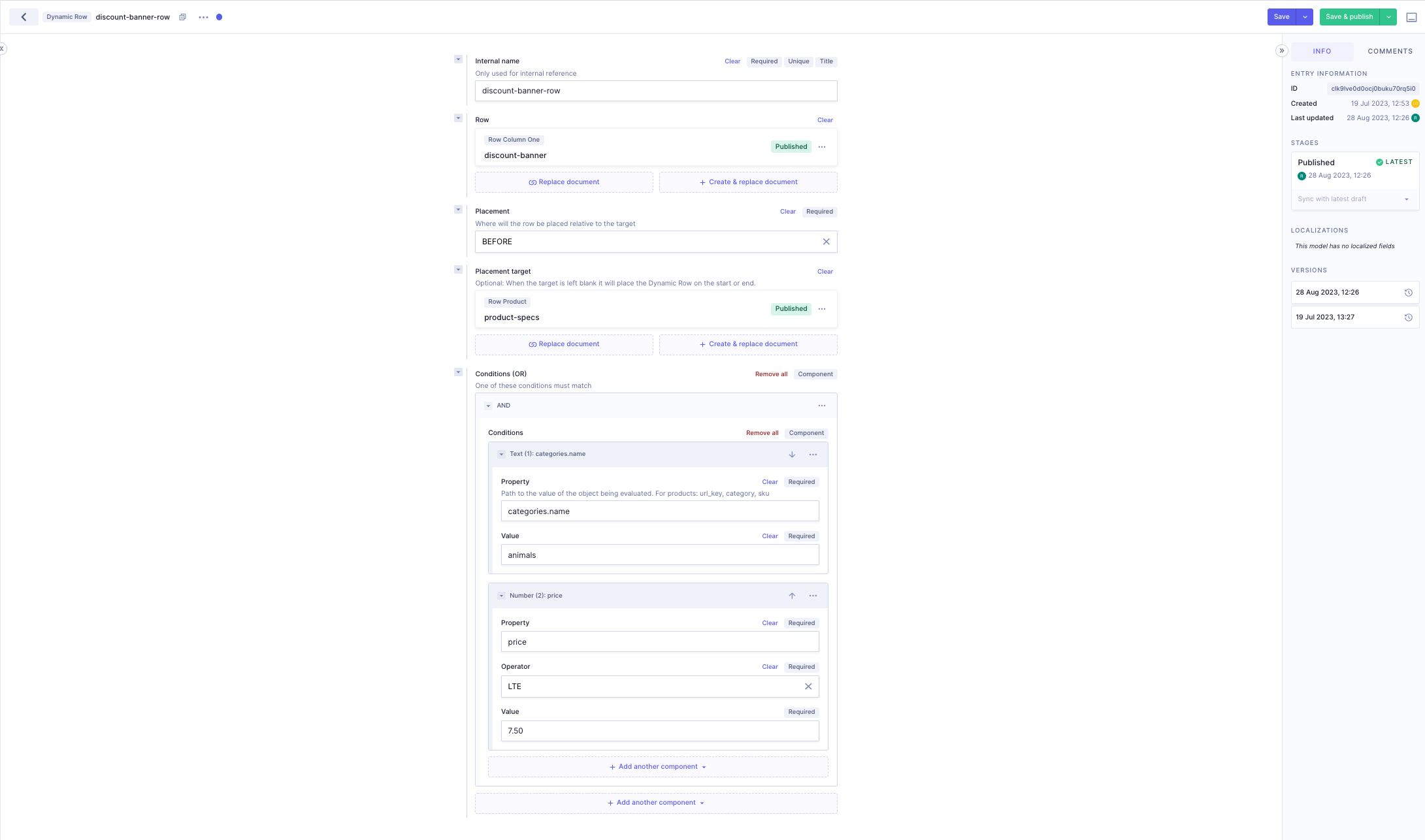
1. We name the Dynamic Row `discount-banner-row`
|
|
19
19
|
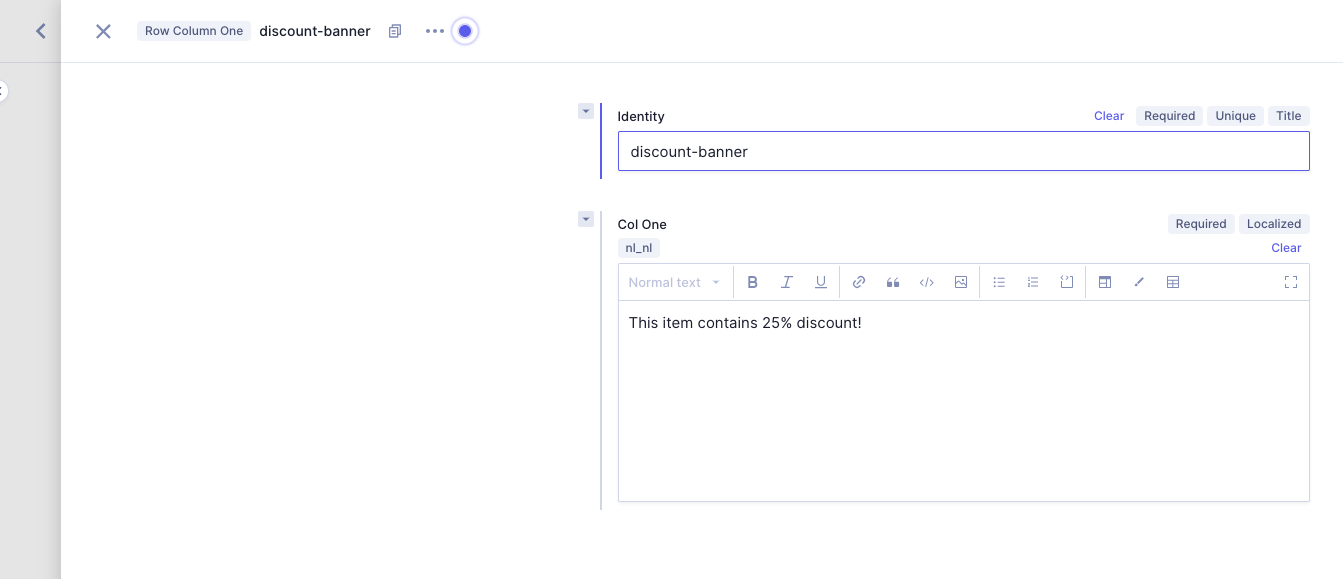
2. The row we want to inject. In this case the row `discount-banner`.
|
|
20
|
-
|
|
21
21
|
3. We set the placement on `AFTER`
|
|
22
22
|
4. The placement target will be `product-specs`
|
|
23
23
|
5. For the conditions we will use the `Text` and `Number` components nested in
|
|
@@ -25,7 +25,7 @@ after the product specs:
|
|
|
25
25
|
|
|
26
26
|
The result is as follows:
|
|
27
27
|
|
|
28
|
-
|
|
29
29
|
|
|
30
30
|
The Dynamic Row should now be injected on all the pages whose properties match
|
|
31
31
|
the conditions.
|
|
@@ -20,75 +20,66 @@ updates for the following data:
|
|
|
20
20
|
selected, but this only happens when the actual variant can be accessed via
|
|
21
21
|
the URL.
|
|
22
22
|
|
|
23
|
-
##
|
|
23
|
+
## Displaying the configured variant on a configurable product page for a simple product
|
|
24
24
|
|
|
25
|
-
|
|
26
|
-
`graphcommerce.config.js` file and activate the desired options.
|
|
25
|
+
Add the following to your `graphcommerce.config.js` file:
|
|
27
26
|
|
|
28
|
-
|
|
29
|
-
|
|
30
|
-
...
|
|
27
|
+
Determines whether a simple product should appear as a Configurable Product with
|
|
28
|
+
pre-selected options or as the default Simple Product.
|
|
31
29
|
|
|
32
|
-
|
|
33
|
-
url: true,
|
|
34
|
-
gallery: true,
|
|
35
|
-
content: true,
|
|
36
|
-
},
|
|
30
|
+
### How does this work?
|
|
37
31
|
|
|
32
|
+
When the `products(filters: { url_key: { eq: 'simple-product' } }) { ... }`
|
|
33
|
+
query is ran, Magento also returns besides the requested Simple product also the
|
|
34
|
+
Configurable product the simple belongs to.
|
|
35
|
+
|
|
36
|
+
If that is the case we render the Configurable Product page instead of the
|
|
37
|
+
Simple Product page, but the options for the Simple Product are pre-selected.
|
|
38
|
+
|
|
39
|
+
```js
|
|
40
|
+
const config = {
|
|
38
41
|
configurableVariantForSimple: true,
|
|
39
42
|
}
|
|
43
|
+
module.exports = config
|
|
40
44
|
```
|
|
41
45
|
|
|
42
|
-
|
|
43
|
-
|
|
44
|
-
- #### `configurableVariantForSimple: Boolean`
|
|
45
|
-
|
|
46
|
-
Determines whether a simple product should appear as a Configurable Product
|
|
47
|
-
with pre-selected options or as the default Simple Product.
|
|
48
|
-
|
|
49
|
-
**How does this work:**
|
|
50
|
-
|
|
51
|
-
When the `products(filters: { url_key: { eq: 'simple-product' } }) { ... }`
|
|
52
|
-
query is ran, Magento also returns the Simple product and the Configurable
|
|
53
|
-
product the simple belongs to.
|
|
46
|
+
## Switching content when a variant is selected
|
|
54
47
|
|
|
55
|
-
|
|
56
|
-
Simple Product page but the options to select the Simple Product are
|
|
57
|
-
pre-selected.
|
|
48
|
+
Add the following to your `graphcommerce.config.js` file:
|
|
58
49
|
|
|
59
|
-
-
|
|
50
|
+
- `url`: When a variant is selected the URL of the product will be changed in
|
|
51
|
+
the address bar. Note that this only occurs when the actual variant can be
|
|
52
|
+
accessed through the URL.
|
|
60
53
|
|
|
61
|
-
|
|
62
|
-
|
|
54
|
+
- `content`: Use the name, description, short description and meta data from the
|
|
55
|
+
configured variant
|
|
63
56
|
|
|
64
|
-
|
|
57
|
+
- `gallery`: This option enables the automatic update of product gallery images
|
|
58
|
+
on the product page when a variant is selected, provided that the gallery
|
|
59
|
+
images for the selected variant differ from the currently displayed images.
|
|
65
60
|
|
|
66
|
-
|
|
67
|
-
|
|
68
|
-
|
|
69
|
-
|
|
70
|
-
|
|
71
|
-
|
|
72
|
-
|
|
73
|
-
|
|
74
|
-
|
|
75
|
-
|
|
76
|
-
- #### `url: Boolean`
|
|
77
|
-
|
|
78
|
-
**Description:** When a variant is selected the URL of the product will be
|
|
79
|
-
changed in the address bar.
|
|
80
|
-
|
|
81
|
-
**Note:** This only occurs when the actual variant can be accessed through
|
|
82
|
-
the URL.
|
|
61
|
+
```js
|
|
62
|
+
const config = {
|
|
63
|
+
configurableVariantValues: {
|
|
64
|
+
url: true,
|
|
65
|
+
gallery: true,
|
|
66
|
+
content: true,
|
|
67
|
+
},
|
|
68
|
+
}
|
|
69
|
+
```
|
|
83
70
|
|
|
84
71
|
## Magento configuration
|
|
85
72
|
|
|
86
|
-
### How
|
|
73
|
+
### How to configure the simple and configurable products to use this feature?
|
|
74
|
+
|
|
75
|
+
By default Magento will return the simple and configurable for a simple variant,
|
|
76
|
+
no configuration required.
|
|
87
77
|
|
|
88
|
-
To make
|
|
89
|
-
|
|
78
|
+
To make the automatic swithcing of URL's possible, make sure the simple product
|
|
79
|
+
has a URL by making sure it's visibility is set something different than
|
|
80
|
+
`Not Visible Individually`: `Catalog`, `Catalog, Search` or `Search`.
|
|
90
81
|
|
|
91
|
-
|
|
82
|
+
`Catalog -> Products -> [product] -> Visibility: [Catalog / Catalog, Search / Search]`
|
|
92
83
|
|
|
93
84
|
## Next steps
|
|
94
85
|
|
package/package.json
CHANGED
|
@@ -2,10 +2,10 @@
|
|
|
2
2
|
"name": "@graphcommerce/docs",
|
|
3
3
|
"homepage": "https://www.graphcommerce.org/docs",
|
|
4
4
|
"repository": "github:graphcommerce-org/graphcommerce/docs",
|
|
5
|
-
"version": "6.2.0-canary.
|
|
5
|
+
"version": "6.2.0-canary.97",
|
|
6
6
|
"sideEffects": true,
|
|
7
7
|
"devDependencies": {
|
|
8
|
-
"@graphcommerce/prettier-config-pwa": "6.2.0-canary.
|
|
8
|
+
"@graphcommerce/prettier-config-pwa": "6.2.0-canary.97"
|
|
9
9
|
},
|
|
10
10
|
"prettier": "@graphcommerce/prettier-config-pwa"
|
|
11
11
|
}
|
package/roadmap.md
CHANGED
|
@@ -13,19 +13,28 @@ menu: Roadmap
|
|
|
13
13
|
The following overview contains the status of items on the GraphCommerce roadmap
|
|
14
14
|
(items are subject to change):
|
|
15
15
|
|
|
16
|
-
## In progress
|
|
16
|
+
## In progress / planned
|
|
17
17
|
|
|
18
|
-
- [ ] Better authorization handling
|
|
19
|
-
- [ ] Hygraph schema migrations
|
|
20
|
-
- [ ] Edge runtime for GraphQL Mesh and Streaming SSR rendering
|
|
21
18
|
- [ ] Global store messages
|
|
19
|
+
- [ ] Wishlist redesign
|
|
20
|
+
- [ ] Success page redesign
|
|
21
|
+
- [ ] Product thumbnails on product page
|
|
22
|
+
- [ ] Dutch Postcode API upgrades
|
|
23
|
+
- [ ] Invalid session handling improvements
|
|
24
|
+
- [ ] Performance improvements
|
|
25
|
+
- [ ] Migration to next/image in favor of @graphcommerce/image
|
|
22
26
|
|
|
23
|
-
##
|
|
27
|
+
## Released
|
|
24
28
|
|
|
25
29
|
[See all releases](https://github.com/graphcommerce-org/graphcommerce/releases?q=prerelease%3Afalse+&expanded=true)
|
|
26
30
|
|
|
31
|
+
- [x] Configurable variants for simple products
|
|
32
|
+
[ocs ↗](https://graphcommerce.org/docs/magento/configurable-products)
|
|
33
|
+
- [x] Cart redesign
|
|
34
|
+
- [x] Hygraph schema migrations
|
|
35
|
+
[docs ↗](https://graphcommerce.org/docs/hygraph/cli)
|
|
27
36
|
- [x] [Algolia Search (beta)](https://github.com/graphcommerce-org/graphcommerce/tree/main/packages/algolia-search)
|
|
28
|
-
- [x] [Dynamic Rows
|
|
37
|
+
- [x] [Dynamic Rows](https://github.com/graphcommerce-org/graphcommerce/tree/main/packages/hygraph-dynamic-rows)
|
|
29
38
|
- [x] [Product compare](https://github.com/graphcommerce-org/graphcommerce/blob/main/packages/magento-compare/Config.graphqls)
|
|
30
39
|
- [x] Google Tagmanager 4 datalayer implementation
|
|
31
40
|
[docs ↗](https://github.com/graphcommerce-org/graphcommerce/tree/main/packages/googleanalytics)
|
|
@@ -51,20 +60,16 @@ The following overview contains the status of items on the GraphCommerce roadmap
|
|
|
51
60
|
- [x] Checkout payment selection rebuild
|
|
52
61
|
- [x] Core stability (hydratation, caching, query optimization)
|
|
53
62
|
|
|
54
|
-
## Planned
|
|
55
|
-
|
|
56
|
-
- [ ] Redesigned cart
|
|
57
|
-
- [ ] Product thumbnail carousel
|
|
58
|
-
- [ ] React Server Components integration
|
|
59
|
-
|
|
60
63
|
## Future
|
|
61
64
|
|
|
62
|
-
- [ ]
|
|
65
|
+
- [ ] React Server Components integration
|
|
66
|
+
- [ ] Edge runtime for GraphQL Mesh
|
|
63
67
|
- [ ] Windows support
|
|
64
68
|
- [ ] Store locator
|
|
65
69
|
- [ ] Buckaroo payment service
|
|
66
70
|
- [ ] `magento` example without Hygraph
|
|
67
71
|
- [ ] PageBuilder support
|
|
72
|
+
[depends on ↗](https://github.com/magento/magento2/issues/37768)
|
|
68
73
|
|
|
69
74
|
## Next steps
|
|
70
75
|
|
|
Binary file
|
|
Binary file
|