@graphcommerce/docs 4.11.1 → 4.12.0-canary.0
This diff represents the content of publicly available package versions that have been released to one of the supported registries. The information contained in this diff is provided for informational purposes only and reflects changes between package versions as they appear in their respective public registries.
- package/CHANGELOG.md +6 -0
- package/framework/plugins.md +172 -0
- package/package.json +1 -1
package/CHANGELOG.md
CHANGED
|
@@ -1,5 +1,11 @@
|
|
|
1
1
|
# Change Log
|
|
2
2
|
|
|
3
|
+
## 4.12.0-canary.0
|
|
4
|
+
|
|
5
|
+
### Minor Changes
|
|
6
|
+
|
|
7
|
+
- [#1718](https://github.com/graphcommerce-org/graphcommerce/pull/1718) [`16abc9995`](https://github.com/graphcommerce-org/graphcommerce/commit/16abc9995377f5c00032674de0a1ea3ebad88c4c) - Introducing a new **Plugin system for GraphCommerce** which allows you to extend GraphCommerce in a plug-and-play manner. [Read the documentation to learn more](https://github.com/graphcommerce-org/graphcommerce/blob/main/docs/framework/plugins.md) ([@paales](https://github.com/paales))
|
|
8
|
+
|
|
3
9
|
## 4.11.1
|
|
4
10
|
|
|
5
11
|
### Patch Changes
|
|
@@ -0,0 +1,172 @@
|
|
|
1
|
+
# Plugins
|
|
2
|
+
|
|
3
|
+
GraphCommerce plugin system allows you to extend GraphCommerce in a
|
|
4
|
+
plug-and-play manner. Install a new package and the code will be added at the
|
|
5
|
+
right places.
|
|
6
|
+
|
|
7
|
+
- Plug-and-play: It is be possible to install packages after which they
|
|
8
|
+
immediately work.
|
|
9
|
+
- No runtime overhead: The plugin system is fully implemented in webpack and
|
|
10
|
+
- Easy plugin creation: Configuration should happen in the plugin file, not a
|
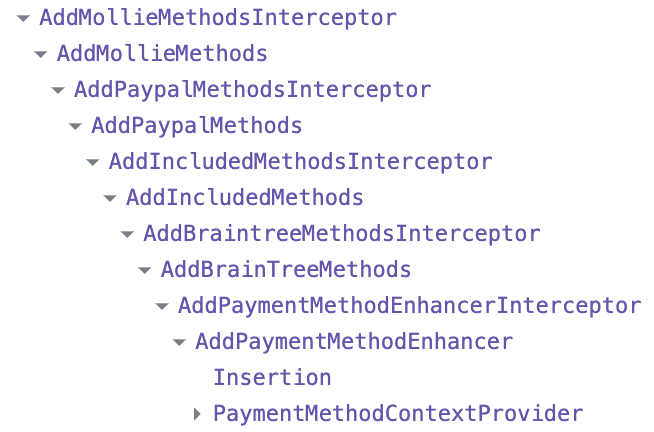
|
11
|
+
separate configuration file.
|
|
12
|
+
|
|
13
|
+
## What problem are we solving?
|
|
14
|
+
|
|
15
|
+
Without plugins the only way to add new functionality is by modifying the code
|
|
16
|
+
of your project at multiple places. We often pass props to components to
|
|
17
|
+
customize them, but sometimes we also place hooks at multiple places.
|
|
18
|
+
|
|
19
|
+
For example, to add a new payment method it was necessary to modify the props of
|
|
20
|
+
`<PaymentMethodContextProvider methods={[...braintree]}>`
|
|
21
|
+
|
|
22
|
+
This causes problems:
|
|
23
|
+
|
|
24
|
+
- Upgrades: If GraphCommerce changes something somewhere in the code where you
|
|
25
|
+
have already modified the code, you get an upgrade conflict which you have to
|
|
26
|
+
manually resolve. By using plugins you can avoid this.
|
|
27
|
+
- New packages: When you install a complex new package, it can happen that you
|
|
28
|
+
have to modify the code of your project at multiple places. This is not
|
|
29
|
+
necessary with plugins.
|
|
30
|
+
|
|
31
|
+
## What is a plugin?
|
|
32
|
+
|
|
33
|
+
A plugin is a way to modify React Components by wrapping them, without having to
|
|
34
|
+
modify the code in `examples/magento-graphcms` or `your-project`.
|
|
35
|
+
|
|
36
|
+
For the M2 people: Think of around plugins, but without configuration files and
|
|
37
|
+
no performance penalty.
|
|
38
|
+
|
|
39
|
+
In the [PR](https://github.com/graphcommerce-org/graphcommerce/pull/1718) I have
|
|
40
|
+
made the
|
|
41
|
+
[`<PaymentMethodContextProvider />`](https://github.com/graphcommerce-org/graphcommerce/pull/1718/files#diff-d5b4da6c34d4b40dc8ac5d1c5967bc6f5aaa70d0d5ac79552f3a980b17a88ea9R115)
|
|
42
|
+
work with plugins.
|
|
43
|
+
|
|
44
|
+
The actual plugins are:
|
|
45
|
+
|
|
46
|
+
- [AddBraintreeMethods](https://github.com/graphcommerce-org/graphcommerce/pull/1718/files#diff-14391e8c8f598e720b3e99ece1248987d68eb6133d354a3a55ef82331905be5b)
|
|
47
|
+
- [AddIncludedMethods](https://github.com/graphcommerce-org/graphcommerce/pull/1718/files#diff-c3d57b802463ed40925b558049a56992202be975f3c86982e6a753e2830bdb9f)
|
|
48
|
+
- [AddPaypalMethods](https://github.com/graphcommerce-org/graphcommerce/pull/1718/files#diff-934d7a9d597b01b6da875f61ca1cdfd57e0e0817e7126ce6216fd82dc4b6f899)
|
|
49
|
+
- [AddMollieMethods](https://github.com/graphcommerce-org/graphcommerce/pull/1718/files#diff-76e6fc63dee67f55cbad4f13dc7b1b764da6235b88ed8d987c7044b7ef7fc942)
|
|
50
|
+
|
|
51
|
+
The result of this is that:
|
|
52
|
+
|
|
53
|
+
- The payment methods are added to the `<PaymentMethodContextProvider />` via
|
|
54
|
+
plugins.
|
|
55
|
+
- These plugins are only applied if the relevant package is installed.
|
|
56
|
+
|
|
57
|
+
### How do I make a plugin?
|
|
58
|
+
|
|
59
|
+
In the root of my project, i've created a plugin
|
|
60
|
+
`examples/magento-graphcms/plugins/AddPaymentMethodEnhancer.tsx` that adds
|
|
61
|
+
purchaseorder to `<PaymentMethodContextProvider/>`
|
|
62
|
+
|
|
63
|
+
```tsx
|
|
64
|
+
import type { PaymentMethodContextProviderProps } from '@graphcommerce/magento-cart-payment-method'
|
|
65
|
+
import type { PluginProps } from '@graphcommerce/next-config'
|
|
66
|
+
import { purchaseorder } from '../PurchaseOrder'
|
|
67
|
+
|
|
68
|
+
// Component to extend, required
|
|
69
|
+
export const component = 'PaymentMethodContextProvider'
|
|
70
|
+
|
|
71
|
+
// Exported location of the component that you are extending, required
|
|
72
|
+
export const exported =
|
|
73
|
+
'@graphcommerce/magento-cart-payment-method/PaymentMethodContext/PaymentMethodContext'
|
|
74
|
+
|
|
75
|
+
function AddPaymentMethodEnhancer(
|
|
76
|
+
props: PluginProps<PaymentMethodContextProviderProps>,
|
|
77
|
+
) {
|
|
78
|
+
const { Component, modules, ...rest } = props
|
|
79
|
+
return <Component {...rest} modules={{ ...modules, purchaseorder }} />
|
|
80
|
+
}
|
|
81
|
+
|
|
82
|
+
/** The export must be named `Plugin` and must accept a Component to render */
|
|
83
|
+
export const Plugin = AddIncludedMethods
|
|
84
|
+
```
|
|
85
|
+
|
|
86
|
+
### How does it work?
|
|
87
|
+
|
|
88
|
+
1. It generates a list of all packages with `graphcommerce` in the package
|
|
89
|
+
`name` (All `@graphcommerce/*` packages and
|
|
90
|
+
`@my-company/graphcommerce-plugin-name`).
|
|
91
|
+
2. It does a glob search for plugins in the plugins folders for each package:
|
|
92
|
+
`${packageLocation}/plugins/**/*.tsx`.
|
|
93
|
+
3. Statically Analyse the plugins, check if the `component` and `exported`
|
|
94
|
+
exports exist and generate the plugin configuration.
|
|
95
|
+
4. Generate `PaymentMethodContext.interceptor.tsx` and place it next to the
|
|
96
|
+
existing component
|
|
97
|
+
|
|
98
|
+
Example of generated interceptor with additional comments:
|
|
99
|
+
|
|
100
|
+
```tsx
|
|
101
|
+
// All plugins are imported, which will be used to enhance the original component.
|
|
102
|
+
import { Plugin as AddIncludedMethods } from '@graphcommerce/magento-payment-included/plugins/AddIncludedMethods'
|
|
103
|
+
import { Plugin as AddPaypalMethods } from '@graphcommerce/magento-payment-paypal/plugins/AddPaypalMethods'
|
|
104
|
+
|
|
105
|
+
// This file is placed next to the original component, so it is imported with a relative path, in the Webpack plugin we
|
|
106
|
+
// load the original file if it is loaded from the interceptor.
|
|
107
|
+
import { PaymentMethodContextProvider as PaymentMethodContextProviderBase } from './PaymentMethodContext'
|
|
108
|
+
|
|
109
|
+
// All original exports are exported, if the original file exports more than we're intercepting, it will still work.
|
|
110
|
+
export * from './PaymentMethodContext'
|
|
111
|
+
|
|
112
|
+
type PaymentMethodContextProviderBaseProps = React.ComponentProps<
|
|
113
|
+
typeof PaymentMethodContextProviderBase
|
|
114
|
+
>
|
|
115
|
+
|
|
116
|
+
// We create new Interceptor components here, which allows us to wrap multiple plugins around the original component.
|
|
117
|
+
const AddIncludedMethodsInterceptor = (
|
|
118
|
+
props: PaymentMethodContextProviderBaseProps,
|
|
119
|
+
) => (
|
|
120
|
+
//For the first plugin we use the original component.
|
|
121
|
+
<AddIncludedMethods {...props} Component={PaymentMethodContextProviderBase} />
|
|
122
|
+
)
|
|
123
|
+
const AddPaypalMethodsInterceptor = (
|
|
124
|
+
props: PaymentMethodContextProviderBaseProps,
|
|
125
|
+
) => (
|
|
126
|
+
// For the next components we use the previous Interceptor component.
|
|
127
|
+
<AddPaypalMethods {...props} Component={AddIncludedMethodsInterceptor} />
|
|
128
|
+
)
|
|
129
|
+
|
|
130
|
+
// Finally we return the resulting interceptor component.
|
|
131
|
+
export const PaymentMethodContextProvider = AddPaypalMethodsInterceptor
|
|
132
|
+
```
|
|
133
|
+
|
|
134
|
+
React profile will show that all components are nested:
|
|
135
|
+
|
|
136
|
+
|
|
137
|
+
|
|
138
|
+
### Possible use cases
|
|
139
|
+
|
|
140
|
+
In the examples above we've extended the payment methods, but it should also
|
|
141
|
+
work for other things such as:
|
|
142
|
+
|
|
143
|
+
- Googletagmanager
|
|
144
|
+
- Googleanalytics
|
|
145
|
+
- Google recaptcha
|
|
146
|
+
- Compare functionality?
|
|
147
|
+
- Wishlist functionality?
|
|
148
|
+
- Abstraction between GraphCommerce and Backends? (Magento, BigCommerce,
|
|
149
|
+
CommerceTools, etc.)
|
|
150
|
+
|
|
151
|
+
### Limitations
|
|
152
|
+
|
|
153
|
+
Work is planned to lift these limitations, but for now:
|
|
154
|
+
|
|
155
|
+
React Refresh doesn't work correctly with Plugins, it will force a page reload
|
|
156
|
+
on each file change and will throw an error in the console. To solve this issue,
|
|
157
|
+
move your actual plugin outside of the plugin file and only have the plugin be a
|
|
158
|
+
configuration file.
|
|
159
|
+
|
|
160
|
+
It currently isn't possible to provide a plugin sort order. The project root is
|
|
161
|
+
intercepting last, followed by the packages in reverse alphabetical order,
|
|
162
|
+
followed by dependencies' dependencies. We don't generate a proper graph at the
|
|
163
|
+
moment to figure out the actual dependencies but is an artifact of how we
|
|
164
|
+
resolve the dependencies.
|
|
165
|
+
|
|
166
|
+
There currently isn't a way for the plugin to determine if the plugin should be
|
|
167
|
+
activated at all. For example, the code for Google Analytics should only be
|
|
168
|
+
added if the user has configured it. This is currently not possible. Of if a
|
|
169
|
+
user wants to disable a plugin, this is currently not possible.
|
|
170
|
+
|
|
171
|
+
It is currently is only possible to extend React Components. This however sets
|
|
172
|
+
the foundation to allow for a more flexible plugin system in the future.
|
package/package.json
CHANGED
|
@@ -2,7 +2,7 @@
|
|
|
2
2
|
"name": "@graphcommerce/docs",
|
|
3
3
|
"homepage": "https://www.graphcommerce.org/docs",
|
|
4
4
|
"repository": "github:graphcommerce-org/graphcommerce/docs",
|
|
5
|
-
"version": "4.
|
|
5
|
+
"version": "4.12.0-canary.0",
|
|
6
6
|
"sideEffects": true,
|
|
7
7
|
"devDependencies": {
|
|
8
8
|
"@graphcommerce/prettier-config-pwa": "^4.0.7"
|