@google-apps/chat 0.9.0 → 0.11.0
This diff represents the content of publicly available package versions that have been released to one of the supported registries. The information contained in this diff is provided for informational purposes only and reflects changes between package versions as they appear in their respective public registries.
- package/CHANGELOG.md +15 -0
- package/README.md +2 -2
- package/build/protos/google/chat/v1/attachment.proto +15 -13
- package/build/protos/google/chat/v1/chat_service.proto +208 -107
- package/build/protos/google/chat/v1/deletion_metadata.proto +2 -1
- package/build/protos/google/chat/v1/membership.proto +52 -32
- package/build/protos/google/chat/v1/message.proto +74 -64
- package/build/protos/google/chat/v1/reaction.proto +16 -12
- package/build/protos/google/chat/v1/space.proto +237 -90
- package/build/protos/google/chat/v1/space_event.proto +6 -4
- package/build/protos/protos.d.ts +406 -0
- package/build/protos/protos.js +1192 -0
- package/build/protos/protos.json +382 -51
- package/build/src/v1/chat_service_client.d.ts +378 -249
- package/build/src/v1/chat_service_client.js +42 -48
- package/build/src/v1/chat_service_client.js.map +1 -1
- package/package.json +1 -1
package/CHANGELOG.md
CHANGED
|
@@ -1,5 +1,20 @@
|
|
|
1
1
|
# Changelog
|
|
2
2
|
|
|
3
|
+
## [0.11.0](https://github.com/googleapis/google-cloud-node/compare/chat-v0.10.0...chat-v0.11.0) (2024-12-18)
|
|
4
|
+
|
|
5
|
+
|
|
6
|
+
### Features
|
|
7
|
+
|
|
8
|
+
* [chat] Add missing field annotations in space.proto, message.proto, reaction.proto, space_event.proto, membership.proto, attachment.proto ([#5870](https://github.com/googleapis/google-cloud-node/issues/5870)) ([0730fb1](https://github.com/googleapis/google-cloud-node/commit/0730fb1e6bce2ddb6e0cd0c38424ca03cf740cb5))
|
|
9
|
+
* [chat] Chat Apps can now retrieve the import mode expire time information to know when to complete the import mode properly ([#5860](https://github.com/googleapis/google-cloud-node/issues/5860)) ([02b43ef](https://github.com/googleapis/google-cloud-node/commit/02b43ef30f6e45488dfea3bf7b4c15a5641b0755))
|
|
10
|
+
|
|
11
|
+
## [0.10.0](https://github.com/googleapis/google-cloud-node/compare/chat-v0.9.0...chat-v0.10.0) (2024-10-10)
|
|
12
|
+
|
|
13
|
+
|
|
14
|
+
### Features
|
|
15
|
+
|
|
16
|
+
* [chat] Add doc for permission settings & announcement space support ([#5731](https://github.com/googleapis/google-cloud-node/issues/5731)) ([d5a4a46](https://github.com/googleapis/google-cloud-node/commit/d5a4a469cfc03b75356e33e9659aa720ff6ee71d))
|
|
17
|
+
|
|
3
18
|
## [0.9.0](https://github.com/googleapis/google-cloud-node/compare/chat-v0.8.0...chat-v0.9.0) (2024-09-13)
|
|
4
19
|
|
|
5
20
|
|
package/README.md
CHANGED
|
@@ -44,7 +44,7 @@ Google APIs Client Libraries, in [Client Libraries Explained][explained].
|
|
|
44
44
|
1. [Select or create a Cloud Platform project][projects].
|
|
45
45
|
1. [Enable billing for your project][billing].
|
|
46
46
|
1. [Enable the Google Chat API API][enable_api].
|
|
47
|
-
1. [Set up authentication
|
|
47
|
+
1. [Set up authentication][auth] so you can access the
|
|
48
48
|
API from your local workstation.
|
|
49
49
|
|
|
50
50
|
### Installing the client library
|
|
@@ -224,4 +224,4 @@ See [LICENSE](https://github.com/googleapis/google-cloud-node/blob/main/LICENSE)
|
|
|
224
224
|
[projects]: https://console.cloud.google.com/project
|
|
225
225
|
[billing]: https://support.google.com/cloud/answer/6293499#enable-billing
|
|
226
226
|
[enable_api]: https://console.cloud.google.com/flows/enableapi?apiid=chat.googleapis.com
|
|
227
|
-
[auth]: https://cloud.google.com/docs/authentication/
|
|
227
|
+
[auth]: https://cloud.google.com/docs/authentication/external/set-up-adc-local
|
|
@@ -47,9 +47,9 @@ message Attachment {
|
|
|
47
47
|
UPLOADED_CONTENT = 2;
|
|
48
48
|
}
|
|
49
49
|
|
|
50
|
-
// Resource name of the attachment, in the form
|
|
50
|
+
// Optional. Resource name of the attachment, in the form
|
|
51
51
|
// `spaces/{space}/messages/{message}/attachments/{attachment}`.
|
|
52
|
-
string name = 1;
|
|
52
|
+
string name = 1 [(google.api.field_behavior) = OPTIONAL];
|
|
53
53
|
|
|
54
54
|
// Output only. The original file name for the content, not the full path.
|
|
55
55
|
string content_name = 2 [(google.api.field_behavior) = OUTPUT_ONLY];
|
|
@@ -59,9 +59,11 @@ message Attachment {
|
|
|
59
59
|
|
|
60
60
|
// The data reference to the attachment.
|
|
61
61
|
oneof data_ref {
|
|
62
|
-
// A reference to the attachment data. This field is used
|
|
63
|
-
//
|
|
64
|
-
|
|
62
|
+
// Optional. A reference to the attachment data. This field is used to
|
|
63
|
+
// create or update messages with attachments, or with the media API to
|
|
64
|
+
// download the attachment data.
|
|
65
|
+
AttachmentDataRef attachment_data_ref = 4
|
|
66
|
+
[(google.api.field_behavior) = OPTIONAL];
|
|
65
67
|
|
|
66
68
|
// Output only. A reference to the Google Drive attachment. This field is
|
|
67
69
|
// used with the Google Drive API.
|
|
@@ -90,14 +92,14 @@ message DriveDataRef {
|
|
|
90
92
|
|
|
91
93
|
// A reference to the attachment data.
|
|
92
94
|
message AttachmentDataRef {
|
|
93
|
-
// The resource name of the attachment data. This field is used with
|
|
94
|
-
// API to download the attachment data.
|
|
95
|
-
string resource_name = 1;
|
|
96
|
-
|
|
97
|
-
// Opaque token containing a reference to an uploaded attachment.
|
|
98
|
-
// clients as an opaque string and used to create or update Chat
|
|
99
|
-
// attachments.
|
|
100
|
-
string attachment_upload_token = 2;
|
|
95
|
+
// Optional. The resource name of the attachment data. This field is used with
|
|
96
|
+
// the media API to download the attachment data.
|
|
97
|
+
string resource_name = 1 [(google.api.field_behavior) = OPTIONAL];
|
|
98
|
+
|
|
99
|
+
// Optional. Opaque token containing a reference to an uploaded attachment.
|
|
100
|
+
// Treated by clients as an opaque string and used to create or update Chat
|
|
101
|
+
// messages with attachments.
|
|
102
|
+
string attachment_upload_token = 2 [(google.api.field_behavior) = OPTIONAL];
|
|
101
103
|
}
|
|
102
104
|
|
|
103
105
|
// Request to get an attachment.
|
|
@@ -66,18 +66,39 @@ service ChatService {
|
|
|
66
66
|
"https://www.googleapis.com/auth/chat.users.readstate,"
|
|
67
67
|
"https://www.googleapis.com/auth/chat.users.readstate.readonly";
|
|
68
68
|
|
|
69
|
-
// Creates a message in a Google Chat space.
|
|
70
|
-
// including text and cards, is 32,000 bytes. For an example, see [Send a
|
|
69
|
+
// Creates a message in a Google Chat space. For an example, see [Send a
|
|
71
70
|
// message](https://developers.google.com/workspace/chat/create-messages).
|
|
72
71
|
//
|
|
73
|
-
//
|
|
74
|
-
//
|
|
75
|
-
//
|
|
72
|
+
// The `create()` method requires either [user
|
|
73
|
+
// authentication](https://developers.google.com/workspace/chat/authenticate-authorize-chat-user)
|
|
74
|
+
// or [app
|
|
75
|
+
// authentication](https://developers.google.com/workspace/chat/authorize-import).
|
|
76
|
+
// Chat attributes the message sender differently depending on the type of
|
|
77
|
+
// authentication that you use in your request.
|
|
78
|
+
//
|
|
79
|
+
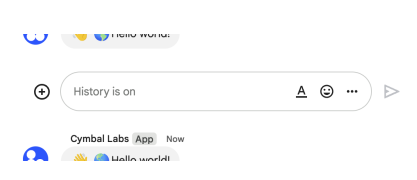
// The following image shows how Chat attributes a message when you use app
|
|
80
|
+
// authentication. Chat displays the Chat app as the message
|
|
81
|
+
// sender. The content of the message can contain text (`text`), cards
|
|
82
|
+
// (`cardsV2`), and accessory widgets (`accessoryWidgets`).
|
|
83
|
+
//
|
|
84
|
+
// 
|
|
86
|
+
//
|
|
87
|
+
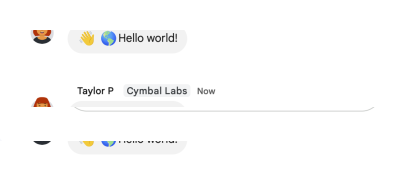
// The following image shows how Chat attributes a message when you use user
|
|
88
|
+
// authentication. Chat displays the user as the message sender and attributes
|
|
89
|
+
// the Chat app to the message by displaying its name. The content of message
|
|
90
|
+
// can only contain text (`text`).
|
|
91
|
+
//
|
|
92
|
+
// 
|
|
94
|
+
//
|
|
95
|
+
// The maximum message size, including the message contents, is 32,000 bytes.
|
|
76
96
|
//
|
|
77
|
-
//
|
|
78
|
-
//
|
|
79
|
-
//
|
|
80
|
-
//
|
|
97
|
+
// For
|
|
98
|
+
// [webhook](https://developers.google.com/workspace/chat/quickstart/webhooks)
|
|
99
|
+
// requests, the response doesn't contain the full message. The response only
|
|
100
|
+
// populates the `name` and `thread.name` fields in addition to the
|
|
101
|
+
// information that was in the request.
|
|
81
102
|
rpc CreateMessage(CreateMessageRequest) returns (Message) {
|
|
82
103
|
option (google.api.http) = {
|
|
83
104
|
post: "/v1/{parent=spaces/*}/messages"
|
|
@@ -87,8 +108,13 @@ service ChatService {
|
|
|
87
108
|
}
|
|
88
109
|
|
|
89
110
|
// Lists messages in a space that the caller is a member of, including
|
|
90
|
-
// messages from blocked members and spaces.
|
|
91
|
-
//
|
|
111
|
+
// messages from blocked members and spaces. If you list messages from a
|
|
112
|
+
// space with no messages, the response is an empty object. When using a
|
|
113
|
+
// REST/HTTP interface, the response contains an empty JSON object, `{}`.
|
|
114
|
+
// For an example, see
|
|
115
|
+
// [List
|
|
116
|
+
// messages](https://developers.google.com/workspace/chat/api/guides/v1/messages/list).
|
|
117
|
+
//
|
|
92
118
|
// Requires [user
|
|
93
119
|
// authentication](https://developers.google.com/workspace/chat/authenticate-authorize-chat-user).
|
|
94
120
|
rpc ListMessages(ListMessagesRequest) returns (ListMessagesResponse) {
|
|
@@ -110,13 +136,16 @@ service ChatService {
|
|
|
110
136
|
// authentication](https://developers.google.com/workspace/chat/authenticate-authorize-chat-user)
|
|
111
137
|
// lists memberships in spaces that the authenticated user has access to.
|
|
112
138
|
//
|
|
113
|
-
//
|
|
114
|
-
// [authentication](https://developers.google.com/workspace/chat/authenticate-authorize)
|
|
115
|
-
//
|
|
116
|
-
// [
|
|
139
|
+
// Supports the following types of
|
|
140
|
+
// [authentication](https://developers.google.com/workspace/chat/authenticate-authorize):
|
|
141
|
+
//
|
|
142
|
+
// - [App
|
|
117
143
|
// authentication](https://developers.google.com/workspace/chat/authenticate-authorize-chat-app)
|
|
118
|
-
//
|
|
119
|
-
//
|
|
144
|
+
//
|
|
145
|
+
// - [User
|
|
146
|
+
// authentication](https://developers.google.com/workspace/chat/authenticate-authorize-chat-user)
|
|
147
|
+
// You can authenticate and authorize this method with administrator
|
|
148
|
+
// privileges by setting the `use_admin_access` field in the request.
|
|
120
149
|
rpc ListMemberships(ListMembershipsRequest)
|
|
121
150
|
returns (ListMembershipsResponse) {
|
|
122
151
|
option (google.api.http) = {
|
|
@@ -129,13 +158,16 @@ service ChatService {
|
|
|
129
158
|
// [Get details about a user's or Google Chat app's
|
|
130
159
|
// membership](https://developers.google.com/workspace/chat/get-members).
|
|
131
160
|
//
|
|
132
|
-
//
|
|
133
|
-
// [authentication](https://developers.google.com/workspace/chat/authenticate-authorize)
|
|
134
|
-
//
|
|
135
|
-
// [
|
|
161
|
+
// Supports the following types of
|
|
162
|
+
// [authentication](https://developers.google.com/workspace/chat/authenticate-authorize):
|
|
163
|
+
//
|
|
164
|
+
// - [App
|
|
136
165
|
// authentication](https://developers.google.com/workspace/chat/authenticate-authorize-chat-app)
|
|
137
|
-
//
|
|
138
|
-
//
|
|
166
|
+
//
|
|
167
|
+
// - [User
|
|
168
|
+
// authentication](https://developers.google.com/workspace/chat/authenticate-authorize-chat-user)
|
|
169
|
+
// You can authenticate and authorize this method with administrator
|
|
170
|
+
// privileges by setting the `use_admin_access` field in the request.
|
|
139
171
|
rpc GetMembership(GetMembershipRequest) returns (Membership) {
|
|
140
172
|
option (google.api.http) = {
|
|
141
173
|
get: "/v1/{name=spaces/*/members/*}"
|
|
@@ -147,13 +179,14 @@ service ChatService {
|
|
|
147
179
|
// For an example, see [Get details about a
|
|
148
180
|
// message](https://developers.google.com/workspace/chat/get-messages).
|
|
149
181
|
//
|
|
150
|
-
//
|
|
151
|
-
// [authentication](https://developers.google.com/workspace/chat/authenticate-authorize)
|
|
152
|
-
//
|
|
153
|
-
// [
|
|
182
|
+
// Supports the following types of
|
|
183
|
+
// [authentication](https://developers.google.com/workspace/chat/authenticate-authorize):
|
|
184
|
+
//
|
|
185
|
+
// - [App
|
|
154
186
|
// authentication](https://developers.google.com/workspace/chat/authenticate-authorize-chat-app)
|
|
155
|
-
//
|
|
156
|
-
//
|
|
187
|
+
//
|
|
188
|
+
// - [User
|
|
189
|
+
// authentication](https://developers.google.com/workspace/chat/authenticate-authorize-chat-user)
|
|
157
190
|
//
|
|
158
191
|
// Note: Might return a message from a blocked member or space.
|
|
159
192
|
rpc GetMessage(GetMessageRequest) returns (Message) {
|
|
@@ -170,13 +203,15 @@ service ChatService {
|
|
|
170
203
|
// [Update a
|
|
171
204
|
// message](https://developers.google.com/workspace/chat/update-messages).
|
|
172
205
|
//
|
|
173
|
-
//
|
|
174
|
-
// [authentication](https://developers.google.com/workspace/chat/authenticate-authorize)
|
|
175
|
-
//
|
|
176
|
-
// [
|
|
206
|
+
// Supports the following types of
|
|
207
|
+
// [authentication](https://developers.google.com/workspace/chat/authenticate-authorize):
|
|
208
|
+
//
|
|
209
|
+
// - [App
|
|
177
210
|
// authentication](https://developers.google.com/workspace/chat/authenticate-authorize-chat-app)
|
|
178
|
-
//
|
|
179
|
-
//
|
|
211
|
+
//
|
|
212
|
+
// - [User
|
|
213
|
+
// authentication](https://developers.google.com/workspace/chat/authenticate-authorize-chat-user)
|
|
214
|
+
//
|
|
180
215
|
// When using app authentication, requests can only update messages
|
|
181
216
|
// created by the calling Chat app.
|
|
182
217
|
rpc UpdateMessage(UpdateMessageRequest) returns (Message) {
|
|
@@ -195,13 +230,15 @@ service ChatService {
|
|
|
195
230
|
// For an example, see [Delete a
|
|
196
231
|
// message](https://developers.google.com/workspace/chat/delete-messages).
|
|
197
232
|
//
|
|
198
|
-
//
|
|
199
|
-
// [authentication](https://developers.google.com/workspace/chat/authenticate-authorize)
|
|
200
|
-
//
|
|
201
|
-
// [
|
|
233
|
+
// Supports the following types of
|
|
234
|
+
// [authentication](https://developers.google.com/workspace/chat/authenticate-authorize):
|
|
235
|
+
//
|
|
236
|
+
// - [App
|
|
202
237
|
// authentication](https://developers.google.com/workspace/chat/authenticate-authorize-chat-app)
|
|
203
|
-
//
|
|
204
|
-
//
|
|
238
|
+
//
|
|
239
|
+
// - [User
|
|
240
|
+
// authentication](https://developers.google.com/workspace/chat/authenticate-authorize-chat-user)
|
|
241
|
+
//
|
|
205
242
|
// When using app authentication, requests can only delete messages
|
|
206
243
|
// created by the calling Chat app.
|
|
207
244
|
rpc DeleteMessage(DeleteMessageRequest) returns (google.protobuf.Empty) {
|
|
@@ -229,6 +266,7 @@ service ChatService {
|
|
|
229
266
|
// Uploads an attachment. For an example, see
|
|
230
267
|
// [Upload media as a file
|
|
231
268
|
// attachment](https://developers.google.com/workspace/chat/upload-media-attachments).
|
|
269
|
+
//
|
|
232
270
|
// Requires user
|
|
233
271
|
// [authentication](https://developers.google.com/workspace/chat/authenticate-authorize-chat-user).
|
|
234
272
|
//
|
|
@@ -248,16 +286,14 @@ service ChatService {
|
|
|
248
286
|
// [List
|
|
249
287
|
// spaces](https://developers.google.com/workspace/chat/list-spaces).
|
|
250
288
|
//
|
|
251
|
-
//
|
|
252
|
-
// [authentication](https://developers.google.com/workspace/chat/authenticate-authorize)
|
|
253
|
-
//
|
|
254
|
-
// [
|
|
289
|
+
// Supports the following types of
|
|
290
|
+
// [authentication](https://developers.google.com/workspace/chat/authenticate-authorize):
|
|
291
|
+
//
|
|
292
|
+
// - [App
|
|
255
293
|
// authentication](https://developers.google.com/workspace/chat/authenticate-authorize-chat-app)
|
|
256
|
-
// and [user
|
|
257
|
-
// authentication](https://developers.google.com/workspace/chat/authenticate-authorize-chat-user).
|
|
258
294
|
//
|
|
259
|
-
//
|
|
260
|
-
//
|
|
295
|
+
// - [User
|
|
296
|
+
// authentication](https://developers.google.com/workspace/chat/authenticate-authorize-chat-user)
|
|
261
297
|
//
|
|
262
298
|
// To list all named spaces by Google Workspace organization, use the
|
|
263
299
|
// [`spaces.search()`](https://developers.google.com/workspace/chat/api/reference/rest/v1/spaces/search)
|
|
@@ -270,7 +306,9 @@ service ChatService {
|
|
|
270
306
|
}
|
|
271
307
|
|
|
272
308
|
// Returns a list of spaces in a Google Workspace organization based on an
|
|
273
|
-
// administrator's search.
|
|
309
|
+
// administrator's search.
|
|
310
|
+
//
|
|
311
|
+
// Requires [user
|
|
274
312
|
// authentication with administrator
|
|
275
313
|
// privileges](https://developers.google.com/workspace/chat/authenticate-authorize-chat-user#admin-privileges).
|
|
276
314
|
// In the request, set `use_admin_access` to `true`.
|
|
@@ -285,13 +323,16 @@ service ChatService {
|
|
|
285
323
|
// [Get details about a
|
|
286
324
|
// space](https://developers.google.com/workspace/chat/get-spaces).
|
|
287
325
|
//
|
|
288
|
-
//
|
|
289
|
-
// [authentication](https://developers.google.com/workspace/chat/authenticate-authorize)
|
|
290
|
-
//
|
|
291
|
-
// [
|
|
326
|
+
// Supports the following types of
|
|
327
|
+
// [authentication](https://developers.google.com/workspace/chat/authenticate-authorize):
|
|
328
|
+
//
|
|
329
|
+
// - [App
|
|
292
330
|
// authentication](https://developers.google.com/workspace/chat/authenticate-authorize-chat-app)
|
|
293
|
-
//
|
|
294
|
-
//
|
|
331
|
+
//
|
|
332
|
+
// - [User
|
|
333
|
+
// authentication](https://developers.google.com/workspace/chat/authenticate-authorize-chat-user)
|
|
334
|
+
// You can authenticate and authorize this method with administrator
|
|
335
|
+
// privileges by setting the `use_admin_access` field in the request.
|
|
295
336
|
rpc GetSpace(GetSpaceRequest) returns (Space) {
|
|
296
337
|
option (google.api.http) = {
|
|
297
338
|
get: "/v1/{name=spaces/*}"
|
|
@@ -299,16 +340,27 @@ service ChatService {
|
|
|
299
340
|
option (google.api.method_signature) = "name";
|
|
300
341
|
}
|
|
301
342
|
|
|
302
|
-
// Creates a
|
|
303
|
-
// example, see [Create a
|
|
343
|
+
// Creates a space with no members. Can be used to create a named space, or a
|
|
344
|
+
// group chat in `Import mode`. For an example, see [Create a
|
|
304
345
|
// space](https://developers.google.com/workspace/chat/create-spaces).
|
|
305
346
|
//
|
|
306
347
|
// If you receive the error message `ALREADY_EXISTS` when creating
|
|
307
348
|
// a space, try a different `displayName`. An existing space within
|
|
308
349
|
// the Google Workspace organization might already use this display name.
|
|
309
350
|
//
|
|
310
|
-
//
|
|
311
|
-
// authentication](https://developers.google.com/workspace/chat/authenticate-authorize
|
|
351
|
+
// Supports the following types of
|
|
352
|
+
// [authentication](https://developers.google.com/workspace/chat/authenticate-authorize):
|
|
353
|
+
//
|
|
354
|
+
// - [App
|
|
355
|
+
// authentication](https://developers.google.com/workspace/chat/authenticate-authorize-chat-app)
|
|
356
|
+
// with [administrator approval](https://support.google.com/a?p=chat-app-auth)
|
|
357
|
+
// in [Developer Preview](https://developers.google.com/workspace/preview)
|
|
358
|
+
//
|
|
359
|
+
// - [User
|
|
360
|
+
// authentication](https://developers.google.com/workspace/chat/authenticate-authorize-chat-user)
|
|
361
|
+
//
|
|
362
|
+
// When authenticating as an app, the `space.customer` field must be set in
|
|
363
|
+
// the request.
|
|
312
364
|
rpc CreateSpace(CreateSpaceRequest) returns (Space) {
|
|
313
365
|
option (google.api.http) = {
|
|
314
366
|
post: "/v1/spaces"
|
|
@@ -384,8 +436,18 @@ service ChatService {
|
|
|
384
436
|
// `ALREADY_EXISTS`, try a different display name.. An existing space within
|
|
385
437
|
// the Google Workspace organization might already use this display name.
|
|
386
438
|
//
|
|
387
|
-
//
|
|
388
|
-
// authentication](https://developers.google.com/workspace/chat/authenticate-authorize
|
|
439
|
+
// Supports the following types of
|
|
440
|
+
// [authentication](https://developers.google.com/workspace/chat/authenticate-authorize):
|
|
441
|
+
//
|
|
442
|
+
// - [App
|
|
443
|
+
// authentication](https://developers.google.com/workspace/chat/authenticate-authorize-chat-app)
|
|
444
|
+
// with [administrator approval](https://support.google.com/a?p=chat-app-auth)
|
|
445
|
+
// in [Developer Preview](https://developers.google.com/workspace/preview)
|
|
446
|
+
//
|
|
447
|
+
// - [User
|
|
448
|
+
// authentication](https://developers.google.com/workspace/chat/authenticate-authorize-chat-user)
|
|
449
|
+
// You can authenticate and authorize this method with administrator
|
|
450
|
+
// privileges by setting the `use_admin_access` field in the request.
|
|
389
451
|
rpc UpdateSpace(UpdateSpaceRequest) returns (Space) {
|
|
390
452
|
option (google.api.http) = {
|
|
391
453
|
patch: "/v1/{space.name=spaces/*}"
|
|
@@ -399,9 +461,19 @@ service ChatService {
|
|
|
399
461
|
// memberships in the space—are also deleted. For an example, see
|
|
400
462
|
// [Delete a
|
|
401
463
|
// space](https://developers.google.com/workspace/chat/delete-spaces).
|
|
402
|
-
//
|
|
464
|
+
//
|
|
465
|
+
// Supports the following types of
|
|
466
|
+
// [authentication](https://developers.google.com/workspace/chat/authenticate-authorize):
|
|
467
|
+
//
|
|
468
|
+
// - [App
|
|
469
|
+
// authentication](https://developers.google.com/workspace/chat/authenticate-authorize-chat-app)
|
|
470
|
+
// with [administrator approval](https://support.google.com/a?p=chat-app-auth)
|
|
471
|
+
// in [Developer Preview](https://developers.google.com/workspace/preview)
|
|
472
|
+
//
|
|
473
|
+
// - [User
|
|
403
474
|
// authentication](https://developers.google.com/workspace/chat/authenticate-authorize-chat-user)
|
|
404
|
-
//
|
|
475
|
+
// You can authenticate and authorize this method with administrator
|
|
476
|
+
// privileges by setting the `use_admin_access` field in the request.
|
|
405
477
|
rpc DeleteSpace(DeleteSpaceRequest) returns (google.protobuf.Empty) {
|
|
406
478
|
option (google.api.http) = {
|
|
407
479
|
delete: "/v1/{name=spaces/*}"
|
|
@@ -412,8 +484,11 @@ service ChatService {
|
|
|
412
484
|
// Completes the
|
|
413
485
|
// [import process](https://developers.google.com/workspace/chat/import-data)
|
|
414
486
|
// for the specified space and makes it visible to users.
|
|
415
|
-
//
|
|
416
|
-
//
|
|
487
|
+
//
|
|
488
|
+
// Requires [app
|
|
489
|
+
// authentication](https://developers.google.com/workspace/chat/authenticate-authorize-chat-app)
|
|
490
|
+
// and domain-wide delegation. For more information, see [Authorize Google
|
|
491
|
+
// Chat apps to import
|
|
417
492
|
// data](https://developers.google.com/workspace/chat/authorize-import).
|
|
418
493
|
rpc CompleteImportSpace(CompleteImportSpaceRequest)
|
|
419
494
|
returns (CompleteImportSpaceResponse) {
|
|
@@ -428,60 +503,60 @@ service ChatService {
|
|
|
428
503
|
// see
|
|
429
504
|
// [Find a direct message](/chat/api/guides/v1/spaces/find-direct-message).
|
|
430
505
|
//
|
|
506
|
+
// With [app
|
|
507
|
+
// authentication](https://developers.google.com/workspace/chat/authenticate-authorize-chat-app),
|
|
508
|
+
// returns the direct message space between the specified user and the calling
|
|
509
|
+
// Chat app.
|
|
510
|
+
//
|
|
431
511
|
// With [user
|
|
432
512
|
// authentication](https://developers.google.com/workspace/chat/authenticate-authorize-chat-user),
|
|
433
513
|
// returns the direct message space between the specified user and the
|
|
434
514
|
// authenticated user.
|
|
435
515
|
//
|
|
436
|
-
//
|
|
437
|
-
// authentication](https://developers.google.com/workspace/chat/authenticate-authorize
|
|
438
|
-
// returns the direct message space between the specified user and the calling
|
|
439
|
-
// Chat app.
|
|
516
|
+
// // Supports the following types of
|
|
517
|
+
// [authentication](https://developers.google.com/workspace/chat/authenticate-authorize):
|
|
440
518
|
//
|
|
441
|
-
//
|
|
519
|
+
// - [App
|
|
520
|
+
// authentication](https://developers.google.com/workspace/chat/authenticate-authorize-chat-app)
|
|
521
|
+
//
|
|
522
|
+
// - [User
|
|
442
523
|
// authentication](https://developers.google.com/workspace/chat/authenticate-authorize-chat-user)
|
|
443
|
-
// or [app
|
|
444
|
-
// authentication](https://developers.google.com/workspace/chat/authenticate-authorize-chat-app).
|
|
445
524
|
rpc FindDirectMessage(FindDirectMessageRequest) returns (Space) {
|
|
446
525
|
option (google.api.http) = {
|
|
447
526
|
get: "/v1/spaces:findDirectMessage"
|
|
448
527
|
};
|
|
449
528
|
}
|
|
450
529
|
|
|
451
|
-
// Creates a
|
|
452
|
-
// memberships for other apps isn't supported.
|
|
453
|
-
// [Invite or add a user or a Google Chat app to a
|
|
454
|
-
// space](https://developers.google.com/workspace/chat/create-members).
|
|
530
|
+
// Creates a membership for the calling Chat app, a user, or a Google Group.
|
|
531
|
+
// Creating memberships for other Chat apps isn't supported.
|
|
455
532
|
// When creating a membership, if the specified member has their auto-accept
|
|
456
533
|
// policy turned off, then they're invited, and must accept the space
|
|
457
534
|
// invitation before joining. Otherwise, creating a membership adds the member
|
|
458
|
-
// directly to the specified space.
|
|
459
|
-
// authentication](https://developers.google.com/workspace/chat/authenticate-authorize-chat-user).
|
|
535
|
+
// directly to the specified space.
|
|
460
536
|
//
|
|
461
|
-
//
|
|
462
|
-
//
|
|
463
|
-
//
|
|
464
|
-
//
|
|
465
|
-
// -
|
|
466
|
-
//
|
|
467
|
-
//
|
|
468
|
-
//
|
|
469
|
-
// -
|
|
470
|
-
//
|
|
471
|
-
// can
|
|
472
|
-
//
|
|
473
|
-
//
|
|
474
|
-
//
|
|
475
|
-
//
|
|
476
|
-
//
|
|
477
|
-
// -
|
|
478
|
-
//
|
|
479
|
-
//
|
|
480
|
-
//
|
|
481
|
-
//
|
|
482
|
-
//
|
|
483
|
-
//
|
|
484
|
-
// supported, and Google groups can only be added as members in named spaces.
|
|
537
|
+
// Supports the following types of
|
|
538
|
+
// [authentication](https://developers.google.com/workspace/chat/authenticate-authorize):
|
|
539
|
+
//
|
|
540
|
+
// - [App
|
|
541
|
+
// authentication](https://developers.google.com/workspace/chat/authenticate-authorize-chat-app)
|
|
542
|
+
// with [administrator approval](https://support.google.com/a?p=chat-app-auth)
|
|
543
|
+
// in [Developer Preview](https://developers.google.com/workspace/preview)
|
|
544
|
+
//
|
|
545
|
+
// - [User
|
|
546
|
+
// authentication](https://developers.google.com/workspace/chat/authenticate-authorize-chat-user)
|
|
547
|
+
// You can authenticate and authorize this method with administrator
|
|
548
|
+
// privileges by setting the `use_admin_access` field in the request.
|
|
549
|
+
//
|
|
550
|
+
// For example usage, see:
|
|
551
|
+
//
|
|
552
|
+
// - [Invite or add a user to a
|
|
553
|
+
// space](https://developers.google.com/workspace/chat/create-members#create-user-membership).
|
|
554
|
+
//
|
|
555
|
+
// - [Invite or add a Google Group to a
|
|
556
|
+
// space](https://developers.google.com/workspace/chat/create-members#create-group-membership).
|
|
557
|
+
//
|
|
558
|
+
// - [Add the Chat app to a
|
|
559
|
+
// space](https://developers.google.com/workspace/chat/create-members#create-membership-calling-api).
|
|
485
560
|
rpc CreateMembership(CreateMembershipRequest) returns (Membership) {
|
|
486
561
|
option (google.api.http) = {
|
|
487
562
|
post: "/v1/{parent=spaces/*}/members"
|
|
@@ -493,8 +568,18 @@ service ChatService {
|
|
|
493
568
|
// Updates a membership. For an example, see [Update a user's membership in
|
|
494
569
|
// a space](https://developers.google.com/workspace/chat/update-members).
|
|
495
570
|
//
|
|
496
|
-
//
|
|
497
|
-
// authentication](https://developers.google.com/workspace/chat/authenticate-authorize
|
|
571
|
+
// Supports the following types of
|
|
572
|
+
// [authentication](https://developers.google.com/workspace/chat/authenticate-authorize):
|
|
573
|
+
//
|
|
574
|
+
// - [App
|
|
575
|
+
// authentication](https://developers.google.com/workspace/chat/authenticate-authorize-chat-app)
|
|
576
|
+
// with [administrator approval](https://support.google.com/a?p=chat-app-auth)
|
|
577
|
+
// in [Developer Preview](https://developers.google.com/workspace/preview)
|
|
578
|
+
//
|
|
579
|
+
// - [User
|
|
580
|
+
// authentication](https://developers.google.com/workspace/chat/authenticate-authorize-chat-user)
|
|
581
|
+
// You can authenticate and authorize this method with administrator
|
|
582
|
+
// privileges by setting the `use_admin_access` field in the request.
|
|
498
583
|
rpc UpdateMembership(UpdateMembershipRequest) returns (Membership) {
|
|
499
584
|
option (google.api.http) = {
|
|
500
585
|
patch: "/v1/{membership.name=spaces/*/members/*}"
|
|
@@ -507,8 +592,18 @@ service ChatService {
|
|
|
507
592
|
// [Remove a user or a Google Chat app from a
|
|
508
593
|
// space](https://developers.google.com/workspace/chat/delete-members).
|
|
509
594
|
//
|
|
510
|
-
//
|
|
511
|
-
// authentication](https://developers.google.com/workspace/chat/authenticate-authorize
|
|
595
|
+
// Supports the following types of
|
|
596
|
+
// [authentication](https://developers.google.com/workspace/chat/authenticate-authorize):
|
|
597
|
+
//
|
|
598
|
+
// - [App
|
|
599
|
+
// authentication](https://developers.google.com/workspace/chat/authenticate-authorize-chat-app)
|
|
600
|
+
// with [administrator approval](https://support.google.com/a?p=chat-app-auth)
|
|
601
|
+
// in [Developer Preview](https://developers.google.com/workspace/preview)
|
|
602
|
+
//
|
|
603
|
+
// - [User
|
|
604
|
+
// authentication](https://developers.google.com/workspace/chat/authenticate-authorize-chat-user)
|
|
605
|
+
// You can authenticate and authorize this method with administrator
|
|
606
|
+
// privileges by setting the `use_admin_access` field in the request.
|
|
512
607
|
rpc DeleteMembership(DeleteMembershipRequest) returns (Membership) {
|
|
513
608
|
option (google.api.http) = {
|
|
514
609
|
delete: "/v1/{name=spaces/*/members/*}"
|
|
@@ -520,6 +615,7 @@ service ChatService {
|
|
|
520
615
|
// supported. For an example, see
|
|
521
616
|
// [Add a reaction to a
|
|
522
617
|
// message](https://developers.google.com/workspace/chat/create-reactions).
|
|
618
|
+
//
|
|
523
619
|
// Requires [user
|
|
524
620
|
// authentication](https://developers.google.com/workspace/chat/authenticate-authorize-chat-user).
|
|
525
621
|
rpc CreateReaction(CreateReactionRequest) returns (Reaction) {
|
|
@@ -533,6 +629,7 @@ service ChatService {
|
|
|
533
629
|
// Lists reactions to a message. For an example, see
|
|
534
630
|
// [List reactions for a
|
|
535
631
|
// message](https://developers.google.com/workspace/chat/list-reactions).
|
|
632
|
+
//
|
|
536
633
|
// Requires [user
|
|
537
634
|
// authentication](https://developers.google.com/workspace/chat/authenticate-authorize-chat-user).
|
|
538
635
|
rpc ListReactions(ListReactionsRequest) returns (ListReactionsResponse) {
|
|
@@ -546,6 +643,7 @@ service ChatService {
|
|
|
546
643
|
// For an example, see
|
|
547
644
|
// [Delete a
|
|
548
645
|
// reaction](https://developers.google.com/workspace/chat/delete-reactions).
|
|
646
|
+
//
|
|
549
647
|
// Requires [user
|
|
550
648
|
// authentication](https://developers.google.com/workspace/chat/authenticate-authorize-chat-user).
|
|
551
649
|
rpc DeleteReaction(DeleteReactionRequest) returns (google.protobuf.Empty) {
|
|
@@ -605,6 +703,9 @@ service ChatService {
|
|
|
605
703
|
// updated, the server returns the updated `Message` resource in the event
|
|
606
704
|
// payload.
|
|
607
705
|
//
|
|
706
|
+
// Note: The `permissionSettings` field is not returned in the Space
|
|
707
|
+
// object of the Space event data for this request.
|
|
708
|
+
//
|
|
608
709
|
// Requires [user
|
|
609
710
|
// authentication](https://developers.google.com/workspace/chat/authenticate-authorize-chat-user).
|
|
610
711
|
// To get an event, the authenticated user must be a member of the space.
|
|
@@ -28,7 +28,8 @@ option ruby_package = "Google::Apps::Chat::V1";
|
|
|
28
28
|
// Information about a deleted message. A message is deleted when `delete_time`
|
|
29
29
|
// is set.
|
|
30
30
|
message DeletionMetadata {
|
|
31
|
-
// Who deleted the message and how it was deleted.
|
|
31
|
+
// Who deleted the message and how it was deleted. More values may be added in
|
|
32
|
+
// the future.
|
|
32
33
|
enum DeletionType {
|
|
33
34
|
// This value is unused.
|
|
34
35
|
DELETION_TYPE_UNSPECIFIED = 0;
|