@google-apps/chat 0.9.0 → 0.10.0
This diff represents the content of publicly available package versions that have been released to one of the supported registries. The information contained in this diff is provided for informational purposes only and reflects changes between package versions as they appear in their respective public registries.
- package/CHANGELOG.md +7 -0
- package/README.md +2 -2
- package/build/protos/google/chat/v1/chat_service.proto +51 -42
- package/build/protos/google/chat/v1/message.proto +14 -13
- package/build/protos/google/chat/v1/space.proto +160 -59
- package/build/protos/google/chat/v1/space_event.proto +2 -0
- package/build/protos/protos.d.ts +288 -0
- package/build/protos/protos.js +879 -0
- package/build/protos/protos.json +147 -0
- package/build/src/v1/chat_service_client.d.ts +103 -80
- package/build/src/v1/chat_service_client.js.map +1 -1
- package/package.json +1 -1
package/CHANGELOG.md
CHANGED
|
@@ -1,5 +1,12 @@
|
|
|
1
1
|
# Changelog
|
|
2
2
|
|
|
3
|
+
## [0.10.0](https://github.com/googleapis/google-cloud-node/compare/chat-v0.9.0...chat-v0.10.0) (2024-10-10)
|
|
4
|
+
|
|
5
|
+
|
|
6
|
+
### Features
|
|
7
|
+
|
|
8
|
+
* [chat] Add doc for permission settings & announcement space support ([#5731](https://github.com/googleapis/google-cloud-node/issues/5731)) ([d5a4a46](https://github.com/googleapis/google-cloud-node/commit/d5a4a469cfc03b75356e33e9659aa720ff6ee71d))
|
|
9
|
+
|
|
3
10
|
## [0.9.0](https://github.com/googleapis/google-cloud-node/compare/chat-v0.8.0...chat-v0.9.0) (2024-09-13)
|
|
4
11
|
|
|
5
12
|
|
package/README.md
CHANGED
|
@@ -44,7 +44,7 @@ Google APIs Client Libraries, in [Client Libraries Explained][explained].
|
|
|
44
44
|
1. [Select or create a Cloud Platform project][projects].
|
|
45
45
|
1. [Enable billing for your project][billing].
|
|
46
46
|
1. [Enable the Google Chat API API][enable_api].
|
|
47
|
-
1. [Set up authentication
|
|
47
|
+
1. [Set up authentication][auth] so you can access the
|
|
48
48
|
API from your local workstation.
|
|
49
49
|
|
|
50
50
|
### Installing the client library
|
|
@@ -224,4 +224,4 @@ See [LICENSE](https://github.com/googleapis/google-cloud-node/blob/main/LICENSE)
|
|
|
224
224
|
[projects]: https://console.cloud.google.com/project
|
|
225
225
|
[billing]: https://support.google.com/cloud/answer/6293499#enable-billing
|
|
226
226
|
[enable_api]: https://console.cloud.google.com/flows/enableapi?apiid=chat.googleapis.com
|
|
227
|
-
[auth]: https://cloud.google.com/docs/authentication/
|
|
227
|
+
[auth]: https://cloud.google.com/docs/authentication/external/set-up-adc-local
|
|
@@ -66,18 +66,30 @@ service ChatService {
|
|
|
66
66
|
"https://www.googleapis.com/auth/chat.users.readstate,"
|
|
67
67
|
"https://www.googleapis.com/auth/chat.users.readstate.readonly";
|
|
68
68
|
|
|
69
|
-
// Creates a message in a Google Chat space.
|
|
70
|
-
// including text and cards, is 32,000 bytes. For an example, see [Send a
|
|
69
|
+
// Creates a message in a Google Chat space. For an example, see [Send a
|
|
71
70
|
// message](https://developers.google.com/workspace/chat/create-messages).
|
|
72
71
|
//
|
|
73
|
-
//
|
|
74
|
-
//
|
|
75
|
-
//
|
|
72
|
+
// The `create()` method requires either user or app authentication. Chat
|
|
73
|
+
// attributes the message sender differently depending on the type of
|
|
74
|
+
// authentication that you use in your request.
|
|
76
75
|
//
|
|
77
|
-
//
|
|
78
|
-
//
|
|
79
|
-
//
|
|
80
|
-
//
|
|
76
|
+
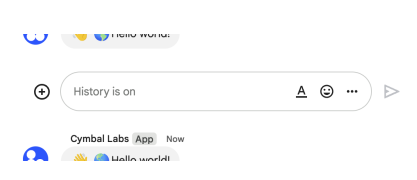
// The following image shows how Chat attributes a message when you use app
|
|
77
|
+
// authentication. Chat displays the Chat app as the message
|
|
78
|
+
// sender. The content of the message can contain text (`text`), cards
|
|
79
|
+
// (`cardsV2`), and accessory widgets (`accessoryWidgets`).
|
|
80
|
+
//
|
|
81
|
+
// 
|
|
83
|
+
//
|
|
84
|
+
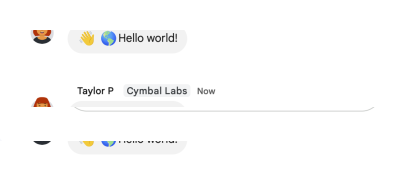
// The following image shows how Chat attributes a message when you use user
|
|
85
|
+
// authentication. Chat displays the user as the message sender and attributes
|
|
86
|
+
// the Chat app to the message by displaying its name. The content of message
|
|
87
|
+
// can only contain text (`text`).
|
|
88
|
+
//
|
|
89
|
+
// 
|
|
91
|
+
//
|
|
92
|
+
// The maximum message size, including the message contents, is 32,000 bytes.
|
|
81
93
|
rpc CreateMessage(CreateMessageRequest) returns (Message) {
|
|
82
94
|
option (google.api.http) = {
|
|
83
95
|
post: "/v1/{parent=spaces/*}/messages"
|
|
@@ -87,8 +99,12 @@ service ChatService {
|
|
|
87
99
|
}
|
|
88
100
|
|
|
89
101
|
// Lists messages in a space that the caller is a member of, including
|
|
90
|
-
// messages from blocked members and spaces.
|
|
91
|
-
//
|
|
102
|
+
// messages from blocked members and spaces. If you list messages from a
|
|
103
|
+
// space with no messages, the response is an empty object. When using a
|
|
104
|
+
// REST/HTTP interface, the response contains an empty JSON object, `{}`.
|
|
105
|
+
// For an example, see
|
|
106
|
+
// [List
|
|
107
|
+
// messages](https://developers.google.com/workspace/chat/api/guides/v1/messages/list).
|
|
92
108
|
// Requires [user
|
|
93
109
|
// authentication](https://developers.google.com/workspace/chat/authenticate-authorize-chat-user).
|
|
94
110
|
rpc ListMessages(ListMessagesRequest) returns (ListMessagesResponse) {
|
|
@@ -299,14 +315,19 @@ service ChatService {
|
|
|
299
315
|
option (google.api.method_signature) = "name";
|
|
300
316
|
}
|
|
301
317
|
|
|
302
|
-
// Creates a
|
|
303
|
-
// example, see
|
|
318
|
+
// Creates a space with no members. Can be used to create a named space.
|
|
319
|
+
// Spaces grouped by topics aren't supported. For an example, see
|
|
320
|
+
// [Create a
|
|
304
321
|
// space](https://developers.google.com/workspace/chat/create-spaces).
|
|
305
322
|
//
|
|
306
323
|
// If you receive the error message `ALREADY_EXISTS` when creating
|
|
307
324
|
// a space, try a different `displayName`. An existing space within
|
|
308
325
|
// the Google Workspace organization might already use this display name.
|
|
309
326
|
//
|
|
327
|
+
// If you're a member of the [Developer Preview
|
|
328
|
+
// program](https://developers.google.com/workspace/preview), you can create a
|
|
329
|
+
// group chat in import mode using `spaceType.GROUP_CHAT`.
|
|
330
|
+
//
|
|
310
331
|
// Requires [user
|
|
311
332
|
// authentication](https://developers.google.com/workspace/chat/authenticate-authorize-chat-user).
|
|
312
333
|
rpc CreateSpace(CreateSpaceRequest) returns (Space) {
|
|
@@ -448,40 +469,25 @@ service ChatService {
|
|
|
448
469
|
};
|
|
449
470
|
}
|
|
450
471
|
|
|
451
|
-
// Creates a
|
|
452
|
-
// memberships for other apps isn't supported.
|
|
453
|
-
// [Invite or add a user or a Google Chat app to a
|
|
454
|
-
// space](https://developers.google.com/workspace/chat/create-members).
|
|
472
|
+
// Creates a membership for the calling Chat app, a user, or a Google Group.
|
|
473
|
+
// Creating memberships for other Chat apps isn't supported.
|
|
455
474
|
// When creating a membership, if the specified member has their auto-accept
|
|
456
475
|
// policy turned off, then they're invited, and must accept the space
|
|
457
476
|
// invitation before joining. Otherwise, creating a membership adds the member
|
|
458
|
-
// directly to the specified space.
|
|
477
|
+
// directly to the specified space.
|
|
478
|
+
// Requires [user
|
|
459
479
|
// authentication](https://developers.google.com/workspace/chat/authenticate-authorize-chat-user).
|
|
460
480
|
//
|
|
461
|
-
//
|
|
462
|
-
//
|
|
463
|
-
//
|
|
464
|
-
//
|
|
465
|
-
//
|
|
466
|
-
//
|
|
467
|
-
//
|
|
468
|
-
//
|
|
469
|
-
// -
|
|
470
|
-
//
|
|
471
|
-
// can also be the `id` for the person from the People API, or the `id` for
|
|
472
|
-
// the user in the Directory API. For example, if the People API Person
|
|
473
|
-
// profile ID for `user@example.com` is `123456789`, you can add the user to
|
|
474
|
-
// the space by setting the `membership.member.name` to
|
|
475
|
-
// `users/user@example.com` or `users/123456789`.
|
|
476
|
-
//
|
|
477
|
-
// - To add or invite a Google group in a named space, use
|
|
478
|
-
// `groups/{group}`, where `{group}` is the `id` for the group from the Cloud
|
|
479
|
-
// Identity Groups API. For example, you can use [Cloud Identity Groups lookup
|
|
480
|
-
// API](https://cloud.google.com/identity/docs/reference/rest/v1/groups/lookup)
|
|
481
|
-
// to retrieve the ID `123456789` for group email `group@example.com`, then
|
|
482
|
-
// you can add or invite the group to a named space by setting the
|
|
483
|
-
// `membership.group_member.name` to `groups/123456789`. Group email is not
|
|
484
|
-
// supported, and Google groups can only be added as members in named spaces.
|
|
481
|
+
// For example usage, see:
|
|
482
|
+
//
|
|
483
|
+
// - [Invite or add a user to a
|
|
484
|
+
// space](https://developers.google.com/workspace/chat/create-members#create-user-membership).
|
|
485
|
+
//
|
|
486
|
+
// - [Invite or add a Google Group to a
|
|
487
|
+
// space](https://developers.google.com/workspace/chat/create-members#create-group-membership).
|
|
488
|
+
//
|
|
489
|
+
// - [Add the Chat app to a
|
|
490
|
+
// space](https://developers.google.com/workspace/chat/create-members#create-membership-calling-api).
|
|
485
491
|
rpc CreateMembership(CreateMembershipRequest) returns (Membership) {
|
|
486
492
|
option (google.api.http) = {
|
|
487
493
|
post: "/v1/{parent=spaces/*}/members"
|
|
@@ -605,6 +611,9 @@ service ChatService {
|
|
|
605
611
|
// updated, the server returns the updated `Message` resource in the event
|
|
606
612
|
// payload.
|
|
607
613
|
//
|
|
614
|
+
// Note: The `permissionSettings` field is not returned in the Space
|
|
615
|
+
// object of the Space event data for this request.
|
|
616
|
+
//
|
|
608
617
|
// Requires [user
|
|
609
618
|
// authentication](https://developers.google.com/workspace/chat/authenticate-authorize-chat-user).
|
|
610
619
|
// To get an event, the authenticated user must be a member of the space.
|
|
@@ -102,8 +102,8 @@ message Message {
|
|
|
102
102
|
// user](https://developers.google.com/workspace/chat/format-messages#messages-@mention),
|
|
103
103
|
// or everyone in the space.
|
|
104
104
|
//
|
|
105
|
-
// To learn about creating text messages, see [Send a
|
|
106
|
-
// message](https://developers.google.com/workspace/chat/create-messages
|
|
105
|
+
// To learn about creating text messages, see [Send a
|
|
106
|
+
// message](https://developers.google.com/workspace/chat/create-messages).
|
|
107
107
|
string text = 4;
|
|
108
108
|
|
|
109
109
|
// Output only. Contains the message `text` with markups added to communicate
|
|
@@ -146,8 +146,8 @@ message Message {
|
|
|
146
146
|
// user](https://developers.google.com/workspace/chat/authenticate-authorize-chat-user),
|
|
147
147
|
// the messages can't contain cards.
|
|
148
148
|
//
|
|
149
|
-
// To learn
|
|
150
|
-
//
|
|
149
|
+
// To learn how to create a message that contains cards, see [Send a
|
|
150
|
+
// message](https://developers.google.com/workspace/chat/create-messages).
|
|
151
151
|
//
|
|
152
152
|
// [Card builder](https://addons.gsuite.google.com/uikit/builder)
|
|
153
153
|
repeated CardWithId cards_v2 = 22;
|
|
@@ -214,16 +214,17 @@ message Message {
|
|
|
214
214
|
|
|
215
215
|
// Immutable. Input for creating a message, otherwise output only. The user
|
|
216
216
|
// that can view the message. When set, the message is private and only
|
|
217
|
-
// visible to the specified user and the Chat app.
|
|
218
|
-
//
|
|
217
|
+
// visible to the specified user and the Chat app. To include this field in
|
|
218
|
+
// your request, you must call the Chat API using [app
|
|
219
|
+
// authentication](https://developers.google.com/workspace/chat/authenticate-authorize-chat-app)
|
|
220
|
+
// and omit the following:
|
|
219
221
|
//
|
|
220
|
-
//
|
|
221
|
-
//
|
|
222
|
-
//
|
|
223
|
-
// to send a message, the message can't be private and must omit this field.
|
|
222
|
+
// * [Attachments](https://developers.google.com/workspace/chat/api/reference/rest/v1/spaces.messages.attachments)
|
|
223
|
+
// * [Accessory
|
|
224
|
+
// widgets](https://developers.google.com/workspace/chat/api/reference/rest/v1/spaces.messages#Message.AccessoryWidget)
|
|
224
225
|
//
|
|
225
|
-
// For details, see [Send
|
|
226
|
-
//
|
|
226
|
+
// For details, see [Send a message
|
|
227
|
+
// privately](https://developers.google.com/workspace/chat/create-messages#private).
|
|
227
228
|
User private_message_viewer = 36 [(google.api.field_behavior) = IMMUTABLE];
|
|
228
229
|
|
|
229
230
|
// Output only. Information about a deleted message. A message is deleted when
|
|
@@ -292,7 +293,7 @@ message Thread {
|
|
|
292
293
|
pattern: "spaces/{space}/threads/{thread}"
|
|
293
294
|
};
|
|
294
295
|
|
|
295
|
-
//
|
|
296
|
+
// Resource name of the thread.
|
|
296
297
|
//
|
|
297
298
|
// Example: `spaces/{space}/threads/{thread}`
|
|
298
299
|
string name = 1;
|
|
@@ -121,12 +121,16 @@ message Space {
|
|
|
121
121
|
// Access state is unknown or not supported in this API.
|
|
122
122
|
ACCESS_STATE_UNSPECIFIED = 0;
|
|
123
123
|
|
|
124
|
-
//
|
|
124
|
+
// Only users or Google Groups that have been individually added or
|
|
125
|
+
// invited by other users or Google Workspace administrators can discover
|
|
126
|
+
// and access the space.
|
|
125
127
|
PRIVATE = 1;
|
|
126
128
|
|
|
127
|
-
//
|
|
128
|
-
//
|
|
129
|
-
//
|
|
129
|
+
// A space manager has granted a target audience access to
|
|
130
|
+
// the space. Users or Google Groups that have been individually added or
|
|
131
|
+
// invited to the space can also discover and access the space. To learn
|
|
132
|
+
// more, see [Make a space discoverable to specific
|
|
133
|
+
// users](https://developers.google.com/workspace/chat/space-target-audience).
|
|
130
134
|
DISCOVERABLE = 2;
|
|
131
135
|
}
|
|
132
136
|
|
|
@@ -135,20 +139,90 @@ message Space {
|
|
|
135
139
|
|
|
136
140
|
// Optional. The resource name of the [target
|
|
137
141
|
// audience](https://support.google.com/a/answer/9934697) who can discover
|
|
138
|
-
// the space, join the space, and preview the messages in the space.
|
|
139
|
-
//
|
|
142
|
+
// the space, join the space, and preview the messages in the space. If
|
|
143
|
+
// unset, only users or Google Groups who have been individually invited or
|
|
144
|
+
// added to the space can access it. For details, see [Make a space
|
|
145
|
+
// discoverable to a target
|
|
140
146
|
// audience](https://developers.google.com/workspace/chat/space-target-audience).
|
|
141
147
|
//
|
|
142
148
|
// Format: `audiences/{audience}`
|
|
143
149
|
//
|
|
144
150
|
// To use the default target audience for the Google Workspace organization,
|
|
145
151
|
// set to `audiences/default`.
|
|
152
|
+
//
|
|
153
|
+
// This field is not populated when using the `chat.bot` scope with [app
|
|
154
|
+
// authentication](https://developers.google.com/workspace/chat/authenticate-authorize-chat-app).
|
|
146
155
|
string audience = 3 [(google.api.field_behavior) = OPTIONAL];
|
|
147
156
|
}
|
|
148
157
|
|
|
158
|
+
// Predefined permission settings that you can only specify when creating a
|
|
159
|
+
// named space. More settings might be added in the future.
|
|
160
|
+
// For details about permission settings for named spaces, see [Learn about
|
|
161
|
+
// spaces](https://support.google.com/chat/answer/7659784).
|
|
162
|
+
enum PredefinedPermissionSettings {
|
|
163
|
+
// Unspecified. Don't use.
|
|
164
|
+
PREDEFINED_PERMISSION_SETTINGS_UNSPECIFIED = 0;
|
|
165
|
+
|
|
166
|
+
// Setting to make the space a collaboration space where all members can
|
|
167
|
+
// post messages.
|
|
168
|
+
COLLABORATION_SPACE = 1;
|
|
169
|
+
|
|
170
|
+
// Setting to make the space an announcement space where only space managers
|
|
171
|
+
// can post messages.
|
|
172
|
+
ANNOUNCEMENT_SPACE = 2;
|
|
173
|
+
}
|
|
174
|
+
|
|
175
|
+
// [Permission settings](https://support.google.com/chat/answer/13340792)
|
|
176
|
+
// that you can specify when updating an existing named space.
|
|
177
|
+
//
|
|
178
|
+
// To set permission settings when creating a space, specify the
|
|
179
|
+
// `PredefinedPermissionSettings` field in your request.
|
|
180
|
+
message PermissionSettings {
|
|
181
|
+
// Setting for managing members and groups in a space.
|
|
182
|
+
optional PermissionSetting manage_members_and_groups = 1;
|
|
183
|
+
|
|
184
|
+
// Setting for updating space name, avatar, description and guidelines.
|
|
185
|
+
optional PermissionSetting modify_space_details = 2;
|
|
186
|
+
|
|
187
|
+
// Setting for toggling space history on and off.
|
|
188
|
+
optional PermissionSetting toggle_history = 3;
|
|
189
|
+
|
|
190
|
+
// Setting for using @all in a space.
|
|
191
|
+
optional PermissionSetting use_at_mention_all = 4;
|
|
192
|
+
|
|
193
|
+
// Setting for managing apps in a space.
|
|
194
|
+
optional PermissionSetting manage_apps = 5;
|
|
195
|
+
|
|
196
|
+
// Setting for managing webhooks in a space.
|
|
197
|
+
optional PermissionSetting manage_webhooks = 6;
|
|
198
|
+
|
|
199
|
+
// Output only. Setting for posting messages in a space.
|
|
200
|
+
optional PermissionSetting post_messages = 7
|
|
201
|
+
[(google.api.field_behavior) = OUTPUT_ONLY];
|
|
202
|
+
|
|
203
|
+
// Setting for replying to messages in a space.
|
|
204
|
+
optional PermissionSetting reply_messages = 8;
|
|
205
|
+
}
|
|
206
|
+
|
|
207
|
+
// Represents a space permission setting.
|
|
208
|
+
message PermissionSetting {
|
|
209
|
+
// Whether spaces managers have this permission.
|
|
210
|
+
bool managers_allowed = 1;
|
|
211
|
+
|
|
212
|
+
// Whether non-manager members have this permission.
|
|
213
|
+
bool members_allowed = 2;
|
|
214
|
+
}
|
|
215
|
+
|
|
149
216
|
// Resource name of the space.
|
|
150
217
|
//
|
|
151
218
|
// Format: `spaces/{space}`
|
|
219
|
+
//
|
|
220
|
+
// Where `{space}` represents the system-assigned ID for the space. You can
|
|
221
|
+
// obtain the space ID by calling the
|
|
222
|
+
// [`spaces.list()`](https://developers.google.com/workspace/chat/api/reference/rest/v1/spaces/list)
|
|
223
|
+
// method or from the space URL. For example, if the space URL
|
|
224
|
+
// is `https://mail.google.com/mail/u/0/#chat/space/AAAAAAAAA`, the space ID
|
|
225
|
+
// is `AAAAAAAAA`.
|
|
152
226
|
string name = 1;
|
|
153
227
|
|
|
154
228
|
// Output only. Deprecated: Use `space_type` instead.
|
|
@@ -169,11 +243,11 @@ message Space {
|
|
|
169
243
|
[deprecated = true, (google.api.field_behavior) = OUTPUT_ONLY];
|
|
170
244
|
|
|
171
245
|
// The space's display name. Required when [creating a
|
|
172
|
-
// space](https://developers.google.com/workspace/chat/api/reference/rest/v1/spaces/create)
|
|
173
|
-
// If you receive the error message
|
|
174
|
-
// updating the `displayName`, try a
|
|
175
|
-
// existing space within the Google Workspace
|
|
176
|
-
// this display name.
|
|
246
|
+
// space](https://developers.google.com/workspace/chat/api/reference/rest/v1/spaces/create)
|
|
247
|
+
// with a `spaceType` of `SPACE`. If you receive the error message
|
|
248
|
+
// `ALREADY_EXISTS` when creating a space or updating the `displayName`, try a
|
|
249
|
+
// different `displayName`. An existing space within the Google Workspace
|
|
250
|
+
// organization might already use this display name.
|
|
177
251
|
//
|
|
178
252
|
// For direct messages, this field might be empty.
|
|
179
253
|
//
|
|
@@ -188,15 +262,6 @@ message Space {
|
|
|
188
262
|
// account). By default, a space created by a consumer account permits any
|
|
189
263
|
// Google Chat user.
|
|
190
264
|
//
|
|
191
|
-
// * The space is used to [import data to Google Chat]
|
|
192
|
-
// (https://developers.google.com/chat/api/guides/import-data-overview)
|
|
193
|
-
// because import mode spaces must only permit members from the same
|
|
194
|
-
// Google Workspace organization. However, as part of the [Google
|
|
195
|
-
// Workspace Developer Preview
|
|
196
|
-
// Program](https://developers.google.com/workspace/preview), import mode
|
|
197
|
-
// spaces can permit any Google Chat user so this field can then be set
|
|
198
|
-
// for import mode spaces.
|
|
199
|
-
//
|
|
200
265
|
// For existing spaces, this field is output only.
|
|
201
266
|
bool external_user_allowed = 8 [(google.api.field_behavior) = IMMUTABLE];
|
|
202
267
|
|
|
@@ -253,17 +318,41 @@ message Space {
|
|
|
253
318
|
|
|
254
319
|
// Output only. The URI for a user to access the space.
|
|
255
320
|
string space_uri = 25 [(google.api.field_behavior) = OUTPUT_ONLY];
|
|
321
|
+
|
|
322
|
+
// Represents the [permission settings]
|
|
323
|
+
// (https://support.google.com/chat/answer/13340792) of a space. Only
|
|
324
|
+
// populated when the `space_type` is `SPACE`.
|
|
325
|
+
oneof space_permission_settings {
|
|
326
|
+
// Optional. Input only. Predefined space permission settings, input only
|
|
327
|
+
// when creating a space. If the field is not set, a collaboration space is
|
|
328
|
+
// created. After you create the space, settings are populated in the
|
|
329
|
+
// `PermissionSettings` field.
|
|
330
|
+
PredefinedPermissionSettings predefined_permission_settings = 26 [
|
|
331
|
+
(google.api.field_behavior) = INPUT_ONLY,
|
|
332
|
+
(google.api.field_behavior) = OPTIONAL
|
|
333
|
+
];
|
|
334
|
+
|
|
335
|
+
// Optional. Space permission settings for existing spaces. Input for
|
|
336
|
+
// updating exact space permission settings, where existing permission
|
|
337
|
+
// settings are replaced. Output lists current permission settings.
|
|
338
|
+
PermissionSettings permission_settings = 27
|
|
339
|
+
[(google.api.field_behavior) = OPTIONAL];
|
|
340
|
+
}
|
|
256
341
|
}
|
|
257
342
|
|
|
258
|
-
// A request to create a named space.
|
|
343
|
+
// A request to create a named space with no members.
|
|
259
344
|
message CreateSpaceRequest {
|
|
260
345
|
// Required. The `displayName` and `spaceType` fields must be populated. Only
|
|
261
346
|
// `SpaceType.SPACE` is supported.
|
|
262
347
|
//
|
|
263
|
-
// If you receive the error message `ALREADY_EXISTS
|
|
348
|
+
// If you receive the error message `ALREADY_EXISTS`,
|
|
264
349
|
// try a different `displayName`. An existing space within the Google
|
|
265
350
|
// Workspace organization might already use this display name.
|
|
266
351
|
//
|
|
352
|
+
// If you're a member of the [Developer Preview
|
|
353
|
+
// program](https://developers.google.com/workspace/preview),
|
|
354
|
+
// `SpaceType.GROUP_CHAT` can be used if `importMode` is set to true.
|
|
355
|
+
//
|
|
267
356
|
// The space `name` is assigned on the server so anything specified in this
|
|
268
357
|
// field will be ignored.
|
|
269
358
|
Space space = 1 [(google.api.field_behavior) = REQUIRED];
|
|
@@ -322,6 +411,8 @@ message ListSpacesRequest {
|
|
|
322
411
|
// The response for a list spaces request.
|
|
323
412
|
message ListSpacesResponse {
|
|
324
413
|
// List of spaces in the requested (or first) page.
|
|
414
|
+
// Note: The `permissionSettings` field is not returned in the Space
|
|
415
|
+
// object for list requests.
|
|
325
416
|
repeated Space spaces = 1;
|
|
326
417
|
|
|
327
418
|
// You can send a token as `pageToken` to retrieve the next page of
|
|
@@ -379,54 +470,64 @@ message UpdateSpaceRequest {
|
|
|
379
470
|
// Required. The updated field paths, comma separated if there are
|
|
380
471
|
// multiple.
|
|
381
472
|
//
|
|
382
|
-
//
|
|
473
|
+
// You can update the following fields for a space:
|
|
383
474
|
//
|
|
384
|
-
//
|
|
385
|
-
//
|
|
386
|
-
// `GROUP_CHAT` space type to `SPACE`. Trying to update the display name of a
|
|
387
|
-
// `GROUP_CHAT` or a `DIRECT_MESSAGE` space results in an invalid argument
|
|
388
|
-
// error. If you receive the error message `ALREADY_EXISTS` when updating the
|
|
389
|
-
// `displayName`, try a different `displayName`. An existing space within the
|
|
390
|
-
// Google Workspace organization might already use this display name.)
|
|
475
|
+
// `space_details`: Updates the space's description. Supports up to 150
|
|
476
|
+
// characters.
|
|
391
477
|
//
|
|
392
|
-
//
|
|
478
|
+
// `display_name`: Only supports updating the display name for spaces where
|
|
479
|
+
// `spaceType` field is `SPACE`.
|
|
480
|
+
// If you receive the error message `ALREADY_EXISTS`, try a different
|
|
481
|
+
// value. An existing space within the
|
|
482
|
+
// Google Workspace organization might already use this display name.
|
|
483
|
+
//
|
|
484
|
+
// `space_type`: Only supports changing a `GROUP_CHAT` space type to
|
|
393
485
|
// `SPACE`. Include `display_name` together
|
|
394
486
|
// with `space_type` in the update mask and ensure that the specified space
|
|
395
487
|
// has a non-empty display name and the `SPACE` space type. Including the
|
|
396
488
|
// `space_type` mask and the `SPACE` type in the specified space when updating
|
|
397
489
|
// the display name is optional if the existing space already has the `SPACE`
|
|
398
490
|
// type. Trying to update the space type in other ways results in an invalid
|
|
399
|
-
// argument error
|
|
400
|
-
// `space_type` is not supported with
|
|
401
|
-
//
|
|
402
|
-
// - `space_details`
|
|
491
|
+
// argument error.
|
|
492
|
+
// `space_type` is not supported with `useAdminAccess`.
|
|
403
493
|
//
|
|
404
|
-
//
|
|
405
|
-
//
|
|
406
|
-
//
|
|
407
|
-
//
|
|
408
|
-
//
|
|
409
|
-
// `space_history_state` is not supported with
|
|
494
|
+
// `space_history_state`: Updates [space history
|
|
495
|
+
// settings](https://support.google.com/chat/answer/7664687) by turning
|
|
496
|
+
// history on or off for the space. Only supported if history settings are
|
|
497
|
+
// enabled for the Google Workspace organization. To update the
|
|
498
|
+
// space history state, you must omit all other field masks in your request.
|
|
499
|
+
// `space_history_state` is not supported with `useAdminAccess`.
|
|
410
500
|
//
|
|
411
|
-
//
|
|
501
|
+
// `access_settings.audience`: Updates the [access
|
|
412
502
|
// setting](https://support.google.com/chat/answer/11971020) of who can
|
|
413
|
-
// discover the space, join the space, and preview the messages in space
|
|
414
|
-
//
|
|
415
|
-
//
|
|
416
|
-
//
|
|
417
|
-
//
|
|
418
|
-
//
|
|
419
|
-
//
|
|
420
|
-
//
|
|
421
|
-
//
|
|
422
|
-
//
|
|
423
|
-
// `
|
|
424
|
-
//
|
|
425
|
-
// `permission_settings
|
|
426
|
-
//
|
|
427
|
-
//
|
|
428
|
-
//
|
|
429
|
-
//
|
|
503
|
+
// discover the space, join the space, and preview the messages in named space
|
|
504
|
+
// where `spaceType` field is `SPACE`. If the existing space has a
|
|
505
|
+
// target audience, you can remove the audience and restrict space access by
|
|
506
|
+
// omitting a value for this field mask. To update access settings for a
|
|
507
|
+
// space, the authenticating user must be a space manager and omit all other
|
|
508
|
+
// field masks in your request. You can't update this field if the space is in
|
|
509
|
+
// [import
|
|
510
|
+
// mode](https://developers.google.com/workspace/chat/import-data-overview).
|
|
511
|
+
// To learn more, see [Make a space discoverable to specific
|
|
512
|
+
// users](https://developers.google.com/workspace/chat/space-target-audience).
|
|
513
|
+
// `access_settings.audience` is not supported with `useAdminAccess`.
|
|
514
|
+
//
|
|
515
|
+
// `permission_settings`: Supports changing the
|
|
516
|
+
// [permission settings](https://support.google.com/chat/answer/13340792)
|
|
517
|
+
// of a space.
|
|
518
|
+
// When updating permission settings, you can only specify
|
|
519
|
+
// `permissionSettings` field masks; you cannot update other field masks
|
|
520
|
+
// at the same time. `permissionSettings` is not supported with
|
|
521
|
+
// `useAdminAccess`.
|
|
522
|
+
// The supported field masks include:
|
|
523
|
+
//
|
|
524
|
+
// - `permission_settings.manageMembersAndGroups`
|
|
525
|
+
// - `permission_settings.modifySpaceDetails`
|
|
526
|
+
// - `permission_settings.toggleHistory`
|
|
527
|
+
// - `permission_settings.useAtMentionAll`
|
|
528
|
+
// - `permission_settings.manageApps`
|
|
529
|
+
// - `permission_settings.manageWebhooks`
|
|
530
|
+
// - `permission_settings.replyMessages`
|
|
430
531
|
google.protobuf.FieldMask update_mask = 2;
|
|
431
532
|
|
|
432
533
|
// When `true`, the method runs using the user's Google Workspace
|
|
@@ -284,6 +284,8 @@ message ListSpaceEventsRequest {
|
|
|
284
284
|
// Response message for listing space events.
|
|
285
285
|
message ListSpaceEventsResponse {
|
|
286
286
|
// Results are returned in chronological order (oldest event first).
|
|
287
|
+
// Note: The `permissionSettings` field is not returned in the Space
|
|
288
|
+
// object for list requests.
|
|
287
289
|
repeated SpaceEvent space_events = 1;
|
|
288
290
|
|
|
289
291
|
// Continuation token used to fetch more events.
|