@google-apps/chat 0.8.0 → 0.10.0
This diff represents the content of publicly available package versions that have been released to one of the supported registries. The information contained in this diff is provided for informational purposes only and reflects changes between package versions as they appear in their respective public registries.
- package/CHANGELOG.md +14 -0
- package/README.md +3 -2
- package/build/protos/google/chat/v1/chat_service.proto +63 -42
- package/build/protos/google/chat/v1/membership.proto +69 -2
- package/build/protos/google/chat/v1/message.proto +14 -13
- package/build/protos/google/chat/v1/space.proto +361 -59
- package/build/protos/google/chat/v1/space_event.proto +2 -0
- package/build/protos/protos.d.ts +702 -0
- package/build/protos/protos.js +2604 -653
- package/build/protos/protos.json +270 -0
- package/build/src/v1/chat_service_client.d.ts +662 -86
- package/build/src/v1/chat_service_client.js +347 -4
- package/build/src/v1/chat_service_client.js.map +1 -1
- package/build/src/v1/chat_service_client_config.json +5 -0
- package/package.json +1 -1
|
@@ -116,18 +116,30 @@ export declare class ChatServiceClient {
|
|
|
116
116
|
getProjectId(): Promise<string>;
|
|
117
117
|
getProjectId(callback: Callback<string, undefined, undefined>): void;
|
|
118
118
|
/**
|
|
119
|
-
* Creates a message in a Google Chat space.
|
|
120
|
-
* including text and cards, is 32,000 bytes. For an example, see [Send a
|
|
119
|
+
* Creates a message in a Google Chat space. For an example, see [Send a
|
|
121
120
|
* message](https://developers.google.com/workspace/chat/create-messages).
|
|
122
121
|
*
|
|
123
|
-
*
|
|
124
|
-
*
|
|
125
|
-
*
|
|
122
|
+
* The `create()` method requires either user or app authentication. Chat
|
|
123
|
+
* attributes the message sender differently depending on the type of
|
|
124
|
+
* authentication that you use in your request.
|
|
126
125
|
*
|
|
127
|
-
*
|
|
128
|
-
*
|
|
129
|
-
*
|
|
130
|
-
*
|
|
126
|
+
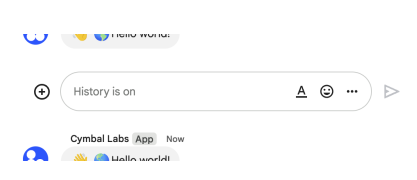
* The following image shows how Chat attributes a message when you use app
|
|
127
|
+
* authentication. Chat displays the Chat app as the message
|
|
128
|
+
* sender. The content of the message can contain text (`text`), cards
|
|
129
|
+
* (`cardsV2`), and accessory widgets (`accessoryWidgets`).
|
|
130
|
+
*
|
|
131
|
+
* 
|
|
133
|
+
*
|
|
134
|
+
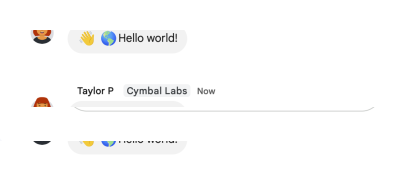
* The following image shows how Chat attributes a message when you use user
|
|
135
|
+
* authentication. Chat displays the user as the message sender and attributes
|
|
136
|
+
* the Chat app to the message by displaying its name. The content of message
|
|
137
|
+
* can only contain text (`text`).
|
|
138
|
+
*
|
|
139
|
+
* 
|
|
141
|
+
*
|
|
142
|
+
* The maximum message size, including the message contents, is 32,000 bytes.
|
|
131
143
|
*
|
|
132
144
|
* @param {Object} request
|
|
133
145
|
* The request object that will be sent.
|
|
@@ -213,6 +225,19 @@ export declare class ChatServiceClient {
|
|
|
213
225
|
* you can use the user's email as an alias for `{member}`. For example,
|
|
214
226
|
* `spaces/{space}/members/example@gmail.com` where `example@gmail.com` is the
|
|
215
227
|
* email of the Google Chat user.
|
|
228
|
+
* @param {boolean} request.useAdminAccess
|
|
229
|
+
* When `true`, the method runs using the user's Google Workspace
|
|
230
|
+
* administrator privileges.
|
|
231
|
+
*
|
|
232
|
+
* The calling user must be a Google Workspace administrator with the
|
|
233
|
+
* [manage chat and spaces conversations
|
|
234
|
+
* privilege](https://support.google.com/a/answer/13369245).
|
|
235
|
+
*
|
|
236
|
+
* Requires the `chat.admin.memberships` or `chat.admin.memberships.readonly`
|
|
237
|
+
* [OAuth 2.0
|
|
238
|
+
* scopes](https://developers.google.com/workspace/chat/authenticate-authorize#chat-api-scopes).
|
|
239
|
+
*
|
|
240
|
+
* Getting app memberships in a space isn't supported when using admin access.
|
|
216
241
|
* @param {object} [options]
|
|
217
242
|
* Call options. See {@link https://googleapis.dev/nodejs/google-gax/latest/interfaces/CallOptions.html|CallOptions} for more details.
|
|
218
243
|
* @returns {Promise} - The promise which resolves to an array.
|
|
@@ -466,6 +491,16 @@ export declare class ChatServiceClient {
|
|
|
466
491
|
* Required. Resource name of the space, in the form `spaces/{space}`.
|
|
467
492
|
*
|
|
468
493
|
* Format: `spaces/{space}`
|
|
494
|
+
* @param {boolean} request.useAdminAccess
|
|
495
|
+
* When `true`, the method runs using the user's Google Workspace
|
|
496
|
+
* administrator privileges.
|
|
497
|
+
*
|
|
498
|
+
* The calling user must be a Google Workspace administrator with the
|
|
499
|
+
* [manage chat and spaces conversations
|
|
500
|
+
* privilege](https://support.google.com/a/answer/13369245).
|
|
501
|
+
*
|
|
502
|
+
* Requires the `chat.admin.spaces` or `chat.admin.spaces.readonly` [OAuth 2.0
|
|
503
|
+
* scopes](https://developers.google.com/workspace/chat/authenticate-authorize#chat-api-scopes).
|
|
469
504
|
* @param {object} [options]
|
|
470
505
|
* Call options. See {@link https://googleapis.dev/nodejs/google-gax/latest/interfaces/CallOptions.html|CallOptions} for more details.
|
|
471
506
|
* @returns {Promise} - The promise which resolves to an array.
|
|
@@ -483,14 +518,19 @@ export declare class ChatServiceClient {
|
|
|
483
518
|
getSpace(request: protos.google.chat.v1.IGetSpaceRequest, options: CallOptions, callback: Callback<protos.google.chat.v1.ISpace, protos.google.chat.v1.IGetSpaceRequest | null | undefined, {} | null | undefined>): void;
|
|
484
519
|
getSpace(request: protos.google.chat.v1.IGetSpaceRequest, callback: Callback<protos.google.chat.v1.ISpace, protos.google.chat.v1.IGetSpaceRequest | null | undefined, {} | null | undefined>): void;
|
|
485
520
|
/**
|
|
486
|
-
* Creates a
|
|
487
|
-
* example, see
|
|
521
|
+
* Creates a space with no members. Can be used to create a named space.
|
|
522
|
+
* Spaces grouped by topics aren't supported. For an example, see
|
|
523
|
+
* [Create a
|
|
488
524
|
* space](https://developers.google.com/workspace/chat/create-spaces).
|
|
489
525
|
*
|
|
490
526
|
* If you receive the error message `ALREADY_EXISTS` when creating
|
|
491
527
|
* a space, try a different `displayName`. An existing space within
|
|
492
528
|
* the Google Workspace organization might already use this display name.
|
|
493
529
|
*
|
|
530
|
+
* If you're a member of the [Developer Preview
|
|
531
|
+
* program](https://developers.google.com/workspace/preview), you can create a
|
|
532
|
+
* group chat in import mode using `spaceType.GROUP_CHAT`.
|
|
533
|
+
*
|
|
494
534
|
* Requires [user
|
|
495
535
|
* authentication](https://developers.google.com/workspace/chat/authenticate-authorize-chat-user).
|
|
496
536
|
*
|
|
@@ -500,10 +540,14 @@ export declare class ChatServiceClient {
|
|
|
500
540
|
* Required. The `displayName` and `spaceType` fields must be populated. Only
|
|
501
541
|
* `SpaceType.SPACE` is supported.
|
|
502
542
|
*
|
|
503
|
-
* If you receive the error message `ALREADY_EXISTS
|
|
543
|
+
* If you receive the error message `ALREADY_EXISTS`,
|
|
504
544
|
* try a different `displayName`. An existing space within the Google
|
|
505
545
|
* Workspace organization might already use this display name.
|
|
506
546
|
*
|
|
547
|
+
* If you're a member of the [Developer Preview
|
|
548
|
+
* program](https://developers.google.com/workspace/preview),
|
|
549
|
+
* `SpaceType.GROUP_CHAT` can be used if `importMode` is set to true.
|
|
550
|
+
*
|
|
507
551
|
* The space `name` is assigned on the server so anything specified in this
|
|
508
552
|
* field will be ignored.
|
|
509
553
|
* @param {string} [request.requestId]
|
|
@@ -684,54 +728,77 @@ export declare class ChatServiceClient {
|
|
|
684
728
|
* Required. The updated field paths, comma separated if there are
|
|
685
729
|
* multiple.
|
|
686
730
|
*
|
|
687
|
-
*
|
|
731
|
+
* You can update the following fields for a space:
|
|
732
|
+
*
|
|
733
|
+
* `space_details`: Updates the space's description. Supports up to 150
|
|
734
|
+
* characters.
|
|
688
735
|
*
|
|
689
|
-
*
|
|
690
|
-
*
|
|
691
|
-
*
|
|
692
|
-
*
|
|
693
|
-
*
|
|
694
|
-
* `displayName`, try a different `displayName`. An existing space within the
|
|
695
|
-
* Google Workspace organization might already use this display name.)
|
|
736
|
+
* `display_name`: Only supports updating the display name for spaces where
|
|
737
|
+
* `spaceType` field is `SPACE`.
|
|
738
|
+
* If you receive the error message `ALREADY_EXISTS`, try a different
|
|
739
|
+
* value. An existing space within the
|
|
740
|
+
* Google Workspace organization might already use this display name.
|
|
696
741
|
*
|
|
697
|
-
*
|
|
742
|
+
* `space_type`: Only supports changing a `GROUP_CHAT` space type to
|
|
698
743
|
* `SPACE`. Include `display_name` together
|
|
699
744
|
* with `space_type` in the update mask and ensure that the specified space
|
|
700
745
|
* has a non-empty display name and the `SPACE` space type. Including the
|
|
701
746
|
* `space_type` mask and the `SPACE` type in the specified space when updating
|
|
702
747
|
* the display name is optional if the existing space already has the `SPACE`
|
|
703
748
|
* type. Trying to update the space type in other ways results in an invalid
|
|
704
|
-
* argument error
|
|
705
|
-
* `space_type` is not supported with
|
|
706
|
-
*
|
|
707
|
-
* - `space_details`
|
|
749
|
+
* argument error.
|
|
750
|
+
* `space_type` is not supported with `useAdminAccess`.
|
|
708
751
|
*
|
|
709
|
-
*
|
|
710
|
-
*
|
|
711
|
-
*
|
|
712
|
-
*
|
|
713
|
-
*
|
|
714
|
-
* `space_history_state` is not supported with
|
|
752
|
+
* `space_history_state`: Updates [space history
|
|
753
|
+
* settings](https://support.google.com/chat/answer/7664687) by turning
|
|
754
|
+
* history on or off for the space. Only supported if history settings are
|
|
755
|
+
* enabled for the Google Workspace organization. To update the
|
|
756
|
+
* space history state, you must omit all other field masks in your request.
|
|
757
|
+
* `space_history_state` is not supported with `useAdminAccess`.
|
|
715
758
|
*
|
|
716
|
-
*
|
|
759
|
+
* `access_settings.audience`: Updates the [access
|
|
717
760
|
* setting](https://support.google.com/chat/answer/11971020) of who can
|
|
718
|
-
* discover the space, join the space, and preview the messages in space
|
|
719
|
-
*
|
|
720
|
-
*
|
|
721
|
-
*
|
|
722
|
-
*
|
|
723
|
-
*
|
|
724
|
-
*
|
|
725
|
-
*
|
|
726
|
-
*
|
|
727
|
-
*
|
|
728
|
-
* `
|
|
729
|
-
*
|
|
730
|
-
* `permission_settings
|
|
731
|
-
*
|
|
732
|
-
*
|
|
733
|
-
*
|
|
734
|
-
*
|
|
761
|
+
* discover the space, join the space, and preview the messages in named space
|
|
762
|
+
* where `spaceType` field is `SPACE`. If the existing space has a
|
|
763
|
+
* target audience, you can remove the audience and restrict space access by
|
|
764
|
+
* omitting a value for this field mask. To update access settings for a
|
|
765
|
+
* space, the authenticating user must be a space manager and omit all other
|
|
766
|
+
* field masks in your request. You can't update this field if the space is in
|
|
767
|
+
* [import
|
|
768
|
+
* mode](https://developers.google.com/workspace/chat/import-data-overview).
|
|
769
|
+
* To learn more, see [Make a space discoverable to specific
|
|
770
|
+
* users](https://developers.google.com/workspace/chat/space-target-audience).
|
|
771
|
+
* `access_settings.audience` is not supported with `useAdminAccess`.
|
|
772
|
+
*
|
|
773
|
+
* `permission_settings`: Supports changing the
|
|
774
|
+
* [permission settings](https://support.google.com/chat/answer/13340792)
|
|
775
|
+
* of a space.
|
|
776
|
+
* When updating permission settings, you can only specify
|
|
777
|
+
* `permissionSettings` field masks; you cannot update other field masks
|
|
778
|
+
* at the same time. `permissionSettings` is not supported with
|
|
779
|
+
* `useAdminAccess`.
|
|
780
|
+
* The supported field masks include:
|
|
781
|
+
*
|
|
782
|
+
* - `permission_settings.manageMembersAndGroups`
|
|
783
|
+
* - `permission_settings.modifySpaceDetails`
|
|
784
|
+
* - `permission_settings.toggleHistory`
|
|
785
|
+
* - `permission_settings.useAtMentionAll`
|
|
786
|
+
* - `permission_settings.manageApps`
|
|
787
|
+
* - `permission_settings.manageWebhooks`
|
|
788
|
+
* - `permission_settings.replyMessages`
|
|
789
|
+
* @param {boolean} request.useAdminAccess
|
|
790
|
+
* When `true`, the method runs using the user's Google Workspace
|
|
791
|
+
* administrator privileges.
|
|
792
|
+
*
|
|
793
|
+
* The calling user must be a Google Workspace administrator with the
|
|
794
|
+
* [manage chat and spaces conversations
|
|
795
|
+
* privilege](https://support.google.com/a/answer/13369245).
|
|
796
|
+
*
|
|
797
|
+
* Requires the `chat.admin.spaces` [OAuth 2.0
|
|
798
|
+
* scope](https://developers.google.com/workspace/chat/authenticate-authorize#chat-api-scopes).
|
|
799
|
+
*
|
|
800
|
+
* Some `FieldMask` values are not supported using admin access. For details,
|
|
801
|
+
* see the description of `update_mask`.
|
|
735
802
|
* @param {object} [options]
|
|
736
803
|
* Call options. See {@link https://googleapis.dev/nodejs/google-gax/latest/interfaces/CallOptions.html|CallOptions} for more details.
|
|
737
804
|
* @returns {Promise} - The promise which resolves to an array.
|
|
@@ -764,6 +831,16 @@ export declare class ChatServiceClient {
|
|
|
764
831
|
* Required. Resource name of the space to delete.
|
|
765
832
|
*
|
|
766
833
|
* Format: `spaces/{space}`
|
|
834
|
+
* @param {boolean} request.useAdminAccess
|
|
835
|
+
* When `true`, the method runs using the user's Google Workspace
|
|
836
|
+
* administrator privileges.
|
|
837
|
+
*
|
|
838
|
+
* The calling user must be a Google Workspace administrator with the
|
|
839
|
+
* [manage chat and spaces conversations
|
|
840
|
+
* privilege](https://support.google.com/a/answer/13369245).
|
|
841
|
+
*
|
|
842
|
+
* Requires the `chat.admin.delete` [OAuth 2.0
|
|
843
|
+
* scope](https://developers.google.com/workspace/chat/authenticate-authorize#chat-api-scopes).
|
|
767
844
|
* @param {object} [options]
|
|
768
845
|
* Call options. See {@link https://googleapis.dev/nodejs/google-gax/latest/interfaces/CallOptions.html|CallOptions} for more details.
|
|
769
846
|
* @returns {Promise} - The promise which resolves to an array.
|
|
@@ -864,40 +941,25 @@ export declare class ChatServiceClient {
|
|
|
864
941
|
findDirectMessage(request: protos.google.chat.v1.IFindDirectMessageRequest, options: CallOptions, callback: Callback<protos.google.chat.v1.ISpace, protos.google.chat.v1.IFindDirectMessageRequest | null | undefined, {} | null | undefined>): void;
|
|
865
942
|
findDirectMessage(request: protos.google.chat.v1.IFindDirectMessageRequest, callback: Callback<protos.google.chat.v1.ISpace, protos.google.chat.v1.IFindDirectMessageRequest | null | undefined, {} | null | undefined>): void;
|
|
866
943
|
/**
|
|
867
|
-
* Creates a
|
|
868
|
-
* memberships for other apps isn't supported.
|
|
869
|
-
* [Invite or add a user or a Google Chat app to a
|
|
870
|
-
* space](https://developers.google.com/workspace/chat/create-members).
|
|
944
|
+
* Creates a membership for the calling Chat app, a user, or a Google Group.
|
|
945
|
+
* Creating memberships for other Chat apps isn't supported.
|
|
871
946
|
* When creating a membership, if the specified member has their auto-accept
|
|
872
947
|
* policy turned off, then they're invited, and must accept the space
|
|
873
948
|
* invitation before joining. Otherwise, creating a membership adds the member
|
|
874
|
-
* directly to the specified space.
|
|
949
|
+
* directly to the specified space.
|
|
950
|
+
* Requires [user
|
|
875
951
|
* authentication](https://developers.google.com/workspace/chat/authenticate-authorize-chat-user).
|
|
876
952
|
*
|
|
877
|
-
*
|
|
878
|
-
*
|
|
879
|
-
*
|
|
880
|
-
*
|
|
881
|
-
*
|
|
882
|
-
*
|
|
883
|
-
*
|
|
884
|
-
*
|
|
885
|
-
* -
|
|
886
|
-
*
|
|
887
|
-
* can also be the `id` for the person from the People API, or the `id` for
|
|
888
|
-
* the user in the Directory API. For example, if the People API Person
|
|
889
|
-
* profile ID for `user@example.com` is `123456789`, you can add the user to
|
|
890
|
-
* the space by setting the `membership.member.name` to
|
|
891
|
-
* `users/user@example.com` or `users/123456789`.
|
|
892
|
-
*
|
|
893
|
-
* - To add or invite a Google group in a named space, use
|
|
894
|
-
* `groups/{group}`, where `{group}` is the `id` for the group from the Cloud
|
|
895
|
-
* Identity Groups API. For example, you can use [Cloud Identity Groups lookup
|
|
896
|
-
* API](https://cloud.google.com/identity/docs/reference/rest/v1/groups/lookup)
|
|
897
|
-
* to retrieve the ID `123456789` for group email `group@example.com`, then
|
|
898
|
-
* you can add or invite the group to a named space by setting the
|
|
899
|
-
* `membership.group_member.name` to `groups/123456789`. Group email is not
|
|
900
|
-
* supported, and Google groups can only be added as members in named spaces.
|
|
953
|
+
* For example usage, see:
|
|
954
|
+
*
|
|
955
|
+
* - [Invite or add a user to a
|
|
956
|
+
* space](https://developers.google.com/workspace/chat/create-members#create-user-membership).
|
|
957
|
+
*
|
|
958
|
+
* - [Invite or add a Google Group to a
|
|
959
|
+
* space](https://developers.google.com/workspace/chat/create-members#create-group-membership).
|
|
960
|
+
*
|
|
961
|
+
* - [Add the Chat app to a
|
|
962
|
+
* space](https://developers.google.com/workspace/chat/create-members#create-membership-calling-api).
|
|
901
963
|
*
|
|
902
964
|
* @param {Object} request
|
|
903
965
|
* The request object that will be sent.
|
|
@@ -923,6 +985,20 @@ export declare class ChatServiceClient {
|
|
|
923
985
|
* `users/user@example.com` or `users/123456789`. When a Chat app creates a
|
|
924
986
|
* membership relation for itself, it must use the `chat.memberships.app`
|
|
925
987
|
* scope, set `user.type` to `BOT`, and set `user.name` to `users/app`.
|
|
988
|
+
* @param {boolean} request.useAdminAccess
|
|
989
|
+
* When `true`, the method runs using the user's Google Workspace
|
|
990
|
+
* administrator privileges.
|
|
991
|
+
*
|
|
992
|
+
* The calling user must be a Google Workspace administrator with the
|
|
993
|
+
* [manage chat and spaces conversations
|
|
994
|
+
* privilege](https://support.google.com/a/answer/13369245).
|
|
995
|
+
*
|
|
996
|
+
* Requires the `chat.admin.memberships` [OAuth 2.0
|
|
997
|
+
* scope](https://developers.google.com/workspace/chat/authenticate-authorize#chat-api-scopes).
|
|
998
|
+
*
|
|
999
|
+
* Creating app memberships or creating memberships for users outside the
|
|
1000
|
+
* administrator's Google Workspace organization isn't supported using admin
|
|
1001
|
+
* access.
|
|
926
1002
|
* @param {object} [options]
|
|
927
1003
|
* Call options. See {@link https://googleapis.dev/nodejs/google-gax/latest/interfaces/CallOptions.html|CallOptions} for more details.
|
|
928
1004
|
* @returns {Promise} - The promise which resolves to an array.
|
|
@@ -958,6 +1034,16 @@ export declare class ChatServiceClient {
|
|
|
958
1034
|
* Currently supported field paths:
|
|
959
1035
|
*
|
|
960
1036
|
* - `role`
|
|
1037
|
+
* @param {boolean} request.useAdminAccess
|
|
1038
|
+
* When `true`, the method runs using the user's Google Workspace
|
|
1039
|
+
* administrator privileges.
|
|
1040
|
+
*
|
|
1041
|
+
* The calling user must be a Google Workspace administrator with the
|
|
1042
|
+
* [manage chat and spaces conversations
|
|
1043
|
+
* privilege](https://support.google.com/a/answer/13369245).
|
|
1044
|
+
*
|
|
1045
|
+
* Requires the `chat.admin.memberships` [OAuth 2.0
|
|
1046
|
+
* scope](https://developers.google.com/workspace/chat/authenticate-authorize#chat-api-scopes).
|
|
961
1047
|
* @param {object} [options]
|
|
962
1048
|
* Call options. See {@link https://googleapis.dev/nodejs/google-gax/latest/interfaces/CallOptions.html|CallOptions} for more details.
|
|
963
1049
|
* @returns {Promise} - The promise which resolves to an array.
|
|
@@ -999,6 +1085,18 @@ export declare class ChatServiceClient {
|
|
|
999
1085
|
* and `spaces/{space}/members/app` format.
|
|
1000
1086
|
*
|
|
1001
1087
|
* Format: `spaces/{space}/members/{member}` or `spaces/{space}/members/app`.
|
|
1088
|
+
* @param {boolean} request.useAdminAccess
|
|
1089
|
+
* When `true`, the method runs using the user's Google Workspace
|
|
1090
|
+
* administrator privileges.
|
|
1091
|
+
*
|
|
1092
|
+
* The calling user must be a Google Workspace administrator with the
|
|
1093
|
+
* [manage chat and spaces conversations
|
|
1094
|
+
* privilege](https://support.google.com/a/answer/13369245).
|
|
1095
|
+
*
|
|
1096
|
+
* Requires the `chat.admin.memberships` [OAuth 2.0
|
|
1097
|
+
* scope](https://developers.google.com/workspace/chat/authenticate-authorize#chat-api-scopes).
|
|
1098
|
+
*
|
|
1099
|
+
* Deleting app memberships in a space isn't supported using admin access.
|
|
1002
1100
|
* @param {object} [options]
|
|
1003
1101
|
* Call options. See {@link https://googleapis.dev/nodejs/google-gax/latest/interfaces/CallOptions.html|CallOptions} for more details.
|
|
1004
1102
|
* @returns {Promise} - The promise which resolves to an array.
|
|
@@ -1228,6 +1326,9 @@ export declare class ChatServiceClient {
|
|
|
1228
1326
|
* updated, the server returns the updated `Message` resource in the event
|
|
1229
1327
|
* payload.
|
|
1230
1328
|
*
|
|
1329
|
+
* Note: The `permissionSettings` field is not returned in the Space
|
|
1330
|
+
* object of the Space event data for this request.
|
|
1331
|
+
*
|
|
1231
1332
|
* Requires [user
|
|
1232
1333
|
* authentication](https://developers.google.com/workspace/chat/authenticate-authorize-chat-user).
|
|
1233
1334
|
* To get an event, the authenticated user must be a member of the space.
|
|
@@ -1260,8 +1361,12 @@ export declare class ChatServiceClient {
|
|
|
1260
1361
|
getSpaceEvent(request: protos.google.chat.v1.IGetSpaceEventRequest, callback: Callback<protos.google.chat.v1.ISpaceEvent, protos.google.chat.v1.IGetSpaceEventRequest | null | undefined, {} | null | undefined>): void;
|
|
1261
1362
|
/**
|
|
1262
1363
|
* Lists messages in a space that the caller is a member of, including
|
|
1263
|
-
* messages from blocked members and spaces.
|
|
1264
|
-
*
|
|
1364
|
+
* messages from blocked members and spaces. If you list messages from a
|
|
1365
|
+
* space with no messages, the response is an empty object. When using a
|
|
1366
|
+
* REST/HTTP interface, the response contains an empty JSON object, `{}`.
|
|
1367
|
+
* For an example, see
|
|
1368
|
+
* [List
|
|
1369
|
+
* messages](https://developers.google.com/workspace/chat/api/guides/v1/messages/list).
|
|
1265
1370
|
* Requires [user
|
|
1266
1371
|
* authentication](https://developers.google.com/workspace/chat/authenticate-authorize-chat-user).
|
|
1267
1372
|
*
|
|
@@ -1601,8 +1706,8 @@ export declare class ChatServiceClient {
|
|
|
1601
1706
|
*
|
|
1602
1707
|
* To filter by role, set `role` to `ROLE_MEMBER` or `ROLE_MANAGER`.
|
|
1603
1708
|
*
|
|
1604
|
-
* To filter by type, set `member.type` to `HUMAN` or `BOT`.
|
|
1605
|
-
*
|
|
1709
|
+
* To filter by type, set `member.type` to `HUMAN` or `BOT`. You can also
|
|
1710
|
+
* filter for `member.type` using the `!=` operator.
|
|
1606
1711
|
*
|
|
1607
1712
|
* To filter by both role and type, use the `AND` operator. To filter by
|
|
1608
1713
|
* either role or type, use the `OR` operator.
|
|
@@ -1646,6 +1751,19 @@ export declare class ChatServiceClient {
|
|
|
1646
1751
|
*
|
|
1647
1752
|
* Currently requires [user
|
|
1648
1753
|
* authentication](https://developers.google.com/workspace/chat/authenticate-authorize-chat-user).
|
|
1754
|
+
* @param {boolean} request.useAdminAccess
|
|
1755
|
+
* When `true`, the method runs using the user's Google Workspace
|
|
1756
|
+
* administrator privileges.
|
|
1757
|
+
*
|
|
1758
|
+
* The calling user must be a Google Workspace administrator with the
|
|
1759
|
+
* [manage chat and spaces conversations
|
|
1760
|
+
* privilege](https://support.google.com/a/answer/13369245).
|
|
1761
|
+
*
|
|
1762
|
+
* Requires either the `chat.admin.memberships.readonly` or
|
|
1763
|
+
* `chat.admin.memberships` [OAuth 2.0
|
|
1764
|
+
* scope](https://developers.google.com/workspace/chat/authenticate-authorize#chat-api-scopes).
|
|
1765
|
+
*
|
|
1766
|
+
* Listing app memberships in a space isn't supported when using admin access.
|
|
1649
1767
|
* @param {object} [options]
|
|
1650
1768
|
* Call options. See {@link https://googleapis.dev/nodejs/google-gax/latest/interfaces/CallOptions.html|CallOptions} for more details.
|
|
1651
1769
|
* @returns {Promise} - The promise which resolves to an array.
|
|
@@ -1701,8 +1819,8 @@ export declare class ChatServiceClient {
|
|
|
1701
1819
|
*
|
|
1702
1820
|
* To filter by role, set `role` to `ROLE_MEMBER` or `ROLE_MANAGER`.
|
|
1703
1821
|
*
|
|
1704
|
-
* To filter by type, set `member.type` to `HUMAN` or `BOT`.
|
|
1705
|
-
*
|
|
1822
|
+
* To filter by type, set `member.type` to `HUMAN` or `BOT`. You can also
|
|
1823
|
+
* filter for `member.type` using the `!=` operator.
|
|
1706
1824
|
*
|
|
1707
1825
|
* To filter by both role and type, use the `AND` operator. To filter by
|
|
1708
1826
|
* either role or type, use the `OR` operator.
|
|
@@ -1746,6 +1864,19 @@ export declare class ChatServiceClient {
|
|
|
1746
1864
|
*
|
|
1747
1865
|
* Currently requires [user
|
|
1748
1866
|
* authentication](https://developers.google.com/workspace/chat/authenticate-authorize-chat-user).
|
|
1867
|
+
* @param {boolean} request.useAdminAccess
|
|
1868
|
+
* When `true`, the method runs using the user's Google Workspace
|
|
1869
|
+
* administrator privileges.
|
|
1870
|
+
*
|
|
1871
|
+
* The calling user must be a Google Workspace administrator with the
|
|
1872
|
+
* [manage chat and spaces conversations
|
|
1873
|
+
* privilege](https://support.google.com/a/answer/13369245).
|
|
1874
|
+
*
|
|
1875
|
+
* Requires either the `chat.admin.memberships.readonly` or
|
|
1876
|
+
* `chat.admin.memberships` [OAuth 2.0
|
|
1877
|
+
* scope](https://developers.google.com/workspace/chat/authenticate-authorize#chat-api-scopes).
|
|
1878
|
+
*
|
|
1879
|
+
* Listing app memberships in a space isn't supported when using admin access.
|
|
1749
1880
|
* @param {object} [options]
|
|
1750
1881
|
* Call options. See {@link https://googleapis.dev/nodejs/google-gax/latest/interfaces/CallOptions.html|CallOptions} for more details.
|
|
1751
1882
|
* @returns {Stream}
|
|
@@ -1796,8 +1927,8 @@ export declare class ChatServiceClient {
|
|
|
1796
1927
|
*
|
|
1797
1928
|
* To filter by role, set `role` to `ROLE_MEMBER` or `ROLE_MANAGER`.
|
|
1798
1929
|
*
|
|
1799
|
-
* To filter by type, set `member.type` to `HUMAN` or `BOT`.
|
|
1800
|
-
*
|
|
1930
|
+
* To filter by type, set `member.type` to `HUMAN` or `BOT`. You can also
|
|
1931
|
+
* filter for `member.type` using the `!=` operator.
|
|
1801
1932
|
*
|
|
1802
1933
|
* To filter by both role and type, use the `AND` operator. To filter by
|
|
1803
1934
|
* either role or type, use the `OR` operator.
|
|
@@ -1841,6 +1972,19 @@ export declare class ChatServiceClient {
|
|
|
1841
1972
|
*
|
|
1842
1973
|
* Currently requires [user
|
|
1843
1974
|
* authentication](https://developers.google.com/workspace/chat/authenticate-authorize-chat-user).
|
|
1975
|
+
* @param {boolean} request.useAdminAccess
|
|
1976
|
+
* When `true`, the method runs using the user's Google Workspace
|
|
1977
|
+
* administrator privileges.
|
|
1978
|
+
*
|
|
1979
|
+
* The calling user must be a Google Workspace administrator with the
|
|
1980
|
+
* [manage chat and spaces conversations
|
|
1981
|
+
* privilege](https://support.google.com/a/answer/13369245).
|
|
1982
|
+
*
|
|
1983
|
+
* Requires either the `chat.admin.memberships.readonly` or
|
|
1984
|
+
* `chat.admin.memberships` [OAuth 2.0
|
|
1985
|
+
* scope](https://developers.google.com/workspace/chat/authenticate-authorize#chat-api-scopes).
|
|
1986
|
+
*
|
|
1987
|
+
* Listing app memberships in a space isn't supported when using admin access.
|
|
1844
1988
|
* @param {object} [options]
|
|
1845
1989
|
* Call options. See {@link https://googleapis.dev/nodejs/google-gax/latest/interfaces/CallOptions.html|CallOptions} for more details.
|
|
1846
1990
|
* @returns {Object}
|
|
@@ -2039,6 +2183,438 @@ export declare class ChatServiceClient {
|
|
|
2039
2183
|
* region_tag:chat_v1_generated_ChatService_ListSpaces_async
|
|
2040
2184
|
*/
|
|
2041
2185
|
listSpacesAsync(request?: protos.google.chat.v1.IListSpacesRequest, options?: CallOptions): AsyncIterable<protos.google.chat.v1.ISpace>;
|
|
2186
|
+
/**
|
|
2187
|
+
* Returns a list of spaces in a Google Workspace organization based on an
|
|
2188
|
+
* administrator's search. Requires [user
|
|
2189
|
+
* authentication with administrator
|
|
2190
|
+
* privileges](https://developers.google.com/workspace/chat/authenticate-authorize-chat-user#admin-privileges).
|
|
2191
|
+
* In the request, set `use_admin_access` to `true`.
|
|
2192
|
+
*
|
|
2193
|
+
* @param {Object} request
|
|
2194
|
+
* The request object that will be sent.
|
|
2195
|
+
* @param {boolean} request.useAdminAccess
|
|
2196
|
+
* When `true`, the method runs using the user's Google Workspace
|
|
2197
|
+
* administrator privileges.
|
|
2198
|
+
*
|
|
2199
|
+
* The calling user must be a Google Workspace administrator with the
|
|
2200
|
+
* [manage chat and spaces conversations
|
|
2201
|
+
* privilege](https://support.google.com/a/answer/13369245).
|
|
2202
|
+
*
|
|
2203
|
+
* Requires either the `chat.admin.spaces.readonly` or `chat.admin.spaces`
|
|
2204
|
+
* [OAuth 2.0
|
|
2205
|
+
* scope](https://developers.google.com/workspace/chat/authenticate-authorize#chat-api-scopes).
|
|
2206
|
+
*
|
|
2207
|
+
* This method currently only supports admin access, thus only `true` is
|
|
2208
|
+
* accepted for this field.
|
|
2209
|
+
* @param {number} request.pageSize
|
|
2210
|
+
* The maximum number of spaces to return. The service may return fewer than
|
|
2211
|
+
* this value.
|
|
2212
|
+
*
|
|
2213
|
+
* If unspecified, at most 100 spaces are returned.
|
|
2214
|
+
*
|
|
2215
|
+
* The maximum value is 1000. If you use a value more than 1000, it's
|
|
2216
|
+
* automatically changed to 1000.
|
|
2217
|
+
* @param {string} request.pageToken
|
|
2218
|
+
* A token, received from the previous search spaces call. Provide this
|
|
2219
|
+
* parameter to retrieve the subsequent page.
|
|
2220
|
+
*
|
|
2221
|
+
* When paginating, all other parameters provided should match the call that
|
|
2222
|
+
* provided the page token. Passing different values to the other parameters
|
|
2223
|
+
* might lead to unexpected results.
|
|
2224
|
+
* @param {string} request.query
|
|
2225
|
+
* Required. A search query.
|
|
2226
|
+
*
|
|
2227
|
+
* You can search by using the following parameters:
|
|
2228
|
+
*
|
|
2229
|
+
* - `create_time`
|
|
2230
|
+
* - `customer`
|
|
2231
|
+
* - `display_name`
|
|
2232
|
+
* - `external_user_allowed`
|
|
2233
|
+
* - `last_active_time`
|
|
2234
|
+
* - `space_history_state`
|
|
2235
|
+
* - `space_type`
|
|
2236
|
+
*
|
|
2237
|
+
* `create_time` and `last_active_time` accept a timestamp in
|
|
2238
|
+
* [RFC-3339](https://www.rfc-editor.org/rfc/rfc3339) format and the supported
|
|
2239
|
+
* comparison operators are: `=`, `<`, `>`, `<=`, `>=`.
|
|
2240
|
+
*
|
|
2241
|
+
* `customer` is required and is used to indicate which customer
|
|
2242
|
+
* to fetch spaces from. `customers/my_customer` is the only supported value.
|
|
2243
|
+
*
|
|
2244
|
+
* `display_name` only accepts the `HAS` (`:`) operator. The text to
|
|
2245
|
+
* match is first tokenized into tokens and each token is prefix-matched
|
|
2246
|
+
* case-insensitively and independently as a substring anywhere in the space's
|
|
2247
|
+
* `display_name`. For example, `Fun Eve` matches `Fun event` or `The
|
|
2248
|
+
* evening was fun`, but not `notFun event` or `even`.
|
|
2249
|
+
*
|
|
2250
|
+
* `external_user_allowed` accepts either `true` or `false`.
|
|
2251
|
+
*
|
|
2252
|
+
* `space_history_state` only accepts values from the [`historyState`]
|
|
2253
|
+
* (https://developers.google.com/workspace/chat/api/reference/rest/v1/spaces#Space.HistoryState)
|
|
2254
|
+
* field of a `space` resource.
|
|
2255
|
+
*
|
|
2256
|
+
* `space_type` is required and the only valid value is `SPACE`.
|
|
2257
|
+
*
|
|
2258
|
+
* Across different fields, only `AND` operators are supported. A valid
|
|
2259
|
+
* example is `space_type = "SPACE" AND display_name:"Hello"` and an invalid
|
|
2260
|
+
* example is `space_type = "SPACE" OR display_name:"Hello"`.
|
|
2261
|
+
*
|
|
2262
|
+
* Among the same field,
|
|
2263
|
+
* `space_type` doesn't support `AND` or `OR` operators.
|
|
2264
|
+
* `display_name`, 'space_history_state', and 'external_user_allowed' only
|
|
2265
|
+
* support `OR` operators.
|
|
2266
|
+
* `last_active_time` and `create_time` support both `AND` and `OR` operators.
|
|
2267
|
+
* `AND` can only be used to represent an interval, such as `last_active_time
|
|
2268
|
+
* < "2022-01-01T00:00:00+00:00" AND last_active_time >
|
|
2269
|
+
* "2023-01-01T00:00:00+00:00"`.
|
|
2270
|
+
*
|
|
2271
|
+
* The following example queries are valid:
|
|
2272
|
+
*
|
|
2273
|
+
* ```
|
|
2274
|
+
* customer = "customers/my_customer" AND space_type = "SPACE"
|
|
2275
|
+
*
|
|
2276
|
+
* customer = "customers/my_customer" AND space_type = "SPACE" AND
|
|
2277
|
+
* display_name:"Hello World"
|
|
2278
|
+
*
|
|
2279
|
+
* customer = "customers/my_customer" AND space_type = "SPACE" AND
|
|
2280
|
+
* (last_active_time < "2020-01-01T00:00:00+00:00" OR last_active_time >
|
|
2281
|
+
* "2022-01-01T00:00:00+00:00")
|
|
2282
|
+
*
|
|
2283
|
+
* customer = "customers/my_customer" AND space_type = "SPACE" AND
|
|
2284
|
+
* (display_name:"Hello World" OR display_name:"Fun event") AND
|
|
2285
|
+
* (last_active_time > "2020-01-01T00:00:00+00:00" AND last_active_time <
|
|
2286
|
+
* "2022-01-01T00:00:00+00:00")
|
|
2287
|
+
*
|
|
2288
|
+
* customer = "customers/my_customer" AND space_type = "SPACE" AND
|
|
2289
|
+
* (create_time > "2019-01-01T00:00:00+00:00" AND create_time <
|
|
2290
|
+
* "2020-01-01T00:00:00+00:00") AND (external_user_allowed = "true") AND
|
|
2291
|
+
* (space_history_state = "HISTORY_ON" OR space_history_state = "HISTORY_OFF")
|
|
2292
|
+
* ```
|
|
2293
|
+
* @param {string} [request.orderBy]
|
|
2294
|
+
* Optional. How the list of spaces is ordered.
|
|
2295
|
+
*
|
|
2296
|
+
* Supported attributes to order by are:
|
|
2297
|
+
*
|
|
2298
|
+
* - `membership_count.joined_direct_human_user_count` — Denotes the count of
|
|
2299
|
+
* human users that have directly joined a space.
|
|
2300
|
+
* - `last_active_time` — Denotes the time when last eligible item is added to
|
|
2301
|
+
* any topic of this space.
|
|
2302
|
+
* - `create_time` — Denotes the time of the space creation.
|
|
2303
|
+
*
|
|
2304
|
+
* Valid ordering operation values are:
|
|
2305
|
+
*
|
|
2306
|
+
* - `ASC` for ascending. Default value.
|
|
2307
|
+
*
|
|
2308
|
+
* - `DESC` for descending.
|
|
2309
|
+
*
|
|
2310
|
+
* The supported syntax are:
|
|
2311
|
+
*
|
|
2312
|
+
* - `membership_count.joined_direct_human_user_count DESC`
|
|
2313
|
+
* - `membership_count.joined_direct_human_user_count ASC`
|
|
2314
|
+
* - `last_active_time DESC`
|
|
2315
|
+
* - `last_active_time ASC`
|
|
2316
|
+
* - `create_time DESC`
|
|
2317
|
+
* - `create_time ASC`
|
|
2318
|
+
* @param {object} [options]
|
|
2319
|
+
* Call options. See {@link https://googleapis.dev/nodejs/google-gax/latest/interfaces/CallOptions.html|CallOptions} for more details.
|
|
2320
|
+
* @returns {Promise} - The promise which resolves to an array.
|
|
2321
|
+
* The first element of the array is Array of {@link protos.google.chat.v1.Space|Space}.
|
|
2322
|
+
* The client library will perform auto-pagination by default: it will call the API as many
|
|
2323
|
+
* times as needed and will merge results from all the pages into this array.
|
|
2324
|
+
* Note that it can affect your quota.
|
|
2325
|
+
* We recommend using `searchSpacesAsync()`
|
|
2326
|
+
* method described below for async iteration which you can stop as needed.
|
|
2327
|
+
* Please see the {@link https://github.com/googleapis/gax-nodejs/blob/master/client-libraries.md#auto-pagination | documentation }
|
|
2328
|
+
* for more details and examples.
|
|
2329
|
+
*/
|
|
2330
|
+
searchSpaces(request?: protos.google.chat.v1.ISearchSpacesRequest, options?: CallOptions): Promise<[
|
|
2331
|
+
protos.google.chat.v1.ISpace[],
|
|
2332
|
+
protos.google.chat.v1.ISearchSpacesRequest | null,
|
|
2333
|
+
protos.google.chat.v1.ISearchSpacesResponse
|
|
2334
|
+
]>;
|
|
2335
|
+
searchSpaces(request: protos.google.chat.v1.ISearchSpacesRequest, options: CallOptions, callback: PaginationCallback<protos.google.chat.v1.ISearchSpacesRequest, protos.google.chat.v1.ISearchSpacesResponse | null | undefined, protos.google.chat.v1.ISpace>): void;
|
|
2336
|
+
searchSpaces(request: protos.google.chat.v1.ISearchSpacesRequest, callback: PaginationCallback<protos.google.chat.v1.ISearchSpacesRequest, protos.google.chat.v1.ISearchSpacesResponse | null | undefined, protos.google.chat.v1.ISpace>): void;
|
|
2337
|
+
/**
|
|
2338
|
+
* Equivalent to `method.name.toCamelCase()`, but returns a NodeJS Stream object.
|
|
2339
|
+
* @param {Object} request
|
|
2340
|
+
* The request object that will be sent.
|
|
2341
|
+
* @param {boolean} request.useAdminAccess
|
|
2342
|
+
* When `true`, the method runs using the user's Google Workspace
|
|
2343
|
+
* administrator privileges.
|
|
2344
|
+
*
|
|
2345
|
+
* The calling user must be a Google Workspace administrator with the
|
|
2346
|
+
* [manage chat and spaces conversations
|
|
2347
|
+
* privilege](https://support.google.com/a/answer/13369245).
|
|
2348
|
+
*
|
|
2349
|
+
* Requires either the `chat.admin.spaces.readonly` or `chat.admin.spaces`
|
|
2350
|
+
* [OAuth 2.0
|
|
2351
|
+
* scope](https://developers.google.com/workspace/chat/authenticate-authorize#chat-api-scopes).
|
|
2352
|
+
*
|
|
2353
|
+
* This method currently only supports admin access, thus only `true` is
|
|
2354
|
+
* accepted for this field.
|
|
2355
|
+
* @param {number} request.pageSize
|
|
2356
|
+
* The maximum number of spaces to return. The service may return fewer than
|
|
2357
|
+
* this value.
|
|
2358
|
+
*
|
|
2359
|
+
* If unspecified, at most 100 spaces are returned.
|
|
2360
|
+
*
|
|
2361
|
+
* The maximum value is 1000. If you use a value more than 1000, it's
|
|
2362
|
+
* automatically changed to 1000.
|
|
2363
|
+
* @param {string} request.pageToken
|
|
2364
|
+
* A token, received from the previous search spaces call. Provide this
|
|
2365
|
+
* parameter to retrieve the subsequent page.
|
|
2366
|
+
*
|
|
2367
|
+
* When paginating, all other parameters provided should match the call that
|
|
2368
|
+
* provided the page token. Passing different values to the other parameters
|
|
2369
|
+
* might lead to unexpected results.
|
|
2370
|
+
* @param {string} request.query
|
|
2371
|
+
* Required. A search query.
|
|
2372
|
+
*
|
|
2373
|
+
* You can search by using the following parameters:
|
|
2374
|
+
*
|
|
2375
|
+
* - `create_time`
|
|
2376
|
+
* - `customer`
|
|
2377
|
+
* - `display_name`
|
|
2378
|
+
* - `external_user_allowed`
|
|
2379
|
+
* - `last_active_time`
|
|
2380
|
+
* - `space_history_state`
|
|
2381
|
+
* - `space_type`
|
|
2382
|
+
*
|
|
2383
|
+
* `create_time` and `last_active_time` accept a timestamp in
|
|
2384
|
+
* [RFC-3339](https://www.rfc-editor.org/rfc/rfc3339) format and the supported
|
|
2385
|
+
* comparison operators are: `=`, `<`, `>`, `<=`, `>=`.
|
|
2386
|
+
*
|
|
2387
|
+
* `customer` is required and is used to indicate which customer
|
|
2388
|
+
* to fetch spaces from. `customers/my_customer` is the only supported value.
|
|
2389
|
+
*
|
|
2390
|
+
* `display_name` only accepts the `HAS` (`:`) operator. The text to
|
|
2391
|
+
* match is first tokenized into tokens and each token is prefix-matched
|
|
2392
|
+
* case-insensitively and independently as a substring anywhere in the space's
|
|
2393
|
+
* `display_name`. For example, `Fun Eve` matches `Fun event` or `The
|
|
2394
|
+
* evening was fun`, but not `notFun event` or `even`.
|
|
2395
|
+
*
|
|
2396
|
+
* `external_user_allowed` accepts either `true` or `false`.
|
|
2397
|
+
*
|
|
2398
|
+
* `space_history_state` only accepts values from the [`historyState`]
|
|
2399
|
+
* (https://developers.google.com/workspace/chat/api/reference/rest/v1/spaces#Space.HistoryState)
|
|
2400
|
+
* field of a `space` resource.
|
|
2401
|
+
*
|
|
2402
|
+
* `space_type` is required and the only valid value is `SPACE`.
|
|
2403
|
+
*
|
|
2404
|
+
* Across different fields, only `AND` operators are supported. A valid
|
|
2405
|
+
* example is `space_type = "SPACE" AND display_name:"Hello"` and an invalid
|
|
2406
|
+
* example is `space_type = "SPACE" OR display_name:"Hello"`.
|
|
2407
|
+
*
|
|
2408
|
+
* Among the same field,
|
|
2409
|
+
* `space_type` doesn't support `AND` or `OR` operators.
|
|
2410
|
+
* `display_name`, 'space_history_state', and 'external_user_allowed' only
|
|
2411
|
+
* support `OR` operators.
|
|
2412
|
+
* `last_active_time` and `create_time` support both `AND` and `OR` operators.
|
|
2413
|
+
* `AND` can only be used to represent an interval, such as `last_active_time
|
|
2414
|
+
* < "2022-01-01T00:00:00+00:00" AND last_active_time >
|
|
2415
|
+
* "2023-01-01T00:00:00+00:00"`.
|
|
2416
|
+
*
|
|
2417
|
+
* The following example queries are valid:
|
|
2418
|
+
*
|
|
2419
|
+
* ```
|
|
2420
|
+
* customer = "customers/my_customer" AND space_type = "SPACE"
|
|
2421
|
+
*
|
|
2422
|
+
* customer = "customers/my_customer" AND space_type = "SPACE" AND
|
|
2423
|
+
* display_name:"Hello World"
|
|
2424
|
+
*
|
|
2425
|
+
* customer = "customers/my_customer" AND space_type = "SPACE" AND
|
|
2426
|
+
* (last_active_time < "2020-01-01T00:00:00+00:00" OR last_active_time >
|
|
2427
|
+
* "2022-01-01T00:00:00+00:00")
|
|
2428
|
+
*
|
|
2429
|
+
* customer = "customers/my_customer" AND space_type = "SPACE" AND
|
|
2430
|
+
* (display_name:"Hello World" OR display_name:"Fun event") AND
|
|
2431
|
+
* (last_active_time > "2020-01-01T00:00:00+00:00" AND last_active_time <
|
|
2432
|
+
* "2022-01-01T00:00:00+00:00")
|
|
2433
|
+
*
|
|
2434
|
+
* customer = "customers/my_customer" AND space_type = "SPACE" AND
|
|
2435
|
+
* (create_time > "2019-01-01T00:00:00+00:00" AND create_time <
|
|
2436
|
+
* "2020-01-01T00:00:00+00:00") AND (external_user_allowed = "true") AND
|
|
2437
|
+
* (space_history_state = "HISTORY_ON" OR space_history_state = "HISTORY_OFF")
|
|
2438
|
+
* ```
|
|
2439
|
+
* @param {string} [request.orderBy]
|
|
2440
|
+
* Optional. How the list of spaces is ordered.
|
|
2441
|
+
*
|
|
2442
|
+
* Supported attributes to order by are:
|
|
2443
|
+
*
|
|
2444
|
+
* - `membership_count.joined_direct_human_user_count` — Denotes the count of
|
|
2445
|
+
* human users that have directly joined a space.
|
|
2446
|
+
* - `last_active_time` — Denotes the time when last eligible item is added to
|
|
2447
|
+
* any topic of this space.
|
|
2448
|
+
* - `create_time` — Denotes the time of the space creation.
|
|
2449
|
+
*
|
|
2450
|
+
* Valid ordering operation values are:
|
|
2451
|
+
*
|
|
2452
|
+
* - `ASC` for ascending. Default value.
|
|
2453
|
+
*
|
|
2454
|
+
* - `DESC` for descending.
|
|
2455
|
+
*
|
|
2456
|
+
* The supported syntax are:
|
|
2457
|
+
*
|
|
2458
|
+
* - `membership_count.joined_direct_human_user_count DESC`
|
|
2459
|
+
* - `membership_count.joined_direct_human_user_count ASC`
|
|
2460
|
+
* - `last_active_time DESC`
|
|
2461
|
+
* - `last_active_time ASC`
|
|
2462
|
+
* - `create_time DESC`
|
|
2463
|
+
* - `create_time ASC`
|
|
2464
|
+
* @param {object} [options]
|
|
2465
|
+
* Call options. See {@link https://googleapis.dev/nodejs/google-gax/latest/interfaces/CallOptions.html|CallOptions} for more details.
|
|
2466
|
+
* @returns {Stream}
|
|
2467
|
+
* An object stream which emits an object representing {@link protos.google.chat.v1.Space|Space} on 'data' event.
|
|
2468
|
+
* The client library will perform auto-pagination by default: it will call the API as many
|
|
2469
|
+
* times as needed. Note that it can affect your quota.
|
|
2470
|
+
* We recommend using `searchSpacesAsync()`
|
|
2471
|
+
* method described below for async iteration which you can stop as needed.
|
|
2472
|
+
* Please see the {@link https://github.com/googleapis/gax-nodejs/blob/master/client-libraries.md#auto-pagination | documentation }
|
|
2473
|
+
* for more details and examples.
|
|
2474
|
+
*/
|
|
2475
|
+
searchSpacesStream(request?: protos.google.chat.v1.ISearchSpacesRequest, options?: CallOptions): Transform;
|
|
2476
|
+
/**
|
|
2477
|
+
* Equivalent to `searchSpaces`, but returns an iterable object.
|
|
2478
|
+
*
|
|
2479
|
+
* `for`-`await`-`of` syntax is used with the iterable to get response elements on-demand.
|
|
2480
|
+
* @param {Object} request
|
|
2481
|
+
* The request object that will be sent.
|
|
2482
|
+
* @param {boolean} request.useAdminAccess
|
|
2483
|
+
* When `true`, the method runs using the user's Google Workspace
|
|
2484
|
+
* administrator privileges.
|
|
2485
|
+
*
|
|
2486
|
+
* The calling user must be a Google Workspace administrator with the
|
|
2487
|
+
* [manage chat and spaces conversations
|
|
2488
|
+
* privilege](https://support.google.com/a/answer/13369245).
|
|
2489
|
+
*
|
|
2490
|
+
* Requires either the `chat.admin.spaces.readonly` or `chat.admin.spaces`
|
|
2491
|
+
* [OAuth 2.0
|
|
2492
|
+
* scope](https://developers.google.com/workspace/chat/authenticate-authorize#chat-api-scopes).
|
|
2493
|
+
*
|
|
2494
|
+
* This method currently only supports admin access, thus only `true` is
|
|
2495
|
+
* accepted for this field.
|
|
2496
|
+
* @param {number} request.pageSize
|
|
2497
|
+
* The maximum number of spaces to return. The service may return fewer than
|
|
2498
|
+
* this value.
|
|
2499
|
+
*
|
|
2500
|
+
* If unspecified, at most 100 spaces are returned.
|
|
2501
|
+
*
|
|
2502
|
+
* The maximum value is 1000. If you use a value more than 1000, it's
|
|
2503
|
+
* automatically changed to 1000.
|
|
2504
|
+
* @param {string} request.pageToken
|
|
2505
|
+
* A token, received from the previous search spaces call. Provide this
|
|
2506
|
+
* parameter to retrieve the subsequent page.
|
|
2507
|
+
*
|
|
2508
|
+
* When paginating, all other parameters provided should match the call that
|
|
2509
|
+
* provided the page token. Passing different values to the other parameters
|
|
2510
|
+
* might lead to unexpected results.
|
|
2511
|
+
* @param {string} request.query
|
|
2512
|
+
* Required. A search query.
|
|
2513
|
+
*
|
|
2514
|
+
* You can search by using the following parameters:
|
|
2515
|
+
*
|
|
2516
|
+
* - `create_time`
|
|
2517
|
+
* - `customer`
|
|
2518
|
+
* - `display_name`
|
|
2519
|
+
* - `external_user_allowed`
|
|
2520
|
+
* - `last_active_time`
|
|
2521
|
+
* - `space_history_state`
|
|
2522
|
+
* - `space_type`
|
|
2523
|
+
*
|
|
2524
|
+
* `create_time` and `last_active_time` accept a timestamp in
|
|
2525
|
+
* [RFC-3339](https://www.rfc-editor.org/rfc/rfc3339) format and the supported
|
|
2526
|
+
* comparison operators are: `=`, `<`, `>`, `<=`, `>=`.
|
|
2527
|
+
*
|
|
2528
|
+
* `customer` is required and is used to indicate which customer
|
|
2529
|
+
* to fetch spaces from. `customers/my_customer` is the only supported value.
|
|
2530
|
+
*
|
|
2531
|
+
* `display_name` only accepts the `HAS` (`:`) operator. The text to
|
|
2532
|
+
* match is first tokenized into tokens and each token is prefix-matched
|
|
2533
|
+
* case-insensitively and independently as a substring anywhere in the space's
|
|
2534
|
+
* `display_name`. For example, `Fun Eve` matches `Fun event` or `The
|
|
2535
|
+
* evening was fun`, but not `notFun event` or `even`.
|
|
2536
|
+
*
|
|
2537
|
+
* `external_user_allowed` accepts either `true` or `false`.
|
|
2538
|
+
*
|
|
2539
|
+
* `space_history_state` only accepts values from the [`historyState`]
|
|
2540
|
+
* (https://developers.google.com/workspace/chat/api/reference/rest/v1/spaces#Space.HistoryState)
|
|
2541
|
+
* field of a `space` resource.
|
|
2542
|
+
*
|
|
2543
|
+
* `space_type` is required and the only valid value is `SPACE`.
|
|
2544
|
+
*
|
|
2545
|
+
* Across different fields, only `AND` operators are supported. A valid
|
|
2546
|
+
* example is `space_type = "SPACE" AND display_name:"Hello"` and an invalid
|
|
2547
|
+
* example is `space_type = "SPACE" OR display_name:"Hello"`.
|
|
2548
|
+
*
|
|
2549
|
+
* Among the same field,
|
|
2550
|
+
* `space_type` doesn't support `AND` or `OR` operators.
|
|
2551
|
+
* `display_name`, 'space_history_state', and 'external_user_allowed' only
|
|
2552
|
+
* support `OR` operators.
|
|
2553
|
+
* `last_active_time` and `create_time` support both `AND` and `OR` operators.
|
|
2554
|
+
* `AND` can only be used to represent an interval, such as `last_active_time
|
|
2555
|
+
* < "2022-01-01T00:00:00+00:00" AND last_active_time >
|
|
2556
|
+
* "2023-01-01T00:00:00+00:00"`.
|
|
2557
|
+
*
|
|
2558
|
+
* The following example queries are valid:
|
|
2559
|
+
*
|
|
2560
|
+
* ```
|
|
2561
|
+
* customer = "customers/my_customer" AND space_type = "SPACE"
|
|
2562
|
+
*
|
|
2563
|
+
* customer = "customers/my_customer" AND space_type = "SPACE" AND
|
|
2564
|
+
* display_name:"Hello World"
|
|
2565
|
+
*
|
|
2566
|
+
* customer = "customers/my_customer" AND space_type = "SPACE" AND
|
|
2567
|
+
* (last_active_time < "2020-01-01T00:00:00+00:00" OR last_active_time >
|
|
2568
|
+
* "2022-01-01T00:00:00+00:00")
|
|
2569
|
+
*
|
|
2570
|
+
* customer = "customers/my_customer" AND space_type = "SPACE" AND
|
|
2571
|
+
* (display_name:"Hello World" OR display_name:"Fun event") AND
|
|
2572
|
+
* (last_active_time > "2020-01-01T00:00:00+00:00" AND last_active_time <
|
|
2573
|
+
* "2022-01-01T00:00:00+00:00")
|
|
2574
|
+
*
|
|
2575
|
+
* customer = "customers/my_customer" AND space_type = "SPACE" AND
|
|
2576
|
+
* (create_time > "2019-01-01T00:00:00+00:00" AND create_time <
|
|
2577
|
+
* "2020-01-01T00:00:00+00:00") AND (external_user_allowed = "true") AND
|
|
2578
|
+
* (space_history_state = "HISTORY_ON" OR space_history_state = "HISTORY_OFF")
|
|
2579
|
+
* ```
|
|
2580
|
+
* @param {string} [request.orderBy]
|
|
2581
|
+
* Optional. How the list of spaces is ordered.
|
|
2582
|
+
*
|
|
2583
|
+
* Supported attributes to order by are:
|
|
2584
|
+
*
|
|
2585
|
+
* - `membership_count.joined_direct_human_user_count` — Denotes the count of
|
|
2586
|
+
* human users that have directly joined a space.
|
|
2587
|
+
* - `last_active_time` — Denotes the time when last eligible item is added to
|
|
2588
|
+
* any topic of this space.
|
|
2589
|
+
* - `create_time` — Denotes the time of the space creation.
|
|
2590
|
+
*
|
|
2591
|
+
* Valid ordering operation values are:
|
|
2592
|
+
*
|
|
2593
|
+
* - `ASC` for ascending. Default value.
|
|
2594
|
+
*
|
|
2595
|
+
* - `DESC` for descending.
|
|
2596
|
+
*
|
|
2597
|
+
* The supported syntax are:
|
|
2598
|
+
*
|
|
2599
|
+
* - `membership_count.joined_direct_human_user_count DESC`
|
|
2600
|
+
* - `membership_count.joined_direct_human_user_count ASC`
|
|
2601
|
+
* - `last_active_time DESC`
|
|
2602
|
+
* - `last_active_time ASC`
|
|
2603
|
+
* - `create_time DESC`
|
|
2604
|
+
* - `create_time ASC`
|
|
2605
|
+
* @param {object} [options]
|
|
2606
|
+
* Call options. See {@link https://googleapis.dev/nodejs/google-gax/latest/interfaces/CallOptions.html|CallOptions} for more details.
|
|
2607
|
+
* @returns {Object}
|
|
2608
|
+
* An iterable Object that allows {@link https://developer.mozilla.org/en-US/docs/Web/JavaScript/Reference/Iteration_protocols | async iteration }.
|
|
2609
|
+
* When you iterate the returned iterable, each element will be an object representing
|
|
2610
|
+
* {@link protos.google.chat.v1.Space|Space}. The API will be called under the hood as needed, once per the page,
|
|
2611
|
+
* so you can stop the iteration when you don't need more results.
|
|
2612
|
+
* Please see the {@link https://github.com/googleapis/gax-nodejs/blob/master/client-libraries.md#auto-pagination | documentation }
|
|
2613
|
+
* for more details and examples.
|
|
2614
|
+
* @example <caption>include:samples/generated/v1/chat_service.search_spaces.js</caption>
|
|
2615
|
+
* region_tag:chat_v1_generated_ChatService_SearchSpaces_async
|
|
2616
|
+
*/
|
|
2617
|
+
searchSpacesAsync(request?: protos.google.chat.v1.ISearchSpacesRequest, options?: CallOptions): AsyncIterable<protos.google.chat.v1.ISpace>;
|
|
2042
2618
|
/**
|
|
2043
2619
|
* Lists reactions to a message. For an example, see
|
|
2044
2620
|
* [List reactions for a
|