@gmickel/gno 2.3.0 → 2.3.2
This diff represents the content of publicly available package versions that have been released to one of the supported registries. The information contained in this diff is provided for informational purposes only and reflects changes between package versions as they appear in their respective public registries.
- package/README.md +50 -4
- package/assets/skill/README.md +60 -21
- package/browser-extension/artifacts/{gno-browser-clipper-v2.3.0.zip → gno-browser-clipper-v2.3.2.zip} +0 -0
- package/browser-extension/artifacts/gno-browser-clipper-v2.3.2.zip.sha256 +1 -0
- package/browser-extension/dist/manifest.json +1 -1
- package/package.json +1 -1
- package/browser-extension/artifacts/gno-browser-clipper-v2.3.0.zip.sha256 +0 -1
package/README.md
CHANGED
|
@@ -117,7 +117,7 @@ gno daemon --detach # headless indexing + resident MCP gateway
|
|
|
117
117
|
|
|
118
118
|
<!-- public-truth:current-version -->
|
|
119
119
|
|
|
120
|
-
> Current source version: **v2.3.
|
|
120
|
+
> Current source version: **v2.3.2**. See [CHANGELOG.md](./CHANGELOG.md).
|
|
121
121
|
|
|
122
122
|
<!-- /public-truth -->
|
|
123
123
|
|
|
@@ -288,6 +288,9 @@ gno query "ECONNREFUSED 127.0.0.1:5432" --thorough
|
|
|
288
288
|
|
|
289
289
|
```bash
|
|
290
290
|
gno setup ~/notes --name notes # Build BM25 and prove an exact local result
|
|
291
|
+
gno skill install --target claude --scope user # Choose your agent
|
|
292
|
+
gno agents install --target claude # Teach retrieval and writing discipline
|
|
293
|
+
gno agents verify --target claude
|
|
291
294
|
gno daemon --detach # Keep index fresh in the background (macOS/Linux)
|
|
292
295
|
gno query "auth best practices" # Hybrid search
|
|
293
296
|
gno ask "summarize the API" --answer # AI answer with citations
|
|
@@ -365,6 +368,30 @@ See also: [docs/DAEMON.md](./docs/DAEMON.md)
|
|
|
365
368
|
|
|
366
369
|
### Connect to AI Agents
|
|
367
370
|
|
|
371
|
+
For a second brain or LLM wiki, install both a connector and the retrieval
|
|
372
|
+
protocol. The skill teaches GNO commands and workflows; the instruction block
|
|
373
|
+
teaches the harness when to retrieve, how to choose an efficient search path,
|
|
374
|
+
and how to cite and maintain knowledge. A connector alone does not establish
|
|
375
|
+
that discipline.
|
|
376
|
+
|
|
377
|
+
```bash
|
|
378
|
+
gno skill install --target claude --scope user
|
|
379
|
+
gno agents install --target claude
|
|
380
|
+
gno agents verify --target claude
|
|
381
|
+
```
|
|
382
|
+
|
|
383
|
+
Choose your harness target (`claude`, `codex`, `opencode`, `openclaw`, or
|
|
384
|
+
`hermes`). For MCP clients, install the MCP connector instead of the skill,
|
|
385
|
+
then add the protocol where the harness supports it. `gno agents install`
|
|
386
|
+
without a target covers detected supported harnesses; see the
|
|
387
|
+
[agent instructions guide](docs/AGENT-INSTRUCTIONS.md) for the target matrix and
|
|
388
|
+
manual guidance. It preserves text outside its managed block.
|
|
389
|
+
|
|
390
|
+
Start a fresh agent session and ask a question answered by an indexed document.
|
|
391
|
+
Check that the agent retrieves it and cites the source. `gno agents verify`
|
|
392
|
+
checks the installed block, not model behavior. CLI and Web UI users can skip
|
|
393
|
+
agent setup.
|
|
394
|
+
|
|
368
395
|
#### MCP Server (Claude Desktop, Cursor, Zed, etc.)
|
|
369
396
|
|
|
370
397
|
One command to add GNO to your AI assistant:
|
|
@@ -391,7 +418,7 @@ target, add `--force` to preview the replacement without writing it.
|
|
|
391
418
|
|
|
392
419
|
Check status: `gno mcp status`
|
|
393
420
|
|
|
394
|
-
#### Skills (Claude Code, Codex, OpenCode, OpenClaw)
|
|
421
|
+
#### Skills (Claude Code, Codex, OpenCode, OpenClaw, Hermes)
|
|
395
422
|
|
|
396
423
|
Skills integrate via CLI with no MCP overhead and include second-brain recipe playbooks:
|
|
397
424
|
|
|
@@ -400,6 +427,7 @@ gno skill install --scope user # User-wide
|
|
|
400
427
|
gno skill install --target codex # Codex
|
|
401
428
|
gno skill install --target opencode # OpenCode
|
|
402
429
|
gno skill install --target openclaw # OpenClaw
|
|
430
|
+
gno skill install --target hermes # Hermes
|
|
403
431
|
gno skill install --target all # All targets
|
|
404
432
|
```
|
|
405
433
|
|
|
@@ -627,10 +655,12 @@ Give your local LLM agents a long-term memory. GNO integrates as a Claude Code s
|
|
|
627
655
|
|
|
628
656
|
### Skills
|
|
629
657
|
|
|
630
|
-
Skills
|
|
658
|
+
Skills teach Claude Code, Codex, OpenCode, OpenClaw, and Hermes how to use GNO. Pair the skill with the retrieval protocol for second-brain and LLM-wiki work:
|
|
631
659
|
|
|
632
660
|
```bash
|
|
633
661
|
gno skill install --scope user
|
|
662
|
+
gno agents install --target claude
|
|
663
|
+
gno agents verify --target claude
|
|
634
664
|
```
|
|
635
665
|
|
|
636
666
|

|
|
@@ -818,7 +848,23 @@ On [Omarchy](https://omarchy.org/), [**GNO Recall**](https://github.com/gmickel/
|
|
|
818
848
|
omarchy plugin add https://github.com/gmickel/omarchy-gno-recall --enable
|
|
819
849
|
```
|
|
820
850
|
|
|
821
|
-
|
|
851
|
+
Then install the plugin's verified runtime and, optionally, the Super+R binding:
|
|
852
|
+
|
|
853
|
+
```bash
|
|
854
|
+
cd ~/.config/omarchy/plugins/gmickel.gno-recall
|
|
855
|
+
./scripts/install-runtime.sh
|
|
856
|
+
./scripts/install-keybind.sh # Optional; checks for conflicts
|
|
857
|
+
```
|
|
858
|
+
|
|
859
|
+
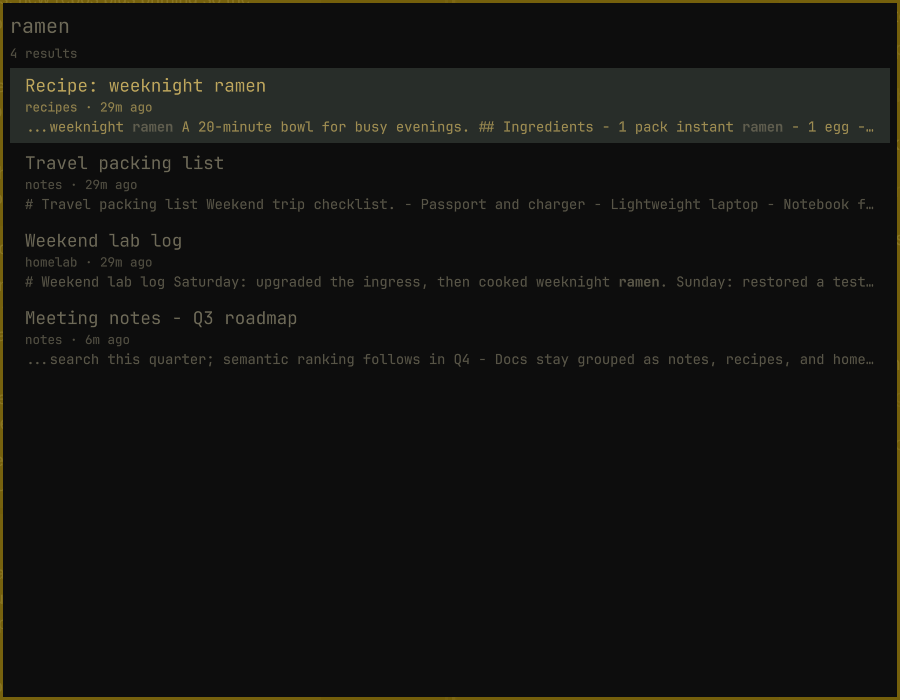
[Marketplace listing](https://omarchyplugins.com/plugin.html?id=gmickel.gno-recall)
|
|
860
|
+
· [Setup and runtime compatibility](https://github.com/gmickel/omarchy-gno-recall#install)
|
|
861
|
+
· [Screenshots](https://github.com/gmickel/omarchy-gno-recall#screenshots)
|
|
862
|
+
|
|
863
|
+
Recall uses its own verified GNO/Bun runtime. A global GNO upgrade does not
|
|
864
|
+
update it; follow the plugin's update instructions and shared-index
|
|
865
|
+
compatibility guidance.
|
|
866
|
+
|
|
867
|
+
|
|
822
868
|
|
|
823
869
|
---
|
|
824
870
|
|
package/assets/skill/README.md
CHANGED
|
@@ -1,10 +1,10 @@
|
|
|
1
1
|
# GNO — Agent Skill
|
|
2
2
|
|
|
3
3
|
Local-first semantic search for documents, notes, and knowledge bases,
|
|
4
|
-
packaged as a Claude Code / Codex / OpenCode / OpenClaw skill.
|
|
4
|
+
packaged as a Claude Code / Codex / OpenCode / OpenClaw / Hermes skill.
|
|
5
5
|
|
|
6
6
|
> **TL;DR** — this folder is a runnable agent skill. Drop it into any
|
|
7
|
-
> Claude Code, Codex, OpenCode, or
|
|
7
|
+
> Claude Code, Codex, OpenCode, OpenClaw, or Hermes workspace and the agent can
|
|
8
8
|
> index and search your local files through the `gno` CLI.
|
|
9
9
|
|
|
10
10
|
## Prerequisites
|
|
@@ -13,14 +13,10 @@ You need the `gno` CLI installed locally. The skill drives it; it does
|
|
|
13
13
|
not ship the binary itself.
|
|
14
14
|
|
|
15
15
|
```bash
|
|
16
|
-
|
|
17
|
-
curl -fsSL https://gno.sh/install | bash
|
|
18
|
-
|
|
19
|
-
# npm / Bun
|
|
20
|
-
bun add -g @gmickel/gno # or: npm install -g @gmickel/gno
|
|
16
|
+
bun install -g @gmickel/gno
|
|
21
17
|
```
|
|
22
18
|
|
|
23
|
-
Verify
|
|
19
|
+
Verify the installed release with `gno --version`. Use the bundled skill to match that release.
|
|
24
20
|
|
|
25
21
|
## Install the skill
|
|
26
22
|
|
|
@@ -30,8 +26,7 @@ you're starting from.
|
|
|
30
26
|
### Option A — install from your local `gno` (recommended if you already have GNO)
|
|
31
27
|
|
|
32
28
|
If you already installed GNO, it ships this skill in-tree. One command
|
|
33
|
-
drops it into the right place for every supported agent,
|
|
34
|
-
with your installed GNO version:
|
|
29
|
+
drops it into the right place for every supported agent, matching the GNO version installed when you run it:
|
|
35
30
|
|
|
36
31
|
```bash
|
|
37
32
|
gno skill install --target claude # Claude Code (default)
|
|
@@ -59,23 +54,67 @@ gno skill paths # resolved installation paths
|
|
|
59
54
|
gno skill uninstall --target all # remove from all agents
|
|
60
55
|
```
|
|
61
56
|
|
|
62
|
-
|
|
63
|
-
|
|
57
|
+
After upgrading GNO, refresh the installed copy as described below.
|
|
58
|
+
|
|
59
|
+
### Option B: ClawHub-managed installation
|
|
60
|
+
|
|
61
|
+
Use the [GNO listing](https://clawhub.ai/gmickel/gno) when your harness manages
|
|
62
|
+
skills through a registry. The GNO executable is still required separately.
|
|
63
|
+
|
|
64
|
+
```bash
|
|
65
|
+
# OpenClaw workspace: run from its workspace root
|
|
66
|
+
bunx clawhub@0.23.3 install @gmickel/gno
|
|
67
|
+
bunx clawhub@0.23.3 update @gmickel/gno
|
|
68
|
+
|
|
69
|
+
# Hermes hub installation
|
|
70
|
+
hermes skills install clawhub/gno # May require review; prefer the local installer
|
|
71
|
+
hermes skills check
|
|
72
|
+
hermes skills update gno
|
|
73
|
+
```
|
|
74
|
+
|
|
75
|
+
GNO releases publish the same source bundle to ClawHub. Choose one installer
|
|
76
|
+
for a given skill directory so registry and local copies do not overwrite one
|
|
77
|
+
another. For Hermes, prefer the local GNO installer if your hub version cannot
|
|
78
|
+
retrieve the full bundle. A bare SKILL.md URL may omit recipes and references.
|
|
64
79
|
|
|
65
|
-
|
|
80
|
+
## Install the retrieval protocol too
|
|
66
81
|
|
|
67
|
-
|
|
68
|
-
|
|
69
|
-
|
|
82
|
+
For second-brain and LLM-wiki work, pair the skill with standing instructions
|
|
83
|
+
for the harness. The skill teaches commands and workflows; the protocol teaches
|
|
84
|
+
when to retrieve, which search path to use, and how to cite and maintain knowledge.
|
|
70
85
|
|
|
71
86
|
```bash
|
|
72
|
-
|
|
73
|
-
|
|
74
|
-
openclaw skills info gno # inspect what's installed
|
|
87
|
+
gno agents install # Detected supported harnesses
|
|
88
|
+
gno agents verify
|
|
75
89
|
```
|
|
76
90
|
|
|
77
|
-
|
|
78
|
-
|
|
91
|
+
Use `--target claude`, `codex`, `opencode`, `openclaw`, or `hermes` for one
|
|
92
|
+
harness. MCP users should install the protocol too where supported. Text outside
|
|
93
|
+
the managed instruction block stays unchanged. Start a fresh session and verify
|
|
94
|
+
that the agent retrieves and cites a document from your index. The verify command
|
|
95
|
+
checks the block, not model behavior. See [agent instructions](https://gno.sh/docs/agents-install).
|
|
96
|
+
|
|
97
|
+
## Keep installations current
|
|
98
|
+
|
|
99
|
+
Local installs copy the skill from your installed GNO release. After upgrading,
|
|
100
|
+
refresh the selected target and protocol:
|
|
101
|
+
|
|
102
|
+
```bash
|
|
103
|
+
gno skill install --target hermes --scope user --force
|
|
104
|
+
gno agents update --target hermes
|
|
105
|
+
gno agents verify --target hermes
|
|
106
|
+
```
|
|
107
|
+
|
|
108
|
+
`--force` replaces local skill edits. Preserve your customizations before using
|
|
109
|
+
it. Change the target for another harness. Registry installs use their native
|
|
110
|
+
update command instead; upgrading the GNO executable alone does not refresh them.
|
|
111
|
+
|
|
112
|
+
For unattended registry updates, schedule only the chosen skill's native update
|
|
113
|
+
command with your OS scheduler, using the same user, workspace, and executable
|
|
114
|
+
paths as the interactive install. Preserve logs and keep safety prompts enabled;
|
|
115
|
+
an update that needs approval must remain pending. Run `gno agents update` after
|
|
116
|
+
upgrading GNO. New skill versions can require a newer executable, so update GNO
|
|
117
|
+
before refreshing the skill. Publishing a release does not modify users' machines.
|
|
79
118
|
|
|
80
119
|
## What the skill teaches the agent
|
|
81
120
|
|
|
Binary file
|
|
@@ -0,0 +1 @@
|
|
|
1
|
+
293a8a52bc9368e6755cc9a23970f83fc6c0344a6832132c93a65b9c73bc3e28 gno-browser-clipper-v2.3.2.zip
|
package/package.json
CHANGED
|
@@ -1 +0,0 @@
|
|
|
1
|
-
9eea4e537f21515ea5de8e1eaea1710b5af0a1201a8b05db399ef0b6874f5f64 gno-browser-clipper-v2.3.0.zip
|