@gluztm/dsh-guard 2.4.0 → 2.4.2
This diff represents the content of publicly available package versions that have been released to one of the supported registries. The information contained in this diff is provided for informational purposes only and reflects changes between package versions as they appear in their respective public registries.
- package/README.en.md +38 -40
- package/README.md +38 -44
- package/bin/dsh-guard.mjs +112 -47
- package/lib/client.js +1679 -451
- package/lib/index.mjs +220 -40
- package/lib/inspector.mjs +1480 -424
- package/package.json +3 -2
- package/screenshots.json +7 -0
package/README.en.md
CHANGED
|
@@ -1,48 +1,46 @@
|
|
|
1
|
-
# @gluztm/dsh-guard
|
|
2
|
-
|
|
3
|
-
|
|
4
|
-
|
|
5
|
-
|
|
6
|
-
|
|
7
|
-
|
|
8
|
-
|
|
9
|
-
|
|
10
|
-
|
|
11
|
-
|
|
12
|
-
|
|
13
|
-
|
|
14
|
-
|
|
15
|
-
|
|
16
|
-
|
|
17
|
-
|
|
18
|
-
|
|
19
|
-
|
|
20
|
-
|
|
21
|
-
|
|
1
|
+
# @gluztm/dsh-guard
|
|
2
|
+
|
|
3
|
+
> Cross-platform configuration, extension, and snapshot companion plugin for **DeepSeek Harness (DSH)**. Runs directly inside DSH Web and CLI without external installers: toggle plugins & MCP servers with automatic backups, repair broken symlinks, inspect `llm-pi-ai` providers, blind-write `.credentials.yaml` refs, and compare/restore local YAML/JSON snapshots.
|
|
4
|
+
|
|
5
|
+
[中文文档](./README.md) · [GitHub Repository](https://github.com/gluztm/DSHGuard) · [Releases](https://github.com/gluztm/DSHGuard/releases/tag/2.4.2)
|
|
6
|
+
|
|
7
|
+
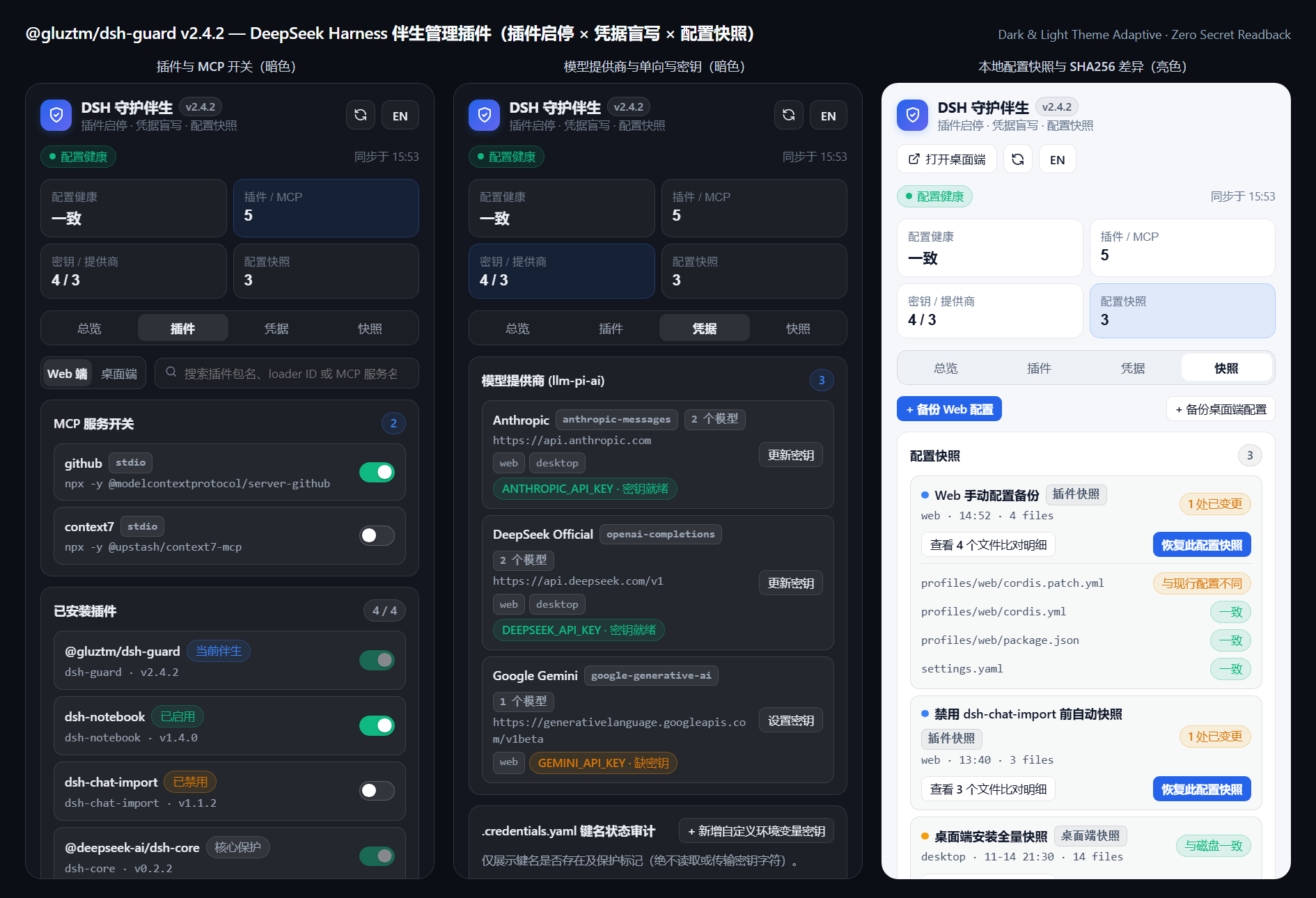
|
|
8
|
+
|
|
9
|
+
## Built-In Capabilities
|
|
10
|
+
|
|
11
|
+
1. **Plugin & MCP Toggle Switchboard (Web & Desktop tracks)**
|
|
12
|
+
- Resolves per-package `loaderId` declarations via `dsh.bundle.patch` / `cordis.patch.yml` and detects `@deepseek-ai/dsh-mcp-client` servers.
|
|
13
|
+
- Protects core `@deepseek-ai/*` modules and the companion plugin itself from accidental disablement.
|
|
14
|
+
- Creates an automatic pre-change snapshot before modifying `cordis.patch.yml` using strict YAML quoting rules.
|
|
15
|
+
2. **Profile Drift & Broken Symlink Repair**
|
|
16
|
+
- Audits `profiles/web` and `profiles/desktop` for missing `dsh.bundles` dependencies and hash drift.
|
|
17
|
+
- Detects broken symlinks / NTFS junctions under `node_modules` and relinks valid targets from `.dsh-module-fallback` or sibling profiles in pure Node.js.
|
|
18
|
+
3. **`llm-pi-ai` Inspection & One-Way `.credentials.yaml` Blind Write**
|
|
19
|
+
- Displays provider protocols (`anthropic-messages`, `openai-completions`, `google-generative-ai`), `baseURL`, model counts, and key readiness badges.
|
|
20
|
+
- **Zero secret readback**: writes user-entered API keys strictly one-way into `.credentials.yaml` `refs:` while preserving `version`, `records`, comments, and protected `*_ACCOUNT_*` OAuth blocks. Never reads back or transmits plaintext values (`redLines: []`, `secretTouches: []` in `dsh-trust-check`).
|
|
21
|
+
4. **Native Config Snapshots, Live SHA256 Diff & Whitelist Rollback**
|
|
22
|
+
- Backs up `cordis.patch.yml`, `cordis.yml`, `package.json`, and `settings.yaml` into `~/.dsh/guard-snapshots` (**strictly excluding** `.credentials.yaml` and secret files).
|
|
23
|
+
- Computes live SHA256 file diff status against disk and restores whitelisted YAML/JSON configs in 1 click (with an automatic `pre-restore` backup).
|
|
24
|
+
5. **Agent Tools, Slash Command & CLI**
|
|
25
|
+
- Tools: `dsh_guard_status`, `dsh_guard_snapshots`, `dsh_guard_backup`, `dsh_guard_open`
|
|
26
|
+
- Slash command: `/guard [status|snapshots|backup [web|desktop|all]|open]`
|
|
27
|
+
- CLI: `dsh-guard status [--json]`, `dsh-guard snapshots`, `dsh-guard backup [web|desktop]`, `dsh-guard repair [web|desktop]`
|
|
22
28
|
|
|
23
29
|
---
|
|
24
30
|
|
|
25
|
-
##
|
|
26
|
-
|
|
27
|
-
```powershell
|
|
28
|
-
# Add to DSH Web profile (Sidebar UI + Agent tools + /guard)
|
|
29
|
-
dsh plugin --profile web add https://github.com/gluztm/DSHGuard/releases/download/2.4.0/dsh-guard-2.4.0.tgz
|
|
31
|
+
## Architecture & Security Boundaries (When Native Desktop App Is Needed)
|
|
30
32
|
|
|
31
|
-
|
|
32
|
-
dsh plugin --profile desktop add https://github.com/gluztm/DSHGuard/releases/download/2.4.0/dsh-guard-2.4.0.tgz
|
|
33
|
-
```
|
|
33
|
+
Routine plugin toggling, credential key entry, link repair, and YAML config snapshots all run directly inside `@gluztm/dsh-guard`. A smaller set of OS-level / out-of-band workflows cannot safely execute inside a live DSH host plugin and live exclusively in the standalone **[DSHGuard Desktop (Windows)](https://github.com/gluztm/DSHGuard/releases/tag/2.4.2)** app:
|
|
34
34
|
|
|
35
|
-
|
|
35
|
+
| Area | Handled Inside Companion Plugin | Exclusive to Native Desktop App (Why) |
|
|
36
|
+
| :--- | :--- | :--- |
|
|
37
|
+
| **Extension Lifecycle** | Toggle plugins & MCP entries, repair symlinks | **Fresh install / full uninstall / force kill locks**: running `npm install` or deleting `node_modules` inside the live host tears loaded modules and hits file locks; plugins should also never pull remote installers or terminate the host process. |
|
|
38
|
+
| **Secrets & Migration** | Key existence audit + one-way write to `.credentials.yaml` | **Plaintext vault, Windows DPAPI & CC Switch import**: Web UI plugins with `fetch` are barred from reading back secrets; hardware-bound DPAPI encryption and cross-tool migrations rely on native Windows security APIs. |
|
|
39
|
+
| **System Rollback** | Live diff & rollback of YAML/JSON configs | **Full `node_modules` ZIP recovery & crash recovery**: restoring full package trees and relaunching DSH requires an external supervisor running out of process. |
|
|
36
40
|
|
|
37
|
-
|
|
38
|
-
|
|
39
|
-
node packages/dsh-guard/bin/dsh-guard.mjs snapshots --json
|
|
40
|
-
```
|
|
41
|
-
|
|
42
|
-
---
|
|
41
|
+
- When `DSHGuard.exe` is detected locally on Windows, the header shows an unobtrusive **Open Desktop** action.
|
|
42
|
+
- Windows users who need those out-of-band capabilities can obtain [DSHGuard-Setup-2.4.2.exe](https://github.com/gluztm/DSHGuard/releases/download/2.4.2/DSHGuard-Setup-2.4.2.exe) from [Release v2.4.2](https://github.com/gluztm/DSHGuard/releases/tag/2.4.2).
|
|
43
43
|
|
|
44
|
-
##
|
|
44
|
+
## License
|
|
45
45
|
|
|
46
|
-
|
|
47
|
-
- **Same-Origin Request Gating**: HTTP routes (`/api/dsh-guard/overview` and `/api/dsh-guard/open`) enforce DSH's `connection.requestRejection` check and never accept arbitrary filesystem path parameters from HTTP callers.
|
|
48
|
-
- **Strictly Read-Only**: Never mutates DSH profiles or third-party plugins. Config/plugin mutations, snapshot rollback, and CC Switch import remain isolated in the out-of-band Windows `DSHGuard.exe` supervisor.
|
|
46
|
+
MIT © gluztm
|
package/README.md
CHANGED
|
@@ -1,52 +1,46 @@
|
|
|
1
|
-
# @gluztm/dsh-guard
|
|
2
|
-
|
|
3
|
-
|
|
4
|
-
|
|
5
|
-
|
|
6
|
-
|
|
7
|
-
|
|
8
|
-
|
|
9
|
-
|
|
10
|
-
|
|
11
|
-
|
|
12
|
-
|
|
13
|
-
|
|
14
|
-
|
|
15
|
-
|
|
16
|
-
|
|
17
|
-
|
|
18
|
-
|
|
19
|
-
|
|
20
|
-
|
|
21
|
-
|
|
1
|
+
# @gluztm/dsh-guard
|
|
2
|
+
|
|
3
|
+
> 面向 **DeepSeek Harness (DSH)** 的跨平台伴生配置与扩展管理插件:无需额外安装独立软件,直接在 Web 侧边栏与全屏页面内完成 **插件 / MCP 开关(变更前自动备份)**、**断裂依赖修复**、**`llm-pi-ai` 巡检与 `.credentials.yaml` 单向盲写** 及 **本地 YAML/JSON 配置快照 + SHA256 差异回滚**。
|
|
4
|
+
|
|
5
|
+
[English Documentation](./README.en.md) · [GitHub 仓库](https://github.com/gluztm/DSHGuard) · [Releases](https://github.com/gluztm/DSHGuard/releases/tag/2.4.2)
|
|
6
|
+
|
|
7
|
+

|
|
8
|
+
|
|
9
|
+
## 伴生插件内置核心能力
|
|
10
|
+
|
|
11
|
+
1. **插件与 MCP 实时启停开关(Web / Desktop 双轨)**
|
|
12
|
+
- 自动解析各插件包 `dsh.bundle.patch` / `cordis.patch.yml` 的 `loaderId` 及 `mcp-client` 条目。
|
|
13
|
+
- 搜索过滤 MCP 服务与已安装插件;内置保护标记(禁止误关 `@deepseek-ai/*` 核心组件或插件自身)。
|
|
14
|
+
- 每次切换开关前都会自动保存一份配置快照(`auto-toggle`),按 Cordis 规则安全引用 `- id:`。
|
|
15
|
+
2. **双轨健康巡检与一键断链修复**
|
|
16
|
+
- 对比 `profiles/web` 与 `profiles/desktop` 的 `dependencies`、`dsh.bundles` 漂移与 `cordis.patch.yml` 哈希。
|
|
17
|
+
- 检测并直接修复 `node_modules` 下失效的符号链接 / NTFS Junction,自动链接至 `.dsh-module-fallback` 或兄弟档案。
|
|
18
|
+
3. **模型提供商巡检与 `.credentials.yaml` 纯单向盲写**
|
|
19
|
+
- 汇总 `llm-pi-ai` 中配置的各家协议(`anthropic-messages` / `openai-completions` / `google-generative-ai`)、`baseURL`、模型数量与环境变量就绪状态。
|
|
20
|
+
- **零明文回显**:可在前端为提供商或自定义环境变量名设置 API Key,服务端采用「只写入 `refs:`、保留 `version`/`records`/`*_ACCOUNT_*` OAuth 块、响应绝不返回明文」的单向盲写模型(通过 `dsh-trust-check` 静态扫描零红线)。
|
|
21
|
+
4. **原生插件快照与实时文件 SHA256 差异回滚**
|
|
22
|
+
- 将 `cordis.patch.yml`、`cordis.yml`、`package.json`、`settings.yaml` 备份至 `~/.dsh/guard-snapshots`(**严格排除** `.credentials.yaml` 等任何敏感文件)。
|
|
23
|
+
- 与磁盘现行配置实时比对 SHA256 状态(`一致` / `已变更` / `已删除`),支持白名单内配置文件一键安全还原(还原前自动二次备份 `pre-restore`)。
|
|
24
|
+
5. **内置 4 个 Agent 工具 + `/guard` 斜杠命令 + CLI**
|
|
25
|
+
- Agent 工具:`dsh_guard_status`、`dsh_guard_snapshots`、`dsh_guard_backup`、`dsh_guard_open`
|
|
26
|
+
- 斜杠命令:`/guard`、`/guard status`、`/guard snapshots`、`/guard backup [web|desktop|all]`、`/guard open`
|
|
27
|
+
- CLI:`dsh-guard status [--json]`、`dsh-guard snapshots`、`dsh-guard backup [web|desktop]`、`dsh-guard repair [web|desktop]`
|
|
22
28
|
|
|
23
29
|
---
|
|
24
30
|
|
|
25
|
-
##
|
|
31
|
+
## 技术与安全边界说明(何时需要原生桌面端)
|
|
26
32
|
|
|
27
|
-
|
|
33
|
+
本伴生插件已经覆盖日常高频的开关、密钥盲写与 YAML 配置备份回滚需求;以下能力由于操作系统或安全架构限制,**无法在运行中的 DSH Node 宿主插件内部安全实现**,仅在独立进程外原生程序 **[DSHGuard Desktop (Windows)](https://github.com/gluztm/DSHGuard/releases/tag/2.4.2)** 中提供:
|
|
28
34
|
|
|
29
|
-
|
|
35
|
+
| 能力领域 | 伴生插件内置能力 | 仅独立原生桌面端提供(及原因) |
|
|
36
|
+
| :--- | :--- | :--- |
|
|
37
|
+
| **插件包生命周期** | 安全切换插件/MCP 开关、断链修复 | **全新安装 / 彻底卸载 / 强杀锁死进程**:运行时在宿主进程内删除或重装 `node_modules` 会撕裂已加载模块并触发文件占用锁死;且插件不应持有远端包拉取与进程强杀权。 |
|
|
38
|
+
| **凭据安全与导入** | `.credentials.yaml` 键名审计 + 单向盲写 | **明文编辑 / Windows DPAPI 硬件加密库 / CC Switch 导入**:Web 插件拥有前端请求能力,依据安全合规禁止反向回显明文;DPAPI 与跨工具配置迁移依赖 Windows 原生安全 API。 |
|
|
39
|
+
| **系统级备份恢复** | YAML/JSON 配置文件实时对比与回滚 | **整包扩展目录 ZIP 归档 + 主程序崩溃带外恢复**:涵盖整套 `node_modules` 与主程序启停的重型恢复必须脱离 DSH 宿主进程独立调度。 |
|
|
30
40
|
|
|
31
|
-
|
|
32
|
-
|
|
33
|
-
dsh plugin --profile web add https://github.com/gluztm/DSHGuard/releases/download/2.4.0/dsh-guard-2.4.0.tgz
|
|
34
|
-
|
|
35
|
-
# 同步安装到 DSH 桌面版
|
|
36
|
-
dsh plugin --profile desktop add https://github.com/gluztm/DSHGuard/releases/download/2.4.0/dsh-guard-2.4.0.tgz
|
|
37
|
-
```
|
|
38
|
-
|
|
39
|
-
### 方式 B:从源码子包本地运行只读 CLI(Node.js >= 18)
|
|
40
|
-
|
|
41
|
-
```powershell
|
|
42
|
-
node packages/dsh-guard/bin/dsh-guard.mjs status
|
|
43
|
-
node packages/dsh-guard/bin/dsh-guard.mjs snapshots --json
|
|
44
|
-
```
|
|
45
|
-
|
|
46
|
-
---
|
|
41
|
+
- 若本机已安装 Windows 原生桌面端,插件右上角会自动显示「打开桌面端」快捷入口。
|
|
42
|
+
- 仅需要上述带外桌面功能时,可在 [GitHub Release v2.4.2](https://github.com/gluztm/DSHGuard/releases/tag/2.4.2) 获取 [DSHGuard-Setup-2.4.2.exe](https://github.com/gluztm/DSHGuard/releases/download/2.4.2/DSHGuard-Setup-2.4.2.exe)(源码可审计,基于 .NET 8 + WPF 原生构建)。
|
|
47
43
|
|
|
48
|
-
##
|
|
44
|
+
## 许可协议
|
|
49
45
|
|
|
50
|
-
|
|
51
|
-
- **同源校验鉴权**:服务端暴露的 `/api/dsh-guard/overview` 与 `/api/dsh-guard/open` 路由复用 DSH 的 `connection.requestRejection` 校验,仅使用服务端 `DSH_HOME` / `DSHGUARD_HOME` 环境变量路径,不接受外部路径参数。
|
|
52
|
-
- **只读原则**:本插件不会改写 DSH 配置、卸载或更新第三方插件;所有高风险变更(装卸更新、快照回滚、CC Switch 多源导入)均交由进程外的 Windows 桌面壳 `DSHGuard.exe` 先自动存档后隔离执行。
|
|
46
|
+
MIT © gluztm
|
package/bin/dsh-guard.mjs
CHANGED
|
@@ -1,66 +1,131 @@
|
|
|
1
1
|
#!/usr/bin/env node
|
|
2
2
|
import {
|
|
3
|
+
PACKAGE_VERSION,
|
|
4
|
+
createSnapshot,
|
|
3
5
|
formatHealthText,
|
|
4
6
|
formatSnapshotsText,
|
|
5
7
|
inspectHealth,
|
|
6
8
|
inspectSnapshots,
|
|
7
9
|
openGuard,
|
|
10
|
+
repairBrokenModuleLinks,
|
|
11
|
+
resolveDshHome,
|
|
8
12
|
} from '../lib/inspector.mjs'
|
|
9
13
|
|
|
10
14
|
function parseArgs(argv) {
|
|
11
|
-
const
|
|
12
|
-
|
|
13
|
-
|
|
14
|
-
|
|
15
|
-
|
|
16
|
-
|
|
17
|
-
|
|
18
|
-
|
|
19
|
-
|
|
20
|
-
|
|
21
|
-
|
|
22
|
-
for (let i = 0; i <
|
|
23
|
-
const
|
|
24
|
-
if (
|
|
25
|
-
|
|
26
|
-
else if (
|
|
27
|
-
|
|
28
|
-
else if (
|
|
29
|
-
|
|
30
|
-
else if (
|
|
31
|
-
|
|
32
|
-
else if (
|
|
15
|
+
const opts = {
|
|
16
|
+
command: 'status',
|
|
17
|
+
json: false,
|
|
18
|
+
launch: false,
|
|
19
|
+
target: 'all',
|
|
20
|
+
limit: 20,
|
|
21
|
+
dshHome: undefined,
|
|
22
|
+
guardHome: undefined,
|
|
23
|
+
help: false,
|
|
24
|
+
}
|
|
25
|
+
const positionals = []
|
|
26
|
+
for (let i = 0; i < argv.length; i += 1) {
|
|
27
|
+
const arg = argv[i]
|
|
28
|
+
if (arg === '--json') {
|
|
29
|
+
opts.json = true
|
|
30
|
+
} else if (arg === '--launch') {
|
|
31
|
+
opts.launch = true
|
|
32
|
+
} else if (arg === '-h' || arg === '--help') {
|
|
33
|
+
opts.help = true
|
|
34
|
+
} else if (arg === '--target' && i + 1 < argv.length) {
|
|
35
|
+
opts.target = argv[++i]
|
|
36
|
+
} else if (arg.startsWith('--target=')) {
|
|
37
|
+
opts.target = arg.slice('--target='.length)
|
|
38
|
+
} else if (arg === '--limit' && i + 1 < argv.length) {
|
|
39
|
+
opts.limit = Number(argv[++i]) || 20
|
|
40
|
+
} else if (arg.startsWith('--limit=')) {
|
|
41
|
+
opts.limit = Number(arg.slice('--limit='.length)) || 20
|
|
42
|
+
} else if (arg === '--dsh-home' && i + 1 < argv.length) {
|
|
43
|
+
opts.dshHome = argv[++i]
|
|
44
|
+
} else if (arg.startsWith('--dsh-home=')) {
|
|
45
|
+
opts.dshHome = arg.slice('--dsh-home='.length)
|
|
46
|
+
} else if (arg === '--guard-home' && i + 1 < argv.length) {
|
|
47
|
+
opts.guardHome = argv[++i]
|
|
48
|
+
} else if (arg.startsWith('--guard-home=')) {
|
|
49
|
+
opts.guardHome = arg.slice('--guard-home='.length)
|
|
50
|
+
} else if (!arg.startsWith('-')) {
|
|
51
|
+
positionals.push(arg)
|
|
52
|
+
}
|
|
53
|
+
}
|
|
54
|
+
if (positionals.length > 0) {
|
|
55
|
+
opts.command = positionals[0].toLowerCase()
|
|
56
|
+
}
|
|
57
|
+
if (positionals.length > 1 && (opts.command === 'backup' || opts.command === 'repair')) {
|
|
58
|
+
opts.target = positionals[1].toLowerCase()
|
|
33
59
|
}
|
|
60
|
+
return opts
|
|
61
|
+
}
|
|
34
62
|
|
|
35
|
-
|
|
63
|
+
function printHelp() {
|
|
64
|
+
console.log(
|
|
65
|
+
[
|
|
66
|
+
`dsh-guard v${PACKAGE_VERSION} — DSH 伴生管理工具`,
|
|
67
|
+
'',
|
|
68
|
+
'用法:',
|
|
69
|
+
' dsh-guard status [--target all|web|desktop] [--dsh-home PATH] [--json]',
|
|
70
|
+
' dsh-guard snapshots [--target all|web|desktop] [--limit N] [--json]',
|
|
71
|
+
' dsh-guard backup [web|desktop|all] [--dsh-home PATH] [--json]',
|
|
72
|
+
' dsh-guard repair [web|desktop] [--dsh-home PATH] [--json]',
|
|
73
|
+
' dsh-guard open [--launch] [--json]',
|
|
74
|
+
].join('\n'),
|
|
75
|
+
)
|
|
36
76
|
}
|
|
37
77
|
|
|
38
|
-
|
|
78
|
+
async function main() {
|
|
79
|
+
const opts = parseArgs(process.argv.slice(2))
|
|
80
|
+
if (opts.help || opts.command === 'help') {
|
|
81
|
+
printHelp()
|
|
82
|
+
return
|
|
83
|
+
}
|
|
39
84
|
|
|
40
|
-
if (opts.
|
|
41
|
-
|
|
42
|
-
|
|
43
|
-
|
|
44
|
-
|
|
45
|
-
|
|
46
|
-
|
|
47
|
-
|
|
48
|
-
|
|
49
|
-
|
|
50
|
-
}
|
|
85
|
+
if (opts.command === 'snapshots' || opts.command === 'snap') {
|
|
86
|
+
const report = inspectSnapshots({
|
|
87
|
+
dshHome: opts.dshHome,
|
|
88
|
+
guardHome: opts.guardHome,
|
|
89
|
+
target: opts.target,
|
|
90
|
+
limit: opts.limit,
|
|
91
|
+
})
|
|
92
|
+
console.log(opts.json ? JSON.stringify(report, null, 2) : formatSnapshotsText(report))
|
|
93
|
+
return
|
|
94
|
+
}
|
|
51
95
|
|
|
52
|
-
if (opts.command === '
|
|
53
|
-
|
|
54
|
-
|
|
55
|
-
|
|
56
|
-
|
|
96
|
+
if (opts.command === 'backup') {
|
|
97
|
+
const t = opts.target === 'desktop' || opts.target === 'all' ? opts.target : 'web'
|
|
98
|
+
const res = createSnapshot(resolveDshHome(opts.dshHome), t, 'manual', 'CLI dsh-guard backup')
|
|
99
|
+
if (opts.json) {
|
|
100
|
+
console.log(JSON.stringify(res, null, 2))
|
|
101
|
+
} else {
|
|
102
|
+
console.log(`已创建配置快照 ${res.snapshot.id}(${res.snapshot.target} · ${res.snapshot.itemCount} 个文件)`)
|
|
103
|
+
}
|
|
104
|
+
return
|
|
105
|
+
}
|
|
106
|
+
|
|
107
|
+
if (opts.command === 'repair') {
|
|
108
|
+
const t = opts.target === 'desktop' ? 'desktop' : 'web'
|
|
109
|
+
const res = repairBrokenModuleLinks(resolveDshHome(opts.dshHome), t)
|
|
110
|
+
if (opts.json) {
|
|
111
|
+
console.log(JSON.stringify(res, null, 2))
|
|
112
|
+
} else {
|
|
113
|
+
console.log(`断链修复 (${res.target}): 已修复 ${res.repairedCount},未解析 ${res.unresolvableCount}`)
|
|
114
|
+
}
|
|
115
|
+
return
|
|
116
|
+
}
|
|
117
|
+
|
|
118
|
+
if (opts.command === 'open') {
|
|
119
|
+
const res = openGuard({ guardHome: opts.guardHome, launch: opts.launch })
|
|
120
|
+
console.log(opts.json ? JSON.stringify(res, null, 2) : res.message)
|
|
121
|
+
return
|
|
122
|
+
}
|
|
57
123
|
|
|
58
|
-
|
|
59
|
-
|
|
60
|
-
console.log(opts.json ? JSON.stringify(res, null, 2) : res.message)
|
|
61
|
-
process.exit(0)
|
|
124
|
+
const health = inspectHealth({ dshHome: opts.dshHome, guardHome: opts.guardHome, target: opts.target })
|
|
125
|
+
console.log(opts.json ? JSON.stringify(health, null, 2) : formatHealthText(health))
|
|
62
126
|
}
|
|
63
127
|
|
|
64
|
-
|
|
65
|
-
console.
|
|
66
|
-
process.
|
|
128
|
+
main().catch((err) => {
|
|
129
|
+
console.error(err instanceof Error ? err.message : String(err))
|
|
130
|
+
process.exitCode = 1
|
|
131
|
+
})
|