@gluip/chart-canvas-mcp 0.1.4 → 0.2.0
This diff represents the content of publicly available package versions that have been released to one of the supported registries. The information contained in this diff is provided for informational purposes only and reflects changes between package versions as they appear in their respective public registries.
- package/LICENSE +21 -0
- package/README.md +238 -0
- package/dist/database.js +112 -0
- package/dist/index.js +183 -0
- package/dist/transformers.js +138 -0
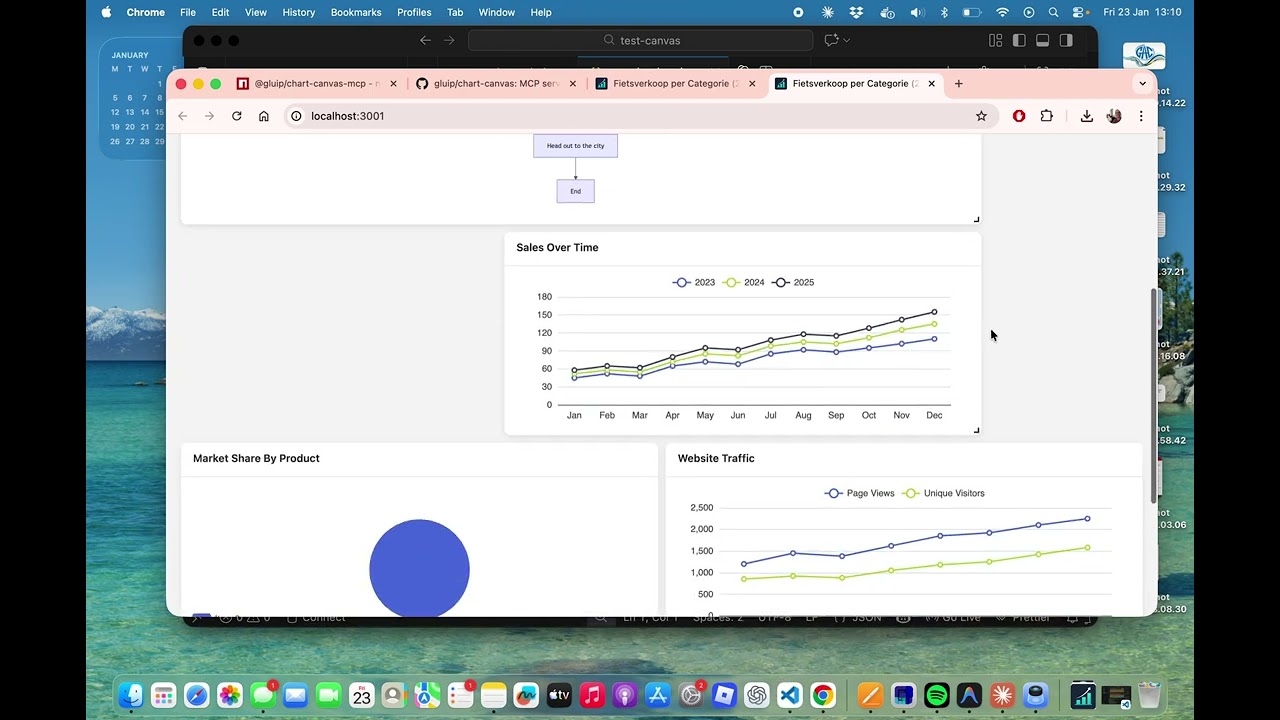
- package/package.json +11 -4
package/LICENSE
ADDED
|
@@ -0,0 +1,21 @@
|
|
|
1
|
+
MIT License
|
|
2
|
+
|
|
3
|
+
Copyright (c) 2026 Martijn
|
|
4
|
+
|
|
5
|
+
Permission is hereby granted, free of charge, to any person obtaining a copy
|
|
6
|
+
of this software and associated documentation files (the "Software"), to deal
|
|
7
|
+
in the Software without restriction, including without limitation the rights
|
|
8
|
+
to use, copy, modify, merge, publish, distribute, sublicense, and/or sell
|
|
9
|
+
copies of the Software, and to permit persons to whom the Software is
|
|
10
|
+
furnished to do so, subject to the following conditions:
|
|
11
|
+
|
|
12
|
+
The above copyright notice and this permission notice shall be included in all
|
|
13
|
+
copies or substantial portions of the Software.
|
|
14
|
+
|
|
15
|
+
THE SOFTWARE IS PROVIDED "AS IS", WITHOUT WARRANTY OF ANY KIND, EXPRESS OR
|
|
16
|
+
IMPLIED, INCLUDING BUT NOT LIMITED TO THE WARRANTIES OF MERCHANTABILITY,
|
|
17
|
+
FITNESS FOR A PARTICULAR PURPOSE AND NONINFRINGEMENT. IN NO EVENT SHALL THE
|
|
18
|
+
AUTHORS OR COPYRIGHT HOLDERS BE LIABLE FOR ANY CLAIM, DAMAGES OR OTHER
|
|
19
|
+
LIABILITY, WHETHER IN AN ACTION OF CONTRACT, TORT OR OTHERWISE, ARISING FROM,
|
|
20
|
+
OUT OF OR IN CONNECTION WITH THE SOFTWARE OR THE USE OR OTHER DEALINGS IN THE
|
|
21
|
+
SOFTWARE.
|
package/README.md
ADDED
|
@@ -0,0 +1,238 @@
|
|
|
1
|
+
# Chart Canvas MCP Server
|
|
2
|
+
|
|
3
|
+
> Interactive visualization dashboard for AI assistants via Model Context Protocol
|
|
4
|
+
|
|
5
|
+
Create beautiful charts, diagrams, and tables directly from your AI conversations. Chart Canvas provides a real-time dashboard that displays visualizations as you work with LLMs like Claude.
|
|
6
|
+
|
|
7
|
+
## Demo
|
|
8
|
+
|
|
9
|
+
[](https://www.youtube.com/watch?v=XVucQstPisc)
|
|
10
|
+
|
|
11
|
+
Watch the [full demo on YouTube](https://www.youtube.com/watch?v=XVucQstPisc) to see Chart Canvas in action!
|
|
12
|
+
|
|
13
|
+
## Features
|
|
14
|
+
|
|
15
|
+
✨ **Multiple Chart Types**: Line, bar, scatter, pie charts, tables, and Mermaid diagrams
|
|
16
|
+
🎨 **Interactive Dashboard**: Drag-and-drop grid layout with real-time updates
|
|
17
|
+
🔄 **Live Synchronization**: Changes appear instantly in your browser
|
|
18
|
+
📊 **Rich Visualizations**: Powered by ECharts and Mermaid
|
|
19
|
+
�️ **SQL Database Integration**: Query SQLite databases directly and visualize results
|
|
20
|
+
⚡ **Smart Data Flow**: Execute queries server-side without passing data through LLM
|
|
21
|
+
�🚀 **Easy Setup**: One command to get started
|
|
22
|
+
🌐 **Production Ready**: Built-in production mode with optimized builds
|
|
23
|
+
|
|
24
|
+
## Quick Start
|
|
25
|
+
|
|
26
|
+
### Installation
|
|
27
|
+
|
|
28
|
+
```bash
|
|
29
|
+
npm install -g @gluip/chart-canvas-mcp
|
|
30
|
+
```
|
|
31
|
+
|
|
32
|
+
Or use directly with npx (no installation needed):
|
|
33
|
+
|
|
34
|
+
```bash
|
|
35
|
+
npx @gluip/chart-canvas-mcp
|
|
36
|
+
```
|
|
37
|
+
|
|
38
|
+
### Configuration
|
|
39
|
+
|
|
40
|
+
Add to your MCP client configuration (e.g., Claude Desktop):
|
|
41
|
+
|
|
42
|
+
**macOS**: `~/Library/Application Support/Claude/claude_desktop_config.json`
|
|
43
|
+
**Windows**: `%APPDATA%/Claude/claude_desktop_config.json`
|
|
44
|
+
|
|
45
|
+
```json
|
|
46
|
+
{
|
|
47
|
+
"mcpServers": {
|
|
48
|
+
"chart-canvas": {
|
|
49
|
+
"command": "npx",
|
|
50
|
+
"args": ["-y", "@gluip/chart-canvas-mcp"]
|
|
51
|
+
}
|
|
52
|
+
}
|
|
53
|
+
}
|
|
54
|
+
```
|
|
55
|
+
|
|
56
|
+
### Usage
|
|
57
|
+
|
|
58
|
+
1. Start your MCP client (e.g., Claude Desktop)
|
|
59
|
+
2. The server will automatically start on port 3000
|
|
60
|
+
3. Use the `showCanvas` tool to open the dashboard in your browser
|
|
61
|
+
4. Ask the AI to create visualizations!
|
|
62
|
+
|
|
63
|
+
## Example Prompts
|
|
64
|
+
|
|
65
|
+
```
|
|
66
|
+
"Show me a line chart comparing sales data for 2023 and 2024"
|
|
67
|
+
|
|
68
|
+
"Create a pie chart showing market share by region"
|
|
69
|
+
|
|
70
|
+
"Draw a flowchart for the user authentication process"
|
|
71
|
+
|
|
72
|
+
"Make a table with team member information"
|
|
73
|
+
|
|
74
|
+
"Show me the database schema for my SQLite database"
|
|
75
|
+
|
|
76
|
+
"Query the athletes table and show the top 10 with most personal records"
|
|
77
|
+
|
|
78
|
+
"Create a chart showing sales trends from the database grouped by region"
|
|
79
|
+
```
|
|
80
|
+
|
|
81
|
+
## MCP Tools
|
|
82
|
+
|
|
83
|
+
### addVisualization
|
|
84
|
+
|
|
85
|
+
Create charts, diagrams, and tables on the canvas.
|
|
86
|
+
|
|
87
|
+
**Supported Types**:
|
|
88
|
+
|
|
89
|
+
- `line` - Line charts with multiple series
|
|
90
|
+
- `bar` - Bar charts for comparisons
|
|
91
|
+
- `scatter` - Scatter plots for data distribution
|
|
92
|
+
- `pie` - Pie charts with labels
|
|
93
|
+
- `table` - Data tables with headers
|
|
94
|
+
- `flowchart` - Mermaid diagrams (flowcharts, sequence diagrams, Gantt charts, etc.)
|
|
95
|
+
|
|
96
|
+
**Example**:
|
|
97
|
+
|
|
98
|
+
```typescript
|
|
99
|
+
{
|
|
100
|
+
type: "line",
|
|
101
|
+
title: "Monthly Sales",
|
|
102
|
+
series: [
|
|
103
|
+
{ name: "2023", data: [[1, 120], [2, 132], [3, 101]] },
|
|
104
|
+
{ name: "2024", data: [[1, 220], [2, 182], [3, 191]] }
|
|
105
|
+
],
|
|
106
|
+
xLabels: ["Jan", "Feb", "Mar"]
|
|
107
|
+
}
|
|
108
|
+
```
|
|
109
|
+
|
|
110
|
+
### removeVisualization
|
|
111
|
+
|
|
112
|
+
Remove a specific visualization by ID.
|
|
113
|
+
|
|
114
|
+
### clearCanvas
|
|
115
|
+
|
|
116
|
+
Remove all visualizations from the canvas.
|
|
117
|
+
|
|
118
|
+
### showCanvas
|
|
119
|
+
|
|
120
|
+
Open the dashboard in your default browser.
|
|
121
|
+
|
|
122
|
+
### getDatabaseSchema
|
|
123
|
+
|
|
124
|
+
Inspect the structure of a SQLite database to understand available tables and columns before writing queries.
|
|
125
|
+
|
|
126
|
+
**Parameters**:
|
|
127
|
+
|
|
128
|
+
- `databasePath` - Path to SQLite database file (e.g., `./data/mydb.sqlite` or absolute path)
|
|
129
|
+
|
|
130
|
+
**Example**:
|
|
131
|
+
|
|
132
|
+
```typescript
|
|
133
|
+
{
|
|
134
|
+
databasePath: "/path/to/database.db";
|
|
135
|
+
}
|
|
136
|
+
```
|
|
137
|
+
|
|
138
|
+
**Returns**: Formatted schema showing all tables, columns, data types, and constraints.
|
|
139
|
+
|
|
140
|
+
### queryAndVisualize
|
|
141
|
+
|
|
142
|
+
Execute a SQL query on a SQLite database and create a visualization from the results. Queries are executed server-side and must be read-only (SELECT only). Maximum 10,000 rows.
|
|
143
|
+
|
|
144
|
+
**Parameters**:
|
|
145
|
+
|
|
146
|
+
- `databasePath` - Path to SQLite database file
|
|
147
|
+
- `query` - SQL SELECT query (read-only)
|
|
148
|
+
- `visualizationType` - Type of chart: `line`, `bar`, `scatter`, `pie`, or `table`
|
|
149
|
+
- `columnMapping` (optional for table) - Mapping of columns to chart axes:
|
|
150
|
+
- `xColumn` - Column for X-axis (required for charts)
|
|
151
|
+
- `yColumns` - Array of columns for Y-axis (required for charts)
|
|
152
|
+
- `seriesColumn` - Column to group data into separate series (optional)
|
|
153
|
+
- `groupByColumn` - Alternative grouping column (optional)
|
|
154
|
+
- `title` - Optional title for visualization
|
|
155
|
+
- `description` - Optional description
|
|
156
|
+
- `useColumnAsXLabel` - If true, use X column values as labels instead of numbers
|
|
157
|
+
|
|
158
|
+
**Example**:
|
|
159
|
+
|
|
160
|
+
```typescript
|
|
161
|
+
{
|
|
162
|
+
databasePath: "./data/sales.db",
|
|
163
|
+
query: "SELECT region, SUM(revenue) as total FROM sales GROUP BY region",
|
|
164
|
+
visualizationType: "bar",
|
|
165
|
+
columnMapping: {
|
|
166
|
+
xColumn: "region",
|
|
167
|
+
yColumns: ["total"]
|
|
168
|
+
},
|
|
169
|
+
title: "Revenue by Region",
|
|
170
|
+
useColumnAsXLabel: true
|
|
171
|
+
}
|
|
172
|
+
```
|
|
173
|
+
|
|
174
|
+
**Security**: Only SELECT and WITH (CTE) queries are allowed. INSERT, UPDATE, DELETE, DROP, and other modifying operations are blocked.
|
|
175
|
+
|
|
176
|
+
## Architecture
|
|
177
|
+
|
|
178
|
+
- **Backend**: Node.js + TypeScript + Express + MCP SDK
|
|
179
|
+
- **Frontend**: Vue 3 + ECharts + Mermaid + Grid Layout
|
|
180
|
+
- **Communication**: Real-time polling for instant updates
|
|
181
|
+
|
|
182
|
+
## Development
|
|
183
|
+
|
|
184
|
+
### Local Development
|
|
185
|
+
|
|
186
|
+
```bash
|
|
187
|
+
# Clone repository
|
|
188
|
+
git clone https://github.com/gluip/chart-canvas.git
|
|
189
|
+
cd chart-canvas
|
|
190
|
+
|
|
191
|
+
# Install backend dependencies
|
|
192
|
+
cd backend
|
|
193
|
+
npm install
|
|
194
|
+
|
|
195
|
+
# Install frontend dependencies
|
|
196
|
+
cd ../frontend
|
|
197
|
+
npm install
|
|
198
|
+
|
|
199
|
+
# Development mode (backend + frontend separate)
|
|
200
|
+
# Terminal 1 - Backend
|
|
201
|
+
cd backend
|
|
202
|
+
npm run dev
|
|
203
|
+
|
|
204
|
+
# Terminal 2 - Frontend
|
|
205
|
+
cd frontend
|
|
206
|
+
npm run dev
|
|
207
|
+
|
|
208
|
+
# Production mode (single server)
|
|
209
|
+
cd backend
|
|
210
|
+
npm run build:all
|
|
211
|
+
npm run start:prod
|
|
212
|
+
```
|
|
213
|
+
|
|
214
|
+
### MCP Configuration for Local Development
|
|
215
|
+
|
|
216
|
+
```json
|
|
217
|
+
{
|
|
218
|
+
"mcpServers": {
|
|
219
|
+
"chart-canvas": {
|
|
220
|
+
"command": "/path/to/node",
|
|
221
|
+
"args": [
|
|
222
|
+
"/path/to/chart-canvas/backend/node_modules/.bin/tsx",
|
|
223
|
+
"/path/to/chart-canvas/backend/src/index.ts"
|
|
224
|
+
]
|
|
225
|
+
}
|
|
226
|
+
}
|
|
227
|
+
}
|
|
228
|
+
```
|
|
229
|
+
|
|
230
|
+
## License
|
|
231
|
+
|
|
232
|
+
MIT © 2026 Martijn
|
|
233
|
+
|
|
234
|
+
## Links
|
|
235
|
+
|
|
236
|
+
- [NPM Package](https://www.npmjs.com/package/@gluip/chart-canvas-mcp)
|
|
237
|
+
- [GitHub Repository](https://github.com/gluip/chart-canvas)
|
|
238
|
+
- [Model Context Protocol](https://modelcontextprotocol.io)
|
package/dist/database.js
ADDED
|
@@ -0,0 +1,112 @@
|
|
|
1
|
+
import Database from "better-sqlite3";
|
|
2
|
+
import { existsSync } from "fs";
|
|
3
|
+
import { resolve } from "path";
|
|
4
|
+
const FORBIDDEN_KEYWORDS = [
|
|
5
|
+
"INSERT",
|
|
6
|
+
"UPDATE",
|
|
7
|
+
"DELETE",
|
|
8
|
+
"DROP",
|
|
9
|
+
"CREATE",
|
|
10
|
+
"ALTER",
|
|
11
|
+
"TRUNCATE",
|
|
12
|
+
"REPLACE",
|
|
13
|
+
"ATTACH",
|
|
14
|
+
"DETACH",
|
|
15
|
+
"PRAGMA",
|
|
16
|
+
];
|
|
17
|
+
const MAX_ROWS = 10000;
|
|
18
|
+
const QUERY_TIMEOUT_MS = 5000;
|
|
19
|
+
/**
|
|
20
|
+
* Validate database path - must exist and be a file
|
|
21
|
+
*/
|
|
22
|
+
export function validateDatabasePath(dbPath) {
|
|
23
|
+
const resolvedPath = resolve(dbPath);
|
|
24
|
+
if (!existsSync(resolvedPath)) {
|
|
25
|
+
throw new Error(`Database file does not exist: ${dbPath}`);
|
|
26
|
+
}
|
|
27
|
+
return resolvedPath;
|
|
28
|
+
}
|
|
29
|
+
/**
|
|
30
|
+
* Validate SQL query - must be read-only (SELECT only)
|
|
31
|
+
*/
|
|
32
|
+
export function validateReadOnlyQuery(sql) {
|
|
33
|
+
const upperSQL = sql.trim().toUpperCase();
|
|
34
|
+
// Must start with SELECT or WITH (for CTEs)
|
|
35
|
+
if (!upperSQL.startsWith("SELECT") && !upperSQL.startsWith("WITH")) {
|
|
36
|
+
throw new Error("Only SELECT queries are allowed");
|
|
37
|
+
}
|
|
38
|
+
// Check for forbidden keywords
|
|
39
|
+
for (const keyword of FORBIDDEN_KEYWORDS) {
|
|
40
|
+
const regex = new RegExp(`\\b${keyword}\\b`, "i");
|
|
41
|
+
if (regex.test(sql)) {
|
|
42
|
+
throw new Error(`Query contains forbidden keyword: ${keyword}`);
|
|
43
|
+
}
|
|
44
|
+
}
|
|
45
|
+
}
|
|
46
|
+
/**
|
|
47
|
+
* Get database schema for all tables
|
|
48
|
+
*/
|
|
49
|
+
export function getDatabaseSchema(dbPath) {
|
|
50
|
+
const resolvedPath = validateDatabasePath(dbPath);
|
|
51
|
+
const db = new Database(resolvedPath, { readonly: true });
|
|
52
|
+
try {
|
|
53
|
+
// Get all table names (excluding sqlite internal tables)
|
|
54
|
+
const tables = db
|
|
55
|
+
.prepare(`SELECT name FROM sqlite_master WHERE type='table' AND name NOT LIKE 'sqlite_%' ORDER BY name`)
|
|
56
|
+
.all();
|
|
57
|
+
const schema = {
|
|
58
|
+
tables: [],
|
|
59
|
+
};
|
|
60
|
+
// Get columns for each table
|
|
61
|
+
for (const table of tables) {
|
|
62
|
+
const columns = db
|
|
63
|
+
.prepare(`PRAGMA table_info(${table.name})`)
|
|
64
|
+
.all();
|
|
65
|
+
schema.tables.push({
|
|
66
|
+
name: table.name,
|
|
67
|
+
columns: columns.map((col) => ({
|
|
68
|
+
name: col.name,
|
|
69
|
+
type: col.type,
|
|
70
|
+
notNull: col.notnull === 1,
|
|
71
|
+
defaultValue: col.dflt_value,
|
|
72
|
+
primaryKey: col.pk === 1,
|
|
73
|
+
})),
|
|
74
|
+
});
|
|
75
|
+
}
|
|
76
|
+
return schema;
|
|
77
|
+
}
|
|
78
|
+
finally {
|
|
79
|
+
db.close();
|
|
80
|
+
}
|
|
81
|
+
}
|
|
82
|
+
/**
|
|
83
|
+
* Execute a SQL query with timeout and row limit
|
|
84
|
+
*/
|
|
85
|
+
export function executeQuery(dbPath, sql) {
|
|
86
|
+
const resolvedPath = validateDatabasePath(dbPath);
|
|
87
|
+
validateReadOnlyQuery(sql);
|
|
88
|
+
const db = new Database(resolvedPath, {
|
|
89
|
+
readonly: true,
|
|
90
|
+
timeout: QUERY_TIMEOUT_MS,
|
|
91
|
+
});
|
|
92
|
+
try {
|
|
93
|
+
// Prepare and execute query
|
|
94
|
+
const stmt = db.prepare(sql);
|
|
95
|
+
const rows = stmt.all();
|
|
96
|
+
// Check row limit
|
|
97
|
+
if (rows.length > MAX_ROWS) {
|
|
98
|
+
throw new Error(`Query returned ${rows.length} rows, exceeding limit of ${MAX_ROWS}`);
|
|
99
|
+
}
|
|
100
|
+
// Get column names from first row or statement columns
|
|
101
|
+
const columns = rows.length > 0
|
|
102
|
+
? Object.keys(rows[0])
|
|
103
|
+
: stmt.columns().map((c) => c.name);
|
|
104
|
+
return {
|
|
105
|
+
rows,
|
|
106
|
+
columns,
|
|
107
|
+
};
|
|
108
|
+
}
|
|
109
|
+
finally {
|
|
110
|
+
db.close();
|
|
111
|
+
}
|
|
112
|
+
}
|
package/dist/index.js
CHANGED
|
@@ -4,6 +4,8 @@ import { StdioServerTransport } from "@modelcontextprotocol/sdk/server/stdio.js"
|
|
|
4
4
|
import { CallToolRequestSchema, ListToolsRequestSchema, } from "@modelcontextprotocol/sdk/types.js";
|
|
5
5
|
import { stateManager } from "./state.js";
|
|
6
6
|
import { startApiServer, getServerPort } from "./api.js";
|
|
7
|
+
import { getDatabaseSchema, executeQuery } from "./database.js";
|
|
8
|
+
import { transformToTable, transformToSeries, extractXLabels, } from "./transformers.js";
|
|
7
9
|
import open from "open";
|
|
8
10
|
const server = new Server({
|
|
9
11
|
name: "chart-canvas-server",
|
|
@@ -123,6 +125,78 @@ server.setRequestHandler(ListToolsRequestSchema, async () => {
|
|
|
123
125
|
properties: {},
|
|
124
126
|
},
|
|
125
127
|
},
|
|
128
|
+
{
|
|
129
|
+
name: "getDatabaseSchema",
|
|
130
|
+
description: "Get the schema of a SQLite database including all tables and columns. Use this to understand the database structure before writing queries.",
|
|
131
|
+
inputSchema: {
|
|
132
|
+
type: "object",
|
|
133
|
+
properties: {
|
|
134
|
+
databasePath: {
|
|
135
|
+
type: "string",
|
|
136
|
+
description: "Path to the SQLite database file (e.g., './data/atletiek.db' or '/absolute/path/to/db.sqlite')",
|
|
137
|
+
},
|
|
138
|
+
},
|
|
139
|
+
required: ["databasePath"],
|
|
140
|
+
},
|
|
141
|
+
},
|
|
142
|
+
{
|
|
143
|
+
name: "queryAndVisualize",
|
|
144
|
+
description: "Execute a SQL query on a SQLite database and create a visualization from the results. The query must be read-only (SELECT only). You must specify how to map columns to the visualization.",
|
|
145
|
+
inputSchema: {
|
|
146
|
+
type: "object",
|
|
147
|
+
properties: {
|
|
148
|
+
databasePath: {
|
|
149
|
+
type: "string",
|
|
150
|
+
description: "Path to the SQLite database file",
|
|
151
|
+
},
|
|
152
|
+
query: {
|
|
153
|
+
type: "string",
|
|
154
|
+
description: "SQL SELECT query to execute (read-only, max 10000 rows)",
|
|
155
|
+
},
|
|
156
|
+
visualizationType: {
|
|
157
|
+
type: "string",
|
|
158
|
+
enum: ["line", "bar", "scatter", "table", "pie"],
|
|
159
|
+
description: "Type of visualization to create from the query results",
|
|
160
|
+
},
|
|
161
|
+
columnMapping: {
|
|
162
|
+
type: "object",
|
|
163
|
+
properties: {
|
|
164
|
+
xColumn: {
|
|
165
|
+
type: "string",
|
|
166
|
+
description: "Column to use for X-axis (required for charts, not needed for table)",
|
|
167
|
+
},
|
|
168
|
+
yColumns: {
|
|
169
|
+
type: "array",
|
|
170
|
+
items: { type: "string" },
|
|
171
|
+
description: "Column(s) to use for Y-axis values (required for charts, not needed for table)",
|
|
172
|
+
},
|
|
173
|
+
seriesColumn: {
|
|
174
|
+
type: "string",
|
|
175
|
+
description: "Optional: Column to group data into separate series (e.g., 'category', 'product_name')",
|
|
176
|
+
},
|
|
177
|
+
groupByColumn: {
|
|
178
|
+
type: "string",
|
|
179
|
+
description: "Optional: Column to group by (alternative to seriesColumn)",
|
|
180
|
+
},
|
|
181
|
+
},
|
|
182
|
+
description: "Mapping of query result columns to chart axes. Not required for table type.",
|
|
183
|
+
},
|
|
184
|
+
title: {
|
|
185
|
+
type: "string",
|
|
186
|
+
description: "Optional title for the visualization",
|
|
187
|
+
},
|
|
188
|
+
description: {
|
|
189
|
+
type: "string",
|
|
190
|
+
description: "Optional description for the visualization",
|
|
191
|
+
},
|
|
192
|
+
useColumnAsXLabel: {
|
|
193
|
+
type: "boolean",
|
|
194
|
+
description: "If true, use the xColumn values as labels instead of numeric values (useful for dates/categories)",
|
|
195
|
+
},
|
|
196
|
+
},
|
|
197
|
+
required: ["databasePath", "query", "visualizationType"],
|
|
198
|
+
},
|
|
199
|
+
},
|
|
126
200
|
],
|
|
127
201
|
};
|
|
128
202
|
});
|
|
@@ -200,6 +274,115 @@ server.setRequestHandler(CallToolRequestSchema, async (request) => {
|
|
|
200
274
|
};
|
|
201
275
|
}
|
|
202
276
|
}
|
|
277
|
+
case "getDatabaseSchema": {
|
|
278
|
+
try {
|
|
279
|
+
const { databasePath } = args;
|
|
280
|
+
const schema = getDatabaseSchema(databasePath);
|
|
281
|
+
// Format schema as readable text
|
|
282
|
+
let schemaText = `Database schema for: ${databasePath}\n\n`;
|
|
283
|
+
for (const table of schema.tables) {
|
|
284
|
+
schemaText += `Table: ${table.name}\n`;
|
|
285
|
+
schemaText += `Columns:\n`;
|
|
286
|
+
for (const col of table.columns) {
|
|
287
|
+
const constraints = [];
|
|
288
|
+
if (col.primaryKey)
|
|
289
|
+
constraints.push("PRIMARY KEY");
|
|
290
|
+
if (col.notNull)
|
|
291
|
+
constraints.push("NOT NULL");
|
|
292
|
+
if (col.defaultValue)
|
|
293
|
+
constraints.push(`DEFAULT ${col.defaultValue}`);
|
|
294
|
+
const constraintStr = constraints.length > 0 ? ` (${constraints.join(", ")})` : "";
|
|
295
|
+
schemaText += ` - ${col.name}: ${col.type}${constraintStr}\n`;
|
|
296
|
+
}
|
|
297
|
+
schemaText += `\n`;
|
|
298
|
+
}
|
|
299
|
+
return {
|
|
300
|
+
content: [
|
|
301
|
+
{
|
|
302
|
+
type: "text",
|
|
303
|
+
text: schemaText,
|
|
304
|
+
},
|
|
305
|
+
],
|
|
306
|
+
};
|
|
307
|
+
}
|
|
308
|
+
catch (error) {
|
|
309
|
+
return {
|
|
310
|
+
content: [
|
|
311
|
+
{
|
|
312
|
+
type: "text",
|
|
313
|
+
text: `Error getting database schema: ${error instanceof Error ? error.message : String(error)}`,
|
|
314
|
+
},
|
|
315
|
+
],
|
|
316
|
+
};
|
|
317
|
+
}
|
|
318
|
+
}
|
|
319
|
+
case "queryAndVisualize": {
|
|
320
|
+
try {
|
|
321
|
+
const { databasePath, query, visualizationType, columnMapping, title, description, useColumnAsXLabel, } = args;
|
|
322
|
+
// Execute query
|
|
323
|
+
const result = executeQuery(databasePath, query);
|
|
324
|
+
if (result.rows.length === 0) {
|
|
325
|
+
return {
|
|
326
|
+
content: [
|
|
327
|
+
{
|
|
328
|
+
type: "text",
|
|
329
|
+
text: "Query returned 0 rows. No visualization created.",
|
|
330
|
+
},
|
|
331
|
+
],
|
|
332
|
+
};
|
|
333
|
+
}
|
|
334
|
+
// Create visualization based on type
|
|
335
|
+
let viz;
|
|
336
|
+
if (visualizationType === "table") {
|
|
337
|
+
// For tables, just transform all columns
|
|
338
|
+
const tableData = transformToTable(result.rows, result.columns);
|
|
339
|
+
viz = stateManager.addVisualization({
|
|
340
|
+
type: "table",
|
|
341
|
+
table: tableData,
|
|
342
|
+
title,
|
|
343
|
+
description,
|
|
344
|
+
});
|
|
345
|
+
}
|
|
346
|
+
else {
|
|
347
|
+
// For charts, need column mapping
|
|
348
|
+
if (!columnMapping ||
|
|
349
|
+
!columnMapping.xColumn ||
|
|
350
|
+
!columnMapping.yColumns) {
|
|
351
|
+
throw new Error("columnMapping with xColumn and yColumns is required for chart visualizations");
|
|
352
|
+
}
|
|
353
|
+
const series = transformToSeries(result.rows, result.columns, columnMapping);
|
|
354
|
+
const xLabels = useColumnAsXLabel
|
|
355
|
+
? extractXLabels(result.rows, columnMapping.xColumn)
|
|
356
|
+
: undefined;
|
|
357
|
+
viz = stateManager.addVisualization({
|
|
358
|
+
type: visualizationType,
|
|
359
|
+
series,
|
|
360
|
+
title,
|
|
361
|
+
description,
|
|
362
|
+
xLabels,
|
|
363
|
+
});
|
|
364
|
+
}
|
|
365
|
+
const port = getServerPort() || 3000;
|
|
366
|
+
return {
|
|
367
|
+
content: [
|
|
368
|
+
{
|
|
369
|
+
type: "text",
|
|
370
|
+
text: `Created ${visualizationType} visualization with ${result.rows.length} rows. ID: ${viz.id}. View at http://localhost:${port}`,
|
|
371
|
+
},
|
|
372
|
+
],
|
|
373
|
+
};
|
|
374
|
+
}
|
|
375
|
+
catch (error) {
|
|
376
|
+
return {
|
|
377
|
+
content: [
|
|
378
|
+
{
|
|
379
|
+
type: "text",
|
|
380
|
+
text: `Error executing query and creating visualization: ${error instanceof Error ? error.message : String(error)}`,
|
|
381
|
+
},
|
|
382
|
+
],
|
|
383
|
+
};
|
|
384
|
+
}
|
|
385
|
+
}
|
|
203
386
|
default:
|
|
204
387
|
throw new Error(`Unknown tool: ${name}`);
|
|
205
388
|
}
|
|
@@ -0,0 +1,138 @@
|
|
|
1
|
+
/**
|
|
2
|
+
* Transform SQL query results to TableData format
|
|
3
|
+
*/
|
|
4
|
+
export function transformToTable(rows, columns) {
|
|
5
|
+
if (rows.length === 0) {
|
|
6
|
+
return {
|
|
7
|
+
headers: columns,
|
|
8
|
+
rows: [],
|
|
9
|
+
};
|
|
10
|
+
}
|
|
11
|
+
return {
|
|
12
|
+
headers: columns,
|
|
13
|
+
rows: rows.map((row) => columns.map((col) => row[col])),
|
|
14
|
+
};
|
|
15
|
+
}
|
|
16
|
+
/**
|
|
17
|
+
* Transform SQL query results to SeriesData format for charts
|
|
18
|
+
*/
|
|
19
|
+
export function transformToSeries(rows, columns, mapping) {
|
|
20
|
+
if (rows.length === 0) {
|
|
21
|
+
return [];
|
|
22
|
+
}
|
|
23
|
+
const { xColumn, yColumns, seriesColumn, groupByColumn } = mapping;
|
|
24
|
+
// Validate required columns
|
|
25
|
+
if (!xColumn) {
|
|
26
|
+
throw new Error("xColumn is required for chart transformation");
|
|
27
|
+
}
|
|
28
|
+
if (!yColumns || yColumns.length === 0) {
|
|
29
|
+
throw new Error("At least one yColumn is required for chart transformation");
|
|
30
|
+
}
|
|
31
|
+
// Validate columns exist
|
|
32
|
+
if (!columns.includes(xColumn)) {
|
|
33
|
+
throw new Error(`xColumn '${xColumn}' not found in query results`);
|
|
34
|
+
}
|
|
35
|
+
for (const yCol of yColumns) {
|
|
36
|
+
if (!columns.includes(yCol)) {
|
|
37
|
+
throw new Error(`yColumn '${yCol}' not found in query results`);
|
|
38
|
+
}
|
|
39
|
+
}
|
|
40
|
+
if (seriesColumn && !columns.includes(seriesColumn)) {
|
|
41
|
+
throw new Error(`seriesColumn '${seriesColumn}' not found in query results`);
|
|
42
|
+
}
|
|
43
|
+
if (groupByColumn && !columns.includes(groupByColumn)) {
|
|
44
|
+
throw new Error(`groupByColumn '${groupByColumn}' not found in query results`);
|
|
45
|
+
}
|
|
46
|
+
// If there's a seriesColumn, group data by series
|
|
47
|
+
if (seriesColumn) {
|
|
48
|
+
return transformWithSeriesColumn(rows, xColumn, yColumns[0], seriesColumn);
|
|
49
|
+
}
|
|
50
|
+
// If there's a groupByColumn, create separate series for each group
|
|
51
|
+
if (groupByColumn) {
|
|
52
|
+
return transformWithGroupBy(rows, xColumn, yColumns[0], groupByColumn);
|
|
53
|
+
}
|
|
54
|
+
// Otherwise, create one series per yColumn
|
|
55
|
+
return transformMultipleYColumns(rows, xColumn, yColumns);
|
|
56
|
+
}
|
|
57
|
+
/**
|
|
58
|
+
* Transform data with a series column (e.g., different product lines)
|
|
59
|
+
*/
|
|
60
|
+
function transformWithSeriesColumn(rows, xColumn, yColumn, seriesColumn) {
|
|
61
|
+
const seriesMap = new Map();
|
|
62
|
+
for (const row of rows) {
|
|
63
|
+
const seriesName = String(row[seriesColumn]);
|
|
64
|
+
const xValue = parseNumericValue(row[xColumn]);
|
|
65
|
+
const yValue = parseNumericValue(row[yColumn]);
|
|
66
|
+
if (!seriesMap.has(seriesName)) {
|
|
67
|
+
seriesMap.set(seriesName, new Map());
|
|
68
|
+
}
|
|
69
|
+
seriesMap.get(seriesName).set(xValue, yValue);
|
|
70
|
+
}
|
|
71
|
+
const result = [];
|
|
72
|
+
for (const [seriesName, dataMap] of seriesMap.entries()) {
|
|
73
|
+
const data = Array.from(dataMap.entries()).sort((a, b) => a[0] - b[0]);
|
|
74
|
+
result.push({
|
|
75
|
+
name: seriesName,
|
|
76
|
+
data,
|
|
77
|
+
});
|
|
78
|
+
}
|
|
79
|
+
return result;
|
|
80
|
+
}
|
|
81
|
+
/**
|
|
82
|
+
* Transform data with a group by column
|
|
83
|
+
*/
|
|
84
|
+
function transformWithGroupBy(rows, xColumn, yColumn, groupByColumn) {
|
|
85
|
+
return transformWithSeriesColumn(rows, xColumn, yColumn, groupByColumn);
|
|
86
|
+
}
|
|
87
|
+
/**
|
|
88
|
+
* Transform data with multiple Y columns (each becomes a series)
|
|
89
|
+
*/
|
|
90
|
+
function transformMultipleYColumns(rows, xColumn, yColumns) {
|
|
91
|
+
const result = [];
|
|
92
|
+
for (const yColumn of yColumns) {
|
|
93
|
+
const data = rows
|
|
94
|
+
.map((row) => {
|
|
95
|
+
const xValue = parseNumericValue(row[xColumn]);
|
|
96
|
+
const yValue = parseNumericValue(row[yColumn]);
|
|
97
|
+
return [xValue, yValue];
|
|
98
|
+
})
|
|
99
|
+
.sort((a, b) => a[0] - b[0]);
|
|
100
|
+
result.push({
|
|
101
|
+
name: yColumn,
|
|
102
|
+
data,
|
|
103
|
+
});
|
|
104
|
+
}
|
|
105
|
+
return result;
|
|
106
|
+
}
|
|
107
|
+
/**
|
|
108
|
+
* Parse a value to number, handling various formats
|
|
109
|
+
*/
|
|
110
|
+
function parseNumericValue(value) {
|
|
111
|
+
if (typeof value === "number") {
|
|
112
|
+
return value;
|
|
113
|
+
}
|
|
114
|
+
if (typeof value === "string") {
|
|
115
|
+
// Try to parse as number
|
|
116
|
+
const parsed = parseFloat(value);
|
|
117
|
+
if (!isNaN(parsed)) {
|
|
118
|
+
return parsed;
|
|
119
|
+
}
|
|
120
|
+
// Try to parse as date
|
|
121
|
+
const date = Date.parse(value);
|
|
122
|
+
if (!isNaN(date)) {
|
|
123
|
+
return date;
|
|
124
|
+
}
|
|
125
|
+
}
|
|
126
|
+
// For other types, try to convert to number
|
|
127
|
+
const num = Number(value);
|
|
128
|
+
if (!isNaN(num)) {
|
|
129
|
+
return num;
|
|
130
|
+
}
|
|
131
|
+
throw new Error(`Cannot convert value to number: ${value}`);
|
|
132
|
+
}
|
|
133
|
+
/**
|
|
134
|
+
* Extract X labels from query results
|
|
135
|
+
*/
|
|
136
|
+
export function extractXLabels(rows, xColumn) {
|
|
137
|
+
return rows.map((row) => String(row[xColumn]));
|
|
138
|
+
}
|
package/package.json
CHANGED
|
@@ -1,7 +1,7 @@
|
|
|
1
1
|
{
|
|
2
2
|
"name": "@gluip/chart-canvas-mcp",
|
|
3
|
-
"version": "0.
|
|
4
|
-
"description": "MCP server for creating interactive visualizations (charts, diagrams, tables) through AI assistants",
|
|
3
|
+
"version": "0.2.0",
|
|
4
|
+
"description": "MCP server for creating interactive visualizations (charts, diagrams, tables) and querying SQLite databases through AI assistants",
|
|
5
5
|
"author": "Martijn",
|
|
6
6
|
"license": "MIT",
|
|
7
7
|
"type": "module",
|
|
@@ -22,7 +22,11 @@
|
|
|
22
22
|
"echarts",
|
|
23
23
|
"mermaid",
|
|
24
24
|
"ai",
|
|
25
|
-
"llm"
|
|
25
|
+
"llm",
|
|
26
|
+
"sqlite",
|
|
27
|
+
"database",
|
|
28
|
+
"sql",
|
|
29
|
+
"query"
|
|
26
30
|
],
|
|
27
31
|
"repository": {
|
|
28
32
|
"type": "git",
|
|
@@ -31,6 +35,7 @@
|
|
|
31
35
|
"scripts": {
|
|
32
36
|
"build": "tsc",
|
|
33
37
|
"build:all": "npm run build && cd ../frontend && npm run build",
|
|
38
|
+
"prepublishOnly": "cp ../README.md . && cp ../LICENSE .",
|
|
34
39
|
"dev": "tsx src/index.ts",
|
|
35
40
|
"dev:api": "tsx src/api-server.ts",
|
|
36
41
|
"start": "node dist/index.js",
|
|
@@ -40,12 +45,14 @@
|
|
|
40
45
|
"@modelcontextprotocol/sdk": "^1.0.4",
|
|
41
46
|
"express": "^4.21.2",
|
|
42
47
|
"cors": "^2.8.5",
|
|
43
|
-
"open": "^10.1.0"
|
|
48
|
+
"open": "^10.1.0",
|
|
49
|
+
"better-sqlite3": "^11.8.1"
|
|
44
50
|
},
|
|
45
51
|
"devDependencies": {
|
|
46
52
|
"@types/express": "^5.0.0",
|
|
47
53
|
"@types/cors": "^2.8.17",
|
|
48
54
|
"@types/node": "^22.10.5",
|
|
55
|
+
"@types/better-sqlite3": "^7.6.12",
|
|
49
56
|
"typescript": "^5.7.3",
|
|
50
57
|
"tsx": "^4.19.2"
|
|
51
58
|
}
|