@giovannijecha/jecode 0.2.5 → 0.3.5
This diff represents the content of publicly available package versions that have been released to one of the supported registries. The information contained in this diff is provided for informational purposes only and reflects changes between package versions as they appear in their respective public registries.
- package/README.md +66 -10
- package/bin/jecode.cjs +4 -3
- package/bin/targets.cjs +10 -1
- package/native/darwin-arm64/jecode +0 -0
- package/native/darwin-x64/jecode +0 -0
- package/native/linux-x64/jecode +0 -0
- package/native/manifest.json +58 -17
- package/native/win32-x64/jecode.exe +0 -0
- package/package.json +2 -2
package/README.md
CHANGED
|
@@ -1,9 +1,31 @@
|
|
|
1
1
|
# Jecode
|
|
2
2
|
|
|
3
|
-
Jecode is a
|
|
4
|
-
|
|
3
|
+
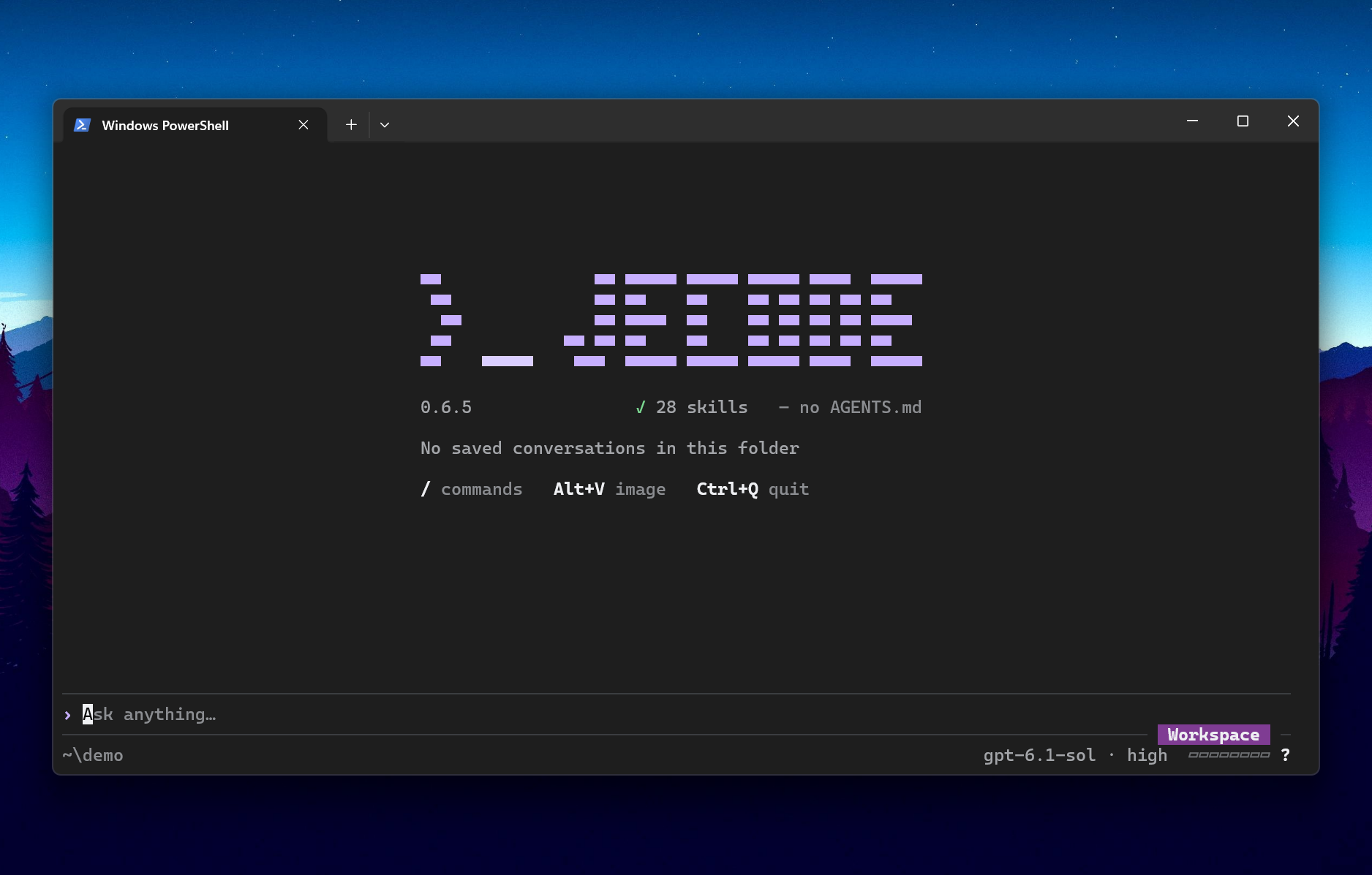
Jecode is a fast, efficient coding agent for your terminal. Choose a model,
|
|
4
|
+
describe a task, and let it read your project, edit files, run commands and check
|
|
5
|
+
the result. Tool cards and diffs show the work as it happens.
|
|
5
6
|
|
|
6
|
-
|
|
8
|
+
|
|
9
|
+
*Windows Terminal, on a pre-release build of this interface that still reports 0.2.5.*
|
|
10
|
+
|
|
11
|
+
## Measured efficiency
|
|
12
|
+
|
|
13
|
+
In our five-turn coding benchmark, Jecode used **21% fewer cost-weighted tokens
|
|
14
|
+
than Codex** with GPT-6.1 Sol and **36% fewer than Claude Code** with Claude
|
|
15
|
+
Sonnet 5.5. All runs passed 21/21 hidden acceptance tests.
|
|
16
|
+
|
|
17
|
+
| Same model, high effort | Weighted token use | Active time |
|
|
18
|
+
| --- | ---: | ---: |
|
|
19
|
+
| Jecode vs Codex 0.166, GPT-6.1 Sol | **21% less** | 11% longer |
|
|
20
|
+
| Jecode vs Claude Code 2.1.318, Sonnet 5.5 | **36% less** | **30% shorter** |
|
|
21
|
+
|
|
22
|
+
One Node project, Windows, 2026-11-04: 7 vs 6 GPT runs and 4 vs 3 Claude runs.
|
|
23
|
+
Jecode used account sign-in; its API-key routes were not compared. Time excludes
|
|
24
|
+
two deliberate 6.5-minute pauses. Weighted tokens are a cache-aware cost proxy,
|
|
25
|
+
not raw totals, API bills or plan quota.
|
|
26
|
+
See the [method, per-run data and limits](https://github.com/giovannijecha/jecode/blob/main/docs/development/AGENT_BENCHMARK.md).
|
|
27
|
+
|
|
28
|
+
## Install
|
|
7
29
|
|
|
8
30
|
Install Jecode with Node.js 22 or later and npm:
|
|
9
31
|
|
|
@@ -12,11 +34,44 @@ npm install -g @giovannijecha/jecode
|
|
|
12
34
|
jecode --version
|
|
13
35
|
```
|
|
14
36
|
|
|
15
|
-
The npm package supports Windows x64, Linux x64 with glibc 2.
|
|
16
|
-
macOS on Apple silicon
|
|
17
|
-
|
|
18
|
-
|
|
19
|
-
|
|
37
|
+
The npm package supports Windows 10 1809 or later (x64), Linux x64 with glibc 2.28
|
|
38
|
+
or newer, and macOS 11 or later on Apple silicon or Intel. It includes the platform
|
|
39
|
+
executables; it does not build code or fetch a binary when you first run it.
|
|
40
|
+
Node.js starts the npm command. A standalone build of Jecode does not need Node.js.
|
|
41
|
+
On macOS 11–13.4, use Node.js 22; Node.js 24 needs macOS 13.5 or later.
|
|
42
|
+
|
|
43
|
+
## Start working
|
|
44
|
+
|
|
45
|
+
Run `jecode` in your project, open `/settings` and choose **Providers**. Connect
|
|
46
|
+
an OpenRouter, OpenAI or Anthropic API key, or sign in with ChatGPT, then select
|
|
47
|
+
a model. A Claude subscription compatibility route is also available; read the
|
|
48
|
+
[provider caveat](https://github.com/giovannijecha/jecode/blob/main/docs/usage/PROVIDERS.md#claude-account).
|
|
49
|
+
API keys use API billing separately from subscription plans.
|
|
50
|
+
|
|
51
|
+
Press Enter to send a task, Ctrl+G to open commands while keeping your draft,
|
|
52
|
+
Esc to stop a turn, and Ctrl+Q to quit. `/help` or F1 lists commands and common
|
|
53
|
+
shortcuts, and `jecode resume` continues saved work. Read the
|
|
54
|
+
[terminal guide](https://github.com/giovannijecha/jecode/blob/main/docs/tui/INTERFACE.md)
|
|
55
|
+
for themes, tool cards, checkpoints and shortcuts.
|
|
56
|
+
|
|
57
|
+
The default permission level, Workspace, confines the agent's commands to your
|
|
58
|
+
project and asks before touching anything outside it; see
|
|
59
|
+
[Permissions](https://github.com/giovannijecha/jecode/blob/main/docs/usage/PERMISSIONS.md)
|
|
60
|
+
for what each system supports.
|
|
61
|
+
|
|
62
|
+
Jecode sends your conversation, including file contents and command output the
|
|
63
|
+
agent has read, to the provider you select. Your keys, account tokens,
|
|
64
|
+
conversations and checkpoints are stored locally under `~/.jecode/`.
|
|
65
|
+
|
|
66
|
+
The harness is one native executable written in Rust without third-party Rust
|
|
67
|
+
crates. It supports prompt caching, batched file tools and prepared tool
|
|
68
|
+
sequences in one request. Native HTTP connections persist between requests;
|
|
69
|
+
OpenAI conversations use WebSocket with HTTP fallback. Separate
|
|
70
|
+
[performance measurements](https://github.com/giovannijecha/jecode/blob/main/docs/development/PERFORMANCE.md)
|
|
71
|
+
record lower first-update latency on Windows; the comparison above predates
|
|
72
|
+
that work.
|
|
73
|
+
|
|
74
|
+
## Update or remove
|
|
20
75
|
|
|
21
76
|
Update the npm installation with:
|
|
22
77
|
|
|
@@ -36,5 +91,6 @@ installed Jecode from source, check which `jecode` command appears first on
|
|
|
36
91
|
`PATH`; npm does not remove that separate installation.
|
|
37
92
|
|
|
38
93
|
See the [installation guide](https://github.com/giovannijecha/jecode/blob/main/docs/usage/INSTALLATION.md)
|
|
39
|
-
for source installation and troubleshooting,
|
|
40
|
-
for usage.
|
|
94
|
+
for source installation and troubleshooting, the [command-line guide](https://github.com/giovannijecha/jecode/blob/main/docs/usage/CLI.md)
|
|
95
|
+
for usage, and the [release notes](https://github.com/giovannijecha/jecode/blob/main/CHANGELOG.md)
|
|
96
|
+
for what changed.
|
package/bin/jecode.cjs
CHANGED
|
@@ -5,7 +5,7 @@ const { spawn } = require('node:child_process');
|
|
|
5
5
|
const { existsSync } = require('node:fs');
|
|
6
6
|
const { constants } = require('node:os');
|
|
7
7
|
const path = require('node:path');
|
|
8
|
-
const { targetFor } = require('./targets.cjs');
|
|
8
|
+
const { targets, targetFor } = require('./targets.cjs');
|
|
9
9
|
|
|
10
10
|
function signalExitCode(signal) {
|
|
11
11
|
const number = constants.signals[signal];
|
|
@@ -13,7 +13,8 @@ function signalExitCode(signal) {
|
|
|
13
13
|
}
|
|
14
14
|
|
|
15
15
|
function glibcMeetsMinimum(version, minimum) {
|
|
16
|
-
|
|
16
|
+
// Development builds report a third part, such as Fedora Rawhide's 2.40.9000.
|
|
17
|
+
if (!/^\d+\.\d+(?:\.\d+)*$/.test(version)) return false;
|
|
17
18
|
const [major, minor] = version.split('.').map(Number);
|
|
18
19
|
const [requiredMajor, requiredMinor] = minimum.split('.').map(Number);
|
|
19
20
|
return major > requiredMajor || (major === requiredMajor && minor >= requiredMinor);
|
|
@@ -29,7 +30,7 @@ function launch({
|
|
|
29
30
|
if (!target) {
|
|
30
31
|
runtime.stderr.write(
|
|
31
32
|
`jecode: unsupported platform ${runtime.platform}-${runtime.arch}. ` +
|
|
32
|
-
|
|
33
|
+
`Supported: ${Object.keys(targets).join(', ')}.\n`,
|
|
33
34
|
);
|
|
34
35
|
runtime.exitCode = 1;
|
|
35
36
|
return null;
|
package/bin/targets.cjs
CHANGED
|
@@ -6,19 +6,28 @@ const targets = Object.freeze({
|
|
|
6
6
|
arch: 'x64',
|
|
7
7
|
binary: 'jecode.exe',
|
|
8
8
|
identity: 'windows-x86_64',
|
|
9
|
+
windowsBuildMinimum: 17763,
|
|
9
10
|
}),
|
|
10
11
|
'linux-x64': Object.freeze({
|
|
11
12
|
platform: 'linux',
|
|
12
13
|
arch: 'x64',
|
|
13
14
|
binary: 'jecode',
|
|
14
15
|
identity: 'linux-x86_64',
|
|
15
|
-
glibcMinimum: '2.
|
|
16
|
+
glibcMinimum: '2.28',
|
|
16
17
|
}),
|
|
17
18
|
'darwin-arm64': Object.freeze({
|
|
18
19
|
platform: 'darwin',
|
|
19
20
|
arch: 'arm64',
|
|
20
21
|
binary: 'jecode',
|
|
21
22
|
identity: 'macos-aarch64',
|
|
23
|
+
macosMinimum: '11.0',
|
|
24
|
+
}),
|
|
25
|
+
'darwin-x64': Object.freeze({
|
|
26
|
+
platform: 'darwin',
|
|
27
|
+
arch: 'x64',
|
|
28
|
+
binary: 'jecode',
|
|
29
|
+
identity: 'macos-x86_64',
|
|
30
|
+
macosMinimum: '11.0',
|
|
22
31
|
}),
|
|
23
32
|
});
|
|
24
33
|
|
|
Binary file
|
|
Binary file
|
package/native/linux-x64/jecode
CHANGED
|
Binary file
|
package/native/manifest.json
CHANGED
|
@@ -1,48 +1,89 @@
|
|
|
1
1
|
{
|
|
2
2
|
"format": 1,
|
|
3
|
-
"version": "0.
|
|
4
|
-
"revision": "
|
|
3
|
+
"version": "0.3.5",
|
|
4
|
+
"revision": "e6eda74d74093ef29efb6bc14c3976fe99b86ce6",
|
|
5
5
|
"artifacts": [
|
|
6
6
|
{
|
|
7
7
|
"format": 1,
|
|
8
|
-
"version": "0.
|
|
9
|
-
"revision": "
|
|
8
|
+
"version": "0.3.5",
|
|
9
|
+
"revision": "e6eda74d74093ef29efb6bc14c3976fe99b86ce6",
|
|
10
10
|
"sourceClean": true,
|
|
11
11
|
"target": "win32-x64",
|
|
12
12
|
"binary": "jecode.exe",
|
|
13
|
-
"bytes":
|
|
14
|
-
"sha256": "
|
|
13
|
+
"bytes": 12940288,
|
|
14
|
+
"sha256": "f40ddac2242d026730ac91818289ac70c7f412131e55348f85c27b85fac939c5",
|
|
15
|
+
"windowsBuildMinimum": 17763,
|
|
16
|
+
"abiCheckedFiles": [
|
|
17
|
+
"jecode-checkpoint_space.exe",
|
|
18
|
+
"jecode-http.exe",
|
|
19
|
+
"jecode-openai_crypto.exe",
|
|
20
|
+
"jecode-pty.exe",
|
|
21
|
+
"jecode-shell.exe",
|
|
22
|
+
"jecode-supervisor.exe",
|
|
23
|
+
"jecode-terminal.exe",
|
|
24
|
+
"jecode.exe"
|
|
25
|
+
]
|
|
15
26
|
},
|
|
16
27
|
{
|
|
17
28
|
"format": 1,
|
|
18
|
-
"version": "0.
|
|
19
|
-
"revision": "
|
|
29
|
+
"version": "0.3.5",
|
|
30
|
+
"revision": "e6eda74d74093ef29efb6bc14c3976fe99b86ce6",
|
|
20
31
|
"sourceClean": true,
|
|
21
32
|
"target": "linux-x64",
|
|
22
33
|
"binary": "jecode",
|
|
23
|
-
"bytes":
|
|
24
|
-
"sha256": "
|
|
25
|
-
"glibcMinimum": "2.
|
|
34
|
+
"bytes": 16160976,
|
|
35
|
+
"sha256": "5fdbe42fe1c542f013d791881deaa484a6eb15edcfd92c784ab20df7931bbb02",
|
|
36
|
+
"glibcMinimum": "2.28",
|
|
26
37
|
"abiCheckedFiles": [
|
|
27
|
-
"jecode",
|
|
28
38
|
"jecode-clipboard_linux",
|
|
29
39
|
"jecode-http",
|
|
30
40
|
"jecode-openai_crypto",
|
|
31
41
|
"jecode-process_unix",
|
|
32
42
|
"jecode-pty_unix",
|
|
33
43
|
"jecode-shell",
|
|
34
|
-
"jecode-terminal_unix"
|
|
44
|
+
"jecode-terminal_unix",
|
|
45
|
+
"jecode"
|
|
35
46
|
]
|
|
36
47
|
},
|
|
37
48
|
{
|
|
38
49
|
"format": 1,
|
|
39
|
-
"version": "0.
|
|
40
|
-
"revision": "
|
|
50
|
+
"version": "0.3.5",
|
|
51
|
+
"revision": "e6eda74d74093ef29efb6bc14c3976fe99b86ce6",
|
|
41
52
|
"sourceClean": true,
|
|
42
53
|
"target": "darwin-arm64",
|
|
43
54
|
"binary": "jecode",
|
|
44
|
-
"bytes":
|
|
45
|
-
"sha256": "
|
|
55
|
+
"bytes": 10471040,
|
|
56
|
+
"sha256": "1566b4890b34eca8a541ab27b14436608b4c67901f4f25f69f5470b7d229ae54",
|
|
57
|
+
"macosMinimum": "11.0",
|
|
58
|
+
"abiCheckedFiles": [
|
|
59
|
+
"jecode-http",
|
|
60
|
+
"jecode-openai_crypto",
|
|
61
|
+
"jecode-process_unix",
|
|
62
|
+
"jecode-pty_unix",
|
|
63
|
+
"jecode-shell",
|
|
64
|
+
"jecode-terminal_unix",
|
|
65
|
+
"jecode"
|
|
66
|
+
]
|
|
67
|
+
},
|
|
68
|
+
{
|
|
69
|
+
"format": 1,
|
|
70
|
+
"version": "0.3.5",
|
|
71
|
+
"revision": "e6eda74d74093ef29efb6bc14c3976fe99b86ce6",
|
|
72
|
+
"sourceClean": true,
|
|
73
|
+
"target": "darwin-x64",
|
|
74
|
+
"binary": "jecode",
|
|
75
|
+
"bytes": 11381040,
|
|
76
|
+
"sha256": "689efcbaa1251cf392d260857f54647458149570f402759ecc57b1815bcb2eb1",
|
|
77
|
+
"macosMinimum": "11.0",
|
|
78
|
+
"abiCheckedFiles": [
|
|
79
|
+
"jecode-http",
|
|
80
|
+
"jecode-openai_crypto",
|
|
81
|
+
"jecode-process_unix",
|
|
82
|
+
"jecode-pty_unix",
|
|
83
|
+
"jecode-shell",
|
|
84
|
+
"jecode-terminal_unix",
|
|
85
|
+
"jecode"
|
|
86
|
+
]
|
|
46
87
|
}
|
|
47
88
|
]
|
|
48
89
|
}
|
|
Binary file
|
package/package.json
CHANGED
|
@@ -1,7 +1,7 @@
|
|
|
1
1
|
{
|
|
2
2
|
"name": "@giovannijecha/jecode",
|
|
3
|
-
"version": "0.
|
|
4
|
-
"description": "A terminal coding agent in Rust",
|
|
3
|
+
"version": "0.3.5",
|
|
4
|
+
"description": "A fast, efficient terminal coding agent in Rust",
|
|
5
5
|
"license": "MIT",
|
|
6
6
|
"author": "Giovanni Jecha",
|
|
7
7
|
"repository": {
|