@ggboy123/dsh-paper-reader 1.11.0 → 1.12.0
This diff represents the content of publicly available package versions that have been released to one of the supported registries. The information contained in this diff is provided for informational purposes only and reflects changes between package versions as they appear in their respective public registries.
- package/README.md +27 -33
- package/package.json +1 -1
- package/reader/index.html +192 -36
package/README.md
CHANGED
|
@@ -7,15 +7,15 @@
|
|
|
7
7
|
|
|
8
8
|
**English**: [README_EN.md](README_EN.md)
|
|
9
9
|
|
|
10
|
-
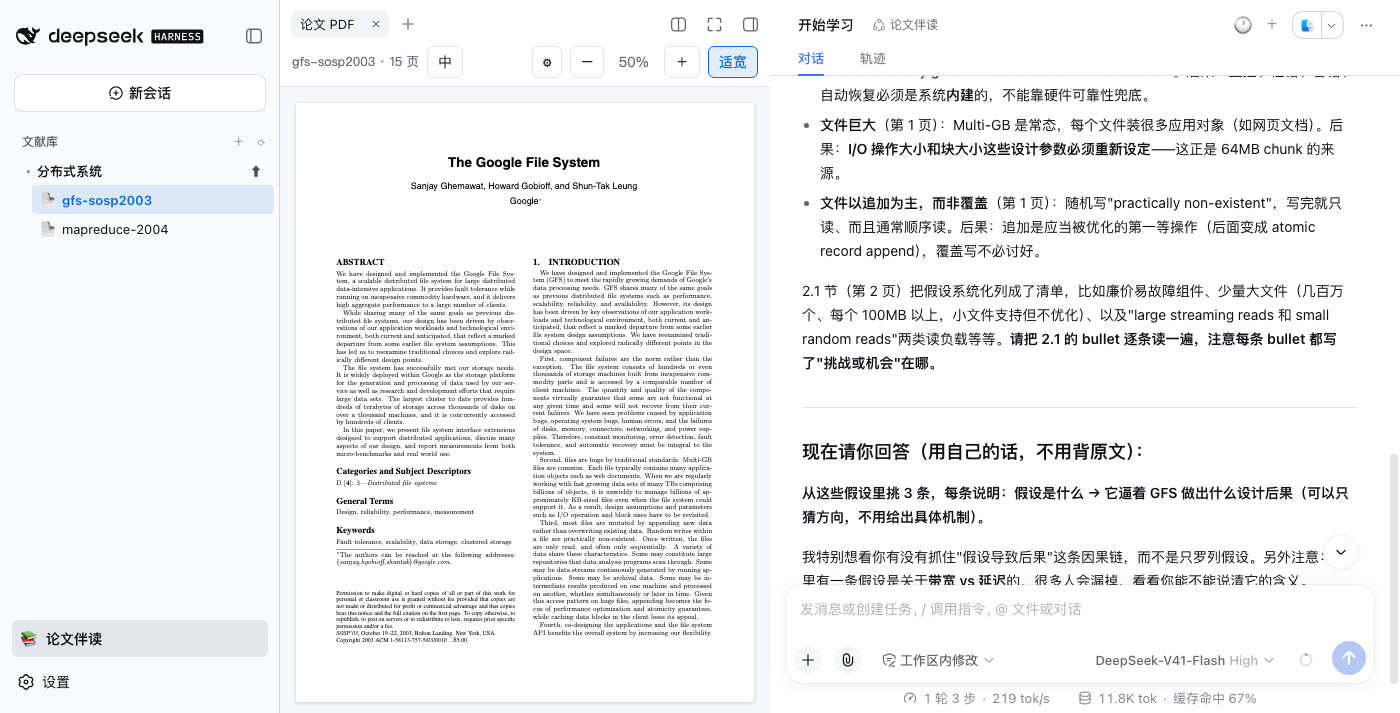
[DeepSeek Harness (dsh)](https://github.com/deepseek-ai/deepseek-harness) 插件:**论文伴读工作台** —— 文献库 + PDF 阅读器 + AI 伴读,回答自带页码、点页码跳回原文。当前版本 **v1.
|
|
10
|
+
[DeepSeek Harness (dsh)](https://github.com/deepseek-ai/deepseek-harness) 插件:**论文伴读工作台** —— 文献库 + PDF 阅读器 + AI 伴读,回答自带页码、点页码跳回原文。当前版本 **v1.12.0**。
|
|
11
11
|
|
|
12
12
|
> 💬 **QQ 交流群:1127244508** —— 安装/使用问题、功能建议、bug 反馈都欢迎来聊。
|
|
13
13
|
|
|
14
|
-
##
|
|
14
|
+
## 为什么
|
|
15
15
|
|
|
16
|
-
1. **论文一多,文件和阅读进度就容易乱。**
|
|
17
|
-
2. **翻译不该打断阅读。**
|
|
18
|
-
3. **AI
|
|
16
|
+
1. **论文一多,文件和阅读进度就容易乱。** 按专题整理论文,每篇论文的 PDF、译文、笔记和学习记录收在一起;改名、移动、删除(可从回收站恢复)都有管理入口。
|
|
17
|
+
2. **翻译不该打断阅读。** 不用来回复制粘贴——中文直接生成在原 PDF 版面上:纯中文、中英对照、左右分屏、划词翻译,公式也保留。
|
|
18
|
+
3. **AI 的回答需要能核对。** 回答自带页码,点击跳回原文并高亮;可以只问当前论文,也可以把范围扩大到整个专题,减少「答得流畅却找不到出处」。
|
|
19
19
|
|
|
20
20
|

|
|
21
21
|
|
|
@@ -23,27 +23,16 @@
|
|
|
23
23
|
|
|
24
24
|
|
|
25
25
|
|
|
26
|
-
##
|
|
27
|
-
|
|
28
|
-
-
|
|
29
|
-
-
|
|
30
|
-
-
|
|
31
|
-
-
|
|
32
|
-
-
|
|
33
|
-
-
|
|
34
|
-
|
|
35
|
-
|
|
36
|
-
- 📏 **长段落不截断 + 实时进度**:翻译由 `babeldoc-driver.py` 驱动 babeldoc —— 按输入估算输出预算(不再吃 babeldoc 写死的 2048),`finish_reason=length` 自动拆段重译;顶栏进度条实时显示「翻译段落 76%(521/798)」这样的阶段进度,端点拒绝关闭推理时自动降推理强度重试
|
|
37
|
-
- 🈯 **划词翻译(公式保留)**(v1.11.0):选中点「译」出纯译文气泡;选区含公式时用 MinerU 识别的 LaTeX 替换文本层乱码、要求模型原样保留
|
|
38
|
-
- 🖥️ **中英对照 / 分屏**(v1.11.0):并排对照页或左右分屏同步滚动,随时切换、按文献记忆
|
|
39
|
-
- 📝 **笔记**(v1.11.0):划词仍直接弹回「选中即问」气泡(与旧版一致),气泡里新增「笔记」「全局搜索」小按钮;记过的文字下方画蓝色波浪线,鼠标停上去看笔记内容、点一下改或删;笔记窗口与查找窗同一套交互(可拖动、拖边框缩放、位置记忆),批量列表按页排序、点条目跳回原文,也可在条目上直接删除(二次确认)。笔记存在 `<文献>.notes.json`(跟文献走,换浏览器不丢)
|
|
40
|
-
- ⚡ **长文档也流畅**:滚动模式只画视口附近的页、页离开视口即释放画布(其余保留等高占位,滚动条与页码始终准);原文 ↔ 中文切换只摘挂缓存好的页节点,不重新解析不重绘;切语言 / 重开论文不重传 PDF(ETag 304)。前提与已知边界见 [docs/features.md](docs/features.md)
|
|
41
|
-
- 🗂️ **文献管理**:专题/论文在文件名上原地改名,论文可跨专题移动;删除进回收站可恢复
|
|
42
|
-
- 🛰️ **OpenCode Go 端点**(v1.11.0):翻译端点供应商预设新增「OpenCode Go」(订阅后复制 API Key 即用,模型名以控制台为准);对 opencode.ai 域的请求自动带稳定 `x-opencode-session` 会话头(同一篇论文的整篇与划词共用同一 ID、跨重启稳定,ID 由本机 0600 secret 派生不含论文名),其它端点不多发任何头
|
|
43
|
-
- 🔀 **翻译模型可跟随也可覆盖**:默认直接跟随 Harness 当前模型(含账号授权,不需要复制 Key);需要专门翻译模型时,可在「设置 → 论文伴读 → 全文翻译模型」选择预设厂商、从官方链接申请 Key、自动获取模型。自定义只作用于翻译,切回跟随时配置仍保留,绝不改写 Harness 设置
|
|
44
|
-
- ➕ **可选增强**(默认关):MinerU 解析——扫描件可读、公式可点引用可检索;嵌入端点——大白话命中术语段落
|
|
45
|
-
|
|
46
|
-
各功能的前提与配置细节见 [docs/features.md](docs/features.md)。
|
|
26
|
+
## 特点
|
|
27
|
+
|
|
28
|
+
- 🔌 **零配置、不打扰**:装完即用——翻译直接跟随 Harness 当前模型与账号授权,不用申请、复制任何 Key;不改动官方界面,侧栏只多一行开关
|
|
29
|
+
- 🔒 **本地优先**:PDF、译文、笔记、学习记录都是文献文件夹里的普通文件,把 `data/` 目录拷走就都带得走;未配置第三方端点时,插件不向任何外部服务发请求(伴读对话历史与端点设置存在 dsh 一侧,不随文件夹迁移)
|
|
30
|
+
- ➕ **可选增强,默认关闭**:MinerU 解析让扫描件可读、公式可点引用可检索;嵌入端点让大白话提问也能命中术语段落——不配置就一条请求都不发
|
|
31
|
+
- ⚡ **长文档不卡**:只渲染视口附近的页,原文 ↔ 中文切换零重载,重开论文不重传 PDF
|
|
32
|
+
- 🤖 **教练式带读(可选)**:AI 制定分步计划,你读原文、作答,答好才继续,学习进度跨会话累积
|
|
33
|
+
- 🌙 **PDF 深色模式**:跟随 dsh 主题,四档强度可调(整页反色实现,图片会褪色偏色——已知代价,可一键关)
|
|
34
|
+
|
|
35
|
+
> 各功能的前提、代价与已知限制统一放在 [docs/features.md](docs/features.md);配置 MinerU、嵌入或翻译端点前,建议先读对应小节。
|
|
47
36
|
|
|
48
37
|
## 安装
|
|
49
38
|
|
|
@@ -59,13 +48,16 @@
|
|
|
59
48
|
|
|
60
49
|
|
|
61
50
|
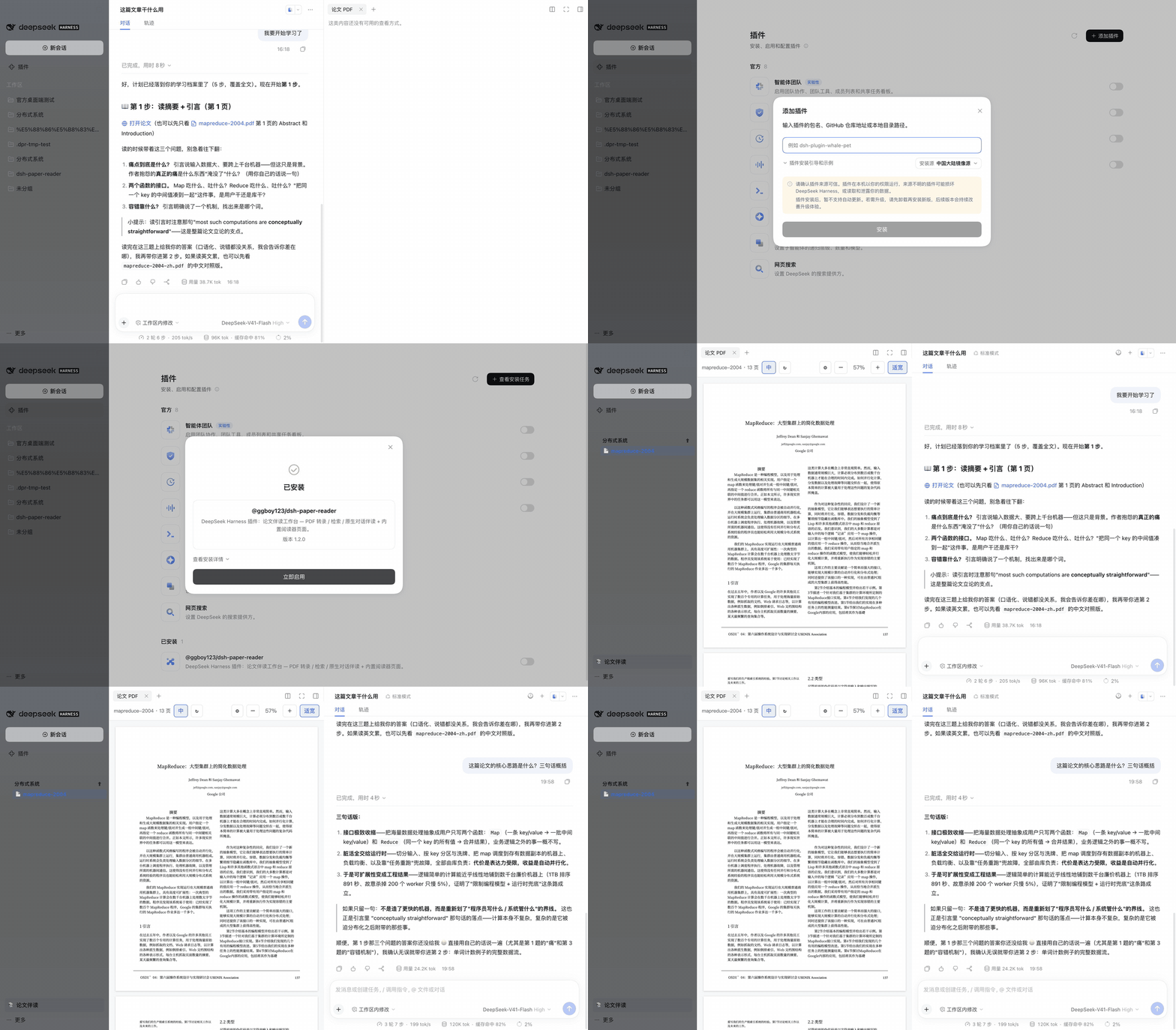
> 需要官方桌面端 V0.2.0-rc.2 或更新版本(内置 dsh ≥0.2.0-rc.2);dsh 0.1.5 不再支持。
|
|
62
|
-
> 想逛插件市场可另装社区插件 [`dshmarket`](https://github.com/dsh-market/dsh-market),本插件已在其目录中。
|
|
63
51
|
|
|
64
|
-
|
|
52
|
+
<details>
|
|
53
|
+
<summary><b>安装排坑(都实测踩过)</b></summary>
|
|
65
54
|
|
|
66
55
|
- **升级后插件开关会回到停用**:重新打开「启用」并重启。症状有迷惑性——文献树还在但点论文没反应
|
|
67
56
|
- **添加务必带 `@latest`**:不带版本号对已装过的插件是 no-op,不会追新
|
|
68
57
|
- pnpm 供应链策略 `minimumReleaseAge` 拦新包时:等过窗口期,或把本包加进豁免清单(`~/.dsh/profiles/web/.npmrc` 的 `minimum-release-age-exclude[]`;桌面端在 `~/.dsh/profiles/desktop/pnpm-workspace.yaml` 的 `minimumReleaseAgeExclude`)
|
|
58
|
+
- 想逛插件市场,可另装社区插件 [`dshmarket`](https://github.com/dsh-market/dsh-market),本插件已在其目录中
|
|
59
|
+
|
|
60
|
+
</details>
|
|
69
61
|
|
|
70
62
|
### 开发者:命令行 dsh
|
|
71
63
|
|
|
@@ -75,17 +67,19 @@ dsh plugin --profile web add @ggboy123/dsh-paper-reader@latest # 升级也是
|
|
|
75
67
|
|
|
76
68
|
> 不要用 `github:GGboya/dsh-paper-reader` 安装 —— dist 不入库,git 安装会导致 profile 起不来。
|
|
77
69
|
|
|
78
|
-
##
|
|
70
|
+
## 快速上手
|
|
79
71
|
|
|
80
72
|
1. **进入**:侧栏底部点「📚 论文伴读」(再点还原)
|
|
81
73
|
2. **入库**:+ 新建专题 → ⬆ 上传 PDF
|
|
82
74
|
3. **读 + 问**:直接提问(回答自带页码),或选中文字弹框提问;点「第 N 页」跳回原文
|
|
83
|
-
4.
|
|
75
|
+
4. **中文版**:顶栏「中」一键生成;需要专用翻译模型时,在「设置 → 论文伴读 → 全文翻译模型」里单独配置
|
|
84
76
|
5. **管理**:行悬停点「⋯」,文件名原地改名(Enter 保存 / Esc 取消),论文可移动到其它专题,也可删除;对话头部 🕐 历史、+ 新开
|
|
85
77
|
|
|
86
|
-
##
|
|
78
|
+
## 数据与安全
|
|
87
79
|
|
|
88
|
-
-
|
|
80
|
+
- 所有数据都是本地文件:文献库默认在 `~/.dsh-paper-reader/data`(可在 profile 改);插件自身的端点凭据落盘 `$DSH_HOME/.dsh-paper-reader/`(权限 0600,界面只回掩码)
|
|
81
|
+
- 删除 = **移入回收站** `data/.trash/`(带 manifest,移回即恢复),会一并处理该文献的全部产物:`<文献>.pdf`、`.txt`、`.pages.json`、`.transcript.json`、`.mineru.md`、`.mineru.json`、`.embeddings.json`、`.study.json`、`.notes.json` 与译文变体 `<文献>-en.pdf` / `-zh.pdf` / `-dual.pdf`(含 `.tmp-*` 残留);伴读会话历史不删
|
|
82
|
+
- 有运行中会话或翻译中的文献会被前置拒绝;路径穿越(`..`、绝对路径、符号链接逃逸)一律拒绝;操作中途失败自动回滚
|
|
89
83
|
|
|
90
84
|
## 参与开发
|
|
91
85
|
|
|
@@ -96,7 +90,7 @@ dsh plugin --profile web add ./dsh-paper-reader # 从父目录执行,或用
|
|
|
96
90
|
dsh --profile web # 侧栏变为文献库树
|
|
97
91
|
```
|
|
98
92
|
|
|
99
|
-
改完 `pnpm run build` 重启 profile 即生效;`npm test` 跑全量测试(
|
|
93
|
+
改完 `pnpm run build` 重启 profile 即生效;`npm test` 跑全量测试(CI 跑 ubuntu / macOS / Windows 三平台)。架构、测试守卫与开发约定见 [AGENTS.md](AGENTS.md)。
|
|
100
94
|
|
|
101
95
|
## 贡献者
|
|
102
96
|
|
package/package.json
CHANGED
package/reader/index.html
CHANGED
|
@@ -55,7 +55,9 @@
|
|
|
55
55
|
.tbtn svg.spin { transform-origin: center; animation: dpr-spin 1s linear infinite; }
|
|
56
56
|
@keyframes dpr-spin { to { transform: rotate(360deg); } }
|
|
57
57
|
@media (prefers-reduced-motion: reduce) { .tbtn svg.spin { animation-duration: 2.4s; } }
|
|
58
|
-
#zoom-label { flex: none; min-width: 44px; text-align: center; color: var(--text-2); }
|
|
58
|
+
#zoom-label { flex: none; min-width: 44px; text-align: center; color: var(--text-2); cursor: pointer; border-radius: 5px; }
|
|
59
|
+
#zoom-label:hover { color: var(--text); background: var(--bg); }
|
|
60
|
+
#zoom-label input { border-radius: 5px; }
|
|
59
61
|
#bar .spacer { flex: 1; }
|
|
60
62
|
/* min-width:0 —— flex 项默认 min-width:auto 会拒绝收缩,空间不够时转而去挤按钮;
|
|
61
63
|
让标题自己截断(已有 ellipsis),按钮才能保持原样 */
|
|
@@ -222,14 +224,13 @@
|
|
|
222
224
|
.textLayer span.find-hit.cur { background: rgba(255,146,0,.55); }
|
|
223
225
|
|
|
224
226
|
/* ---------- 笔记(划词标注 + 可移动笔记窗口) ----------
|
|
225
|
-
|
|
226
|
-
|
|
227
|
-
|
|
227
|
+
issue #22-7 定稿(维护者拍板):不用波浪线(长笔记连成密集「斑马纹」),也不加 ✎ 小标记
|
|
228
|
+
(放行尾/页边都会压到论文内容)——所有笔记统一一个**蓝色虚线圆角框**圈住原文范围。
|
|
229
|
+
框本身 pointer-events:none 不挡正文;悬停/点击的命中区是**虚线边框本体**(±5px 环带,
|
|
230
|
+
见 noteFindAt),框内部阅读零干扰。跳转定位时框内闪一层浅蓝。 */
|
|
228
231
|
.noteLayer { position: absolute; inset: 0; pointer-events: none; z-index: 4; }
|
|
229
|
-
.note-under { position: absolute; border-radius:
|
|
230
|
-
|
|
231
|
-
background-repeat: repeat-x; background-position: 0 100%; background-size: 9px 4px; }
|
|
232
|
-
.note-under.flash { background-color: rgba(47,107,255,.20); }
|
|
232
|
+
.note-under { position: absolute; pointer-events: none; border: 2px dashed rgba(47,107,255,.8); border-radius: 6px; background-color: rgba(47,107,255,.04); }
|
|
233
|
+
.note-under.flash { background-color: rgba(47,107,255,.12); }
|
|
233
234
|
#note-tip { position: fixed; z-index: 58; display: none; max-width: 320px; background: var(--panel);
|
|
234
235
|
border: 1px solid var(--border); border-radius: 8px; box-shadow: 0 6px 22px rgba(0,0,0,.18);
|
|
235
236
|
padding: 8px 10px; font-size: 12px; line-height: 1.55; white-space: pre-wrap; word-break: break-word; pointer-events: none; }
|
|
@@ -281,18 +282,21 @@
|
|
|
281
282
|
|
|
282
283
|
/* ---------- 选中即问浮层 ---------- */
|
|
283
284
|
#ask-scope-row { display: flex; align-items: center; gap: 6px; margin: 2px 0 4px; font-size: 12px; color: var(--text-2); }
|
|
285
|
+
#ask-scope-label { flex: none; white-space: nowrap; }
|
|
284
286
|
#ask-scope-row select { font: inherit; font-size: 12px; padding: 2px 4px; border: 1px solid var(--border); border-radius: 5px; background: var(--panel); color: var(--text); max-width: 60%; }
|
|
285
|
-
#ask-scope-hint { opacity: .75; font-size: 11px; }
|
|
287
|
+
#ask-scope-hint { flex: 1; min-width: 0; opacity: .75; font-size: 11px; white-space: nowrap; overflow: hidden; text-overflow: ellipsis; }
|
|
286
288
|
#cfg-pop hr { border: none; border-top: 1px solid var(--border); margin: 12px 0 8px; }
|
|
287
289
|
#cfg-theme-hint { font-size: 11.5px; color: var(--text-2); line-height: 1.5; margin-top: 4px; }
|
|
288
290
|
#ask-scope-row { display: flex; align-items: center; gap: 6px; margin: 2px 0 4px; font-size: 12px; color: var(--text-2); }
|
|
291
|
+
#ask-scope-label { flex: none; white-space: nowrap; }
|
|
289
292
|
#ask-scope-row select { font: inherit; font-size: 12px; padding: 2px 4px; border: 1px solid var(--border); border-radius: 5px; background: var(--panel); color: var(--text); max-width: 60%; }
|
|
290
|
-
#ask-scope-hint { opacity: .75; font-size: 11px; }
|
|
293
|
+
#ask-scope-hint { flex: 1; min-width: 0; opacity: .75; font-size: 11px; white-space: nowrap; overflow: hidden; text-overflow: ellipsis; }
|
|
291
294
|
#cfg-pop hr { border: none; border-top: 1px solid var(--border); margin: 12px 0 8px; }
|
|
292
295
|
#cfg-theme-hint { font-size: 11.5px; color: var(--text-2); line-height: 1.5; margin-top: 4px; }
|
|
293
296
|
#ask-pop { position: fixed; z-index: 50; display: none; background: var(--panel); border: 1px solid var(--border); border-radius: 10px; box-shadow: 0 6px 24px rgba(0,0,0,.16); padding: 10px; width: 320px; }
|
|
294
297
|
#ask-quote { font-size: 12px; color: var(--text-2); max-height: 64px; overflow: hidden; margin-bottom: 8px; border-left: 3px solid var(--accent-soft); padding-left: 8px; }
|
|
295
|
-
#ask-input { width: 100%; border: 1px solid var(--border); border-radius: 6px; padding: 6px 8px; font: inherit; resize: none; }
|
|
298
|
+
#ask-input { width: 100%; box-sizing: border-box; border: 1px solid var(--border); border-radius: 6px; padding: 6px 8px; font: inherit; resize: none; }
|
|
299
|
+
#ask-input:focus { border-color: var(--accent); outline: 2px solid var(--accent-soft); }
|
|
296
300
|
#ask-actions { display: flex; justify-content: flex-end; gap: 8px; margin-top: 8px; }
|
|
297
301
|
#ask-send { background: var(--accent); color: #fff; border: none; border-radius: 6px; padding: 5px 14px; cursor: pointer; }
|
|
298
302
|
#ask-send:disabled { opacity: .5; cursor: default; }
|
|
@@ -311,6 +315,13 @@
|
|
|
311
315
|
#tr-body { font-size: 13px; white-space: pre-wrap; word-break: break-word; }
|
|
312
316
|
#tr-note { font-size: 12px; color: var(--text-2); margin-top: 6px; line-height: 1.5; }
|
|
313
317
|
#tr-note:empty { display: none; }
|
|
318
|
+
/* 气泡拖动把手(issue #22-4):顶部居中的胶囊条(sheet-handle 样式),hover 亮起提示可拖;两处气泡共用 */
|
|
319
|
+
.pop-grip { display: flex; align-items: center; justify-content: center; height: 14px; margin: -5px -2px 3px;
|
|
320
|
+
cursor: grab; user-select: none; }
|
|
321
|
+
.pop-grip::after { content: ''; width: 26px; height: 4px; border-radius: 2px; background: var(--text-2); opacity: .4; }
|
|
322
|
+
.pop-grip:hover::after { opacity: .85; }
|
|
323
|
+
.pop-grip:active { cursor: grabbing; }
|
|
324
|
+
.pop-grip:active::after { opacity: 1; }
|
|
314
325
|
/* 公式段:KaTeX 渲染进我们新建的元素(.tr-math / .tr-math-block);渲染失败时该段落回原始 LaTeX
|
|
315
326
|
文本并加 .tr-math-fallback(可读可复制,绝不留白)。 */
|
|
316
327
|
#tr-body .tr-math-block { margin: 6px 0; overflow-x: auto; }
|
|
@@ -320,18 +331,18 @@
|
|
|
320
331
|
/* ---------- 全文翻译模型设置:与 dsh 设置页同一套跟随 / 覆盖语义 ---------- */
|
|
321
332
|
#cfg-pop, #theme-pop, #generate-pop { position: fixed; z-index: 60; display: none; background: var(--panel); border: 1px solid var(--border); border-radius: 10px; box-shadow: 0 6px 24px rgba(0,0,0,.16); padding: 10px; width: min(320px, calc(100vw - 32px)); }
|
|
322
333
|
#cfg-pop { width: min(640px, calc(100vw - 28px)); max-height: calc(100vh - 28px); overflow-y: auto; padding: 0; }
|
|
323
|
-
#cfg-pop h3, #theme-pop h3 { margin: 0; font-size: 13px; }
|
|
334
|
+
#cfg-pop h3, #theme-pop h3, #generate-pop h3 { margin: 0 0 6px; font-size: 13px; }
|
|
324
335
|
#cfg-head { display: flex; align-items: center; justify-content: space-between; padding: 15px 16px 12px; border-bottom: 1px solid var(--border); }
|
|
325
336
|
#cfg-cancel { border: 0; background: transparent; color: var(--text-2); cursor: pointer; padding: 2px 5px; border-radius: 4px; }
|
|
326
337
|
#cfg-cancel:hover { background: var(--bg); color: var(--text); }
|
|
327
338
|
#cfg-hint { font-size: 12px; color: var(--text-2); line-height: 1.55; margin: 10px 16px 12px; }
|
|
328
|
-
#cfg-pop label, #theme-pop label { display: block; font-size: 12px; color: var(--text-2); margin: 8px 0 4px; }
|
|
339
|
+
#cfg-pop label, #theme-pop label, #generate-pop label { display: block; font-size: 12px; color: var(--text-2); margin: 8px 0 4px; }
|
|
329
340
|
#cfg-pop input[type="checkbox"], #theme-pop input[type="checkbox"] { width: auto; }
|
|
330
341
|
#theme-pop h3 { display: flex; align-items: center; justify-content: space-between; }
|
|
331
342
|
#theme-close { all: unset; cursor: pointer; font-size: 12px; color: var(--text-2); padding: 2px 6px; border-radius: 4px; }
|
|
332
343
|
#theme-close:hover { background: var(--bg); color: var(--text); }
|
|
333
|
-
#cfg-pop input, #cfg-pop select, #theme-pop input, #theme-pop select { box-sizing: border-box; width: 100%; border: 1px solid var(--border); border-radius: 6px; padding: 7px 9px; font: inherit; background: var(--panel); color: var(--text); }
|
|
334
|
-
#cfg-pop input:focus, #cfg-pop select:focus { border-color: var(--accent); outline: 2px solid var(--accent-soft); }
|
|
344
|
+
#cfg-pop input, #cfg-pop select, #theme-pop input, #theme-pop select, #generate-pop select { box-sizing: border-box; width: 100%; border: 1px solid var(--border); border-radius: 6px; padding: 7px 9px; font: inherit; background: var(--panel); color: var(--text); }
|
|
345
|
+
#cfg-pop input:focus, #cfg-pop select:focus, #generate-pop select:focus { border-color: var(--accent); outline: 2px solid var(--accent-soft); }
|
|
335
346
|
.cfg-modes { display: flex; gap: 9px; padding: 0 16px 14px; }
|
|
336
347
|
.cfg-mode, .cfg-provider, .cfg-model { font: inherit; color: var(--text); background: var(--panel); border: 1px solid var(--border); cursor: pointer; text-align: left; }
|
|
337
348
|
.cfg-mode { flex: 1; min-width: 0; display: flex; align-items: flex-start; gap: 9px; padding: 11px; border-radius: 8px; }
|
|
@@ -380,6 +391,7 @@
|
|
|
380
391
|
.cfg-empty { padding: 14px; border: 1px dashed var(--border); border-radius: 7px; color: var(--text-2); font-size: 11px; line-height: 1.6; text-align: center; }
|
|
381
392
|
#cfg-scope { padding: 0 16px 13px; color: var(--text-2); font-size: 11px; line-height: 1.5; text-align: center; }
|
|
382
393
|
#generate-actions { display: flex; justify-content: flex-end; gap: 8px; margin-top: 10px; }
|
|
394
|
+
#generate-hint { font-size: 12px; color: var(--text-2); line-height: 1.55; }
|
|
383
395
|
@media (max-width: 520px) { #cfg-provider-grid { grid-template-columns: repeat(2, minmax(0, 1fr)); } .cfg-modes { flex-direction: column; } }
|
|
384
396
|
|
|
385
397
|
#toast { position: fixed; left: 50%; bottom: 28px; transform: translateX(-50%); background: rgba(30,30,30,.92); color: #fff; padding: 8px 16px; border-radius: 8px; font-size: 13px; display: none; z-index: 99; max-width: 70%; }
|
|
@@ -428,7 +440,7 @@
|
|
|
428
440
|
<button id="zh-regen" class="tbtn tucked" title="重新翻译:删除现有译文,用当前端点重跑(换模型后用)" style="display:none" data-icon="regen"></button>
|
|
429
441
|
<span class="bar-sep"></span>
|
|
430
442
|
<button id="zoom-out" class="tbtn" title="缩小" data-icon="minus"></button>
|
|
431
|
-
<span id="zoom-label">100%</span>
|
|
443
|
+
<span id="zoom-label" title="点击输入精确缩放百分比(40–300)">100%</span>
|
|
432
444
|
<button id="zoom-in" class="tbtn" title="放大" data-icon="plus"></button>
|
|
433
445
|
<button id="zoom-fit" class="tbtn">适宽</button>
|
|
434
446
|
<button id="mode-toggle" class="tbtn" title="切换 滚动/翻页模式" style="display:none" data-icon="paged"></button>
|
|
@@ -531,6 +543,7 @@
|
|
|
531
543
|
</div>
|
|
532
544
|
|
|
533
545
|
<div id="ask-pop">
|
|
546
|
+
<div class="pop-grip" id="ask-grip" title="拖动移动气泡"></div>
|
|
534
547
|
<div id="ask-quote"></div>
|
|
535
548
|
<!-- 提问范围(方案 §B3.3 入口 1):默认「本篇」=改造前行为;「所在专题」会带上整棵子专题的目录内容 -->
|
|
536
549
|
<div id="ask-scope-row">
|
|
@@ -554,6 +567,7 @@
|
|
|
554
567
|
|
|
555
568
|
<!-- 划词译文气泡:只有译文 + 状态行 + 一行诚实提示,**零按钮**(用户明确不要插入会话/复制) -->
|
|
556
569
|
<div id="tr-pop">
|
|
570
|
+
<div class="pop-grip" id="tr-grip" title="拖动移动气泡"></div>
|
|
557
571
|
<div id="tr-status"></div>
|
|
558
572
|
<div id="tr-body"></div>
|
|
559
573
|
<div id="tr-note"></div>
|
|
@@ -1011,9 +1025,9 @@ async function openPaper(topic, name, opts = {}) {
|
|
|
1011
1025
|
$('zh-toggle').classList.toggle('active', zhVariant !== null);
|
|
1012
1026
|
// 译文版页宽与原文不同(对照双栏≈2×),分屏每列只有一半宽 ⇒ 都先进适宽
|
|
1013
1027
|
if (zhVariant || viewMode === 'split') { fitMode = true; fitBtn.classList.add('active'); }
|
|
1014
|
-
// 笔记与公式索引都必须在首次 paintPage 之前到货:paintPage 直接按 notes.list
|
|
1028
|
+
// 笔记与公式索引都必须在首次 paintPage 之前到货:paintPage 直接按 notes.list 铺笔记标注框。
|
|
1015
1029
|
// 两者互不依赖,并行拉取;笔记读失败不阻塞 PDF(loadNotes 内部吞错并保留空列表)。
|
|
1016
|
-
const notesReady = loadNotes().catch(() => { /*
|
|
1030
|
+
const notesReady = loadNotes().catch(() => { /* 读失败:本页只是没有标注框,不影响读论文 */ });
|
|
1017
1031
|
// 公式索引(MinerU content_list):**必须在 loadPdf 之前到货**——热区是在 paintPage 里
|
|
1018
1032
|
// 按 eqIndex 铺的,先渲染会漏画/残留上一篇的矩形;又必须排在 zhVariant 定稿之后——
|
|
1019
1033
|
// eqHotEnabled()/renderEqPanel() 都按 zhVariant 决定「译文视图关热区」。失败不影响打开文献。
|
|
@@ -1676,8 +1690,8 @@ window.dprFindDebug = () => {
|
|
|
1676
1690
|
/* ================= 笔记(划词标注 + 可移动笔记窗口)=================
|
|
1677
1691
|
存储:服务端 `<论文>.notes.json`(与 `.study.json` 同目录 ⇒ 跟文献走、换浏览器不丢、将来也能被伴读读到)。
|
|
1678
1692
|
锚点:页号 + 「该页 DOM 文本层拼接串」里的字符区间。文本层的内容只由 PDF 决定(与缩放/模式无关),
|
|
1679
|
-
所以偏移在重渲染后仍然有效 → 每次渲染完成按偏移重建 Range →
|
|
1680
|
-
为什么不用给 span 加 text-decoration:一个选区常跨多个 span
|
|
1693
|
+
所以偏移在重渲染后仍然有效 → 每次渲染完成按偏移重建 Range → 百分比盒子(蓝色虚线框)。
|
|
1694
|
+
为什么不用给 span 加 text-decoration:一个选区常跨多个 span,加类会把整行都画上标注。
|
|
1681
1695
|
盒子层 pointer-events:none,悬停/点击靠坐标命中测试 —— 绝不挡住划词选字。 */
|
|
1682
1696
|
const NOTE_WIN_KEY = 'dpr.noteWin';
|
|
1683
1697
|
const NOTE_BODY_MAX = 20000;
|
|
@@ -1865,7 +1879,7 @@ function noteAnchorFromSelection() {
|
|
|
1865
1879
|
return { page, start: a, end: b, doc, quote: sel.text.slice(0, 400) };
|
|
1866
1880
|
}
|
|
1867
1881
|
|
|
1868
|
-
/* ----------
|
|
1882
|
+
/* ---------- 画笔记标注框(蓝色虚线圆角框,圈住选区范围) ---------- */
|
|
1869
1883
|
function noteClearLayers() {
|
|
1870
1884
|
document.querySelectorAll('.noteLayer').forEach((l) => l.remove());
|
|
1871
1885
|
noteHideTip();
|
|
@@ -1881,7 +1895,7 @@ function notePaintPageDiv(div) {
|
|
|
1881
1895
|
const hay = noteTextHay(div);
|
|
1882
1896
|
const rect = tl.getBoundingClientRect();
|
|
1883
1897
|
if (!hay || !rect.width || !rect.height) return;
|
|
1884
|
-
// 同一页可能被重画多次(逐页渲染 +
|
|
1898
|
+
// 同一页可能被重画多次(逐页渲染 + 收尾重放):先清掉这一页旧的装饰层,避免叠出两层框
|
|
1885
1899
|
const stale = div.querySelector(':scope > .noteLayer');
|
|
1886
1900
|
if (stale) stale.remove();
|
|
1887
1901
|
const pct = (v, base) => (v / base * 100).toFixed(3) + '%';
|
|
@@ -1898,22 +1912,27 @@ function notePaintPageDiv(div) {
|
|
|
1898
1912
|
const rng = document.createRange();
|
|
1899
1913
|
rng.setStart(na, oa);
|
|
1900
1914
|
rng.setEnd(nb, ob);
|
|
1915
|
+
// 统一样式(issue #22-7 定稿):一条笔记一个虚线圆角框圈住全部矩形——不用波浪线
|
|
1916
|
+
// (长笔记逐行画会连成「斑马纹」),也不加小标记(会压到论文内容)。
|
|
1917
|
+
const rs = [];
|
|
1901
1918
|
for (const r of rng.getClientRects()) {
|
|
1902
1919
|
if (r.width < 0.6 || r.height < 0.6) continue; // 换行点产生的退化矩形
|
|
1903
|
-
|
|
1904
|
-
box.className = 'note-under';
|
|
1905
|
-
box.dataset.note = n.id;
|
|
1906
|
-
box.style.left = pct(r.left - rect.left, rect.width);
|
|
1907
|
-
box.style.top = pct(r.top - rect.top, rect.height);
|
|
1908
|
-
box.style.width = pct(r.width, rect.width);
|
|
1909
|
-
box.style.height = pct(r.height, rect.height);
|
|
1910
|
-
layer.appendChild(box);
|
|
1920
|
+
rs.push(r);
|
|
1911
1921
|
}
|
|
1922
|
+
if (!rs.length) continue;
|
|
1923
|
+
const box = document.createElement('span');
|
|
1924
|
+
box.className = 'note-under';
|
|
1925
|
+
box.dataset.note = n.id;
|
|
1926
|
+
box.style.left = pct(Math.min(...rs.map((r) => r.left)) - 4 - rect.left, rect.width);
|
|
1927
|
+
box.style.top = pct(Math.min(...rs.map((r) => r.top)) - 3 - rect.top, rect.height);
|
|
1928
|
+
box.style.width = pct(Math.max(...rs.map((r) => r.right)) - Math.min(...rs.map((r) => r.left)) + 8, rect.width);
|
|
1929
|
+
box.style.height = pct(Math.max(...rs.map((r) => r.bottom)) - Math.min(...rs.map((r) => r.top)) + 6, rect.height);
|
|
1930
|
+
layer.appendChild(box);
|
|
1912
1931
|
} catch { /* 单条锚点算不出几何:跳过这条,列表里仍能看到 */ }
|
|
1913
1932
|
}
|
|
1914
1933
|
if (!layer.childElementCount) layer.remove();
|
|
1915
1934
|
}
|
|
1916
|
-
/** 缩放/切模式/换文档会重建整个 DOM
|
|
1935
|
+
/** 缩放/切模式/换文档会重建整个 DOM:重画全部标注框 */
|
|
1917
1936
|
function notesReapply() {
|
|
1918
1937
|
noteClearLayers();
|
|
1919
1938
|
if (!pdfDoc || !notes.list.length) return;
|
|
@@ -1925,9 +1944,13 @@ function noteById(id) {
|
|
|
1925
1944
|
return notes.list.find((n) => n.id === id) || null;
|
|
1926
1945
|
}
|
|
1927
1946
|
function noteFindAt(x, y) {
|
|
1947
|
+
// 命中区是虚线框的**边框环带**(框外 2px、框内 5px):贴边悬停/点击 = 操作这条笔记;
|
|
1948
|
+
// 框内部保持纯净——阅读时鼠标扫过整段不会一直弹「点击编辑」提示,框内划词提问照常。
|
|
1928
1949
|
for (const box of document.querySelectorAll('.note-under')) {
|
|
1929
1950
|
const r = box.getBoundingClientRect();
|
|
1930
|
-
if (x
|
|
1951
|
+
if (x < r.left - 2 || x > r.right + 2 || y < r.top - 2 || y > r.bottom + 2) continue;
|
|
1952
|
+
const d = Math.min(x - r.left, r.right - x, y - r.top, r.bottom - y);
|
|
1953
|
+
if (d <= 5) return box.dataset.note || null;
|
|
1931
1954
|
}
|
|
1932
1955
|
return null;
|
|
1933
1956
|
}
|
|
@@ -2081,7 +2104,7 @@ function noteCreateFromSelection() {
|
|
|
2081
2104
|
if (!sel || !current) { toast('先在正文里选中一段文字'); return; }
|
|
2082
2105
|
const anchor = noteAnchorFromSelection();
|
|
2083
2106
|
noteStartEdit({ quote: sel.text, anchor: anchor || undefined, body: '' });
|
|
2084
|
-
if (!anchor) toast('
|
|
2107
|
+
if (!anchor) toast('这段选区没能精确锚定:笔记会留在列表里,但不会画标注框', 5000);
|
|
2085
2108
|
}
|
|
2086
2109
|
function noteCreateBlank() {
|
|
2087
2110
|
const sel = askSelection;
|
|
@@ -2482,10 +2505,13 @@ $('split-toggle').onclick = () => setViewMode(viewMode === 'split' ? 'orig' : 's
|
|
|
2482
2505
|
|
|
2483
2506
|
let generateForce = false;
|
|
2484
2507
|
let generateEndpoints = [];
|
|
2508
|
+
/** 选项文本截断(issue #22-1):端点名/模型名/掩码 Key 拼起来可以很长,select 的固有宽度
|
|
2509
|
+
由最长选项决定,曾把 320px 的弹窗撑破 ~100px。宽度已用 CSS 约束(width:100%),这里再截断文本。 */
|
|
2510
|
+
const clipStr = (v, n) => { const s = String(v ?? ''); return s.length > n ? s.slice(0, n - 1) + '…' : s; };
|
|
2485
2511
|
function endpointDisplay(e) {
|
|
2486
|
-
if (e.source === 'harness') return `跟随 Harness · ${e.providerName || '当前模型'} / ${e.model}`;
|
|
2512
|
+
if (e.source === 'harness') return `跟随 Harness · ${clipStr(e.providerName || '当前模型', 20)} / ${clipStr(e.model, 36)}`;
|
|
2487
2513
|
const provider = providerOf(e.baseUrl).name;
|
|
2488
|
-
return `${e.label || provider} · ${e.model || '未填模型'} · ${e.apiKeyHint || '无 Key'}`;
|
|
2514
|
+
return `${clipStr(e.label || provider, 18)} · ${clipStr(e.model || '未填模型', 30)} · ${clipStr(e.apiKeyHint || '无 Key', 14)}`;
|
|
2489
2515
|
}
|
|
2490
2516
|
function closeGeneratePop() { $('generate-pop').style.display = 'none'; }
|
|
2491
2517
|
async function openGeneratePop(force) {
|
|
@@ -3679,6 +3705,42 @@ function fitToWidth() {
|
|
|
3679
3705
|
}
|
|
3680
3706
|
$('zoom-in').onclick = () => { exitFitMode(); setZoom(zoomScale + 0.25); };
|
|
3681
3707
|
$('zoom-out').onclick = () => { exitFitMode(); setZoom(zoomScale - 0.25); };
|
|
3708
|
+
/* 点百分比直接输入缩放值(issue #22-6):只有 ± 按钮不够精确。Enter 提交 / Esc 取消 / 失焦提交;
|
|
3709
|
+
setZoom 自己会夹在 0.6–4.5(即标签口径的 40%–300%),越界输入不会出错。 */
|
|
3710
|
+
$('zoom-label').addEventListener('click', () => {
|
|
3711
|
+
const label = $('zoom-label');
|
|
3712
|
+
if (label.querySelector('input')) return;
|
|
3713
|
+
const inp = document.createElement('input');
|
|
3714
|
+
inp.type = 'text';
|
|
3715
|
+
inp.inputMode = 'numeric';
|
|
3716
|
+
inp.value = Math.round(zoomScale / 1.5 * 100);
|
|
3717
|
+
inp.title = '40–300,Enter 确认';
|
|
3718
|
+
inp.style.cssText = 'width: 50px; font: inherit; font-size: 12px; text-align: center; border: 1px solid var(--accent); border-radius: 5px; background: var(--panel); color: var(--text); padding: 1px 2px';
|
|
3719
|
+
label.textContent = '';
|
|
3720
|
+
label.appendChild(inp);
|
|
3721
|
+
inp.focus();
|
|
3722
|
+
inp.select();
|
|
3723
|
+
let closed = false;
|
|
3724
|
+
const done = (commit) => {
|
|
3725
|
+
if (closed) return;
|
|
3726
|
+
closed = true;
|
|
3727
|
+
if (commit) {
|
|
3728
|
+
const v = Math.round(parseFloat(String(inp.value).replace('%', '').trim()));
|
|
3729
|
+
if (Number.isFinite(v) && v > 0) { exitFitMode(); setZoom(v / 100 * 1.5); }
|
|
3730
|
+
}
|
|
3731
|
+
label.textContent = Math.round(zoomScale / 1.5 * 100) + '%';
|
|
3732
|
+
};
|
|
3733
|
+
inp.addEventListener('keydown', (e) => {
|
|
3734
|
+
if (e.key === 'Enter') { e.preventDefault(); done(true); }
|
|
3735
|
+
else if (e.key === 'Escape') { e.preventDefault(); done(false); }
|
|
3736
|
+
e.stopPropagation();
|
|
3737
|
+
});
|
|
3738
|
+
inp.addEventListener('blur', () => done(true));
|
|
3739
|
+
});
|
|
3740
|
+
|
|
3741
|
+
/* 捏合缩放(issue #22-6):不上。做过两版——逐帧重渲(卡)、CSS transform 预览 +
|
|
3742
|
+
停顿提交 + wheel/gesture 双通道(合成手势下指标全绿,真触控板体验仍不佳)。
|
|
3743
|
+
维护者裁定撤销:缩放 = ± 按钮 / 适宽 / 点百分比输入。 */
|
|
3682
3744
|
fitBtn.onclick = () => { if (!pdfDoc) return; fitMode = true; fitBtn.classList.add('active'); fitBtn.blur(); fitToWidth(); };
|
|
3683
3745
|
window.addEventListener('resize', () => {
|
|
3684
3746
|
if (viewMode === 'split' && window.innerWidth < SPLIT_MIN_WIDTH) {
|
|
@@ -4282,7 +4344,7 @@ let downPt = null;
|
|
|
4282
4344
|
|
|
4283
4345
|
/** 弹层共用的展示动作(文字引用与公式引用都走这里)。 */
|
|
4284
4346
|
function showAskPop(o) {
|
|
4285
|
-
$('ask-quote').textContent = o.quote.length >
|
|
4347
|
+
$('ask-quote').textContent = o.quote.length > 220 ? o.quote.slice(0, 220) + '…' : o.quote;
|
|
4286
4348
|
$('ask-input').value = '';
|
|
4287
4349
|
$('ask-copy').style.display = askSelection && askSelection.kind === 'equation' ? 'inline-block' : 'none';
|
|
4288
4350
|
// 「译」只在「纯文字选区 + 原文视图 + **原文列** + 长度可翻译」时出现。
|
|
@@ -4306,10 +4368,80 @@ function showAskPop(o) {
|
|
|
4306
4368
|
askPop.style.left = Math.max(8, Math.min(o.x, window.innerWidth - popW - 8)) + 'px';
|
|
4307
4369
|
askPop.style.top = Math.max(8, Math.min(o.y, window.innerHeight - popH - 8)) + 'px';
|
|
4308
4370
|
$('ask-input').focus();
|
|
4371
|
+
// focus() 会把文档选区清掉(Chromium:焦点进可编辑区即清页面选区)——实测让「三击选段」
|
|
4372
|
+
// 看起来像没生效:段落已选中、气泡也引用了整段,但 PDF 上的高亮瞬间消失。把刚克隆的
|
|
4373
|
+
// 选区放回去:输入框保持焦点可直接打字,选中高亮不再消失(划词/双击选词同样受益)。
|
|
4374
|
+
try {
|
|
4375
|
+
const r0 = askSelection && askSelection.range;
|
|
4376
|
+
if (r0 && r0.startContainer && r0.startContainer.isConnected !== false && typeof r0.cloneRange === 'function') {
|
|
4377
|
+
const sel = window.getSelection();
|
|
4378
|
+
sel.removeAllRanges();
|
|
4379
|
+
sel.addRange(r0.cloneRange());
|
|
4380
|
+
}
|
|
4381
|
+
} catch { /* 选区已失效:气泡里仍有引用文本,不阻塞 */ }
|
|
4309
4382
|
}
|
|
4310
4383
|
|
|
4311
4384
|
document.addEventListener('mousedown', (e) => { downPt = { x: e.clientX, y: e.clientY }; }, true);
|
|
4312
4385
|
|
|
4386
|
+
/* 三击选中整段(issue #22-3):文本层没有段落语义,原生三击会选中整个 textLayer(≈整页)。
|
|
4387
|
+
行盒分组版:先把 span 按 top 归并成「行」(行盒 = 成员并集),再从命中行向上下扩——
|
|
4388
|
+
同列(水平区间有重叠,双栏左右栏因此自然断开)且行间竖直间隙 ≤ 0.45×行高的连续行算同段。
|
|
4389
|
+
pdf.js 的 span 高度≈字号而非行距,行间间隙明显小于段间距,这个阈值分得开两种间隙。
|
|
4390
|
+
上一版按 span 连通 + 「分量占全页 60% 就放弃」的守卫会在单栏满页段落上误判成「只选一行」,
|
|
4391
|
+
已换成绝对行数封顶(>60 行视为整页误并,退回命中行)。设好选区后走同一条
|
|
4392
|
+
mouseup →「选中即问」链路,不另接气泡。 */
|
|
4393
|
+
document.addEventListener('mousedown', (e) => {
|
|
4394
|
+
if (e.detail < 3) return;
|
|
4395
|
+
const tl = e.target && e.target.closest ? e.target.closest('.textLayer') : null;
|
|
4396
|
+
if (!tl || !tl.isConnected) return;
|
|
4397
|
+
const items = Array.from(tl.querySelectorAll('span'))
|
|
4398
|
+
.filter((s) => (s.textContent || '').trim())
|
|
4399
|
+
.map((s) => { const r = s.getBoundingClientRect(); return { s, l: r.left, r2: r.right, t: r.top, b: r.bottom }; })
|
|
4400
|
+
.filter((r) => r.r2 > r.l && r.b > r.t)
|
|
4401
|
+
.sort((a, b) => a.t - b.t || a.l - b.l);
|
|
4402
|
+
if (!items.length) return;
|
|
4403
|
+
// 1) 归行:top 相差 ≤2px 的 span 属于同一行
|
|
4404
|
+
const lines = [];
|
|
4405
|
+
for (const it of items) {
|
|
4406
|
+
const ln = lines[lines.length - 1];
|
|
4407
|
+
if (ln && Math.abs(ln.t - it.t) <= 2) {
|
|
4408
|
+
ln.b = Math.max(ln.b, it.b); ln.l = Math.min(ln.l, it.l); ln.r2 = Math.max(ln.r2, it.r2);
|
|
4409
|
+
ln.items.push(it);
|
|
4410
|
+
} else {
|
|
4411
|
+
lines.push({ t: it.t, b: it.b, l: it.l, r2: it.r2, items: [it] });
|
|
4412
|
+
}
|
|
4413
|
+
}
|
|
4414
|
+
// 2) 命中行(±3px 容差)
|
|
4415
|
+
const idx = lines.findIndex((x) => e.clientY >= x.t - 3 && e.clientY <= x.b + 3 && e.clientX >= x.l - 3 && e.clientX <= x.r2 + 3);
|
|
4416
|
+
if (idx < 0) return;
|
|
4417
|
+
e.preventDefault(); // 替换原生三击(整页全选)
|
|
4418
|
+
// 3) 向上下扩段:同列 + 竖直间隙小
|
|
4419
|
+
const lh = Math.max(5, lines[idx].b - lines[idx].t);
|
|
4420
|
+
const gapY = lh * 0.45;
|
|
4421
|
+
const colOver = (a, b) => Math.min(a.r2, b.r2) - Math.max(a.l, b.l) > 0;
|
|
4422
|
+
let lo = idx, hi = idx;
|
|
4423
|
+
while (lo > 0 && lines[lo].t - lines[lo - 1].b <= gapY && colOver(lines[lo], lines[lo - 1])) lo--;
|
|
4424
|
+
while (hi < lines.length - 1 && lines[hi + 1].t - lines[hi].b <= gapY && colOver(lines[hi], lines[hi + 1])) hi++;
|
|
4425
|
+
if (hi - lo + 1 > 60) lo = hi = idx; // 整页误并:退回命中行,宁可少选不多选
|
|
4426
|
+
const first = lines[lo].items[0].s; // 段首 = 首行最左
|
|
4427
|
+
const last = lines[hi].items[lines[hi].items.length - 1].s; // 段尾 = 末行最右
|
|
4428
|
+
// 端点必须落在**文本节点**上(setStart(spanEl, 0) 会得到元素端点):笔记锚定的
|
|
4429
|
+
// noteAnchorFromSelection → offsetOf 只认文本节点,元素端点会让笔记画不出波浪线
|
|
4430
|
+
// (实测教训:选区正常、气泡正常,唯独笔记锚定失败)。
|
|
4431
|
+
const firstText = (sp) => { for (let n = sp.firstChild; n; n = n.nextSibling) if (n.nodeType === 3 && n.nodeValue) return n; return null; };
|
|
4432
|
+
const lastText = (sp) => { for (let n = sp.lastChild; n; n = n.previousSibling) if (n.nodeType === 3 && n.nodeValue) return n; return null; };
|
|
4433
|
+
try {
|
|
4434
|
+
const ft = firstText(first) || first.firstChild || first;
|
|
4435
|
+
const lt = lastText(last) || last.lastChild || last;
|
|
4436
|
+
const rng = document.createRange();
|
|
4437
|
+
rng.setStart(ft, 0);
|
|
4438
|
+
rng.setEnd(lt, lt.nodeType === 3 ? (lt.nodeValue || '').length : (lt.childNodes || []).length);
|
|
4439
|
+
const sel = window.getSelection();
|
|
4440
|
+
sel.removeAllRanges();
|
|
4441
|
+
sel.addRange(rng);
|
|
4442
|
+
} catch { /* 跨节点边界算不出 Range:放回原生行为(下次三击仍走原生整页) */ }
|
|
4443
|
+
}, true);
|
|
4444
|
+
|
|
4313
4445
|
document.addEventListener('mouseup', (e) => {
|
|
4314
4446
|
if (askPop.contains(e.target)) return;
|
|
4315
4447
|
if (noteWinEl && noteWinEl.contains(e.target)) return;
|
|
@@ -4360,6 +4492,30 @@ document.addEventListener('mouseup', (e) => {
|
|
|
4360
4492
|
document.addEventListener('mousedown', (e) => { if (!askPop.contains(e.target)) askPop.style.display = 'none'; });
|
|
4361
4493
|
$('ask-cancel').onclick = () => { askPop.style.display = 'none'; };
|
|
4362
4494
|
|
|
4495
|
+
/* 气泡可拖动(issue #22-4):把手 mousedown → 跟随指针移动,夹在视口内。位置不记忆——
|
|
4496
|
+
气泡是临时的,下次选中/翻译会按锚点重新定位;拖动只是当下把它挪开别挡字。 */
|
|
4497
|
+
function makePopDraggable(gripId, popId) {
|
|
4498
|
+
const grip = $(gripId);
|
|
4499
|
+
const pop = $(popId);
|
|
4500
|
+
grip.addEventListener('mousedown', (e) => {
|
|
4501
|
+
if (e.button !== 0) return;
|
|
4502
|
+
e.preventDefault();
|
|
4503
|
+
e.stopPropagation();
|
|
4504
|
+
const r = pop.getBoundingClientRect();
|
|
4505
|
+
const dx = e.clientX - r.left;
|
|
4506
|
+
const dy = e.clientY - r.top;
|
|
4507
|
+
const move = (ev) => {
|
|
4508
|
+
pop.style.left = Math.max(0, Math.min(window.innerWidth - 60, ev.clientX - dx)) + 'px';
|
|
4509
|
+
pop.style.top = Math.max(0, Math.min(window.innerHeight - 30, ev.clientY - dy)) + 'px';
|
|
4510
|
+
};
|
|
4511
|
+
const up = () => { document.removeEventListener('mousemove', move); document.removeEventListener('mouseup', up); };
|
|
4512
|
+
document.addEventListener('mousemove', move);
|
|
4513
|
+
document.addEventListener('mouseup', up);
|
|
4514
|
+
});
|
|
4515
|
+
}
|
|
4516
|
+
makePopDraggable('ask-grip', 'ask-pop');
|
|
4517
|
+
makePopDraggable('tr-grip', 'tr-pop');
|
|
4518
|
+
|
|
4363
4519
|
// 复制 LaTeX(显式动作:不自动写剪贴板,静默覆盖用户剪贴板是意外副作用)
|
|
4364
4520
|
$('ask-copy').onclick = async () => {
|
|
4365
4521
|
const latex = askSelection && askSelection.kind === 'equation' ? askSelection.text : '';
|