@ggboy123/dsh-paper-reader 0.1.1 → 0.2.1
This diff represents the content of publicly available package versions that have been released to one of the supported registries. The information contained in this diff is provided for informational purposes only and reflects changes between package versions as they appear in their respective public registries.
- package/README.md +8 -2
- package/dist/host.js +14 -5
- package/dist/translate-config.js +12 -2
- package/dist/translate.js +69 -3
- package/lib/client.js +81 -22
- package/package.json +1 -1
- package/reader/index.html +107 -14
package/README.md
CHANGED
|
@@ -4,9 +4,15 @@
|
|
|
4
4
|
|
|
5
5
|
功能迁移自本地独立产品 pdfqa(Go 实现的论文伴读工具)。原则:agent 循环 / 模型层 / 会话持久化全部交给 dsh 框架,插件只做「转录 + 检索 + 阅读器 UI」的薄壳组合。
|
|
6
6
|
|
|
7
|
+
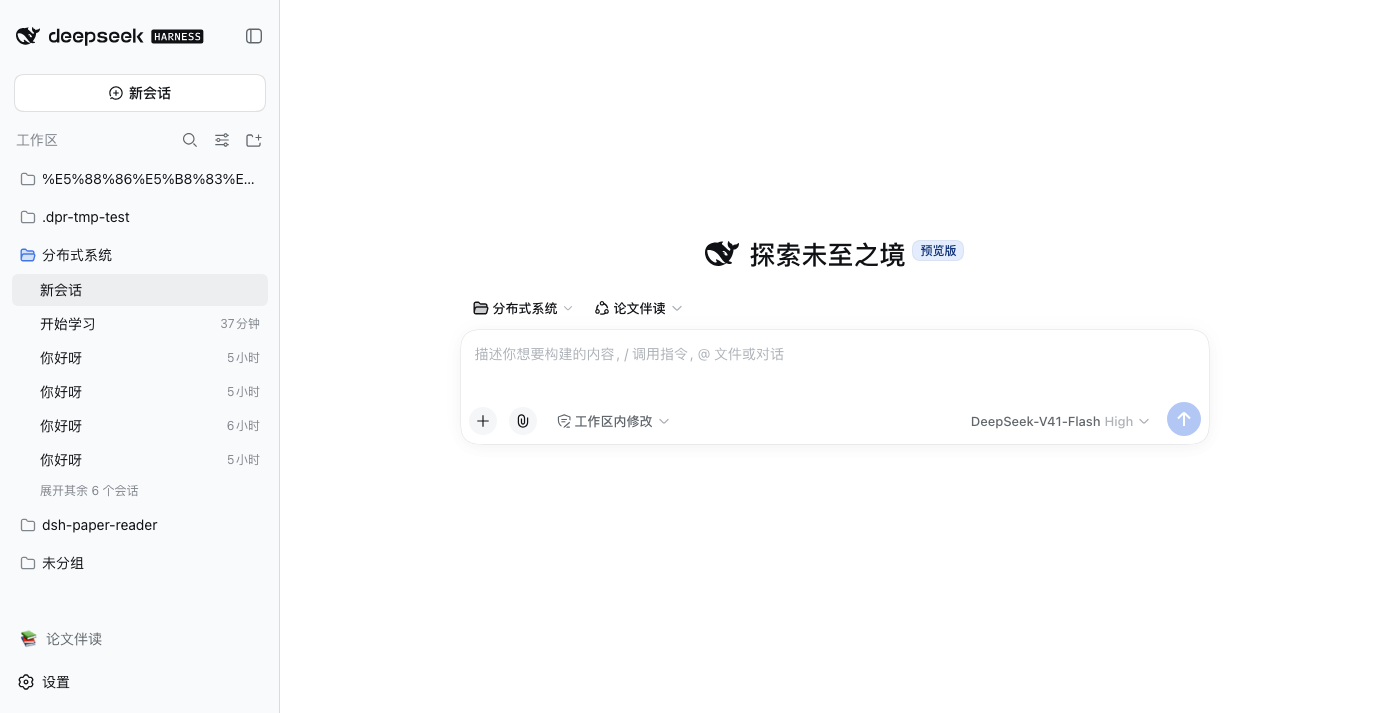
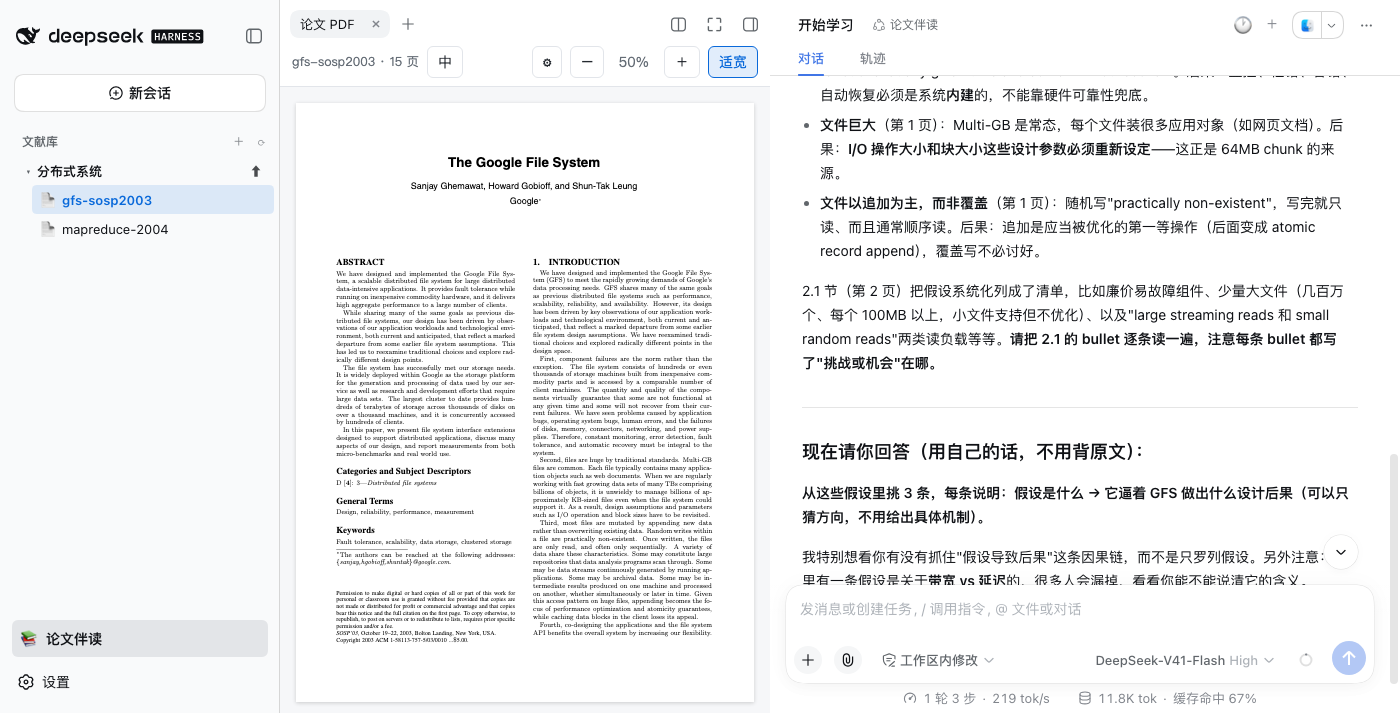
**安装后不改动官方界面** —— 侧栏底部多一行「📚 论文伴读」开关,点击才进入伴读模式(左侧变为文献库树),再点即还原官方工作区列表:
|
|
8
|
+
|
|
9
|
+
|
|
10
|
+
|
|
11
|
+
|
|
12
|
+
|
|
7
13
|
## 功能
|
|
8
14
|
|
|
9
|
-
- 📚
|
|
15
|
+
- 📚 **侧栏文献库树**:「论文伴读」模式开启时接管工作区侧栏,专题 → 论文两级;支持新建专题、上传 PDF(默认关闭,不覆盖官方界面)
|
|
10
16
|
- 💬 **原生对话伴读**:点击论文即在右侧打开它的 dsh 原生会话(流式 / 工具卡 / 用量条全是官方 UI);默认只呈现当前对话,对话列头部的 🕐 下拉回看**历史对话**(真实标题+日期,点哪条进哪条),+ 新建对话
|
|
11
17
|
- 🔗 **会话绑定论文**:会话 id 编码文献身份,工具调用自动定位当前论文——直接在输入框提问无需点名论文,回答必带页码
|
|
12
18
|
- 🤖 **专用 agent preset「论文伴读」**:paper 会话自动使用专用 preset —— 像老师一样带读:制定分步阅读计划(每步带页码和思考题)→ 逐节指导、点评 → 出题检验、逐题批改 → 成绩与薄弱点记入 `<文献>.study.json` 学习档案,跨会话累积;快速问答(选中即问)则直接回答,不上课
|
|
@@ -50,7 +56,7 @@ dsh --profile web # 侧栏变为文献库树
|
|
|
50
56
|
> 上面的 `translate` 配置退为**部署方默认值**,仅当 UI 未配置时生效。babeldoc 只支持 OpenAI 协议端点,
|
|
51
57
|
> Anthropic 协议的端点(如 `api.kimi.com/coding/`)不能直连。
|
|
52
58
|
|
|
53
|
-
|
|
59
|
+
> 伴读模式是**按需开启**的:默认不注册 `sidebar.workspaces`(官方工作区/会话列表原样),侧栏底部「📚 论文伴读」开关点击才接管,再点还原;模式选择记在 localStorage。退出模式时已打开的 PDF 页签和伴读会话不受影响。
|
|
54
60
|
|
|
55
61
|
## 架构
|
|
56
62
|
|
package/dist/host.js
CHANGED
|
@@ -6,7 +6,7 @@ import { randomUUID } from 'node:crypto';
|
|
|
6
6
|
import { join } from 'node:path';
|
|
7
7
|
import { listPapers, listTopics, resolveDataDir, resolvePaper } from "./library.js";
|
|
8
8
|
import { readTranscript, transcribePaper } from "./transcribe.js";
|
|
9
|
-
import { pdfVariantPath, startTranslation, zhStatus } from "./translate.js";
|
|
9
|
+
import { pdfVariantPath, restartTranslation, startTranslation, zhStatus } from "./translate.js";
|
|
10
10
|
import { clearTranslateConfig, maskApiKey, readTranslateConfig, resolveTranslateEndpoint, testTranslateEndpoint, writeTranslateConfig, } from "./translate-config.js";
|
|
11
11
|
import { installPaperPreset, PAPER_PRESET_ID } from "./preset.js";
|
|
12
12
|
function json(res, status, body) {
|
|
@@ -261,17 +261,26 @@ export function registerRoutes(ctx, config) {
|
|
|
261
261
|
createReadStream(pdfPath).pipe(res);
|
|
262
262
|
return;
|
|
263
263
|
}
|
|
264
|
-
// 中文版状态:zh=纯中文 dual=中英对照 busy
|
|
264
|
+
// 中文版状态:zh=纯中文 dual=中英对照 busy=翻译中。
|
|
265
|
+
// 顺带返回生效端点的脱敏信息,让 UI 能回答「正在用哪个模型/key 翻」——key 只给掩码。
|
|
265
266
|
if (sub === '/api/zh' && req.method === 'GET') {
|
|
266
|
-
|
|
267
|
+
const { endpoint, source } = await resolveTranslateEndpoint(config.translate);
|
|
268
|
+
json(res, 200, {
|
|
269
|
+
...zhStatus(locate(url)),
|
|
270
|
+
model: endpoint.model ?? null,
|
|
271
|
+
apiKeyHint: endpoint.apiKey ? maskApiKey(endpoint.apiKey) : null,
|
|
272
|
+
endpointSource: source,
|
|
273
|
+
});
|
|
267
274
|
return;
|
|
268
275
|
}
|
|
269
|
-
//
|
|
276
|
+
// 启动后台翻译(幂等;force=true 为重翻:先删已有译文再启动)。端点:UI 里填的 > profile 的 translate
|
|
270
277
|
if (sub === '/api/zh/generate' && req.method === 'POST') {
|
|
271
278
|
const body = (await readBody(req));
|
|
272
279
|
const ref = resolvePaper(dataDir, body);
|
|
273
280
|
const { endpoint } = await resolveTranslateEndpoint(config.translate);
|
|
274
|
-
const r =
|
|
281
|
+
const r = body.force
|
|
282
|
+
? await restartTranslation(ref, dataDir, endpoint)
|
|
283
|
+
: await startTranslation(ref, dataDir, endpoint);
|
|
275
284
|
json(res, r.started ? 200 : 409, r);
|
|
276
285
|
return;
|
|
277
286
|
}
|
package/dist/translate-config.js
CHANGED
|
@@ -90,8 +90,18 @@ export async function testTranslateEndpoint(ep) {
|
|
|
90
90
|
body: JSON.stringify({ model, messages: [{ role: 'user', content: 'ping' }], max_tokens: 1 }),
|
|
91
91
|
signal: AbortSignal.timeout(15_000),
|
|
92
92
|
});
|
|
93
|
-
if (r.ok)
|
|
94
|
-
|
|
93
|
+
if (r.ok) {
|
|
94
|
+
// 智谱系网关切错路径时(如 /api/v1)会回 HTTP 200 + {"code":1001,"success":false},
|
|
95
|
+
// 只看状态码会误判成功,babeldoc 跑起来才炸。真成功必须有 choices。
|
|
96
|
+
const text = (await r.text().catch(() => '')).slice(0, 300);
|
|
97
|
+
try {
|
|
98
|
+
const data = JSON.parse(text);
|
|
99
|
+
if (Array.isArray(data.choices))
|
|
100
|
+
return { ok: true };
|
|
101
|
+
}
|
|
102
|
+
catch { /* 非 JSON 也算失败,走下面报 body */ }
|
|
103
|
+
return { ok: false, detail: `HTTP 200 但响应不是补全结果:${text.slice(0, 200)}(多半是端点路径不对,如智谱应为 /api/paas/v4)` };
|
|
104
|
+
}
|
|
95
105
|
const text = (await r.text().catch(() => '')).slice(0, 200);
|
|
96
106
|
return { ok: false, detail: `HTTP ${r.status}${text ? ' ' + text : ''}` };
|
|
97
107
|
}
|
package/dist/translate.js
CHANGED
|
@@ -4,7 +4,7 @@
|
|
|
4
4
|
// babeldoc 只支持 OpenAI 兼容端点 → 端点/key/模型由插件配置提供。
|
|
5
5
|
import { execFile } from 'node:child_process';
|
|
6
6
|
import { existsSync } from 'node:fs';
|
|
7
|
-
import { mkdir, rename } from 'node:fs/promises';
|
|
7
|
+
import { mkdir, rename, rm } from 'node:fs/promises';
|
|
8
8
|
import { glob } from 'node:fs/promises';
|
|
9
9
|
import { join, dirname, basename, extname } from 'node:path';
|
|
10
10
|
export function zhPdfPath(ref) {
|
|
@@ -48,6 +48,31 @@ async function findBabeldoc(dataDir) {
|
|
|
48
48
|
}
|
|
49
49
|
return null;
|
|
50
50
|
}
|
|
51
|
+
/**
|
|
52
|
+
* 探测 babeldoc 支持的 CLI 参数(按 bin 缓存,进程内只跑一次 --help)。
|
|
53
|
+
* 必要性:--skip-figure-text 目前只在 GGboya 的 fork(PR#616)里,PyPI 版没有;
|
|
54
|
+
* 不认识的参数会让 babeldoc 启动即报错,所以可选参数必须探测后再传。
|
|
55
|
+
* 探测失败返回空集合——只丢可选功能,不影响核心参数。
|
|
56
|
+
*/
|
|
57
|
+
const flagSupport = new Map();
|
|
58
|
+
function babeldocFlags(bin) {
|
|
59
|
+
let p = flagSupport.get(bin);
|
|
60
|
+
if (!p) {
|
|
61
|
+
p = new Promise((res) => {
|
|
62
|
+
execFile(bin, ['--help'], { timeout: 60000 }, (err, stdout, stderr) => {
|
|
63
|
+
if (err)
|
|
64
|
+
console.warn('[dsh-paper-reader] babeldoc --help 探测失败,按最老参数集运行');
|
|
65
|
+
const flags = new Set();
|
|
66
|
+
for (const m of (stdout + '\n' + stderr).matchAll(/--[a-z0-9-]+/g)) {
|
|
67
|
+
flags.add(m[0].slice(2));
|
|
68
|
+
}
|
|
69
|
+
res(flags);
|
|
70
|
+
});
|
|
71
|
+
});
|
|
72
|
+
flagSupport.set(bin, p);
|
|
73
|
+
}
|
|
74
|
+
return p;
|
|
75
|
+
}
|
|
51
76
|
/**
|
|
52
77
|
* 启动 babeldoc 后台翻译。幂等:已生成或进行中直接返回 false 表示未新启动。
|
|
53
78
|
* 完成/失败结果写进 busy map,由 zhStatus 暴露。
|
|
@@ -58,6 +83,13 @@ export async function startTranslation(ref, dataDir, endpoint) {
|
|
|
58
83
|
return { started: false, reason: 'already-exists' };
|
|
59
84
|
if (st.busy)
|
|
60
85
|
return { started: false, reason: 'busy' };
|
|
86
|
+
const pre = await precheck(dataDir, endpoint);
|
|
87
|
+
if (pre)
|
|
88
|
+
return pre;
|
|
89
|
+
return launch(ref, dataDir, endpoint);
|
|
90
|
+
}
|
|
91
|
+
/** 端点/babeldoc 预检:不齐全时返回与 startTranslation 同形的失败结果。 */
|
|
92
|
+
async function precheck(dataDir, endpoint) {
|
|
61
93
|
const bin = await findBabeldoc(dataDir);
|
|
62
94
|
if (!bin)
|
|
63
95
|
return { started: false, reason: '未找到 babeldoc(pip install babeldoc,或复用 pdfqa 的 .venv-pdf2zh)' };
|
|
@@ -69,18 +101,52 @@ export async function startTranslation(ref, dataDir, endpoint) {
|
|
|
69
101
|
reason: '未配置翻译端点:在阅读器里点「中」按钮填写(OpenAI 兼容端点即可),或改 profile 的 translate 配置',
|
|
70
102
|
};
|
|
71
103
|
}
|
|
104
|
+
return null;
|
|
105
|
+
}
|
|
106
|
+
/**
|
|
107
|
+
* 重新翻译:删除已有译文产物后再启动(换模型/翻得不好时用)。
|
|
108
|
+
* 先预检再删——端点不齐或 babeldoc 缺失时不动旧译文,免得删完才发现跑不起来。
|
|
109
|
+
* babeldoc 的段落缓存 key 含模型名,换模型自然失效,无需 --ignore-cache。
|
|
110
|
+
*/
|
|
111
|
+
export async function restartTranslation(ref, dataDir, endpoint) {
|
|
112
|
+
if (zhStatus(ref).busy)
|
|
113
|
+
return { started: false, reason: 'busy' };
|
|
114
|
+
const pre = await precheck(dataDir, endpoint);
|
|
115
|
+
if (pre)
|
|
116
|
+
return pre;
|
|
117
|
+
await rm(zhPdfPath(ref), { force: true });
|
|
118
|
+
await rm(dualPdfPath(ref), { force: true });
|
|
119
|
+
return launch(ref, dataDir, endpoint);
|
|
120
|
+
}
|
|
121
|
+
/** 真正拉起 babeldoc 子进程(precheck 已通过、产物不存在/已删)。 */
|
|
122
|
+
async function launch(ref, dataDir, endpoint) {
|
|
123
|
+
const bin = (await findBabeldoc(dataDir));
|
|
72
124
|
const tmpDir = join(dataDir, '.pdf2zh-tmp');
|
|
73
125
|
await mkdir(tmpDir, { recursive: true });
|
|
74
126
|
busy.set(ref.pdfPath, null);
|
|
75
127
|
const stem = basename(ref.pdfPath, extname(ref.pdfPath));
|
|
76
128
|
const dstStem = ref.pdfPath.slice(0, -extname(ref.pdfPath).length);
|
|
129
|
+
// 推理型模型(glm-5.x / k3 / deepseek-flash)默认每段都先跑隐藏推理,翻译慢好几倍还偶尔返回空。
|
|
130
|
+
// 这三家的 OpenAI 兼容端点都接受 DeepSeek 风格 thinking 开关(babeldoc --openai-thinking 即发该字段);
|
|
131
|
+
// 自定义端点不加——OpenAI 官方等严格校验参数的端点会因未知字段 400。
|
|
132
|
+
// 可选参数统一过一遍探测:babeldoc 对不认识的参数直接报错退出,探测不到就不传(功能降级但不炸)。
|
|
133
|
+
const supported = await babeldocFlags(bin);
|
|
134
|
+
const opt = (flag) => (supported.has(flag) ? [`--${flag}`] : []);
|
|
135
|
+
const noThink = /bigmodel|kimi|moonshot|deepseek/i.test(endpoint.baseUrl)
|
|
136
|
+
? opt('openai-thinking').flatMap((f) => [f, 'disabled'])
|
|
137
|
+
: [];
|
|
77
138
|
const child = execFile(bin, [
|
|
78
139
|
'--files', ref.pdfPath,
|
|
79
140
|
'--lang-in', 'en', '--lang-out', 'zh-CN',
|
|
80
141
|
'--openai', '--openai-model', endpoint.model,
|
|
81
142
|
'--openai-base-url', endpoint.baseUrl, '--openai-api-key', endpoint.apiKey,
|
|
82
|
-
|
|
83
|
-
'--
|
|
143
|
+
...noThink,
|
|
144
|
+
'--qps', '16', '--no-watermark', '--output', tmpDir,
|
|
145
|
+
// 图/图片区域内的文字保持原文(架构图术语不翻)——目前仅 fork(PR#616)支持
|
|
146
|
+
...opt('skip-figure-text'),
|
|
147
|
+
// 跳过术语表自动抽取:该阶段要额外跑十几轮 LLM(推理型模型上能拖十几分钟,比正文还慢),
|
|
148
|
+
// 换来的术语一致性提升有限
|
|
149
|
+
...opt('no-auto-extract-glossary'),
|
|
84
150
|
], {
|
|
85
151
|
env: { ...process.env, HF_ENDPOINT: 'https://hf-mirror.com' }, // 版面模型走国内镜像
|
|
86
152
|
timeout: 45 * 60 * 1000,
|
package/lib/client.js
CHANGED
|
@@ -7,9 +7,9 @@
|
|
|
7
7
|
// 列钉到 grid 第 2 轨(宽轨=阅读器),center 列自动流入第 3 轨(窄轨=对话)。
|
|
8
8
|
// 纯 CSS grid 放置技巧:JS 只维护 grid-template-columns 的列宽(宽轨给 PDF、
|
|
9
9
|
// 窄轨给对话,正是想要的比例),内容换列不影响拖拽手柄/全屏/折叠逻辑。
|
|
10
|
-
// - sidebar.workspaces single slot 按 priority -1000 接管(lowest renders
|
|
11
|
-
//
|
|
12
|
-
//
|
|
10
|
+
// - sidebar.workspaces single slot 按 priority -1000 接管(lowest renders)——但**按需**:
|
|
11
|
+
// 「论文伴读模式」默认关闭,侧栏底部 footer.action 开关行点击才注册(再点注销,
|
|
12
|
+
// 还原官方工作区列表),localStorage 记忆。安装后官方侧栏原样,只多一行开关。
|
|
13
13
|
// - 选中即问:阅读器内选中 → /api/ask 注入当前会话 → 原生对话区实时流出。
|
|
14
14
|
//
|
|
15
15
|
// 加载机制:package.json 声明 dsh.client.inject + exports["./client"];require 解析
|
|
@@ -32,6 +32,7 @@ window.__ModuleLoader__.load({
|
|
|
32
32
|
upload: '上传 PDF 到此专题', newChat: '新建对话', session: '会话', pdfTab: '论文 PDF',
|
|
33
33
|
history: '历史对话',
|
|
34
34
|
sync: '对话还停在另一篇文献的会话里,点击切到当前文献',
|
|
35
|
+
mode: '论文伴读', modeEnterTip: '进入论文伴读:左侧变为文献库树', modeExitTip: '退出论文伴读:恢复官方工作区列表',
|
|
35
36
|
}
|
|
36
37
|
const en = {
|
|
37
38
|
library: 'Library',
|
|
@@ -39,6 +40,7 @@ window.__ModuleLoader__.load({
|
|
|
39
40
|
upload: 'Upload PDF into this topic', newChat: 'New chat', session: 'Session', pdfTab: 'Paper PDF',
|
|
40
41
|
history: 'Chat history',
|
|
41
42
|
sync: 'Chat is still on another paper — click to switch to the current one',
|
|
43
|
+
mode: 'Paper Reading', modeEnterTip: 'Enter paper-reading mode: sidebar becomes the library tree', modeExitTip: 'Exit paper-reading mode: restore the official workspace list',
|
|
42
44
|
}
|
|
43
45
|
|
|
44
46
|
let t = (k) => k
|
|
@@ -654,16 +656,65 @@ window.__ModuleLoader__.load({
|
|
|
654
656
|
)
|
|
655
657
|
|
|
656
658
|
return h('div', { style: S.root, 'data-dsh-plugin': 'dsh-paper-reader', 'data-dsh-surface': 'sidebar' },
|
|
657
|
-
// 常驻阅读器 iframe(覆盖在 PDF 页签的锚点上;不随会话重建)
|
|
658
|
-
h(ReaderOverlay, null),
|
|
659
|
-
// 对话列头部的历史/新建浮动按钮组(自渲染,不占树)
|
|
660
|
-
h(SessionActions, { uiWorkspace }),
|
|
661
659
|
h('input', { ref: fileInput, type: 'file', accept: '.pdf', style: { display: 'none' }, onChange: onFile }),
|
|
662
|
-
//
|
|
660
|
+
// 阅读器 iframe 与对话头部按钮组已迁往 shell.overlay 常驻注册(见 applyPaperMode 下方)——
|
|
661
|
+
// 它们不属于侧栏,更不能跟着「退出伴读模式」被卸载(已打开的 PDF 页签要继续活着)
|
|
663
662
|
tree,
|
|
664
663
|
)
|
|
665
664
|
}
|
|
666
665
|
|
|
666
|
+
/* ---------- 论文伴读模式:默认不接管侧栏 ----------
|
|
667
|
+
sidebar.workspaces 是 single slot,注册即遮蔽官方工作区列表——「一装就覆盖」
|
|
668
|
+
对用户不礼貌。改为按需注册:默认不注册(官方侧栏原样),sidebar.footer.action
|
|
669
|
+
(list slot,侧栏底部常驻)放一个开关行,点击注册/注销文献库树,localStorage 记忆。
|
|
670
|
+
阅读器悬浮层/会话按钮组走 shell.overlay 常驻注册,与本开关无关——退出模式时
|
|
671
|
+
已打开的 PDF 页签和伴读会话照常工作,随时可切回。 */
|
|
672
|
+
let paperMode = localStorage.getItem('dpr.mode') === 'paper'
|
|
673
|
+
let disposeLibrarySlot = null
|
|
674
|
+
let clientApi = null // apply() 里注入 { slots, layout, uiWorkspace, sidebarRight }
|
|
675
|
+
|
|
676
|
+
function applyPaperMode(on) {
|
|
677
|
+
paperMode = on
|
|
678
|
+
try { localStorage.setItem('dpr.mode', on ? 'paper' : '') } catch { /* 隐私模式写不了就算了 */ }
|
|
679
|
+
if (!clientApi) return
|
|
680
|
+
if (on && !disposeLibrarySlot) {
|
|
681
|
+
clientApi.slots.inject('sidebar.workspaces', () => {
|
|
682
|
+
disposeLibrarySlot = clientApi.slots.register({
|
|
683
|
+
name: 'sidebar.workspaces', priority: -1000, locale: NS,
|
|
684
|
+
}, function LibrarySection(slot) {
|
|
685
|
+
return h(LibraryTree, {
|
|
686
|
+
layout: clientApi.layout, uiWorkspace: clientApi.uiWorkspace,
|
|
687
|
+
sidebarRight: clientApi.sidebarRight,
|
|
688
|
+
wide: slot?.wide, expandSidebar: slot?.expandSidebar,
|
|
689
|
+
})
|
|
690
|
+
})
|
|
691
|
+
})
|
|
692
|
+
} else if (!on && disposeLibrarySlot) {
|
|
693
|
+
disposeLibrarySlot()
|
|
694
|
+
disposeLibrarySlot = null
|
|
695
|
+
}
|
|
696
|
+
}
|
|
697
|
+
|
|
698
|
+
const MODE = {
|
|
699
|
+
// 展开态:对齐官方 panelRow(36px 高、radius 8、hover 官方交互色)
|
|
700
|
+
wide: { display: 'flex', alignItems: 'center', gap: '8px', width: '100%', minHeight: '36px', padding: '7px 8px', borderRadius: '8px', border: 'none', background: 'none', cursor: 'pointer', font: 'inherit', textAlign: 'left', color: 'var(--dsw-alias-label-secondary, #656d76)' },
|
|
701
|
+
wideOn: { background: 'var(--dsw-alias-interactive-bg-active, rgba(9,105,218,.12))', color: 'var(--dsw-alias-label-primary, #24292f)', fontWeight: 600 },
|
|
702
|
+
// 收起态(rail):36×36 圆形图标钮,对齐官方 rail 控件
|
|
703
|
+
rail: { width: '36px', height: '36px', display: 'inline-flex', alignItems: 'center', justifyContent: 'center', borderRadius: '50%', border: 'none', background: 'none', cursor: 'pointer', font: 'inherit', color: 'var(--dsw-alias-label-primary, #24292f)' },
|
|
704
|
+
}
|
|
705
|
+
|
|
706
|
+
function PaperModeToggle(props) {
|
|
707
|
+
const wide = props?.wide !== false
|
|
708
|
+
const [on, setOn] = useState(paperMode)
|
|
709
|
+
return h('button', {
|
|
710
|
+
type: 'button', 'data-dsh-plugin': 'dsh-paper-reader', 'data-dsh-surface': 'paper-mode', 'data-dpr-mode': '',
|
|
711
|
+
title: on ? t('modeExitTip') : t('modeEnterTip'),
|
|
712
|
+
'aria-pressed': on ? 'true' : 'false',
|
|
713
|
+
style: { ...(wide ? MODE.wide : MODE.rail), ...(on && wide ? MODE.wideOn : {}) },
|
|
714
|
+
onClick: () => { applyPaperMode(!paperMode); setOn(paperMode) },
|
|
715
|
+
}, wide ? h(React.Fragment, null, '📚', h('span', null, t('mode'))) : '📚')
|
|
716
|
+
}
|
|
717
|
+
|
|
667
718
|
return {
|
|
668
719
|
inject: ['slots', 'locale', 'layout', 'uiWorkspace', 'sidebarRight', 'sidebarRightTabs'],
|
|
669
720
|
apply(ctx) {
|
|
@@ -687,7 +738,7 @@ window.__ModuleLoader__.load({
|
|
|
687
738
|
if (!document.getElementById('dpr-surface-css')) {
|
|
688
739
|
const styleEl = document.createElement('style')
|
|
689
740
|
styleEl.id = 'dpr-surface-css'
|
|
690
|
-
styleEl.textContent = '[data-dpr-rail]:hover{background:var(--dsw-alias-interactive-bg-hover)!important}'
|
|
741
|
+
styleEl.textContent = '[data-dpr-rail]:hover,[data-dpr-mode]:hover{background:var(--dsw-alias-interactive-bg-hover)!important}'
|
|
691
742
|
document.head.appendChild(styleEl)
|
|
692
743
|
}
|
|
693
744
|
|
|
@@ -699,20 +750,28 @@ window.__ModuleLoader__.load({
|
|
|
699
750
|
name: 'sidebar.right.pane.tab', key: 'dpr-reader', locale: NS,
|
|
700
751
|
}, PdfTab))
|
|
701
752
|
|
|
702
|
-
|
|
703
|
-
|
|
704
|
-
|
|
705
|
-
//
|
|
706
|
-
//
|
|
707
|
-
|
|
708
|
-
|
|
709
|
-
|
|
710
|
-
|
|
711
|
-
|
|
712
|
-
|
|
713
|
-
|
|
714
|
-
})
|
|
753
|
+
clientApi = { slots: ctx.slots, layout: ctx.layout, uiWorkspace: ctx.uiWorkspace, sidebarRight: ctx.sidebarRight }
|
|
754
|
+
|
|
755
|
+
// 常驻浮层(与模式开关无关):阅读器 iframe + 对话头部历史/新建按钮组。
|
|
756
|
+
// shell.overlay 是官方钦定的整页浮层自留地(list slot,additive,不遮蔽任何人)。
|
|
757
|
+
// (对话头部按钮不走 slot —— session 作用域 slot 不渲染动态包条目,只能自渲染。)
|
|
758
|
+
ctx.slots.inject('shell.overlay', () => ctx.slots.register({
|
|
759
|
+
name: 'shell.overlay', id: 'dpr-paper-overlays', locale: NS,
|
|
760
|
+
}, function PaperOverlays() {
|
|
761
|
+
return h(React.Fragment, null,
|
|
762
|
+
h(ReaderOverlay, null),
|
|
763
|
+
h(SessionActions, { uiWorkspace: clientApi?.uiWorkspace }),
|
|
764
|
+
)
|
|
715
765
|
}))
|
|
766
|
+
|
|
767
|
+
// 侧栏底部常驻的模式开关行(list slot)——安装后官方侧栏原样,只是底部多一行
|
|
768
|
+
// 「论文伴读」;点它才接管 workspaces 区,再点还原。
|
|
769
|
+
ctx.slots.inject('sidebar.footer.action', () => ctx.slots.register({
|
|
770
|
+
name: 'sidebar.footer.action', id: 'dpr-paper-mode', locale: NS,
|
|
771
|
+
}, PaperModeToggle))
|
|
772
|
+
|
|
773
|
+
// 上次会话开过伴读模式的话恢复(默认/首次安装 = 关 = 官方侧栏)
|
|
774
|
+
if (paperMode) applyPaperMode(true)
|
|
716
775
|
} catch (e) {
|
|
717
776
|
console.error('[dsh-paper-reader] client apply failed:', e)
|
|
718
777
|
}
|
package/package.json
CHANGED
package/reader/index.html
CHANGED
|
@@ -57,7 +57,9 @@
|
|
|
57
57
|
#cfg-pop h3 { margin: 0; font-size: 13px; }
|
|
58
58
|
#cfg-hint { font-size: 12px; color: var(--text-2); margin: 4px 0 2px; }
|
|
59
59
|
#cfg-pop label { display: block; font-size: 12px; color: var(--text-2); margin: 8px 0 2px; }
|
|
60
|
-
#cfg-pop input { width: 100%; border: 1px solid var(--border); border-radius: 6px; padding: 6px 8px; font: inherit; }
|
|
60
|
+
#cfg-pop input, #cfg-pop select { width: 100%; border: 1px solid var(--border); border-radius: 6px; padding: 6px 8px; font: inherit; background: var(--panel); color: var(--text); }
|
|
61
|
+
#cfg-model-hint, #cfg-source { font-size: 11.5px; color: var(--text-2); margin-top: 4px; line-height: 1.5; }
|
|
62
|
+
#cfg-source:empty { display: none; }
|
|
61
63
|
#cfg-actions { display: flex; justify-content: flex-end; gap: 8px; margin-top: 10px; }
|
|
62
64
|
#cfg-save { background: var(--accent); color: #fff; border: none; border-radius: 6px; padding: 5px 14px; cursor: pointer; }
|
|
63
65
|
#cfg-save:disabled { opacity: .5; cursor: default; }
|
|
@@ -71,6 +73,7 @@
|
|
|
71
73
|
<div id="bar">
|
|
72
74
|
<span id="status">论文伴读</span>
|
|
73
75
|
<button id="zh-toggle" class="tbtn" title="切换中文译文(没有译文时可生成)" style="display:none">中</button>
|
|
76
|
+
<button id="zh-regen" class="tbtn" title="重新翻译:删除现有译文,用当前端点重跑(换模型后用)" style="display:none">↻</button>
|
|
74
77
|
<span class="spacer"></span>
|
|
75
78
|
<button id="cfg-open" class="tbtn" title="翻译端点设置">⚙</button>
|
|
76
79
|
<button id="zoom-out" class="tbtn">−</button>
|
|
@@ -97,13 +100,18 @@
|
|
|
97
100
|
|
|
98
101
|
<div id="cfg-pop">
|
|
99
102
|
<h3>翻译端点</h3>
|
|
100
|
-
<div id="cfg-hint"
|
|
103
|
+
<div id="cfg-hint">选预设供应商,或选「自定义」填任意 OpenAI 兼容端点(通义 / 本地 vLLM 等)。保存前会先测试连接。</div>
|
|
104
|
+
<div id="cfg-source"></div>
|
|
105
|
+
<label for="cfg-provider">供应商</label>
|
|
106
|
+
<select id="cfg-provider"></select>
|
|
101
107
|
<label for="cfg-url">端点 URL</label>
|
|
102
108
|
<input id="cfg-url" type="text" placeholder="https://api.deepseek.com/v1" autocomplete="off">
|
|
103
109
|
<label for="cfg-key">API Key</label>
|
|
104
110
|
<input id="cfg-key" type="password" placeholder="sk-..." autocomplete="new-password">
|
|
105
111
|
<label for="cfg-model">模型</label>
|
|
106
|
-
<input id="cfg-model" type="text" placeholder="deepseek-chat" autocomplete="off">
|
|
112
|
+
<input id="cfg-model" type="text" placeholder="deepseek-chat" autocomplete="off" list="cfg-model-list">
|
|
113
|
+
<datalist id="cfg-model-list"></datalist>
|
|
114
|
+
<div id="cfg-model-hint">glm-5.x / k3 / deepseek-flash 是推理型模型,服务端已自动关闭思考;选自定义端点时建议用非推理模型,否则会慢好几倍。</div>
|
|
107
115
|
<div id="cfg-actions">
|
|
108
116
|
<button id="cfg-cancel">取消</button>
|
|
109
117
|
<button id="cfg-save">保存</button>
|
|
@@ -167,9 +175,14 @@ async function refreshZhState() {
|
|
|
167
175
|
btn.style.display = '';
|
|
168
176
|
btn.disabled = zhState.busy;
|
|
169
177
|
btn.textContent = zhState.busy ? '译' : '中';
|
|
170
|
-
btn.title = zhState.busy ? '
|
|
178
|
+
btn.title = zhState.busy ? `翻译进行中${zhState.model ? `(${zhState.model})` : ''}…`
|
|
171
179
|
: (zhState.zh || zhState.dual) ? '切换中文译文'
|
|
172
180
|
: '还没有中文版,点击生成(babeldoc,需要几分钟)';
|
|
181
|
+
// ↻ 只在「已有译文且空闲」时出现;状态变化时顺手拆掉两击确认的待确认态
|
|
182
|
+
const regen = $('zh-regen');
|
|
183
|
+
const canRegen = (zhState.zh || zhState.dual) && !zhState.busy;
|
|
184
|
+
regen.style.display = canRegen ? '' : 'none';
|
|
185
|
+
if (!canRegen) disarmRegen();
|
|
173
186
|
}
|
|
174
187
|
|
|
175
188
|
$('zh-toggle').onclick = async () => {
|
|
@@ -183,28 +196,95 @@ $('zh-toggle').onclick = async () => {
|
|
|
183
196
|
await loadPdf(pdfUrl(zhVariant));
|
|
184
197
|
return;
|
|
185
198
|
}
|
|
199
|
+
await startGenerate(false);
|
|
200
|
+
};
|
|
201
|
+
|
|
202
|
+
// 生成/重翻共用:force=true 时服务端先删旧译文再启动;成功后轮询到完成
|
|
203
|
+
async function startGenerate(force) {
|
|
186
204
|
try {
|
|
187
|
-
await api('/zh/generate', {
|
|
188
|
-
|
|
205
|
+
await api('/zh/generate', {
|
|
206
|
+
method: 'POST', headers: { 'content-type': 'application/json' },
|
|
207
|
+
body: JSON.stringify(force ? { ...current, force: true } : current),
|
|
208
|
+
});
|
|
209
|
+
const m = zhState.model ? `(${zhState.model})` : '';
|
|
210
|
+
toast(force ? `已删除旧译文,开始重新翻译${m}…` : `开始生成中文版${m}(约几分钟)…`, 5000);
|
|
189
211
|
} catch (e) {
|
|
190
|
-
// 没配端点 →
|
|
191
|
-
if (e.code === 'no-endpoint') { openCfgPop(true); return; }
|
|
212
|
+
// 没配端点 → 直接弹配置表单;填好保存后自动回来重试(记住是不是重翻)
|
|
213
|
+
if (e.code === 'no-endpoint') { cfgRetryForce = force; openCfgPop(true); return; }
|
|
192
214
|
toast(e.message, 8000); return;
|
|
193
215
|
}
|
|
194
216
|
$('zh-toggle').disabled = true; $('zh-toggle').textContent = '译';
|
|
217
|
+
$('zh-regen').style.display = 'none';
|
|
195
218
|
const timer = setInterval(async () => {
|
|
196
219
|
await refreshZhState();
|
|
197
220
|
if (!zhState.busy) {
|
|
198
221
|
clearInterval(timer);
|
|
199
|
-
if (zhState.dual || zhState.zh) {
|
|
222
|
+
if (zhState.dual || zhState.zh) {
|
|
223
|
+
toast('中文版已生成');
|
|
224
|
+
// 重翻完成时用户可能正停在译文视图:原地刷新同一变体,而不是来回切换
|
|
225
|
+
if (zhVariant) await loadPdf(pdfUrl(zhVariant));
|
|
226
|
+
else $('zh-toggle').click();
|
|
227
|
+
}
|
|
200
228
|
else toast('生成失败:' + (zhState.error || '未知原因'), 8000);
|
|
201
229
|
}
|
|
202
230
|
}, 5000);
|
|
231
|
+
}
|
|
232
|
+
|
|
233
|
+
/* ================= 重新翻译(↻,两击确认) ================= */
|
|
234
|
+
// 不用原生 confirm:阅读器跑在 dsh 桌面壳的 iframe 里,原生对话框行为不可靠。
|
|
235
|
+
// 第一击把按钮变成「重翻?」待确认态(3 秒有效),第二击才真删真跑。
|
|
236
|
+
let regenArmTimer = null;
|
|
237
|
+
function disarmRegen() {
|
|
238
|
+
clearTimeout(regenArmTimer); regenArmTimer = null;
|
|
239
|
+
const btn = $('zh-regen');
|
|
240
|
+
btn.textContent = '↻'; btn.classList.remove('active');
|
|
241
|
+
}
|
|
242
|
+
$('zh-regen').onclick = async () => {
|
|
243
|
+
if (!current || zhState.busy) return;
|
|
244
|
+
const btn = $('zh-regen');
|
|
245
|
+
if (regenArmTimer) { // 第二击:确认执行
|
|
246
|
+
disarmRegen();
|
|
247
|
+
await startGenerate(true);
|
|
248
|
+
return;
|
|
249
|
+
}
|
|
250
|
+
btn.textContent = '重翻?'; // 第一击:进入待确认态
|
|
251
|
+
btn.classList.add('active');
|
|
252
|
+
regenArmTimer = setTimeout(disarmRegen, 3000);
|
|
203
253
|
};
|
|
204
254
|
|
|
205
255
|
/* ================= 翻译端点设置 ================= */
|
|
206
|
-
//
|
|
256
|
+
// 供应商预设(OpenAI 兼容端点,对齐 lflow 的供应商清单):选中即回填 URL + 推荐模型。
|
|
257
|
+
// 一律走 Coding 套餐端点——买套餐是常态;套餐 key 走按量口会报余额不足。按量用户选「自定义」手填。
|
|
258
|
+
// models 仅作 datalist 建议,输入框仍可自由填写(新型号上线不用发版)。
|
|
259
|
+
// glm-5.x / k3 / deepseek-flash 是推理型,服务端会对这三家域名自动关 thinking(translate.ts)。
|
|
260
|
+
const PROVIDERS = [
|
|
261
|
+
{ id: 'custom', name: '自定义(OpenAI 兼容)', baseUrl: '', models: [] },
|
|
262
|
+
{ id: 'deepseek', name: 'DeepSeek', baseUrl: 'https://api.deepseek.com', models: ['deepseek-v4-pro', 'deepseek-flash'] },
|
|
263
|
+
{ id: 'glm', name: '智谱 GLM', baseUrl: 'https://open.bigmodel.cn/api/coding/paas/v4', models: ['glm-5.3-flash', 'glm-5.3', 'glm-4.6'] },
|
|
264
|
+
{ id: 'kimi', name: 'Kimi', baseUrl: 'https://api.kimi.com/coding/v1', models: ['k3'] },
|
|
265
|
+
];
|
|
266
|
+
const normUrl = (u) => (u || '').trim().replace(/\/+$/, '');
|
|
267
|
+
// 按 baseUrl 反查预设(打开表单时回显选中项);查不到就是 custom
|
|
268
|
+
const providerOf = (baseUrl) => PROVIDERS.find((p) => p.id !== 'custom' && normUrl(p.baseUrl) === normUrl(baseUrl)) || PROVIDERS[0];
|
|
269
|
+
|
|
270
|
+
(function initProviderSelect() {
|
|
271
|
+
const sel = $('cfg-provider');
|
|
272
|
+
for (const p of PROVIDERS) {
|
|
273
|
+
const opt = document.createElement('option');
|
|
274
|
+
opt.value = p.id; opt.textContent = p.name;
|
|
275
|
+
sel.appendChild(opt);
|
|
276
|
+
}
|
|
277
|
+
sel.onchange = () => {
|
|
278
|
+
const p = PROVIDERS.find((x) => x.id === sel.value) || PROVIDERS[0];
|
|
279
|
+
if (p.baseUrl) $('cfg-url').value = p.baseUrl; // custom 不动用户已填的 URL
|
|
280
|
+
$('cfg-model-list').innerHTML = p.models.map((m) => `<option value="${esc(m)}">`).join('');
|
|
281
|
+
if (p.models.length && !p.models.includes($('cfg-model').value.trim())) $('cfg-model').value = p.models[0];
|
|
282
|
+
};
|
|
283
|
+
})();
|
|
284
|
+
|
|
285
|
+
// 保存成功后是否自动接着生成:点「中」/「↻」发现没配 → 弹本表单 → 填完直接开跑
|
|
207
286
|
let cfgRetryGenerate = false;
|
|
287
|
+
let cfgRetryForce = false; // 待重试的是不是「重翻」(↻ 进来时旧译文还在,zh-toggle 点击语义不对,必须带 force)
|
|
208
288
|
|
|
209
289
|
async function openCfgPop(retryGenerate) {
|
|
210
290
|
cfgRetryGenerate = Boolean(retryGenerate);
|
|
@@ -214,23 +294,36 @@ async function openCfgPop(retryGenerate) {
|
|
|
214
294
|
} catch (e) { toast('读取配置失败:' + e.message, 8000); return; }
|
|
215
295
|
$('cfg-url').value = cfg.baseUrl || '';
|
|
216
296
|
$('cfg-model').value = cfg.model || '';
|
|
297
|
+
// 按已存 URL 回显供应商,并触发一次 onchange 补齐模型候选(但不覆盖已存模型/URL)
|
|
298
|
+
const sel = $('cfg-provider');
|
|
299
|
+
sel.value = providerOf(cfg.baseUrl).id;
|
|
300
|
+
const keepUrl = $('cfg-url').value, keepModel = $('cfg-model').value;
|
|
301
|
+
sel.onchange();
|
|
302
|
+
$('cfg-url').value = keepUrl || $('cfg-url').value;
|
|
303
|
+
$('cfg-model').value = keepModel || $('cfg-model').value;
|
|
217
304
|
// 明文 key 不回传:留空 = 沿用已存的那把
|
|
218
305
|
$('cfg-key').value = '';
|
|
219
306
|
$('cfg-key').placeholder = cfg.hasApiKey ? `已保存(${cfg.apiKeyHint}),留空则不修改` : 'sk-...';
|
|
307
|
+
// 生效配置的来源:界面保存的文件 优先于 profile 的 YAML 默认值——两条来源都有时不说明会分不清生效的是谁
|
|
308
|
+
$('cfg-source').textContent =
|
|
309
|
+
cfg.source === 'file' ? `当前生效:本界面保存的配置(key ${cfg.apiKeyHint})`
|
|
310
|
+
: cfg.source === 'profile' ? '当前生效:profile 默认配置(在本界面保存后会被覆盖)'
|
|
311
|
+
: '';
|
|
220
312
|
const pop = $('cfg-pop');
|
|
221
313
|
pop.style.display = 'block';
|
|
222
314
|
// 先显示再量尺寸(不像 #ask-pop 那样写死尺寸常量,免得跟 CSS 漂移)
|
|
223
315
|
pop.style.left = Math.max(8, (window.innerWidth - pop.offsetWidth) / 2) + 'px';
|
|
224
316
|
pop.style.top = Math.max(8, (window.innerHeight - pop.offsetHeight) / 3) + 'px';
|
|
225
|
-
$('cfg-
|
|
317
|
+
$('cfg-key').focus();
|
|
226
318
|
}
|
|
227
|
-
function closeCfgPop() { $('cfg-pop').style.display = 'none'; cfgRetryGenerate = false; }
|
|
319
|
+
function closeCfgPop() { $('cfg-pop').style.display = 'none'; cfgRetryGenerate = false; cfgRetryForce = false; }
|
|
228
320
|
|
|
229
321
|
$('cfg-open').onclick = () => openCfgPop(false);
|
|
230
322
|
$('cfg-cancel').onclick = closeCfgPop;
|
|
231
323
|
|
|
232
324
|
$('cfg-save').onclick = async () => {
|
|
233
|
-
|
|
325
|
+
// retry/force 先捞出来:closeCfgPop 会把这两个待确认态清零
|
|
326
|
+
const btn = $('cfg-save'), label = btn.textContent, retry = cfgRetryGenerate, force = cfgRetryForce;
|
|
234
327
|
btn.disabled = true; btn.textContent = '测试中…';
|
|
235
328
|
try {
|
|
236
329
|
// 服务端先打一发极小的 chat/completions 验证 url/key/model,通过才落盘
|
|
@@ -251,7 +344,7 @@ $('cfg-save').onclick = async () => {
|
|
|
251
344
|
}
|
|
252
345
|
closeCfgPop();
|
|
253
346
|
await refreshZhState();
|
|
254
|
-
if (retry)
|
|
347
|
+
if (retry) startGenerate(force); // 沿用触发来源的语义:「中」=生成,「↻」=重翻
|
|
255
348
|
else toast('翻译端点已保存');
|
|
256
349
|
};
|
|
257
350
|
|