@ggboy123/dsh-paper-reader 0.1.1 → 0.2.0
This diff represents the content of publicly available package versions that have been released to one of the supported registries. The information contained in this diff is provided for informational purposes only and reflects changes between package versions as they appear in their respective public registries.
- package/README.md +8 -2
- package/lib/client.js +81 -22
- package/package.json +1 -1
package/README.md
CHANGED
|
@@ -4,9 +4,15 @@
|
|
|
4
4
|
|
|
5
5
|
功能迁移自本地独立产品 pdfqa(Go 实现的论文伴读工具)。原则:agent 循环 / 模型层 / 会话持久化全部交给 dsh 框架,插件只做「转录 + 检索 + 阅读器 UI」的薄壳组合。
|
|
6
6
|
|
|
7
|
+
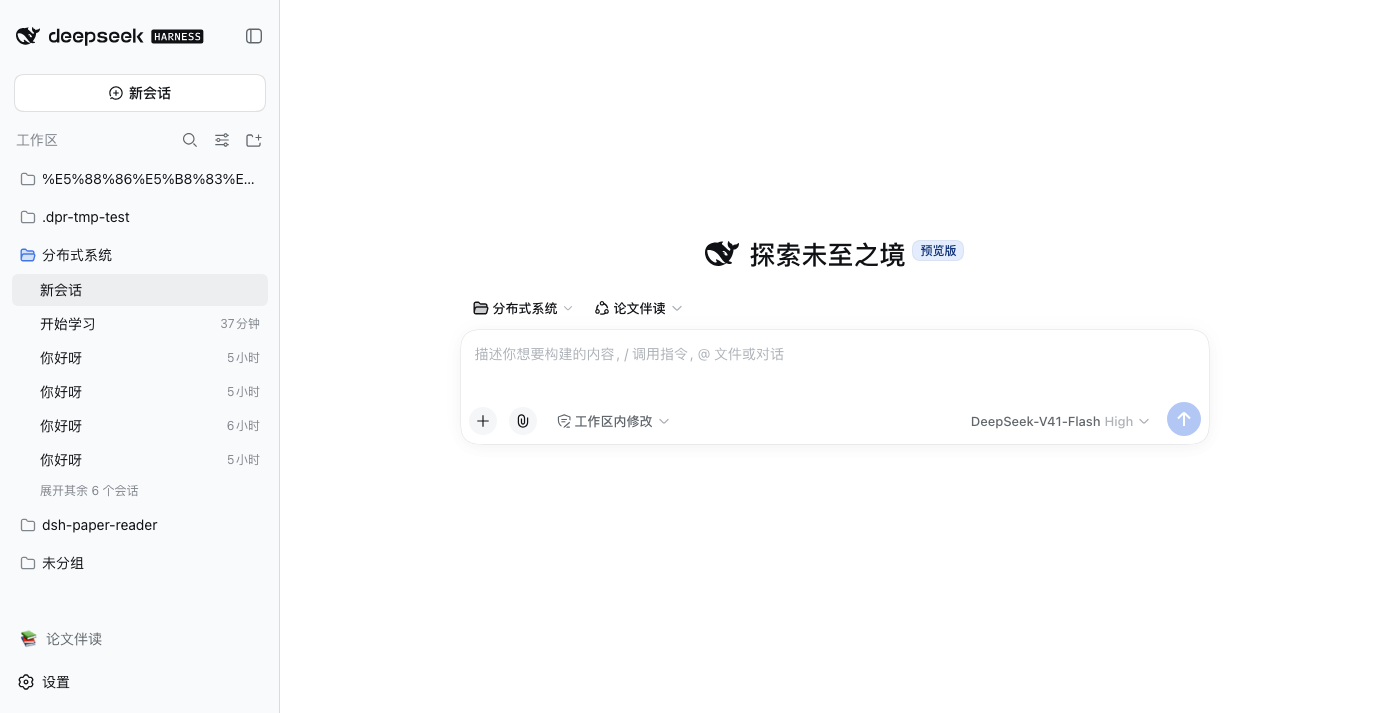
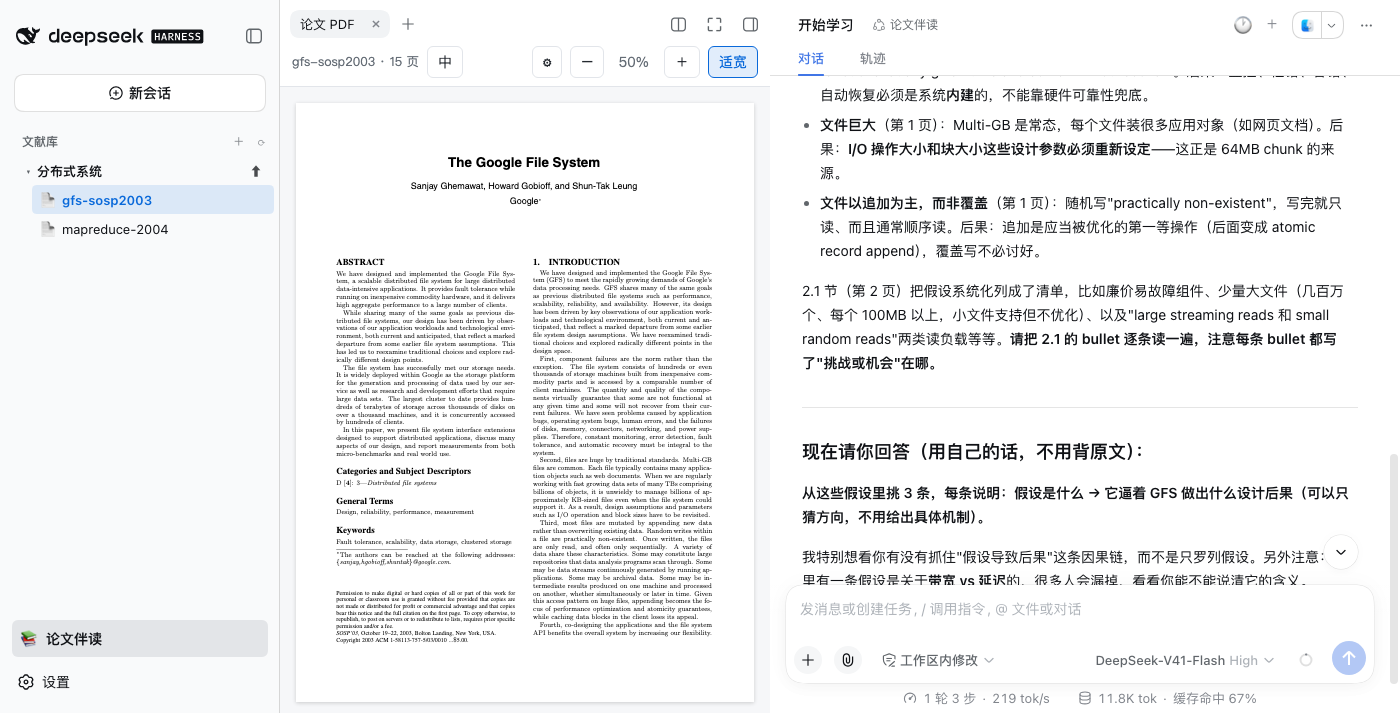
**安装后不改动官方界面** —— 侧栏底部多一行「📚 论文伴读」开关,点击才进入伴读模式(左侧变为文献库树),再点即还原官方工作区列表:
|
|
8
|
+
|
|
9
|
+
|
|
10
|
+
|
|
11
|
+
|
|
12
|
+
|
|
7
13
|
## 功能
|
|
8
14
|
|
|
9
|
-
- 📚
|
|
15
|
+
- 📚 **侧栏文献库树**:「论文伴读」模式开启时接管工作区侧栏,专题 → 论文两级;支持新建专题、上传 PDF(默认关闭,不覆盖官方界面)
|
|
10
16
|
- 💬 **原生对话伴读**:点击论文即在右侧打开它的 dsh 原生会话(流式 / 工具卡 / 用量条全是官方 UI);默认只呈现当前对话,对话列头部的 🕐 下拉回看**历史对话**(真实标题+日期,点哪条进哪条),+ 新建对话
|
|
11
17
|
- 🔗 **会话绑定论文**:会话 id 编码文献身份,工具调用自动定位当前论文——直接在输入框提问无需点名论文,回答必带页码
|
|
12
18
|
- 🤖 **专用 agent preset「论文伴读」**:paper 会话自动使用专用 preset —— 像老师一样带读:制定分步阅读计划(每步带页码和思考题)→ 逐节指导、点评 → 出题检验、逐题批改 → 成绩与薄弱点记入 `<文献>.study.json` 学习档案,跨会话累积;快速问答(选中即问)则直接回答,不上课
|
|
@@ -50,7 +56,7 @@ dsh --profile web # 侧栏变为文献库树
|
|
|
50
56
|
> 上面的 `translate` 配置退为**部署方默认值**,仅当 UI 未配置时生效。babeldoc 只支持 OpenAI 协议端点,
|
|
51
57
|
> Anthropic 协议的端点(如 `api.kimi.com/coding/`)不能直连。
|
|
52
58
|
|
|
53
|
-
|
|
59
|
+
> 伴读模式是**按需开启**的:默认不注册 `sidebar.workspaces`(官方工作区/会话列表原样),侧栏底部「📚 论文伴读」开关点击才接管,再点还原;模式选择记在 localStorage。退出模式时已打开的 PDF 页签和伴读会话不受影响。
|
|
54
60
|
|
|
55
61
|
## 架构
|
|
56
62
|
|
package/lib/client.js
CHANGED
|
@@ -7,9 +7,9 @@
|
|
|
7
7
|
// 列钉到 grid 第 2 轨(宽轨=阅读器),center 列自动流入第 3 轨(窄轨=对话)。
|
|
8
8
|
// 纯 CSS grid 放置技巧:JS 只维护 grid-template-columns 的列宽(宽轨给 PDF、
|
|
9
9
|
// 窄轨给对话,正是想要的比例),内容换列不影响拖拽手柄/全屏/折叠逻辑。
|
|
10
|
-
// - sidebar.workspaces single slot 按 priority -1000 接管(lowest renders
|
|
11
|
-
//
|
|
12
|
-
//
|
|
10
|
+
// - sidebar.workspaces single slot 按 priority -1000 接管(lowest renders)——但**按需**:
|
|
11
|
+
// 「论文伴读模式」默认关闭,侧栏底部 footer.action 开关行点击才注册(再点注销,
|
|
12
|
+
// 还原官方工作区列表),localStorage 记忆。安装后官方侧栏原样,只多一行开关。
|
|
13
13
|
// - 选中即问:阅读器内选中 → /api/ask 注入当前会话 → 原生对话区实时流出。
|
|
14
14
|
//
|
|
15
15
|
// 加载机制:package.json 声明 dsh.client.inject + exports["./client"];require 解析
|
|
@@ -32,6 +32,7 @@ window.__ModuleLoader__.load({
|
|
|
32
32
|
upload: '上传 PDF 到此专题', newChat: '新建对话', session: '会话', pdfTab: '论文 PDF',
|
|
33
33
|
history: '历史对话',
|
|
34
34
|
sync: '对话还停在另一篇文献的会话里,点击切到当前文献',
|
|
35
|
+
mode: '论文伴读', modeEnterTip: '进入论文伴读:左侧变为文献库树', modeExitTip: '退出论文伴读:恢复官方工作区列表',
|
|
35
36
|
}
|
|
36
37
|
const en = {
|
|
37
38
|
library: 'Library',
|
|
@@ -39,6 +40,7 @@ window.__ModuleLoader__.load({
|
|
|
39
40
|
upload: 'Upload PDF into this topic', newChat: 'New chat', session: 'Session', pdfTab: 'Paper PDF',
|
|
40
41
|
history: 'Chat history',
|
|
41
42
|
sync: 'Chat is still on another paper — click to switch to the current one',
|
|
43
|
+
mode: 'Paper Reading', modeEnterTip: 'Enter paper-reading mode: sidebar becomes the library tree', modeExitTip: 'Exit paper-reading mode: restore the official workspace list',
|
|
42
44
|
}
|
|
43
45
|
|
|
44
46
|
let t = (k) => k
|
|
@@ -654,16 +656,65 @@ window.__ModuleLoader__.load({
|
|
|
654
656
|
)
|
|
655
657
|
|
|
656
658
|
return h('div', { style: S.root, 'data-dsh-plugin': 'dsh-paper-reader', 'data-dsh-surface': 'sidebar' },
|
|
657
|
-
// 常驻阅读器 iframe(覆盖在 PDF 页签的锚点上;不随会话重建)
|
|
658
|
-
h(ReaderOverlay, null),
|
|
659
|
-
// 对话列头部的历史/新建浮动按钮组(自渲染,不占树)
|
|
660
|
-
h(SessionActions, { uiWorkspace }),
|
|
661
659
|
h('input', { ref: fileInput, type: 'file', accept: '.pdf', style: { display: 'none' }, onChange: onFile }),
|
|
662
|
-
//
|
|
660
|
+
// 阅读器 iframe 与对话头部按钮组已迁往 shell.overlay 常驻注册(见 applyPaperMode 下方)——
|
|
661
|
+
// 它们不属于侧栏,更不能跟着「退出伴读模式」被卸载(已打开的 PDF 页签要继续活着)
|
|
663
662
|
tree,
|
|
664
663
|
)
|
|
665
664
|
}
|
|
666
665
|
|
|
666
|
+
/* ---------- 论文伴读模式:默认不接管侧栏 ----------
|
|
667
|
+
sidebar.workspaces 是 single slot,注册即遮蔽官方工作区列表——「一装就覆盖」
|
|
668
|
+
对用户不礼貌。改为按需注册:默认不注册(官方侧栏原样),sidebar.footer.action
|
|
669
|
+
(list slot,侧栏底部常驻)放一个开关行,点击注册/注销文献库树,localStorage 记忆。
|
|
670
|
+
阅读器悬浮层/会话按钮组走 shell.overlay 常驻注册,与本开关无关——退出模式时
|
|
671
|
+
已打开的 PDF 页签和伴读会话照常工作,随时可切回。 */
|
|
672
|
+
let paperMode = localStorage.getItem('dpr.mode') === 'paper'
|
|
673
|
+
let disposeLibrarySlot = null
|
|
674
|
+
let clientApi = null // apply() 里注入 { slots, layout, uiWorkspace, sidebarRight }
|
|
675
|
+
|
|
676
|
+
function applyPaperMode(on) {
|
|
677
|
+
paperMode = on
|
|
678
|
+
try { localStorage.setItem('dpr.mode', on ? 'paper' : '') } catch { /* 隐私模式写不了就算了 */ }
|
|
679
|
+
if (!clientApi) return
|
|
680
|
+
if (on && !disposeLibrarySlot) {
|
|
681
|
+
clientApi.slots.inject('sidebar.workspaces', () => {
|
|
682
|
+
disposeLibrarySlot = clientApi.slots.register({
|
|
683
|
+
name: 'sidebar.workspaces', priority: -1000, locale: NS,
|
|
684
|
+
}, function LibrarySection(slot) {
|
|
685
|
+
return h(LibraryTree, {
|
|
686
|
+
layout: clientApi.layout, uiWorkspace: clientApi.uiWorkspace,
|
|
687
|
+
sidebarRight: clientApi.sidebarRight,
|
|
688
|
+
wide: slot?.wide, expandSidebar: slot?.expandSidebar,
|
|
689
|
+
})
|
|
690
|
+
})
|
|
691
|
+
})
|
|
692
|
+
} else if (!on && disposeLibrarySlot) {
|
|
693
|
+
disposeLibrarySlot()
|
|
694
|
+
disposeLibrarySlot = null
|
|
695
|
+
}
|
|
696
|
+
}
|
|
697
|
+
|
|
698
|
+
const MODE = {
|
|
699
|
+
// 展开态:对齐官方 panelRow(36px 高、radius 8、hover 官方交互色)
|
|
700
|
+
wide: { display: 'flex', alignItems: 'center', gap: '8px', width: '100%', minHeight: '36px', padding: '7px 8px', borderRadius: '8px', border: 'none', background: 'none', cursor: 'pointer', font: 'inherit', textAlign: 'left', color: 'var(--dsw-alias-label-secondary, #656d76)' },
|
|
701
|
+
wideOn: { background: 'var(--dsw-alias-interactive-bg-active, rgba(9,105,218,.12))', color: 'var(--dsw-alias-label-primary, #24292f)', fontWeight: 600 },
|
|
702
|
+
// 收起态(rail):36×36 圆形图标钮,对齐官方 rail 控件
|
|
703
|
+
rail: { width: '36px', height: '36px', display: 'inline-flex', alignItems: 'center', justifyContent: 'center', borderRadius: '50%', border: 'none', background: 'none', cursor: 'pointer', font: 'inherit', color: 'var(--dsw-alias-label-primary, #24292f)' },
|
|
704
|
+
}
|
|
705
|
+
|
|
706
|
+
function PaperModeToggle(props) {
|
|
707
|
+
const wide = props?.wide !== false
|
|
708
|
+
const [on, setOn] = useState(paperMode)
|
|
709
|
+
return h('button', {
|
|
710
|
+
type: 'button', 'data-dsh-plugin': 'dsh-paper-reader', 'data-dsh-surface': 'paper-mode', 'data-dpr-mode': '',
|
|
711
|
+
title: on ? t('modeExitTip') : t('modeEnterTip'),
|
|
712
|
+
'aria-pressed': on ? 'true' : 'false',
|
|
713
|
+
style: { ...(wide ? MODE.wide : MODE.rail), ...(on && wide ? MODE.wideOn : {}) },
|
|
714
|
+
onClick: () => { applyPaperMode(!paperMode); setOn(paperMode) },
|
|
715
|
+
}, wide ? h(React.Fragment, null, '📚', h('span', null, t('mode'))) : '📚')
|
|
716
|
+
}
|
|
717
|
+
|
|
667
718
|
return {
|
|
668
719
|
inject: ['slots', 'locale', 'layout', 'uiWorkspace', 'sidebarRight', 'sidebarRightTabs'],
|
|
669
720
|
apply(ctx) {
|
|
@@ -687,7 +738,7 @@ window.__ModuleLoader__.load({
|
|
|
687
738
|
if (!document.getElementById('dpr-surface-css')) {
|
|
688
739
|
const styleEl = document.createElement('style')
|
|
689
740
|
styleEl.id = 'dpr-surface-css'
|
|
690
|
-
styleEl.textContent = '[data-dpr-rail]:hover{background:var(--dsw-alias-interactive-bg-hover)!important}'
|
|
741
|
+
styleEl.textContent = '[data-dpr-rail]:hover,[data-dpr-mode]:hover{background:var(--dsw-alias-interactive-bg-hover)!important}'
|
|
691
742
|
document.head.appendChild(styleEl)
|
|
692
743
|
}
|
|
693
744
|
|
|
@@ -699,20 +750,28 @@ window.__ModuleLoader__.load({
|
|
|
699
750
|
name: 'sidebar.right.pane.tab', key: 'dpr-reader', locale: NS,
|
|
700
751
|
}, PdfTab))
|
|
701
752
|
|
|
702
|
-
|
|
703
|
-
|
|
704
|
-
|
|
705
|
-
//
|
|
706
|
-
//
|
|
707
|
-
|
|
708
|
-
|
|
709
|
-
|
|
710
|
-
|
|
711
|
-
|
|
712
|
-
|
|
713
|
-
|
|
714
|
-
})
|
|
753
|
+
clientApi = { slots: ctx.slots, layout: ctx.layout, uiWorkspace: ctx.uiWorkspace, sidebarRight: ctx.sidebarRight }
|
|
754
|
+
|
|
755
|
+
// 常驻浮层(与模式开关无关):阅读器 iframe + 对话头部历史/新建按钮组。
|
|
756
|
+
// shell.overlay 是官方钦定的整页浮层自留地(list slot,additive,不遮蔽任何人)。
|
|
757
|
+
// (对话头部按钮不走 slot —— session 作用域 slot 不渲染动态包条目,只能自渲染。)
|
|
758
|
+
ctx.slots.inject('shell.overlay', () => ctx.slots.register({
|
|
759
|
+
name: 'shell.overlay', id: 'dpr-paper-overlays', locale: NS,
|
|
760
|
+
}, function PaperOverlays() {
|
|
761
|
+
return h(React.Fragment, null,
|
|
762
|
+
h(ReaderOverlay, null),
|
|
763
|
+
h(SessionActions, { uiWorkspace: clientApi?.uiWorkspace }),
|
|
764
|
+
)
|
|
715
765
|
}))
|
|
766
|
+
|
|
767
|
+
// 侧栏底部常驻的模式开关行(list slot)——安装后官方侧栏原样,只是底部多一行
|
|
768
|
+
// 「论文伴读」;点它才接管 workspaces 区,再点还原。
|
|
769
|
+
ctx.slots.inject('sidebar.footer.action', () => ctx.slots.register({
|
|
770
|
+
name: 'sidebar.footer.action', id: 'dpr-paper-mode', locale: NS,
|
|
771
|
+
}, PaperModeToggle))
|
|
772
|
+
|
|
773
|
+
// 上次会话开过伴读模式的话恢复(默认/首次安装 = 关 = 官方侧栏)
|
|
774
|
+
if (paperMode) applyPaperMode(true)
|
|
716
775
|
} catch (e) {
|
|
717
776
|
console.error('[dsh-paper-reader] client apply failed:', e)
|
|
718
777
|
}
|