@getyoti/react-face-capture 1.1.0 → 1.3.0
This diff represents the content of publicly available package versions that have been released to one of the supported registries. The information contained in this diff is provided for informational purposes only and reflects changes between package versions as they appear in their respective public registries.
- package/CHANGELOG.md +44 -0
- package/README.md +59 -46
- package/index.css +1 -1
- package/index.d.ts +11 -0
- package/index.js +1 -1
- package/package.json +9 -10
- package/vanilla/index.css +1 -1
- package/vanilla/index.js +1 -1
- package/vanilla/index.js.map +1 -1
package/CHANGELOG.md
CHANGED
|
@@ -1,5 +1,49 @@
|
|
|
1
1
|
# CHANGELOG
|
|
2
2
|
|
|
3
|
+
## v1.3.0
|
|
4
|
+
|
|
5
|
+
### New features
|
|
6
|
+
|
|
7
|
+
- The secure payload has a new field `verification`.
|
|
8
|
+
- Increased the protection against requests from untrusted devices. The
|
|
9
|
+
malicious and suspicious requests will return a new error code
|
|
10
|
+
`UNTRUSTED_SECURE_SESSION`.
|
|
11
|
+
- The `manualCaptureFallback` time has been increased to 10 seconds.
|
|
12
|
+
- Implemented localisation languages:
|
|
13
|
+
|
|
14
|
+
- `BG-bg`: Bulgarian
|
|
15
|
+
- `fa-IR`: Persian
|
|
16
|
+
- `pt-BR`: Portuguese (Brazil)
|
|
17
|
+
- `pt` and `pt-BR` are both Brazilian. `pt` is now deprecated and it will be
|
|
18
|
+
removed on future releases.
|
|
19
|
+
- `pt-PT`: Portuguese (Portugal)
|
|
20
|
+
|
|
21
|
+
### Fixes
|
|
22
|
+
|
|
23
|
+
- Secure session initialisation request is not longer cached.
|
|
24
|
+
- Added missing fields in the typing file.
|
|
25
|
+
- Camera feedback messages are shown only after the camera permissions were
|
|
26
|
+
giving not before.
|
|
27
|
+
|
|
28
|
+
## v1.2.0
|
|
29
|
+
|
|
30
|
+
### New features
|
|
31
|
+
|
|
32
|
+
- Added two new error codes:
|
|
33
|
+
|
|
34
|
+
- `SECURE_SESSION_EXPIRED` is thrown when the secure session token has expired.
|
|
35
|
+
- `VIDEO_STREAM_INTERRUPTED` is thrown when the camera connection is lost after reaching the ready state.
|
|
36
|
+
|
|
37
|
+
- Implemented localisation languages:
|
|
38
|
+
|
|
39
|
+
- `el`: Greek
|
|
40
|
+
|
|
41
|
+
- Improve secure mode checks.
|
|
42
|
+
|
|
43
|
+
- Fix the error when the FCM component is unmounted if it uses the secure mode.
|
|
44
|
+
|
|
45
|
+
- Use the new Yoti colors for the button and overlay feedback.
|
|
46
|
+
|
|
3
47
|
## v1.1.0
|
|
4
48
|
|
|
5
49
|
### New features
|
package/README.md
CHANGED
|
@@ -22,14 +22,14 @@ The package depends on the following peer dependencies
|
|
|
22
22
|
|
|
23
23
|
<browserSupportTable>
|
|
24
24
|
|
|
25
|
-
| Browser | Versions
|
|
26
|
-
| ------- |
|
|
27
|
-
| and_chr |
|
|
28
|
-
| chrome |
|
|
29
|
-
| edge |
|
|
30
|
-
| firefox |
|
|
31
|
-
| ios_saf | 15.
|
|
32
|
-
| safari | 15.
|
|
25
|
+
| Browser | Versions |
|
|
26
|
+
| ------- | ------------------------ |
|
|
27
|
+
| and_chr | 104 |
|
|
28
|
+
| chrome | 105,104,103,102 |
|
|
29
|
+
| edge | 105,104 |
|
|
30
|
+
| firefox | 104,103,102,101 |
|
|
31
|
+
| ios_saf | 15.6,15.5,15.4 |
|
|
32
|
+
| safari | 15.6,15.5,15.4,15.2-15.3 |
|
|
33
33
|
|
|
34
34
|
</browserSupportTable>
|
|
35
35
|
|
|
@@ -41,6 +41,8 @@ _Note: Edge is only supported on desktop versions._
|
|
|
41
41
|
|
|
42
42
|
Finally, some devices might experience poor performance when attempting to detect a face. This is because the underlying library TensorFlow.js can still be too demanding for older less performant devices.
|
|
43
43
|
|
|
44
|
+
_Note: `iPhone 7` and older will take a longer time to load the face detector model than more recent devices, and in most cases, will fall back from auto to manual capture mode. If this behaviour is not desired, as an integrator you could disable the manual capture mode altogether, implementing manualCaptureFallback = false. Note, this could increase the load time for old and low-quality devices._
|
|
45
|
+
|
|
44
46
|
## React face capture module
|
|
45
47
|
|
|
46
48
|
### Install dependency
|
|
@@ -49,7 +51,7 @@ Finally, some devices might experience poor performance when attempting to detec
|
|
|
49
51
|
npm i @getyoti/react-face-capture -S
|
|
50
52
|
```
|
|
51
53
|
|
|
52
|
-
|
|
54
|
+
### Import js and css
|
|
53
55
|
|
|
54
56
|
```
|
|
55
57
|
import FaceCapture from "@getyoti/react-face-capture"
|
|
@@ -73,38 +75,41 @@ new CopyPlugin([
|
|
|
73
75
|
|
|
74
76
|
### Props
|
|
75
77
|
|
|
76
|
-
| Property name
|
|
77
|
-
|
|
|
78
|
-
| captureMethod
|
|
79
|
-
| manualCaptureFallback
|
|
80
|
-
| countdownMode
|
|
81
|
-
| secure
|
|
82
|
-
| onSuccess
|
|
83
|
-
| onError
|
|
84
|
-
| onReadyForCapture
|
|
85
|
-
| showOverlay
|
|
86
|
-
| resolutionType
|
|
87
|
-
| format
|
|
88
|
-
| CustomManualButton
|
|
89
|
-
| CustomConsentButton
|
|
90
|
-
| imageType
|
|
91
|
-
| qualityType
|
|
92
|
-
| language
|
|
93
|
-
| a11yLiveRegionMode
|
|
94
|
-
| isConsentRequired
|
|
78
|
+
| Property name | Type | Default | Mand | Description |
|
|
79
|
+
| ------------------------ | ---------------------------------------------- | ---------------------- | ---- | --------------------------------------------------------------------------------------------------------------------------------------------------------------------------------------------------------------------------------------------------------------------------------------- |
|
|
80
|
+
| captureMethod | String `manual/auto` | `auto` | - | Capture method to take the photo: by clicking a button or auto-capture. |
|
|
81
|
+
| manualCaptureFallback | Boolean | `true` | - | In `auto` capture method, allow the use of `manual` capture mode as fallback. This would be triggered only when low performance conditions are detected, usually on very old devices. NOTE: If this option is turned off, some users might not be able to successfully submit an image. |
|
|
82
|
+
| countdownMode | String `only_desktop/only_mobile/never/always` | `never` | - | Indicates when the countdown will be used. Note: It's only used if captureMethod is set to `manual`. |
|
|
83
|
+
| secure | Boolean | false | - | If `true`, the face capture module will use the [secure mode](#secure-mode) |
|
|
84
|
+
| onSuccess | Function({ img, secure }) | - | Y | Callback called once the result (capture) is complete. The field `secure` is only returned in secure mode (See [secure mode section](#secure-mode)) |
|
|
85
|
+
| onError | Function | - | - | Callback called when there is an error. See Appendix for the list of error codes we currently support. |
|
|
86
|
+
| onReadyForCapture | Function | - | - | Callback called when the face capture module is ready to take images (Video feed and face scan are ready). |
|
|
87
|
+
| showOverlay | Boolean | `true` | - | Optional use of the face overlay. |
|
|
88
|
+
| resolutionType | String `hd/full_hd` | `hd` | - | Image resolution constraints passed to `getUserMedia`. |
|
|
89
|
+
| format | String | `jpeg` | - | Image format type. |
|
|
90
|
+
| CustomManualButton | Function | simple button | - | Custom UI of the manual capture button. It uses `onClick` and `disabled` as props. |
|
|
91
|
+
| CustomConsentButton | Function | simple button | - | Custom UI of the consent button. It uses `onClick` and `disabled` as props. |
|
|
92
|
+
| imageType | String `original/cropped` | `original` | - | imageType select if the image will be the original or it will be cropped in order to improve the timing response when processing the image in the API call. |
|
|
93
|
+
| qualityType | String `high/medium/low` | `high` | - | Sets the image quality of jpeg format images only. High (1) - Medium (0.96) - Low (0.90). |
|
|
94
|
+
| language | Language code (\*) | `en` | - | The language code to set the language of the feedback messages. |
|
|
95
|
+
| a11yLiveRegionMode | String `assertive/polite` | `polite` | - | Determines the [politeness setting of the live region](https://developer.mozilla.org/en-US/docs/Web/Accessibility/ARIA/ARIA_Live_Regions#live_regions) used to read out prompts for screen reader users |
|
|
96
|
+
| isConsentRequired | Boolean | `false` | - | Makes sure that the user gives consent to the tool to analyse their face. If it is `true`, a button will appear on the bottom section of the module, asking the user for their consent, and not analysing the user face until the consent is given. After this, the button disappears. |
|
|
95
97
|
| faceCaptureAssetsRootUrl | string | `assets/face-capture/` | - | Root url where the face detection assets are located. See [copy assets](#copy-assets) section for assets configuration. |
|
|
96
98
|
|
|
97
99
|
**(\*)**
|
|
98
100
|
Current languages supported:
|
|
99
101
|
|
|
100
102
|
- `en`: English
|
|
103
|
+
- `bg-BG`: Bulgarian
|
|
101
104
|
- `ar`: Arabic
|
|
102
105
|
- `cs`: Czech
|
|
103
106
|
- `da`: Danish
|
|
104
107
|
- `de`: German
|
|
108
|
+
- `el`: Greek
|
|
105
109
|
- `es`: Spanish (Spain)
|
|
106
110
|
- `es-419`: Spanish (Latin America)
|
|
107
111
|
- `et`: Estonian
|
|
112
|
+
- `fa-IR` : Persian
|
|
108
113
|
- `fi`: Finnish
|
|
109
114
|
- `fr`: French
|
|
110
115
|
- `he`: Hebrew
|
|
@@ -120,7 +125,9 @@ Current languages supported:
|
|
|
120
125
|
- `nb`: Norwegian
|
|
121
126
|
- `nl`: Dutch
|
|
122
127
|
- `pl`: Polish
|
|
123
|
-
- `pt`: Portuguese
|
|
128
|
+
- `pt`: Portuguese `[deprecated]`
|
|
129
|
+
- `pt-BR`: Portuguese (Brazil)
|
|
130
|
+
- `pt-PT`: Portuguese (Portugal)
|
|
124
131
|
- `ro`: Romanian
|
|
125
132
|
- `ru`: Russian
|
|
126
133
|
- `sv`: Swedish
|
|
@@ -132,7 +139,7 @@ Current languages supported:
|
|
|
132
139
|
|
|
133
140
|
#### Language fallback
|
|
134
141
|
|
|
135
|
-
|
|
142
|
+
Mechanism used for the prop `language` to avoid issues when the value passed is wrong. Example: first try exact match (es-es or es-ES, ignore case):
|
|
136
143
|
|
|
137
144
|
- If no match, try the mainstream (es), by removing the region part (-es).
|
|
138
145
|
- If no mainstream, try any other available es-[region] sibling (example: es-419).
|
|
@@ -150,6 +157,8 @@ Mechanisnm used for the prop `language` to avoid issues when the value passed is
|
|
|
150
157
|
| `FACE_DETECTION_INIT_ERROR` | The face detection has failed to initialise. This usually means that the required model assets are missing from the host application. |
|
|
151
158
|
| `INTERNAL_ERROR` | Internal error. This can be due to a programming error, or the user using an old unsupported browser. |
|
|
152
159
|
| `CAPTURE_LOAD_ERROR` | The secure module could not be loaded. This usually means your token is not updated, or there is an error on the module provider. |
|
|
160
|
+
| `VIDEO_STREAM_INTERRUPTED` | The camera stream has stopped unexpectedly. |
|
|
161
|
+
| `SECURE_SESSION_EXPIRED` | The secure session has expired (the token expire field is older than the current time). |
|
|
153
162
|
|
|
154
163
|
The error codes can be imported as follow:
|
|
155
164
|
|
|
@@ -159,12 +168,12 @@ import { ERROR_CODE } from '@getyoti/react-face-capture';
|
|
|
159
168
|
|
|
160
169
|
#### Secure mode
|
|
161
170
|
|
|
162
|
-
The
|
|
171
|
+
The Secure mode allows [Yoti back-end
|
|
163
172
|
service](https://developers.yoti.com/age-estimation/integration-guide)
|
|
164
|
-
|
|
165
|
-
modified in any form. Note the
|
|
166
|
-
back-end
|
|
167
|
-
|
|
173
|
+
to verify that the image captured on client-side browser with the FCM hasn't been
|
|
174
|
+
modified in any form. Note, the secure mode of Yoti FCM makes a request to Yoti
|
|
175
|
+
back-end to download the encrypted capture package that takes the
|
|
176
|
+
photo and create the secure result request. The secure result information will
|
|
168
177
|
be returned in `onSuccess` callback:
|
|
169
178
|
|
|
170
179
|
```json
|
|
@@ -173,20 +182,14 @@ be returned in `onSuccess` callback:
|
|
|
173
182
|
"secure": {
|
|
174
183
|
"version": "<fcm_version>",
|
|
175
184
|
"token": "<session_token>",
|
|
176
|
-
"signature": "<result_signature>"
|
|
185
|
+
"signature": "<result_signature>",
|
|
186
|
+
"verification": "<verification_data>"
|
|
177
187
|
}
|
|
178
188
|
}
|
|
179
189
|
```
|
|
180
190
|
|
|
181
|
-
|
|
182
|
-
|
|
183
|
-
1. Request for a session -> `(GET) https://api.yoti.com/ai/sm/v1/secure-fcm/<version>/token`
|
|
184
|
-
2. Request for the encrypted javascript module -> `(GET) https://api.yoti.com/ai/sm/v1/secure-fcm/<version>/module?s=<token>`
|
|
185
|
-
|
|
186
|
-
Where `<version>` is the current version of the FCM (It is embedded in the
|
|
187
|
-
module) and the `<token>` is the session token the first request returns.
|
|
188
|
-
|
|
189
|
-
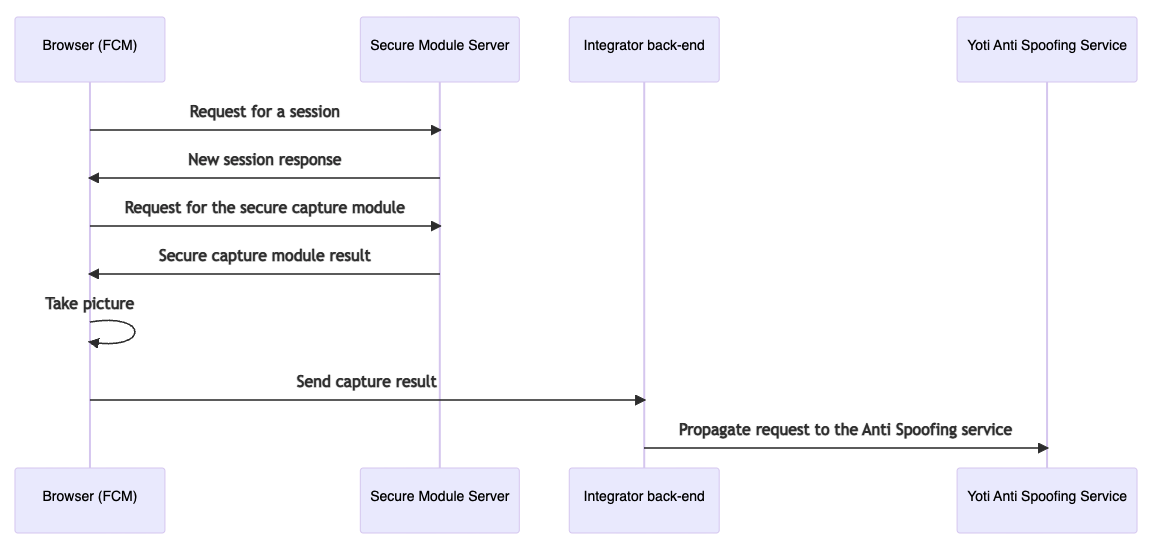
|
|
191
|
+
`<fcm_version>` is the current version of FCM (embedded in the
|
|
192
|
+
module) and `<session_token>` is the session token generated from the request.
|
|
190
193
|
|
|
191
194
|
##### Possible issues
|
|
192
195
|
|
|
@@ -195,6 +198,10 @@ on demand so the front-end must be able to handle that requests. Keep in mind if
|
|
|
195
198
|
your front-end uses any mechanism to prevent data injection attacks or
|
|
196
199
|
cross-site scripting like SCP you will need to allow the FCM requests.
|
|
197
200
|
|
|
201
|
+
##### Virtual cameras
|
|
202
|
+
|
|
203
|
+
The secure mode detects modifications on the camera stream source and fraudulent camera hardware. In these scenarios, it will return an `UNTRUSTED_SECURE_SESSION` error code when calling the Yoti BE service.
|
|
204
|
+
|
|
198
205
|
### Example
|
|
199
206
|
|
|
200
207
|
```js
|
|
@@ -202,7 +209,7 @@ import FaceCapture from '@getyoti/react-face-capture';
|
|
|
202
209
|
import '@getyoti/react-face-capture/index.css';
|
|
203
210
|
|
|
204
211
|
export function App() {
|
|
205
|
-
const onSuccess = ({
|
|
212
|
+
const onSuccess = ({ img }) => console.log('Length = ', img.length);
|
|
206
213
|
const onError = (error) => console.log('Error =', error);
|
|
207
214
|
|
|
208
215
|
return <FaceCapture onSuccess={onSuccess} onError={onError} />;
|
|
@@ -259,3 +266,9 @@ In order to unmount the component, it is highly recommended to call the `Yoti.Fa
|
|
|
259
266
|
|
|
260
267
|
<div id="face-capture-module-root"></div>
|
|
261
268
|
```
|
|
269
|
+
|
|
270
|
+
## Debugging Yoti Face Capture Module
|
|
271
|
+
|
|
272
|
+
Yoti Face capture module is protected with code obfuscation techniques for security reasons.
|
|
273
|
+
|
|
274
|
+
This protection is present in both secure and non-secure mode, and it makes it mostly impossible to debug the module by using development tools on any browser, as the application will crash or keep looping right after the tool menu is opened.
|
package/index.css
CHANGED
|
@@ -1 +1 @@
|
|
|
1
|
-
.mtcvKOHbFdRFpAH7ZHwW{align-items:center;background-color:#
|
|
1
|
+
.mtcvKOHbFdRFpAH7ZHwW{align-items:center;background-color:#2875bc;border:none;border-radius:5px;color:#fff;cursor:pointer;display:block;display:flex;font-size:14px;font-weight:500;justify-content:center;letter-spacing:.5px;margin:auto;min-width:134px;outline:none;padding:12px 20px;text-transform:uppercase;transition:background-color .15s ease-out 0s;width:100%}.mtcvKOHbFdRFpAH7ZHwW.kYH4ilWb5sFtCcwqD29n{max-width:350px;width:45%}.mtcvKOHbFdRFpAH7ZHwW:hover{background-color:#27619b}.mtcvKOHbFdRFpAH7ZHwW:disabled{background-color:#6ba7df}.GusgiqC_1nbmjyHkruu0 use{fill:currentColor}.dDcfK_agfQV9XSYSuuxR{align-items:center;bottom:-8px;box-sizing:border-box;display:inline-block;justify-content:center;padding:16px;position:absolute;text-align:center;width:100%}._XKP_3EMO0LKJr53EW21{height:auto;transform:scaleX(-1);width:100%}._cYL8AOtgycwZXRT1onC{min-height:300px}.bX5GJJw3AqsCwBDA6qWZ{visibility:hidden}.RxkomAqHmrdu47_oGii4{bottom:-8px;box-sizing:border-box;display:grid;font-size:40px;grid-template-columns:repeat(3,80px) 50px;justify-content:center;padding:16px;position:absolute;text-align:center;width:100%}.ZSTtG9h6K6_0_axlDNnV,.__OOQVMtxL3v8uCw9eKy,.hwSkw4zQBundKmrqIwqC{color:#333b40;font-family:sans-serif;font-size:40px;font-weight:700;height:50px;line-height:55px;text-align:center;width:51px}.__OOQVMtxL3v8uCw9eKy{opacity:.5}.Gf_S7QnzULbIZZZ7roY2,.OZI1jG8pdtaOfb2ZsB2n,.XOix2SeWtEFksSSmLt9v{fill:#333b40}.Gf_S7QnzULbIZZZ7roY2 use,.OZI1jG8pdtaOfb2ZsB2n use,.XOix2SeWtEFksSSmLt9v use{fill:inherit}.ZSTtG9h6K6_0_axlDNnV svg,.__OOQVMtxL3v8uCw9eKy svg,.hwSkw4zQBundKmrqIwqC svg{font-size:50px}.Gf_S7QnzULbIZZZ7roY2{opacity:.5}.aM6UBOeSFg8vwirw8BEs{position:absolute}.HPEPfcUpwWOVOJSPP9R_{box-sizing:border-box;color:#546072;height:100%;left:0;position:absolute;right:0}.HPEPfcUpwWOVOJSPP9R_._0fft05LhDRetV8QdNSI{color:#1b9f4a}.HPEPfcUpwWOVOJSPP9R_.JHe4OqVjOOuBZXJn_axE{color:#db970e}.xsnSbKRs6MZbpP2odJGk{box-sizing:border-box;position:absolute;width:100%}.xsnSbKRs6MZbpP2odJGk.lSsJ_kvBTJOO0shULKLn{height:43.5%;top:28.3%}.xsnSbKRs6MZbpP2odJGk._6X0Zl0a0b8R2wCqGS_K{height:71.7%;top:11.5%}@keyframes TgYAVlLOGfJ_hl3TBdkC{0%{transform:rotate(0)}to{transform:rotate(1turn)}}.X_Bq5FImnGbO6TLe3Len{align-items:center;display:flex;height:100%;justify-content:center;line-height:0;text-align:center}.WPX6_jcjLpB6aH420ZCd{animation:TgYAVlLOGfJ_hl3TBdkC 1.5s infinite}.bPwt8l_jKvlB2llQ7azY{height:35.71px;width:35.71px}.bPwt8l_jKvlB2llQ7azY use{fill:#333b40}.Ds2gos19dHtdm4Aer1pq{display:flex;height:100%;justify-content:center;position:absolute;top:0;width:100%}.x_r8eQXclQHy5Jjno7pU{display:block;height:100%;margin:auto;position:absolute}.IpX4dJbHat9i3luoCwef{align-items:flex-start;background-color:#fff;border-radius:.3em;box-shadow:0 8px 15px #333b401a;box-sizing:border-box;color:#333b40;display:flex;font-family:sans-serif;font-size:16px;font-size:var(--message-font-size);font-weight:900;justify-content:flex-start;left:50%;padding:.4em 0;position:absolute;text-align:center}.a_0VmnisbKCGWfubHrmj{margin-bottom:50px;top:4.6%;transform:translate(-50%);width:90%}.CqNtyAmFAcDIeu8mRGPD{top:5.5%;transform:translate(-50%);width:51.25%}.rlF15FcuMGotbEHYe5KW{align-items:flex-start;font-size:calc(var(--message-font-size) + 3px)}._CvVxyqwMB2D7fkKx_NZ{display:flex;justify-content:center;order:1;width:14%}._znJxLRvhRnuCU0KBY3_{order:2;width:72%}._2_U2DYHedfGUyvS1oS5{display:flex;flex-direction:column;overflow:hidden;position:relative}.mteIzegCA0cNMXt96BYN{position:relative}.Va8swWS5S29Uvou7UNnc{height:100%;position:absolute;width:100%}
|
package/index.d.ts
CHANGED
|
@@ -13,6 +13,8 @@ declare module '@getyoti/react-face-capture' {
|
|
|
13
13
|
FACE_DETECTION_INIT_ERROR = 'FACE_DETECTION_INIT_ERROR',
|
|
14
14
|
CAPTURE_LOAD_ERROR = 'CAPTURE_LOAD_ERROR',
|
|
15
15
|
INTERNAL_ERROR = 'INTERNAL_ERROR',
|
|
16
|
+
VIDEO_STREAM_INTERRUPTED = 'VIDEO_STREAM_INTERRUPTED',
|
|
17
|
+
SECURE_SESSION_EXPIRED = 'SECURE_SESSION_EXPIRED',
|
|
16
18
|
}
|
|
17
19
|
|
|
18
20
|
/**
|
|
@@ -79,13 +81,16 @@ declare module '@getyoti/react-face-capture' {
|
|
|
79
81
|
*/
|
|
80
82
|
export enum LANGUAGE_CODE {
|
|
81
83
|
AR = 'ar',
|
|
84
|
+
BG_BG = 'bg-BG',
|
|
82
85
|
CS = 'cs',
|
|
83
86
|
DA = 'da',
|
|
84
87
|
DE = 'de',
|
|
88
|
+
EL = 'el',
|
|
85
89
|
EN = 'en',
|
|
86
90
|
ES = 'es',
|
|
87
91
|
ES_419 = 'es-419',
|
|
88
92
|
ET = 'et',
|
|
93
|
+
FA_IR = 'fa-IR',
|
|
89
94
|
FI = 'fi',
|
|
90
95
|
FR = 'fr',
|
|
91
96
|
HE = 'he',
|
|
@@ -101,7 +106,12 @@ declare module '@getyoti/react-face-capture' {
|
|
|
101
106
|
NB = 'nb',
|
|
102
107
|
NL = 'nl',
|
|
103
108
|
PL = 'pl',
|
|
109
|
+
/**
|
|
110
|
+
* @deprecated Use {@link LANGUAGE_CODE.PT_BR} or {@link LANGUAGE_CODE.PT_PT} instead.
|
|
111
|
+
*/
|
|
104
112
|
PT = 'pt',
|
|
113
|
+
PT_BR = 'pt-BR',
|
|
114
|
+
PT_PT = 'pt-PT',
|
|
105
115
|
RO = 'ro',
|
|
106
116
|
RU = 'ru',
|
|
107
117
|
SV = 'sv',
|
|
@@ -119,6 +129,7 @@ declare module '@getyoti/react-face-capture' {
|
|
|
119
129
|
version: string;
|
|
120
130
|
token: string;
|
|
121
131
|
signature: string;
|
|
132
|
+
verification: string;
|
|
122
133
|
}
|
|
123
134
|
|
|
124
135
|
/**
|