@getyoti/react-face-capture 0.6.0 → 1.0.0
This diff represents the content of publicly available package versions that have been released to one of the supported registries. The information contained in this diff is provided for informational purposes only and reflects changes between package versions as they appear in their respective public registries.
- package/CHANGELOG.md +118 -0
- package/README.md +96 -31
- package/index.css +1 -1
- package/index.d.ts +181 -0
- package/index.js +1 -1
- package/index.js.LICENSE.txt +0 -23
- package/package.json +40 -37
- package/vanilla/index.css +1 -1
- package/vanilla/index.js +1 -1
- package/vanilla/index.js.LICENSE.txt +3 -3
- package/vanilla/index.js.map +1 -1
package/CHANGELOG.md
CHANGED
|
@@ -1,5 +1,123 @@
|
|
|
1
1
|
# CHANGELOG
|
|
2
2
|
|
|
3
|
+
## v1.0.0
|
|
4
|
+
|
|
5
|
+
### New features
|
|
6
|
+
|
|
7
|
+
- Removed `widthMinConstraint` and `widthIdealConstraint` from the Face Capture Module props.
|
|
8
|
+
|
|
9
|
+
- Added `resolutionType` prop to provide a semantic and easier way of selecting the desired resolution.
|
|
10
|
+
The possible values for the new prop are:
|
|
11
|
+
|
|
12
|
+
- `hd`
|
|
13
|
+
- `full_hd`
|
|
14
|
+
|
|
15
|
+
- Added `onReadyForCapture` callback to provide a way for the integrators to know when the module is ready to take images.
|
|
16
|
+
|
|
17
|
+
- Now the Face Capture Module will stop the process and the camera when the page is hidden.
|
|
18
|
+
|
|
19
|
+
- There is a known issue on iPhone Firefox, when opening a new FCM instance in a different tab, that may cause the previous one to freeze.
|
|
20
|
+
|
|
21
|
+
- Now the vanilla version of the Face Capture Module also exports some useful constants, as the React version does. Here is a list of all of them:
|
|
22
|
+
|
|
23
|
+
- **CAPTURE_METHOD**
|
|
24
|
+
- **COUNTDOWN_MODES**
|
|
25
|
+
- **ERROR_CODE**
|
|
26
|
+
- **FORMAT_TYPE**
|
|
27
|
+
- **IMAGE_TYPE**
|
|
28
|
+
- **LANGUAGE_CODE**
|
|
29
|
+
- **QUALITY_TYPE**
|
|
30
|
+
- **RESOLUTION_TYPE**
|
|
31
|
+
|
|
32
|
+
New constants can be accessed by using `Yoti.<CONSTANT_NAME>`.
|
|
33
|
+
|
|
34
|
+
- Now `countdownMode` has new options:
|
|
35
|
+
|
|
36
|
+
- `never` and `always` remains the same.
|
|
37
|
+
- `auto` has been replaced by `only_mobile` and `only_desktop` which brings extra configuration for all possible scenarios.
|
|
38
|
+
|
|
39
|
+
- Implemented localisation languages:
|
|
40
|
+
|
|
41
|
+
- `ur`: Urdu
|
|
42
|
+
- `hy`: Armenian
|
|
43
|
+
- `he`: Hebrew
|
|
44
|
+
|
|
45
|
+
- Updated localisations languages:
|
|
46
|
+
|
|
47
|
+
- `it`: Italian
|
|
48
|
+
- `es-419`: Latin American Spanish
|
|
49
|
+
|
|
50
|
+
- Fixed typo in German localisation.
|
|
51
|
+
|
|
52
|
+
- Manual capture method fallback when slow performance, is now optional with the new `manualCaptureFallback` prop.
|
|
53
|
+
|
|
54
|
+
- Added type declaration file `index.d.ts` for the Face Capture component and exported properties.
|
|
55
|
+
|
|
56
|
+
- CustomManualButton and CustomConsentButton properties are not supported in the vanilla version.
|
|
57
|
+
|
|
58
|
+
### Minor changes
|
|
59
|
+
|
|
60
|
+
- Removed ellipsis from user feedback messages.
|
|
61
|
+
|
|
62
|
+
### Fixes
|
|
63
|
+
|
|
64
|
+
- Fix error added on `FCM 1.0.0-beta.2` causing `JPEG` images to be more compressed than desired on landscape scenario.
|
|
65
|
+
|
|
66
|
+
## v1.0.0-beta.3
|
|
67
|
+
|
|
68
|
+
Fix a package install error which cause `yarn` and older `npm` versions to fail.
|
|
69
|
+
|
|
70
|
+
## v1.0.0-beta.2
|
|
71
|
+
|
|
72
|
+
### New features
|
|
73
|
+
|
|
74
|
+
- Capture secure mode.
|
|
75
|
+
- Vanilla version reload.
|
|
76
|
+
- New FCM Design.
|
|
77
|
+
- New optional "consent" button.
|
|
78
|
+
- Default captureMethod changed from "Manual" to "Auto".
|
|
79
|
+
|
|
80
|
+
### Breaking changes
|
|
81
|
+
|
|
82
|
+
Now the `onSuccess` callback returns the image in the `img` field instead for
|
|
83
|
+
`image`.
|
|
84
|
+
|
|
85
|
+
- Before:
|
|
86
|
+
|
|
87
|
+
```json
|
|
88
|
+
{
|
|
89
|
+
"image": "<base64_img>"
|
|
90
|
+
}
|
|
91
|
+
```
|
|
92
|
+
|
|
93
|
+
- After:
|
|
94
|
+
|
|
95
|
+
- No secure:
|
|
96
|
+
|
|
97
|
+
```json
|
|
98
|
+
{
|
|
99
|
+
"img": "<base64_img>"
|
|
100
|
+
}
|
|
101
|
+
```
|
|
102
|
+
|
|
103
|
+
- Secure:
|
|
104
|
+
|
|
105
|
+
```json
|
|
106
|
+
{
|
|
107
|
+
"img": "<base64_img>",
|
|
108
|
+
"secure": {
|
|
109
|
+
"version": "<fcm_version>",
|
|
110
|
+
"token": "<session_token>",
|
|
111
|
+
"signature": "<result_signature>"
|
|
112
|
+
}
|
|
113
|
+
}
|
|
114
|
+
```
|
|
115
|
+
|
|
116
|
+
Now the `CustomButton` has been splited in `CustomManualButton` and `CustomConsentButton` because
|
|
117
|
+
of the implementation of the new consent mode. Each of the properties has the same definitions as
|
|
118
|
+
the old `CustomButton`, funtions using `onClick` and `disabled` as props that returns a button
|
|
119
|
+
component.
|
|
120
|
+
|
|
3
121
|
## v0.6.0
|
|
4
122
|
|
|
5
123
|
### New features
|
package/README.md
CHANGED
|
@@ -9,8 +9,8 @@ The purpose of this module is to capture a face and return the output image.
|
|
|
9
9
|
The package depends on the following peer dependencies
|
|
10
10
|
|
|
11
11
|
```
|
|
12
|
-
"react": "16.12.0",
|
|
13
|
-
"react-dom": "16.12.0"
|
|
12
|
+
"react": ">=16.12.0 <18",
|
|
13
|
+
"react-dom": ">=16.12.0 <18"
|
|
14
14
|
```
|
|
15
15
|
|
|
16
16
|
### Browser support
|
|
@@ -19,12 +19,12 @@ The package depends on the following peer dependencies
|
|
|
19
19
|
|
|
20
20
|
| Browser | Versions |
|
|
21
21
|
| ------- | ----------------------------- |
|
|
22
|
-
| and_chr |
|
|
23
|
-
| chrome | 96,95
|
|
24
|
-
| edge |
|
|
25
|
-
| firefox | 95,94
|
|
26
|
-
| ios_saf | 15.0-15.1,14.5-14.8
|
|
27
|
-
| safari | 15.1,15,14.1
|
|
22
|
+
| and_chr | 98 |
|
|
23
|
+
| chrome | 98,97,96,95 |
|
|
24
|
+
| edge | 98,97 |
|
|
25
|
+
| firefox | 97,96,95,94 |
|
|
26
|
+
| ios_saf | 15.2-15.3,15.0-15.1,14.5-14.8 |
|
|
27
|
+
| safari | 15.2-15.3,15.1,15,14.1 |
|
|
28
28
|
|
|
29
29
|
</browserSupportTable>
|
|
30
30
|
|
|
@@ -32,9 +32,13 @@ Secondly, the module needs `MediaDevices.getUserMedia()` to work. When this isn'
|
|
|
32
32
|
|
|
33
33
|
_Note: Non-Safari browsers on iOS are not supported because of an iOS limitation._
|
|
34
34
|
|
|
35
|
+
_Note: Edge is only supported on desktop versions._
|
|
36
|
+
|
|
35
37
|
Finally, some devices might experience poor performance when attempting to detect a face. This is because the underlying library TensorFlow.js can still be too demanding for older less performant devices.
|
|
36
38
|
|
|
37
|
-
##
|
|
39
|
+
## React face capture module
|
|
40
|
+
|
|
41
|
+
### Install dependency
|
|
38
42
|
|
|
39
43
|
```
|
|
40
44
|
npm i @getyoti/react-face-capture -S
|
|
@@ -47,7 +51,7 @@ import FaceCapture from "@getyoti/react-face-capture"
|
|
|
47
51
|
import "@getyoti/react-face-capture/index.css"
|
|
48
52
|
```
|
|
49
53
|
|
|
50
|
-
|
|
54
|
+
### Copy assets
|
|
51
55
|
|
|
52
56
|
**Assets** are not included in the javascript bundle. To have the components to work correctly, you will need to copy library assets from `@getyoti/react-face-capture/assets` folder into your assets folder.
|
|
53
57
|
|
|
@@ -62,23 +66,28 @@ new CopyPlugin([
|
|
|
62
66
|
]),
|
|
63
67
|
```
|
|
64
68
|
|
|
65
|
-
|
|
66
|
-
|
|
67
|
-
| Property name
|
|
68
|
-
|
|
|
69
|
-
| captureMethod
|
|
70
|
-
|
|
|
71
|
-
|
|
|
72
|
-
|
|
|
73
|
-
|
|
|
74
|
-
|
|
|
75
|
-
|
|
|
76
|
-
|
|
|
77
|
-
|
|
|
78
|
-
|
|
|
79
|
-
|
|
|
80
|
-
|
|
|
81
|
-
|
|
|
69
|
+
### Props
|
|
70
|
+
|
|
71
|
+
| Property name | Type | Default | Mand | Description |
|
|
72
|
+
| --------------------- | ---------------------------------------------- | ------------- | ---- | --------------------------------------------------------------------------------------------------------------------------------------------------------------------------------------------------------------------------------------------------------------------------------------- |
|
|
73
|
+
| captureMethod | String `manual/auto` | `auto` | - | Capture method to take the photo: by clicking a button or auto-capture. |
|
|
74
|
+
| manualCaptureFallback | Boolean | `true` | - | In `auto` capture method, allow the use of `manual` capture mode as fallback. This would be triggered only when low performance conditions are detected, usually on very old devices. NOTE: If this option is turned off, some users might not be able to successfully submit an image. |
|
|
75
|
+
| countdownMode | String `only_desktop/only_mobile/never/always` | `never` | - | Indicates when the countdown will be used. Note: It's only used if captureMethod is set to `manual`. |
|
|
76
|
+
| secure | Boolean | false | - | If `true`, the face capture module will use the [secure mode](#secure-mode) |
|
|
77
|
+
| onSuccess | Function({ img, secure }) | - | Y | Callback called once the result (capture) is complete. The field `secure` is only returned in secure mode (See [secure mode section](#secure-mode)) |
|
|
78
|
+
| onError | Function | - | - | Callback called when there is an error. See Appendix for the list of error codes we currently support. |
|
|
79
|
+
| onReadyForCapture | Function | - | - | Callback called when the face capture module is ready to take images (Video feed and face scan are ready). |
|
|
80
|
+
| showOverlay | Boolean | `true` | - | Optional use of the face overlay. |
|
|
81
|
+
| resolutionType | String `hd/full_hd` | `hd` | - | Image resolution constraints passed to `getUserMedia`. |
|
|
82
|
+
| format | String | `jpeg` | - | Image format type. |
|
|
83
|
+
| CustomManualButton | Function | simple button | - | Custom UI of the manual capture button. It uses `onClick` and `disabled` as props. |
|
|
84
|
+
| CustomConsentButton | Function | simple button | - | Custom UI of the consent button. It uses `onClick` and `disabled` as props. |
|
|
85
|
+
| imageType | String `original/cropped` | `original` | - | imageType select if the image will be the original or it will be cropped in order to improve the timing response when processing the image in the API call. |
|
|
86
|
+
| qualityType | String `high/medium/low` | `high` | - | Sets the image quality of jpeg format images only. High (1) - Medium (0.96) - Low (0.90). |
|
|
87
|
+
| language | Language code (\*) | `en` | - | The language code to set the language of the feedback messages. |
|
|
88
|
+
| a11yLiveRegionMode | String `assertive/polite` | `polite` | - | Determines the [politeness setting of the live region](https://developer.mozilla.org/en-US/docs/Web/Accessibility/ARIA/ARIA_Live_Regions#live_regions) used to read out prompts for screen reader users |
|
|
89
|
+
| isConsentRequired | Boolean | `false` | - | Makes sure that the user gives consent to the tool to analyse their face. If it is `true`, a button will appear on the bottom section of the module, asking the user for their consent, and not analysing the user face until the consent is given. After this, the button disappears. |
|
|
90
|
+
| faceCaptureAssetsRootUrl | string | `assets/face-capture/` | - | Root url where the face detection assets are located. See [copy assets](#copy-assets) section for assets configuration. |
|
|
82
91
|
|
|
83
92
|
**(\*)**
|
|
84
93
|
Current languages supported:
|
|
@@ -93,7 +102,9 @@ Current languages supported:
|
|
|
93
102
|
- `et`: Estonian
|
|
94
103
|
- `fi`: Finnish
|
|
95
104
|
- `fr`: French
|
|
105
|
+
- `he`: Hebrew
|
|
96
106
|
- `hi`: Hindi
|
|
107
|
+
- `hy`: Armenian
|
|
97
108
|
- `id`: Bahasa
|
|
98
109
|
- `it`: Italian
|
|
99
110
|
- `ja`: Japanese
|
|
@@ -111,9 +122,10 @@ Current languages supported:
|
|
|
111
122
|
- `th`: Thai
|
|
112
123
|
- `tr`: Turkish
|
|
113
124
|
- `uk`: Ukranian
|
|
125
|
+
- `ur`: Urdu
|
|
114
126
|
- `vi`: Vietnamese
|
|
115
127
|
|
|
116
|
-
|
|
128
|
+
#### Language fallback
|
|
117
129
|
|
|
118
130
|
Mechanisnm used for the prop `language` to avoid issues when the value passed is wrong. Example: first try exact match (es-es or es-ES, ignore case):
|
|
119
131
|
|
|
@@ -121,7 +133,7 @@ Mechanisnm used for the prop `language` to avoid issues when the value passed is
|
|
|
121
133
|
- If no mainstream, try any other available es-[region] sibling (example: es-419).
|
|
122
134
|
- If no regional sibling, use the default language: en.
|
|
123
135
|
|
|
124
|
-
|
|
136
|
+
#### Supported error codes
|
|
125
137
|
|
|
126
138
|
| Error code | Description |
|
|
127
139
|
| --------------------------- | --------------------------------------------------------------------------------------------------------------------------------------------------------------------------------------------------------------------------- |
|
|
@@ -132,6 +144,7 @@ Mechanisnm used for the prop `language` to avoid issues when the value passed is
|
|
|
132
144
|
| `OVERCONSTRAINED` | The camera constraints are not compatible with any camera device. `Note: One recovery option is to lower the widthMinConstraint value.` |
|
|
133
145
|
| `FACE_DETECTION_INIT_ERROR` | The face detection has failed to initialise. This usually means that the required model assets are missing from the host application. |
|
|
134
146
|
| `INTERNAL_ERROR` | Internal error. This can be due to a programming error, or the user using an old unsupported browser. |
|
|
147
|
+
| `CAPTURE_LOAD_ERROR` | The secure module could not be loaded. This usually means your token is not updated, or there is an error on the module provider. |
|
|
135
148
|
|
|
136
149
|
The error codes can be imported as follow:
|
|
137
150
|
|
|
@@ -139,7 +152,45 @@ The error codes can be imported as follow:
|
|
|
139
152
|
import { ERROR_CODE } from '@getyoti/react-face-capture';
|
|
140
153
|
```
|
|
141
154
|
|
|
142
|
-
|
|
155
|
+
#### Secure mode
|
|
156
|
+
|
|
157
|
+
The secure mode allows [Yoti back-end
|
|
158
|
+
service](https://developers.yoti.com/age-estimation/integration-guide)
|
|
159
|
+
verifying the image captured on the client-side browser with the FCM hasn't been
|
|
160
|
+
modified in any form. Note the Secure mode of Yoti FCM will request Yoti
|
|
161
|
+
back-end in order to download the encrypted capture package that takes the
|
|
162
|
+
photos and create the secure result request. The secure result information will
|
|
163
|
+
be returned in `onSuccess` callback:
|
|
164
|
+
|
|
165
|
+
```json
|
|
166
|
+
{
|
|
167
|
+
"img": "<base64_img>",
|
|
168
|
+
"secure": {
|
|
169
|
+
"version": "<fcm_version>",
|
|
170
|
+
"token": "<session_token>",
|
|
171
|
+
"signature": "<result_signature>"
|
|
172
|
+
}
|
|
173
|
+
}
|
|
174
|
+
```
|
|
175
|
+
|
|
176
|
+
The flow for the secure mode is the following:
|
|
177
|
+
|
|
178
|
+
1. Request for a session -> `(GET) https://api.yoti.com/ai/sm/v1/secure-fcm/<version>/token`
|
|
179
|
+
2. Request for the encrypted javascript module -> `(GET) https://api.yoti.com/ai/sm/v1/secure-fcm/<version>/module?s=<token>`
|
|
180
|
+
|
|
181
|
+
Where `<version>` is the current version of the FCM (It is embedded in the
|
|
182
|
+
module) and the `<token>` is the session token the first request returns.
|
|
183
|
+
|
|
184
|
+
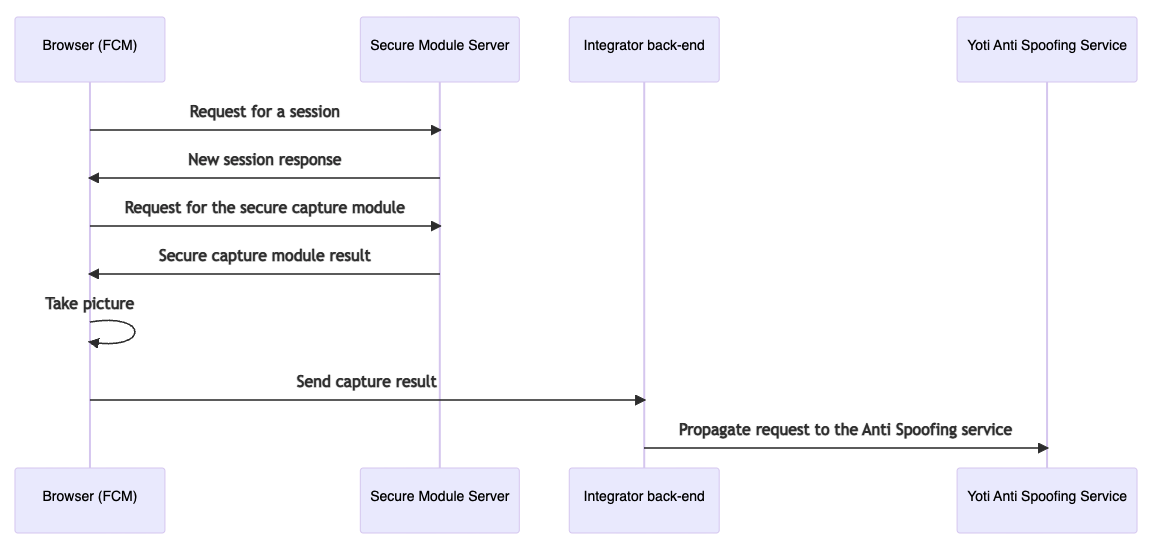
|
|
185
|
+
|
|
186
|
+
##### Possible issues
|
|
187
|
+
|
|
188
|
+
The secure mode requests Yoti back-end in order to download the encrypted module
|
|
189
|
+
on demand so the front-end must be able to handle that requests. Keep in mind if
|
|
190
|
+
your front-end uses any mechanism to prevent data injection attacks or
|
|
191
|
+
cross-site scripting like SCP you will need to allow the FCM requests.
|
|
192
|
+
|
|
193
|
+
### Example
|
|
143
194
|
|
|
144
195
|
```js
|
|
145
196
|
import FaceCapture from '@getyoti/react-face-capture';
|
|
@@ -178,6 +229,8 @@ Inside the page you want to have face capture, add Face capture scripts and styl
|
|
|
178
229
|
|
|
179
230
|
Our scripts will give you access to `Yoti.FaceCaptureModule.render` you can pass 2 parameters, first parameters are the props and are the same used in react integration and second parameter you need a html DOM reference so we know where we can render the UI.
|
|
180
231
|
|
|
232
|
+
In order to unmount the component, it is highly recommended to call the `Yoti.FaceCaptureModule.unmount` function instead of destroying the HTML element, as this could lead to some issues or misbehavior.
|
|
233
|
+
|
|
181
234
|
**index.html**
|
|
182
235
|
|
|
183
236
|
```html
|
|
@@ -188,8 +241,20 @@ Our scripts will give you access to `Yoti.FaceCaptureModule.render` you can pass
|
|
|
188
241
|
faceCaptureAssetsRootUrl: '/@getyoti/react-face-capture/vanilla/assets/';
|
|
189
242
|
};
|
|
190
243
|
|
|
191
|
-
Yoti.FaceCaptureModule.render(props, document.getElementById('face-capture-module-root'));
|
|
244
|
+
const fcm = Yoti.FaceCaptureModule.render(props, document.getElementById('face-capture-module-root'));
|
|
245
|
+
|
|
246
|
+
function reload() {
|
|
247
|
+
fcm.reload()
|
|
248
|
+
}
|
|
249
|
+
|
|
250
|
+
function unmount() {
|
|
251
|
+
fcm.unmount()
|
|
252
|
+
}
|
|
192
253
|
</script>
|
|
193
254
|
|
|
194
255
|
<div id="face-capture-module-root"></div>
|
|
195
256
|
```
|
|
257
|
+
|
|
258
|
+
## CHANGELOG
|
|
259
|
+
|
|
260
|
+
[CHANGELOG](https://github.com/getyoti/web-fcm-demo/blob/main/docs/FCM-CHANGELOG.md) file.
|
package/index.css
CHANGED
|
@@ -1 +1 @@
|
|
|
1
|
-
.
|
|
1
|
+
.mtcvKOHbFdRFpAH7ZHwW{align-items:center;background-color:#229dff;border:none;border-radius:5px;color:#fff;cursor:pointer;display:block;display:flex;font-size:14px;font-weight:500;justify-content:center;letter-spacing:.5px;margin:auto;min-width:134px;outline:none;padding:12px 20px;text-transform:uppercase;transition:background-color .15s ease-out 0s;width:100%}.mtcvKOHbFdRFpAH7ZHwW.kYH4ilWb5sFtCcwqD29n{max-width:350px;width:45%}.mtcvKOHbFdRFpAH7ZHwW:hover{background-color:#007ee8}.mtcvKOHbFdRFpAH7ZHwW:disabled{background-color:#88caff}.GusgiqC_1nbmjyHkruu0 use{fill:currentColor}.dDcfK_agfQV9XSYSuuxR{align-items:center;bottom:-8px;box-sizing:border-box;display:inline-block;justify-content:center;padding:16px;position:absolute;text-align:center;width:100%}._XKP_3EMO0LKJr53EW21{box-shadow:0 0 3px 1px #0000001c;height:auto;transform:scaleX(-1);width:100%}.bX5GJJw3AqsCwBDA6qWZ{visibility:hidden}.RxkomAqHmrdu47_oGii4{bottom:-8px;box-sizing:border-box;display:grid;font-size:40px;grid-template-columns:repeat(3,80px) 50px;justify-content:center;padding:16px;position:absolute;text-align:center;width:100%}.ZSTtG9h6K6_0_axlDNnV,.__OOQVMtxL3v8uCw9eKy,.hwSkw4zQBundKmrqIwqC{color:#333b40;font-family:sans-serif;font-size:40px;font-weight:700;height:50px;line-height:55px;text-align:center;width:51px}.__OOQVMtxL3v8uCw9eKy{opacity:.5}.Gf_S7QnzULbIZZZ7roY2,.OZI1jG8pdtaOfb2ZsB2n,.XOix2SeWtEFksSSmLt9v{fill:#333b40}.Gf_S7QnzULbIZZZ7roY2 use,.OZI1jG8pdtaOfb2ZsB2n use,.XOix2SeWtEFksSSmLt9v use{fill:inherit}.ZSTtG9h6K6_0_axlDNnV svg,.__OOQVMtxL3v8uCw9eKy svg,.hwSkw4zQBundKmrqIwqC svg{font-size:50px}.Gf_S7QnzULbIZZZ7roY2{opacity:.5}.aM6UBOeSFg8vwirw8BEs{position:absolute}.HPEPfcUpwWOVOJSPP9R_{box-sizing:border-box;color:#67717f;height:100%;left:0;position:absolute;right:0}.HPEPfcUpwWOVOJSPP9R_._0fft05LhDRetV8QdNSI{color:#39c48e}.HPEPfcUpwWOVOJSPP9R_.JHe4OqVjOOuBZXJn_axE{color:#ffba37}.xsnSbKRs6MZbpP2odJGk{box-sizing:border-box;position:absolute;width:100%}.xsnSbKRs6MZbpP2odJGk.lSsJ_kvBTJOO0shULKLn{height:43.5%;top:28.3%}.xsnSbKRs6MZbpP2odJGk._6X0Zl0a0b8R2wCqGS_K{height:71.7%;top:11.5%}@keyframes TgYAVlLOGfJ_hl3TBdkC{0%{transform:rotate(0)}to{transform:rotate(1turn)}}.X_Bq5FImnGbO6TLe3Len{align-items:center;display:flex;height:100%;justify-content:center;line-height:0;text-align:center}.WPX6_jcjLpB6aH420ZCd{animation:TgYAVlLOGfJ_hl3TBdkC 1.5s infinite}.bPwt8l_jKvlB2llQ7azY{height:35.71px;width:35.71px}.bPwt8l_jKvlB2llQ7azY use{fill:#333b40}.Ds2gos19dHtdm4Aer1pq{display:flex;height:100%;justify-content:center;position:absolute;top:0;width:100%}.x_r8eQXclQHy5Jjno7pU{display:block;height:100%;margin:auto;position:absolute}.IpX4dJbHat9i3luoCwef{align-items:start;background-color:#fff;border-radius:.3em;box-shadow:0 8px 15px #333b401a;box-sizing:border-box;color:#333b40;display:flex;font-family:sans-serif;font-size:16px;font-size:var(--message-font-size);font-weight:900;justify-content:start;left:50%;padding:.4em 0;position:absolute;text-align:center}.a_0VmnisbKCGWfubHrmj{margin-bottom:50px;top:4.6%;transform:translate(-50%);width:90%}.CqNtyAmFAcDIeu8mRGPD{top:5.5%;transform:translate(-50%);width:51.25%}.rlF15FcuMGotbEHYe5KW{align-items:start;font-size:calc(var(--message-font-size) + 3px)}._CvVxyqwMB2D7fkKx_NZ{display:flex;justify-content:center;order:1;width:14%}._znJxLRvhRnuCU0KBY3_{order:2;width:72%}._2_U2DYHedfGUyvS1oS5{display:flex;flex-direction:column;overflow:hidden;position:relative}.mteIzegCA0cNMXt96BYN{position:relative}.Va8swWS5S29Uvou7UNnc{height:100%;position:absolute;width:100%}
|
package/index.d.ts
ADDED
|
@@ -0,0 +1,181 @@
|
|
|
1
|
+
declare module '@getyoti/react-face-capture' {
|
|
2
|
+
import * as React from 'react';
|
|
3
|
+
|
|
4
|
+
/**
|
|
5
|
+
* Error codes used by the Face Capture.
|
|
6
|
+
*/
|
|
7
|
+
export enum ERROR_CODE {
|
|
8
|
+
NO_CAMERA_PERMISSION = 'NO_CAMERA_PERMISSION',
|
|
9
|
+
NO_CAMERA = 'NO_CAMERA',
|
|
10
|
+
UNSUPPORTED_BROWSER = 'UNSUPPORTED_BROWSER',
|
|
11
|
+
OVERCONSTRAINED = 'OVERCONSTRAINED',
|
|
12
|
+
GENERIC_CAMERA_ERROR = 'GENERIC_CAMERA_ERROR',
|
|
13
|
+
FACE_DETECTION_INIT_ERROR = 'FACE_DETECTION_INIT_ERROR',
|
|
14
|
+
CAPTURE_LOAD_ERROR = 'CAPTURE_LOAD_ERROR',
|
|
15
|
+
INTERNAL_ERROR = 'INTERNAL_ERROR',
|
|
16
|
+
}
|
|
17
|
+
|
|
18
|
+
/**
|
|
19
|
+
* Capture modes supported by the Face Capture.
|
|
20
|
+
*/
|
|
21
|
+
export enum CAPTURE_METHOD {
|
|
22
|
+
MANUAL = 'manual',
|
|
23
|
+
AUTO = 'auto',
|
|
24
|
+
}
|
|
25
|
+
|
|
26
|
+
/**
|
|
27
|
+
* Image formats supported by the Face Capture.
|
|
28
|
+
*/
|
|
29
|
+
export enum FORMAT_TYPE {
|
|
30
|
+
PNG = 'png',
|
|
31
|
+
JPEG = 'jpeg',
|
|
32
|
+
}
|
|
33
|
+
|
|
34
|
+
/**
|
|
35
|
+
* Image types supported by the Face Capture.
|
|
36
|
+
*/
|
|
37
|
+
export enum IMAGE_TYPE {
|
|
38
|
+
ORIGINAL = 'original',
|
|
39
|
+
CROPPED = 'cropped',
|
|
40
|
+
}
|
|
41
|
+
|
|
42
|
+
/**
|
|
43
|
+
* Quality types supported by the Face Capture for the JPEG encoding.
|
|
44
|
+
*/
|
|
45
|
+
export enum QUALITY_TYPE {
|
|
46
|
+
HIGH = 'high',
|
|
47
|
+
MEDIUM = 'medium',
|
|
48
|
+
LOW = 'low',
|
|
49
|
+
}
|
|
50
|
+
|
|
51
|
+
/**
|
|
52
|
+
* Scenarios in which the countdown will be used.
|
|
53
|
+
*/
|
|
54
|
+
export enum COUNTDOWN_MODES {
|
|
55
|
+
ALWAYS = 'always',
|
|
56
|
+
ONLY_MOBILE = 'only_mobile',
|
|
57
|
+
ONLY_DESKTOP = 'only_desktop',
|
|
58
|
+
NEVER = 'never',
|
|
59
|
+
}
|
|
60
|
+
|
|
61
|
+
/**
|
|
62
|
+
* Politeness setting of the live region supported by the Face Capture.
|
|
63
|
+
*/
|
|
64
|
+
export enum A11Y_LIVE_REGION_MODE {
|
|
65
|
+
ASSERTIVE = 'assertive',
|
|
66
|
+
POLITE = 'polite',
|
|
67
|
+
}
|
|
68
|
+
|
|
69
|
+
/**
|
|
70
|
+
* Image resolutions supported by the Face Capture.
|
|
71
|
+
*/
|
|
72
|
+
export enum RESOLUTION_TYPE {
|
|
73
|
+
HD = 'hd',
|
|
74
|
+
FULL_HD = 'full_hd',
|
|
75
|
+
}
|
|
76
|
+
|
|
77
|
+
/**
|
|
78
|
+
* Languages supported by the Face Capture.
|
|
79
|
+
*/
|
|
80
|
+
export enum LANGUAGE_CODE {
|
|
81
|
+
AR = 'ar',
|
|
82
|
+
CS = 'cs',
|
|
83
|
+
DA = 'da',
|
|
84
|
+
DE = 'de',
|
|
85
|
+
EN = 'en',
|
|
86
|
+
ES = 'es',
|
|
87
|
+
ES_419 = 'es-419',
|
|
88
|
+
ET = 'et',
|
|
89
|
+
FI = 'fi',
|
|
90
|
+
FR = 'fr',
|
|
91
|
+
HE = 'he',
|
|
92
|
+
HI = 'hi',
|
|
93
|
+
HY = 'hy',
|
|
94
|
+
ID = 'id',
|
|
95
|
+
IT = 'it',
|
|
96
|
+
JA = 'ja',
|
|
97
|
+
KO = 'ko',
|
|
98
|
+
LT = 'lt',
|
|
99
|
+
LV = 'lv',
|
|
100
|
+
MS = 'ms',
|
|
101
|
+
NB = 'nb',
|
|
102
|
+
NL = 'nl',
|
|
103
|
+
PL = 'pl',
|
|
104
|
+
PT = 'pt',
|
|
105
|
+
RO = 'ro',
|
|
106
|
+
RU = 'ru',
|
|
107
|
+
SV = 'sv',
|
|
108
|
+
TH = 'th',
|
|
109
|
+
TR = 'tr',
|
|
110
|
+
UK = 'uk',
|
|
111
|
+
UR = 'ur',
|
|
112
|
+
VI = 'vi',
|
|
113
|
+
}
|
|
114
|
+
|
|
115
|
+
/**
|
|
116
|
+
* Secure information the Face Capture will provide as result when it takes a picture (onSuccess callback). Only when the secure prop is set to true.
|
|
117
|
+
*/
|
|
118
|
+
export interface Secure {
|
|
119
|
+
version: string;
|
|
120
|
+
token: string;
|
|
121
|
+
signature: string;
|
|
122
|
+
}
|
|
123
|
+
|
|
124
|
+
/**
|
|
125
|
+
* Result entity the FCM will return on the onSuccess callback.
|
|
126
|
+
*/
|
|
127
|
+
export interface FCMResult {
|
|
128
|
+
img: string;
|
|
129
|
+
secure?: Secure;
|
|
130
|
+
}
|
|
131
|
+
|
|
132
|
+
/**
|
|
133
|
+
* Face Capture properties.
|
|
134
|
+
*/
|
|
135
|
+
export interface FaceCaptureProps {
|
|
136
|
+
/** Root url where assets for the face detection are located. */
|
|
137
|
+
faceCaptureAssetsRootUrl: string;
|
|
138
|
+
/** Capture method to take the photo: by clicking a button or auto-capture. (default:auto) */
|
|
139
|
+
captureMethod?: CAPTURE_METHOD;
|
|
140
|
+
/** If true, the face capture module will use the secure mode. (default:false) */
|
|
141
|
+
secure?: boolean;
|
|
142
|
+
/** Callback called once the result (capture) is complete. */
|
|
143
|
+
onSuccess: (e: FCMResult) => void;
|
|
144
|
+
/** Callback called when there is an error. */
|
|
145
|
+
onError?: (e: ERROR_CODE) => void;
|
|
146
|
+
/** Callback called when the face capture module is ready to take images. */
|
|
147
|
+
onReadyForCapture?: () => void;
|
|
148
|
+
/** Optional use of the face overlay (default: true) */
|
|
149
|
+
showOverlay?: boolean;
|
|
150
|
+
/** Image resolution constraints passed to getUserMedia. (default:HD) */
|
|
151
|
+
resolutionType?: RESOLUTION_TYPE;
|
|
152
|
+
/** Image format type. (default:jpeg) */
|
|
153
|
+
format?: FORMAT_TYPE;
|
|
154
|
+
/** Custom UI of the manual capture button. It uses onClick and disabled as props */
|
|
155
|
+
CustomManualButton?: (props: any) => JSX.Element;
|
|
156
|
+
/** Custom UI of the consent button. It uses onClick and disabled as props */
|
|
157
|
+
CustomConsentButton?: (props: any) => JSX.Element;
|
|
158
|
+
/** Indicates when the countdown will be used. Note: It's only used if captureMethod is set to manual. (default:never) */
|
|
159
|
+
countdownMode?: COUNTDOWN_MODES;
|
|
160
|
+
/** imageType select if the image will be the original or it will be cropped in order to improve the timing
|
|
161
|
+
response when processing the image in the API call. (default:original) */
|
|
162
|
+
imageType?: IMAGE_TYPE;
|
|
163
|
+
/** Sets the image quality of jpeg format images only. High (1) - Medium (0.96) - Low (0.90). (default:high) */
|
|
164
|
+
qualityType?: QUALITY_TYPE;
|
|
165
|
+
/** The language code to set the language of the feedback messages. (default:en) */
|
|
166
|
+
language?: LANGUAGE_CODE;
|
|
167
|
+
/** Determines the politeness setting of the live region used to read out prompts for screen reader users. (default:polite) */
|
|
168
|
+
a11yLiveRegionMode?: A11Y_LIVE_REGION_MODE;
|
|
169
|
+
/** isConsentRequired Adds a step to click a button to ensure the user gives consent to the tool to start the face capture process. (default:false) */
|
|
170
|
+
isConsentRequired?: boolean;
|
|
171
|
+
/** Indicates if the face capture will use the manual capture method because of slow performance. (default:true) */
|
|
172
|
+
manualCaptureFallback?: boolean;
|
|
173
|
+
}
|
|
174
|
+
|
|
175
|
+
/**
|
|
176
|
+
* Module to capture a face and return the output image.
|
|
177
|
+
*/
|
|
178
|
+
const FaceCapture: React.FC<FaceCaptureProps>;
|
|
179
|
+
|
|
180
|
+
export default FaceCapture;
|
|
181
|
+
}
|