@gethopp/figma-mcp-bridge 0.0.2 → 0.0.3
This diff represents the content of publicly available package versions that have been released to one of the supported registries. The information contained in this diff is provided for informational purposes only and reflects changes between package versions as they appear in their respective public registries.
- package/README.md +166 -0
- package/package.json +1 -1
package/README.md
ADDED
|
@@ -0,0 +1,166 @@
|
|
|
1
|
+
# Figma MCP Bridge
|
|
2
|
+
|
|
3
|
+
- [Demo](#demo)
|
|
4
|
+
- [Quick Start](#quick-start)
|
|
5
|
+
- [Local development](#local-development)
|
|
6
|
+
- [Structure](#structure)
|
|
7
|
+
- [How it works](#how-it-works)
|
|
8
|
+
|
|
9
|
+
<br/>
|
|
10
|
+
|
|
11
|
+
<img src="./logo.png" alt="Figma MCP Bridge" align="center" />
|
|
12
|
+
|
|
13
|
+
<br/>
|
|
14
|
+
|
|
15
|
+
While other amazing Figma MCP servers like [Figma-Context-MCP](https://github.com/GLips/Figma-Context-MCP/) exist, one issues is the [API limiting](https://github.com/GLips/Figma-Context-MCP/issues/258) for free users.
|
|
16
|
+
|
|
17
|
+
The limit for free accounts is 6 requests per month, yes **per month**.
|
|
18
|
+
|
|
19
|
+
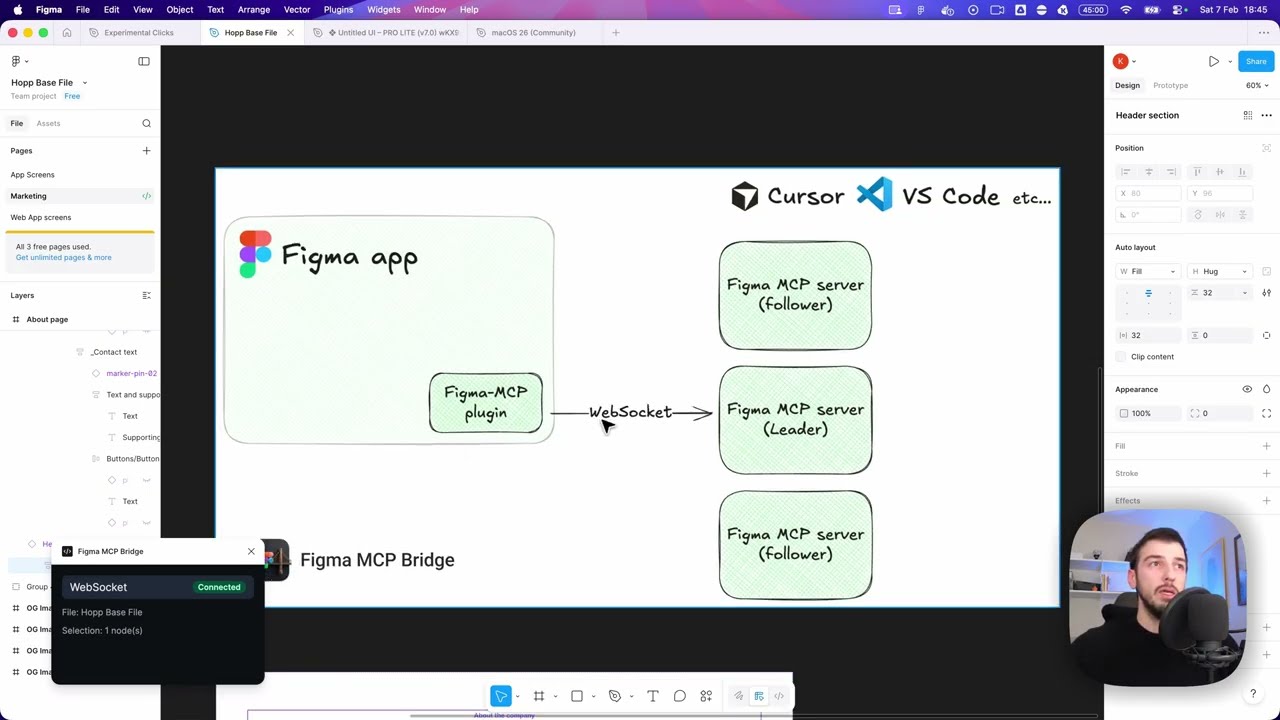
Figma MCP Bridge is a solution to this problem. It is a plugin + MCP server that streams live Figma document data to AI tools without hitting Figma API rate limits, so its Figma MCP for the rest of us ✊
|
|
20
|
+
|
|
21
|
+
## Demo
|
|
22
|
+
|
|
23
|
+
[Watch a demo of building a UI in Cursor with Figma MCP Bridge](https://youtu.be/ouygIhFBx0g)
|
|
24
|
+
|
|
25
|
+
[](https://youtu.be/ouygIhFBx0g)
|
|
26
|
+
|
|
27
|
+
|
|
28
|
+
## Quick Start
|
|
29
|
+
|
|
30
|
+
### 1. Add the MCP server to your favourite AI tool
|
|
31
|
+
|
|
32
|
+
Add the following to your AI tool's MCP configuration (e.g. Cursor, Windsurf, Claude Desktop):
|
|
33
|
+
|
|
34
|
+
```json
|
|
35
|
+
{
|
|
36
|
+
"figma-bridge": {
|
|
37
|
+
"command": "npx",
|
|
38
|
+
"args": ["-y", "@gethopp/figma-mcp-bridge"]
|
|
39
|
+
}
|
|
40
|
+
}
|
|
41
|
+
```
|
|
42
|
+
|
|
43
|
+
That's it — no binaries to download or install.
|
|
44
|
+
|
|
45
|
+
### 2. Add the Figma plugin
|
|
46
|
+
|
|
47
|
+
Download the plugin from the [latest release](https://github.com/gethopp/figma-mcp-bridge/releases) page, then in Figma go to `Plugins > Development > Import plugin from manifest` and select the `manifest.json` file from the `plugin/` folder.
|
|
48
|
+
|
|
49
|
+
### 3. Start using it 🎉
|
|
50
|
+
|
|
51
|
+
Open a Figma file, run the plugin, and start prompting your AI tool. The MCP server will automatically connect to the plugin.
|
|
52
|
+
|
|
53
|
+
If you want to know more about how it works, read the [How it works](#how-it-works) section.
|
|
54
|
+
|
|
55
|
+
## Local development
|
|
56
|
+
|
|
57
|
+
#### 1. Clone this repository locally
|
|
58
|
+
|
|
59
|
+
```bash
|
|
60
|
+
git clone git@github.com:gethopp/figma-mcp-bridge.git
|
|
61
|
+
```
|
|
62
|
+
|
|
63
|
+
#### 2. Build the server
|
|
64
|
+
|
|
65
|
+
```bash
|
|
66
|
+
cd server && npm install && npm run build
|
|
67
|
+
```
|
|
68
|
+
|
|
69
|
+
#### 3. Build the plugin
|
|
70
|
+
|
|
71
|
+
```bash
|
|
72
|
+
cd plugin && bun install && bun run build
|
|
73
|
+
```
|
|
74
|
+
|
|
75
|
+
#### 4. Add the MCP server to your favourite AI tool
|
|
76
|
+
|
|
77
|
+
For local development, add the following to your AI tool's MCP config:
|
|
78
|
+
|
|
79
|
+
```json
|
|
80
|
+
{
|
|
81
|
+
"figma-bridge": {
|
|
82
|
+
"command": "node",
|
|
83
|
+
"args": ["/path/to/figma-mcp-bridge/server/dist/index.js"]
|
|
84
|
+
}
|
|
85
|
+
}
|
|
86
|
+
```
|
|
87
|
+
|
|
88
|
+
## Structure
|
|
89
|
+
|
|
90
|
+
```
|
|
91
|
+
Figma-MCP-Bridge/
|
|
92
|
+
├── plugin/ # Figma plugin (TypeScript/React)
|
|
93
|
+
└── server/ # MCP server (TypeScript/Node.js)
|
|
94
|
+
└── src/
|
|
95
|
+
├── index.ts # Entry point
|
|
96
|
+
├── bridge.ts # WebSocket bridge to Figma plugin
|
|
97
|
+
├── leader.ts # Leader: HTTP server + bridge
|
|
98
|
+
├── follower.ts # Follower: proxies to leader via HTTP
|
|
99
|
+
├── node.ts # Dynamic leader/follower role switching
|
|
100
|
+
├── election.ts # Leader election & health monitoring
|
|
101
|
+
├── tools.ts # MCP tool definitions
|
|
102
|
+
└── types.ts # Shared types
|
|
103
|
+
```
|
|
104
|
+
|
|
105
|
+
## How it works
|
|
106
|
+
|
|
107
|
+
There are two main components to the Figma MCP Bridge:
|
|
108
|
+
|
|
109
|
+
### 1. The Figma Plugin
|
|
110
|
+
|
|
111
|
+
The Figma plugin is the user interface for the Figma MCP Bridge. You run this inside the Figma file you want to use the MCP server for, and its responsible for getting you all the information you need.
|
|
112
|
+
|
|
113
|
+
### 2. The MCP Server
|
|
114
|
+
|
|
115
|
+
The MCP server is the core of the Figma MCP Bridge. As the Figma plugin connects with the MCP server via a WebSocket connection, the MCP server is responsible for:
|
|
116
|
+
- Handling WebSocket connections from the Figma plugin
|
|
117
|
+
- Forwarding tool calls to the Figma plugin
|
|
118
|
+
- Routing responses back to the Figma plugin
|
|
119
|
+
- Handling leader election (as we can have only one WS connection to an MCP server at a time)
|
|
120
|
+
|
|
121
|
+
|
|
122
|
+
```
|
|
123
|
+
┌─────────────────────────────────────────────────────────────────────────────┐
|
|
124
|
+
│ FIGMA (Browser) │
|
|
125
|
+
│ ┌───────────────────────────────────────────────────────────────────────┐ │
|
|
126
|
+
│ │ Figma Plugin │ │
|
|
127
|
+
│ │ (TypeScript/React) │ │
|
|
128
|
+
│ └───────────────────────────────────────────────────────────────────────┘ │
|
|
129
|
+
└─────────────────────────────────────────────────────────────────────────────┘
|
|
130
|
+
│
|
|
131
|
+
│ WebSocket
|
|
132
|
+
│ (ws://localhost:1994/ws)
|
|
133
|
+
▼
|
|
134
|
+
┌─────────────────────────────────────────────────────────────────────────────┐
|
|
135
|
+
│ PRIMARY MCP SERVER │
|
|
136
|
+
│ (Leader on :1994) │
|
|
137
|
+
│ ┌─────────────────────────────────────────────────────────────────────┐ │
|
|
138
|
+
│ │ Bridge Endpoints: │ │
|
|
139
|
+
│ │ • Manages WebSocket conn • /ws (plugin) │ │
|
|
140
|
+
│ │ • Forwards requests to plugin • /ping (health) │ │
|
|
141
|
+
│ │ • Routes responses back • /rpc (followers) │ │
|
|
142
|
+
│ └─────────────────────────────────────────────────────────────────────┘ │
|
|
143
|
+
└─────────────────────────────────────────────────────────────────────────────┘
|
|
144
|
+
▲ ▲
|
|
145
|
+
│ HTTP /rpc │ HTTP /rpc
|
|
146
|
+
│ POST requests │ POST requests
|
|
147
|
+
│ │
|
|
148
|
+
┌─────────────────┴───────────┐ ┌─────────────┴───────────────┐
|
|
149
|
+
│ FOLLOWER MCP SERVER 1 │ │ FOLLOWER MCP SERVER 2 │
|
|
150
|
+
│ │ │ │
|
|
151
|
+
│ • Pings leader /ping │ │ • Pings leader /ping │
|
|
152
|
+
│ • Forwards tool calls │ │ • Forwards tool calls │
|
|
153
|
+
│ via HTTP /rpc │ │ via HTTP /rpc │
|
|
154
|
+
│ • If leader dies → │ │ • If leader dies → │
|
|
155
|
+
│ attempts takeover │ │ attempts takeover │
|
|
156
|
+
└─────────────────────────────┘ └─────────────────────────────┘
|
|
157
|
+
▲ ▲
|
|
158
|
+
│ │
|
|
159
|
+
│ MCP Protocol │ MCP Protocol
|
|
160
|
+
│ (stdio) │ (stdio)
|
|
161
|
+
▼ ▼
|
|
162
|
+
┌─────────────────────────────┐ ┌─────────────────────────────┐
|
|
163
|
+
│ AI Tool / IDE 1 │ │ AI Tool / IDE 2 │
|
|
164
|
+
│ (e.g., Cursor) │ │ (e.g., Cursor) │
|
|
165
|
+
└─────────────────────────────┘ └─────────────────────────────┘
|
|
166
|
+
```
|