@fungi.computer/oyster 0.0.1 → 0.1.0
This diff represents the content of publicly available package versions that have been released to one of the supported registries. The information contained in this diff is provided for informational purposes only and reflects changes between package versions as they appear in their respective public registries.
- package/README.md +228 -176
- package/dist/app-builds.d.ts +76 -17
- package/dist/app-builds.js +207 -63
- package/dist/app-sources.d.ts +7 -22
- package/dist/app-sources.js +49 -14
- package/dist/build/artifact-writer.d.ts +40 -0
- package/dist/build/artifact-writer.js +181 -0
- package/dist/build/build-jobs.js +7 -1
- package/dist/build/build-policy.d.ts +10 -0
- package/dist/build/build-policy.js +10 -0
- package/dist/build/build-step.d.ts +12 -1
- package/dist/build/build-step.js +9 -1
- package/dist/build/candidate-builder.d.ts +68 -0
- package/dist/build/candidate-builder.js +91 -0
- package/dist/build/candidate-cli.d.ts +1 -0
- package/dist/build/candidate-cli.js +119 -0
- package/dist/build/candidate-cli.mjs +28170 -0
- package/dist/build/content-objects.d.ts +37 -0
- package/dist/build/content-objects.js +53 -0
- package/dist/build/effect.d.ts +18 -0
- package/dist/build/effect.js +52 -12
- package/dist/build/git-environment.d.ts +3 -0
- package/dist/build/git-environment.js +21 -9
- package/dist/build/local-build.d.ts +13 -3
- package/dist/build/local-build.js +149 -99
- package/dist/build/snapshot-package-store.d.ts +10 -0
- package/dist/build/snapshot-package-store.js +15 -0
- package/dist/build/snapshot-program-scripts.js +1 -1
- package/dist/build/snapshot-programs/snapshot-path.d.ts +2 -0
- package/dist/build/snapshot-programs/snapshot-path.js +6 -0
- package/dist/build/submission-contract.d.ts +461 -17
- package/dist/build/submission-contract.js +136 -26
- package/dist/build/workspace-build.d.ts +7 -2
- package/dist/build/workspace-build.js +55 -11
- package/dist/build-contract.d.ts +3 -0
- package/dist/build-contract.js +3 -0
- package/dist/build-egress.d.ts +62 -0
- package/dist/build-egress.js +148 -0
- package/dist/build.d.ts +1 -0
- package/dist/build.js +1 -0
- package/dist/mcp-owner.js +20 -8
- package/dist/pack.d.ts +6 -3
- package/dist/pack.js +28 -11
- package/dist/page/gill-observation.d.ts +4 -0
- package/dist/page/gill-observation.js +31 -0
- package/dist/page/window-launch.d.ts +18 -0
- package/dist/page/window-launch.js +11 -0
- package/dist/page-script.js +2 -2
- package/dist/release.d.ts +11 -0
- package/dist/release.js +4 -1
- package/dist/shell/app-directory.d.ts +13 -8
- package/dist/shell/app-directory.js +4 -0
- package/dist/shell/shell-module.d.ts +26 -2
- package/dist/shell/shell-module.js +51 -2
- package/dist/shell/workbench-directory.d.ts +332 -0
- package/dist/shell/workbench-directory.js +35 -0
- package/dist/source/index.d.ts +6 -7
- package/dist/source/index.js +6 -7
- package/dist/source/template-push.d.ts +33 -0
- package/dist/source/template-push.js +223 -0
- package/dist/source/template-repository.d.ts +2 -0
- package/dist/source/template-repository.js +13 -0
- package/dist/source/{template-write.d.ts → template-seed.d.ts} +19 -20
- package/dist/source/template-seed.js +80 -0
- package/dist/standalone/agent-directory.d.ts +4 -0
- package/dist/standalone/agent-directory.js +4 -0
- package/dist/standalone/agents.d.ts +220 -0
- package/dist/standalone/agents.js +795 -0
- package/dist/standalone/app-builds-binding.d.ts +36 -0
- package/dist/standalone/app-builds-binding.js +119 -0
- package/dist/standalone/app-set.d.ts +91 -0
- package/dist/standalone/app-set.js +395 -0
- package/dist/standalone/app-source.d.ts +41 -0
- package/dist/standalone/app-source.js +59 -0
- package/dist/standalone/builds.d.ts +18 -0
- package/dist/standalone/builds.js +101 -0
- package/dist/standalone/computer-egress.d.ts +37 -0
- package/dist/standalone/computer-egress.js +111 -0
- package/dist/standalone/computer.d.ts +122 -0
- package/dist/standalone/computer.js +714 -0
- package/dist/standalone/install-apps-cli.d.ts +2 -0
- package/dist/standalone/install-apps-cli.js +126 -0
- package/dist/standalone/instance.d.ts +35 -0
- package/dist/standalone/instance.js +74 -0
- package/dist/standalone/media.d.ts +76 -0
- package/dist/standalone/media.js +227 -0
- package/dist/standalone/preview.d.ts +51 -0
- package/dist/standalone/preview.js +167 -0
- package/dist/standalone/registry.d.ts +102 -0
- package/dist/standalone/registry.js +193 -0
- package/dist/standalone/tenancy.d.ts +42 -0
- package/dist/standalone/tenancy.js +241 -0
- package/dist/standalone/worker.d.ts +55 -0
- package/dist/standalone/worker.js +147 -0
- package/dist/standalone/workflow-authority-readers.d.ts +16 -0
- package/dist/standalone/workflow-authority-readers.js +35 -0
- package/dist/standalone/workflow-binding.d.ts +216 -0
- package/dist/standalone/workflow-binding.js +217 -0
- package/dist/standalone/workflow-events.d.ts +46 -0
- package/dist/standalone/workflow-events.js +39 -0
- package/dist/standalone/workflow-git-capture.d.ts +7 -0
- package/dist/standalone/workflow-git-capture.js +62 -0
- package/dist/standalone/workflow-host.d.ts +931 -0
- package/dist/standalone/workflow-host.js +751 -0
- package/dist/standalone/workflow-node-capture.d.ts +13 -0
- package/dist/standalone/workflow-node-capture.js +72 -0
- package/dist/standalone/workflow-root-authority.d.ts +27 -0
- package/dist/standalone/workflow-root-authority.js +87 -0
- package/dist/standalone/workflow-schedules.d.ts +52 -0
- package/dist/standalone/workflow-schedules.js +40 -0
- package/dist/standalone/workflow-trigger-host.d.ts +1694 -0
- package/dist/standalone/workflow-trigger-host.js +52 -0
- package/dist/standalone/workflows.d.ts +657 -0
- package/dist/standalone/workflows.js +554 -0
- package/dist/tenancy/auth0.d.ts +64 -0
- package/dist/tenancy/auth0.js +198 -0
- package/dist/tenancy/cloudflare/rate-limit.d.ts +8 -0
- package/dist/tenancy/cloudflare/rate-limit.js +19 -0
- package/dist/tenancy/cloudflare/registry.d.ts +50 -0
- package/dist/tenancy/cloudflare/registry.js +301 -0
- package/dist/tenancy/cloudflare.d.ts +2 -0
- package/dist/tenancy/cloudflare.js +2 -0
- package/dist/tenancy/cold-directory.d.ts +13 -0
- package/dist/tenancy/cold-directory.js +43 -0
- package/dist/tenancy/contracts.d.ts +195 -0
- package/dist/tenancy/contracts.js +1 -0
- package/dist/tenancy/index.d.ts +19 -0
- package/dist/tenancy/index.js +156 -0
- package/dist/tenancy/owner-key.d.ts +26 -0
- package/dist/tenancy/owner-key.js +63 -0
- package/dist/tenancy/oyster.d.ts +4 -0
- package/dist/tenancy/oyster.js +25 -0
- package/dist/tenancy/registry-record.d.ts +7 -0
- package/dist/tenancy/registry-record.js +44 -0
- package/dist/tenancy/registry.d.ts +27 -0
- package/dist/tenancy/registry.js +138 -0
- package/dist/tenancy/resolve.d.ts +7 -0
- package/dist/tenancy/resolve.js +64 -0
- package/dist/workers.d.ts +2 -2
- package/dist/workers.js +3 -1
- package/docs/api/build-contract.md +829 -32
- package/docs/api/build.md +253 -17
- package/docs/api/modules.md +40 -32
- package/docs/api/pack.md +6 -3
- package/docs/api/shell/app-directory.md +267 -0
- package/docs/api/shell/shell-module.md +64 -3
- package/docs/api/shell/workbench-directory.md +119 -0
- package/docs/api/shell/workbench.md +19 -0
- package/docs/api/shell.md +127 -0
- package/docs/api/tenancy/auth0.md +110 -0
- package/docs/api/tenancy/cloudflare.md +221 -0
- package/docs/api/tenancy/cold-directory.md +46 -0
- package/docs/api/tenancy/owner-key.md +63 -0
- package/docs/api/tenancy/registry.md +77 -0
- package/docs/api/tenancy/resolve.md +69 -0
- package/docs/api/tenancy.md +430 -0
- package/docs/api/workers-git.md +140 -21
- package/docs/api/workers.md +15 -2
- package/docs/site/agent-quickstart.mdx +52 -55
- package/examples/standalone/worker.ts +7 -14
- package/examples/standalone/wrangler.jsonc +67 -6
- package/package.json +72 -21
- package/dist/build/r2-artifact-writer.d.ts +0 -31
- package/dist/build/r2-artifact-writer.js +0 -179
- package/dist/source/template-write.js +0 -344
- package/docs/media/architecture.mmd +0 -32
- package/docs/media/architecture.png +0 -0
- package/docs/media/bonsai-network.png +0 -0
- package/docs/media/bonsai-repository.png +0 -0
- package/examples/git/worker.ts +0 -39
- package/examples/git/wrangler.jsonc +0 -32
package/README.md
CHANGED
|
@@ -1,39 +1,185 @@
|
|
|
1
1
|
# Oyster (`@fungi.computer/oyster`)
|
|
2
2
|
|
|
3
|
-
Oyster
|
|
4
|
-
|
|
5
|
-
|
|
3
|
+
Oyster puts a desktop of Apps on your own Cloudflare account: a git platform,
|
|
4
|
+
agents, a terminal, an editor, workflows and image generation, each built from a
|
|
5
|
+
git commit on your own Computer.
|
|
6
|
+
|
|
7
|
+
<picture>
|
|
8
|
+
<source media="(prefers-color-scheme: light)" srcset="https://raw.githubusercontent.com/fungi-computer/oyster/main/docs/media/desktop-light.png">
|
|
9
|
+
<img alt="The Tourtois desktop on Oyster with three Apps tiled: Trellis editing the Bonsai checks graph, Bonsai drawing a repository's network of agent forks, and Shed's terminal on the Computer" src="https://raw.githubusercontent.com/fungi-computer/oyster/main/docs/media/desktop-dark.png">
|
|
10
|
+
</picture>
|
|
11
|
+
|
|
12
|
+
Deploy one Worker, run `npx oyster install-apps`, and your Oyster builds seven
|
|
13
|
+
Apps on its own Computer and opens on the Tourtois desktop. A live Oyster runs
|
|
14
|
+
at <https://oyster.shiit.app/>, and
|
|
15
|
+
[CONTEST.md](https://github.com/fungi-computer/oyster/blob/main/CONTEST.md) is
|
|
16
|
+
the five-minute tour of it.
|
|
17
|
+
|
|
18
|
+
## What you get
|
|
19
|
+
|
|
20
|
+
`oyster install-apps` installs these Apps. Each one lives in its own repository
|
|
21
|
+
under [github.com/fungi-computer](https://github.com/fungi-computer), and each
|
|
22
|
+
installed App is also a template your agents can fork and rebuild on the same
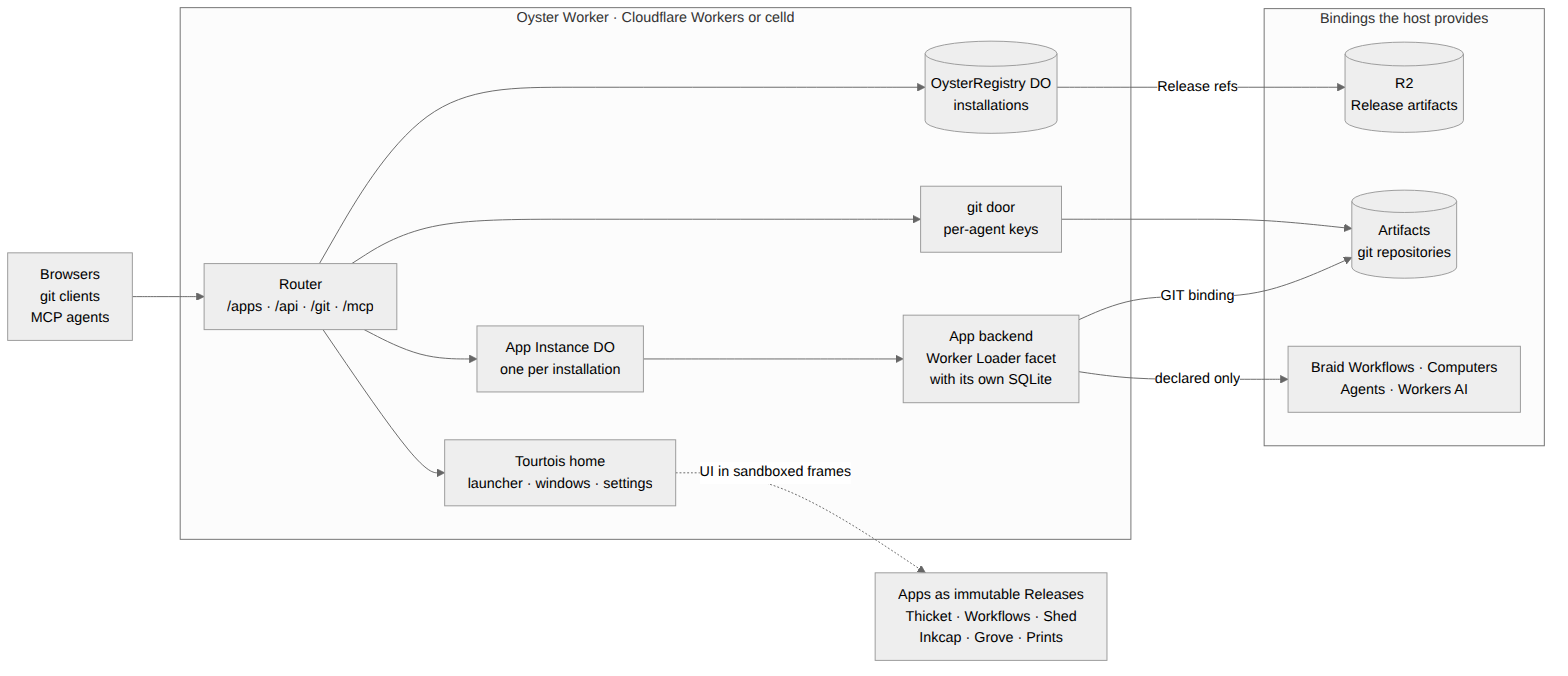
|
|
23
|
+
Computer.
|
|
24
|
+
|
|
25
|
+
- [Tourtois](https://github.com/fungi-computer/tourtois) is the desktop: a
|
|
26
|
+
launcher, tiled or floating windows, menus and settings.
|
|
27
|
+
- [Bonsai](https://github.com/fungi-computer/bonsai) hosts git repositories on
|
|
28
|
+
Cloudflare Artifacts. Each agent pushes to its own fork with ordinary `git`,
|
|
29
|
+
and the network graph shows the forks folding back into main.
|
|
30
|
+
- [Grove](https://github.com/fungi-computer/grove) holds conversations with
|
|
31
|
+
agents that call every installed App as code.
|
|
32
|
+
- [Shed](https://github.com/fungi-computer/shed) opens a terminal on the
|
|
33
|
+
Computer, with its ports and processes.
|
|
34
|
+
- [Inkcap](https://github.com/fungi-computer/inkcap) edits the Computer's files.
|
|
35
|
+
- [Trellis](https://github.com/fungi-computer/trellis) runs typed graphs of App
|
|
36
|
+
methods on Cloudflare Workflows, started by a push, a webhook or a schedule.
|
|
37
|
+
- [Prints](https://github.com/fungi-computer/prints) generates images and video
|
|
38
|
+
with Workers AI.
|
|
39
|
+
|
|
40
|
+
<table>
|
|
41
|
+
<tr>
|
|
42
|
+
<td width="50%"><img alt="Bonsai's koi-pond repository: a network graph with one lane per agent fork, its three open Changes and the live activity feed" src="https://raw.githubusercontent.com/fungi-computer/oyster/main/docs/media/bonsai-koi-pond.png"><br><b>Bonsai</b>: a repository three agents build together</td>
|
|
43
|
+
<td width="50%"><img alt="Grove: the conversation list beside a finished conversation in which the agent ran three scripts against Bonsai and listed the repositories with open changes" src="https://raw.githubusercontent.com/fungi-computer/oyster/main/docs/media/grove-conversation.png"><br><b>Grove</b>: an agent answers by calling Bonsai</td>
|
|
44
|
+
</tr>
|
|
45
|
+
<tr>
|
|
46
|
+
<td width="50%"><img alt="Trellis editor with the Bonsai checks graph: Workflow input, a Change script node and a Bonsai Checks.report step, between the Palette and the Inspector" src="https://raw.githubusercontent.com/fungi-computer/oyster/main/docs/media/workflows-editor.png"><br><b>Trellis</b>: a graph of App methods</td>
|
|
47
|
+
<td width="50%"><img alt="Inkcap with the koi-pond workspace in the explorer and src/fish.ts open beside README.md" src="https://raw.githubusercontent.com/fungi-computer/oyster/main/docs/media/inkcap-editor.png"><br><b>Inkcap</b>: the Computer's files</td>
|
|
48
|
+
</tr>
|
|
49
|
+
<tr>
|
|
50
|
+
<td width="50%"><img alt="The Tourtois desktop: Grove's inbox of agent conversations and a launcher for Bonsai, Grove, Inkcap, Prints, Shed and Trellis" src="https://raw.githubusercontent.com/fungi-computer/oyster/main/docs/media/tourtois-desktop.png"><br><b>Tourtois</b>: the inbox and the launcher</td>
|
|
51
|
+
<td width="50%"><img alt="Prints: a gallery of five generated images, two koi ponds, a knight dunking a basketball, an elf holding a basketball and a sunrise over water, above the prompt bar" src="https://raw.githubusercontent.com/fungi-computer/oyster/main/docs/media/prints-gallery.png"><br><b>Prints</b>: images from Workers AI</td>
|
|
52
|
+
</tr>
|
|
53
|
+
</table>
|
|
54
|
+
|
|
55
|
+
Shed is in the desktop picture at the top. Oyster itself is the host underneath:
|
|
56
|
+
git through Cloudflare Artifacts, a Computer (a Linux workspace in a Cloudflare
|
|
57
|
+
Container) that builds Apps and runs their terminals and files, Agents on
|
|
58
|
+
Workers AI, Workflows and media.
|
|
6
59
|
|
|
7
|
-
|
|
60
|
+
## Quick start: deploy your own Oyster
|
|
8
61
|
|
|
9
|
-
|
|
10
|
-
deploy. Try a live Oyster first at <https://oyster.shiit.app/>: it runs Bonsai,
|
|
11
|
-
Fungi's git platform for many agents at once, and
|
|
12
|
-
[CONTEST.md](https://github.com/fungi-computer/oyster/blob/main/CONTEST.md) is
|
|
13
|
-
the five-minute tour and the comparison with GitHub.
|
|
62
|
+
You need:
|
|
14
63
|
|
|
15
|
-
|
|
16
|
-
|
|
17
|
-
|
|
18
|
-
|
|
19
|
-
|
|
20
|
-
|
|
64
|
+
- a Cloudflare account on Workers Paid, with Containers, Artifacts, Workers AI
|
|
65
|
+
and Workflows enabled;
|
|
66
|
+
- Docker, which Wrangler uses to build the Computer's container image;
|
|
67
|
+
- Node 24, pnpm (npm works the same way) and Git.
|
|
68
|
+
|
|
69
|
+
The first install takes about 15 to 20 minutes, most of it the seven App builds
|
|
70
|
+
on the Computer, one after another. Start a project, add Oyster, its Computer
|
|
71
|
+
and Wrangler, and copy the example Worker out of the package:
|
|
72
|
+
|
|
73
|
+
```sh
|
|
74
|
+
mkdir my-oyster && cd my-oyster
|
|
75
|
+
pnpm add @fungi.computer/oyster @fungi.computer/computer
|
|
76
|
+
pnpm add -D wrangler
|
|
77
|
+
cp node_modules/@fungi.computer/oyster/examples/standalone/{worker.ts,wrangler.jsonc} .
|
|
78
|
+
```
|
|
79
|
+
|
|
80
|
+
pnpm 11 may end an `add` with `ERR_PNPM_IGNORED_BUILDS` for packages such as
|
|
81
|
+
`esbuild` or `workerd`; they are installed, and Oyster needs none of their
|
|
82
|
+
install scripts.
|
|
83
|
+
|
|
84
|
+
`worker.ts` re-exports the whole host:
|
|
85
|
+
|
|
86
|
+
```ts title="worker.ts"
|
|
87
|
+
export * from "@fungi.computer/oyster/standalone";
|
|
88
|
+
export { default } from "@fungi.computer/oyster/standalone";
|
|
89
|
+
```
|
|
90
|
+
|
|
91
|
+
`wrangler.jsonc` names the Worker `oyster`, its Release bucket `oyster-releases`
|
|
92
|
+
and its Artifacts namespace `oyster`, and runs the Computer from
|
|
93
|
+
`node_modules/@fungi.computer/computer/Dockerfile`. Create the bucket and
|
|
94
|
+
deploy. Your Worker's address is `https://oyster.<your-subdomain>.workers.dev`;
|
|
95
|
+
your workers.dev subdomain is on the Workers & Pages overview in the Cloudflare
|
|
96
|
+
dashboard.
|
|
97
|
+
|
|
98
|
+
```sh
|
|
99
|
+
npx wrangler login
|
|
100
|
+
npx wrangler r2 bucket create oyster-releases
|
|
101
|
+
export OYSTER_URL=https://oyster.<your-subdomain>.workers.dev
|
|
102
|
+
npx wrangler deploy --var OYSTER_ORIGIN:$OYSTER_URL
|
|
103
|
+
```
|
|
104
|
+
|
|
105
|
+
Set `OYSTER_ORIGIN` in `wrangler.jsonc` instead if you deploy again later; every
|
|
106
|
+
deploy replaces the Worker's variables.
|
|
107
|
+
|
|
108
|
+
Choose an owner key and store it as a secret:
|
|
109
|
+
|
|
110
|
+
```sh
|
|
111
|
+
export OYSTER_OWNER_KEY=$(openssl rand -hex 24)
|
|
112
|
+
printf '%s' "$OYSTER_OWNER_KEY" | npx wrangler secret put OYSTER_OWNER_KEY
|
|
113
|
+
```
|
|
114
|
+
|
|
115
|
+
### Install the starter Apps
|
|
116
|
+
|
|
117
|
+
```sh
|
|
118
|
+
npx oyster install-apps
|
|
119
|
+
```
|
|
120
|
+
|
|
121
|
+
The installer clones each App's repository, seeds it on your Oyster with
|
|
122
|
+
`git push`, and builds the Apps on your Computer, Tourtois first, installing
|
|
123
|
+
each as its build succeeds. It prints a line per step and then where the time
|
|
124
|
+
went:
|
|
125
|
+
|
|
126
|
+
```
|
|
127
|
+
tourtois source recorded at git:…
|
|
128
|
+
…
|
|
129
|
+
Building tourtois on the Computer (build_…)
|
|
130
|
+
Installed tourtois from its build build_…
|
|
131
|
+
Building bonsai on the Computer (build_…)
|
|
132
|
+
…
|
|
133
|
+
Installed grove from its build build_…
|
|
134
|
+
|
|
135
|
+
App fetch seed queue build clone deps compile upload install
|
|
136
|
+
tourtois …
|
|
137
|
+
…
|
|
138
|
+
Installed 7 Apps in …. Open https://oyster.<your-subdomain>.workers.dev/ to use Tourtois and the installed Apps.
|
|
139
|
+
```
|
|
140
|
+
|
|
141
|
+
Open `$OYSTER_URL/login` and sign in with the owner key: your Oyster opens on
|
|
142
|
+
the Tourtois desktop with all seven Apps, as in the pictures above.
|
|
143
|
+
|
|
144
|
+
Run `install-apps` again to update them; a replaced Release keeps each App's
|
|
145
|
+
data. `--ref` picks a branch or tag of the App repositories, `--repositories`
|
|
146
|
+
another host for them, and `--timings <file>` writes the timing table as JSON.
|
|
147
|
+
Builds run two at a time on the example's `standard-4` Computer (12 GiB).
|
|
148
|
+
`--concurrency 1` runs them one at a time and `--concurrency 3` three at once.
|
|
149
|
+
|
|
150
|
+
### Git, keys and MCP
|
|
151
|
+
|
|
152
|
+
People and agents `clone`, `fetch` and `push` App repositories with ordinary
|
|
153
|
+
`git` at `/git/<installation>/<repo>.git`. Give each agent its own key; Oyster
|
|
154
|
+
shows each key once:
|
|
155
|
+
|
|
156
|
+
```sh
|
|
157
|
+
curl -s -X POST -H "Authorization: Bearer $OYSTER_OWNER_KEY" \
|
|
158
|
+
-H 'content-type: application/json' \
|
|
159
|
+
-d '{"name":"morel","grants":[{"capability":"apps.use","targets":{"kind":"all"}}]}' \
|
|
160
|
+
$OYSTER_URL/api/keys
|
|
161
|
+
```
|
|
21
162
|
|
|
22
|
-
The
|
|
23
|
-
|
|
163
|
+
The answer's `plaintext` field, starting `oyk_`, signs in to `git` and to
|
|
164
|
+
`/mcp`. That key can read and write every App on this Oyster, including Apps
|
|
165
|
+
installed later, without asking each time; anyone holding it can act as the
|
|
166
|
+
owner in those Apps, and revoking it stops it immediately.
|
|
24
167
|
|
|
25
|
-
|
|
26
|
-
own fork and pushes with ordinary `git`.
|
|
27
|
-
- **Workflows** runs typed graphs of App methods on Cloudflare Workflows,
|
|
28
|
-
started by a push, a webhook or a schedule.
|
|
29
|
-
- **Shed** opens a terminal on a Computer, a Linux workspace in a Cloudflare
|
|
30
|
-
Container.
|
|
31
|
-
- **Inkcap** edits files on a Computer, **Grove** holds conversations with
|
|
32
|
-
agents and **Prints** generates images and video with Workers AI.
|
|
168
|
+
Any MCP client can call every installed App with a key. For Claude Code:
|
|
33
169
|
|
|
34
|
-
|
|
35
|
-
|
|
36
|
-
|
|
170
|
+
```sh
|
|
171
|
+
claude mcp add --transport http oyster "$OYSTER_URL/mcp" \
|
|
172
|
+
--header "Authorization: Bearer <the agent's key>"
|
|
173
|
+
```
|
|
174
|
+
|
|
175
|
+
### What the live demo runs
|
|
176
|
+
|
|
177
|
+
<https://oyster.shiit.app/> runs this same host with the same seven Apps. Its
|
|
178
|
+
`koi-pond` repository is a small canvas game three coding agents built together,
|
|
179
|
+
each in its own fork with its own key, with Bonsai drawing a lane per agent as
|
|
180
|
+
they pushed and merged.
|
|
181
|
+
[CONTEST.md](https://github.com/fungi-computer/oyster/blob/main/CONTEST.md)
|
|
182
|
+
tours it.
|
|
37
183
|
|
|
38
184
|
## Part of Fungi
|
|
39
185
|
|
|
@@ -154,7 +300,7 @@ that an agent discovers and calls from code; a dotted method is a nested
|
|
|
154
300
|
property, e.g. `env.BONSAI.repos.list({})`. Writes need explicit approval. Each
|
|
155
301
|
agent has its own key, so every push and call is attributed.
|
|
156
302
|
|
|
157
|
-
**Workflows compose Apps.**
|
|
303
|
+
**Workflows compose Apps.** Trellis stores each graph in git, so a commit is a
|
|
158
304
|
version. Each graph compiles to a plan with a digest and runs on Cloudflare
|
|
159
305
|
Workflows. Steps call App methods and can run a sandboxed Code node or a step in
|
|
160
306
|
a Computer.
|
|
@@ -172,7 +318,14 @@ anything you can.
|
|
|
172
318
|
|
|
173
319
|
## Architecture
|
|
174
320
|
|
|
175
|
-
|
|
321
|
+
An Oyster is one Worker. Every App installed on it is an immutable Release built
|
|
322
|
+
from an exact git commit. Its UI runs in a sandboxed frame, its backend runs in
|
|
323
|
+
its own Durable Object with its own SQLite, and it receives only the bindings it
|
|
324
|
+
declares. Agents reach every installed App through one MCP endpoint. The same
|
|
325
|
+
Worker runs on Cloudflare Workers and on celld, a Workers-compatible runtime you
|
|
326
|
+
can host yourself.
|
|
327
|
+
|
|
328
|
+
|
|
176
329
|
|
|
177
330
|
| Piece | Owns |
|
|
178
331
|
| ----------------- | ----------------------------------------------------------------------------------------- |
|
|
@@ -186,118 +339,7 @@ anything you can.
|
|
|
186
339
|
| Platform bindings | Workflows, Computers, Agents and Workers AI, offered only to Apps that declare them. |
|
|
187
340
|
|
|
188
341
|
The diagram source is
|
|
189
|
-
[`docs/media/architecture.mmd`](docs/media/architecture.mmd).
|
|
190
|
-
|
|
191
|
-
## Quick start: deploy your own Oyster
|
|
192
|
-
|
|
193
|
-
You need a Cloudflare account on Workers Paid, Node 24 and pnpm (npm works the
|
|
194
|
-
same way). Start a project, add Oyster and Wrangler, and copy the standalone
|
|
195
|
-
example Worker out of the package:
|
|
196
|
-
|
|
197
|
-
```sh
|
|
198
|
-
mkdir my-oyster && cd my-oyster
|
|
199
|
-
pnpm add @fungi.computer/oyster
|
|
200
|
-
pnpm add -D wrangler
|
|
201
|
-
cp node_modules/@fungi.computer/oyster/examples/standalone/{worker.ts,wrangler.jsonc} .
|
|
202
|
-
```
|
|
203
|
-
|
|
204
|
-
pnpm 11 may end an `add` with `ERR_PNPM_IGNORED_BUILDS` for packages such as
|
|
205
|
-
`esbuild` or `workerd`; they are installed, and Oyster needs none of their
|
|
206
|
-
install scripts.
|
|
207
|
-
|
|
208
|
-
`worker.ts` is the whole Worker: the default handler plus four classes.
|
|
209
|
-
`OysterRegistry`, `OysterInstance` and `OysterMcp` are the Durable Objects its
|
|
210
|
-
`wrangler.jsonc` binds; `OysterBinding` is the one entrypoint every App binding
|
|
211
|
-
in every invocation frame is minted from (`env.APP_STORAGE`, `env.BACKGROUND`,
|
|
212
|
-
`env.APPS` and the rest).
|
|
213
|
-
|
|
214
|
-
```ts title="worker.ts"
|
|
215
|
-
import { createOysterWorker } from "@fungi.computer/oyster/workers";
|
|
216
|
-
|
|
217
|
-
export {
|
|
218
|
-
OysterBinding,
|
|
219
|
-
OysterInstance,
|
|
220
|
-
OysterRegistry,
|
|
221
|
-
OysterMcp,
|
|
222
|
-
} from "@fungi.computer/oyster/workers";
|
|
223
|
-
|
|
224
|
-
export default createOysterWorker();
|
|
225
|
-
```
|
|
226
|
-
|
|
227
|
-
`wrangler.jsonc` names the Worker `oyster` and its Release bucket
|
|
228
|
-
`oyster-releases`. Create the bucket and deploy. Your Worker's address is
|
|
229
|
-
`https://oyster.<your-subdomain>.workers.dev`; your workers.dev subdomain is on
|
|
230
|
-
the Workers & Pages overview in the Cloudflare dashboard.
|
|
231
|
-
|
|
232
|
-
```sh
|
|
233
|
-
npx wrangler login
|
|
234
|
-
npx wrangler r2 bucket create oyster-releases
|
|
235
|
-
export OYSTER_URL=https://oyster.<your-subdomain>.workers.dev
|
|
236
|
-
npx wrangler deploy --var OYSTER_ORIGIN:$OYSTER_URL
|
|
237
|
-
```
|
|
238
|
-
|
|
239
|
-
Set `OYSTER_ORIGIN` in `wrangler.jsonc` instead if you deploy again later; every
|
|
240
|
-
deploy replaces the Worker's variables.
|
|
241
|
-
|
|
242
|
-
Choose an owner key and store it as a secret:
|
|
243
|
-
|
|
244
|
-
```sh
|
|
245
|
-
export OYSTER_OWNER_KEY=$(openssl rand -hex 24)
|
|
246
|
-
printf '%s' "$OYSTER_OWNER_KEY" | npx wrangler secret put OYSTER_OWNER_KEY
|
|
247
|
-
```
|
|
248
|
-
|
|
249
|
-
Open `$OYSTER_URL/login` and sign in with the owner key. Your Oyster starts with
|
|
250
|
-
no Apps; "Pack an App" under Run your own Oyster builds one from a git commit
|
|
251
|
-
and installs it, and the
|
|
252
|
-
[agent quick start](https://github.com/fungi-computer/oyster/blob/main/docs/site/agent-quickstart.mdx)
|
|
253
|
-
walks through a first App step by step.
|
|
254
|
-
|
|
255
|
-
### Add Git
|
|
256
|
-
|
|
257
|
-
For git, copy `examples/git` instead of `examples/standalone`:
|
|
258
|
-
|
|
259
|
-
```sh
|
|
260
|
-
cp node_modules/@fungi.computer/oyster/examples/git/{worker.ts,wrangler.jsonc} .
|
|
261
|
-
```
|
|
262
|
-
|
|
263
|
-
It is the same Oyster with Oyster's git door: people and agents `clone`, `fetch`
|
|
264
|
-
and `push` App repositories with ordinary `git` at
|
|
265
|
-
`/git/<installation>/<repo>.git`. Its `wrangler.jsonc` names the Worker
|
|
266
|
-
`oyster-git` and adds the `ARTIFACTS` binding and the `KEYS` and `WEBHOOKS`
|
|
267
|
-
Durable Objects. Repositories live in Cloudflare Artifacts, so the account needs
|
|
268
|
-
Artifacts enabled. Deploy it the same way, with `OYSTER_URL` set to
|
|
269
|
-
`https://oyster-git.<your-subdomain>.workers.dev`, then give each agent its own
|
|
270
|
-
key; Oyster shows each key once:
|
|
271
|
-
|
|
272
|
-
```sh
|
|
273
|
-
curl -s -X POST -H "Authorization: Bearer $OYSTER_OWNER_KEY" \
|
|
274
|
-
-H 'content-type: application/json' \
|
|
275
|
-
-d '{"name":"morel","grants":[{"capability":"apps.use","targets":{"kind":"all"}}]}' \
|
|
276
|
-
$OYSTER_URL/api/keys
|
|
277
|
-
```
|
|
278
|
-
|
|
279
|
-
The answer's `plaintext` field, starting `oyk_`, signs in to `git` and to
|
|
280
|
-
`/mcp`. That key can read and write every App on this Oyster, including Apps
|
|
281
|
-
installed later, without asking each time; anyone holding it can act as the
|
|
282
|
-
owner in those Apps, and revoking it stops it immediately.
|
|
283
|
-
|
|
284
|
-
Any MCP client can call every installed App with a key. For Claude Code:
|
|
285
|
-
|
|
286
|
-
```sh
|
|
287
|
-
claude mcp add --transport http oyster "$OYSTER_URL/mcp" \
|
|
288
|
-
--header "Authorization: Bearer <the agent's key>"
|
|
289
|
-
```
|
|
290
|
-
|
|
291
|
-
### What the live demo runs
|
|
292
|
-
|
|
293
|
-
<https://oyster.shiit.app/> is this package's git root with more filled in: it
|
|
294
|
-
installs Fungi's App set (Tourtois, Bonsai, Shed, Inkcap, Workflows, Prints and
|
|
295
|
-
Grove), selects Tourtois as its home installation, and composes Computers,
|
|
296
|
-
Agents and media. Its `koi-pond` repository is a small canvas game three coding
|
|
297
|
-
agents built together, each in its own fork with its own key, with Bonsai
|
|
298
|
-
drawing a lane per agent as they pushed and merged.
|
|
299
|
-
[CONTEST.md](https://github.com/fungi-computer/oyster/blob/main/CONTEST.md)
|
|
300
|
-
tours it.
|
|
342
|
+
[`docs/media/architecture.mmd`](https://github.com/fungi-computer/oyster/blob/main/docs/media/architecture.mmd).
|
|
301
343
|
|
|
302
344
|
## Install or set up
|
|
303
345
|
|
|
@@ -320,19 +362,19 @@ door. "Part of Fungi" above lists them all.
|
|
|
320
362
|
|
|
321
363
|
## Run your own Oyster
|
|
322
364
|
|
|
323
|
-
|
|
324
|
-
|
|
325
|
-
|
|
326
|
-
|
|
327
|
-
|
|
365
|
+
`@fungi.computer/oyster/standalone` is the whole host the quick start deploys:
|
|
366
|
+
the git root below plus tenancy, a Computer (`ComputerDO`, a Cloudflare
|
|
367
|
+
Container or an on-box VM), Agents on Workers AI composed from stock
|
|
368
|
+
[Shiitake](https://github.com/fungi-computer/shiitake) Durable Objects,
|
|
369
|
+
Workflows, media, and the owner routes that seed App templates and build them on
|
|
370
|
+
the Computer. `examples/standalone/wrangler.jsonc` declares every binding it
|
|
371
|
+
uses. Set the owner key as a secret (`OYSTER_OWNER_KEY`, 24+ characters) and
|
|
372
|
+
deploy with `wrangler deploy`. Sign in at `/login`.
|
|
328
373
|
|
|
329
|
-
|
|
330
|
-
|
|
331
|
-
|
|
332
|
-
|
|
333
|
-
and `MCP`). Set the owner key as a secret (`OYSTER_OWNER_KEY`, 24+ characters)
|
|
334
|
-
and deploy with `wrangler deploy`; the same config runs under `celld dev`. Sign
|
|
335
|
-
in at `/login`.
|
|
374
|
+
The layers it is built from stay exported for hosts that compose their own:
|
|
375
|
+
`@fungi.computer/oyster/workers` (Releases, Instances, MCP and App storage) and
|
|
376
|
+
`@fungi.computer/oyster/workers-git` (the git door), with `oysterAppMethods`
|
|
377
|
+
supplying the installed App catalog to an Agent runtime.
|
|
336
378
|
|
|
337
379
|
Pack and install an App with `@fungi.computer/oyster/pack`: `packRelease` turns
|
|
338
380
|
an exact Git commit and a canonical build recipe into a Release with immutable
|
|
@@ -365,10 +407,9 @@ There are two ways to get it:
|
|
|
365
407
|
return `root.hostFor(this.env, scope)` from your `OysterGitInstance` subclass,
|
|
366
408
|
so HTTP, MCP and background wakes share one composition. `tenancy` is
|
|
367
409
|
required; a single-owner root passes `ownerOrKeyTenancy`, so the owner key and
|
|
368
|
-
named keys sign git in.
|
|
369
|
-
|
|
370
|
-
`
|
|
371
|
-
Durable Objects.
|
|
410
|
+
named keys sign git in. `@fungi.computer/oyster/standalone` is a real
|
|
411
|
+
multi-door caller. Its `wrangler.jsonc` adds the `ARTIFACTS` binding and the
|
|
412
|
+
`KEYS` and `WEBHOOKS` Durable Objects.
|
|
372
413
|
- **Set `host.git` on your own host.** Keep your own `createOyster(host)`
|
|
373
414
|
composition and set `git: oysterWorkerGit(env, { scope })` and
|
|
374
415
|
`ownerRoutes: gitAdminRoutes(env, scope)` for `/api/keys` and `/api/webhooks`,
|
|
@@ -400,12 +441,12 @@ export class OysterInstance extends OysterGitInstance {
|
|
|
400
441
|
export default createOysterGitWorker(root);
|
|
401
442
|
```
|
|
402
443
|
|
|
403
|
-
|
|
404
|
-
|
|
405
|
-
|
|
406
|
-
bare repositories: the owner pushes with `git`, a named agent key's
|
|
407
|
-
refused by the App's policy with Git's own `ng` report, both keys clone,
|
|
408
|
-
accepted push reaches the App's `onGitPush`.
|
|
444
|
+
A host also exports the Durable Objects and the git `OysterBinding` entrypoint,
|
|
445
|
+
whose table also serves `env.GIT` and `env.EVENTS`. The package's
|
|
446
|
+
`test:git-door` check runs that root (`test/git-root.fixture.ts`) on workerd
|
|
447
|
+
against real bare repositories: the owner pushes with `git`, a named agent key's
|
|
448
|
+
push is refused by the App's policy with Git's own `ng` report, both keys clone,
|
|
449
|
+
and the accepted push reaches the App's `onGitPush`.
|
|
409
450
|
|
|
410
451
|
Each layer owns one decision:
|
|
411
452
|
|
|
@@ -445,8 +486,8 @@ flowchart LR
|
|
|
445
486
|
selected Instance's `onGitPush` when the Release declares
|
|
446
487
|
`receives: ["git.push"]` and `git.repository`. The App emits typed events
|
|
447
488
|
through `env.EVENTS`: Oyster delivers them as signed Standard Webhooks, and a
|
|
448
|
-
host with Workflows (the Hub, or the live demo's root) starts the
|
|
449
|
-
triggers armed on that event.
|
|
489
|
+
host with Cloudflare Workflows (the Hub, or the live demo's root) starts the
|
|
490
|
+
Workflow triggers armed on that event.
|
|
450
491
|
|
|
451
492
|
Agent approval stays owner-direct in both compositions: the approval routes are
|
|
452
493
|
owner routes, refuse App-origin requests, and are never an `OysterCapability` an
|
|
@@ -870,15 +911,12 @@ The core is `@fungi.computer/oyster`; the Durable Object adapter is
|
|
|
870
911
|
|
|
871
912
|
## Examples
|
|
872
913
|
|
|
873
|
-
`examples/standalone`
|
|
874
|
-
|
|
875
|
-
|
|
914
|
+
`examples/standalone` ships in the npm package, ready to copy as in the quick
|
|
915
|
+
start. The generated API reference and the in-memory example below ship with
|
|
916
|
+
them. The rest live in the
|
|
876
917
|
[Oyster repository](https://github.com/fungi-computer/oyster):
|
|
877
918
|
|
|
878
|
-
- `examples/standalone` is the
|
|
879
|
-
start.
|
|
880
|
-
- `examples/git` adds the git door to an Oyster host on Workers, as described in
|
|
881
|
-
"Add Git to your host" under Run your own Oyster.
|
|
919
|
+
- `examples/standalone` is the whole host from the quick start.
|
|
882
920
|
- `examples/notes-app` is a full App: UI, backend methods and SQLite. Copy it to
|
|
883
921
|
start an App with a backend. `test/standalone.native.mjs` packs it, installs
|
|
884
922
|
it on the standalone Oyster and drives its UI in a browser, on workerd and on
|
|
@@ -890,8 +928,8 @@ below ship with them. The rest live in the
|
|
|
890
928
|
`wrangler dev` (workerd) and `celld dev`.
|
|
891
929
|
- `test/core.mjs` exercises replay, state transitions and owner fences in plain
|
|
892
930
|
Node.
|
|
893
|
-
- <https://oyster.shiit.app/>
|
|
894
|
-
|
|
931
|
+
- <https://oyster.shiit.app/> runs that same host with Fungi's seven starter
|
|
932
|
+
Apps.
|
|
895
933
|
|
|
896
934
|
### Drive one Instance in memory
|
|
897
935
|
|
|
@@ -1029,11 +1067,25 @@ projects, compiles declared stylesheets, and builds the source HTML with Vite.
|
|
|
1029
1067
|
Notes uses plain TypeScript; Bonsai uses React and Tailwind. Neither reads
|
|
1030
1068
|
prebuilt workspace `dist` directories or an external UI output directory.
|
|
1031
1069
|
|
|
1070
|
+
A workspace dependency that cannot build from its `tsconfig.build.json` names
|
|
1071
|
+
the one `package.json` script that builds it, in place of TypeScript configs:
|
|
1072
|
+
`"fungi": { "build": { "script": "build" } }`. The compiler runs exactly that
|
|
1073
|
+
script, at the dependency's place in the build order, with
|
|
1074
|
+
`pnpm run -- <script>` in the package directory and no `pre`/`post` hooks or
|
|
1075
|
+
implicit install. Only the Computer build (`buildTeamCandidate`, composed with
|
|
1076
|
+
`createLocalBuildExecutor({ packageScripts: "run" })`) runs it; the script is
|
|
1077
|
+
arbitrary package code, isolated by that admitted Computer. Every other
|
|
1078
|
+
composition, including `packRelease` and `create-fungi-app`, refuses such a
|
|
1079
|
+
source before installing. Unknown `fungi.build` fields are refused. The policy
|
|
1080
|
+
is pinned as `package-json-fungi-build-v2` in the recipe toolchain; an executor
|
|
1081
|
+
refuses a recipe pinned under another policy.
|
|
1082
|
+
|
|
1032
1083
|
`createLocalArtifactWriter(directory, recipe.assets)` writes the App root and
|
|
1033
1084
|
all referenced UI/backend objects. It uses the supplied asset bounds and
|
|
1034
1085
|
maintained MIME metadata. Bundled UI plus a backend may hydrate a captured
|
|
1035
1086
|
`pnpm-lock.yaml` with the pinned `pnpm@11.24.0`, frozen lockfile and no
|
|
1036
|
-
lifecycle scripts or pnpmfile
|
|
1087
|
+
lifecycle scripts or pnpmfile. Installs never run lifecycle scripts; the only
|
|
1088
|
+
package script a build runs is a declared `fungi.build.script`, on a Computer.
|
|
1037
1089
|
|
|
1038
1090
|
For Artifacts, `createArtifactsSourceCapture({ remote, token, sourceRevision })`
|
|
1039
1091
|
accepts the host's Git URL and a `git:<commit>` revision. Native Git receives
|
package/dist/app-builds.d.ts
CHANGED
|
@@ -1,20 +1,53 @@
|
|
|
1
|
+
/**
|
|
2
|
+
* Oyster's App build owner: an App's registered source, its build jobs on the
|
|
3
|
+
* host's own Computer, and the Releases those builds produce.
|
|
4
|
+
*
|
|
5
|
+
* A build runs the shared job lifecycle (`build/build-jobs.ts`) and the fixed
|
|
6
|
+
* captured builder command on one Computer. The Computer holds no key: its
|
|
7
|
+
* clone is admitted at egress for exactly the job's one repository (read
|
|
8
|
+
* only), and its candidate upload for exactly the job. A source is either a
|
|
9
|
+
* repository in an installation's Git (a fork, through the Git door) or the
|
|
10
|
+
* App's own published template, built only at a recorded seed revision of
|
|
11
|
+
* its pinned recipe (no installed App is needed). The build streams each
|
|
12
|
+
* built object into the host's artifact store itself, through the egress, and
|
|
13
|
+
* then submits a small manifest naming them. This owner only records facts:
|
|
14
|
+
* it checks each named object's stored size and digest, writes the asset
|
|
15
|
+
* manifest and App root in Oyster's one immutable artifact representation
|
|
16
|
+
* (the same objects a packed upload writes), verifies the Release like any
|
|
17
|
+
* installed one, and records it; installing it is a separate owner act.
|
|
18
|
+
*/
|
|
1
19
|
import * as Schema from "effect/Schema";
|
|
2
20
|
import type { WatchdogSqliteOwner } from "@fungi.computer/watchdog";
|
|
3
21
|
import { type Release } from "@fungi.computer/puffball";
|
|
4
|
-
import { type
|
|
5
|
-
import { type
|
|
6
|
-
import {
|
|
7
|
-
/** A Computer's whole-build budget: a cold
|
|
22
|
+
import { type TeamAppCandidateManifest } from "./build/submission-contract.js";
|
|
23
|
+
import { type ArtifactHeads, type ArtifactStore } from "./release.js";
|
|
24
|
+
import type { PublisherTemplateSeedReceipts } from "./source/seed-receipt.js";
|
|
25
|
+
/** A Computer's whole-build budget: a cold build on a 6 GiB Computer measured 185-270 s. */
|
|
8
26
|
export declare const oysterAppBuildTimeoutMs = 900000;
|
|
9
27
|
/** Host names the Computer's egress serves for a build; never public hosts. */
|
|
10
28
|
export declare const oysterBuildGitHost = "git.team.internal";
|
|
11
29
|
export declare const oysterBuildReportHost = "build.team.internal";
|
|
12
|
-
/**
|
|
13
|
-
export declare const
|
|
14
|
-
readonly
|
|
30
|
+
/** Where an App's source is cloned from. */
|
|
31
|
+
export declare const oysterBuildLocationSchema: Schema.Union<readonly [Schema.Struct<{
|
|
32
|
+
readonly kind: Schema.Literal<"installation">;
|
|
15
33
|
/** The installation whose Git holds the repository (Bonsai for a fork). */
|
|
16
34
|
readonly installationId: Schema.String;
|
|
17
35
|
readonly repository: Schema.String;
|
|
36
|
+
}>, Schema.Struct<{
|
|
37
|
+
readonly kind: Schema.Literal<"template">;
|
|
38
|
+
}>]>;
|
|
39
|
+
export type OysterBuildLocation = Schema.Schema.Type<typeof oysterBuildLocationSchema>;
|
|
40
|
+
/** An App's registered build source: where it is cloned and its pinned recipe. */
|
|
41
|
+
export declare const oysterBuildSourceSchema: Schema.Struct<{
|
|
42
|
+
readonly appId: Schema.refine<import("@fungi.computer/puffball").AppId, Schema.String>;
|
|
43
|
+
readonly location: Schema.Union<readonly [Schema.Struct<{
|
|
44
|
+
readonly kind: Schema.Literal<"installation">;
|
|
45
|
+
/** The installation whose Git holds the repository (Bonsai for a fork). */
|
|
46
|
+
readonly installationId: Schema.String;
|
|
47
|
+
readonly repository: Schema.String;
|
|
48
|
+
}>, Schema.Struct<{
|
|
49
|
+
readonly kind: Schema.Literal<"template">;
|
|
50
|
+
}>]>;
|
|
18
51
|
readonly recipe: Schema.Struct<{
|
|
19
52
|
readonly kind: Schema.optional<Schema.Literals<readonly ["bundled-html", "source-html"]>>;
|
|
20
53
|
readonly bundle: Schema.Literal<true>;
|
|
@@ -54,9 +87,10 @@ export type OysterBuildView = Readonly<{
|
|
|
54
87
|
detail: string | null;
|
|
55
88
|
release: Release | null;
|
|
56
89
|
}>;
|
|
57
|
-
/** One Computer as the build owner reaches it. */
|
|
58
90
|
export type OysterBuildComputer = Readonly<{
|
|
59
|
-
/** Run the fixed build command; the Computer re-admits the job first.
|
|
91
|
+
/** Run the fixed build command; the Computer re-admits the job first.
|
|
92
|
+
* A missing `output` means no terminal result was established: the
|
|
93
|
+
* command may still be running, so it is never read as an exit. */
|
|
60
94
|
runBuild(input: {
|
|
61
95
|
jobId: string;
|
|
62
96
|
command: string;
|
|
@@ -78,19 +112,27 @@ export type OysterAppBuildOptions = Readonly<{
|
|
|
78
112
|
objectId: string;
|
|
79
113
|
port: OysterBuildComputer;
|
|
80
114
|
}>;
|
|
81
|
-
|
|
82
|
-
artifacts: ArtifactStore;
|
|
115
|
+
/** The host's artifact store; a build's objects are already in it. */
|
|
116
|
+
artifacts: ArtifactStore & ArtifactHeads;
|
|
117
|
+
/** The seed receipts a template build must match. */
|
|
118
|
+
templates: Pick<PublisherTemplateSeedReceipts, "read">;
|
|
83
119
|
now?: () => number;
|
|
84
120
|
}>;
|
|
85
|
-
/**
|
|
86
|
-
|
|
87
|
-
|
|
121
|
+
/**
|
|
122
|
+
* The SQLite tables one Oyster build owner keeps. Creation and any carrying
|
|
123
|
+
* forward of retained facts run as one transaction of the owner's storage, so
|
|
124
|
+
* an interrupted conversion leaves the facts as they were for a retry.
|
|
125
|
+
*/
|
|
126
|
+
export declare function migrateOysterAppBuilds(owner: WatchdogSqliteOwner): void;
|
|
127
|
+
/** The build owner over one tenant's SQLite, Computer and artifact store. */
|
|
88
128
|
export declare function createOysterAppBuilds(options: OysterAppBuildOptions): Readonly<{
|
|
89
129
|
/** Record (or replace) an App's build source; the caller is the owner. */
|
|
90
130
|
registerSource(source: OysterBuildSource): OysterBuildSource;
|
|
91
131
|
readSource: (appId: string) => OysterBuildSource | null;
|
|
92
132
|
/**
|
|
93
133
|
* Mint one build job for an App's registered source at one exact commit.
|
|
134
|
+
* A template source builds only a seed revision recorded for its pinned
|
|
135
|
+
* recipe.
|
|
94
136
|
* Answers the job and its one run, which the caller keeps alive (the
|
|
95
137
|
* upload grant exists only inside that run's fixed command).
|
|
96
138
|
*/
|
|
@@ -128,6 +170,11 @@ export declare function createOysterAppBuilds(options: OysterAppBuildOptions): R
|
|
|
128
170
|
}>): Readonly<{
|
|
129
171
|
requestedBy: string;
|
|
130
172
|
}> | null;
|
|
173
|
+
/**
|
|
174
|
+
* May this Computer's clone read this template repository now? Only while
|
|
175
|
+
* a live template job on this Computer names it.
|
|
176
|
+
*/
|
|
177
|
+
admitTemplateClone(computerObjectId: string, repository: string): boolean;
|
|
131
178
|
/** A reported artifact or status for a live job. */
|
|
132
179
|
record(event: Readonly<{
|
|
133
180
|
kind: "build-artifact";
|
|
@@ -143,9 +190,21 @@ export declare function createOysterAppBuilds(options: OysterAppBuildOptions): R
|
|
|
143
190
|
detail: string | null;
|
|
144
191
|
}>): void;
|
|
145
192
|
/**
|
|
146
|
-
*
|
|
147
|
-
*
|
|
193
|
+
* May this live job's build upload one object now, and how large? The
|
|
194
|
+
* grant is the one inside the job's fixed command; the bound is its
|
|
195
|
+
* recipe's (`pinnedRecipeObjectBound`).
|
|
196
|
+
*/
|
|
197
|
+
admitObjectUpload(jobId: string, computerObjectId: string, grant: string): Promise<Readonly<{
|
|
198
|
+
maxObjectBytes: number;
|
|
199
|
+
}> | null>;
|
|
200
|
+
/**
|
|
201
|
+
* The Computer's candidate manifest for a live job: checked against the
|
|
202
|
+
* job and its pinned recipe, each named object found stored with its
|
|
203
|
+
* size and verified digest (one at a time; only the backend descriptor
|
|
204
|
+
* is read), its asset manifest and App root written, verified as an
|
|
205
|
+
* installable Release and recorded. An over-policy candidate stores
|
|
206
|
+
* nothing.
|
|
148
207
|
*/
|
|
149
|
-
submitCandidate(jobId: string,
|
|
208
|
+
submitCandidate(jobId: string, manifest: TeamAppCandidateManifest, grant: string, credentialId: string): Promise<Response>;
|
|
150
209
|
}>;
|
|
151
210
|
export type OysterAppBuilds = ReturnType<typeof createOysterAppBuilds>;
|