@fungi.computer/oyster 0.0.0-stage → 0.1.0
This diff represents the content of publicly available package versions that have been released to one of the supported registries. The information contained in this diff is provided for informational purposes only and reflects changes between package versions as they appear in their respective public registries.
- package/LICENSE +21 -0
- package/README.md +1134 -2
- package/dist/agents.d.ts +114 -0
- package/dist/agents.js +322 -0
- package/dist/app-builds.d.ts +210 -0
- package/dist/app-builds.js +499 -0
- package/dist/app-sandbox.d.ts +2 -0
- package/dist/app-sandbox.js +2 -0
- package/dist/app-sources.d.ts +31 -0
- package/dist/app-sources.js +370 -0
- package/dist/app-storage.d.ts +141 -0
- package/dist/app-storage.js +281 -0
- package/dist/apps/gate.d.ts +105 -0
- package/dist/apps/gate.js +273 -0
- package/dist/apps/index.d.ts +5 -0
- package/dist/apps/index.js +5 -0
- package/dist/apps/installation.d.ts +248 -0
- package/dist/apps/installation.js +307 -0
- package/dist/apps/operations.d.ts +8 -0
- package/dist/apps/operations.js +98 -0
- package/dist/apps/tools.d.ts +33 -0
- package/dist/apps/tools.js +17 -0
- package/dist/auth.d.ts +11 -0
- package/dist/auth.js +93 -0
- package/dist/backend-request.d.ts +3 -0
- package/dist/backend-request.js +53 -0
- package/dist/build/artifact-writer.d.ts +40 -0
- package/dist/build/artifact-writer.js +181 -0
- package/dist/build/build-jobs.d.ts +128 -0
- package/dist/build/build-jobs.js +203 -0
- package/dist/build/build-policy.d.ts +10 -0
- package/dist/build/build-policy.js +10 -0
- package/dist/build/build-step.d.ts +37 -0
- package/dist/build/build-step.js +28 -0
- package/dist/build/bundled-html.d.ts +7 -0
- package/dist/build/bundled-html.js +64 -0
- package/dist/build/candidate-builder.d.ts +68 -0
- package/dist/build/candidate-builder.js +91 -0
- package/dist/build/candidate-cli.d.ts +1 -0
- package/dist/build/candidate-cli.js +119 -0
- package/dist/build/candidate-cli.mjs +28170 -0
- package/dist/build/content-objects.d.ts +37 -0
- package/dist/build/content-objects.js +53 -0
- package/dist/build/definition-emission.d.ts +34 -0
- package/dist/build/definition-emission.js +201 -0
- package/dist/build/effect.d.ts +249 -0
- package/dist/build/effect.js +436 -0
- package/dist/build/git-environment.d.ts +9 -0
- package/dist/build/git-environment.js +60 -0
- package/dist/build/html-recipe.d.ts +20 -0
- package/dist/build/html-recipe.js +51 -0
- package/dist/build/local-build.d.ts +67 -0
- package/dist/build/local-build.js +1128 -0
- package/dist/build/snapshot-package-store.d.ts +12 -0
- package/dist/build/snapshot-package-store.js +36 -0
- package/dist/build/snapshot-program-scripts.d.ts +6 -0
- package/dist/build/snapshot-program-scripts.js +2 -0
- package/dist/build/snapshot-programs/snapshot-path.d.ts +2 -0
- package/dist/build/snapshot-programs/snapshot-path.js +6 -0
- package/dist/build/submission-contract.d.ts +828 -0
- package/dist/build/submission-contract.js +180 -0
- package/dist/build/workspace-build.d.ts +55 -0
- package/dist/build/workspace-build.js +200 -0
- package/dist/build-contract.d.ts +7 -0
- package/dist/build-contract.js +7 -0
- package/dist/build-egress.d.ts +62 -0
- package/dist/build-egress.js +148 -0
- package/dist/build-jobs.d.ts +2 -0
- package/dist/build-jobs.js +2 -0
- package/dist/build.d.ts +12 -0
- package/dist/build.js +14 -0
- package/dist/capability-descriptor.d.ts +46 -0
- package/dist/capability-descriptor.js +51 -0
- package/dist/catalog-frame.d.ts +39 -0
- package/dist/catalog-frame.js +72 -0
- package/dist/cause-class.d.ts +19 -0
- package/dist/cause-class.js +54 -0
- package/dist/cloudflare.d.ts +123 -0
- package/dist/cloudflare.js +391 -0
- package/dist/computer-terminal.d.ts +38 -0
- package/dist/computer-terminal.js +410 -0
- package/dist/computer.d.ts +60 -0
- package/dist/computer.js +33 -0
- package/dist/event-recipients.d.ts +57 -0
- package/dist/event-recipients.js +144 -0
- package/dist/facet-invocation.d.ts +4 -0
- package/dist/facet-invocation.js +45 -0
- package/dist/files.d.ts +42 -0
- package/dist/files.js +123 -0
- package/dist/frame-binding-wire-script.d.ts +2 -0
- package/dist/frame-binding-wire-script.js +1 -0
- package/dist/frame-binding-wire.d.ts +28 -0
- package/dist/frame-binding-wire.js +54 -0
- package/dist/git-admission.d.ts +52 -0
- package/dist/git-admission.js +188 -0
- package/dist/git-auth.d.ts +11 -0
- package/dist/git-auth.js +27 -0
- package/dist/git-door.d.ts +35 -0
- package/dist/git-door.js +108 -0
- package/dist/git-journal.d.ts +31 -0
- package/dist/git-journal.js +188 -0
- package/dist/git.d.ts +31 -0
- package/dist/git.js +64 -0
- package/dist/guest-policy.d.ts +9 -0
- package/dist/guest-policy.js +13 -0
- package/dist/host.d.ts +244 -0
- package/dist/host.js +1043 -0
- package/dist/index.d.ts +166 -0
- package/dist/index.js +320 -0
- package/dist/installation-consent.d.ts +79 -0
- package/dist/installation-consent.js +82 -0
- package/dist/internal/background-origins.d.ts +3 -0
- package/dist/internal/background-origins.js +8 -0
- package/dist/internal/delivery.d.ts +12 -0
- package/dist/internal/delivery.js +167 -0
- package/dist/internal/host-gate.d.ts +14 -0
- package/dist/internal/host-gate.js +62 -0
- package/dist/internal/registry-installations.d.ts +6 -0
- package/dist/internal/registry-installations.js +12 -0
- package/dist/invocation.d.ts +251 -0
- package/dist/invocation.js +377 -0
- package/dist/keys.d.ts +48 -0
- package/dist/keys.js +52 -0
- package/dist/mcp-owner.d.ts +27 -0
- package/dist/mcp-owner.js +155 -0
- package/dist/mcp.d.ts +89 -0
- package/dist/mcp.js +429 -0
- package/dist/media.d.ts +23 -0
- package/dist/media.js +12 -0
- package/dist/pack.d.ts +79 -0
- package/dist/pack.js +151 -0
- package/dist/page/capabilities.d.ts +23 -0
- package/dist/page/capabilities.js +256 -0
- package/dist/page/computer-handles.d.ts +79 -0
- package/dist/page/computer-handles.js +44 -0
- package/dist/page/gill-observation.d.ts +4 -0
- package/dist/page/gill-observation.js +31 -0
- package/dist/page/lifetime.d.ts +6 -0
- package/dist/page/lifetime.js +19 -0
- package/dist/page/mount.d.ts +163 -0
- package/dist/page/mount.js +390 -0
- package/dist/page/storage.d.ts +3 -0
- package/dist/page/storage.js +82 -0
- package/dist/page/terminal.d.ts +5 -0
- package/dist/page/terminal.js +7 -0
- package/dist/page/window-launch.d.ts +18 -0
- package/dist/page/window-launch.js +11 -0
- package/dist/page-script.d.ts +14 -0
- package/dist/page-script.js +5 -0
- package/dist/r2-files.d.ts +3 -0
- package/dist/r2-files.js +79 -0
- package/dist/release.d.ts +83 -0
- package/dist/release.js +167 -0
- package/dist/root-data.d.ts +86 -0
- package/dist/root-data.js +69 -0
- package/dist/shell/app-directory.d.ts +542 -0
- package/dist/shell/app-directory.js +199 -0
- package/dist/shell/browser-actions.d.ts +7 -0
- package/dist/shell/browser-actions.js +56 -0
- package/dist/shell/command-host.d.ts +112 -0
- package/dist/shell/command-host.js +502 -0
- package/dist/shell/commands.d.ts +25 -0
- package/dist/shell/commands.js +78 -0
- package/dist/shell/index.d.ts +8 -0
- package/dist/shell/index.js +8 -0
- package/dist/shell/keys.d.ts +41 -0
- package/dist/shell/keys.js +134 -0
- package/dist/shell/shell-module.d.ts +55 -0
- package/dist/shell/shell-module.js +86 -0
- package/dist/shell/window-manager.d.ts +124 -0
- package/dist/shell/window-manager.js +711 -0
- package/dist/shell/workbench-contract.d.ts +68 -0
- package/dist/shell/workbench-contract.js +1 -0
- package/dist/shell/workbench-directory.d.ts +332 -0
- package/dist/shell/workbench-directory.js +35 -0
- package/dist/shell/workbench-host-types.d.ts +96 -0
- package/dist/shell/workbench-host-types.js +1 -0
- package/dist/shell/workbench-host.d.ts +34 -0
- package/dist/shell/workbench-host.js +347 -0
- package/dist/shell/workbench-model.d.ts +192 -0
- package/dist/shell/workbench-model.js +53 -0
- package/dist/shell/workbench.d.ts +4 -0
- package/dist/shell/workbench.js +2 -0
- package/dist/source/fork.d.ts +27 -0
- package/dist/source/fork.js +46 -0
- package/dist/source/index.d.ts +10 -0
- package/dist/source/index.js +10 -0
- package/dist/source/seed-receipt.d.ts +53 -0
- package/dist/source/seed-receipt.js +18 -0
- package/dist/source/team-source.d.ts +32 -0
- package/dist/source/team-source.js +42 -0
- package/dist/source/template-push.d.ts +33 -0
- package/dist/source/template-push.js +223 -0
- package/dist/source/template-repository.d.ts +4 -0
- package/dist/source/template-repository.js +21 -0
- package/dist/source/template-seed.d.ts +68 -0
- package/dist/source/template-seed.js +80 -0
- package/dist/standalone/agent-directory.d.ts +4 -0
- package/dist/standalone/agent-directory.js +4 -0
- package/dist/standalone/agents.d.ts +220 -0
- package/dist/standalone/agents.js +795 -0
- package/dist/standalone/app-builds-binding.d.ts +36 -0
- package/dist/standalone/app-builds-binding.js +119 -0
- package/dist/standalone/app-set.d.ts +91 -0
- package/dist/standalone/app-set.js +395 -0
- package/dist/standalone/app-source.d.ts +41 -0
- package/dist/standalone/app-source.js +59 -0
- package/dist/standalone/builds.d.ts +18 -0
- package/dist/standalone/builds.js +101 -0
- package/dist/standalone/computer-egress.d.ts +37 -0
- package/dist/standalone/computer-egress.js +111 -0
- package/dist/standalone/computer.d.ts +122 -0
- package/dist/standalone/computer.js +714 -0
- package/dist/standalone/install-apps-cli.d.ts +2 -0
- package/dist/standalone/install-apps-cli.js +126 -0
- package/dist/standalone/instance.d.ts +35 -0
- package/dist/standalone/instance.js +74 -0
- package/dist/standalone/media.d.ts +76 -0
- package/dist/standalone/media.js +227 -0
- package/dist/standalone/preview.d.ts +51 -0
- package/dist/standalone/preview.js +167 -0
- package/dist/standalone/registry.d.ts +102 -0
- package/dist/standalone/registry.js +193 -0
- package/dist/standalone/tenancy.d.ts +42 -0
- package/dist/standalone/tenancy.js +241 -0
- package/dist/standalone/worker.d.ts +55 -0
- package/dist/standalone/worker.js +147 -0
- package/dist/standalone/workflow-authority-readers.d.ts +16 -0
- package/dist/standalone/workflow-authority-readers.js +35 -0
- package/dist/standalone/workflow-binding.d.ts +216 -0
- package/dist/standalone/workflow-binding.js +217 -0
- package/dist/standalone/workflow-events.d.ts +46 -0
- package/dist/standalone/workflow-events.js +39 -0
- package/dist/standalone/workflow-git-capture.d.ts +7 -0
- package/dist/standalone/workflow-git-capture.js +62 -0
- package/dist/standalone/workflow-host.d.ts +931 -0
- package/dist/standalone/workflow-host.js +751 -0
- package/dist/standalone/workflow-node-capture.d.ts +13 -0
- package/dist/standalone/workflow-node-capture.js +72 -0
- package/dist/standalone/workflow-root-authority.d.ts +27 -0
- package/dist/standalone/workflow-root-authority.js +87 -0
- package/dist/standalone/workflow-schedules.d.ts +52 -0
- package/dist/standalone/workflow-schedules.js +40 -0
- package/dist/standalone/workflow-trigger-host.d.ts +1694 -0
- package/dist/standalone/workflow-trigger-host.js +52 -0
- package/dist/standalone/workflows.d.ts +657 -0
- package/dist/standalone/workflows.js +554 -0
- package/dist/storage-frame.d.ts +64 -0
- package/dist/storage-frame.js +28 -0
- package/dist/tenancy/auth0.d.ts +64 -0
- package/dist/tenancy/auth0.js +198 -0
- package/dist/tenancy/cloudflare/rate-limit.d.ts +8 -0
- package/dist/tenancy/cloudflare/rate-limit.js +19 -0
- package/dist/tenancy/cloudflare/registry.d.ts +50 -0
- package/dist/tenancy/cloudflare/registry.js +301 -0
- package/dist/tenancy/cloudflare.d.ts +2 -0
- package/dist/tenancy/cloudflare.js +2 -0
- package/dist/tenancy/cold-directory.d.ts +13 -0
- package/dist/tenancy/cold-directory.js +43 -0
- package/dist/tenancy/contracts.d.ts +195 -0
- package/dist/tenancy/contracts.js +1 -0
- package/dist/tenancy/index.d.ts +19 -0
- package/dist/tenancy/index.js +156 -0
- package/dist/tenancy/owner-key.d.ts +26 -0
- package/dist/tenancy/owner-key.js +63 -0
- package/dist/tenancy/oyster.d.ts +4 -0
- package/dist/tenancy/oyster.js +25 -0
- package/dist/tenancy/registry-record.d.ts +7 -0
- package/dist/tenancy/registry-record.js +44 -0
- package/dist/tenancy/registry.d.ts +27 -0
- package/dist/tenancy/registry.js +138 -0
- package/dist/tenancy/resolve.d.ts +7 -0
- package/dist/tenancy/resolve.js +64 -0
- package/dist/tenant.d.ts +81 -0
- package/dist/tenant.js +71 -0
- package/dist/testing/capabilities.d.ts +29 -0
- package/dist/testing/capabilities.js +130 -0
- package/dist/testing/catalog.d.ts +3 -0
- package/dist/testing/catalog.js +53 -0
- package/dist/testing/index.d.ts +10 -0
- package/dist/testing/index.js +10 -0
- package/dist/testing/installation.d.ts +11 -0
- package/dist/testing/installation.js +25 -0
- package/dist/testing/native-worker.d.ts +21 -0
- package/dist/testing/native-worker.js +106 -0
- package/dist/testing/worker.d.ts +18 -0
- package/dist/testing/worker.js +67 -0
- package/dist/testing/workers-runtime.d.ts +24 -0
- package/dist/testing/workers-runtime.js +33 -0
- package/dist/webhook-delivery.d.ts +14 -0
- package/dist/webhook-delivery.js +17 -0
- package/dist/workers-git.d.ts +285 -0
- package/dist/workers-git.js +1174 -0
- package/dist/workers.d.ts +352 -0
- package/dist/workers.js +868 -0
- package/docs/api/README.md +82 -0
- package/docs/api/agents.md +332 -0
- package/docs/api/app-storage.md +209 -0
- package/docs/api/apps.md +1375 -0
- package/docs/api/auth.md +63 -0
- package/docs/api/build-contract.md +1304 -0
- package/docs/api/build.md +1712 -0
- package/docs/api/cloudflare.md +421 -0
- package/docs/api/computer.md +203 -0
- package/docs/api/files.md +117 -0
- package/docs/api/git.md +470 -0
- package/docs/api/host.md +1328 -0
- package/docs/api/index.md +430 -0
- package/docs/api/invocation.md +738 -0
- package/docs/api/keys.md +175 -0
- package/docs/api/mcp.md +301 -0
- package/docs/api/media.md +40 -0
- package/docs/api/modules.md +50 -0
- package/docs/api/pack.md +141 -0
- package/docs/api/page/mount.md +298 -0
- package/docs/api/root-data.md +111 -0
- package/docs/api/shell/app-directory.md +599 -0
- package/docs/api/shell/command-host.md +224 -0
- package/docs/api/shell/commands.md +197 -0
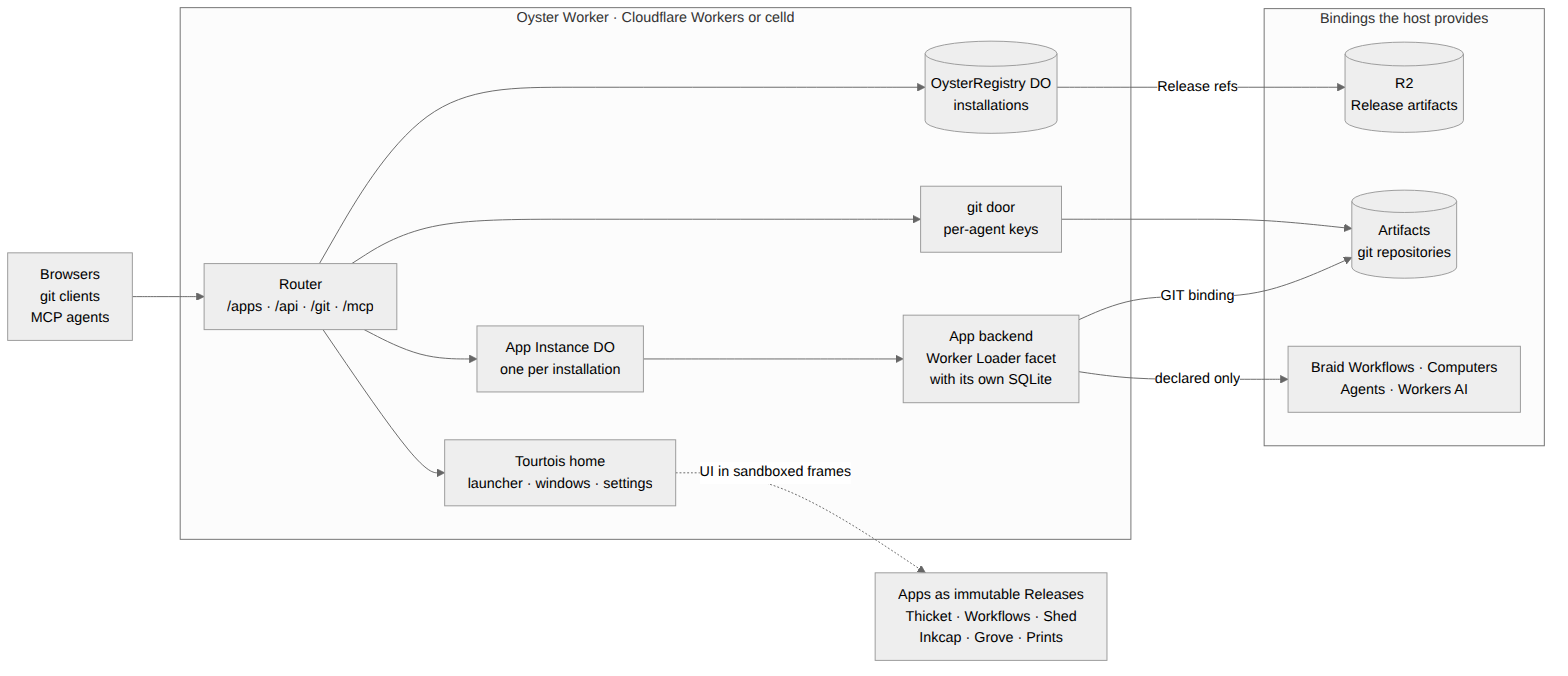
- package/docs/api/shell/keys.md +183 -0
- package/docs/api/shell/shell-module.md +204 -0
- package/docs/api/shell/window-manager.md +267 -0
- package/docs/api/shell/workbench-directory.md +119 -0
- package/docs/api/shell/workbench.md +205 -0
- package/docs/api/shell.md +1915 -0
- package/docs/api/tenancy/auth0.md +110 -0
- package/docs/api/tenancy/cloudflare.md +221 -0
- package/docs/api/tenancy/cold-directory.md +46 -0
- package/docs/api/tenancy/owner-key.md +63 -0
- package/docs/api/tenancy/registry.md +77 -0
- package/docs/api/tenancy/resolve.md +69 -0
- package/docs/api/tenancy.md +430 -0
- package/docs/api/tenant.md +194 -0
- package/docs/api/workers-git.md +1646 -0
- package/docs/api/workers.md +1691 -0
- package/docs/site/agent-quickstart.mdx +346 -0
- package/examples/standalone/worker.ts +7 -0
- package/examples/standalone/wrangler.jsonc +82 -0
- package/package.json +300 -3
package/README.md
CHANGED
|
@@ -1,3 +1,1135 @@
|
|
|
1
|
-
#
|
|
1
|
+
# Oyster (`@fungi.computer/oyster`)
|
|
2
2
|
|
|
3
|
-
|
|
3
|
+
Oyster puts a desktop of Apps on your own Cloudflare account: a git platform,
|
|
4
|
+
agents, a terminal, an editor, workflows and image generation, each built from a
|
|
5
|
+
git commit on your own Computer.
|
|
6
|
+
|
|
7
|
+
<picture>
|
|
8
|
+
<source media="(prefers-color-scheme: light)" srcset="https://raw.githubusercontent.com/fungi-computer/oyster/main/docs/media/desktop-light.png">
|
|
9
|
+
<img alt="The Tourtois desktop on Oyster with three Apps tiled: Trellis editing the Bonsai checks graph, Bonsai drawing a repository's network of agent forks, and Shed's terminal on the Computer" src="https://raw.githubusercontent.com/fungi-computer/oyster/main/docs/media/desktop-dark.png">
|
|
10
|
+
</picture>
|
|
11
|
+
|
|
12
|
+
Deploy one Worker, run `npx oyster install-apps`, and your Oyster builds seven
|
|
13
|
+
Apps on its own Computer and opens on the Tourtois desktop. A live Oyster runs
|
|
14
|
+
at <https://oyster.shiit.app/>, and
|
|
15
|
+
[CONTEST.md](https://github.com/fungi-computer/oyster/blob/main/CONTEST.md) is
|
|
16
|
+
the five-minute tour of it.
|
|
17
|
+
|
|
18
|
+
## What you get
|
|
19
|
+
|
|
20
|
+
`oyster install-apps` installs these Apps. Each one lives in its own repository
|
|
21
|
+
under [github.com/fungi-computer](https://github.com/fungi-computer), and each
|
|
22
|
+
installed App is also a template your agents can fork and rebuild on the same
|
|
23
|
+
Computer.
|
|
24
|
+
|
|
25
|
+
- [Tourtois](https://github.com/fungi-computer/tourtois) is the desktop: a
|
|
26
|
+
launcher, tiled or floating windows, menus and settings.
|
|
27
|
+
- [Bonsai](https://github.com/fungi-computer/bonsai) hosts git repositories on
|
|
28
|
+
Cloudflare Artifacts. Each agent pushes to its own fork with ordinary `git`,
|
|
29
|
+
and the network graph shows the forks folding back into main.
|
|
30
|
+
- [Grove](https://github.com/fungi-computer/grove) holds conversations with
|
|
31
|
+
agents that call every installed App as code.
|
|
32
|
+
- [Shed](https://github.com/fungi-computer/shed) opens a terminal on the
|
|
33
|
+
Computer, with its ports and processes.
|
|
34
|
+
- [Inkcap](https://github.com/fungi-computer/inkcap) edits the Computer's files.
|
|
35
|
+
- [Trellis](https://github.com/fungi-computer/trellis) runs typed graphs of App
|
|
36
|
+
methods on Cloudflare Workflows, started by a push, a webhook or a schedule.
|
|
37
|
+
- [Prints](https://github.com/fungi-computer/prints) generates images and video
|
|
38
|
+
with Workers AI.
|
|
39
|
+
|
|
40
|
+
<table>
|
|
41
|
+
<tr>
|
|
42
|
+
<td width="50%"><img alt="Bonsai's koi-pond repository: a network graph with one lane per agent fork, its three open Changes and the live activity feed" src="https://raw.githubusercontent.com/fungi-computer/oyster/main/docs/media/bonsai-koi-pond.png"><br><b>Bonsai</b>: a repository three agents build together</td>
|
|
43
|
+
<td width="50%"><img alt="Grove: the conversation list beside a finished conversation in which the agent ran three scripts against Bonsai and listed the repositories with open changes" src="https://raw.githubusercontent.com/fungi-computer/oyster/main/docs/media/grove-conversation.png"><br><b>Grove</b>: an agent answers by calling Bonsai</td>
|
|
44
|
+
</tr>
|
|
45
|
+
<tr>
|
|
46
|
+
<td width="50%"><img alt="Trellis editor with the Bonsai checks graph: Workflow input, a Change script node and a Bonsai Checks.report step, between the Palette and the Inspector" src="https://raw.githubusercontent.com/fungi-computer/oyster/main/docs/media/workflows-editor.png"><br><b>Trellis</b>: a graph of App methods</td>
|
|
47
|
+
<td width="50%"><img alt="Inkcap with the koi-pond workspace in the explorer and src/fish.ts open beside README.md" src="https://raw.githubusercontent.com/fungi-computer/oyster/main/docs/media/inkcap-editor.png"><br><b>Inkcap</b>: the Computer's files</td>
|
|
48
|
+
</tr>
|
|
49
|
+
<tr>
|
|
50
|
+
<td width="50%"><img alt="The Tourtois desktop: Grove's inbox of agent conversations and a launcher for Bonsai, Grove, Inkcap, Prints, Shed and Trellis" src="https://raw.githubusercontent.com/fungi-computer/oyster/main/docs/media/tourtois-desktop.png"><br><b>Tourtois</b>: the inbox and the launcher</td>
|
|
51
|
+
<td width="50%"><img alt="Prints: a gallery of five generated images, two koi ponds, a knight dunking a basketball, an elf holding a basketball and a sunrise over water, above the prompt bar" src="https://raw.githubusercontent.com/fungi-computer/oyster/main/docs/media/prints-gallery.png"><br><b>Prints</b>: images from Workers AI</td>
|
|
52
|
+
</tr>
|
|
53
|
+
</table>
|
|
54
|
+
|
|
55
|
+
Shed is in the desktop picture at the top. Oyster itself is the host underneath:
|
|
56
|
+
git through Cloudflare Artifacts, a Computer (a Linux workspace in a Cloudflare
|
|
57
|
+
Container) that builds Apps and runs their terminals and files, Agents on
|
|
58
|
+
Workers AI, Workflows and media.
|
|
59
|
+
|
|
60
|
+
## Quick start: deploy your own Oyster
|
|
61
|
+
|
|
62
|
+
You need:
|
|
63
|
+
|
|
64
|
+
- a Cloudflare account on Workers Paid, with Containers, Artifacts, Workers AI
|
|
65
|
+
and Workflows enabled;
|
|
66
|
+
- Docker, which Wrangler uses to build the Computer's container image;
|
|
67
|
+
- Node 24, pnpm (npm works the same way) and Git.
|
|
68
|
+
|
|
69
|
+
The first install takes about 15 to 20 minutes, most of it the seven App builds
|
|
70
|
+
on the Computer, one after another. Start a project, add Oyster, its Computer
|
|
71
|
+
and Wrangler, and copy the example Worker out of the package:
|
|
72
|
+
|
|
73
|
+
```sh
|
|
74
|
+
mkdir my-oyster && cd my-oyster
|
|
75
|
+
pnpm add @fungi.computer/oyster @fungi.computer/computer
|
|
76
|
+
pnpm add -D wrangler
|
|
77
|
+
cp node_modules/@fungi.computer/oyster/examples/standalone/{worker.ts,wrangler.jsonc} .
|
|
78
|
+
```
|
|
79
|
+
|
|
80
|
+
pnpm 11 may end an `add` with `ERR_PNPM_IGNORED_BUILDS` for packages such as
|
|
81
|
+
`esbuild` or `workerd`; they are installed, and Oyster needs none of their
|
|
82
|
+
install scripts.
|
|
83
|
+
|
|
84
|
+
`worker.ts` re-exports the whole host:
|
|
85
|
+
|
|
86
|
+
```ts title="worker.ts"
|
|
87
|
+
export * from "@fungi.computer/oyster/standalone";
|
|
88
|
+
export { default } from "@fungi.computer/oyster/standalone";
|
|
89
|
+
```
|
|
90
|
+
|
|
91
|
+
`wrangler.jsonc` names the Worker `oyster`, its Release bucket `oyster-releases`
|
|
92
|
+
and its Artifacts namespace `oyster`, and runs the Computer from
|
|
93
|
+
`node_modules/@fungi.computer/computer/Dockerfile`. Create the bucket and
|
|
94
|
+
deploy. Your Worker's address is `https://oyster.<your-subdomain>.workers.dev`;
|
|
95
|
+
your workers.dev subdomain is on the Workers & Pages overview in the Cloudflare
|
|
96
|
+
dashboard.
|
|
97
|
+
|
|
98
|
+
```sh
|
|
99
|
+
npx wrangler login
|
|
100
|
+
npx wrangler r2 bucket create oyster-releases
|
|
101
|
+
export OYSTER_URL=https://oyster.<your-subdomain>.workers.dev
|
|
102
|
+
npx wrangler deploy --var OYSTER_ORIGIN:$OYSTER_URL
|
|
103
|
+
```
|
|
104
|
+
|
|
105
|
+
Set `OYSTER_ORIGIN` in `wrangler.jsonc` instead if you deploy again later; every
|
|
106
|
+
deploy replaces the Worker's variables.
|
|
107
|
+
|
|
108
|
+
Choose an owner key and store it as a secret:
|
|
109
|
+
|
|
110
|
+
```sh
|
|
111
|
+
export OYSTER_OWNER_KEY=$(openssl rand -hex 24)
|
|
112
|
+
printf '%s' "$OYSTER_OWNER_KEY" | npx wrangler secret put OYSTER_OWNER_KEY
|
|
113
|
+
```
|
|
114
|
+
|
|
115
|
+
### Install the starter Apps
|
|
116
|
+
|
|
117
|
+
```sh
|
|
118
|
+
npx oyster install-apps
|
|
119
|
+
```
|
|
120
|
+
|
|
121
|
+
The installer clones each App's repository, seeds it on your Oyster with
|
|
122
|
+
`git push`, and builds the Apps on your Computer, Tourtois first, installing
|
|
123
|
+
each as its build succeeds. It prints a line per step and then where the time
|
|
124
|
+
went:
|
|
125
|
+
|
|
126
|
+
```
|
|
127
|
+
tourtois source recorded at git:…
|
|
128
|
+
…
|
|
129
|
+
Building tourtois on the Computer (build_…)
|
|
130
|
+
Installed tourtois from its build build_…
|
|
131
|
+
Building bonsai on the Computer (build_…)
|
|
132
|
+
…
|
|
133
|
+
Installed grove from its build build_…
|
|
134
|
+
|
|
135
|
+
App fetch seed queue build clone deps compile upload install
|
|
136
|
+
tourtois …
|
|
137
|
+
…
|
|
138
|
+
Installed 7 Apps in …. Open https://oyster.<your-subdomain>.workers.dev/ to use Tourtois and the installed Apps.
|
|
139
|
+
```
|
|
140
|
+
|
|
141
|
+
Open `$OYSTER_URL/login` and sign in with the owner key: your Oyster opens on
|
|
142
|
+
the Tourtois desktop with all seven Apps, as in the pictures above.
|
|
143
|
+
|
|
144
|
+
Run `install-apps` again to update them; a replaced Release keeps each App's
|
|
145
|
+
data. `--ref` picks a branch or tag of the App repositories, `--repositories`
|
|
146
|
+
another host for them, and `--timings <file>` writes the timing table as JSON.
|
|
147
|
+
Builds run two at a time on the example's `standard-4` Computer (12 GiB).
|
|
148
|
+
`--concurrency 1` runs them one at a time and `--concurrency 3` three at once.
|
|
149
|
+
|
|
150
|
+
### Git, keys and MCP
|
|
151
|
+
|
|
152
|
+
People and agents `clone`, `fetch` and `push` App repositories with ordinary
|
|
153
|
+
`git` at `/git/<installation>/<repo>.git`. Give each agent its own key; Oyster
|
|
154
|
+
shows each key once:
|
|
155
|
+
|
|
156
|
+
```sh
|
|
157
|
+
curl -s -X POST -H "Authorization: Bearer $OYSTER_OWNER_KEY" \
|
|
158
|
+
-H 'content-type: application/json' \
|
|
159
|
+
-d '{"name":"morel","grants":[{"capability":"apps.use","targets":{"kind":"all"}}]}' \
|
|
160
|
+
$OYSTER_URL/api/keys
|
|
161
|
+
```
|
|
162
|
+
|
|
163
|
+
The answer's `plaintext` field, starting `oyk_`, signs in to `git` and to
|
|
164
|
+
`/mcp`. That key can read and write every App on this Oyster, including Apps
|
|
165
|
+
installed later, without asking each time; anyone holding it can act as the
|
|
166
|
+
owner in those Apps, and revoking it stops it immediately.
|
|
167
|
+
|
|
168
|
+
Any MCP client can call every installed App with a key. For Claude Code:
|
|
169
|
+
|
|
170
|
+
```sh
|
|
171
|
+
claude mcp add --transport http oyster "$OYSTER_URL/mcp" \
|
|
172
|
+
--header "Authorization: Bearer <the agent's key>"
|
|
173
|
+
```
|
|
174
|
+
|
|
175
|
+
### What the live demo runs
|
|
176
|
+
|
|
177
|
+
<https://oyster.shiit.app/> runs this same host with the same seven Apps. Its
|
|
178
|
+
`koi-pond` repository is a small canvas game three coding agents built together,
|
|
179
|
+
each in its own fork with its own key, with Bonsai drawing a lane per agent as
|
|
180
|
+
they pushed and merged.
|
|
181
|
+
[CONTEST.md](https://github.com/fungi-computer/oyster/blob/main/CONTEST.md)
|
|
182
|
+
tours it.
|
|
183
|
+
|
|
184
|
+
## Part of Fungi
|
|
185
|
+
|
|
186
|
+
[Fungi](https://fungi.computer/) runs AI Agents on their own Computers, inside
|
|
187
|
+
Teams that share Agents, Computers, Apps and a bill. Oyster is its App host,
|
|
188
|
+
released on its own, and it is built from 21 more Fungi packages released with
|
|
189
|
+
it. Each one is MIT-licensed, has its own repository at
|
|
190
|
+
`github.com/fungi-computer/<name>`, installs from npm as
|
|
191
|
+
`@fungi.computer/<name>`, and works without the rest. Installing Oyster brings
|
|
192
|
+
in the ones it runs on.
|
|
193
|
+
|
|
194
|
+
Apps and hosting:
|
|
195
|
+
|
|
196
|
+
- [Agar](https://github.com/fungi-computer/agar): the App contract. Typed
|
|
197
|
+
backend methods, host capabilities and the connection between an App's
|
|
198
|
+
frontend and its host.
|
|
199
|
+
- [Puffball](https://github.com/fungi-computer/puffball): a catalog of web Apps
|
|
200
|
+
and their immutable Releases, which serves only promoted Releases and checks
|
|
201
|
+
every artifact against its recorded digest.
|
|
202
|
+
- [Gills](https://github.com/fungi-computer/gills): compact plain-text App views
|
|
203
|
+
shared by browser and terminal hosts.
|
|
204
|
+
- [Whistle](https://github.com/fungi-computer/whistle): one command definition
|
|
205
|
+
becomes key bindings, a command palette, slash commands, help, a menu and an
|
|
206
|
+
agent tool, all running through one typed `execute` door.
|
|
207
|
+
|
|
208
|
+
Agents and tools:
|
|
209
|
+
|
|
210
|
+
- [Shiitake](https://github.com/fungi-computer/shiitake): durable Agent
|
|
211
|
+
conversations. A Session holds accepted work, messages and observations; the
|
|
212
|
+
host supplies storage, models and tools.
|
|
213
|
+
- [Mule](https://github.com/fungi-computer/mule): runs Pi's model and tool loop
|
|
214
|
+
inside Effect as an awaited, cancellable run.
|
|
215
|
+
- [Mycelium](https://github.com/fungi-computer/mycelium): gives an Agent typed
|
|
216
|
+
operations through one `execute` tool, with a capability snapshot acquired and
|
|
217
|
+
released per run.
|
|
218
|
+
- [Knapsack](https://github.com/fungi-computer/knapsack): connects an Agent to
|
|
219
|
+
Computers, files and remote MCP servers as Mycelium capability sources.
|
|
220
|
+
- [Forage](https://github.com/fungi-computer/forage): lists, searches and
|
|
221
|
+
describes a catalog of operations, so a caller or a model finds the right one.
|
|
222
|
+
- [BirdDog](https://github.com/fungi-computer/bird-dog): durable mail between
|
|
223
|
+
agent sessions, with replies retried from an outbox until they are accepted.
|
|
224
|
+
|
|
225
|
+
Durable work, git and keys:
|
|
226
|
+
|
|
227
|
+
- [Watchdog](https://github.com/fungi-computer/watchdog): a small durable job
|
|
228
|
+
engine on SQLite, D1 or PostgreSQL. Each job settles with exactly one recorded
|
|
229
|
+
outcome, even across restarts.
|
|
230
|
+
- [Carrier](https://github.com/fungi-computer/carrier): durable email delivery
|
|
231
|
+
whose receipts record only what the provider said, and ordered envelopes
|
|
232
|
+
between Durable Objects.
|
|
233
|
+
- [Burrow](https://github.com/fungi-computer/burrow): the repository owner for
|
|
234
|
+
Cloudflare Artifacts, serving only Git's smart-HTTP operations and never
|
|
235
|
+
returning a credential.
|
|
236
|
+
- [Ear Tag](https://github.com/fungi-computer/ear-tag): bearer keys and their
|
|
237
|
+
hashes, a typed grant vocabulary, and a tenant-scoped key store with
|
|
238
|
+
revocation, expiry and a per-key rate limit.
|
|
239
|
+
- [Cairn](https://github.com/fungi-computer/cairn): typed, opaque identifiers,
|
|
240
|
+
temporary keys and candidate word names, with their parsers.
|
|
241
|
+
|
|
242
|
+
Interface:
|
|
243
|
+
|
|
244
|
+
- [Stipe](https://github.com/fungi-computer/stipe): a CSS-first theme layer for
|
|
245
|
+
Tailwind CSS v4 and daisyUI 5, with spacing, fonts and material tokens.
|
|
246
|
+
- [Caps](https://github.com/fungi-computer/caps): accessible React primitives
|
|
247
|
+
and blocks, from buttons and dialogs to a chat composer and window frames,
|
|
248
|
+
themed by Stipe.
|
|
249
|
+
- [Maosaico](https://github.com/fungi-computer/maosaico): arranges React panes
|
|
250
|
+
inside a measured container, with floating frames and optional tiling.
|
|
251
|
+
- [Sigils](https://github.com/fungi-computer/sigils): Fungi's decorative SVG
|
|
252
|
+
marks and their gallery.
|
|
253
|
+
- [Sprite](https://github.com/fungi-computer/sprite): shows an animated
|
|
254
|
+
character through a renderer the host installs.
|
|
255
|
+
- [Sprite Zdog](https://github.com/fungi-computer/sprite-zdog): a Canvas
|
|
256
|
+
renderer for Zdog characters, with built-in characters and authoring tools for
|
|
257
|
+
Sprite.
|
|
258
|
+
|
|
259
|
+
## Hand this to your agent
|
|
260
|
+
|
|
261
|
+
Paste this prompt into a coding agent (Claude Code, Codex or any other) to have
|
|
262
|
+
it set up a local Oyster, install an App, connect over MCP and deploy:
|
|
263
|
+
|
|
264
|
+
```text
|
|
265
|
+
Set up Oyster for me. Install it from npm as @fungi.computer/oyster and follow
|
|
266
|
+
https://github.com/fungi-computer/oyster/blob/main/docs/site/agent-quickstart.mdx
|
|
267
|
+
step by step. Run each command exactly as written, compare its output with the
|
|
268
|
+
expected output, and use the "If it fails" notes before improvising. Stop and
|
|
269
|
+
ask me before step 7 (deploy).
|
|
270
|
+
```
|
|
271
|
+
|
|
272
|
+
The guide ships in the package as `docs/site/agent-quickstart.mdx`. It needs
|
|
273
|
+
Node 24, pnpm and Git; a Cloudflare account matters only for the deploy step.
|
|
274
|
+
|
|
275
|
+
## Why Oyster
|
|
276
|
+
|
|
277
|
+
**Apps are Releases with provenance.** `packRelease` builds an App from one
|
|
278
|
+
commit and records it as `sourceRevision: git:<sha>`. Every artifact is
|
|
279
|
+
addressed by its SHA-256 digest, and Oyster verifies each digest before it
|
|
280
|
+
installs or replaces a Release. Replacing a Release keeps the App's data;
|
|
281
|
+
deleting it purges the data and leaves a tombstone.
|
|
282
|
+
|
|
283
|
+
**Every App is isolated.** An App's backend loads through a Worker Loader into
|
|
284
|
+
its own Durable Object facet with its own SQLite database. It has no ambient
|
|
285
|
+
network access. It receives only the bindings its Release declares (`GIT`,
|
|
286
|
+
`EVENTS`, Computer, agent, workflow, media), and Oyster checks that declaration
|
|
287
|
+
again on every request. App pages are served with a deny-by-default Content
|
|
288
|
+
Security Policy inside a sandboxed frame.
|
|
289
|
+
|
|
290
|
+
**Git is a binding.** An App that declares `git.repository` gets `env.GIT`:
|
|
291
|
+
create, fork, log, read and merge on Cloudflare Artifacts, scoped to its
|
|
292
|
+
installation. People and agents push with ordinary `git` through Oyster's git
|
|
293
|
+
door using their own keys; the host keeps every provider credential. Each
|
|
294
|
+
accepted push reaches the App's `onGitPush` handler and can start a Workflow or
|
|
295
|
+
a signed webhook.
|
|
296
|
+
|
|
297
|
+
**Agents are first-class callers.** `POST /mcp` serves one MCP endpoint for the
|
|
298
|
+
whole Oyster. Every installed App's methods appear as typed `env.<APP>` modules
|
|
299
|
+
that an agent discovers and calls from code; a dotted method is a nested
|
|
300
|
+
property, e.g. `env.BONSAI.repos.list({})`. Writes need explicit approval. Each
|
|
301
|
+
agent has its own key, so every push and call is attributed.
|
|
302
|
+
|
|
303
|
+
**Workflows compose Apps.** Trellis stores each graph in git, so a commit is a
|
|
304
|
+
version. Each graph compiles to a plan with a digest and runs on Cloudflare
|
|
305
|
+
Workflows. Steps call App methods and can run a sandboxed Code node or a step in
|
|
306
|
+
a Computer.
|
|
307
|
+
|
|
308
|
+
**Computers are ordinary capabilities.** A Computer is a durable workspace with
|
|
309
|
+
a Container backing. Shed opens its terminal, Inkcap edits its files and port
|
|
310
|
+
previews serve what it runs on signed hostnames. Apps reach it only through the
|
|
311
|
+
`computer.*` capability they declare.
|
|
312
|
+
|
|
313
|
+
**The desktop is a trusted shell.** Tourtois is installed like any other
|
|
314
|
+
Release, but your Oyster renders its home installation as the top-level page,
|
|
315
|
+
with every permission you have as owner. Each App it opens still runs in its own
|
|
316
|
+
sandboxed frame inside that App's window. Pick a shell you trust: it can do
|
|
317
|
+
anything you can.
|
|
318
|
+
|
|
319
|
+
## Architecture
|
|
320
|
+
|
|
321
|
+
An Oyster is one Worker. Every App installed on it is an immutable Release built
|
|
322
|
+
from an exact git commit. Its UI runs in a sandboxed frame, its backend runs in
|
|
323
|
+
its own Durable Object with its own SQLite, and it receives only the bindings it
|
|
324
|
+
declares. Agents reach every installed App through one MCP endpoint. The same
|
|
325
|
+
Worker runs on Cloudflare Workers and on celld, a Workers-compatible runtime you
|
|
326
|
+
can host yourself.
|
|
327
|
+
|
|
328
|
+
|
|
329
|
+
|
|
330
|
+
| Piece | Owns |
|
|
331
|
+
| ----------------- | ----------------------------------------------------------------------------------------- |
|
|
332
|
+
| Router | Sign-in, `/apps/<installation>/` pages, App methods, owner `/api/*` routes and `/mcp`. |
|
|
333
|
+
| `OysterRegistry` | The installation list: which Release each installation runs, and its visibility. |
|
|
334
|
+
| R2 | Release artifacts, stored by digest. |
|
|
335
|
+
| App Instance | One Durable Object per installation: lifecycle, owner state and the backend facet. |
|
|
336
|
+
| Backend facet | The App's own code and SQLite database, loaded through the Worker Loader. |
|
|
337
|
+
| git door | Smart-HTTP `clone`, `fetch` and `push`, admitted per key and forwarded to Artifacts. |
|
|
338
|
+
| Tourtois | The trusted shell: launcher, windows, menus and settings, rendered as the top-level page. |
|
|
339
|
+
| Platform bindings | Workflows, Computers, Agents and Workers AI, offered only to Apps that declare them. |
|
|
340
|
+
|
|
341
|
+
The diagram source is
|
|
342
|
+
[`docs/media/architecture.mmd`](https://github.com/fungi-computer/oyster/blob/main/docs/media/architecture.mmd).
|
|
343
|
+
|
|
344
|
+
## Install or set up
|
|
345
|
+
|
|
346
|
+
```sh
|
|
347
|
+
pnpm add @fungi.computer/oyster
|
|
348
|
+
```
|
|
349
|
+
|
|
350
|
+
Oyster is ESM only and runs on Node 24 or newer, Cloudflare Workers and celld.
|
|
351
|
+
React and React DOM 18.3 or 19.2 are peer dependencies; the host renders its
|
|
352
|
+
pages with them. Wrangler is an optional peer dependency: add it as a dev
|
|
353
|
+
dependency to run or deploy the example Workers, which ship in the package under
|
|
354
|
+
`examples/`. The generated [API reference](docs/api/README.md) ships in the
|
|
355
|
+
package too.
|
|
356
|
+
|
|
357
|
+
Oyster's runtime dependencies are other Fungi packages, among them
|
|
358
|
+
[Agar](https://github.com/fungi-computer/agar) for the App contract,
|
|
359
|
+
[Puffball](https://github.com/fungi-computer/puffball) for Releases and
|
|
360
|
+
[Mycelium](https://github.com/fungi-computer/mycelium) for the MCP `execute`
|
|
361
|
+
door. "Part of Fungi" above lists them all.
|
|
362
|
+
|
|
363
|
+
## Run your own Oyster
|
|
364
|
+
|
|
365
|
+
`@fungi.computer/oyster/standalone` is the whole host the quick start deploys:
|
|
366
|
+
the git root below plus tenancy, a Computer (`ComputerDO`, a Cloudflare
|
|
367
|
+
Container or an on-box VM), Agents on Workers AI composed from stock
|
|
368
|
+
[Shiitake](https://github.com/fungi-computer/shiitake) Durable Objects,
|
|
369
|
+
Workflows, media, and the owner routes that seed App templates and build them on
|
|
370
|
+
the Computer. `examples/standalone/wrangler.jsonc` declares every binding it
|
|
371
|
+
uses. Set the owner key as a secret (`OYSTER_OWNER_KEY`, 24+ characters) and
|
|
372
|
+
deploy with `wrangler deploy`. Sign in at `/login`.
|
|
373
|
+
|
|
374
|
+
The layers it is built from stay exported for hosts that compose their own:
|
|
375
|
+
`@fungi.computer/oyster/workers` (Releases, Instances, MCP and App storage) and
|
|
376
|
+
`@fungi.computer/oyster/workers-git` (the git door), with `oysterAppMethods`
|
|
377
|
+
supplying the installed App catalog to an Agent runtime.
|
|
378
|
+
|
|
379
|
+
Pack and install an App with `@fungi.computer/oyster/pack`: `packRelease` turns
|
|
380
|
+
an exact Git commit and a canonical build recipe into a Release with immutable
|
|
381
|
+
artifacts, and `installRelease` uploads it. Each installed App gets:
|
|
382
|
+
|
|
383
|
+
- its UI at `/apps/<installation>/`, in a sandboxed frame connected through
|
|
384
|
+
Agar's `app.backend` capability;
|
|
385
|
+
- its methods at `POST /apps/<installation>/methods/<name>` (JSON in and out);
|
|
386
|
+
- its own SQLite state in its Instance's `app` facet.
|
|
387
|
+
|
|
388
|
+
`createOyster(host)` from `@fungi.computer/oyster/host` is the same server over
|
|
389
|
+
your own adapters (`auth`, `artifacts`, `installations`, `instances`, `mcp`,
|
|
390
|
+
`capabilities`).
|
|
391
|
+
|
|
392
|
+
### Add Git to your host
|
|
393
|
+
|
|
394
|
+
Git is one optional field of the typed host: `host.git`. When it is present,
|
|
395
|
+
`createOyster` mounts the git door at `/git/<installation>/<repo>.git`, and
|
|
396
|
+
people and agents `clone`, `fetch` and `push` with ordinary git. Nothing else in
|
|
397
|
+
the host changes.
|
|
398
|
+
|
|
399
|
+
There are two ways to get it:
|
|
400
|
+
|
|
401
|
+
- **Use one Git root.** `oysterGitRoot(options)` from
|
|
402
|
+
`@fungi.computer/oyster/workers-git` is the whole composition: the git door
|
|
403
|
+
plus tenancy, Agents and their owner-only approval routes, workspace and
|
|
404
|
+
capability slots, the page script and the home App. Its `hostFor(env, scope)`
|
|
405
|
+
is the only way a tenant host is built. Pass the root to
|
|
406
|
+
`createOysterGitWorker` for HTTP and to `createOysterGitMcpOwner` for MCP, and
|
|
407
|
+
return `root.hostFor(this.env, scope)` from your `OysterGitInstance` subclass,
|
|
408
|
+
so HTTP, MCP and background wakes share one composition. `tenancy` is
|
|
409
|
+
required; a single-owner root passes `ownerOrKeyTenancy`, so the owner key and
|
|
410
|
+
named keys sign git in. `@fungi.computer/oyster/standalone` is a real
|
|
411
|
+
multi-door caller. Its `wrangler.jsonc` adds the `ARTIFACTS` binding and the
|
|
412
|
+
`KEYS` and `WEBHOOKS` Durable Objects.
|
|
413
|
+
- **Set `host.git` on your own host.** Keep your own `createOyster(host)`
|
|
414
|
+
composition and set `git: oysterWorkerGit(env, { scope })` and
|
|
415
|
+
`ownerRoutes: gitAdminRoutes(env, scope)` for `/api/keys` and `/api/webhooks`,
|
|
416
|
+
with the tenant `scope` your host selected.
|
|
417
|
+
|
|
418
|
+
The git root, from Workers:
|
|
419
|
+
|
|
420
|
+
```ts title="worker.ts"
|
|
421
|
+
import type { TenantScope } from "@fungi.computer/oyster/tenant";
|
|
422
|
+
import {
|
|
423
|
+
createOysterGitMcpOwner,
|
|
424
|
+
createOysterGitWorker,
|
|
425
|
+
OysterGitInstance,
|
|
426
|
+
oysterGitRoot,
|
|
427
|
+
ownerOrKeyTenancy,
|
|
428
|
+
type OysterGitWorkerEnv,
|
|
429
|
+
} from "@fungi.computer/oyster/workers-git";
|
|
430
|
+
|
|
431
|
+
const root = oysterGitRoot<OysterGitWorkerEnv>({ tenancy: ownerOrKeyTenancy });
|
|
432
|
+
|
|
433
|
+
export class OysterMcp extends createOysterGitMcpOwner(root) {}
|
|
434
|
+
|
|
435
|
+
export class OysterInstance extends OysterGitInstance {
|
|
436
|
+
protected hostFor(scope: TenantScope) {
|
|
437
|
+
return root.hostFor(this.env, scope);
|
|
438
|
+
}
|
|
439
|
+
}
|
|
440
|
+
|
|
441
|
+
export default createOysterGitWorker(root);
|
|
442
|
+
```
|
|
443
|
+
|
|
444
|
+
A host also exports the Durable Objects and the git `OysterBinding` entrypoint,
|
|
445
|
+
whose table also serves `env.GIT` and `env.EVENTS`. The package's
|
|
446
|
+
`test:git-door` check runs that root (`test/git-root.fixture.ts`) on workerd
|
|
447
|
+
against real bare repositories: the owner pushes with `git`, a named agent key's
|
|
448
|
+
push is refused by the App's policy with Git's own `ng` report, both keys clone,
|
|
449
|
+
and the accepted push reaches the App's `onGitPush`.
|
|
450
|
+
|
|
451
|
+
Each layer owns one decision:
|
|
452
|
+
|
|
453
|
+
```mermaid
|
|
454
|
+
flowchart LR
|
|
455
|
+
client["git client<br/>clone · fetch · push"]
|
|
456
|
+
auth["Authentication<br/>owner key · named key<br/>Workflow Git pass header"]
|
|
457
|
+
admission["Git admission<br/>enabled installation · git.repository<br/>tenant scope · Workflow branch grant"]
|
|
458
|
+
policy["App push policy<br/>authorizeGitPush, every ref"]
|
|
459
|
+
burrow["Burrow<br/>Artifacts provider and repository<br/>host-held credentials"]
|
|
460
|
+
events["App events<br/>journal → onGitPush → env.EVENTS<br/>webhooks · Workflow triggers"]
|
|
461
|
+
client --> auth --> admission
|
|
462
|
+
admission -- "push: ask first" --> policy
|
|
463
|
+
admission -- "admitted bytes" --> burrow
|
|
464
|
+
burrow -- "accepted refs" --> events
|
|
465
|
+
```
|
|
466
|
+
|
|
467
|
+
- **Authentication** is the host's own `auth`. The owner key is a Bearer token;
|
|
468
|
+
a named key may also be the Basic password from a git credential helper. A
|
|
469
|
+
Workflow Git pass (a `wgp.` Bearer header, never in a URL) goes only to
|
|
470
|
+
`host.git.workflowPass`; without that port it admits nothing. Anonymous
|
|
471
|
+
requests read only public installations and never push.
|
|
472
|
+
- **Git admission** reopens the live installation before every provider call: it
|
|
473
|
+
must be enabled and its Release must declare `git.repository`. The tenant
|
|
474
|
+
scope prefixes every repository name (`<installation>--<repo>` for the default
|
|
475
|
+
tenant), so an installation reaches only its own repositories. A Workflow
|
|
476
|
+
writer may push only the branches its grant names.
|
|
477
|
+
- **The App's push policy** answers `authorizeGitPush` for every ref update
|
|
478
|
+
before any bytes reach the provider. One refusal rejects the whole push with
|
|
479
|
+
Git's native `ng` report. Unsupported receive-pack commands, including signed
|
|
480
|
+
push certificates, fail closed.
|
|
481
|
+
- **Burrow** owns the provider and the repository. The host's Artifacts adapter
|
|
482
|
+
mints short-lived credentials through it and forwards the admitted smart-HTTP
|
|
483
|
+
exchange (up to 64 MiB per request); the App sees repository names, git
|
|
484
|
+
objects and its own events, never a credential or remote.
|
|
485
|
+
- **App events** start from the accepted-ref journal. Delivery calls the
|
|
486
|
+
selected Instance's `onGitPush` when the Release declares
|
|
487
|
+
`receives: ["git.push"]` and `git.repository`. The App emits typed events
|
|
488
|
+
through `env.EVENTS`: Oyster delivers them as signed Standard Webhooks, and a
|
|
489
|
+
host with Cloudflare Workflows (the Hub, or the live demo's root) starts the
|
|
490
|
+
Workflow triggers armed on that event.
|
|
491
|
+
|
|
492
|
+
Agent approval stays owner-direct in both compositions: the approval routes are
|
|
493
|
+
owner routes, refuse App-origin requests, and are never an `OysterCapability` an
|
|
494
|
+
App can be granted.
|
|
495
|
+
|
|
496
|
+
#### Git bindings, journal and lower-level ports
|
|
497
|
+
|
|
498
|
+
A Release's `backend.bindings` determines whether its App gets `env.GIT`
|
|
499
|
+
(Cloudflare Artifacts, scoped to its installation; credentials stay in the host)
|
|
500
|
+
or `env.EVENTS` (delivered as Standard Webhooks to subscriptions the owner
|
|
501
|
+
creates at `/api/webhooks`). Each binding enforces its declared operations.
|
|
502
|
+
`await env.GIT.cloneUrl(repo)` returns the host-issued clone URL; an undeclared
|
|
503
|
+
binding grants nothing. Declaration changes invalidate the loader entry even
|
|
504
|
+
when the backend bytes stay the same. Agents push with keys from `/api/keys`.
|
|
505
|
+
|
|
506
|
+
Hosts compose one `createAdmittedGit` with an installation-scoped store, live
|
|
507
|
+
host grants, the App's typed `authorizeGitPush` policy and an accepted-ref
|
|
508
|
+
journal. `GitWriter`, `GitPushQuestion`, `GitPushVerdict` and accepted facts
|
|
509
|
+
come from `@fungi.computer/agar/git`; the shared wire parser is in
|
|
510
|
+
`agar/git-wire`.
|
|
511
|
+
|
|
512
|
+
An App's own `GIT` binding uses `admitted.binding(onBehalfOf)`. Its writer is
|
|
513
|
+
`installation`, with the host-attested caller retained in `onBehalfOf`. These
|
|
514
|
+
writes skip the App's external-push policy, retain live host admission and enter
|
|
515
|
+
the same accepted-ref journal. The journal records only refs accepted by the
|
|
516
|
+
provider and commits before the exchange is acknowledged. Redelivery keeps the
|
|
517
|
+
complete original fact and `eventId`; handlers record that ID with their
|
|
518
|
+
effects.
|
|
519
|
+
|
|
520
|
+
`createGitPushJournal` composes the standalone Instance's SQLite owner with
|
|
521
|
+
Carrier delivery and an alarm hook. Its accepted fact, ref tips and Carrier send
|
|
522
|
+
commit together; Carrier retains delivery attempts across restarts and retries.
|
|
523
|
+
The Hub composes its ref journal and `TeamPost.sendGitPush` in one host
|
|
524
|
+
transaction. Neither HTTP routing nor the provider adapter creates a second push
|
|
525
|
+
fact.
|
|
526
|
+
|
|
527
|
+
`createGitDoor` from `@fungi.computer/oyster/git` accepts the host's
|
|
528
|
+
`authenticate`, `isPublic` and `git` ports. `authenticate` receives the request
|
|
529
|
+
and the exact installation, repository and read/write scope it names. The last
|
|
530
|
+
returns an `AdmittedGit`; the door forwards reads to `.read` and pushes to
|
|
531
|
+
`.push`. Provider credentials stay inside the storage adapter. `createOyster`
|
|
532
|
+
builds these ports from `host.auth`, `host.installations` and `host.git`, so
|
|
533
|
+
most hosts set `host.git` and never call `createGitDoor` directly.
|
|
534
|
+
|
|
535
|
+
A host that mints Workflow Git passes supplies `workflowGitPass` in
|
|
536
|
+
`oysterGitRoot` or `oysterWorkerGit` options. A pass travels only as an
|
|
537
|
+
`Authorization: Bearer` header starting with `workflowGitPassPrefix` (`wgp.`) on
|
|
538
|
+
the ordinary credential-free door URL; it is never part of a URL. That header is
|
|
539
|
+
admitted only by the port, for one repository and scope, as the arming member
|
|
540
|
+
under the Workflow's branch grant, and never as a session or key. Pushes outside
|
|
541
|
+
those branches are refused before the App's push policy runs.
|
|
542
|
+
|
|
543
|
+
### Provide App capabilities
|
|
544
|
+
|
|
545
|
+
Each `OysterCapability` supplies its Agar `id` and `version`, a mount `base`,
|
|
546
|
+
relative Hono `routes`, an `admits(principal, installation)` decision, and
|
|
547
|
+
`methods`. Each method descriptor has `kind`, `method` (HTTP method), and `path`
|
|
548
|
+
(relative route). `CapabilityMethodKind` is `json | transport | read | write`:
|
|
549
|
+
JSON calls return decoded data, transports return Fetch handles, and
|
|
550
|
+
reads/writes return Agar's stream handles.
|
|
551
|
+
|
|
552
|
+
Method paths may contain named parameters, such as `:agentId/sessions`. Oyster
|
|
553
|
+
uses `path-to-regexp` to compile input fields into those parameters; remaining
|
|
554
|
+
scalar fields become query parameters for GET and handle calls. Other JSON calls
|
|
555
|
+
keep their remaining fields in the request body. Transport handles append their
|
|
556
|
+
Fetch pathname below that resolved route and may declare `method: "ANY"` to
|
|
557
|
+
retain the request's HTTP method. JSON results, including Agar's
|
|
558
|
+
`{ kind: "pending", retryAfterMs }`, reach the App unchanged; the page does not
|
|
559
|
+
poll on the App's behalf.
|
|
560
|
+
|
|
561
|
+
For example, a directory method uses
|
|
562
|
+
`{ kind: "json", method: "GET", path: "list" }`; a file read uses
|
|
563
|
+
`{ kind: "read", method: "GET", path: "content" }`. `fileCapabilities(source)`
|
|
564
|
+
from `@fungi.computer/oyster/files` supplies the three file contracts over the
|
|
565
|
+
existing `/files/` GET, PUT and POST routes.
|
|
566
|
+
|
|
567
|
+
The page offers a capability only when the installed Release declares its ID and
|
|
568
|
+
`admits` allows the principal. Visitors receive none. Every route request also
|
|
569
|
+
rechecks that declaration and admission using the `X-Oyster-Installation` header
|
|
570
|
+
set by the page; a read grant does not authorize the write route sharing its
|
|
571
|
+
file mount.
|
|
572
|
+
|
|
573
|
+
Consent approves capabilities, like OAuth scopes. An App upgrade may add a
|
|
574
|
+
method that uses an already-approved capability without asking again. A new
|
|
575
|
+
capability always needs approval. Release selection intersects stored operation
|
|
576
|
+
and resource approvals; it never adds a grant. Every Worker call receives only
|
|
577
|
+
the bindings allowed by that method's declared `requires`, rather than all the
|
|
578
|
+
App's approved capabilities.
|
|
579
|
+
|
|
580
|
+
The `agent.manage` consent wording is **Can create Agents; write abilities need
|
|
581
|
+
your approval.**
|
|
582
|
+
|
|
583
|
+
The `apps.call` permission also shows the declared target Apps and methods. Its
|
|
584
|
+
route approvals retain those exact pairs: adding or renaming a target method
|
|
585
|
+
needs owner approval. On Oyster these page calls run as the signed-in member
|
|
586
|
+
through the target App's ordinary method gate; Agents, keys and visitors cannot
|
|
587
|
+
use this path. The target receives its own grants, never the caller App's
|
|
588
|
+
grants. The Hub shows the same consent list but does not offer this page
|
|
589
|
+
capability.
|
|
590
|
+
|
|
591
|
+
### Connect an agent over MCP
|
|
592
|
+
|
|
593
|
+
Connect your MCP client to `https://<your-oyster>/mcp` with
|
|
594
|
+
`Authorization: Bearer <key>`. Installed App methods are available through
|
|
595
|
+
`execute` as `env.<APP>`; a dotted method is a nested property, e.g.
|
|
596
|
+
`env.BONSAI.repos.list({})`; discover them with `forage.search` and
|
|
597
|
+
`forage.describe`. A key's or Agent's App writes run under the owner's stored
|
|
598
|
+
approval of its App tools (recorded when the owner creates the key), so a
|
|
599
|
+
headless client such as `claude -p` can write. That approval already covers
|
|
600
|
+
every App on this Oyster, including ones installed after the key existed, with
|
|
601
|
+
no per-call prompt; anyone holding the key can act as the owner in those Apps,
|
|
602
|
+
and revoking the key is what stops it. Every other write, including the owner's
|
|
603
|
+
own calls, requires a client that supports form elicitation and explicit
|
|
604
|
+
approval; anonymous callers are refused.
|
|
605
|
+
|
|
606
|
+
When the host has a Computer, the catalog also holds it as
|
|
607
|
+
`env.computers.workspace`, e.g.
|
|
608
|
+
`env.computers.workspace.exec({ command: "ls", cwd: "/workspace" })`. Its
|
|
609
|
+
operations are the ones every Computer advertises (`read`, `list`, `write`,
|
|
610
|
+
`mkdir`, `bash`, `exec` and the process tools), and each call asks for approval.
|
|
611
|
+
The host supplies `computer(principal)` on its workspace: it returns the
|
|
612
|
+
Computer's calls for a caller with Computer access and `null` otherwise. The
|
|
613
|
+
standalone host gives an owner, key or member the same Computer grant its
|
|
614
|
+
`/computer` routes use; visitors and Agents get none. The Computer accepts every
|
|
615
|
+
call against that grant. `oysterComputerTools(host, principal)` from
|
|
616
|
+
`@fungi.computer/oyster/mcp` returns this Knapsack source and its `grants`.
|
|
617
|
+
|
|
618
|
+
Workers route every MCP request to the tenant's `MCP` Durable Object. Export
|
|
619
|
+
`OysterMcp` from `oyster/workers` for the default host, or derive it from
|
|
620
|
+
`createOysterGitMcpOwner(root)` with the same root passed to
|
|
621
|
+
`createOysterGitWorker(root)`. Declare the `MCP` binding and SQLite migration as
|
|
622
|
+
shown in the standalone example, and configure `OYSTER_ORIGIN`.
|
|
623
|
+
|
|
624
|
+
The owner authenticates every request. SDK session IDs, event data and closure
|
|
625
|
+
belong to that owner; deleting a session releases its catalog connection. If an
|
|
626
|
+
owner restarts and cannot restore its live SDK transport, the old ID
|
|
627
|
+
returns 404. Close the client's old transport and initialize a fresh session.
|
|
628
|
+
Pending execution and elicitation are never replayed. Node hosts retain their
|
|
629
|
+
explicit MCP adapter and call its `close()` when shutting down.
|
|
630
|
+
|
|
631
|
+
Agent and key adapters use `await oysterAppMethods(host, principal, access)`
|
|
632
|
+
from `@fungi.computer/oyster/mcp`. Pass the result in Mycelium's `sources`; its
|
|
633
|
+
`grants` names each captured module at the level (`read`/`write`) the caller
|
|
634
|
+
actually holds for it, so Mycelium itself refuses a write call up front when a
|
|
635
|
+
module's own grant is `read`. For an Agent, `access` is
|
|
636
|
+
`{kind: "agent", policy}`, the host's one stored, blanket
|
|
637
|
+
`{level, revision, grantedBy}` approval; missing it grants no tool access. For a
|
|
638
|
+
named key, `access` is `{kind: "key", keyId, byInstallation}`, one
|
|
639
|
+
`{level, revision, grantedBy}` per installation the key's own Ear Tag grants
|
|
640
|
+
admit (`keyAppAccess`); an installation the key has no grant for is absent from
|
|
641
|
+
`byInstallation` and never listed at all, not merely refused. A key's grants are
|
|
642
|
+
set once, at `POST /api/keys`, and never edited: to change them the owner
|
|
643
|
+
revokes the key (`POST /api/keys/revoke`) and issues a new one. A module grant
|
|
644
|
+
does not approve an App operation. The gate also intersects the installation's
|
|
645
|
+
explicit approvals with its verified Release; `external` methods are refused
|
|
646
|
+
with `approval_required`. MCP uses this same projection. Capture again when tool
|
|
647
|
+
policy, installation authority, a key's own grants or a Release changes; the
|
|
648
|
+
source represents one immutable catalog snapshot.
|
|
649
|
+
|
|
650
|
+
### Approve an Agent's App tools
|
|
651
|
+
|
|
652
|
+
An App with `agent.manage` can create Agents and request tool-policy changes.
|
|
653
|
+
The host records the admitted installation; those requests remain pending and
|
|
654
|
+
have no `grantedBy`. Only direct owner approval grants App tools. The standalone
|
|
655
|
+
owner key resolves through the seeded tenancy registry: `grantedBy` is the
|
|
656
|
+
canonical stored member ID, while `OYSTER_OWNER_NAME` is an identity label. The
|
|
657
|
+
stored approval pins that member's `membershipVersion`; demotion and
|
|
658
|
+
re-promotion, removal and re-addition, or suspension and reactivation require
|
|
659
|
+
new approval. Old policy rows also require re-approval.
|
|
660
|
+
|
|
661
|
+
The authenticated owner reads `GET /api/agent-policies/:agentId` for the current
|
|
662
|
+
`expectedRevision`, then sends `PUT` to the same path with
|
|
663
|
+
`{"level":"write","expectedRevision":"<the returned revision>"}` (or `null` when
|
|
664
|
+
no policy exists). These host-owned routes reject an App installation header.
|
|
665
|
+
The Agent must have its host-minted directory/tenant pin; another tenant or an
|
|
666
|
+
unpinned Agent refuses. A stale revision returns 409, an unknown Agent returns
|
|
667
|
+
404, and malformed approval input returns 400.
|
|
668
|
+
|
|
669
|
+
### Connect an Agent to a remote MCP server
|
|
670
|
+
|
|
671
|
+
The owner connects any Streamable HTTP MCP server to one Agent. The Agent's
|
|
672
|
+
codemode then sees its tools as `env.mcp.<name>.<tool>()`, beside the installed
|
|
673
|
+
Apps; Knapsack's `mcpServers` connection owns the client. On a standalone Oyster
|
|
674
|
+
the Agent's own Durable Object keeps the endpoint and an optional bearer token,
|
|
675
|
+
and no route returns the token.
|
|
676
|
+
|
|
677
|
+
`GET /api/agent-mcp-servers` lists every Agent with its servers (`serverId`,
|
|
678
|
+
`name`, `url`, `hasBearer`). `POST /api/agent-mcp-servers/:agentId` with
|
|
679
|
+
`{"name":"linear","url":"https://mcp.example.com/mcp","bearer":null}` connects
|
|
680
|
+
one; the name is lowercase letters, digits and `_`, and the endpoint must be
|
|
681
|
+
`https:` with no credentials or fragment. A repeated name or more than 16
|
|
682
|
+
servers returns 409. `DELETE /api/agent-mcp-servers/:agentId/:serverId`
|
|
683
|
+
disconnects one. These routes are owner-direct and reject an App installation
|
|
684
|
+
header. A server that is down or refuses the token is left out of that run and
|
|
685
|
+
the others stay available. OAuth sign-in is not offered yet.
|
|
686
|
+
|
|
687
|
+
### Pack an App
|
|
688
|
+
|
|
689
|
+
`packRelease` composes `oyster/build`'s source capture, candidate preparer,
|
|
690
|
+
compiler and local artifact writer. Pass `sourceDirectory` as the repository
|
|
691
|
+
root, an explicit `sourceRevision` (`git:<full commit SHA>`), and `recipe`.
|
|
692
|
+
Every entry is relative to that captured repository root. Dirty files and
|
|
693
|
+
external build outputs are not inputs. The result retains `release.json` plus
|
|
694
|
+
`artifacts/`, ready for `installRelease`. This example packs the
|
|
695
|
+
[Notes example App](https://github.com/fungi-computer/oyster/tree/main/examples/notes-app)
|
|
696
|
+
kept at the root of its own git repository, `./notes-app`:
|
|
697
|
+
|
|
698
|
+
```ts
|
|
699
|
+
import { execFileSync } from "node:child_process";
|
|
700
|
+
import { packRelease } from "@fungi.computer/oyster/pack";
|
|
701
|
+
|
|
702
|
+
const commit = execFileSync("git", ["-C", "./notes-app", "rev-parse", "HEAD"], {
|
|
703
|
+
encoding: "utf8",
|
|
704
|
+
}).trim();
|
|
705
|
+
|
|
706
|
+
await packRelease({
|
|
707
|
+
appId: "app_notes",
|
|
708
|
+
sourceDirectory: "./notes-app",
|
|
709
|
+
sourceRevision: `git:${commit}`,
|
|
710
|
+
recipe: {
|
|
711
|
+
entry: "ui/index.html",
|
|
712
|
+
assets: {
|
|
713
|
+
maxManifestBytes: 1_048_576,
|
|
714
|
+
maxObjects: 1024,
|
|
715
|
+
maxObjectBytes: 16_777_216,
|
|
716
|
+
maxTotalBytes: 67_108_864,
|
|
717
|
+
},
|
|
718
|
+
assetBase: "./",
|
|
719
|
+
maxOutputBytes: 67_108_864,
|
|
720
|
+
backend: {
|
|
721
|
+
entry: "backend/index.ts",
|
|
722
|
+
exportName: "Notes",
|
|
723
|
+
compatibilityDate: "2026-09-04",
|
|
724
|
+
runtime: { kind: "durable-facet", stateSchema: 1 },
|
|
725
|
+
},
|
|
726
|
+
},
|
|
727
|
+
outDirectory: "./notes-release",
|
|
728
|
+
});
|
|
729
|
+
```
|
|
730
|
+
|
|
731
|
+
The canonical compiler reads the nearest package's `fungi.app` declaration,
|
|
732
|
+
including capabilities and commands for UI-only Apps. Backend Apps declare
|
|
733
|
+
`fungi.backendDefinition`; the emitter derives the API and declaration from that
|
|
734
|
+
definition and `fungi.app` in the same build that produces the Worker.
|
|
735
|
+
Handwritten package API methods are refused. Closed source HTML recipes
|
|
736
|
+
(including Notes, Bonsai and Inkcap) build captured source.
|
|
737
|
+
`kind: "bundled-html"` instead accepts committed, ready assets such as
|
|
738
|
+
`bundle/index.html`, with an explicit asset policy.
|
|
739
|
+
|
|
740
|
+
`installFromSource` accepts `appId`, `recipe`,
|
|
741
|
+
`source: {remote, token, sourceRevision}` and the destination Oyster's `url`,
|
|
742
|
+
`key` and `installationId`. It uses the maintained Artifacts Git capture, the
|
|
743
|
+
same build/writer composition, then `installRelease`, and cleans its temporary
|
|
744
|
+
output. Source credentials and the destination owner key remain separate.
|
|
745
|
+
`installRelease` uploads a packed Release and makes one
|
|
746
|
+
`POST /api/installations` naming the installation. The host's one
|
|
747
|
+
install-or-select owner installs it (201) or, when the installation already
|
|
748
|
+
exists, switches it to that Release (200); the App keeps its state, and every
|
|
749
|
+
other refusal is returned unchanged.
|
|
750
|
+
|
|
751
|
+
## Build a shell
|
|
752
|
+
|
|
753
|
+
`@fungi.computer/oyster/shell` supplies the client side of hosting Apps. It can
|
|
754
|
+
be imported independently of the Workers server and Node packing helpers. The
|
|
755
|
+
same exports are available through focused entries:
|
|
756
|
+
|
|
757
|
+
| Entry | Contract |
|
|
758
|
+
| ------------------------ | ----------------------------------------------------------------------------------- |
|
|
759
|
+
| `./shell/workbench` | Workbench host contract, shared child-window host, Gill layout and arranger shapes. |
|
|
760
|
+
| `./shell/command-host` | A Whistle graph that admits mounted commands against verified Release declarations. |
|
|
761
|
+
| `./shell/keys` | DOM key dispatch and shared chord matching. |
|
|
762
|
+
| `./shell/commands` | Window, App picker and command palette declarations over host callbacks. |
|
|
763
|
+
| `./shell/window-manager` | Window generations, visibility, navigation, cancellation and disposal. |
|
|
764
|
+
| `./shell/app-directory` | App addresses, reusable directory rows and catalog metadata. |
|
|
765
|
+
|
|
766
|
+
`./shell/shell-module` is the contract between a host and the shell it runs, and
|
|
767
|
+
is imported on its own rather than through `./shell`. A shell Release exports
|
|
768
|
+
`mountShell(root, input)` (`MountShell`); `input` (`ShellMountInput`) carries
|
|
769
|
+
the workbench handle, the shell installation's `AppStorage` and
|
|
770
|
+
`methods.call(method, input)` for its declared backend methods, which takes the
|
|
771
|
+
input as JSON text and resolves with the decoded JSON result.
|
|
772
|
+
`importShellModule(moduleUrl, hostOrigin)` imports the picked shell's module
|
|
773
|
+
from the host's own origin, checks that it exports `mountShell`, and rejects
|
|
774
|
+
with `ShellModuleError` otherwise. The host never bundles a shell.
|
|
775
|
+
|
|
776
|
+
Supply your own mount adapter to `createWindowManager`. It receives the
|
|
777
|
+
container, launch descriptor, cancellation signal and navigation callbacks; its
|
|
778
|
+
returned handle owns visibility, reconfiguration and disposal. The manager
|
|
779
|
+
disposes stale mounts and serializes changes to each window. It neither picks
|
|
780
|
+
Apps nor grants capabilities.
|
|
781
|
+
|
|
782
|
+
`createAppSurfaceCommandHost` owns command contribution and focus. Give
|
|
783
|
+
`mount(id, declarations)` the verified Release's declarations and pass the
|
|
784
|
+
returned handlers to Agar's `connectAppHost`. A mounted App cannot introduce an
|
|
785
|
+
undeclared command or claim the reserved shell chord. Dispose its command mount
|
|
786
|
+
when its iframe closes, and dispose the command host with the shell.
|
|
787
|
+
`installShellKeys` attaches DOM listeners only when called; its return value
|
|
788
|
+
removes them. Terminal shells can use the command and window owners without a
|
|
789
|
+
DOM.
|
|
790
|
+
|
|
791
|
+
Directory metadata is not launch authority. A host extends the public row schema
|
|
792
|
+
with its own permission model and admits each mount itself. Fungi's Team
|
|
793
|
+
directory, Team settings capability and signed Hub/host protocol live in its
|
|
794
|
+
private consumers; the public shell imports none of them.
|
|
795
|
+
|
|
796
|
+
`@fungi.computer/oyster/page` mounts one installed App's page and connects its
|
|
797
|
+
sandboxed frame with that installation's admitted slots. That page is only the
|
|
798
|
+
framed App: menus, the command palette, status bars and every other piece of
|
|
799
|
+
desktop chrome belong to the shell.
|
|
800
|
+
|
|
801
|
+
### The shell is trusted
|
|
802
|
+
|
|
803
|
+
A shell is not a framed App. When an owner opens the home installation, the page
|
|
804
|
+
is served with an empty `#oyster-shell` root and the host's page script renders
|
|
805
|
+
the shell there, in the top-level document. The shell runs with the host's
|
|
806
|
+
escalated permissions: it reads the installation directory and opens, arranges
|
|
807
|
+
and closes every App. Choose a shell you trust, as you would choose the host
|
|
808
|
+
itself.
|
|
809
|
+
|
|
810
|
+
Child Apps stay isolated. `WorkbenchHost.mount(container, launch, events)`
|
|
811
|
+
mounts each App in its own sandboxed, cross-origin frame (`appSandbox`), inside
|
|
812
|
+
the `container` slot the shell hands it. The shell keeps one stable slot per
|
|
813
|
+
window and moves that window with transforms, so the frame moves, clips to the
|
|
814
|
+
window's rounded corners and stacks below shell menus in the same rendered
|
|
815
|
+
frame. Slots are never re-parented, and a minimized window keeps its frame
|
|
816
|
+
mounted, so restoring it never reloads the App. A click inside a frame never
|
|
817
|
+
reaches the shell; the App's own focus report raises its window. Every child
|
|
818
|
+
keeps its own configuration and capabilities; nothing granted to the shell is
|
|
819
|
+
lent to it. Read the home installation's own handles with
|
|
820
|
+
`oysterShellHandles(readOysterPageConfig())`, and connect each child frame with
|
|
821
|
+
`connectOysterApp`.
|
|
822
|
+
|
|
823
|
+
The standalone root chooses its home by installation ID. Oyster core imports no
|
|
824
|
+
home App: it serves the selected enabled installation, or its installation list
|
|
825
|
+
when no home is available. `@fungi.computer/oyster/root-data` adapts the
|
|
826
|
+
existing installation and verified Release owners into shared workbench metadata
|
|
827
|
+
and opens the existing SQLite App-storage owner with fresh admission. The
|
|
828
|
+
deployable Bonsai root mounts Tourtois's own `PlatformControlsView`, offering
|
|
829
|
+
desktop and App settings. Unsupported hosted administration and platform
|
|
830
|
+
destinations are not offered; Computer inventory and Gill resource reads
|
|
831
|
+
currently refuse.
|
|
832
|
+
|
|
833
|
+
The workbench host handle offers `memberAvatar()` as a read-only projection of
|
|
834
|
+
the signed-in member's catalog-validated avatar preference. Consumers refresh
|
|
835
|
+
that read when host settings change. Account writes remain Hub-owned.
|
|
836
|
+
|
|
837
|
+
## Core concepts
|
|
838
|
+
|
|
839
|
+
### Owner state and selection
|
|
840
|
+
|
|
841
|
+
The host calls `apply` with the complete owner-issued state, then `fetch` or
|
|
842
|
+
`call` with the admitted selection. Both identify the Instance, owner, App,
|
|
843
|
+
Release and authority version. Oyster persists the version the owner supplied;
|
|
844
|
+
it never increments another owner's authority or trusts a guest's claim to it.
|
|
845
|
+
|
|
846
|
+
| Owner state | Runtime behavior |
|
|
847
|
+
| ----------- | --------------------------------------------------------------- |
|
|
848
|
+
| `enabled` | Resolve and activate the eligible backend. |
|
|
849
|
+
| `disabled` | Fence new requests and abort connections while retaining state. |
|
|
850
|
+
| `deleted` | Record deletion, abort, purge state and retain a tombstone. |
|
|
851
|
+
|
|
852
|
+
An exact owner-state retry returns its recorded result. Changed input at the
|
|
853
|
+
same version conflicts. Older versions are stale. Disable or delete can be the
|
|
854
|
+
first state delivered. Re-enable requires a later owner operation. A same-schema
|
|
855
|
+
Release replacement keeps backend state. A changed schema fails with
|
|
856
|
+
`state_schema_migration_unsupported`; Oyster invents no migration policy.
|
|
857
|
+
|
|
858
|
+
### Ports
|
|
859
|
+
|
|
860
|
+
`createAppInstance` is the Effect core. Its host supplies `read`, `write`,
|
|
861
|
+
`resolve`, `abort`, `purge` and `connect` for one stable Instance ID. `resolve`
|
|
862
|
+
returns the selected Release's verified durable backend: runtime profile,
|
|
863
|
+
state-schema version, compatibility date, export name and bundled ESM under an
|
|
864
|
+
immutable digest. Admission takes the lifecycle lock while acquiring a
|
|
865
|
+
connection; waiting on App code does not hold that lock, so disable and delete
|
|
866
|
+
can abort in-flight work.
|
|
867
|
+
|
|
868
|
+
### Scoped App storage
|
|
869
|
+
|
|
870
|
+
`@fungi.computer/oyster/app-storage` exports `createAppStorage`, the SQLite
|
|
871
|
+
owner for declared App keys. Supply the database connection and an atomic
|
|
872
|
+
`commit` callback. `open(authorize)` binds a member view;
|
|
873
|
+
`openInstallation(authorize)` binds lifecycle work to the shared team layer.
|
|
874
|
+
Each operation rechecks live admission. Member-scoped lifecycle reads and writes
|
|
875
|
+
reject with `owner_required`.
|
|
876
|
+
|
|
877
|
+
The standalone backend receives `env.APP_STORAGE` only for operations admitted
|
|
878
|
+
by its verified declaration and approved grants. Export `OysterBinding`, the one
|
|
879
|
+
guest binding entrypoint, beside `OysterInstance` and `OysterRegistry` from your
|
|
880
|
+
Worker entry. A root that omits it refuses every backend frame with
|
|
881
|
+
`binding_unavailable`. Backend calls admit only the current instance owner;
|
|
882
|
+
other callers receive `owner_required`. Reads, writes and resets use the same
|
|
883
|
+
storage owner and invalidation stream as the UI. On the Hub, the live owner
|
|
884
|
+
admission also allows an owner's attached Agent to edit a declared Team layer;
|
|
885
|
+
losing owner authority refuses the next mutation. Storage events carry the key,
|
|
886
|
+
scope and revision; they do not identify an Agent.
|
|
887
|
+
|
|
888
|
+
Writes and resets check the expected revision, declared scopes, size and quotas.
|
|
889
|
+
After commit, `events(key)` publishes bounded invalidations; its first `null`
|
|
890
|
+
value marks an armed subscription. Installation and membership deletion use
|
|
891
|
+
`purgeAppStorageInCommit` and `purgeAppMemberStorageInCommit` inside the
|
|
892
|
+
caller's transaction. `appStorageSchemaStatements` retains the existing SQLite
|
|
893
|
+
table names.
|
|
894
|
+
|
|
895
|
+
### Durable Object composition
|
|
896
|
+
|
|
897
|
+
`createCloudflareAppInstance` keeps supervisor state in a SQLite Durable Object
|
|
898
|
+
and runs the backend in a named `app` facet loaded through the Worker Loader.
|
|
899
|
+
Supervisor metadata and the backend's database are separate, and a new Release
|
|
900
|
+
keeps the facet's database. The loader key includes the Instance ID and artifact
|
|
901
|
+
digest, so separate Instances of one Release never share guest module scope.
|
|
902
|
+
Guest code receives only the `bindings()` its host builds, no ambient outbound
|
|
903
|
+
access, and requests carry only `Content-Type` and the host-admitted actor,
|
|
904
|
+
Computer and resource headers.
|
|
905
|
+
|
|
906
|
+
## API reference
|
|
907
|
+
|
|
908
|
+
The core is `@fungi.computer/oyster`; the Durable Object adapter is
|
|
909
|
+
`@fungi.computer/oyster/cloudflare`. The generated
|
|
910
|
+
[API reference](docs/api/README.md) is included in the tarball.
|
|
911
|
+
|
|
912
|
+
## Examples
|
|
913
|
+
|
|
914
|
+
`examples/standalone` ships in the npm package, ready to copy as in the quick
|
|
915
|
+
start. The generated API reference and the in-memory example below ship with
|
|
916
|
+
them. The rest live in the
|
|
917
|
+
[Oyster repository](https://github.com/fungi-computer/oyster):
|
|
918
|
+
|
|
919
|
+
- `examples/standalone` is the whole host from the quick start.
|
|
920
|
+
- `examples/notes-app` is a full App: UI, backend methods and SQLite. Copy it to
|
|
921
|
+
start an App with a backend. `test/standalone.native.mjs` packs it, installs
|
|
922
|
+
it on the standalone Oyster and drives its UI in a browser, on workerd and on
|
|
923
|
+
celld.
|
|
924
|
+
- `examples/notes.js` is a small backend with its own SQLite and no external
|
|
925
|
+
grants. It reads or writes one note.
|
|
926
|
+
- `src/testing/worker.ts` with `wrangler.test.jsonc` hosts Instances in a
|
|
927
|
+
Durable Object with a Worker Loader. The same pre-bundled Worker runs under
|
|
928
|
+
`wrangler dev` (workerd) and `celld dev`.
|
|
929
|
+
- `test/core.mjs` exercises replay, state transitions and owner fences in plain
|
|
930
|
+
Node.
|
|
931
|
+
- <https://oyster.shiit.app/> runs that same host with Fungi's seven starter
|
|
932
|
+
Apps.
|
|
933
|
+
|
|
934
|
+
### Drive one Instance in memory
|
|
935
|
+
|
|
936
|
+
This self-contained example drives one Instance through in-memory ports. A
|
|
937
|
+
disabled Instance never resolves or connects a backend, so no Release is needed.
|
|
938
|
+
The request runs in a frame from `createInvocationGate`, the same gate the
|
|
939
|
+
standalone Instances and the Hub open for every call; the example is
|
|
940
|
+
`docs/home.ts`, which the package docs check typechecks.
|
|
941
|
+
|
|
942
|
+
```ts
|
|
943
|
+
import * as Effect from "effect/Effect";
|
|
944
|
+
import * as Schema from "effect/Schema";
|
|
945
|
+
import {
|
|
946
|
+
AppInstanceError,
|
|
947
|
+
createAppInstance,
|
|
948
|
+
instanceIds,
|
|
949
|
+
ownerStateSchema,
|
|
950
|
+
type Instance,
|
|
951
|
+
} from "@fungi.computer/oyster";
|
|
952
|
+
import {
|
|
953
|
+
APP_INVOCATION_CEILING_MS,
|
|
954
|
+
createInvocationGate,
|
|
955
|
+
invocationFactsSchema,
|
|
956
|
+
} from "@fungi.computer/oyster/invocation";
|
|
957
|
+
|
|
958
|
+
const instanceId = instanceIds.instance.generate();
|
|
959
|
+
let stored: Instance | null = null;
|
|
960
|
+
const instance = createAppInstance({
|
|
961
|
+
instanceId,
|
|
962
|
+
read: () => Effect.succeed(stored),
|
|
963
|
+
write: (record) =>
|
|
964
|
+
Effect.sync(() => {
|
|
965
|
+
stored = record;
|
|
966
|
+
}),
|
|
967
|
+
resolve: () => Effect.fail(new Error("No Releases in this example")),
|
|
968
|
+
abort: () => Effect.void,
|
|
969
|
+
purge: () => Effect.void,
|
|
970
|
+
connect: () => Effect.fail(new Error("No backend in this example")),
|
|
971
|
+
});
|
|
972
|
+
|
|
973
|
+
const selection = {
|
|
974
|
+
instanceId,
|
|
975
|
+
owner: { kind: "installation", id: "installation_example" },
|
|
976
|
+
appId: "app_example",
|
|
977
|
+
releaseId: "rel_example",
|
|
978
|
+
authorityVersion: 2,
|
|
979
|
+
} as const;
|
|
980
|
+
const disabled = Schema.decodeUnknownSync(ownerStateSchema)({
|
|
981
|
+
...selection,
|
|
982
|
+
status: "disabled",
|
|
983
|
+
});
|
|
984
|
+
|
|
985
|
+
const receipt = await Effect.runPromise(instance.apply(disabled));
|
|
986
|
+
console.log(receipt.status); // "disabled"
|
|
987
|
+
|
|
988
|
+
// A request runs inside an invocation frame: the caller facts the host admitted,
|
|
989
|
+
// a deadline, and an abort signal the gate owns.
|
|
990
|
+
const gate = createInvocationGate<null>({
|
|
991
|
+
abortGuest: () => Promise.resolve(),
|
|
992
|
+
close: () => Promise.resolve(),
|
|
993
|
+
});
|
|
994
|
+
const facts = Schema.decodeUnknownSync(invocationFactsSchema)({
|
|
995
|
+
instanceId,
|
|
996
|
+
selection,
|
|
997
|
+
artifactDigest: `sha256:${"0".repeat(64)}`,
|
|
998
|
+
subject: {
|
|
999
|
+
kind: "call",
|
|
1000
|
+
context: {
|
|
1001
|
+
actor: { kind: "member", memberId: "member_example" },
|
|
1002
|
+
computerId: null,
|
|
1003
|
+
},
|
|
1004
|
+
},
|
|
1005
|
+
grants: [],
|
|
1006
|
+
ancestry: [],
|
|
1007
|
+
deadlineAt: Date.now() + APP_INVOCATION_CEILING_MS,
|
|
1008
|
+
});
|
|
1009
|
+
const refused = await gate.run(facts, null, (frame) =>
|
|
1010
|
+
Effect.runPromise(
|
|
1011
|
+
Effect.result(instance.fetch(frame, new Request("https://app.test/"))),
|
|
1012
|
+
),
|
|
1013
|
+
);
|
|
1014
|
+
if (refused._tag === "Failure" && refused.failure instanceof AppInstanceError)
|
|
1015
|
+
console.log(refused.failure.code); // "instance_inactive"
|
|
1016
|
+
```
|
|
1017
|
+
|
|
1018
|
+
## Limits and errors
|
|
1019
|
+
|
|
1020
|
+
Typed `AppInstanceError` codes distinguish stale authority, mismatched identity,
|
|
1021
|
+
inactive or deleted state and unsupported schema replacement. The host decides
|
|
1022
|
+
their HTTP presentation and retry behavior. Rejected admission is not a
|
|
1023
|
+
successful empty backend response.
|
|
1024
|
+
|
|
1025
|
+
Deletion persists `deleting` before purge and a `deleted` tombstone afterwards.
|
|
1026
|
+
A later access resumes an interrupted purge; this is access-driven recovery, not
|
|
1027
|
+
an autonomous scheduler. Recreating a facet cannot bypass the tombstone.
|
|
1028
|
+
|
|
1029
|
+
Oyster is not admission. It does not decide who may install, enable or call an
|
|
1030
|
+
App; the host must obtain that authority from its owner.
|
|
1031
|
+
|
|
1032
|
+
## Build App Releases
|
|
1033
|
+
|
|
1034
|
+
`@fungi.computer/oyster/build` owns the Node source capture, pinned compiler,
|
|
1035
|
+
declaration emission and local artifact writer used by the private Publisher.
|
|
1036
|
+
`createLocalCommitSourceCapture` captures one Git commit into a scoped snapshot;
|
|
1037
|
+
`createAppCandidatePreparer` builds it with `createLocalBuildExecutor` and keeps
|
|
1038
|
+
that commit in the candidate's `sourceRevision`. `commitPreparedCandidate`
|
|
1039
|
+
persists its output through the supplied writer and Release catalog.
|
|
1040
|
+
|
|
1041
|
+
Workers use `@fungi.computer/oyster/build-contract` for the same recipe schemas,
|
|
1042
|
+
normalization, digest and provider-neutral Effect orchestration. That entry has
|
|
1043
|
+
no filesystem, subprocess or compiler imports. Builds execute in Node within the
|
|
1044
|
+
host's trusted build environment; they do not execute inside Oyster request
|
|
1045
|
+
handlers.
|
|
1046
|
+
|
|
1047
|
+
Recipe paths are relative to the captured Git repository root. For an App in
|
|
1048
|
+
`apps/notes`, use `apps/notes/ui/index.html` and `apps/notes/backend/index.ts`;
|
|
1049
|
+
capture does not rebase paths to the App directory. The nearest `package.json`
|
|
1050
|
+
above the entry supplies `fungi.app`, plus `fungi.backendDefinition` for an API
|
|
1051
|
+
derived from the compiled backend.
|
|
1052
|
+
|
|
1053
|
+
A captured UI bundle uses `kind: "bundled-html"`, an `entry` ending in
|
|
1054
|
+
`/index.html`, `assetBase: "./"`, and an explicit `assets` policy with
|
|
1055
|
+
`maxManifestBytes`, `maxObjects`, `maxObjectBytes`, and `maxTotalBytes`. Set
|
|
1056
|
+
`backend: null` for UI only, or supply a repository-relative `backend.entry`
|
|
1057
|
+
with the backend runtime, export name, and compatibility date. The compiler
|
|
1058
|
+
joins both outputs from that same snapshot. A backend-only recipe uses its
|
|
1059
|
+
Worker entry as `entry` and omits `backend.entry`. Existing first-party HTML
|
|
1060
|
+
recipes retain their pinned steps and digests.
|
|
1061
|
+
|
|
1062
|
+
For UI source, omit `kind` and use a closed HTML recipe entry, such as
|
|
1063
|
+
`ui/index.html` for Notes at its repository root. It requires `assets` and
|
|
1064
|
+
`assetBase`, and accepts `backend.entry` in the same recipe. The compiler
|
|
1065
|
+
installs the captured lockfile, emits the catalog's ordered workspace TypeScript
|
|
1066
|
+
projects, compiles declared stylesheets, and builds the source HTML with Vite.
|
|
1067
|
+
Notes uses plain TypeScript; Bonsai uses React and Tailwind. Neither reads
|
|
1068
|
+
prebuilt workspace `dist` directories or an external UI output directory.
|
|
1069
|
+
|
|
1070
|
+
A workspace dependency that cannot build from its `tsconfig.build.json` names
|
|
1071
|
+
the one `package.json` script that builds it, in place of TypeScript configs:
|
|
1072
|
+
`"fungi": { "build": { "script": "build" } }`. The compiler runs exactly that
|
|
1073
|
+
script, at the dependency's place in the build order, with
|
|
1074
|
+
`pnpm run -- <script>` in the package directory and no `pre`/`post` hooks or
|
|
1075
|
+
implicit install. Only the Computer build (`buildTeamCandidate`, composed with
|
|
1076
|
+
`createLocalBuildExecutor({ packageScripts: "run" })`) runs it; the script is
|
|
1077
|
+
arbitrary package code, isolated by that admitted Computer. Every other
|
|
1078
|
+
composition, including `packRelease` and `create-fungi-app`, refuses such a
|
|
1079
|
+
source before installing. Unknown `fungi.build` fields are refused. The policy
|
|
1080
|
+
is pinned as `package-json-fungi-build-v2` in the recipe toolchain; an executor
|
|
1081
|
+
refuses a recipe pinned under another policy.
|
|
1082
|
+
|
|
1083
|
+
`createLocalArtifactWriter(directory, recipe.assets)` writes the App root and
|
|
1084
|
+
all referenced UI/backend objects. It uses the supplied asset bounds and
|
|
1085
|
+
maintained MIME metadata. Bundled UI plus a backend may hydrate a captured
|
|
1086
|
+
`pnpm-lock.yaml` with the pinned `pnpm@11.24.0`, frozen lockfile and no
|
|
1087
|
+
lifecycle scripts or pnpmfile. Installs never run lifecycle scripts; the only
|
|
1088
|
+
package script a build runs is a declared `fungi.build.script`, on a Computer.
|
|
1089
|
+
|
|
1090
|
+
For Artifacts, `createArtifactsSourceCapture({ remote, token, sourceRevision })`
|
|
1091
|
+
accepts the host's Git URL and a `git:<commit>` revision. Native Git receives
|
|
1092
|
+
the credential through its environment, refuses redirects, and captures that
|
|
1093
|
+
exact commit even if the branch advances. A `git.push` Workflow can prepare the
|
|
1094
|
+
candidate in Node, commit it through the artifact writer and Release catalog,
|
|
1095
|
+
then upload/install the Release through `oyster/pack`.
|
|
1096
|
+
|
|
1097
|
+
## Contribute and license
|
|
1098
|
+
|
|
1099
|
+
Oyster is developed inside Fungi's own workspace with the rest of the family and
|
|
1100
|
+
released to this repository with its history. There,
|
|
1101
|
+
`pnpm --filter @fungi.computer/oyster test` runs the lifecycle checks,
|
|
1102
|
+
`pnpm --filter @fungi.computer/oyster build` compiles the package, and
|
|
1103
|
+
`test:standalone` and `test:standalone:celld` run a real Oyster under workerd
|
|
1104
|
+
and under celld, install the Notes example App, call its methods and drive its
|
|
1105
|
+
UI in a browser. The package uses the MIT license in [`LICENSE`](LICENSE).
|
|
1106
|
+
|
|
1107
|
+
## Hosting many tenants
|
|
1108
|
+
|
|
1109
|
+
Pass your own `OysterTenancy` from `@fungi.computer/oyster/tenant` as the
|
|
1110
|
+
`tenancy` of `oysterGitRoot({ tenancy })`. Its `resolve(request)` selects one
|
|
1111
|
+
tenant from the request origin before sign-in and returns that tenant's
|
|
1112
|
+
`TenantScope` (built with `tenantScope(tenantId, origin)`) and authentication,
|
|
1113
|
+
or `null` to refuse an unknown origin. Oyster uses the scope for registry,
|
|
1114
|
+
workspace, keys, webhooks and repository names, and pins each Instance to its
|
|
1115
|
+
selected tenant. Canonical member roles remain distinct from owner authority.
|
|
1116
|
+
Public App reads remain available; unknown origins and policy refusals fail
|
|
1117
|
+
closed. `ownerOrKeyTenancy` is the single-tenant case.
|
|
1118
|
+
|
|
1119
|
+
## Approve an installed App's permissions
|
|
1120
|
+
|
|
1121
|
+
After selecting a new Release, the owner can open **App access** beside the App
|
|
1122
|
+
on the standalone owner home, or visit
|
|
1123
|
+
`/api/installations/<installationId>/grants` directly. Review the requested
|
|
1124
|
+
capabilities and choose **Save permissions**. Existing resource restrictions are
|
|
1125
|
+
preserved; a newly selected capability is approved within this Oyster's scope.
|
|
1126
|
+
This updates the installation without reinstalling the App or changing its data.
|
|
1127
|
+
|
|
1128
|
+
The page sends an owner-only `PUT` to the same path, carrying the captured
|
|
1129
|
+
`authorityVersion`, Release `artifactDigest`, and the maintained
|
|
1130
|
+
`{kind:"set-grants",grants}` command. Agents, keys, visitors and App-origin
|
|
1131
|
+
requests cannot approve. A stale Release/version or concurrent approval returns
|
|
1132
|
+
`409`; reload the page to review current permissions. The required
|
|
1133
|
+
`InstallationStore.compareAndPut` port returns a serializable commit/refusal
|
|
1134
|
+
result across Durable Object RPC. The registry checks the expected authority
|
|
1135
|
+
version in its existing commit transaction.
|