@foldjs/svelte 0.2.0 → 0.3.0
This diff represents the content of publicly available package versions that have been released to one of the supported registries. The information contained in this diff is provided for informational purposes only and reflects changes between package versions as they appear in their respective public registries.
- package/README.md +31 -9
- package/dist/index.cjs +2 -0
- package/dist/index.d.cts +1 -1
- package/dist/index.d.ts +1 -1
- package/dist/index.js +2 -1
- package/package.json +4 -3
package/README.md
CHANGED
|
@@ -7,13 +7,15 @@
|
|
|
7
7
|
|
|
8
8
|
**fold.js is an open-source JavaScript library that makes web apps work properly on foldable phones** such as the Samsung Galaxy Z Fold, Google Pixel Fold, Honor Magic V or Microsoft Surface Duo. It detects the hinge and the device posture (flat, book, tabletop), and gives you two-pane layouts that never put content under the hinge. It works with React, Vue, Svelte, Solid, Angular, Astro or plain HTML, weighs about 2 kB, and ships with a built-in foldable simulator so you can build without owning a device.
|
|
9
9
|
|
|
10
|
+
> 📊 **New study:** [94% of popular websites split a button across a foldable's hinge](https://christophe77.github.io/foldjs/study.html) (79 sites audited on a Galaxy Z Fold, including Google, Amazon and Facebook, plus a run at the leaked iPhone Fold size: 88%).
|
|
11
|
+
|
|
10
12
|
### [▶ Try the live demo](https://christophe77.github.io/foldjs/) (works on desktop: the simulator is built in) · [See an existing site fixed in one line](https://christophe77.github.io/foldjs/legacy.html)
|
|
11
13
|
|
|
12
14
|
```bash
|
|
13
15
|
npx foldjs audit https://your-site.com # how foldable-ready is your site? Score out of 100 + HTML report
|
|
14
16
|
```
|
|
15
17
|
|
|
16
|
-
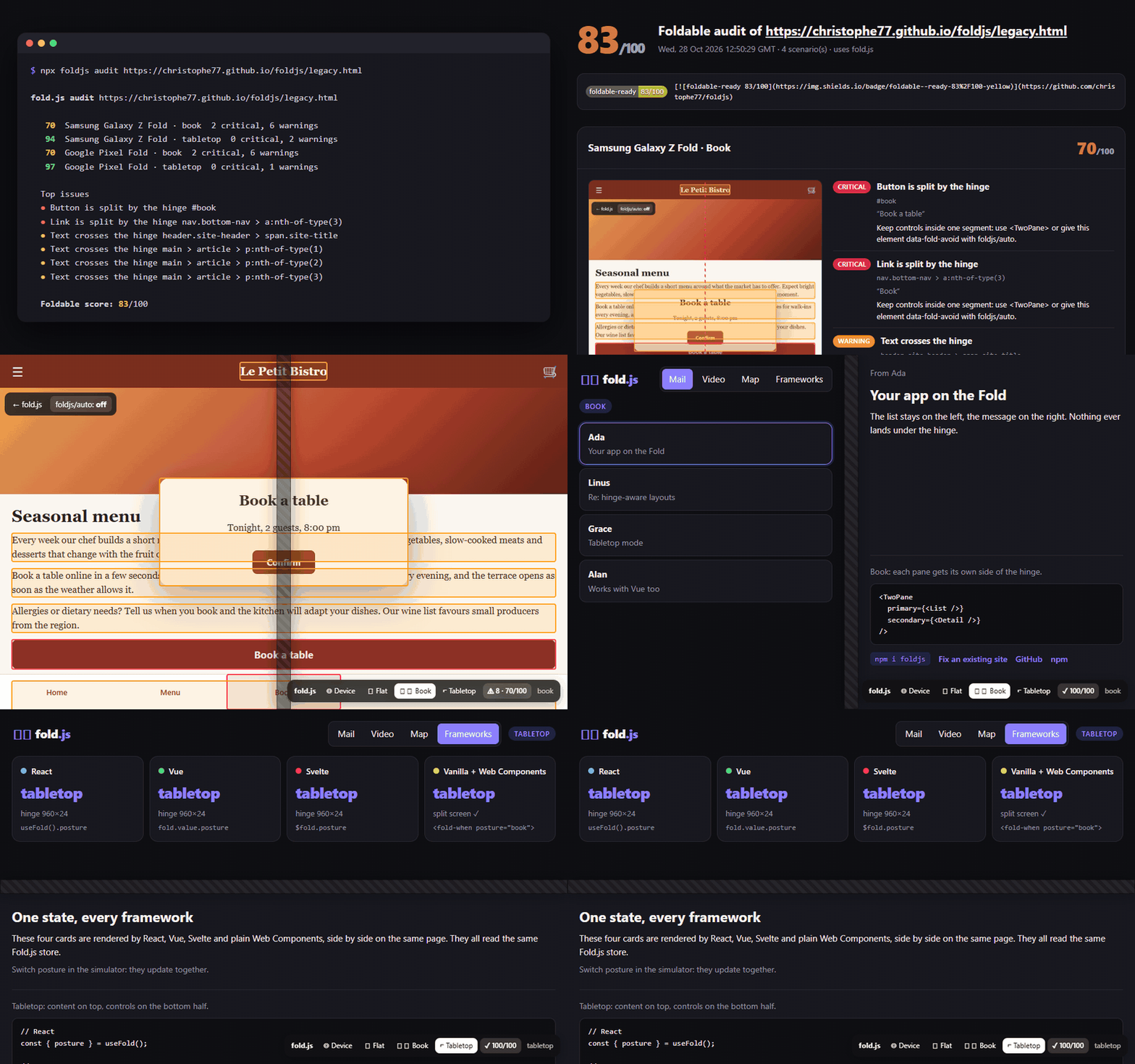
|
|
17
19
|
|
|
18
20
|
## Why fold.js?
|
|
19
21
|
|
|
@@ -158,20 +160,21 @@ The panel also shows a live **foldable score** and outlines every element under
|
|
|
158
160
|
## Audit any website: `npx foldjs audit`
|
|
159
161
|
|
|
160
162
|
```bash
|
|
161
|
-
npx foldjs audit https://
|
|
163
|
+
npx foldjs audit https://christophe77.github.io/foldjs/legacy.html
|
|
162
164
|
```
|
|
163
165
|
|
|
164
166
|
```
|
|
165
|
-
|
|
167
|
+
70 Samsung Galaxy Z Fold · book 2 critical, 6 warnings
|
|
166
168
|
94 Samsung Galaxy Z Fold · tabletop 0 critical, 2 warnings
|
|
167
|
-
|
|
168
|
-
|
|
169
|
+
70 Google Pixel Fold · book 2 critical, 6 warnings
|
|
170
|
+
97 Google Pixel Fold · tabletop 0 critical, 1 warnings
|
|
169
171
|
|
|
170
172
|
Top issues
|
|
171
|
-
●
|
|
172
|
-
●
|
|
173
|
+
● Button is split by the hinge #book
|
|
174
|
+
● Link is split by the hinge nav.bottom-nav > a:nth-of-type(3)
|
|
175
|
+
● Text crosses the hinge main > article > p:nth-of-type(1)
|
|
173
176
|
|
|
174
|
-
Foldable score:
|
|
177
|
+
Foldable score: 83/100
|
|
175
178
|
Report: ./foldjs-report/report.html
|
|
176
179
|
```
|
|
177
180
|
|
|
@@ -179,10 +182,11 @@ It opens the page in headless Chrome at the real inner-screen sizes of the Samsu
|
|
|
179
182
|
|
|
180
183
|
| Option | Default | |
|
|
181
184
|
|---|---|---|
|
|
182
|
-
| `--device` | `all` | `galaxy-z-fold`, `pixel-fold` or `all` |
|
|
185
|
+
| `--device` | `all` | `galaxy-z-fold`, `pixel-fold`, `iphone-fold` or `all`. `iphone-fold` uses leaked specs (904×640 CSS px, iPhone user agent) and is not part of `all`. |
|
|
183
186
|
| `--posture` | `all` | `book`, `tabletop` or `all` |
|
|
184
187
|
| `--out` | `foldjs-report` | Report folder (`report.html` + `report.json`) |
|
|
185
188
|
| `--min-score` | | Exit with code 1 below this score, for CI |
|
|
189
|
+
| `--dismiss-consent` | | Close cookie banners (rejecting when possible) before the audit |
|
|
186
190
|
| `--json` | | Print the result as JSON |
|
|
187
191
|
| `--browser` | auto | Chrome, Edge or Chromium path (or `CHROME_PATH`). No browser is downloaded. |
|
|
188
192
|
|
|
@@ -217,6 +221,21 @@ On a foldable (and in the simulator), it applies safe, reversible fixes as inlin
|
|
|
217
221
|
|
|
218
222
|
Turn a fix off with `autoFix({ bars: false })` or `<script src="…/auto.global.js" data-bars="false">`. [See it on a typical mobile site](https://christophe77.github.io/foldjs/legacy.html): the foldable score goes from 70 to 100 in book posture.
|
|
219
223
|
|
|
224
|
+
## iPhone Fold: the virtual fold
|
|
225
|
+
|
|
226
|
+
Safari does not implement the foldable web APIs, so a page cannot know where the iPhone Fold folds. fold.js handles it anyway: when an Apple touch screen measures 600 to 720px on its short side (regular iPhones are under 450px, iPads at least 744px, so only an unfolded iPhone Fold fits) and is held in landscape, it splits the viewport at its center line. `<TwoPane>`, `use:twoPane`, `<fold-two-pane>` and the CSS layer then show list and detail side by side, like on an iPad. In portrait, nothing changes.
|
|
227
|
+
|
|
228
|
+
It is on by default and only affects that case. `getFold().virtual` tells you when it is active. Change it with `configure()`:
|
|
229
|
+
|
|
230
|
+
```js
|
|
231
|
+
import { configure } from "foldjs"; // also exported by every adapter
|
|
232
|
+
configure({ virtualFold: "auto" }); // default: unfolded iPhone Fold only
|
|
233
|
+
configure({ virtualFold: true }); // any landscape screen at least 600px tall (tablets, desktop testing)
|
|
234
|
+
configure({ virtualFold: false }); // never
|
|
235
|
+
```
|
|
236
|
+
|
|
237
|
+
The iPhone Fold crease is reportedly much shallower than on earlier foldables, so content on the fold stays readable. The virtual fold is about using the wide inner screen well, not about hiding a gap. Preview it in the [demo](https://christophe77.github.io/foldjs/?virtual=1), and audit a site at the leaked iPhone Fold size with `npx foldjs audit <url> --device iphone-fold`.
|
|
238
|
+
|
|
220
239
|
## Core API
|
|
221
240
|
|
|
222
241
|
```ts
|
|
@@ -263,6 +282,9 @@ Use the `fold-two-pane` class from `foldjs/css`, or the `--fold-hinge-*` and `--
|
|
|
263
282
|
### Can I build for foldables without owning one?
|
|
264
283
|
Yes. The built-in simulator (`<FoldDevtools />`, `<FoldDevtools>` in Vue, or `mountDevtools()` anywhere) fakes the segments and posture on any desktop browser. Chrome DevTools device emulation (Galaxy Z Fold, Surface Duo) also works with fold.js.
|
|
265
284
|
|
|
285
|
+
### Does fold.js work on the iPhone Fold?
|
|
286
|
+
Yes, with a virtual fold. Safari exposes no foldable API, so fold.js detects an unfolded iPhone Fold from its screen size and splits the viewport at its center in landscape. Two-pane layouts work out of the box; posture detection (book or tabletop angle) is not possible on iOS until WebKit ships the Device Posture and Viewport Segments APIs.
|
|
287
|
+
|
|
266
288
|
### Which devices and browsers are supported?
|
|
267
289
|
Chrome and Edge on Android foldables (Samsung Galaxy Z Fold, Google Pixel Fold, Honor, Oppo, Vivo, Surface Duo) support the native APIs. On every other browser, including Samsung Internet, Firefox and Safari on iOS, fold.js falls back to a normal single-screen layout and the simulator still works.
|
|
268
290
|
|
package/dist/index.cjs
CHANGED
|
@@ -20,6 +20,7 @@ var __toCommonJS = (mod) => __copyProps(__defProp({}, "__esModule", { value: tru
|
|
|
20
20
|
// src/index.ts
|
|
21
21
|
var index_exports = {};
|
|
22
22
|
__export(index_exports, {
|
|
23
|
+
configure: () => import_foldjs2.configure,
|
|
23
24
|
fold: () => fold,
|
|
24
25
|
foldWhen: () => foldWhen,
|
|
25
26
|
mountDevtools: () => import_devtools.mountDevtools,
|
|
@@ -56,6 +57,7 @@ function foldWhen(node, posture) {
|
|
|
56
57
|
}
|
|
57
58
|
// Annotate the CommonJS export names for ESM import in node:
|
|
58
59
|
0 && (module.exports = {
|
|
60
|
+
configure,
|
|
59
61
|
fold,
|
|
60
62
|
foldWhen,
|
|
61
63
|
mountDevtools,
|
package/dist/index.d.cts
CHANGED
|
@@ -1,6 +1,6 @@
|
|
|
1
1
|
import { Readable } from 'svelte/store';
|
|
2
2
|
import { FoldState, Posture, TwoPaneOptions } from 'foldjs';
|
|
3
|
-
export { FoldState, Posture, Rect, Spanning, simulate } from 'foldjs';
|
|
3
|
+
export { FoldState, Posture, Rect, Spanning, configure, simulate } from 'foldjs';
|
|
4
4
|
export { mountDevtools } from 'foldjs/devtools';
|
|
5
5
|
|
|
6
6
|
/** Live foldable state: `$fold.posture`, `$fold.hinge`… */
|
package/dist/index.d.ts
CHANGED
|
@@ -1,6 +1,6 @@
|
|
|
1
1
|
import { Readable } from 'svelte/store';
|
|
2
2
|
import { FoldState, Posture, TwoPaneOptions } from 'foldjs';
|
|
3
|
-
export { FoldState, Posture, Rect, Spanning, simulate } from 'foldjs';
|
|
3
|
+
export { FoldState, Posture, Rect, Spanning, configure, simulate } from 'foldjs';
|
|
4
4
|
export { mountDevtools } from 'foldjs/devtools';
|
|
5
5
|
|
|
6
6
|
/** Live foldable state: `$fold.posture`, `$fold.hinge`… */
|
package/dist/index.js
CHANGED
|
@@ -1,7 +1,7 @@
|
|
|
1
1
|
// src/index.ts
|
|
2
2
|
import { readable } from "svelte/store";
|
|
3
3
|
import { bindTwoPane, getFold, subscribe } from "foldjs";
|
|
4
|
-
import { simulate } from "foldjs";
|
|
4
|
+
import { configure, simulate } from "foldjs";
|
|
5
5
|
import { mountDevtools } from "foldjs/devtools";
|
|
6
6
|
var fold = readable(getFold(), (set) => {
|
|
7
7
|
set(getFold());
|
|
@@ -27,6 +27,7 @@ function foldWhen(node, posture) {
|
|
|
27
27
|
};
|
|
28
28
|
}
|
|
29
29
|
export {
|
|
30
|
+
configure,
|
|
30
31
|
fold,
|
|
31
32
|
foldWhen,
|
|
32
33
|
mountDevtools,
|
package/package.json
CHANGED
|
@@ -1,6 +1,6 @@
|
|
|
1
1
|
{
|
|
2
2
|
"name": "@foldjs/svelte",
|
|
3
|
-
"version": "0.
|
|
3
|
+
"version": "0.3.0",
|
|
4
4
|
"description": "Svelte store and actions for foldable phones: $fold, use:twoPane, use:foldWhen and a built-in foldable simulator. Works with SvelteKit.",
|
|
5
5
|
"license": "MIT",
|
|
6
6
|
"author": "christophe77",
|
|
@@ -48,10 +48,11 @@
|
|
|
48
48
|
"responsive-design",
|
|
49
49
|
"layout",
|
|
50
50
|
"tabletop-mode",
|
|
51
|
-
"foldjs"
|
|
51
|
+
"foldjs",
|
|
52
|
+
"iphone-fold"
|
|
52
53
|
],
|
|
53
54
|
"peerDependencies": {
|
|
54
|
-
"foldjs": "^0.
|
|
55
|
+
"foldjs": "^0.3.0",
|
|
55
56
|
"svelte": ">=4"
|
|
56
57
|
},
|
|
57
58
|
"scripts": {
|