@flow-engineer/flow 0.2.0 → 0.2.2
This diff represents the content of publicly available package versions that have been released to one of the supported registries. The information contained in this diff is provided for informational purposes only and reflects changes between package versions as they appear in their respective public registries.
- package/LICENSE +202 -21
- package/README.md +190 -17
- package/coding-agents/auth-skill.md +137 -0
- package/coding-agents/context-skill.md +94 -0
- package/coding-agents/skill.md +245 -11
- package/coding-agents/test-skill.md +13 -11
- package/coding-agents/tools-skill.md +78 -1
- package/dist/cli/src/auth.d.ts +11 -0
- package/dist/cli/src/auth.js +147 -0
- package/dist/cli/src/commands.d.ts +119 -0
- package/dist/cli/src/commands.js +212 -0
- package/dist/cli/src/index.d.ts +2 -0
- package/dist/cli/src/index.js +5 -0
- package/dist/cli/src/run.d.ts +28 -0
- package/dist/cli/src/run.js +523 -0
- package/dist/cli/src/terminal.d.ts +3 -0
- package/dist/cli/src/terminal.js +135 -0
- package/dist/flow-messaging/src/client.d.ts +7 -1
- package/dist/flow-messaging/src/client.js +13 -1
- package/dist/flow-messaging/src/index.d.ts +38 -3
- package/dist/flow-messaging/src/index.js +242 -40
- package/dist/mcp/src/client.d.ts +54 -0
- package/dist/mcp/src/client.js +175 -0
- package/dist/mcp/src/describe.d.ts +41 -0
- package/dist/mcp/src/describe.js +110 -0
- package/dist/mcp/src/index.d.ts +4 -0
- package/dist/mcp/src/index.js +7 -0
- package/dist/mcp/src/server.d.ts +70 -0
- package/dist/mcp/src/server.js +252 -0
- package/dist/mcp/src/terminal.d.ts +24 -0
- package/dist/mcp/src/terminal.js +54 -0
- package/dist/simulators/src/index.d.ts +1 -1
- package/dist/simulators/src/page.html +267 -49
- package/dist/simulators/src/server.d.ts +27 -0
- package/dist/simulators/src/server.js +264 -40
- package/dist/src/agent.d.ts +69 -3
- package/dist/src/agent.js +162 -8
- package/dist/src/channels.d.ts +2 -0
- package/dist/src/conversation.d.ts +16 -1
- package/dist/src/conversation.js +140 -12
- package/dist/src/events.d.ts +1 -1
- package/dist/src/index.d.ts +2 -2
- package/dist/src/index.js +1 -1
- package/dist/src/model.d.ts +27 -0
- package/dist/src/model.js +85 -13
- package/dist/src/names.d.ts +5 -0
- package/dist/src/names.js +5 -0
- package/dist/src/skills.d.ts +4 -0
- package/dist/src/skills.js +23 -0
- package/dist/src/store.d.ts +2 -0
- package/dist/src/store.js +18 -0
- package/dist/src/tools.d.ts +69 -0
- package/dist/src/tools.js +17 -1
- package/dist/src/traces.js +32 -4
- package/dist/src/types.d.ts +2 -0
- package/dist/testing/src/account.d.ts +4 -0
- package/dist/testing/src/account.js +891 -0
- package/dist/testing/src/chat.d.ts +3 -0
- package/dist/testing/src/chat.js +125 -0
- package/dist/testing/src/check.d.ts +4 -0
- package/dist/testing/src/check.js +90 -0
- package/dist/testing/src/chinwag.js +1 -1
- package/dist/testing/src/cli.js +105 -18
- package/dist/testing/src/client.d.ts +2 -0
- package/dist/testing/src/client.js +4 -3
- package/dist/testing/src/flow-login.d.ts +176 -0
- package/dist/testing/src/flow-login.js +274 -0
- package/dist/testing/src/new.d.ts +15 -2
- package/dist/testing/src/new.js +80 -21
- package/dist/testing/src/plugin.d.ts +4 -0
- package/dist/testing/src/plugin.js +116 -0
- package/docs/agents.md +160 -0
- package/examples/cafe/src/agent.ts +6 -2
- package/examples/cafe/src/channels.ts +20 -0
- package/examples/cafe/src/cli.ts +24 -0
- package/examples/cafe/src/main.ts +17 -3
- package/examples/cafe/src/mcp.ts +22 -0
- package/examples/cafe/src/tools.ts +13 -0
- package/flow-messaging/README.md +66 -27
- package/package.json +30 -2
- package/spec/agent-endpoint.openapi.yaml +2 -2
- package/spec/nudges.openapi.yaml +2 -2
package/LICENSE
CHANGED
|
@@ -1,21 +1,202 @@
|
|
|
1
|
-
|
|
2
|
-
|
|
3
|
-
|
|
4
|
-
|
|
5
|
-
|
|
6
|
-
|
|
7
|
-
|
|
8
|
-
|
|
9
|
-
|
|
10
|
-
|
|
11
|
-
|
|
12
|
-
|
|
13
|
-
|
|
14
|
-
|
|
15
|
-
|
|
16
|
-
|
|
17
|
-
|
|
18
|
-
|
|
19
|
-
|
|
20
|
-
|
|
21
|
-
|
|
1
|
+
|
|
2
|
+
Apache License
|
|
3
|
+
Version 2.0, January 2004
|
|
4
|
+
http://www.apache.org/licenses/
|
|
5
|
+
|
|
6
|
+
TERMS AND CONDITIONS FOR USE, REPRODUCTION, AND DISTRIBUTION
|
|
7
|
+
|
|
8
|
+
1. Definitions.
|
|
9
|
+
|
|
10
|
+
"License" shall mean the terms and conditions for use, reproduction,
|
|
11
|
+
and distribution as defined by Sections 1 through 9 of this document.
|
|
12
|
+
|
|
13
|
+
"Licensor" shall mean the copyright owner or entity authorized by
|
|
14
|
+
the copyright owner that is granting the License.
|
|
15
|
+
|
|
16
|
+
"Legal Entity" shall mean the union of the acting entity and all
|
|
17
|
+
other entities that control, are controlled by, or are under common
|
|
18
|
+
control with that entity. For the purposes of this definition,
|
|
19
|
+
"control" means (i) the power, direct or indirect, to cause the
|
|
20
|
+
direction or management of such entity, whether by contract or
|
|
21
|
+
otherwise, or (ii) ownership of fifty percent (50%) or more of the
|
|
22
|
+
outstanding shares, or (iii) beneficial ownership of such entity.
|
|
23
|
+
|
|
24
|
+
"You" (or "Your") shall mean an individual or Legal Entity
|
|
25
|
+
exercising permissions granted by this License.
|
|
26
|
+
|
|
27
|
+
"Source" form shall mean the preferred form for making modifications,
|
|
28
|
+
including but not limited to software source code, documentation
|
|
29
|
+
source, and configuration files.
|
|
30
|
+
|
|
31
|
+
"Object" form shall mean any form resulting from mechanical
|
|
32
|
+
transformation or translation of a Source form, including but
|
|
33
|
+
not limited to compiled object code, generated documentation,
|
|
34
|
+
and conversions to other media types.
|
|
35
|
+
|
|
36
|
+
"Work" shall mean the work of authorship, whether in Source or
|
|
37
|
+
Object form, made available under the License, as indicated by a
|
|
38
|
+
copyright notice that is included in or attached to the work
|
|
39
|
+
(an example is provided in the Appendix below).
|
|
40
|
+
|
|
41
|
+
"Derivative Works" shall mean any work, whether in Source or Object
|
|
42
|
+
form, that is based on (or derived from) the Work and for which the
|
|
43
|
+
editorial revisions, annotations, elaborations, or other modifications
|
|
44
|
+
represent, as a whole, an original work of authorship. For the purposes
|
|
45
|
+
of this License, Derivative Works shall not include works that remain
|
|
46
|
+
separable from, or merely link (or bind by name) to the interfaces of,
|
|
47
|
+
the Work and Derivative Works thereof.
|
|
48
|
+
|
|
49
|
+
"Contribution" shall mean any work of authorship, including
|
|
50
|
+
the original version of the Work and any modifications or additions
|
|
51
|
+
to that Work or Derivative Works thereof, that is intentionally
|
|
52
|
+
submitted to Licensor for inclusion in the Work by the copyright owner
|
|
53
|
+
or by an individual or Legal Entity authorized to submit on behalf of
|
|
54
|
+
the copyright owner. For the purposes of this definition, "submitted"
|
|
55
|
+
means any form of electronic, verbal, or written communication sent
|
|
56
|
+
to the Licensor or its representatives, including but not limited to
|
|
57
|
+
communication on electronic mailing lists, source code control systems,
|
|
58
|
+
and issue tracking systems that are managed by, or on behalf of, the
|
|
59
|
+
Licensor for the purpose of discussing and improving the Work, but
|
|
60
|
+
excluding communication that is conspicuously marked or otherwise
|
|
61
|
+
designated in writing by the copyright owner as "Not a Contribution."
|
|
62
|
+
|
|
63
|
+
"Contributor" shall mean Licensor and any individual or Legal Entity
|
|
64
|
+
on behalf of whom a Contribution has been received by Licensor and
|
|
65
|
+
subsequently incorporated within the Work.
|
|
66
|
+
|
|
67
|
+
2. Grant of Copyright License. Subject to the terms and conditions of
|
|
68
|
+
this License, each Contributor hereby grants to You a perpetual,
|
|
69
|
+
worldwide, non-exclusive, no-charge, royalty-free, irrevocable
|
|
70
|
+
copyright license to reproduce, prepare Derivative Works of,
|
|
71
|
+
publicly display, publicly perform, sublicense, and distribute the
|
|
72
|
+
Work and such Derivative Works in Source or Object form.
|
|
73
|
+
|
|
74
|
+
3. Grant of Patent License. Subject to the terms and conditions of
|
|
75
|
+
this License, each Contributor hereby grants to You a perpetual,
|
|
76
|
+
worldwide, non-exclusive, no-charge, royalty-free, irrevocable
|
|
77
|
+
(except as stated in this section) patent license to make, have made,
|
|
78
|
+
use, offer to sell, sell, import, and otherwise transfer the Work,
|
|
79
|
+
where such license applies only to those patent claims licensable
|
|
80
|
+
by such Contributor that are necessarily infringed by their
|
|
81
|
+
Contribution(s) alone or by combination of their Contribution(s)
|
|
82
|
+
with the Work to which such Contribution(s) was submitted. If You
|
|
83
|
+
institute patent litigation against any entity (including a
|
|
84
|
+
cross-claim or counterclaim in a lawsuit) alleging that the Work
|
|
85
|
+
or a Contribution incorporated within the Work constitutes direct
|
|
86
|
+
or contributory patent infringement, then any patent licenses
|
|
87
|
+
granted to You under this License for that Work shall terminate
|
|
88
|
+
as of the date such litigation is filed.
|
|
89
|
+
|
|
90
|
+
4. Redistribution. You may reproduce and distribute copies of the
|
|
91
|
+
Work or Derivative Works thereof in any medium, with or without
|
|
92
|
+
modifications, and in Source or Object form, provided that You
|
|
93
|
+
meet the following conditions:
|
|
94
|
+
|
|
95
|
+
(a) You must give any other recipients of the Work or
|
|
96
|
+
Derivative Works a copy of this License; and
|
|
97
|
+
|
|
98
|
+
(b) You must cause any modified files to carry prominent notices
|
|
99
|
+
stating that You changed the files; and
|
|
100
|
+
|
|
101
|
+
(c) You must retain, in the Source form of any Derivative Works
|
|
102
|
+
that You distribute, all copyright, patent, trademark, and
|
|
103
|
+
attribution notices from the Source form of the Work,
|
|
104
|
+
excluding those notices that do not pertain to any part of
|
|
105
|
+
the Derivative Works; and
|
|
106
|
+
|
|
107
|
+
(d) If the Work includes a "NOTICE" text file as part of its
|
|
108
|
+
distribution, then any Derivative Works that You distribute must
|
|
109
|
+
include a readable copy of the attribution notices contained
|
|
110
|
+
within such NOTICE file, excluding those notices that do not
|
|
111
|
+
pertain to any part of the Derivative Works, in at least one
|
|
112
|
+
of the following places: within a NOTICE text file distributed
|
|
113
|
+
as part of the Derivative Works; within the Source form or
|
|
114
|
+
documentation, if provided along with the Derivative Works; or,
|
|
115
|
+
within a display generated by the Derivative Works, if and
|
|
116
|
+
wherever such third-party notices normally appear. The contents
|
|
117
|
+
of the NOTICE file are for informational purposes only and
|
|
118
|
+
do not modify the License. You may add Your own attribution
|
|
119
|
+
notices within Derivative Works that You distribute, alongside
|
|
120
|
+
or as an addendum to the NOTICE text from the Work, provided
|
|
121
|
+
that such additional attribution notices cannot be construed
|
|
122
|
+
as modifying the License.
|
|
123
|
+
|
|
124
|
+
You may add Your own copyright statement to Your modifications and
|
|
125
|
+
may provide additional or different license terms and conditions
|
|
126
|
+
for use, reproduction, or distribution of Your modifications, or
|
|
127
|
+
for any such Derivative Works as a whole, provided Your use,
|
|
128
|
+
reproduction, and distribution of the Work otherwise complies with
|
|
129
|
+
the conditions stated in this License.
|
|
130
|
+
|
|
131
|
+
5. Submission of Contributions. Unless You explicitly state otherwise,
|
|
132
|
+
any Contribution intentionally submitted for inclusion in the Work
|
|
133
|
+
by You to the Licensor shall be under the terms and conditions of
|
|
134
|
+
this License, without any additional terms or conditions.
|
|
135
|
+
Notwithstanding the above, nothing herein shall supersede or modify
|
|
136
|
+
the terms of any separate license agreement you may have executed
|
|
137
|
+
with Licensor regarding such Contributions.
|
|
138
|
+
|
|
139
|
+
6. Trademarks. This License does not grant permission to use the trade
|
|
140
|
+
names, trademarks, service marks, or product names of the Licensor,
|
|
141
|
+
except as required for reasonable and customary use in describing the
|
|
142
|
+
origin of the Work and reproducing the content of the NOTICE file.
|
|
143
|
+
|
|
144
|
+
7. Disclaimer of Warranty. Unless required by applicable law or
|
|
145
|
+
agreed to in writing, Licensor provides the Work (and each
|
|
146
|
+
Contributor provides its Contributions) on an "AS IS" BASIS,
|
|
147
|
+
WITHOUT WARRANTIES OR CONDITIONS OF ANY KIND, either express or
|
|
148
|
+
implied, including, without limitation, any warranties or conditions
|
|
149
|
+
of TITLE, NON-INFRINGEMENT, MERCHANTABILITY, or FITNESS FOR A
|
|
150
|
+
PARTICULAR PURPOSE. You are solely responsible for determining the
|
|
151
|
+
appropriateness of using or redistributing the Work and assume any
|
|
152
|
+
risks associated with Your exercise of permissions under this License.
|
|
153
|
+
|
|
154
|
+
8. Limitation of Liability. In no event and under no legal theory,
|
|
155
|
+
whether in tort (including negligence), contract, or otherwise,
|
|
156
|
+
unless required by applicable law (such as deliberate and grossly
|
|
157
|
+
negligent acts) or agreed to in writing, shall any Contributor be
|
|
158
|
+
liable to You for damages, including any direct, indirect, special,
|
|
159
|
+
incidental, or consequential damages of any character arising as a
|
|
160
|
+
result of this License or out of the use or inability to use the
|
|
161
|
+
Work (including but not limited to damages for loss of goodwill,
|
|
162
|
+
work stoppage, computer failure or malfunction, or any and all
|
|
163
|
+
other commercial damages or losses), even if such Contributor
|
|
164
|
+
has been advised of the possibility of such damages.
|
|
165
|
+
|
|
166
|
+
9. Accepting Warranty or Additional Liability. While redistributing
|
|
167
|
+
the Work or Derivative Works thereof, You may choose to offer,
|
|
168
|
+
and charge a fee for, acceptance of support, warranty, indemnity,
|
|
169
|
+
or other liability obligations and/or rights consistent with this
|
|
170
|
+
License. However, in accepting such obligations, You may act only
|
|
171
|
+
on Your own behalf and on Your sole responsibility, not on behalf
|
|
172
|
+
of any other Contributor, and only if You agree to indemnify,
|
|
173
|
+
defend, and hold each Contributor harmless for any liability
|
|
174
|
+
incurred by, or claims asserted against, such Contributor by reason
|
|
175
|
+
of your accepting any such warranty or additional liability.
|
|
176
|
+
|
|
177
|
+
END OF TERMS AND CONDITIONS
|
|
178
|
+
|
|
179
|
+
APPENDIX: How to apply the Apache License to your work.
|
|
180
|
+
|
|
181
|
+
To apply the Apache License to your work, attach the following
|
|
182
|
+
boilerplate notice, with the fields enclosed by brackets "[]"
|
|
183
|
+
replaced with your own identifying information. (Don't include
|
|
184
|
+
the brackets!) The text should be enclosed in the appropriate
|
|
185
|
+
comment syntax for the file format. We also recommend that a
|
|
186
|
+
file or class name and description of purpose be included on the
|
|
187
|
+
same "printed page" as the copyright notice for easier
|
|
188
|
+
identification within third-party archives.
|
|
189
|
+
|
|
190
|
+
Copyright [yyyy] [name of copyright owner]
|
|
191
|
+
|
|
192
|
+
Licensed under the Apache License, Version 2.0 (the "License");
|
|
193
|
+
you may not use this file except in compliance with the License.
|
|
194
|
+
You may obtain a copy of the License at
|
|
195
|
+
|
|
196
|
+
http://www.apache.org/licenses/LICENSE-2.0
|
|
197
|
+
|
|
198
|
+
Unless required by applicable law or agreed to in writing, software
|
|
199
|
+
distributed under the License is distributed on an "AS IS" BASIS,
|
|
200
|
+
WITHOUT WARRANTIES OR CONDITIONS OF ANY KIND, either express or implied.
|
|
201
|
+
See the License for the specific language governing permissions and
|
|
202
|
+
limitations under the License.
|
package/README.md
CHANGED
|
@@ -4,7 +4,7 @@
|
|
|
4
4
|
|
|
5
5
|
Flow Framework (`npm i @flow-engineer/flow`). Formerly chinwag: see [Moving from chinwag](#moving-from-chinwag).
|
|
6
6
|
|
|
7
|
-
[](https://github.com/flow-engineer/flow/blob/main/LICENSE)  
|
|
8
8
|
|
|
9
9
|
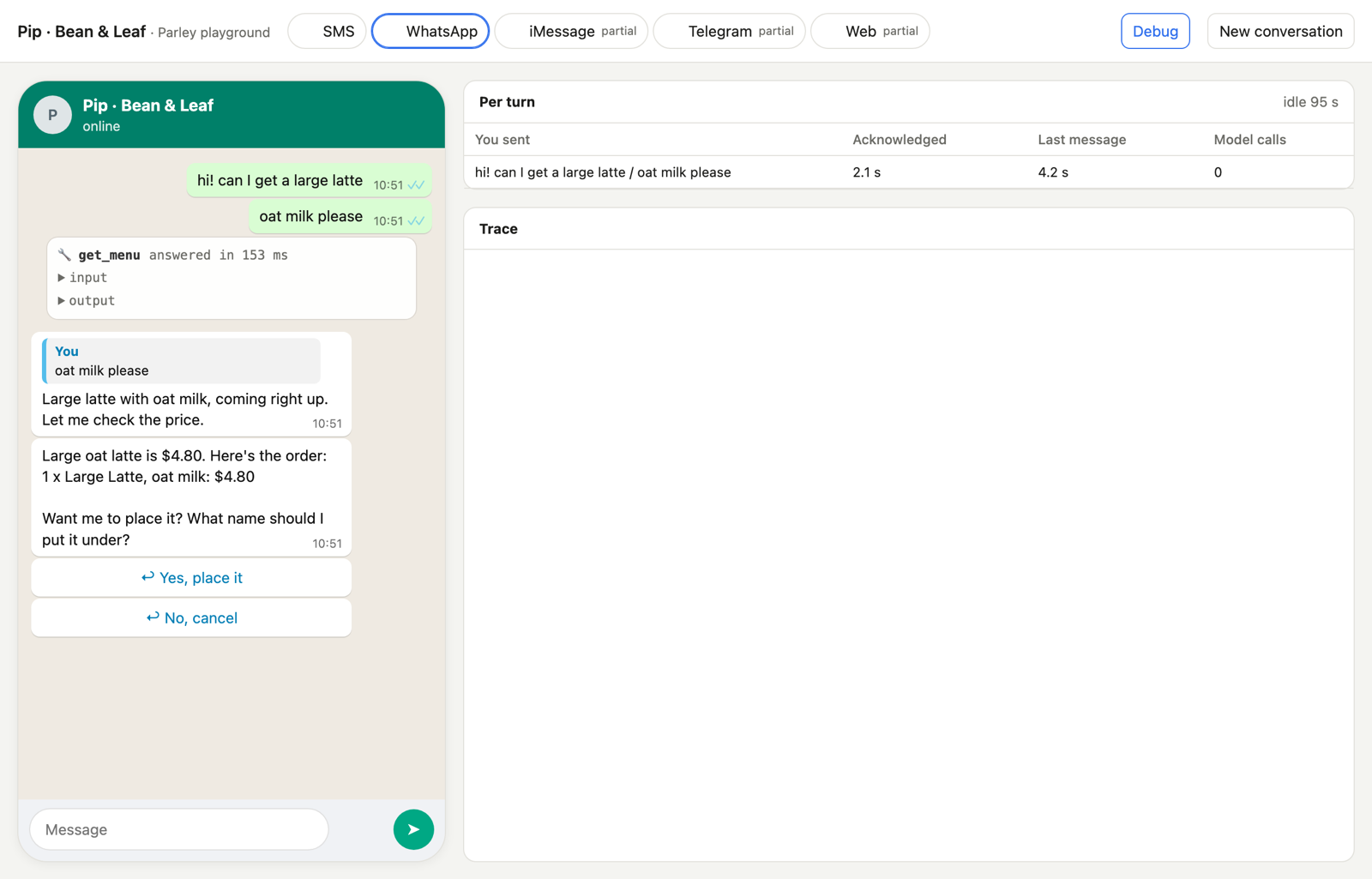
|
|
10
10
|
|
|
@@ -26,12 +26,31 @@ Flow Framework makes the chat behaviour the default. You write the agent's promp
|
|
|
26
26
|
Node 22.18 or later. Your agent is TypeScript that Node runs as it is, with no build step.
|
|
27
27
|
|
|
28
28
|
```bash
|
|
29
|
-
npx @flow-engineer/flow new my-agent && cd my-agent && npm install
|
|
30
|
-
|
|
29
|
+
npx @flow-engineer/flow new my-agent --display-name "My agent" && cd my-agent && npm install
|
|
30
|
+
npx @flow-engineer/flow link # signs in; writes Flow's free trial model key and a phone link (or put your own key in .env)
|
|
31
31
|
npm start
|
|
32
32
|
```
|
|
33
33
|
|
|
34
|
-
`flow new <name>` makes `./<name>/` from the café example (lowercase letters, digits and dashes). Open the link `npm start` prints and text Pip, a café ordering assistant: your starting point. Pick a platform at the top (SMS, WhatsApp, iMessage, Telegram, web), and turn on **Debug** to see every tool call and how fast each message was answered. A model call that fails (a wrong or expired key, say) shows in the chat, in Debug and on the terminal. The café's `src/agent.ts` reads its model id from `CAFE_MODEL` (default: the model for the key you set, see [Models](#models)). The new folder has the coding-agent skills in `.claude/skills/` and an `AGENTS.md` pointing at them, so you can tell Claude Code, Codex or any coding agent what to build.
|
|
34
|
+
`flow new <name>` makes `./<name>/` from the café example (lowercase letters, digits and dashes); `--display-name` is what people call it, kept as `displayName` in its `package.json`, and a phone reaches it by sending `Hi <that name> (ref <code>)`. Open the link `npm start` prints and text Pip, a café ordering assistant: your starting point. Pick a platform at the top (SMS, WhatsApp, iMessage, Telegram, web), and turn on **Debug** to see every tool call and how fast each message was answered. A model call that fails (a wrong or expired key, say) shows in the chat, in Debug and on the terminal. The café's `src/agent.ts` reads its model id from `CAFE_MODEL` (default: the model for the key you set, see [Models](#models)). The new folder has the coding-agent skills in `.claude/skills/` and an `AGENTS.md` pointing at them, so you can tell Claude Code, Codex or any coding agent what to build.
|
|
35
|
+
|
|
36
|
+
### On your phone, from your laptop
|
|
37
|
+
|
|
38
|
+
```bash
|
|
39
|
+
npx @flow-engineer/flow init # the same starter in the current folder; then npm install
|
|
40
|
+
npx @flow-engineer/flow link # signs in (opens the browser), writes its keys and Flow's trial model key into .env, prints a link
|
|
41
|
+
npm start # try it in the playground link it prints, then open the phone link and text the agent
|
|
42
|
+
npx @flow-engineer/flow status # what the folder has and lacks
|
|
43
|
+
```
|
|
44
|
+
|
|
45
|
+
Test it first in the playground (the link `npm start` prints: the test people and the channels side by side), then on your phone. `flow chat` (the agent in the terminal) and `npm test -- --synthetic` are how a coding agent checks its own work.
|
|
46
|
+
|
|
47
|
+
`flow chat` builds the agent from `src/agent.ts` and writes as its first test person, one message per line of stdin. `flow link` signs in and runs `flow setup` when the folder is not set up yet, then prints the link for `--channel telegram` (the default), `whatsapp` or `imessage`; a channel flow.engineer cannot open yet answers with what to do instead. With `FLOW_MESSAGING_KEY` in `.env`, the starter's `npm start` is on Telegram, plus WhatsApp and iMessage when `.env` has their senders, and connects to Flow Messaging by its outbound event stream, so there is no tunnel or public URL, and messages sent while it was stopped arrive when it starts again ([flow-messaging/README.md](flow-messaging/README.md)). Coding agents: [docs/agents.md](docs/agents.md) (https://flow.engineer/flow-framework/agents.md) has the exit codes and `next` steps.
|
|
48
|
+
|
|
49
|
+
**Shared test numbers and privacy.** The free trial runs on Flow's shared Telegram bot, WhatsApp number and iMessage line. A join code binds that phone to one app, so its messages go only to that app's agent; sending another app's code moves it. Trial chats are test data, kept for the account's retention (30 days by default). Do not use the trial for real customers' data: connect your own number for that.
|
|
50
|
+
|
|
51
|
+
**Stability.** 0.x: the CLI's commands, `--json` fields and exit codes in [docs/agents.md](docs/agents.md) stay compatible within 0.2.x; a breaking change comes with a minor version bump and a release note. Pin the version in `package.json` for production.
|
|
52
|
+
|
|
53
|
+
**Host it.** Coming soon: `npx @flow-engineer/flow deploy`, to keep the agent answering while the laptop sleeps.
|
|
35
54
|
|
|
36
55
|
### In a folder of your own
|
|
37
56
|
|
|
@@ -63,11 +82,11 @@ console.log(`Playground: ${url}/`);
|
|
|
63
82
|
```
|
|
64
83
|
|
|
65
84
|
```bash
|
|
66
|
-
echo "OPENROUTER_API_KEY=sk-or-..." > .env
|
|
85
|
+
npx @flow-engineer/flow setup # writes FLOW_KEY (the agent's Flow key, on Flow's trial credit), or: echo "OPENROUTER_API_KEY=sk-or-..." > .env
|
|
67
86
|
node --env-file=.env src/main.ts
|
|
68
87
|
```
|
|
69
88
|
|
|
70
|
-
Tests run with `npx flow test` (see [Testing](#testing)); `npx flow --help` lists everything the command does.
|
|
89
|
+
Tests run with `npx @flow-engineer/flow test` (see [Testing](#testing)); `npx @flow-engineer/flow --help` lists everything the command does.
|
|
71
90
|
|
|
72
91
|
## How a turn works
|
|
73
92
|
|
|
@@ -143,6 +162,8 @@ await play.listen(buildAgent({ events: [play.events] }), 8788);
|
|
|
143
162
|
|
|
144
163
|
The playground plays only the test people you declare (`testPeople: [{ name, phone }]`) on the agent's own channels. A test person is a real person to the agent: the same identity, `resolve` and history as if they wrote from their phone, one conversation on every channel, and "Clear history" to start again. Replies go back where the person last wrote from, the playground or the real channel. The playground's Person tab moves the agent's clock (`simulators({ clock: playgroundClock() })`, with `createAgent({ now: clock.now })`), lists what is scheduled or held for them, sets their time zone and quiet hours, and sends nudges with every field the API takes. Locally it answers only on localhost, and its API only its own page, so a site you visit cannot send it messages. On a deployed agent, mount `play.handler(agent, { token })`: it refuses requests without the token (at least 32 characters), swaps `?token=` for a cookie on the playground's path, and limits wrong tries.
|
|
145
164
|
|
|
165
|
+
To test account sign-in, give `simulators` an `authentication({ channel, visitor })` hook. The person picker gains **New user · signed out**: the hook returns a sign-in URL until the application verifies the visitor, then its account `key` and channel `address`. The playground uses that account's existing conversation and keeps replies inside the simulator. Each interface authenticates independently; verified-phone channels can resolve the account directly. Existing test people keep their identity shortcut. See [setting up authentication](coding-agents/auth-skill.md#exercise-sign-in-in-the-playground).
|
|
166
|
+
|
|
146
167
|
`AGENTS.md` says what the agent is for and what it may and may not do. Leave messaging out of it: Flow Framework adds how to talk on each channel (its send tool, reactions, formatting, acknowledging first). A skill's `SKILL.md` starts with a `name` and `description`; the agent sees every description and loads a skill when it needs it (`inlineSkills: true` puts them all in the prompt instead).
|
|
147
168
|
|
|
148
169
|
## Channels and people
|
|
@@ -356,7 +377,7 @@ expect:
|
|
|
356
377
|
`expect.calls` and `expect.never` name tools that must or must not be called, checked by code from the recorded calls. `now` and `timezone` set the test's clock, and dates in test files are written against it (`{{now + 1d | date}}`), so they never go stale ([coding-agents/test-skill.md](coding-agents/test-skill.md)). `tests/tools/*.yaml` describe how each tool behaves (normal, slow, each error). Run the suite from the agent's folder:
|
|
357
378
|
|
|
358
379
|
```bash
|
|
359
|
-
npx flow test --cloud https://flow.engineer/observe --synthetic --runs 3 --only latte-correction
|
|
380
|
+
npx @flow-engineer/flow test --cloud https://flow.engineer/observe --synthetic --runs 3 --only latte-correction
|
|
360
381
|
```
|
|
361
382
|
|
|
362
383
|
Your agent stays on your machine with its own model and key; the test cloud ([get one](#get-a-test-cloud)) plays the person and the tools and judges each run. The cloud is a hosted service, not part of this package. The command prints pass or fail per run, with the judge's reasons, the cost, and a link to watch each conversation. Before anything is sent it reads every test file as the cloud does, and a mistake stops it with the file and line (`tests/scenarios/latte-correction.yaml:3: person.goal: missing`).
|
|
@@ -415,20 +436,25 @@ Each run's line carries its id (`FAIL latte-correction #1 (whatsapp) trn_…: 6
|
|
|
415
436
|
`--failed` runs again only the scenarios that did not pass in that file (failed, errored or not played), on every channel each plays: a scenario's channels are part of its file, so one channel cannot be picked alone. It goes with `--runs`; with `--only` it stops and says to pick one, since the two would each pick the scenarios. With nothing to run again it prints `Nothing failed in the last session (<id>).` and exits 0 (and says when that session ran only some scenarios); with no file it says to run `flow test` first and exits 1. The loop, for you or a coding agent:
|
|
416
437
|
|
|
417
438
|
```bash
|
|
418
|
-
npx flow test --synthetic
|
|
439
|
+
npx @flow-engineer/flow test --synthetic # the whole suite
|
|
419
440
|
# fix what failed
|
|
420
|
-
npx flow show last
|
|
421
|
-
npx flow test --synthetic --failed
|
|
422
|
-
npx flow test --synthetic
|
|
441
|
+
npx @flow-engineer/flow show last # why: the judge's reasons, the conversation and the tool calls
|
|
442
|
+
npx @flow-engineer/flow test --synthetic --failed # only what did not pass; again until it exits 0
|
|
443
|
+
npx @flow-engineer/flow test --synthetic # the whole suite once more before you finish
|
|
423
444
|
```
|
|
424
445
|
|
|
425
446
|
### Get a test cloud
|
|
426
447
|
|
|
448
|
+
The quick way: `npx @flow-engineer/flow login` (it opens the browser and waits up to 120 s; `npx @flow-engineer/flow login --wait` waits again for the same code, so a coding agent can run it), then `npx @flow-engineer/flow setup` in the agent's folder, which
|
|
449
|
+
writes `FLOW_FRAMEWORK_CLOUD_KEY` (and the traces and Flow Messaging keys, the join code and its
|
|
450
|
+
`FLOW_FRAMEWORK_TRY_URL`, and the shared Telegram, WhatsApp and iMessage senders that are open) into `.env`, filling names `.env` has with no value and setting it to mode 0600; `npx @flow-engineer/flow link` then prints that link to chat with the agent from a phone (and does the sign-in and setup itself when they have not been done). On WhatsApp and iMessage the agent replies only after you write first (WhatsApp: within 24 hours of your last message). The sign-in token is sent only to the server that issued it, over https.
|
|
451
|
+
Always name the package: `npx flow` on its own fetches another npm package. By hand:
|
|
452
|
+
|
|
427
453
|
1. Sign in at https://flow.engineer/observe (Google, GitHub or an email link).
|
|
428
454
|
2. Workspace → New agent.
|
|
429
455
|
3. On the agent's Developers page, "Make a CI key". It starts with `oci_` and is shown once.
|
|
430
456
|
4. Put it in the agent's `.env` as `FLOW_FRAMEWORK_CLOUD_KEY` (never on the command line).
|
|
431
|
-
5. `npx flow test --cloud https://flow.engineer/observe --synthetic` from the agent's folder (`--cloud` is that address by default).
|
|
457
|
+
5. `npx @flow-engineer/flow test --cloud https://flow.engineer/observe --synthetic` from the agent's folder (`--cloud` is that address by default).
|
|
432
458
|
|
|
433
459
|
Your agent runs on your machine with your own model key. The cloud's person simulator, tool simulator and judge are free up to $5 a day per workspace, with 2 sessions at once; test data only (`--synthetic`), and records are deleted after 30 days.
|
|
434
460
|
|
|
@@ -494,9 +520,52 @@ It sends a fixed set of synthetic messages (a typed message, a double text, a ph
|
|
|
494
520
|
|
|
495
521
|
The café's agent as an HTTP endpoint, with its two tools and one model through any OpenAI-compatible API (the same key variables as `openAICompatible`, `MODEL` for the model; `FAKE_MODEL=1` for a fixed reply and no model call): [`examples/http-agent-python`](examples/http-agent-python) (standard library only) and [`examples/http-agent-go`](examples/http-agent-go) (standard library only).
|
|
496
522
|
|
|
523
|
+
## The same tools in Claude, ChatGPT and a CLI
|
|
524
|
+
|
|
525
|
+
The tools and skills you write for the chat agent are also an MCP server, so people use them from
|
|
526
|
+
Claude, ChatGPT or any MCP host, and a command line for your organization. Each needs the official
|
|
527
|
+
MCP SDK, an optional peer installed only when you use it.
|
|
528
|
+
|
|
529
|
+
```ts
|
|
530
|
+
import { mcpServer } from "@flow-engineer/flow/mcp"; // npm i @modelcontextprotocol/server@2.3.1
|
|
531
|
+
|
|
532
|
+
const mcp = mcpServer({ name: "cafe", version: "1.0.0", tools, dir: "agent" });
|
|
533
|
+
createServer((req, res) => void mcp.node(req, res)).listen(8790); // Streamable HTTP at /mcp
|
|
534
|
+
```
|
|
535
|
+
|
|
536
|
+
- Every tool becomes an MCP tool with every field filled from the tool: `title`, `output` (sent as
|
|
537
|
+
structured content), `status` lines, and `hints` (`readOnly`, `destructive`, `idempotent`,
|
|
538
|
+
`openWorld`) as MCP annotations. Chat ignores all of these. Skills go as the server's
|
|
539
|
+
instructions and a `read_skill` tool.
|
|
540
|
+
- Sign-in is the host's OAuth against your own authorization server: `auth: { issuer, scopes,
|
|
541
|
+
verify }`, with `signIn: "required" | "optional" | "none"` per tool. A call that needs sign-in gets
|
|
542
|
+
HTTP 401 and the host's sign-in prompt; the person is `context.key` in the tool.
|
|
543
|
+
- Backend access stays in tool code: supply the same `credentials` provider to `createAgent` and
|
|
544
|
+
`mcpServer`, then use `context.credentials.get("backend")` for that verified account. `resolve`
|
|
545
|
+
receives a normalized `phone` only on verified phone channels; phone-first brands need no extra
|
|
546
|
+
login or permissions screen there. See `coding-agents/auth-skill.md`.
|
|
547
|
+
- Another MCP server's tools become your agent's with `mcpTools({ name, url })`, pinned to
|
|
548
|
+
`mcp.lock.json` (`npx flow mcp update`), so a change on that server never reaches your
|
|
549
|
+
customers before your tests do.
|
|
550
|
+
- `@flow-engineer/flow/cli` makes your organization's command line from the same server, on Stricli (the
|
|
551
|
+
framework Sentry's CLI uses): every tool is a command, a `defineCli` file adds command groups
|
|
552
|
+
(`acme order -h` lists `place`, `status`), arguments and columns, and every command takes `--json`,
|
|
553
|
+
`--fields`, `--dry-run` and `--yes`. `npx flow cli --server <url> -h` works for any MCP server.
|
|
554
|
+
- `npx flow check` checks it all by rule before you ship: tools that cannot be described
|
|
555
|
+
exactly, a CLI file that no longer matches the tools, skills that name chat-only tools.
|
|
556
|
+
- Every generated piece can be replaced: the instructions, any tool's descriptor, your own MCP
|
|
557
|
+
handlers (`extend`), your own commands.
|
|
558
|
+
|
|
559
|
+
The coding-agent skills in [`coding-agents/`](https://github.com/flow-engineer/flow/tree/main/coding-agents)
|
|
560
|
+
cover it end to end: `context-skill.md` builds the context the tools are written from (OpenAPI,
|
|
561
|
+
workflows, business rules, access) out of your existing codebase, and `auth-skill.md` sets up
|
|
562
|
+
sign-in for your stack (an OAuth provider, Firebase, Supabase, your own login page).
|
|
563
|
+
|
|
497
564
|
## Models
|
|
498
565
|
|
|
499
|
-
Any OpenAI-compatible API. With no `apiKey` or `baseURL`, `openAICompatible` uses the first key that has a value: `OPENROUTER_API_KEY` (OpenRouter), `OPENAI_API_KEY` (OpenAI), `ANTHROPIC_API_KEY` (Anthropic),
|
|
566
|
+
Any OpenAI-compatible API. With no `apiKey` or `baseURL`, `openAICompatible` uses the first key that has a value: `OPENROUTER_API_KEY` (OpenRouter), `OPENAI_API_KEY` (OpenAI), `ANTHROPIC_API_KEY` (Anthropic), `GEMINI_API_KEY` (Gemini), then `FLOW_KEY` (Flow); with none it stops at once and names them.
|
|
567
|
+
|
|
568
|
+
A provider key is optional: `npx @flow-engineer/flow setup` writes `FLOW_KEY`, the agent's one Flow key (shown only as its prefix and last 4 characters), which calls models through Flow on $2 of Flow trial credit per account (`npx @flow-engineer/flow status` shows what is left). A provider key in `.env` wins over it for the model; `setup --rotate key` replaces a leaked `FLOW_KEY` (the old one works 24 h more, `--now` ends it at once). `flowModel({ model })` uses Flow explicitly (default `anthropic/claude-haiku-5.5`; Flow offers a short list of models, `GET /models`); `FLOW_MODEL_URL` points it at another Flow server. When the credit is used up, a call fails with code `trial_credit_used` and the next step. `MODEL` sets the model id; each key has its own default. Pass `baseURL` and `apiKey` for any other address; a local server that needs no key needs only `baseURL`. Give `contextTokens` (the model's window) and a long chat's history is kept within it: the latest messages go to every call, older ones are left out (the agent is told).
|
|
500
569
|
|
|
501
570
|
For agents with tools we recommend **Claude Haiku 5.5** (`anthropic/claude-haiku-5.5`) or **GPT-6.1 Sol** (`openai/gpt-6.1-sol`, about 3x the cost). In our tests, GPT Luna repeated tool calls and answered twice.
|
|
502
571
|
|
|
@@ -533,7 +602,7 @@ For agents with tools we recommend **Claude Haiku 5.5** (`anthropic/claude-haiku
|
|
|
533
602
|
|
|
534
603
|
## With a coding agent
|
|
535
604
|
|
|
536
|
-
`flow new`
|
|
605
|
+
`flow new` and `flow init` put the skills in your agent's `.claude/skills/`; [docs/agents.md](docs/agents.md) is the short guide from `init` to the phone. They are also in [`coding-agents/`](https://github.com/flow-engineer/flow/tree/main/coding-agents): `skill.md` builds an agent, `tools-skill.md` writes tools and their test files, `test-skill.md` writes scenarios. The café in [`examples/cafe`](https://github.com/flow-engineer/flow/tree/main/examples/cafe) is a complete agent with tests to copy from.
|
|
537
606
|
|
|
538
607
|
## Roadmap
|
|
539
608
|
|
|
@@ -547,6 +616,8 @@ For agents with tools we recommend **Claude Haiku 5.5** (`anthropic/claude-haiku
|
|
|
547
616
|
| `simulators/` | The playground (`@flow-engineer/flow/simulators`): SMS, WhatsApp, iMessage, Telegram and web, with each platform's rules |
|
|
548
617
|
| `flow-messaging/` | Channels on Flow Messaging (`@flow-engineer/flow/flow-messaging`): WhatsApp, Telegram and SMS through one API |
|
|
549
618
|
| `testing/` | Test file formats and the `flow` command (`@flow-engineer/flow/testing`) |
|
|
619
|
+
| `mcp/` | Tools and skills as an MCP server, and other MCP servers' tools (`@flow-engineer/flow/mcp`) |
|
|
620
|
+
| `cli/` | An organization's command line over its MCP server (`@flow-engineer/flow/cli`) |
|
|
550
621
|
| `examples/cafe/` | Pip, an ordering assistant, with tests |
|
|
551
622
|
| `coding-agents/` | Skills for coding agents |
|
|
552
623
|
|
|
@@ -568,7 +639,7 @@ cd agents/my-agent && npm start
|
|
|
568
639
|
|
|
569
640
|
**How is it different from general agent frameworks?** Those give you an agent loop, and a chat is one more thing you build on top. Flow Framework is opinionated about chat: one actor per conversation, double texts folded into one turn, tools that never stall the chat, acknowledgements, channel rules, one person across channels, and schedules built in.
|
|
570
641
|
|
|
571
|
-
**Which channels are real?** WhatsApp, SMS and your own UI (`customUI`) have production definitions today; you plug in any provider by writing `sendMessage`.
|
|
642
|
+
**Which channels are real?** WhatsApp, SMS and your own UI (`customUI`) have production definitions today; you plug in any provider by writing `sendMessage`. Telegram and iMessage are real through Flow Messaging (`fm.telegram()`, `fm.imessage()`, [flow-messaging/README.md](flow-messaging/README.md)); in core they are in the playground for now.
|
|
572
643
|
|
|
573
644
|
**Does it host my agent?** No. It runs in your Node process, on your machine or servers. You pay your model and messaging providers directly.
|
|
574
645
|
|
|
@@ -582,7 +653,7 @@ Flow Framework was published as `chinwag` up to 0.1.13; from 0.2.0 it is `@flow-
|
|
|
582
653
|
|
|
583
654
|
1. `npm uninstall chinwag && npm i @flow-engineer/flow`
|
|
584
655
|
2. Imports: `chinwag` becomes `@flow-engineer/flow`, `chinwag/simulators` becomes `@flow-engineer/flow/simulators`, `chinwag/testing` becomes `@flow-engineer/flow/testing`. The type `ChinwagEvent` is now `FlowEvent` (the old name still works, deprecated).
|
|
585
|
-
3. The command: `npx chinwag ...` becomes `npx flow ...`
|
|
656
|
+
3. The command: `npx chinwag ...` becomes `npx @flow-engineer/flow ...`, and `chinwag ...` in `package.json` scripts becomes `flow ...`. `chinwag` still runs for this release and says it was renamed.
|
|
586
657
|
4. Environment: `CHINWAG_CLOUD`, `CHINWAG_CLOUD_KEY`, `CHINWAG_AGENT_TOKEN`, `CHINWAG_TRACES_KEY`, `CHINWAG_TRACES_URL` and `CHINWAG_TRACES_CONTENT` are now `FLOW_FRAMEWORK_CLOUD`, `FLOW_FRAMEWORK_CLOUD_KEY`, and so on. The old names still work; a new name wins when both are set.
|
|
587
658
|
5. Test results now go to `.flow/last-session.json`; `--failed` and `show last` still read `.chinwag/last-session.json` until the first run writes the new one. Add `.flow/` to `.gitignore`. Files the command keeps on this machine (such as a sign-in) go to `~/.config/flow-framework/`; `~/.config/chinwag/` is still read until then.
|
|
588
659
|
6. Coding-agent skills are now `flow-framework`, `flow-framework-tools` and `flow-framework-tests`: copy them again from `node_modules/@flow-engineer/flow/coding-agents/`.
|
|
@@ -592,4 +663,106 @@ The test cloud, its address and its API are unchanged, and traces keep their `ch
|
|
|
592
663
|
|
|
593
664
|
## License
|
|
594
665
|
|
|
595
|
-
[
|
|
666
|
+
[Apache-2.0](https://github.com/flow-engineer/flow/blob/main/LICENSE)
|
|
667
|
+
|
|
668
|
+
### Native plugins and standalone MCP
|
|
669
|
+
|
|
670
|
+
The standalone `/mcp` endpoint includes the skills list and `read_skill`. Native plugins
|
|
671
|
+
copy the agent's `agent/skills/` folder and connect to `/mcp/plugin`, which serves tools only,
|
|
672
|
+
so a host receives each skill once. Both paths share tools, auth and descriptor overrides.
|
|
673
|
+
`mcpServer({ ..., plugin: false })` disables the plugin path; `plugin: { path: "/native" }`
|
|
674
|
+
moves it. `handle.plugin` exposes its path and descriptors. Your `instructions` override
|
|
675
|
+
applies to both endpoints, and `extend` can add SDK handlers on both.
|
|
676
|
+
|
|
677
|
+
From the agent folder, run:
|
|
678
|
+
|
|
679
|
+
```sh
|
|
680
|
+
flow plugin --server https://agent.example.com/mcp --out plugins
|
|
681
|
+
flow check --plugin plugins
|
|
682
|
+
```
|
|
683
|
+
|
|
684
|
+
`plugins/claude/` uses Claude Code's `.claude-plugin/plugin.json` and `.mcp.json` with
|
|
685
|
+
`type: "http"`. `plugins/agent-plugins/` uses Agent Plugins 1.0.0 root `plugin.json` and
|
|
686
|
+
`mcp.json` with `type: "streamable-http"`; Codex supports this portable format.
|
|
687
|
+
Pass `--name` to override the package name. For a custom plugin route, pass its URL ending
|
|
688
|
+
in `/plugin`, or edit the generated MCP config. No token is written into either package.
|
|
689
|
+
Regenerate after changing a skill or its assets; `check --plugin` compares content hashes.
|
|
690
|
+
Generated files remain plain files in your repository: customize manifests and add components
|
|
691
|
+
alongside them. Regeneration rewrites manifests and source skill copies; keep hand-written
|
|
692
|
+
skills outside those source paths.
|
|
693
|
+
|
|
694
|
+
Formats checked 18 October 2026: [Agent Plugins 1.0.0](https://agent-plugins.org/specification),
|
|
695
|
+
[OpenAI plugin packaging](https://developers.openai.com/plugins/build/plugins), and
|
|
696
|
+
[Claude Code plugin reference](https://code.claude.com/docs/en/plugins-reference).
|
|
697
|
+
|
|
698
|
+
MCP calls emit `tool.start`/`tool.end` with surface (`mcp`, `mcp-plugin`, `cli`), client name
|
|
699
|
+
and version, session, person, duration, outcome and error. CLI calls send command and an
|
|
700
|
+
idempotency key in `_meta`; a caller can reuse its key on a retry. `defineCli`'s `version`
|
|
701
|
+
sets its client version (default `"1"`). Neither CLI arguments nor trace credentials go in `_meta`.
|
|
702
|
+
`mcpServer` uses `FLOW_FRAMEWORK_TRACES_*`, like chat agents, or explicit `traces` options;
|
|
703
|
+
`traces: false` disables export without disabling your event sinks. `await handle.flushTraces()`
|
|
704
|
+
flushes its bounded background queue. Each tool call is a root trace without a conversation;
|
|
705
|
+
arguments and results require `FLOW_FRAMEWORK_TRACES_CONTENT=1`. Legacy clients' initialization
|
|
706
|
+
metadata is retained for up to 24 hours in at most 4,096 sessions; bearer tokens are never cached.
|
|
707
|
+
|
|
708
|
+
### Local playground CLI
|
|
709
|
+
|
|
710
|
+
A local playground can run the team's actual CLI, including custom commands, OAuth, interactive
|
|
711
|
+
chat, confirmations, stdout/stderr and exit codes. Opt in on the server that runs on your computer:
|
|
712
|
+
|
|
713
|
+
```ts
|
|
714
|
+
import { cli } from "./cli.ts"; // the team's defineCli configuration
|
|
715
|
+
await play.listen(agent, 8790, { localCli: { channel: "terminal", config: cli } });
|
|
716
|
+
// For a local agent mounting its playground under /playground:
|
|
717
|
+
const handler = play.handler(agent, { token, base: "/playground", localCli: { channel: "terminal", config: cli } });
|
|
718
|
+
```
|
|
719
|
+
|
|
720
|
+
The named channel must be declared on the agent. Its tab opens the runner instead of simulated
|
|
721
|
+
chat. Each browser gets an independent temporary sign-in and conversation directory; the test
|
|
722
|
+
person picker does not grant it an account. Run `auth login`, open the sign-in link, then return
|
|
723
|
+
to the runner. `chat` keeps reading input until `/exit`; reload reconnects to that session.
|
|
724
|
+
**Clear output** clears the viewport; **New CLI session** ends the session and removes its local
|
|
725
|
+
credentials, without clearing the account's agent history. Sessions expire after 30 minutes
|
|
726
|
+
without browser activity, and a server restart starts fresh. Ending a session does not undo
|
|
727
|
+
work already accepted by the agent.
|
|
728
|
+
|
|
729
|
+
This runner accepts only direct loopback connections with a loopback Host and same-origin API
|
|
730
|
+
requests, even if explicitly configured on a mounted handler. It is absent by default and is
|
|
731
|
+
not enabled in the hosted test cloud. It invokes `runCli` in-process: no shell, arbitrary program
|
|
732
|
+
execution, expansion or pipelines. Quoted arguments work. Its configured endpoints stay fixed;
|
|
733
|
+
use the installed CLI for `--server`, `--token` or `skill --write`.
|
|
734
|
+
|
|
735
|
+
- [ ] **TODO: Hosted CLI runner — deferred until a security review is complete.** Review execution
|
|
736
|
+
isolation, custom-command filesystem/network access, credentials, OAuth callbacks, session cleanup
|
|
737
|
+
and abuse controls before implementing or deploying cloud support. Keep the current runner local-only.
|
|
738
|
+
|
|
739
|
+
Embedded clients can set `CliConfig.directory` to isolate credential/conversation files and
|
|
740
|
+
`CliIO.env` to avoid inheriting process tokens; `CliIO.signal` cancels sign-in and terminal HTTP
|
|
741
|
+
requests. Defaults retain the installed CLI's existing environment and config directory.
|
|
742
|
+
|
|
743
|
+
### Terminal conversations
|
|
744
|
+
|
|
745
|
+
`chat` talks directly to the agent, using the same bearer as MCP; it is not an MCP tool. `defineCli({ name: "acme", server, agent: "https://agent.example.com/agent/terminal" })`
|
|
746
|
+
overrides the terminal URL; the default is the MCP server's origin plus `/agent/terminal`.
|
|
747
|
+
`acme chat "Which orders are ready?" --json` prints one response; `acme chat` reads a TTY until
|
|
748
|
+
Ctrl-D or `/exit`. Without a TTY pass a message to `chat` (an interactive chat exits 2); sign-in failures exit 3.
|
|
749
|
+
`chat.json` is mode 600 and scoped by terminal endpoint. `--new` forgets the terminal's saved
|
|
750
|
+
reference; the agent keeps its one-person history across channels. It does not erase a person's
|
|
751
|
+
WhatsApp history. Teams can replace `chat` with their own Stricli command in `commands`.
|
|
752
|
+
|
|
753
|
+
Mount the optional terminal handler beside MCP (no model or extra dependency in the CLI):
|
|
754
|
+
|
|
755
|
+
```ts
|
|
756
|
+
import { terminalServer } from "@flow-engineer/flow/mcp";
|
|
757
|
+
const terminal = terminalServer({ agent: () => agent, auth });
|
|
758
|
+
const agent = createAgent({ ...options, channels: [...channels, terminal.channel] });
|
|
759
|
+
// Route terminal.path to terminal.fetch(request), and MCP's paths to mcp.fetch(request).
|
|
760
|
+
```
|
|
761
|
+
|
|
762
|
+
`terminalServer` accepts `path` and `channel` overrides. It verifies auth on every POST,
|
|
763
|
+
serializes concurrent requests per person, and returns `{ conversationId, replies }` after the
|
|
764
|
+
turn settles. The authenticated key becomes the same person that `resolve` returns on other
|
|
765
|
+
channels. A body cannot choose its own person; a conversation reference from another person is
|
|
766
|
+
refused. Its custom UI uses Markdown and exports turns as channel `cli`.
|
|
767
|
+
For your own HTTP adapters, `agent.request({ channel, key, text, conversationId? })` exposes this
|
|
768
|
+
without the handler. Supply a verified key and serialize calls for that channel and person.
|