@flow-engineer/flow 0.0.0-stage → 0.2.0
This diff represents the content of publicly available package versions that have been released to one of the supported registries. The information contained in this diff is provided for informational purposes only and reflects changes between package versions as they appear in their respective public registries.
- package/LICENSE +21 -0
- package/README.md +594 -2
- package/coding-agents/skill.md +321 -0
- package/coding-agents/test-skill.md +223 -0
- package/coding-agents/tools-skill.md +89 -0
- package/dist/flow-messaging/src/client.d.ts +34 -0
- package/dist/flow-messaging/src/client.js +130 -0
- package/dist/flow-messaging/src/index.d.ts +37 -0
- package/dist/flow-messaging/src/index.js +409 -0
- package/dist/simulators/src/index.d.ts +2 -0
- package/dist/simulators/src/index.js +2 -0
- package/dist/simulators/src/page.html +1245 -0
- package/dist/simulators/src/person.html +100 -0
- package/dist/simulators/src/platforms.d.ts +29 -0
- package/dist/simulators/src/platforms.js +72 -0
- package/dist/simulators/src/server.d.ts +201 -0
- package/dist/simulators/src/server.js +759 -0
- package/dist/src/agent.d.ts +504 -0
- package/dist/src/agent.js +818 -0
- package/dist/src/channels.d.ts +178 -0
- package/dist/src/channels.js +243 -0
- package/dist/src/conversation.d.ts +361 -0
- package/dist/src/conversation.js +1487 -0
- package/dist/src/db.d.ts +18 -0
- package/dist/src/db.js +57 -0
- package/dist/src/events.d.ts +17 -0
- package/dist/src/events.js +20 -0
- package/dist/src/http.d.ts +45 -0
- package/dist/src/http.js +269 -0
- package/dist/src/index.d.ts +14 -0
- package/dist/src/index.js +11 -0
- package/dist/src/model.d.ts +21 -0
- package/dist/src/model.js +96 -0
- package/dist/src/names.d.ts +17 -0
- package/dist/src/names.js +38 -0
- package/dist/src/nudges.d.ts +23 -0
- package/dist/src/nudges.js +117 -0
- package/dist/src/postgres.d.ts +20 -0
- package/dist/src/postgres.js +62 -0
- package/dist/src/schedules.d.ts +60 -0
- package/dist/src/schedules.js +249 -0
- package/dist/src/skills.d.ts +12 -0
- package/dist/src/skills.js +69 -0
- package/dist/src/store.d.ts +214 -0
- package/dist/src/store.js +448 -0
- package/dist/src/talk.d.ts +57 -0
- package/dist/src/talk.js +166 -0
- package/dist/src/time.d.ts +71 -0
- package/dist/src/time.js +170 -0
- package/dist/src/tools.d.ts +43 -0
- package/dist/src/tools.js +26 -0
- package/dist/src/traces.d.ts +31 -0
- package/dist/src/traces.js +303 -0
- package/dist/src/types.d.ts +260 -0
- package/dist/src/types.js +2 -0
- package/dist/testing/src/check-endpoint.d.ts +31 -0
- package/dist/testing/src/check-endpoint.js +158 -0
- package/dist/testing/src/chinwag.d.ts +2 -0
- package/dist/testing/src/chinwag.js +6 -0
- package/dist/testing/src/cli.d.ts +2 -0
- package/dist/testing/src/cli.js +563 -0
- package/dist/testing/src/client.d.ts +115 -0
- package/dist/testing/src/client.js +955 -0
- package/dist/testing/src/http-agent.d.ts +47 -0
- package/dist/testing/src/http-agent.js +155 -0
- package/dist/testing/src/index.d.ts +3 -0
- package/dist/testing/src/index.js +2 -0
- package/dist/testing/src/new.d.ts +9 -0
- package/dist/testing/src/new.js +122 -0
- package/dist/testing/src/print-run.d.ts +3 -0
- package/dist/testing/src/print-run.js +22 -0
- package/dist/testing/src/protocol.d.ts +159 -0
- package/dist/testing/src/protocol.js +28 -0
- package/dist/testing/src/report.d.ts +74 -0
- package/dist/testing/src/report.js +90 -0
- package/dist/testing/src/show.d.ts +36 -0
- package/dist/testing/src/show.js +280 -0
- package/dist/testing/src/suite.d.ts +87 -0
- package/dist/testing/src/suite.js +198 -0
- package/examples/cafe/agent/AGENTS.md +10 -0
- package/examples/cafe/agent/skills/allergens/SKILL.md +7 -0
- package/examples/cafe/src/agent.ts +39 -0
- package/examples/cafe/src/main.ts +16 -0
- package/examples/cafe/src/tools.ts +62 -0
- package/examples/cafe/tests/scenarios/latte-correction.yaml +30 -0
- package/examples/cafe/tests/scenarios/order-fails.yaml +26 -0
- package/examples/cafe/tests/tools/get_menu.yaml +14 -0
- package/examples/cafe/tests/tools/place_order.yaml +29 -0
- package/examples/http-agent/server.mjs +32 -0
- package/examples/http-agent/tests/scenarios/opening-hours.yaml +16 -0
- package/flow-messaging/README.md +152 -0
- package/package.json +65 -4
- package/spec/agent-endpoint.openapi.yaml +148 -0
- package/spec/nudges.openapi.yaml +167 -0
- package/spec/request.schema.json +121 -0
- package/spec/response.schema.json +284 -0
package/LICENSE
ADDED
|
@@ -0,0 +1,21 @@
|
|
|
1
|
+
MIT License
|
|
2
|
+
|
|
3
|
+
Copyright (c) 2026 flow-engineer
|
|
4
|
+
|
|
5
|
+
Permission is hereby granted, free of charge, to any person obtaining a copy
|
|
6
|
+
of this software and associated documentation files (the "Software"), to deal
|
|
7
|
+
in the Software without restriction, including without limitation the rights
|
|
8
|
+
to use, copy, modify, merge, publish, distribute, sublicense, and/or sell
|
|
9
|
+
copies of the Software, and to permit persons to whom the Software is
|
|
10
|
+
furnished to do so, subject to the following conditions:
|
|
11
|
+
|
|
12
|
+
The above copyright notice and this permission notice shall be included in all
|
|
13
|
+
copies or substantial portions of the Software.
|
|
14
|
+
|
|
15
|
+
THE SOFTWARE IS PROVIDED "AS IS", WITHOUT WARRANTY OF ANY KIND, EXPRESS OR
|
|
16
|
+
IMPLIED, INCLUDING BUT NOT LIMITED TO THE WARRANTIES OF MERCHANTABILITY,
|
|
17
|
+
FITNESS FOR A PARTICULAR PURPOSE AND NONINFRINGEMENT. IN NO EVENT SHALL THE
|
|
18
|
+
AUTHORS OR COPYRIGHT HOLDERS BE LIABLE FOR ANY CLAIM, DAMAGES OR OTHER
|
|
19
|
+
LIABILITY, WHETHER IN AN ACTION OF CONTRACT, TORT OR OTHERWISE, ARISING FROM,
|
|
20
|
+
OUT OF OR IN CONNECTION WITH THE SOFTWARE OR THE USE OR OTHER DEALINGS IN THE
|
|
21
|
+
SOFTWARE.
|
package/README.md
CHANGED
|
@@ -1,3 +1,595 @@
|
|
|
1
|
-
#
|
|
1
|
+
# Flow Framework
|
|
2
2
|
|
|
3
|
-
|
|
3
|
+
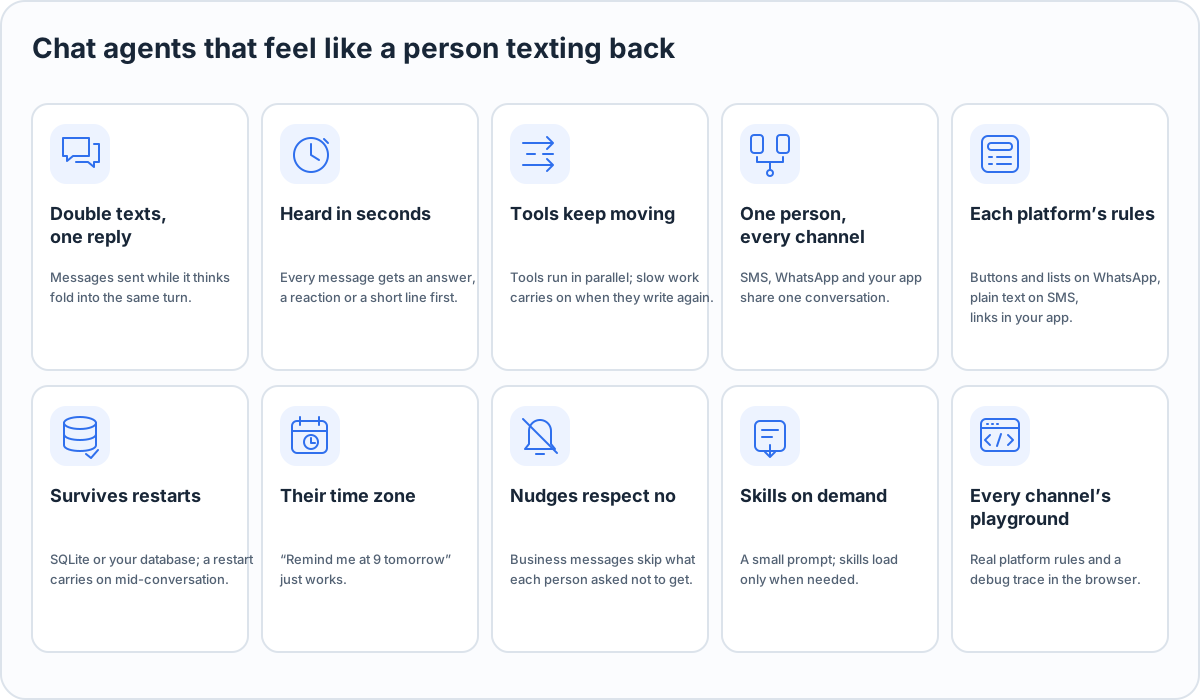
**Chat agents that feel like a person texting back**, on WhatsApp, SMS, iMessage, Telegram and your own app.
|
|
4
|
+
|
|
5
|
+
Flow Framework (`npm i @flow-engineer/flow`). Formerly chinwag: see [Moving from chinwag](#moving-from-chinwag).
|
|
6
|
+
|
|
7
|
+
[](https://github.com/flow-engineer/flow/blob/main/LICENSE)  
|
|
8
|
+
|
|
9
|
+
|
|
10
|
+
|
|
11
|
+
## Why
|
|
12
|
+
|
|
13
|
+
Agent SDKs are built for agents that work alone on long tasks. Put one in a chat and it shows:
|
|
14
|
+
|
|
15
|
+
- Someone sends "hi", then "I need to move my booking", and gets two replies, the first already wrong.
|
|
16
|
+
- A tool is slow and the chat goes silent for forty seconds.
|
|
17
|
+
- They text on SMS, then WhatsApp, and the agent has never met them.
|
|
18
|
+
- "Remind me at 9 tomorrow" never arrives, because the agent has no clock.
|
|
19
|
+
|
|
20
|
+
Flow Framework makes the chat behaviour the default. You write the agent's prompt, skills and tools; Flow Framework handles the conversation.
|
|
21
|
+
|
|
22
|
+
|
|
23
|
+
|
|
24
|
+
## Quick start
|
|
25
|
+
|
|
26
|
+
Node 22.18 or later. Your agent is TypeScript that Node runs as it is, with no build step.
|
|
27
|
+
|
|
28
|
+
```bash
|
|
29
|
+
npx @flow-engineer/flow new my-agent && cd my-agent && npm install
|
|
30
|
+
cp .env.example .env # then put one model key in it; the file says where to make one
|
|
31
|
+
npm start
|
|
32
|
+
```
|
|
33
|
+
|
|
34
|
+
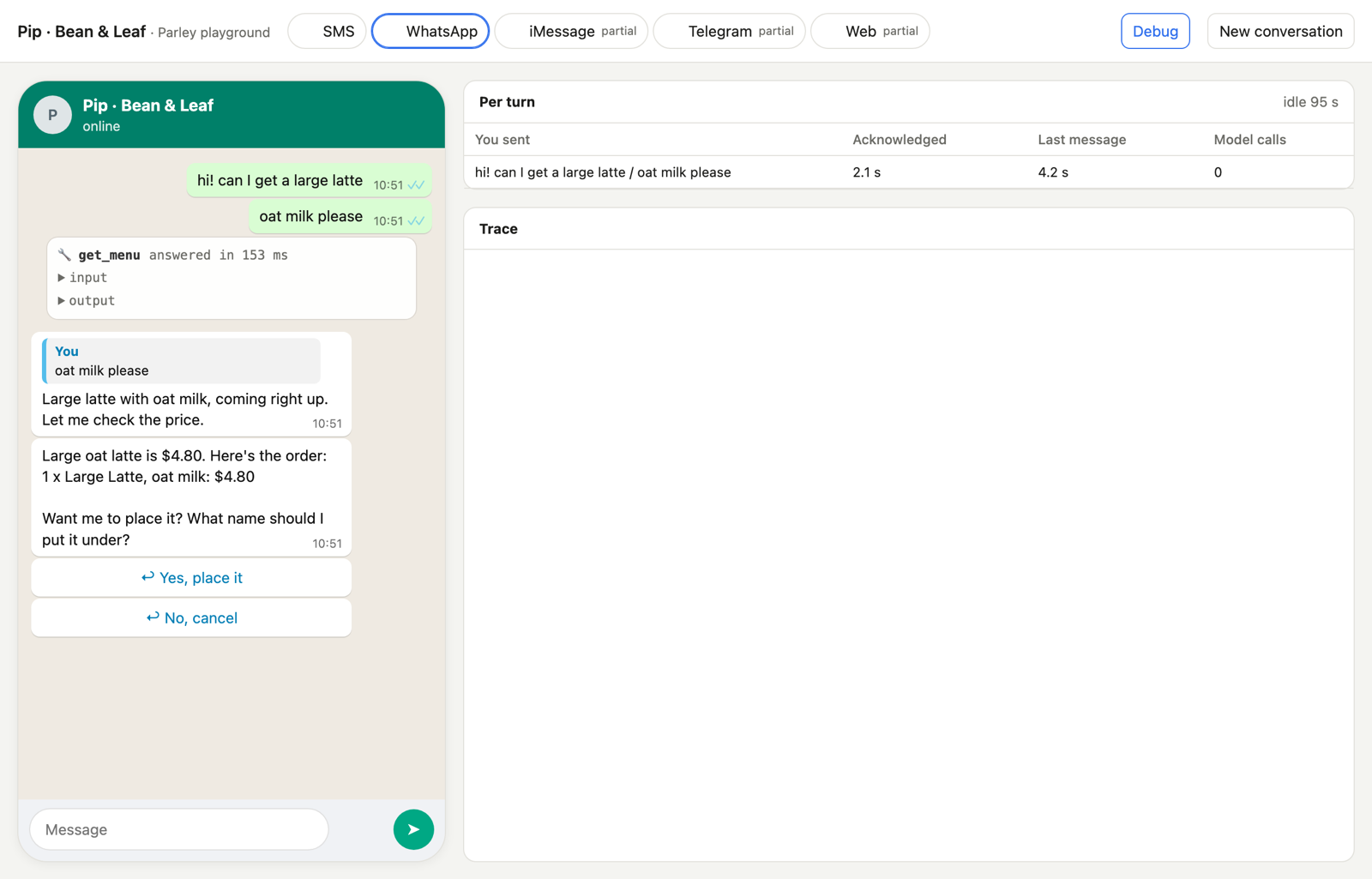
`flow new <name>` makes `./<name>/` from the café example (lowercase letters, digits and dashes). Open the link `npm start` prints and text Pip, a café ordering assistant: your starting point. Pick a platform at the top (SMS, WhatsApp, iMessage, Telegram, web), and turn on **Debug** to see every tool call and how fast each message was answered. A model call that fails (a wrong or expired key, say) shows in the chat, in Debug and on the terminal. The café's `src/agent.ts` reads its model id from `CAFE_MODEL` (default: the model for the key you set, see [Models](#models)). The new folder has the coding-agent skills in `.claude/skills/` and an `AGENTS.md` pointing at them, so you can tell Claude Code, Codex or any coding agent what to build.
|
|
35
|
+
|
|
36
|
+
### In a folder of your own
|
|
37
|
+
|
|
38
|
+
```bash
|
|
39
|
+
npm init -y && npm pkg set type=module && npm i @flow-engineer/flow
|
|
40
|
+
```
|
|
41
|
+
|
|
42
|
+
`src/main.ts`:
|
|
43
|
+
|
|
44
|
+
```ts
|
|
45
|
+
import { createAgent, openAICompatible, sms, whatsapp } from "@flow-engineer/flow";
|
|
46
|
+
import { simulators } from "@flow-engineer/flow/simulators";
|
|
47
|
+
|
|
48
|
+
// No provider connected yet: only the playground's test people reach the agent.
|
|
49
|
+
const notConnected = async () => {
|
|
50
|
+
throw new Error("not connected yet");
|
|
51
|
+
};
|
|
52
|
+
|
|
53
|
+
const play = simulators({ title: "Ada" });
|
|
54
|
+
const agent = createAgent({
|
|
55
|
+
files: { "AGENTS.md": "# Ada\n\nYou take table bookings for Luigi's, a small restaurant. Be brief and warm." },
|
|
56
|
+
model: openAICompatible({ model: "anthropic/claude-haiku-5.5" }),
|
|
57
|
+
channels: [whatsapp({ sendMessage: notConnected }), sms({ sendMessage: notConnected })],
|
|
58
|
+
testPeople: [{ name: "Sam", phone: "+15555550102" }],
|
|
59
|
+
events: [play.events],
|
|
60
|
+
});
|
|
61
|
+
const { url } = await play.listen(agent, 8788);
|
|
62
|
+
console.log(`Playground: ${url}/`);
|
|
63
|
+
```
|
|
64
|
+
|
|
65
|
+
```bash
|
|
66
|
+
echo "OPENROUTER_API_KEY=sk-or-..." > .env
|
|
67
|
+
node --env-file=.env src/main.ts
|
|
68
|
+
```
|
|
69
|
+
|
|
70
|
+
Tests run with `npx flow test` (see [Testing](#testing)); `npx flow --help` lists everything the command does.
|
|
71
|
+
|
|
72
|
+
## How a turn works
|
|
73
|
+
|
|
74
|
+
|
|
75
|
+
|
|
76
|
+
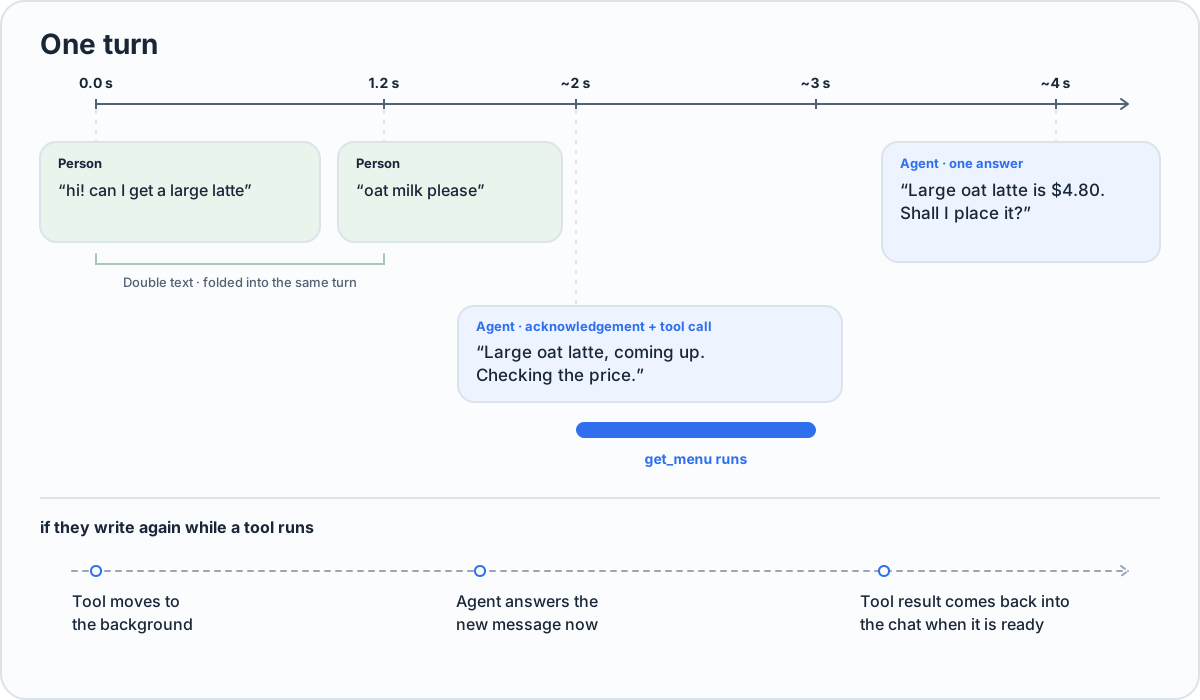
| When | Flow Framework does |
|
|
77
|
+
|---|---|
|
|
78
|
+
| They send several messages in a row | Folds them into one turn; a model step in flight restarts with all of them |
|
|
79
|
+
| They write | Shows typing at once; the first thing they get is an answer, or an acknowledgement sent with the tool calls |
|
|
80
|
+
| The agent calls tools | Runs them in parallel and waits for them, so they get one answer, not an "on it" and a result later |
|
|
81
|
+
| They write again while a tool runs | The agent reads it at once; the tool carries on in the background and its result comes back into the chat |
|
|
82
|
+
| A tool passes its limit (`deadlineMs`, 60 s by default) | It moves to the background the same way |
|
|
83
|
+
| The model writes text without sending it | It is reminded once to send it; text it already sent is not repeated |
|
|
84
|
+
|
|
85
|
+
## Build an agent
|
|
86
|
+
|
|
87
|
+
An agent is a prompt, a few skills and plain functions, so a coding agent can build and change one end to end. This is what `flow new` makes:
|
|
88
|
+
|
|
89
|
+
```
|
|
90
|
+
my-agent/
|
|
91
|
+
agent/AGENTS.md the agent's prompt
|
|
92
|
+
agent/skills/<name>/SKILL.md rules for one kind of request, loaded only when needed
|
|
93
|
+
src/tools.ts tools: plain functions with a zod input
|
|
94
|
+
src/agent.ts buildAgent(): the one place the agent is built
|
|
95
|
+
src/main.ts runs it in the playground
|
|
96
|
+
tests/scenarios/*.yaml tests: one situation each
|
|
97
|
+
tests/tools/*.yaml how each tool behaves in tests
|
|
98
|
+
```
|
|
99
|
+
|
|
100
|
+
**Tools** are functions with a zod input. Return anything; it is shown to the model as JSON.
|
|
101
|
+
|
|
102
|
+
```ts
|
|
103
|
+
import { tool, z } from "@flow-engineer/flow";
|
|
104
|
+
|
|
105
|
+
export const tools = [
|
|
106
|
+
tool({
|
|
107
|
+
name: "get_menu",
|
|
108
|
+
description: "The full menu: items, sizes with prices, milk options and allergens.",
|
|
109
|
+
input: z.object({}),
|
|
110
|
+
run: async () => ({ menu: await pos.menu() }),
|
|
111
|
+
}),
|
|
112
|
+
];
|
|
113
|
+
```
|
|
114
|
+
|
|
115
|
+
**The agent** is built in one function, which the playground and the tests both call:
|
|
116
|
+
|
|
117
|
+
```ts
|
|
118
|
+
import { fileURLToPath } from "node:url";
|
|
119
|
+
import { createAgent, openAICompatible, type EventSink, type Model, type Tool } from "@flow-engineer/flow";
|
|
120
|
+
import { tools as myTools } from "./tools.ts";
|
|
121
|
+
|
|
122
|
+
export const tools = myTools;
|
|
123
|
+
|
|
124
|
+
export function buildAgent(options: { model?: Model; events?: EventSink[]; tools?: Tool[] } = {}) {
|
|
125
|
+
return createAgent({
|
|
126
|
+
dir: fileURLToPath(new URL("../agent", import.meta.url)),
|
|
127
|
+
model: options.model ?? openAICompatible({ model: "anthropic/claude-haiku-5.5" }),
|
|
128
|
+
tools: options.tools ?? myTools,
|
|
129
|
+
events: options.events ?? [],
|
|
130
|
+
});
|
|
131
|
+
}
|
|
132
|
+
```
|
|
133
|
+
|
|
134
|
+
**The playground** serves it in every simulator:
|
|
135
|
+
|
|
136
|
+
```ts
|
|
137
|
+
import { simulators } from "@flow-engineer/flow/simulators";
|
|
138
|
+
import { buildAgent } from "./agent.ts";
|
|
139
|
+
|
|
140
|
+
const play = simulators({ title: "My agent" });
|
|
141
|
+
await play.listen(buildAgent({ events: [play.events] }), 8788);
|
|
142
|
+
```
|
|
143
|
+
|
|
144
|
+
The playground plays only the test people you declare (`testPeople: [{ name, phone }]`) on the agent's own channels. A test person is a real person to the agent: the same identity, `resolve` and history as if they wrote from their phone, one conversation on every channel, and "Clear history" to start again. Replies go back where the person last wrote from, the playground or the real channel. The playground's Person tab moves the agent's clock (`simulators({ clock: playgroundClock() })`, with `createAgent({ now: clock.now })`), lists what is scheduled or held for them, sets their time zone and quiet hours, and sends nudges with every field the API takes. Locally it answers only on localhost, and its API only its own page, so a site you visit cannot send it messages. On a deployed agent, mount `play.handler(agent, { token })`: it refuses requests without the token (at least 32 characters), swaps `?token=` for a cookie on the playground's path, and limits wrong tries.
|
|
145
|
+
|
|
146
|
+
`AGENTS.md` says what the agent is for and what it may and may not do. Leave messaging out of it: Flow Framework adds how to talk on each channel (its send tool, reactions, formatting, acknowledging first). A skill's `SKILL.md` starts with a `name` and `description`; the agent sees every description and loads a skill when it needs it (`inlineSkills: true` puts them all in the prompt instead).
|
|
147
|
+
|
|
148
|
+
## Channels and people
|
|
149
|
+
|
|
150
|
+
|
|
151
|
+
|
|
152
|
+
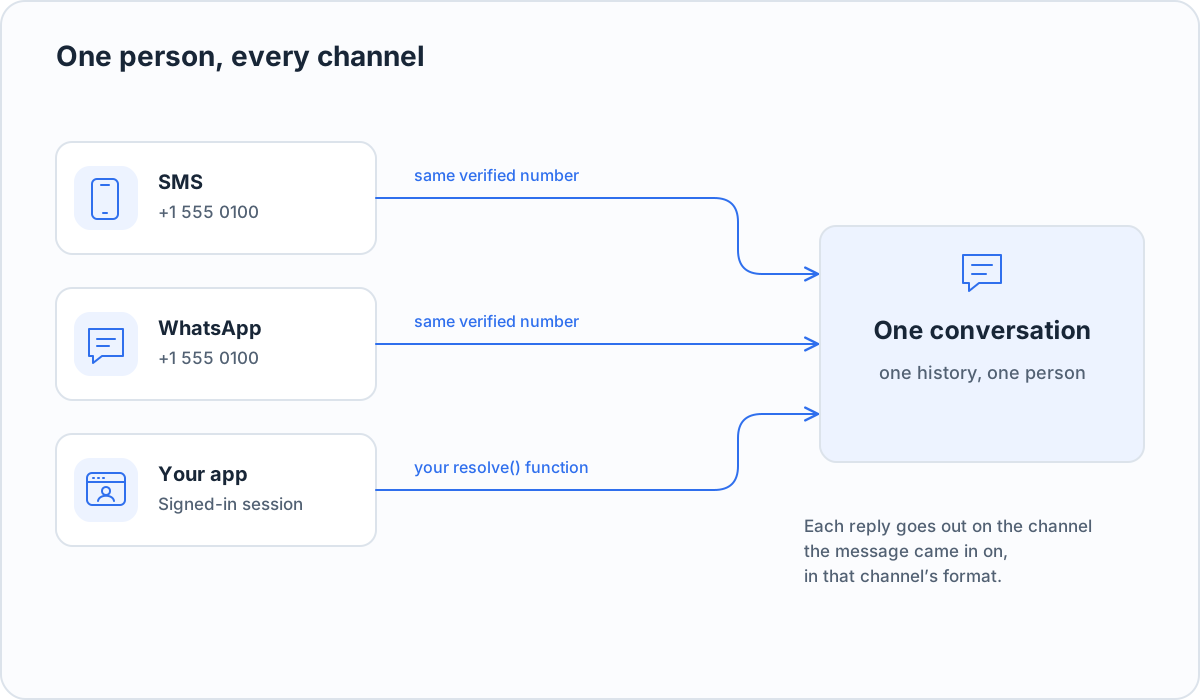
A channel is a definition: Flow Framework knows the platform's rules, your provider only says how to send.
|
|
153
|
+
|
|
154
|
+
```ts
|
|
155
|
+
const wa = whatsapp({
|
|
156
|
+
sendMessage: (to, m) => api.send(to, m), // m: { text, replyTo?, buttons?, list?, link?, image? }
|
|
157
|
+
react: (to, id, emoji) => api.react(to, id, emoji),
|
|
158
|
+
});
|
|
159
|
+
const text = sms({ sendMessage: (to, m) => smsApi.send(to, m.text) });
|
|
160
|
+
const app = customUI("app", {
|
|
161
|
+
params: { app_link: z.string().describe("A link a tool result gave you") },
|
|
162
|
+
instructions: "Only fill app_link with a URL from a tool result; never make one up.",
|
|
163
|
+
sendMessage: (to, m) => myApp.push(to, m), // m.text, m.app_link
|
|
164
|
+
});
|
|
165
|
+
|
|
166
|
+
const agent = createAgent({
|
|
167
|
+
dir, model, tools,
|
|
168
|
+
channels: [wa, text, app],
|
|
169
|
+
database: sqlite("data/agent.db"),
|
|
170
|
+
resolve: ({ channel, address }) => members.idFor(channel, address),
|
|
171
|
+
timeZone: "America/New_York",
|
|
172
|
+
});
|
|
173
|
+
await agent.resume();
|
|
174
|
+
await agent.message({ channel: "whatsapp", from: "+15550100100", message: "hi" });
|
|
175
|
+
```
|
|
176
|
+
|
|
177
|
+
- **Each platform's rules are built in:** WhatsApp buttons, lists, replies, reactions and its 24-hour window; SMS as plain text in segments; your app's own fields. Features your provider lacks are never offered to the model.
|
|
178
|
+
- **One person, one conversation.** The same number on SMS and WhatsApp is one person, however each provider writes it (`+1 555 010 0100`, `15550100100`: both are `+15550100100`), also when their first messages on both arrive at once. If your SMS provider gives national numbers (`098765 43210`), set `createAgent({ defaultCountryCode: "+91" })`: on every phone channel but WhatsApp, a number with no `+` or `00` is then read as that country's (its trunk 0 dropped), so it joins `919876543210` on WhatsApp; without it, bare digits are taken as international. Anything else (your app, your website) is joined only by your `resolve`. Flow Framework never guesses. A tool sees who the person is as `context.person`, the stable id to key their data by: `key:<your resolve's value>`, else `phone:<E.164>` (`phone:+15550100100`), else `<channel>:<address>`. `context.key` is your `resolve`'s value as it returned it (`customer-7`), or null when the person is known only by phone or channel, so `members.get(context.key)` finds them.
|
|
179
|
+
- **The agent gets one send tool per channel** (`send_sms`, `send_whatsapp`, `send_app`) and answers each message where it came in. `instructions` guide the agent on that channel only.
|
|
180
|
+
|
|
181
|
+
## What the agent knows about the person
|
|
182
|
+
|
|
183
|
+
Give the agent what your business knows about someone (their account, plan, orders, preferences) with `profile`. Flow Framework offers it as a built-in tool, `get_user_profile`, which the agent calls when it needs it; it has no input, so it is always about the person in this conversation:
|
|
184
|
+
|
|
185
|
+
```ts
|
|
186
|
+
createAgent({
|
|
187
|
+
// ...
|
|
188
|
+
resolve: ({ channel, address }) => members.idFor(channel, address),
|
|
189
|
+
profile: async ({ person }) => members.profile(person), // person: what tools get as context.person
|
|
190
|
+
});
|
|
191
|
+
```
|
|
192
|
+
|
|
193
|
+
A tool of yours named `get_user_profile` is used instead. In `flow test` runs the profile is played by the test cloud from the scenario's `world`, like your tools, so a test never reads a real one.
|
|
194
|
+
|
|
195
|
+
`context(conversationId)` is still there for small facts at hand, added to the system prompt at the start of every turn. It runs before every reply, so a lookup in it (an API call, a slow query) delays every reply: put those in `profile` or a tool. What is the same for everyone (opening hours, policies) belongs in the agent's `AGENTS.md`.
|
|
196
|
+
|
|
197
|
+
## Time zones
|
|
198
|
+
|
|
199
|
+
Flow Framework tells the agent the time at every turn: in the person's time zone when it is known, else in the business's (`timeZone`), saying theirs is not known. A person's zone is never guessed from the business's. It is known when:
|
|
200
|
+
|
|
201
|
+
- **You set it.** Many businesses already know it: `await agent.setTimeZone({ to: { channel: "sms", address: "+15550100100" }, timeZone: "Asia/Kolkata" })`, or over HTTP (below). It answers `{ status: "set" }`, or `{ status: "refused", reason: "unknown_person" }` for someone who has never written; a name that is not an IANA zone throws.
|
|
202
|
+
- **They say it.** When they name a place for a reminder, the agent keeps their zone.
|
|
203
|
+
|
|
204
|
+
Without it, a reminder at a clock time ("at 9 tomorrow") makes the agent ask where they are first; one "in 30 minutes" needs no zone. A no-contact rule that lasts "until Friday" ends where Friday ends last (UTC-12), so it never lifts early.
|
|
205
|
+
|
|
206
|
+
## Reminders and nudges
|
|
207
|
+
|
|
208
|
+
Built in, so you don't write them as tools:
|
|
209
|
+
|
|
210
|
+
- **Scheduled messages.** People ask ("remind me at 9 tomorrow"); the agent schedules, lists and cancels them in the person's own time zone. When one is due, the agent writes it in the context of the chat.
|
|
211
|
+
- **No-contact rules.** "No promotions", "nothing before 9am": the agent keeps them per person, and they apply on every channel to everything the business starts, sent now or scheduled.
|
|
212
|
+
- **STOP, START and HELP.** On SMS (STOP; START; HELP, INFO) and WhatsApp (STOP, UNSUBSCRIBE; START), a message that is only the keyword is answered with no model call. STOP keeps a hard rule: no nudge, scheduled message or reminder goes to that person, on any channel, until they text START; the agent still answers when they write, and cannot lift it. Set the replies, or other words, with `sms(provider, { keywords: { replies: { stop, start, help } } })` (`keywords: false` turns them off); without a `help` reply the agent answers HELP. A reply left out sends nothing, for providers that send their own. Which words carriers or regulators expect differs by country (some US carrier rules expect STOPALL, UNSUBSCRIBE, CANCEL, END and QUIT too), so check your market's rules; Flow Framework's default on SMS is STOP only. For the fuller list, `sms(provider, { keywords: US_CARRIER_KEYWORDS })` (with your replies: `{ ...US_CARRIER_KEYWORDS, replies }`), or name your own words: `keywords: { stop: ["STOP", "ARRET"] }`.
|
|
213
|
+
|
|
214
|
+
Your `intercept` sees these words first, with `message.keyword` set to `"stop"`, `"start"` or `"help"` (`null` for any other message), so an agent that keeps its own opt-out state can update it. `message.channel` is the channel every message came in on, by its name in `channels`. Flow Framework keeps or lifts the STOP whatever the hook returns, and also when it throws; a reply the hook returns goes instead of Flow Framework's, never both. The keyword and its reply are kept in the history and the transcript, as any message answered without the model is. An agent that keeps its own opt-out for texts only:
|
|
215
|
+
|
|
216
|
+
```ts
|
|
217
|
+
const optedOutOfSms = new Set<string>();
|
|
218
|
+
createAgent({
|
|
219
|
+
// ...
|
|
220
|
+
intercept: (conversationId, text, message) => {
|
|
221
|
+
if (message.channel !== "sms") return null; // a STOP on WhatsApp is Flow Framework's alone
|
|
222
|
+
if (message.keyword === "stop") optedOutOfSms.add(conversationId);
|
|
223
|
+
if (message.keyword === "start") optedOutOfSms.delete(conversationId);
|
|
224
|
+
return null; // Flow Framework's own reply goes
|
|
225
|
+
},
|
|
226
|
+
});
|
|
227
|
+
```
|
|
228
|
+
- **Nudges, messages your business starts:**
|
|
229
|
+
|
|
230
|
+
```ts
|
|
231
|
+
await agent.nudge({ to: { channel: "whatsapp", address: "+15550100100" }, prompt: "Their order is ready for pickup." });
|
|
232
|
+
```
|
|
233
|
+
|
|
234
|
+
`text` sends it as written, `prompt` lets the agent write it (or decide not to), `template` sends a WhatsApp template with its header, body and button values (`{ name, header?, body?: [...], buttons?: [{ index, value }] }`; a declared one sent with the wrong values throws before it goes). `at` sends it later, and `idempotencyKey` makes a retry safe: the same key sends once, also from two calls at once, and every call gets the first one's result. A nudge a no-contact rule covers, or to someone who texted STOP, is dropped. `nudge()` always settles, with `status` `sent`, `silent`, `dropped`, `refused`, `failed`, `scheduled`, `held` or `expired` and a `reason`: when the model fails during a nudge, it is `failed`, and the person is sent nothing (only someone who wrote is told something went wrong).
|
|
235
|
+
|
|
236
|
+
Prefer `prompt`: the agent writes it in the context of the chat, in their language, and may hold back what no longer fits. Use `text` only where the wording must be exact (a code, a legal notice), and `template` for campaigns and notifications you set up with Meta, which go as they are.
|
|
237
|
+
|
|
238
|
+
### WhatsApp's 24-hour window
|
|
239
|
+
|
|
240
|
+
Outside it, WhatsApp delivers only templates. Declare a fallback, a template with no values that says something is waiting ("You have a new message. Reply to see it."), and a nudge still reaches the person:
|
|
241
|
+
|
|
242
|
+
```ts
|
|
243
|
+
createAgent({
|
|
244
|
+
// ...
|
|
245
|
+
templates: [
|
|
246
|
+
{ name: "message_waiting", language: "en", category: "utility", body: "You have a new message. Reply to see it." },
|
|
247
|
+
{ name: "order_shipped", language: "en", category: "utility", body: "Hi {{1}}, your order {{2}} has shipped." },
|
|
248
|
+
],
|
|
249
|
+
fallbackTemplate: { name: "message_waiting" },
|
|
250
|
+
});
|
|
251
|
+
```
|
|
252
|
+
|
|
253
|
+
- **A `prompt` nudge**: the agent is told the window is closed and may send one of your templates that says the same thing, its values filled in (`send_template`, built in).
|
|
254
|
+
- **When none fits** (or for a `text` nudge), Flow Framework sends the fallback, and the nudge is held (`held`, `window_closed`) until they reply, when the agent tells them (or the text goes as written). Past its `expiresAt` (24 hours by default) it expires.
|
|
255
|
+
- **Each fallback emits a `template.missing` event** with what the nudge said: the messages worth a template of their own.
|
|
256
|
+
|
|
257
|
+
Without a fallback, a `text` or `prompt` nudge outside the window is refused (`outside_window`). A template nudge always goes as it is. Meta decides each template's category from its text and may charge or limit it as marketing: check yours.
|
|
258
|
+
|
|
259
|
+
### Quiet hours
|
|
260
|
+
|
|
261
|
+
What the business starts waits for each person's quiet hours: 22:00 to 07:00 in their own time by default (`createAgent({ quietHours: { from: "21:00", to: "08:00" } })` to change it, `false` for none). They apply only where the person's time zone is known (see [Time zones](#time-zones)): without it nothing is held.
|
|
262
|
+
|
|
263
|
+
- **A nudge in their quiet hours is held** (`status: "held"`), and goes when the hours end or as soon as they write, whichever comes first. Everything held reaches one turn: the agent writes one short message for all of it, not a text each, after answering whatever they just asked. A `text` or template nudge goes as written.
|
|
264
|
+
- **It can go stale.** A held nudge past its `expiresAt` (default 24 hours) is dropped as `expired`; give a short one to "your table is ready". `respectQuietHours: false` sends it now, quiet hours or not, for what cannot wait (a security alert).
|
|
265
|
+
- **A scheduled nudge** (`at`) that comes due in their quiet hours moves to when they end.
|
|
266
|
+
- **Their own reminders** go at the time they asked for, quiet hours or not, unless the agent marks one as able to wait (`respect_quiet_hours` on `schedule_message`: "check for new listings and let me know"); a repeat like that skips its runs in their quiet hours.
|
|
267
|
+
- **People set their own.** "Not after 9pm" sets theirs (`set_quiet_hours`, built in), "no messages this week" pauses everything the business starts (`pause_messages`), with no model call to check either. Your backend sets or reads them too: `agent.setQuietHours({ to, quietHours })`, `agent.contact(to)`.
|
|
268
|
+
|
|
269
|
+
The contact record (`agent.contact(to)`, or `GET /people/contact`) is what the agent goes by for a person: `timeZone` and `timeZoneSource` (`business` or `person`), `quietHours` and `quietHoursSource` (`person`, `agent`, `off`, or `no_time_zone`), `stop`, `pauses` and `topics` (what they asked not to be messaged about, in their words).
|
|
270
|
+
|
|
271
|
+
Rules on when marketing may be sent differ by country, and by US state: check yours. US telemarketing rules, as far as we know, allow calls and texts only from 8am to 9pm the recipient's time, which is narrower than the default.
|
|
272
|
+
|
|
273
|
+
### Nudges over HTTP
|
|
274
|
+
|
|
275
|
+
When the system that decides to nudge is a separate service, mount `nudgeHandler` in the agent's server and call it over HTTP. It is a plain `(req, res)` handler; hand it the requests under its `base` (`/nudges` by default; anything else gets 404). It needs a token of at least 32 characters, from a secret, or it throws at setup:
|
|
276
|
+
|
|
277
|
+
```ts
|
|
278
|
+
import { createServer } from "node:http";
|
|
279
|
+
import { nudgeHandler } from "@flow-engineer/flow";
|
|
280
|
+
|
|
281
|
+
const nudges = nudgeHandler(agent, { token: process.env.NUDGE_TOKEN! });
|
|
282
|
+
createServer((req, res) => {
|
|
283
|
+
if (req.url?.startsWith("/nudges")) return nudges(req, res);
|
|
284
|
+
// ... your webhooks
|
|
285
|
+
}).listen(3000);
|
|
286
|
+
```
|
|
287
|
+
|
|
288
|
+
- `POST /nudges` with `{ to: { channel, address }, text | prompt | template, at?, idempotency_key?, respect_quiet_hours?, expires_at? }`: exactly one of `text`, `prompt` or `template`, as in `agent.nudge()`; `at` is milliseconds since the epoch; unknown fields are refused; at most 16 KB. It answers `202 { id, status, reason? }` as soon as the nudge is recorded, without waiting for the send or the agent's turn: usually `queued`. What is decided as it is recorded is in that answer too, still a 202, since it is the nudge's state and not an error: `refused` (`unknown_person`, with `id` `""` since nothing is recorded; `outside_window`), `dropped` (they texted STOP, or paused messages), `held` (their quiet hours) or `scheduled`. A bad body, a channel the agent does not have, or a declared template's wrong values get `400 { error }`.
|
|
289
|
+
- `GET /nudges/<id>`: `200 { id, status, reason? }`, its state now: `queued`, `sent`, `silent`, `dropped`, `refused`, `failed`, `scheduled`, `held` or `expired`. An id it never recorded gets 404.
|
|
290
|
+
- The same `idempotency_key` returns the first nudge's id and its state now, and sends once.
|
|
291
|
+
- Every request needs `Authorization: Bearer <token>`, compared in constant time; wrong tokens are limited per address (10 in 15 minutes, then 429), as on the playground. Answers are JSON with `cache-control: no-store`. Each accepted nudge is logged (id, status, channel, kind, time and the caller's IP address), never its text or the token.
|
|
292
|
+
|
|
293
|
+
```sh
|
|
294
|
+
curl -s -X POST https://agent.example.com/nudges \
|
|
295
|
+
-H "Authorization: Bearer $NUDGE_TOKEN" -H "content-type: application/json" \
|
|
296
|
+
-d '{"to":{"channel":"whatsapp","address":"+15550100100"},"prompt":"Their order is ready for pickup.","idempotency_key":"order-1042-ready"}'
|
|
297
|
+
# {"id":"n_3f9c2a1b","status":"queued"}
|
|
298
|
+
curl -s https://agent.example.com/nudges/n_3f9c2a1b -H "Authorization: Bearer $NUDGE_TOKEN"
|
|
299
|
+
# {"id":"n_3f9c2a1b","status":"sent"}
|
|
300
|
+
```
|
|
301
|
+
|
|
302
|
+
What you know about people goes the same way, for a business that keeps it in its own database: mount `peopleHandler(agent, { token })` and
|
|
303
|
+
|
|
304
|
+
- `PUT /people/time-zone` with `{ to: { channel, address }, time_zone }`;
|
|
305
|
+
- `PUT /people/quiet-hours` with `{ to, quiet_hours: { from, to } | "off" | null }` (null: back to the agent's);
|
|
306
|
+
- `GET /people/contact?channel=&address=`: their contact record (below).
|
|
307
|
+
|
|
308
|
+
Each answers `200`, or `404 { status: "refused", reason: "unknown_person" }` for someone who has never written, or `400 { error }` (a name that is not a time zone, hours that are not `HH:MM`).
|
|
309
|
+
|
|
310
|
+
```sh
|
|
311
|
+
curl -s -X PUT https://agent.example.com/people/time-zone \
|
|
312
|
+
-H "Authorization: Bearer $NUDGE_TOKEN" -H "content-type: application/json" \
|
|
313
|
+
-d '{"to":{"channel":"sms","address":"+15550100100"},"time_zone":"Asia/Kolkata"}'
|
|
314
|
+
# {"status":"set"}
|
|
315
|
+
```
|
|
316
|
+
|
|
317
|
+
The contract is [`spec/nudges.openapi.yaml`](spec/nudges.openapi.yaml). In code, `agent.recordNudge(input)` is the same early answer and `agent.nudgeState(id)` the same read.
|
|
318
|
+
|
|
319
|
+
## State, restarts and hosting
|
|
320
|
+
|
|
321
|
+
- Everything is stored as it happens: history, messages not yet handled, background tools, schedules. SQLite is built in (`sqlite("file.db")`; in memory by default). Postgres: `postgres(pool)` over your own node-postgres pool. Any other engine: implement the three-method `Database` interface, or pass a whole `store` of your own.
|
|
322
|
+
- After a restart, `await agent.resume()` carries on: cut-off turns run again, and background tools that were running are reported as interrupted, never silently rerun. A tool's `context.idempotencyKey` is the same when the agent calls it again with the same input in that turn, so your backend can do it once; `context.callId` and `context.signal` (aborted when the person is forgotten) are there too.
|
|
323
|
+
- Pass the provider's own id as `messageId` to `agent.message()`: a webhook the provider sends again is taken once. Ids are kept 7 days (`keepMessageIdsDays`); once an hour one runner deletes older ones, a batch at a time, on the scheduled messages' timer.
|
|
324
|
+
- Run one copy of an agent per database. Scheduled messages, upkeep and a provider's retried webhooks are claimed in the database, so they happen once whichever copy takes them; a conversation, though, lives in one process (its turn, folded double texts, background tools), and two copies taking messages for the same conversation would run overlapping turns. On a platform that adds instances under load, set it to exactly one instance, kept warm, with CPU always on, and use a durable `database`.
|
|
325
|
+
- `agent.status()` says whether anything is running and for how long it has been idle, so your platform can stop idle agents and start them on the next message.
|
|
326
|
+
- Every message, turn, model call (tokens and cost), tool and schedule is an event. Send events wherever you like; `jsonlSink(path)` writes them to a file. An `EventSink` is a function that gets each event (`{ type, conversationId, at, ... }`) and must not throw:
|
|
327
|
+
|
|
328
|
+
```ts
|
|
329
|
+
const log: EventSink = (event) => console.log(event.type, event.conversationId);
|
|
330
|
+
createAgent({ /* ... */ events: [log] });
|
|
331
|
+
```
|
|
332
|
+
- Traces: with `FLOW_FRAMEWORK_TRACES_KEY` set, every turn is posted as an OTLP/JSON trace to `<url>/v1/traces`, where the URL is `FLOW_FRAMEWORK_TRACES_URL`, else https://flow.engineer/observe (the trace key is made there). `FLOW_FRAMEWORK_TRACES_CONTENT=1` adds what was written; without it, metadata only. Under `flow test` every trace is marked as a test's (`chinwag.run_kind` "test" and the session as `chinwag.test.session`; otherwise `chinwag.run_kind` is "production"), so the dashboard can keep tests apart from real conversations.
|
|
333
|
+
|
|
334
|
+
## Testing
|
|
335
|
+
|
|
336
|
+
Write tests as situations, not scripts. A model plays the person, another plays your tools from the scenario's world, and a judge grades the run.
|
|
337
|
+
|
|
338
|
+
```yaml
|
|
339
|
+
id: latte-correction
|
|
340
|
+
channels: [whatsapp]
|
|
341
|
+
person:
|
|
342
|
+
persona: Sam, in a hurry; types in short bursts.
|
|
343
|
+
goal: Get a large oat latte for pickup, under the name Sam.
|
|
344
|
+
opening:
|
|
345
|
+
- say: "can i get a large latte"
|
|
346
|
+
- say: "oat milk actually"
|
|
347
|
+
after_ms: 1200
|
|
348
|
+
world: The point of sale is slow this morning, but orders go through.
|
|
349
|
+
expect:
|
|
350
|
+
outcome:
|
|
351
|
+
- Exactly one order is placed, for one large latte with oat milk.
|
|
352
|
+
judge:
|
|
353
|
+
- The agent asks Sam to confirm before placing the order.
|
|
354
|
+
```
|
|
355
|
+
|
|
356
|
+
`expect.calls` and `expect.never` name tools that must or must not be called, checked by code from the recorded calls. `now` and `timezone` set the test's clock, and dates in test files are written against it (`{{now + 1d | date}}`), so they never go stale ([coding-agents/test-skill.md](coding-agents/test-skill.md)). `tests/tools/*.yaml` describe how each tool behaves (normal, slow, each error). Run the suite from the agent's folder:
|
|
357
|
+
|
|
358
|
+
```bash
|
|
359
|
+
npx flow test --cloud https://flow.engineer/observe --synthetic --runs 3 --only latte-correction
|
|
360
|
+
```
|
|
361
|
+
|
|
362
|
+
Your agent stays on your machine with its own model and key; the test cloud ([get one](#get-a-test-cloud)) plays the person and the tools and judges each run. The cloud is a hosted service, not part of this package. The command prints pass or fail per run, with the judge's reasons, the cost, and a link to watch each conversation. Before anything is sent it reads every test file as the cloud does, and a mistake stops it with the file and line (`tests/scenarios/latte-correction.yaml:3: person.goal: missing`).
|
|
363
|
+
|
|
364
|
+
Exit status:
|
|
365
|
+
|
|
366
|
+
| Exit | Meaning |
|
|
367
|
+
|---|---|
|
|
368
|
+
| 0 | Every run passed. |
|
|
369
|
+
| 1 | A run failed. Or nothing was sent: a wrong flag, a test file that does not parse, no `FLOW_FRAMEWORK_CLOUD_KEY`; the message is printed on its own. |
|
|
370
|
+
| 2 | The connection, the tunnel or the stream failed (before or after the session opened), the cloud answered 5xx or no JSON, the cloud ended the session for its own failure, or runs errored (the cloud could not play or judge them) and none failed. |
|
|
371
|
+
| 3 | The cloud refused: the open (a bad or wrong key, 401/403; an invalid request, 400; busy, 429 `rate_limited`; the spend cap, 429 `spend_cap`; 503 `capacity`), or it ended the session for the spend cap or capacity. |
|
|
372
|
+
| 130 | Interrupted (Ctrl-C). |
|
|
373
|
+
|
|
374
|
+
A busy cloud's refused open (429 other than the spend cap, or 503 `capacity`) with a Retry-After of 60 s or less is sent once more after it, with one line saying so; the spend cap never is. On a cloud that resumes, a dropped stream is opened again for up to 2 minutes, picking up after the last command. On a cloud that can re-open, a session the cloud lost is opened once more for only the runs with no result (the log names them, since they are played and paid for again), and the report covers both sessions with both dashboard links. If the tunnel, the stream, or the connection fails after the session has opened, it exits 2: the runs that had already finished are printed, then `N of M runs finished before: <reason>`, then the dashboard link. Ctrl-C prints that same partial report, says the cloud keeps playing until it is stopped from the dashboard, and exits 130.
|
|
375
|
+
|
|
376
|
+
Each run's line carries its id (`FAIL latte-correction #1 (whatsapp) trn_…: 6 turns, …`). `--dotenv <path>` reads the environment from that file instead of the folder's `.env` (variables already set still win; no value is printed), and `--verbose` also prints slow event uploads.
|
|
377
|
+
|
|
378
|
+
`--json` prints one JSON document on stdout when the command ends, on every exit once its flags are read; every other line goes to stderr:
|
|
379
|
+
|
|
380
|
+
```json
|
|
381
|
+
{
|
|
382
|
+
"version": 1, "outcome": "failed", "exitCode": 1,
|
|
383
|
+
"sessionId": "tse_…", "agent": "agt_…", "dashboard": "https://…", "suiteHash": "…",
|
|
384
|
+
"error": null,
|
|
385
|
+
"counts": { "runs": 2, "passed": 1, "failed": 1, "errored": 0, "notPlayed": 0 },
|
|
386
|
+
"costUsd": { "agent": 0.0123, "test": 0.0456 },
|
|
387
|
+
"runs": [
|
|
388
|
+
{ "runId": "trn_…", "scenario": "latte-correction", "channel": "whatsapp", "run": 1, "verdict": "failed",
|
|
389
|
+
"error": null, "ended": "goal_met", "turns": 6, "watch": "https://…",
|
|
390
|
+
"failedChecks": [{ "kind": "judge", "text": "The agent asks Sam to confirm before placing the order.", "reason": "…" }] }
|
|
391
|
+
]
|
|
392
|
+
}
|
|
393
|
+
```
|
|
394
|
+
|
|
395
|
+
`outcome` is `passed` (exit 0), `failed` or `invalid` (1), `errored` or `transport` (2), `refused` (3) or `interrupted` (130). A run's `verdict` is `errored` whenever the cloud names an `error` for it (such as `judge_failed`, `simulator_failed` or `spend_cap`), whatever it `ended` as: the cloud could not play or judge it, so it says nothing about the agent. Its line reads `ERROR` instead of `PASS` or `FAIL`, and the run's `error` is that code (else `null`). `error` is `{ "message", "status", "type", "retryAfterSeconds" }` when the session did not finish (`type` is the cloud's code, such as `spend_cap`; the others are `null` when it did not say).
|
|
396
|
+
|
|
397
|
+
`--only latte-correction,order-fails` runs only those scenarios (file names without `.yaml`); every tool file still goes. Once the session has opened, every exit (0, 1, 2, 3 or 130) writes `.flow/last-session.json` in the agent's folder and prints its path; `flow new` git-ignores `.flow/`. It holds what each run ended as and the judge's reasons, never the messages (a reason can quote one, which is why the file stays on your machine; the suite is synthetic by `--synthetic`):
|
|
398
|
+
|
|
399
|
+
```json
|
|
400
|
+
{
|
|
401
|
+
"sessionId": "…", "agent": "agt_…", "dashboard": "https://…", "suiteHash": "…", "endedAt": "2026-10-16T09:12:03.000Z",
|
|
402
|
+
"ended": "finished",
|
|
403
|
+
"only": null,
|
|
404
|
+
"runs": [
|
|
405
|
+
{ "scenario": "latte-correction", "channel": "whatsapp", "run": 1, "runId": "trn_…", "verdict": "failed",
|
|
406
|
+
"failedChecks": [{ "kind": "judge", "text": "The agent asks Sam to confirm before placing the order.", "reason": "…" }] }
|
|
407
|
+
]
|
|
408
|
+
}
|
|
409
|
+
```
|
|
410
|
+
|
|
411
|
+
`ended` is `finished`, `stopped` (the session broke off or the cloud stopped it) or `interrupted`. `agent` is the cloud's id for the agent (a hosted cloud names it), which `flow show` reads. `only` is the scenarios the session was limited to, `null` for the whole suite. `verdict` is `passed`, `failed`, `errored` (the cloud could not play or judge the run) or `not_played` (the session ended first; its `runId` is `null`).
|
|
412
|
+
|
|
413
|
+
`flow show <run-id>` prints one run's record from the cloud, read with `FLOW_FRAMEWORK_CLOUD_KEY`: the verdict, every check with the judge's reason, then the conversation in time order with each tool call the simulator played (its input, output and what it changed). `flow show last` picks the first run in `.flow/last-session.json` that did not pass (its first run when all passed) and names the others. `--json` prints the record exactly as the cloud answered it. It exits 0 when it printed; 1 for a wrong flag, no key or last session, no such run (404) or one past the 30 days runs are kept (410); 2 when the cloud did not answer or answered 5xx; 3 when it refused the key (401, 403) or is busy (429).
|
|
414
|
+
|
|
415
|
+
`--failed` runs again only the scenarios that did not pass in that file (failed, errored or not played), on every channel each plays: a scenario's channels are part of its file, so one channel cannot be picked alone. It goes with `--runs`; with `--only` it stops and says to pick one, since the two would each pick the scenarios. With nothing to run again it prints `Nothing failed in the last session (<id>).` and exits 0 (and says when that session ran only some scenarios); with no file it says to run `flow test` first and exits 1. The loop, for you or a coding agent:
|
|
416
|
+
|
|
417
|
+
```bash
|
|
418
|
+
npx flow test --synthetic # the whole suite
|
|
419
|
+
# fix what failed
|
|
420
|
+
npx flow show last # why: the judge's reasons, the conversation and the tool calls
|
|
421
|
+
npx flow test --synthetic --failed # only what did not pass; again until it exits 0
|
|
422
|
+
npx flow test --synthetic # the whole suite once more before you finish
|
|
423
|
+
```
|
|
424
|
+
|
|
425
|
+
### Get a test cloud
|
|
426
|
+
|
|
427
|
+
1. Sign in at https://flow.engineer/observe (Google, GitHub or an email link).
|
|
428
|
+
2. Workspace → New agent.
|
|
429
|
+
3. On the agent's Developers page, "Make a CI key". It starts with `oci_` and is shown once.
|
|
430
|
+
4. Put it in the agent's `.env` as `FLOW_FRAMEWORK_CLOUD_KEY` (never on the command line).
|
|
431
|
+
5. `npx flow test --cloud https://flow.engineer/observe --synthetic` from the agent's folder (`--cloud` is that address by default).
|
|
432
|
+
|
|
433
|
+
Your agent runs on your machine with your own model key. The cloud's person simulator, tool simulator and judge are free up to $5 a day per workspace, with 2 sessions at once; test data only (`--synthetic`), and records are deleted after 30 days.
|
|
434
|
+
|
|
435
|
+
`--cloud` (or `FLOW_FRAMEWORK_CLOUD`) points at another test cloud. A hosted cloud takes its key in `FLOW_FRAMEWORK_CLOUD_KEY` and `--synthetic`, your attestation that the test files hold no real customer data; without the key the command stops and says where to make one.
|
|
436
|
+
|
|
437
|
+
### Test an agent you already have
|
|
438
|
+
|
|
439
|
+
An agent built on any framework is tested through an HTTP endpoint, with no rewrite. It needs a test cloud like any run (see [Get a test cloud](#get-a-test-cloud)): `FLOW_FRAMEWORK_CLOUD_KEY` and `--synthetic` for the hosted one, the default, or `--cloud` for another. From a folder with `tests/scenarios/*.yaml`, with your agent running:
|
|
440
|
+
|
|
441
|
+
```bash
|
|
442
|
+
npx @flow-engineer/flow test --agent-url http://localhost:3000/flow --cloud https://flow.engineer/observe --synthetic
|
|
443
|
+
```
|
|
444
|
+
|
|
445
|
+
Before the session opens, the command sends one `HEAD` request to the URL (never a message), and stops with "Could not reach your agent at <url>" if nothing answers; any HTTP status counts as an answer.
|
|
446
|
+
|
|
447
|
+
`flow test` runs on your machine and POSTs each of the person's messages to that URL from there, so your agent never has to be reachable from the internet (`http://localhost` is fine). The request is JSON, with `authorization: Bearer <FLOW_FRAMEWORK_AGENT_TOKEN>` when that variable is set:
|
|
448
|
+
|
|
449
|
+
```json
|
|
450
|
+
{
|
|
451
|
+
"conversationId": "whatsapp:ses_8f2a.opening-hours.whatsapp.1",
|
|
452
|
+
"messageId": "m1",
|
|
453
|
+
"channel": "whatsapp",
|
|
454
|
+
"message": { "text": "hi, what time are you open today?", "attachments": [{ "kind": "image", "mime": "image/jpeg", "name": "receipt.jpg", "data": "<base64>" }] }
|
|
455
|
+
}
|
|
456
|
+
```
|
|
457
|
+
|
|
458
|
+
Keep the conversation's history by `conversationId`, as you would per phone number. `channel` is the platform the run plays (`whatsapp`, `sms`, `imessage`, `telegram`, `web`), or the name you give with `--channel`. `message.text` is `""` when the person only sent a file; a tapped button or list row also comes as `message.choice` (`{ id, title }`), a quoted message as `message.replyTo`. Answer `200` with the replies to send, in order, in the shape a Flow Framework agent sends (`{ "type": "message", "text", "buttons"?, "list"?, "link"?, "image"?, "replyTo"? }`, `{ "type": "reaction", "emoji", "messageId" }`, `{ "type": "template", ... }`, ...); `[]` sends nothing:
|
|
459
|
+
|
|
460
|
+
```json
|
|
461
|
+
{ "replies": [{ "type": "message", "text": "We're open 8am to 6pm today.", "buttons": ["Order ahead"] }] }
|
|
462
|
+
```
|
|
463
|
+
|
|
464
|
+
A minimal server, with no dependencies (the whole file is [`examples/http-agent/server.mjs`](https://github.com/flow-engineer/flow/blob/main/examples/http-agent/server.mjs), with a test scenario beside it; it also ships in the package, in `node_modules/@flow-engineer/flow/examples/http-agent`):
|
|
465
|
+
|
|
466
|
+
```js
|
|
467
|
+
import { createServer } from "node:http";
|
|
468
|
+
|
|
469
|
+
createServer(async (req, res) => {
|
|
470
|
+
let body = "";
|
|
471
|
+
for await (const chunk of req) body += chunk;
|
|
472
|
+
const { conversationId, channel, message } = JSON.parse(body);
|
|
473
|
+
const text = await myAgent.reply(conversationId, message.text); // your framework here
|
|
474
|
+
res.writeHead(200, { "content-type": "application/json" });
|
|
475
|
+
res.end(JSON.stringify({ replies: [{ type: "message", text }] }));
|
|
476
|
+
}).listen(3000);
|
|
477
|
+
```
|
|
478
|
+
|
|
479
|
+
Each reply is checked against what the run's platform can show, as a Flow Framework agent's is: one that does not fit (buttons on SMS, text over the limit) is not sent, and the run says why. A status other than 200, a body that is not `{ "replies": [...] }` or no answer within 60 seconds (`--agent-timeout <s>`) fails that message's turn, with the reason in the run; the session goes on. A conversation's messages are sent one at a time: the next waits for the last one's answer.
|
|
480
|
+
|
|
481
|
+
Your agent's own tools run on its side, for real, so `tests/tools/*.yaml` are not used, and outcome, `calls` and `never` checks (which read simulated tool calls) see none: write what must be true as `judge` items. The agent's model cost shows as $0, since Flow Framework does not see its model calls. Not yet supported: agents that answer later through a callback instead of in the response, and the person's reactions to the agent's messages.
|
|
482
|
+
|
|
483
|
+
### Any language
|
|
484
|
+
|
|
485
|
+
The endpoint's contract is written down in [`spec/`](spec/): [`agent-endpoint.openapi.yaml`](spec/agent-endpoint.openapi.yaml) (OpenAPI 3.1: the request, the answer, statuses, timeouts, the token, and what each platform shows) with JSON Schemas for the [request](spec/request.schema.json) and the [answer](spec/response.schema.json). A coding agent can implement it in any language from those files alone.
|
|
486
|
+
|
|
487
|
+
Check an endpoint against the contract before a test run, with no cloud, no key and no model call on Flow Framework's side:
|
|
488
|
+
|
|
489
|
+
```bash
|
|
490
|
+
npx @flow-engineer/flow check-endpoint http://localhost:3000/flow [--token-env NAME] [--json]
|
|
491
|
+
```
|
|
492
|
+
|
|
493
|
+
It sends a fixed set of synthetic messages (a typed message, a double text, a photo, a tapped button quoting the agent, a message that may need no answer) and checks each answer: status 200, `{ "replies": [...] }`, every reply against the schema and what WhatsApp can show, and every id a reply names (`replyTo`, a reaction's `messageId`) one of the person's messages. One line per case; exit 0 when all pass, else 1. The token is the value of `NAME` (default `FLOW_FRAMEWORK_AGENT_TOKEN`).
|
|
494
|
+
|
|
495
|
+
The café's agent as an HTTP endpoint, with its two tools and one model through any OpenAI-compatible API (the same key variables as `openAICompatible`, `MODEL` for the model; `FAKE_MODEL=1` for a fixed reply and no model call): [`examples/http-agent-python`](examples/http-agent-python) (standard library only) and [`examples/http-agent-go`](examples/http-agent-go) (standard library only).
|
|
496
|
+
|
|
497
|
+
## Models
|
|
498
|
+
|
|
499
|
+
Any OpenAI-compatible API. With no `apiKey` or `baseURL`, `openAICompatible` uses the first key that has a value: `OPENROUTER_API_KEY` (OpenRouter), `OPENAI_API_KEY` (OpenAI), `ANTHROPIC_API_KEY` (Anthropic), then `GEMINI_API_KEY` (Gemini); with none it stops at once and names them. `MODEL` sets the model id; each key has its own default. Pass `baseURL` and `apiKey` for any other address; a local server that needs no key needs only `baseURL`. Give `contextTokens` (the model's window) and a long chat's history is kept within it: the latest messages go to every call, older ones are left out (the agent is told).
|
|
500
|
+
|
|
501
|
+
For agents with tools we recommend **Claude Haiku 5.5** (`anthropic/claude-haiku-5.5`) or **GPT-6.1 Sol** (`openai/gpt-6.1-sol`, about 3x the cost). In our tests, GPT Luna repeated tool calls and answered twice.
|
|
502
|
+
|
|
503
|
+
## `createAgent` options
|
|
504
|
+
|
|
505
|
+
| Option | What it does |
|
|
506
|
+
|---|---|
|
|
507
|
+
| `dir` | The folder with `AGENTS.md` and `skills/` |
|
|
508
|
+
| `files` | `AGENTS.md` and skills as text, instead of `dir`, where there is no folder to read |
|
|
509
|
+
| `model` | Any `Model`; `openAICompatible({ model })` for most |
|
|
510
|
+
| `tools` | Your tools |
|
|
511
|
+
| `channels` | `whatsapp()`, `sms()`, `customUI()` definitions |
|
|
512
|
+
| `resolve` | Your key for a person from a channel identity, to join channels |
|
|
513
|
+
| `database` | Where state lives (`sqlite()` in memory by default) |
|
|
514
|
+
| `store` | Instead of `database`: a store of your own that keeps the state elsewhere |
|
|
515
|
+
| `testPeople` | Who the playground may play: `[{ name, phone }]` |
|
|
516
|
+
| `fallbackTemplate` | The declared template sent when a nudge meets a closed WhatsApp window and no other fits; the nudge then waits for their reply (see [WhatsApp's 24-hour window](#whatsapps-24-hour-window)) |
|
|
517
|
+
| `templates` | The WhatsApp templates you set up with Meta (header, body, footer, buttons): each send is checked against its declaration, and the playground shows it as WhatsApp does |
|
|
518
|
+
| `transcribe` | Speech to text for voice notes, with the provider you choose |
|
|
519
|
+
| `context` | Small facts added to the system prompt at every turn; it runs before every reply, so keep lookups out of it (see [What the agent knows about the person](#what-the-agent-knows-about-the-person)) |
|
|
520
|
+
| `profile` | What your business knows about the person, as the built-in tool `get_user_profile`, called only when the agent needs it |
|
|
521
|
+
| `intercept` | Answer some messages without the model; `message.channel` is the channel it came in on, and it sees STOP, START and HELP first, marked in `message.keyword` (they are built in on SMS and WhatsApp). The message and the reply are kept in the history (the agent reads them at its next turn) and the transcript, and are `message.in` and `message.out` events marked `answered: true` |
|
|
522
|
+
| `quietHours` | Each person's quiet hours in their own time (22:00–07:00 by default; `false` for none): what the business starts waits for them (see [Quiet hours](#quiet-hours)) |
|
|
523
|
+
| `timeZone` | The business's time zone: the time the agent is told when a person's is not known (never taken as theirs; see [Time zones](#time-zones)) |
|
|
524
|
+
| `deadlineMs` | The longest a reply waits for a tool (60,000); a tool can set its own |
|
|
525
|
+
| `partialAfterMs` | How long a finished tool's result waits for the others (5,000) |
|
|
526
|
+
| `debounceMs` | Quiet time after a message before the reply starts (300) |
|
|
527
|
+
| `maxSteps` | Model steps per turn (8) |
|
|
528
|
+
| `history` | How much of a long chat each model call carries: `{ maxTokens, toolResultChars }` (60% of the model's `contextTokens`, else 50,000 tokens; tool results cut at 12,000 characters) |
|
|
529
|
+
| `inlineSkills` | Put every skill in the prompt instead of loading on demand |
|
|
530
|
+
| `shareUpdates` | Live status lines on web and app UIs (on); a string replaces the guidance |
|
|
531
|
+
| `traces` | Where traces go (from the environment by default, see above) |
|
|
532
|
+
| `events` | Where events go |
|
|
533
|
+
|
|
534
|
+
## With a coding agent
|
|
535
|
+
|
|
536
|
+
`flow new` puts the skills in your agent's `.claude/skills/`. They are also in [`coding-agents/`](https://github.com/flow-engineer/flow/tree/main/coding-agents): `skill.md` builds an agent, `tools-skill.md` writes tools and their test files, `test-skill.md` writes scenarios. The café in [`examples/cafe`](https://github.com/flow-engineer/flow/tree/main/examples/cafe) is a complete agent with tests to copy from.
|
|
537
|
+
|
|
538
|
+
## Roadmap
|
|
539
|
+
|
|
540
|
+
- **Several copies of one agent.** Each conversation owned by one copy at a time (a claim in the database, taken over when a copy stops), so an agent can run on more than one instance. Until then, run one copy (see [State, restarts and hosting](#state-restarts-and-hosting)).
|
|
541
|
+
|
|
542
|
+
## Contributing
|
|
543
|
+
|
|
544
|
+
| Folder | What it is |
|
|
545
|
+
|---|---|
|
|
546
|
+
| `src/` | The runtime (`@flow-engineer/flow`) |
|
|
547
|
+
| `simulators/` | The playground (`@flow-engineer/flow/simulators`): SMS, WhatsApp, iMessage, Telegram and web, with each platform's rules |
|
|
548
|
+
| `flow-messaging/` | Channels on Flow Messaging (`@flow-engineer/flow/flow-messaging`): WhatsApp, Telegram and SMS through one API |
|
|
549
|
+
| `testing/` | Test file formats and the `flow` command (`@flow-engineer/flow/testing`) |
|
|
550
|
+
| `examples/cafe/` | Pip, an ordering assistant, with tests |
|
|
551
|
+
| `coding-agents/` | Skills for coding agents |
|
|
552
|
+
|
|
553
|
+
To work on Flow Framework itself, start an agent inside a clone; it imports `src/` and `simulators/src/` by path, so your changes show at once:
|
|
554
|
+
|
|
555
|
+
```bash
|
|
556
|
+
git clone https://github.com/flow-engineer/flow
|
|
557
|
+
cd flow && npm ci
|
|
558
|
+
npm run new -- my-agent
|
|
559
|
+
echo "OPENROUTER_API_KEY=sk-or-..." > agents/my-agent/.env
|
|
560
|
+
cd agents/my-agent && npm start
|
|
561
|
+
```
|
|
562
|
+
|
|
563
|
+
`agents/` is git-ignored, so `git pull` never touches your agents. `npm test` runs the runtime's tests `cd simulators && npm test` the simulators' and `cd flow-messaging && npm test` the Flow Messaging channels'. Unit tests never call a real model. Read [AGENTS.md](https://github.com/flow-engineer/flow/blob/main/AGENTS.md) before contributing.
|
|
564
|
+
|
|
565
|
+
## FAQ
|
|
566
|
+
|
|
567
|
+
**Who is it for?** Anyone putting an agent in front of people in a chat: a booking assistant, a shop's order bot, a support agent. If your agent mostly talks to a person and calls tools, it is for you. If it works alone for an hour on a codebase, use a general agent SDK.
|
|
568
|
+
|
|
569
|
+
**How is it different from general agent frameworks?** Those give you an agent loop, and a chat is one more thing you build on top. Flow Framework is opinionated about chat: one actor per conversation, double texts folded into one turn, tools that never stall the chat, acknowledgements, channel rules, one person across channels, and schedules built in.
|
|
570
|
+
|
|
571
|
+
**Which channels are real?** WhatsApp, SMS and your own UI (`customUI`) have production definitions today; you plug in any provider by writing `sendMessage`. iMessage and Telegram are in the playground for now.
|
|
572
|
+
|
|
573
|
+
**Does it host my agent?** No. It runs in your Node process, on your machine or servers. You pay your model and messaging providers directly.
|
|
574
|
+
|
|
575
|
+
**Is the data mine?** Yes. State lives in your database, and events go wherever you send them.
|
|
576
|
+
|
|
577
|
+
**What does a double text do mid-reply?** While the agent is thinking, its step restarts with everything they said, so they get one reply. While a tool runs, the agent reads the new message at once and the tool carries on in the background.
|
|
578
|
+
|
|
579
|
+
## Moving from chinwag
|
|
580
|
+
|
|
581
|
+
Flow Framework was published as `chinwag` up to 0.1.13; from 0.2.0 it is `@flow-engineer/flow`, and its command is `flow`, with no change in behaviour.
|
|
582
|
+
|
|
583
|
+
1. `npm uninstall chinwag && npm i @flow-engineer/flow`
|
|
584
|
+
2. Imports: `chinwag` becomes `@flow-engineer/flow`, `chinwag/simulators` becomes `@flow-engineer/flow/simulators`, `chinwag/testing` becomes `@flow-engineer/flow/testing`. The type `ChinwagEvent` is now `FlowEvent` (the old name still works, deprecated).
|
|
585
|
+
3. The command: `npx chinwag ...` becomes `npx flow ...` (in `package.json` scripts too). `chinwag` still runs for this release and says it was renamed.
|
|
586
|
+
4. Environment: `CHINWAG_CLOUD`, `CHINWAG_CLOUD_KEY`, `CHINWAG_AGENT_TOKEN`, `CHINWAG_TRACES_KEY`, `CHINWAG_TRACES_URL` and `CHINWAG_TRACES_CONTENT` are now `FLOW_FRAMEWORK_CLOUD`, `FLOW_FRAMEWORK_CLOUD_KEY`, and so on. The old names still work; a new name wins when both are set.
|
|
587
|
+
5. Test results now go to `.flow/last-session.json`; `--failed` and `show last` still read `.chinwag/last-session.json` until the first run writes the new one. Add `.flow/` to `.gitignore`. Files the command keeps on this machine (such as a sign-in) go to `~/.config/flow-framework/`; `~/.config/chinwag/` is still read until then.
|
|
588
|
+
6. Coding-agent skills are now `flow-framework`, `flow-framework-tools` and `flow-framework-tests`: copy them again from `node_modules/@flow-engineer/flow/coding-agents/`.
|
|
589
|
+
7. Flow Messaging channels are in the package as `@flow-engineer/flow/flow-messaging` ([its README](flow-messaging/README.md)).
|
|
590
|
+
|
|
591
|
+
The test cloud, its address and its API are unchanged, and traces keep their `chinwag.*` attribute names.
|
|
592
|
+
|
|
593
|
+
## License
|
|
594
|
+
|
|
595
|
+
[MIT](https://github.com/flow-engineer/flow/blob/main/LICENSE)
|