@firstpick/pi-package-webui 0.1.9 → 0.2.1
This diff represents the content of publicly available package versions that have been released to one of the supported registries. The information contained in this diff is provided for informational purposes only and reflects changes between package versions as they appear in their respective public registries.
- package/README.md +77 -118
- package/WEBUI_TUI_NATIVE_PARITY.json +666 -0
- package/bin/pi-webui.mjs +375 -28
- package/package.json +6 -3
- package/public/app.js +802 -94
- package/public/index.html +25 -21
- package/public/styles.css +209 -82
- package/start-webui.ps1 +368 -0
- package/start-webui.sh +510 -0
- package/tests/mobile-static.test.mjs +118 -12
- package/tests/native-parity.test.mjs +148 -0
package/README.md
CHANGED
|
@@ -1,105 +1,59 @@
|
|
|
1
1
|
# @firstpick/pi-package-webui
|
|
2
2
|
|
|
3
|
-
Local browser
|
|
3
|
+
Local browser UI for [Pi coding agent](https://www.npmjs.com/package/@earendil-works/pi-coding-agent).
|
|
4
4
|
|
|
5
5
|
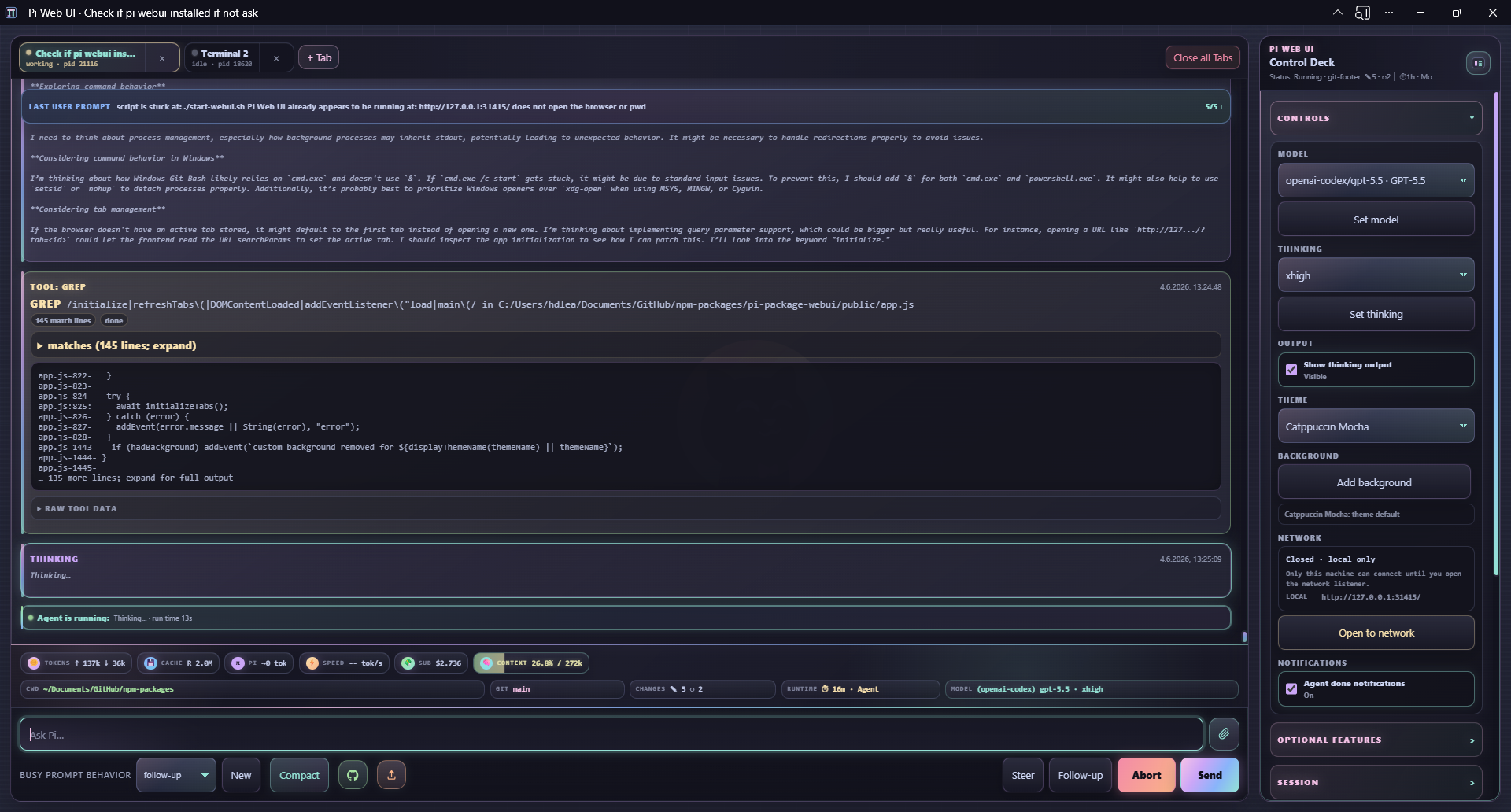
|
|
6
6
|
|
|
7
|
-
|
|
7
|
+
Pi Web UI gives you a local browser companion for Pi: multi-tab chat, streaming output, model controls, uploads, slash-command helpers, workspace navigation, and optional extension widgets.
|
|
8
8
|
|
|
9
|
-
|
|
10
|
-
- `/webui-start`: a Pi slash command that launches `pi-webui` for the current Pi working directory and opens the browser.
|
|
11
|
-
- `/webui-status`: a Pi slash command that reports the Web UI URL, online state, network exposure, and optional detailed runtime info.
|
|
12
|
-
- A no-build web app in `public/` with no runtime frontend dependencies.
|
|
13
|
-
|
|
14
|
-
> **Security:** Pi Web UI has no authentication. It can control the spawned Pi session, including any tools Pi is allowed to run. It binds to `127.0.0.1` by default; do not expose it on untrusted networks.
|
|
9
|
+
> **Security:** Pi Web UI has no authentication. It can control the spawned Pi session and run anything that session is allowed to run. It binds to `127.0.0.1` by default; only expose it on trusted networks.
|
|
15
10
|
|
|
16
11
|
## Requirements
|
|
17
12
|
|
|
18
13
|
- Node.js `>=22.19.0`
|
|
19
|
-
- Pi
|
|
14
|
+
- Pi installed and configured
|
|
20
15
|
- A modern browser with Server-Sent Events support
|
|
21
16
|
|
|
22
|
-
##
|
|
23
|
-
|
|
24
|
-
The Web UI declares its companion Pi packages as npm `optionalDependencies`. A normal npm/Pi install will install them, while minimal installs can skip them with npm's optional-dependency controls such as `npm install --omit=optional`.
|
|
25
|
-
|
|
26
|
-
At startup, the browser checks loaded Pi capabilities directly through RPC-visible commands and live widget events; it does not inspect npm package folders. That means locally symlinked/dev packages and separately installed Pi packages work as long as their commands/widgets are loaded in the active Pi tab.
|
|
27
|
-
|
|
28
|
-
The side panel shows each optional feature as enabled, disabled, or install-needed. Disabling a feature is Web UI-local and hides Web UI affordances/specialized renderers without uninstalling or unloading the underlying Pi package. Installing a missing feature is an explicit, warned action: the server runs npm install for the whitelisted package from localhost only, then prompts you to `/reload` the active Pi tab so newly installed resources can load.
|
|
29
|
-
|
|
30
|
-
Optional companions:
|
|
17
|
+
## Install
|
|
31
18
|
|
|
32
|
-
|
|
33
|
-
- `@firstpick/pi-extension-release-npm` and `@firstpick/pi-extension-release-aur` for Publish menu commands and live release widgets.
|
|
34
|
-
- `@firstpick/pi-extension-todo-progress` for the specialized todo-progress widget.
|
|
35
|
-
- `@firstpick/pi-extension-git-footer-status` and `@firstpick/pi-extension-stats` for richer Pi status/footer and stats commands.
|
|
36
|
-
- `@firstpick/pi-themes-bundle` for theme resources used by the browser theme picker and Pi themes.
|
|
37
|
-
|
|
38
|
-
## Quick start
|
|
39
|
-
|
|
40
|
-
Install the package from npm into Pi, then restart Pi so `/webui-start` and `/webui-status` are loaded:
|
|
19
|
+
Install the package into Pi:
|
|
41
20
|
|
|
42
21
|
```bash
|
|
43
22
|
pi install npm:@firstpick/pi-package-webui
|
|
44
23
|
```
|
|
45
24
|
|
|
46
|
-
|
|
25
|
+
Restart Pi after installation so the Web UI commands are loaded.
|
|
26
|
+
|
|
27
|
+
## Start from Pi
|
|
28
|
+
|
|
29
|
+
Run this inside Pi:
|
|
47
30
|
|
|
48
31
|
```text
|
|
49
32
|
/webui-start
|
|
50
33
|
```
|
|
51
34
|
|
|
52
|
-
Open the printed URL, usually <http://127.0.0.1:31415/>. The command opens
|
|
53
|
-
|
|
54
|
-
For direct development from this package directory:
|
|
35
|
+
Open the printed URL, usually <http://127.0.0.1:31415/>. The command opens your browser automatically unless you pass `--no-open`.
|
|
55
36
|
|
|
56
|
-
|
|
57
|
-
node bin/pi-webui.mjs --cwd /path/to/project
|
|
58
|
-
```
|
|
59
|
-
|
|
60
|
-
After a global npm install:
|
|
37
|
+
Check a running Web UI with:
|
|
61
38
|
|
|
62
|
-
```
|
|
63
|
-
|
|
64
|
-
|
|
39
|
+
```text
|
|
40
|
+
/webui-status
|
|
41
|
+
/webui-status detailed
|
|
65
42
|
```
|
|
66
43
|
|
|
67
|
-
|
|
68
|
-
|
|
69
|
-
- Local browser chat over Pi RPC with isolated terminal tabs; each tab has its own `pi --mode rpc` subprocess, event stream, session state, prompt draft, cwd, and activity indicator.
|
|
70
|
-
- Automatic tab naming from the first prompt on default-named tabs, plus `/name <title>` to manually sync the Pi session and browser tab name.
|
|
71
|
-
- Live transcript with streamed assistant text/thinking, Markdown output, active-run status, tool/bash cards, queue/compaction events, jump-to-latest, sticky last-prompt navigation, and abort by button, Esc, or long press.
|
|
72
|
-
- Prompt composer for prompts, steer/follow-up, busy-session behavior, model/thinking controls, manual compact/new session, uploads by button/drag/drop/paste, slash-command autocomplete, and `@` file/path references with live suggestions.
|
|
73
|
-
- Browser-native selector dialogs for `/model`, `/settings`, `/theme`, `/fork`, `/clone`, `/resume`, `/tree`, and `/scoped-models`; `/login`/`/logout` show non-secret guidance instead of accepting credentials in the browser.
|
|
74
|
-
- Session/workspace helpers for per-tab cwd changes, a clickable footer cwd picker with server-persisted fast picks, fork/clone/resume/tree navigation, and restart-safe restoration of currently open tabs.
|
|
75
|
-
- Collapsible side-panel control deck for model/thinking/settings, optional features, Codex usage, session/queue/commands/events, local-network exposure, browser notifications, and Web UI themes/custom backgrounds.
|
|
76
|
-
- Pi-style footer with token/cache/context/cost/speed telemetry, estimated Pi-context tokens, cwd/git/runtime/model/thinking metadata, and a scoped-model picker.
|
|
77
|
-
- Optional companion management with capability-based enabled/disabled/install-needed status, localhost-only warned installs, Side-panel theme picker backed by optional `@firstpick/pi-themes-bundle` themes when loaded, guided Git commit/push workflow, NPM/AUR Publish menu, todo-progress rendering, and richer git/status/stats widgets.
|
|
78
|
-
- Extension UI bridge for `notify`, `setStatus`, `setWidget`, `setTitle`, `set_editor_text`, `select`, `confirm`, `input`, and `editor`, with browser notifications when a tab needs an extension UI response and an optional side-panel toggle for agent-done notifications.
|
|
79
|
-
- Feedback reactions (`👍`, `👎`, `?`) on final assistant output plus tool/bash action cards, with queued post-run submission that asks Pi to create/update a LEARNING.
|
|
80
|
-
- Mobile/PWA support: installable app shell, service worker/icons, backend-offline recovery panel, touch-friendly composer/tabs/footer, and a static frontend with no bundler or frontend install step.
|
|
81
|
-
|
|
82
|
-
## Mobile/PWA notes
|
|
83
|
-
|
|
84
|
-
- The mobile composer starts as a one-line `Ask Pi…` input, grows with user-entered lines, and scrolls the transcript to the latest output when focused.
|
|
85
|
-
- When Pi is idle, `Steer` and `Follow-up` live inside `Actions`; while a run is active, they move back into the main composer row for quick steering/follow-up.
|
|
86
|
-
- PWA install support, blocked-tab browser notifications, and optional agent-done notifications require browser service-worker/notification support and usually HTTPS or `localhost`. Plain `http://<LAN-IP>` may show the app but may not offer install or notifications on Chrome/Safari.
|
|
87
|
-
|
|
88
|
-
## Pi slash commands
|
|
44
|
+
### `/webui-start` options
|
|
89
45
|
|
|
90
46
|
```text
|
|
91
47
|
/webui-start [port] [options] [-- <pi args...>]
|
|
92
48
|
```
|
|
93
49
|
|
|
94
|
-
Options:
|
|
95
|
-
|
|
96
50
|
```text
|
|
97
|
-
[port]
|
|
51
|
+
[port] Port shortcut
|
|
98
52
|
--host <host> HTTP bind host (default: 127.0.0.1)
|
|
99
53
|
--port <port> HTTP port (default: 31415)
|
|
100
54
|
--no-open Do not open the browser automatically
|
|
101
55
|
--no-session Start Pi RPC with --no-session
|
|
102
|
-
--name <name> Initial Web UI tab
|
|
56
|
+
--name <name> Initial Web UI tab name
|
|
103
57
|
-- <pi args...> Extra arguments forwarded to Pi RPC
|
|
104
58
|
```
|
|
105
59
|
|
|
@@ -112,33 +66,36 @@ Examples:
|
|
|
112
66
|
/webui-start --name browser -- --model anthropic/claude-sonnet-4-5:high
|
|
113
67
|
```
|
|
114
68
|
|
|
115
|
-
|
|
69
|
+
Running `/webui-start` again on the same URL restarts the server and restores currently open Web UI tabs from their session files when possible.
|
|
116
70
|
|
|
117
|
-
|
|
71
|
+
### `/webui-status` options
|
|
118
72
|
|
|
119
73
|
```text
|
|
120
|
-
/webui-status
|
|
121
|
-
/webui-status detailed
|
|
122
|
-
/webui-status detailed --port 31500
|
|
74
|
+
/webui-status [detailed] [port] [--port N] [--host HOST]
|
|
123
75
|
```
|
|
124
76
|
|
|
125
|
-
`/webui-status` reports the
|
|
77
|
+
`/webui-status` reports the URL, online state, and network exposure. `detailed` adds tabs, sessions, models/providers, and recent backend events.
|
|
78
|
+
|
|
79
|
+
## Standalone CLI
|
|
126
80
|
|
|
127
|
-
|
|
81
|
+
Use the CLI when you want to start the Web UI without first opening terminal Pi:
|
|
82
|
+
|
|
83
|
+
```bash
|
|
84
|
+
npm install -g @firstpick/pi-package-webui
|
|
85
|
+
pi-webui --cwd ~/src/my-project
|
|
86
|
+
```
|
|
128
87
|
|
|
129
88
|
```text
|
|
130
89
|
pi-webui [options] [-- <pi args...>]
|
|
131
90
|
```
|
|
132
91
|
|
|
133
|
-
Options:
|
|
134
|
-
|
|
135
92
|
```text
|
|
136
93
|
--host <host> HTTP bind host (default: 127.0.0.1)
|
|
137
94
|
--port <port> HTTP port (default: 31415)
|
|
138
95
|
--cwd <path> Default working directory for Pi tabs (default: current dir)
|
|
139
96
|
--pi <command> Pi executable to spawn (default: bundled dependency, then "pi")
|
|
140
97
|
--no-session Start Pi RPC with --no-session
|
|
141
|
-
--name <name> Initial Web UI tab
|
|
98
|
+
--name <name> Initial Web UI tab name
|
|
142
99
|
-h, --help Show help
|
|
143
100
|
-v, --version Print version
|
|
144
101
|
```
|
|
@@ -155,61 +112,63 @@ Environment variables:
|
|
|
155
112
|
|
|
156
113
|
- `PI_WEBUI_HOST`
|
|
157
114
|
- `PI_WEBUI_PORT`
|
|
158
|
-
- `PI_WEBUI_PI_BIN`
|
|
115
|
+
- `PI_WEBUI_PI_BIN`
|
|
159
116
|
|
|
160
|
-
##
|
|
161
|
-
|
|
162
|
-
The browser button runs a native local workflow in the Web UI server process:
|
|
117
|
+
## Main features
|
|
163
118
|
|
|
164
|
-
|
|
165
|
-
|
|
166
|
-
|
|
167
|
-
|
|
168
|
-
|
|
119
|
+
- Multi-tab Pi sessions with isolated processes, working directories, prompt drafts, and activity state.
|
|
120
|
+
- Streaming chat transcript with Markdown, thinking output, tool/bash cards, queue and compaction events, and abort controls.
|
|
121
|
+
- Prompt composer with uploads, drag/drop/paste, inline image support, slash-command autocomplete, and `@` file/path references.
|
|
122
|
+
- Browser dialogs for common Pi selectors such as `/model`, `/settings`, `/theme`, `/fork`, `/clone`, `/resume`, `/tree`, and `/scoped-models`.
|
|
123
|
+
- Model, thinking, session, workspace, theme, optional-feature, Codex usage, network, event, and notification controls in the side panel.
|
|
124
|
+
- Per-tab cwd changes, a clickable footer cwd picker, saved path fast picks, and restart-safe restoration of open tabs.
|
|
125
|
+
- Browser support for Pi extension UI prompts, widgets, status updates, and notifications.
|
|
126
|
+
- Feedback reactions (`👍`, `👎`, `?`) on assistant output and action cards, which can ask Pi to create or update a LEARNING.
|
|
127
|
+
- Mobile-friendly layout and PWA install support where the browser allows it.
|
|
169
128
|
|
|
170
|
-
|
|
129
|
+
## Optional companion features
|
|
171
130
|
|
|
172
|
-
|
|
131
|
+
A normal Pi/npm install includes the optional companion packages unless optional dependencies are disabled. If a feature is missing, the side panel shows it as install-needed. Installing from the side panel is localhost-only, limited to known packages, and requires reloading the active Pi tab after installation.
|
|
173
132
|
|
|
174
|
-
|
|
133
|
+
Optional companions:
|
|
175
134
|
|
|
176
|
-
|
|
177
|
-
pi
|
|
178
|
-
|
|
135
|
+
- `@firstpick/pi-prompts-git-pr` — guided Git commit/push workflow.
|
|
136
|
+
- `@firstpick/pi-extension-release-npm` — NPM publish menu and release widgets.
|
|
137
|
+
- `@firstpick/pi-extension-release-aur` — AUR publish menu and release widgets.
|
|
138
|
+
- `@firstpick/pi-extension-todo-progress` — todo-progress rendering.
|
|
139
|
+
- `@firstpick/pi-extension-git-footer-status` — richer git/footer status.
|
|
140
|
+
- `@firstpick/pi-extension-stats` — stats commands and status data.
|
|
141
|
+
- `@firstpick/pi-themes-bundle` — Web UI and Pi theme resources.
|
|
179
142
|
|
|
180
|
-
|
|
143
|
+
## Guided Git workflow
|
|
181
144
|
|
|
182
|
-
|
|
183
|
-
pi --mode rpc [--no-session] [...extra Pi args]
|
|
184
|
-
```
|
|
145
|
+
The Git workflow button runs local git commands in the active Pi working directory:
|
|
185
146
|
|
|
186
|
-
|
|
147
|
+
1. `git add .`
|
|
148
|
+
2. Send `/git-staged-msg` to Pi
|
|
149
|
+
3. Read the generated commit message files from `dev/COMMIT/`
|
|
150
|
+
4. Commit with the selected message
|
|
151
|
+
5. Run `git push`
|
|
187
152
|
|
|
188
|
-
|
|
153
|
+
This requires `/git-staged-msg` from `@firstpick/pi-prompts-git-pr`. Review the generated commit message before committing or pushing.
|
|
189
154
|
|
|
190
|
-
|
|
191
|
-
- `GET /api/tabs`, `POST /api/tabs`, `PATCH /api/tabs/:id`, and `DELETE /api/tabs/:id` for isolated Web UI terminal tabs and per-tab cwd changes; default-named tabs are auto-renamed from the first conversation prompt
|
|
192
|
-
- `GET /api/directories?tab=<tabId>&path=<path>` for the browser cwd picker
|
|
193
|
-
- `GET /api/path-suggestions?tab=<tabId>&query=<path>` for `@` file/path reference autocomplete in the prompt composer
|
|
194
|
-
- `GET /api/path-fast-picks` and `POST /api/path-fast-picks` for cwd picker fast picks persisted across browser tabs, Pi terminal tabs, and Web UI server restarts
|
|
195
|
-
- `POST /api/attachments` for browser-selected, pasted, or dropped files; files are stored under the OS temp directory and referenced in the prompt, while supported images can also be sent inline via RPC `images`
|
|
196
|
-
- `GET /api/themes` for optional theme data from `@firstpick/pi-themes-bundle` when available
|
|
197
|
-
- `GET /api/fork-messages`, `POST /api/fork`, `POST /api/clone`, `GET /api/sessions`, `POST /api/switch-session`, `GET /api/session-tree`, and `POST /api/tree-navigate` for browser-native native slash selectors
|
|
198
|
-
- localhost-only `POST /api/optional-feature-install` for explicit, warned installation of whitelisted optional feature packages
|
|
199
|
-
- `GET /api/network` and localhost-only `POST /api/network/open` for local-network exposure status/control
|
|
200
|
-
- `GET /api/webui-status?detailed=1` for slash-command status reporting
|
|
201
|
-
- `POST /api/shutdown` for localhost-only graceful restarts from `/webui-start`; restart captures detailed open-tab status first so currently open tabs can be restored with their session files
|
|
202
|
-
- HTTP endpoints for prompt/session/model/thinking/compact/git actions; tab-scoped calls use `?tab=<tabId>`
|
|
203
|
-
- `POST /api/action-feedback?tab=<tabId>` to turn queued action/final-output reactions into a Pi prompt that creates/updates a LEARNING after the run is idle
|
|
204
|
-
- `/api/events?tab=<tabId>` as a per-tab Server-Sent Events stream for Pi RPC events
|
|
205
|
-
- `/api/extension-ui-response?tab=<tabId>` for browser responses to extension UI prompts
|
|
155
|
+
## Mobile and PWA notes
|
|
206
156
|
|
|
207
|
-
|
|
157
|
+
- The mobile composer starts as a compact `Ask Pi…` input and grows as you type.
|
|
158
|
+
- Installable PWA support and notifications depend on browser support and usually require `localhost` or HTTPS.
|
|
159
|
+
- Plain `http://<LAN-IP>` can show the app, but some browsers disable PWA install and notifications there.
|
|
208
160
|
|
|
209
|
-
## Network
|
|
161
|
+
## Network safety
|
|
210
162
|
|
|
211
163
|
- Default bind is localhost-only: `127.0.0.1:31415`.
|
|
212
|
-
- The side-panel
|
|
213
|
-
- `--host 0.0.0.0` also
|
|
214
|
-
-
|
|
215
|
-
-
|
|
164
|
+
- The side-panel **Open to network** button rebinds the server to `0.0.0.0` and shows LAN URLs when available.
|
|
165
|
+
- `--host 0.0.0.0` also exposes the Web UI to the local network.
|
|
166
|
+
- Any connected browser client can control Pi and run Web UI bash actions as the Web UI process user.
|
|
167
|
+
- Treat Pi Web UI as a local companion, not a hardened multi-user web service.
|
|
168
|
+
|
|
169
|
+
## Troubleshooting
|
|
170
|
+
|
|
171
|
+
- **`/webui-start` is missing:** restart Pi after installing the package.
|
|
172
|
+
- **Wrong port or existing server:** use `/webui-status detailed`, or start on another port with `/webui-start --port 31500`.
|
|
173
|
+
- **Optional feature is disabled or missing:** check the side panel, install the companion package if needed, then run `/reload` in the active Pi tab.
|
|
174
|
+
- **PWA install or notifications are unavailable:** use `localhost` or HTTPS; browser support varies on LAN HTTP URLs.
|