@fffangchenghao/dsh-web-search 0.23.0 → 0.24.1
This diff represents the content of publicly available package versions that have been released to one of the supported registries. The information contained in this diff is provided for informational purposes only and reflects changes between package versions as they appear in their respective public registries.
- package/CHANGELOG.md +58 -0
- package/README.md +45 -17
- package/README.zh-CN.md +40 -16
- package/SECURITY.md +11 -6
- package/client.js +5 -5
- package/docs/architecture.md +181 -0
- package/docs/comparison.md +2 -0
- package/docs/engines.md +203 -0
- package/docs/images/web-tools-demo.svg +1 -1
- package/docs/latency-and-sources.md +2 -0
- package/docs/plugin-settings-form.md +160 -0
- package/docs/quickstart.md +6 -0
- package/docs/store-evidence.md +6 -1
- package/docs/troubleshooting.md +225 -0
- package/lib/proxy.d.ts +16 -3
- package/lib/proxy.js +66 -18
- package/locales/en.json +2 -2
- package/locales/zh-CN.json +2 -2
- package/package.json +13 -5
package/CHANGELOG.md
CHANGED
|
@@ -1,5 +1,63 @@
|
|
|
1
1
|
# Changelog
|
|
2
2
|
|
|
3
|
+
## 0.24.1
|
|
4
|
+
|
|
5
|
+
Documentation and metadata patch; no search or fetch behavior changed.
|
|
6
|
+
|
|
7
|
+
### Fixed
|
|
8
|
+
- **README and docs no longer imply macOS-only proxy discovery.** The English
|
|
9
|
+
and Chinese READMEs, architecture note, and troubleshooting guide now describe
|
|
10
|
+
macOS `scutil` and Windows Internet Settings as the two system-proxy sources,
|
|
11
|
+
with PowerShell checks for environment variables, registry values and port
|
|
12
|
+
reachability.
|
|
13
|
+
- **The test commands match the cross-platform script.** Docs use `npm test`
|
|
14
|
+
instead of an unquoted shell glob; CI documentation now names Ubuntu, macOS
|
|
15
|
+
and Windows.
|
|
16
|
+
- **The troubleshooting guide no longer says `lib/` is gitignored.** It is
|
|
17
|
+
committed, and the guide now says so.
|
|
18
|
+
- **The "no version is hard-coded" claim was removed.** The ecosystem table is
|
|
19
|
+
explicitly a dated snapshot, not a live leaderboard.
|
|
20
|
+
- **README links point at files that exist in the npm package.** The package now
|
|
21
|
+
ships `docs/architecture.md`, `docs/engines.md`, `docs/plugin-settings-form.md`
|
|
22
|
+
and `docs/troubleshooting.md`; the benchmark link goes to GitHub instead.
|
|
23
|
+
- **Package metadata and Settings copy were refreshed.** The npm description
|
|
24
|
+
names Windows/macOS proxy support; keywords include `windows`, `keyless`,
|
|
25
|
+
`arxiv` and `web-fetch`; the Settings title/description now names eight
|
|
26
|
+
engines and 34 sources instead of Bing/AnySearch.
|
|
27
|
+
|
|
28
|
+
**Test suite: 690 tests across 56 files** (689 pass, 1 skipped); this patch does
|
|
29
|
+
not change runtime code.
|
|
30
|
+
|
|
31
|
+
## 0.24.0
|
|
32
|
+
|
|
33
|
+
### Added
|
|
34
|
+
- **Windows system-proxy detection.** When no explicit proxy or proxy
|
|
35
|
+
environment variable is set, the plugin reads `ProxyEnable` / `ProxyServer`
|
|
36
|
+
from the current user's Windows Internet Settings (`HKCU\...\Internet
|
|
37
|
+
Settings`) with a fixed, absolute `reg.exe` probe. A bare `host:port` and the
|
|
38
|
+
`http=...;https=...` map are both accepted; SOCKS-only and PAC-only settings
|
|
39
|
+
are left alone rather than guessed. macOS `scutil` behavior is unchanged.
|
|
40
|
+
- **Windows CI.** The GitHub Actions matrix now includes `windows-latest`; the
|
|
41
|
+
install, typecheck, full test suite, build and entry-point checks all pass on
|
|
42
|
+
Windows, macOS and Ubuntu (Node 24).
|
|
43
|
+
|
|
44
|
+
### Fixed
|
|
45
|
+
- **Cross-platform test command.** `npm test` now passes a quoted glob to
|
|
46
|
+
Node's test runner instead of relying on shell expansion, which cmd.exe does
|
|
47
|
+
not perform.
|
|
48
|
+
- **Windows cache path test.** The cache-path assertion uses the platform
|
|
49
|
+
temporary directory instead of a hard-coded `/tmp` path.
|
|
50
|
+
|
|
51
|
+
### Documentation
|
|
52
|
+
- **Windows install notes.** README, Chinese README and the quickstart document
|
|
53
|
+
the identical PowerShell command, the no-native-addon requirement, automatic
|
|
54
|
+
system-proxy detection, PAC-only fallback and the `%USERPROFILE%` cache path.
|
|
55
|
+
- **Security boundary updated.** [SECURITY.md](SECURITY.md) now lists the
|
|
56
|
+
Windows registry probe alongside the macOS `scutil` probe and records its
|
|
57
|
+
fixed argv, timeout and data access.
|
|
58
|
+
|
|
59
|
+
**Test suite: 690 tests across 56 files** (689 pass, 1 skipped).
|
|
60
|
+
|
|
3
61
|
## 0.23.0
|
|
4
62
|
|
|
5
63
|
### Added
|
package/README.md
CHANGED
|
@@ -10,7 +10,7 @@
|
|
|
10
10
|
|
|
11
11
|
<p align="center">
|
|
12
12
|
<a href="https://www.npmjs.com/package/@fffangchenghao/dsh-web-search"><img src="https://img.shields.io/npm/v/@fffangchenghao/dsh-web-search.svg" alt="npm version"></a>
|
|
13
|
-
<img src="https://img.shields.io/badge/tests-
|
|
13
|
+
<img src="https://img.shields.io/badge/tests-690%20tests-brightgreen" alt="tests">
|
|
14
14
|
<img src="https://img.shields.io/badge/engines-8%2C%20zero%20API%20key-brightgreen" alt="engines">
|
|
15
15
|
<img src="https://img.shields.io/badge/node-%3E%3D22.18-blue" alt="node">
|
|
16
16
|
<img src="https://img.shields.io/badge/dsh-%3E%3D0.2.1--rc.2%20%3C0.3.0-blueviolet" alt="dsh">
|
|
@@ -27,7 +27,8 @@
|
|
|
27
27
|
- **One package, two runtimes.** DSH gets the native plugin and one `web_tools` entry; Claude Code, Codex and other MCP clients get the same keyless search through a dependency-free stdio server with `search`, `fetch`, `research` and `domain_search`. See [Cross-agent MCP](docs/cross-agent.md).
|
|
28
28
|
- **Measured in public, including the losses.** A 30-query bilingual comparison records availability, latency, unique domains, official-domain presence and every failure against keyless Firecrawl and anonymous Exa. The follow-up documents the Exa architecture difference, the 3 s CJK budget and the Rust official-source lookup. Exa is faster here; this plugin returns more distinct domains. Both test arms were keyless. The method and raw results are in [docs/comparison.md](docs/comparison.md) and a [public gist](https://gist.github.com/fangchenghao/3db9838fa98928435c1c2df38202c373).
|
|
29
29
|
- **Fetching admits failure.** Binary documents and empty 200 responses are rejected by name (`SEARCH_UNSUPPORTED`, `SEARCH_EMPTY`) instead of being returned as noise; arXiv PDF links are the deliberate exception and are read through the HTML full-text view; the direct → tunnel → render → extract ladder shares one 25 s budget and stops when there is no time left. The budget is per request — there is a regression test for exactly that.
|
|
30
|
-
- **
|
|
30
|
+
- **Windows is a first-class host.** Pure ESM, no native addon or install script; the system proxy is discovered from Windows Internet Settings, and the full suite runs on a `windows-latest` CI runner. See [Install on Windows](#windows).
|
|
31
|
+
- **690 tests across 56 files**, a committed `lib/`, declared `engines.dsh` / `engines.node`, and a [SECURITY.md](SECURITY.md) that lists every process, host and file the plugin touches.
|
|
31
32
|
- **Bilingual documentation.** This README and [中文说明](README.zh-CN.md) are maintained side by side.
|
|
32
33
|
|
|
33
34
|
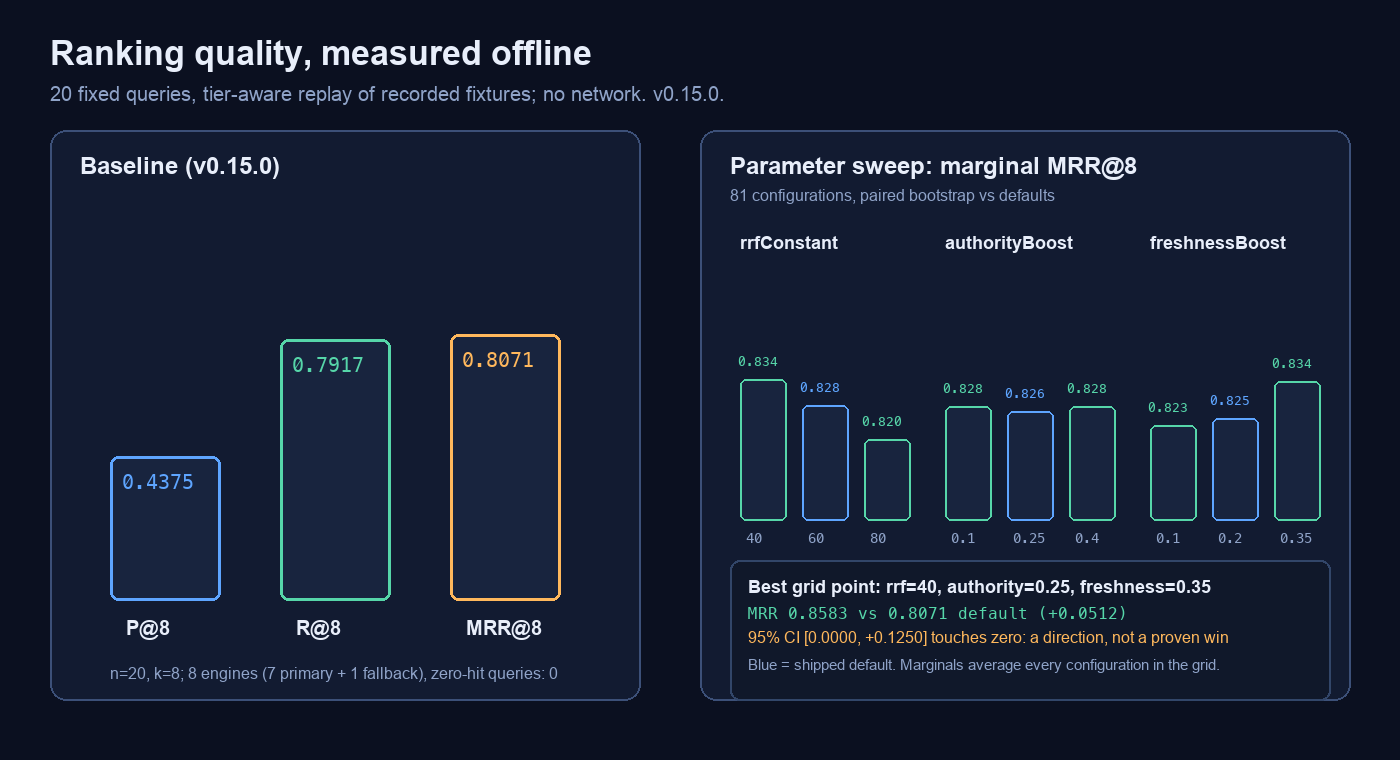
|
|
@@ -36,7 +37,7 @@ The benchmark is offline and deterministic: 20 recorded queries, precision/recal
|
|
|
36
37
|
|
|
37
38
|
## Where it stands
|
|
38
39
|
|
|
39
|
-
The web-search corner of the DSH plugin ecosystem is crowded. A
|
|
40
|
+
The web-search corner of the DSH plugin ecosystem is crowded. A dated snapshot
|
|
40
41
|
(2026-10-25; stars and npm downloads are adoption signals, not quality scores):
|
|
41
42
|
|
|
42
43
|
| | this plugin | [dsh-free-search](https://github.com/DDDMUC/dsh-free-search) | [dsh-web-search-pro](https://github.com/anweat/dsh-web-search-pro) | [modsearch](https://github.com/liustack/modsearch) | [anysearch-dsh](https://github.com/anysearch-team/anysearch-dsh) |
|
|
@@ -44,7 +45,7 @@ The web-search corner of the DSH plugin ecosystem is crowded. A fresh snapshot
|
|
|
44
45
|
| Key-free path | 8 engines, all key-free | ~30-engine free/paid chain | 5 defaults (seam, Exa, DDG, Bing, Jina) | Firecrawl + Keenable keyless defaults | 1 anonymous AnySearch API |
|
|
45
46
|
| Dedicated vertical sources | 34 (8 on by default) | 41 | platform registry, not a vertical catalog | web + X, no vertical catalog | vertical API behind AnySearch |
|
|
46
47
|
| Model-facing tools | 1 (`web_tools`, 8 actions) + 4 MCP tools | ~10 | 2 (`web_index` / `web_call`, 20 actions) | native search/fetch + skill | 5 |
|
|
47
|
-
| Tests | 56 files /
|
|
48
|
+
| Tests | 56 files / 690 cases, locally verified | no test script in `package.json` | 774 unit + 94 bench, self-reported | Vitest configured; count not published | Vitest configured; count not published |
|
|
48
49
|
| GitHub stars | 0 | 620 | 77 | 836 | 663 |
|
|
49
50
|
| npm downloads, last month | 1,087 | 52,436 | 6,420 | 43,151 | 9,251 |
|
|
50
51
|
| npm unpacked size | 1.2 MB | 0.70 MB | 3.05 MB | 0.51 MB | 0.27 MB |
|
|
@@ -55,16 +56,16 @@ read is:
|
|
|
55
56
|
- **Feature depth:** upper-middle. `dsh-free-search` has more engines and
|
|
56
57
|
verticals; `dsh-web-search-pro` has a deeper evidence/ranking pipeline and far
|
|
57
58
|
more platform backends; `modsearch` is the stronger cross-host bridge.
|
|
58
|
-
- **Engineering and verification:** near the top.
|
|
59
|
+
- **Engineering and verification:** near the top. 690 local tests, a replayable
|
|
59
60
|
ranking benchmark, declared security boundaries and one runtime dependency
|
|
60
61
|
put it alongside the best-maintained entries, while remaining much smaller
|
|
61
62
|
than the Playwright-heavy option.
|
|
62
63
|
- **Key-free + official-source correctness:** its strongest niche. The official
|
|
63
64
|
Chrome, PostgreSQL and AI Act paths and the 34-source vertical layer are not
|
|
64
65
|
common in the other plugins.
|
|
65
|
-
- **Adoption and maturity:** bottom third of this sample.
|
|
66
|
-
|
|
67
|
-
|
|
66
|
+
- **Adoption and maturity:** bottom third of this sample. At the 2026-10-25
|
|
67
|
+
snapshot the repository was four days old, had no stars and little
|
|
68
|
+
independent adoption; the current npm release is 0.24.1.
|
|
68
69
|
- **Tool-surface economy:** now competitive. 0.20.x exposes one `web_tools`
|
|
69
70
|
entry with eight actions, close to `dsh-web-search-pro`'s two tools with 20
|
|
70
71
|
actions; the legacy eight-name surface remains opt-in for old prompts.
|
|
@@ -76,7 +77,7 @@ is the compact, fully key-free option for search plus vertical lookup, research
|
|
|
76
77
|
packs and official-source correction. It is not the most popular, and it should
|
|
77
78
|
not claim to be the largest.
|
|
78
79
|
|
|
79
|
-
> The latest version and install command live on [npm](https://www.npmjs.com/package/@fffangchenghao/dsh-web-search);
|
|
80
|
+
> The latest version and install command live on [npm](https://www.npmjs.com/package/@fffangchenghao/dsh-web-search); the comparison table is a dated snapshot, not a live leaderboard. What follows starts with what this means for you; the technical detail is collected in the appendix.
|
|
80
81
|
|
|
81
82
|
## In one sentence
|
|
82
83
|
|
|
@@ -307,7 +308,7 @@ Each line is the plain version first, the technical note second. The technical n
|
|
|
307
308
|
|
|
308
309
|
13. **It works on a restricted network.**
|
|
309
310
|
With a tunnel running and set as the system proxy, nothing needs configuring. With the tunnel off, it falls back to direct requests instead of failing.
|
|
310
|
-
*Technical: proxy sources in order — the `proxy` setting, then `DSH_WEB_SEARCH_PROXY` / `HTTPS_PROXY` / `ALL_PROXY` / `HTTP_PROXY`, then macOS `scutil
|
|
311
|
+
*Technical: proxy sources in order — the `proxy` setting, then `DSH_WEB_SEARCH_PROXY` / `HTTPS_PROXY` / `ALL_PROXY` / `HTTP_PROXY`, then the OS system proxy (macOS `scutil`, Windows Internet Settings); HTTP proxies only (`CONNECT`), not `socks5://`.*
|
|
311
312
|
|
|
312
313
|
14. **Every setting is editable in the UI.**
|
|
313
314
|
Thirty controls in six groups; a save takes effect on the next search, apart from `cachePersist` and `cacheFile` (cache wiring at mount) and `toolSurface` (the tool registry is built at mount).
|
|
@@ -489,6 +490,25 @@ a `link:` if you want the profile updater to manage it:
|
|
|
489
490
|
dsh plugin --profile web add @fffangchenghao/dsh-web-search@latest
|
|
490
491
|
```
|
|
491
492
|
|
|
493
|
+
### Windows
|
|
494
|
+
|
|
495
|
+
The package has no native addon; Node 22.18+ is enough. In PowerShell the
|
|
496
|
+
install command is unchanged:
|
|
497
|
+
|
|
498
|
+
```powershell
|
|
499
|
+
dsh plugin --profile web add @fffangchenghao/dsh-web-search@latest
|
|
500
|
+
```
|
|
501
|
+
|
|
502
|
+
If `dsh` is not on `PATH`, run the same command through the DSH installation's
|
|
503
|
+
CLI, or install the npm package from the plugin manager in Settings. Restart
|
|
504
|
+
DSH once after installation.
|
|
505
|
+
|
|
506
|
+
The plugin reads the Windows system proxy from Internet Settings (the same
|
|
507
|
+
`ProxyEnable` / `ProxyServer` values Clash and other clients set) and falls
|
|
508
|
+
back to `HTTPS_PROXY` / `HTTP_PROXY` / `DSH_WEB_SEARCH_PROXY`. A PAC-only proxy
|
|
509
|
+
is not executed; set the `proxy` setting explicitly for that case. The cache
|
|
510
|
+
lives at `%USERPROFILE%\.dsh\cache\dsh-web-search\cache.json`.
|
|
511
|
+
|
|
492
512
|
The rest of this section is the source-checkout development path.
|
|
493
513
|
|
|
494
514
|
### Step 1: build
|
|
@@ -570,7 +590,7 @@ Optionally, add a config row:
|
|
|
570
590
|
|
|
571
591
|
### Step 4: restart completely
|
|
572
592
|
|
|
573
|
-
After changing code or profile config, **quit DSH entirely and open it again** (on macOS
|
|
593
|
+
After changing code or profile config, **quit DSH entirely and open it again** (on macOS press `Cmd+Q`; on Windows quit from the tray or menu; closing the window is not enough). Modules are evaluated once per process, and a running process never sees a file you edited underneath it.
|
|
574
594
|
|
|
575
595
|
Values saved from the Settings page apply immediately; only `cachePersist` and `cacheFile` need the plugin to reload.
|
|
576
596
|
|
|
@@ -1047,9 +1067,9 @@ Conclusions:
|
|
|
1047
1067
|
|
|
1048
1068
|
### Proxy
|
|
1049
1069
|
|
|
1050
|
-
Node's global `fetch` reads neither the
|
|
1070
|
+
Node's global `fetch` reads neither the OS system proxy (macOS `scutil` / Windows Internet Settings) nor `HTTPS_PROXY` — unless the process started with `NODE_USE_ENV_PROXY=1`, which cannot be switched on from inside a running process. So when a proxy is needed, the plugin speaks to it directly: send `CONNECT`, upgrade with TLS for `https:` targets, write the request by hand, and decode `Content-Length`, chunked, gzip, deflate and brotli, following up to four redirects. `307`/`308` keep the method and body; any other `3xx` downgrades a `POST` to a bodyless `GET`.
|
|
1051
1071
|
|
|
1052
|
-
Resolution order: the `proxy` setting → the environment (`DSH_WEB_SEARCH_PROXY`, `HTTPS_PROXY`, `ALL_PROXY`, `HTTP_PROXY`, either casing) → macOS `scutil --proxy
|
|
1072
|
+
Resolution order: the `proxy` setting → the environment (`DSH_WEB_SEARCH_PROXY`, `HTTPS_PROXY`, `ALL_PROXY`, `HTTP_PROXY`, either casing) → the OS system proxy (macOS `scutil --proxy` / Windows Internet Settings), adopted only if a 400 ms TCP probe connects, and cached for 60 seconds. HTTP proxies only; replace `socks5://` with the client's HTTP/mixed port. Proxying is scoped to this plugin — the rest of the app keeps its ordinary network path.
|
|
1053
1073
|
|
|
1054
1074
|
### Known limitations
|
|
1055
1075
|
|
|
@@ -1113,16 +1133,24 @@ Resolution order: the `proxy` setting → the environment (`DSH_WEB_SEARCH_PROXY
|
|
|
1113
1133
|
### Development and tests
|
|
1114
1134
|
|
|
1115
1135
|
```sh
|
|
1116
|
-
|
|
1136
|
+
npm test # the whole offline suite (one live case is skipped by default)
|
|
1117
1137
|
node --test test/proxy.test.ts # one file
|
|
1118
1138
|
npm run typecheck # tsc --noEmit
|
|
1119
1139
|
npm run build # compile src/ to lib/
|
|
1120
1140
|
npm run check # typecheck + tests
|
|
1121
1141
|
```
|
|
1122
1142
|
|
|
1123
|
-
The suite runs offline by default and passes in full; the one live paging check is skipped unless `READ_PAGE_LIVE=1`: parser tests replay captured fixtures from `test/fixtures/` (normal and empty responses for the default eight and the 26 opt-in sources), transport tests open no sockets, proxy tests cover `parseProxy`, `proxyFromEnv` and the pure response framer, time-window tests pin the date with an injected `now`, and the newer suites cover Markdown extraction (`markdown.test.ts`), batch search (`search-many.test.ts`), chunked reading (`read-page.test.ts`), the disk snapshot (`cache-persist.test.ts`), optional JS rendering (`render-js.test.ts`) and benchmark scoring/replay (`bench-metrics.test.ts`, `bench-replay.test.ts`). One live-network test in `read-page.test.ts` is skipped by default; run it with
|
|
1143
|
+
The suite runs offline by default and passes in full; the one live paging check is skipped unless `READ_PAGE_LIVE=1`: parser tests replay captured fixtures from `test/fixtures/` (normal and empty responses for the default eight and the 26 opt-in sources), transport tests open no sockets, proxy tests cover `parseProxy`, `proxyFromEnv` and the pure response framer, time-window tests pin the date with an injected `now`, and the newer suites cover Markdown extraction (`markdown.test.ts`), batch search (`search-many.test.ts`), chunked reading (`read-page.test.ts`), the disk snapshot (`cache-persist.test.ts`), optional JS rendering (`render-js.test.ts`) and benchmark scoring/replay (`bench-metrics.test.ts`, `bench-replay.test.ts`). One live-network test in `read-page.test.ts` is skipped by default; run it with:
|
|
1144
|
+
|
|
1145
|
+
```sh
|
|
1146
|
+
# macOS / Linux
|
|
1147
|
+
READ_PAGE_LIVE=1 node --test test/read-page.test.ts
|
|
1148
|
+
|
|
1149
|
+
# Windows PowerShell
|
|
1150
|
+
$env:READ_PAGE_LIVE=1; node --test test/read-page.test.ts
|
|
1151
|
+
```
|
|
1124
1152
|
|
|
1125
|
-
CI (`.github/workflows/ci.yml`) runs `npm ci`, `npm run typecheck`, `npm test` and `npm run build` on Node 24 for Ubuntu and
|
|
1153
|
+
CI (`.github/workflows/ci.yml`) runs `npm ci`, `npm run typecheck`, `npm test` and `npm run build` on Node 24 for Ubuntu, macOS and Windows, then checks that the build emitted `lib/index.js` and `lib/index.d.ts` and that both `apply` and `Config` import.
|
|
1126
1154
|
|
|
1127
1155
|
After editing `src/*.ts`, build and restart — otherwise you are still running the old code in `lib/`.
|
|
1128
1156
|
|
|
@@ -1133,7 +1161,7 @@ After editing `src/*.ts`, build and restart — otherwise you are still running
|
|
|
1133
1161
|
- [docs/architecture.md](docs/architecture.md): the module map and the data flow from the `web` service to a source list.
|
|
1134
1162
|
- [docs/engines.md](docs/engines.md): each engine's request shape, parser quirks and measured results.
|
|
1135
1163
|
- [docs/troubleshooting.md](docs/troubleshooting.md): no results, proxy not detected, provider not selected, cooldown stuck.
|
|
1136
|
-
- [bench/README.md](bench/README.md): how the 20-query retrieval benchmark records fixtures, scores them and compares versions.
|
|
1164
|
+
- [bench/README.md](https://github.com/fangchenghao/dsh-web-search/blob/main/bench/README.md): how the 20-query retrieval benchmark records fixtures, scores them and compares versions.
|
|
1137
1165
|
- [README.zh-CN.md](README.zh-CN.md): the Chinese guide, section for section.
|
|
1138
1166
|
|
|
1139
1167
|
MIT © 2026 fangchenghao. See [LICENSE](LICENSE).
|
package/README.zh-CN.md
CHANGED
|
@@ -9,7 +9,7 @@
|
|
|
9
9
|
|
|
10
10
|
<p align="center">
|
|
11
11
|
<a href="https://www.npmjs.com/package/@fffangchenghao/dsh-web-search"><img src="https://img.shields.io/npm/v/@fffangchenghao/dsh-web-search.svg" alt="npm 版本"></a>
|
|
12
|
-
<img src="https://img.shields.io/badge/tests-
|
|
12
|
+
<img src="https://img.shields.io/badge/tests-690%20tests-brightgreen" alt="测试">
|
|
13
13
|
<img src="https://img.shields.io/badge/engines-8%2C%20zero%20API%20key-brightgreen" alt="引擎">
|
|
14
14
|
<img src="https://img.shields.io/badge/node-%3E%3D22.18-blue" alt="node">
|
|
15
15
|
<img src="https://img.shields.io/badge/dsh-%3E%3D0.2.1--rc.2%20%3C0.3.0-blueviolet" alt="dsh">
|
|
@@ -26,7 +26,8 @@
|
|
|
26
26
|
- **一个包,两种运行时。** DSH 里是原生插件和唯一的 `web_tools` 入口;Claude Code、Codex 等 MCP 客户端通过零依赖的 stdio server 使用同一套免密钥搜索,提供 `search`、`fetch`、`research`、`domain_search`。见 [跨 Agent MCP](docs/cross-agent.md)。
|
|
27
27
|
- **公开测量,也公开输的地方。** 30 条中英查询对比记录可用性、延迟、独立域名、官方域名命中与每一条失败;对比对象是免 key Firecrawl 和匿名 Exa。这里 Exa 更快,本插件返回的独立域名更多;两条对比路径都未使用 key。方法和原始结果在 [docs/comparison.md](docs/comparison.md);Exa 架构差异、中文 3 秒预算和 Rust 官方源见 [延迟与官方源](docs/latency-and-sources.md)。
|
|
28
28
|
- **抓取会承认失败。** 二进制文档和「200 但正文为空」会被明确拒绝(`SEARCH_UNSUPPORTED`、`SEARCH_EMPTY`),而不是当噪音返回;arXiv 的 PDF 链接是有意保留的例外,会改读 HTML 全文;direct → tunnel → render → extract 四级阶梯共享 25 秒预算,预算不足就不再起新的一级。预算是「每次请求」而不是「插件启动时」,这点有回归测试守着。
|
|
29
|
-
- **
|
|
29
|
+
- **Windows 是一等宿主。** 纯 ESM,没有原生扩展或安装脚本;会自动读取 Windows 的 Internet 设置代理,完整测试套件也在 `windows-latest` CI 上跑通。安装见[Windows 小节](#windows)。
|
|
30
|
+
- **56 个测试文件、690 个用例**,`lib/` 产物入库,声明了 `engines.dsh` / `engines.node`,[SECURITY.md](SECURITY.md) 逐项列出插件会碰的进程、主机和文件。
|
|
30
31
|
- **双语文档。** 本文件和 [English README](README.md) 同步维护。
|
|
31
32
|
|
|
32
33
|

|
|
@@ -35,7 +36,7 @@
|
|
|
35
36
|
|
|
36
37
|
## 它在同类里的位置
|
|
37
38
|
|
|
38
|
-
DSH 插件生态里的「联网搜索」已经很挤。下面是一张 2026-10-25
|
|
39
|
+
DSH 插件生态里的「联网搜索」已经很挤。下面是一张 2026-10-25 的历史快照
|
|
39
40
|
(stars 和 npm 下载量是采用度信号,不是质量分数):
|
|
40
41
|
|
|
41
42
|
| | 本插件 | [dsh-free-search](https://github.com/DDDMUC/dsh-free-search) | [dsh-web-search-pro](https://github.com/anweat/dsh-web-search-pro) | [modsearch](https://github.com/liustack/modsearch) | [anysearch-dsh](https://github.com/anysearch-team/anysearch-dsh) |
|
|
@@ -43,7 +44,7 @@ DSH 插件生态里的「联网搜索」已经很挤。下面是一张 2026-10-2
|
|
|
43
44
|
| 免 key 路径 | 8 个引擎,全部免 key | ~30 个免费/付费引擎链 | 默认 5 个(seam、Exa、DDG、Bing、Jina) | Firecrawl + Keenable 免 key 默认 | 1 个 AnySearch 匿名 API |
|
|
44
45
|
| 专门数据源 | 34 个(默认开 8 个) | 41 个 | 平台注册表,不是垂直源目录 | 网页 + X,无垂直源目录 | AnySearch 的垂直 API |
|
|
45
46
|
| 面向模型的工具 | 1 个(`web_tools`,8 个 action)+ 4 个 MCP 工具 | ~10 个 | 2 个(`web_index` / `web_call`,20 个动作) | 原生搜索/抓取 + skill | 5 个 |
|
|
46
|
-
| 测试 | 56 文件 /
|
|
47
|
+
| 测试 | 56 文件 / 690 用例,本地实测 | `package.json` 无测试脚本 | 774 单元 + 94 bench,自报 | 配了 Vitest,未公布数量 | 配了 Vitest,未公布数量 |
|
|
47
48
|
| GitHub stars | 0 | 620 | 77 | 836 | 663 |
|
|
48
49
|
| npm 近一月下载 | 1,087 | 52,436 | 6,420 | 43,151 | 9,251 |
|
|
49
50
|
| npm 解包大小 | 1.2 MB | 0.70 MB | 3.05 MB | 0.51 MB | 0.27 MB |
|
|
@@ -53,12 +54,11 @@ DSH 插件生态里的「联网搜索」已经很挤。下面是一张 2026-10-2
|
|
|
53
54
|
- **功能深度:中上。** `dsh-free-search` 引擎和垂直源更多;
|
|
54
55
|
`dsh-web-search-pro` 的证据/排序管线和平台后端更深;`modsearch` 的跨宿主
|
|
55
56
|
能力更强。
|
|
56
|
-
- **工程质量与可验证性:接近第一梯队。**
|
|
57
|
+
- **工程质量与可验证性:接近第一梯队。** 690 个本地测试、可重放的排序基准、
|
|
57
58
|
明确的安全边界、只有 1 个运行时依赖,同时体积远小于 Playwright 重型方案。
|
|
58
59
|
- **免 key + 官方源纠错:最强卖点。** Chrome、PostgreSQL、AI Act 的官方路径
|
|
59
60
|
和 34 个垂直源,不是其他插件普遍具备的。
|
|
60
|
-
- **采用度与成熟度:这个样本里的后段。**
|
|
61
|
-
还缺少独立采用。
|
|
61
|
+
- **采用度与成熟度:这个样本里的后段。** 2026-10-25 快照时 GitHub 仓库刚创建 4 天、0 stars,还缺少独立采用;当前 npm 版本是 0.24.1。
|
|
62
62
|
- **工具面的经济性:现在有竞争力。** 0.20.x 只暴露一个 `web_tools` + 8 个
|
|
63
63
|
action,接近 `dsh-web-search-pro` 的 2 工具 + 20 动作;旧的八个工具名保留为
|
|
64
64
|
可选兼容模式。
|
|
@@ -68,7 +68,7 @@ DSH 插件生态里的「联网搜索」已经很挤。下面是一张 2026-10-2
|
|
|
68
68
|
搜索 + 垂直查询 + 研究包 + 官方源纠错」的轻量选项。它不是最流行的,也不该
|
|
69
69
|
自称最大。
|
|
70
70
|
|
|
71
|
-
> 最新版本与安装命令以 [npm 上的 latest](https://www.npmjs.com/package/@fffangchenghao/dsh-web-search)
|
|
71
|
+
> 最新版本与安装命令以 [npm 上的 latest](https://www.npmjs.com/package/@fffangchenghao/dsh-web-search) 为准;上面的对比表是历史快照,不是实时排行榜。下面先讲「它跟我有什么关系」,技术细节放在后面的附录。
|
|
72
72
|
|
|
73
73
|
## 一句话说明
|
|
74
74
|
|
|
@@ -299,7 +299,7 @@ Harness 里有个叫 `web` 的**服务**,它自己不会搜索,只负责「
|
|
|
299
299
|
|
|
300
300
|
13. **受限网络下也能用。**
|
|
301
301
|
梯子开着并且设为系统代理时,不用配置任何东西;关掉梯子会自动退回直连,不会因此报错。
|
|
302
|
-
*技术补充:代理来源依次是配置里的 `proxy`、环境变量 `DSH_WEB_SEARCH_PROXY` / `HTTPS_PROXY` / `ALL_PROXY` / `HTTP_PROXY
|
|
302
|
+
*技术补充:代理来源依次是配置里的 `proxy`、环境变量 `DSH_WEB_SEARCH_PROXY` / `HTTPS_PROXY` / `ALL_PROXY` / `HTTP_PROXY`、操作系统系统代理(macOS 的 `scutil`、Windows 的 Internet 设置);只支持 HTTP 代理(`CONNECT`),不支持 `socks5://`。*
|
|
303
303
|
|
|
304
304
|
14. **所有设置都能在界面上改,不用编辑文件。**
|
|
305
305
|
设置页有 30 个控件,分六组;保存后下一次搜索就生效;只有 `cachePersist` / `cacheFile`(决定缓存接线)和 `toolSurface`(工具注册表在挂载时构建)要重载插件。
|
|
@@ -460,6 +460,22 @@ profile 更新器。插件本身从不 fork/exec `pnpm`;手动按钮只是请
|
|
|
460
460
|
dsh plugin --profile web add @fffangchenghao/dsh-web-search@latest
|
|
461
461
|
```
|
|
462
462
|
|
|
463
|
+
### Windows
|
|
464
|
+
|
|
465
|
+
插件没有原生扩展,Node 22.18 以上即可。PowerShell 里的安装命令完全一样:
|
|
466
|
+
|
|
467
|
+
```powershell
|
|
468
|
+
dsh plugin --profile web add @fffangchenghao/dsh-web-search@latest
|
|
469
|
+
```
|
|
470
|
+
|
|
471
|
+
如果 `dsh` 不在 `PATH`,用 DSH 安装目录里的 CLI 执行同一条命令,或者在
|
|
472
|
+
Settings 的插件管理器里安装这个 npm 包。安装后重启一次 DSH。
|
|
473
|
+
|
|
474
|
+
插件会读取 Windows「Internet 设置」里的系统代理(Clash 等客户端写入的
|
|
475
|
+
`ProxyEnable` / `ProxyServer`),也会回退到 `HTTPS_PROXY` / `HTTP_PROXY` /
|
|
476
|
+
`DSH_WEB_SEARCH_PROXY`。只提供 PAC 的代理不会被执行,请显式填写 `proxy`
|
|
477
|
+
设置。缓存位置是 `%USERPROFILE%\.dsh\cache\dsh-web-search\cache.json`。
|
|
478
|
+
|
|
463
479
|
下面是从源码 checkout 开发的路径。
|
|
464
480
|
|
|
465
481
|
### 第一步:构建
|
|
@@ -541,7 +557,7 @@ pnpm install
|
|
|
541
557
|
|
|
542
558
|
### 第四步:完全重启
|
|
543
559
|
|
|
544
|
-
改完代码或 profile 配置后,**完全退出 DSH 再打开**(macOS
|
|
560
|
+
改完代码或 profile 配置后,**完全退出 DSH 再打开**(macOS 按 `Cmd+Q`;Windows 从托盘或菜单退出,不能只关窗口)。原因是模块在每个进程里只求值一次,热改文件不会被已运行的进程看见。
|
|
545
561
|
|
|
546
562
|
设置页里大部分值不需要重启,例外情况见下一节。
|
|
547
563
|
|
|
@@ -989,9 +1005,9 @@ read_page 调用
|
|
|
989
1005
|
|
|
990
1006
|
### 代理
|
|
991
1007
|
|
|
992
|
-
Node 的全局 `fetch`
|
|
1008
|
+
Node 的全局 `fetch` 既不读操作系统系统代理(macOS 的 `scutil`、Windows 的 Internet 设置),也不读 `HTTPS_PROXY`——除非进程启动时带了 `NODE_USE_ENV_PROXY=1`,而这个开关在进程跑起来之后打不开。所以需要代理时,插件自己连:发 `CONNECT`、对 `https:` 目标做 TLS 升级、手写请求、自己解析 `Content-Length` / chunked / gzip / deflate / brotli,最多跟 4 次跳转。`307`/`308` 保留方法和请求体,其他 `3xx` 把 `POST` 降级成无 body 的 `GET`。
|
|
993
1009
|
|
|
994
|
-
代理来源顺序:配置里的 `proxy` → 环境变量 `DSH_WEB_SEARCH_PROXY` / `HTTPS_PROXY` / `ALL_PROXY` / `HTTP_PROXY`(大小写都认)→ macOS `scutil --proxy
|
|
1010
|
+
代理来源顺序:配置里的 `proxy` → 环境变量 `DSH_WEB_SEARCH_PROXY` / `HTTPS_PROXY` / `ALL_PROXY` / `HTTP_PROXY`(大小写都认)→ 操作系统系统代理(macOS `scutil --proxy` / Windows Internet 设置,带 400 ms TCP 探测,结果缓存 60 秒)。只支持 HTTP 代理;`socks5://` 请换成客户端的 HTTP/mixed 端口。代理只作用于本插件,应用其他流量走原来的路。
|
|
995
1011
|
|
|
996
1012
|
### 已知限制
|
|
997
1013
|
|
|
@@ -1055,16 +1071,24 @@ Node 的全局 `fetch` 既不读 macOS 系统代理,也不读 `HTTPS_PROXY`—
|
|
|
1055
1071
|
### 开发与测试
|
|
1056
1072
|
|
|
1057
1073
|
```sh
|
|
1058
|
-
|
|
1074
|
+
npm test # 全部离线测试(联网用例默认跳过)
|
|
1059
1075
|
node --test test/proxy.test.ts # 单个文件
|
|
1060
1076
|
npm run typecheck # tsc --noEmit
|
|
1061
1077
|
npm run build # 编译 src/ 到 lib/
|
|
1062
1078
|
npm run check # typecheck + 测试
|
|
1063
1079
|
```
|
|
1064
1080
|
|
|
1065
|
-
测试默认全程离线、全部通过;唯一需要联网的分段验证默认跳过(`READ_PAGE_LIVE=1` 时才跑):解析器测试回放 `test/fixtures/` 里抓下来的真实响应(含默认八个与 26 个按需源的真实响应),传输测试不开 socket,代理测试只验 `parseProxy`、`proxyFromEnv` 和纯函数式的响应分帧,时间窗测试用注入的 `now` 固定日期;新增的几组覆盖 Markdown 正文提取(`markdown.test.ts`)、批量查询(`search-many.test.ts`)、分段续读(`read-page.test.ts`)、硬盘快照(`cache-persist.test.ts`)、可选 JS 渲染(`render-js.test.ts`)和基准计分/重放(`bench-metrics.test.ts`、`bench-replay.test.ts`)。其中 `read-page.test.ts`
|
|
1081
|
+
测试默认全程离线、全部通过;唯一需要联网的分段验证默认跳过(`READ_PAGE_LIVE=1` 时才跑):解析器测试回放 `test/fixtures/` 里抓下来的真实响应(含默认八个与 26 个按需源的真实响应),传输测试不开 socket,代理测试只验 `parseProxy`、`proxyFromEnv` 和纯函数式的响应分帧,时间窗测试用注入的 `now` 固定日期;新增的几组覆盖 Markdown 正文提取(`markdown.test.ts`)、批量查询(`search-many.test.ts`)、分段续读(`read-page.test.ts`)、硬盘快照(`cache-persist.test.ts`)、可选 JS 渲染(`render-js.test.ts`)和基准计分/重放(`bench-metrics.test.ts`、`bench-replay.test.ts`)。其中 `read-page.test.ts` 有一条真实联网用例默认跳过;联网验证时:
|
|
1082
|
+
|
|
1083
|
+
```sh
|
|
1084
|
+
# macOS / Linux
|
|
1085
|
+
READ_PAGE_LIVE=1 node --test test/read-page.test.ts
|
|
1086
|
+
|
|
1087
|
+
# Windows PowerShell
|
|
1088
|
+
$env:READ_PAGE_LIVE=1; node --test test/read-page.test.ts
|
|
1089
|
+
```
|
|
1066
1090
|
|
|
1067
|
-
CI(`.github/workflows/ci.yml`)在 Node 24 的 Ubuntu 与
|
|
1091
|
+
CI(`.github/workflows/ci.yml`)在 Node 24 的 Ubuntu、macOS 与 Windows 上跑 `npm ci`、`npm run typecheck`、`npm test`、`npm run build`,并检查构建确实产出了 `lib/index.js` 和 `lib/index.d.ts`,且 `apply` 与 `Config` 都可导入。
|
|
1068
1092
|
|
|
1069
1093
|
改完 `src/*.ts` 记得构建并重启,否则跑的还是 `lib/` 里的旧代码。
|
|
1070
1094
|
|
|
@@ -1075,7 +1099,7 @@ CI(`.github/workflows/ci.yml`)在 Node 24 的 Ubuntu 与 macOS 上跑 `npm c
|
|
|
1075
1099
|
- [docs/architecture.md](docs/architecture.md):模块划分和从 `web` 服务到来源列表的数据流。
|
|
1076
1100
|
- [docs/engines.md](docs/engines.md):每个引擎的请求形状、解析怪癖与实测结论。
|
|
1077
1101
|
- [docs/troubleshooting.md](docs/troubleshooting.md):没有结果、代理没探测到、提供方没被选中、冷却卡住。
|
|
1078
|
-
- [bench/README.md](bench/README.md):20 条查询的检索基准怎么录制夹具、怎么计分、怎么比较版本。
|
|
1102
|
+
- [bench/README.md](https://github.com/fangchenghao/dsh-web-search/blob/main/bench/README.md):20 条查询的检索基准怎么录制夹具、怎么计分、怎么比较版本。
|
|
1079
1103
|
- [README.md](README.md):英文版,与中文版逐节对应。
|
|
1080
1104
|
|
|
1081
1105
|
MIT © 2026 fangchenghao,见 [LICENSE](LICENSE)。
|
package/SECURITY.md
CHANGED
|
@@ -40,6 +40,8 @@ Outbound TCP/HTTPS only, plus one local system query described below.
|
|
|
40
40
|
| `api.anysearch.com` | optional: search and page extraction, **only when an AnySearch key is configured** |
|
|
41
41
|
| your configured proxy | HTTP `CONNECT` tunnel for the hosts above |
|
|
42
42
|
|
|
43
|
+
On Windows the system proxy is read locally from `HKCU\Software\Microsoft\Windows\CurrentVersion\Internet Settings`; that registry read is not network traffic.
|
|
44
|
+
|
|
43
45
|
`web_fetch` and `read_page` reach **any** HTTP(S) URL the model asks for; that is
|
|
44
46
|
their purpose. `engine_test` sends its probe query to the engines it tests, just
|
|
45
47
|
like a normal search; `advanced_search` is an ordinary search with a per-call
|
|
@@ -61,14 +63,17 @@ rungs failed. Nothing else is transmitted.
|
|
|
61
63
|
|
|
62
64
|
## Processes
|
|
63
65
|
|
|
64
|
-
The plugin spawns
|
|
66
|
+
The plugin spawns at most one system-proxy helper, selected by OS:
|
|
65
67
|
|
|
66
68
|
- `/usr/sbin/scutil --proxy` — macOS only, when `useProxy` is on, no explicit
|
|
67
|
-
proxy is configured, and the system proxy has to be discovered.
|
|
68
|
-
|
|
69
|
-
|
|
70
|
-
|
|
71
|
-
|
|
69
|
+
proxy is configured, and the system proxy has to be discovered.
|
|
70
|
+
- `%SystemRoot%\System32\reg.exe query HKCU\Software\Microsoft\Windows\CurrentVersion\Internet Settings` — Windows only under the same conditions.
|
|
71
|
+
The absolute path avoids a hijacked `PATH`; the key and value names are fixed.
|
|
72
|
+
|
|
73
|
+
Both probes use a fixed argv (no shell, no interpolation, no model- or
|
|
74
|
+
user-controlled arguments), parse stdout locally with fixed regexes, discard
|
|
75
|
+
stderr, and are capped at 2 s before the child is killed. They read nothing but
|
|
76
|
+
the system proxy settings.
|
|
72
77
|
|
|
73
78
|
The optional renderer is a **library**, not a command: when the user installed
|
|
74
79
|
`playwright` or `playwright-core` and enabled `renderJs`, the plugin imports it
|
package/client.js
CHANGED
|
@@ -74,14 +74,14 @@
|
|
|
74
74
|
var ENTRY = 'web-search-bing';
|
|
75
75
|
var PACKAGE_NAME = 'dsh-web-search-bing';
|
|
76
76
|
/** Keep in step with package.json; compared with the npm registry. */
|
|
77
|
-
var VERSION = '0.
|
|
77
|
+
var VERSION = '0.24.1';
|
|
78
78
|
/** Snapshot used while no configuration service is reachable. */
|
|
79
79
|
var EMPTY_STATE = { status: 'unavailable', value: undefined, base: undefined, user: undefined, revision: undefined, writable: false };
|
|
80
80
|
|
|
81
81
|
// English copy. Every label the page renders lives here.
|
|
82
82
|
var en = {
|
|
83
|
-
title: 'Web
|
|
84
|
-
description: '
|
|
83
|
+
title: 'Web Search',
|
|
84
|
+
description: 'Key-free search, page fetch and research: eight engines fused with RRF, 34 dedicated sources, fetch ladder, proxy, cache and cooldown settings.',
|
|
85
85
|
jumpTo: 'Jump to',
|
|
86
86
|
latest: 'Latest on npm',
|
|
87
87
|
upToDate: 'up to date',
|
|
@@ -191,7 +191,7 @@
|
|
|
191
191
|
|
|
192
192
|
// Simplified Chinese copy.
|
|
193
193
|
var zh = {
|
|
194
|
-
title: '
|
|
194
|
+
title: '网页搜索',
|
|
195
195
|
jumpTo: '跳到',
|
|
196
196
|
latest: 'npm 最新版',
|
|
197
197
|
autoUpdateHint: '定时自动更新需要 profile 更新器(dsh-autoupdater);「安装更新」按钮不依赖它:它会请 Host 插件管理器安装 npm 包,装完需重启。link:/file: 安装会被拒绝。',
|
|
@@ -205,7 +205,7 @@
|
|
|
205
205
|
updateUnavailable: '当前部署没有内置插件管理器;请用 profile 的包管理器更新。',
|
|
206
206
|
upToDate: '已是最新',
|
|
207
207
|
updateAvailable: '有新版本',
|
|
208
|
-
description: '
|
|
208
|
+
description: '免密钥的搜索、抓取与研究:8 个引擎 RRF 融合、34 个专用源、抓取梯队、代理、缓存与冷却设置。',
|
|
209
209
|
'group.engines': '引擎与传输',
|
|
210
210
|
'group.ranking': '结果与排序',
|
|
211
211
|
'group.fetch': '抓取',
|