@fecommunity/reactpress 2.0.0-beta-4-beta.1
This diff represents the content of publicly available package versions that have been released to one of the supported registries. The information contained in this diff is provided for informational purposes only and reflects changes between package versions as they appear in their respective public registries.
- package/CONTRIBUTING.md +122 -0
- package/LICENSE +21 -0
- package/README.md +195 -0
- package/client/bin/reactpress-client.js +190 -0
- package/package.json +92 -0
- package/scripts/reactpress-cli.js +90 -0
- package/scripts/reactpress-deploy.sh +47 -0
- package/scripts/reactpress-dev.js +39 -0
- package/scripts/reactpress-publish.js +945 -0
- package/scripts/reactpress.js +90 -0
- package/server/bin/reactpress-server.js +203 -0
package/CONTRIBUTING.md
ADDED
|
@@ -0,0 +1,122 @@
|
|
|
1
|
+
# Contributing to ReactPress
|
|
2
|
+
|
|
3
|
+
Thank you for your interest in contributing to ReactPress! We welcome contributions from the community to help improve the project.
|
|
4
|
+
|
|
5
|
+
## Code of Conduct
|
|
6
|
+
|
|
7
|
+
Please read and follow our [Code of Conduct](CODE_OF_CONDUCT.md) to ensure a welcoming and inclusive environment for all contributors.
|
|
8
|
+
|
|
9
|
+
## Getting Started
|
|
10
|
+
|
|
11
|
+
1. Fork the repository
|
|
12
|
+
2. Clone your fork: `git clone https://github.com/your-username/reactpress.git`
|
|
13
|
+
3. Create a new branch: `git checkout -b feature/your-feature-name`
|
|
14
|
+
4. Make your changes
|
|
15
|
+
5. Commit your changes: `git commit -m "Add your feature description"`
|
|
16
|
+
6. Push to your fork: `git push origin feature/your-feature-name`
|
|
17
|
+
7. Create a pull request
|
|
18
|
+
|
|
19
|
+
## Development Setup
|
|
20
|
+
|
|
21
|
+
### Prerequisites
|
|
22
|
+
|
|
23
|
+
- Node.js >= 16.5.0
|
|
24
|
+
- pnpm >= 7.0.0
|
|
25
|
+
- MySQL 5.7 or higher
|
|
26
|
+
|
|
27
|
+
### Installation
|
|
28
|
+
|
|
29
|
+
```bash
|
|
30
|
+
# Clone the repository
|
|
31
|
+
git clone https://github.com/fecommunity/reactpress.git
|
|
32
|
+
cd reactpress
|
|
33
|
+
|
|
34
|
+
# Install dependencies
|
|
35
|
+
pnpm install
|
|
36
|
+
|
|
37
|
+
# Start development servers
|
|
38
|
+
pnpm run dev
|
|
39
|
+
```
|
|
40
|
+
|
|
41
|
+
## Project Structure
|
|
42
|
+
|
|
43
|
+
ReactPress follows a monorepo structure:
|
|
44
|
+
|
|
45
|
+
```
|
|
46
|
+
reactpress/
|
|
47
|
+
├── client/ # Next.js frontend application
|
|
48
|
+
├── server/ # NestJS backend API
|
|
49
|
+
├── toolkit/ # Auto-generated API client SDK
|
|
50
|
+
├── templates/ # Project templates
|
|
51
|
+
├── scripts/ # Build and deployment scripts
|
|
52
|
+
└── docs/ # Documentation
|
|
53
|
+
```
|
|
54
|
+
|
|
55
|
+
## Development Workflow
|
|
56
|
+
|
|
57
|
+
### Running Services
|
|
58
|
+
|
|
59
|
+
```bash
|
|
60
|
+
# Start both client and server in development mode
|
|
61
|
+
pnpm run dev
|
|
62
|
+
|
|
63
|
+
# Start only the server
|
|
64
|
+
pnpm run dev:server
|
|
65
|
+
|
|
66
|
+
# Start only the client
|
|
67
|
+
pnpm run dev:client
|
|
68
|
+
```
|
|
69
|
+
|
|
70
|
+
### Building Packages
|
|
71
|
+
|
|
72
|
+
```bash
|
|
73
|
+
# Build all packages
|
|
74
|
+
pnpm run build
|
|
75
|
+
|
|
76
|
+
# Build specific packages
|
|
77
|
+
pnpm run build:client
|
|
78
|
+
pnpm run build:server
|
|
79
|
+
pnpm run build:toolkit
|
|
80
|
+
```
|
|
81
|
+
|
|
82
|
+
### Testing
|
|
83
|
+
|
|
84
|
+
```bash
|
|
85
|
+
# Run all tests
|
|
86
|
+
pnpm test
|
|
87
|
+
|
|
88
|
+
# Run tests for specific package
|
|
89
|
+
pnpm test --dir client
|
|
90
|
+
pnpm test --dir server
|
|
91
|
+
```
|
|
92
|
+
|
|
93
|
+
## Code Style
|
|
94
|
+
|
|
95
|
+
- Follow the existing code style in the project
|
|
96
|
+
- Use TypeScript for type safety
|
|
97
|
+
- Write clear, concise commit messages
|
|
98
|
+
- Update documentation as needed
|
|
99
|
+
|
|
100
|
+
## Pull Request Process
|
|
101
|
+
|
|
102
|
+
1. Ensure your changes are well-tested
|
|
103
|
+
2. Update the README.md if you've changed functionality
|
|
104
|
+
3. Create a pull request with a clear title and description
|
|
105
|
+
4. Link any related issues in your pull request description
|
|
106
|
+
5. Be responsive to feedback during the review process
|
|
107
|
+
|
|
108
|
+
## Reporting Issues
|
|
109
|
+
|
|
110
|
+
If you find a bug or have a feature request, please [create an issue](https://github.com/fecommunity/reactpress/issues/new) on GitHub. Include as much detail as possible to help us understand and reproduce the problem.
|
|
111
|
+
|
|
112
|
+
## Publishing Packages
|
|
113
|
+
|
|
114
|
+
To publish packages to npm:
|
|
115
|
+
|
|
116
|
+
1. Ensure you're logged into npm: `pnpm login`
|
|
117
|
+
2. Run the publish script: `pnpm run publish`
|
|
118
|
+
3. Follow the interactive prompts to select packages and version increments
|
|
119
|
+
|
|
120
|
+
## License
|
|
121
|
+
|
|
122
|
+
By contributing to ReactPress, you agree that your contributions will be licensed under the MIT License.
|
package/LICENSE
ADDED
|
@@ -0,0 +1,21 @@
|
|
|
1
|
+
MIT License
|
|
2
|
+
|
|
3
|
+
Copyright (c) [2024] [fecommunity]
|
|
4
|
+
|
|
5
|
+
Permission is hereby granted, free of charge, to any person obtaining a copy
|
|
6
|
+
of this software and associated documentation files (the "Software"), to deal
|
|
7
|
+
in the Software without restriction, including without limitation the rights
|
|
8
|
+
to use, copy, modify, merge, publish, distribute, sublicense, and/or sell
|
|
9
|
+
copies of the Software, and to permit persons to whom the Software is
|
|
10
|
+
furnished to do so, subject to the following conditions:
|
|
11
|
+
|
|
12
|
+
The above copyright notice and this permission notice shall be included in all
|
|
13
|
+
copies or substantial portions of the Software.
|
|
14
|
+
|
|
15
|
+
THE SOFTWARE IS PROVIDED "AS IS", WITHOUT WARRANTY OF ANY KIND, EXPRESS OR
|
|
16
|
+
IMPLIED, INCLUDING BUT NOT LIMITED TO THE WARRANTIES OF MERCHANTABILITY,
|
|
17
|
+
FITNESS FOR A PARTICULAR PURPOSE AND NONINFRINGEMENT. IN NO EVENT SHALL THE
|
|
18
|
+
AUTHORS OR COPYRIGHT HOLDERS BE LIABLE FOR ANY CLAIM, DAMAGES OR OTHER
|
|
19
|
+
LIABILITY, WHETHER IN AN ACTION OF CONTRACT, TORT OR OTHERWISE, ARISING FROM,
|
|
20
|
+
OUT OF OR IN CONNECTION WITH THE SOFTWARE OR THE USE OR OTHER DEALINGS IN THE
|
|
21
|
+
SOFTWARE.
|
package/README.md
ADDED
|
@@ -0,0 +1,195 @@
|
|
|
1
|
+
<div align="center">
|
|
2
|
+
<a href="https://gaoredu.com" title="ReactPress">
|
|
3
|
+
<img height="180" src="./public/logo.png" alt="ReactPress Logo">
|
|
4
|
+
</a>
|
|
5
|
+
|
|
6
|
+
<h1>ReactPress 2.0</h1>
|
|
7
|
+
|
|
8
|
+
<p align="center">
|
|
9
|
+
<em>Modern Full-Stack Publishing Platform Built with React, Next.js, and NestJS</em>
|
|
10
|
+
</p>
|
|
11
|
+
|
|
12
|
+
[](https://github.com/fecommunity/reactpress/blob/master/LICENSE)
|
|
13
|
+
[](https://www.npmjs.com/package/@fecommunity/reactpress)
|
|
14
|
+
[](https://github.com/fecommunity/reactpress/pulls)
|
|
15
|
+
[](http://www.typescriptlang.org/)
|
|
16
|
+
[](https://nextjs.org/)
|
|
17
|
+
[](https://nestjs.com/)
|
|
18
|
+
[](https://vercel.com/new/clone?repository-url=https://github.com/fecommunity/reactpress)
|
|
19
|
+
[](https://github.com/fecommunity/reactpress/actions/workflows/npm-publish.yml)
|
|
20
|
+
|
|
21
|
+
<p>
|
|
22
|
+
<a href="https://github.com/fecommunity/reactpress/issues">Report Bug</a>
|
|
23
|
+
·
|
|
24
|
+
<a href="https://github.com/fecommunity/reactpress/issues">Request Feature</a>
|
|
25
|
+
·
|
|
26
|
+
<a href="./README-zh_CN.md">中文文档</a>
|
|
27
|
+
</p>
|
|
28
|
+
</div>
|
|
29
|
+
|
|
30
|
+
## 🌟 Modern Publishing Platform
|
|
31
|
+
|
|
32
|
+
**ReactPress 2.0** is a full-stack publishing platform built with modern web technologies. It enables developers and content creators to build professional blogs, websites, and content management systems with minimal setup.
|
|
33
|
+
|
|
34
|
+
[](https://gaoredu.com)
|
|
35
|
+
|
|
36
|
+
## ✨ Key Features
|
|
37
|
+
|
|
38
|
+
### ⚡ 5-Minute Installation
|
|
39
|
+
- **Zero-Configuration Setup** with intelligent defaults
|
|
40
|
+
- **WordPress-Style Installation Wizard** for intuitive setup
|
|
41
|
+
- **Auto-Database Provisioning** with automatic schema migration
|
|
42
|
+
|
|
43
|
+
### 🎨 Advanced Customization
|
|
44
|
+
- **Dynamic Theme Switching** with light/dark mode
|
|
45
|
+
- **Component-Level Customization** through modular architecture
|
|
46
|
+
- **Internationalization** support (Chinese & English)
|
|
47
|
+
|
|
48
|
+
### 🔧 Unified Development Experience
|
|
49
|
+
- **Monorepo Architecture** with modular packages
|
|
50
|
+
- **TypeScript** for type safety across frontend and backend
|
|
51
|
+
- **PM2 Process Management** for production deployments
|
|
52
|
+
|
|
53
|
+
### 🚀 Modern Technology Stack
|
|
54
|
+
- **Frontend**: React 18 + Next.js 14 App Router
|
|
55
|
+
- **Backend**: NestJS 10 with modular architecture
|
|
56
|
+
- **Database**: MySQL with TypeORM
|
|
57
|
+
- **UI**: Ant Design v5 components
|
|
58
|
+
|
|
59
|
+
## 📸 Screenshots
|
|
60
|
+
|
|
61
|
+
### Installation Wizard
|
|
62
|
+
[](https://gaoredu.com)
|
|
63
|
+
|
|
64
|
+
### Content Management Dashboard
|
|
65
|
+
[](https://gaoredu.com)
|
|
66
|
+
|
|
67
|
+
### Demo Site
|
|
68
|
+
[](https://gaoredu.com)
|
|
69
|
+
|
|
70
|
+
## 🚀 Quick Start
|
|
71
|
+
|
|
72
|
+
### 🏁 Installation Options
|
|
73
|
+
|
|
74
|
+
#### Option 1: Unified CLI (Recommended)
|
|
75
|
+
```bash
|
|
76
|
+
# Install ReactPress globally
|
|
77
|
+
npm install -g @fecommunity/reactpress
|
|
78
|
+
|
|
79
|
+
# Launch installation wizard
|
|
80
|
+
reactpress server install
|
|
81
|
+
|
|
82
|
+
# Start services
|
|
83
|
+
reactpress server start
|
|
84
|
+
reactpress client
|
|
85
|
+
```
|
|
86
|
+
|
|
87
|
+
#### Option 2: Independent Services
|
|
88
|
+
```bash
|
|
89
|
+
# Install and start ReactPress server
|
|
90
|
+
npx @fecommunity/reactpress-server
|
|
91
|
+
|
|
92
|
+
# Install and run client independently
|
|
93
|
+
npx @fecommunity/reactpress-client
|
|
94
|
+
```
|
|
95
|
+
|
|
96
|
+
## 📦 Packages & Components
|
|
97
|
+
|
|
98
|
+
ReactPress is organized as a **monorepo with modular packages**:
|
|
99
|
+
|
|
100
|
+
### Core Packages
|
|
101
|
+
|
|
102
|
+
| Package | Description | Version |
|
|
103
|
+
|---------|-------------|---------|
|
|
104
|
+
| [`@fecommunity/reactpress`](.) | Main CLI and unified entry point | 2.0.0 |
|
|
105
|
+
| [`@fecommunity/reactpress-client`](./client) | Next.js 14 frontend application | 1.0.0 |
|
|
106
|
+
| [`@fecommunity/reactpress-server`](./server) | NestJS 10 backend API | 1.0.0 |
|
|
107
|
+
| [`@fecommunity/reactpress-toolkit`](./toolkit) | Auto-generated API client SDK | 1.0.0 |
|
|
108
|
+
|
|
109
|
+
### Templates
|
|
110
|
+
|
|
111
|
+
| Template | Description | Package Name |
|
|
112
|
+
|----------|-------------|--------------|
|
|
113
|
+
| [`hello-world`](./templates/hello-world) | Minimal template for rapid prototyping | `@fecommunity/reactpress-template-hello-world` |
|
|
114
|
+
| [`twentytwentyfive`](./templates/twentytwentyfive) | Feature-rich blog template | `@fecommunity/reactpress-template-twentytwentyfive` |
|
|
115
|
+
|
|
116
|
+
## 🔧 Configuration
|
|
117
|
+
|
|
118
|
+
Create a `.env` file in the root directory for local development:
|
|
119
|
+
|
|
120
|
+
```env
|
|
121
|
+
# Database Config
|
|
122
|
+
DB_HOST=127.0.0.1
|
|
123
|
+
DB_PORT=3306
|
|
124
|
+
DB_USER=reactpress
|
|
125
|
+
DB_PASSWD=reactpress
|
|
126
|
+
DB_DATABASE=reactpress
|
|
127
|
+
|
|
128
|
+
# Client Config
|
|
129
|
+
CLIENT_SITE_URL=http://localhost:3001
|
|
130
|
+
|
|
131
|
+
# Server Config
|
|
132
|
+
SERVER_SITE_URL=http://localhost:3002
|
|
133
|
+
```
|
|
134
|
+
|
|
135
|
+
## 🚀 Deployment Options
|
|
136
|
+
|
|
137
|
+
### Deploy with Vercel (Recommended for Startups)
|
|
138
|
+
[](https://vercel.com/new/clone?repository-url=https://github.com/fecommunity/reactpress)
|
|
139
|
+
|
|
140
|
+
### PM2 Deployment (Recommended for Production)
|
|
141
|
+
```bash
|
|
142
|
+
# Install PM2 globally
|
|
143
|
+
npm install -g pm2
|
|
144
|
+
|
|
145
|
+
# Start ReactPress server with PM2
|
|
146
|
+
npx @fecommunity/reactpress-server --pm2
|
|
147
|
+
|
|
148
|
+
# Start ReactPress client with PM2
|
|
149
|
+
npx @fecommunity/reactpress-client --pm2
|
|
150
|
+
```
|
|
151
|
+
|
|
152
|
+
### Traditional Deployment (Self-Managed)
|
|
153
|
+
```bash
|
|
154
|
+
# Build for production
|
|
155
|
+
pnpm run build
|
|
156
|
+
|
|
157
|
+
# Start production servers
|
|
158
|
+
pnpm run start
|
|
159
|
+
```
|
|
160
|
+
|
|
161
|
+
## 🤝 Contributing
|
|
162
|
+
|
|
163
|
+
We welcome contributions of all kinds! Whether it's bug fixes, new features, documentation improvements, or translations, your help is appreciated.
|
|
164
|
+
|
|
165
|
+
### 📋 Development Setup
|
|
166
|
+
|
|
167
|
+
1. Fork the repository
|
|
168
|
+
2. Clone your fork: `git clone https://github.com/your-username/reactpress.git`
|
|
169
|
+
3. Install dependencies: `pnpm install`
|
|
170
|
+
4. Start development servers: `pnpm run dev`
|
|
171
|
+
|
|
172
|
+
### 📦 Publishing
|
|
173
|
+
|
|
174
|
+
To publish packages to npm:
|
|
175
|
+
|
|
176
|
+
1. Ensure you're logged into npm: `pnpm login`
|
|
177
|
+
2. Run the publish script: `pnpm run publish`
|
|
178
|
+
3. Follow the interactive prompts to select packages and version increments
|
|
179
|
+
|
|
180
|
+
Please read our [Contributing Guide](https://github.com/fecommunity/reactpress/blob/master/CONTRIBUTING.md) for details on our code of conduct and development process.
|
|
181
|
+
|
|
182
|
+
## ❤️ Acknowledgments
|
|
183
|
+
|
|
184
|
+
ReactPress is inspired by and built upon the work of many amazing open-source projects:
|
|
185
|
+
|
|
186
|
+
- [Next.js](https://github.com/vercel/next.js) - React framework
|
|
187
|
+
- [NestJS](https://github.com/nestjs/nest) - Progressive Node.js framework
|
|
188
|
+
- [Ant Design](https://github.com/ant-design/ant-design) - UI design language
|
|
189
|
+
- [TypeORM](https://github.com/typeorm/typeorm) - ORM for TypeScript and JavaScript
|
|
190
|
+
|
|
191
|
+
We're grateful to the authors and contributors of these projects for their excellent work.
|
|
192
|
+
|
|
193
|
+
## 📈 Star History
|
|
194
|
+
|
|
195
|
+
[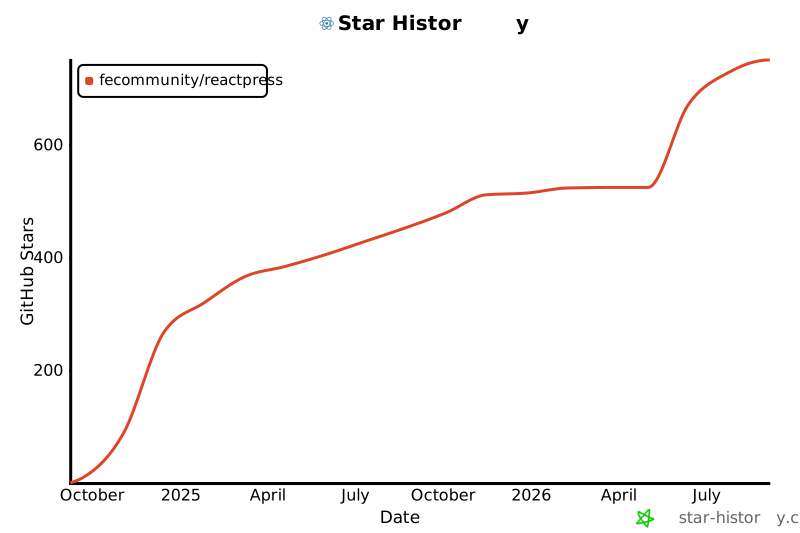](https://star-history.com/#fecommunity/reactpress&Date)
|
|
@@ -0,0 +1,190 @@
|
|
|
1
|
+
#!/usr/bin/env node
|
|
2
|
+
|
|
3
|
+
/**
|
|
4
|
+
* ReactPress Client CLI Entry Point
|
|
5
|
+
* This script allows starting the ReactPress client via npx
|
|
6
|
+
* Supports both regular and PM2 startup modes
|
|
7
|
+
*/
|
|
8
|
+
|
|
9
|
+
const path = require('path');
|
|
10
|
+
const fs = require('fs');
|
|
11
|
+
const { spawn, spawnSync } = require('child_process');
|
|
12
|
+
|
|
13
|
+
// Capture the original working directory where npx was executed
|
|
14
|
+
// BUT prioritize the REACTPRESS_ORIGINAL_CWD environment variable if it exists
|
|
15
|
+
// This ensures consistency when running via pnpm dev from root directory
|
|
16
|
+
const originalCwd = process.env.REACTPRESS_ORIGINAL_CWD || process.cwd();
|
|
17
|
+
|
|
18
|
+
// Get command line arguments
|
|
19
|
+
const args = process.argv.slice(2);
|
|
20
|
+
const usePM2 = args.includes('--pm2');
|
|
21
|
+
const showHelp = args.includes('--help') || args.includes('-h');
|
|
22
|
+
|
|
23
|
+
// Show help if requested
|
|
24
|
+
if (showHelp) {
|
|
25
|
+
console.log(`
|
|
26
|
+
ReactPress Client - Next.js-based frontend for ReactPress CMS
|
|
27
|
+
|
|
28
|
+
Usage:
|
|
29
|
+
npx @fecommunity/reactpress-client [options]
|
|
30
|
+
|
|
31
|
+
Options:
|
|
32
|
+
--pm2 Start client with PM2 process manager
|
|
33
|
+
--help, -h Show this help message
|
|
34
|
+
|
|
35
|
+
Examples:
|
|
36
|
+
npx @fecommunity/reactpress-client # Start client normally
|
|
37
|
+
npx @fecommunity/reactpress-client --pm2 # Start client with PM2
|
|
38
|
+
npx @fecommunity/reactpress-client --help # Show this help message
|
|
39
|
+
`);
|
|
40
|
+
process.exit(0);
|
|
41
|
+
}
|
|
42
|
+
|
|
43
|
+
// Get the directory where this script is located
|
|
44
|
+
const binDir = __dirname;
|
|
45
|
+
const clientDir = path.join(binDir, '..');
|
|
46
|
+
const nextDir = path.join(clientDir, '.next');
|
|
47
|
+
|
|
48
|
+
// Function to check if PM2 is installed
|
|
49
|
+
function isPM2Installed() {
|
|
50
|
+
try {
|
|
51
|
+
require.resolve('pm2');
|
|
52
|
+
return true;
|
|
53
|
+
} catch (e) {
|
|
54
|
+
// Check if PM2 is installed globally
|
|
55
|
+
try {
|
|
56
|
+
spawnSync('pm2', ['--version'], { stdio: 'ignore' });
|
|
57
|
+
return true;
|
|
58
|
+
} catch (e) {
|
|
59
|
+
return false;
|
|
60
|
+
}
|
|
61
|
+
}
|
|
62
|
+
}
|
|
63
|
+
|
|
64
|
+
// Function to install PM2
|
|
65
|
+
function installPM2() {
|
|
66
|
+
console.log('[ReactPress Client] Installing PM2...');
|
|
67
|
+
const installResult = spawnSync('npm', ['install', 'pm2', '--no-save'], {
|
|
68
|
+
stdio: 'inherit',
|
|
69
|
+
cwd: clientDir
|
|
70
|
+
});
|
|
71
|
+
|
|
72
|
+
if (installResult.status !== 0) {
|
|
73
|
+
console.error('[ReactPress Client] Failed to install PM2');
|
|
74
|
+
return false;
|
|
75
|
+
}
|
|
76
|
+
|
|
77
|
+
return true;
|
|
78
|
+
}
|
|
79
|
+
|
|
80
|
+
// Function to start with PM2
|
|
81
|
+
function startWithPM2() {
|
|
82
|
+
// Check if PM2 is installed
|
|
83
|
+
if (!isPM2Installed()) {
|
|
84
|
+
// Try to install PM2
|
|
85
|
+
if (!installPM2()) {
|
|
86
|
+
console.error('[ReactPress Client] Cannot start with PM2');
|
|
87
|
+
process.exit(1);
|
|
88
|
+
}
|
|
89
|
+
}
|
|
90
|
+
|
|
91
|
+
// Check if the client is built
|
|
92
|
+
if (!fs.existsSync(nextDir)) {
|
|
93
|
+
console.log('[ReactPress Client] Client not built yet. Building...');
|
|
94
|
+
|
|
95
|
+
// Try to build the client
|
|
96
|
+
const buildResult = spawnSync('npm', ['run', 'build'], {
|
|
97
|
+
stdio: 'inherit',
|
|
98
|
+
cwd: clientDir
|
|
99
|
+
});
|
|
100
|
+
|
|
101
|
+
if (buildResult.status !== 0) {
|
|
102
|
+
console.error('[ReactPress Client] Failed to build client');
|
|
103
|
+
process.exit(1);
|
|
104
|
+
}
|
|
105
|
+
}
|
|
106
|
+
|
|
107
|
+
console.log('[ReactPress Client] Starting with PM2...');
|
|
108
|
+
|
|
109
|
+
// Use PM2 to start the Next.js production server
|
|
110
|
+
let pm2Command = 'pm2';
|
|
111
|
+
try {
|
|
112
|
+
// Try to resolve PM2 path
|
|
113
|
+
pm2Command = path.join(clientDir, 'node_modules', '.bin', 'pm2');
|
|
114
|
+
if (!fs.existsSync(pm2Command)) {
|
|
115
|
+
pm2Command = 'pm2';
|
|
116
|
+
}
|
|
117
|
+
} catch (e) {
|
|
118
|
+
pm2Command = 'pm2';
|
|
119
|
+
}
|
|
120
|
+
|
|
121
|
+
// Start with PM2 using direct command
|
|
122
|
+
const pm2 = spawn(pm2Command, ['start', 'npm', '--name', 'reactpress-client', '--', 'run', 'start'], {
|
|
123
|
+
stdio: 'inherit',
|
|
124
|
+
cwd: clientDir
|
|
125
|
+
});
|
|
126
|
+
|
|
127
|
+
pm2.on('close', (code) => {
|
|
128
|
+
console.log(`[ReactPress Client] PM2 process exited with code ${code}`);
|
|
129
|
+
process.exit(code);
|
|
130
|
+
});
|
|
131
|
+
|
|
132
|
+
pm2.on('error', (error) => {
|
|
133
|
+
console.error('[ReactPress Client] Failed to start with PM2:', error);
|
|
134
|
+
process.exit(1);
|
|
135
|
+
});
|
|
136
|
+
}
|
|
137
|
+
|
|
138
|
+
// Function to start with regular Node.js (npm start)
|
|
139
|
+
function startWithNode() {
|
|
140
|
+
// Check if the app is built
|
|
141
|
+
if (!fs.existsSync(nextDir)) {
|
|
142
|
+
console.log('[ReactPress Client] Client not built yet. Building...');
|
|
143
|
+
|
|
144
|
+
// Try to build the client
|
|
145
|
+
const buildResult = spawnSync('npm', ['run', 'build'], {
|
|
146
|
+
stdio: 'inherit',
|
|
147
|
+
cwd: clientDir
|
|
148
|
+
});
|
|
149
|
+
|
|
150
|
+
if (buildResult.status !== 0) {
|
|
151
|
+
console.error('[ReactPress Client] Failed to build client');
|
|
152
|
+
process.exit(1);
|
|
153
|
+
}
|
|
154
|
+
}
|
|
155
|
+
|
|
156
|
+
// ONLY set the environment variable if it's not already set
|
|
157
|
+
// This preserves the value set by set-env.js when running pnpm dev from root
|
|
158
|
+
if (!process.env.REACTPRESS_ORIGINAL_CWD) {
|
|
159
|
+
process.env.REACTPRESS_ORIGINAL_CWD = originalCwd;
|
|
160
|
+
} else {
|
|
161
|
+
console.log(`[ReactPress Client] Using existing REACTPRESS_ORIGINAL_CWD: ${process.env.REACTPRESS_ORIGINAL_CWD}`);
|
|
162
|
+
}
|
|
163
|
+
|
|
164
|
+
// Change to the client directory
|
|
165
|
+
process.chdir(clientDir);
|
|
166
|
+
|
|
167
|
+
// Start with npm start
|
|
168
|
+
console.log('[ReactPress Client] Starting with npm start...');
|
|
169
|
+
const npmStart = spawn('npm', ['start'], {
|
|
170
|
+
stdio: 'inherit',
|
|
171
|
+
cwd: clientDir
|
|
172
|
+
});
|
|
173
|
+
|
|
174
|
+
npmStart.on('close', (code) => {
|
|
175
|
+
console.log(`[ReactPress Client] npm start process exited with code ${code}`);
|
|
176
|
+
process.exit(code);
|
|
177
|
+
});
|
|
178
|
+
|
|
179
|
+
npmStart.on('error', (error) => {
|
|
180
|
+
console.error('[ReactPress Client] Failed to start with npm start:', error);
|
|
181
|
+
process.exit(1);
|
|
182
|
+
});
|
|
183
|
+
}
|
|
184
|
+
|
|
185
|
+
// Main execution
|
|
186
|
+
if (usePM2) {
|
|
187
|
+
startWithPM2();
|
|
188
|
+
} else {
|
|
189
|
+
startWithNode();
|
|
190
|
+
}
|
package/package.json
ADDED
|
@@ -0,0 +1,92 @@
|
|
|
1
|
+
{
|
|
2
|
+
"name": "@fecommunity/reactpress",
|
|
3
|
+
"author": "fecommunity",
|
|
4
|
+
"version": "2.0.0-beta-4-beta.1",
|
|
5
|
+
"description": "ReactPress - A full-stack CMS built with React, Next.js, and NestJS",
|
|
6
|
+
"keywords": [
|
|
7
|
+
"reactpress",
|
|
8
|
+
"cms",
|
|
9
|
+
"blog",
|
|
10
|
+
"react",
|
|
11
|
+
"nextjs",
|
|
12
|
+
"nestjs",
|
|
13
|
+
"typescript"
|
|
14
|
+
],
|
|
15
|
+
"bin": {
|
|
16
|
+
"reactpress": "./scripts/reactpress-cli.js",
|
|
17
|
+
"reactpress-server": "./server/bin/reactpress-server.js",
|
|
18
|
+
"reactpress-client": "./client/bin/reactpress-client.js"
|
|
19
|
+
},
|
|
20
|
+
"files": [
|
|
21
|
+
"bin/**/*",
|
|
22
|
+
"scripts/**/*",
|
|
23
|
+
"client/bin/**/*",
|
|
24
|
+
"server/bin/**/*",
|
|
25
|
+
"CONTRIBUTING.md"
|
|
26
|
+
],
|
|
27
|
+
"dependencies": {
|
|
28
|
+
"chalk": "^4.1.2",
|
|
29
|
+
"commander": "^9.4.1",
|
|
30
|
+
"concurrently": "^7.0.0",
|
|
31
|
+
"conventional-changelog-cli": "^3.0.0",
|
|
32
|
+
"cross-env": "^7.0.3",
|
|
33
|
+
"express": "^5.1.0",
|
|
34
|
+
"fs-extra": "^10.0.0",
|
|
35
|
+
"inquirer": "^8.2.4",
|
|
36
|
+
"mysql2": "^3.12.0",
|
|
37
|
+
"open": "^8.2.1",
|
|
38
|
+
"rimraf": "^3.0.2"
|
|
39
|
+
},
|
|
40
|
+
"engines": {
|
|
41
|
+
"node": ">=16.5.0"
|
|
42
|
+
},
|
|
43
|
+
"devDependencies": {
|
|
44
|
+
"husky": "^7.0.4",
|
|
45
|
+
"lint-staged": "^12.4.1",
|
|
46
|
+
"prettier": "^2.3.2",
|
|
47
|
+
"typescript": "~4.1.6"
|
|
48
|
+
},
|
|
49
|
+
"lint-staged": {
|
|
50
|
+
"*.{ts,tsx,js,jsx,.css,.scss}": "prettier --write",
|
|
51
|
+
"./client/**/*.{ts,tsx,js,jsx}": [
|
|
52
|
+
"eslint --fix"
|
|
53
|
+
],
|
|
54
|
+
"./server/src/**/*.{ts,js}": [
|
|
55
|
+
"eslint --fix"
|
|
56
|
+
],
|
|
57
|
+
"./config/**/*.{ts,tsx,js,jsx}": [
|
|
58
|
+
"eslint --fix"
|
|
59
|
+
]
|
|
60
|
+
},
|
|
61
|
+
"scripts": {
|
|
62
|
+
"clean": "pnpm clean:node_modules && pnpm clean:dist",
|
|
63
|
+
"clean:node_modules": "npx rimraf ./node_modules ./**/node_modules",
|
|
64
|
+
"clean:dist": "npx rimraf ./dist ./**/dist",
|
|
65
|
+
"dev": "node ./scripts/reactpress-dev.js",
|
|
66
|
+
"dev:server": "pnpm run --dir ./server dev",
|
|
67
|
+
"dev:client": "pnpm run --dir ./client dev",
|
|
68
|
+
"dev:docs": "pnpm run --dir ./docs dev",
|
|
69
|
+
"build": "pnpm build:toolkit && pnpm build:server && pnpm build:client",
|
|
70
|
+
"build:packages": "node scripts/reactpress-cli.js --build",
|
|
71
|
+
"build:toolkit": "pnpm run --dir ./toolkit build",
|
|
72
|
+
"build:server": "pnpm run --dir ./server build",
|
|
73
|
+
"build:client": "pnpm run --dir ./client build",
|
|
74
|
+
"build:docs": "pnpm run --dir ./docs build",
|
|
75
|
+
"deploy:docs": "pnpm run --dir ./docs deploy:surge",
|
|
76
|
+
"deploy": "sh scripts/deploy.sh",
|
|
77
|
+
"start": "concurrently 'pnpm:start:*'",
|
|
78
|
+
"start:server": "pnpm run --dir ./server start",
|
|
79
|
+
"start:client": "pnpm run --dir ./client start",
|
|
80
|
+
"pm2": "pnpm run pm2:server && pnpm run pm2:client",
|
|
81
|
+
"pm2:server": "pnpm run --dir ./server pm2",
|
|
82
|
+
"pm2:client": "pnpm run --dir ./client pm2",
|
|
83
|
+
"lint": "concurrently 'pnpm:lint:*'",
|
|
84
|
+
"lint:client": "eslint --fix './client/**/*.{ts,tsx,js,jsx}'",
|
|
85
|
+
"lint:server": "eslint --fix './server/./**/*.{ts,js}'",
|
|
86
|
+
"format": "concurrently 'pnpm:format:*'",
|
|
87
|
+
"format:js": "prettier --write --parser typescript './**/*.{ts,tsx,js,jsx}'",
|
|
88
|
+
"precommit": "lint-staged",
|
|
89
|
+
"changelog": "conventional-changelog -p angular -i CHANGELOG.md -s -r 0",
|
|
90
|
+
"release": "node scripts/reactpress-publish.js --publish"
|
|
91
|
+
}
|
|
92
|
+
}
|