@exodus/react-native-webview 11.26.1-exodus.32 → 11.26.1-exodus.34
This diff represents the content of publicly available package versions that have been released to one of the supported registries. The information contained in this diff is provided for informational purposes only and reflects changes between package versions as they appear in their respective public registries.
- package/android/src/main/java/com/reactnativecommunity/webview/RNCWebViewManager.java +24 -7
- package/apple/RNCWebView.m +10 -11
- package/apple/RNCWebViewManager.m +1 -0
- package/lib/WebViewShared.js +1 -1
- package/lib/WebViewTypes.d.ts +5 -0
- package/package.json +1 -1
- package/.all-contributorsrc +0 -185
- package/.circleci/config.yml +0 -66
- package/.eslintignore +0 -2
- package/.eslintrc.js +0 -94
- package/.flowconfig +0 -88
- package/.flowconfig.android +0 -88
- package/.gitattributes +0 -12
- package/.github/CODEOWNERS +0 -1
- package/.github/ISSUE_TEMPLATE/bug-report.md +0 -42
- package/.github/ISSUE_TEMPLATE/feature_request.md +0 -30
- package/.github/workflows/android-ci.yml +0 -35
- package/.github/workflows/detox.yml +0 -20
- package/.github/workflows/ios-ci.yml +0 -31
- package/.github/workflows/scripts/install-vs-features.ps1 +0 -108
- package/.github/workflows/stale.yml +0 -17
- package/.gitignore +0 -62
- package/.idea/.gitignore +0 -5
- package/.idea/inspectionProfiles/Project_Default.xml +0 -6
- package/.idea/misc.xml +0 -9
- package/.idea/modules.xml +0 -8
- package/.idea/react-native-webview.iml +0 -9
- package/.idea/vcs.xml +0 -6
- package/.idea/workspace.xml +0 -104
- package/.prettierrc.js +0 -10
- package/.releaserc +0 -15
- package/.vscode/settings.json +0 -9
- package/babel.config.js +0 -11
- package/bin/setup +0 -26
- package/docs/Contributing.md +0 -102
- package/docs/Custom-Android.md +0 -222
- package/docs/Custom-iOS.md +0 -236
- package/docs/Debugging.md +0 -101
- package/docs/Getting-Started.md +0 -142
- package/docs/Guide.md +0 -613
- package/docs/Reference.md +0 -1639
- package/example/.gitignore +0 -14
- package/example/.watchmanconfig +0 -1
- package/example/App.tsx +0 -262
- package/example/android/build.gradle +0 -15
- package/example/android/gradle/wrapper/gradle-wrapper.jar +0 -0
- package/example/android/gradle/wrapper/gradle-wrapper.properties +0 -5
- package/example/android/gradle.properties +0 -34
- package/example/android/gradlew +0 -234
- package/example/android/gradlew.bat +0 -89
- package/example/android/settings.gradle +0 -12
- package/example/app.json +0 -20
- package/example/assets/test.html +0 -9
- package/example/babel.config.js +0 -3
- package/example/examples/Alerts.tsx +0 -72
- package/example/examples/ApplePay.tsx +0 -23
- package/example/examples/Background.tsx +0 -54
- package/example/examples/Downloads.tsx +0 -57
- package/example/examples/Injection.tsx +0 -161
- package/example/examples/LocalPageLoad.tsx +0 -16
- package/example/examples/Messaging.tsx +0 -63
- package/example/examples/NativeWebpage.tsx +0 -22
- package/example/examples/Scrolling.tsx +0 -68
- package/example/examples/Uploads.tsx +0 -69
- package/example/index.js +0 -9
- package/example/ios/Podfile +0 -8
- package/example/ios/Podfile.lock +0 -445
- package/jest-setups/jest.setup.js +0 -8
- package/jest.config.js +0 -184
- package/lib/WebView.android.d.ts.map +0 -1
- package/lib/WebView.d.ts.map +0 -1
- package/lib/WebView.ios.d.ts.map +0 -1
- package/lib/WebView.styles.d.ts.map +0 -1
- package/lib/WebViewNativeComponent.android.d.ts.map +0 -1
- package/lib/WebViewNativeComponent.ios.d.ts.map +0 -1
- package/lib/WebViewShared.d.ts.map +0 -1
- package/lib/WebViewTypes.d.ts.map +0 -1
- package/lib/index.d.ts.map +0 -1
- package/lib/validation.d.ts.map +0 -1
- package/metro.config.js +0 -57
- package/src/WebView.android.tsx +0 -255
- package/src/WebView.ios.tsx +0 -230
- package/src/WebView.styles.ts +0 -44
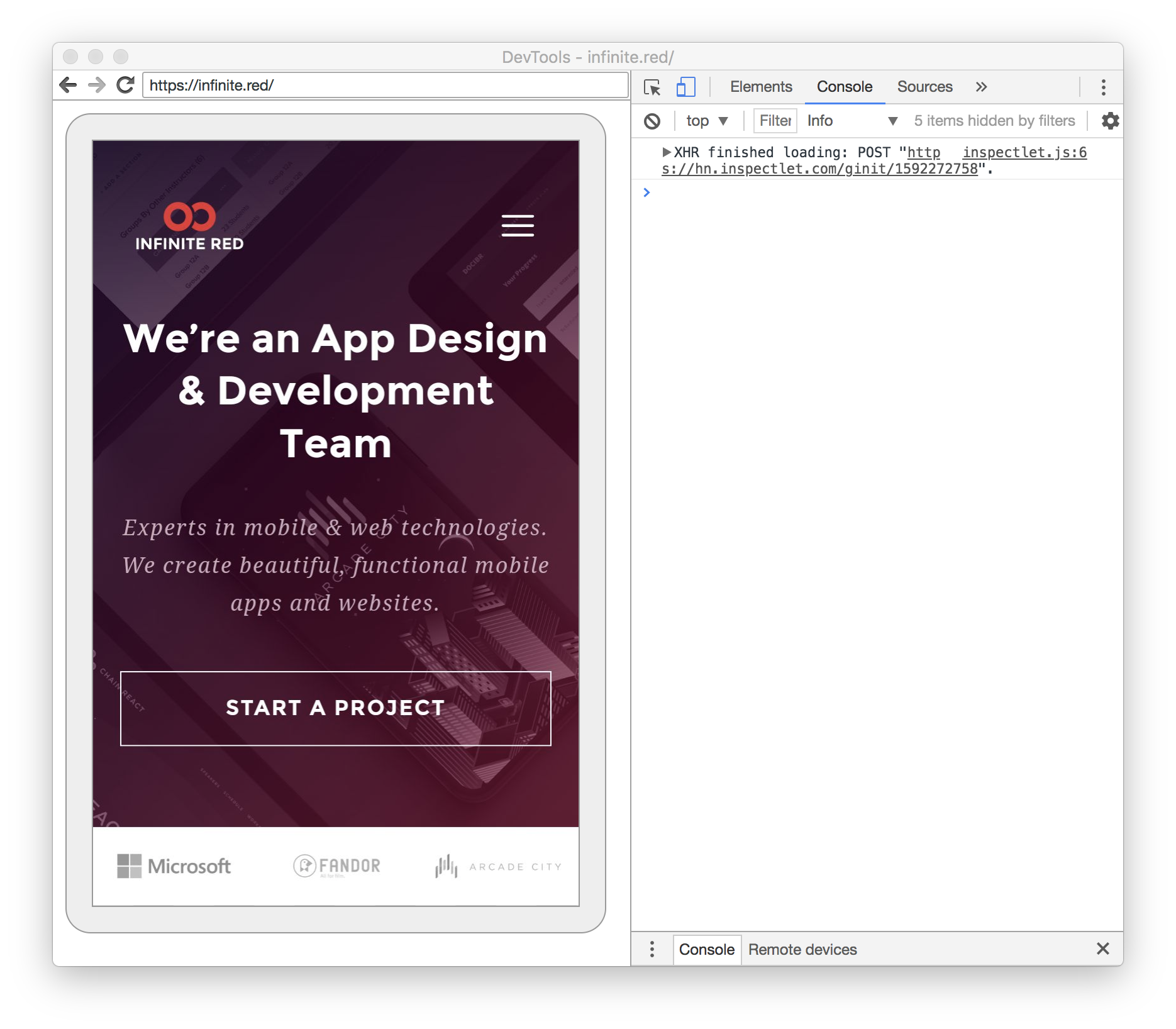
- package/src/WebView.tsx +0 -18
- package/src/WebViewNativeComponent.android.ts +0 -8
- package/src/WebViewNativeComponent.ios.ts +0 -8
- package/src/WebViewShared.tsx +0 -318
- package/src/WebViewTypes.ts +0 -941
- package/src/__tests__/WebViewShared-test.js +0 -292
- package/src/__tests__/__snapshots__/WebViewShared-test.js.snap +0 -13
- package/src/__tests__/validation-test.js +0 -39
- package/src/index.ts +0 -4
- package/src/validation.ts +0 -13
- package/tsconfig.json +0 -24
- package/yarn.lock +0 -13397
package/bin/setup
DELETED
|
@@ -1,26 +0,0 @@
|
|
|
1
|
-
#! /bin/bash
|
|
2
|
-
|
|
3
|
-
# Node installed?
|
|
4
|
-
if ! [ -x "$(command -v node)" ]; then
|
|
5
|
-
echo 'Error: node is not installed.' >&2
|
|
6
|
-
|
|
7
|
-
if ! [ -x "$(command -v brew)" ]; then
|
|
8
|
-
echo 'Go here to install: https://nodejs.org/en/download/'
|
|
9
|
-
fi
|
|
10
|
-
|
|
11
|
-
if [ -x "$(command -v brew)" ]; then
|
|
12
|
-
echo 'You have Homebrew installed, so run "brew install node".'
|
|
13
|
-
fi
|
|
14
|
-
|
|
15
|
-
exit 1
|
|
16
|
-
fi
|
|
17
|
-
|
|
18
|
-
# React Native installed?
|
|
19
|
-
if ! [ -x "$(command -v react-native)" ]; then
|
|
20
|
-
echo 'Error: React Native is not installed.' >&2
|
|
21
|
-
echo 'Go here: https://reactnative.dev/docs/getting-started.html' >&2
|
|
22
|
-
echo 'Use the "Building Projects With Native Code" option.'
|
|
23
|
-
exit 1
|
|
24
|
-
fi
|
|
25
|
-
|
|
26
|
-
# TODO: Automate setup on new machines
|
package/docs/Contributing.md
DELETED
|
@@ -1,102 +0,0 @@
|
|
|
1
|
-
# Contributing to React Native WebView
|
|
2
|
-
|
|
3
|
-
First off, _thank you_ for considering contributing to the React Native Community. The community-supported packages are only possible because of amazing people like you.
|
|
4
|
-
|
|
5
|
-
Secondly, we'd like the contribution experience to be as good as possible. While we are a small all-volunteer team, we are happy to hear feedback about your experience, and if we can make the docs or experience better please let us know.
|
|
6
|
-
|
|
7
|
-
## How to test changes
|
|
8
|
-
|
|
9
|
-
After you fork the repo, clone it to your machine, and make your changes, you'll want to test them in an app.
|
|
10
|
-
|
|
11
|
-
There are two methods of testing:
|
|
12
|
-
1) Testing within a clone of react-native-webview
|
|
13
|
-
2) Testing in a new `react-native init` project
|
|
14
|
-
|
|
15
|
-
### Testing within react-native-webview
|
|
16
|
-
|
|
17
|
-
#### For all platforms:
|
|
18
|
-
|
|
19
|
-
```sh
|
|
20
|
-
yarn install
|
|
21
|
-
```
|
|
22
|
-
|
|
23
|
-
#### For Android:
|
|
24
|
-
|
|
25
|
-
```sh
|
|
26
|
-
yarn android
|
|
27
|
-
```
|
|
28
|
-
|
|
29
|
-
The Android example app will built, the Metro Bundler will launch, and the example app will be installed and started in the Android emulator.
|
|
30
|
-
|
|
31
|
-
#### For iOS:
|
|
32
|
-
|
|
33
|
-
```sh
|
|
34
|
-
pod install --project-directory=ios
|
|
35
|
-
yarn ios
|
|
36
|
-
```
|
|
37
|
-
|
|
38
|
-
The iOS example app will be built, the Metro bundler will launch, and the example app will be installed and started in the Simulator.
|
|
39
|
-
|
|
40
|
-
#### For macOS:
|
|
41
|
-
|
|
42
|
-
```sh
|
|
43
|
-
pod install --project-directory=macos
|
|
44
|
-
yarn macos
|
|
45
|
-
```
|
|
46
|
-
|
|
47
|
-
The macOS example app will be built, the Metro bundler will launch, and the example app will be installed and started.
|
|
48
|
-
|
|
49
|
-
#### For Windows:
|
|
50
|
-
|
|
51
|
-
```sh
|
|
52
|
-
yarn windows
|
|
53
|
-
```
|
|
54
|
-
|
|
55
|
-
The Windows example app will be built, the Metro bundler will launch, and the example app will be installed and started.
|
|
56
|
-
|
|
57
|
-
### Testing in a new `react-native init` project
|
|
58
|
-
|
|
59
|
-
In a new `react-native init` project, do this:
|
|
60
|
-
|
|
61
|
-
```
|
|
62
|
-
$ yarn add ../react-native-webview
|
|
63
|
-
$ react-native link react-native-webview
|
|
64
|
-
```
|
|
65
|
-
|
|
66
|
-
You may run into a problem where the `jest-haste-map` module map says react-native was added twice:
|
|
67
|
-
|
|
68
|
-
```
|
|
69
|
-
Loading dependency graph...(node:32651) UnhandledPromiseRejectionWarning: Error: jest-haste-map: Haste module naming collision:
|
|
70
|
-
Duplicate module name: react-native
|
|
71
|
-
Paths: /Users/myuser/TestApp/node_modules/react-native/package.json collides with /Users/myuser/TestApp/node_modules/react-native-webview/node_modules/react-native/package.json
|
|
72
|
-
```
|
|
73
|
-
|
|
74
|
-
Just remove the second path like this:
|
|
75
|
-
|
|
76
|
-
```
|
|
77
|
-
$ rm -rf ./node_modules/react-native-webview/node_modules/react-native
|
|
78
|
-
```
|
|
79
|
-
|
|
80
|
-
And then re-run the packager:
|
|
81
|
-
|
|
82
|
-
```
|
|
83
|
-
$ react-native start --reset-cache
|
|
84
|
-
```
|
|
85
|
-
|
|
86
|
-
When you make a change, you'll probably need to unlink, remove, re-add, and re-link `react-native-webview`:
|
|
87
|
-
|
|
88
|
-
```
|
|
89
|
-
$ react-native unlink react-native-webview && yarn remove react-native-webview
|
|
90
|
-
$ yarn add ../react-native-webview && react-native link react-native-webview
|
|
91
|
-
```
|
|
92
|
-
|
|
93
|
-
## Notes
|
|
94
|
-
|
|
95
|
-
- We use TypeScript.
|
|
96
|
-
- After pulling this repo and installing all dependencies, you can run tests using the command: `yarn ci`
|
|
97
|
-
|
|
98
|
-
## Translations
|
|
99
|
-
|
|
100
|
-
This file is available at:
|
|
101
|
-
|
|
102
|
-
- [Brazilian portuguese](Contributing.portuguese.md)
|
package/docs/Custom-Android.md
DELETED
|
@@ -1,222 +0,0 @@
|
|
|
1
|
-
While the built-in web view has a lot of features, it is not possible to handle every use-case in React Native. You can, however, extend the web view with native code without forking React Native or duplicating all the existing web view code.
|
|
2
|
-
|
|
3
|
-
Before you do this, you should be familiar with the concepts in [native UI components](https://reactnative.dev/docs/native-components-android). You should also familiarise yourself with the [native code for web views](https://github.com/react-native-webview/react-native-webview/blob/master/android/src/main/java/com/reactnativecommunity/webview/RNCWebViewManager.java), as you will have to use this as a reference when implementing new features—although a deep understanding is not required.
|
|
4
|
-
|
|
5
|
-
## Native Code
|
|
6
|
-
|
|
7
|
-
To get started, you'll need to create a subclass of `RNCWebViewManager`, `RNCWebView`, and `RNCWebViewClient`. In your view manager, you'll then need to override:
|
|
8
|
-
|
|
9
|
-
- `createReactWebViewInstance`
|
|
10
|
-
- `getName`
|
|
11
|
-
- `addEventEmitters`
|
|
12
|
-
|
|
13
|
-
```java
|
|
14
|
-
@ReactModule(name = CustomWebViewManager.REACT_CLASS)
|
|
15
|
-
public class CustomWebViewManager extends RNCWebViewManager {
|
|
16
|
-
/* This name must match what we're referring to in JS */
|
|
17
|
-
protected static final String REACT_CLASS = "RCTCustomWebView";
|
|
18
|
-
|
|
19
|
-
protected static class CustomWebViewClient extends RNCWebViewClient { }
|
|
20
|
-
|
|
21
|
-
protected static class CustomWebView extends RNCWebView {
|
|
22
|
-
public CustomWebView(ThemedReactContext reactContext) {
|
|
23
|
-
super(reactContext);
|
|
24
|
-
}
|
|
25
|
-
}
|
|
26
|
-
|
|
27
|
-
@Override
|
|
28
|
-
protected RNCWebView createRNCWebViewInstance(ThemedReactContext reactContext) {
|
|
29
|
-
return new CustomWebView(reactContext);
|
|
30
|
-
}
|
|
31
|
-
|
|
32
|
-
@Override
|
|
33
|
-
public String getName() {
|
|
34
|
-
return REACT_CLASS;
|
|
35
|
-
}
|
|
36
|
-
|
|
37
|
-
@Override
|
|
38
|
-
protected void addEventEmitters(ThemedReactContext reactContext, WebView view) {
|
|
39
|
-
view.setWebViewClient(new CustomWebViewClient());
|
|
40
|
-
}
|
|
41
|
-
}
|
|
42
|
-
```
|
|
43
|
-
|
|
44
|
-
You'll need to follow the usual steps to [register the module](https://reactnative.dev/docs/native-modules-android#register-the-module-android-specific).
|
|
45
|
-
|
|
46
|
-
### Adding New Properties
|
|
47
|
-
|
|
48
|
-
To add a new property, you'll need to add it to `CustomWebView`, and then expose it in `CustomWebViewManager`.
|
|
49
|
-
|
|
50
|
-
```java
|
|
51
|
-
public class CustomWebViewManager extends RNCWebViewManager {
|
|
52
|
-
...
|
|
53
|
-
|
|
54
|
-
protected static class CustomWebView extends RNCWebView {
|
|
55
|
-
public CustomWebView(ThemedReactContext reactContext) {
|
|
56
|
-
super(reactContext);
|
|
57
|
-
}
|
|
58
|
-
|
|
59
|
-
protected @Nullable String mFinalUrl;
|
|
60
|
-
|
|
61
|
-
public void setFinalUrl(String url) {
|
|
62
|
-
mFinalUrl = url;
|
|
63
|
-
}
|
|
64
|
-
|
|
65
|
-
public String getFinalUrl() {
|
|
66
|
-
return mFinalUrl;
|
|
67
|
-
}
|
|
68
|
-
}
|
|
69
|
-
|
|
70
|
-
...
|
|
71
|
-
|
|
72
|
-
@ReactProp(name = "finalUrl")
|
|
73
|
-
public void setFinalUrl(WebView view, String url) {
|
|
74
|
-
((CustomWebView) view).setFinalUrl(url);
|
|
75
|
-
}
|
|
76
|
-
}
|
|
77
|
-
```
|
|
78
|
-
|
|
79
|
-
### Adding New Events
|
|
80
|
-
|
|
81
|
-
For events, you'll first need to make create event subclass.
|
|
82
|
-
|
|
83
|
-
```java
|
|
84
|
-
// NavigationCompletedEvent.java
|
|
85
|
-
public class NavigationCompletedEvent extends Event<NavigationCompletedEvent> {
|
|
86
|
-
private WritableMap mParams;
|
|
87
|
-
|
|
88
|
-
public NavigationCompletedEvent(int viewTag, WritableMap params) {
|
|
89
|
-
super(viewTag);
|
|
90
|
-
this.mParams = params;
|
|
91
|
-
}
|
|
92
|
-
|
|
93
|
-
@Override
|
|
94
|
-
public String getEventName() {
|
|
95
|
-
return "navigationCompleted";
|
|
96
|
-
}
|
|
97
|
-
|
|
98
|
-
@Override
|
|
99
|
-
public void dispatch(RCTEventEmitter rctEventEmitter) {
|
|
100
|
-
init(getViewTag());
|
|
101
|
-
rctEventEmitter.receiveEvent(getViewTag(), getEventName(), mParams);
|
|
102
|
-
}
|
|
103
|
-
}
|
|
104
|
-
```
|
|
105
|
-
|
|
106
|
-
You can trigger the event in your web view client. You can hook existing handlers if your events are based on them.
|
|
107
|
-
|
|
108
|
-
You should refer to [RNCWebViewManager.java](https://github.com/react-native-webview/react-native-webview/blob/master/android/src/main/java/com/reactnativecommunity/webview/RNCWebViewManager.java) in the react-native-webview codebase to see what handlers are available and how they are implemented. You can extend any methods here to provide extra functionality.
|
|
109
|
-
|
|
110
|
-
```java
|
|
111
|
-
public class NavigationCompletedEvent extends Event<NavigationCompletedEvent> {
|
|
112
|
-
private WritableMap mParams;
|
|
113
|
-
|
|
114
|
-
public NavigationCompletedEvent(int viewTag, WritableMap params) {
|
|
115
|
-
super(viewTag);
|
|
116
|
-
this.mParams = params;
|
|
117
|
-
}
|
|
118
|
-
|
|
119
|
-
@Override
|
|
120
|
-
public String getEventName() {
|
|
121
|
-
return "navigationCompleted";
|
|
122
|
-
}
|
|
123
|
-
|
|
124
|
-
@Override
|
|
125
|
-
public void dispatch(RCTEventEmitter rctEventEmitter) {
|
|
126
|
-
init(getViewTag());
|
|
127
|
-
rctEventEmitter.receiveEvent(getViewTag(), getEventName(), mParams);
|
|
128
|
-
}
|
|
129
|
-
}
|
|
130
|
-
|
|
131
|
-
// CustomWebViewManager.java
|
|
132
|
-
protected static class CustomWebViewClient extends RNCWebViewClient {
|
|
133
|
-
@Override
|
|
134
|
-
public boolean shouldOverrideUrlLoading(WebView view, String url) {
|
|
135
|
-
boolean shouldOverride = super.shouldOverrideUrlLoading(view, url);
|
|
136
|
-
String finalUrl = ((CustomWebView) view).getFinalUrl();
|
|
137
|
-
|
|
138
|
-
if (!shouldOverride && url != null && finalUrl != null && new String(url).equals(finalUrl)) {
|
|
139
|
-
final WritableMap params = Arguments.createMap();
|
|
140
|
-
dispatchEvent(view, new NavigationCompletedEvent(view.getId(), params));
|
|
141
|
-
}
|
|
142
|
-
|
|
143
|
-
return shouldOverride;
|
|
144
|
-
}
|
|
145
|
-
}
|
|
146
|
-
```
|
|
147
|
-
|
|
148
|
-
Finally, you'll need to expose the events in `CustomWebViewManager` through `getExportedCustomDirectEventTypeConstants`. Note that currently, the default implementation returns `null`, but this may change in the future.
|
|
149
|
-
|
|
150
|
-
```java
|
|
151
|
-
public class CustomWebViewManager extends RNCWebViewManager {
|
|
152
|
-
...
|
|
153
|
-
|
|
154
|
-
@Override
|
|
155
|
-
public @Nullable
|
|
156
|
-
Map getExportedCustomDirectEventTypeConstants() {
|
|
157
|
-
Map<String, Object> export = super.getExportedCustomDirectEventTypeConstants();
|
|
158
|
-
if (export == null) {
|
|
159
|
-
export = MapBuilder.newHashMap();
|
|
160
|
-
}
|
|
161
|
-
export.put("navigationCompleted", MapBuilder.of("registrationName", "onNavigationCompleted"));
|
|
162
|
-
return export;
|
|
163
|
-
}
|
|
164
|
-
}
|
|
165
|
-
```
|
|
166
|
-
|
|
167
|
-
## JavaScript Interface
|
|
168
|
-
|
|
169
|
-
To use your custom web view, you may want to create a class for it. Your class must return a `WebView` component with the prop `nativeConfig.component` set to your native component (see below).
|
|
170
|
-
|
|
171
|
-
To get your native component, you must use `requireNativeComponent`: the same as for regular custom components.
|
|
172
|
-
|
|
173
|
-
```javascript
|
|
174
|
-
import React, { Component } from 'react';
|
|
175
|
-
import { requireNativeComponent } from 'react-native';
|
|
176
|
-
import { WebView } from 'react-native-webview';
|
|
177
|
-
|
|
178
|
-
export default class CustomWebView extends Component {
|
|
179
|
-
render() {
|
|
180
|
-
return (
|
|
181
|
-
<WebView {...this.props} nativeConfig={{ component: RCTCustomWebView }} />
|
|
182
|
-
);
|
|
183
|
-
}
|
|
184
|
-
}
|
|
185
|
-
|
|
186
|
-
const RCTCustomWebView = requireNativeComponent('RCTCustomWebView');
|
|
187
|
-
```
|
|
188
|
-
|
|
189
|
-
If you want to add custom props to your native component, you can use `nativeConfig.props` on the web view.
|
|
190
|
-
|
|
191
|
-
For events, the event handler must always be set to a function. This means it isn't safe to use the event handler directly from `this.props`, as the user might not have provided one. The standard approach is to create a event handler in your class, and then invoking the event handler given in `this.props` if it exists.
|
|
192
|
-
|
|
193
|
-
If you are unsure how something should be implemented from the JS side, look at [WebView.android.tsx](https://github.com/react-native-webview/react-native-webview/blob/master/src/WebView.android.tsx) in the React Native WebView source.
|
|
194
|
-
|
|
195
|
-
```javascript
|
|
196
|
-
export default class CustomWebView extends Component {
|
|
197
|
-
_onNavigationCompleted = (event) => {
|
|
198
|
-
const { onNavigationCompleted } = this.props;
|
|
199
|
-
onNavigationCompleted && onNavigationCompleted(event);
|
|
200
|
-
};
|
|
201
|
-
|
|
202
|
-
render() {
|
|
203
|
-
return (
|
|
204
|
-
<WebView
|
|
205
|
-
{...this.props}
|
|
206
|
-
nativeConfig={{
|
|
207
|
-
component: RCTCustomWebView,
|
|
208
|
-
props: {
|
|
209
|
-
finalUrl: this.props.finalUrl,
|
|
210
|
-
onNavigationCompleted: this._onNavigationCompleted,
|
|
211
|
-
},
|
|
212
|
-
}}
|
|
213
|
-
/>
|
|
214
|
-
);
|
|
215
|
-
}
|
|
216
|
-
}
|
|
217
|
-
```
|
|
218
|
-
## Translations
|
|
219
|
-
|
|
220
|
-
This file is available at:
|
|
221
|
-
|
|
222
|
-
- [Brazilian portuguese](Custom-Android.portuguese.md)
|
package/docs/Custom-iOS.md
DELETED
|
@@ -1,236 +0,0 @@
|
|
|
1
|
-
**NOTE: This document was imported from [the original WebView documentation](https://github.com/facebook/react-native-website/blob/7d3e9e120e38a7ba928f6b173eb98f88b6f2f85f/docs/custom-webview-ios.md). While it may prove useful, it has not been adapted to React Native WebView yet.**
|
|
2
|
-
|
|
3
|
-
While the built-in web view has a lot of features, it is not possible to handle every use-case in React Native. You can, however, extend the web view with native code without forking React Native or duplicating all the existing web view code.
|
|
4
|
-
|
|
5
|
-
Before you do this, you should be familiar with the concepts in [native UI components](native-components-ios). You should also familiarise yourself with the [native code for web views](https://github.com/react-native-webview/react-native-webview/blob/master/apple/RNCWebViewManager.m), as you will have to use this as a reference when implementing new features—although a deep understanding is not required.
|
|
6
|
-
|
|
7
|
-
## Native Code
|
|
8
|
-
|
|
9
|
-
Like for regular native components, you need a view manager and an web view.
|
|
10
|
-
|
|
11
|
-
For the view, you'll need to make a subclass of `RCTWebView`.
|
|
12
|
-
|
|
13
|
-
```objc
|
|
14
|
-
// RCTCustomWebView.h
|
|
15
|
-
#import <React/RCTWebView.h>
|
|
16
|
-
|
|
17
|
-
@interface RCTCustomWebView : RCTWebView
|
|
18
|
-
|
|
19
|
-
@end
|
|
20
|
-
|
|
21
|
-
// RCTCustomWebView.m
|
|
22
|
-
#import "RCTCustomWebView.h"
|
|
23
|
-
|
|
24
|
-
@interface RCTCustomWebView ()
|
|
25
|
-
|
|
26
|
-
@end
|
|
27
|
-
|
|
28
|
-
@implementation RCTCustomWebView { }
|
|
29
|
-
|
|
30
|
-
@end
|
|
31
|
-
```
|
|
32
|
-
|
|
33
|
-
For the view manager, you need to make a subclass `RCTWebViewManager`. You must still include:
|
|
34
|
-
|
|
35
|
-
* `(UIView *)view` that returns your custom view
|
|
36
|
-
* The `RCT_EXPORT_MODULE()` tag
|
|
37
|
-
|
|
38
|
-
```objc
|
|
39
|
-
// RCTCustomWebViewManager.h
|
|
40
|
-
#import <React/RCTWebViewManager.h>
|
|
41
|
-
|
|
42
|
-
@interface RCTCustomWebViewManager : RCTWebViewManager
|
|
43
|
-
|
|
44
|
-
@end
|
|
45
|
-
|
|
46
|
-
// RCTCustomWebViewManager.m
|
|
47
|
-
#import "RCTCustomWebViewManager.h"
|
|
48
|
-
#import "RCTCustomWebView.h"
|
|
49
|
-
|
|
50
|
-
@interface RCTCustomWebViewManager () <RCTWebViewDelegate>
|
|
51
|
-
|
|
52
|
-
@end
|
|
53
|
-
|
|
54
|
-
@implementation RCTCustomWebViewManager { }
|
|
55
|
-
|
|
56
|
-
RCT_EXPORT_MODULE()
|
|
57
|
-
|
|
58
|
-
- (UIView *)view
|
|
59
|
-
{
|
|
60
|
-
RCTCustomWebView *webView = [RCTCustomWebView new];
|
|
61
|
-
webView.delegate = self;
|
|
62
|
-
return webView;
|
|
63
|
-
}
|
|
64
|
-
|
|
65
|
-
@end
|
|
66
|
-
```
|
|
67
|
-
|
|
68
|
-
### Adding New Events and Properties
|
|
69
|
-
|
|
70
|
-
Adding new properties and events is the same as regular UI components. For properties, you define an `@property` in the header. For events, you define a `RCTDirectEventBlock` in the view's `@interface`.
|
|
71
|
-
|
|
72
|
-
```objc
|
|
73
|
-
// RCTCustomWebView.h
|
|
74
|
-
@property (nonatomic, copy) NSString *finalUrl;
|
|
75
|
-
|
|
76
|
-
// RCTCustomWebView.m
|
|
77
|
-
@interface RCTCustomWebView ()
|
|
78
|
-
|
|
79
|
-
@property (nonatomic, copy) RCTDirectEventBlock onNavigationCompleted;
|
|
80
|
-
|
|
81
|
-
@end
|
|
82
|
-
```
|
|
83
|
-
|
|
84
|
-
Then expose it in the view manager's `@implementation`.
|
|
85
|
-
|
|
86
|
-
```objc
|
|
87
|
-
// RCTCustomWebViewManager.m
|
|
88
|
-
RCT_EXPORT_VIEW_PROPERTY(onNavigationCompleted, RCTDirectEventBlock)
|
|
89
|
-
RCT_EXPORT_VIEW_PROPERTY(finalUrl, NSString)
|
|
90
|
-
```
|
|
91
|
-
|
|
92
|
-
### Extending Existing Events
|
|
93
|
-
|
|
94
|
-
You should refer to [RCTWebView.m](https://github.com/facebook/react-native/blob/master/React/Views/RCTWebView.m) in the React Native codebase to see what handlers are available and how they are implemented. You can extend any methods here to provide extra functionality.
|
|
95
|
-
|
|
96
|
-
By default, most methods aren't exposed from RCTWebView. If you need to expose them, you need to create an [Objective C category](https://developer.apple.com/library/content/documentation/Cocoa/Conceptual/ProgrammingWithObjectiveC/CustomizingExistingClasses/CustomizingExistingClasses.html), and then expose all the methods you need to use.
|
|
97
|
-
|
|
98
|
-
```objc
|
|
99
|
-
// RCTWebView+Custom.h
|
|
100
|
-
#import <React/RCTWebView.h>
|
|
101
|
-
|
|
102
|
-
@interface RCTWebView (Custom)
|
|
103
|
-
- (BOOL)webView:(__unused UIWebView *)webView shouldStartLoadWithRequest:(NSURLRequest *)request navigationType:(UIWebViewNavigationType)navigationType;
|
|
104
|
-
- (NSMutableDictionary<NSString *, id> *)baseEvent;
|
|
105
|
-
@end
|
|
106
|
-
```
|
|
107
|
-
|
|
108
|
-
Once these are exposed, you can reference them in your custom web view class.
|
|
109
|
-
|
|
110
|
-
```objc
|
|
111
|
-
// RCTCustomWebView.m
|
|
112
|
-
|
|
113
|
-
// Remember to import the category file.
|
|
114
|
-
#import "RCTWebView+Custom.h"
|
|
115
|
-
|
|
116
|
-
- (BOOL)webView:(__unused UIWebView *)webView shouldStartLoadWithRequest:(NSURLRequest *)request
|
|
117
|
-
navigationType:(UIWebViewNavigationType)navigationType
|
|
118
|
-
{
|
|
119
|
-
BOOL allowed = [super webView:webView shouldStartLoadWithRequest:request navigationType:navigationType];
|
|
120
|
-
|
|
121
|
-
if (allowed) {
|
|
122
|
-
NSString* url = request.URL.absoluteString;
|
|
123
|
-
if (url && [url isEqualToString:_finalUrl]) {
|
|
124
|
-
if (_onNavigationCompleted) {
|
|
125
|
-
NSMutableDictionary<NSString *, id> *event = [self baseEvent];
|
|
126
|
-
_onNavigationCompleted(event);
|
|
127
|
-
}
|
|
128
|
-
}
|
|
129
|
-
}
|
|
130
|
-
|
|
131
|
-
return allowed;
|
|
132
|
-
}
|
|
133
|
-
```
|
|
134
|
-
|
|
135
|
-
### Setting Client Certificate Authentication Credential
|
|
136
|
-
|
|
137
|
-
If you open webpages that needs a Client Certificate for Authentication, you can create a credential and pass it to the webview:
|
|
138
|
-
|
|
139
|
-
```
|
|
140
|
-
[RNCWebView setClientAuthenticationCredential:credential];
|
|
141
|
-
```
|
|
142
|
-
|
|
143
|
-
This can be paired with a call from Javascript to pass a string label for the certificate stored in keychain and use native calls to fetch the certificate to create a credential object. This call can be made anywhere that makes sense for your application (e.g. as part of the user authentication stack). The only requirement is to make this call before displaying any webviews.
|
|
144
|
-
|
|
145
|
-
### Allowing custom CAs (Certifica Authorities) and enabling SSL Pinning
|
|
146
|
-
|
|
147
|
-
If you need to connect to a server which has a self signed certificate, or want to perform SSL Pinning on the webview requests, you need to pass a dictionary with the host as the key, and the certificate as the value of each item:
|
|
148
|
-
|
|
149
|
-
|
|
150
|
-
```objc
|
|
151
|
-
-(void)installCerts {
|
|
152
|
-
|
|
153
|
-
// Get the bundle where the certificates in DER format are present.
|
|
154
|
-
NSBundle *bundle = [NSBundle mainBundle];
|
|
155
|
-
|
|
156
|
-
NSMutableDictionary* certMap = [NSMutableDictionary new];
|
|
157
|
-
|
|
158
|
-
NSData *rootCertData = [NSData dataWithContentsOfFile:[bundle pathForResource:@"example_ca" ofType:@"der"]];
|
|
159
|
-
|
|
160
|
-
SecCertificateRef certificate = SecCertificateCreateWithData(NULL, (CFDataRef) rootCertData);
|
|
161
|
-
|
|
162
|
-
OSStatus err = SecItemAdd((CFDictionaryRef) [NSDictionary dictionaryWithObjectsAndKeys:(id) kSecClassCertificate, kSecClass, certificate, kSecValueRef, nil], NULL);
|
|
163
|
-
|
|
164
|
-
[certMap setObject:(__bridge id _Nonnull)(certificate) forKey:@"example.com"];
|
|
165
|
-
|
|
166
|
-
[RNCWebView setCustomCertificatesForHost:certMap];
|
|
167
|
-
}
|
|
168
|
-
|
|
169
|
-
```
|
|
170
|
-
|
|
171
|
-
Multiple hosts can be added to the dictionary, and only one certificate for a host is allowed. The verification will succeed if any of the certificates in the chain of the request matches the one defined for the request's host.
|
|
172
|
-
|
|
173
|
-
|
|
174
|
-
## JavaScript Interface
|
|
175
|
-
|
|
176
|
-
To use your custom web view, you may want to create a class for it. Your class must return a `WebView` component with the prop `nativeConfig.component` set to your native component (see below).
|
|
177
|
-
|
|
178
|
-
To get your native component, you must use `requireNativeComponent`: the same as for regular custom components.
|
|
179
|
-
|
|
180
|
-
```javascript
|
|
181
|
-
import React, {Component} from 'react';
|
|
182
|
-
import {WebView, requireNativeComponent, NativeModules} from 'react-native';
|
|
183
|
-
const {CustomWebViewManager} = NativeModules;
|
|
184
|
-
|
|
185
|
-
export default class CustomWebView extends Component {
|
|
186
|
-
render() {
|
|
187
|
-
return (
|
|
188
|
-
<WebView
|
|
189
|
-
{...this.props}
|
|
190
|
-
nativeConfig={{
|
|
191
|
-
component: RCTCustomWebView,
|
|
192
|
-
viewManager: CustomWebViewManager,
|
|
193
|
-
}}
|
|
194
|
-
/>
|
|
195
|
-
);
|
|
196
|
-
}
|
|
197
|
-
}
|
|
198
|
-
|
|
199
|
-
const RCTCustomWebView = requireNativeComponent('RCTCustomWebView');
|
|
200
|
-
```
|
|
201
|
-
|
|
202
|
-
If you want to add custom props to your native component, you can use `nativeConfig.props` on the web view. For iOS, you should also set the `nativeConfig.viewManager` prop with your custom WebView ViewManager as in the example above.
|
|
203
|
-
|
|
204
|
-
For events, the event handler must always be set to a function. This means it isn't safe to use the event handler directly from `this.props`, as the user might not have provided one. The standard approach is to create a event handler in your class, and then invoking the event handler given in `this.props` if it exists.
|
|
205
|
-
|
|
206
|
-
If you are unsure how something should be implemented from the JS side, look at [WebView.ios.tsx](https://github.com/react-native-webview/react-native-webview/blob/master/src/WebView.ios.tsx) in the React Native WebView source.
|
|
207
|
-
|
|
208
|
-
```javascript
|
|
209
|
-
export default class CustomWebView extends Component {
|
|
210
|
-
_onNavigationCompleted = (event) => {
|
|
211
|
-
const {onNavigationCompleted} = this.props;
|
|
212
|
-
onNavigationCompleted && onNavigationCompleted(event);
|
|
213
|
-
};
|
|
214
|
-
|
|
215
|
-
render() {
|
|
216
|
-
return (
|
|
217
|
-
<WebView
|
|
218
|
-
{...this.props}
|
|
219
|
-
nativeConfig={{
|
|
220
|
-
component: RCTCustomWebView,
|
|
221
|
-
props: {
|
|
222
|
-
finalUrl: this.props.finalUrl,
|
|
223
|
-
onNavigationCompleted: this._onNavigationCompleted,
|
|
224
|
-
},
|
|
225
|
-
viewManager: CustomWebViewManager,
|
|
226
|
-
}}
|
|
227
|
-
/>
|
|
228
|
-
);
|
|
229
|
-
}
|
|
230
|
-
}
|
|
231
|
-
```
|
|
232
|
-
## Translations
|
|
233
|
-
|
|
234
|
-
This file is available at:
|
|
235
|
-
|
|
236
|
-
- [Brazilian portuguese](Custom-iOS.portuguese.md)
|
package/docs/Debugging.md
DELETED
|
@@ -1,101 +0,0 @@
|
|
|
1
|
-
# React Native WebView Debugging Guide
|
|
2
|
-
|
|
3
|
-
Here are some helpful React Native WebView debugging tips.
|
|
4
|
-
|
|
5
|
-
## Script Errors
|
|
6
|
-
|
|
7
|
-
It can be difficult to debug syntax errors and other script errors in WebView, since errors don't show up in a console by default.
|
|
8
|
-
|
|
9
|
-
One option (if you're loading HTML from an external source) is to inject an error handler before the content is loaded.
|
|
10
|
-
|
|
11
|
-
```js
|
|
12
|
-
<WebView
|
|
13
|
-
injectedJavaScriptBeforeContentLoaded={`
|
|
14
|
-
window.onerror = function(message, sourcefile, lineno, colno, error) {
|
|
15
|
-
alert("Message: " + message + " - Source: " + sourcefile + " Line: " + lineno + ":" + colno);
|
|
16
|
-
return true;
|
|
17
|
-
};
|
|
18
|
-
true;
|
|
19
|
-
`}
|
|
20
|
-
source={{
|
|
21
|
-
uri:
|
|
22
|
-
'https://bl.ocks.org/jamonholmgren/raw/48423fd99537283beace1daa2688e80f/',
|
|
23
|
-
}}
|
|
24
|
-
/>
|
|
25
|
-
```
|
|
26
|
-
|
|
27
|
-
This will provide an Alert box with (hopefully) useful debugging information.
|
|
28
|
-
|
|
29
|
-
If you're injecting JavaScript, this may fail with `Script error` and no other useful information. One simple way to debug this is to wrap your injected JavaScript in a try/catch, like so:
|
|
30
|
-
|
|
31
|
-
```js
|
|
32
|
-
const js = `
|
|
33
|
-
try {
|
|
34
|
-
// your code here
|
|
35
|
-
} catch(e) {
|
|
36
|
-
alert(e)
|
|
37
|
-
}
|
|
38
|
-
true;
|
|
39
|
-
`;
|
|
40
|
-
```
|
|
41
|
-
|
|
42
|
-
This will bring up an alert with the error message, which may or may not be helpful.
|
|
43
|
-
|
|
44
|
-
If these two simple methods fail to uncover the bug, try using the next technique!
|
|
45
|
-
|
|
46
|
-
## Debugging WebView Contents
|
|
47
|
-
|
|
48
|
-
### iOS & Safari
|
|
49
|
-
|
|
50
|
-
It's possible to debug WebView contents in the iOS simulator or on a device using Safari Developer Toolkit.
|
|
51
|
-
|
|
52
|
-
#### Steps:
|
|
53
|
-
|
|
54
|
-
1. Open Safari Preferences -> "Advanced" tab -> enable checkbox "Show Develop menu in menu bar"
|
|
55
|
-
2. Start app with React Native WebView in iOS simulator or iOS device
|
|
56
|
-
3. Safari -> Develop -> [device name] -> [app name] -> [url - title]
|
|
57
|
-
4. You can now debug the WebView contents just as you would on the web
|
|
58
|
-
|
|
59
|
-
##### Notes:
|
|
60
|
-
|
|
61
|
-
When debugging on device you must enable Web Inspector in your device settings:
|
|
62
|
-
|
|
63
|
-
Settings -> Safari -> Advanced -> Web Inspector
|
|
64
|
-
|
|
65
|
-
Also, if you don't see your device in the Develop menu, and you started Safari before you started your simulator, try restarting Safari.
|
|
66
|
-
|
|
67
|
-
### Android & Chrome
|
|
68
|
-
|
|
69
|
-
It's possible to debug WebView contents in the Android emulator or on a device using Chrome DevTools.
|
|
70
|
-
|
|
71
|
-
1. You will need to make the following change to `MainApplication.java` to enabled web contents debugging:
|
|
72
|
-
|
|
73
|
-
```java
|
|
74
|
-
import android.webkit.WebView;
|
|
75
|
-
|
|
76
|
-
@Override
|
|
77
|
-
public void onCreate() {
|
|
78
|
-
super.onCreate();
|
|
79
|
-
...
|
|
80
|
-
WebView.setWebContentsDebuggingEnabled(true);
|
|
81
|
-
}
|
|
82
|
-
```
|
|
83
|
-
|
|
84
|
-
2. Start app with React Native WebView in Android emulator or Android device
|
|
85
|
-
3. Open `chrome://inspect/#devices` on Chrome (Reference: [Remote debug Android devices](https://developer.chrome.com/docs/devtools/remote-debugging/))
|
|
86
|
-
4. Select your device on the left and select "Inspect" on the WebView contents you'd like to inspect
|
|
87
|
-
5. You can now debug the WebView contents just as you would on the web
|
|
88
|
-
|
|
89
|
-
|
|
90
|
-
|
|
91
|
-
##### Note:
|
|
92
|
-
|
|
93
|
-
When debugging on device you must enable USB debugging in your device settings:
|
|
94
|
-
|
|
95
|
-
Settings -> System -> About Phone -> Developer options -> enable USB debugging
|
|
96
|
-
|
|
97
|
-
## Translations
|
|
98
|
-
|
|
99
|
-
This file is available at:
|
|
100
|
-
|
|
101
|
-
- [Brazilian portuguese](Debugging.portuguese.md)
|