@evotecit/canopyx 0.1.0 → 0.1.1
This diff represents the content of publicly available package versions that have been released to one of the supported registries. The information contained in this diff is provided for informational purposes only and reflects changes between package versions as they appear in their respective public registries.
- package/README.md +124 -402
- package/README.nuget.md +96 -40
- package/docs/images/static-outline.png +0 -0
- package/docs/images/tree-grid-dark.png +0 -0
- package/docs/images/tree-grid-light.png +0 -0
- package/package.json +28 -7
package/README.md
CHANGED
|
@@ -1,477 +1,199 @@
|
|
|
1
|
-
# CanopyX
|
|
1
|
+
# CanopyX - Interactive Trees and Data Grids
|
|
2
2
|
|
|
3
|
-
|
|
3
|
+
Turn application data into searchable trees, sortable tables and standalone HTML reports. Use C# to write a report you can open in a browser, or mount the JavaScript runtime in your own page.
|
|
4
4
|
|
|
5
|
-
|
|
5
|
+
📦 **.NET packages**
|
|
6
6
|
|
|
7
|
+
[](https://www.nuget.org/packages/CanopyX)
|
|
8
|
+
[](https://www.nuget.org/packages/CanopyX.Html)
|
|
7
9
|
|
|
8
|
-
|
|
10
|
+
🌐 **JavaScript package**
|
|
9
11
|
|
|
10
|
-
|
|
12
|
+
[](https://www.npmjs.com/package/@evotecit/canopyx)
|
|
13
|
+
[](https://opensource.org/license/mit)
|
|
11
14
|
|
|
12
|
-
|
|
13
|
-
| --- | --- |
|
|
14
|
-
|  |  |
|
|
15
|
-
|
|
16
|
-
The images come from the pages `CanopyX.Examples` generates; `tests/browser/tools/screenshots.mjs` refreshes them.
|
|
17
|
-
|
|
18
|
-
## Packages
|
|
19
|
-
|
|
20
|
-
| Package | Purpose |
|
|
21
|
-
| --- | --- |
|
|
22
|
-
| `CanopyX` | View definitions, the `canopyx/2` data protocol, the bundle writer, and the static fallback renderer. No runtime dependencies. |
|
|
23
|
-
| `CanopyX.Html` | The browser runtime (tree grid, data sources, theme CSS) and the API that writes pages, fragments, bundles, and asset files. |
|
|
24
|
-
|
|
25
|
-
Both packages target `net472`, `netstandard2.0`, `net8.0`, and `net10.0`.
|
|
26
|
-
|
|
27
|
-
### Wrapped grid rows
|
|
28
|
-
|
|
29
|
-
Set a grid column's `wrap: true` and the grid's `rowHeight: "auto"` to display complete multiline notes. Fixed rows remain the default. In .NET, set `CanopyColumn.Wrap = true` and `CanopyDataGridView.AutoRowHeight = true`; `RowHeight` supplies the minimum and initial estimate. Rendered records are measured as they enter the viewport, with stable scroll anchoring and pixel-based keyboard paging. The generated `wrapped-grid.html` examples demonstrate continuous, paged and grouped views. Grids created inside hidden tabs, accordions and details render automatically when shown; see `contained-grids.html`.
|
|
30
|
-
|
|
31
|
-
### Highlight records by raw values
|
|
32
|
-
|
|
33
|
-
Grid rows accept optional `tone` and `className`. Declare ordered `highlightRules` to decorate records without a callback:
|
|
34
|
-
|
|
35
|
-
```javascript
|
|
36
|
-
highlightRules: [
|
|
37
|
-
{ column: "status", operator: "eq", values: ["Failed"], tone: "danger" },
|
|
38
|
-
{ column: "size", operator: "gt", values: [1000000], target: "cell", className: "large-value" }
|
|
39
|
-
]
|
|
40
|
-
```
|
|
41
|
-
|
|
42
|
-
In .NET, add `new CanopyGridHighlightRule(new CanopyGridFilter("status", CanopyGridFilterOperator.Equal, "Failed"), CanopyTone.Danger)` to `view.HighlightRules`. The default target is the row; `CanopyGridHighlightTarget.Cell` decorates the condition column's cell. The first match wins separately for the row and each cell. Rules use typed raw values and the existing filter semantics; display text is independent. Row tones use the existing theme palette, and script-free fallback tables retain the rules and classes. The content-sized example demonstrates these rules.
|
|
43
|
-
|
|
44
|
-
### Shipped languages
|
|
45
|
-
|
|
46
|
-
Polish, German and Spanish packs cover all browser controls and static-fallback labels. Set `view.Labels = CanopyLabels.Polish()` (or `German()` / `Spanish()`) in .NET. JavaScript hosts import labels from `@evotecit/canopyx/locales/pl`, `/de` or `/es` and pass them as `labels` on the definition or host options. Individual host overrides still take precedence. The packs are optional assets; the runtime bundles retain their English defaults and existing size budgets. See [label packs](docs/labels.md) for offline classic scripts, placeholders and page language, and the generated `localized-grid-pl.html`, `localized-grid-de.html` and `localized-grid-es.html` examples.
|
|
47
|
-
|
|
48
|
-
### JavaScript Hosts
|
|
49
|
-
|
|
50
|
-
The optional `@evotecit/canopyx` package contains the complete interactive runtime, CSS, and TypeScript declarations. It has no runtime dependencies. The module and classic scripts are assembled from the same JavaScript source; .NET consumers keep their existing build with no JavaScript compiler or bundler.
|
|
51
|
-
|
|
52
|
-
```javascript
|
|
53
|
-
import { createTreeGrid } from "@evotecit/canopyx";
|
|
54
|
-
import "@evotecit/canopyx/styles.css";
|
|
55
|
-
|
|
56
|
-
const grid = createTreeGrid(document.getElementById("files"), {
|
|
57
|
-
view: {
|
|
58
|
-
protocol: "canopyx/2", type: "view", id: "files", label: "Files",
|
|
59
|
-
rowHeight: 28, pageSize: 100, selection: "single",
|
|
60
|
-
columns: [{ id: "name", title: "Name", kind: "text", width: 320 }],
|
|
61
|
-
source: { kind: "inline" }, roots: [{ id: "plans", label: "Plans" }]
|
|
62
|
-
}
|
|
63
|
-
});
|
|
64
|
-
await grid.ready;
|
|
65
|
-
```
|
|
66
|
-
|
|
67
|
-
The CSS import above uses the host's existing asset pipeline. A host without a bundler serves the exported stylesheet through a `<link>` and imports `CanopyX.Html/Assets/canopyx-module.mjs` from a module script. `classic.js` and `core.js` export the complete interactive and smaller readonly scripts as assets; their matching styles are `styles.css` and `core.css`. Classic scripts expose `window.CanopyX`.
|
|
68
|
-
|
|
69
|
-
Module imports are safe during server rendering and leave the server's globals unchanged. Mounting, configuration, and DOM helpers run in the browser. On a page that mixes module and classic hosts, load the module or complete interactive script first; an already-loaded core script cannot be upgraded to support interaction methods. The module rejects that loading order explicitly. Include one matching runtime and stylesheet for the page.
|
|
70
|
-
|
|
71
|
-
Typed hosts use `InlineView`, `SidecarView`, or `RemoteView` with the matching source factory. Inline roots use the recursive `InlineNode` shape; `CanopyNode` also supports lazy branches. A node chooses complete children or a lazy reference, and detail rows remain leaves. Query-aware custom sources return a dataset `revision` with every page, search result, and count update. Custom link parsers and formatters are supplied together.
|
|
72
|
-
|
|
73
|
-
Build the local JavaScript archive with `npm pack --ignore-scripts --pack-destination <output-directory>` at the repository root, then install that tarball in a host. This packs the checked-in assets and declarations; it performs no compilation. Reassemble assets with `Build/Sync-Assets.ps1` after editing their canonical source. The browser quality loop packs and installs an isolated consumer, checks its types, and verifies server imports and browser module behavior.
|
|
74
|
-
|
|
75
|
-
### Building Against Local Source
|
|
76
|
-
|
|
77
|
-
A released consumer references the packages. A consumer that needs work that is not released yet (a bridge, a host under development) builds against a checkout of this repository instead:
|
|
78
|
-
|
|
79
|
-
- Reference `CanopyX.Html/CanopyX.Html.csproj` with a `ProjectReference`; it brings `CanopyX/CanopyX.csproj` with it. A consumer that needs only the model, the bundle writer, and the static outline references `CanopyX/CanopyX.csproj` alone. These two projects are the whole product: `Build/project.build.json` names them in `ExpectedVersionMap` and excludes the examples and test projects, which a consumer never builds.
|
|
80
|
-
- Check out the whole repository, not one project folder. `CanopyX.Html` compiles three shared files from `CanopyX/Bundles`, and both projects take their version from `Directory.Build.props` in the repository root.
|
|
81
|
-
- The build needs the .NET 10 SDK, because both projects also target `net10.0`. Nothing else has to run before the consumer's build: the runtime a consumer embeds, `CanopyX.Html/Assets/canopyx.js`, is checked in assembled, and there is no npm step. (`Build/Sync-Assets.ps1` reassembles it for someone who edits CanopyX itself.)
|
|
82
|
-
- Keep the project reference behind a switch that names the checkout, and the package reference for every other build. A root that is set but wrong fails the build instead of silently taking the package:
|
|
83
|
-
|
|
84
|
-
```xml
|
|
85
|
-
<!-- dotnet build -p:CanopyXRoot=C:\Source\CanopyX -->
|
|
86
|
-
<ItemGroup Condition="'$(CanopyXRoot)' != ''">
|
|
87
|
-
<ProjectReference Include="$(CanopyXRoot)\CanopyX.Html\CanopyX.Html.csproj" />
|
|
88
|
-
</ItemGroup>
|
|
89
|
-
<ItemGroup Condition="'$(CanopyXRoot)' == ''">
|
|
90
|
-
<PackageReference Include="CanopyX.Html" Version="0.1.0" />
|
|
91
|
-
</ItemGroup>
|
|
92
|
-
<Target Name="CheckCanopyXRoot" BeforeTargets="CollectPackageReferences;ResolveProjectReferences" Condition="'$(CanopyXRoot)' != ''">
|
|
93
|
-
<Error Condition="!Exists('$(CanopyXRoot)\CanopyX.Html\CanopyX.Html.csproj')" Text="CanopyXRoot ('$(CanopyXRoot)') does not contain CanopyX.Html\CanopyX.Html.csproj." />
|
|
94
|
-
</Target>
|
|
95
|
-
```
|
|
15
|
+
## What you can build
|
|
96
16
|
|
|
97
|
-
|
|
17
|
+
- **File and folder explorers** with expandable branches, lazy loading, search and multi-selection.
|
|
18
|
+
- **Inventory and results tables** with typed sorting, filters, column resizing and saved views.
|
|
19
|
+
- **HTML reports** that include their own runtime and data and can be opened from disk or a file share.
|
|
20
|
+
- **Application views** backed by paged or cursor-based data sources, with selection and detail callbacks.
|
|
21
|
+
- **Email and print tables** rendered from the same .NET view without JavaScript.
|
|
98
22
|
|
|
99
|
-
|
|
23
|
+
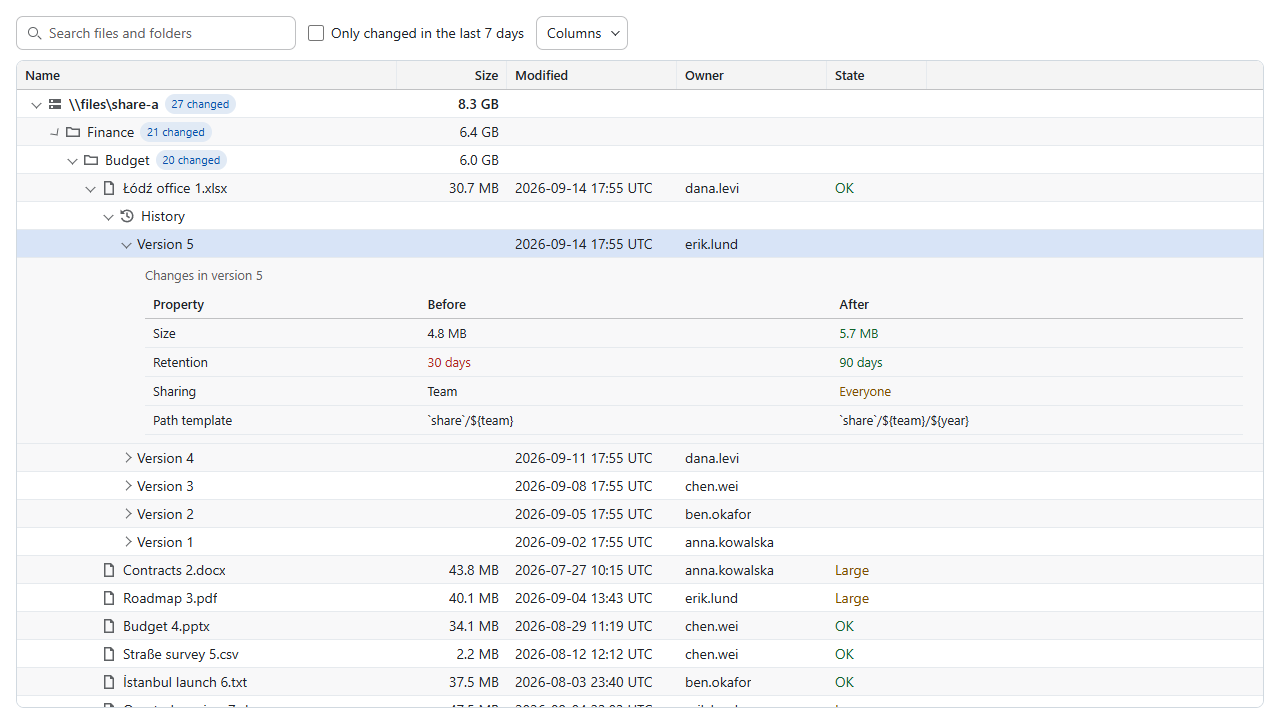
|
|
100
24
|
|
|
101
|
-
|
|
25
|
+
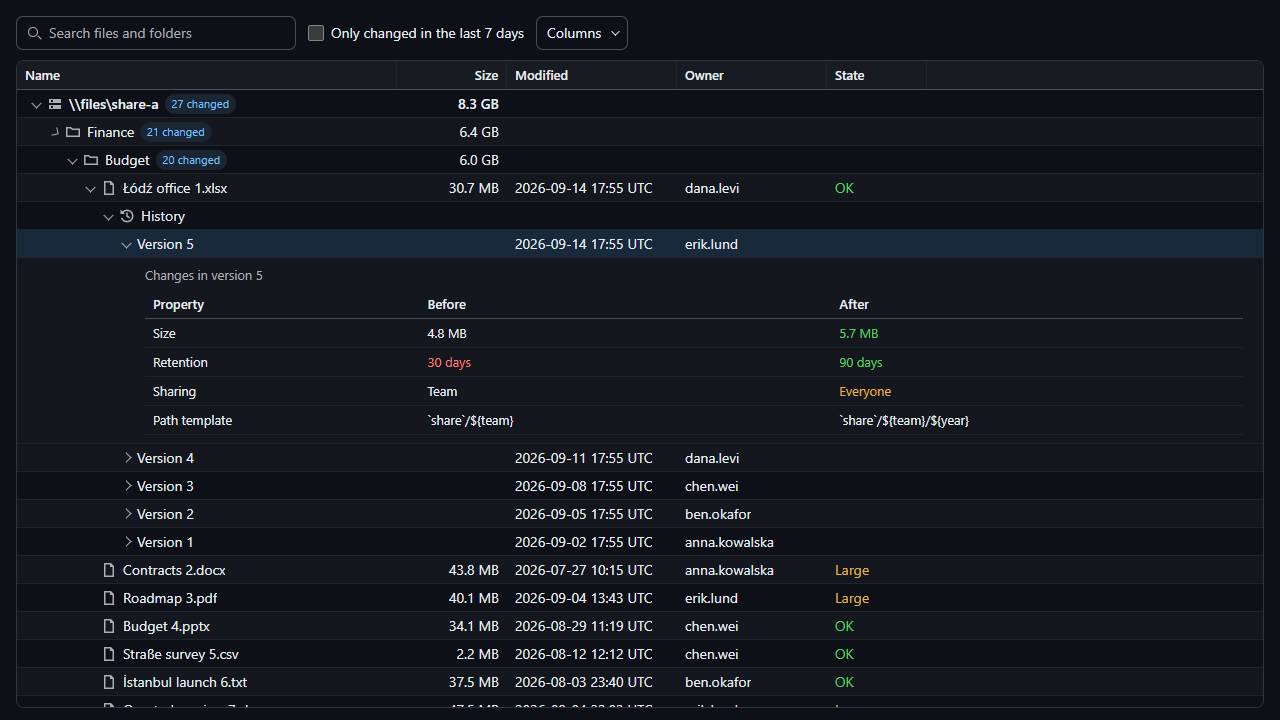
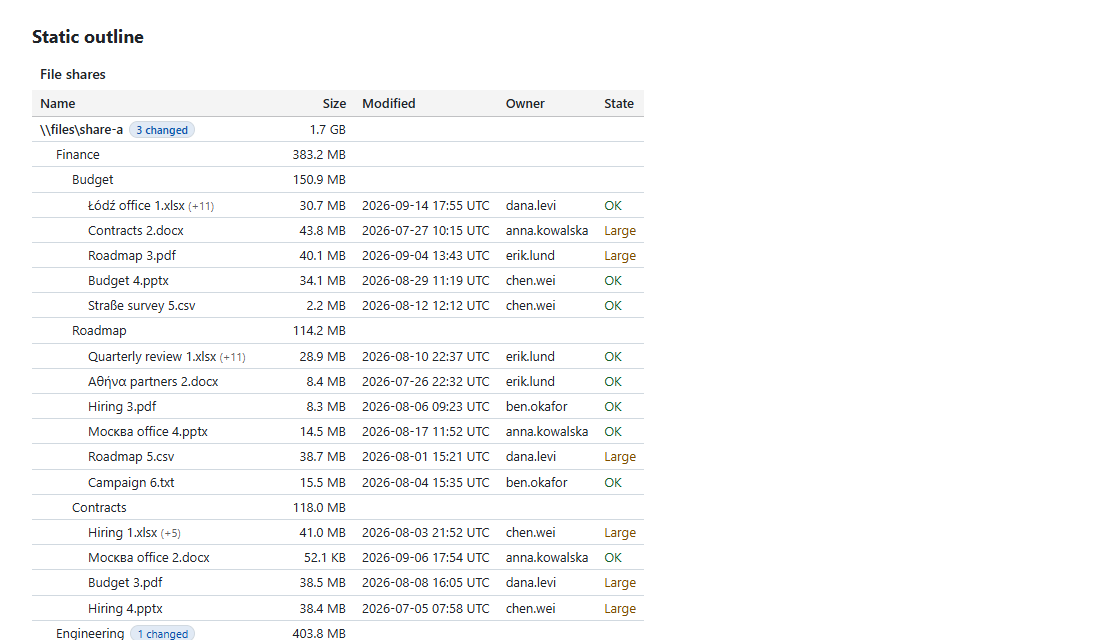
The same explorer in the dark theme, alongside its script-free output for email and print:
|
|
102
26
|
|
|
103
|
-
|
|
104
|
-
|
|
105
|
-
|
|
106
|
-
|
|
107
|
-
Define typed columns and complete inline records with `CanopyDataGridView`, then write a page or host fragment:
|
|
108
|
-
|
|
109
|
-
```csharp
|
|
110
|
-
var inventory = new CanopyDataGridView("inventory", "Inventory");
|
|
111
|
-
inventory.Columns.Add(new CanopyColumn("name", "Name") { Sortable = true });
|
|
112
|
-
inventory.Columns.Add(new CanopyColumn("size", "Size") { Kind = CanopyColumnKind.Number, Sortable = true });
|
|
113
|
-
var row = new CanopyGridRow("record-17");
|
|
114
|
-
row.Cells["name"] = "Archive";
|
|
115
|
-
row.Cells["size"] = new CanopyCell(2048L) { Text = "2 KiB" };
|
|
116
|
-
inventory.Rows.Add(row);
|
|
117
|
-
inventory.SaveHtmlPage("inventory.html");
|
|
118
|
-
```
|
|
119
|
-
|
|
120
|
-
For typed records, declare selectors once and reuse the mapper for inline rows or hosted result pages:
|
|
121
|
-
|
|
122
|
-
```csharp
|
|
123
|
-
var mapper = new CanopyGridMapper<FileRecord>(record => record.Id)
|
|
124
|
-
.AddColumn(new CanopyColumn("name", "Name") { Sortable = true }, record => record.Name)
|
|
125
|
-
.AddColumn(new CanopyColumn("size", "Size") {
|
|
126
|
-
Kind = CanopyColumnKind.Number,
|
|
127
|
-
Sizing = CanopyColumnSizing.Preferred(140)
|
|
128
|
-
}, record => new CanopyCell(record.Bytes) { Text = record.DisplaySize });
|
|
129
|
-
var inventory = mapper.CreateView("inventory", "Inventory", records);
|
|
130
|
-
inventory.SaveHtmlPage("inventory.html");
|
|
131
|
-
```
|
|
132
|
-
|
|
133
|
-
`FileRecord` and `records` are host-owned. The mapper uses selectors rather than reflection and validates the resulting view. Column definitions remain mutable and are reused by its views. Its optional `configure` callback sets reporting or source options before validation. `MapRow(record)` supplies the same mapping to a hosted page.
|
|
134
|
-
|
|
135
|
-
Choose `CanopyGridSource.Inline()`, `HostedOffset()` or `HostedCursor()` through `view.Source`. Cursor sources select paged presentation and reject continuous presentation. Call `view.Validate()` to check a definition before writing it. `CanopyStaticHtml.RenderGrid(view, cursorPage)` accepts a cursor snapshot, including unknown totals, for script-free fallback.
|
|
136
|
-
|
|
137
|
-
Before 1.0, the C# authoring API uses `CanopyTreeView` and `CanopyDataGridView` in place of `CanopyView` and `CanopyGridView`. Replace column `Width` and the separate layout fields with `CanopyColumnSizing`; put presenters and ordering directly on the column instead of `Reporting.Presenters`, `Reporting.Ordering` or `Reporting.Layout`. Use numeric `ResponsivePriority` instead of the priority enum. Grid source factories replace separate source/navigation assignments. HTML extension methods retain their names and live in `CanopyHtmlExtensions`. JavaScript hosts use `setColumnPinned(id, "left" | "right" | "none")`; the `pinColumn` alias is removed. These changes have no compatibility aliases. Existing `canopyx/2` documents retain their meaning.
|
|
138
|
-
|
|
139
|
-
JavaScript export rows now contain normalized cells with both `value` and `text`. Use `row.cells[id].value` for typed data and `row.cells[id].text` for captured display text. The `onExport` event supplies `capture`; enumerate `capture.rows({ signal: event.signal })` directly instead of preparing another export from current UI state. Reporting captures also carry semantic tones, links and diagnostics; ordinary grid captures declare `presentation: "text"`.
|
|
140
|
-
|
|
141
|
-
Sorting, search and typed predicates use raw values; display text and badges remain presentation. Missing values sort last in either direction, with ordinal record identity as the final tie-breaker. Filters and sort keys apply to the full dataset before returning a window.
|
|
142
|
-
|
|
143
|
-
Set `inventory.Presentation = CanopyGridPresentation.Paged` and `inventory.PageLength = 50` to show pages with first/previous/next/last controls, direct page entry and a visible range. `PageSize` remains the source fetch size; it does not set the visible page length. Continuous mode remains the default. The `inventory-grid-paged.html` example uses the same full-query results and exports as the continuous inventory.
|
|
144
|
-
|
|
145
|
-
Browser hosts use `getPaging()`, `goToPage(index)` and `setPageLength(length)` over known-count offset sources. Page indices are zero based; displayed ranges are one based. Saved views retain page length and position, and restoration clamps to the refreshed matching count. `scrollToRow(index)` returns a promise so a host can await navigation across pages. Sources must provide complete offset windows and exact counts; cursor-only and unknown-count sources require a separate host/navigation contract.
|
|
146
|
-
|
|
147
|
-
Set a query's `SearchMode` to `CanopyGridSearchMode.Words` to match every word or quoted phrase across searchable columns. `inventory.SearchColumns` restricts the searched columns, and a cell's `SearchText` supplies alternate keywords without changing its display, sorting or export value. Existing queries keep substring matching. An optional `CanopyGridFilterGroup` combines typed predicates with nested AND/OR rules; search, flat filters and that group all apply before sorting and paging. `inventory-grid-query.html` demonstrates these contracts on the complete inventory.
|
|
27
|
+
| Dark theme | Static outline |
|
|
28
|
+
| --- | --- |
|
|
29
|
+
|  |  |
|
|
148
30
|
|
|
149
|
-
|
|
31
|
+
## Features
|
|
150
32
|
|
|
151
|
-
|
|
33
|
+
| | Tree grid | Data grid |
|
|
34
|
+
| --- | --- | --- |
|
|
35
|
+
| Navigation | Expandable branches, path search and lazy children | Continuous or paged records, offset or cursor navigation |
|
|
36
|
+
| Querying | Search, sibling sorting and named filters | Search, multi-column sorting, typed filters and condition groups |
|
|
37
|
+
| Columns | Resize and hide | Resize, hide, reorder, pin and fit to content |
|
|
38
|
+
| Selection | Single/multiple selection and hierarchical checkboxes | Single/multiple selection with stable record IDs |
|
|
39
|
+
| Presentation | Badges, details, custom cells and light/dark themes | Links, progress, wrapped text, row highlighting and light/dark themes |
|
|
40
|
+
| Delivery | Single HTML file, sidecar bundle or hosted data | Single HTML file or hosted data |
|
|
152
41
|
|
|
153
|
-
|
|
42
|
+
Both views use virtual rows and support keyboard navigation. Reporting grids also provide grouping, aggregates, saved views, CSV export and row copying. English labels are built in; Polish, German and Spanish packs are included.
|
|
154
43
|
|
|
155
|
-
|
|
44
|
+
## Installation
|
|
156
45
|
|
|
157
|
-
|
|
46
|
+
### .NET
|
|
158
47
|
|
|
159
|
-
```
|
|
160
|
-
|
|
161
|
-
inventory.Selection = CanopySelectionMode.Multiple;
|
|
48
|
+
```shell
|
|
49
|
+
dotnet add package CanopyX.Html
|
|
162
50
|
```
|
|
163
51
|
|
|
164
|
-
|
|
165
|
-
|
|
166
|
-
Reporting grids also offer direct header moves with `inventory.Reporting.ColumnReorder = true`. Drag a header's move handle or use Left/Right while that handle has focus. Hidden columns, sorting, saved state and export order follow stable column IDs. `inventory.GetColumn("name").Sizing = CanopyColumnSizing.Flex(1, 120, 600)` constrains its width and allocates spare viewport space. A manual resize disables that column's flex sizing; resetting or restoring a saved view restores its sizing intent.
|
|
52
|
+
`CanopyX.Html` includes the browser assets and brings in `CanopyX` for the view definitions. Install `CanopyX` alone when you only need the model, tree bundle writer or script-free table renderer.
|
|
167
53
|
|
|
168
|
-
|
|
54
|
+
| Target | Support |
|
|
55
|
+
| --- | --- |
|
|
56
|
+
| .NET 8 and .NET 10 | Windows, Linux and macOS |
|
|
57
|
+
| .NET Standard 2.0 | Compatible .NET applications |
|
|
58
|
+
| .NET Framework 4.7.2 | Windows |
|
|
169
59
|
|
|
170
|
-
|
|
60
|
+
Neither .NET package adds third-party runtime dependencies. Generating a report from C# needs no Node.js, npm or JavaScript build step.
|
|
171
61
|
|
|
172
|
-
|
|
62
|
+
### JavaScript
|
|
173
63
|
|
|
174
|
-
```
|
|
175
|
-
|
|
176
|
-
var name = inventory.GetColumn("name");
|
|
177
|
-
name.Sizing = CanopyColumnSizing.Flex(1, 120, 600);
|
|
178
|
-
name.Pinned = CanopyGridColumnPin.Left;
|
|
179
|
-
name.ResponsivePriority = 0;
|
|
180
|
-
name.AlwaysVisible = true;
|
|
64
|
+
```shell
|
|
65
|
+
npm install @evotecit/canopyx
|
|
181
66
|
```
|
|
182
67
|
|
|
183
|
-
|
|
184
|
-
|
|
185
|
-
Use `api.getState()` and `await api.setState(state)` to save and restore the accepted query, column layout, time zone, selection IDs and scroll position. `api.saveView("Archives")` saves a named snapshot; `await api.applySavedView("Archives")` restores it, and `api.removeSavedView("Archives")` removes it. A grid's `StateKey` remembers the current settings and up to 20 named views in session storage. `await api.resetView()` restores the original definition and clears selection while retaining named views. A host that supplies its own toolbar passes `toolbar: false` and uses these same controller methods.
|
|
68
|
+
The package includes ES modules, classic scripts, stylesheets and TypeScript declarations, with no runtime package dependencies.
|
|
186
69
|
|
|
187
|
-
|
|
70
|
+
## Usage in .NET
|
|
188
71
|
|
|
189
|
-
|
|
190
|
-
|
|
191
|
-
The reporting filter editor provides inclusive number/date ranges, category suggestions from declared ordering policies, and translated boolean choices. A filled accent filter button appears beside the title of each filtered column and reopens its filter; unfiltered headers show only the column menu, which offers Filter…. Escape returns focus to the button that opened the filter. `HeaderFilters` remains accepted for existing hosts. Ranges remain two ordinary typed predicates, so hosted queries and exports keep their existing meaning. Category suggestions leave free-text filtering available for values outside the declared list. Active-condition chips and counts describe the accepted full query, including predicates on hidden columns. `Labels.GridBetween`, `GridTrue`, `GridFalse` and `GridHeaderFilter` customize the new controls.
|
|
72
|
+
### Create a file explorer
|
|
192
73
|
|
|
193
74
|
```csharp
|
|
194
|
-
|
|
195
|
-
|
|
196
|
-
view.GetColumn("status").Ordering = new CanopyGridOrdering(CanopyGridTextOrder.FoldedOrdinal,
|
|
197
|
-
new[] { "Critical", "Warning", "Healthy" });
|
|
198
|
-
```
|
|
199
|
-
|
|
200
|
-
The columns identify declared sortable text fields. Complete-page writers select `CanopyRuntime.ReportingGrid` automatically. JavaScript hosts import from `@evotecit/canopyx/reporting` with its matching `reporting.css`, and supply `reporting: { ordering: { name: { text: "foldedNatural" } } }` in the grid definition. Host query engines can reuse `CanopyGridOrdering`; sorting precedes result windows and export order remains the accepted query order. See the [protocol's ordering and precision rules](docs/data-protocol.md#flat-grid-documents) for categories, missing values, exact text representations and UTC millisecond dates.
|
|
201
|
-
|
|
202
|
-
The export menu distinguishes filtered results, selected records and all results. Exports use the accepted query, stable record IDs and ordered columns, independently of the virtual rows on screen. `await api.toCsv({ scope: "filtered" })` produces CSV; `await api.copy({ scope: "selected" })` copies tab-separated records with spreadsheet formula protection. Client exports have explicit row limits. For larger Office files, configure `onExport` and call `api.exportToHost("xlsx", { scope: "all" })`; the host owns authorization, document generation and delivery.
|
|
203
|
-
|
|
204
|
-
`api.refresh()` repaints accepted data. `await api.reload()` requests a fresh source revision using the accepted filters and ordering and restarts at the first page; a failed request keeps the last accepted query and rows. A prepared export remains bound to its original revision.
|
|
205
|
-
|
|
206
|
-
`prepareExport()` captures an immutable request and a fresh `rows({ signal })` enumeration factory. Each exported cell contains `value` and resolved `text`. The reporting runtime marks the request as `presentation: "semantic"` and also captures presenter intent, CSS pixel width bounds, wrapping, alignment, first-match highlight tones, safe absolute links and diagnostics for presentation that needs host policy. Ordinary grids mark text-only captures as `presentation: "text"`. `recordCount` includes selected-query exclusions and stays null for unknown counts. The `onExport` event supplies this exact `capture` alongside `request` and its cancellation signal; hosts map semantic tones to their output palette and own format generation. See [export contracts](docs/data-protocol.md#export-clipboard-and-record-details) for precision, unsupported presentation and memory limits.
|
|
207
|
-
|
|
208
|
-
Enter on a row, double-click or Record details opens a drawer with every field, including hidden columns. The drawer uses the column presenters and optional `CanopyColumn.Section` labels, with previous/next records, Escape and focus return. F2 enters the row's cells. On phones, tapping a row opens the full-screen drawer; a +N indicator shows how many fields are hidden. Configure `onDetails` to use a host-owned record view instead. The hook retains its immutable row, accepted query, cancellation signal and return-focus element. A changed query or newer details request cancels an unfinished opening operation. See [export and details contracts](docs/data-protocol.md#export-clipboard-and-record-details) for revision checks and limits.
|
|
209
|
-
|
|
210
|
-
The generated `inventory-grid.html` example contains 5,000 records and starts with a typed category predicate and numeric descending sort. It exercises the shared viewport, toolbar, saved views and export controls. Consumer adoption and scrolling performance follow-ups remain in [TODO.md](TODO.md).
|
|
211
|
-
|
|
212
|
-
The sentence builder composes All/Any condition groups in ordinary and reporting grids. `Reporting.FilterGroups` remains accepted for existing hosts. Flat conditions remain an outer conjunction. Groups use the same typed predicates, saved query state and whole-result export semantics as API-authored queries. Inclusive ranges inside an Any group stay one condition, represented by an inner AND group. Live editing validates the complete expression before requesting data; invalid input retains the accepted results. The engine still supports eight levels, 64 groups and 64 total predicates. Saved expressions deeper than the UI's two levels open read-only until Edit as text is chosen. Group editing does not enable hosted facet counts.
|
|
213
|
-
|
|
214
|
-
Inline text columns offer a value list with full-query counts in their column filter popover. Declare `Reporting.FacetColumns.Add("status")` and supply `source.facet(request, { signal })` for hosted facets. The control searches available values and preserves raw types; counts exclude the current column's predicates and include the other accepted conditions. Changes apply after 200 ms. Counts never come from just the visible page. `api.getFacets("status", { search: "review", limit: 100, includeCurrentFilter: false })` retains the explicit projection option; see the [facet protocol](docs/data-protocol.md#flat-grid-documents) for snapshot rules.
|
|
215
|
-
|
|
216
|
-
Saved reporting views can survive browser sessions with `inventory.StateKey = "inventory-reader"` and `inventory.Reporting.ViewStorage = CanopyGridViewStorage.Local`. The Saved views menu offers rename and default choices; Reset view restores the definition while keeping named views. JavaScript hosts can supply `viewStore.load/save` hooks for governed preference storage instead. Use `api.flushViewSettings()` before disposal when the host must acknowledge a save. `api.getShareState()` keeps layout and sorting while removing searches, filters, selected IDs and dataset positions. See the [preference contract](docs/data-protocol.md#flat-grid-documents) for bounds, schema evolution, cancellation and privacy.
|
|
217
|
-
|
|
218
|
-
Reporting exports offer progress and cancellation for full filtered, selected or all-result scopes. Optional `fileName`, `locale` and `timeZone` options stay with the captured request. A host can call `api.materializeExport({ scope: "filtered", maxRows: 1000 })` for a complete bounded snapshot, or configure `onPrint({ snapshot, signal })` and call `api.print({ scope: "filtered" })`. The host uses its existing renderer and honors cancellation before delivery. Larger Office or print reports use `exportToHost`, with authorization and generation governed by that host. See the [delivery contract](docs/data-protocol.md#export-clipboard-and-record-details) for bounds, progress and offline choices.
|
|
219
|
-
|
|
220
|
-
Grouped reporting views retain record-based paging and export scope:
|
|
221
|
-
|
|
222
|
-
```csharp
|
|
223
|
-
inventory.Reporting = new CanopyGridReporting {
|
|
224
|
-
Grouping = new CanopyGridGrouping("category"), SelectionControls = true
|
|
225
|
-
};
|
|
226
|
-
inventory.Reporting.Aggregates.Add(new CanopyGridAggregate(
|
|
227
|
-
"total", "amount", CanopyGridAggregateOperation.Sum, "Total amount"));
|
|
228
|
-
```
|
|
229
|
-
|
|
230
|
-
The grouping column leads ordering, followed by user sorts and stable record IDs. Group headings show full group counts, column-aligned totals and the worst declared state tone; collapsing a group hides its rows without removing records from selections or exports. Hosted summaries supply optional `CanopyGridGroup.Cells` / `groups[].cells` for group display facts. The pinned summary row follows the complete filtered query. Inline data computes generic aggregates; hosted sources provide revisioned `gridSummary` metadata through `source.summary`. See the [group and summary contract](docs/data-protocol.md#flat-groups-and-complete-query-totals) for ordering, bounds and host validation. The generated `grouped-grid.html` and continuous/dark variants combine grouping with responsive columns, filters, saved views and selection.
|
|
231
|
-
|
|
232
|
-
Set `CanopyDataGridView.StatusBar = true` / `statusBar: true` for matching and selected counts. Numeric columns marked `Aggregatable` / `aggregatable` show selected sums and a tooltip with count, average, minimum and maximum. These use complete selected records rather than visible rows. Hosted aggregates read through the accepted export contract, cancel when selection or query changes, and stop at 50,000 records; unavailable values display the translated no-data message. Inline All in the paging footer uses the complete dataset; `api.setPageLength("all")` selects it programmatically and saved paging state retains that choice.
|
|
75
|
+
using CanopyX;
|
|
76
|
+
using CanopyX.Html;
|
|
233
77
|
|
|
234
|
-
|
|
78
|
+
var files = new CanopyTreeView("files", "Project files");
|
|
79
|
+
files.Search = new CanopySearchOptions();
|
|
80
|
+
files.Columns.Add(new CanopyColumn("name", "Name") { Sortable = true });
|
|
81
|
+
files.Columns.Add(new CanopyColumn("size", "Size")
|
|
82
|
+
{
|
|
83
|
+
Kind = CanopyColumnKind.Number,
|
|
84
|
+
Sortable = true
|
|
85
|
+
});
|
|
235
86
|
|
|
236
|
-
|
|
87
|
+
var projects = new CanopyNode("projects", "Projects");
|
|
88
|
+
var report = new CanopyNode("quarterly-report", "Quarterly report.pdf");
|
|
89
|
+
report.Cells["size"] = new CanopyCell(2048L) { Text = "2 KiB" };
|
|
90
|
+
projects.Children.Add(report);
|
|
91
|
+
files.Roots.Add(projects);
|
|
237
92
|
|
|
238
|
-
|
|
239
|
-
view.GetColumn("name").Presenter = CanopyGridPresenter.Link("address", newWindow: true);
|
|
240
|
-
view.GetColumn("status").Presenter = CanopyGridPresenter.Icon("●");
|
|
241
|
-
view.GetColumn("completion").Presenter = CanopyGridPresenter.Progress(maximum: 100);
|
|
242
|
-
view.GetColumn("enabled").Presenter = CanopyGridPresenter.Boolean();
|
|
243
|
-
view.GetColumn("owners").Presenter = CanopyGridPresenter.List(", ", limit: 2);
|
|
244
|
-
view.GetColumn("notes").Presenter = CanopyGridPresenter.LongText();
|
|
93
|
+
files.SaveHtmlPage("files.html");
|
|
245
94
|
```
|
|
246
95
|
|
|
247
|
-
|
|
96
|
+
Open `files.html` in a browser and expand Projects. The first column displays the node label; the Size column displays the matching cell. Numeric values control sorting while `Text` controls the displayed value.
|
|
248
97
|
|
|
249
|
-
|
|
250
|
-
|
|
251
|
-
Every toolbar control can be switched off; a control switched off is removed from the page (it is not built, or is taken out before the grid appears), and the methods behind it stay available. C# views set `Toolbar` switches (the search box keeps its `Search` switch); browser hosts pass `toolbar` to `createDataGrid` or `CanopyX.configure`, which overrides the definition and also accepts `search`:
|
|
98
|
+
For a larger tree, write a bundle that loads branches on demand:
|
|
252
99
|
|
|
253
100
|
```csharp
|
|
254
|
-
|
|
255
|
-
inventory.Toolbar.Count = false; // the host shows its own count
|
|
256
|
-
```
|
|
257
|
-
|
|
258
|
-
```js
|
|
259
|
-
createDataGrid(host, { view, toolbar: { views: false, more: true } }); // search, filters, columns, views, export, more, count
|
|
260
|
-
```
|
|
261
|
-
|
|
262
|
-
The reporting runtime (`@evotecit/canopyx/reporting`) adds host slots and content entries. Four slots hold host elements in the toolbar: `start`, `afterSearch`, `afterViews` and `end` (the start of the right-hand group, before Export and ⋯). `afterSearch` follows `start` directly when the grid has no search box. `api.toolbarSlot(name)` returns the slot's element (it carries `data-cx-toolbar-slot`), the same one for the grid's lifetime whatever the phone layout moves. Children of the host element marked `data-cx-slot` move into their slot when the grid mounts and return to the host element when it is destroyed, so a remount picks them up again; a misspelt slot name fails the mount and leaves them in place. A replacement grid on another host takes host elements with `next.toolbarSlot("end").append(count)`. Slots add no box of their own; host elements that use the `cx-button` and `cx-grid-field` classes match the grid's controls.
|
|
263
|
-
|
|
264
|
-
```html
|
|
265
|
-
<div data-canopyx-host>
|
|
266
|
-
<span data-cx-slot="end" class="my-count">1,204 devices</span>
|
|
267
|
-
<script type="application/json" class="cx-config">…</script>
|
|
268
|
-
</div>
|
|
269
|
-
```
|
|
270
|
-
|
|
271
|
-
`actions` entries run a handler (`{ label, run }`) or, in the reporting runtime, disclose host content inside the more menu (`{ label, render }`). `render(container, { close, signal })` fills the container on first open (again after a render that threw); focus moves to its first control, Escape folds the entry back to its label, closing the menu folds it, and `close()` closes the menu and returns focus to ⋯. `signal` aborts when the grid is destroyed:
|
|
272
|
-
|
|
273
|
-
```js
|
|
274
|
-
actions: [{ label: "Save view…", render(container, { close }) {
|
|
275
|
-
const field = document.createElement("label"), name = document.createElement("input"), save = document.createElement("button");
|
|
276
|
-
field.className = "cx-grid-field"; field.append("View name", name);
|
|
277
|
-
save.type = "button"; save.className = "cx-button"; save.textContent = "Save";
|
|
278
|
-
save.onclick = () => { grid.saveView(name.value); close(); };
|
|
279
|
-
container.append(field, save);
|
|
280
|
-
} }]
|
|
101
|
+
files.SaveHtmlBundle("file-report");
|
|
281
102
|
```
|
|
282
103
|
|
|
283
|
-
|
|
104
|
+
Keep the generated page, assets and data files together. The bundle can be opened directly from disk or a file share.
|
|
284
105
|
|
|
285
|
-
|
|
286
|
-
|
|
287
|
-
- Lazy children from inline data, sidecar script files, or an HTTP endpoint, with long child lists paged behind a "show more" row.
|
|
288
|
-
- Virtual scrolling over a fixed row height; only the rows near the viewport exist in the DOM. Large logical heights map to a bounded native scrollbar, keeping every loaded row reachable through scrolling, keyboard navigation, and saved anchors.
|
|
289
|
-
- Columns with per-level sort, resize, and hide, and a tree column that can stay pinned while the others scroll; dates in UTC or the reader's time zone, switchable at run time.
|
|
290
|
-
- Search that returns id paths and expands the tree to the match, optionally limited to the node kinds worth finding; the bundle writer stores every node once and files its words in shards by prefix, so a query loads only the shards of its words and the entries of the matches it shows.
|
|
291
|
-
- "Only matching" filters that keep the ancestors of matching rows.
|
|
292
|
-
- Cells with host-supplied values, display text, tones, and badges; icons declared once per view. Six tones are built in, and a host adds its own (a severity scale, a maintenance state) with a name and two theme colours.
|
|
293
|
-
- Detail rows that hold a table, a property list, or host HTML: as tall as their content (measured in the browser) or a fixed number of row slots, and always inside the visible width of the grid.
|
|
294
|
-
- Single and multi-select, selection events for a drawer, deep links that expand a path (in the default scheme or the host's own), and versioned view state remembered for the session.
|
|
295
|
-
- Light and dark themes from a handful of CSS custom properties.
|
|
296
|
-
- Every text CanopyX writes itself (search hints, "show more" and error rows, the column chooser, screen-reader announcements, date marks, the outline's notes) comes from `CanopyTreeView.Labels`: English by default, translated once per view.
|
|
297
|
-
- A script-free outline table for email, print, and Word, in the light or dark palette or the host's own colours.
|
|
298
|
-
|
|
299
|
-
JavaScript hosts can save a view with `const state = api.getState()` and restore it with `await api.setState(state)`. The JSON snapshot includes columns, sort, declared filters, selection, expansion, timezone, focus, and a scroll anchor. Existing expansion-only snapshots remain readable. `stateKey` remembers the same settings in session storage. Host predicates and callbacks stay with the host and are not serialized.
|
|
300
|
-
|
|
301
|
-
Use `await api.reload()` to reread roots, or `await api.reload(parentId, { signal })` to reread a loaded parent's children. Reload reads through the range already loaded, validates the replacement before applying it, and preserves surviving selection, expansion, focus, and scroll position. A newer reload supersedes an older one. Failed validation retains the old data; cancellation returns `false`. `api.refresh()` repaints the current nodes, and `api.refreshCounts()` updates rollup values and child counts.
|
|
302
|
-
|
|
303
|
-
The generated `live-records.html` example replaces an inline snapshot and provides save and restore controls for the view. An inline host can assign a new array to `api.view.roots` and then call `await api.reload()`; stable node IDs retain the reader's selection and open branches.
|
|
304
|
-
|
|
305
|
-
The generated `long-document.html` example loads 20,000 tall sections and provides jumps and saved positions across their full range. The height mapping preserves each section's size; it does not load additional pages or bound the memory of rows the host has already supplied.
|
|
306
|
-
|
|
307
|
-
Sorting an inline list orders its complete sibling array before choosing the loaded page. Selected and expanded identities remain available when they move outside that prefix. `retainedNodeLimit` is a JavaScript host option, defaulting to 1,024 nodes, that bounds unpinned wrappers retained after inline reordering. Selection, expansion, focus, anchors, and pending operations pin their subtrees. The host's inline arrays remain unchanged. For remote and sidecar lists this API orders loaded siblings; ordering the complete dataset remains the host's responsibility.
|
|
308
|
-
|
|
309
|
-
## Quick Start
|
|
310
|
-
|
|
311
|
-
Build a view, add nodes, and save a single-file page:
|
|
106
|
+
### Create an inventory table
|
|
312
107
|
|
|
313
108
|
```csharp
|
|
314
109
|
using CanopyX;
|
|
315
110
|
using CanopyX.Html;
|
|
316
111
|
|
|
317
|
-
var
|
|
318
|
-
|
|
319
|
-
|
|
320
|
-
|
|
321
|
-
|
|
322
|
-
|
|
323
|
-
|
|
324
|
-
projects.Cells["owner"] = "Engineering";
|
|
325
|
-
|
|
326
|
-
var plans = new CanopyNode("projects/plans", "plans");
|
|
327
|
-
plans.Cells["size"] = 1_048_576;
|
|
328
|
-
plans.Badges.Add(new CanopyBadge("stale", CanopyTone.Warning));
|
|
329
|
-
projects.Children.Add(plans);
|
|
330
|
-
|
|
331
|
-
view.Roots.Add(projects);
|
|
332
|
-
view.SaveHtmlPage("files.html");
|
|
333
|
-
```
|
|
334
|
-
|
|
335
|
-
The first column shows each node's label; the other columns show the node's cells by column id.
|
|
336
|
-
|
|
337
|
-
For large trees, write a bundle instead. The data is split into sidecar files that the page loads on demand, and the page works when opened straight from a file share. Small child lists share pack files, so a tree with hundreds of thousands of rows is a few thousand files. The page references the runtime under a name that carries its content hash (`assets/canopyx.<hash>.js`), so it always loads the runtime it was written for and the file can be cached for good; publish the page and its data folder together:
|
|
338
|
-
|
|
339
|
-
```csharp
|
|
340
|
-
CanopyBundleResult bundle = view.SaveHtmlBundle("report");
|
|
341
|
-
Console.WriteLine($"{bundle.NodeCount:N0} nodes in {bundle.FileCount:N0} files ({bundle.PackCount:N0} packs), largest {bundle.LargestFileBytes:N0} bytes");
|
|
342
|
-
```
|
|
112
|
+
var inventory = new CanopyDataGridView("inventory", "Inventory");
|
|
113
|
+
inventory.Columns.Add(new CanopyColumn("name", "Name") { Sortable = true });
|
|
114
|
+
inventory.Columns.Add(new CanopyColumn("size", "Size")
|
|
115
|
+
{
|
|
116
|
+
Kind = CanopyColumnKind.Number,
|
|
117
|
+
Sortable = true
|
|
118
|
+
});
|
|
343
119
|
|
|
344
|
-
|
|
120
|
+
foreach (var (name, bytes) in new[] { ("Archive", 2048L), ("Documents", 512L) })
|
|
121
|
+
{
|
|
122
|
+
var row = new CanopyGridRow(name);
|
|
123
|
+
row.Cells["name"] = name;
|
|
124
|
+
row.Cells["size"] = new CanopyCell(bytes) { Text = $"{bytes:N0} bytes" };
|
|
125
|
+
inventory.Rows.Add(row);
|
|
126
|
+
}
|
|
345
127
|
|
|
346
|
-
|
|
347
|
-
var view = new CanopyTreeView("files", "File shares"); // columns as above, no roots
|
|
348
|
-
CanopyBundleResult bundle = view.SaveHtmlBundle("report", ReadShares(), node => ReadChildren(node.Id));
|
|
128
|
+
inventory.SaveHtmlPage("inventory.html");
|
|
349
129
|
```
|
|
350
130
|
|
|
351
|
-
`
|
|
352
|
-
|
|
353
|
-
Local external assets in an HTML bundle use a separate directory tree from its sidecar data. Bundle folders cannot occupy `index.html` or a runtime asset file path. Local asset folders use portable names without internal `.` or `..` segments; a leading `./` is allowed. These layout checks run before any bundle files are written. URLs outside the bundle remain host-served.
|
|
131
|
+
Open `inventory.html` to search the records, sort by name or size, and adjust the columns. Record IDs stay stable when the order changes.
|
|
354
132
|
|
|
355
|
-
|
|
133
|
+
### Render a table for email or print
|
|
356
134
|
|
|
357
135
|
```csharp
|
|
358
136
|
using CanopyX.Rendering;
|
|
359
137
|
|
|
360
|
-
string
|
|
361
|
-
|
|
362
|
-
|
|
363
|
-
The outline is light by default. `Theme = CanopyStaticTheme.Dark()` writes the dark palette, a host sets the colours of its own design tokens on the theme, and `UseThemeVariables` lets an outline inside a page follow that page's theme without script ([Theming the Outline](docs/architecture.md#theming-the-outline)).
|
|
364
|
-
|
|
365
|
-
JavaScript hosts can create a tree grid directly from a view document:
|
|
366
|
-
|
|
367
|
-
```js
|
|
368
|
-
const grid = CanopyX.createTreeGrid(document.getElementById("files"), {
|
|
369
|
-
view,
|
|
370
|
-
// The host draws the columns it names and returns true; every other column keeps the default painting.
|
|
371
|
-
renderers: { owner: (node, element, context) => drawOwnerChip(node, element) },
|
|
372
|
-
onSelect: (node) => showDrawer(node)
|
|
373
|
-
});
|
|
374
|
-
await grid.expandPath(["projects", "projects/plans"]);
|
|
375
|
-
// Pass { signal: controller.signal } to cancel navigation promptly, even while a page is still loading.
|
|
376
|
-
```
|
|
377
|
-
|
|
378
|
-
A renderer that draws badges or chips uses `CanopyX.badge({ text, tone, title })`, which returns the badge element the grid itself draws (the `cx-badge` class, the classes of a named tone, and for a host tone its `--cx-tone-<name>` colours), so a host cell matches the cells CanopyX paints:
|
|
379
|
-
|
|
380
|
-
```js
|
|
381
|
-
renderers: { finding: (node, element) => {
|
|
382
|
-
if (!node.data || !node.data.severity) return false;
|
|
383
|
-
element.append(CanopyX.badge({ text: node.data.severity, tone: node.data.severity.toLowerCase() }), " " + node.label);
|
|
384
|
-
return true;
|
|
385
|
-
} }
|
|
386
|
-
```
|
|
387
|
-
|
|
388
|
-
A renderer gets the node, a fresh element to fill, and `{ column, level, expanded, index }`. Name only the columns the host really draws: a cell the renderer draws (returns true) or decorates is rebuilt whenever its row is painted, while the other columns, and the rows where the renderer returns false without adding children or attributes to the element (which is then dropped, so put listeners on content you add, or on the grid), reuse their cells, which is what keeps scrolling smooth on slow machines.
|
|
389
|
-
|
|
390
|
-
A page that embeds a fragment from `ToHtmlFragment` hands it the same options before the runtime mounts it, from a script that runs before the page has loaded:
|
|
391
|
-
|
|
392
|
-
```js
|
|
393
|
-
const releaseOptions = CanopyX.configure("files", { renderers: { owner: drawOwnerChip }, onSelect: showDrawer });
|
|
394
|
-
// When the host retires this view, destroy its grid and call releaseOptions().
|
|
138
|
+
string treeTable = CanopyStaticHtml.Render(files);
|
|
139
|
+
string inventoryTable = CanopyStaticHtml.RenderGrid(inventory);
|
|
395
140
|
```
|
|
396
141
|
|
|
397
|
-
|
|
398
|
-
|
|
399
|
-
Repeated creation on a live host returns its existing grid. Call `grid.destroy()` before creating a replacement. Destruction releases loaded rows, selection, caches, and the row pool. A caller-held retired API retains its view metadata; the host no longer exposes the destroyed grid.
|
|
400
|
-
|
|
401
|
-
Registered fragment options persist for remounting until their disposer is called or `CanopyX.unconfigure(viewId)` removes them. Removing a registration leaves a mounted grid intact, and an older disposer cannot remove a newer registration.
|
|
402
|
-
|
|
403
|
-
Built-in remote requests have a 30-second deadline, including reading the response body. Set `requestTimeoutMs` in grid options to change it; destroying the grid cancels its built-in requests. A separately owned source created with `CanopyX.sources.remote(view, { timeoutMs, signal })` follows its owner's signal, and `page(node, cursor, { signal })`, `search(query, limit, { signal })`, and `counts(ids, { signal })` accept individual request signals. Cancelling navigation releases that caller without cancelling a shared page load. Custom sources own their transport cancellation and deadlines.
|
|
404
|
-
|
|
405
|
-
Selection is independent of focus. `grid.setSelection(["projects", "archive"])` replaces the selection with loaded node ids, `grid.clearSelection()` clears it, and `grid.selectAll({ scope: "visible" })` selects eligible rows in the current expanded/filtered view. The alternative `scope: "loaded"` includes loaded collapsed descendants. Select-all requires multiple selection and never fetches unloaded data; invalid ids and single-selection overflow leave the existing selection intact. Call `expandPath` to load an id before selecting it directly.
|
|
406
|
-
|
|
407
|
-
Hosts can pass `isSelectable(node)` to keep rows focusable while preventing selection additions, and `beforeSelect(node, nodes, { previous, reason })` to synchronously veto a whole proposal by returning false. The cancelable `canopyx:beforeselect` event offers the same veto. Reasons are `row`, `range`, `api`, `clear`, or `all`. Selection methods return whether their proposal was accepted. A successful clear emits `canopyx:select` and calls `onSelect` with `null` and an empty array; hosts that handle clearing should account for that nullable node. Removal of data reconciles selection directly and cannot be vetoed.
|
|
142
|
+
These methods return HTML tables with no scripts. Insert the returned HTML into your email, print layout or document-generation workflow.
|
|
408
143
|
|
|
409
|
-
|
|
144
|
+
## Usage in JavaScript
|
|
410
145
|
|
|
411
|
-
|
|
146
|
+
Add a container to your page:
|
|
412
147
|
|
|
413
|
-
|
|
414
|
-
|
|
415
|
-
Checkboxes are independent of row selection. A hierarchical check applies to a complete branch, including children that have not loaded; a deeper rule creates an exception. Checking does not fetch children or perform a host operation.
|
|
416
|
-
|
|
417
|
-
```csharp
|
|
418
|
-
view.Checkboxes = CanopyCheckboxMode.Hierarchical;
|
|
419
|
-
view.CheckIntents.Add(new CanopyCheckIntent(new[] { "project-a" }, true));
|
|
420
|
-
view.CheckIntents.Add(new CanopyCheckIntent(new[] { "project-a", "task-1" }, false));
|
|
148
|
+
```html
|
|
149
|
+
<div id="files" style="height: 360px"></div>
|
|
421
150
|
```
|
|
422
151
|
|
|
423
|
-
|
|
424
|
-
|
|
425
|
-
In the browser, `api.setChecked(id, checked)` changes a loaded node. `api.setCheckIntents([{ path, checked }])` replaces the complete intent without loading paths. `getCheckState(id)` returns `true`, `false`, `"mixed"`, or `null` for an unavailable node; `getCheckIntents()` returns a copied snapshot suitable for the host to interpret. A complete loaded sibling set can combine into one branch rule; partial pages preserve exceptions without claiming unseen siblings. Rules survive sorting, reload, and cache eviction. Saved views include them, and both outline renderers show readonly check states.
|
|
152
|
+
Then mount a tree grid:
|
|
426
153
|
|
|
427
|
-
|
|
428
|
-
|
|
429
|
-
|
|
430
|
-
|
|
431
|
-
## Host Actions, Editing, and Moving Nodes
|
|
154
|
+
```javascript
|
|
155
|
+
import { createTreeGrid } from "@evotecit/canopyx";
|
|
156
|
+
import "@evotecit/canopyx/styles.css";
|
|
432
157
|
|
|
433
|
-
|
|
158
|
+
const grid = createTreeGrid(document.getElementById("files"), {
|
|
159
|
+
view: {
|
|
160
|
+
protocol: "canopyx/2", type: "view", id: "files", label: "Project files",
|
|
161
|
+
rowHeight: 28, pageSize: 100, selection: "single",
|
|
162
|
+
search: { minLength: 1, maxResults: 50 },
|
|
163
|
+
columns: [{ id: "name", title: "Name", kind: "text", width: 320 }],
|
|
164
|
+
source: { kind: "inline" },
|
|
165
|
+
roots: [{
|
|
166
|
+
id: "projects", label: "Projects",
|
|
167
|
+
children: [{ id: "quarterly-report", label: "Quarterly report.pdf" }]
|
|
168
|
+
}]
|
|
169
|
+
}
|
|
170
|
+
});
|
|
434
171
|
|
|
435
|
-
|
|
436
|
-
view.Columns[0].Editable = true;
|
|
437
|
-
view.DragDrop = true;
|
|
438
|
-
view.ContextActions.Add(new CanopyContextAction("inspect", "Inspect record"));
|
|
172
|
+
await grid.ready;
|
|
439
173
|
```
|
|
440
174
|
|
|
441
|
-
|
|
442
|
-
|
|
443
|
-
```js
|
|
444
|
-
CanopyX.configure("records", {
|
|
445
|
-
canEdit: (node, column) => node.kind === "task",
|
|
446
|
-
canDrag: node => node.kind === "task",
|
|
447
|
-
onEdit: async (proposal, request) => {
|
|
448
|
-
// The host validates the path, column, value, and current authorization.
|
|
449
|
-
return await records.acceptEdit(proposal, request.signal);
|
|
450
|
-
},
|
|
451
|
-
onDrop: (proposal, request) => records.acceptMove(proposal, request.signal),
|
|
452
|
-
onAction: (proposal, request) => records.runAction(proposal, request.signal)
|
|
453
|
-
});
|
|
454
|
-
```
|
|
175
|
+
The stylesheet import uses your application's asset pipeline. For a page without a bundler, serve `classic.js` and `styles.css` from the installed package and load them with `<script>` and `<link>` elements; the script exposes `window.CanopyX`. Use one matching runtime and stylesheet per page.
|
|
455
176
|
|
|
456
|
-
|
|
177
|
+
### Choose a runtime
|
|
457
178
|
|
|
458
|
-
|
|
179
|
+
| Import | Use it for | Stylesheet |
|
|
180
|
+
| --- | --- | --- |
|
|
181
|
+
| `@evotecit/canopyx` | Interactive tree grids | `@evotecit/canopyx/styles.css` |
|
|
182
|
+
| `@evotecit/canopyx/grid` | Flat data grids | `@evotecit/canopyx/grid.css` |
|
|
183
|
+
| `@evotecit/canopyx/reporting` | Flat grids with reporting controls | `@evotecit/canopyx/reporting.css` |
|
|
459
184
|
|
|
460
|
-
|
|
185
|
+
Module imports are safe on the server; mounting a view requires a browser. The included TypeScript declarations describe the view, data-source and event APIs.
|
|
461
186
|
|
|
462
|
-
|
|
187
|
+
### Translate the controls
|
|
463
188
|
|
|
464
|
-
|
|
189
|
+
Import labels from `@evotecit/canopyx/locales/pl`, `/locales/de` or `/locales/es` and pass them as `labels` in your view definition. In C#, set the view's `Labels` to `CanopyLabels.Polish()`, `German()` or `Spanish()` before writing the page.
|
|
465
190
|
|
|
466
|
-
|
|
191
|
+
## Working with larger datasets
|
|
467
192
|
|
|
468
|
-
|
|
193
|
+
Virtual rows keep the rendered DOM small. Tree bundles split data into sidecar files, and hosted sources let your application fetch records as the reader navigates. Flat-grid queries filter and sort the complete dataset before paging; loading one page does not mean the rest of the results are available in the browser.
|
|
469
194
|
|
|
470
|
-
|
|
471
|
-
- [Data protocol](docs/data-protocol.md): the `canopyx/2` documents, bundle file layout, and remote endpoints, with a JSON schema in `docs/schema`.
|
|
472
|
-
- [Roadmap](TODO.md): milestones, their consumers, and their gates.
|
|
473
|
-
- [Contributing](CONTRIBUTING.md): the quality loop, browser tests, and performance evidence.
|
|
195
|
+
CSV export and copying distinguish filtered results, selected records and all records. For Office files, large exports or application actions, connect your own callbacks to the view.
|
|
474
196
|
|
|
475
|
-
##
|
|
197
|
+
## Community and license
|
|
476
198
|
|
|
477
|
-
CanopyX is licensed under the [
|
|
199
|
+
CanopyX is an Evotec project, licensed under MIT. Questions and feedback are welcome in the [Evotec community on Discord](https://evo.yt/discord). You can find more Evotec projects and articles at [evotec.xyz](https://evotec.xyz/hub).
|
package/README.nuget.md
CHANGED
|
@@ -1,75 +1,131 @@
|
|
|
1
|
-
# CanopyX -
|
|
1
|
+
# CanopyX - Interactive Trees and Data Grids
|
|
2
2
|
|
|
3
|
-
|
|
3
|
+
Turn application data into searchable trees, sortable tables and standalone HTML reports. Use C# to write a report you can open in a browser, or mount the JavaScript runtime in your own page.
|
|
4
4
|
|
|
5
|
-
|
|
5
|
+
📦 **.NET packages**
|
|
6
6
|
|
|
7
|
-
|
|
7
|
+
[](https://www.nuget.org/packages/CanopyX)
|
|
8
|
+
[](https://www.nuget.org/packages/CanopyX.Html)
|
|
9
|
+
|
|
10
|
+
|
|
11
|
+
## What you can build
|
|
12
|
+
|
|
13
|
+
- **File and folder explorers** with expandable branches, lazy loading, search and multi-selection.
|
|
14
|
+
- **Inventory and results tables** with typed sorting, filters, column resizing and saved views.
|
|
15
|
+
- **HTML reports** that include their own runtime and data and can be opened from disk or a file share.
|
|
16
|
+
- **Application views** backed by paged or cursor-based data sources, with selection and detail callbacks.
|
|
17
|
+
- **Email and print tables** rendered from the same .NET view without JavaScript.
|
|
18
|
+
|
|
19
|
+
## Features
|
|
20
|
+
|
|
21
|
+
| | Tree grid | Data grid |
|
|
22
|
+
| --- | --- | --- |
|
|
23
|
+
| Navigation | Expandable branches, path search and lazy children | Continuous or paged records, offset or cursor navigation |
|
|
24
|
+
| Querying | Search, sibling sorting and named filters | Search, multi-column sorting, typed filters and condition groups |
|
|
25
|
+
| Columns | Resize and hide | Resize, hide, reorder, pin and fit to content |
|
|
26
|
+
| Selection | Single/multiple selection and hierarchical checkboxes | Single/multiple selection with stable record IDs |
|
|
27
|
+
| Presentation | Badges, details, custom cells and light/dark themes | Links, progress, wrapped text, row highlighting and light/dark themes |
|
|
28
|
+
| Delivery | Single HTML file, sidecar bundle or hosted data | Single HTML file or hosted data |
|
|
29
|
+
|
|
30
|
+
Both views use virtual rows and support keyboard navigation. Reporting grids also provide grouping, aggregates, saved views, CSV export and row copying. English labels are built in; Polish, German and Spanish packs are included.
|
|
31
|
+
|
|
32
|
+
## Installation
|
|
33
|
+
|
|
34
|
+
```shell
|
|
8
35
|
dotnet add package CanopyX.Html
|
|
9
36
|
```
|
|
10
37
|
|
|
11
|
-
|
|
38
|
+
`CanopyX.Html` includes the browser assets and brings in `CanopyX` for the view definitions. Install `CanopyX` alone when you only need the model, tree bundle writer or script-free table renderer.
|
|
12
39
|
|
|
13
|
-
|
|
|
40
|
+
| Target | Support |
|
|
14
41
|
| --- | --- |
|
|
15
|
-
|
|
|
16
|
-
|
|
|
42
|
+
| .NET 8 and .NET 10 | Windows, Linux and macOS |
|
|
43
|
+
| .NET Standard 2.0 | Compatible .NET applications |
|
|
44
|
+
| .NET Framework 4.7.2 | Windows |
|
|
45
|
+
|
|
46
|
+
Neither .NET package adds third-party runtime dependencies. Generating a report from C# needs no Node.js, npm or JavaScript build step.
|
|
47
|
+
|
|
48
|
+
|
|
49
|
+
## Usage in .NET
|
|
17
50
|
|
|
18
|
-
|
|
51
|
+
### Create a file explorer
|
|
19
52
|
|
|
20
53
|
```csharp
|
|
21
54
|
using CanopyX;
|
|
22
55
|
using CanopyX.Html;
|
|
23
56
|
|
|
24
|
-
var
|
|
25
|
-
|
|
26
|
-
|
|
57
|
+
var files = new CanopyTreeView("files", "Project files");
|
|
58
|
+
files.Search = new CanopySearchOptions();
|
|
59
|
+
files.Columns.Add(new CanopyColumn("name", "Name") { Sortable = true });
|
|
60
|
+
files.Columns.Add(new CanopyColumn("size", "Size")
|
|
61
|
+
{
|
|
62
|
+
Kind = CanopyColumnKind.Number,
|
|
63
|
+
Sortable = true
|
|
64
|
+
});
|
|
65
|
+
|
|
66
|
+
var projects = new CanopyNode("projects", "Projects");
|
|
67
|
+
var report = new CanopyNode("quarterly-report", "Quarterly report.pdf");
|
|
68
|
+
report.Cells["size"] = new CanopyCell(2048L) { Text = "2 KiB" };
|
|
69
|
+
projects.Children.Add(report);
|
|
70
|
+
files.Roots.Add(projects);
|
|
71
|
+
|
|
72
|
+
files.SaveHtmlPage("files.html");
|
|
73
|
+
```
|
|
74
|
+
|
|
75
|
+
Open `files.html` in a browser and expand Projects. The first column displays the node label; the Size column displays the matching cell. Numeric values control sorting while `Text` controls the displayed value.
|
|
27
76
|
|
|
28
|
-
|
|
29
|
-
projects.Cells["size"] = 5_368_709_120;
|
|
30
|
-
projects.Children.Add(new CanopyNode("projects/plans", "plans"));
|
|
31
|
-
view.Roots.Add(projects);
|
|
77
|
+
For a larger tree, write a bundle that loads branches on demand:
|
|
32
78
|
|
|
33
|
-
|
|
34
|
-
|
|
79
|
+
```csharp
|
|
80
|
+
files.SaveHtmlBundle("file-report");
|
|
35
81
|
```
|
|
36
82
|
|
|
37
|
-
|
|
83
|
+
Keep the generated page, assets and data files together. The bundle can be opened directly from disk or a file share.
|
|
38
84
|
|
|
39
|
-
|
|
85
|
+
### Create an inventory table
|
|
40
86
|
|
|
41
87
|
```csharp
|
|
88
|
+
using CanopyX;
|
|
89
|
+
using CanopyX.Html;
|
|
90
|
+
|
|
42
91
|
var inventory = new CanopyDataGridView("inventory", "Inventory");
|
|
43
92
|
inventory.Columns.Add(new CanopyColumn("name", "Name") { Sortable = true });
|
|
44
|
-
inventory.Columns.Add(new CanopyColumn("size", "Size")
|
|
45
|
-
|
|
46
|
-
|
|
47
|
-
|
|
48
|
-
|
|
93
|
+
inventory.Columns.Add(new CanopyColumn("size", "Size")
|
|
94
|
+
{
|
|
95
|
+
Kind = CanopyColumnKind.Number,
|
|
96
|
+
Sortable = true
|
|
97
|
+
});
|
|
98
|
+
|
|
99
|
+
foreach (var (name, bytes) in new[] { ("Archive", 2048L), ("Documents", 512L) })
|
|
100
|
+
{
|
|
101
|
+
var row = new CanopyGridRow(name);
|
|
102
|
+
row.Cells["name"] = name;
|
|
103
|
+
row.Cells["size"] = new CanopyCell(bytes) { Text = $"{bytes:N0} bytes" };
|
|
104
|
+
inventory.Rows.Add(row);
|
|
105
|
+
}
|
|
106
|
+
|
|
49
107
|
inventory.SaveHtmlPage("inventory.html");
|
|
50
108
|
```
|
|
51
109
|
|
|
52
|
-
|
|
53
|
-
|
|
54
|
-
A sortable text column's `Ordering` policy adds deterministic ordinal, folded and natural text ordering, plus host-defined category order; enable `CanopyDataGridView.Reporting` for these capabilities. `CanopyGridOrdering` supplies the same comparer to host queries, and the page writer selects the reporting runtime. Represent exact large identifiers and decimals as text; JSON numbers use binary64 precision and numeric magnitudes are limited to the safe-integer range.
|
|
55
|
-
|
|
56
|
-
The reporting filter editor provides inclusive numeric/date ranges, category suggestions and translated boolean choices. Set `Reporting.HeaderFilters = true` to open the editor from a column header. Ranges use the existing typed predicates; filtering and exports apply to all accepted results before visible paging. `Reporting.FilterGroups = true` adds nested AND/OR condition groups over those predicates, with atomic Apply validation and saved-query restoration. Inclusive ranges within OR remain a conjunction. Expressions are bounded to eight levels, 64 groups and 64 total predicates. Add declared column IDs to `Reporting.FacetColumns` for bounded raw values and counts from the complete accepted query. Inline sources compute them; hosted sources provide an explicit facet hook. Choosing a value edits the draft until Apply, with an option to exclude that column's current conditions from the counts.
|
|
110
|
+
Open `inventory.html` to search the records, sort by name or size, and adjust the columns. Record IDs stay stable when the order changes.
|
|
57
111
|
|
|
58
|
-
|
|
112
|
+
### Render a table for email or print
|
|
59
113
|
|
|
60
|
-
|
|
114
|
+
```csharp
|
|
115
|
+
using CanopyX.Rendering;
|
|
61
116
|
|
|
62
|
-
|
|
117
|
+
string treeTable = CanopyStaticHtml.Render(files);
|
|
118
|
+
string inventoryTable = CanopyStaticHtml.RenderGrid(inventory);
|
|
119
|
+
```
|
|
63
120
|
|
|
64
|
-
|
|
121
|
+
These methods return HTML tables with no scripts. Insert the returned HTML into your email, print layout or document-generation workflow.
|
|
65
122
|
|
|
66
|
-
|
|
123
|
+
## Working with larger datasets
|
|
67
124
|
|
|
68
|
-
|
|
125
|
+
Virtual rows keep the rendered DOM small. Tree bundles split data into sidecar files, and hosted sources let your application fetch records as the reader navigates. Flat-grid queries filter and sort the complete dataset before paging; loading one page does not mean the rest of the results are available in the browser.
|
|
69
126
|
|
|
70
|
-
|
|
127
|
+
CSV export and copying distinguish filtered results, selected records and all records. For Office files, large exports or application actions, connect your own callbacks to the view.
|
|
71
128
|
|
|
72
|
-
##
|
|
129
|
+
## Community and license
|
|
73
130
|
|
|
74
|
-
|
|
75
|
-
- Issues: https://github.com/EvotecIT/CanopyX/issues
|
|
131
|
+
CanopyX is an Evotec project, licensed under MIT. Questions and feedback are welcome in the [Evotec community on Discord](https://evo.yt/discord). You can find more Evotec projects and articles at [evotec.xyz](https://evotec.xyz/hub).
|
|
Binary file
|
|
Binary file
|
|
Binary file
|
package/package.json
CHANGED
|
@@ -1,7 +1,7 @@
|
|
|
1
1
|
{
|
|
2
2
|
"name": "@evotecit/canopyx",
|
|
3
|
-
"version": "0.1.
|
|
4
|
-
"description": "
|
|
3
|
+
"version": "0.1.1",
|
|
4
|
+
"description": "Interactive tree grids and data tables with virtual rows, search, filters and offline HTML reports.",
|
|
5
5
|
"type": "module",
|
|
6
6
|
"license": "MIT",
|
|
7
7
|
"repository": {
|
|
@@ -32,14 +32,24 @@
|
|
|
32
32
|
"./reporting.js": "./CanopyX.Html/Assets/canopyx-reporting.js",
|
|
33
33
|
"./filter-editor.js": "./CanopyX.Html/Assets/canopyx-filter-editor.js",
|
|
34
34
|
"./filter-editor.css": "./CanopyX.Html/Assets/canopyx-filter-editor.css",
|
|
35
|
-
"./locales/pl": {
|
|
36
|
-
|
|
37
|
-
|
|
35
|
+
"./locales/pl": {
|
|
36
|
+
"types": "./JavaScript/locales/pl.d.ts",
|
|
37
|
+
"import": "./JavaScript/locales/pl.mjs"
|
|
38
|
+
},
|
|
39
|
+
"./locales/de": {
|
|
40
|
+
"types": "./JavaScript/locales/de.d.ts",
|
|
41
|
+
"import": "./JavaScript/locales/de.mjs"
|
|
42
|
+
},
|
|
43
|
+
"./locales/es": {
|
|
44
|
+
"types": "./JavaScript/locales/es.d.ts",
|
|
45
|
+
"import": "./JavaScript/locales/es.mjs"
|
|
46
|
+
},
|
|
38
47
|
"./locales/pl.js": "./CanopyX.Html/Assets/canopyx-labels-pl.js",
|
|
39
48
|
"./locales/de.js": "./CanopyX.Html/Assets/canopyx-labels-de.js",
|
|
40
49
|
"./locales/es.js": "./CanopyX.Html/Assets/canopyx-labels-es.js"
|
|
41
50
|
},
|
|
42
51
|
"files": [
|
|
52
|
+
"docs/images/*.png",
|
|
43
53
|
"JavaScript/*.d.ts",
|
|
44
54
|
"JavaScript/locales/*.d.ts",
|
|
45
55
|
"JavaScript/locales/*.mjs",
|
|
@@ -58,6 +68,17 @@
|
|
|
58
68
|
"CanopyX.Html/Assets/canopyx-filter-editor.js",
|
|
59
69
|
"CanopyX.Html/Assets/canopyx-filter-editor.css"
|
|
60
70
|
],
|
|
61
|
-
"keywords": [
|
|
62
|
-
|
|
71
|
+
"keywords": [
|
|
72
|
+
"treegrid",
|
|
73
|
+
"treeview",
|
|
74
|
+
"data-grid",
|
|
75
|
+
"data-table",
|
|
76
|
+
"virtualization",
|
|
77
|
+
"accessibility",
|
|
78
|
+
"lazy-loading",
|
|
79
|
+
"html-reports"
|
|
80
|
+
],
|
|
81
|
+
"engines": {
|
|
82
|
+
"node": ">=18"
|
|
83
|
+
}
|
|
63
84
|
}
|