@eliottd/kleap 1.1.0
This diff represents the content of publicly available package versions that have been released to one of the supported registries. The information contained in this diff is provided for informational purposes only and reflects changes between package versions as they appear in their respective public registries.
- package/LICENSE +21 -0
- package/README.md +261 -0
- package/kleap-mcp-server.mjs +655 -0
- package/package.json +47 -0
- package/skill/SKILL.md +64 -0
package/LICENSE
ADDED
|
@@ -0,0 +1,21 @@
|
|
|
1
|
+
MIT License
|
|
2
|
+
|
|
3
|
+
Copyright (c) 2026 Kleap
|
|
4
|
+
|
|
5
|
+
Permission is hereby granted, free of charge, to any person obtaining a copy
|
|
6
|
+
of this software and associated documentation files (the "Software"), to deal
|
|
7
|
+
in the Software without restriction, including without limitation the rights
|
|
8
|
+
to use, copy, modify, merge, publish, distribute, sublicense, and/or sell
|
|
9
|
+
copies of the Software, and to permit persons to whom the Software is
|
|
10
|
+
furnished to do so, subject to the following conditions:
|
|
11
|
+
|
|
12
|
+
The above copyright notice and this permission notice shall be included in all
|
|
13
|
+
copies or substantial portions of the Software.
|
|
14
|
+
|
|
15
|
+
THE SOFTWARE IS PROVIDED "AS IS", WITHOUT WARRANTY OF ANY KIND, EXPRESS OR
|
|
16
|
+
IMPLIED, INCLUDING BUT NOT LIMITED TO THE WARRANTIES OF MERCHANTABILITY,
|
|
17
|
+
FITNESS FOR A PARTICULAR PURPOSE AND NONINFRINGEMENT. IN NO EVENT SHALL THE
|
|
18
|
+
AUTHORS OR COPYRIGHT HOLDERS BE LIABLE FOR ANY CLAIM, DAMAGES OR OTHER
|
|
19
|
+
LIABILITY, WHETHER IN AN ACTION OF CONTRACT, TORT OR OTHERWISE, ARISING FROM,
|
|
20
|
+
OUT OF OR IN CONNECTION WITH THE SOFTWARE OR THE USE OR OTHER DEALINGS IN THE
|
|
21
|
+
SOFTWARE.
|
package/README.md
ADDED
|
@@ -0,0 +1,261 @@
|
|
|
1
|
+
# Kleap — website infrastructure for AI agents
|
|
2
|
+
|
|
3
|
+
[](https://github.com/Kleap-co/kleap/actions/workflows/ci.yml)
|
|
4
|
+
[](https://modelcontextprotocol.io)
|
|
5
|
+
[](#tools)
|
|
6
|
+
[](./LICENSE)
|
|
7
|
+
|
|
8
|
+
> **Your agent builds. Kleap ships it live.**
|
|
9
|
+
> Let any AI agent — Claude, ChatGPT, Cursor — build, edit and **publish real,
|
|
10
|
+
> live websites** for you. Hosting, database, auth and domains included.
|
|
11
|
+
|
|
12
|
+
An alternative to Lovable / v0 / Bolt — except it's driven by **your** agent, and
|
|
13
|
+
every publish comes with the **verified-live guarantee**: a site is only ever
|
|
14
|
+
reported online once it is *provably serving* — never a hallucinated dead link.
|
|
15
|
+
|
|
16
|
+
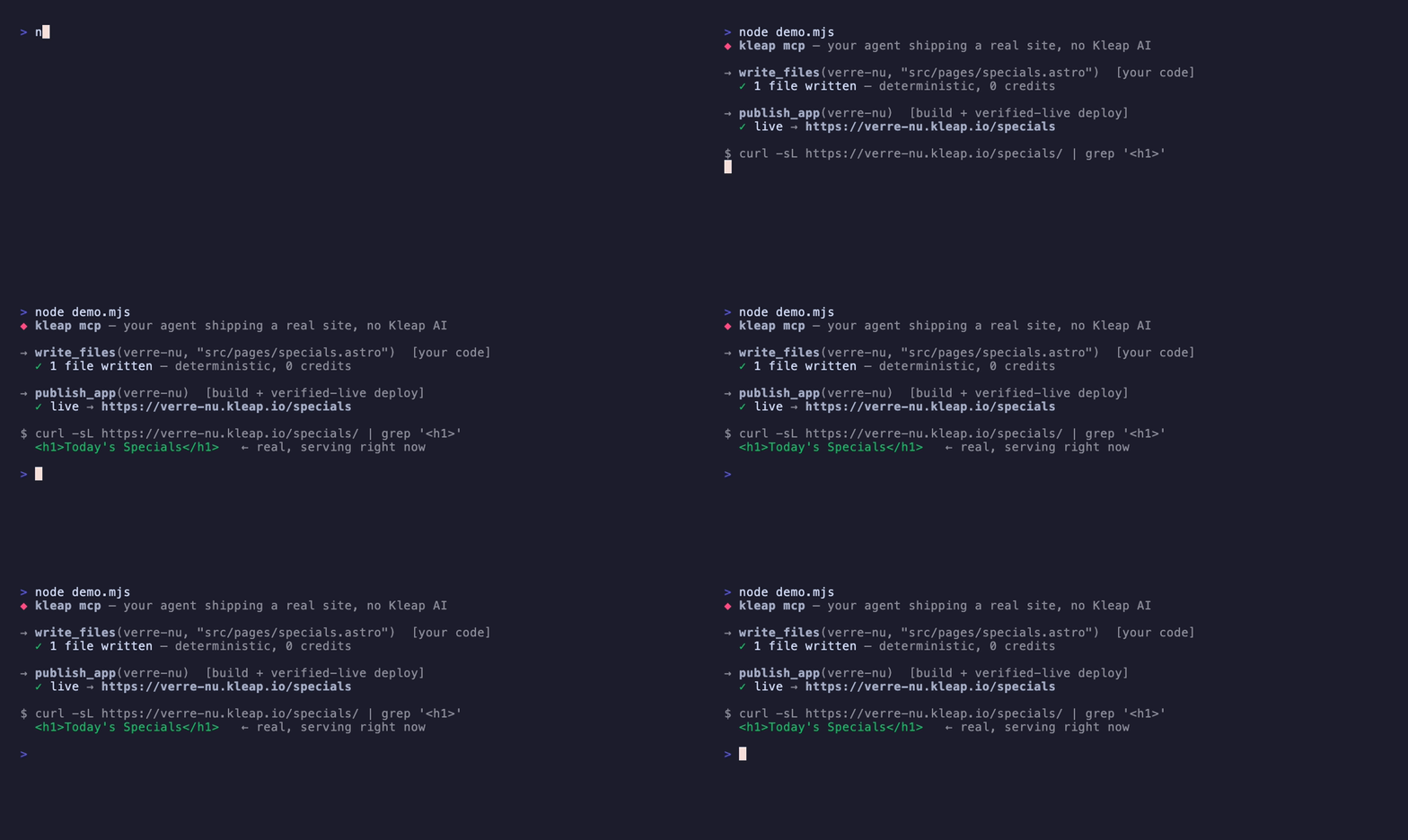
|
|
17
|
+
|
|
18
|
+
> *Above: a real run — your agent writes the code with `write_files`, `publish_app` builds & deploys it, and the page is live in seconds. Or just ask Kleap's AI in plain English.*
|
|
19
|
+
|
|
20
|
+
This is a thin [Model Context Protocol](https://modelcontextprotocol.io) server
|
|
21
|
+
that wraps Kleap's public REST API. **No secrets live in this package** — it reads
|
|
22
|
+
your own `KLEAP_API_KEY` from the environment and talks only to `kleap.co`.
|
|
23
|
+
|
|
24
|
+
---
|
|
25
|
+
|
|
26
|
+
## Quick start
|
|
27
|
+
|
|
28
|
+
### Easiest — connect with OAuth, no key
|
|
29
|
+
|
|
30
|
+
Add the hosted connector and sign in. **Nothing to generate, nothing to paste** —
|
|
31
|
+
you authorize Kleap in your browser like any other app. Works in Claude Desktop,
|
|
32
|
+
ChatGPT and Cursor.
|
|
33
|
+
|
|
34
|
+
```
|
|
35
|
+
https://kleap.co/api/mcp
|
|
36
|
+
```
|
|
37
|
+
|
|
38
|
+
- **Claude Desktop** — Settings → Connectors → **Add custom connector** → paste the URL → **Connect** → sign in to Kleap.
|
|
39
|
+
- **ChatGPT** — Settings → Connectors → add the URL → authorize with OAuth.
|
|
40
|
+
- **Cursor** — Settings → **MCP** → Add server → paste the URL → authorize.
|
|
41
|
+
|
|
42
|
+
That's it — same 17 tools, no API key. Skip straight to step 3.
|
|
43
|
+
|
|
44
|
+
---
|
|
45
|
+
|
|
46
|
+
### Or — local CLI, sign in with your browser (no key)
|
|
47
|
+
|
|
48
|
+
Prefer a local stdio process? Sign in once — no key to generate or paste:
|
|
49
|
+
|
|
50
|
+
```
|
|
51
|
+
npx kleap auth login
|
|
52
|
+
```
|
|
53
|
+
|
|
54
|
+
This opens your browser, you authorize Kleap, and the token is saved to
|
|
55
|
+
`~/.kleap/config.json`. After that, `npx -y kleap` just works. (`kleap auth
|
|
56
|
+
logout` / `kleap auth status` are there too.) Then add a keyless stdio entry to
|
|
57
|
+
your client, e.g. Claude Desktop `claude_desktop_config.json`:
|
|
58
|
+
|
|
59
|
+
```json
|
|
60
|
+
{ "mcpServers": { "kleap": { "command": "npx", "args": ["-y", "kleap"] } } }
|
|
61
|
+
```
|
|
62
|
+
|
|
63
|
+
---
|
|
64
|
+
|
|
65
|
+
### Or — local CLI with an API key
|
|
66
|
+
|
|
67
|
+
Prefer a key (e.g. for CI or scripting the REST API directly)?
|
|
68
|
+
|
|
69
|
+
**1. Get an API key** — at [kleap.co](https://kleap.co) → **Settings → API key →
|
|
70
|
+
MCP / API access → Generate MCP key** (`kleap_live_sk_...`).
|
|
71
|
+
|
|
72
|
+
**2. Add Kleap to your AI client:**
|
|
73
|
+
|
|
74
|
+
<details open>
|
|
75
|
+
<summary><b>Claude Desktop</b> — <code>claude_desktop_config.json</code></summary>
|
|
76
|
+
|
|
77
|
+
```json
|
|
78
|
+
{
|
|
79
|
+
"mcpServers": {
|
|
80
|
+
"kleap": {
|
|
81
|
+
"command": "npx",
|
|
82
|
+
"args": ["-y", "kleap"],
|
|
83
|
+
"env": { "KLEAP_API_KEY": "kleap_live_sk_..." }
|
|
84
|
+
}
|
|
85
|
+
}
|
|
86
|
+
}
|
|
87
|
+
```
|
|
88
|
+
</details>
|
|
89
|
+
|
|
90
|
+
<details>
|
|
91
|
+
<summary><b>Cursor</b> — <code>.cursor/mcp.json</code></summary>
|
|
92
|
+
|
|
93
|
+
```json
|
|
94
|
+
{
|
|
95
|
+
"mcpServers": {
|
|
96
|
+
"kleap": {
|
|
97
|
+
"command": "npx",
|
|
98
|
+
"args": ["-y", "kleap"],
|
|
99
|
+
"env": { "KLEAP_API_KEY": "kleap_live_sk_..." }
|
|
100
|
+
}
|
|
101
|
+
}
|
|
102
|
+
}
|
|
103
|
+
```
|
|
104
|
+
</details>
|
|
105
|
+
|
|
106
|
+
<details>
|
|
107
|
+
<summary><b>Claude Code</b> — one command</summary>
|
|
108
|
+
|
|
109
|
+
```bash
|
|
110
|
+
claude mcp add kleap -e KLEAP_API_KEY=kleap_live_sk_... -- npx -y kleap
|
|
111
|
+
```
|
|
112
|
+
</details>
|
|
113
|
+
|
|
114
|
+
<details>
|
|
115
|
+
<summary><b>Cline / Roo (VS Code)</b> — <code>cline_mcp_settings.json</code></summary>
|
|
116
|
+
|
|
117
|
+
```json
|
|
118
|
+
{
|
|
119
|
+
"mcpServers": {
|
|
120
|
+
"kleap": {
|
|
121
|
+
"command": "npx",
|
|
122
|
+
"args": ["-y", "kleap"],
|
|
123
|
+
"env": { "KLEAP_API_KEY": "kleap_live_sk_..." }
|
|
124
|
+
}
|
|
125
|
+
}
|
|
126
|
+
}
|
|
127
|
+
```
|
|
128
|
+
</details>
|
|
129
|
+
|
|
130
|
+
<details>
|
|
131
|
+
<summary><b>Windsurf</b> — <code>~/.codeium/windsurf/mcp_config.json</code></summary>
|
|
132
|
+
|
|
133
|
+
```json
|
|
134
|
+
{
|
|
135
|
+
"mcpServers": {
|
|
136
|
+
"kleap": {
|
|
137
|
+
"command": "npx",
|
|
138
|
+
"args": ["-y", "kleap"],
|
|
139
|
+
"env": { "KLEAP_API_KEY": "kleap_live_sk_..." }
|
|
140
|
+
}
|
|
141
|
+
}
|
|
142
|
+
}
|
|
143
|
+
```
|
|
144
|
+
</details>
|
|
145
|
+
|
|
146
|
+
<details>
|
|
147
|
+
<summary><b>ChatGPT & hosted agents</b> — no local process</summary>
|
|
148
|
+
|
|
149
|
+
Add the hosted connector at **`https://kleap.co/api/mcp`** and authorize with
|
|
150
|
+
OAuth (or paste your `kleap_live_sk_` key). Same tools, no install.
|
|
151
|
+
</details>
|
|
152
|
+
|
|
153
|
+
> Every stdio config is identical — `npx -y kleap` + a `KLEAP_API_KEY` env var —
|
|
154
|
+
> so any MCP client works.
|
|
155
|
+
|
|
156
|
+
**Least-privilege keys:** when you generate a key, pick a scope — **Read-only**
|
|
157
|
+
(inspect sites, no changes), **Build**, or **Full**. Buying domains is never
|
|
158
|
+
included by default. Give a read-only agent a read-only key.
|
|
159
|
+
|
|
160
|
+
**3. Restart the client and just ask:**
|
|
161
|
+
|
|
162
|
+
> *"Build me a one-page site for my bakery, publish it, and give me the live URL."*
|
|
163
|
+
> *"Add a contact form to my site and redeploy."*
|
|
164
|
+
> *"Change the headline to 'Roasted slow' and publish."*
|
|
165
|
+
|
|
166
|
+
Works with **any MCP-compatible agent**: Claude · ChatGPT · Cursor · Claude Code · Codex.
|
|
167
|
+
|
|
168
|
+
---
|
|
169
|
+
|
|
170
|
+
## Tools
|
|
171
|
+
|
|
172
|
+
**Find & build** — `find_app` · `create_app` · `modify_app` · `read_files` · `write_files` · `rename_app` · `check_task` · `retry_task`
|
|
173
|
+
**Publish & domains** — `publish_app` · `get_publish_status` · `search_domains` · `check_domain` · `connect_domain`
|
|
174
|
+
**Account** — `list_apps` · `get_app` · `list_app_files` · `get_credits`
|
|
175
|
+
|
|
176
|
+
| Tool | What it does |
|
|
177
|
+
|------|--------------|
|
|
178
|
+
| `find_app` | Resolve a domain / URL / slug → app_id in one call |
|
|
179
|
+
| `create_app` | Create an Astro site from a prompt → returns a task (auto-deploys live) |
|
|
180
|
+
| `modify_app` | Ask the app's AI to change it → returns a task |
|
|
181
|
+
| `read_files` | Read the **current contents** of files so you can edit them safely (not blind) |
|
|
182
|
+
| `write_files` | Write exact files directly (**your** code, deterministic) → then `publish_app` |
|
|
183
|
+
| `rename_app` | Rename the display name (URL stays the same) |
|
|
184
|
+
| `check_task` | Long-poll a create/modify task to completion (`wait` up to 50s) |
|
|
185
|
+
| `retry_task` | Resume a failed/stalled build from partial state (new task_id) |
|
|
186
|
+
| `publish_app` | Publish with verified-live (live-or-rollback, never a false "online") |
|
|
187
|
+
| `get_publish_status` | Confirm a site is actually published + live |
|
|
188
|
+
| `search_domains` | Find available domains (purchase stays user-confirmed in Kleap) |
|
|
189
|
+
| `connect_domain` | Connect a domain you already own to a live app |
|
|
190
|
+
| `check_domain` | A domain's connection / DNS status |
|
|
191
|
+
| `list_apps` / `get_app` / `list_app_files` | Your apps, an app's details, its files (read-only) |
|
|
192
|
+
| `get_credits` | Remaining credit balance + plan |
|
|
193
|
+
|
|
194
|
+
App arguments are snake_case: `app_id`, `task_id`, `prompt`, `message`, `visibility`.
|
|
195
|
+
|
|
196
|
+
## Recipes
|
|
197
|
+
|
|
198
|
+
**Two ways to put code on a site — pick per task:**
|
|
199
|
+
- **`write_files` (deterministic):** *your* model writes the exact file contents; you push them and Kleap builds + deploys as-is. No Kleap-AI step → no Kleap credits, never stalls. Then `publish_app`. Unlike Lovable/v0/Bolt, your agent can write the code itself.
|
|
200
|
+
- **`modify_app` (Kleap's AI):** describe the outcome in plain English and Kleap's AI writes it. Like Lovable's message-passing — kept for when you'd rather it figure out the change.
|
|
201
|
+
|
|
202
|
+
Either way Kleap hosts it (build, deploy, SSL, DB, auth, domains, verified-live).
|
|
203
|
+
|
|
204
|
+
- **Edit existing files SAFELY (don't rewrite blind)** — `list_app_files(app_id)` → `read_files(app_id, ["src/components/Header.astro"])` → edit only what must change with your own model → `write_files(app_id, [{ path, content }])` → `publish_app(app_id)`. This read→edit→write loop is the reliable way to fix headers/footers, wrong phone numbers, broken links or dead forms without breaking the rest of the site.
|
|
205
|
+
- **Edit a site named by its address** — `find_app("mysite.ch")` → `read_files(...)` → `write_files(...)` → `publish_app(...)`, or `modify_app(app_id, "…")` → `check_task(task_id, wait=45)`.
|
|
206
|
+
- **Many pages (programmatic SEO) — BEST:** generate a dynamic route + a data file with your own model and push them in one `write_files`, then `publish_app`:
|
|
207
|
+
> `write_files(app_id, [{ path: "src/pages/[service]/[city].astro", content: … }, { path: "src/data/locations.json", content: … }])` → `publish_app(app_id)`
|
|
208
|
+
Deterministic, scales to thousands, no stall, no credits. (Or ask Kleap's AI to do the same in one `modify_app` — never loop one call per page.)
|
|
209
|
+
- **Don't babysit a 5-15 min build** — `check_task` long-polls (default `wait=45`),
|
|
210
|
+
or pass a `webhook_url` to `create_app` / `modify_app` for a fully hands-off flow.
|
|
211
|
+
- **A build failed** — `TASK_TIMEOUT`/`STALE_TASK` = transient, call `retry_task`; it
|
|
212
|
+
returns a **new** task_id — poll *that* one. `TASK_FAILED` = read the message, retry once.
|
|
213
|
+
|
|
214
|
+
## The verified-live guarantee
|
|
215
|
+
|
|
216
|
+
Most tools tell the agent "it's online" the moment a deploy is *requested*. Kleap
|
|
217
|
+
reports a site as published **only once the new version is provably serving** at
|
|
218
|
+
its live URL — otherwise it rolls back and reports "not confirmed live." Your
|
|
219
|
+
agent can never hand a user a dead link.
|
|
220
|
+
|
|
221
|
+
If `check_task` reports `failed` (a transient generation stall), call `retry_task`
|
|
222
|
+
with that `task_id` to resume from where it stopped — it returns a **new** task_id
|
|
223
|
+
to poll, and partial work is kept. Or skip the AI entirely and `write_files` the
|
|
224
|
+
exact code yourself, then `publish_app`.
|
|
225
|
+
|
|
226
|
+
## FAQ
|
|
227
|
+
|
|
228
|
+
**Do I need an API key?** No. The easiest path is the OAuth connector
|
|
229
|
+
(`https://kleap.co/api/mcp`) — you sign in with your browser and never copy a
|
|
230
|
+
key. An API key is only needed for the local CLI / direct REST use.
|
|
231
|
+
|
|
232
|
+
**Is it safe?** Yes. Whether you connect with OAuth or an API key, an agent can
|
|
233
|
+
only ever touch *your own* Kleap apps. OAuth tokens and `kleap_live_sk_` keys are
|
|
234
|
+
scoped, sent only to `kleap.co` over HTTPS, and revocable anytime in
|
|
235
|
+
**Settings → API key**. Keys stay in your local client config; nothing else is
|
|
236
|
+
written to disk.
|
|
237
|
+
|
|
238
|
+
**How much does it cost?** Connecting is free. Builds and edits use Kleap credits
|
|
239
|
+
(`get_credits` reports your balance) — see [pricing](https://kleap.co/pricing).
|
|
240
|
+
|
|
241
|
+
**Which agents work?** Any MCP client: Claude Desktop, Claude Code, Cursor,
|
|
242
|
+
ChatGPT (hosted connector), and others.
|
|
243
|
+
|
|
244
|
+
## Requirements & run
|
|
245
|
+
|
|
246
|
+
Node ≥ 18. Run it directly:
|
|
247
|
+
|
|
248
|
+
```bash
|
|
249
|
+
KLEAP_API_KEY=kleap_live_sk_... npx -y kleap
|
|
250
|
+
# → [kleap-mcp] ready (stdio) → https://kleap.co. Tools: list_apps, ...
|
|
251
|
+
```
|
|
252
|
+
|
|
253
|
+
Override the API base with `KLEAP_API_URL` (default `https://kleap.co`).
|
|
254
|
+
Missing key → the server exits with a clear message.
|
|
255
|
+
|
|
256
|
+
## Links
|
|
257
|
+
|
|
258
|
+
- Kleap: https://kleap.co · MCP & CLI page: https://kleap.co/mcp
|
|
259
|
+
- Issues & security: https://github.com/Kleap-co/kleap/issues
|
|
260
|
+
|
|
261
|
+
Maintained by the [Kleap](https://kleap.co) team. MIT © Kleap.
|
|
@@ -0,0 +1,655 @@
|
|
|
1
|
+
#!/usr/bin/env node
|
|
2
|
+
/**
|
|
3
|
+
* Kleap MCP server (v1 — stdio transport, API-key auth).
|
|
4
|
+
*
|
|
5
|
+
* Lets ANY MCP client (Claude Desktop, Cursor, or ChatGPT via a bridge) drive
|
|
6
|
+
* Kleap: create / list / inspect apps, edit them through Kleap's own AI, and
|
|
7
|
+
* PUBLISH with the verified-live guarantee. It does this by wrapping the
|
|
8
|
+
* existing public REST API (`/api/v1/*`) — the MCP is just another client onto
|
|
9
|
+
* the same backend, exactly like the web app or the WhatsApp integration. No
|
|
10
|
+
* new write path, so every Kleap convention/guardrail still applies server-side.
|
|
11
|
+
*
|
|
12
|
+
* Auth: a Kleap API key, sent as `Authorization: Bearer kleap_live_sk_...`.
|
|
13
|
+
* Transport: stdio (the client spawns this process).
|
|
14
|
+
*
|
|
15
|
+
* Run:
|
|
16
|
+
* KLEAP_API_KEY=kleap_live_sk_... node mcp/kleap-mcp-server.mjs
|
|
17
|
+
* (optional) KLEAP_API_URL=https://kleap.co # default
|
|
18
|
+
*
|
|
19
|
+
* PHASE 2 (deliberately NOT here — see the agent-platform plan):
|
|
20
|
+
* remote HTTP transport + OAuth (so users add it without a local process),
|
|
21
|
+
* registry listing + one-click install, and metering/quota surfacing. This
|
|
22
|
+
* file is the working keystone of the agent interface: it proves the whole
|
|
23
|
+
* path (external agent → Kleap backend → verified-live publish) end to end.
|
|
24
|
+
*/
|
|
25
|
+
import { Server } from "@modelcontextprotocol/sdk/server/index.js";
|
|
26
|
+
import { StdioServerTransport } from "@modelcontextprotocol/sdk/server/stdio.js";
|
|
27
|
+
import {
|
|
28
|
+
ListToolsRequestSchema,
|
|
29
|
+
CallToolRequestSchema,
|
|
30
|
+
} from "@modelcontextprotocol/sdk/types.js";
|
|
31
|
+
import { createServer } from "node:http";
|
|
32
|
+
import { randomBytes, createHash } from "node:crypto";
|
|
33
|
+
import { spawn } from "node:child_process";
|
|
34
|
+
import { readFileSync, writeFileSync, mkdirSync, chmodSync } from "node:fs";
|
|
35
|
+
import { homedir } from "node:os";
|
|
36
|
+
import { join } from "node:path";
|
|
37
|
+
|
|
38
|
+
const API_URL = (process.env.KLEAP_API_URL || "https://kleap.co").replace(
|
|
39
|
+
/\/$/,
|
|
40
|
+
"",
|
|
41
|
+
);
|
|
42
|
+
|
|
43
|
+
// Auth token used on every API call. Resolved at boot (below): an explicit
|
|
44
|
+
// KLEAP_API_KEY env var wins; otherwise the OAuth token saved by
|
|
45
|
+
// `kleap auth login`. Mutable so a refresh can swap it in.
|
|
46
|
+
let AUTH_TOKEN = null;
|
|
47
|
+
|
|
48
|
+
// ── Stored credentials (~/.kleap/config.json) ───────────────────────────────
|
|
49
|
+
const CONFIG_DIR = join(homedir(), ".kleap");
|
|
50
|
+
const CONFIG_PATH = join(CONFIG_DIR, "config.json");
|
|
51
|
+
function readConfig() {
|
|
52
|
+
try {
|
|
53
|
+
return JSON.parse(readFileSync(CONFIG_PATH, "utf8"));
|
|
54
|
+
} catch {
|
|
55
|
+
return {};
|
|
56
|
+
}
|
|
57
|
+
}
|
|
58
|
+
function writeConfig(cfg) {
|
|
59
|
+
mkdirSync(CONFIG_DIR, { recursive: true });
|
|
60
|
+
writeFileSync(CONFIG_PATH, JSON.stringify(cfg, null, 2));
|
|
61
|
+
try {
|
|
62
|
+
chmodSync(CONFIG_PATH, 0o600);
|
|
63
|
+
} catch {}
|
|
64
|
+
}
|
|
65
|
+
|
|
66
|
+
// ── OAuth (browser, PKCE + http loopback, RFC 8252) — `kleap auth login` ─────
|
|
67
|
+
const OAUTH_SCOPES = "apps:read apps:create apps:update messages:create tasks:read";
|
|
68
|
+
const b64url = (buf) =>
|
|
69
|
+
Buffer.from(buf)
|
|
70
|
+
.toString("base64")
|
|
71
|
+
.replace(/\+/g, "-")
|
|
72
|
+
.replace(/\//g, "_")
|
|
73
|
+
.replace(/=+$/, "");
|
|
74
|
+
function openBrowser(url) {
|
|
75
|
+
const plat = process.platform;
|
|
76
|
+
const cmd = plat === "darwin" ? "open" : plat === "win32" ? "cmd" : "xdg-open";
|
|
77
|
+
const args = plat === "win32" ? ["/c", "start", "", url] : [url];
|
|
78
|
+
try {
|
|
79
|
+
spawn(cmd, args, { stdio: "ignore", detached: true }).unref();
|
|
80
|
+
} catch {}
|
|
81
|
+
}
|
|
82
|
+
async function oauthPost(path, payload) {
|
|
83
|
+
const res = await fetch(`${API_URL}${path}`, {
|
|
84
|
+
method: "POST",
|
|
85
|
+
headers: { "Content-Type": "application/json", Accept: "application/json" },
|
|
86
|
+
body: JSON.stringify(payload),
|
|
87
|
+
});
|
|
88
|
+
const text = await res.text();
|
|
89
|
+
let json = null;
|
|
90
|
+
try {
|
|
91
|
+
json = JSON.parse(text);
|
|
92
|
+
} catch {}
|
|
93
|
+
if (!res.ok) {
|
|
94
|
+
const msg = json?.error_description || json?.error || text.slice(0, 200);
|
|
95
|
+
throw new Error(`${path} → HTTP ${res.status}: ${msg}`);
|
|
96
|
+
}
|
|
97
|
+
return json || {};
|
|
98
|
+
}
|
|
99
|
+
async function authLogin() {
|
|
100
|
+
const verifier = b64url(randomBytes(32));
|
|
101
|
+
const challenge = b64url(createHash("sha256").update(verifier).digest());
|
|
102
|
+
const state = b64url(randomBytes(16));
|
|
103
|
+
// 1. bind a loopback server first so we know the redirect port
|
|
104
|
+
const server = createServer();
|
|
105
|
+
await new Promise((resolve, reject) => {
|
|
106
|
+
server.once("error", reject);
|
|
107
|
+
server.listen(0, "127.0.0.1", resolve);
|
|
108
|
+
});
|
|
109
|
+
const redirectUri = `http://127.0.0.1:${server.address().port}/callback`;
|
|
110
|
+
// 2. register a native client (Dynamic Client Registration) for that redirect
|
|
111
|
+
const reg = await oauthPost("/api/oauth/register", {
|
|
112
|
+
client_name: "Kleap CLI",
|
|
113
|
+
redirect_uris: [redirectUri],
|
|
114
|
+
grant_types: ["authorization_code", "refresh_token"],
|
|
115
|
+
response_types: ["code"],
|
|
116
|
+
token_endpoint_auth_method: "none",
|
|
117
|
+
});
|
|
118
|
+
const clientId = reg.client_id;
|
|
119
|
+
// 3. wait for the browser to redirect back with the code
|
|
120
|
+
const codePromise = new Promise((resolve, reject) => {
|
|
121
|
+
const timer = setTimeout(() => {
|
|
122
|
+
try {
|
|
123
|
+
server.close();
|
|
124
|
+
} catch {}
|
|
125
|
+
reject(new Error("login timed out after 5 minutes"));
|
|
126
|
+
}, 300000);
|
|
127
|
+
server.on("request", (req, res) => {
|
|
128
|
+
const u = new URL(req.url, redirectUri);
|
|
129
|
+
if (u.pathname !== "/callback") {
|
|
130
|
+
res.writeHead(404);
|
|
131
|
+
res.end();
|
|
132
|
+
return;
|
|
133
|
+
}
|
|
134
|
+
const err = u.searchParams.get("error");
|
|
135
|
+
const code = u.searchParams.get("code");
|
|
136
|
+
const st = u.searchParams.get("state");
|
|
137
|
+
res.writeHead(err ? 400 : 200, {
|
|
138
|
+
"Content-Type": "text/html; charset=utf-8",
|
|
139
|
+
});
|
|
140
|
+
res.end(
|
|
141
|
+
`<!doctype html><meta charset="utf-8"><body style="font-family:system-ui,sans-serif;text-align:center;padding:64px;color:#111"><h2 style="color:${err ? "#cc0033" : "#16b364"}">${err ? "Sign-in failed" : "Kleap connected"}</h2><p>${err ? "Return to the terminal and try again." : "You can close this tab and return to the terminal."}</p></body>`,
|
|
142
|
+
);
|
|
143
|
+
clearTimeout(timer);
|
|
144
|
+
try {
|
|
145
|
+
server.close();
|
|
146
|
+
} catch {}
|
|
147
|
+
if (err) return reject(new Error(err));
|
|
148
|
+
if (st !== state) return reject(new Error("state mismatch (possible CSRF)"));
|
|
149
|
+
resolve(code);
|
|
150
|
+
});
|
|
151
|
+
});
|
|
152
|
+
// 4. open the browser to the authorize page
|
|
153
|
+
const authUrl =
|
|
154
|
+
`${API_URL}/api/oauth/authorize?response_type=code` +
|
|
155
|
+
`&client_id=${encodeURIComponent(clientId)}` +
|
|
156
|
+
`&redirect_uri=${encodeURIComponent(redirectUri)}` +
|
|
157
|
+
`&scope=${encodeURIComponent(OAUTH_SCOPES)}` +
|
|
158
|
+
`&state=${state}&code_challenge=${challenge}&code_challenge_method=S256`;
|
|
159
|
+
console.error(
|
|
160
|
+
"[kleap] Opening your browser to sign in…\n[kleap] If it doesn't open, paste this URL:\n" +
|
|
161
|
+
authUrl +
|
|
162
|
+
"\n",
|
|
163
|
+
);
|
|
164
|
+
openBrowser(authUrl);
|
|
165
|
+
const code = await codePromise;
|
|
166
|
+
// 5. exchange the code for tokens (PKCE)
|
|
167
|
+
const tok = await oauthPost("/api/oauth/token", {
|
|
168
|
+
grant_type: "authorization_code",
|
|
169
|
+
code,
|
|
170
|
+
redirect_uri: redirectUri,
|
|
171
|
+
client_id: clientId,
|
|
172
|
+
code_verifier: verifier,
|
|
173
|
+
});
|
|
174
|
+
const cfg = readConfig();
|
|
175
|
+
cfg.oauth = {
|
|
176
|
+
client_id: clientId,
|
|
177
|
+
access_token: tok.access_token,
|
|
178
|
+
refresh_token: tok.refresh_token || null,
|
|
179
|
+
expires_at: tok.expires_in ? Date.now() + tok.expires_in * 1000 : null,
|
|
180
|
+
api_url: API_URL,
|
|
181
|
+
};
|
|
182
|
+
writeConfig(cfg);
|
|
183
|
+
console.error(
|
|
184
|
+
"[kleap] Signed in. Token saved to ~/.kleap/config.json — `npx kleap` now works with no API key.",
|
|
185
|
+
);
|
|
186
|
+
}
|
|
187
|
+
async function refreshIfNeeded(cfg) {
|
|
188
|
+
const o = cfg.oauth;
|
|
189
|
+
if (!o) return null;
|
|
190
|
+
if (!o.refresh_token || !o.expires_at) return o.access_token || null;
|
|
191
|
+
if (o.expires_at > Date.now() + 60000) return o.access_token; // still valid
|
|
192
|
+
try {
|
|
193
|
+
const tok = await oauthPost("/api/oauth/token", {
|
|
194
|
+
grant_type: "refresh_token",
|
|
195
|
+
refresh_token: o.refresh_token,
|
|
196
|
+
client_id: o.client_id,
|
|
197
|
+
});
|
|
198
|
+
o.access_token = tok.access_token;
|
|
199
|
+
if (tok.refresh_token) o.refresh_token = tok.refresh_token;
|
|
200
|
+
o.expires_at = tok.expires_in ? Date.now() + tok.expires_in * 1000 : null;
|
|
201
|
+
writeConfig(cfg);
|
|
202
|
+
return o.access_token;
|
|
203
|
+
} catch {
|
|
204
|
+
return o.access_token; // fall back; the server will 401 if it's truly dead
|
|
205
|
+
}
|
|
206
|
+
}
|
|
207
|
+
async function resolveToken() {
|
|
208
|
+
if (process.env.KLEAP_API_KEY) return process.env.KLEAP_API_KEY; // explicit key wins
|
|
209
|
+
const cfg = readConfig();
|
|
210
|
+
if (cfg.oauth?.access_token) return await refreshIfNeeded(cfg);
|
|
211
|
+
return null;
|
|
212
|
+
}
|
|
213
|
+
|
|
214
|
+
const sleep = (ms) => new Promise((r) => setTimeout(r, ms));
|
|
215
|
+
const safeJson = (t) => { try { return JSON.parse(t); } catch { return null; } };
|
|
216
|
+
|
|
217
|
+
/**
|
|
218
|
+
* Thin REST caller — auth, timeout, bounded retry, JSON/HTML-aware errors.
|
|
219
|
+
* Retries transient failures (5xx / 429 / network / timeout) with backoff.
|
|
220
|
+
* Never surfaces raw HTML error pages to the agent; extracts error.code/message.
|
|
221
|
+
*/
|
|
222
|
+
async function api(method, path, body, { retries = 2, timeoutMs = 60000 } = {}) {
|
|
223
|
+
const url = `${API_URL}/api/v1${path}`;
|
|
224
|
+
let lastErr;
|
|
225
|
+
for (let attempt = 0; attempt <= retries; attempt++) {
|
|
226
|
+
const ctrl = new AbortController();
|
|
227
|
+
const t = setTimeout(() => ctrl.abort(), timeoutMs);
|
|
228
|
+
try {
|
|
229
|
+
const res = await fetch(url, {
|
|
230
|
+
method,
|
|
231
|
+
headers: {
|
|
232
|
+
Authorization: `Bearer ${AUTH_TOKEN}`,
|
|
233
|
+
Accept: "application/json",
|
|
234
|
+
...(body ? { "Content-Type": "application/json" } : {}),
|
|
235
|
+
},
|
|
236
|
+
body: body ? JSON.stringify(body) : undefined,
|
|
237
|
+
signal: ctrl.signal,
|
|
238
|
+
});
|
|
239
|
+
clearTimeout(t);
|
|
240
|
+
|
|
241
|
+
const ctype = res.headers.get("content-type") || "";
|
|
242
|
+
const text = await res.text();
|
|
243
|
+
const isJson = ctype.includes("application/json");
|
|
244
|
+
const parsed = isJson ? safeJson(text) : null;
|
|
245
|
+
|
|
246
|
+
if (!res.ok) {
|
|
247
|
+
if ((res.status >= 500 || res.status === 429) && attempt < retries) {
|
|
248
|
+
await sleep(400 * 2 ** attempt);
|
|
249
|
+
continue;
|
|
250
|
+
}
|
|
251
|
+
const detail =
|
|
252
|
+
parsed?.error?.message ||
|
|
253
|
+
parsed?.message ||
|
|
254
|
+
(isJson
|
|
255
|
+
? JSON.stringify(parsed).slice(0, 300)
|
|
256
|
+
: `non-JSON ${ctype || "response"} (likely an unhandled route)`);
|
|
257
|
+
const code = parsed?.error?.code ? ` [${parsed.error.code}]` : "";
|
|
258
|
+
throw new Error(`Kleap API ${res.status}${code} on ${method} ${path}: ${detail}`);
|
|
259
|
+
}
|
|
260
|
+
|
|
261
|
+
if (!isJson) {
|
|
262
|
+
throw new Error(`Kleap API returned non-JSON (${ctype}) for ${method} ${path}`);
|
|
263
|
+
}
|
|
264
|
+
return parsed;
|
|
265
|
+
} catch (e) {
|
|
266
|
+
clearTimeout(t);
|
|
267
|
+
lastErr =
|
|
268
|
+
e?.name === "AbortError"
|
|
269
|
+
? new Error(`Kleap API timeout after ${timeoutMs}ms on ${method} ${path}`)
|
|
270
|
+
: e;
|
|
271
|
+
const retryable =
|
|
272
|
+
e?.name === "AbortError" ||
|
|
273
|
+
e?.code === "ECONNRESET" ||
|
|
274
|
+
e?.code === "ETIMEDOUT" ||
|
|
275
|
+
/fetch failed|network/i.test(e?.message || "");
|
|
276
|
+
if (retryable && attempt < retries) {
|
|
277
|
+
await sleep(400 * 2 ** attempt);
|
|
278
|
+
continue;
|
|
279
|
+
}
|
|
280
|
+
throw lastErr;
|
|
281
|
+
}
|
|
282
|
+
}
|
|
283
|
+
throw lastErr;
|
|
284
|
+
}
|
|
285
|
+
|
|
286
|
+
const num = (description) => ({ type: "number", description });
|
|
287
|
+
const str = (description) => ({ type: "string", description });
|
|
288
|
+
const obj = (properties, required) => ({
|
|
289
|
+
type: "object",
|
|
290
|
+
properties: properties || {},
|
|
291
|
+
...(required ? { required } : {}),
|
|
292
|
+
additionalProperties: false,
|
|
293
|
+
});
|
|
294
|
+
|
|
295
|
+
/**
|
|
296
|
+
* The tool surface. Each maps 1:1 to an existing /api/v1 endpoint.
|
|
297
|
+
*
|
|
298
|
+
* Tool names + argument names are kept IDENTICAL to the hosted remote server
|
|
299
|
+
* (/api/mcp) on purpose, so an agent (or a tutorial) written for one transport
|
|
300
|
+
* works verbatim on the other. Arguments are snake_case (app_id, task_id).
|
|
301
|
+
*/
|
|
302
|
+
const TOOLS = [
|
|
303
|
+
{
|
|
304
|
+
name: "list_apps",
|
|
305
|
+
description:
|
|
306
|
+
"List the Kleap apps (websites) owned by the authenticated account, newest first. Returns a `pagination` object {total, limit, offset, has_more, next_offset}: the server caps `limit` at 100, so when `has_more` is true, page with `next_offset`. To find ONE site by its domain / URL / slug, use find_app instead of paging through everything.",
|
|
307
|
+
inputSchema: obj({
|
|
308
|
+
limit: num("Max apps to return (default 50, server max 100)."),
|
|
309
|
+
offset: num("Pagination offset (default 0)."),
|
|
310
|
+
q: str("Optional filter on app name or slug (substring match)."),
|
|
311
|
+
}),
|
|
312
|
+
handler: ({ limit, offset, q } = {}) => {
|
|
313
|
+
const params = new URLSearchParams();
|
|
314
|
+
if (limit != null) params.set("limit", String(limit));
|
|
315
|
+
if (offset != null) params.set("offset", String(offset));
|
|
316
|
+
if (q) params.set("q", q);
|
|
317
|
+
const qs = params.toString();
|
|
318
|
+
return api("GET", `/apps${qs ? `?${qs}` : ""}`);
|
|
319
|
+
},
|
|
320
|
+
},
|
|
321
|
+
{
|
|
322
|
+
name: "find_app",
|
|
323
|
+
description:
|
|
324
|
+
"Resolve a website the user names by its ADDRESS — a custom domain (\"serrureriesk.ch\"), a kleap.io URL (\"mysite.kleap.io\"), or a bare slug (\"mysite\") — to one of your apps in ONE call. Use this FIRST whenever the user refers to a site by its domain/URL instead of an app id, then pass the returned app_id to get_app / modify_app / publish_app. Do not list every app and scan. Returns NOT_FOUND if no owned app matches (the site may not be on this account or not connected yet) — then fall back to list_apps.",
|
|
325
|
+
inputSchema: obj(
|
|
326
|
+
{ query: str("A domain, URL, or slug, e.g. 'serrureriesk.ch'.") },
|
|
327
|
+
["query"],
|
|
328
|
+
),
|
|
329
|
+
handler: ({ query }) =>
|
|
330
|
+
api("GET", `/apps/resolve?q=${encodeURIComponent(query)}`),
|
|
331
|
+
},
|
|
332
|
+
{
|
|
333
|
+
name: "get_app",
|
|
334
|
+
description:
|
|
335
|
+
"Get one Kleap app's metadata: status, slug, production_url, published state. Use this for general app info at any time. To specifically confirm a deploy/publish, use get_publish_status.",
|
|
336
|
+
inputSchema: obj({ app_id: num("The app id.") }, ["app_id"]),
|
|
337
|
+
handler: ({ app_id }) => api("GET", `/apps/${app_id}`),
|
|
338
|
+
},
|
|
339
|
+
{
|
|
340
|
+
name: "list_app_files",
|
|
341
|
+
description:
|
|
342
|
+
"List the source file PATHS of a Kleap app (names only — no contents). Use it to inspect the project structure, then read_files to get the actual contents before editing. To CHANGE files: read_files → edit with your model → write_files → publish_app (deterministic), or modify_app (you describe the change and Kleap's AI writes it).",
|
|
343
|
+
inputSchema: obj({ app_id: num("The app id.") }, ["app_id"]),
|
|
344
|
+
handler: ({ app_id }) => api("GET", `/apps/${app_id}/files`),
|
|
345
|
+
},
|
|
346
|
+
{
|
|
347
|
+
name: "read_files",
|
|
348
|
+
description:
|
|
349
|
+
"Read the FULL CONTENTS of existing files so you can edit them SAFELY instead of rewriting blind (which risks breaking shared components/homepages). This closes the loop: list_app_files → read_files → edit the exact text with YOUR model → write_files → publish_app. Use it to fix headers/footers, wrong phone numbers, broken links, dead forms, etc. Pass one or many paths. Allowed with a Read-only key. Returns { files: [{ path, content, type, bytes }], missing: [paths not found] }.",
|
|
350
|
+
inputSchema: obj(
|
|
351
|
+
{
|
|
352
|
+
app_id: num("The app id."),
|
|
353
|
+
paths: {
|
|
354
|
+
type: "array",
|
|
355
|
+
description:
|
|
356
|
+
"Project-relative file paths to read, from list_app_files (e.g. ['src/components/Header.astro','src/components/Footer.astro']).",
|
|
357
|
+
items: { type: "string" },
|
|
358
|
+
},
|
|
359
|
+
},
|
|
360
|
+
["app_id", "paths"],
|
|
361
|
+
),
|
|
362
|
+
handler: ({ app_id, paths }) =>
|
|
363
|
+
api(
|
|
364
|
+
"GET",
|
|
365
|
+
`/apps/${encodeURIComponent(app_id)}/files?paths=${encodeURIComponent(
|
|
366
|
+
(Array.isArray(paths) ? paths : [paths]).join(","),
|
|
367
|
+
)}`,
|
|
368
|
+
),
|
|
369
|
+
},
|
|
370
|
+
{
|
|
371
|
+
name: "write_files",
|
|
372
|
+
description:
|
|
373
|
+
"Write source files DIRECTLY — YOUR agent's model generates the code, Kleap just stores, builds and deploys it. No Kleap-AI generation step, so it is DETERMINISTIC, uses NO Kleap credits, and never stalls (unlike asking an AI to build). Use this to scaffold exact files/pages — e.g. programmatic-SEO routes — instead of relying on modify_app. Paths are project-relative; these are Astro sites (src/pages/*.astro, src/data/*.json, src/components/*.astro, public/*). Overwrites by path. AFTER writing, call publish_app to build & go live. (Prefer modify_app when you'd rather Kleap's AI figure out the change.)",
|
|
374
|
+
inputSchema: obj(
|
|
375
|
+
{
|
|
376
|
+
app_id: num("The app id."),
|
|
377
|
+
files: {
|
|
378
|
+
type: "array",
|
|
379
|
+
description:
|
|
380
|
+
"Files to write/overwrite. Each is { path, content }. path is project-relative (e.g. 'src/pages/services/[city].astro'); content is the full file text.",
|
|
381
|
+
items: {
|
|
382
|
+
type: "object",
|
|
383
|
+
properties: {
|
|
384
|
+
path: { type: "string" },
|
|
385
|
+
content: { type: "string" },
|
|
386
|
+
},
|
|
387
|
+
required: ["path", "content"],
|
|
388
|
+
},
|
|
389
|
+
},
|
|
390
|
+
},
|
|
391
|
+
["app_id", "files"],
|
|
392
|
+
),
|
|
393
|
+
handler: ({ app_id, files }) =>
|
|
394
|
+
api("PUT", `/apps/${encodeURIComponent(app_id)}/files`, { files }),
|
|
395
|
+
},
|
|
396
|
+
{
|
|
397
|
+
name: "create_app",
|
|
398
|
+
description:
|
|
399
|
+
"Create a new Kleap website (an Astro site) from a natural-language prompt. Returns app_id + task_id immediately; poll check_task until status='completed' (~5-15 min). The site auto-builds and goes LIVE on completion — no separate publish needed for the first version.",
|
|
400
|
+
inputSchema: obj(
|
|
401
|
+
{
|
|
402
|
+
prompt: str("What the website should be."),
|
|
403
|
+
visibility: str("'public' (discoverable) or 'personal' (private)."),
|
|
404
|
+
webhook_url: str(
|
|
405
|
+
"Optional HTTPS URL that Kleap POSTs when the build finishes — use it for a hands-off flow instead of polling check_task.",
|
|
406
|
+
),
|
|
407
|
+
},
|
|
408
|
+
["prompt"],
|
|
409
|
+
),
|
|
410
|
+
handler: ({ prompt, visibility, webhook_url }) =>
|
|
411
|
+
api("POST", "/apps", {
|
|
412
|
+
prompt,
|
|
413
|
+
visibility: visibility || "personal",
|
|
414
|
+
...(webhook_url ? { webhook_url } : {}),
|
|
415
|
+
}),
|
|
416
|
+
},
|
|
417
|
+
{
|
|
418
|
+
name: "modify_app",
|
|
419
|
+
description:
|
|
420
|
+
"Ask a Kleap app's AI to change it — describe the OUTCOME you want (edit copy, add a section or page, fix a bug); the AI writes the files (you cannot write files yourself). Returns a task — poll check_task. For MANY similar pages (programmatic SEO), ask in ONE call for a single dynamic Astro route + a data file, NOT one page per call.",
|
|
421
|
+
inputSchema: obj(
|
|
422
|
+
{
|
|
423
|
+
app_id: num("The app id."),
|
|
424
|
+
message: str("The change to make."),
|
|
425
|
+
webhook_url: str(
|
|
426
|
+
"Optional HTTPS URL that Kleap POSTs when the edit finishes — for a hands-off flow instead of polling check_task.",
|
|
427
|
+
),
|
|
428
|
+
},
|
|
429
|
+
["app_id", "message"],
|
|
430
|
+
),
|
|
431
|
+
handler: ({ app_id, message, webhook_url }) =>
|
|
432
|
+
api("POST", `/apps/${app_id}/messages`, {
|
|
433
|
+
message,
|
|
434
|
+
...(webhook_url ? { webhook_url } : {}),
|
|
435
|
+
}),
|
|
436
|
+
},
|
|
437
|
+
{
|
|
438
|
+
name: "rename_app",
|
|
439
|
+
description:
|
|
440
|
+
"Rename an app's display name. This does NOT change its URL — the live address ({slug}.kleap.io) and any links to it stay intact. (There is no delete tool, by design.)",
|
|
441
|
+
inputSchema: obj(
|
|
442
|
+
{ app_id: num("The app id."), name: str("The new display name.") },
|
|
443
|
+
["app_id", "name"],
|
|
444
|
+
),
|
|
445
|
+
handler: ({ app_id, name }) =>
|
|
446
|
+
api("PATCH", `/apps/${app_id}`, { name }),
|
|
447
|
+
},
|
|
448
|
+
{
|
|
449
|
+
name: "check_task",
|
|
450
|
+
description:
|
|
451
|
+
"Check an async create/modify task. By default it LONG-POLLS: the call holds for up to 'wait' seconds and returns the moment the task finishes — so you wait efficiently instead of hammering this every few seconds through a 5-15 min build. Just call it again if status is still queued/processing. status is one of: queued, processing, completed, failed. On 'completed' the change is built and LIVE (app_id + production_url available). On 'failed', error.code is TASK_TIMEOUT or STALE_TASK (the build STALLED — transient — call retry_task, which returns a NEW task_id to poll) or TASK_FAILED (generation failed — read error.message; retry_task once, and if it repeats, stop and tell the user). (Out-of-credits is not a task failure — create_app/modify_app reject up front with 402 INSUFFICIENT_CREDITS.)",
|
|
452
|
+
inputSchema: obj(
|
|
453
|
+
{
|
|
454
|
+
task_id: str("The task id."),
|
|
455
|
+
wait: num(
|
|
456
|
+
"Seconds to long-poll, 0-50 (default 45). The call returns early the instant the task reaches completed/failed. Use 0 for an immediate snapshot.",
|
|
457
|
+
),
|
|
458
|
+
},
|
|
459
|
+
["task_id"],
|
|
460
|
+
),
|
|
461
|
+
handler: ({ task_id, wait }) => {
|
|
462
|
+
const w = wait == null ? 45 : Math.min(Math.max(Number(wait) || 0, 0), 50);
|
|
463
|
+
return api(
|
|
464
|
+
"GET",
|
|
465
|
+
`/tasks/${encodeURIComponent(task_id)}?wait=${w}`,
|
|
466
|
+
undefined,
|
|
467
|
+
{ timeoutMs: (w + 15) * 1000 },
|
|
468
|
+
);
|
|
469
|
+
},
|
|
470
|
+
},
|
|
471
|
+
{
|
|
472
|
+
name: "retry_task",
|
|
473
|
+
description:
|
|
474
|
+
"Resume a failed/stalled create/modify task from where it stopped (partial files preserved). Use when check_task reports 'failed', instead of starting a brand-new create_app. Returns a NEW task_id — poll check_task on that NEW id (not the original). Budget: retry TASK_TIMEOUT/STALE_TASK up to TWICE; retry TASK_FAILED only ONCE; then stop and tell the user. NEVER retry a non-transient error (402 INSUFFICIENT_CREDITS, a rejected prompt) — it just fails again.",
|
|
475
|
+
inputSchema: obj({ task_id: str("The failed task id to resume.") }, [
|
|
476
|
+
"task_id",
|
|
477
|
+
]),
|
|
478
|
+
handler: ({ task_id }) => api("POST", `/tasks/${task_id}/retry`, {}),
|
|
479
|
+
},
|
|
480
|
+
{
|
|
481
|
+
name: "publish_app",
|
|
482
|
+
description:
|
|
483
|
+
"Build & publish an app to its live URL, with the VERIFIED-LIVE guarantee: only reported live once provably serving (else 'not confirmed live' — never a false positive). REQUIRED after write_files (that stores files but does not deploy). NOT needed after create_app/modify_app (those auto-deploy on completion). Returns a deploy handle; poll get_publish_status. If it reports not-confirmed-live, keep polling get_publish_status — do not loop publish_app.",
|
|
484
|
+
inputSchema: obj({ app_id: num("The app id.") }, ["app_id"]),
|
|
485
|
+
handler: ({ app_id }) => api("POST", `/apps/${app_id}/publish`, {}),
|
|
486
|
+
},
|
|
487
|
+
{
|
|
488
|
+
name: "get_publish_status",
|
|
489
|
+
description:
|
|
490
|
+
"Confirm whether an app is actually published and live (production_url + published state) — use this to answer \"is it live yet?\", typically after publish_app. For general app metadata use get_app instead.",
|
|
491
|
+
inputSchema: obj({ app_id: num("The app id.") }, ["app_id"]),
|
|
492
|
+
handler: ({ app_id }) => api("GET", `/apps/${app_id}/publish`),
|
|
493
|
+
},
|
|
494
|
+
{
|
|
495
|
+
name: "get_credits",
|
|
496
|
+
description:
|
|
497
|
+
"Check the authenticated account's remaining credit balance and plan.",
|
|
498
|
+
inputSchema: obj(),
|
|
499
|
+
handler: () => api("GET", "/account/credits"),
|
|
500
|
+
},
|
|
501
|
+
{
|
|
502
|
+
name: "search_domains",
|
|
503
|
+
description:
|
|
504
|
+
"Search for available domains for a site (e.g. 'mybakery'). Returns available names across TLDs. NOTE: agents cannot buy a domain — purchase is confirmed by the user in Kleap. Use connect_domain for a domain the user already owns.",
|
|
505
|
+
inputSchema: obj(
|
|
506
|
+
{
|
|
507
|
+
query: str("Base name to search, without a TLD (e.g. 'mybakery')."),
|
|
508
|
+
tlds: {
|
|
509
|
+
type: "array",
|
|
510
|
+
items: { type: "string" },
|
|
511
|
+
description: "Optional TLDs to check, e.g. ['.com', '.io', '.ch'].",
|
|
512
|
+
},
|
|
513
|
+
},
|
|
514
|
+
["query"],
|
|
515
|
+
),
|
|
516
|
+
handler: ({ query, tlds }) => api("POST", "/domains/search", { query, tlds }),
|
|
517
|
+
},
|
|
518
|
+
{
|
|
519
|
+
name: "check_domain",
|
|
520
|
+
description:
|
|
521
|
+
"Check a domain's connection / DNS status for a Kleap app.",
|
|
522
|
+
inputSchema: obj({ domain: str("The domain, e.g. 'mybakery.com'.") }, [
|
|
523
|
+
"domain",
|
|
524
|
+
]),
|
|
525
|
+
handler: ({ domain }) =>
|
|
526
|
+
api("GET", `/domains/${encodeURIComponent(domain)}/check`),
|
|
527
|
+
},
|
|
528
|
+
{
|
|
529
|
+
name: "connect_domain",
|
|
530
|
+
description:
|
|
531
|
+
"Connect a domain the user ALREADY OWNS to a live Kleap app (sets up routing + automatic TLS). The app must be live first — a completed create_app/modify_app already counts as published, so you do NOT need to call publish_app first. The response includes a `dns_config` object with the exact A records the user must set at their registrar (+ propagation time) — relay those to the user. Does not buy anything.",
|
|
532
|
+
inputSchema: obj(
|
|
533
|
+
{
|
|
534
|
+
app_id: num("The app id (must be published)."),
|
|
535
|
+
domain: str("The domain to connect, e.g. 'mybakery.com'."),
|
|
536
|
+
},
|
|
537
|
+
["app_id", "domain"],
|
|
538
|
+
),
|
|
539
|
+
handler: ({ app_id, domain }) =>
|
|
540
|
+
api("POST", "/domains/connect", { app_id, domain }),
|
|
541
|
+
},
|
|
542
|
+
];
|
|
543
|
+
|
|
544
|
+
const INSTRUCTIONS = `Kleap builds and HOSTS real websites (Astro). You have TWO ways to put code on a site — pick per task:
|
|
545
|
+
• write_files (DETERMINISTIC, recommended when you know the code): YOUR model writes the exact file contents; push them with write_files(app_id, files); Kleap stores, builds and deploys them AS-IS. No Kleap-AI generation step → no Kleap credits, and it never stalls. Best for precise scaffolding: pages, components, data files, programmatic SEO. Then call publish_app to go live.
|
|
546
|
+
• modify_app (Kleap's AI does it): describe the OUTCOME in plain language and Kleap's AI writes the files. Best when you'd rather it figure out the change than write the code yourself.
|
|
547
|
+
Either way KLEAP HOSTS the result — build, deploy, SSL, database, auth, forms, custom domains, and the verified-live guarantee. Use list_app_files first to see the project structure (paths only; these are Astro sites: src/pages/*.astro, src/data/*.json, src/components/*.astro, public/*).
|
|
548
|
+
|
|
549
|
+
TO EDIT AN EXISTING SITE SAFELY — never rewrite a file blind. Do: list_app_files → read_files(app_id, [paths]) to get the CURRENT contents → edit only what must change with your model → write_files the edited files → publish_app. This is the reliable way to fix shared components, headers/footers, wrong phone numbers, broken links, dead forms, etc. (read_files works with a Read-only key, so you can always inspect before changing.) Prefer this read→edit→write loop over modify_app when you need a precise, verifiable change — modify_app hands the edit to Kleap's AI and may not apply exactly what you intend.
|
|
550
|
+
|
|
551
|
+
THE LOOP
|
|
552
|
+
1. Find the site. If the user names it by address ("serrureriesk.ch", "mysite.kleap.io"), call find_app FIRST. If find_app returns NOT_FOUND, the site isn't on this account or isn't connected yet — fall back to list_apps (supports ?q=) or ask the user. Otherwise use list_apps.
|
|
553
|
+
2. Build or change it — two paths:
|
|
554
|
+
- DETERMINISTIC (your code): write_files(app_id, [{path, content}, ...]) to push exact files, then publish_app(app_id) to build + deploy. No task, no stall. Best for adding/scaffolding pages you can write yourself.
|
|
555
|
+
- AI (Kleap writes it): create_app(prompt) for a brand-new site, or modify_app(app_id, message) to change one. These return a task_id. Call check_task(task_id) — it LONG-POLLS by default (holds up to 50s, default 45, and returns the instant the build finishes), so just call it again while status is queued/processing. A full build is ~5-15 min, NOT instant, so calling check_task ~10-20 times in a row through one build is EXPECTED — that is normal waiting, not a "loop" (the loop warnings below are only about retrying failed tasks). For a fully hands-off flow, create_app/modify_app also accept a webhook_url that is POSTed when the task finishes.
|
|
556
|
+
3. When status="completed", the change is already BUILT AND LIVE at the production URL — create_app and modify_app auto-deploy. (publish_app + get_publish_status only force/verify a re-publish; you normally don't need them after a build.) connect_domain attaches a domain the user already owns (the app must be live first).
|
|
557
|
+
|
|
558
|
+
ON FAILURE (check_task status="failed"): error.code is one of:
|
|
559
|
+
- TASK_TIMEOUT / STALE_TASK → the build STALLED (transient). Call retry_task(task_id); it returns a NEW task_id — poll check_task on THAT id. Retry up to twice.
|
|
560
|
+
- TASK_FAILED → generation failed. Read error.message; retry_task once. If it repeats, STOP and tell the user. Do NOT loop.
|
|
561
|
+
|
|
562
|
+
ERRORS BEFORE A TASK STARTS (HTTP errors thrown by create_app/modify_app, with an error.code): 402 INSUFFICIENT_CREDITS (check get_credits and ask the user to top up — do NOT retry), 400 VALIDATION_ERROR (fix the input), 401 UNAUTHORIZED (bad/expired key), 429 RATE_LIMITED (back off, honor Retry-After), 404 NOT_FOUND (wrong app_id — use find_app).
|
|
563
|
+
|
|
564
|
+
Send ONE coherent change per modify_app call.
|
|
565
|
+
|
|
566
|
+
MANY PAGES / PROGRAMMATIC SEO — read this before you start:
|
|
567
|
+
BEST (deterministic, no stall): use write_files. Generate, with YOUR own model, a dynamic Astro route + a data file, and push them in one write_files call, then publish_app. Example files: src/pages/[service]/[city].astro (a layout that maps over the data) + src/data/locations.json (your full list). One write_files + one publish_app ships every page, scales to thousands, costs no Kleap credits, and cannot stall. This is THE recommended path — especially since asking the AI to scaffold new pages can stall.
|
|
568
|
+
ALTERNATIVE (let Kleap's AI do it): ONE modify_app call asking for "a dynamic route src/pages/[service]/[city].astro driven by src/data/locations.json with <your list>, plus a /services index linking them." Never make N create/modify calls (one per page) — that stalls.
|
|
569
|
+
|
|
570
|
+
rename_app changes only the display name — the live URL never changes. There is no delete tool, by design.
|
|
571
|
+
|
|
572
|
+
KEYS & SCOPES: this server can't manage API keys. Users create and SCOPE keys in Kleap (Settings -> MCP / API access): pick Read-only, Build, or Full. Read-only allows only the read tools (list_apps, find_app, get_app, list_app_files, read_files, get_publish_status, check_domain, search_domains, get_credits) and a write tool with a read-only key returns 401/403; Build/Full additionally allow create_app, modify_app, write_files, rename_app, publish_app, connect_domain. So for a read-only agent, tell the user to generate a Read-only key there. Buying domains is never included by default.`;
|
|
573
|
+
|
|
574
|
+
const server = new Server(
|
|
575
|
+
{ name: "kleap", version: "1.0.10" },
|
|
576
|
+
{ capabilities: { tools: {} }, instructions: INSTRUCTIONS },
|
|
577
|
+
);
|
|
578
|
+
|
|
579
|
+
server.setRequestHandler(ListToolsRequestSchema, async () => ({
|
|
580
|
+
tools: TOOLS.map(({ name, description, inputSchema }) => ({
|
|
581
|
+
name,
|
|
582
|
+
description,
|
|
583
|
+
inputSchema,
|
|
584
|
+
})),
|
|
585
|
+
}));
|
|
586
|
+
|
|
587
|
+
server.setRequestHandler(CallToolRequestSchema, async (req) => {
|
|
588
|
+
const tool = TOOLS.find((t) => t.name === req.params.name);
|
|
589
|
+
if (!tool) {
|
|
590
|
+
return {
|
|
591
|
+
isError: true,
|
|
592
|
+
content: [{ type: "text", text: `Unknown tool: ${req.params.name}` }],
|
|
593
|
+
};
|
|
594
|
+
}
|
|
595
|
+
try {
|
|
596
|
+
const result = await tool.handler(req.params.arguments || {});
|
|
597
|
+
return {
|
|
598
|
+
content: [{ type: "text", text: JSON.stringify(result, null, 2) }],
|
|
599
|
+
};
|
|
600
|
+
} catch (e) {
|
|
601
|
+
return {
|
|
602
|
+
isError: true,
|
|
603
|
+
content: [{ type: "text", text: `Error: ${e?.message || e}` }],
|
|
604
|
+
};
|
|
605
|
+
}
|
|
606
|
+
});
|
|
607
|
+
|
|
608
|
+
// ── CLI dispatch ────────────────────────────────────────────────────────────
|
|
609
|
+
// `kleap auth <login|logout|status>` runs and exits; no args = the MCP server.
|
|
610
|
+
const cmd = process.argv.slice(2);
|
|
611
|
+
if (cmd[0] === "auth") {
|
|
612
|
+
const sub = cmd[1];
|
|
613
|
+
if (sub === "login") {
|
|
614
|
+
await authLogin();
|
|
615
|
+
process.exit(0);
|
|
616
|
+
}
|
|
617
|
+
if (sub === "logout") {
|
|
618
|
+
const c = readConfig();
|
|
619
|
+
delete c.oauth;
|
|
620
|
+
writeConfig(c);
|
|
621
|
+
console.error("[kleap] Signed out (cleared ~/.kleap/config.json).");
|
|
622
|
+
process.exit(0);
|
|
623
|
+
}
|
|
624
|
+
if (sub === "status") {
|
|
625
|
+
const t = await resolveToken();
|
|
626
|
+
if (!t) {
|
|
627
|
+
console.error("[kleap] Not signed in. Run `npx kleap auth login`.");
|
|
628
|
+
process.exit(1);
|
|
629
|
+
}
|
|
630
|
+
console.error(
|
|
631
|
+
process.env.KLEAP_API_KEY
|
|
632
|
+
? "[kleap] Authenticated via KLEAP_API_KEY (env)."
|
|
633
|
+
: "[kleap] Signed in via OAuth (~/.kleap/config.json).",
|
|
634
|
+
);
|
|
635
|
+
process.exit(0);
|
|
636
|
+
}
|
|
637
|
+
console.error("[kleap] Usage: kleap auth <login|logout|status>");
|
|
638
|
+
process.exit(1);
|
|
639
|
+
}
|
|
640
|
+
|
|
641
|
+
// Default: run the stdio MCP server. Resolve auth first.
|
|
642
|
+
AUTH_TOKEN = await resolveToken();
|
|
643
|
+
if (!AUTH_TOKEN) {
|
|
644
|
+
console.error(
|
|
645
|
+
"[kleap-mcp] Not signed in. Run `npx kleap auth login` (opens your browser, no API key needed),\n" +
|
|
646
|
+
" or set KLEAP_API_KEY=kleap_live_sk_... (https://kleap.co/settings/api-key).",
|
|
647
|
+
);
|
|
648
|
+
process.exit(1);
|
|
649
|
+
}
|
|
650
|
+
|
|
651
|
+
const transport = new StdioServerTransport();
|
|
652
|
+
await server.connect(transport);
|
|
653
|
+
console.error(
|
|
654
|
+
`[kleap-mcp] ready (stdio) → ${API_URL}. Tools: ${TOOLS.map((t) => t.name).join(", ")}`,
|
|
655
|
+
);
|
package/package.json
ADDED
|
@@ -0,0 +1,47 @@
|
|
|
1
|
+
{
|
|
2
|
+
"name": "@eliottd/kleap",
|
|
3
|
+
"version": "1.1.0",
|
|
4
|
+
"description": "Website infrastructure for AI agents. Drive Kleap from any MCP client (Claude, ChatGPT, Cursor) — create, edit and publish real websites, with the verified-live guarantee.",
|
|
5
|
+
"type": "module",
|
|
6
|
+
"bin": {
|
|
7
|
+
"kleap": "kleap-mcp-server.mjs"
|
|
8
|
+
},
|
|
9
|
+
"scripts": {
|
|
10
|
+
"test": "node test/smoke.mjs",
|
|
11
|
+
"start": "node kleap-mcp-server.mjs"
|
|
12
|
+
},
|
|
13
|
+
"files": [
|
|
14
|
+
"kleap-mcp-server.mjs",
|
|
15
|
+
"skill",
|
|
16
|
+
"README.md",
|
|
17
|
+
"LICENSE"
|
|
18
|
+
],
|
|
19
|
+
"engines": {
|
|
20
|
+
"node": ">=18"
|
|
21
|
+
},
|
|
22
|
+
"dependencies": {
|
|
23
|
+
"@modelcontextprotocol/sdk": "^1.26.0"
|
|
24
|
+
},
|
|
25
|
+
"keywords": [
|
|
26
|
+
"mcp",
|
|
27
|
+
"model-context-protocol",
|
|
28
|
+
"kleap",
|
|
29
|
+
"ai-agent",
|
|
30
|
+
"website-builder",
|
|
31
|
+
"claude",
|
|
32
|
+
"chatgpt",
|
|
33
|
+
"cursor",
|
|
34
|
+
"ai",
|
|
35
|
+
"publish"
|
|
36
|
+
],
|
|
37
|
+
"repository": {
|
|
38
|
+
"type": "git",
|
|
39
|
+
"url": "git+https://github.com/Kleap-co/kleap.git"
|
|
40
|
+
},
|
|
41
|
+
"homepage": "https://kleap.co/mcp",
|
|
42
|
+
"bugs": {
|
|
43
|
+
"url": "https://github.com/Kleap-co/kleap/issues"
|
|
44
|
+
},
|
|
45
|
+
"license": "MIT",
|
|
46
|
+
"author": "Kleap"
|
|
47
|
+
}
|
package/skill/SKILL.md
ADDED
|
@@ -0,0 +1,64 @@
|
|
|
1
|
+
---
|
|
2
|
+
name: kleap
|
|
3
|
+
description: >-
|
|
4
|
+
Build, edit and publish real websites with Kleap from inside this agent, via
|
|
5
|
+
the Kleap MCP server. Use when the user wants to create a website or web app,
|
|
6
|
+
change a site they made on Kleap, connect a domain, or take a site live —
|
|
7
|
+
especially when they want it actually hosted and online, not just code. Kleap
|
|
8
|
+
provides the hosting, database, auth, domains and a verified-live publish.
|
|
9
|
+
---
|
|
10
|
+
|
|
11
|
+
# Driving Kleap
|
|
12
|
+
|
|
13
|
+
Kleap is website infrastructure for agents: you describe a site, Kleap builds it
|
|
14
|
+
(hosting + database + auth included), connects a domain, and publishes it with a
|
|
15
|
+
**verified-live guarantee**. You drive it through the Kleap MCP tools
|
|
16
|
+
(`create_app`, `modify_app`, `check_task`, `publish_app`, etc.).
|
|
17
|
+
|
|
18
|
+
## The golden rule: never claim a site is live until Kleap confirms it
|
|
19
|
+
|
|
20
|
+
A deploy being *started* is NOT the same as a site being *online*. Only state
|
|
21
|
+
that a site is live after `get_publish_status` (or `check_task`) returns
|
|
22
|
+
`status: "published"` with a `production_url`. If it isn't confirmed, say so
|
|
23
|
+
plainly — never invent a working URL.
|
|
24
|
+
|
|
25
|
+
## Core flow — create a site
|
|
26
|
+
|
|
27
|
+
1. `create_app({ prompt })` — give a detailed description. Returns `{ app_id, task_id }`.
|
|
28
|
+
2. Poll `check_task({ task_id })` every ~10–15s until `status` is `completed` or `failed`. Building usually takes a couple of minutes (up to ~15 for complex sites) — check_task long-polls so you don't babysit it.
|
|
29
|
+
3. If `failed` (transient stalls happen): call `retry_task({ task_id })` with the
|
|
30
|
+
SAME task_id — it resumes from partial state and preserves files already
|
|
31
|
+
written. Do not start a brand-new `create_app`. Then poll `check_task` on the
|
|
32
|
+
new task_id. Retry once or twice before giving up.
|
|
33
|
+
4. `publish_app({ app_id })` → then poll `get_publish_status({ app_id })` until
|
|
34
|
+
`status: "published"`. Report the `production_url` only then.
|
|
35
|
+
|
|
36
|
+
## Edit an existing site
|
|
37
|
+
|
|
38
|
+
`modify_app({ app_id, message })` with a clear, specific instruction (e.g.
|
|
39
|
+
"Change the headline to X and make the background charcoal"). It returns a task —
|
|
40
|
+
poll `check_task`, then `publish_app` to push the change live. Editing is
|
|
41
|
+
reliable; prefer it over recreating.
|
|
42
|
+
|
|
43
|
+
## Domains
|
|
44
|
+
|
|
45
|
+
- `search_domains({ query })` — find available names. **You cannot buy a domain**
|
|
46
|
+
— purchase is confirmed by the user in Kleap. Tell the user to complete the
|
|
47
|
+
purchase there, then continue.
|
|
48
|
+
- `connect_domain({ app_id, domain })` — connect a domain the user ALREADY owns
|
|
49
|
+
to a published app (the app must be published first). The user points the
|
|
50
|
+
domain's A record to Kleap; TLS is automatic.
|
|
51
|
+
- `check_domain({ domain })` — DNS / connection status.
|
|
52
|
+
|
|
53
|
+
## Conventions
|
|
54
|
+
|
|
55
|
+
- Arguments are snake_case: `app_id`, `task_id`, `prompt`, `message`, `visibility`.
|
|
56
|
+
- `visibility` is `"personal"` (private, default) or `"public"` (discoverable).
|
|
57
|
+
- Use `get_credits` if a create/modify fails for quota reasons.
|
|
58
|
+
- One app per site. Keep the user's `app_id` to make later edits.
|
|
59
|
+
|
|
60
|
+
## What good looks like
|
|
61
|
+
|
|
62
|
+
> User: "Make me a landing page for my bakery and put it online."
|
|
63
|
+
> You: create_app → poll check_task → publish_app → poll get_publish_status →
|
|
64
|
+
> "It's live at your-bakery.kleap.io ✅" (only after it's confirmed serving).
|