@eightkk/vue-weave 0.0.0-stage → 1.0.0
This diff represents the content of publicly available package versions that have been released to one of the supported registries. The information contained in this diff is provided for informational purposes only and reflects changes between package versions as they appear in their respective public registries.
- package/CHANGELOG.md +517 -0
- package/CONTRIBUTING.md +123 -0
- package/LICENSE +21 -0
- package/README.ja.md +275 -0
- package/README.md +272 -2
- package/THIRD_PARTY_NOTICES.md +25 -0
- package/dist/core-BH5rTsKp.js +13606 -0
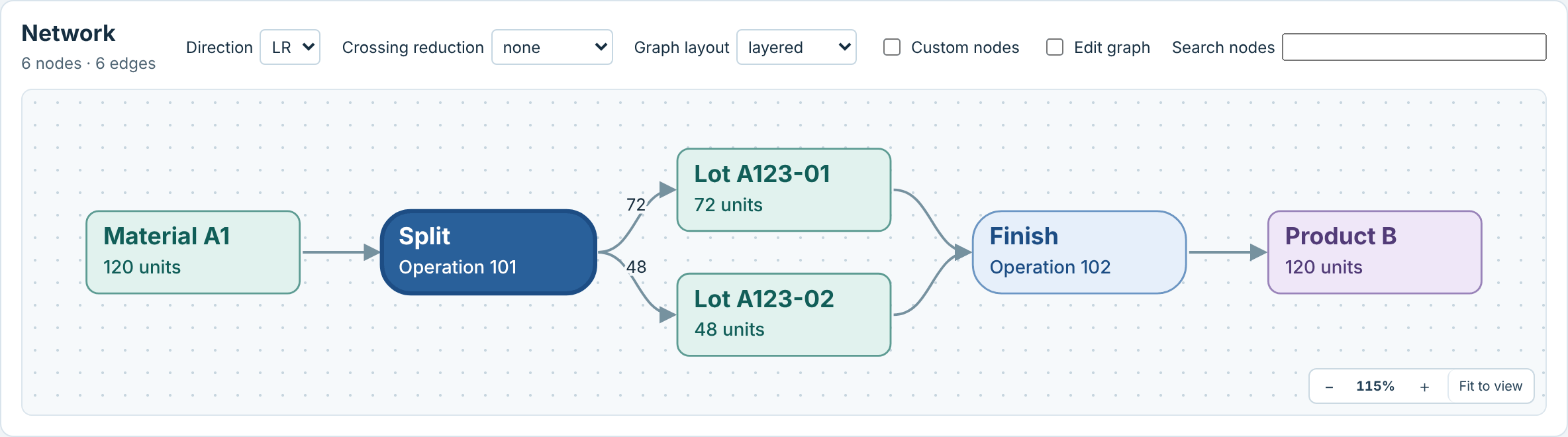
- package/dist/core.js +1 -0
- package/dist/index.js +8022 -0
- package/dist/style.css +2 -0
- package/dist/types/components/GanttChart.vue.d.ts +339 -0
- package/dist/types/components/NetworkGraph.vue.d.ts +252 -0
- package/dist/types/components/types.d.ts +27 -0
- package/dist/types/composables/useAsyncGraphLayout.d.ts +163 -0
- package/dist/types/composables/useEditHistory.d.ts +13 -0
- package/dist/types/composables/useEditTransaction.d.ts +46 -0
- package/dist/types/composables/useLinkedSelection.d.ts +118 -0
- package/dist/types/composables/useTimelineView.d.ts +24 -0
- package/dist/types/composables/useWindowedData.d.ts +83 -0
- package/dist/types/core/actuals.d.ts +170 -0
- package/dist/types/core/calendarFormat.d.ts +65 -0
- package/dist/types/core/editTransaction.d.ts +96 -0
- package/dist/types/core/exportSvg.d.ts +236 -0
- package/dist/types/core/fieldEditing.d.ts +114 -0
- package/dist/types/core/graph.d.ts +196 -0
- package/dist/types/core/graphAlgorithms.d.ts +51 -0
- package/dist/types/core/graphAnalysis.d.ts +96 -0
- package/dist/types/core/graphCollapse.d.ts +62 -0
- package/dist/types/core/graphCrossings.d.ts +25 -0
- package/dist/types/core/graphEditing.d.ts +52 -0
- package/dist/types/core/graphExpansion.d.ts +71 -0
- package/dist/types/core/graphFlow.d.ts +184 -0
- package/dist/types/core/graphForce.d.ts +29 -0
- package/dist/types/core/graphGeometry.d.ts +31 -0
- package/dist/types/core/graphIncremental.d.ts +93 -0
- package/dist/types/core/graphLasso.d.ts +15 -0
- package/dist/types/core/graphLayoutRequests.d.ts +218 -0
- package/dist/types/core/graphLayouts.d.ts +81 -0
- package/dist/types/core/graphObstacleRouting.d.ts +68 -0
- package/dist/types/core/graphPortRules.d.ts +111 -0
- package/dist/types/core/graphRouting.d.ts +84 -0
- package/dist/types/core/graphSnapping.d.ts +34 -0
- package/dist/types/core/graphSpatial.d.ts +49 -0
- package/dist/types/core/graphSwimlanes.d.ts +77 -0
- package/dist/types/core/graphTraversal.d.ts +51 -0
- package/dist/types/core/graphView.d.ts +73 -0
- package/dist/types/core/index.d.ts +75 -0
- package/dist/types/core/interchange.d.ts +6 -0
- package/dist/types/core/interchangeCsv.d.ts +75 -0
- package/dist/types/core/interchangeICalendar.d.ts +111 -0
- package/dist/types/core/interchangeMsProject.d.ts +339 -0
- package/dist/types/core/leveling.d.ts +57 -0
- package/dist/types/core/pert.d.ts +62 -0
- package/dist/types/core/placement.d.ts +100 -0
- package/dist/types/core/planComparison.d.ts +275 -0
- package/dist/types/core/resourceLoad.d.ts +65 -0
- package/dist/types/core/resourceTimeline.d.ts +179 -0
- package/dist/types/core/rowHierarchy.d.ts +25 -0
- package/dist/types/core/scheduleDiagnostics.d.ts +37 -0
- package/dist/types/core/scheduleModel.d.ts +187 -0
- package/dist/types/core/scheduleTrace.d.ts +118 -0
- package/dist/types/core/scheduling.d.ts +194 -0
- package/dist/types/core/snapshot.d.ts +388 -0
- package/dist/types/core/statusDate.d.ts +36 -0
- package/dist/types/core/timeRangeTargets.d.ts +67 -0
- package/dist/types/core/timeline.d.ts +194 -0
- package/dist/types/core/timelineView.d.ts +101 -0
- package/dist/types/core/types.d.ts +783 -0
- package/dist/types/core/viewBindings.d.ts +112 -0
- package/dist/types/core/windowedData.d.ts +255 -0
- package/dist/types/core/workCalendar.d.ts +41 -0
- package/dist/types/core/workingTimeScale.d.ts +33 -0
- package/dist/types/index.d.ts +52 -0
- package/docs/api.md +1989 -0
- package/docs/architecture.md +112 -0
- package/docs/code-of-conduct.md +24 -0
- package/docs/integration.md +931 -0
- package/docs/scheduling.md +586 -0
- package/docs/security.md +26 -0
- package/docs/third-party-licenses.md +33 -0
- package/package.json +79 -4
package/CONTRIBUTING.md
ADDED
|
@@ -0,0 +1,123 @@
|
|
|
1
|
+
# Contributing
|
|
2
|
+
|
|
3
|
+
Bug reports, documentation corrections and focused pull requests are welcome. For security concerns, follow the [security policy](docs/security.md) instead of opening a public issue. Everyone participating is expected to follow the [code of conduct](docs/code-of-conduct.md).
|
|
4
|
+
|
|
5
|
+
## Set up a checkout
|
|
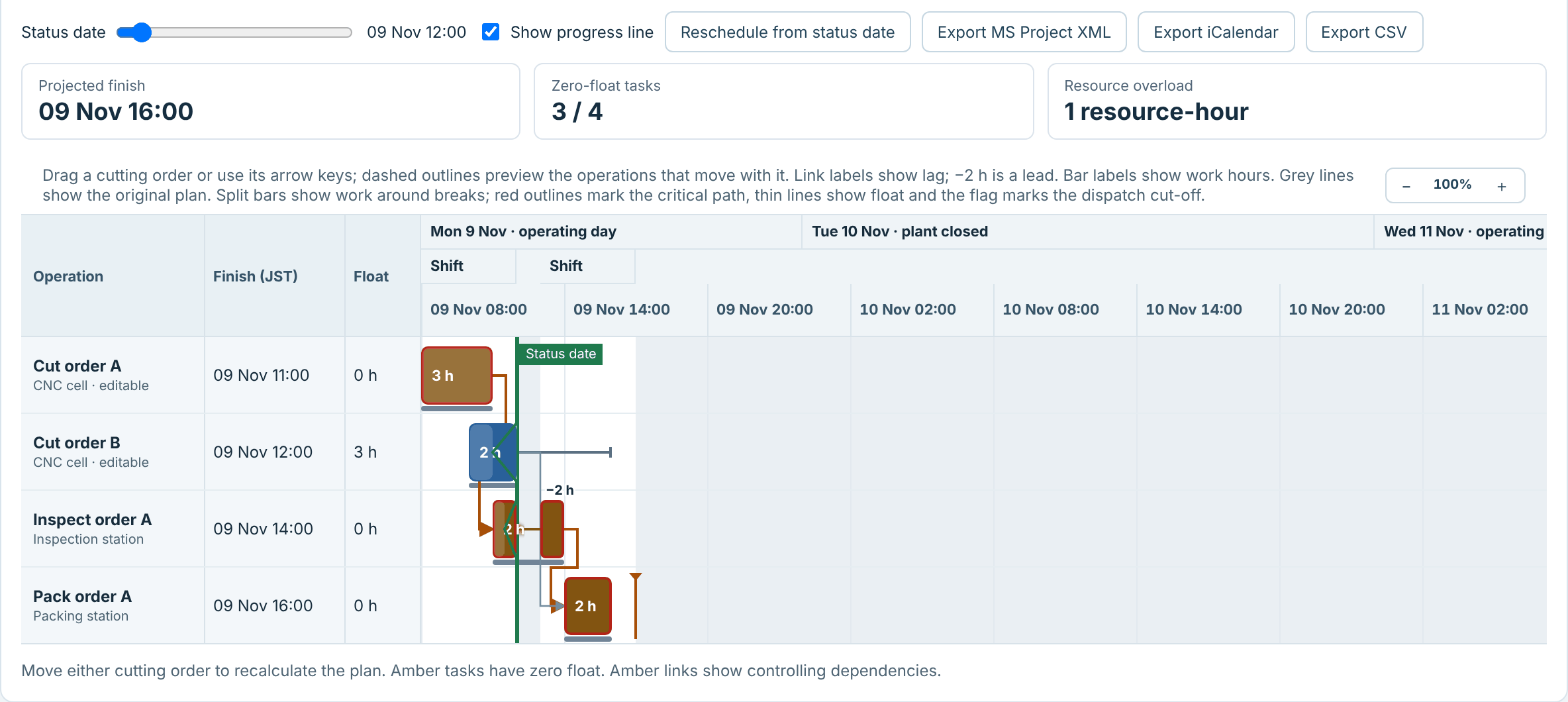
6
|
+
|
|
7
|
+
Use Node.js 22.18 or later and npm. CI covers Node.js 22 and 24 on Linux and Windows. Clone [EightKK/vue-weave](https://github.com/EightKK/vue-weave) or extract its source archive, then run:
|
|
8
|
+
|
|
9
|
+
```sh
|
|
10
|
+
npm ci
|
|
11
|
+
npm run dev
|
|
12
|
+
```
|
|
13
|
+
|
|
14
|
+
The development demo is at http://127.0.0.1:5173. A fresh GitHub checkout or automatically generated GitHub source ZIP does not include `preview/`. To run the static demo, first run `npm run build:demo`, then `npm start`. On Windows, `Start.cmd` does both: it rebuilds `preview/` when it is missing or was built from other sources (running `npm ci` first if `node_modules` does not match `package-lock.json`), then serves it. A separately prepared demo archive can include `preview/` and run offline with Node.js; Windows users can launch it with `Start.cmd`.
|
|
15
|
+
|
|
16
|
+
`npm run build:demo` writes `preview/demo-build.json`, a hash of the demo sources listed in `demoInputs` in `scripts/demo-build.mjs`. `Start.cmd` runs `scripts/serve.mjs --build-if-stale`, which compares that hash with the current sources. If the demo starts reading a new file outside those inputs, add it to `demoInputs`.
|
|
17
|
+
|
|
18
|
+
The development toolchain uses TypeScript 6.0.x. The current `vue-tsc` depends on the JavaScript compiler API; standard TypeScript 7.0 does not provide its required compiler entry point and fails before checking Vue files. See the [upstream compatibility discussion](https://github.com/vuejs/language-tools/issues/6156). Dependabot holds TypeScript 7 and later until upstream support, type checking, declaration generation and isolated package-consumer checks have been verified. This development-tool restriction does not set a TypeScript peer requirement for library consumers.
|
|
19
|
+
|
|
20
|
+
## Report a problem or propose a feature
|
|
21
|
+
|
|
22
|
+
Search existing issues first. Include the installed package version, Vue version, Node.js version, browser and operating system, a minimal reproduction, expected behavior and actual behavior. Use synthetic data and remove credentials, personal data and confidential business data. Describe a feature's use case before proposing a new API. Questions about using the library can be opened as issues.
|
|
23
|
+
|
|
24
|
+
Maintainers review API and scope changes before accepting them. A response or fix deadline is not guaranteed.
|
|
25
|
+
|
|
26
|
+
## Make a change
|
|
27
|
+
|
|
28
|
+
- Keep comments, API documentation and test descriptions in English. Keep `README.md` and `README.ja.md` aligned.
|
|
29
|
+
- Preserve the controlled editing contract: components emit proposals and parents replace accepted data. Cancel gestures when their source data or coordinate mapping changes.
|
|
30
|
+
- Keep `src/core/` independent of Vue, the DOM and browser globals. Keep imports within `src/` independent of `examples/`.
|
|
31
|
+
- Use `.js` extensions in relative TypeScript imports that are emitted into declarations. This lets ESM consumers resolve them with TypeScript's `NodeNext` mode.
|
|
32
|
+
- Match the existing two-space indentation, single quotes, no semicolons and trailing commas. Use type-only imports where appropriate.
|
|
33
|
+
- Add tests for changed public behavior, especially cycles, input validation, coordinate inversion, cancelled edits and stale source data. Tests must import the public package entry points.
|
|
34
|
+
- Document public API changes in `docs/api.md`, affected guides and `CHANGELOG.md` under `Unreleased`. Identify breaking changes explicitly. New features should be opt-in.
|
|
35
|
+
- Discuss new dependencies before adding them. There are no runtime dependencies; Vue remains a peer dependency and is externalized from the library bundle.
|
|
36
|
+
|
|
37
|
+
Do not edit `dist/` or `preview/` manually. Generate `package-lock.json` with npm when an approved dependency change requires it. Do not commit local configuration, secrets, test output or release artifacts.
|
|
38
|
+
|
|
39
|
+
## Build a local package
|
|
40
|
+
|
|
41
|
+
From a source checkout, run:
|
|
42
|
+
|
|
43
|
+
```sh
|
|
44
|
+
npm ci
|
|
45
|
+
npm pack
|
|
46
|
+
```
|
|
47
|
+
|
|
48
|
+
`npm pack` builds the library through the `prepack` script and creates a `.tgz` in the checkout. Install that file from a consumer application's directory, replacing the example path with the generated tarball path:
|
|
49
|
+
|
|
50
|
+
```sh
|
|
51
|
+
npm install ./path/to/package.tgz
|
|
52
|
+
```
|
|
53
|
+
|
|
54
|
+
The package includes ES modules, declarations, the stylesheet and documentation. Vue remains a peer dependency. Use `@eightkk/vue-weave/core` for calculations without importing Vue components.
|
|
55
|
+
|
|
56
|
+
## Verify a pull request
|
|
57
|
+
|
|
58
|
+
```sh
|
|
59
|
+
npm run check
|
|
60
|
+
npx playwright install chromium
|
|
61
|
+
npm run test:e2e
|
|
62
|
+
npm run test:package
|
|
63
|
+
```
|
|
64
|
+
|
|
65
|
+
`check` type-checks the library and examples, builds the library, runs core/SSR tests and rebuilds the demo. Run browser tests after changes to components, styles, examples or accessible names. Browser regression fixtures also load the built library from `dist/`; build both the library and demo first, or use `check` as above. The Playwright server needs port 4173 free; the specs share that one static server and run on two workers (`workers: 2` in `playwright.config.ts`), so a test must not depend on another test, on run order or on server state; `CHROMIUM_PATH` can select an existing Chromium installation. Accessible-name changes may require updating the matching spec file in `test/browser/`, whose files are split by area and share their fixtures and helpers through `test/browser/support.ts`.
|
|
66
|
+
|
|
67
|
+
`test:package` builds and packs the actual release files, rejects unexpected files (including declaration files not reachable from the two public entry declarations: `build` prunes internal ones from `dist/types`), installs the tarball into a temporary consumer, checks core use without Vue, then checks Vue SSR, stylesheet resolution, strict TypeScript consumption (`noUncheckedSideEffectImports`, library checks on) of the same tarball twice, with the pinned development Vue version and again with the minimum version of the `vue` peer range (`^3.5.0`, so Vue 3.5.0), so the declarations cannot rely on types that only newer Vue releases declare, and finally the [public API baseline](#public-api-baseline). It uses the project's existing TypeScript compiler and installs both Vue versions into the consumer in turn; registry access or a populated npm cache is required. It removes that temporary consumer and retains the reviewed tarball in `artifacts/package-check/`, apart from the verified release sets in `artifacts/release/`, which it never writes. It never publishes or changes the repository lockfile. CI runs it on the Node/OS package matrix. Run it after package, declaration, build or export changes and before a release.
|
|
68
|
+
|
|
69
|
+
### Public API baseline
|
|
70
|
+
|
|
71
|
+
[`api/public-api.md`](https://github.com/EightKK/vue-weave/blob/v1.0.0/api/public-api.md) records the public API of the built package: the runtime and type-only export names of `@eightkk/vue-weave` and `@eightkk/vue-weave/core`, the normalized declaration of every export (and of the non-exported types that public signatures refer to), the props, emits, slots and exposed members of both components, and the `--vw-*` custom properties in `dist/style.css`. `test:package` fails with a per-item diff when the installed tarball differs from it. To check or regenerate it locally:
|
|
72
|
+
|
|
73
|
+
```sh
|
|
74
|
+
npm run build && node scripts/api-baseline.mjs # check
|
|
75
|
+
npm run build && node scripts/api-baseline.mjs --update # rewrite from dist/
|
|
76
|
+
```
|
|
77
|
+
|
|
78
|
+
Regenerate it in the pull request that changes the API, and review its diff like code: from 1.0, removing or changing an export, a declaration, a prop, an event, a slot, an exposed member or a custom property is a breaking change, and only additions fit a minor release. Documentation comments are not part of the baseline.
|
|
79
|
+
|
|
80
|
+
Include the checks run and any failures or unverified behavior in the pull request. Explain the user-visible result, relevant compatibility constraints and documentation changes.
|
|
81
|
+
|
|
82
|
+
## Licensing contributions
|
|
83
|
+
|
|
84
|
+
By submitting a contribution, you agree to provide it under this project's [MIT license](LICENSE). Submit only work you have permission to distribute under that license. Identify third-party code or assets and their license requirements in your pull request. Preserve existing copyright and third-party notices. No contributor license agreement or sign-off requirement is currently imposed.
|
|
85
|
+
|
|
86
|
+
## Versioning
|
|
87
|
+
|
|
88
|
+
Versions follow [Semantic Versioning](https://semver.org/). From 1.0.0, breaking changes are made only in a major release, a minor release adds backward-compatible features, and a patch release contains only backward-compatible fixes. [Compatibility and versioning](docs/api.md#compatibility-and-versioning) defines the public API this applies to. Breaking changes are listed under "Breaking changes" in the changelog entry of the release that introduces them.
|
|
89
|
+
|
|
90
|
+
## Prepare a release
|
|
91
|
+
|
|
92
|
+
A maintainer makes each release by hand: a GitHub Release and a manual npm publication of the same verified tarball, from the maintainer's own npm account with two-factor authentication. Agents and CI never publish.
|
|
93
|
+
|
|
94
|
+
1. Choose the version by the rules in [Versioning](#versioning) and set it with `npm version <version> --no-git-tag-version`, which updates `package.json` and `package-lock.json` together. Move the `Unreleased` entries into a `## <version> - <YYYY-MM-DD>` changelog entry and leave an empty `Unreleased` section. In `README.md` and `README.ja.md`, update the tarball name in the install instructions and the `v<version>` tag in the absolute image and document URLs (npm shows the README without the repository, so those links point at the release tag). Review package metadata and distribution rights for source, examples and assets.
|
|
95
|
+
2. From the final source revision, run `npm ci`, the checks in [Verify a pull request](#verify-a-pull-request), `npm pack --dry-run` and `npm audit`. Review every failure and inspect the actual packed file list. CI covers Node.js 22 and 24 on Linux and Windows, with Chromium interactions on Linux; use the results for the release commit.
|
|
96
|
+
3. Verify that private vulnerability reporting is enabled under the repository's **Settings > Advanced Security**. GitHub offers it only for public repositories, so enable it as soon as the repository is public. Review the source, package contents and Git history for credentials, personal data and confidential examples. Preserve project and third-party notices.
|
|
97
|
+
4. Run `npm run prepare:release` (below). Its verified package tarball, `artifacts/release/<version>/eightkk-vue-weave-<version>.tgz` (`<path-to-verified-tgz>` in the next steps), is the only file that is published; do not run `npm pack` or `npm publish` in the checkout again, because that rebuilds the package.
|
|
98
|
+
5. Create the `v<version>` tag on the checked revision and push it, so the tag-pinned README links resolve.
|
|
99
|
+
6. Publish the verified tarball to npm, entering the one-time password when npm asks for it (or passing `--otp <code>`):
|
|
100
|
+
|
|
101
|
+
```sh
|
|
102
|
+
npm publish <path-to-verified-tgz> --access public
|
|
103
|
+
```
|
|
104
|
+
|
|
105
|
+
7. Check that the registry holds the same bytes. The integrity npm reports must equal the local SHA-512 of the tarball:
|
|
106
|
+
|
|
107
|
+
```sh
|
|
108
|
+
npm view @eightkk/vue-weave@<version> dist.integrity
|
|
109
|
+
node -e "console.log('sha512-' + require('node:crypto').createHash('sha512').update(require('node:fs').readFileSync(process.argv[1])).digest('base64'))" <path-to-verified-tgz>
|
|
110
|
+
```
|
|
111
|
+
|
|
112
|
+
A published version cannot be replaced. If the values differ, deprecate the version with `npm deprecate` and release a new patch version.
|
|
113
|
+
8. Create the GitHub Release from the `v<version>` tag. Attach the same tarball bytes that were published, `eightkk-vue-weave-<version>-source-demo.tar.gz` and `SHA256SUMS` from `artifacts/release/<version>/`, and use the changelog entry as the release notes.
|
|
114
|
+
|
|
115
|
+
To prepare matching local package and offline-demo candidates, install Chromium once with `npx playwright install chromium`, then run:
|
|
116
|
+
|
|
117
|
+
```sh
|
|
118
|
+
npm run prepare:release
|
|
119
|
+
```
|
|
120
|
+
|
|
121
|
+
This command reruns the full check, browser tests, package-consumer tests (including the public API baseline) and dependency audit. It requires registry access (or a populated npm cache), Chromium and a `tar` executable, which is supplied by current Windows and Linux environments. It uses an explicit source-file allowlist, rejects symlinks, and excludes `.git`, `node_modules`, local settings, credentials and test output. It checks that source files stay unchanged during verification, creates an archive with the generated `preview/`, compares every extracted file against the source inventory, and smoke-tests the extracted demo without installing dependencies. Each run writes all of its files (tarball, source archive, `SHA256SUMS` and `release-verification.json`) into a new candidate directory `artifacts/.candidate-*`, then checks that the checksums and the record match the files. Only then does it move that set into `artifacts/release/<version>/` with two directory renames, replacing the previous set for that version as a whole. If any step fails, the candidate is deleted and the previous verified set stays unchanged; a run that is killed can leave a `.candidate-*` directory, which is safe to delete. `VW_RELEASE_FAIL_AT=after-package`, `before-promote` or `during-promote` simulates a failure at that point, and `test/release-candidate.test.mjs` covers these cases. The verification record lists file hashes and outstanding publication checks; it does not certify distribution rights, Git history or hosted settings. No publishing, tags or repository changes are performed. Review the allowlisted source files for confidential content before sharing them. GitHub's generated source ZIP omits ignored `preview/` and requires a demo build.
|
|
122
|
+
|
|
123
|
+
To host a public demo, serve the static files from `preview/` with the relevant third-party notices. The local preview server binds to `127.0.0.1`.
|
package/LICENSE
ADDED
|
@@ -0,0 +1,21 @@
|
|
|
1
|
+
The MIT License (MIT)
|
|
2
|
+
|
|
3
|
+
Copyright (c) 2026 vue-weave contributors
|
|
4
|
+
|
|
5
|
+
Permission is hereby granted, free of charge, to any person obtaining a copy
|
|
6
|
+
of this software and associated documentation files (the "Software"), to deal
|
|
7
|
+
in the Software without restriction, including without limitation the rights
|
|
8
|
+
to use, copy, modify, merge, publish, distribute, sublicense, and/or sell
|
|
9
|
+
copies of the Software, and to permit persons to whom the Software is
|
|
10
|
+
furnished to do so, subject to the following conditions:
|
|
11
|
+
|
|
12
|
+
The above copyright notice and this permission notice shall be included in
|
|
13
|
+
all copies or substantial portions of the Software.
|
|
14
|
+
|
|
15
|
+
THE SOFTWARE IS PROVIDED "AS IS", WITHOUT WARRANTY OF ANY KIND, EXPRESS OR
|
|
16
|
+
IMPLIED, INCLUDING BUT NOT LIMITED TO THE WARRANTIES OF MERCHANTABILITY,
|
|
17
|
+
FITNESS FOR A PARTICULAR PURPOSE AND NONINFRINGEMENT. IN NO EVENT SHALL THE
|
|
18
|
+
AUTHORS OR COPYRIGHT HOLDERS BE LIABLE FOR ANY CLAIM, DAMAGES OR OTHER
|
|
19
|
+
LIABILITY, WHETHER IN AN ACTION OF CONTRACT, TORT OR OTHERWISE, ARISING FROM,
|
|
20
|
+
OUT OF OR IN CONNECTION WITH THE SOFTWARE OR THE USE OR OTHER DEALINGS IN
|
|
21
|
+
THE SOFTWARE.
|
package/README.ja.md
ADDED
|
@@ -0,0 +1,275 @@
|
|
|
1
|
+
# Vue Weave
|
|
2
|
+
|
|
3
|
+
[](https://github.com/EightKK/vue-weave/actions/workflows/ci.yml) [](https://github.com/EightKK/vue-weave/blob/v1.0.0/LICENSE)
|
|
4
|
+
|
|
5
|
+
[English](https://github.com/EightKK/vue-weave/blob/v1.0.0/README.md)
|
|
6
|
+
|
|
7
|
+
[ソースコード](https://github.com/EightKK/vue-weave) · [課題・問い合わせ](https://github.com/EightKK/vue-weave/issues) · [リリース](https://github.com/EightKK/vue-weave/releases)
|
|
8
|
+
|
|
9
|
+
Vue 3でネットワークグラフとガントチャートを実装するためのライブラリです。関係の探索、工程フロー、製造のロット系譜、プロジェクト工程、設備・担当者別の予定などを、型付きの2つのコンポーネントで作れます。グラフ・日程計算・設備負荷の計算は、Node.js、Worker、サーバーでも動くヘッドレスのコアで行えます。
|
|
10
|
+
|
|
11
|
+
- **制御されたコンポーネント。** `NetworkGraph` と `GanttChart` は渡されたデータを書き換えません。利用者の編集は変更案のイベントになり、反映するかどうかはアプリ側で決めます。
|
|
12
|
+
- **計画機能を内蔵。** 稼働カレンダー、依存関係、クリティカルパス、設備負荷と平準化、実績からの再計画、計画シナリオの比較に対応し、各日程が決まった理由も説明できます。
|
|
13
|
+
- **必要な機能だけを有効化。** 既定の動作はシンプルなまま、ほかの機能はpropsで有効にします。Vue以外の実行時依存はなく、サーバーサイドレンダリング、SVG・PNGの書き出し、ダークテーマ、右から左のレイアウトに対応します。
|
|
14
|
+
|
|
15
|
+
## インストール
|
|
16
|
+
|
|
17
|
+
```sh
|
|
18
|
+
npm install @eightkk/vue-weave
|
|
19
|
+
```
|
|
20
|
+
|
|
21
|
+
Vue `^3.5.0` をpeer dependencyとしています。npm 7以降では、アプリケーションにVueがまだなければパッケージと一緒にインストールされます。ES modules、TypeScriptの型定義、スタイルシート1つを提供します。
|
|
22
|
+
|
|
23
|
+
スタイルシートは、アプリケーションのエントリファイルなどで一度だけ読み込みます。
|
|
24
|
+
|
|
25
|
+
```ts
|
|
26
|
+
import '@eightkk/vue-weave/style.css'
|
|
27
|
+
```
|
|
28
|
+
|
|
29
|
+
Viteではこのままimportできます。`tsconfig.json` で `noUncheckedSideEffectImports` を有効にしている場合や、CSSを扱えないビルド環境の場合は、[The stylesheet and TypeScript](https://github.com/EightKK/vue-weave/blob/v1.0.0/docs/integration.md#the-stylesheet-and-typescript)を参照してください。
|
|
30
|
+
|
|
31
|
+
**コアだけを使う場合(サーバー・Worker)。** `@eightkk/vue-weave/core` は実行時にVueを必要とせず、Node.js 22.18以降、Worker、サーバーで動作します。ただしVueは必須のpeer dependencyで、optionalなpeerとしては設定していないため、`npm install @eightkk/vue-weave` でVueもインストールされます。コアだけを配備する環境でVueを除くには `--omit=peer` を付けてインストールします。詳しくは[Core only: servers and Workers](https://github.com/EightKK/vue-weave/blob/v1.0.0/docs/integration.md#core-only-servers-and-workers)を参照してください。
|
|
32
|
+
|
|
33
|
+
**オフラインでのインストール。** 各[GitHub Release](https://github.com/EightKK/vue-weave/releases)には、npmに公開したものと同じパッケージのtarballも添付しています。`eightkk-vue-weave-1.0.0.tgz` をダウンロードし、利用するアプリケーションのフォルダーからインストールします。次のパスは実際のファイルのパスに置き換えます。
|
|
34
|
+
|
|
35
|
+
```sh
|
|
36
|
+
npm install ./eightkk-vue-weave-1.0.0.tgz
|
|
37
|
+
```
|
|
38
|
+
|
|
39
|
+
チェックアウトから[ローカルパッケージを作成](https://github.com/EightKK/vue-weave/blob/v1.0.0/CONTRIBUTING.md#build-a-local-package)することもできます。
|
|
40
|
+
|
|
41
|
+
## クイックスタート
|
|
42
|
+
|
|
43
|
+
### ネットワークグラフ
|
|
44
|
+
|
|
45
|
+
```vue
|
|
46
|
+
<script setup lang="ts">
|
|
47
|
+
import { ref } from 'vue'
|
|
48
|
+
import { NetworkGraph, type NetworkNode, type GraphEdge } from '@eightkk/vue-weave'
|
|
49
|
+
import '@eightkk/vue-weave/style.css'
|
|
50
|
+
|
|
51
|
+
const selected = ref('design')
|
|
52
|
+
const nodes: NetworkNode[] = [
|
|
53
|
+
{ id: 'design', label: 'Design' },
|
|
54
|
+
{ id: 'build', label: 'Build' },
|
|
55
|
+
{ id: 'release', label: 'Release' },
|
|
56
|
+
]
|
|
57
|
+
const edges: GraphEdge[] = [
|
|
58
|
+
{ id: 'db', from: 'design', to: 'build' },
|
|
59
|
+
{ id: 'br', from: 'build', to: 'release', label: 'Approved' },
|
|
60
|
+
]
|
|
61
|
+
</script>
|
|
62
|
+
|
|
63
|
+
<template>
|
|
64
|
+
<NetworkGraph
|
|
65
|
+
v-model:selected-id="selected"
|
|
66
|
+
:nodes="nodes"
|
|
67
|
+
:edges="edges"
|
|
68
|
+
:options="{ direction: 'LR' }"
|
|
69
|
+
/>
|
|
70
|
+
</template>
|
|
71
|
+
```
|
|
72
|
+
|
|
73
|
+
ほかの機能も、propsと `options` で同じように有効にします。次の例は、右から左へ配置し、辺の交差を減らし、検索結果を強調し、画面外のノードの描画を省略します。
|
|
74
|
+
|
|
75
|
+
```vue
|
|
76
|
+
<NetworkGraph
|
|
77
|
+
ref="graph"
|
|
78
|
+
:nodes="nodes"
|
|
79
|
+
:edges="edges"
|
|
80
|
+
:options="{ direction: 'RL', crossingReduction: 'barycenter' }"
|
|
81
|
+
:match-ids="matches"
|
|
82
|
+
cull-offscreen
|
|
83
|
+
/>
|
|
84
|
+
```
|
|
85
|
+
|
|
86
|
+
### ガントチャート
|
|
87
|
+
|
|
88
|
+
```vue
|
|
89
|
+
<script setup lang="ts">
|
|
90
|
+
import { ref } from 'vue'
|
|
91
|
+
import { GanttChart, type TimelineBar, type TimelineEdit } from '@eightkk/vue-weave'
|
|
92
|
+
import '@eightkk/vue-weave/style.css'
|
|
93
|
+
|
|
94
|
+
const start = Date.parse('2026-11-09T08:00:00Z')
|
|
95
|
+
const hour = 3_600_000
|
|
96
|
+
const range = { start, end: start + 8 * hour }
|
|
97
|
+
const rows = [{ id: 'team', label: 'Engineering' }]
|
|
98
|
+
const bars = ref<TimelineBar[]>([
|
|
99
|
+
{
|
|
100
|
+
id: 'build', rowId: 'team', label: 'Build',
|
|
101
|
+
start: start + hour, end: start + 3 * hour,
|
|
102
|
+
editable: true, progress: 0.4,
|
|
103
|
+
},
|
|
104
|
+
])
|
|
105
|
+
|
|
106
|
+
function commit(change: TimelineEdit) {
|
|
107
|
+
bars.value = bars.value.map(bar =>
|
|
108
|
+
bar.id === change.id ? { ...bar, ...change.after } : bar,
|
|
109
|
+
)
|
|
110
|
+
}
|
|
111
|
+
</script>
|
|
112
|
+
|
|
113
|
+
<template>
|
|
114
|
+
<GanttChart :rows="rows" :bars="bars" :range="range" @edit="commit" />
|
|
115
|
+
</template>
|
|
116
|
+
```
|
|
117
|
+
|
|
118
|
+
コンポーネントはドラッグ中のプレビューを表示し、`edit` イベントで変更案を渡します。呼び出し側が採用した内容を `bars` に反映します。アプリ固有の検証、API保存、非同期の承認処理を組み込めます。同期の `validateEdit` フックでイベント発行前に変更案を拒否することもできます。区間は半開区間 `[start, end)` で、長さ0のバーはマイルストーンです。
|
|
119
|
+
|
|
120
|
+
### ビューの連動
|
|
121
|
+
|
|
122
|
+
グラフとガントチャートを連動させる最小の例です。どちらかのビューで項目を選ぶと、そのビューで選択され、もう一方の対応する項目が強調されます。
|
|
123
|
+
|
|
124
|
+
```vue
|
|
125
|
+
<script setup lang="ts">
|
|
126
|
+
import { NetworkGraph, GanttChart, useLinkedSelection, type ViewBinding, type ViewTargetEvent } from '@eightkk/vue-weave'
|
|
127
|
+
|
|
128
|
+
// nodes、edges、rows、bars、range は上の例と同じです。ここではノードIDとバーIDがタスクIDです。
|
|
129
|
+
const bindings: ViewBinding[] = bars.value.flatMap(bar => [
|
|
130
|
+
{ entity: { kind: 'task', id: bar.id }, target: { view: 'graph', kind: 'node', id: bar.id } },
|
|
131
|
+
{ entity: { kind: 'task', id: bar.id }, target: { view: 'timeline', kind: 'bar', id: bar.id } },
|
|
132
|
+
])
|
|
133
|
+
const linked = useLinkedSelection({ bindings })
|
|
134
|
+
const activate = (event: ViewTargetEvent) => linked.select(event.target.view, [event.target])
|
|
135
|
+
</script>
|
|
136
|
+
|
|
137
|
+
<template>
|
|
138
|
+
<NetworkGraph :nodes="nodes" :edges="edges" :selected-ids="linked.graph.value.selectedNodeIds"
|
|
139
|
+
:highlighted-node-ids="linked.graph.value.highlightedNodeIds" @target-activate="activate" />
|
|
140
|
+
<GanttChart :rows="rows" :bars="bars" :range="range" :selected-ids="linked.timeline.value.selectedBarIds"
|
|
141
|
+
:highlighted-bar-ids="linked.timeline.value.highlightedBarIds" @target-activate="activate" />
|
|
142
|
+
</template>
|
|
143
|
+
```
|
|
144
|
+
|
|
145
|
+
ホバー、負荷行、折り畳まれた項目への移動は [Linking views](https://github.com/EightKK/vue-weave/blob/v1.0.0/docs/integration.md#linking-views) を、`useEditTransaction` は [Saving through a server](https://github.com/EightKK/vue-weave/blob/v1.0.0/docs/integration.md#saving-through-a-server) を参照してください。
|
|
146
|
+
|
|
147
|
+
## ギャラリー
|
|
148
|
+
|
|
149
|
+
画像はすべて、このリポジトリの[デモ](#デモを起動する)の画面です。
|
|
150
|
+
|
|
151
|
+
|
|
152
|
+
|
|
153
|
+
|
|
154
|
+
|
|
155
|
+
<table>
|
|
156
|
+
<tr>
|
|
157
|
+
<td width="50%" valign="top">
|
|
158
|
+
<img src="https://raw.githubusercontent.com/EightKK/vue-weave/v1.0.0/.github/images/process-lanes.png" alt="工程レーンのデモ。機械加工の工程を4つの部門レーン(購買、加工、検査、空の出荷レーン)に配置し、部門間の受け渡しを表す直角の辺がレーン境界をまたぎ、ミニマップにもレーンが表示されている" width="100%"><br>
|
|
159
|
+
<b>スイムレーン。</b>部門や作業区ごとのレーンを指定した順に並べます(<code>layoutSwimlaneGraph</code>、<code>lanes</code>)。
|
|
160
|
+
</td>
|
|
161
|
+
<td width="50%" valign="top">
|
|
162
|
+
<img src="https://raw.githubusercontent.com/EightKK/vue-weave/v1.0.0/.github/images/quantity-flow.png" alt="数量フローのデモ。100個のロットが2つのラインに60対40で分かれ、検査で合流し、Bラインで4個減り、10個が手戻りとして破線の帯でループするサンキー図と、工程ごとの流入量・流出量・差の表" width="100%"><br>
|
|
163
|
+
<b>数量フロー。</b>辺を数量に比例した太さの帯として、図全体で同じ縮尺で描きます(<code>layoutFlowGraph</code>、<code>edgeBands</code>)。
|
|
164
|
+
</td>
|
|
165
|
+
</tr>
|
|
166
|
+
<tr>
|
|
167
|
+
<td width="50%" valign="top">
|
|
168
|
+
<img src="https://raw.githubusercontent.com/EightKK/vue-weave/v1.0.0/.github/images/linked-views.png" alt="ビュー連動のデモ。ガントチャートで「Cut order A」を選択すると、上のネットワークグラフと下のCNCセルの負荷行でも同じタスクが強調され、負荷行では赤い区間が負荷超過を示している" width="100%"><br>
|
|
169
|
+
<b>ビューの連動。</b>一つのビューで選ぶと、グラフ、ガントチャート、負荷行で同じタスクが強調されます(<code>useLinkedSelection</code>)。
|
|
170
|
+
</td>
|
|
171
|
+
<td width="50%" valign="top">
|
|
172
|
+
<img src="https://raw.githubusercontent.com/EightKK/vue-weave/v1.0.0/.github/images/plan-comparison.png" alt="計画シナリオのデモ。保守時間帯の後へ切断作業を送る候補計画を現行計画と比較し、最終完了、期限超過、割り当ての変更、CNCセルの負荷超過を表にまとめ、ガントチャートでは各候補バーの下に現行計画を細い帯で表示している" width="100%"><br>
|
|
173
|
+
<b>計画シナリオ。</b>候補計画を採用する前に現行計画と比較します(<code>comparePlans</code>)。
|
|
174
|
+
</td>
|
|
175
|
+
</tr>
|
|
176
|
+
<tr>
|
|
177
|
+
<td width="50%" valign="top">
|
|
178
|
+
<img src="https://raw.githubusercontent.com/EightKK/vue-weave/v1.0.0/.github/images/diagram-styles-dark.png" alt="ダークテーマで表示したダイアグラム表現のデモ。楕円、ひし形、六角形のノード、主経路の破線のアニメーション辺、白抜き矢印や丸の端の記号、左右に振り分けた平行な辺の組を含む受注処理フロー" width="100%"><br>
|
|
179
|
+
<b>ダイアグラム表現とダークテーマ。</b>ノード形状、辺の端の記号、アニメーションする辺と平行な辺、組み込みのダークテーマ。
|
|
180
|
+
</td>
|
|
181
|
+
<td width="50%" valign="top">
|
|
182
|
+
<b>デモにはほかにも:</b>プロジェクト工程、1,000行のタイムライン、大規模グラフ、タイムライン編集、非同期レイアウト、グラフ分析、未計画タスクを含むリソース計画、模擬サーバーへの保存を伴う編集、表示範囲ごとに読み込む大規模な計画があります。デザインギャラリーでは、両コンポーネントをワークフロービルダー、データベーススキーマ図、組織図、ロードマップ、スプリント計画、客室予約、カレンダー表示の見た目に作り替えています。
|
|
183
|
+
</td>
|
|
184
|
+
</tr>
|
|
185
|
+
</table>
|
|
186
|
+
|
|
187
|
+
## 機能
|
|
188
|
+
|
|
189
|
+
基本機能以外はすべてオプトインです。ここでは概要を示します。props、イベント、スロット、関数の一覧は [docs/api.md](https://github.com/EightKK/vue-weave/blob/v1.0.0/docs/api.md) に、手順は [docs/integration.md](https://github.com/EightKK/vue-weave/blob/v1.0.0/docs/integration.md) と [docs/scheduling.md](https://github.com/EightKK/vue-weave/blob/v1.0.0/docs/scheduling.md) にあります。
|
|
190
|
+
|
|
191
|
+
### NetworkGraph
|
|
192
|
+
|
|
193
|
+
- **レイアウト:** 分岐・合流、閉路、自己ループに対応した標準の階層レイアウト(`LR`・`TB`・`RL`・`BT`。`crossingReduction: 'barycenter'` で交差を削減)。`layout` propでは、木、放射状、円形、格子、同心円、決定的な力学モデルの各配置(`layoutTreeGraph`、`layoutRadialGraph`、`layoutCircularGraph`、`layoutGridGraph`、`layoutConcentricGraph`、`layoutForceGraph`)や、アプリケーションで導入した[ELK.js](https://github.com/EightKK/vue-weave/blob/v1.0.0/docs/integration.md#use-elkjs-for-layout)の結果を使えます。
|
|
194
|
+
- **工程レーン:** `layoutSwimlaneGraph` は部門や作業区ごとのレーンを指定した順に並べます。`lanes` propで帯を描き、ミニマップと書き出しにも反映されます。ドラッグしたノードが入るレーンは `graphSwimlaneAt` で判定できます。詳しくは[Swimlanes for process flows](https://github.com/EightKK/vue-weave/blob/v1.0.0/docs/integration.md#swimlanes-for-process-flows)を参照してください。
|
|
195
|
+
- **数量フロー(サンキー図):** `layoutFlowGraph` は各辺を数量に応じた太さにして図全体で同じ縮尺で描き、ノードごとの流入量・流出量とその差を補正せずに報告します。単位の異なる数量は合算せず、手戻りのループは破線の参照帯にします。`edgeBands` propは「Cut → Inspect: 60 pcs」のような名前付きで帯を描きます。詳しくは[Quantity flows](https://github.com/EightKK/vue-weave/blob/v1.0.0/docs/integration.md#quantity-flows-sankey-diagrams)を参照してください。
|
|
196
|
+
- **描画:** 独自のSVGを描く `node`・`edge`・`group`・`minimap-node` スロット、HTMLを表示する `tooltip`・`node-toolbar`・`edge-toolbar` スロット。ひし形・楕円・六角形のノード、直角・直線の辺(`edgeStyle`)、ノードを避ける経路(`avoidNodes`)、経由点、端の記号、アニメーションする辺、平行な辺の振り分け。
|
|
197
|
+
- **変更案としての編集:** ノードの移動、型付きのポートルール(`connectionRules`)で検査する接続と接続先のヒント、ラベルのその場編集、矩形・投げ縄による選択、入れ子で折りたためるグループ、ノードのサイズ変更、グリッドへの吸着と整列ガイド、パレットからのドロップ、クリップボード、キーボードによる削除。
|
|
198
|
+
- **表示範囲の操作:** ミニマップ、大規模グラフ向けの表示範囲外の描画省略と縮小時の簡略表示、ピンチズーム、検索結果の強調(`matchIds`)、`focusNode(id)`、`fit({ ids })`。
|
|
199
|
+
|
|
200
|
+
### GanttChart
|
|
201
|
+
|
|
202
|
+
- **表示:** 複数レーン、進捗率、マイルストーン、ラグのラベル付きのFS/SS/FF/SF依存関係。サマリーの集約バーと、オプトインのサマリー行への依存関係を持つ階層行。差異付きで最大3つの名前付きベースライン。多段見出し、日時マーカー、期間の強調(`markerRanges`)。ステータス日付線とイナズマ線。非稼働時間の網掛け。クリティカルパスの枠線、余裕の線、期限、分割バー。`calculateResourceLoad` の出力をそのまま渡せる設備負荷のヒストグラム(`loadRows`)。
|
|
203
|
+
- **変更案としての編集:** ドラッグとキーボードによる移動・伸縮、移動に連動して動くバーのプレビュー(`cascade`)、依存関係の作成と付け替え、複数選択と一括移動、ドラッグによるバーの作成、進捗率のスライダー、削除、行の階層移動、列幅の変更、スケジュール制約のハンドル、型付きのセル編集(`field-edit`)、アプリの一覧からのドロップ(`bar-drop`)。
|
|
204
|
+
- **時間軸:** ズームプリセット、IANAタイムゾーンとロケールに沿ったカレンダー用プリセット(`calendarZoomPresets`、`intlTimeFormatter`)、非稼働時間を圧縮する時間軸(`createWorkingTimeScale`)、Ctrl+ホイールとピンチによるズーム、現在時刻マーカー、`fitToBars()`。
|
|
205
|
+
- **大規模データ:** 行と表示時間範囲の仮想化。表示中の週と行だけを読み込むための `visible-window-change`。
|
|
206
|
+
|
|
207
|
+
### ヘッドレスコア(`@eightkk/vue-weave/core`)
|
|
208
|
+
|
|
209
|
+
- **グラフのアルゴリズムと指標:** `topologicalOrder`、`findGraphCycles`、`shortestGraphPath`、`searchGraphNodes`、`filterGraph`、連結成分、次数・媒介・PageRankの各中心性、Louvain法によるコミュニティ検出(`detectGraphCommunities`)と、その結果をグループに変換する `graphCommunityGroups`。
|
|
210
|
+
- **日程計算:** `buildWorkPeriods` で作るカレンダー(IANAタイムゾーンを含む)上での `scheduleTasks`。最遅開始、手動・非アクティブ・サマリーのタスク、制約、中断区間、循環や実行不能の診断に対応します。`scheduleTasks(input, { explain: true })` は各タスクの開始が決まった理由をトレースし、`toPlanningDiagnostics` は問題を一覧にします。
|
|
211
|
+
- **リソース:** `calculateResourceLoad` と `levelResources`。時間とともに変わる能力(`capacityPeriods`)や、タスクの一部だけを占める割り当て(`workOffset`、`workDuration`)にも対応します。`projectResourceTimeline` はリソース別に計画を表示し、`buildPlacementInput` は未計画タスクを計算から除きます。
|
|
212
|
+
- **計画の更新:** `propagateEdit`、`rescheduleFromStatusDate`、`rescheduleFromActuals`(記録した実績を保ち、残りを予測)、そして編集した内容と結果として動いた内容を分けて示す `comparePlans`。詳しくは[Compare plan scenarios](https://github.com/EightKK/vue-weave/blob/v1.0.0/docs/scheduling.md#compare-plan-scenarios)を参照してください。
|
|
213
|
+
- **データ交換:** Microsoft Project XML(カレンダー、リソース、割り当てを含む)、iCalendar、CSVの読み込みと書き出し(`fromMsProjectXml`、`toMsProjectXml`、`fromICalendar`、`toICalendar`、`parseCsv`、`toCsv`)。日程をPERT図にする `scheduleToGraph`。
|
|
214
|
+
|
|
215
|
+
### ビューの連動・大規模データ・保存
|
|
216
|
+
|
|
217
|
+
- **ビューの連動:** `useLinkedSelection` はグラフ、ガントチャート、負荷行をエンティティの対応づけで連動させます。`revealNode`、`revealBar`、`revealLinkedTarget` は折り畳まれたグループや行の中も含めて項目へ移動し、`timelineBarsInRange` と `resolveTimeRangeTargets` はある時間範囲に作業していた対象を強調します。詳しくは[Linking views](https://github.com/EightKK/vue-weave/blob/v1.0.0/docs/integration.md#linking-views)を参照してください。
|
|
218
|
+
- **大規模データ:** `useWindowedData` はアプリの `load` 関数を通じて表示中の範囲だけを取得し、中断、重複排除、再試行に対応します。グラフ展開ヘルパーと `layoutGraphIncrementally` は、表示中のノードを動かさずにグラフを1ホップずつ読み込みます。`useAsyncGraphLayout` はWorkerでレイアウトを計算し、`routingPolicy="preserve"` はエンジンの配線を保持します。詳しくは[Loading only what is visible](https://github.com/EightKK/vue-weave/blob/v1.0.0/docs/integration.md#loading-only-what-is-visible)を参照してください。
|
|
219
|
+
- **表示と保存:** 行を検索・並べ替える `useTimelineView`、Undo/Redoの `useEditHistory`、サーバーのアダプターを通じて版競合も扱いながら保存する `useEditTransaction`、版付きで検証されたJSONとして保存・復元する `serializeWeaveSnapshot` と `restoreWeaveSnapshot`。
|
|
220
|
+
|
|
221
|
+
### 書き出し・テーマ・アクセシビリティ
|
|
222
|
+
|
|
223
|
+
- どちらのコンポーネントも `exportSvg(options)` と `exportPng(options)` を提供し、サーバーでは `renderGraphSvg` と `renderTimelineSvg` がSVGを生成します。
|
|
224
|
+
- 組み込みのダークテーマ(`vw-theme-dark`)と、`prefers-color-scheme` に従う `vw-theme-auto`。`--vw-*` のCSS変数で見た目を調整できます。強制カラー、モーション低減、印刷にも対応します。
|
|
225
|
+
- `dir="rtl"`(または `auto`)による右から左のレイアウト。
|
|
226
|
+
- キーボード操作とARIA名を備えています。検証の範囲は[対応状況](#対応状況)を参照してください。
|
|
227
|
+
|
|
228
|
+
```ts
|
|
229
|
+
const svg = chart.value!.exportSvg({ title: 'Plan' })
|
|
230
|
+
const png = await chart.value!.exportPng({ scale: 2 })
|
|
231
|
+
```
|
|
232
|
+
|
|
233
|
+
## 対応状況
|
|
234
|
+
|
|
235
|
+
- **バージョン1.0です。** [セマンティックバージョニング](https://semver.org/lang/ja/)に従い、破壊的変更はメジャーリリースだけで行い、[変更履歴](https://github.com/EightKK/vue-weave/blob/v1.0.0/CHANGELOG.md)の「Breaking changes」に記載します。対象となるもの(エクスポートされた名前と型、props、イベント、スロット、ドキュメントに記載した `--vw-*` 変数、スナップショットの形式)と対象外のもの(エラーメッセージの文言、コンポーネントが出力する `vw-` クラス、DOM構造、サーバーレンダリングのマークアップ)は[Compatibility and versioning](https://github.com/EightKK/vue-weave/blob/v1.0.0/docs/api.md#compatibility-and-versioning)に記載しています。
|
|
236
|
+
- **Vue:** 3.x の3.5以降(peer dependency `^3.5.0`)。
|
|
237
|
+
- **モジュールとTypeScript:** ESMのみ。型定義は `Bundler` と `NodeNext` の型解決に対応しています。項目の `data` に型を付けられ(`NetworkNode<MyData>`、`TimelineBar<MyData>`)、その型がキャストなしでスロットのpropsやコールバックに渡ります。
|
|
238
|
+
- **Node.js:** ヘッドレスの `@eightkk/vue-weave/core`、サーバーサイドレンダリング、開発には22.18以降が必要です。
|
|
239
|
+
- **ブラウザー:** 最新の主要ブラウザー(Chrome、Edge、Firefox、Safari)。自動ブラウザーテストはChromiumのみで実行するため、ほかのブラウザーはCIの対象外です。
|
|
240
|
+
- **アクセシビリティ:** キーボード操作とARIA名を備えています。専用のスクリーンリーダーでの検証はまだ行っていません([構成、性能上の扱い、対応範囲](https://github.com/EightKK/vue-weave/blob/v1.0.0/docs/architecture.md)を参照)。十分に対応していると想定しないでください。
|
|
241
|
+
|
|
242
|
+
## デモを起動する
|
|
243
|
+
|
|
244
|
+
ホスト型のデモはありません。Node.js 22.18以降とnpmを用意し、ローカルで起動します。cloneしたソースやGitHubのソースZIPのフォルダーで次を実行します。
|
|
245
|
+
|
|
246
|
+
```sh
|
|
247
|
+
npm ci
|
|
248
|
+
npm run build:demo
|
|
249
|
+
npm start
|
|
250
|
+
```
|
|
251
|
+
|
|
252
|
+
デモには例ごとのページ([ギャラリー](#ギャラリー)を参照)、書き出しボタン、テーマ切り替え、採用済みの変更を戻す **Undo**/**Redo** があります。**Edit graph** や **Planning overlays** などの切り替えで、上記のオプトイン機能を試せます。**Design gallery** の行では、同じ2つのコンポーネントをスロット、`--vw-*` 変数、`vw-` クラスだけで作り替えています。編集結果はデモ画面内の状態として保持します。デモの未計画一覧、インスペクター、診断一覧、ツールバーは `examples/components/` の参考実装で、パッケージには含まれません。
|
|
253
|
+
|
|
254
|
+
Windowsでは代わりに `Start.cmd` をダブルクリックしても起動できます。`preview/` が現在のソースからビルドされたものであればそのまま表示し、そうでなければ先にビルドします。インストール済みの依存関係が `package-lock.json` と一致しない場合は、ビルドの前に `npm ci` も実行します。`npm start` は `preview/` をそのまま表示します。
|
|
255
|
+
|
|
256
|
+
`preview/` を含むビルド済みデモのアーカイブ(リリースに添付されることがあります)を使う場合は、全体を展開して `npm start` を実行するか、Windowsで `Start.cmd` をダブルクリックします。ビルド済みデモはNode.jsがあれば依存関係のインストールなしで起動できます。ソースを変更した場合は `Start.cmd` がデモをビルドし直します。初回はnpmとインターネット接続が必要です。
|
|
257
|
+
|
|
258
|
+
開発・検証コマンドは[Contributing](https://github.com/EightKK/vue-weave/blob/v1.0.0/CONTRIBUTING.md)を参照してください。
|
|
259
|
+
|
|
260
|
+
## ドキュメント
|
|
261
|
+
|
|
262
|
+
API、コメント、詳細ドキュメントは英語です。
|
|
263
|
+
|
|
264
|
+
- [入力型と公開API](https://github.com/EightKK/vue-weave/blob/v1.0.0/docs/api.md)
|
|
265
|
+
- [Vue・Nuxtへの組み込み、独自描画、時間軸、保存処理](https://github.com/EightKK/vue-weave/blob/v1.0.0/docs/integration.md)
|
|
266
|
+
- [構成、性能上の扱い、対応範囲](https://github.com/EightKK/vue-weave/blob/v1.0.0/docs/architecture.md)
|
|
267
|
+
- [日程計算と設備負荷](https://github.com/EightKK/vue-weave/blob/v1.0.0/docs/scheduling.md)
|
|
268
|
+
- [開発とリリース手順](https://github.com/EightKK/vue-weave/blob/v1.0.0/CONTRIBUTING.md)
|
|
269
|
+
- [セキュリティ方針と脆弱性の非公開報告](https://github.com/EightKK/vue-weave/blob/v1.0.0/docs/security.md)
|
|
270
|
+
- [行動規範](https://github.com/EightKK/vue-weave/blob/v1.0.0/docs/code-of-conduct.md)
|
|
271
|
+
- [変更履歴](https://github.com/EightKK/vue-weave/blob/v1.0.0/CHANGELOG.md)
|
|
272
|
+
|
|
273
|
+
## ライセンス
|
|
274
|
+
|
|
275
|
+
MITです。[LICENSE](https://github.com/EightKK/vue-weave/blob/v1.0.0/LICENSE) を参照してください。ビルド済みデモの第三者ライセンス表示は [THIRD_PARTY_NOTICES.md](https://github.com/EightKK/vue-weave/blob/v1.0.0/THIRD_PARTY_NOTICES.md) と [Third-party licenses](https://github.com/EightKK/vue-weave/blob/v1.0.0/docs/third-party-licenses.md) にあります。
|