@eagleoutice/flowr 2.2.3 → 2.2.5
This diff represents the content of publicly available package versions that have been released to one of the supported registries. The information contained in this diff is provided for informational purposes only and reflects changes between package versions as they appear in their respective public registries.
- package/README.md +412 -39
- package/benchmark/slicer.js +0 -1
- package/benchmark/summarizer/first-phase/process.js +18 -8
- package/benchmark/summarizer/summarizer.d.ts +1 -1
- package/benchmark/summarizer/summarizer.js +1 -1
- package/cli/benchmark-app.js +1 -1
- package/cli/common/script.js +0 -1
- package/cli/repl/commands/repl-cfg.js +38 -8
- package/cli/repl/commands/repl-commands.js +1 -1
- package/cli/repl/commands/repl-dataflow.js +38 -8
- package/cli/repl/commands/repl-normalize.js +38 -8
- package/cli/repl/commands/repl-query.js +2 -2
- package/cli/repl/core.d.ts +1 -1
- package/cli/repl/core.js +40 -21
- package/cli/repl/print-version.js +2 -1
- package/cli/repl/server/connection.js +17 -7
- package/cli/repl/server/messages/all-messages.js +17 -7
- package/cli/repl/server/messages/message-repl.js +17 -7
- package/cli/repl/server/messages/message-slice.js +17 -7
- package/cli/script-core/statistics-helper-core.js +0 -1
- package/config.d.ts +2 -2
- package/config.js +7 -1
- package/core/print/normalize-printer.js +0 -1
- package/dataflow/environments/resolve-by-name.d.ts +2 -0
- package/dataflow/environments/resolve-by-name.js +2 -0
- package/dataflow/graph/resolve-graph.js +1 -1
- package/dataflow/internal/process/functions/call/built-in/built-in-assignment.d.ts +1 -1
- package/documentation/data/server/doc-data-server-messages.js +1 -2
- package/documentation/doc-util/doc-auto-gen.d.ts +1 -0
- package/documentation/doc-util/doc-auto-gen.js +5 -1
- package/documentation/doc-util/doc-benchmarks.d.ts +23 -0
- package/documentation/doc-util/doc-benchmarks.js +76 -0
- package/documentation/doc-util/doc-code.d.ts +1 -0
- package/documentation/doc-util/doc-code.js +4 -0
- package/documentation/doc-util/doc-files.d.ts +1 -0
- package/documentation/doc-util/doc-files.js +2 -1
- package/documentation/doc-util/doc-server-message.js +1 -1
- package/documentation/doc-util/doc-structure.d.ts +1 -1
- package/documentation/doc-util/doc-structure.js +2 -2
- package/documentation/doc-util/doc-types.d.ts +1 -0
- package/documentation/doc-util/doc-types.js +16 -8
- package/documentation/print-core-wiki.js +8 -1
- package/documentation/print-interface-wiki.js +21 -15
- package/documentation/print-linting-and-testing-wiki.js +3 -1
- package/documentation/print-readme.d.ts +1 -0
- package/documentation/print-readme.js +160 -0
- package/package.json +28 -40
- package/queries/catalog/dependencies-query/dependencies-query-executor.js +77 -45
- package/queries/catalog/dependencies-query/dependencies-query-format.d.ts +3 -0
- package/queries/catalog/dependencies-query/dependencies-query-format.js +3 -2
- package/r-bridge/lang-4.x/ast/model/model.d.ts +2 -3
- package/r-bridge/lang-4.x/tree-sitter/tree-sitter-executor.d.ts +1 -0
- package/r-bridge/lang-4.x/tree-sitter/tree-sitter-executor.js +3 -0
- package/r-bridge/shell.js +18 -8
- package/statistics/features/supported/comments/comments.js +17 -7
- package/statistics/features/supported/used-functions/post-process.js +0 -1
- package/statistics/features/supported/used-packages/used-packages.js +17 -7
- package/statistics/features/supported/values/values.js +17 -7
- package/statistics/summarizer/summarizer.js +1 -2
- package/util/files.js +17 -7
- package/util/json.js +0 -2
- package/util/numbers.d.ts +1 -0
- package/util/numbers.js +5 -0
- package/util/parallel.js +17 -7
- package/util/quads.js +3 -3
- package/util/version.js +1 -1
|
@@ -0,0 +1,76 @@
|
|
|
1
|
+
"use strict";
|
|
2
|
+
var __createBinding = (this && this.__createBinding) || (Object.create ? (function(o, m, k, k2) {
|
|
3
|
+
if (k2 === undefined) k2 = k;
|
|
4
|
+
var desc = Object.getOwnPropertyDescriptor(m, k);
|
|
5
|
+
if (!desc || ("get" in desc ? !m.__esModule : desc.writable || desc.configurable)) {
|
|
6
|
+
desc = { enumerable: true, get: function() { return m[k]; } };
|
|
7
|
+
}
|
|
8
|
+
Object.defineProperty(o, k2, desc);
|
|
9
|
+
}) : (function(o, m, k, k2) {
|
|
10
|
+
if (k2 === undefined) k2 = k;
|
|
11
|
+
o[k2] = m[k];
|
|
12
|
+
}));
|
|
13
|
+
var __setModuleDefault = (this && this.__setModuleDefault) || (Object.create ? (function(o, v) {
|
|
14
|
+
Object.defineProperty(o, "default", { enumerable: true, value: v });
|
|
15
|
+
}) : function(o, v) {
|
|
16
|
+
o["default"] = v;
|
|
17
|
+
});
|
|
18
|
+
var __importStar = (this && this.__importStar) || (function () {
|
|
19
|
+
var ownKeys = function(o) {
|
|
20
|
+
ownKeys = Object.getOwnPropertyNames || function (o) {
|
|
21
|
+
var ar = [];
|
|
22
|
+
for (var k in o) if (Object.prototype.hasOwnProperty.call(o, k)) ar[ar.length] = k;
|
|
23
|
+
return ar;
|
|
24
|
+
};
|
|
25
|
+
return ownKeys(o);
|
|
26
|
+
};
|
|
27
|
+
return function (mod) {
|
|
28
|
+
if (mod && mod.__esModule) return mod;
|
|
29
|
+
var result = {};
|
|
30
|
+
if (mod != null) for (var k = ownKeys(mod), i = 0; i < k.length; i++) if (k[i] !== "default") __createBinding(result, mod, k[i]);
|
|
31
|
+
__setModuleDefault(result, mod);
|
|
32
|
+
return result;
|
|
33
|
+
};
|
|
34
|
+
})();
|
|
35
|
+
var __importDefault = (this && this.__importDefault) || function (mod) {
|
|
36
|
+
return (mod && mod.__esModule) ? mod : { "default": mod };
|
|
37
|
+
};
|
|
38
|
+
Object.defineProperty(exports, "__esModule", { value: true });
|
|
39
|
+
exports.loadBenchmarkData = loadBenchmarkData;
|
|
40
|
+
exports.getLatestBenchmark = getLatestBenchmark;
|
|
41
|
+
exports.getLastBenchmarkUpdate = getLastBenchmarkUpdate;
|
|
42
|
+
exports.getLatestDfAnalysisTime = getLatestDfAnalysisTime;
|
|
43
|
+
const path_1 = __importDefault(require("path"));
|
|
44
|
+
const assert_1 = require("../../util/assert");
|
|
45
|
+
const BenchmarkDataPath = path_1.default.resolve(__dirname, '..', '..', '..', 'wiki', 'stats', 'benchmark', 'data.js');
|
|
46
|
+
let benchmarkData = null;
|
|
47
|
+
async function loadBenchmarkData() {
|
|
48
|
+
if (benchmarkData === null) {
|
|
49
|
+
// provide a window object to attach to in the import
|
|
50
|
+
globalThis['window'] = {};
|
|
51
|
+
await Promise.resolve(`${BenchmarkDataPath}`).then(s => __importStar(require(s)));
|
|
52
|
+
// @ts-expect-error -- we know that the data is there
|
|
53
|
+
benchmarkData = window['BENCHMARK_DATA'];
|
|
54
|
+
}
|
|
55
|
+
return benchmarkData;
|
|
56
|
+
}
|
|
57
|
+
async function getLatestBenchmark(suite) {
|
|
58
|
+
// provide a window object to attach to in the import
|
|
59
|
+
const suiteData = (await loadBenchmarkData()).entries[suite];
|
|
60
|
+
(0, assert_1.guard)(suiteData, `No benchmark data for suite '${suite}' found!`);
|
|
61
|
+
return suiteData.sort((a, b) => b.date - a.date)[0];
|
|
62
|
+
}
|
|
63
|
+
async function getLastBenchmarkUpdate() {
|
|
64
|
+
return (await loadBenchmarkData()).lastUpdate;
|
|
65
|
+
}
|
|
66
|
+
function getBenchmarkElement(bench, name) {
|
|
67
|
+
const element = bench.benches.find(b => b.name === name);
|
|
68
|
+
(0, assert_1.guard)(element, `No benchmark data for '${name}' found!`);
|
|
69
|
+
return element;
|
|
70
|
+
}
|
|
71
|
+
async function getLatestDfAnalysisTime(suite) {
|
|
72
|
+
const elem = await getLatestBenchmark(suite);
|
|
73
|
+
const [parse, normalize, analyze] = ['Retrieve AST from R code', 'Normalize R AST', 'Produce dataflow information'].map(name => getBenchmarkElement(elem, name));
|
|
74
|
+
return parse.value + normalize.value + analyze.value;
|
|
75
|
+
}
|
|
76
|
+
//# sourceMappingURL=doc-benchmarks.js.map
|
|
@@ -1,11 +1,15 @@
|
|
|
1
1
|
"use strict";
|
|
2
2
|
Object.defineProperty(exports, "__esModule", { value: true });
|
|
3
3
|
exports.codeBlock = codeBlock;
|
|
4
|
+
exports.codeInline = codeInline;
|
|
4
5
|
exports.jsonWithLimit = jsonWithLimit;
|
|
5
6
|
const json_1 = require("../../util/json");
|
|
6
7
|
function codeBlock(language, code) {
|
|
7
8
|
return `\n\`\`\`${language}\n${code?.trim() ?? ''}\n\`\`\`\n`;
|
|
8
9
|
}
|
|
10
|
+
function codeInline(code) {
|
|
11
|
+
return `<code>${code}</code>`;
|
|
12
|
+
}
|
|
9
13
|
function jsonWithLimit(object, maxLength = 5_000, tooLongText = '_As the code is pretty long, we inhibit pretty printing and syntax highlighting (JSON):_') {
|
|
10
14
|
const prettyPrinted = JSON.stringify(object, json_1.jsonReplacer, 2);
|
|
11
15
|
return `
|
|
@@ -5,6 +5,7 @@ export declare const FlowrWikiBaseRef = "https://github.com/flowr-analysis/flowr
|
|
|
5
5
|
export declare const FlowrNpmRef = "https://www.npmjs.com/package/@eagleoutice/flowr";
|
|
6
6
|
export declare const FlowrDockerRef = "https://hub.docker.com/r/eagleoutice/flowr";
|
|
7
7
|
export declare const FlowrCodecovRef = "https://app.codecov.io/gh/flowr-analysis/flowr";
|
|
8
|
+
export declare const FlowrVsCode = "https://marketplace.visualstudio.com/items?itemName=code-inspect.vscode-flowr";
|
|
8
9
|
export declare function getFilePathMd(path: string): string;
|
|
9
10
|
export declare function getFileContentFromRoot(path: string): string;
|
|
10
11
|
export declare function linkFlowRSourceFile(path: string): string;
|
|
@@ -3,7 +3,7 @@ var __importDefault = (this && this.__importDefault) || function (mod) {
|
|
|
3
3
|
return (mod && mod.__esModule) ? mod : { "default": mod };
|
|
4
4
|
};
|
|
5
5
|
Object.defineProperty(exports, "__esModule", { value: true });
|
|
6
|
-
exports.FlowrCodecovRef = exports.FlowrDockerRef = exports.FlowrNpmRef = exports.FlowrWikiBaseRef = exports.RemoteFlowrFilePathBaseRef = exports.FlowrSiteBaseRef = exports.FlowrGithubBaseRef = void 0;
|
|
6
|
+
exports.FlowrVsCode = exports.FlowrCodecovRef = exports.FlowrDockerRef = exports.FlowrNpmRef = exports.FlowrWikiBaseRef = exports.RemoteFlowrFilePathBaseRef = exports.FlowrSiteBaseRef = exports.FlowrGithubBaseRef = void 0;
|
|
7
7
|
exports.getFilePathMd = getFilePathMd;
|
|
8
8
|
exports.getFileContentFromRoot = getFileContentFromRoot;
|
|
9
9
|
exports.linkFlowRSourceFile = linkFlowRSourceFile;
|
|
@@ -15,6 +15,7 @@ exports.FlowrWikiBaseRef = `${exports.FlowrGithubBaseRef}/flowr/wiki`;
|
|
|
15
15
|
exports.FlowrNpmRef = 'https://www.npmjs.com/package/@eagleoutice/flowr';
|
|
16
16
|
exports.FlowrDockerRef = 'https://hub.docker.com/r/eagleoutice/flowr';
|
|
17
17
|
exports.FlowrCodecovRef = 'https://app.codecov.io/gh/flowr-analysis/flowr';
|
|
18
|
+
exports.FlowrVsCode = 'https://marketplace.visualstudio.com/items?itemName=code-inspect.vscode-flowr';
|
|
18
19
|
function getFilePathMd(path) {
|
|
19
20
|
// we go one up as we are in doc-util now :D #convenience
|
|
20
21
|
const fullpath = require.resolve('../' + path);
|
|
@@ -80,7 +80,7 @@ async function documentServerMessageResponse({ shell, title, messageType, messag
|
|
|
80
80
|
try {
|
|
81
81
|
await socket.waitForMessage(metaMessage.expectedType, 20);
|
|
82
82
|
}
|
|
83
|
-
catch
|
|
83
|
+
catch {
|
|
84
84
|
console.error('Failed to receive message', metaMessage.expectedType, 'has', socket.getMessages());
|
|
85
85
|
}
|
|
86
86
|
}
|
|
@@ -6,7 +6,7 @@ export interface DetailsOptions {
|
|
|
6
6
|
}
|
|
7
7
|
export declare function details(title: string, content: string, { color, open, hideIfEmpty, prefixInit }?: DetailsOptions): string;
|
|
8
8
|
export interface BlockOptions {
|
|
9
|
-
readonly type: 'NOTE' | 'WARNING' | 'TIP';
|
|
9
|
+
readonly type: 'NOTE' | 'WARNING' | 'TIP' | 'IMPORTANT';
|
|
10
10
|
readonly content: string;
|
|
11
11
|
}
|
|
12
12
|
export declare function block({ type, content }: BlockOptions): string;
|
|
@@ -3,9 +3,9 @@ Object.defineProperty(exports, "__esModule", { value: true });
|
|
|
3
3
|
exports.details = details;
|
|
4
4
|
exports.block = block;
|
|
5
5
|
const doc_general_1 = require("./doc-general");
|
|
6
|
-
function details(title, content, { color
|
|
6
|
+
function details(title, content, { color, open = false, hideIfEmpty = true, prefixInit = '' } = {}) {
|
|
7
7
|
return hideIfEmpty && content.trim().length === 0 ? '' : `
|
|
8
|
-
${prefixInit}<details${open ? ' open' : ''}><summary style="
|
|
8
|
+
${prefixInit}<details${open ? ' open' : ''}><summary style="${color ? 'color:' + color : ''}">${title}</summary>
|
|
9
9
|
|
|
10
10
|
${content}
|
|
11
11
|
|
|
@@ -40,6 +40,7 @@ export declare function printHierarchy({ program, info, root, collapseFromNestin
|
|
|
40
40
|
/**
|
|
41
41
|
* Create a short link to a type in the documentation
|
|
42
42
|
* @param name - The name of the type, e.g. `MyType`, may include a container, e.g.,`MyContainer::MyType` (this works with function nestings too)
|
|
43
|
+
* Use `:::` if you want to access a scoped function, but the name should be displayed without the scope
|
|
43
44
|
* @param hierarchy - The hierarchy of types to search in
|
|
44
45
|
* @param codeStyle - Whether to use code style for the link
|
|
45
46
|
* @param realNameWrapper - How to highlight the function in name in the `x::y` format?
|
|
@@ -218,7 +218,7 @@ function collectHierarchyInformation(sourceFiles, options) {
|
|
|
218
218
|
return hierarchyList;
|
|
219
219
|
}
|
|
220
220
|
function getTypePathLink({ filePath, lineNumber }, prefix = doc_files_1.RemoteFlowrFilePathBaseRef) {
|
|
221
|
-
const fromSource = filePath.replace(/^.*\/src\//, 'src/');
|
|
221
|
+
const fromSource = filePath.replace(/^.*\/src\//, 'src/').replace(/^.*\/test\//, 'test/');
|
|
222
222
|
return `${prefix}/${fromSource}#L${lineNumber}`;
|
|
223
223
|
}
|
|
224
224
|
function generateMermaidClassDiagram(hierarchyList, rootName, options, visited = new Set()) {
|
|
@@ -348,20 +348,24 @@ function printHierarchy({ program, info, root, collapseFromNesting = 1, initialN
|
|
|
348
348
|
function retrieveNode(name, hierarchy) {
|
|
349
349
|
let container = undefined;
|
|
350
350
|
if (name.includes('::')) {
|
|
351
|
-
[container, name] = name.split(
|
|
351
|
+
[container, name] = name.split(/:::?/);
|
|
352
352
|
}
|
|
353
|
-
|
|
354
|
-
if (
|
|
353
|
+
let node = hierarchy.filter(e => e.name === name);
|
|
354
|
+
if (node.length === 0) {
|
|
355
355
|
return undefined;
|
|
356
356
|
}
|
|
357
|
-
else if (container
|
|
358
|
-
|
|
357
|
+
else if (container) {
|
|
358
|
+
node = node.filter(n => n.extends.includes(container));
|
|
359
|
+
if (node.length === 0) {
|
|
360
|
+
return undefined;
|
|
361
|
+
}
|
|
359
362
|
}
|
|
360
|
-
return [container, name, node];
|
|
363
|
+
return [container, name, node[0]];
|
|
361
364
|
}
|
|
362
365
|
/**
|
|
363
366
|
* Create a short link to a type in the documentation
|
|
364
367
|
* @param name - The name of the type, e.g. `MyType`, may include a container, e.g.,`MyContainer::MyType` (this works with function nestings too)
|
|
368
|
+
* Use `:::` if you want to access a scoped function, but the name should be displayed without the scope
|
|
365
369
|
* @param hierarchy - The hierarchy of types to search in
|
|
366
370
|
* @param codeStyle - Whether to use code style for the link
|
|
367
371
|
* @param realNameWrapper - How to highlight the function in name in the `x::y` format?
|
|
@@ -372,7 +376,11 @@ function shortLink(name, hierarchy, codeStyle = true, realNameWrapper = 'b') {
|
|
|
372
376
|
console.error(`Could not find node ${name} when resolving short link!`);
|
|
373
377
|
return '';
|
|
374
378
|
}
|
|
375
|
-
const [
|
|
379
|
+
const [, mainName, node] = res;
|
|
380
|
+
let pkg = res[0];
|
|
381
|
+
if (name.includes(':::')) {
|
|
382
|
+
pkg = undefined;
|
|
383
|
+
}
|
|
376
384
|
const comments = node.comments?.join('\n').replace(/\\?\n|```[a-zA-Z]*|\s\s*/g, ' ').replace(/<\/?code>|`/g, '').replace(/<\/?p\/?>/g, ' ').replace(/"/g, '\'') ?? '';
|
|
377
385
|
return `[${codeStyle ? '<code>' : ''}${(node.comments?.length ?? 0) > 0 ?
|
|
378
386
|
(0, html_hover_over_1.textWithTooltip)(pkg ? `${pkg}::<${realNameWrapper}>${mainName}</${realNameWrapper}>` : mainName, comments.length > 400 ? comments.slice(0, 400) + '...' : comments) : node.name}${codeStyle ? '</code>' : ''}](${getTypePathLink(node)})`;
|
|
@@ -184,7 +184,14 @@ ${await (0, doc_repl_1.documentReplSession)(shell, [{
|
|
|
184
184
|
}
|
|
185
185
|
], { openOutput: false })}
|
|
186
186
|
|
|
187
|
-
|
|
187
|
+
${(0, doc_structure_1.block)({
|
|
188
|
+
type: 'TIP',
|
|
189
|
+
content: `
|
|
190
|
+
All of these commands accept file paths as well, so you can write longer R code within a file, and then pass
|
|
191
|
+
the file path prefixed with \`${retriever_1.fileProtocol}\` (e.g., \`${retriever_1.fileProtocol}test/testfiles/example.R\`) to the commands.`
|
|
192
|
+
})}
|
|
193
|
+
|
|
194
|
+
Especially when you are just starting with flowR, we recommend using the REPL to explore the output of the different steps.
|
|
188
195
|
|
|
189
196
|
${(0, doc_structure_1.block)({
|
|
190
197
|
type: 'NOTE',
|
|
@@ -24,6 +24,7 @@ const pipeline_executor_1 = require("../core/pipeline-executor");
|
|
|
24
24
|
const doc_structure_1 = require("./doc-util/doc-structure");
|
|
25
25
|
const doc_types_1 = require("./doc-util/doc-types");
|
|
26
26
|
const path_1 = __importDefault(require("path"));
|
|
27
|
+
const tree_sitter_executor_1 = require("../r-bridge/lang-4.x/tree-sitter/tree-sitter-executor");
|
|
27
28
|
async function explainServer(shell) {
|
|
28
29
|
(0, doc_data_server_messages_1.documentAllServerMessages)();
|
|
29
30
|
return `
|
|
@@ -239,7 +240,7 @@ ${(0, schema_1.describeSchema)(config_1.flowrConfigFileSchema, ansi_1.markdownFo
|
|
|
239
240
|
}
|
|
240
241
|
function explainWritingCode(shell) {
|
|
241
242
|
const types = (0, doc_types_1.getTypesFromFolderAsMermaid)({
|
|
242
|
-
rootFolder: path_1.default.resolve('./src/
|
|
243
|
+
rootFolder: path_1.default.resolve('./src/'),
|
|
243
244
|
files: [path_1.default.resolve('./src/core/pipeline-executor.ts'), path_1.default.resolve('./src/core/steps/pipeline/default-pipelines.ts')],
|
|
244
245
|
typeName: 'RShell',
|
|
245
246
|
inlineTypes: doc_types_1.mermaidHide
|
|
@@ -251,20 +252,26 @@ _flowR_ can be used as a [module](${doc_files_1.FlowrNpmRef}) and offers several
|
|
|
251
252
|
### Using the ${(0, doc_types_1.shortLink)(shell_1.RShell.name, types.info)} to Interact with R
|
|
252
253
|
|
|
253
254
|
The ${(0, doc_types_1.shortLink)(shell_1.RShell.name, types.info)} class allows interfacing with the \`R\` ecosystem installed on the host system.
|
|
254
|
-
Please have a look at [flowR's engines](${doc_files_1.FlowrWikiBaseRef}/Engines) for more information on alterantives.
|
|
255
|
+
Please have a look at [flowR's engines](${doc_files_1.FlowrWikiBaseRef}/Engines) for more information on alterantives (for example, the ${(0, doc_types_1.shortLink)(tree_sitter_executor_1.TreeSitterExecutor.name, types.info)}).
|
|
255
256
|
|
|
256
|
-
|
|
257
|
-
|
|
257
|
+
${(0, doc_structure_1.block)({
|
|
258
|
+
type: 'IMPORTANT',
|
|
259
|
+
content: `
|
|
260
|
+
Each ${(0, doc_types_1.shortLink)(shell_1.RShell.name, types.info)} controls a new instance of the R interpreter,
|
|
261
|
+
make sure to call ${(0, doc_code_1.codeInline)((0, doc_types_1.shortLink)(shell_1.RShell.name + '::' + shell.close.name, types.info, false, 'i') + '()')} when you are done.`
|
|
262
|
+
})}
|
|
258
263
|
|
|
259
|
-
You can start a new "session" simply by constructing a new object with
|
|
264
|
+
You can start a new "session" simply by constructing a new object with ${(0, doc_code_1.codeInline)('new ' + (0, doc_types_1.shortLink)(shell_1.RShell.name, types.info, false) + '()')}.
|
|
260
265
|
|
|
261
|
-
However, there are several options that may be of interest
|
|
266
|
+
However, there are several options that may be of interest
|
|
267
|
+
(e.g., to automatically revive the shell in case of errors or to control the name location of the R process on the system).
|
|
262
268
|
|
|
263
|
-
With a shell object (let's call it \`shell\`), you can execute R code by using
|
|
264
|
-
for example
|
|
265
|
-
However, this does not return anything, so if you want to collect the output of your command, use
|
|
269
|
+
With a shell object (let's call it \`shell\`), you can execute R code by using ${(0, doc_types_1.shortLink)(shell_1.RShell.name + '::' + shell.sendCommand.name, types.info, true, 'i')},
|
|
270
|
+
for example ${(0, doc_code_1.codeInline)('shell.' + (0, doc_types_1.shortLink)(shell_1.RShell.name + ':::' + shell.sendCommand.name, types.info, false) + '("1 + 1")')}.
|
|
271
|
+
However, this does not return anything, so if you want to collect the output of your command, use
|
|
272
|
+
${(0, doc_types_1.shortLink)(shell_1.RShell.name + '::' + shell.sendCommandWithOutput.name, types.info, true, 'i')} instead.
|
|
266
273
|
|
|
267
|
-
Besides that, the command
|
|
274
|
+
Besides that, the command ${(0, doc_types_1.shortLink)(shell_1.RShell.name + '::' + shell.tryToInjectHomeLibPath.name, types.info)} may be of interest, as it enables all libraries available on the host system.
|
|
268
275
|
|
|
269
276
|
### The Pipeline Executor
|
|
270
277
|
|
|
@@ -284,22 +291,21 @@ const slice = await slicer.allRemainingSteps()
|
|
|
284
291
|
// console.log(slice.reconstruct.code)
|
|
285
292
|
`)}
|
|
286
293
|
|
|
287
|
-
|
|
288
|
-
|
|
289
|
-
<summary style='color:gray'>More Information</summary>
|
|
294
|
+
${(0, doc_structure_1.details)('More Information', `
|
|
290
295
|
|
|
291
296
|
If you compare this, with what you would have done with the old (and removed) \`SteppingSlicer\`,
|
|
292
297
|
this essentially just requires you to replace the \`SteppingSlicer\` with the ${(0, doc_types_1.shortLink)(pipeline_executor_1.PipelineExecutor.name, types.info)}
|
|
293
298
|
and to pass the ${(0, doc_types_1.shortLink)('DEFAULT_SLICING_PIPELINE', types.info)} as the first argument.
|
|
294
299
|
The ${(0, doc_types_1.shortLink)(pipeline_executor_1.PipelineExecutor.name, types.info)}...
|
|
295
300
|
|
|
296
|
-
1.
|
|
301
|
+
1. Provides structures to investigate the results of all intermediate steps
|
|
297
302
|
2. Can be executed step-by-step
|
|
298
303
|
3. Can repeat steps (e.g., to calculate multiple slices on the same input)
|
|
299
304
|
|
|
300
305
|
See the in-code documentation for more information.
|
|
301
306
|
|
|
302
|
-
|
|
307
|
+
`)}
|
|
308
|
+
|
|
303
309
|
|
|
304
310
|
### Generate Statistics
|
|
305
311
|
|
|
@@ -9,6 +9,7 @@ const doc_files_1 = require("./doc-util/doc-files");
|
|
|
9
9
|
const doc_structure_1 = require("./doc-util/doc-structure");
|
|
10
10
|
const doc_types_1 = require("./doc-util/doc-types");
|
|
11
11
|
const path_1 = __importDefault(require("path"));
|
|
12
|
+
const doc_auto_gen_1 = require("./doc-util/doc-auto-gen");
|
|
12
13
|
function getText() {
|
|
13
14
|
const { info } = (0, doc_types_1.getTypesFromFolderAsMermaid)({
|
|
14
15
|
rootFolder: path_1.default.resolve('./test'),
|
|
@@ -16,7 +17,8 @@ function getText() {
|
|
|
16
17
|
typeName: 'parameter',
|
|
17
18
|
inlineTypes: doc_types_1.mermaidHide
|
|
18
19
|
});
|
|
19
|
-
return
|
|
20
|
+
return `${(0, doc_auto_gen_1.autoGenHeader)({ filename: module.filename, purpose: 'linting and testing definitions' })}
|
|
21
|
+
|
|
20
22
|
For the latest code coverage information, see [codecov.io](${doc_files_1.FlowrCodecovRef}),
|
|
21
23
|
for the latest benchmark results, see the [benchmark results](${doc_files_1.FlowrSiteBaseRef}/wiki/stats/benchmark) wiki page.
|
|
22
24
|
|
|
@@ -0,0 +1 @@
|
|
|
1
|
+
export {};
|
|
@@ -0,0 +1,160 @@
|
|
|
1
|
+
"use strict";
|
|
2
|
+
Object.defineProperty(exports, "__esModule", { value: true });
|
|
3
|
+
const shell_1 = require("../r-bridge/shell");
|
|
4
|
+
const log_1 = require("../../test/functionality/_helper/log");
|
|
5
|
+
const tree_sitter_executor_1 = require("../r-bridge/lang-4.x/tree-sitter/tree-sitter-executor");
|
|
6
|
+
const doc_files_1 = require("./doc-util/doc-files");
|
|
7
|
+
const doc_code_1 = require("./doc-util/doc-code");
|
|
8
|
+
const doc_cli_option_1 = require("./doc-util/doc-cli-option");
|
|
9
|
+
const doc_benchmarks_1 = require("./doc-util/doc-benchmarks");
|
|
10
|
+
const numbers_1 = require("../util/numbers");
|
|
11
|
+
const html_hover_over_1 = require("../util/html-hover-over");
|
|
12
|
+
const doc_structure_1 = require("./doc-util/doc-structure");
|
|
13
|
+
const doc_repl_1 = require("./doc-util/doc-repl");
|
|
14
|
+
const doc_auto_gen_1 = require("./doc-util/doc-auto-gen");
|
|
15
|
+
const doc_general_1 = require("./doc-util/doc-general");
|
|
16
|
+
const doc_dfg_1 = require("./doc-util/doc-dfg");
|
|
17
|
+
async function getText(shell) {
|
|
18
|
+
const dateOptions = { year: 'numeric', month: 'short', day: 'numeric' };
|
|
19
|
+
return `
|
|
20
|
+
[](${doc_files_1.FlowrGithubBaseRef}/flowr/wiki)\\
|
|
21
|
+
[](${doc_files_1.FlowrGithubBaseRef}/flowr/actions/workflows/qa.yaml)
|
|
22
|
+
[](https://codecov.io/gh/flowr-analysis/flowr)
|
|
23
|
+
[](${doc_files_1.FlowrDockerRef})
|
|
24
|
+
[](${doc_files_1.FlowrGithubBaseRef}/flowr/releases/latest)
|
|
25
|
+
[](${doc_files_1.FlowrVsCode})
|
|
26
|
+
[](https://zenodo.org/doi/10.5281/zenodo.13319290)
|
|
27
|
+
|
|
28
|
+
_flowR_ is a sophisticated, static [dataflow analyzer](https://en.wikipedia.org/wiki/Data-flow_analysis) for the [R programming language](https://www.r-project.org/).
|
|
29
|
+
It offers a wide variety of features, for example:
|
|
30
|
+
|
|
31
|
+
* 🍕 **program slicing**\\
|
|
32
|
+
Given a point of interest like the visualization of a plot, _flowR_ reduces the program to just the parts which are relevant
|
|
33
|
+
for the computation of the point of interest.
|
|
34
|
+
|
|
35
|
+
${(0, doc_general_1.prefixLines)((0, doc_structure_1.details)('Example: Slicing with flowR', `
|
|
36
|
+
The simplest way to retrieve slices is with flowR's [Visual Studio Code extension](${doc_files_1.FlowrVsCode}).
|
|
37
|
+
However, you can slice using the [REPL](${doc_files_1.FlowrWikiBaseRef}/Interface#using-the-repl) as well.
|
|
38
|
+
This can help you if you want to reuse specific parts of an existing analysis within another context or if you want to understand
|
|
39
|
+
what is happening in the code.
|
|
40
|
+
|
|
41
|
+
For this, let's have a look at the example file, located at ${(0, doc_files_1.linkFlowRSourceFile)('test/testfiles/example.R')}:
|
|
42
|
+
|
|
43
|
+
${(0, doc_code_1.codeBlock)('r', (0, doc_files_1.getFileContentFromRoot)('test/testfiles/example.R'))}
|
|
44
|
+
|
|
45
|
+
Let's suppose we are interested only in the \`sum\` which is printed in line 11.
|
|
46
|
+
To get a slice for this, you can use the following command:
|
|
47
|
+
|
|
48
|
+
${await (0, doc_repl_1.documentReplSession)(shell, [{
|
|
49
|
+
command: ':slicer test/testfiles/example.R --criterion "11@sum"',
|
|
50
|
+
description: ''
|
|
51
|
+
}])}
|
|
52
|
+
|
|
53
|
+
`), ' ')}
|
|
54
|
+
|
|
55
|
+
* 📚 **dependency analysis**\\
|
|
56
|
+
Given your analysis project, flowR offers a plethora of so-called [queries](${doc_files_1.FlowrWikiBaseRef}/Query-API) to get more information about your code.
|
|
57
|
+
An important query is the [dependencies query](${doc_files_1.FlowrWikiBaseRef}/Query-API#dependencies-query), which shows you the library your project needs,
|
|
58
|
+
the data files it reads, the scripts it sources, and the data it outputs.
|
|
59
|
+
|
|
60
|
+
${(0, doc_general_1.prefixLines)((0, doc_structure_1.details)('Example: Dependency Analysis with flowR', `
|
|
61
|
+
The following showcases the dependency view of the [Visual Studio Code extension](${doc_files_1.FlowrVsCode}):
|
|
62
|
+
|
|
63
|
+
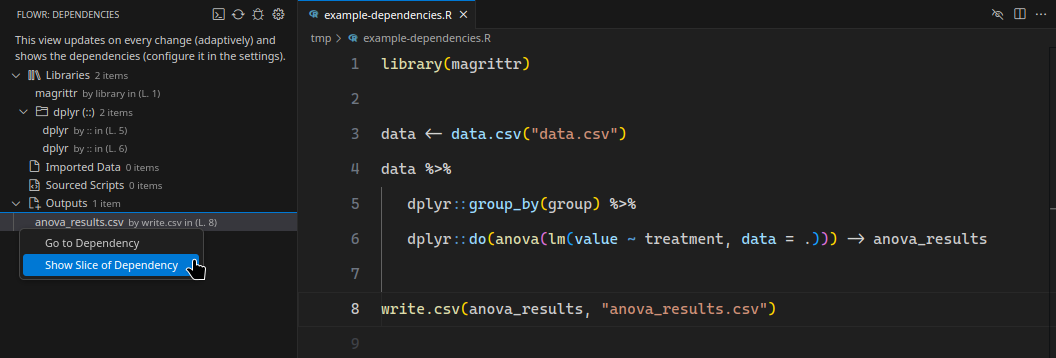
|
|
64
|
+
|
|
65
|
+
`), ' ')}
|
|
66
|
+
|
|
67
|
+
* 🚀 **fast data and control-flow graphs**\\
|
|
68
|
+
Within just ${'<i>' + (0, html_hover_over_1.textWithTooltip)((0, numbers_1.roundToDecimals)(await (0, doc_benchmarks_1.getLatestDfAnalysisTime)('"social-science" Benchmark Suite (tree-sitter)'), 1) + ' ms</i>', 'This measurement is automatically fetched from the latest benchmarks!')} (as of ${new Date(await (0, doc_benchmarks_1.getLastBenchmarkUpdate)()).toLocaleDateString('en-US', dateOptions)}),
|
|
69
|
+
_flowR_ can analyze the data- and control-flow of the average real-world R script. See the [benchmarks](https://flowr-analysis.github.io/flowr/wiki/stats/benchmark) for more information,
|
|
70
|
+
and consult the [wiki pages](${doc_files_1.FlowrWikiBaseRef}/Dataflow-Graph) for more details on the dataflow graph.
|
|
71
|
+
|
|
72
|
+
${(0, doc_general_1.prefixLines)((0, doc_structure_1.details)('Example: Generating a dataflow graph with flowR', `
|
|
73
|
+
You can investigate flowR's analyses using the [REPL](${doc_files_1.FlowrWikiBaseRef}/Interface#using-the-repl).
|
|
74
|
+
Commands like ${(0, doc_cli_option_1.getReplCommand)('dataflow*')} allow you to view a dataflow graph for a given R script.
|
|
75
|
+
|
|
76
|
+
Let's have a look at the following example:
|
|
77
|
+
|
|
78
|
+
${(0, doc_code_1.codeBlock)('r', (0, doc_files_1.getFileContentFromRoot)('test/testfiles/example.R'))}
|
|
79
|
+
|
|
80
|
+
To get the dataflow graph for this script, you can use the following command:
|
|
81
|
+
|
|
82
|
+
${await (0, doc_repl_1.documentReplSession)(shell, [{
|
|
83
|
+
command: ':dataflow* test/testfiles/example.R',
|
|
84
|
+
description: `
|
|
85
|
+
Following the link output should show the following:
|
|
86
|
+
${await (0, doc_dfg_1.printDfGraphForCode)(shell, (0, doc_files_1.getFileContentFromRoot)('test/testfiles/example.R'), { showCode: false })}`
|
|
87
|
+
}])}
|
|
88
|
+
|
|
89
|
+
`), ' ')}
|
|
90
|
+
|
|
91
|
+
If you want to use flowR and the features it provides, feel free to check out the:
|
|
92
|
+
|
|
93
|
+
- [Visual Studio Code extension](${doc_files_1.FlowrVsCode}): provides access to flowR's capabilities directly in VS Code (also works in [vscode.dev](https://vscode.dev/))
|
|
94
|
+
- [RStudio Addin](${doc_files_1.FlowrGithubBaseRef}/rstudio-addin-flowr): integrates flowR into [RStudio](https://posit.co/downloads/)
|
|
95
|
+
- [R package](${doc_files_1.FlowrGithubBaseRef}/flowr-r-adapter): allows you to use flowR in your R scripts
|
|
96
|
+
- [Docker image](${doc_files_1.FlowrDockerRef}): run flowR in a container, this also includes [flowR's server](${doc_files_1.FlowrWikiBaseRef}/Interface#communicating-with-the-server)
|
|
97
|
+
- [NPM package](${doc_files_1.FlowrNpmRef}): include flowR in your TypeScript and JavaScript projects (e.g., used for the VS Code extension)
|
|
98
|
+
|
|
99
|
+
## ⭐ Getting Started
|
|
100
|
+
|
|
101
|
+
To get started with _flowR_ and its features, please check out the [Overview](${doc_files_1.FlowrGithubBaseRef}/flowr/wiki/Overview) wiki page.
|
|
102
|
+
The [Setup](${doc_files_1.FlowrGithubBaseRef}/flowr/wiki/Setup) wiki page explains how you can download and setup _flowR_ on your system.
|
|
103
|
+
With docker 🐳️, the following line should be enough (and drop you directly into the read-eval-print loop):
|
|
104
|
+
|
|
105
|
+
${(0, doc_code_1.codeBlock)('shell', 'docker run -it --rm eagleoutice/flowr')}
|
|
106
|
+
|
|
107
|
+
You can enter ${(0, doc_cli_option_1.getReplCommand)('help')} to gain more information on its capabilities.
|
|
108
|
+
|
|
109
|
+
<details>
|
|
110
|
+
|
|
111
|
+
<summary>Example REPL session</summary>
|
|
112
|
+
|
|
113
|
+

|
|
114
|
+
|
|
115
|
+
</details>
|
|
116
|
+
|
|
117
|
+
## 📜 More Information
|
|
118
|
+
|
|
119
|
+
For more details on how to use _flowR_ please refer to the [wiki pages](${doc_files_1.FlowrGithubBaseRef}/flowr/wiki),
|
|
120
|
+
as well as the deployed [code documentation](https://flowr-analysis.github.io/flowr/doc/).
|
|
121
|
+
|
|
122
|
+
## 🚀 Contributing
|
|
123
|
+
|
|
124
|
+
We welcome every contribution! Please check out the [contributing guidelines](${doc_files_1.FlowrGithubBaseRef}/flowr/tree/main/.github/CONTRIBUTING.md) for more information.
|
|
125
|
+
|
|
126
|
+
### Contributors
|
|
127
|
+
|
|
128
|
+
<a href="https://github.com/flowr-analysis/flowr/graphs/contributors">
|
|
129
|
+
<img src="https://contrib.rocks/image?repo=flowr-analysis/flowr" alt="flowR Contributors"/>
|
|
130
|
+
</a>
|
|
131
|
+
|
|
132
|
+
----
|
|
133
|
+
|
|
134
|
+
*flowr* is actively developed by [Florian Sihler](https://eagleoutice.github.io/portfolio/) under the
|
|
135
|
+
[GPLv3 License](LICENSE).\\
|
|
136
|
+
It is partially supported by the German Research Foundation (DFG) under the grant [504226141](https://gepris.dfg.de/gepris/projekt/504226141) ("CodeInspector").
|
|
137
|
+
|
|
138
|
+
----
|
|
139
|
+
|
|
140
|
+
### Generation Notice
|
|
141
|
+
|
|
142
|
+
Please notice that this file was generated automatically using the file ${(0, doc_auto_gen_1.fileNameForGenHeader)(module.filename)} as a source.\\
|
|
143
|
+
If you want to make changes please edit the source file (the CI will take care of the rest).
|
|
144
|
+
In fact, many files in the [wiki](${doc_files_1.FlowrWikiBaseRef}) are generated, so make sure to check for the source file if you want to make changes.
|
|
145
|
+
|
|
146
|
+
`.trim();
|
|
147
|
+
}
|
|
148
|
+
/** if we run this script, we want a Markdown representation of the capabilities */
|
|
149
|
+
if (require.main === module) {
|
|
150
|
+
void tree_sitter_executor_1.TreeSitterExecutor.initTreeSitter().then(() => {
|
|
151
|
+
(0, log_1.setMinLevelOfAllLogs)(6 /* LogLevel.Fatal */);
|
|
152
|
+
const shell = new shell_1.RShell();
|
|
153
|
+
void getText(shell).then(str => {
|
|
154
|
+
console.log(str);
|
|
155
|
+
}).finally(() => {
|
|
156
|
+
shell.close();
|
|
157
|
+
});
|
|
158
|
+
});
|
|
159
|
+
}
|
|
160
|
+
//# sourceMappingURL=print-readme.js.map
|
package/package.json
CHANGED
|
@@ -1,6 +1,6 @@
|
|
|
1
1
|
{
|
|
2
2
|
"name": "@eagleoutice/flowr",
|
|
3
|
-
"version": "2.2.
|
|
3
|
+
"version": "2.2.5",
|
|
4
4
|
"description": "Static Dataflow Analyzer and Program Slicer for the R Programming Language",
|
|
5
5
|
"types": "dist/src/index.d.ts",
|
|
6
6
|
"repository": {
|
|
@@ -33,6 +33,7 @@
|
|
|
33
33
|
"wiki:search-api": "ts-node src/documentation/print-search-wiki.ts",
|
|
34
34
|
"wiki:linting-and-testing": "ts-node src/documentation/print-linting-and-testing-wiki.ts",
|
|
35
35
|
"wiki:interface": "ts-node src/documentation/print-interface-wiki.ts",
|
|
36
|
+
"gen:readme": "ts-node src/documentation/print-readme.ts",
|
|
36
37
|
"build": "tsc --project .",
|
|
37
38
|
"build-dev": "npm run build && npm run build:copy-wasm",
|
|
38
39
|
"build:bundle-flowr": "npm run build && esbuild --bundle dist/src/cli/flowr.js --platform=node --bundle --minify --external:clipboardy --target=node22 --outfile=dist/src/cli/flowr.min.js && npm run build:copy-wasm-min",
|
|
@@ -48,7 +49,7 @@
|
|
|
48
49
|
"performance-test": "func() { cd test/performance/ && bash run-all-suites.sh $1 $2 $3 $4; cd ../../; }; func",
|
|
49
50
|
"test-full": "npm run test:coverage -- --no-watch -- --make-summary --test-installation",
|
|
50
51
|
"detect-circular-deps": "npx madge --extensions ts,tsx --circular src/",
|
|
51
|
-
"checkup": "npm run flowr -- --execute \":version\" && npm run lint && npm run test-full -- --allowOnly=false && npm run test:system -- --no-watch && docker build -t test-flowr -f scripts/Dockerfile . && npm run doc && npm-run-all wiki:*"
|
|
52
|
+
"checkup": "npm run flowr -- --execute \":version\" && npm run lint && npm run test-full -- --allowOnly=false && npm run test:system -- --no-watch && docker build -t test-flowr -f scripts/Dockerfile . && npm run doc && npm run gen:readme && npm-run-all wiki:*"
|
|
52
53
|
},
|
|
53
54
|
"keywords": [
|
|
54
55
|
"static code analysis",
|
|
@@ -60,21 +61,6 @@
|
|
|
60
61
|
],
|
|
61
62
|
"author": "Florian Sihler",
|
|
62
63
|
"license": "ISC",
|
|
63
|
-
"eslintConfig": {
|
|
64
|
-
"settings": {
|
|
65
|
-
"import/resolver": {
|
|
66
|
-
"node": {
|
|
67
|
-
"extensions": [
|
|
68
|
-
".ts"
|
|
69
|
-
]
|
|
70
|
-
}
|
|
71
|
-
}
|
|
72
|
-
},
|
|
73
|
-
"extends": [
|
|
74
|
-
"@eagleoutice/eslint-config-flowr"
|
|
75
|
-
],
|
|
76
|
-
"rules": {}
|
|
77
|
-
},
|
|
78
64
|
"typedocOptions": {
|
|
79
65
|
"includeVersion": true,
|
|
80
66
|
"plugin": [
|
|
@@ -183,48 +169,50 @@
|
|
|
183
169
|
}
|
|
184
170
|
},
|
|
185
171
|
"devDependencies": {
|
|
186
|
-
"@commitlint/cli": "^19.
|
|
187
|
-
"@commitlint/config-angular": "^19.
|
|
188
|
-
"@eagleoutice/eslint-config-flowr": "^1.0.
|
|
189
|
-
"@
|
|
172
|
+
"@commitlint/cli": "^19.7.1",
|
|
173
|
+
"@commitlint/config-angular": "^19.7.1",
|
|
174
|
+
"@eagleoutice/eslint-config-flowr": "^1.0.17",
|
|
175
|
+
"@eslint/eslintrc": "^3.2.0",
|
|
176
|
+
"@eslint/js": "^9.20.0",
|
|
177
|
+
"@j-ulrich/release-it-regex-bumper": "^5.2.0",
|
|
190
178
|
"@types/command-line-args": "^5.2.3",
|
|
191
179
|
"@types/command-line-usage": "^5.0.4",
|
|
192
180
|
"@types/n-readlines": "^1.0.6",
|
|
193
|
-
"@types/n3": "^1.
|
|
181
|
+
"@types/n3": "^1.21.1",
|
|
194
182
|
"@types/object-hash": "^3.0.6",
|
|
195
|
-
"@types/semver": "^7.5.
|
|
183
|
+
"@types/semver": "^7.5.8",
|
|
196
184
|
"@types/tmp": "^0.2.6",
|
|
197
|
-
"@types/ws": "^8.5.
|
|
198
|
-
"@typescript-eslint/eslint-plugin": "^
|
|
199
|
-
"@vitest/coverage-v8": "^
|
|
185
|
+
"@types/ws": "^8.5.14",
|
|
186
|
+
"@typescript-eslint/eslint-plugin": "^8.24.0",
|
|
187
|
+
"@vitest/coverage-v8": "^3.0.5",
|
|
200
188
|
"esbuild": "^0.25.0",
|
|
201
|
-
"eslint": "^
|
|
189
|
+
"eslint": "^9.20.1",
|
|
202
190
|
"license-checker": "^25.0.1",
|
|
203
191
|
"npm-run-all": "^4.1.5",
|
|
204
|
-
"release-it": "^
|
|
192
|
+
"release-it": "^18.1.2",
|
|
205
193
|
"ts-node": "^10.9.2",
|
|
206
|
-
"typedoc": "^0.
|
|
207
|
-
"typedoc-plugin-missing-exports": "^3.
|
|
208
|
-
"typedoc-theme-hierarchy": "^5.0.
|
|
209
|
-
"typedoc-umlclass": "^0.10.
|
|
210
|
-
"typescript": "^5.
|
|
211
|
-
"vitest": "^
|
|
194
|
+
"typedoc": "^0.27.7",
|
|
195
|
+
"typedoc-plugin-missing-exports": "^3.1.0",
|
|
196
|
+
"typedoc-theme-hierarchy": "^5.0.4",
|
|
197
|
+
"typedoc-umlclass": "^0.10.1",
|
|
198
|
+
"typescript": "^5.7.3",
|
|
199
|
+
"vitest": "^3.0.5"
|
|
212
200
|
},
|
|
213
201
|
"dependencies": {
|
|
214
|
-
"@xmldom/xmldom": "^0.9.
|
|
202
|
+
"@xmldom/xmldom": "^0.9.7",
|
|
215
203
|
"clipboardy": "^4.0.0",
|
|
216
|
-
"command-line-args": "^6.0.
|
|
204
|
+
"command-line-args": "^6.0.1",
|
|
217
205
|
"command-line-usage": "^7.0.3",
|
|
218
206
|
"joi": "^17.13.3",
|
|
219
207
|
"n-readlines": "^1.0.1",
|
|
220
|
-
"n3": "^1.
|
|
208
|
+
"n3": "^1.23.1",
|
|
221
209
|
"object-hash": "^3.0.0",
|
|
222
210
|
"object-sizeof": "^2.6.5",
|
|
223
|
-
"rotating-file-stream": "^3.2.
|
|
224
|
-
"semver": "^7.
|
|
211
|
+
"rotating-file-stream": "^3.2.6",
|
|
212
|
+
"semver": "^7.7.1",
|
|
225
213
|
"tar": "^7.4.3",
|
|
226
214
|
"tmp": "^0.2.3",
|
|
227
|
-
"ts-essentials": "^10.0.
|
|
215
|
+
"ts-essentials": "^10.0.4",
|
|
228
216
|
"tslog": "^4.9.3",
|
|
229
217
|
"web-tree-sitter": "^0.24.7",
|
|
230
218
|
"ws": "^8.18.0",
|