@eagleoutice/flowr 2.2.2 → 2.2.4
This diff represents the content of publicly available package versions that have been released to one of the supported registries. The information contained in this diff is provided for informational purposes only and reflects changes between package versions as they appear in their respective public registries.
- package/README.md +412 -39
- package/benchmark/slicer.js +0 -1
- package/benchmark/summarizer/first-phase/process.js +18 -8
- package/benchmark/summarizer/summarizer.d.ts +1 -1
- package/benchmark/summarizer/summarizer.js +1 -1
- package/cli/benchmark-app.js +1 -1
- package/cli/common/script.js +0 -1
- package/cli/repl/commands/repl-cfg.js +38 -8
- package/cli/repl/commands/repl-commands.js +1 -1
- package/cli/repl/commands/repl-dataflow.js +45 -12
- package/cli/repl/commands/repl-normalize.js +38 -8
- package/cli/repl/commands/repl-parse.js +43 -2
- package/cli/repl/commands/repl-query.js +2 -2
- package/cli/repl/core.js +17 -8
- package/cli/repl/print-version.d.ts +1 -0
- package/cli/repl/print-version.js +8 -2
- package/cli/repl/server/connection.js +27 -15
- package/cli/repl/server/messages/all-messages.js +17 -7
- package/cli/repl/server/messages/message-repl.js +17 -7
- package/cli/repl/server/messages/message-slice.js +17 -7
- package/cli/script-core/statistics-helper-core.js +0 -1
- package/core/pipeline-executor.d.ts +6 -0
- package/core/pipeline-executor.js +8 -0
- package/core/print/dataflow-printer.js +3 -0
- package/core/print/normalize-printer.js +0 -1
- package/core/steps/all/core/01-parse-tree-sitter.d.ts +7 -0
- package/core/steps/pipeline/default-pipelines.d.ts +57 -47
- package/core/steps/pipeline/default-pipelines.js +23 -2
- package/core/steps/pipeline/pipeline.d.ts +1 -1
- package/core/steps/pipeline/pipeline.js +1 -1
- package/core/steps/pipeline-step.d.ts +1 -3
- package/dataflow/environments/resolve-by-name.d.ts +5 -2
- package/dataflow/environments/resolve-by-name.js +6 -4
- package/dataflow/extractor.d.ts +10 -0
- package/dataflow/extractor.js +10 -0
- package/dataflow/graph/resolve-graph.js +1 -1
- package/dataflow/internal/process/functions/call/built-in/built-in-assignment.d.ts +1 -1
- package/dataflow/internal/process/functions/call/built-in/built-in-if-then-else.js +1 -1
- package/dataflow/internal/process/functions/call/built-in/built-in-source.js +20 -4
- package/documentation/data/server/doc-data-server-messages.js +1 -2
- package/documentation/doc-util/doc-auto-gen.d.ts +1 -0
- package/documentation/doc-util/doc-auto-gen.js +5 -1
- package/documentation/doc-util/doc-benchmarks.d.ts +23 -0
- package/documentation/doc-util/doc-benchmarks.js +76 -0
- package/documentation/doc-util/doc-code.d.ts +1 -0
- package/documentation/doc-util/doc-code.js +4 -0
- package/documentation/doc-util/doc-dfg.d.ts +5 -3
- package/documentation/doc-util/doc-dfg.js +10 -8
- package/documentation/doc-util/doc-files.d.ts +2 -1
- package/documentation/doc-util/doc-files.js +3 -2
- package/documentation/doc-util/doc-normalized-ast.d.ts +2 -1
- package/documentation/doc-util/doc-normalized-ast.js +4 -5
- package/documentation/doc-util/doc-repl.d.ts +6 -2
- package/documentation/doc-util/doc-repl.js +10 -6
- package/documentation/doc-util/doc-server-message.js +1 -1
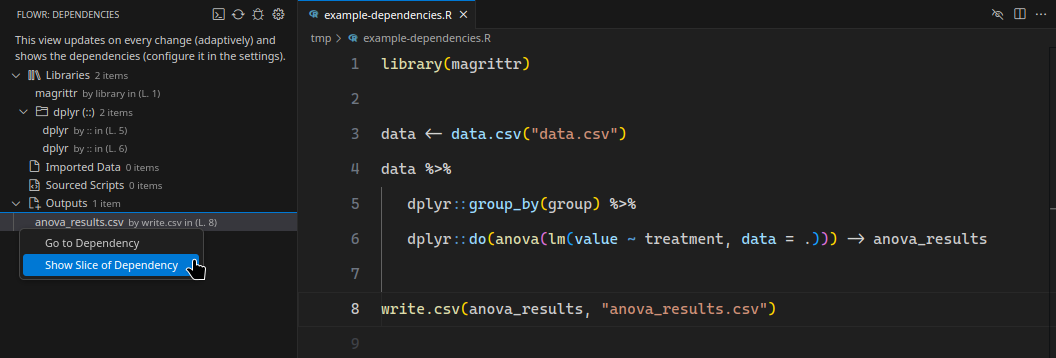
- package/documentation/doc-util/doc-structure.d.ts +1 -1
- package/documentation/doc-util/doc-structure.js +2 -2
- package/documentation/doc-util/doc-types.d.ts +8 -5
- package/documentation/doc-util/doc-types.js +31 -18
- package/documentation/index.d.ts +9 -0
- package/documentation/index.js +26 -0
- package/documentation/print-capabilities-markdown.js +105 -19
- package/documentation/print-core-wiki.d.ts +1 -0
- package/documentation/print-core-wiki.js +413 -0
- package/documentation/print-dataflow-graph-wiki.js +27 -27
- package/documentation/print-interface-wiki.js +22 -16
- package/documentation/print-linting-and-testing-wiki.js +29 -9
- package/documentation/print-normalized-ast-wiki.js +22 -17
- package/documentation/print-query-wiki.js +7 -7
- package/documentation/print-readme.d.ts +1 -0
- package/documentation/print-readme.js +160 -0
- package/documentation/print-search-wiki.js +2 -1
- package/package.json +30 -41
- package/queries/catalog/dependencies-query/dependencies-query-executor.js +77 -45
- package/queries/catalog/dependencies-query/dependencies-query-format.d.ts +3 -0
- package/queries/catalog/dependencies-query/dependencies-query-format.js +3 -2
- package/queries/catalog/happens-before-query/happens-before-query-format.js +1 -1
- package/queries/catalog/resolve-value-query/resolve-value-query-executor.js +1 -1
- package/queries/catalog/resolve-value-query/resolve-value-query-format.js +1 -1
- package/queries/catalog/search-query/search-query-format.js +1 -1
- package/r-bridge/data/data.d.ts +48 -7
- package/r-bridge/data/data.js +62 -8
- package/r-bridge/data/types.d.ts +7 -1
- package/r-bridge/lang-4.x/ast/model/model.d.ts +2 -3
- package/r-bridge/lang-4.x/ast/model/processing/decorate.d.ts +2 -0
- package/r-bridge/lang-4.x/ast/model/processing/node-id.js +2 -5
- package/r-bridge/lang-4.x/ast/parser/json/format.d.ts +6 -0
- package/r-bridge/lang-4.x/ast/parser/json/format.js +6 -0
- package/r-bridge/lang-4.x/ast/parser/json/parser.d.ts +13 -2
- package/r-bridge/lang-4.x/ast/parser/json/parser.js +19 -3
- package/r-bridge/lang-4.x/ast/parser/main/internal/structure/normalize-root.d.ts +3 -0
- package/r-bridge/lang-4.x/ast/parser/main/internal/structure/normalize-root.js +3 -0
- package/r-bridge/lang-4.x/tree-sitter/tree-sitter-executor.d.ts +1 -0
- package/r-bridge/lang-4.x/tree-sitter/tree-sitter-executor.js +3 -0
- package/r-bridge/lang-4.x/tree-sitter/tree-sitter-normalize.js +6 -1
- package/r-bridge/parser.d.ts +10 -0
- package/r-bridge/parser.js +26 -2
- package/r-bridge/shell.js +18 -8
- package/search/flowr-search-builder.d.ts +1 -2
- package/search/flowr-search-builder.js +1 -3
- package/statistics/features/supported/comments/comments.js +17 -7
- package/statistics/features/supported/used-functions/post-process.js +0 -1
- package/statistics/features/supported/used-packages/used-packages.js +17 -7
- package/statistics/features/supported/values/values.js +17 -7
- package/statistics/summarizer/summarizer.js +1 -2
- package/util/files.js +17 -7
- package/util/json.js +0 -2
- package/util/mermaid/dfg.d.ts +3 -0
- package/util/mermaid/dfg.js +24 -8
- package/util/numbers.d.ts +1 -0
- package/util/numbers.js +5 -0
- package/util/parallel.js +17 -7
- package/util/quads.js +3 -3
- package/util/strings.d.ts +9 -0
- package/util/strings.js +14 -0
- package/util/version.js +1 -1
|
@@ -24,6 +24,7 @@ const pipeline_executor_1 = require("../core/pipeline-executor");
|
|
|
24
24
|
const doc_structure_1 = require("./doc-util/doc-structure");
|
|
25
25
|
const doc_types_1 = require("./doc-util/doc-types");
|
|
26
26
|
const path_1 = __importDefault(require("path"));
|
|
27
|
+
const tree_sitter_executor_1 = require("../r-bridge/lang-4.x/tree-sitter/tree-sitter-executor");
|
|
27
28
|
async function explainServer(shell) {
|
|
28
29
|
(0, doc_data_server_messages_1.documentAllServerMessages)();
|
|
29
30
|
return `
|
|
@@ -133,7 +134,7 @@ use ${(0, doc_cli_option_1.getReplCommand)('dataflow*')} (or ${(0, doc_cli_optio
|
|
|
133
134
|
|
|
134
135
|
${await (0, doc_repl_1.documentReplSession)(shell, [{
|
|
135
136
|
command: ':dataflow* y <- 1 + x',
|
|
136
|
-
description: `Retrieve the dataflow graph of the expression \`y <- 1 + x\`. It looks like this:\n${await (0, doc_dfg_1.printDfGraphForCode)(shell, 'y <- 1 + x')}
|
|
137
|
+
description: `Retrieve the dataflow graph of the expression \`y <- 1 + x\`. It looks like this:\n${await (0, doc_dfg_1.printDfGraphForCode)(shell, 'y <- 1 + x')}`
|
|
137
138
|
}])}
|
|
138
139
|
|
|
139
140
|
For the slicing with ${(0, doc_cli_option_1.getReplCommand)('slicer')}, you have access to the same [magic comments](#slice-magic-comments) as with the [slice request](#message-request-slice).
|
|
@@ -239,7 +240,7 @@ ${(0, schema_1.describeSchema)(config_1.flowrConfigFileSchema, ansi_1.markdownFo
|
|
|
239
240
|
}
|
|
240
241
|
function explainWritingCode(shell) {
|
|
241
242
|
const types = (0, doc_types_1.getTypesFromFolderAsMermaid)({
|
|
242
|
-
rootFolder: path_1.default.resolve('./src/
|
|
243
|
+
rootFolder: path_1.default.resolve('./src/'),
|
|
243
244
|
files: [path_1.default.resolve('./src/core/pipeline-executor.ts'), path_1.default.resolve('./src/core/steps/pipeline/default-pipelines.ts')],
|
|
244
245
|
typeName: 'RShell',
|
|
245
246
|
inlineTypes: doc_types_1.mermaidHide
|
|
@@ -251,20 +252,26 @@ _flowR_ can be used as a [module](${doc_files_1.FlowrNpmRef}) and offers several
|
|
|
251
252
|
### Using the ${(0, doc_types_1.shortLink)(shell_1.RShell.name, types.info)} to Interact with R
|
|
252
253
|
|
|
253
254
|
The ${(0, doc_types_1.shortLink)(shell_1.RShell.name, types.info)} class allows interfacing with the \`R\` ecosystem installed on the host system.
|
|
254
|
-
Please have a look at [flowR's engines](${doc_files_1.FlowrWikiBaseRef}/Engines) for more information on alterantives.
|
|
255
|
+
Please have a look at [flowR's engines](${doc_files_1.FlowrWikiBaseRef}/Engines) for more information on alterantives (for example, the ${(0, doc_types_1.shortLink)(tree_sitter_executor_1.TreeSitterExecutor.name, types.info)}).
|
|
255
256
|
|
|
256
|
-
|
|
257
|
-
|
|
257
|
+
${(0, doc_structure_1.block)({
|
|
258
|
+
type: 'IMPORTANT',
|
|
259
|
+
content: `
|
|
260
|
+
Each ${(0, doc_types_1.shortLink)(shell_1.RShell.name, types.info)} controls a new instance of the R interpreter,
|
|
261
|
+
make sure to call ${(0, doc_code_1.codeInline)((0, doc_types_1.shortLink)(shell_1.RShell.name + '::' + shell.close.name, types.info, false, 'i') + '()')} when you are done.`
|
|
262
|
+
})}
|
|
258
263
|
|
|
259
|
-
You can start a new "session" simply by constructing a new object with
|
|
264
|
+
You can start a new "session" simply by constructing a new object with ${(0, doc_code_1.codeInline)('new ' + (0, doc_types_1.shortLink)(shell_1.RShell.name, types.info, false) + '()')}.
|
|
260
265
|
|
|
261
|
-
However, there are several options that may be of interest
|
|
266
|
+
However, there are several options that may be of interest
|
|
267
|
+
(e.g., to automatically revive the shell in case of errors or to control the name location of the R process on the system).
|
|
262
268
|
|
|
263
|
-
With a shell object (let's call it \`shell\`), you can execute R code by using
|
|
264
|
-
for example
|
|
265
|
-
However, this does not return anything, so if you want to collect the output of your command, use
|
|
269
|
+
With a shell object (let's call it \`shell\`), you can execute R code by using ${(0, doc_types_1.shortLink)(shell_1.RShell.name + '::' + shell.sendCommand.name, types.info, true, 'i')},
|
|
270
|
+
for example ${(0, doc_code_1.codeInline)('shell.' + (0, doc_types_1.shortLink)(shell_1.RShell.name + ':::' + shell.sendCommand.name, types.info, false) + '("1 + 1")')}.
|
|
271
|
+
However, this does not return anything, so if you want to collect the output of your command, use
|
|
272
|
+
${(0, doc_types_1.shortLink)(shell_1.RShell.name + '::' + shell.sendCommandWithOutput.name, types.info, true, 'i')} instead.
|
|
266
273
|
|
|
267
|
-
Besides that, the command
|
|
274
|
+
Besides that, the command ${(0, doc_types_1.shortLink)(shell_1.RShell.name + '::' + shell.tryToInjectHomeLibPath.name, types.info)} may be of interest, as it enables all libraries available on the host system.
|
|
268
275
|
|
|
269
276
|
### The Pipeline Executor
|
|
270
277
|
|
|
@@ -284,22 +291,21 @@ const slice = await slicer.allRemainingSteps()
|
|
|
284
291
|
// console.log(slice.reconstruct.code)
|
|
285
292
|
`)}
|
|
286
293
|
|
|
287
|
-
|
|
288
|
-
|
|
289
|
-
<summary style='color:gray'>More Information</summary>
|
|
294
|
+
${(0, doc_structure_1.details)('More Information', `
|
|
290
295
|
|
|
291
296
|
If you compare this, with what you would have done with the old (and removed) \`SteppingSlicer\`,
|
|
292
297
|
this essentially just requires you to replace the \`SteppingSlicer\` with the ${(0, doc_types_1.shortLink)(pipeline_executor_1.PipelineExecutor.name, types.info)}
|
|
293
298
|
and to pass the ${(0, doc_types_1.shortLink)('DEFAULT_SLICING_PIPELINE', types.info)} as the first argument.
|
|
294
299
|
The ${(0, doc_types_1.shortLink)(pipeline_executor_1.PipelineExecutor.name, types.info)}...
|
|
295
300
|
|
|
296
|
-
1.
|
|
301
|
+
1. Provides structures to investigate the results of all intermediate steps
|
|
297
302
|
2. Can be executed step-by-step
|
|
298
303
|
3. Can repeat steps (e.g., to calculate multiple slices on the same input)
|
|
299
304
|
|
|
300
305
|
See the in-code documentation for more information.
|
|
301
306
|
|
|
302
|
-
|
|
307
|
+
`)}
|
|
308
|
+
|
|
303
309
|
|
|
304
310
|
### Generate Statistics
|
|
305
311
|
|
|
@@ -1,11 +1,24 @@
|
|
|
1
1
|
"use strict";
|
|
2
|
+
var __importDefault = (this && this.__importDefault) || function (mod) {
|
|
3
|
+
return (mod && mod.__esModule) ? mod : { "default": mod };
|
|
4
|
+
};
|
|
2
5
|
Object.defineProperty(exports, "__esModule", { value: true });
|
|
3
6
|
const log_1 = require("../../test/functionality/_helper/log");
|
|
4
7
|
const doc_code_1 = require("./doc-util/doc-code");
|
|
5
8
|
const doc_files_1 = require("./doc-util/doc-files");
|
|
6
9
|
const doc_structure_1 = require("./doc-util/doc-structure");
|
|
10
|
+
const doc_types_1 = require("./doc-util/doc-types");
|
|
11
|
+
const path_1 = __importDefault(require("path"));
|
|
12
|
+
const doc_auto_gen_1 = require("./doc-util/doc-auto-gen");
|
|
7
13
|
function getText() {
|
|
8
|
-
|
|
14
|
+
const { info } = (0, doc_types_1.getTypesFromFolderAsMermaid)({
|
|
15
|
+
rootFolder: path_1.default.resolve('./test'),
|
|
16
|
+
files: [path_1.default.resolve('./src/dataflow/graph/dataflowgraph-builder.ts')],
|
|
17
|
+
typeName: 'parameter',
|
|
18
|
+
inlineTypes: doc_types_1.mermaidHide
|
|
19
|
+
});
|
|
20
|
+
return `${(0, doc_auto_gen_1.autoGenHeader)({ filename: module.filename, purpose: 'linting and testing definitions' })}
|
|
21
|
+
|
|
9
22
|
For the latest code coverage information, see [codecov.io](${doc_files_1.FlowrCodecovRef}),
|
|
10
23
|
for the latest benchmark results, see the [benchmark results](${doc_files_1.FlowrSiteBaseRef}/wiki/stats/benchmark) wiki page.
|
|
11
24
|
|
|
@@ -53,7 +66,7 @@ If you want to run the tests without the watch mode, you can use:
|
|
|
53
66
|
|
|
54
67
|
${(0, doc_code_1.codeBlock)('shell', 'npm run test -- --no-watch')}
|
|
55
68
|
|
|
56
|
-
To run all tests, including a coverage report and label summary, run:
|
|
69
|
+
To run all tests, including a coverage report and label summary, run:
|
|
57
70
|
|
|
58
71
|
${(0, doc_code_1.codeBlock)('shell', 'npm run test-full')}
|
|
59
72
|
|
|
@@ -64,7 +77,7 @@ It is up to the [ci](#ci-pipeline) to run the tests on different systems to ensu
|
|
|
64
77
|
|
|
65
78
|
#### Test Structure
|
|
66
79
|
|
|
67
|
-
All functionality tests are to be located under [test/functionality](${doc_files_1.RemoteFlowrFilePathBaseRef}test/functionality).
|
|
80
|
+
All functionality tests are to be located under [test/functionality](${doc_files_1.RemoteFlowrFilePathBaseRef}/test/functionality).
|
|
68
81
|
|
|
69
82
|
This folder contains three special and important elements:
|
|
70
83
|
|
|
@@ -76,19 +89,23 @@ ${(0, doc_structure_1.block)({
|
|
|
76
89
|
type: 'WARNING',
|
|
77
90
|
content: `
|
|
78
91
|
We name all test files using the \`.test.ts\` suffix and try to run them in parallel.
|
|
79
|
-
Whenever this is
|
|
92
|
+
Whenever this is impossible (e.g., when using ${(0, doc_types_1.shortLink)('withShell', info)}), please use _\`describe.sequential\`_
|
|
80
93
|
to disable parallel execution for the respective test (otherwise, such tests are flaky).
|
|
81
94
|
`
|
|
82
95
|
})}
|
|
83
96
|
|
|
84
97
|
#### Writing a Test
|
|
85
98
|
|
|
86
|
-
Currently, this is heavily dependent on what you want to test (normalization, dataflow, quad-export,
|
|
99
|
+
Currently, this is heavily dependent on what you want to test (normalization, dataflow, quad-export, …)
|
|
87
100
|
and it is probably best to have a look at existing tests in that area to get an idea of what comfort functionality is available.
|
|
88
101
|
|
|
89
|
-
Generally, tests should be [labeled](${doc_files_1.RemoteFlowrFilePathBaseRef}test/functionality/_helper/label.ts) according to the *flowR* capabilities they test.
|
|
102
|
+
Generally, tests should be [labeled](${doc_files_1.RemoteFlowrFilePathBaseRef}test/functionality/_helper/label.ts) according to the *flowR* capabilities they test.
|
|
103
|
+
The set of currently supported capabilities and their IDs can be found in ${(0, doc_files_1.getFilePathMd)('../r-bridge/data/data.ts')}.
|
|
104
|
+
The resulting labels are used in the test report that is generated as part of the test output.
|
|
105
|
+
They group tests by the capabilities they test and allow the report to display how many tests ensure that any given capability is properly supported.
|
|
90
106
|
|
|
91
|
-
Various helper functions are available to ease in writing tests with common behaviors, like testing for dataflow, slicing or query results.
|
|
107
|
+
Various helper functions are available to ease in writing tests with common behaviors, like testing for dataflow, slicing or query results.
|
|
108
|
+
These can be found in [the \`_helper\` subdirectory](${doc_files_1.RemoteFlowrFilePathBaseRef}test/functionality/_helper).
|
|
92
109
|
|
|
93
110
|
For example, an [existing test](${doc_files_1.RemoteFlowrFilePathBaseRef}test/functionality/dataflow/processing-of-elements/atomic/dataflow-atomic.test.ts) that tests the dataflow graph of a simple variable looks like this:
|
|
94
111
|
${(0, doc_code_1.codeBlock)('typescript', `
|
|
@@ -96,11 +113,14 @@ assertDataflow(label('simple variable', ['name-normal']), shell,
|
|
|
96
113
|
'x', emptyGraph().use('0', 'x')
|
|
97
114
|
);
|
|
98
115
|
`)}
|
|
116
|
+
Have a look at ${(0, doc_types_1.shortLink)('assertDataflow', info)}, ${(0, doc_types_1.shortLink)('label', info)}, and ${(0, doc_types_1.shortLink)('emptyGraph', info)} for more information.
|
|
99
117
|
|
|
100
118
|
When writing dataflow tests, additional settings can be used to reduce the amount of graph data that needs to be pre-written. Notably:
|
|
101
119
|
|
|
102
|
-
-
|
|
103
|
-
|
|
120
|
+
- ${(0, doc_types_1.shortLink)('expectIsSubgraph', info)} indicates that the expected graph is a subgraph, rather than the full graph that the test should generate.
|
|
121
|
+
The test will then only check if the supplied graph is contained in the result graph, rather than an exact match.
|
|
122
|
+
- ${(0, doc_types_1.shortLink)('resolveIdsAsCriterion', info)} indicates that the ids given in the expected (sub)graph should be resolved as [slicing criteria](${doc_files_1.FlowrWikiBaseRef}/Terminology#slicing-criterion) rather than actual ids.
|
|
123
|
+
For example, passing \`12@a\` as an id in the expected (sub)graph will cause it to be resolved as the corresponding id.
|
|
104
124
|
|
|
105
125
|
The following example shows both in use:
|
|
106
126
|
${(0, doc_code_1.codeBlock)('typescript', `
|
|
@@ -19,21 +19,21 @@ const retriever_1 = require("../r-bridge/retriever");
|
|
|
19
19
|
const visitor_1 = require("../r-bridge/lang-4.x/ast/model/processing/visitor");
|
|
20
20
|
const collect_1 = require("../r-bridge/lang-4.x/ast/model/collect");
|
|
21
21
|
const normalized_ast_fold_1 = require("../abstract-interpretation/normalized-ast-fold");
|
|
22
|
+
const default_pipelines_1 = require("../core/steps/pipeline/default-pipelines");
|
|
22
23
|
async function getText(shell) {
|
|
23
24
|
const rversion = (await shell.usedRVersion())?.format() ?? 'unknown';
|
|
24
25
|
const now = performance.now();
|
|
25
26
|
const types = (0, doc_types_1.getTypesFromFolderAsMermaid)({
|
|
26
|
-
rootFolder: path_1.default.resolve('./src
|
|
27
|
-
files: [path_1.default.resolve('./src/abstract-interpretation/normalized-ast-fold.ts'), path_1.default.resolve('./src/core/steps/pipeline/default-pipelines.ts')],
|
|
27
|
+
rootFolder: path_1.default.resolve('./src'),
|
|
28
28
|
typeName: 'RNode',
|
|
29
29
|
inlineTypes: doc_types_1.mermaidHide
|
|
30
30
|
});
|
|
31
31
|
const elapsed = performance.now() - now;
|
|
32
32
|
return `${(0, doc_auto_gen_1.autoGenHeader)({ filename: module.filename, purpose: 'normalized ast', rVersion: rversion })}
|
|
33
33
|
|
|
34
|
-
_flowR_ produces a normalized version of R's abstract syntax tree (AST),
|
|
34
|
+
_flowR_ produces a normalized version of R's abstract syntax tree (AST),
|
|
35
35
|
offering the following benefits:
|
|
36
|
-
|
|
36
|
+
|
|
37
37
|
1. abstract away from intricacies of the R parser
|
|
38
38
|
2. provide a version-independent representation of the program
|
|
39
39
|
3. decorate the AST with additional information, e.g., parent relations and nesting information
|
|
@@ -49,12 +49,10 @@ Each edge is labeled with the type of the parent-child relationship (the "role")
|
|
|
49
49
|
|
|
50
50
|
${await (0, doc_normalized_ast_1.printNormalizedAstForCode)(shell, 'x <- 2 * 3 + 1', { showCode: false, prefix: 'flowchart LR\n' })}
|
|
51
51
|
|
|
52
|
-
|
|
53
|
-
|
|
54
52
|
> [!TIP]
|
|
55
53
|
> If you want to investigate the normalized AST,
|
|
56
54
|
> you can either use the [Visual Studio Code extension](${doc_files_1.FlowrGithubBaseRef}/vscode-flowr) or the ${(0, doc_cli_option_1.getReplCommand)('normalize*')}
|
|
57
|
-
> command in the REPL (see the [Interface wiki page](${doc_files_1.FlowrWikiBaseRef}/Interface) for more information).
|
|
55
|
+
> command in the REPL (see the [Interface wiki page](${doc_files_1.FlowrWikiBaseRef}/Interface) for more information).
|
|
58
56
|
|
|
59
57
|
Indicative of the normalization is the root expression list node, which is present in every normalized AST.
|
|
60
58
|
In general, we provide node types for:
|
|
@@ -84,7 +82,7 @@ Most notably, the \`info\` field holds the \`id\` of the node, which is used to
|
|
|
84
82
|
|
|
85
83
|
In summary, we have the following types:
|
|
86
84
|
|
|
87
|
-
${(0, doc_structure_1.details)('Normalized AST Node Types', (0, doc_types_1.printHierarchy)({ program: types.program,
|
|
85
|
+
${(0, doc_structure_1.details)('Normalized AST Node Types', (0, doc_types_1.printHierarchy)({ program: types.program, info: types.info, root: 'RNode', collapseFromNesting: Number.MAX_VALUE }))}
|
|
88
86
|
|
|
89
87
|
The following segments intend to give you an overview of how to work with the normalized AST:
|
|
90
88
|
|
|
@@ -94,7 +92,7 @@ The following segments intend to give you an overview of how to work with the no
|
|
|
94
92
|
## How Get a Normalized AST
|
|
95
93
|
|
|
96
94
|
As explained alongside the [Interface](${doc_files_1.FlowrWikiBaseRef}/Interface#the-pipeline-executor) wiki page, you can use the
|
|
97
|
-
|
|
95
|
+
${(0, doc_types_1.shortLink)(pipeline_executor_1.PipelineExecutor.name, types.info)} to get the ${(0, doc_types_1.shortLink)('NormalizedAst', types.info)}. If you are only interested in the normalization,
|
|
98
96
|
a pipeline like the ${(0, doc_types_1.shortLink)('DEFAULT_NORMALIZE_PIPELINE', types.info)} suffices:
|
|
99
97
|
|
|
100
98
|
${(0, doc_code_1.codeBlock)('ts', `
|
|
@@ -106,7 +104,7 @@ async function getAst(code: string): Promise<RNode> {
|
|
|
106
104
|
return result.normalize.ast;
|
|
107
105
|
}`)}
|
|
108
106
|
|
|
109
|
-
From the REPL, you can use the ${(0, doc_cli_option_1.getReplCommand)('normalize')} command.
|
|
107
|
+
From the REPL, you can use the ${(0, doc_cli_option_1.getReplCommand)('normalize')} command.
|
|
110
108
|
|
|
111
109
|
## Traversing the Normalized AST
|
|
112
110
|
|
|
@@ -114,12 +112,11 @@ We provide two ways to traverse the normalized AST: [Visitors](#visitors) and [F
|
|
|
114
112
|
|
|
115
113
|
### Visitors
|
|
116
114
|
|
|
117
|
-
If you want a simple visitor which traverses the AST, the
|
|
118
|
-
${(0, doc_files_1.getFilePathMd)('../r-bridge/lang-4.x/ast/model/processing/visitor.ts')} is a good starting point.
|
|
115
|
+
If you want a simple visitor which traverses the AST, the ${(0, doc_types_1.shortLink)(visitor_1.visitAst.name, types.info)} function is a good starting point.
|
|
119
116
|
You may specify functions to be called whenever you enter and exit a node during the traversal, and any
|
|
120
117
|
computation is to be done by side effects.
|
|
121
118
|
For example, if you want to collect all the \`id\`s present within a normalized (sub-)ast,
|
|
122
|
-
as it is done by the ${collect_1.collectAllIds.name} function, you can use the following visitor:
|
|
119
|
+
as it is done by the ${(0, doc_types_1.shortLink)(collect_1.collectAllIds.name, types.info)} function, you can use the following visitor:
|
|
123
120
|
|
|
124
121
|
${(0, doc_code_1.codeBlock)('ts', `
|
|
125
122
|
const ids = new Set<NodeId>();
|
|
@@ -131,12 +128,12 @@ return ids;
|
|
|
131
128
|
|
|
132
129
|
### Folds
|
|
133
130
|
|
|
134
|
-
We formulate a fold with the base class
|
|
131
|
+
We formulate a fold with the base class ${(0, doc_types_1.shortLink)(normalized_ast_fold_1.DefaultNormalizedAstFold.name, types.info)} in ${(0, doc_files_1.getFilePathMd)('../abstract-interpretation/normalized-ast-fold.ts')}.
|
|
135
132
|
Using this class, you can create your own fold behavior by overwriting the default methods.
|
|
136
133
|
By default, the class provides a monoid abstraction using the _empty_ from the constructor and the _concat_ method.
|
|
137
134
|
|
|
138
135
|
|
|
139
|
-
${(0, doc_types_1.printHierarchy)({ program: types.program,
|
|
136
|
+
${(0, doc_types_1.printHierarchy)({ program: types.program, info: types.info, root: 'DefaultNormalizedAstFold' })}
|
|
140
137
|
|
|
141
138
|
Now, of course, we could provide hundreds of examples here, but we use tests to verify that the fold behaves as expected
|
|
142
139
|
and happily point to them at ${(0, doc_files_1.getFilePathMd)('../../test/functionality/r-bridge/normalize-ast-fold.test.ts')}.
|
|
@@ -173,8 +170,8 @@ class MyMathFold<Info> extends ${normalized_ast_fold_1.DefaultNormalizedAstFold.
|
|
|
173
170
|
}
|
|
174
171
|
`)}
|
|
175
172
|
|
|
176
|
-
Now, we can use the
|
|
177
|
-
|
|
173
|
+
Now, we can use the ${(0, doc_types_1.shortLink)(pipeline_executor_1.PipelineExecutor.name, types.info)} to get the normalized AST and apply the fold:
|
|
174
|
+
|
|
178
175
|
${(0, doc_code_1.codeBlock)('ts', `
|
|
179
176
|
const shell = new ${shell_1.RShell.name}();
|
|
180
177
|
const ast = (await new ${pipeline_executor_1.PipelineExecutor.name}(DEFAULT_NORMALIZE_PIPELINE, {
|
|
@@ -185,6 +182,14 @@ const result = new MyMathFold().fold(ast);
|
|
|
185
182
|
console.log(result); // -> 7
|
|
186
183
|
`)}
|
|
187
184
|
|
|
185
|
+
${(0, doc_structure_1.block)({
|
|
186
|
+
type: 'NOTE',
|
|
187
|
+
content: `
|
|
188
|
+
If you want to retrieve the normalized AST with the [Tree-Sitter Engine](${doc_files_1.FlowrWikiBaseRef}/Engines),
|
|
189
|
+
you may use the ${(0, doc_types_1.shortLink)('TREE_SITTER_NORMALIZE_PIPELINE', types.info)} or directly rely on one of the
|
|
190
|
+
helper functions like ${(0, doc_types_1.shortLink)(default_pipelines_1.createNormalizePipeline.name, types.info)}.
|
|
191
|
+
`
|
|
192
|
+
})}
|
|
188
193
|
`;
|
|
189
194
|
}
|
|
190
195
|
/** if we run this script, we want a Markdown representation of the capabilities */
|
|
@@ -59,9 +59,9 @@ Besides this, we provide the following ways to automatically categorize and link
|
|
|
59
59
|
It's also possible to filter the results based on the following properties:
|
|
60
60
|
|
|
61
61
|
1. **File** (\`fileFilter\`): This allows you to filter the results based on the file in which the call is located. This can be useful if you are only interested in calls in, e.g., specific folders.
|
|
62
|
-
|
|
63
|
-
|
|
64
|
-
|
|
62
|
+
The \`fileFilter\` property is an object made up of two properties:
|
|
63
|
+
- **Filter** (\`filter\`): A regular expression that a node's file attribute must match to be considered.
|
|
64
|
+
- **Include Undefined Files** (\`includeUndefinedFiles\`): If \`fileFilter\` is set, but a node's file attribute is not present, should we include it in the results? Defaults to \`true\`.
|
|
65
65
|
|
|
66
66
|
Re-using the example code from above, the following query attaches all calls to \`mean\` to the kind \`visualize\` and the subkind \`text\`,
|
|
67
67
|
all calls that start with \`read_\` to the kind \`input\` but only if they are not locally overwritten, and the subkind \`csv-file\`, and links all calls to \`points\` to the last call to \`plot\`:
|
|
@@ -164,7 +164,7 @@ ${await (0, doc_query_1.showQuery)(shell, exampleCode, [{
|
|
|
164
164
|
}], { showCode: false })}
|
|
165
165
|
|
|
166
166
|
In this simple scenario, the _lineage_ is equivalent to the slice (and in-fact the complete code).
|
|
167
|
-
In general the lineage is smaller and makes no executability
|
|
167
|
+
In general the lineage is smaller and makes no guarantees on executability.
|
|
168
168
|
It is just a quick and neither complete nor sound way to get information on where the variable originates from.
|
|
169
169
|
|
|
170
170
|
This query replaces the old [\`request-lineage\`](${doc_files_1.FlowrWikiBaseRef}/Interface#message-request-lineage) message.
|
|
@@ -368,7 +368,7 @@ ${await (0, doc_query_1.showQuery)(shell, exampleCode, [{
|
|
|
368
368
|
criteria: ['3@x']
|
|
369
369
|
}], { showCode: false })}
|
|
370
370
|
|
|
371
|
-
In general you may be uninterested in seeing the reconstructed version and want to save some computation time, for this,
|
|
371
|
+
In general, you may be uninterested in seeing the reconstructed version and want to save some computation time, for this,
|
|
372
372
|
you can use the \`noReconstruction\` flag.
|
|
373
373
|
|
|
374
374
|
${(0, doc_structure_1.details)('No Reconstruction Example', await (0, doc_query_1.showQuery)(shell, exampleCode, [{
|
|
@@ -449,7 +449,7 @@ ${await (0, doc_query_1.showQuery)(shell, longerCode, [{
|
|
|
449
449
|
});
|
|
450
450
|
const exampleCode = 'x + 1\nx * 2';
|
|
451
451
|
return `
|
|
452
|
-
A query like the ${(0, doc_query_1.linkToQueryOfName)('id-map')} query can return a
|
|
452
|
+
A query like the ${(0, doc_query_1.linkToQueryOfName)('id-map')} query can return a huge result, especially for larger scripts.
|
|
453
453
|
If you are not interested in all of the information contained within the full map, you can use the location map query to get a simple mapping of ids to their location in the source file.
|
|
454
454
|
|
|
455
455
|
Consider you have the following code:
|
|
@@ -489,7 +489,7 @@ Queries are JSON arrays of query objects, each of which uses a \`type\` property
|
|
|
489
489
|
In general, we separate two types of queries:
|
|
490
490
|
|
|
491
491
|
1. **Active Queries**: Are exactly what you would expect from a query (e.g., the ${(0, doc_query_1.linkToQueryOfName)('call-context')}). They fetch information from the dataflow graph.
|
|
492
|
-
2. **Virtual Queries**: Are used to structure your queries (e.g., the ${(0, doc_query_1.linkToQueryOfName)('compound')}).
|
|
492
|
+
2. **Virtual Queries**: Are used to structure your queries (e.g., the ${(0, doc_query_1.linkToQueryOfName)('compound')}).
|
|
493
493
|
|
|
494
494
|
We separate these from a concept perspective.
|
|
495
495
|
For now, we support the following **active** queries (which we will refer to simply as a \`query\`):
|
|
@@ -0,0 +1 @@
|
|
|
1
|
+
export {};
|
|
@@ -0,0 +1,160 @@
|
|
|
1
|
+
"use strict";
|
|
2
|
+
Object.defineProperty(exports, "__esModule", { value: true });
|
|
3
|
+
const shell_1 = require("../r-bridge/shell");
|
|
4
|
+
const log_1 = require("../../test/functionality/_helper/log");
|
|
5
|
+
const tree_sitter_executor_1 = require("../r-bridge/lang-4.x/tree-sitter/tree-sitter-executor");
|
|
6
|
+
const doc_files_1 = require("./doc-util/doc-files");
|
|
7
|
+
const doc_code_1 = require("./doc-util/doc-code");
|
|
8
|
+
const doc_cli_option_1 = require("./doc-util/doc-cli-option");
|
|
9
|
+
const doc_benchmarks_1 = require("./doc-util/doc-benchmarks");
|
|
10
|
+
const numbers_1 = require("../util/numbers");
|
|
11
|
+
const html_hover_over_1 = require("../util/html-hover-over");
|
|
12
|
+
const doc_structure_1 = require("./doc-util/doc-structure");
|
|
13
|
+
const doc_repl_1 = require("./doc-util/doc-repl");
|
|
14
|
+
const doc_auto_gen_1 = require("./doc-util/doc-auto-gen");
|
|
15
|
+
const doc_general_1 = require("./doc-util/doc-general");
|
|
16
|
+
const doc_dfg_1 = require("./doc-util/doc-dfg");
|
|
17
|
+
async function getText(shell) {
|
|
18
|
+
const dateOptions = { year: 'numeric', month: 'short', day: 'numeric' };
|
|
19
|
+
return `
|
|
20
|
+
[](${doc_files_1.FlowrGithubBaseRef}/flowr/wiki)\\
|
|
21
|
+
[](${doc_files_1.FlowrGithubBaseRef}/flowr/actions/workflows/qa.yaml)
|
|
22
|
+
[](https://codecov.io/gh/flowr-analysis/flowr)
|
|
23
|
+
[](${doc_files_1.FlowrDockerRef})
|
|
24
|
+
[](${doc_files_1.FlowrGithubBaseRef}/flowr/releases/latest)
|
|
25
|
+
[](${doc_files_1.FlowrVsCode})
|
|
26
|
+
[](https://zenodo.org/doi/10.5281/zenodo.13319290)
|
|
27
|
+
|
|
28
|
+
_flowR_ is a sophisticated, static [dataflow analyzer](https://en.wikipedia.org/wiki/Data-flow_analysis) for the [R programming language](https://www.r-project.org/).
|
|
29
|
+
It offers a wide variety of features, for example:
|
|
30
|
+
|
|
31
|
+
* 🍕 **program slicing**\\
|
|
32
|
+
Given a point of interest like the visualization of a plot, _flowR_ reduces the program to just the parts which are relevant
|
|
33
|
+
for the computation of the point of interest.
|
|
34
|
+
|
|
35
|
+
${(0, doc_general_1.prefixLines)((0, doc_structure_1.details)('Example: Slicing with flowR', `
|
|
36
|
+
The simplest way to retrieve slices is with flowR's [Visual Studio Code extension](${doc_files_1.FlowrVsCode}).
|
|
37
|
+
However, you can slice using the [REPL](${doc_files_1.FlowrWikiBaseRef}/Interface#using-the-repl) as well.
|
|
38
|
+
This can help you if you want to reuse specific parts of an existing analysis within another context or if you want to understand
|
|
39
|
+
what is happening in the code.
|
|
40
|
+
|
|
41
|
+
For this, let's have a look at the example file, located at ${(0, doc_files_1.linkFlowRSourceFile)('test/testfiles/example.R')}:
|
|
42
|
+
|
|
43
|
+
${(0, doc_code_1.codeBlock)('r', (0, doc_files_1.getFileContentFromRoot)('test/testfiles/example.R'))}
|
|
44
|
+
|
|
45
|
+
Let's suppose we are interested only in the sum which is printed in line 11.
|
|
46
|
+
To get a slice for this, you can use the following command:
|
|
47
|
+
|
|
48
|
+
${await (0, doc_repl_1.documentReplSession)(shell, [{
|
|
49
|
+
command: ':slicer test/testfiles/example.R --criterion "11@sum"',
|
|
50
|
+
description: ''
|
|
51
|
+
}])}
|
|
52
|
+
|
|
53
|
+
`), ' ')}
|
|
54
|
+
|
|
55
|
+
* 📚 **dependency analysis**\\
|
|
56
|
+
Given your analysis project, flowR offers a plethora of so-called [queries](${doc_files_1.FlowrWikiBaseRef}/Query-API) to get more information about your code.
|
|
57
|
+
An important query is the [dependencies query](${doc_files_1.FlowrWikiBaseRef}/Query-API#dependencies-query), which shows you the library your project needs,
|
|
58
|
+
the data files it reads, the scripts it sources, and the data it outputs.
|
|
59
|
+
|
|
60
|
+
${(0, doc_general_1.prefixLines)((0, doc_structure_1.details)('Example: Dependency Analysis with flowR', `
|
|
61
|
+
The following showcases the dependency view of the [Visual Studio Code extension](${doc_files_1.FlowrVsCode}):
|
|
62
|
+
|
|
63
|
+
|
|
64
|
+
|
|
65
|
+
`), ' ')}
|
|
66
|
+
|
|
67
|
+
* 🚀 **fast data and control-flow graphs**\\
|
|
68
|
+
Within just ${'<i>' + (0, html_hover_over_1.textWithTooltip)((0, numbers_1.roundToDecimals)(await (0, doc_benchmarks_1.getLatestDfAnalysisTime)('"social-science" Benchmark Suite (tree-sitter)'), 1) + ' ms</i>', 'This measurement is automatically fetched from the latest benchmarks!')} (as of ${new Date(await (0, doc_benchmarks_1.getLastBenchmarkUpdate)()).toLocaleDateString('en-US', dateOptions)}),
|
|
69
|
+
_flowR_ can analyze the data- and control-flow of the average real-world R script. See the [benchmarks](https://flowr-analysis.github.io/flowr/wiki/stats/benchmark) for more information,
|
|
70
|
+
and consult the [wiki pages](${doc_files_1.FlowrWikiBaseRef}/Dataflow-Graph) for more details on the dataflow graph.
|
|
71
|
+
|
|
72
|
+
${(0, doc_general_1.prefixLines)((0, doc_structure_1.details)('Example: Generating a dataflow graph with flowR', `
|
|
73
|
+
You can investigate flowR's analyses using the [REPL](${doc_files_1.FlowrWikiBaseRef}/Interface#using-the-repl).
|
|
74
|
+
Commands like ${(0, doc_cli_option_1.getReplCommand)('dataflow*')} allow you to view a dataflow graph for a given R script.
|
|
75
|
+
|
|
76
|
+
Let's have a look at the following example:
|
|
77
|
+
|
|
78
|
+
${(0, doc_code_1.codeBlock)('r', (0, doc_files_1.getFileContentFromRoot)('test/testfiles/example.R'))}
|
|
79
|
+
|
|
80
|
+
To get the dataflow graph for this script, you can use the following command:
|
|
81
|
+
|
|
82
|
+
${await (0, doc_repl_1.documentReplSession)(shell, [{
|
|
83
|
+
command: ':dataflow* test/testfiles/example.R',
|
|
84
|
+
description: `
|
|
85
|
+
Following the link output should show the following:
|
|
86
|
+
${await (0, doc_dfg_1.printDfGraphForCode)(shell, (0, doc_files_1.getFileContentFromRoot)('test/testfiles/example.R'), { showCode: false })}`
|
|
87
|
+
}])}
|
|
88
|
+
|
|
89
|
+
`), ' ')}
|
|
90
|
+
|
|
91
|
+
If you want to use flowR and the features it provides, feel free to check out the:
|
|
92
|
+
|
|
93
|
+
- [Visual Studio Code extension](${doc_files_1.FlowrVsCode}): provides access to flowR's capabilities directly in VS Code (also works in [vscode.dev](https://vscode.dev/))
|
|
94
|
+
- [RStudio Addin](${doc_files_1.FlowrGithubBaseRef}/rstudio-addin-flowr): integrates flowR into [RStudio](https://posit.co/downloads/)
|
|
95
|
+
- [R package](${doc_files_1.FlowrGithubBaseRef}/flowr-r-adapter): allows you to use flowR in your R scripts
|
|
96
|
+
- [Docker image](${doc_files_1.FlowrDockerRef}): run flowR in a container, this also includes [flowR's server](${doc_files_1.FlowrWikiBaseRef}/Interface#communicating-with-the-server)
|
|
97
|
+
- [NPM package](${doc_files_1.FlowrNpmRef}): include flowR in your TypeScript and JavaScript projects (e.g., used for the VS Code extension)
|
|
98
|
+
|
|
99
|
+
## ⭐ Getting Started
|
|
100
|
+
|
|
101
|
+
To get started with _flowR_ and its features, please check out the [Overview](${doc_files_1.FlowrGithubBaseRef}/flowr/wiki/Overview) wiki page.
|
|
102
|
+
The [Setup](${doc_files_1.FlowrGithubBaseRef}/flowr/wiki/Setup) wiki page explains how you can download and setup _flowR_ on your system.
|
|
103
|
+
With docker 🐳️, the following line should be enough (and drop you directly into the read-eval-print loop):
|
|
104
|
+
|
|
105
|
+
${(0, doc_code_1.codeBlock)('shell', 'docker run -it --rm eagleoutice/flowr')}
|
|
106
|
+
|
|
107
|
+
You can enter ${(0, doc_cli_option_1.getReplCommand)('help')} to gain more information on its capabilities.
|
|
108
|
+
|
|
109
|
+
<details>
|
|
110
|
+
|
|
111
|
+
<summary>Example REPL session</summary>
|
|
112
|
+
|
|
113
|
+

|
|
114
|
+
|
|
115
|
+
</details>
|
|
116
|
+
|
|
117
|
+
## 📜 More Information
|
|
118
|
+
|
|
119
|
+
For more details on how to use _flowR_ please refer to the [wiki pages](${doc_files_1.FlowrGithubBaseRef}/flowr/wiki),
|
|
120
|
+
as well as the deployed [code documentation](https://flowr-analysis.github.io/flowr/doc/).
|
|
121
|
+
|
|
122
|
+
## 🚀 Contributing
|
|
123
|
+
|
|
124
|
+
We welcome every contribution! Please check out the [contributing guidelines](${doc_files_1.FlowrGithubBaseRef}/flowr/tree/main/.github/CONTRIBUTING.md) for more information.
|
|
125
|
+
|
|
126
|
+
### Contributors
|
|
127
|
+
|
|
128
|
+
<a href="https://github.com/flowr-analysis/flowr/graphs/contributors">
|
|
129
|
+
<img src="https://contrib.rocks/image?repo=flowr-analysis/flowr" alt="flowR Contributors"/>
|
|
130
|
+
</a>
|
|
131
|
+
|
|
132
|
+
----
|
|
133
|
+
|
|
134
|
+
*flowr* is actively developed by [Florian Sihler](https://eagleoutice.github.io/portfolio/) under the
|
|
135
|
+
[GPLv3 License](LICENSE).\\
|
|
136
|
+
It is partially supported by the German Research Foundation (DFG) under the grant [504226141](https://gepris.dfg.de/gepris/projekt/504226141) ("CodeInspector").
|
|
137
|
+
|
|
138
|
+
----
|
|
139
|
+
|
|
140
|
+
### Generation Notice
|
|
141
|
+
|
|
142
|
+
Please notice that this file was generated automatically using the file ${(0, doc_auto_gen_1.fileNameForGenHeader)(module.filename)} as a source.\\
|
|
143
|
+
If you want to make changes please edit the source file (the CI will take care of the rest).
|
|
144
|
+
In fact, many files in the [wiki](${doc_files_1.FlowrWikiBaseRef}) are generated, so make sure to check for the source file if you want to make changes.
|
|
145
|
+
|
|
146
|
+
`.trim();
|
|
147
|
+
}
|
|
148
|
+
/** if we run this script, we want a Markdown representation of the capabilities */
|
|
149
|
+
if (require.main === module) {
|
|
150
|
+
void tree_sitter_executor_1.TreeSitterExecutor.initTreeSitter().then(() => {
|
|
151
|
+
(0, log_1.setMinLevelOfAllLogs)(6 /* LogLevel.Fatal */);
|
|
152
|
+
const shell = new shell_1.RShell();
|
|
153
|
+
void getText(shell).then(str => {
|
|
154
|
+
console.log(str);
|
|
155
|
+
}).finally(() => {
|
|
156
|
+
shell.close();
|
|
157
|
+
});
|
|
158
|
+
});
|
|
159
|
+
}
|
|
160
|
+
//# sourceMappingURL=print-readme.js.map
|
|
@@ -12,6 +12,7 @@ const flowr_search_builder_1 = require("../search/flowr-search-builder");
|
|
|
12
12
|
const vertex_1 = require("../dataflow/graph/vertex");
|
|
13
13
|
const doc_types_1 = require("./doc-util/doc-types");
|
|
14
14
|
const path_1 = __importDefault(require("path"));
|
|
15
|
+
const flowr_search_executor_1 = require("../search/flowr-search-executor");
|
|
15
16
|
async function getText(shell) {
|
|
16
17
|
const rversion = (await shell.usedRVersion())?.format() ?? 'unknown';
|
|
17
18
|
const types = (0, doc_types_1.getTypesFromFolderAsMermaid)({
|
|
@@ -24,7 +25,7 @@ async function getText(shell) {
|
|
|
24
25
|
This page briefly summarizes flowR's search API which provides a set of functions to search for nodes in the [Dataflow Graph](${doc_files_1.FlowrWikiBaseRef}/Dataflow%20Graph) and the
|
|
25
26
|
[Normalized AST](${doc_files_1.FlowrWikiBaseRef}/Normalized%20AST) of a given R code (the search will always consider both, with respect to your search query).
|
|
26
27
|
Please see the [Interface](${doc_files_1.FlowrWikiBaseRef}/Interface) wiki page for more information on how to access this API.
|
|
27
|
-
Within code, you can execute a search using the ${(0, doc_types_1.shortLink)(
|
|
28
|
+
Within code, you can execute a search using the ${(0, doc_types_1.shortLink)(flowr_search_executor_1.runSearch.name, types.info)} function.
|
|
28
29
|
|
|
29
30
|
For an initial motivation, let's have a look at the following example:
|
|
30
31
|
|