@eagleoutice/flowr 2.10.9 → 2.10.10
This diff represents the content of publicly available package versions that have been released to one of the supported registries. The information contained in this diff is provided for informational purposes only and reflects changes between package versions as they appear in their respective public registries.
- package/README.md +103 -33
- package/abstract-interpretation/absint-visitor.js +6 -3
- package/abstract-interpretation/domains/abstract-domain.d.ts +1 -1
- package/abstract-interpretation/domains/bounded-set-domain.d.ts +1 -1
- package/abstract-interpretation/domains/bounded-set-domain.js +1 -1
- package/abstract-interpretation/domains/interval-domain.d.ts +1 -1
- package/abstract-interpretation/domains/interval-domain.js +1 -1
- package/abstract-interpretation/domains/lattice.d.ts +1 -1
- package/abstract-interpretation/domains/partial-product-domain.d.ts +1 -1
- package/abstract-interpretation/domains/partial-product-domain.js +2 -2
- package/abstract-interpretation/domains/set-range-domain.d.ts +1 -1
- package/abstract-interpretation/domains/set-range-domain.js +1 -1
- package/abstract-interpretation/domains/set-upper-bound-domain.d.ts +1 -1
- package/abstract-interpretation/domains/set-upper-bound-domain.js +1 -1
- package/abstract-interpretation/domains/singleton-domain.d.ts +1 -1
- package/abstract-interpretation/domains/singleton-domain.js +1 -1
- package/abstract-interpretation/domains/state-abstract-domain.d.ts +1 -1
- package/abstract-interpretation/domains/state-abstract-domain.js +2 -2
- package/abstract-interpretation/unsupported-functions.d.ts +3 -2
- package/abstract-interpretation/unsupported-functions.js +38 -28
- package/cli/benchmark-app.js +2 -1
- package/cli/common/script.js +3 -2
- package/cli/flowr.js +47 -10
- package/cli/repl/commands/repl-cfg.js +9 -9
- package/cli/repl/commands/repl-commands.js +5 -0
- package/cli/repl/commands/repl-dataflow.js +31 -24
- package/cli/repl/commands/repl-main.d.ts +6 -0
- package/cli/repl/commands/repl-normalize.js +15 -12
- package/cli/repl/commands/repl-parse.js +1 -1
- package/cli/repl/commands/repl-query.js +4 -5
- package/cli/repl/commands/repl-quit.js +2 -1
- package/cli/repl/core.d.ts +11 -0
- package/cli/repl/core.js +101 -3
- package/cli/repl/execute.js +3 -2
- package/cli/repl/parser/slice-query-parser.d.ts +16 -0
- package/cli/repl/parser/slice-query-parser.js +52 -0
- package/cli/repl/server/connection.d.ts +1 -0
- package/cli/repl/server/connection.js +25 -0
- package/cli/repl/server/messages/message-analysis.d.ts +10 -0
- package/cli/repl/server/messages/message-analysis.js +6 -2
- package/cli/repl/server/messages/message-slice.d.ts +1 -1
- package/cli/script-core/statistics-core.js +2 -1
- package/cli/script-core/statistics-helper-core.js +2 -1
- package/cli/wiki.d.ts +2 -1
- package/cli/wiki.js +4 -1
- package/config.d.ts +9 -10
- package/config.js +25 -7
- package/control-flow/diff-cfg.d.ts +1 -1
- package/control-flow/diff-cfg.js +1 -1
- package/control-flow/semantic-cfg-guided-visitor.js +1 -0
- package/control-flow/simple-visitor.js +6 -5
- package/control-flow/useless-loop.js +2 -2
- package/core/print/dataflow-printer.d.ts +2 -2
- package/core/print/dataflow-printer.js +2 -2
- package/core/steps/all/static-slicing/00-slice.js +1 -1
- package/core/steps/pipeline/default-pipelines.d.ts +146 -146
- package/dataflow/environments/append.d.ts +2 -1
- package/dataflow/environments/append.js +2 -1
- package/dataflow/environments/built-in-proc-name.d.ts +2 -0
- package/dataflow/environments/built-in-proc-name.js +2 -0
- package/dataflow/environments/built-in.d.ts +2 -0
- package/dataflow/environments/built-in.js +2 -0
- package/dataflow/environments/default-builtin-config.d.ts +122 -66
- package/dataflow/environments/default-builtin-config.js +324 -145
- package/dataflow/environments/environment.d.ts +2 -1
- package/dataflow/environments/environment.js +13 -9
- package/dataflow/environments/identifier.d.ts +55 -2
- package/dataflow/environments/identifier.js +14 -2
- package/dataflow/environments/reference-to-maybe.d.ts +2 -0
- package/dataflow/environments/reference-to-maybe.js +56 -11
- package/dataflow/environments/resolve-by-name.js +13 -7
- package/dataflow/eval/values/general.js +4 -0
- package/dataflow/extractor.js +12 -2
- package/dataflow/graph/df-helper.d.ts +6 -0
- package/dataflow/graph/df-helper.js +33 -0
- package/dataflow/graph/graph.js +1 -1
- package/dataflow/info.d.ts +1 -1
- package/dataflow/internal/linker.d.ts +5 -1
- package/dataflow/internal/linker.js +34 -9
- package/dataflow/internal/process/functions/call/built-in/built-in-for-loop.js +1 -1
- package/dataflow/internal/process/functions/call/built-in/built-in-function-definition.js +53 -0
- package/dataflow/internal/process/functions/call/built-in/built-in-namespace-access.d.ts +13 -0
- package/dataflow/internal/process/functions/call/built-in/built-in-namespace-access.js +58 -0
- package/dataflow/internal/process/functions/call/built-in/built-in-repeat-loop.js +1 -1
- package/dataflow/internal/process/functions/call/built-in/built-in-rm.d.ts +1 -1
- package/dataflow/internal/process/functions/call/built-in/built-in-rm.js +38 -14
- package/dataflow/internal/process/functions/call/built-in/built-in-source.js +9 -10
- package/dataflow/internal/process/functions/call/built-in/built-in-while-loop.js +1 -1
- package/dataflow/internal/process/functions/call/known-call-handling.js +4 -3
- package/dataflow/internal/process/functions/call/named-call-handling.js +6 -0
- package/dataflow/origin/dfg-get-origin.d.ts +1 -1
- package/dataflow/origin/dfg-get-origin.js +1 -1
- package/dataflow/processor.d.ts +6 -0
- package/documentation/data/faq/faqs.d.ts +2 -1
- package/documentation/data/faq/faqs.js +75 -57
- package/documentation/data/server/doc-data-server-messages.d.ts +2 -1
- package/documentation/data/server/doc-data-server-messages.js +15 -7
- package/documentation/doc-readme.js +15 -15
- package/documentation/doc-util/doc-cfg.d.ts +3 -1
- package/documentation/doc-util/doc-cfg.js +3 -3
- package/documentation/doc-util/doc-dfg.d.ts +3 -1
- package/documentation/doc-util/doc-dfg.js +3 -3
- package/documentation/doc-util/doc-files.d.ts +3 -1
- package/documentation/doc-util/doc-files.js +9 -6
- package/documentation/doc-util/doc-normalized-ast.d.ts +3 -1
- package/documentation/doc-util/doc-normalized-ast.js +2 -2
- package/documentation/doc-util/doc-query.d.ts +2 -1
- package/documentation/doc-util/doc-query.js +2 -2
- package/documentation/doc-util/doc-repl.js +1 -0
- package/documentation/doc-util/doc-types.d.ts +6 -6
- package/documentation/doc-util/doc-types.js +11 -9
- package/documentation/issue-linting-rule.js +1 -2
- package/documentation/wiki-analyzer.js +9 -9
- package/documentation/wiki-cfg.js +40 -41
- package/documentation/wiki-core.js +119 -31
- package/documentation/wiki-create-linting-rules.d.ts +6 -0
- package/documentation/wiki-create-linting-rules.js +95 -0
- package/documentation/wiki-dataflow-graph.js +77 -76
- package/documentation/wiki-engine.js +1 -2
- package/documentation/wiki-faq.d.ts +2 -1
- package/documentation/wiki-faq.js +4 -4
- package/documentation/wiki-interface.js +19 -6
- package/documentation/wiki-linter.d.ts +1 -1
- package/documentation/wiki-linter.js +14 -6
- package/documentation/wiki-linting-and-testing.js +2 -2
- package/documentation/wiki-mk/doc-context.d.ts +3 -3
- package/documentation/wiki-mk/doc-maker.d.ts +2 -0
- package/documentation/wiki-mk/doc-maker.js +7 -1
- package/documentation/wiki-normalized-ast.js +5 -5
- package/documentation/wiki-onboarding.d.ts +2 -1
- package/documentation/wiki-onboarding.js +5 -5
- package/documentation/wiki-overview.js +3 -3
- package/documentation/wiki-query.js +85 -84
- package/documentation/wiki-search.js +4 -5
- package/documentation/wiki-setup.js +6 -7
- package/gas.d.ts +74 -0
- package/gas.js +18 -0
- package/linter/linter-executor.js +2 -8
- package/linter/linter-format.d.ts +4 -11
- package/linter/linter-rules.d.ts +88 -86
- package/linter/linter-rules.js +7 -1
- package/linter/rules/absolute-path.d.ts +2 -7
- package/linter/rules/absolute-path.js +6 -4
- package/linter/rules/dataframe-access-validation.d.ts +1 -6
- package/linter/rules/dataframe-access-validation.js +8 -6
- package/linter/rules/dead-code.d.ts +2 -11
- package/linter/rules/dead-code.js +16 -11
- package/linter/rules/deprecated-functions.d.ts +3 -3
- package/linter/rules/file-path-validity.d.ts +1 -6
- package/linter/rules/file-path-validity.js +5 -5
- package/linter/rules/function-finder-util.d.ts +7 -11
- package/linter/rules/function-finder-util.js +9 -6
- package/linter/rules/naming-convention.d.ts +2 -7
- package/linter/rules/naming-convention.js +3 -2
- package/linter/rules/network-functions.d.ts +2 -7
- package/linter/rules/network-functions.js +14 -12
- package/linter/rules/no-leaked-credentials.d.ts +36 -0
- package/linter/rules/no-leaked-credentials.js +75 -0
- package/linter/rules/problematic-inputs.d.ts +1 -8
- package/linter/rules/problematic-inputs.js +5 -4
- package/linter/rules/roxygen-arguments.d.ts +2 -7
- package/linter/rules/roxygen-arguments.js +13 -20
- package/linter/rules/seeded-randomness.d.ts +2 -7
- package/linter/rules/seeded-randomness.js +7 -4
- package/linter/rules/software-has-license.d.ts +31 -0
- package/linter/rules/software-has-license.js +46 -0
- package/linter/rules/software-has-tests.d.ts +38 -0
- package/linter/rules/software-has-tests.js +48 -0
- package/linter/rules/stop-with-call-arg.d.ts +2 -7
- package/linter/rules/stop-with-call-arg.js +3 -2
- package/linter/rules/unused-definition.d.ts +3 -8
- package/linter/rules/unused-definition.js +7 -5
- package/linter/rules/useless-loop.d.ts +2 -7
- package/linter/rules/useless-loop.js +5 -2
- package/package.json +3 -2
- package/project/context/flowr-analyzer-context.d.ts +13 -14
- package/project/context/flowr-analyzer-context.js +4 -0
- package/project/context/flowr-analyzer-files-context.d.ts +12 -0
- package/project/context/flowr-analyzer-files-context.js +12 -2
- package/project/context/flowr-analyzer-gas-context.d.ts +28 -0
- package/project/context/flowr-analyzer-gas-context.js +101 -0
- package/project/plugins/file-plugins/files/flowr-rmarkdown-file.d.ts +13 -7
- package/project/plugins/file-plugins/files/flowr-rmarkdown-file.js +56 -11
- package/project/plugins/file-plugins/notebooks/flowr-analyzer-qmd-file-plugin.d.ts +1 -1
- package/project/plugins/file-plugins/notebooks/flowr-analyzer-qmd-file-plugin.js +2 -2
- package/project/plugins/file-plugins/notebooks/flowr-analyzer-rmd-file-plugin.d.ts +2 -1
- package/project/plugins/file-plugins/notebooks/flowr-analyzer-rmd-file-plugin.js +5 -5
- package/project/plugins/flowr-analyzer-plugin.d.ts +15 -8
- package/project/plugins/flowr-analyzer-plugin.js +14 -7
- package/project/plugins/gas-plugins/flowr-analyzer-gas-plugin.d.ts +19 -0
- package/project/plugins/gas-plugins/flowr-analyzer-gas-plugin.js +35 -0
- package/project/plugins/plugin-registry.d.ts +2 -1
- package/project/plugins/plugin-registry.js +3 -1
- package/project/plugins/project-discovery/flowr-analyzer-gitignore-project-discovery-plugin.d.ts +22 -0
- package/project/plugins/project-discovery/flowr-analyzer-gitignore-project-discovery-plugin.js +47 -0
- package/project/plugins/project-discovery/flowr-analyzer-project-discovery-plugin.js +1 -1
- package/queries/catalog/call-context-query/call-context-query-executor.js +54 -8
- package/queries/catalog/call-context-query/call-context-query-format.d.ts +2 -2
- package/queries/catalog/dependencies-query/function-info/test-functions.d.ts +2 -0
- package/queries/catalog/dependencies-query/function-info/test-functions.js +18 -177
- package/queries/catalog/df-shape-query/df-shape-query-format.js +1 -1
- package/queries/catalog/dice-query/dice-query-executor.d.ts +8 -0
- package/queries/catalog/dice-query/dice-query-executor.js +52 -0
- package/queries/catalog/dice-query/dice-query-format.d.ts +53 -0
- package/queries/catalog/dice-query/dice-query-format.js +102 -0
- package/queries/catalog/happens-before-query/happens-before-query-executor.js +2 -2
- package/queries/catalog/input-sources-query/input-sources-query-format.d.ts +2 -0
- package/queries/catalog/input-sources-query/input-sources-query-format.js +1 -0
- package/queries/catalog/inspect-exceptions-query/inspect-exception-query-format.d.ts +2 -0
- package/queries/catalog/inspect-exceptions-query/inspect-exception-query-format.js +1 -0
- package/queries/catalog/inspect-higher-order-query/inspect-higher-order-query-format.d.ts +2 -0
- package/queries/catalog/inspect-higher-order-query/inspect-higher-order-query-format.js +1 -0
- package/queries/catalog/linter-query/linter-query-executor.js +7 -0
- package/queries/catalog/location-map-query/location-map-query-format.d.ts +2 -0
- package/queries/catalog/location-map-query/location-map-query-format.js +1 -0
- package/queries/catalog/origin-query/origin-query-format.d.ts +2 -0
- package/queries/catalog/origin-query/origin-query-format.js +1 -0
- package/queries/catalog/provenance-query/provenance-query-format.d.ts +2 -0
- package/queries/catalog/provenance-query/provenance-query-format.js +1 -0
- package/queries/catalog/resolve-value-query/resolve-value-query-format.d.ts +2 -0
- package/queries/catalog/resolve-value-query/resolve-value-query-format.js +1 -0
- package/queries/catalog/static-slice-query/static-slice-query-executor.js +1 -1
- package/queries/catalog/static-slice-query/static-slice-query-format.d.ts +2 -0
- package/queries/catalog/static-slice-query/static-slice-query-format.js +1 -0
- package/queries/query.d.ts +18 -1
- package/queries/query.js +3 -1
- package/r-bridge/data/data.d.ts +5 -0
- package/r-bridge/data/data.js +6 -0
- package/r-bridge/lang-4.x/ast/model/nodes/r-string.d.ts +0 -1
- package/r-bridge/lang-4.x/ast/parser/main/internal/values/normalize-number.d.ts +1 -1
- package/r-bridge/lang-4.x/ast/parser/main/internal/values/normalize-number.js +1 -1
- package/r-bridge/lang-4.x/ast/parser/main/internal/values/normalize-string.d.ts +1 -1
- package/r-bridge/lang-4.x/ast/parser/main/internal/values/normalize-string.js +1 -1
- package/r-bridge/lang-4.x/tree-sitter/tree-sitter-normalize.js +55 -44
- package/r-bridge/parser.js +2 -9
- package/r-bridge/shell.d.ts +8 -1
- package/r-bridge/shell.js +26 -7
- package/search/flowr-search-builder.d.ts +2 -2
- package/search/flowr-search-builder.js +1 -1
- package/search/flowr-search-filters.d.ts +30 -9
- package/search/flowr-search-filters.js +26 -21
- package/search/search-executor/search-enrichers.d.ts +600 -0
- package/search/search-executor/search-enrichers.js +23 -2
- package/slicing/static/static-slicer.d.ts +39 -11
- package/slicing/static/static-slicer.js +44 -14
- package/util/collections/queue.d.ts +16 -0
- package/util/collections/queue.js +38 -0
- package/util/log.d.ts +1 -1
- package/util/log.js +1 -1
- package/util/mermaid/dfg.d.ts +2 -2
- package/util/mermaid/dfg.js +2 -2
- package/util/objects.d.ts +9 -0
- package/util/objects.js +54 -0
- package/util/proc.d.ts +6 -0
- package/util/proc.js +20 -0
- package/util/version.js +1 -1
|
@@ -0,0 +1,58 @@
|
|
|
1
|
+
"use strict";
|
|
2
|
+
Object.defineProperty(exports, "__esModule", { value: true });
|
|
3
|
+
exports.processNamespaceAccess = processNamespaceAccess;
|
|
4
|
+
const known_call_handling_1 = require("../known-call-handling");
|
|
5
|
+
const r_function_call_1 = require("../../../../../../r-bridge/lang-4.x/ast/model/nodes/r-function-call");
|
|
6
|
+
const logger_1 = require("../../../../../logger");
|
|
7
|
+
const type_1 = require("../../../../../../r-bridge/lang-4.x/ast/model/type");
|
|
8
|
+
const identifier_1 = require("../../../../../environments/identifier");
|
|
9
|
+
const graph_1 = require("../../../../../graph/graph");
|
|
10
|
+
const vertex_1 = require("../../../../../graph/vertex");
|
|
11
|
+
const built_in_proc_name_1 = require("../../../../../environments/built-in-proc-name");
|
|
12
|
+
const r_string_1 = require("../../../../../../r-bridge/lang-4.x/ast/model/nodes/r-string");
|
|
13
|
+
/**
|
|
14
|
+
* Processes `::` and `:::` when called as a function, e.g., `::`(ggplot2, a).
|
|
15
|
+
* Constructs a namespaced symbol identical to what tree-sitter produces for `ggplot2::a`.
|
|
16
|
+
*/
|
|
17
|
+
function processNamespaceAccess(name, args, rootId, data, config) {
|
|
18
|
+
if (args.length !== 2 || args[0] === r_function_call_1.EmptyArgument || args[1] === r_function_call_1.EmptyArgument) {
|
|
19
|
+
logger_1.dataflowLogger.warn(`Namespace access ${identifier_1.Identifier.toString(name.content)} does not have exactly 2 non-empty arguments, falling back`);
|
|
20
|
+
return (0, known_call_handling_1.processKnownFunctionCall)({ name, args, rootId, data, origin: built_in_proc_name_1.BuiltInProcName.NamespaceAccess }).information;
|
|
21
|
+
}
|
|
22
|
+
const nsNode = args[0].value;
|
|
23
|
+
const symNode = args[1].value;
|
|
24
|
+
let namespace;
|
|
25
|
+
let symbolName;
|
|
26
|
+
if (nsNode?.type === type_1.RType.Symbol) {
|
|
27
|
+
namespace = identifier_1.Identifier.getName(nsNode.content);
|
|
28
|
+
}
|
|
29
|
+
else if (nsNode && r_string_1.RString.is(nsNode)) {
|
|
30
|
+
namespace = nsNode.content.str;
|
|
31
|
+
}
|
|
32
|
+
if (symNode?.type === type_1.RType.Symbol) {
|
|
33
|
+
symbolName = identifier_1.Identifier.getName(symNode.content);
|
|
34
|
+
}
|
|
35
|
+
else if (symNode && r_string_1.RString.is(symNode)) {
|
|
36
|
+
symbolName = symNode.content.str;
|
|
37
|
+
}
|
|
38
|
+
if (!namespace || !symbolName) {
|
|
39
|
+
logger_1.dataflowLogger.warn(`Namespace access ${identifier_1.Identifier.toString(name.content)} has non-symbol/string arguments, falling back`);
|
|
40
|
+
return (0, known_call_handling_1.processKnownFunctionCall)({ name, args, rootId, data, origin: built_in_proc_name_1.BuiltInProcName.NamespaceAccess }).information;
|
|
41
|
+
}
|
|
42
|
+
const id = identifier_1.Identifier.make(symbolName, namespace, config.internal);
|
|
43
|
+
return {
|
|
44
|
+
unknownReferences: [{ nodeId: rootId, name: id, cds: data.cds, type: identifier_1.ReferenceType.Unknown }],
|
|
45
|
+
in: [],
|
|
46
|
+
out: [],
|
|
47
|
+
environment: data.environment,
|
|
48
|
+
graph: new graph_1.DataflowGraph(data.completeAst.idMap).addVertex({
|
|
49
|
+
tag: vertex_1.VertexType.Use,
|
|
50
|
+
id: rootId,
|
|
51
|
+
cds: data.cds
|
|
52
|
+
}, data.ctx.env.makeCleanEnv()),
|
|
53
|
+
entryPoint: rootId,
|
|
54
|
+
exitPoints: [{ nodeId: rootId, type: 0 /* ExitPointType.Default */, cds: data.cds }],
|
|
55
|
+
hooks: []
|
|
56
|
+
};
|
|
57
|
+
}
|
|
58
|
+
//# sourceMappingURL=built-in-namespace-access.js.map
|
|
@@ -41,7 +41,7 @@ function processRepeatLoop(name, args, rootId, data) {
|
|
|
41
41
|
});
|
|
42
42
|
const body = processedArguments[0];
|
|
43
43
|
(0, assert_1.guard)(body !== undefined, () => `Repeat-Loop ${identifier_1.Identifier.toString(name.content)} has no body, impossible!`);
|
|
44
|
-
(0, linker_1.linkCircularRedefinitionsWithinALoop)(information.graph, (0, linker_1.produceNameSharedIdMap)((0, linker_1.findNonLocalReads)(information.graph)), body.out);
|
|
44
|
+
(0, linker_1.linkCircularRedefinitionsWithinALoop)(information.graph, (0, linker_1.produceNameSharedIdMap)((0, linker_1.findNonLocalReads)(information.graph)), body.out, body.environment);
|
|
45
45
|
(0, linker_1.reapplyLoopExitPoints)(body.exitPoints, body.in.concat(body.out, body.unknownReferences), information.graph);
|
|
46
46
|
information.exitPoints = (0, info_1.filterOutLoopExitPoints)(information.exitPoints);
|
|
47
47
|
return information;
|
|
@@ -1,7 +1,7 @@
|
|
|
1
1
|
import type { DataflowProcessorInformation } from '../../../../../processor';
|
|
2
2
|
import type { DataflowInformation } from '../../../../../info';
|
|
3
3
|
import type { ParentInformation } from '../../../../../../r-bridge/lang-4.x/ast/model/processing/decorate';
|
|
4
|
-
import {
|
|
4
|
+
import type { PotentiallyEmptyRArgument } from '../../../../../../r-bridge/lang-4.x/ast/model/nodes/r-function-call';
|
|
5
5
|
import type { RSymbol } from '../../../../../../r-bridge/lang-4.x/ast/model/nodes/r-symbol';
|
|
6
6
|
import type { NodeId } from '../../../../../../r-bridge/lang-4.x/ast/model/processing/node-id';
|
|
7
7
|
/**
|
|
@@ -2,10 +2,15 @@
|
|
|
2
2
|
Object.defineProperty(exports, "__esModule", { value: true });
|
|
3
3
|
exports.processRm = processRm;
|
|
4
4
|
const known_call_handling_1 = require("../known-call-handling");
|
|
5
|
-
const r_function_call_1 = require("../../../../../../r-bridge/lang-4.x/ast/model/nodes/r-function-call");
|
|
6
5
|
const logger_1 = require("../../../../../logger");
|
|
7
6
|
const type_1 = require("../../../../../../r-bridge/lang-4.x/ast/model/type");
|
|
8
7
|
const built_in_proc_name_1 = require("../../../../../environments/built-in-proc-name");
|
|
8
|
+
const linker_1 = require("../../../../linker");
|
|
9
|
+
const r_argument_1 = require("../../../../../../r-bridge/lang-4.x/ast/model/nodes/r-argument");
|
|
10
|
+
const common_1 = require("../common");
|
|
11
|
+
const alias_tracking_1 = require("../../../../../eval/resolve/alias-tracking");
|
|
12
|
+
const general_1 = require("../../../../../eval/values/general");
|
|
13
|
+
const r_value_1 = require("../../../../../eval/values/r-value");
|
|
9
14
|
/**
|
|
10
15
|
* Process an `rm` call.
|
|
11
16
|
*/
|
|
@@ -16,25 +21,44 @@ function processRm(name, args, rootId, data) {
|
|
|
16
21
|
}
|
|
17
22
|
const res = (0, known_call_handling_1.processKnownFunctionCall)({ name, args, rootId, data, origin: built_in_proc_name_1.BuiltInProcName.Rm }).information;
|
|
18
23
|
const names = [];
|
|
19
|
-
|
|
20
|
-
|
|
21
|
-
|
|
22
|
-
|
|
24
|
+
const argMaps = (0, linker_1.pMatch)((0, common_1.convertFnArguments)(args), { '...': '...', 'list': 'list', 'envir': 'envir' });
|
|
25
|
+
for (const dotId of argMaps.get('...') ?? []) {
|
|
26
|
+
const value = r_argument_1.RArgument.getWithId(args, dotId)?.value;
|
|
27
|
+
if (value?.type === type_1.RType.Symbol) {
|
|
28
|
+
names.push(value.content);
|
|
29
|
+
}
|
|
30
|
+
else if (value?.type === type_1.RType.String) {
|
|
31
|
+
names.push(value.content.str);
|
|
32
|
+
}
|
|
33
|
+
else if (value !== undefined) {
|
|
34
|
+
logger_1.dataflowLogger.warn(`argument is not a symbol or string in rm, skipping ${JSON.stringify(value)}`);
|
|
23
35
|
}
|
|
24
|
-
|
|
25
|
-
|
|
26
|
-
|
|
36
|
+
}
|
|
37
|
+
for (const listId of argMaps.get('list') ?? []) {
|
|
38
|
+
const value = r_argument_1.RArgument.getWithId(args, listId)?.value;
|
|
39
|
+
if (!value) {
|
|
40
|
+
continue;
|
|
27
41
|
}
|
|
28
|
-
|
|
29
|
-
names.push(
|
|
42
|
+
if (value.type === type_1.RType.String) {
|
|
43
|
+
names.push(value.content.str);
|
|
30
44
|
}
|
|
31
|
-
else
|
|
32
|
-
|
|
45
|
+
else {
|
|
46
|
+
const resolved = (0, general_1.valueSetGuard)((0, alias_tracking_1.resolveIdToValue)(value.info.id, {
|
|
47
|
+
environment: data.environment,
|
|
48
|
+
idMap: data.completeAst.idMap,
|
|
49
|
+
resolve: data.ctx.config.solver.variables,
|
|
50
|
+
ctx: data.ctx
|
|
51
|
+
}));
|
|
52
|
+
for (const r of resolved?.elements ?? []) {
|
|
53
|
+
if (r.type === 'string' && (0, r_value_1.isValue)(r.value)) {
|
|
54
|
+
names.push(r.value.str);
|
|
55
|
+
}
|
|
56
|
+
}
|
|
33
57
|
}
|
|
34
58
|
}
|
|
35
59
|
let env = res.environment.current;
|
|
36
|
-
for (const
|
|
37
|
-
env = env.remove(
|
|
60
|
+
for (const n of names) {
|
|
61
|
+
env = env.remove(n);
|
|
38
62
|
}
|
|
39
63
|
return {
|
|
40
64
|
...res,
|
|
@@ -25,7 +25,7 @@ const parser_1 = require("../../../../../../r-bridge/lang-4.x/ast/parser/json/pa
|
|
|
25
25
|
const shell_executor_1 = require("../../../../../../r-bridge/shell-executor");
|
|
26
26
|
const assert_1 = require("../../../../../../util/assert");
|
|
27
27
|
const path_1 = __importDefault(require("path"));
|
|
28
|
-
const
|
|
28
|
+
const gas_1 = require("../../../../../../gas");
|
|
29
29
|
const general_1 = require("../../../../../eval/values/general");
|
|
30
30
|
const r_value_1 = require("../../../../../eval/values/r-value");
|
|
31
31
|
const unknown_side_effect_1 = require("../../../../../graph/unknown-side-effect");
|
|
@@ -220,15 +220,14 @@ function sourceRequest(rootId, request, data, information, makeMaybe, getId) {
|
|
|
220
220
|
return information;
|
|
221
221
|
}
|
|
222
222
|
}
|
|
223
|
-
const
|
|
224
|
-
if (
|
|
225
|
-
|
|
226
|
-
|
|
227
|
-
|
|
228
|
-
|
|
229
|
-
|
|
230
|
-
|
|
231
|
-
}
|
|
223
|
+
const gasLevel = data.ctx.gas.checkGas(gas_1.GasFeatureKey.Source);
|
|
224
|
+
if (gasLevel >= 2 /* GasLevel.Critical */) {
|
|
225
|
+
logger_1.dataflowLogger.warn(`Skipping source of ${JSON.stringify(request)} due to resource pressure (gas: critical). See ${gas_1.GasWikiRef}`);
|
|
226
|
+
(0, unknown_side_effect_1.handleUnknownSideEffect)(information.graph, information.environment, rootId);
|
|
227
|
+
return information;
|
|
228
|
+
}
|
|
229
|
+
else if (gasLevel >= 1 /* GasLevel.Problematic */) {
|
|
230
|
+
logger_1.dataflowLogger.warn(`Approaching resource limits for source of ${JSON.stringify(request)} (gas: problematic). See ${gas_1.GasWikiRef}`);
|
|
232
231
|
}
|
|
233
232
|
const parsed = (!data.parser.async ? data.parser : new shell_executor_1.RShellExecutor()).parse(textRequest.r);
|
|
234
233
|
const normalized = (typeof parsed !== 'string' ?
|
|
@@ -74,7 +74,7 @@ function processWhileLoop(name, args, rootId, data) {
|
|
|
74
74
|
(0, reference_to_maybe_1.applyCdsToAllInGraphButConstants)(body.graph, bodyRead, cdTrue);
|
|
75
75
|
const remainingInputs = (0, linker_1.linkInputs)(bodyRead, information.environment, condition.in.concat(condition.unknownReferences), information.graph, true);
|
|
76
76
|
(0, reference_to_maybe_1.applyCdToReferences)(body.out, cdTrue);
|
|
77
|
-
(0, linker_1.linkCircularRedefinitionsWithinALoop)(information.graph, (0, linker_1.produceNameSharedIdMap)((0, linker_1.findNonLocalReads)(information.graph, new Set(condition.in.map(i => i.nodeId)))), body.out);
|
|
77
|
+
(0, linker_1.linkCircularRedefinitionsWithinALoop)(information.graph, (0, linker_1.produceNameSharedIdMap)((0, linker_1.findNonLocalReads)(information.graph, new Set(condition.in.map(i => i.nodeId)))), body.out, body.environment);
|
|
78
78
|
(0, linker_1.reapplyLoopExitPoints)(body.exitPoints, body.in.concat(body.out, body.unknownReferences), information.graph);
|
|
79
79
|
// as the while-loop always evaluates its condition
|
|
80
80
|
information.graph.addEdge(nameId, condition.entryPoint, edge_1.EdgeType.Reads);
|
|
@@ -40,13 +40,14 @@ function processKnownFunctionCall({ name, args, rootId, data, reverseOrder = fal
|
|
|
40
40
|
if (markAsNSE) {
|
|
41
41
|
markNonStandardEvaluationEdges(markAsNSE, processedArguments, finalGraph, rootId);
|
|
42
42
|
}
|
|
43
|
+
const onlyBuiltin = data.builtInNoEnv === rootId;
|
|
43
44
|
finalGraph.addVertex({
|
|
44
45
|
tag: vertex_1.VertexType.FunctionCall,
|
|
45
46
|
id: rootId,
|
|
46
|
-
environment: data.environment,
|
|
47
|
+
environment: onlyBuiltin ? undefined : data.environment,
|
|
47
48
|
name: functionCallName,
|
|
48
|
-
/*
|
|
49
|
-
onlyBuiltin
|
|
49
|
+
/* may still be overwritten by markAsOnlyBuiltIn */
|
|
50
|
+
onlyBuiltin,
|
|
50
51
|
cds: data.cds,
|
|
51
52
|
args: reverseOrder ? callArgs.toReversed() : callArgs,
|
|
52
53
|
origin: origin === 'default' ? [built_in_proc_name_1.BuiltInProcName.Function] : [origin]
|
|
@@ -46,6 +46,12 @@ function markAsOnlyBuiltIn(graph, rootId) {
|
|
|
46
46
|
function processNamedCall(name, args, rootId, data) {
|
|
47
47
|
const resolved = (0, resolve_by_name_1.resolveByName)(name.content, data.environment, identifier_1.ReferenceType.Function) ?? [];
|
|
48
48
|
let defaultProcessor = resolved.length === 0;
|
|
49
|
+
/* if this call will be marked as built-in only (see below), its vertex needs no environment snapshot */
|
|
50
|
+
if (resolved.length > 0
|
|
51
|
+
&& resolved.every(r => r.type === identifier_1.ReferenceType.BuiltInFunction && typeof r.processor === 'function')
|
|
52
|
+
&& resolved.some(r => r.type === identifier_1.ReferenceType.BuiltInFunction && r.config?.libFn !== true)) {
|
|
53
|
+
data = { ...data, builtInNoEnv: rootId };
|
|
54
|
+
}
|
|
49
55
|
let information = undefined;
|
|
50
56
|
let builtIn = false;
|
|
51
57
|
for (const resolvedFunction of resolved) {
|
|
@@ -70,7 +70,7 @@ export type Origin = SimpleOrigin | FunctionCallOrigin | BuiltInFunctionOrigin;
|
|
|
70
70
|
* }
|
|
71
71
|
* print(x)
|
|
72
72
|
* ```
|
|
73
|
-
* Requesting the origin of `x` in the `print(x)` node yields two {@link
|
|
73
|
+
* Requesting the origin of `x` in the `print(x)` node yields two {@link SimpleOrigin|variable origins} for both
|
|
74
74
|
* definitions of `x`.
|
|
75
75
|
* Similarly, requesting the origin of `print` returns a {@link BuiltInFunctionOrigin|`BuiltInFunctionOrigin`}.
|
|
76
76
|
*
|
|
@@ -16,7 +16,7 @@ const assert_1 = require("../../util/assert");
|
|
|
16
16
|
* }
|
|
17
17
|
* print(x)
|
|
18
18
|
* ```
|
|
19
|
-
* Requesting the origin of `x` in the `print(x)` node yields two {@link
|
|
19
|
+
* Requesting the origin of `x` in the `print(x)` node yields two {@link SimpleOrigin|variable origins} for both
|
|
20
20
|
* definitions of `x`.
|
|
21
21
|
* Similarly, requesting the origin of `print` returns a {@link BuiltInFunctionOrigin|`BuiltInFunctionOrigin`}.
|
|
22
22
|
*
|
package/dataflow/processor.d.ts
CHANGED
|
@@ -7,6 +7,7 @@ import type { REnvironmentInformation } from './environments/environment';
|
|
|
7
7
|
import type { RNode } from '../r-bridge/lang-4.x/ast/model/model';
|
|
8
8
|
import type { KnownParserType, Parser } from '../r-bridge/parser';
|
|
9
9
|
import type { FlowrAnalyzerContext } from '../project/context/flowr-analyzer-context';
|
|
10
|
+
import type { NodeId } from '../r-bridge/lang-4.x/ast/model/processing/node-id';
|
|
10
11
|
export interface DataflowProcessorInformation<OtherInfo> {
|
|
11
12
|
readonly parser: Parser<KnownParserType>;
|
|
12
13
|
/**
|
|
@@ -35,6 +36,11 @@ export interface DataflowProcessorInformation<OtherInfo> {
|
|
|
35
36
|
* The flowr context used for environment seeding, files, and precision control, ...
|
|
36
37
|
*/
|
|
37
38
|
readonly ctx: FlowrAnalyzerContext;
|
|
39
|
+
/**
|
|
40
|
+
* If set, the function call with this id is known to resolve to built-ins only,
|
|
41
|
+
* so its vertex needs no environment snapshot (it would be discarded by markAsOnlyBuiltIn anyway).
|
|
42
|
+
*/
|
|
43
|
+
readonly builtInNoEnv?: NodeId;
|
|
38
44
|
}
|
|
39
45
|
export type DataflowProcessor<OtherInfo, NodeType extends RNodeWithParent<OtherInfo>> = (node: NodeType, data: DataflowProcessorInformation<OtherInfo>) => DataflowInformation;
|
|
40
46
|
type NodeWithKey<OtherInfo, Key> = RNode<OtherInfo & ParentInformation> & {
|
|
@@ -8,79 +8,97 @@ const recommended_configs_1 = require("./recommended-configs");
|
|
|
8
8
|
/**
|
|
9
9
|
*
|
|
10
10
|
*/
|
|
11
|
-
function registerFaqs() {
|
|
11
|
+
function registerFaqs(ctx) {
|
|
12
12
|
const wikiFaq = new wiki_faq_store_1.FaqStore();
|
|
13
13
|
wikiFaq.withTopic('flowr.development')
|
|
14
|
-
.addFaq('What are *test labels*?', `
|
|
15
|
-
Tests are labeled based on the *flowR* capabilities that they test for.
|
|
16
|
-
The list of supported capabilities can be found on the
|
|
17
|
-
For more extensive information on test labels, see the
|
|
14
|
+
.addFaq('What are *test labels*?', `
|
|
15
|
+
Tests are labeled based on the *flowR* capabilities that they test for.
|
|
16
|
+
The list of supported capabilities can be found on the ${ctx.linkPage('wiki/Capabilities', 'Capabilities')} wiki page.
|
|
17
|
+
For more extensive information on test labels, see the ${ctx.linkPage('wiki/Linting and Testing', 'test labels wiki section', 'test-labels')}.
|
|
18
18
|
`)
|
|
19
|
-
.addFaq('How to get a REPL with debug-info/*hot-reload*?', `
|
|
20
|
-
To enter the development repl, execute \`npm run main-dev\` in contrast to \`npm run flowr\`
|
|
21
|
-
this will use an unminified build (keeping debug info) and also watches the source files for changes.
|
|
22
|
-
In case of a change, this mode automatically recompiles.
|
|
23
|
-
Please note, that this may have negative performance implications (so do not use this for e.g., benchmarking).
|
|
19
|
+
.addFaq('How to get a REPL with debug-info/*hot-reload*?', `
|
|
20
|
+
To enter the development repl, execute \`npm run main-dev\` in contrast to \`npm run flowr\`
|
|
21
|
+
this will use an unminified build (keeping debug info) and also watches the source files for changes.
|
|
22
|
+
In case of a change, this mode automatically recompiles.
|
|
23
|
+
Please note, that this may have negative performance implications (so do not use this for e.g., benchmarking).
|
|
24
24
|
`)
|
|
25
|
-
.addFaq('How to generate *mermaid diagrams*?', `
|
|
26
|
-
There are several ways to generate mermaid diagrams based on the input data that you want to use.
|
|
27
|
-
- From the AST (abstract syntax tree): ${(0, doc_files_1.getFilePathMd)('../util/mermaid/ast.ts')}
|
|
28
|
-
- From the CFG (control flow graph): ${(0, doc_files_1.getFilePathMd)('../util/mermaid/cfg.ts')}
|
|
29
|
-
- From the DFG (dataflow graph): ${(0, doc_files_1.getFilePathMd)('../util/mermaid/dfg.ts')}
|
|
25
|
+
.addFaq('How to generate *mermaid diagrams*?', `
|
|
26
|
+
There are several ways to generate mermaid diagrams based on the input data that you want to use.
|
|
27
|
+
- From the AST (abstract syntax tree): ${(0, doc_files_1.getFilePathMd)('../util/mermaid/ast.ts')}
|
|
28
|
+
- From the CFG (control flow graph): ${(0, doc_files_1.getFilePathMd)('../util/mermaid/cfg.ts')}
|
|
29
|
+
- From the DFG (dataflow graph): ${(0, doc_files_1.getFilePathMd)('../util/mermaid/dfg.ts')}
|
|
30
30
|
`)
|
|
31
|
-
.addFaq('How to create *new wiki* pages?', `
|
|
32
|
-
To create an automatically generated wiki page, you can follow these steps:
|
|
33
|
-
- Create a new file in \`src/documentation\` with a name like \`wiki-thename.ts\`.
|
|
34
|
-
- Register your new wiki page in the \`src/cli/wiki.ts\` file to have it executed by the wiki generation tool.
|
|
35
|
-
|
|
36
|
-
You can test your page by piping the wiki generation script to a file. For example, you can run the following command:
|
|
37
|
-
${(0, doc_code_1.codeBlock)('shell', 'npm run wiki')}
|
|
38
|
-
Alternatively use the following to generate a specific wiki page:
|
|
39
|
-
${(0, doc_code_1.codeBlock)('shell', 'npm run wiki -- --filter=Dataflow')}
|
|
40
|
-
Or, activate the watch mode to automatically regenerate the wiki on changes:
|
|
41
|
-
${(0, doc_code_1.codeBlock)('shell', 'npm run wiki:watch')}
|
|
42
|
-
|
|
31
|
+
.addFaq('How to create *new wiki* pages?', `
|
|
32
|
+
To create an automatically generated wiki page, you can follow these steps:
|
|
33
|
+
- Create a new file in \`src/documentation\` with a name like \`wiki-thename.ts\`.
|
|
34
|
+
- Register your new wiki page in the \`src/cli/wiki.ts\` file to have it executed by the wiki generation tool.
|
|
35
|
+
|
|
36
|
+
You can test your page by piping the wiki generation script to a file. For example, you can run the following command:
|
|
37
|
+
${(0, doc_code_1.codeBlock)('shell', 'npm run wiki')}
|
|
38
|
+
Alternatively use the following to generate a specific wiki page:
|
|
39
|
+
${(0, doc_code_1.codeBlock)('shell', 'npm run wiki -- --filter=Dataflow')}
|
|
40
|
+
Or, activate the watch mode to automatically regenerate the wiki on changes:
|
|
41
|
+
${(0, doc_code_1.codeBlock)('shell', 'npm run wiki:watch')}
|
|
42
|
+
|
|
43
43
|
`)
|
|
44
|
-
.addFaq('Why can\'t I pass *arguments* when running flowR *with npm*?', `
|
|
45
|
-
With \`npm\` you have to pass arguments in a specific way. The \`--\` operator is used to separate the \`npm\` arguments from the script arguments. For example, if you want to run \`flowR\` with the \`--help\` argument, you can use the following command:
|
|
46
|
-
${(0, doc_code_1.codeBlock)('shell', 'npm run flowR -- --help')}
|
|
44
|
+
.addFaq('Why can\'t I pass *arguments* when running flowR *with npm*?', `
|
|
45
|
+
With \`npm\` you have to pass arguments in a specific way. The \`--\` operator is used to separate the \`npm\` arguments from the script arguments. For example, if you want to run \`flowR\` with the \`--help\` argument, you can use the following command:
|
|
46
|
+
${(0, doc_code_1.codeBlock)('shell', 'npm run flowR -- --help')}
|
|
47
47
|
`)
|
|
48
|
-
.addFaq('How to do *logging* in flowR?', `
|
|
49
|
-
Check out the
|
|
48
|
+
.addFaq('How to do *logging* in flowR?', `
|
|
49
|
+
Check out the ${ctx.linkPage('wiki/Linting and Testing', 'Logging Section in the Linting and Testing wiki page', 'logging')} for more information on how to do logging in *flowR*.
|
|
50
|
+
`)
|
|
51
|
+
.addFaq('How to run *tests* with *verbose* logging?', `
|
|
52
|
+
Use the dedicated npm script to run all tests with trace-level log output:
|
|
53
|
+
${(0, doc_code_1.codeBlock)('shell', 'npm run test:verbose')}
|
|
54
|
+
Alternatively, set the \`FLOWR_VERBOSE\` environment variable directly:
|
|
55
|
+
${(0, doc_code_1.codeBlock)('shell', 'FLOWR_VERBOSE=true npm run test')}
|
|
56
|
+
Both forms accept the usual vitest filters (e.g. \`npm run test:verbose -- cli/server\`).
|
|
57
|
+
`)
|
|
58
|
+
.addFaq('How to add a *linting rule*?', `
|
|
59
|
+
To add a new linting rule, see ${ctx.linkPage('wiki/Create Linting Rules')}.
|
|
50
60
|
`);
|
|
51
61
|
wikiFaq.withTopic('flowr.use')
|
|
52
|
-
.addFaq('How to *
|
|
53
|
-
|
|
54
|
-
|
|
55
|
-
|
|
62
|
+
.addFaq('How to *watch* a file for changes in the REPL?', `
|
|
63
|
+
Replace the \`file://\` prefix with \`watch://\` when passing a path to any REPL command.
|
|
64
|
+
flowR will run the command immediately and then re-run it every time the file (or any file inside the specified folder) changes.
|
|
65
|
+
Press Ctrl+C or enter any other command to leave watch mode.
|
|
66
|
+
${(0, doc_code_1.codeBlock)('shell', ':df watch://path/to/analysis.R')}
|
|
67
|
+
For a folder, flowR uses the same project discovery as with \`file://\`:
|
|
68
|
+
${(0, doc_code_1.codeBlock)('shell', ':query @linter watch://path/to/project')}
|
|
69
|
+
`)
|
|
70
|
+
.addFaq('How to *query* an R project?', `
|
|
71
|
+
For this you can use flowR's ${ctx.linkPage('wiki/Query API', 'Query API')}.
|
|
72
|
+
If you want to create your own project using flowR as a library, check out the
|
|
73
|
+
[${doc_files_1.FlowrGithubGroupName}/sample-analyzer-project-query](${doc_files_1.FlowrGithubBaseRef}/sample-analyzer-project-query) repository for an example project setup.
|
|
56
74
|
`);
|
|
57
75
|
wikiFaq.withTopic('r.packages')
|
|
58
|
-
.addFaq('What is the R *prelude* and R *base* package?', `
|
|
59
|
-
The base package contains lots of base functions like \`source\` for example.
|
|
60
|
-
The R prelude includes the base package along with several other packages.
|
|
61
|
-
Packages that were loaded by the prelude can be called without prefixing the
|
|
62
|
-
function call with the package name and the \`::\` operator.
|
|
63
|
-
|
|
64
|
-
The packages loaded by the R prelude can be seen in the \`attached base packages\`
|
|
65
|
-
sections in the output of \`sessionInfo()\`.
|
|
76
|
+
.addFaq('What is the R *prelude* and R *base* package?', `
|
|
77
|
+
The base package contains lots of base functions like \`source\` for example.
|
|
78
|
+
The R prelude includes the base package along with several other packages.
|
|
79
|
+
Packages that were loaded by the prelude can be called without prefixing the
|
|
80
|
+
function call with the package name and the \`::\` operator.
|
|
81
|
+
|
|
82
|
+
The packages loaded by the R prelude can be seen in the \`attached base packages\`
|
|
83
|
+
sections in the output of \`sessionInfo()\`.
|
|
66
84
|
`)
|
|
67
|
-
.addFaq('How to get *documentation* for a function or package?', `
|
|
68
|
-
There are a couple of ways to get documentation for a function or package.
|
|
69
|
-
|
|
70
|
-
🖥️ Firstly, if you have already installed the package the function originated from you can simply run \`?<package name>::<function name>\` in an R session to print the
|
|
71
|
-
relevant documentation. If you don't know the origin of the package, you can use
|
|
72
|
-
\`??<function name>\` in an R shell to fuzzy find all documentations containing
|
|
73
|
-
\`<function name>\` or something similar.
|
|
74
|
-
|
|
75
|
-
🌐 Secondly, if you don't have or don't want to install the package you can simply google the fully qualified name of the function. Good sources include [rdrr.io](https://rdrr.io/)
|
|
76
|
-
or [rdocumentation.org](https://rdocumentation.org/). Additionally, the package documentation PDF can also
|
|
77
|
-
be downloaded directly from [cran](https://cran.r-project.org/).
|
|
85
|
+
.addFaq('How to get *documentation* for a function or package?', `
|
|
86
|
+
There are a couple of ways to get documentation for a function or package.
|
|
87
|
+
|
|
88
|
+
🖥️ Firstly, if you have already installed the package the function originated from you can simply run \`?<package name>::<function name>\` in an R session to print the
|
|
89
|
+
relevant documentation. If you don't know the origin of the package, you can use
|
|
90
|
+
\`??<function name>\` in an R shell to fuzzy find all documentations containing
|
|
91
|
+
\`<function name>\` or something similar.
|
|
92
|
+
|
|
93
|
+
🌐 Secondly, if you don't have or don't want to install the package you can simply google the fully qualified name of the function. Good sources include [rdrr.io](https://rdrr.io/)
|
|
94
|
+
or [rdocumentation.org](https://rdocumentation.org/). Additionally, the package documentation PDF can also
|
|
95
|
+
be downloaded directly from [cran](https://cran.r-project.org/).
|
|
78
96
|
`);
|
|
79
97
|
wikiFaq.withTopic('editor.configs')
|
|
80
|
-
.addFaq('How can I make eslint and ZED work together?', `Use this project config (\`.zed/settings.json\`) to disable all formatters except eslint:
|
|
98
|
+
.addFaq('How can I make eslint and ZED work together?', `Use this project config (\`.zed/settings.json\`) to disable all formatters except eslint:
|
|
81
99
|
${(0, doc_code_1.codeBlock)('json', JSON.stringify(recommended_configs_1.recommendedZedConfig, null, 2))}`);
|
|
82
100
|
wikiFaq.withTopic('editor.configs')
|
|
83
|
-
.addFaq('How can I launch the flowr repl form vs code?', `You can use the following launch task (\`.vscode/launch.json\`):
|
|
101
|
+
.addFaq('How can I launch the flowr repl form vs code?', `You can use the following launch task (\`.vscode/launch.json\`):
|
|
84
102
|
${(0, doc_code_1.codeBlock)('json', JSON.stringify(recommended_configs_1.recommendedVsCodeTask, null, 2))}`);
|
|
85
103
|
return wikiFaq;
|
|
86
104
|
}
|
|
@@ -20,7 +20,7 @@ const identify_link_to_last_call_relation_1 = require("../../../queries/catalog/
|
|
|
20
20
|
/**
|
|
21
21
|
*
|
|
22
22
|
*/
|
|
23
|
-
function documentAllServerMessages() {
|
|
23
|
+
function documentAllServerMessages(ctx) {
|
|
24
24
|
(0, doc_server_message_1.documentServerMessage)({
|
|
25
25
|
title: 'Hello',
|
|
26
26
|
type: 'response',
|
|
@@ -78,6 +78,14 @@ Furthermore, the request must contain either a \`content\` field to directly pas
|
|
|
78
78
|
If you add the \`id\` field, the answer will use the same \`id\` so you can match requests and the corresponding answers.
|
|
79
79
|
See the implementation of the request-file-analysis message for more information.
|
|
80
80
|
|
|
81
|
+
You can drop one or more stored file tokens by adding the \`invalidateToken\` field (a single token or an array of tokens).
|
|
82
|
+
The server frees the corresponding analyses _after_ it has answered the request.
|
|
83
|
+
|
|
84
|
+
> **Tip!**\\
|
|
85
|
+
> If you only want to drop tokens, you do not need a separate message: send a \`request-file-analysis\` that contains _just_ the \`invalidateToken\` field (and no \`content\` or \`filepath\`).
|
|
86
|
+
> Such a request behaves like an empty file analysis and the server replies with an empty \`results\` object.
|
|
87
|
+
> Because invalidation happens after the response, you may even pass the _current_ \`filetoken\` in \`invalidateToken\` to analyze a file once and have the server forget it right after you received the results.
|
|
88
|
+
|
|
81
89
|
${await (0, doc_server_message_1.documentServerMessageResponse)({
|
|
82
90
|
shell,
|
|
83
91
|
messageType: 'request-file-analysis',
|
|
@@ -101,8 +109,8 @@ ${await (0, doc_server_message_1.documentServerMessageResponse)({
|
|
|
101
109
|
The \`results\` field of the response effectively contains three keys of importance:
|
|
102
110
|
|
|
103
111
|
- \`parse\`: which contains 1:1 the parse result in CSV format that we received from the \`${shell_1.RShell.name}\` (i.e., the AST produced by the parser of the R interpreter).
|
|
104
|
-
- \`normalize\`: which contains the normalized AST, including ids (see the \`info\` field and the
|
|
105
|
-
- \`dataflow\`: especially important is the \`graph\` field which contains the dataflow graph as a set of root vertices (see the
|
|
112
|
+
- \`normalize\`: which contains the normalized AST, including ids (see the \`info\` field and the ${ctx.linkPage('wiki/Normalized AST', 'Normalized AST')} wiki page).
|
|
113
|
+
- \`dataflow\`: especially important is the \`graph\` field which contains the dataflow graph as a set of root vertices (see the ${ctx.linkPage('wiki/Dataflow Graph', 'Dataflow Graph')} wiki page).
|
|
106
114
|
`
|
|
107
115
|
}
|
|
108
116
|
]
|
|
@@ -172,7 +180,7 @@ If you are interested in a visual representation of the control flow graph, see
|
|
|
172
180
|
**Retrieve the Output as RDF N-Quads**
|
|
173
181
|
|
|
174
182
|
The default response is formatted as JSON.
|
|
175
|
-
However, by specifying \`format: "n-quads"\`, you can retrieve the individual results (e.g., the
|
|
183
|
+
However, by specifying \`format: "n-quads"\`, you can retrieve the individual results (e.g., the ${ctx.linkPage('wiki/Normalized AST', 'Normalized AST')}),
|
|
176
184
|
as [RDF N-Quads](https://www.w3.org/TR/n-quads/).
|
|
177
185
|
This works with and without the control flow graph as described [above](#analysis-include-cfg).
|
|
178
186
|
|
|
@@ -254,7 +262,7 @@ Please note, that the base message format is still JSON. Only the individual res
|
|
|
254
262
|
shortDescription: `${deprecatedByQuery} The server slices a file based on the given criteria.`,
|
|
255
263
|
text: async (shell) => {
|
|
256
264
|
return `
|
|
257
|
-
**We deprecated the slice request in favor of the \`static-slice\`
|
|
265
|
+
**We deprecated the slice request in favor of the \`static-slice\` ${ctx.linkPage('wiki/Query API', 'Query')}.**
|
|
258
266
|
|
|
259
267
|
To slice, you have to send a file analysis request first. The \`filetoken\` you assign is of use here as you can re-use it to repeatedly slice the same file.
|
|
260
268
|
Besides that, you only need to add an array of slicing criteria, using one of the formats described on the [terminology wiki page](${doc_files_1.FlowrWikiBaseRef}/Terminology#slicing-criterion)
|
|
@@ -353,7 +361,7 @@ Within a document that is to be sliced, you can use magic comments to influence
|
|
|
353
361
|
|
|
354
362
|
|
|
355
363
|
The REPL execution message allows to send a REPL command to receive its output.
|
|
356
|
-
For more on the REPL, see the
|
|
364
|
+
For more on the REPL, see the ${ctx.linkPage('wiki/Overview', 'introduction', 'the-read-eval-print-loop-repl')}, or the [description below](#using-the-repl).
|
|
357
365
|
You only have to pass the command you want to execute in the \`expression\` field.
|
|
358
366
|
Furthermore, you can set the \`ansi\` field to \`true\` if you are interested in output formatted using [ANSI escape codes](https://en.wikipedia.org/wiki/ANSI_escape_code).
|
|
359
367
|
We strongly recommend you to make use of the \`id\` field to link answers with requests as you can theoretically request the execution of multiple scripts at the same time, which then happens in parallel.
|
|
@@ -423,7 +431,7 @@ ${(0, doc_code_1.codeBlock)('text', msg.result)}
|
|
|
423
431
|
text: async (shell) => {
|
|
424
432
|
return `
|
|
425
433
|
To send queries, you have to send an [analysis request](#message-request-file-analysis) first. The \`filetoken\` you assign is of use here as you can re-use it to repeatedly query the same file.
|
|
426
|
-
This message provides direct access to _flowR_'s Query API. Please consult the
|
|
434
|
+
This message provides direct access to _flowR_'s Query API. Please consult the ${ctx.linkPage('wiki/Query API', 'Query API documentation')} for more information.
|
|
427
435
|
|
|
428
436
|
${await (0, doc_server_message_1.documentServerMessageResponse)({
|
|
429
437
|
shell,
|
|
@@ -143,14 +143,14 @@ class DocReadme extends doc_maker_1.DocMaker {
|
|
|
143
143
|
[](https://zenodo.org/doi/10.5281/zenodo.13319290)
|
|
144
144
|
|
|
145
145
|
_flowR_ is a sophisticated, static [dataflow analyzer](https://en.wikipedia.org/wiki/Data-flow_analysis) for the [R programming language](https://www.r-project.org/),
|
|
146
|
-
available for
|
|
147
|
-
and
|
|
146
|
+
available for ${ctx.linkPage('flowr:vscode', 'VSCode')}, ${ctx.linkPage('flowr:positron', 'Positron')}, ${ctx.linkPage('flowr:rstudio-addin', 'RStudio')},
|
|
147
|
+
and ${ctx.linkPage('flowr:docker', 'Docker')}.
|
|
148
148
|
It offers a wide variety of features, for example:
|
|
149
149
|
|
|
150
150
|
* 🐞 **code linting**\\
|
|
151
|
-
Analyze your R scripts for common issues and potential bugs (see the
|
|
151
|
+
Analyze your R scripts for common issues and potential bugs (see the ${ctx.linkPage('wiki/Linter', 'wiki page')} for more information on the currently supported linters).
|
|
152
152
|
|
|
153
|
-
${(0, doc_general_1.prefixLines)((0, doc_structure_1.details)('Example: Linting code with flowR', `To lint your code, you can use the
|
|
153
|
+
${(0, doc_general_1.prefixLines)((0, doc_structure_1.details)('Example: Linting code with flowR', `To lint your code, you can use the ${ctx.linkPage('wiki/Interface', 'REPL', 'using-the-repl')} or the ${ctx.linkPage('flowr:vscode', 'Visual Studio Code extension')} (see [vscode-flowr#283](https://github.com/flowr-analysis/vscode-flowr/pull/283)).
|
|
154
154
|
|
|
155
155
|
${await (async () => {
|
|
156
156
|
const code = 'read.csv("/root/x.txt")';
|
|
@@ -174,8 +174,8 @@ ${res}
|
|
|
174
174
|
for the computation of the point of interest.
|
|
175
175
|
|
|
176
176
|
${(0, doc_general_1.prefixLines)((0, doc_structure_1.details)('Example: Slicing with flowR', `
|
|
177
|
-
The simplest way to retrieve slices is with flowR's
|
|
178
|
-
However, you can slice using the
|
|
177
|
+
The simplest way to retrieve slices is with flowR's ${ctx.linkPage('flowr:vscode', 'Visual Studio Code extension')}.
|
|
178
|
+
However, you can slice using the ${ctx.linkPage('wiki/Interface', 'REPL', 'using-the-repl')} as well.
|
|
179
179
|
This can help you if you want to reuse specific parts of an existing analysis within another context or if you want to understand
|
|
180
180
|
what is happening in the code.
|
|
181
181
|
|
|
@@ -195,11 +195,11 @@ ${await (0, doc_repl_1.documentReplSession)(treeSitter, [{
|
|
|
195
195
|
|
|
196
196
|
* 📚 **dependency analysis**\\
|
|
197
197
|
Given your analysis project, flowR offers a plethora of so-called ${ctx.linkPage('wiki/Query API', 'queries')} to get more information about your code.
|
|
198
|
-
An important query is the
|
|
198
|
+
An important query is the ${ctx.linkPage('wiki/Query API', 'dependencies query', 'dependencies-query')}, which shows you the library your project needs,
|
|
199
199
|
the data files it reads, the scripts it sources, and the data it outputs.
|
|
200
200
|
|
|
201
201
|
${(0, doc_general_1.prefixLines)((0, doc_structure_1.details)('Example: Dependency Analysis with flowR', `
|
|
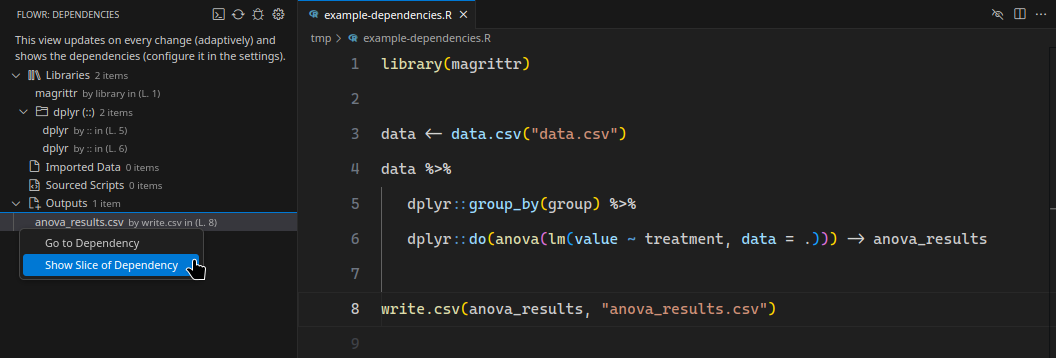
202
|
-
The following showcases the dependency view of the
|
|
202
|
+
The following showcases the dependency view of the ${ctx.linkPage('flowr:vscode', 'Visual Studio Code extension')}:
|
|
203
203
|
|
|
204
204
|
|
|
205
205
|
|
|
@@ -211,7 +211,7 @@ The following showcases the dependency view of the [Visual Studio Code extension
|
|
|
211
211
|
and consult the ${ctx.linkPage('wiki/Dataflow Graph', 'wiki pages')} for more details on the ${ctx.linkPage('wiki/Dataflow Graph', 'dataflow graphs')} as well as ${ctx.linkPage('wiki/Dataflow Graph', 'call graphs', 'perspectives-cg')}.
|
|
212
212
|
|
|
213
213
|
${(0, doc_general_1.prefixLines)((0, doc_structure_1.details)('Example: Generating a dataflow graph with flowR', `
|
|
214
|
-
You can investigate flowR's analyses using the
|
|
214
|
+
You can investigate flowR's analyses using the ${ctx.linkPage('wiki/Interface', 'REPL', 'using-the-repl')}.
|
|
215
215
|
Commands like ${(0, doc_cli_option_1.getReplCommand)('dataflow*')} allow you to view a ${ctx.linkPage('wiki/Dataflow Graph', 'dataflow graph')} for a given R script.
|
|
216
216
|
|
|
217
217
|
Let's have a look at the following example:
|
|
@@ -231,11 +231,11 @@ ${await (0, doc_dfg_1.printDfGraphForCode)(treeSitter, (0, doc_files_1.getFileCo
|
|
|
231
231
|
|
|
232
232
|
If you want to use flowR and the features it provides, feel free to check out the:
|
|
233
233
|
|
|
234
|
-
-
|
|
235
|
-
-
|
|
236
|
-
-
|
|
237
|
-
-
|
|
238
|
-
-
|
|
234
|
+
- ${ctx.linkPage('flowr:vscode', 'Visual Studio Code')}/${ctx.linkPage('flowr:positron', 'Positron')}: provides access to flowR directly in VS Code and Positron (or [vscode.dev](https://vscode.dev/))
|
|
235
|
+
- ${ctx.linkPage('flowr:rstudio-addin', 'RStudio Addin')}: integrates flowR into [RStudio](https://posit.co/downloads/)
|
|
236
|
+
- ${ctx.linkPage('flowr:radapter', 'R package')}: use flowR in your R scripts
|
|
237
|
+
- ${ctx.linkPage('flowr:docker', 'Docker image')}: run flowR in a container, this also includes ${ctx.linkPage('wiki/Interface', "flowR's server", 'communicating-with-the-server')}
|
|
238
|
+
- ${ctx.linkPage('flowr:npm', 'NPM package')}: include flowR in your TypeScript and JavaScript projects
|
|
239
239
|
|
|
240
240
|
|
|
241
241
|
If you are already using flowR and want to give feedback, please consider filling out our [feedback form](https://docs.google.com/forms/d/e/1FAIpQLScKFhgnh9LGVU7QzqLvFwZe1oiv_5jNhkIO-G-zND0ppqsMxQ/viewform).
|
|
@@ -302,7 +302,7 @@ and received an unrestricted gift from [Posit](https://posit.co/), the open-sour
|
|
|
302
302
|
|
|
303
303
|
Please notice that this file was generated automatically using the file ${(0, doc_auto_gen_1.fileNameForGenHeader)(module.filename)} as a source.\\
|
|
304
304
|
If you want to make changes please edit the source file (the CI will take care of the rest).
|
|
305
|
-
In fact, many files in the
|
|
305
|
+
In fact, many files in the ${ctx.linkPage('flowr:wiki', 'wiki')} are generated, so make sure to check for the source file if you want to make changes.
|
|
306
306
|
|
|
307
307
|
`.trim();
|
|
308
308
|
}
|