@each1024/pi-mini-mode 1.0.1 → 1.0.2
This diff represents the content of publicly available package versions that have been released to one of the supported registries. The information contained in this diff is provided for informational purposes only and reflects changes between package versions as they appear in their respective public registries.
- package/README.md +27 -39
- package/README.zh-CN.md +27 -38
- package/package.json +1 -1
package/README.md
CHANGED
|
@@ -1,8 +1,8 @@
|
|
|
1
1
|
<p>
|
|
2
|
-
<img src="assets/readme-cover.en.svg" alt="Pi Mini Mode — Less noise. More focus. Image input, foldable conversations, subagents, themes and a live footer." width="100%">
|
|
2
|
+
<img src="https://raw.githubusercontent.com/eachann1024/pi-mini-mode/main/assets/readme-cover.en.svg" alt="Pi Mini Mode — Less noise. More focus. Image input, foldable conversations, subagents, themes and a live footer." width="100%">
|
|
3
3
|
</p>
|
|
4
4
|
|
|
5
|
-
[中文](README.zh-CN.md) · [Install](#install) · [Features](#features) · [
|
|
5
|
+
[中文](https://github.com/eachann1024/pi-mini-mode/blob/main/README.zh-CN.md) · [Install](#install) · [Features](#features) · [Reference](#reference)
|
|
6
6
|
|
|
7
7
|
# Pi Mini Mode
|
|
8
8
|
|
|
@@ -10,11 +10,12 @@
|
|
|
10
10
|
|
|
11
11
|
An everyday refinement for [Pi](https://pi.dev), not just a footer. Preview images at the cursor, fold long messages and process details, inspect subagent work, and keep your session’s essential signals in view.
|
|
12
12
|
|
|
13
|
-
<
|
|
14
|
-
|
|
15
|
-
|
|
13
|
+
<details>
|
|
14
|
+
<summary>See the full interface</summary>
|
|
16
15
|
|
|
16
|
+
<img width="1698" height="1588" alt="Pi Mini Mode interface" src="https://github.com/user-attachments/assets/9990b080-f82b-4dd0-bc7b-a0cdded72181" />
|
|
17
17
|
|
|
18
|
+
</details>
|
|
18
19
|
|
|
19
20
|
## Install
|
|
20
21
|
|
|
@@ -22,7 +23,7 @@ An everyday refinement for [Pi](https://pi.dev), not just a footer. Preview imag
|
|
|
22
23
|
pi install npm:@each1024/pi-mini-mode
|
|
23
24
|
```
|
|
24
25
|
|
|
25
|
-
|
|
26
|
+
In an open Pi session, run Pi's built-in `/reload` command. On first use, choose **Apply recommended setup** for a bundled theme and fullscreen mode, then restart Pi for fullscreen to take effect. Configure this extension any time with `/pi-mini-mode-settings`. Project settings and CLI flags may override global settings.
|
|
26
27
|
|
|
27
28
|
**Pi ≥ 0.84.0.** Input enhancements and minimal output are on by default. Minimal mode uses a private **Pi 0.85.x** layout adapter—see [compatibility](#compatibility) before enabling it.
|
|
28
29
|
|
|
@@ -39,6 +40,8 @@ pi install git:github.com/eachann1024/pi-mini-mode
|
|
|
39
40
|
|
|
40
41
|
### 01 / Input, refined
|
|
41
42
|
|
|
43
|
+
<img width="1092" height="764" alt="Image previews and compact labels in Pi Mini Mode" src="https://github.com/user-attachments/assets/2ea6d037-d3f0-423c-8588-17992a49d445" />
|
|
44
|
+
|
|
42
45
|
**Images at your cursor.** Move the editing cursor into an image path or compact label to preview it. Fullscreen also supports editor hover. Press `Esc` to dismiss.
|
|
43
46
|
|
|
44
47
|
**Less path clutter. Same image.** Image paths become underlined `[image1]` labels in the editor and messages, preserving the original path when submitted. Open the original image or another linked file in its default app using your terminal’s link gesture.
|
|
@@ -47,26 +50,21 @@ pi install git:github.com/eachann1024/pi-mini-mode
|
|
|
47
50
|
|
|
48
51
|
Paste images with `Ctrl+V` (`Alt+V` on Windows/WSL). Disabling input enhancements preserves Pi’s native clipboard behavior.
|
|
49
52
|
|
|
50
|
-
<img width="1092" height="764" alt="image" src="https://github.com/user-attachments/assets/2ea6d037-d3f0-423c-8588-17992a49d445" />
|
|
51
|
-
|
|
52
|
-
|
|
53
53
|
### 02 / Process, quieter
|
|
54
54
|
|
|
55
55
|
Enable **Minimal output** in `/pi-mini-mode-settings`.
|
|
56
56
|
|
|
57
|
+
<img width="1092" height="764" alt="Folded process tree in minimal output" src="https://github.com/user-attachments/assets/eb8c88f6-84af-499e-b105-5395b4f02e66" />
|
|
58
|
+
|
|
57
59
|
- **Long prompts, folded.** In fullscreen minimal mode, long user messages show the first four rendered rows. Click the fold control to reveal the rest. Complete fenced code blocks stay intact.
|
|
58
|
-
- **Subagents, in plain sight.** Click a subagent row to expand its available activity and message/final output. A dispatch receipt or returned tool call is not a completed background task.
|
|
60
|
+
- **Subagents, in plain sight.** Click a subagent row to expand its available activity and message/final output. In minimal mode, this extension uses `Ctrl+S` to expand or collapse completed subagent summaries; Pi's focused selectors keep their own keys. A dispatch receipt or returned tool call is not a completed background task.
|
|
59
61
|
- **A process tree, not a wall of output.** Thinking, tools and skill reads share one chronological tree. The latest summaries stay visible, including the latest thinking; `Ctrl+O` expands or collapses the full process. New questions start collapsed.
|
|
60
62
|
- **Tool details on demand.** Expand a tool or thinking entry, including the latest thinking, using its fold control. Thinking starts collapsed and only expands or collapses manually, including while running. Tool details show saved text, not the original custom renderer or image output.
|
|
61
63
|
- **Room for the answer.** Final Markdown streams without extra headings or backgrounds. Failures and interruptions stay explicit. Folding changes presentation, not stored session messages.
|
|
62
64
|
|
|
63
65
|
Turn **Minimal output** off in settings to restore native Pi history.
|
|
64
66
|
|
|
65
|
-
|
|
66
|
-
<img width="1092" height="764" alt="image" src="https://github.com/user-attachments/assets/eb8c88f6-84af-499e-b105-5395b4f02e66" />
|
|
67
|
-
<img width="1092" height="764" alt="image" src="https://github.com/user-attachments/assets/53f5aa28-4b96-45db-b02e-0108aa9e68bc" />
|
|
68
|
-
|
|
69
|
-
|
|
67
|
+
<img width="1092" height="764" alt="Expanded process details" src="https://github.com/user-attachments/assets/53f5aa28-4b96-45db-b02e-0108aa9e68bc" />
|
|
70
68
|
|
|
71
69
|
### 03 / Session, in focus
|
|
72
70
|
|
|
@@ -77,7 +75,7 @@ Turn **Minimal output** off in settings to restore native Pi history.
|
|
|
77
75
|
<details>
|
|
78
76
|
<summary>See the footer settings and demo</summary>
|
|
79
77
|
|
|
80
|
-
[](assets/pi-mini-mode-settings.jpg)
|
|
78
|
+
[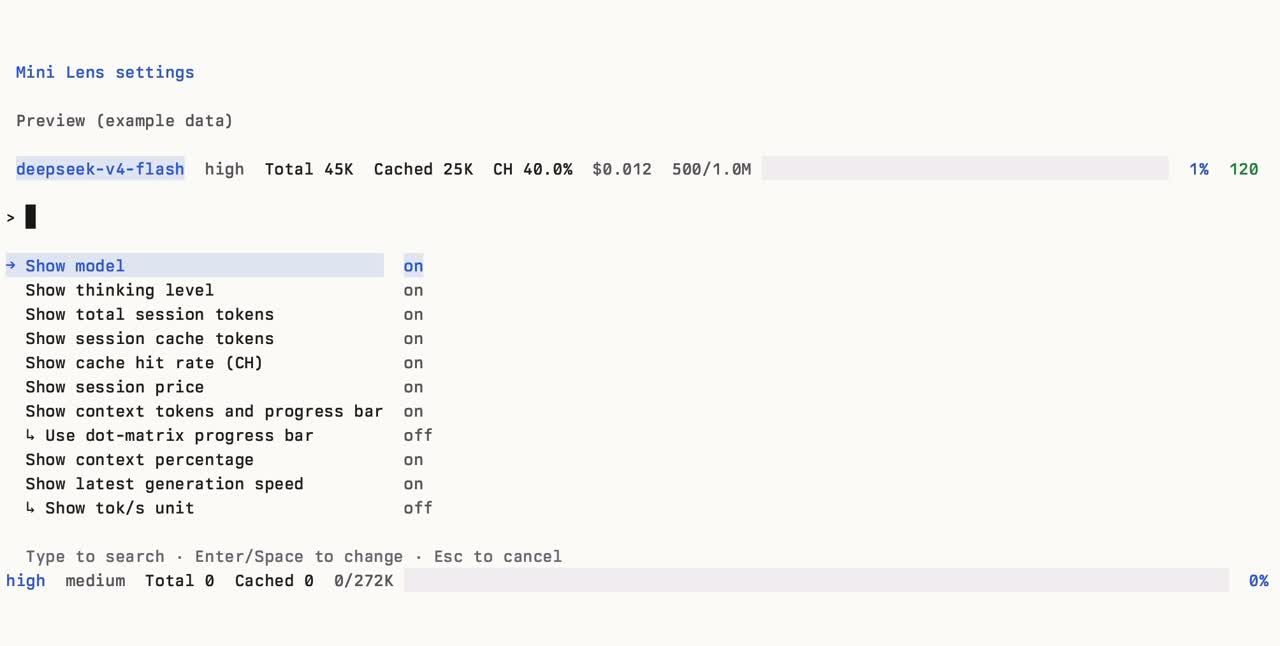](https://raw.githubusercontent.com/eachann1024/pi-mini-mode/main/assets/pi-mini-mode-settings.jpg)
|
|
81
79
|
|
|
82
80
|
[Watch the footer settings demo](https://github.com/user-attachments/assets/5f2f4816-45ed-4759-b035-d9ee59e8a763)
|
|
83
81
|
|
|
@@ -85,17 +83,6 @@ This earlier screenshot and recording show footer configuration, not the newer i
|
|
|
85
83
|
|
|
86
84
|
</details>
|
|
87
85
|
|
|
88
|
-
## Commands
|
|
89
|
-
|
|
90
|
-
| Command / shortcut | Purpose |
|
|
91
|
-
| --- | --- |
|
|
92
|
-
| `/pi-mini-mode-settings` | Configure fields, input enhancements and minimal output |
|
|
93
|
-
| `Ctrl+O` | Expand or collapse the complete process tree |
|
|
94
|
-
| `Ctrl+S` | Expand or collapse completed subagent rows; yields to Pi `/model`, `/thinking`, and other selectors |
|
|
95
|
-
| `/reload` | Reload the extension after installation or source changes |
|
|
96
|
-
|
|
97
|
-
Subagent rows have their own click-to-expand control; supported third-party widgets retain native detail shortcuts.
|
|
98
|
-
|
|
99
86
|
## Compatibility
|
|
100
87
|
|
|
101
88
|
- **Images:** previews require a terminal image protocol; unsupported terminals show a hint. Image reads are limited to **20 MB**, and deleted files cannot be reopened. Link gestures depend on the terminal: usually `Cmd+click` on macOS or `Ctrl+click` on Windows/Linux; Ghostty fullscreen may require `Shift+Cmd` / `Shift+Ctrl`. Pi fullscreen also supports direct link clicks. See [Pi terminal setup](https://github.com/earendil-works/pi-mono/blob/main/packages/coding-agent/docs/terminal-setup.md).
|
|
@@ -109,7 +96,9 @@ Subagent rows have their own click-to-expand control; supported third-party widg
|
|
|
109
96
|
<details>
|
|
110
97
|
<summary><strong>First run & configuration</strong> — defaults, controls, and settings file</summary>
|
|
111
98
|
|
|
112
|
-
On the first interactive TUI session, Pi Mini Mode shows a preview.
|
|
99
|
+
On the first interactive TUI session, Pi Mini Mode shows a preview. **Branch-only**, **Cached tokens**, and **MCP count** are off by default; branch-only is mutually exclusive with **project & branch**. Change anything later with `/pi-mini-mode-settings`.
|
|
100
|
+
|
|
101
|
+
Example with optional Cached and MCP fields enabled:
|
|
113
102
|
|
|
114
103
|
```text
|
|
115
104
|
deepseek-v4-flash high Total 45K Cached 25K CH 40.0% $0.012 ◇ MCP 3 500/1.0M ⣿⣀⣀⣀⣀⣀⣀⣀⣀⣀ 1% 120 tok/s
|
|
@@ -131,13 +120,16 @@ Settings are stored globally at Pi's agent directory (normally `~/.pi/agent/pi-m
|
|
|
131
120
|
|
|
132
121
|
```json
|
|
133
122
|
{
|
|
123
|
+
"pi-mini-mode-project-branch-show": true,
|
|
124
|
+
"pi-mini-mode-branch-show": false,
|
|
134
125
|
"pi-mini-mode-model-show": true,
|
|
135
126
|
"pi-mini-mode-thinking-show": true,
|
|
136
127
|
"pi-mini-mode-ch-show": true,
|
|
137
128
|
"pi-mini-mode-session-tokens-show": true,
|
|
138
|
-
"pi-mini-mode-cache-tokens-show":
|
|
129
|
+
"pi-mini-mode-cache-tokens-show": false,
|
|
130
|
+
"pi-mini-mode-cache-miss-show": true,
|
|
139
131
|
"pi-mini-mode-cost-show": true,
|
|
140
|
-
"pi-mini-mode-mcp-show":
|
|
132
|
+
"pi-mini-mode-mcp-show": false,
|
|
141
133
|
"pi-mini-mode-context-show": true,
|
|
142
134
|
"pi-mini-mode-context-dots-show": true,
|
|
143
135
|
"pi-mini-mode-context-percent-show": true,
|
|
@@ -151,13 +143,16 @@ Settings are stored globally at Pi's agent directory (normally `~/.pi/agent/pi-m
|
|
|
151
143
|
|
|
152
144
|
| Key | Default | Controls |
|
|
153
145
|
| --- | --- | --- |
|
|
146
|
+
| `pi-mini-mode-project-branch-show` | `true` | Project name and branch |
|
|
147
|
+
| `pi-mini-mode-branch-show` | `false` | Branch only, instead of project and branch |
|
|
154
148
|
| `pi-mini-mode-model-show` | `true` | Model ID without provider prefix |
|
|
155
149
|
| `pi-mini-mode-thinking-show` | `true` | Thinking level |
|
|
156
150
|
| `pi-mini-mode-ch-show` | `true` | Session cache-hit rate (`CH`) |
|
|
157
151
|
| `pi-mini-mode-session-tokens-show` | `true` | Accumulated session tokens (`Total`) |
|
|
158
|
-
| `pi-mini-mode-cache-tokens-show` | `
|
|
152
|
+
| `pi-mini-mode-cache-tokens-show` | `false` | Accumulated cache read + cache write tokens |
|
|
153
|
+
| `pi-mini-mode-cache-miss-show` | `true` | Estimated cache misses when detected |
|
|
159
154
|
| `pi-mini-mode-cost-show` | `true` | Estimated session list price |
|
|
160
|
-
| `pi-mini-mode-mcp-show` | `
|
|
155
|
+
| `pi-mini-mode-mcp-show` | `false` | Enabled MCP server count |
|
|
161
156
|
| `pi-mini-mode-context-show` | `true` | Used/total context tokens and progress bar |
|
|
162
157
|
| `pi-mini-mode-context-dots-show` | `true` | Use a single-line dot-matrix bar instead of the solid bar |
|
|
163
158
|
| `pi-mini-mode-context-percent-show` | `true` | Context-use percentage |
|
|
@@ -212,13 +207,6 @@ The backup workflow needs the package’s npm Trusted Publisher configured for t
|
|
|
212
207
|
|
|
213
208
|
</details>
|
|
214
209
|
|
|
215
|
-
<details>
|
|
216
|
-
<summary><strong>Collaboration guidance</strong></summary>
|
|
217
|
-
|
|
218
|
-
The main session owns requirement alignment, risk research, the complete solution, task scheduling, key decisions, integration, and the final summary. Before implementation, it should investigate the key risks, boundaries, acceptance criteria, and solution. Once authorized, use subagents aggressively and parallelize independent work to save time, while respecting relevance, risk, budget, concurrency, and single-writer constraints. Use the `low` model by default for most tasks and subagents; upgrade only for complex reasoning, key decisions, or risk reviews when necessary.
|
|
219
|
-
|
|
220
|
-
</details>
|
|
221
|
-
|
|
222
210
|
---
|
|
223
211
|
|
|
224
212
|
[MIT License](LICENSE) · Built for [Pi](https://pi.dev)
|
package/README.zh-CN.md
CHANGED
|
@@ -1,22 +1,21 @@
|
|
|
1
1
|
<p>
|
|
2
|
-
<img src="assets/readme-cover.zh-CN.svg" alt="Pi Mini Mode — 少一点干扰,多一点专注。图片输入、可折叠对话、子代理、明暗主题与实时页脚。" width="100%">
|
|
2
|
+
<img src="https://raw.githubusercontent.com/eachann1024/pi-mini-mode/main/assets/readme-cover.zh-CN.svg" alt="Pi Mini Mode — 少一点干扰,多一点专注。图片输入、可折叠对话、子代理、明暗主题与实时页脚。" width="100%">
|
|
3
3
|
</p>
|
|
4
4
|
|
|
5
|
-
[English](README.md) · [安装](#安装) · [功能](#功能) · [
|
|
5
|
+
[English](https://github.com/eachann1024/pi-mini-mode/blob/main/README.md) · [安装](#安装) · [功能](#功能) · [参考](#参考)
|
|
6
6
|
|
|
7
7
|
# Pi Mini Mode
|
|
8
8
|
|
|
9
|
-
|
|
10
|
-
|
|
11
|
-
|
|
12
9
|
**少一点干扰。多一点专注。**
|
|
13
10
|
|
|
14
11
|
为 [Pi](https://pi.dev) 的日常工作做一点精细的改进,不止于页脚。光标处预览图片,折叠长消息和过程详情,展开子代理工作,让重要的会话状态始终清晰。
|
|
15
12
|
|
|
16
|
-
<
|
|
17
|
-
|
|
13
|
+
<details>
|
|
14
|
+
<summary>查看完整界面</summary>
|
|
18
15
|
|
|
16
|
+
<img width="892" height="797" alt="Pi Mini Mode 完整界面" src="https://github.com/user-attachments/assets/8f7abdc8-646e-4ded-8009-b58d2833c1f4" />
|
|
19
17
|
|
|
18
|
+
</details>
|
|
20
19
|
|
|
21
20
|
## 安装
|
|
22
21
|
|
|
@@ -24,7 +23,7 @@
|
|
|
24
23
|
pi install npm:@each1024/pi-mini-mode
|
|
25
24
|
```
|
|
26
25
|
|
|
27
|
-
|
|
26
|
+
已打开的 Pi 会话中,运行 Pi 自带的 `/reload`。首次使用选择 **应用推荐配置**,设置内置主题和全屏模式,重启 Pi 后全屏才会生效。之后可用 `/pi-mini-mode-settings` 随时配置本扩展。项目设置和命令行参数可能覆盖全局设置。
|
|
28
27
|
|
|
29
28
|
**需要 Pi ≥ 0.84.0。** 输入增强和极简输出默认开启。极简模式使用私有 **Pi 0.85.x** 布局适配器,启用前请查看[兼容性](#兼容性)。
|
|
30
29
|
|
|
@@ -41,6 +40,8 @@ pi install git:github.com/eachann1024/pi-mini-mode
|
|
|
41
40
|
|
|
42
41
|
### 01 / 输入,更顺手
|
|
43
42
|
|
|
43
|
+
<img width="1092" height="764" alt="图片预览与紧凑标签" src="https://github.com/user-attachments/assets/2ea6d037-d3f0-423c-8588-17992a49d445" />
|
|
44
|
+
|
|
44
45
|
**图片,随光标浮现。** 编辑光标移入图片路径或紧凑标签,即可预览。全屏编辑器也支持悬停,按 `Esc` 关闭。
|
|
45
46
|
|
|
46
47
|
**收起路径,保留原图。** 输入框和消息中的图片路径收纳为带下划线的 `[image1]` 标签,提交时保留原始路径。使用终端的链接点击手势,即可通过系统默认应用打开原图或其他文件。
|
|
@@ -49,23 +50,21 @@ pi install git:github.com/eachann1024/pi-mini-mode
|
|
|
49
50
|
|
|
50
51
|
使用 `Ctrl+V` 粘贴图片,Windows/WSL 使用 `Alt+V`。关闭输入增强不会关闭 Pi 原生剪贴板功能。
|
|
51
52
|
|
|
52
|
-
<img width="1092" height="764" alt="image" src="https://github.com/user-attachments/assets/2ea6d037-d3f0-423c-8588-17992a49d445" />
|
|
53
|
-
|
|
54
53
|
### 02 / 过程,更安静
|
|
55
54
|
|
|
56
55
|
在 `/pi-mini-mode-settings` 中开启 **极简输出**。
|
|
57
56
|
|
|
57
|
+
<img width="1092" height="764" alt="极简输出中的过程树" src="https://github.com/user-attachments/assets/eb8c88f6-84af-499e-b105-5395b4f02e66" />
|
|
58
|
+
|
|
58
59
|
- **长消息,自动折叠。** 全屏极简模式下,长用户消息默认保留前四个显示行。点击折叠控件展开全文。完整代码围栏保持完整。
|
|
59
|
-
- **子代理,清晰可查。**
|
|
60
|
+
- **子代理,清晰可查。** 点击子代理行,展开可用的活动记录与消息/最终输出。极简模式下,本扩展用 `Ctrl+S` 展开/收起已完成的子代理摘要;Pi 当前聚焦的选择器保留自己的快捷键。任务派发回执或工具调用返回,不等于后台任务已完成。
|
|
60
61
|
- **过程是一棵树,而非满屏输出。** 思考、工具与技能读取汇入同一棵时间顺序树,显示最新摘要,包括最新一条思考;`Ctrl+O` 展开/收起完整过程,新问题默认收起。
|
|
61
62
|
- **工具详情,按需展开。** 点击工具或思考条目的折叠控件,最新一条思考也可以展开。思考默认收起,进行中与结束后均只由手动操作展开或收起。工具详情展示保存的文本,不还原原生自定义渲染器或图片输出。
|
|
62
63
|
- **把空间留给答案。** 最终 Markdown 流式呈现,不添加额外标题或背景。失败和中断明确标记;折叠只改变显示,不删除原始会话消息。
|
|
63
64
|
|
|
64
65
|
在设置中关闭 **极简输出** 即恢复 Pi 原生历史。
|
|
65
66
|
|
|
66
|
-
<img width="1092" height="764" alt="
|
|
67
|
-
<img width="1092" height="764" alt="image" src="https://github.com/user-attachments/assets/53f5aa28-4b96-45db-b02e-0108aa9e68bc" />
|
|
68
|
-
|
|
67
|
+
<img width="1092" height="764" alt="展开后的过程详情" src="https://github.com/user-attachments/assets/53f5aa28-4b96-45db-b02e-0108aa9e68bc" />
|
|
69
68
|
|
|
70
69
|
### 03 / 状态,更清晰
|
|
71
70
|
|
|
@@ -76,7 +75,7 @@ pi install git:github.com/eachann1024/pi-mini-mode
|
|
|
76
75
|
<details>
|
|
77
76
|
<summary>查看页脚设置截图与演示</summary>
|
|
78
77
|
|
|
79
|
-
[](assets/pi-mini-mode-settings.jpg)
|
|
78
|
+
[](https://raw.githubusercontent.com/eachann1024/pi-mini-mode/main/assets/pi-mini-mode-settings.jpg)
|
|
80
79
|
|
|
81
80
|
[观看页脚设置演示](https://github.com/user-attachments/assets/5f2f4816-45ed-4759-b035-d9ee59e8a763)
|
|
82
81
|
|
|
@@ -84,17 +83,6 @@ pi install git:github.com/eachann1024/pi-mini-mode
|
|
|
84
83
|
|
|
85
84
|
</details>
|
|
86
85
|
|
|
87
|
-
## 命令速查
|
|
88
|
-
|
|
89
|
-
| 命令/快捷键 | 用途 |
|
|
90
|
-
| --- | --- |
|
|
91
|
-
| `/pi-mini-mode-settings` | 配置字段、输入增强和极简输出 |
|
|
92
|
-
| `Ctrl+O` | 展开/收起完整过程树 |
|
|
93
|
-
| `Ctrl+S` | 展开/收起已完成的子代理行;打开 `/model`、`/thinking` 等选择器时交给 Pi |
|
|
94
|
-
| `/reload` | 安装或修改源码后重载扩展 |
|
|
95
|
-
|
|
96
|
-
子代理行有独立的点击展开控件;受支持的第三方小组件保留原生详情快捷键。
|
|
97
|
-
|
|
98
86
|
## 兼容性
|
|
99
87
|
|
|
100
88
|
- **图片:** 预览依赖终端图片协议,不支持时显示提示。读取上限 **20 MB**,文件被清理后无法重新打开。点击手势由终端决定:macOS 通常使用 `Cmd+点击`,Windows/Linux 通常使用 `Ctrl+点击`;Ghostty 全屏可能需要 `Shift+Cmd` / `Shift+Ctrl`。Pi 全屏也支持直接点击链接。参见 [Pi 终端设置](https://github.com/earendil-works/pi-mono/blob/main/packages/coding-agent/docs/terminal-setup.md)。
|
|
@@ -108,7 +96,9 @@ pi install git:github.com/eachann1024/pi-mini-mode
|
|
|
108
96
|
<details>
|
|
109
97
|
<summary><strong>首次使用与配置</strong></summary>
|
|
110
98
|
|
|
111
|
-
首次进入交互式 TUI 会话时,Pi Mini Mode
|
|
99
|
+
首次进入交互式 TUI 会话时,Pi Mini Mode 显示设置预览。「仅显示分支」「缓存 token」「MCP」默认关闭;「仅显示分支」与「项目与分支」互斥。之后可用 `/pi-mini-mode-settings` 再改。
|
|
100
|
+
|
|
101
|
+
以下示例开启了可选的 Cached 和 MCP 字段:
|
|
112
102
|
|
|
113
103
|
```text
|
|
114
104
|
deepseek-v4-flash high Total 45K Cached 25K CH 40.0% $0.012 ◇ MCP 3 500/1.0M ⣿⣀⣀⣀⣀⣀⣀⣀⣀⣀ 1% 120 tok/s
|
|
@@ -120,13 +110,16 @@ deepseek-v4-flash high Total 45K Cached 25K CH 40.0% $0.012 ◇ MCP 3 500
|
|
|
120
110
|
|
|
121
111
|
```json
|
|
122
112
|
{
|
|
113
|
+
"pi-mini-mode-project-branch-show": true,
|
|
114
|
+
"pi-mini-mode-branch-show": false,
|
|
123
115
|
"pi-mini-mode-model-show": true,
|
|
124
116
|
"pi-mini-mode-thinking-show": true,
|
|
125
117
|
"pi-mini-mode-ch-show": true,
|
|
126
118
|
"pi-mini-mode-session-tokens-show": true,
|
|
127
|
-
"pi-mini-mode-cache-tokens-show":
|
|
119
|
+
"pi-mini-mode-cache-tokens-show": false,
|
|
120
|
+
"pi-mini-mode-cache-miss-show": true,
|
|
128
121
|
"pi-mini-mode-cost-show": true,
|
|
129
|
-
"pi-mini-mode-mcp-show":
|
|
122
|
+
"pi-mini-mode-mcp-show": false,
|
|
130
123
|
"pi-mini-mode-context-show": true,
|
|
131
124
|
"pi-mini-mode-context-dots-show": true,
|
|
132
125
|
"pi-mini-mode-context-percent-show": true,
|
|
@@ -140,13 +133,16 @@ deepseek-v4-flash high Total 45K Cached 25K CH 40.0% $0.012 ◇ MCP 3 500
|
|
|
140
133
|
|
|
141
134
|
| 配置项 | 默认值 | 说明 |
|
|
142
135
|
| --- | --- | --- |
|
|
136
|
+
| `pi-mini-mode-project-branch-show` | `true` | 显示项目名称与分支 |
|
|
137
|
+
| `pi-mini-mode-branch-show` | `false` | 仅显示分支,代替项目与分支 |
|
|
143
138
|
| `pi-mini-mode-model-show` | `true` | 显示不含 provider 前缀的模型 ID |
|
|
144
139
|
| `pi-mini-mode-thinking-show` | `true` | 显示思考级别 |
|
|
145
140
|
| `pi-mini-mode-ch-show` | `true` | 显示会话缓存命中率(`CH`) |
|
|
146
141
|
| `pi-mini-mode-session-tokens-show` | `true` | 显示会话累计令牌(`Total`) |
|
|
147
|
-
| `pi-mini-mode-cache-tokens-show` | `
|
|
142
|
+
| `pi-mini-mode-cache-tokens-show` | `false` | 显示缓存读取与写入令牌(已包含在 Total 中) |
|
|
143
|
+
| `pi-mini-mode-cache-miss-show` | `true` | 检测到缓存 miss 时显示估算量 |
|
|
148
144
|
| `pi-mini-mode-cost-show` | `true` | 显示会话费用估算 |
|
|
149
|
-
| `pi-mini-mode-mcp-show` | `
|
|
145
|
+
| `pi-mini-mode-mcp-show` | `false` | 显示已启用的 MCP 服务器数量 |
|
|
150
146
|
| `pi-mini-mode-context-show` | `true` | 显示已用/总上下文令牌和进度条 |
|
|
151
147
|
| `pi-mini-mode-context-dots-show` | `true` | 使用单行点阵进度条替代实心进度条 |
|
|
152
148
|
| `pi-mini-mode-context-percent-show` | `true` | 显示上下文使用百分比 |
|
|
@@ -204,13 +200,6 @@ python3 test/minimal-pty.py
|
|
|
204
200
|
|
|
205
201
|
</details>
|
|
206
202
|
|
|
207
|
-
<details>
|
|
208
|
-
<summary><strong>协作说明</strong></summary>
|
|
209
|
-
|
|
210
|
-
主会话负责需求对齐、风险调研、完整方案、任务调度、关键决策、整合与总结;执行前应先调查关键风险点、边界、验收标准和解决方案。获得授权后,应积极使用子代理并并行拆分独立任务以节省时间,同时遵守相关性、风险、预算、并发和单一修改负责人约束。绝大部分任务及子代理默认使用 `low` 模型,仅在复杂推理、关键决策或风险审查确有需要时升级。
|
|
211
|
-
|
|
212
|
-
</details>
|
|
213
|
-
|
|
214
203
|
---
|
|
215
204
|
|
|
216
205
|
[MIT License](LICENSE) · 为 [Pi](https://pi.dev) 打造
|
package/package.json
CHANGED