@dynatrace/react-native-plugin 2.343.1 → 2.345.1
This diff represents the content of publicly available package versions that have been released to one of the supported registries. The information contained in this diff is provided for informational purposes only and reflects changes between package versions as they appear in their respective public registries.
- package/README.md +638 -660
- package/android/build.gradle +6 -2
- package/files/plugin-runtime.gradle +17 -33
- package/files/plugin.gradle +1 -1
- package/instrumentation/BabelPluginDynatrace.js +1 -1
- package/instrumentation/libs/UserInteraction.js +20 -6
- package/instrumentation/libs/react-navigation/ReactNavigation.js +14 -58
- package/instrumentation/libs/withOnPressMonitoring.js +3 -54
- package/internal.d.ts +1 -0
- package/internal.js +3 -1
- package/ios/DynatraceRNBridge.mm +9 -0
- package/lib/core/configuration/ConfigurationHandler.js +0 -21
- package/lib/dynatrace-reporter.js +1 -30
- package/lib/dynatrace-transformer.js +6 -34
- package/lib/next/configuration/INativeRuntimeConfiguration.js +0 -1
- package/lib/next/configuration/RuntimeConfigurationObserver.js +1 -6
- package/lib/next/navigation/NavigationTracker.js +93 -0
- package/lib/next/navigation/useNavigationTracking.js +54 -0
- package/package.json +9 -21
- package/public.js +3 -1
- package/react-native-dynatrace.podspec +1 -1
- package/scripts/Android.js +1 -20
- package/scripts/Config.js +0 -4
- package/scripts/Deprecations.js +18 -0
- package/scripts/Install.js +13 -0
- package/scripts/PathsConstants.js +0 -4
- package/scripts/Uninstall.js +0 -15
- package/scripts/core/InstrumentCall.js +2 -3
- package/scripts/util/DeprecationReport.js +24 -0
- package/types.d.ts +212 -10
- package/instrumentation/DynatraceInstrumentation.js +0 -1
- package/instrumentation/libs/community/Picker.InstrInfo.js +0 -20
- package/instrumentation/libs/community/gesture-handler/Touchables.InstrInfo.js +0 -25
- package/instrumentation/libs/react-native/RefreshControl.InstrInfo.js +0 -12
- package/instrumentation/libs/react-native/Switch.InstrInfo.js +0 -12
- package/instrumentation/libs/react-native/Touchables.InstrInfo.js +0 -25
- package/instrumentation/model/Reference.js +0 -2
- package/instrumentation/parser/Babel.js +0 -60
- package/instrumentation/parser/ParserUtil.js +0 -11
- package/lib/features/ui-interaction/Config.js +0 -42
- package/lib/features/ui-interaction/IUserInteractionEvent.js +0 -16
- package/lib/features/ui-interaction/Plugin.Fragment.Test.js +0 -170
- package/lib/features/ui-interaction/Plugin.js +0 -289
- package/lib/features/ui-interaction/RootDetection.js +0 -51
- package/lib/features/ui-interaction/RootWrapper.js +0 -236
- package/lib/features/ui-interaction/Run.js +0 -38
- package/lib/features/ui-interaction/Runtime.js +0 -843
- package/lib/features/ui-interaction/TouchMetaResolver.js +0 -493
- package/lib/features/ui-interaction/Types.js +0 -14
- package/lib/metro/getSourceMapInfo.js +0 -26
- package/scripts/LineOffsetAnalyze.js +0 -25
- package/scripts/core/LineOffsetAnalyzeCall.js +0 -165
- package/scripts/util/SourceMapUtil.js +0 -68
package/README.md
CHANGED
|
@@ -35,8 +35,8 @@ If you want to start using this plugin and are not a Dynatrace customer yet, hea
|
|
|
35
35
|
## Agent Versions
|
|
36
36
|
These agent versions are configured in this plugin:
|
|
37
37
|
|
|
38
|
-
* Android Agent: 8.
|
|
39
|
-
* iOS Agent: 8.
|
|
38
|
+
* Android Agent: 8.345.1.1003
|
|
39
|
+
* iOS Agent: 8.345.1.1003
|
|
40
40
|
|
|
41
41
|
## Quick Setup
|
|
42
42
|
|
|
@@ -48,36 +48,35 @@ These agent versions are configured in this plugin:
|
|
|
48
48
|
|
|
49
49
|
## Advanced topics
|
|
50
50
|
* [Manual OneAgent Startup](#manual-oneagent-startup)
|
|
51
|
-
* [
|
|
52
|
-
* [
|
|
51
|
+
* [Real User Monitoring (RUM)](#real-user-monitoring-rum)
|
|
52
|
+
* [User Interaction](#user-interaction)
|
|
53
|
+
* [Send Event](#send-event)
|
|
54
|
+
* [Send Session Property Event](#send-session-property-event)
|
|
55
|
+
* [Event Modifier](#event-modifier)
|
|
56
|
+
* [Send Exception Event](#send-exception-event)
|
|
57
|
+
* [Send HTTP Request Event](#send-http-request-event)
|
|
58
|
+
* [View Monitoring](#view-monitoring)
|
|
59
|
+
* [React Native Symbolication](#react-native-symbolication)
|
|
60
|
+
* [RUM Classic](#rum-classic)
|
|
53
61
|
* [Monitor a Component](#monitor-a-component)
|
|
54
62
|
* [Create Custom Action](#create-custom-actions)
|
|
55
63
|
* [Cancel Actions](#cancel-actions)
|
|
56
64
|
* [Manual Web Request Tagging](#manual-web-request-tagging)
|
|
57
65
|
* [Report Values](#report-values)
|
|
58
66
|
* [Report Stacktrace](#report-an-error-stacktrace)
|
|
59
|
-
* [Identify User](#identify-a-user)
|
|
60
|
-
* [End Session](#end-the-current-user-session)
|
|
61
67
|
* [Crash Reporting](#manually-report-a-crash)
|
|
62
|
-
* [User Privacy Options](#user-privacy-options)
|
|
63
68
|
* [Report GPS Position](#report-gps-location)
|
|
64
69
|
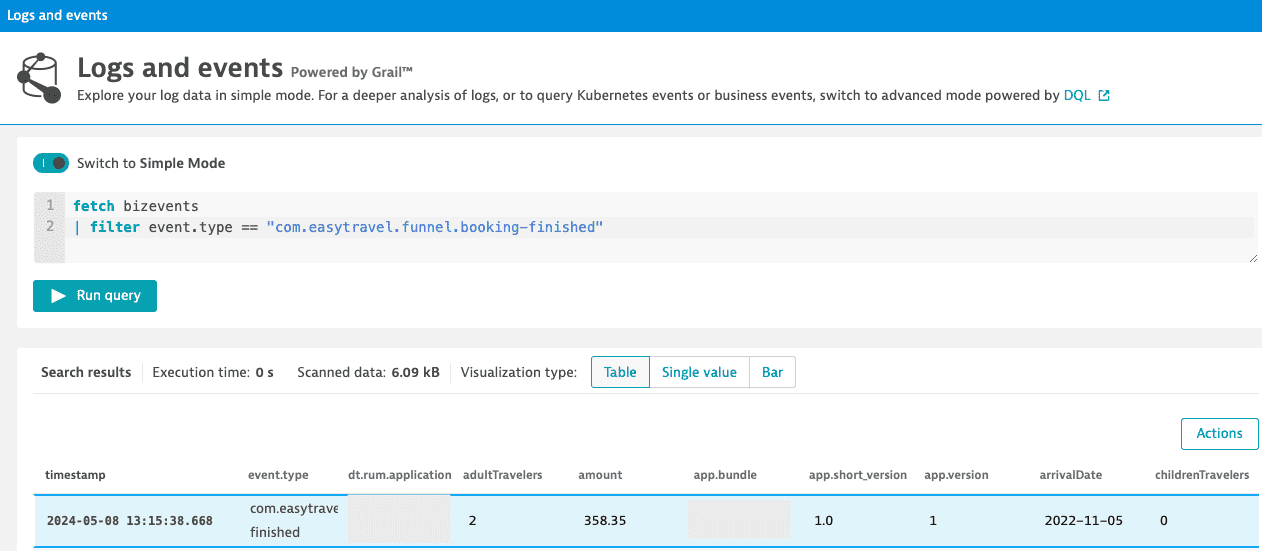
* [Business event capturing](#business-event-capturing)
|
|
65
70
|
* [Platform independent reporting](#platform-independent-reporting)
|
|
66
71
|
* [Set beacon headers](#setting-beacon-headers)
|
|
67
72
|
* [Exclude Individual JSX Elements](#exclude-individual-jsx-elements)
|
|
68
|
-
* [
|
|
69
|
-
* [User
|
|
70
|
-
* [
|
|
71
|
-
* [
|
|
72
|
-
* [Event Modifier](#event-modifier)
|
|
73
|
-
* [Send Exception Event](#send-exception-event)
|
|
74
|
-
* [Send HTTP Request Event](#send-http-request-event)
|
|
75
|
-
* [View Monitoring](#view-monitoring)
|
|
76
|
-
* [React Native Symbolication](#react-native-symbolication)
|
|
73
|
+
* [Extended topics](#extended-topics)
|
|
74
|
+
* [Identify User](#identify-a-user)
|
|
75
|
+
* [End Session](#end-the-current-user-session)
|
|
76
|
+
* [User Privacy Options](#user-privacy-options)
|
|
77
77
|
* [NPX Commands](#npx-commands)
|
|
78
78
|
* [npx instrumentDynatrace](#npx-instrumentdynatrace)
|
|
79
79
|
* [npx configDynatrace](#npx-configdynatrace)
|
|
80
|
-
* [npx lineOffsetDynatrace](#npx-lineoffsetdynatrace)
|
|
81
80
|
* [Customizing paths for configuration](#customizing-paths-for-configuration)
|
|
82
81
|
* [Manual adding iOS Agent to project](#manually-adding-ios-oneagent-to-a-project)
|
|
83
82
|
* [Setup for tvOS](#setup-for-tvos)
|
|
@@ -91,10 +90,8 @@ These agent versions are configured in this plugin:
|
|
|
91
90
|
* [Autostart](#autostart)
|
|
92
91
|
* [Bundle Name and Version](#bundle-name-and-version)
|
|
93
92
|
* [Navigation](#navigation)
|
|
94
|
-
* [Source Map](#source-map)
|
|
95
93
|
* [User Interaction Configuration](#user-interaction-configuration)
|
|
96
94
|
* [Debugging our auto-instrumentation](#debugging-our-auto-instrumentation)
|
|
97
|
-
* [Using our legacy jscodeshift auto-instrumentation](#using-our-legacy-jscodeshift-auto-instrumentation)
|
|
98
95
|
* [Android block](#android-block)
|
|
99
96
|
* [iOS block](#ios-block)
|
|
100
97
|
* [Lifecycle modes](#lifecycle)
|
|
@@ -221,31 +218,7 @@ module.exports = {
|
|
|
221
218
|
};
|
|
222
219
|
```
|
|
223
220
|
|
|
224
|
-
2.
|
|
225
|
-
|
|
226
|
-
Example of a startup call:
|
|
227
|
-
|
|
228
|
-
```ts
|
|
229
|
-
import { Dynatrace, ConfigurationBuilder } from '@dynatrace/react-native-plugin';
|
|
230
|
-
|
|
231
|
-
await Dynatrace.start(new ConfigurationBuilder("beaconUrl", "applicationId").buildConfiguration());
|
|
232
|
-
```
|
|
233
|
-
|
|
234
|
-
For more details see the section about [startup API](#plugin-startup).
|
|
235
|
-
|
|
236
|
-
**Note**: If you don't deactivate the automated startup with the `dynatrace.config.js` file, the `beaconUrl` and `applicationId` values have no impact and are thrown away.
|
|
237
|
-
|
|
238
|
-
## Manual instrumentation
|
|
239
|
-
|
|
240
|
-
To use the API of the React Native plugin, import the API:
|
|
241
|
-
|
|
242
|
-
```ts
|
|
243
|
-
import { Dynatrace } from '@dynatrace/react-native-plugin';
|
|
244
|
-
```
|
|
245
|
-
|
|
246
|
-
### Plugin startup
|
|
247
|
-
|
|
248
|
-
The manual startup of the plugin is triggered via the `start(configuration: IConfiguration)` method. If you configured `dynatrace.config.js` for manual startup then the plugin doesn't send any data when not calling this function. Besides the application id and the beacon URL, there are several optional configuration parameters, which are shown in the table below.
|
|
221
|
+
2. Call `Dynatrace.start()` with your configuration. The startup call is triggered via the `start(configuration: IConfiguration)` method — if you configured `dynatrace.config.js` for manual startup, the plugin doesn't send any data until this function is called. At minimum you need `beaconUrl` and `applicationId`, but there are several optional configuration parameters as well:
|
|
249
222
|
|
|
250
223
|
```ts
|
|
251
224
|
import { Dynatrace, ConfigurationBuilder, LogLevel } from '@dynatrace/react-native-plugin';
|
|
@@ -265,6 +238,8 @@ configurationBuilder.withCrashReporting(true)
|
|
|
265
238
|
await Dynatrace.start(configurationBuilder.buildConfiguration());
|
|
266
239
|
```
|
|
267
240
|
|
|
241
|
+
**Note**: If you don't deactivate the automated startup with the `dynatrace.config.js` file, the `beaconUrl` and `applicationId` values have no impact and are thrown away.
|
|
242
|
+
|
|
268
243
|
**Info**: The value used in the function calls for the parameters is also their default value.
|
|
269
244
|
|
|
270
245
|
| Property name | Type | Default | Description |
|
|
@@ -282,866 +257,867 @@ await Dynatrace.start(configurationBuilder.buildConfiguration());
|
|
|
282
257
|
|actionNameAlgorithm |string |'depth-first' |Controls the traversal algorithm used when searching the component tree for the name of an `onPress` action. `'depth-first'` follows the first child branch fully before trying siblings. `'breadth-first'` visits all siblings at a level before going deeper, returning the shallowest match first.|
|
|
283
258
|
|bundleName |string |undefined |Should be used only if you have a multiple bundle setup where you load several .bundle files within your React Native application. Enter the name of your bundle. This should be unique in comparison to your other bundle names. This will ensure that actions coming from different bundles will not interfere with each other.
|
|
284
259
|
|
|
285
|
-
**Attention:**
|
|
260
|
+
**Attention:**
|
|
286
261
|
* Keep in mind that configuration within the `dynatrace.config.js` file is the basis, even for manual startup. When we look at the lifecycleUpdate property: Per default if not used, it is false. If enabled (set to true) in `dynatrace.config.js` file, this will be also true if manual startup is used. You can still override this behavior by calling `ConfigurationBuilder.withLifecycleUpdate(false)`.
|
|
287
262
|
* Please use those parameters only when doing a manual startup. If you want to do an automated startup, please configure the properties via the [auto startup configuration](#manual-startup-counterparts). You will find a list which explains all the counterparts for the available options here.
|
|
288
263
|
|
|
289
|
-
|
|
264
|
+
## Real User Monitoring (RUM)
|
|
290
265
|
|
|
291
|
-
|
|
266
|
+
Real User Monitoring introduces a set of advanced APIs that allow you to send custom events, modify event data, track exceptions, monitor HTTP requests, and manage view contexts in your React Native application. These APIs provide more granular control over the data captured by Dynatrace and are designed for the next generation RUM capabilities.
|
|
292
267
|
|
|
293
|
-
|
|
268
|
+
For more detailed information about Real User Monitoring, see the [official Dynatrace documentation](https://docs.dynatrace.com/docs/shortlink/react-native-main).
|
|
294
269
|
|
|
295
|
-
|
|
296
|
-
import { Dynatrace } from '@dynatrace/react-native-plugin';
|
|
297
|
-
import { FunctionComponent } from 'react';
|
|
270
|
+
### Send Event
|
|
298
271
|
|
|
299
|
-
|
|
300
|
-
return null;
|
|
301
|
-
}
|
|
272
|
+
The `sendEvent()` method allows you to send custom events with arbitrary properties using the EventData class. This is useful for tracking specific user interactions or application state changes.
|
|
302
273
|
|
|
303
|
-
|
|
274
|
+
```ts
|
|
275
|
+
import { Dynatrace, EventData } from '@dynatrace/react-native-plugin';
|
|
276
|
+
|
|
277
|
+
// Send a custom event with properties
|
|
278
|
+
Dynatrace.sendEvent(new EventData()
|
|
279
|
+
.addEventProperty("event_properties.button_clicked", "login_button")
|
|
280
|
+
.addEventProperty("event_properties.user_type", "premium")
|
|
281
|
+
.addEventProperty("event_properties.attempt_count", 3)
|
|
282
|
+
.withDuration(250)
|
|
283
|
+
);
|
|
304
284
|
```
|
|
305
|
-
|
|
306
285
|
|
|
307
|
-
|
|
286
|
+
**Property Requirements:**
|
|
287
|
+
* Only properties prefixed with `event_properties.*` are allowed
|
|
288
|
+
* Additionally, the `duration` property is allowed
|
|
289
|
+
* Maximum of 50 custom properties per event
|
|
290
|
+
* If the limit is exceeded, properties are sorted alphabetically by key and excess properties are dropped deterministically
|
|
291
|
+
* String properties are limited to 5000 characters (exceeding characters are truncated)
|
|
292
|
+
* Field names must contain only alphabetic characters, numbers, underscores, and dots
|
|
293
|
+
* Each dot must be followed by an alphabetic character
|
|
294
|
+
* Each underscore must be followed by an alphabetic character or number
|
|
295
|
+
* Values must be primitive types (string, number, boolean)
|
|
296
|
+
* Cannot contain functions, undefined, Infinity, or NaN as values (they will be replaced with null)
|
|
308
297
|
|
|
309
|
-
|
|
298
|
+
### Send Session Property Event
|
|
310
299
|
|
|
311
|
-
|
|
300
|
+
Session properties apply to all events within the current session. Use `sendSessionPropertyEvent()` to set properties that should be available across the entire user session.
|
|
312
301
|
|
|
313
|
-
|
|
302
|
+
```ts
|
|
303
|
+
import { Dynatrace, SessionPropertyEventData } from '@dynatrace/react-native-plugin';
|
|
314
304
|
|
|
315
|
-
|
|
305
|
+
// Set session-wide properties
|
|
306
|
+
Dynatrace.sendSessionPropertyEvent(new SessionPropertyEventData()
|
|
307
|
+
.addSessionProperty("session_properties.user_tier", "premium")
|
|
308
|
+
.addSessionProperty("session_properties.app_version", "2.1.0")
|
|
309
|
+
.addSessionProperty("session_properties.feature_flag_enabled", true)
|
|
310
|
+
);
|
|
311
|
+
```
|
|
316
312
|
|
|
317
|
-
|
|
313
|
+
**Important Notes:**
|
|
314
|
+
* Session properties persist throughout the entire session
|
|
315
|
+
* If you send the same property multiple times, only one value will be kept (first or last)
|
|
316
|
+
* Use session properties for data that applies to the entire user session
|
|
317
|
+
* Field naming follows the same rules as events, but with `session_properties.` prefix
|
|
318
|
+
* Maximum of 50 custom properties per event
|
|
319
|
+
* If the limit is exceeded, properties are sorted alphabetically by key and excess properties are dropped deterministically
|
|
318
320
|
|
|
319
|
-
|
|
320
|
-
import { Dynatrace } from '@dynatrace/react-native-plugin';
|
|
321
|
+
### Event Modifier
|
|
321
322
|
|
|
322
|
-
|
|
323
|
-
//Perform the action and whatever else is needed.
|
|
324
|
-
myAction.leaveAction();
|
|
325
|
-
```
|
|
326
|
-
|
|
323
|
+
Event modifiers allow you to intercept and modify events before they are sent to Dynatrace. This is useful for adding common properties, filtering sensitive data, or enriching events with additional context. Event modifiers apply to all event types, including custom events, session properties, exceptions, and HTTP events.
|
|
327
324
|
|
|
328
|
-
|
|
325
|
+
If multiple event modifiers are added, they are executed in the order they were added.
|
|
329
326
|
|
|
330
|
-
|
|
331
|
-
import { Dynatrace } from '@dynatrace/react-native-plugin';
|
|
327
|
+
Most fields and namespaces can't be modified in any way (added, removed or overridden), while others are open for modification.
|
|
332
328
|
|
|
333
|
-
|
|
334
|
-
|
|
335
|
-
|
|
336
|
-
```
|
|
329
|
+
**Open for modification and can be added:**
|
|
330
|
+
- `event_properties.*`
|
|
331
|
+
- `session_properties.*`
|
|
337
332
|
|
|
338
|
-
|
|
333
|
+
`session_properties.*` are only allowed to be on a session property event.
|
|
334
|
+
|
|
335
|
+
**Open for modification only:**
|
|
336
|
+
- `url.full`
|
|
337
|
+
- `exception.stack_trace`
|
|
338
|
+
|
|
339
|
+
#### Example
|
|
339
340
|
|
|
340
341
|
```ts
|
|
341
|
-
import { Dynatrace } from '@dynatrace/react-native-plugin';
|
|
342
|
+
import { Dynatrace, IEventModifier } from '@dynatrace/react-native-plugin';
|
|
342
343
|
|
|
343
|
-
|
|
344
|
-
|
|
345
|
-
|
|
344
|
+
// Create an event modifier
|
|
345
|
+
const myModifier: IEventModifier = {
|
|
346
|
+
modifyEvent(event) {
|
|
347
|
+
// Add common properties to all events
|
|
348
|
+
event["event_properties.app_build"] = "1.2.3";
|
|
349
|
+
event["event_properties.environment"] = "production";
|
|
350
|
+
|
|
351
|
+
// Return null to discard the event entirely
|
|
352
|
+
if (event["event_properties.ignore"] === true) {
|
|
353
|
+
return null;
|
|
354
|
+
}
|
|
355
|
+
|
|
356
|
+
return event;
|
|
357
|
+
}
|
|
358
|
+
};
|
|
359
|
+
|
|
360
|
+
// Add the modifier
|
|
361
|
+
Dynatrace.addEventModifier(myModifier);
|
|
362
|
+
|
|
363
|
+
// Remove the modifier when no longer needed
|
|
364
|
+
Dynatrace.removeEventModifier(myModifier);
|
|
346
365
|
```
|
|
347
366
|
|
|
348
|
-
|
|
367
|
+
#### Important Considerations
|
|
349
368
|
|
|
350
|
-
|
|
369
|
+
- **Execution order**: If multiple event modifiers are added, they are executed in the order they were added
|
|
370
|
+
- **Returning null**: Returning `null` discards the event and prevents future modifier functions from being executed
|
|
371
|
+
- **Performance**: Event modifiers should be efficient as they are called for every event
|
|
372
|
+
- **Field naming**: Custom properties must follow the `event_properties.*` or `session_properties.*` prefix naming convention
|
|
373
|
+
- **Reserved fields**: Certain reserved fields and namespaces cannot be modified. Attempts to modify them will be ignored
|
|
374
|
+
- **Error handling**: If a modifier throws an exception, it will be logged but won't prevent other modifiers from executing
|
|
375
|
+
- **Primitive values**: Event fields can only contain primitive values (String, int, double, bool)
|
|
376
|
+
- **Invalid argument**: In case you pass an invalid argument to `addEventModifier`, we return a no-op placeholder modifier.
|
|
351
377
|
|
|
352
|
-
|
|
378
|
+
### Send Exception Event
|
|
379
|
+
|
|
380
|
+
The `sendExceptionEvent()` method provides a structured way to report exceptions with additional context and custom properties using the ExceptionEventData class.
|
|
353
381
|
|
|
354
382
|
```ts
|
|
355
|
-
import { Dynatrace } from '@dynatrace/react-native-plugin';
|
|
383
|
+
import { Dynatrace, ExceptionEventData } from '@dynatrace/react-native-plugin';
|
|
356
384
|
|
|
357
|
-
|
|
358
|
-
|
|
359
|
-
|
|
360
|
-
|
|
361
|
-
|
|
385
|
+
try {
|
|
386
|
+
// Code that may throw an error
|
|
387
|
+
throw new Error('Something went wrong');
|
|
388
|
+
} catch (error) {
|
|
389
|
+
if (error instanceof Error) {
|
|
390
|
+
Dynatrace.sendExceptionEvent(new ExceptionEventData(error)
|
|
391
|
+
.addEventProperty('event_properties.custom_key', 'custom_value')
|
|
392
|
+
.addEventProperty('event_properties.error_context', 'user_action')
|
|
393
|
+
);
|
|
394
|
+
}
|
|
395
|
+
}
|
|
362
396
|
```
|
|
363
|
-
|
|
364
397
|
|
|
365
|
-
|
|
398
|
+
**Parameters:**
|
|
399
|
+
* `error`: The Error object containing exception information (required)
|
|
366
400
|
|
|
367
|
-
|
|
401
|
+
### Send HTTP Request Event
|
|
402
|
+
|
|
403
|
+
The `sendHttpRequestEvent()` method allows you to manually report HTTP request events with detailed information about the request and response.
|
|
368
404
|
|
|
369
405
|
```ts
|
|
370
|
-
import { Dynatrace } from '@dynatrace/react-native-plugin';
|
|
406
|
+
import { Dynatrace, HttpRequestEventData } from '@dynatrace/react-native-plugin';
|
|
371
407
|
|
|
372
|
-
|
|
373
|
-
|
|
374
|
-
|
|
408
|
+
// Basic HTTP request event
|
|
409
|
+
const requestEventData = new HttpRequestEventData('https://api.example.com/users', 'GET');
|
|
410
|
+
Dynatrace.sendHttpRequestEvent(requestEventData);
|
|
375
411
|
|
|
376
|
-
//
|
|
377
|
-
|
|
412
|
+
// HTTP request with additional details
|
|
413
|
+
const detailedRequestEventData = new HttpRequestEventData('https://api.example.com/data', 'POST')
|
|
414
|
+
.withStatusCode(200)
|
|
415
|
+
.addEventProperty('event_properties.headers.content_type', 'application/json');
|
|
416
|
+
Dynatrace.sendHttpRequestEvent(detailedRequestEventData);
|
|
378
417
|
```
|
|
379
418
|
|
|
380
|
-
|
|
419
|
+
**Parameters:**
|
|
420
|
+
* `url`: The URL of the HTTP request (required)
|
|
421
|
+
* `method`: The HTTP method (e.g., 'GET', 'POST', 'PUT', 'DELETE') (required)
|
|
381
422
|
|
|
382
|
-
|
|
423
|
+
### View Monitoring
|
|
383
424
|
|
|
384
|
-
|
|
385
|
-
Using this API will force the request to be added to the action that is manually created.
|
|
425
|
+
The view monitoring APIs allow you to track different screens or views in your application, providing context for all events happening within those views.
|
|
386
426
|
|
|
387
|
-
|
|
388
|
-
|
|
427
|
+
There are two ways to monitor views:
|
|
428
|
+
1. **Automatic view monitoring** - Enable navigation tracking in your configuration to automatically capture view changes through supported navigation libraries (enabled by default)
|
|
429
|
+
2. **Manual view monitoring** - Use the `startView()` API to manually control when view contexts are created and updated
|
|
389
430
|
|
|
390
|
-
|
|
391
|
-
const url = 'https://api.example.com/data';
|
|
392
|
-
const tag = await action.getRequestTag(url);
|
|
393
|
-
const timing = new DynatraceWebRequestTiming(tag, url);
|
|
431
|
+
> **Important:** These approaches should not be mixed, as the outcome is unpredictable. Choose either automatic or manual view monitoring for your application.
|
|
394
432
|
|
|
395
|
-
|
|
396
|
-
|
|
397
|
-
|
|
398
|
-
|
|
399
|
-
|
|
400
|
-
|
|
401
|
-
|
|
402
|
-
|
|
403
|
-
|
|
404
|
-
|
|
405
|
-
timing.stopWebRequestTiming(-1, error.message);
|
|
406
|
-
} else {
|
|
407
|
-
timing.stopWebRequestTiming(-1, (error as any).toString());
|
|
433
|
+
#### Automatic Navigation tracking
|
|
434
|
+
|
|
435
|
+
> **Note:** This feature only works with `@react-navigation` versions 5.x through 7.x.
|
|
436
|
+
|
|
437
|
+
The following is an example of how this feature can be configured in your `dynatrace.config.js` file. Note that this feature is enabled by default.
|
|
438
|
+
|
|
439
|
+
```js
|
|
440
|
+
react: {
|
|
441
|
+
navigation: {
|
|
442
|
+
enabled: true
|
|
408
443
|
}
|
|
409
|
-
} finally {
|
|
410
|
-
action.leaveAction();
|
|
411
444
|
}
|
|
412
445
|
```
|
|
413
|
-
|
|
414
446
|
|
|
415
|
-
|
|
447
|
+
When this feature is enabled, the view context will represent the current state of the `@react-navigation` `NavigationContainer`. The state gets represented as a URL-style route. All subsequent events get associated with the view context and thus with the current route.
|
|
416
448
|
|
|
417
|
-
|
|
418
|
-
|
|
449
|
+
For instance, assume the following setup:
|
|
450
|
+
```js
|
|
451
|
+
const Drawer = createDrawerNavigator();
|
|
419
452
|
|
|
420
|
-
|
|
421
|
-
|
|
422
|
-
|
|
423
|
-
|
|
424
|
-
|
|
453
|
+
function App() {
|
|
454
|
+
return (
|
|
455
|
+
<NavigationContainer>
|
|
456
|
+
<Drawer.Navigator initialRouteName="Home">
|
|
457
|
+
<Drawer.Screen name="Home" component={HomeScreen} />
|
|
458
|
+
<Drawer.Screen name="Feature" component={FeatureScreen}/>
|
|
459
|
+
</Drawer.Navigator>
|
|
460
|
+
</NavigationContainer>
|
|
461
|
+
);
|
|
462
|
+
}
|
|
425
463
|
|
|
426
|
-
|
|
427
|
-
|
|
428
|
-
|
|
429
|
-
|
|
430
|
-
|
|
431
|
-
|
|
432
|
-
|
|
433
|
-
|
|
434
|
-
body: requestData
|
|
435
|
-
});
|
|
436
|
-
const responseData = await response.text();
|
|
437
|
-
timing.stopWebRequestTimingWithSize(
|
|
438
|
-
response.status,
|
|
439
|
-
response.statusText,
|
|
440
|
-
requestData.length,
|
|
441
|
-
responseData.length
|
|
464
|
+
const Stack = createStackNavigator();
|
|
465
|
+
|
|
466
|
+
function FeatureScreen() {
|
|
467
|
+
return (
|
|
468
|
+
<Stack.Navigator initialRouteName="ScreenOne">
|
|
469
|
+
<Stack.Screen name="ScreenOne" component={NestedScreenOne} />
|
|
470
|
+
<Stack.Screen name="ScreenTwo" component={NestedScreenTwo} />
|
|
471
|
+
</Stack.Navigator>
|
|
442
472
|
);
|
|
443
|
-
} catch (error) {
|
|
444
|
-
if (error instanceof Error) {
|
|
445
|
-
timing.stopWebRequestTiming(-1, error.message);
|
|
446
|
-
} else {
|
|
447
|
-
timing.stopWebRequestTiming(-1, (error as any).toString());
|
|
448
|
-
}
|
|
449
|
-
} finally {
|
|
450
|
-
action.leaveAction();
|
|
451
473
|
}
|
|
452
474
|
```
|
|
453
|
-
|
|
454
475
|
|
|
455
|
-
|
|
476
|
+
When navigating to `Home`, the view context will be set to `/Home`. When navigating to `Feature` and being redirected to the nested `ScreenOne`, the view context will be set to `/Home/ScreenOne`. When navigating to `ScreenTwo` within `Feature`, the view context will be set to `/Feature/ScreenTwo`.
|
|
456
477
|
|
|
457
|
-
|
|
478
|
+
#### Start View
|
|
479
|
+
|
|
480
|
+
Use `startView()` to begin monitoring a specific view or screen. When a view is started, all subsequent events will be associated with that view context.
|
|
458
481
|
|
|
459
482
|
```ts
|
|
460
|
-
import {
|
|
483
|
+
import { Dynatrace } from '@dynatrace/react-native-plugin';
|
|
461
484
|
|
|
462
|
-
|
|
463
|
-
|
|
464
|
-
reportError(errorName: string, errorCode: number, platform?: Platform): void;
|
|
465
|
-
reportEvent(eventName: string, platform?: Platform): void;
|
|
466
|
-
reportIntValue(valueName: string, value: number, platform?: Platform): void;
|
|
467
|
-
reportStringValue(valueName: string, value: string, platform?: Platform): void;
|
|
468
|
-
}
|
|
485
|
+
// Start monitoring a view
|
|
486
|
+
Dynatrace.startView("HomeScreen");
|
|
469
487
|
```
|
|
470
488
|
|
|
471
|
-
**Important:**
|
|
489
|
+
**Important Considerations:**
|
|
490
|
+
* Only one view can be active at a time
|
|
491
|
+
* Starting a new view will automatically stop the previous one
|
|
492
|
+
* View names should be meaningful and consistent across your application
|
|
493
|
+
* All events captured after starting a view will include the view context
|
|
472
494
|
|
|
473
|
-
|
|
495
|
+
**Complete Example:**
|
|
474
496
|
|
|
475
497
|
```ts
|
|
476
|
-
import { Dynatrace } from '@dynatrace/react-native-plugin';
|
|
498
|
+
import { Dynatrace, EventData } from '@dynatrace/react-native-plugin';
|
|
477
499
|
|
|
478
|
-
|
|
479
|
-
|
|
480
|
-
myAction.leaveAction();
|
|
481
|
-
```
|
|
482
|
-
|
|
500
|
+
// User navigates to profile screen
|
|
501
|
+
Dynatrace.startView("UserProfile");
|
|
483
502
|
|
|
484
|
-
|
|
503
|
+
// Send custom event within the view
|
|
504
|
+
Dynatrace.sendEvent(new EventData()
|
|
505
|
+
.addEventProperty("event_properties.profile_action", "edit_profile")
|
|
506
|
+
.addEventProperty("event_properties.changes_made", true)
|
|
507
|
+
);
|
|
485
508
|
|
|
509
|
+
// User navigates away
|
|
510
|
+
Dynatrace.startView("UserProfileDetailed");
|
|
511
|
+
```
|
|
486
512
|
|
|
487
|
-
###
|
|
513
|
+
### User Interaction
|
|
488
514
|
|
|
489
|
-
|
|
515
|
+
User Interaction is an automatic instrumentation feature that captures touch and press events in your React Native application without requiring any manual API calls. When enabled, the plugin instruments your UI components at build time and sends structured interaction events to Dynatrace at runtime.
|
|
490
516
|
|
|
491
|
-
|
|
492
|
-
import { Dynatrace } from '@dynatrace/react-native-plugin';
|
|
517
|
+
The following is an example of how this feature can be configured in your `dynatrace.config.js` file. Note that this feature is enabled by default.
|
|
493
518
|
|
|
494
|
-
|
|
495
|
-
|
|
496
|
-
|
|
497
|
-
if (error instanceof Error) {
|
|
498
|
-
Dynatrace.reportErrorStacktrace(
|
|
499
|
-
'DatabaseError',
|
|
500
|
-
error.message,
|
|
501
|
-
'Failed to connect to remote database',
|
|
502
|
-
error.stack || 'No stack trace available'
|
|
503
|
-
);
|
|
504
|
-
}
|
|
519
|
+
```js
|
|
520
|
+
react: {
|
|
521
|
+
userInteraction: true
|
|
505
522
|
}
|
|
506
523
|
```
|
|
507
|
-
|
|
508
|
-
|
|
509
|
-
**Note:**
|
|
510
|
-
The previous API without *errorValue* is deprecated and will be removed in the future. Please use the new API with errorValue if possible.
|
|
511
524
|
|
|
512
|
-
|
|
525
|
+
When enabled, UI Interaction can be controlled by two layers:
|
|
513
526
|
|
|
514
|
-
|
|
527
|
+
1. **Build/config layer (`dynatrace.config.js`)**
|
|
528
|
+
- `react.userInteraction: true|false` controls whether the UI Interaction instrumentation feature is applied.
|
|
515
529
|
|
|
516
|
-
**
|
|
530
|
+
2. **Runtime remote layer**
|
|
531
|
+
- CP always forwards User Interaction Actions (UIA) to the native agent unconditionally. The native agent decides whether to record or discard each UIA based on its own remote configuration (e.g. `touch_interaction_enabled`).
|
|
517
532
|
|
|
518
|
-
|
|
519
|
-
import { Dynatrace } from '@dynatrace/react-native-plugin';
|
|
533
|
+
#### Masking sensitive UI labels
|
|
520
534
|
|
|
521
|
-
|
|
522
|
-
```
|
|
523
|
-

|
|
535
|
+
UI Interaction also supports masking sensitive labels before events are sent.
|
|
524
536
|
|
|
525
|
-
|
|
537
|
+
Masking is applied when:
|
|
526
538
|
|
|
527
|
-
|
|
539
|
+
* the touched element or one of its parents is marked with `dtMask`
|
|
540
|
+
* the runtime masking rules classify the detected text as sensitive
|
|
541
|
+
* the runtime masking rules classify the element `testID` as sensitive
|
|
528
542
|
|
|
529
|
-
|
|
530
|
-
import { Dynatrace } from '@dynatrace/react-native-plugin';
|
|
543
|
+
When masking is active:
|
|
531
544
|
|
|
532
|
-
|
|
533
|
-
|
|
545
|
+
* the interaction path and component information are still reported
|
|
546
|
+
* the detected UI label is replaced with the configured replacement string (default: `***`)
|
|
547
|
+
* `ui_element.name_origin` is reported as `masked`
|
|
534
548
|
|
|
535
|
-
|
|
549
|
+
Example using `dtMask`:
|
|
536
550
|
|
|
537
|
-
|
|
551
|
+
```tsx
|
|
552
|
+
<View dtMask>
|
|
553
|
+
<Pressable onPress={onPress}>
|
|
554
|
+
<Text>john.doe@example.com</Text>
|
|
555
|
+
</Pressable>
|
|
556
|
+
</View>
|
|
557
|
+
```
|
|
538
558
|
|
|
539
|
-
|
|
559
|
+
This allows you to preserve interaction analytics while avoiding exposure of sensitive text in the emitted UI Interaction event.
|
|
540
560
|
|
|
541
|
-
```ts
|
|
542
|
-
import { Dynatrace } from '@dynatrace/react-native-plugin';
|
|
543
561
|
|
|
544
|
-
|
|
545
|
-
throw new Error('Fatal memory allocation failure');
|
|
546
|
-
} catch (error) {
|
|
547
|
-
if (error instanceof Error) {
|
|
548
|
-
Dynatrace.reportCrash(
|
|
549
|
-
'MemoryError',
|
|
550
|
-
error.message,
|
|
551
|
-
error.stack || 'No stack trace available'
|
|
552
|
-
);
|
|
562
|
+
#### Produced data
|
|
553
563
|
|
|
554
|
-
|
|
555
|
-
Dynatrace.reportCrashWithException('MemoryError', error);
|
|
556
|
-
}
|
|
557
|
-
}
|
|
558
|
-
```
|
|
559
|
-
|
|
564
|
+
Each captured interaction produces an event describing what the user touched and where. The event includes:
|
|
560
565
|
|
|
561
|
-
|
|
566
|
+
- **Detected name** — the resolved label of the touched element, derived from its visible text, accessibility label, component name, or test ID.
|
|
567
|
+
- **Component** — the type of the UI component that was touched (e.g. `Pressable`).
|
|
568
|
+
- **Component Path** — a stable path through the component tree that uniquely identifies the element (e.g. `App/View[1]/Pressable[1]`).
|
|
569
|
+
- **Interaction type** — how the user interacted (e.g. `touch`).
|
|
570
|
+
- **Position** — the screen coordinates where the touch occurred.
|
|
562
571
|
|
|
563
|
-
|
|
572
|
+
In some cases, a **responder** is also included. The responder is the component that ultimately handled the user's touch — for example, a `Pressable` that received the press event. It carries the same name, component type, and path information as the touched element, and can differ when a touch is visually on a child element but handled by a parent.
|
|
564
573
|
|
|
565
|
-
|
|
574
|
+
If masking is active for an interaction, the event still contains the same structural information, but the detected name is replaced and the name origin changes to `masked`.
|
|
566
575
|
|
|
567
|
-
|
|
576
|
+
#### Example event
|
|
568
577
|
|
|
569
|
-
```
|
|
570
|
-
|
|
571
|
-
|
|
578
|
+
```json
|
|
579
|
+
{
|
|
580
|
+
"characteristics.has_user_interaction": true,
|
|
581
|
+
"ui_element.detected_name": "LoginButton",
|
|
582
|
+
"ui_element.components": ["Pressable"],
|
|
583
|
+
"ui_element.id": "App/View/Pressable",
|
|
584
|
+
"ui_element.name_origin": "component",
|
|
585
|
+
"interaction.type": "touch",
|
|
586
|
+
"positions": [{ "x": 120, "y": 460 }],
|
|
587
|
+
"ui_element.responder.detected_name": "Pressable",
|
|
588
|
+
"ui_element.responder.components": ["Pressable"],
|
|
589
|
+
"ui_element.responder.id": "App/View[/Pressable",
|
|
590
|
+
"ui_element.responder.name_origin": "component"
|
|
572
591
|
}
|
|
573
592
|
```
|
|
574
593
|
|
|
575
|
-
|
|
576
|
-
2. Performance: Native Agent captures only anonymous performance data. Monitoring data that can be used to identify individual users, such as user tags and custom values, aren't captured.
|
|
577
|
-
3. UserBehavior: Native Agent captures both performance and user data. In this mode, Native Agent recognizes and reports users who re-visit in future sessions.
|
|
594
|
+
#### Custom Names for Components
|
|
578
595
|
|
|
579
|
-
|
|
596
|
+
You can assign custom names to your components. A custom name affects both the **Component** and the **Component Path** described above. There are two ways to do this, depending on how the component is used.
|
|
580
597
|
|
|
581
|
-
|
|
598
|
+
##### 1. As a JSX prop (`dtActionName`)
|
|
582
599
|
|
|
583
|
-
|
|
584
|
-
import { Platform, UserPrivacyOptions } from '@dynatrace/react-native-plugin';
|
|
600
|
+
Use this when you render the component as JSX. Pass `dtActionName` as a prop, and it overrides the auto-detected name for that specific usage:
|
|
585
601
|
|
|
586
|
-
|
|
587
|
-
|
|
588
|
-
|
|
589
|
-
|
|
602
|
+
```tsx
|
|
603
|
+
<TouchableOpacity dtActionName="Checkout Button" onPress={onCheckout}>
|
|
604
|
+
<Text dtActionName="Checkout Text">Buy now</Text>
|
|
605
|
+
</TouchableOpacity>
|
|
590
606
|
```
|
|
591
607
|
|
|
592
|
-
|
|
593
|
-
|
|
594
|
-
```ts
|
|
595
|
-
import { Dynatrace } from '@dynatrace/react-native-plugin';
|
|
608
|
+
Touching it produces:
|
|
596
609
|
|
|
597
|
-
|
|
610
|
+
```json
|
|
611
|
+
"ui_element.components": ["Checkout Text"],
|
|
612
|
+
"ui_element.id": ".../Checkout Button/Checkout Text"
|
|
598
613
|
```
|
|
599
614
|
|
|
600
|
-
|
|
601
|
-
|
|
602
|
-
```ts
|
|
603
|
-
import { Dynatrace, DataCollectionLevel, UserPrivacyOptions } from '@dynatrace/react-native-plugin';
|
|
615
|
+
##### 2. As a static property (`Component.dtActionName`)
|
|
604
616
|
|
|
605
|
-
|
|
617
|
+
Use this when the component is **not** rendered as JSX, so the prop approach above is not available — for example, a screen component you define once and hand to a navigator by reference. Set `dtActionName` directly on the component. This affects **every** place the component is used at once:
|
|
606
618
|
|
|
607
|
-
|
|
608
|
-
|
|
609
|
-
|
|
619
|
+
```tsx
|
|
620
|
+
import { NavigationContainer } from '@react-navigation/native';
|
|
621
|
+
import { createDrawerNavigator } from '@react-navigation/drawer';
|
|
610
622
|
|
|
611
|
-
const
|
|
612
|
-
const crashReporting = privacyConfig.crashReportingOptedIn;
|
|
623
|
+
const Drawer = createDrawerNavigator();
|
|
613
624
|
|
|
614
|
-
|
|
615
|
-
|
|
625
|
+
function ProfileScreen() {
|
|
626
|
+
return (/* ... */);
|
|
627
|
+
}
|
|
616
628
|
|
|
617
|
-
|
|
629
|
+
// Applies to all usages of ProfileScreen below
|
|
630
|
+
ProfileScreen.dtActionName = 'User Profile';
|
|
618
631
|
|
|
619
|
-
|
|
632
|
+
function App() {
|
|
633
|
+
return (
|
|
634
|
+
<NavigationContainer>
|
|
635
|
+
<Drawer.Navigator>
|
|
636
|
+
{/* Both screens reference the same component,
|
|
637
|
+
so both pick up the 'User Profile' name */}
|
|
638
|
+
<Drawer.Screen name="Me" component={ProfileScreen} />
|
|
639
|
+
<Drawer.Screen name="Account" component={ProfileScreen} />
|
|
640
|
+
</Drawer.Navigator>
|
|
641
|
+
</NavigationContainer>
|
|
642
|
+
);
|
|
643
|
+
}
|
|
644
|
+
```
|
|
620
645
|
|
|
621
|
-
|
|
622
|
-
import { Dynatrace } from '@dynatrace/react-native-plugin';
|
|
646
|
+
Touches inside one of the 2 screens now produce:
|
|
623
647
|
|
|
624
|
-
|
|
648
|
+
```json
|
|
649
|
+
"ui_element.id": ".../User Profile/..."
|
|
625
650
|
```
|
|
626
651
|
|
|
627
|
-
|
|
652
|
+
> **Note:** The static property applies to *all* uses of the component. If you need a different name per usage, render the component as JSX and use the `dtActionName` prop (option 1) instead.
|
|
653
|
+
>
|
|
654
|
+
> **Note:** The static property has no effect when a component is rendered as JSX. In that case the name is taken from either the `dtActionName` prop passed to it (option 1) or the name of the JSX component.
|
|
628
655
|
|
|
629
|
-
|
|
630
|
-
* Passing to **iOS** only:
|
|
631
|
-
```ts
|
|
632
|
-
import { Dynatrace, Platform } from '@dynatrace/react-native-plugin';
|
|
656
|
+
### React Native Symbolication
|
|
633
657
|
|
|
634
|
-
|
|
635
|
-
//Perform the action and whatever else is needed.
|
|
636
|
-
myAction.leaveAction(Platform.Ios);
|
|
637
|
-
```
|
|
638
|
-
|
|
639
|
-
* Passing to **Android** only:
|
|
640
|
-
```ts
|
|
641
|
-
import { Dynatrace, Platform } from '@dynatrace/react-native-plugin';
|
|
658
|
+
Dynatrace can automatically symbolicate JavaScript stack traces captured by the plugin using sourcemaps. This allows you to view human-readable file names, line numbers, and column information in your crash reports.
|
|
642
659
|
|
|
643
|
-
|
|
644
|
-
//Perform the action and whatever else is needed.
|
|
645
|
-
myAction.leaveAction(Platform.Android);
|
|
646
|
-
```
|
|
647
|
-
|
|
648
|
-
* Passing to **both**:
|
|
649
|
-
```ts
|
|
650
|
-
import { Dynatrace } from '@dynatrace/react-native-plugin';
|
|
660
|
+
#### Generating Sourcemaps
|
|
651
661
|
|
|
652
|
-
|
|
653
|
-
//Perform the action and whatever else is needed.
|
|
654
|
-
myAction.leaveAction();
|
|
655
|
-
```
|
|
662
|
+
Sourcemaps are generated during release builds and map bytecode offsets (Hermes) and locations in the minified JavaScript bundle (JavaScriptCore) back to your original source code. We support sourcemaps for both Hermes and JavaScriptCore. For detailed instructions on generating sourcemaps, see the [React Native debugging release builds guide](https://reactnative.dev/docs/debugging-release-builds).
|
|
656
663
|
|
|
657
|
-
|
|
664
|
+
To generate a sourcemap:
|
|
658
665
|
|
|
659
|
-
|
|
666
|
+
**Android:**
|
|
667
|
+
* Run `npx react-native run-android --mode release` in your project root, or
|
|
668
|
+
* Run `gradlew assembleRelease` in the `/android` directory
|
|
660
669
|
|
|
661
|
-
|
|
670
|
+
**iOS:**
|
|
671
|
+
* First, enable sourcemaps according to the [React Native debugging release builds guide](https://reactnative.dev/docs/debugging-release-builds)
|
|
672
|
+
* Then run `npx react-native run-ios --mode Release`, or
|
|
673
|
+
* Build for release in Xcode
|
|
662
674
|
|
|
663
|
-
|
|
664
|
-
import { Dynatrace } from '@dynatrace/react-native-plugin';
|
|
675
|
+
#### Uploading Sourcemaps
|
|
665
676
|
|
|
666
|
-
Dynatrace.
|
|
667
|
-
"event.name" : "Confirmed Booking",
|
|
668
|
-
"screen": "booking-confirmation",
|
|
669
|
-
"product": "Danube Anna Hotel",
|
|
670
|
-
"amount": 358.35,
|
|
671
|
-
"currency": "USD",
|
|
672
|
-
"reviewScore": 4.8,
|
|
673
|
-
"arrivalDate": "2022-11-05",
|
|
674
|
-
"departureDate": "2022-11-15",
|
|
675
|
-
"journeyDuration": 10,
|
|
676
|
-
"adultTravelers": 2,
|
|
677
|
-
"childrenTravelers": 0
|
|
678
|
-
});
|
|
679
|
-
```
|
|
680
|
-
|
|
677
|
+
Once generated, upload your sourcemaps to Dynatrace. For detailed instructions, see the [symbol file management documentation](https://docs.dynatrace.com/docs/observe/digital-experience/mobile-applications/analyze-and-use/upload-and-manage-symbol-files).
|
|
681
678
|
|
|
682
|
-
|
|
679
|
+
## RUM Classic
|
|
683
680
|
|
|
684
|
-
|
|
681
|
+
### Monitor a Component
|
|
685
682
|
|
|
686
|
-
|
|
683
|
+
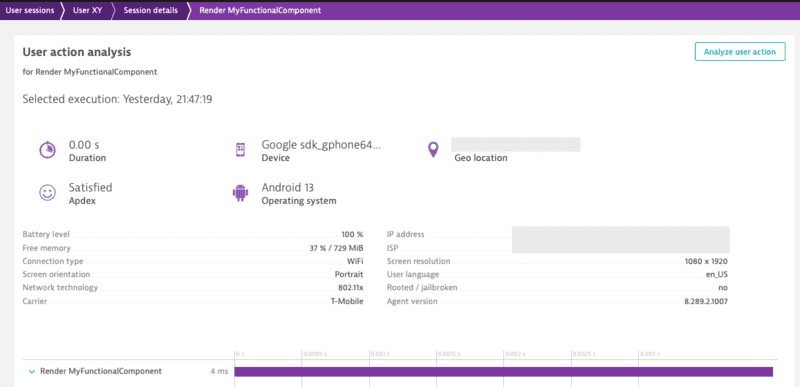
A component can be either monitored automatically or manually. The auto instrumentation is handled via the dynatrace.config.js file. If you want to manually instrument a component you can use the API call `withMonitoring`.
|
|
684
|
+
|
|
685
|
+
* Example with Functional Component:
|
|
687
686
|
|
|
688
687
|
```ts
|
|
689
688
|
import { Dynatrace } from '@dynatrace/react-native-plugin';
|
|
689
|
+
import { FunctionComponent } from 'react';
|
|
690
690
|
|
|
691
|
-
const
|
|
692
|
-
|
|
693
|
-
|
|
694
|
-
```
|
|
691
|
+
export const MyFunctionalComponent: FunctionComponent<{}> = () => {
|
|
692
|
+
return null;
|
|
693
|
+
}
|
|
695
694
|
|
|
696
|
-
|
|
695
|
+
Dynatrace.withMonitoring(MyFunctionalComponent, "MyFunctionalComponent");
|
|
696
|
+
```
|
|
697
|
+

|
|
697
698
|
|
|
698
|
-
|
|
699
|
+
The String "MyFunctionalComponent" is optional as the name of the component can be retrieved through [different properties](#how-does-dynatrace-determine-the-user-action-name).
|
|
699
700
|
|
|
700
|
-
|
|
701
|
-
import React from 'react';
|
|
702
|
-
import { TouchableHighlight, Text, View } from 'react-native';
|
|
701
|
+
Combining manual and auto instrumentation should not be a problem. As they're running the same execution, the manual instrumentation will only override the content of auto instrumentation happening through the transformer.
|
|
703
702
|
|
|
704
|
-
|
|
705
|
-
return (
|
|
706
|
-
<View>
|
|
707
|
-
<TouchableHighlight onPress={onPress}>
|
|
708
|
-
<Text>TouchableHighlight that will be monitored</Text>
|
|
709
|
-
</TouchableHighlight>
|
|
710
|
-
<TouchableHighlight onPress={onPress} dtActionIgnore="true">
|
|
711
|
-
<Text>TouchableHighlight that will be ignored</Text>
|
|
712
|
-
</TouchableHighlight>
|
|
713
|
-
</View>
|
|
714
|
-
);
|
|
715
|
-
};
|
|
703
|
+
### Create custom actions
|
|
716
704
|
|
|
717
|
-
|
|
718
|
-
console.log("TouchableHighlight Pressed!");
|
|
719
|
-
};
|
|
705
|
+
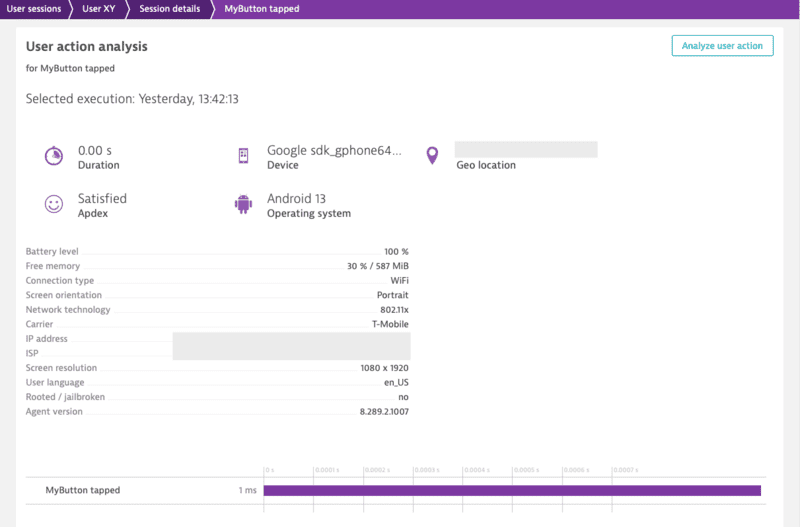
There are two options to create an action. Either using `enterAutoAction` (the previous `enterAction`) or `enterManualAction`:
|
|
720
706
|
|
|
721
|
-
|
|
722
|
-
```
|
|
707
|
+
**Important:** Action names are limited to 250 characters and will be truncated if they exceed this limit.
|
|
723
708
|
|
|
724
|
-
|
|
709
|
+
* `enterAutoAction` - Creates an Action which will be automatically handled by the plugin (This is the type of action which is internally used by the plugin when monitoring components and touchables). This means that the plugin decides about the hierarchy of this action. If there is no open action, the following action will be a root action. All other actions created by this method, while a root action is open, will be automatically inserted as a child action. Furthermore the plugin will automatically link webrequest (if they are not tagged manually) to the open root action. Be aware that the timeout/wait time for sub actions or web requests cannot be modified on the Android side for React Native Auto actions. The timeout is fixed to a 1000ms.
|
|
725
710
|
|
|
726
|
-
|
|
711
|
+
```ts
|
|
712
|
+
import { Dynatrace } from '@dynatrace/react-native-plugin';
|
|
727
713
|
|
|
728
|
-
|
|
714
|
+
const myAction = Dynatrace.enterAutoAction("MyButton tapped");
|
|
715
|
+
//Perform the action and whatever else is needed.
|
|
716
|
+
myAction.leaveAction();
|
|
717
|
+
```
|
|
718
|
+

|
|
729
719
|
|
|
730
|
-
|
|
720
|
+
* `enterManualAction` - Creates an Action which will NOT be handled by the plugin. This means that you have full control about the hierarchy of your actions. This function will create a root action for you, which has the ability to create child actions via `enterAction`. Be aware, because of the full manual approach the plugin will not link webrequest automatically. Webrequest have to be manually tagged by using the tag provided by the action via `getRequestTag`.
|
|
731
721
|
|
|
732
|
-
|
|
722
|
+
```ts
|
|
723
|
+
import { Dynatrace } from '@dynatrace/react-native-plugin';
|
|
733
724
|
|
|
734
|
-
|
|
725
|
+
const myAction = Dynatrace.enterManualAction("MyButton tapped");
|
|
726
|
+
//Perform the action and whatever else is needed.
|
|
727
|
+
myAction.leaveAction();
|
|
728
|
+
```
|
|
735
729
|
|
|
736
|
-
|
|
730
|
+
To create a custom action named `"MyButton tapped"`, use the following code. The *leaveAction* closes the action again. To report values for this action before closing, see [Report Values](#report-values).
|
|
737
731
|
|
|
738
732
|
```ts
|
|
739
|
-
import { Dynatrace
|
|
733
|
+
import { Dynatrace } from '@dynatrace/react-native-plugin';
|
|
740
734
|
|
|
741
|
-
|
|
742
|
-
|
|
743
|
-
|
|
744
|
-
.addEventProperty("event_properties.user_type", "premium")
|
|
745
|
-
.addEventProperty("event_properties.attempt_count", 3)
|
|
746
|
-
.withDuration(250)
|
|
747
|
-
);
|
|
735
|
+
const myAction = Dynatrace.enterAutoAction("MyButton tapped");
|
|
736
|
+
//Perform the action and whatever else is needed.
|
|
737
|
+
myAction.leaveAction();
|
|
748
738
|
```
|
|
749
739
|
|
|
750
|
-
|
|
751
|
-
* Only properties prefixed with `event_properties.*` are allowed
|
|
752
|
-
* Additionally, the `duration` property is allowed
|
|
753
|
-
* Maximum of 50 custom properties per event
|
|
754
|
-
* If the limit is exceeded, properties are sorted alphabetically by key and excess properties are dropped deterministically
|
|
755
|
-
* String properties are limited to 5000 characters (exceeding characters are truncated)
|
|
756
|
-
* Field names must contain only alphabetic characters, numbers, underscores, and dots
|
|
757
|
-
* Each dot must be followed by an alphabetic character
|
|
758
|
-
* Each underscore must be followed by an alphabetic character or number
|
|
759
|
-
* Values must be primitive types (string, number, boolean)
|
|
760
|
-
* Cannot contain functions, undefined, Infinity, or NaN as values (they will be replaced with null)
|
|
740
|
+
### Create custom sub actions
|
|
761
741
|
|
|
762
|
-
|
|
742
|
+
You can create a single custom action as well as sub actions. The `MyButton Sub Action` is automatically put under the `MyButton tapped`. As long as `MyButton tapped` is open, it gathers all the web requests.
|
|
763
743
|
|
|
764
|
-
|
|
744
|
+
**Important:** Action names are limited to 250 characters and will be truncated if they exceed this limit.
|
|
765
745
|
|
|
766
746
|
```ts
|
|
767
|
-
import { Dynatrace
|
|
747
|
+
import { Dynatrace } from '@dynatrace/react-native-plugin';
|
|
768
748
|
|
|
769
|
-
|
|
770
|
-
|
|
771
|
-
|
|
772
|
-
|
|
773
|
-
|
|
774
|
-
);
|
|
749
|
+
const myAction = Dynatrace.enterManualAction("MyButton tapped");
|
|
750
|
+
const mySubAction = myAction.enterAction("MyButton Sub Action");
|
|
751
|
+
//Perform the action and whatever else is needed.
|
|
752
|
+
mySubAction.leaveAction();
|
|
753
|
+
myAction.leaveAction();
|
|
775
754
|
```
|
|
755
|
+

|
|
776
756
|
|
|
777
|
-
|
|
778
|
-
* Session properties persist throughout the entire session
|
|
779
|
-
* If you send the same property multiple times, only one value will be kept (first or last)
|
|
780
|
-
* Use session properties for data that applies to the entire user session
|
|
781
|
-
* Field naming follows the same rules as events, but with `session_properties.` prefix
|
|
782
|
-
* Maximum of 50 custom properties per event
|
|
783
|
-
* If the limit is exceeded, properties are sorted alphabetically by key and excess properties are dropped deterministically
|
|
784
|
-
|
|
785
|
-
### Event Modifier
|
|
757
|
+
### Cancel actions
|
|
786
758
|
|
|
787
|
-
|
|
759
|
+
Actions can be canceled. That means they will not be sent and discarded fully. This also means that any values and sub actions attached to the action will be removed.
|
|
788
760
|
|
|
789
|
-
|
|
761
|
+
```ts
|
|
762
|
+
import { Dynatrace } from '@dynatrace/react-native-plugin';
|
|
790
763
|
|
|
791
|
-
|
|
764
|
+
const myAction = Dynatrace.enterAutoAction("MyButton tapped");
|
|
765
|
+
// Action will be canceled
|
|
766
|
+
myAction.cancel();
|
|
792
767
|
|
|
793
|
-
|
|
794
|
-
|
|
795
|
-
|
|
768
|
+
// Has no impact as the action is already canceled
|
|
769
|
+
myAction.leaveAction();
|
|
770
|
+
```
|
|
796
771
|
|
|
797
|
-
|
|
772
|
+
### Manual Web Request Tagging
|
|
798
773
|
|
|
799
|
-
|
|
800
|
-
- `url.full`
|
|
801
|
-
- `exception.stack_trace`
|
|
774
|
+
You can manually tag and time your web requests. With the API shown below, you are able to manually capture the web requests of an http framework/library.
|
|
802
775
|
|
|
803
|
-
|
|
776
|
+
**Note:**
|
|
777
|
+
Using this API will force the request to be added to the action that is manually created.
|
|
804
778
|
|
|
805
779
|
```ts
|
|
806
|
-
import { Dynatrace,
|
|
780
|
+
import { Dynatrace, DynatraceWebRequestTiming } from '@dynatrace/react-native-plugin';
|
|
807
781
|
|
|
808
|
-
|
|
809
|
-
const
|
|
810
|
-
|
|
811
|
-
|
|
812
|
-
|
|
813
|
-
|
|
814
|
-
|
|
815
|
-
|
|
816
|
-
|
|
817
|
-
|
|
782
|
+
const action = Dynatrace.enterManualAction('API Data Fetch');
|
|
783
|
+
const url = 'https://api.example.com/data';
|
|
784
|
+
const tag = await action.getRequestTag(url);
|
|
785
|
+
const timing = new DynatraceWebRequestTiming(tag, url);
|
|
786
|
+
|
|
787
|
+
try {
|
|
788
|
+
timing.startWebRequestTiming();
|
|
789
|
+
const response = await fetch(url, {
|
|
790
|
+
headers: {
|
|
791
|
+
[timing.getRequestTagHeader()]: tag
|
|
818
792
|
}
|
|
819
|
-
|
|
820
|
-
|
|
793
|
+
});
|
|
794
|
+
timing.stopWebRequestTiming(response.status, response.statusText);
|
|
795
|
+
} catch (error) {
|
|
796
|
+
if (error instanceof Error) {
|
|
797
|
+
timing.stopWebRequestTiming(-1, error.message);
|
|
798
|
+
} else {
|
|
799
|
+
timing.stopWebRequestTiming(-1, (error as any).toString());
|
|
821
800
|
}
|
|
822
|
-
}
|
|
823
|
-
|
|
824
|
-
|
|
825
|
-
Dynatrace.addEventModifier(myModifier);
|
|
826
|
-
|
|
827
|
-
// Remove the modifier when no longer needed
|
|
828
|
-
Dynatrace.removeEventModifier(myModifier);
|
|
801
|
+
} finally {
|
|
802
|
+
action.leaveAction();
|
|
803
|
+
}
|
|
829
804
|
```
|
|
805
|
+

|
|
830
806
|
|
|
831
|
-
|
|
832
|
-
|
|
833
|
-
- **Execution order**: If multiple event modifiers are added, they are executed in the order they were added
|
|
834
|
-
- **Returning null**: Returning `null` discards the event and prevents future modifier functions from being executed
|
|
835
|
-
- **Performance**: Event modifiers should be efficient as they are called for every event
|
|
836
|
-
- **Field naming**: Custom properties must follow the `event_properties.*` or `session_properties.*` prefix naming convention
|
|
837
|
-
- **Reserved fields**: Certain reserved fields and namespaces cannot be modified. Attempts to modify them will be ignored
|
|
838
|
-
- **Error handling**: If a modifier throws an exception, it will be logged but won't prevent other modifiers from executing
|
|
839
|
-
- **Primitive values**: Event fields can only contain primitive values (String, int, double, bool)
|
|
840
|
-
- **Invalid argument**: In case you pass an invalid argument to `addEventModifier`, we return a no-op placeholder modifier.
|
|
841
|
-
|
|
842
|
-
### Send Exception Event
|
|
843
|
-
|
|
844
|
-
The `sendExceptionEvent()` method provides a structured way to report exceptions with additional context and custom properties using the ExceptionEventData class.
|
|
807
|
+
There is also the option to report values for request and response size:
|
|
845
808
|
|
|
846
809
|
```ts
|
|
847
|
-
import { Dynatrace,
|
|
810
|
+
import { Dynatrace, DynatraceWebRequestTiming } from '@dynatrace/react-native-plugin';
|
|
811
|
+
|
|
812
|
+
const action = Dynatrace.enterManualAction('API Data Upload');
|
|
813
|
+
const url = 'https://api.example.com/upload';
|
|
814
|
+
const tag = await action.getRequestTag(url);
|
|
815
|
+
const timing = new DynatraceWebRequestTiming(tag, url);
|
|
816
|
+
const requestData = JSON.stringify({ key: 'value' });
|
|
848
817
|
|
|
849
818
|
try {
|
|
850
|
-
|
|
851
|
-
|
|
819
|
+
timing.startWebRequestTiming();
|
|
820
|
+
const response = await fetch(url, {
|
|
821
|
+
method: 'POST',
|
|
822
|
+
headers: {
|
|
823
|
+
[timing.getRequestTagHeader()]: tag,
|
|
824
|
+
'Content-Type': 'application/json'
|
|
825
|
+
},
|
|
826
|
+
body: requestData
|
|
827
|
+
});
|
|
828
|
+
const responseData = await response.text();
|
|
829
|
+
timing.stopWebRequestTimingWithSize(
|
|
830
|
+
response.status,
|
|
831
|
+
response.statusText,
|
|
832
|
+
requestData.length,
|
|
833
|
+
responseData.length
|
|
834
|
+
);
|
|
852
835
|
} catch (error) {
|
|
853
836
|
if (error instanceof Error) {
|
|
854
|
-
|
|
855
|
-
|
|
856
|
-
|
|
857
|
-
);
|
|
837
|
+
timing.stopWebRequestTiming(-1, error.message);
|
|
838
|
+
} else {
|
|
839
|
+
timing.stopWebRequestTiming(-1, (error as any).toString());
|
|
858
840
|
}
|
|
841
|
+
} finally {
|
|
842
|
+
action.leaveAction();
|
|
859
843
|
}
|
|
860
844
|
```
|
|
845
|
+

|
|
861
846
|
|
|
862
|
-
|
|
863
|
-
* `error`: The Error object containing exception information (required)
|
|
864
|
-
|
|
865
|
-
### Send HTTP Request Event
|
|
847
|
+
### Report values
|
|
866
848
|
|
|
867
|
-
|
|
849
|
+
For any open action you can report certain values. The following API is available for action:
|
|
868
850
|
|
|
869
851
|
```ts
|
|
870
|
-
import {
|
|
871
|
-
|
|
872
|
-
// Basic HTTP request event
|
|
873
|
-
const requestEventData = new HttpRequestEventData('https://api.example.com/users', 'GET');
|
|
874
|
-
Dynatrace.sendHttpRequestEvent(requestEventData);
|
|
852
|
+
import { Platform } from '@dynatrace/react-native-plugin';
|
|
875
853
|
|
|
876
|
-
|
|
877
|
-
|
|
878
|
-
|
|
879
|
-
|
|
880
|
-
|
|
854
|
+
interface IDynatraceAction {
|
|
855
|
+
reportDoubleValue(valueName: string, value: number, platform?: Platform): void;
|
|
856
|
+
reportError(errorName: string, errorCode: number, platform?: Platform): void;
|
|
857
|
+
reportEvent(eventName: string, platform?: Platform): void;
|
|
858
|
+
reportIntValue(valueName: string, value: number, platform?: Platform): void;
|
|
859
|
+
reportStringValue(valueName: string, value: string, platform?: Platform): void;
|
|
860
|
+
}
|
|
881
861
|
```
|
|
882
862
|
|
|
883
|
-
**
|
|
884
|
-
* `url`: The URL of the HTTP request (required)
|
|
885
|
-
* `method`: The HTTP method (e.g., 'GET', 'POST', 'PUT', 'DELETE') (required)
|
|
863
|
+
**Important:** All string parameters (errorName, eventName, valueName, value) are limited to 250 characters and will be truncated if they exceed this limit.
|
|
886
864
|
|
|
887
|
-
|
|
865
|
+
To report a string value, use the following:
|
|
888
866
|
|
|
889
|
-
|
|
867
|
+
```ts
|
|
868
|
+
import { Dynatrace } from '@dynatrace/react-native-plugin';
|
|
890
869
|
|
|
891
|
-
|
|
892
|
-
|
|
893
|
-
|
|
870
|
+
const myAction = Dynatrace.enterAutoAction("MyButton tapped");
|
|
871
|
+
myAction.reportStringValue("ValueName", "ImportantValue");
|
|
872
|
+
myAction.leaveAction();
|
|
873
|
+
```
|
|
874
|
+

|
|
894
875
|
|
|
895
|
-
|
|
876
|
+
If you look at the API calls, you will see the optional parameter `platform?: Platform`. This parameter offers the possibility to report values only for a specific platform. to know more, see [Platform independent reporting](#platform-independent-reporting).
|
|
896
877
|
|
|
897
|
-
#### Automatic Navigation tracking
|
|
898
878
|
|
|
899
|
-
|
|
879
|
+
### Report an error stacktrace
|
|
900
880
|
|
|
901
|
-
|
|
881
|
+
To manually report an error stacktrace, use the following API call:
|
|
902
882
|
|
|
903
|
-
```
|
|
904
|
-
|
|
905
|
-
|
|
906
|
-
|
|
883
|
+
```ts
|
|
884
|
+
import { Dynatrace } from '@dynatrace/react-native-plugin';
|
|
885
|
+
|
|
886
|
+
try {
|
|
887
|
+
throw new Error('Database connection failed');
|
|
888
|
+
} catch (error) {
|
|
889
|
+
if (error instanceof Error) {
|
|
890
|
+
Dynatrace.reportErrorStacktrace(
|
|
891
|
+
'DatabaseError',
|
|
892
|
+
error.message,
|
|
893
|
+
'Failed to connect to remote database',
|
|
894
|
+
error.stack || 'No stack trace available'
|
|
895
|
+
);
|
|
907
896
|
}
|
|
908
897
|
}
|
|
909
898
|
```
|
|
899
|
+

|
|
910
900
|
|
|
911
|
-
|
|
901
|
+
**Note:**
|
|
902
|
+
The previous API without *errorValue* is deprecated and will be removed in the future. Please use the new API with errorValue if possible.
|
|
912
903
|
|
|
913
|
-
|
|
914
|
-
```js
|
|
915
|
-
const Drawer = createDrawerNavigator();
|
|
904
|
+
### Manually report a crash
|
|
916
905
|
|
|
917
|
-
|
|
918
|
-
return (
|
|
919
|
-
<NavigationContainer>
|
|
920
|
-
<Drawer.Navigator initialRouteName="Home">
|
|
921
|
-
<Drawer.Screen name="Home" component={HomeScreen} />
|
|
922
|
-
<Drawer.Screen name="Feature" component={FeatureScreen}/>
|
|
923
|
-
</Drawer.Navigator>
|
|
924
|
-
</NavigationContainer>
|
|
925
|
-
);
|
|
926
|
-
}
|
|
906
|
+
You can manually report a crash via the following API calls:
|
|
927
907
|
|
|
928
|
-
|
|
908
|
+
```ts
|
|
909
|
+
import { Dynatrace } from '@dynatrace/react-native-plugin';
|
|
929
910
|
|
|
930
|
-
|
|
931
|
-
|
|
932
|
-
|
|
933
|
-
|
|
934
|
-
|
|
935
|
-
|
|
936
|
-
|
|
911
|
+
try {
|
|
912
|
+
throw new Error('Fatal memory allocation failure');
|
|
913
|
+
} catch (error) {
|
|
914
|
+
if (error instanceof Error) {
|
|
915
|
+
Dynatrace.reportCrash(
|
|
916
|
+
'MemoryError',
|
|
917
|
+
error.message,
|
|
918
|
+
error.stack || 'No stack trace available'
|
|
919
|
+
);
|
|
920
|
+
|
|
921
|
+
// or directly via the full error
|
|
922
|
+
Dynatrace.reportCrashWithException('MemoryError', error);
|
|
923
|
+
}
|
|
937
924
|
}
|
|
938
925
|
```
|
|
926
|
+

|
|
939
927
|
|
|
940
|
-
|
|
928
|
+
> **Note**: If you use this API call to report a crash manually, it will force the session to be completed. Any new actions that are captured afterwards will be added into a new session.
|
|
941
929
|
|
|
942
|
-
|
|
930
|
+
*reportCrashWithException* will use the crashName as name for the crash. It will only report the crash if there is also a stacktrace available.
|
|
943
931
|
|
|
944
|
-
|
|
932
|
+
### Report GPS Location
|
|
933
|
+
|
|
934
|
+
You can report latitude and longitude and specify an optional platform.
|
|
945
935
|
|
|
946
936
|
```ts
|
|
947
937
|
import { Dynatrace } from '@dynatrace/react-native-plugin';
|
|
948
938
|
|
|
949
|
-
|
|
950
|
-
|
|
951
|
-
```
|
|
952
|
-
|
|
953
|
-
**Important Considerations:**
|
|
954
|
-
* Only one view can be active at a time
|
|
955
|
-
* Starting a new view will automatically stop the previous one
|
|
956
|
-
* View names should be meaningful and consistent across your application
|
|
957
|
-
* All events captured after starting a view will include the view context
|
|
939
|
+
Dynatrace.setGPSLocation(48.31518732698596, 14.305245274594471);
|
|
940
|
+
```
|
|
958
941
|
|
|
959
|
-
|
|
942
|
+
### Platform independent reporting
|
|
960
943
|
|
|
944
|
+
You probably noticed that each method has an additional *optional* parameter named `platform` of type `Platform`. You can use this to only trigger manual instrumentation for a specific OS. The available values are: `Platform.Ios` and `Platform.Android`. Default is that it will work on any platform. Otherwise it is passed *only* to the relevant OS. For example:
|
|
945
|
+
* Passing to **iOS** only:
|
|
961
946
|
```ts
|
|
962
|
-
import { Dynatrace,
|
|
947
|
+
import { Dynatrace, Platform } from '@dynatrace/react-native-plugin';
|
|
963
948
|
|
|
964
|
-
|
|
965
|
-
|
|
949
|
+
const myAction = Dynatrace.enterAutoAction("MyButton tapped", Platform.Ios);
|
|
950
|
+
//Perform the action and whatever else is needed.
|
|
951
|
+
myAction.leaveAction(Platform.Ios);
|
|
952
|
+
```
|
|
953
|
+
|
|
954
|
+
* Passing to **Android** only:
|
|
955
|
+
```ts
|
|
956
|
+
import { Dynatrace, Platform } from '@dynatrace/react-native-plugin';
|
|
966
957
|
|
|
967
|
-
|
|
968
|
-
|
|
969
|
-
|
|
970
|
-
|
|
971
|
-
|
|
958
|
+
const myAction = Dynatrace.enterAutoAction("MyButton tapped", Platform.Android);
|
|
959
|
+
//Perform the action and whatever else is needed.
|
|
960
|
+
myAction.leaveAction(Platform.Android);
|
|
961
|
+
```
|
|
962
|
+
|
|
963
|
+
* Passing to **both**:
|
|
964
|
+
```ts
|
|
965
|
+
import { Dynatrace } from '@dynatrace/react-native-plugin';
|
|
972
966
|
|
|
973
|
-
|
|
974
|
-
|
|
967
|
+
const myAction = Dynatrace.enterAutoAction("MyButton tapped");
|
|
968
|
+
//Perform the action and whatever else is needed.
|
|
969
|
+
myAction.leaveAction();
|
|
975
970
|
```
|
|
976
971
|
|
|
977
|
-
###
|
|
972
|
+
### Business event capturing
|
|
978
973
|
|
|
979
|
-
|
|
974
|
+
With `sendBizEvent`, you can report business events. These events are standalone events, as OneAgent sends them detached from user actions or user sessions.
|
|
980
975
|
|
|
981
|
-
|
|
976
|
+
For more information on business events, see [dynatrace documentation](https://docs.dynatrace.com/docs/observe/business-observability/explore-business-events).
|
|
982
977
|
|
|
983
|
-
```
|
|
984
|
-
|
|
985
|
-
|
|
986
|
-
|
|
978
|
+
```ts
|
|
979
|
+
import { Dynatrace } from '@dynatrace/react-native-plugin';
|
|
980
|
+
|
|
981
|
+
Dynatrace.sendBizEvent("com.easytravel.funnel.booking-finished", {
|
|
982
|
+
"event.name" : "Confirmed Booking",
|
|
983
|
+
"screen": "booking-confirmation",
|
|
984
|
+
"product": "Danube Anna Hotel",
|
|
985
|
+
"amount": 358.35,
|
|
986
|
+
"currency": "USD",
|
|
987
|
+
"reviewScore": 4.8,
|
|
988
|
+
"arrivalDate": "2022-11-05",
|
|
989
|
+
"departureDate": "2022-11-15",
|
|
990
|
+
"journeyDuration": 10,
|
|
991
|
+
"adultTravelers": 2,
|
|
992
|
+
"childrenTravelers": 0
|
|
993
|
+
});
|
|
987
994
|
```
|
|
995
|
+

|
|
988
996
|
|
|
989
|
-
|
|
997
|
+
### Setting beacon headers
|
|
990
998
|
|
|
991
|
-
|
|
992
|
-
- `react.userInteraction: true|false` controls whether the UI Interaction instrumentation feature is applied.
|
|
999
|
+
This allows you to put a set of http headers on every agent http request (i.e. Authorization header etc.). It will also triggers the agent to reconnect to the beacon endpoint with the new headers.
|
|
993
1000
|
|
|
994
|
-
|
|
995
|
-
- Runtime emission checks the remote flag `touch_interaction_enabled`.
|
|
996
|
-
- If remote flag is present, it is used as the source of truth.
|
|
997
|
-
- If remote flag is temporarily unavailable, the plugin falls back to the last known good remote value.
|
|
998
|
-
- If no remote value was received yet, runtime defaults to enabled behavior.
|
|
1001
|
+
**Note:** To clear the previously set headers, call the method without the headers parameter or with a null value for the headers parameter.
|
|
999
1002
|
|
|
1000
|
-
|
|
1003
|
+
```ts
|
|
1004
|
+
import { Dynatrace } from '@dynatrace/react-native-plugin';
|
|
1001
1005
|
|
|
1002
|
-
|
|
1006
|
+
const beaconHeaders = new Map<string, string>();
|
|
1007
|
+
beaconHeaders.set('headerName', 'headerValue');
|
|
1008
|
+
Dynatrace.setBeaconHeaders(beaconHeaders);
|
|
1009
|
+
```
|
|
1003
1010
|
|
|
1004
|
-
|
|
1011
|
+
### Exclude Individual JSX Elements
|
|
1005
1012
|
|
|
1006
|
-
|
|
1007
|
-
* the runtime masking rules classify the detected text as sensitive
|
|
1008
|
-
* the runtime masking rules classify the element `testID` as sensitive
|
|
1013
|
+
If you want to instrument a functional component or class component but want to exclude a certain button or element, you can do this via the `dtActionIgnore` property. Example:
|
|
1009
1014
|
|
|
1010
|
-
|
|
1015
|
+
```tsx
|
|
1016
|
+
import React from 'react';
|
|
1017
|
+
import { TouchableHighlight, Text, View } from 'react-native';
|
|
1011
1018
|
|
|
1012
|
-
|
|
1013
|
-
|
|
1014
|
-
|
|
1019
|
+
const TouchableHighlightScreen = () => {
|
|
1020
|
+
return (
|
|
1021
|
+
<View>
|
|
1022
|
+
<TouchableHighlight onPress={onPress}>
|
|
1023
|
+
<Text>TouchableHighlight that will be monitored</Text>
|
|
1024
|
+
</TouchableHighlight>
|
|
1025
|
+
<TouchableHighlight onPress={onPress} dtActionIgnore="true">
|
|
1026
|
+
<Text>TouchableHighlight that will be ignored</Text>
|
|
1027
|
+
</TouchableHighlight>
|
|
1028
|
+
</View>
|
|
1029
|
+
);
|
|
1030
|
+
};
|
|
1015
1031
|
|
|
1016
|
-
|
|
1032
|
+
const onPress = () => {
|
|
1033
|
+
console.log("TouchableHighlight Pressed!");
|
|
1034
|
+
};
|
|
1017
1035
|
|
|
1018
|
-
|
|
1019
|
-
<View dtMask>
|
|
1020
|
-
<Pressable onPress={onPress}>
|
|
1021
|
-
<Text>john.doe@example.com</Text>
|
|
1022
|
-
</Pressable>
|
|
1023
|
-
</View>
|
|
1036
|
+
export default TouchableHighlightScreen;
|
|
1024
1037
|
```
|
|
1025
1038
|
|
|
1026
|
-
This
|
|
1027
|
-
|
|
1039
|
+
This example shows two *TouchableHighlight*, which will fire the *onPress()* function when pressed. The property `dtActionIgnore="true"` will prevent the monitoring of one of them. This means that the onPress will still be executed but we will no longer create a user action which is wrapping the button click.
|
|
1028
1040
|
|
|
1029
|
-
|
|
1041
|
+
>*Attention:* If you are using Typescript and want to set this property with type-safety, look [here](#typescript-setup-for-dtactionignore-and-dtactionname).
|
|
1030
1042
|
|
|
1031
|
-
|
|
1043
|
+
## Extended topics
|
|
1032
1044
|
|
|
1033
|
-
|
|
1034
|
-
- **Component** — the type of the UI component that was touched (e.g. `Pressable`).
|
|
1035
|
-
- **Component Path** — a stable path through the component tree that uniquely identifies the element (e.g. `App/View[1]/Pressable[1]`).
|
|
1036
|
-
- **Interaction type** — how the user interacted (e.g. `touch`).
|
|
1037
|
-
- **Position** — the screen coordinates where the touch occurred.
|
|
1045
|
+
### Identify a user
|
|
1038
1046
|
|
|
1039
|
-
|
|
1047
|
+
You can identify a user and tag the current session with a name by making the following call:
|
|
1040
1048
|
|
|
1041
|
-
|
|
1049
|
+
**Important:** The user identifier is limited to 250 characters and will be truncated if it exceeds this limit.
|
|
1042
1050
|
|
|
1043
|
-
|
|
1051
|
+
```ts
|
|
1052
|
+
import { Dynatrace } from '@dynatrace/react-native-plugin';
|
|
1044
1053
|
|
|
1045
|
-
|
|
1046
|
-
{
|
|
1047
|
-
"characteristics.has_user_interaction": true,
|
|
1048
|
-
"ui_element.detected_name": "LoginButton",
|
|
1049
|
-
"ui_element.components": ["Pressable"],
|
|
1050
|
-
"ui_element.id": "App/View/Pressable",
|
|
1051
|
-
"ui_element.name_origin": "component",
|
|
1052
|
-
"interaction.type": "touch",
|
|
1053
|
-
"positions": [{ "x": 120, "y": 460 }],
|
|
1054
|
-
"ui_element.responder.detected_name": "Pressable",
|
|
1055
|
-
"ui_element.responder.components": ["Pressable"],
|
|
1056
|
-
"ui_element.responder.id": "App/View[/Pressable",
|
|
1057
|
-
"ui_element.responder.name_origin": "component"
|
|
1058
|
-
}
|
|
1054
|
+
Dynatrace.identifyUser("User XY");
|
|
1059
1055
|
```
|
|
1056
|
+

|
|
1060
1057
|
|
|
1061
|
-
|
|
1062
|
-
|
|
1063
|
-
You can assign custom names to your components. A custom name affects both the **Component** and the **Component Path** described above. There are two ways to do this, depending on how the component is used.
|
|
1058
|
+
### End the current user session
|
|
1064
1059
|
|
|
1065
|
-
|
|
1060
|
+
To end the current user session, use the following API call:
|
|
1066
1061
|
|
|
1067
|
-
|
|
1062
|
+
```ts
|
|
1063
|
+
import { Dynatrace } from '@dynatrace/react-native-plugin';
|
|
1068
1064
|
|
|
1069
|
-
|
|
1070
|
-
<TouchableOpacity dtActionName="Checkout Button" onPress={onCheckout}>
|
|
1071
|
-
<Text dtActionName="Checkout Text">Buy now</Text>
|
|
1072
|
-
</TouchableOpacity>
|
|
1065
|
+
Dynatrace.endSession();
|
|
1073
1066
|
```
|
|
1074
1067
|
|
|
1075
|
-
|
|
1068
|
+
**Note:** The user tagging will not carry over to the new user session that is started after using this API. If user tagging is desired in the new user session, please ensure that you call the [user tagging](#identify-a-user) API.
|
|
1076
1069
|
|
|
1077
|
-
|
|
1078
|
-
"ui_element.components": ["Checkout Text"],
|
|
1079
|
-
"ui_element.id": ".../Checkout Button/Checkout Text"
|
|
1080
|
-
```
|
|
1070
|
+
### User Privacy Options
|
|
1081
1071
|
|
|
1082
|
-
|
|
1072
|
+
The privacy API methods allow you to dynamically change the data-collection level based on the individual preferences of your end users. Each end user can select from three data-privacy levels:
|
|
1083
1073
|
|
|
1084
|
-
|
|
1074
|
+
```ts
|
|
1075
|
+
export enum DataCollectionLevel {
|
|
1076
|
+
Off, Performance, UserBehavior
|
|
1077
|
+
}
|
|
1078
|
+
```
|
|
1085
1079
|
|
|
1086
|
-
|
|
1087
|
-
|
|
1088
|
-
|
|
1080
|
+
1. Off: Native Agent doesn't capture any monitoring data.
|
|
1081
|
+
2. Performance: Native Agent captures only anonymous performance data. Monitoring data that can be used to identify individual users, such as user tags and custom values, aren't captured.
|
|
1082
|
+
3. UserBehavior: Native Agent captures both performance and user data. In this mode, Native Agent recognizes and reports users who re-visit in future sessions.
|
|
1089
1083
|
|
|
1090
|
-
|
|
1084
|
+
Crash reporting is enabled by default. The Mobile agent captures all unhandled exceptions/errors and immediately sends the crash report to the server. With this API you can activate or deactivate crash reporting. To change this behaviour via the API, enable/activate [`userOptIn`](#user-opt-in-mode) and set the User Privacy Options.
|
|
1091
1085
|
|
|
1092
|
-
|
|
1093
|
-
return (/* ... */);
|
|
1094
|
-
}
|
|
1086
|
+
The API to get and set the current privacy level looks like this:
|
|
1095
1087
|
|
|
1096
|
-
|
|
1097
|
-
|
|
1088
|
+
```ts
|
|
1089
|
+
import { Platform, UserPrivacyOptions } from '@dynatrace/react-native-plugin';
|
|
1098
1090
|
|
|
1099
|
-
|
|
1100
|
-
|
|
1101
|
-
|
|
1102
|
-
<Drawer.Navigator>
|
|
1103
|
-
{/* Both screens reference the same component,
|
|
1104
|
-
so both pick up the 'User Profile' name */}
|
|
1105
|
-
<Drawer.Screen name="Me" component={ProfileScreen} />
|
|
1106
|
-
<Drawer.Screen name="Account" component={ProfileScreen} />
|
|
1107
|
-
</Drawer.Navigator>
|
|
1108
|
-
</NavigationContainer>
|
|
1109
|
-
);
|
|
1091
|
+
interface IDynatrace {
|
|
1092
|
+
getUserPrivacyOptions(platform?: Platform): Promise<UserPrivacyOptions>;
|
|
1093
|
+
applyUserPrivacyOptions(userPrivacyOptions: UserPrivacyOptions, platform?: Platform): void;
|
|
1110
1094
|
}
|
|
1111
1095
|
```
|
|
1112
1096
|
|
|
1113
|
-
|
|
1114
|
-
|
|
1115
|
-
```json
|
|
1116
|
-
"ui_element.id": ".../User Profile/..."
|
|
1117
|
-
```
|
|
1118
|
-
|
|
1119
|
-
> **Note:** The static property applies to *all* uses of the component. If you need a different name per usage, render the component as JSX and use the `dtActionName` prop (option 1) instead.
|
|
1120
|
-
>
|
|
1121
|
-
> **Note:** The static property has no effect when a component is rendered as JSX. In that case the name is taken from either the `dtActionName` prop passed to it (option 1) or the name of the JSX component.
|
|
1122
|
-
|
|
1123
|
-
### React Native Symbolication
|
|
1097
|
+
To check the current privacy options that are set:
|
|
1124
1098
|
|
|
1125
|
-
|
|
1099
|
+
```ts
|
|
1100
|
+
import { Dynatrace } from '@dynatrace/react-native-plugin';
|
|
1126
1101
|
|
|
1127
|
-
|
|
1102
|
+
const privacyOptions = await Dynatrace.getUserPrivacyOptions();
|
|
1103
|
+
```
|
|
1128
1104
|
|
|
1129
|
-
|
|
1105
|
+
If you want to create a new `UserPrivacyOptions` object and pass it to Dynatrace:
|
|
1130
1106
|
|
|
1131
|
-
|
|
1107
|
+
```ts
|
|
1108
|
+
import { Dynatrace, DataCollectionLevel, UserPrivacyOptions } from '@dynatrace/react-native-plugin';
|
|
1132
1109
|
|
|
1133
|
-
|
|
1134
|
-
* Run `npx react-native run-android --mode release` in your project root, or
|
|
1135
|
-
* Run `gradlew assembleRelease` in the `/android` directory
|
|
1110
|
+
const privacyConfig = new UserPrivacyOptions(DataCollectionLevel.UserBehavior, true);
|
|
1136
1111
|
|
|
1137
|
-
|
|
1138
|
-
|
|
1139
|
-
|
|
1140
|
-
* Build for release in Xcode
|
|
1112
|
+
// Getter and setter available for UserPrivacyOptions
|
|
1113
|
+
privacyConfig.crashReportingOptedIn = false;
|
|
1114
|
+
privacyConfig.dataCollectionLevel = DataCollectionLevel.Performance;
|
|
1141
1115
|
|
|
1142
|
-
|
|
1116
|
+
const level = privacyConfig.dataCollectionLevel;
|
|
1117
|
+
const crashReporting = privacyConfig.crashReportingOptedIn;
|
|
1143
1118
|
|
|
1144
|
-
|
|
1119
|
+
Dynatrace.applyUserPrivacyOptions(privacyConfig);
|
|
1120
|
+
```
|
|
1145
1121
|
|
|
1146
1122
|
## NPX Commands
|
|
1147
1123
|
|
|
@@ -1149,7 +1125,6 @@ The following npx commands are available for the plugin:
|
|
|
1149
1125
|
|
|
1150
1126
|
* npx instrumentDynatrace - Is triggering the configuration process and will insert the configuration into the Android and iOS application. This is mandatory and should usually happen automatically when doing `react-native run-android` or `react-native run-ios` command.
|
|
1151
1127
|
* npx configDynatrace - Is checking the current configuration and is creating a default configuration if there is none.
|
|
1152
|
-
* npx lineOffsetDynatrace - ...
|
|
1153
1128
|
|
|
1154
1129
|
### npx instrumentDynatrace
|
|
1155
1130
|
|
|
@@ -1520,18 +1495,6 @@ The changes our auto-instrumentation is making now get dumped into the `node_mod
|
|
|
1520
1495
|
|
|
1521
1496
|
> **Note:** This feature increases the time it takes to build the Javascript bundle. Only use it for debugging purposes. Deactivate it otherwise, especially when fast build times are important.
|
|
1522
1497
|
|
|
1523
|
-
#### Using our legacy jscodeshift auto-instrumentation
|
|
1524
|
-
|
|
1525
|
-
We recently moved our auto-instrumentation to a babel plugin. In case you need to, you can still switch to the old jscodeshift auto-instrumentation with this flag:
|
|
1526
|
-
|
|
1527
|
-
```js
|
|
1528
|
-
react: {
|
|
1529
|
-
useLegacyJscodeshift: true
|
|
1530
|
-
}
|
|
1531
|
-
```
|
|
1532
|
-
|
|
1533
|
-
> **Note:** When we moved our auto-instrumentation to a babel plugin, we removed documentation that was only relevant for the jscodeshift auto-instrumentation. Most notably, we removed documentation concerning registering a custom metro transformer and patching sourcemaps. If you use the `useLegacyJscodeshift` flag, please refer to the [legacy documentation (v2.333.1)](https://www.npmjs.com/package/@dynatrace/react-native-plugin/v/2.333.1) for details on custom metro transformers and sourcemap patching.
|
|
1534
|
-
|
|
1535
1498
|
### Android block
|
|
1536
1499
|
|
|
1537
1500
|
The Android block is a wrapper for the Android configuration you find in the WebUI (in the Mobile Application Settings). Copy the content into the following block:
|
|
@@ -1701,7 +1664,7 @@ ios: {
|
|
|
1701
1664
|
* class name: If the display name is not available, the class name is used by taking the property name from the constructor
|
|
1702
1665
|
* Touchables, Buttons, Pressable
|
|
1703
1666
|
* dtActionName: Use a custom property called dtActionName
|
|
1704
|
-
* If [actionNamePrivacy](#
|
|
1667
|
+
* If [actionNamePrivacy](#manual-oneagent-startup) is activated anything below will not be detected
|
|
1705
1668
|
* title property
|
|
1706
1669
|
* accessibilityLabel property
|
|
1707
1670
|
* If none of the above exist, we recursively traverse `children` to find a name. We consider text, the source property of any `ReactNative.Image` and the name property of any functional component called `Icon`.
|
|
@@ -1751,7 +1714,7 @@ import { Text } from 'react-native';
|
|
|
1751
1714
|
</TouchableHighlight>
|
|
1752
1715
|
```
|
|
1753
1716
|
|
|
1754
|
-
*Note:* [actionNamePrivacy](#
|
|
1717
|
+
*Note:* [actionNamePrivacy](#manual-oneagent-startup) has no impact on using dtActionName. dtActionName will always be used.
|
|
1755
1718
|
|
|
1756
1719
|
>*Attention:* If you are using Typescript and want to set this property with type-safety, look [here](#typescript-setup-for-dtactionignore-and-dtactionname).
|
|
1757
1720
|
|
|
@@ -1765,7 +1728,7 @@ In general, Dynatrace always closes the session when a crash occurs. Usually a c
|
|
|
1765
1728
|
* Fatal error: If the error is considered as fatal by the React Native crash handler, it will be treated as crash.
|
|
1766
1729
|
* Native crashes: If a crash appears solely on the native side and is not noticed by the internal React Native crash handler, it will be reported directly by the Android or iOS agent.
|
|
1767
1730
|
* Exception: Some JavaScript crashes will result in Native crashes. Therefore, they are filtered on the native side as normally the crash would be reported twice. On the JavaScript side, these crashes are already reported by us before they hit the native side resulting in no lost information.
|
|
1768
|
-
Additionally, you can use our crash and error reporting APIs which are available with [
|
|
1731
|
+
Additionally, you can use our crash and error reporting APIs which are available with [RUM Classic](#rum-classic).
|
|
1769
1732
|
|
|
1770
1733
|
|
|
1771
1734
|
## React Automatic Runtime
|
|
@@ -2088,6 +2051,20 @@ If you are struggling with a problem, submit a support ticket to Dynatrace (supp
|
|
|
2088
2051
|
<br/><br/>
|
|
2089
2052
|
## Changelog
|
|
2090
2053
|
|
|
2054
|
+
In Progress
|
|
2055
|
+
|
|
2056
|
+
2.345.1
|
|
2057
|
+
* Updated Android (8.345.1.1003) & iOS Agent (8.345.1.1003)
|
|
2058
|
+
* Renamed `monitorNavigation` to `useNavigationMonitor`; React Navigation screen changes are now detected automatically, stamped with `start_time` and `duration`, and trigger Session Replay capture after the incoming screen settles
|
|
2059
|
+
* Added React Navigation support: settle detection on both Android and iOS bridges, UI-change capture toggling restored
|
|
2060
|
+
* Removed the bridge-side settle helper — the native agent now owns coalescing on both platforms
|
|
2061
|
+
* Added a runtime deprecation warning system
|
|
2062
|
+
* Removed the option to use the legacy jscodeshift auto-instrumentation by removing the `useLegacyJscodeshift` flag from `dynatrace.config.js`
|
|
2063
|
+
* Removed leading slash from reported view names
|
|
2064
|
+
* Discard user interaction actions when 3rd-gen instrumentation is disabled, even without an `onPress` callback
|
|
2065
|
+
* Android: compatibility fixes for AGP 9 and Kotlin 2.2 (React Native 0.87)
|
|
2066
|
+
* iOS: app-start measurement fixes for the new architecture
|
|
2067
|
+
|
|
2091
2068
|
2.343.1
|
|
2092
2069
|
* Updated Android (8.343.1.1038) & iOS Agent (8.343.1.1007)
|
|
2093
2070
|
* Added User Actions feature
|
|
@@ -2101,6 +2078,7 @@ If you are struggling with a problem, submit a support ticket to Dynatrace (supp
|
|
|
2101
2078
|
* Added `DYNATRACE_CONFIG` environment variable as an alternative way to specify the config file path for the Metro/Babel transformer.
|
|
2102
2079
|
* Added `npx instrumentDynatrace --reset` flag to clear a previously-persisted custom config path and revert the Metro/Babel transformer to the default `dynatrace.config.js` lookup. Useful after switching between build flavors that each use a different config file.
|
|
2103
2080
|
* Fixed incorrect `start_time` on Android app start events when `3rd_gen_enabled` is false. The `EventPipeline` was suppressing the `forwardAppStartEvent` timing-correction call along with all other 3rd-gen events, causing the native Dynatrace SDK to report its own stale process-creation timestamp instead of the actual JS bundle load time.
|
|
2081
|
+
* CP now always forwards User Interaction Actions (UIA) to the native agent unconditionally, regardless of the `touch_interaction_enabled` server configuration flag. The native agent is responsible for deciding whether to record or discard each UIA. This applies to both the Babel-instrumented (`AnalyticsRoot`/`TouchCapture`) and the legacy JSX-wrapped Touchables UIA paths.
|
|
2104
2082
|
|
|
2105
2083
|
2.341.1
|
|
2106
2084
|
* Updated Android (8.341.1.1004) & iOS Agent (8.341.1.1010)
|
|
@@ -2128,7 +2106,7 @@ If you are struggling with a problem, submit a support ticket to Dynatrace (supp
|
|
|
2128
2106
|
* Updated Android (8.337.2.1010) & iOS Agent (8.337.1.1003)
|
|
2129
2107
|
* Fixed gradle path derivation for custom `--gradle` arguments: the plugin now correctly probes the filesystem to auto-detect `app/build.gradle(.kts)` with proper Kotlin DSL support, and validates that only `build.gradle` or `build.gradle.kts` files are accepted (not `settings.gradle`).
|
|
2130
2108
|
* Enables [pnpm monorepo instrumentation](#pnpm-monorexpo-setup) by allowing explicit `config=`, `gradle=`, and `plist=` arguments in root `package.json` scripts, supporting shared native project layouts where `android/` and `ios/` are not co-located with each app.
|
|
2131
|
-
* Added [actionNamePreference](#
|
|
2109
|
+
* Added [actionNamePreference](#manual-oneagent-startup) and [actionNameAlgorithm](#manual-oneagent-startup) configuration flags.
|
|
2132
2110
|
|
|
2133
2111
|
2.335.1
|
|
2134
2112
|
* Updated Android (8.335.1.1001) & iOS Agent (8.335.1.1009)
|
|
@@ -2152,12 +2130,12 @@ If you are struggling with a problem, submit a support ticket to Dynatrace (supp
|
|
|
2152
2130
|
|
|
2153
2131
|
2.329.1
|
|
2154
2132
|
* Updated Android (8.329.1.1014) & iOS Agent (8.329.1.1017)
|
|
2155
|
-
* [New RUM experience](#
|
|
2156
|
-
* [New RUM experience](#
|
|
2157
|
-
* [New RUM experience](#
|
|
2133
|
+
* [New RUM experience](#real-user-monitoring-rum) Removed Dynatrace.stopView() API
|
|
2134
|
+
* [New RUM experience](#real-user-monitoring-rum) Enforcing length limitation of 5000 characters for user input values
|
|
2135
|
+
* [New RUM experience](#real-user-monitoring-rum) React Native Deobfuscation service via sourcemaps
|
|
2158
2136
|
* Adding [`npx lineOffsetDynatrace`](#npx-lineoffsetdynatrace) command
|
|
2159
|
-
* [New RUM experience](#
|
|
2160
|
-
* [New RUM experience](#
|
|
2137
|
+
* [New RUM experience](#real-user-monitoring-rum) Added automated view tracking via [navigation](#automatic-navigation-tracking)
|
|
2138
|
+
* [New RUM experience](#real-user-monitoring-rum) Event and session properties are now sorted alphabetically when the limit of 50 is exceeded, ensuring deterministic property dropping
|
|
2161
2139
|
|
|
2162
2140
|
2.327.2
|
|
2163
2141
|
* Fixed iOS startup time calculation issues for React Native 0.72 and lower
|
|
@@ -2166,7 +2144,7 @@ If you are struggling with a problem, submit a support ticket to Dynatrace (supp
|
|
|
2166
2144
|
|
|
2167
2145
|
2.327.1
|
|
2168
2146
|
* Added [Compose Compatibility Note](#compose-compatibility-note)
|
|
2169
|
-
* Added [New RUM experience preview](#
|
|
2147
|
+
* Added [New RUM experience preview](#real-user-monitoring-rum) documentation
|
|
2170
2148
|
* Fixed iOS crash reporting by delaying the crash by 200ms on iOS to give the Agent enough time to report it
|
|
2171
2149
|
* Updated Android (8.327.2.1004) & iOS Agent (8.327.1.1020)
|
|
2172
2150
|
|
|
@@ -2175,8 +2153,8 @@ If you are struggling with a problem, submit a support ticket to Dynatrace (supp
|
|
|
2175
2153
|
|
|
2176
2154
|
2.325.1
|
|
2177
2155
|
* Updated Android (8.325.1.1007) & iOS Agent (8.325.1.1012)
|
|
2178
|
-
* [New RUM experience preview](#
|
|
2179
|
-
* [New RUM experience preview](#
|
|
2156
|
+
* [New RUM experience preview](#real-user-monitoring-rum) ReactNative version now added to RUM on Grail event base data
|
|
2157
|
+
* [New RUM experience preview](#real-user-monitoring-rum) Added API documentation for RUM on Grail API
|
|
2180
2158
|
|
|
2181
2159
|
2.323.2
|
|
2182
2160
|
* Fixed error "Execution failed for task ':app:mergeReleaseAssets'. A problem occured starting process 'command 'npx''" when building for release on Windows.
|
|
@@ -2362,7 +2340,7 @@ If you are struggling with a problem, submit a support ticket to Dynatrace (supp
|
|
|
2362
2340
|
2.247.1
|
|
2363
2341
|
* Updated Android Agent (8.247.1.1003) & iOS Agent (8.247.1.1007)
|
|
2364
2342
|
* Minimum supported Android SDK version raised to 21
|
|
2365
|
-
* Added [actionNamePrivacy](#
|
|
2343
|
+
* Added [actionNamePrivacy](#manual-oneagent-startup) configuration flag
|
|
2366
2344
|
* Removed `instrumentDynatrace` from package.json
|
|
2367
2345
|
* Adding [`npx instrumentDynatrace`](#npx-instrumentdynatrace) and [`npx configDynatrace`](#npx-configdynatrace) command
|
|
2368
2346
|
|