@dynatrace/react-native-plugin 2.327.2 → 2.331.1
This diff represents the content of publicly available package versions that have been released to one of the supported registries. The information contained in this diff is provided for informational purposes only and reflects changes between package versions as they appear in their respective public registries.
- package/README.md +419 -164
- package/android/build.gradle +1 -1
- package/android/src/main/java/com/dynatrace/android/agent/DynatraceConfigurationModule.kt +48 -0
- package/android/src/main/java/com/dynatrace/android/agent/DynatraceRNBridgeImpl.kt +41 -8
- package/android/src/main/java/com/dynatrace/android/agent/DynatraceReactPackage.kt +3 -0
- package/android/src/main/java/com/dynatrace/android/agent/DynatraceRuntimeConfigurationStore.kt +14 -0
- package/android/src/main/java/com/dynatrace/android/agent/DynatraceUtils.kt +103 -47
- package/android/src/new/java/com/dynatrace/android/agent/DynatraceRNBridge.kt +12 -4
- package/android/src/old/java/com/dynatrace/android/agent/DynatraceRNBridge.kt +15 -5
- package/files/default.config.js +7 -0
- package/files/plugin-runtime.gradle +7 -17
- package/files/plugin.gradle +1 -1
- package/instrumentation/DynatraceInstrumentation.js +1 -1
- package/instrumentation/libs/react-navigation/ReactNavigation.js +53 -18
- package/ios/ConfigurationSubscriber.h +15 -0
- package/ios/DynatraceRNBridge.h +4 -0
- package/ios/DynatraceRNBridge.mm +125 -29
- package/lib/core/Dynatrace.js +8 -11
- package/lib/core/configuration/ConfigurationHandler.js +3 -0
- package/lib/next/Dynatrace.js +50 -33
- package/lib/next/DynatraceArgValidators.js +10 -0
- package/lib/next/DynatraceEventBus.js +35 -0
- package/lib/next/appstart/AppStartObserver.js +2 -3
- package/lib/next/configuration/INativeRuntimeConfiguration.js +7 -0
- package/lib/next/configuration/RuntimeConfigurationObserver.js +40 -0
- package/lib/next/events/EventBuilderUtil.js +7 -0
- package/lib/next/events/EventData.js +28 -0
- package/lib/next/events/EventPipeline.js +5 -11
- package/lib/next/events/ExceptionEventData.js +26 -0
- package/lib/next/events/HttpRequestEventData.js +174 -0
- package/lib/next/events/SessionPropertyEventData.js +22 -0
- package/lib/next/events/interface/IBaseEvent.js +2 -0
- package/lib/next/events/interface/IEventData.js +2 -0
- package/lib/next/events/interface/IExceptionEventData.js +2 -0
- package/lib/next/events/interface/IHttpRequestEventData.js +2 -0
- package/lib/next/events/interface/ISessionPropertyEventData.js +2 -0
- package/lib/next/events/modifier/BaseDataEventModifier.js +1 -3
- package/lib/next/events/modifier/EventModifierUtil.js +34 -41
- package/lib/next/events/modifier/ModifyEventValidation.js +117 -27
- package/lib/next/events/modifier/SendEventValidation.js +53 -22
- package/lib/next/events/modifier/StringLengthEventModifier.js +53 -0
- package/lib/next/events/spec/EventSpecContstants.js +9 -2
- package/package.json +11 -5
- package/public.js +9 -3
- package/react-native-dynatrace.podspec +1 -1
- package/scripts/Config.js +6 -2
- package/scripts/LineOffsetAnalyze.js +1 -4
- package/scripts/core/LineOffsetAnalyzeCall.js +39 -46
- package/src/lib/core/interface/NativeDynatraceBridge.ts +6 -2
- package/types.d.ts +408 -177
- package/lib/next/events/HttpRequestEventBuilder.js +0 -196
- package/lib/next/events/ViewInfoCreator.js +0 -27
- package/lib/next/events/modifier/EventLimitation.js +0 -69
- /package/lib/next/events/{IHttpRequestEventBuilder.js → interface/EventProperty.js} +0 -0
package/README.md
CHANGED
|
@@ -16,7 +16,6 @@ If you want to start using this plugin and are not a Dynatrace customer yet, hea
|
|
|
16
16
|
* Manual instrumentation
|
|
17
17
|
* Typescript bindings to add manual instrumentation
|
|
18
18
|
* New React-Native architecture
|
|
19
|
-
>**Note:** With iOS specifically, we noticed that there are some features that are not working the same as when using the current default architecture. You may experience issues with crash reporting being captured and web requests being linked to specific user actions. Per react native, [the new architecture is experimental](https://reactnative.dev/docs/the-new-architecture/landing-page#should-i-use-the-new-architecture-today). We will keep an eye on new updates and will continue to improve our support for the new architecture on both platforms.
|
|
20
19
|
|
|
21
20
|
## Requirements
|
|
22
21
|
* React v16.8 or newer
|
|
@@ -34,8 +33,8 @@ If you want to start using this plugin and are not a Dynatrace customer yet, hea
|
|
|
34
33
|
## Agent Versions
|
|
35
34
|
This agent versions are configured in this plugin:
|
|
36
35
|
|
|
37
|
-
* Android Agent: 8.
|
|
38
|
-
* iOS Agent: 8.
|
|
36
|
+
* Android Agent: 8.331.1.1004
|
|
37
|
+
* iOS Agent: 8.331.1.1008
|
|
39
38
|
|
|
40
39
|
## Quick Setup
|
|
41
40
|
|
|
@@ -64,21 +63,34 @@ This agent versions are configured in this plugin:
|
|
|
64
63
|
* [Platform independent reporting](#platform-independent-reporting)
|
|
65
64
|
* [Set beacon headers](#setting-beacon-headers)
|
|
66
65
|
* [Exclude Individual JSX Elements](#exclude-individual-jsx-elements)
|
|
67
|
-
* [New RUM experience
|
|
66
|
+
* [New RUM experience](#new-rum-experience)
|
|
68
67
|
* [Send Event](#send-event)
|
|
69
68
|
* [Send Session Property Event](#send-session-property-event)
|
|
70
69
|
* [Event Modifier](#event-modifier)
|
|
71
70
|
* [Send Exception Event](#send-exception-event)
|
|
72
71
|
* [Send HTTP Request Event](#send-http-request-event)
|
|
73
72
|
* [View Monitoring](#view-monitoring)
|
|
73
|
+
* [React Native Symbolication](#react-native-symbolication)
|
|
74
74
|
* [NPX Commands](#npx-commands)
|
|
75
75
|
* [npx instrumentDynatrace](#npx-instrumentdynatrace)
|
|
76
76
|
* [npx configDynatrace](#npx-configdynatrace)
|
|
77
|
+
* [npx lineOffsetDynatrace](#npx-lineoffsetdynatrace)
|
|
77
78
|
* [Customizing paths for configuration](#customizing-paths-for-configuration)
|
|
78
79
|
* [Manual adding iOS Agent to project](#manually-adding-ios-oneagent-to-a-project)
|
|
79
80
|
* [Setup for tvOS](#setup-for-tvos)
|
|
80
81
|
* [Configuration structure](#structure-of-the-dynatracejs-file)
|
|
81
82
|
* [Manual Startup Counterparts](#manual-startup-counterparts)
|
|
83
|
+
* [React block](#react-block)
|
|
84
|
+
* [Input](#input)
|
|
85
|
+
* [Lifecycle](#lifecycle)
|
|
86
|
+
* [Debug mode](#debug-mode)
|
|
87
|
+
* [Error Handler](#error-handler)
|
|
88
|
+
* [Autostart](#autostart)
|
|
89
|
+
* [Bundle Name and Version](#bundle-name-and-version)
|
|
90
|
+
* [Navigation](#navigation)
|
|
91
|
+
* [Source Map](#source-map)
|
|
92
|
+
* [Android block](#android-block)
|
|
93
|
+
* [iOS block](#ios-block)
|
|
82
94
|
* [Lifecycle modes](#lifecycle)
|
|
83
95
|
* [Define build stages](#define-build-stages-in-dynatraceconfigjs)
|
|
84
96
|
* [User Opt In Mode](#user-opt-in-mode)
|
|
@@ -224,11 +236,11 @@ A manual startup requires the following two steps:
|
|
|
224
236
|
|
|
225
237
|
1. Deactivate the automated startup in `dynatrace.config.js`:
|
|
226
238
|
|
|
227
|
-
```
|
|
239
|
+
```ts
|
|
228
240
|
module.exports = {
|
|
229
241
|
react: {
|
|
230
242
|
autoStart: false,
|
|
231
|
-
...
|
|
243
|
+
// ...
|
|
232
244
|
},
|
|
233
245
|
android: {
|
|
234
246
|
config: `
|
|
@@ -246,8 +258,8 @@ module.exports = {
|
|
|
246
258
|
<key>DTXAutoStart</key>
|
|
247
259
|
<false/>
|
|
248
260
|
`
|
|
249
|
-
}
|
|
250
|
-
}
|
|
261
|
+
},
|
|
262
|
+
};
|
|
251
263
|
```
|
|
252
264
|
|
|
253
265
|
2. Make the start-up call with at least `beaconUrl` and `applicationId`:
|
|
@@ -287,8 +299,7 @@ configurationBuilder.withCrashReporting(true)
|
|
|
287
299
|
.withLogLevel(LogLevel.Info)
|
|
288
300
|
.withLifecycleUpdate(false)
|
|
289
301
|
.withUserOptIn(false)
|
|
290
|
-
.withActionNamePrivacy(false)
|
|
291
|
-
.withBundleName(undefined);
|
|
302
|
+
.withActionNamePrivacy(false);
|
|
292
303
|
|
|
293
304
|
await Dynatrace.start(configurationBuilder.buildConfiguration());
|
|
294
305
|
```
|
|
@@ -320,9 +331,10 @@ A component can be either monitored automatically or manually. The auto instrume
|
|
|
320
331
|
|
|
321
332
|
```ts
|
|
322
333
|
import { Dynatrace } from '@dynatrace/react-native-plugin';
|
|
334
|
+
import { FunctionComponent } from 'react';
|
|
323
335
|
|
|
324
|
-
export
|
|
325
|
-
|
|
336
|
+
export const MyFunctionalComponent: FunctionComponent<{}> = () => {
|
|
337
|
+
return null;
|
|
326
338
|
}
|
|
327
339
|
|
|
328
340
|
Dynatrace.withMonitoring(MyFunctionalComponent, "MyFunctionalComponent");
|
|
@@ -412,22 +424,25 @@ Using this API will force the request to be added to the action that is manually
|
|
|
412
424
|
```ts
|
|
413
425
|
import { Dynatrace, DynatraceWebRequestTiming } from '@dynatrace/react-native-plugin';
|
|
414
426
|
|
|
415
|
-
|
|
416
|
-
|
|
417
|
-
|
|
418
|
-
|
|
419
|
-
let timing = new DynatraceWebRequestTiming(tag, url);
|
|
427
|
+
const action = Dynatrace.enterManualAction('API Data Fetch');
|
|
428
|
+
const url = 'https://api.example.com/data';
|
|
429
|
+
const tag = await action.getRequestTag(url);
|
|
430
|
+
const timing = new DynatraceWebRequestTiming(url, tag);
|
|
420
431
|
|
|
421
|
-
try {
|
|
432
|
+
try {
|
|
422
433
|
timing.startWebRequestTiming();
|
|
423
|
-
|
|
434
|
+
const response = await fetch(url, {
|
|
424
435
|
headers: {
|
|
425
|
-
|
|
436
|
+
[timing.getRequestTagHeader()]: tag
|
|
426
437
|
}
|
|
427
438
|
});
|
|
428
|
-
timing.stopWebRequestTiming(
|
|
439
|
+
timing.stopWebRequestTiming(response.status, response.statusText);
|
|
429
440
|
} catch (error) {
|
|
430
|
-
|
|
441
|
+
if (error instanceof Error) {
|
|
442
|
+
timing.stopWebRequestTiming(-1, error.message);
|
|
443
|
+
} else {
|
|
444
|
+
timing.stopWebRequestTiming(-1, (error as any).toString());
|
|
445
|
+
}
|
|
431
446
|
} finally {
|
|
432
447
|
action.leaveAction();
|
|
433
448
|
}
|
|
@@ -439,22 +454,35 @@ There is also the option to report values for request and response size:
|
|
|
439
454
|
```ts
|
|
440
455
|
import { Dynatrace, DynatraceWebRequestTiming } from '@dynatrace/react-native-plugin';
|
|
441
456
|
|
|
442
|
-
|
|
443
|
-
|
|
444
|
-
|
|
445
|
-
|
|
446
|
-
|
|
457
|
+
const action = Dynatrace.enterManualAction('API Data Upload');
|
|
458
|
+
const url = 'https://api.example.com/upload';
|
|
459
|
+
const tag = await action.getRequestTag(url);
|
|
460
|
+
const timing = new DynatraceWebRequestTiming(url, tag);
|
|
461
|
+
const requestData = JSON.stringify({ key: 'value' });
|
|
447
462
|
|
|
448
|
-
try {
|
|
463
|
+
try {
|
|
449
464
|
timing.startWebRequestTiming();
|
|
450
|
-
|
|
465
|
+
const response = await fetch(url, {
|
|
466
|
+
method: 'POST',
|
|
451
467
|
headers: {
|
|
452
|
-
|
|
453
|
-
|
|
468
|
+
[timing.getRequestTagHeader()]: tag,
|
|
469
|
+
'Content-Type': 'application/json'
|
|
470
|
+
},
|
|
471
|
+
body: requestData
|
|
454
472
|
});
|
|
455
|
-
|
|
473
|
+
const responseData = await response.text();
|
|
474
|
+
timing.stopWebRequestTimingWithSize(
|
|
475
|
+
response.status,
|
|
476
|
+
response.statusText,
|
|
477
|
+
requestData.length,
|
|
478
|
+
responseData.length
|
|
479
|
+
);
|
|
456
480
|
} catch (error) {
|
|
457
|
-
|
|
481
|
+
if (error instanceof Error) {
|
|
482
|
+
timing.stopWebRequestTiming(-1, error.message);
|
|
483
|
+
} else {
|
|
484
|
+
timing.stopWebRequestTiming(-1, (error as any).toString());
|
|
485
|
+
}
|
|
458
486
|
} finally {
|
|
459
487
|
action.leaveAction();
|
|
460
488
|
}
|
|
@@ -466,11 +494,15 @@ try {
|
|
|
466
494
|
For any open action you can report certain values. The following API is available for action:
|
|
467
495
|
|
|
468
496
|
```ts
|
|
469
|
-
|
|
470
|
-
|
|
471
|
-
|
|
472
|
-
|
|
473
|
-
|
|
497
|
+
import { Platform } from '@dynatrace/react-native-plugin';
|
|
498
|
+
|
|
499
|
+
interface IDynatraceAction {
|
|
500
|
+
reportDoubleValue(valueName: string, value: number, platform?: Platform): void;
|
|
501
|
+
reportError(errorName: string, errorCode: number, platform?: Platform): void;
|
|
502
|
+
reportEvent(eventName: string, platform?: Platform): void;
|
|
503
|
+
reportIntValue(valueName: string, value: number, platform?: Platform): void;
|
|
504
|
+
reportStringValue(valueName: string, value: string, platform?: Platform): void;
|
|
505
|
+
}
|
|
474
506
|
```
|
|
475
507
|
|
|
476
508
|
**Important:** All string parameters (errorName, eventName, valueName, value) are limited to 250 characters and will be truncated if they exceed this limit.
|
|
@@ -494,7 +526,20 @@ If you look at the API calls, you will see the optional parameter `platform?: Pl
|
|
|
494
526
|
To manually report an error stacktrace, use the following API call:
|
|
495
527
|
|
|
496
528
|
```ts
|
|
497
|
-
|
|
529
|
+
import { Dynatrace } from '@dynatrace/react-native-plugin';
|
|
530
|
+
|
|
531
|
+
try {
|
|
532
|
+
throw new Error('Database connection failed');
|
|
533
|
+
} catch (error) {
|
|
534
|
+
if (error instanceof Error) {
|
|
535
|
+
Dynatrace.reportErrorStacktrace(
|
|
536
|
+
'DatabaseError',
|
|
537
|
+
error.message,
|
|
538
|
+
'Failed to connect to remote database',
|
|
539
|
+
error.stack || 'No stack trace available'
|
|
540
|
+
);
|
|
541
|
+
}
|
|
542
|
+
}
|
|
498
543
|
```
|
|
499
544
|
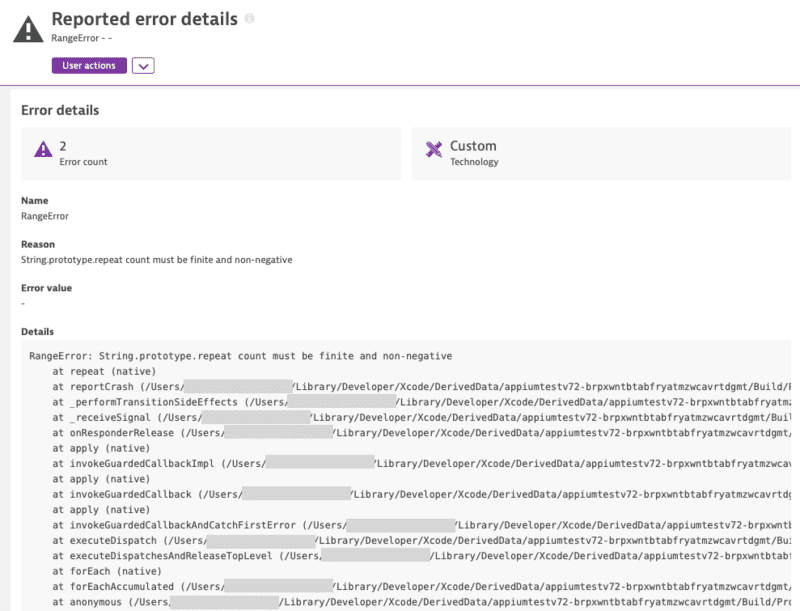
|
|
500
545
|
|
|
@@ -528,11 +573,25 @@ Dynatrace.endSession();
|
|
|
528
573
|
|
|
529
574
|
### Manually report a crash
|
|
530
575
|
|
|
531
|
-
You can manually report a crash via the following API
|
|
576
|
+
You can manually report a crash via the following API calls:
|
|
532
577
|
|
|
533
578
|
```ts
|
|
534
|
-
|
|
535
|
-
|
|
579
|
+
import { Dynatrace } from '@dynatrace/react-native-plugin';
|
|
580
|
+
|
|
581
|
+
try {
|
|
582
|
+
throw new Error('Fatal memory allocation failure');
|
|
583
|
+
} catch (error) {
|
|
584
|
+
if (error instanceof Error) {
|
|
585
|
+
Dynatrace.reportCrash(
|
|
586
|
+
'MemoryError',
|
|
587
|
+
error.message,
|
|
588
|
+
error.stack || 'No stack trace available'
|
|
589
|
+
);
|
|
590
|
+
|
|
591
|
+
// or directly via the full error
|
|
592
|
+
Dynatrace.reportCrashWithException('MemoryError', error);
|
|
593
|
+
}
|
|
594
|
+
}
|
|
536
595
|
```
|
|
537
596
|
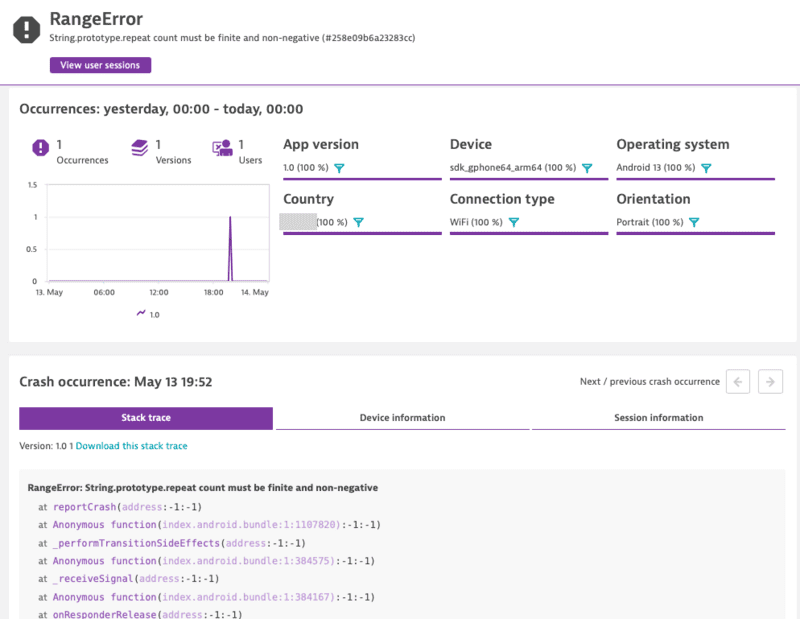
|
|
538
597
|
|
|
@@ -559,8 +618,12 @@ Crash reporting is enabled by default. The Mobile agent captures all unhandled e
|
|
|
559
618
|
The API to get and set the current privacy level looks like this:
|
|
560
619
|
|
|
561
620
|
```ts
|
|
562
|
-
|
|
563
|
-
|
|
621
|
+
import { Platform, UserPrivacyOptions } from '@dynatrace/react-native-plugin';
|
|
622
|
+
|
|
623
|
+
interface IDynatrace {
|
|
624
|
+
getUserPrivacyOptions(platform?: Platform): Promise<UserPrivacyOptions>;
|
|
625
|
+
applyUserPrivacyOptions(userPrivacyOptions: UserPrivacyOptions, platform?: Platform): void;
|
|
626
|
+
}
|
|
564
627
|
```
|
|
565
628
|
|
|
566
629
|
To check the current privacy options that are set:
|
|
@@ -571,32 +634,19 @@ import { Dynatrace } from '@dynatrace/react-native-plugin';
|
|
|
571
634
|
const privacyOptions = await Dynatrace.getUserPrivacyOptions();
|
|
572
635
|
```
|
|
573
636
|
|
|
574
|
-
If you want to create a new `UserPrivacyOptions` object:
|
|
637
|
+
If you want to create a new `UserPrivacyOptions` object and pass it to Dynatrace:
|
|
575
638
|
|
|
576
639
|
```ts
|
|
577
|
-
import { DataCollectionLevel, UserPrivacyOptions } from '@dynatrace/react-native-plugin';
|
|
578
|
-
|
|
579
|
-
let privacyConfig = new UserPrivacyOptions(DataCollectionLevel.UserBehavior, true);
|
|
580
|
-
```
|
|
640
|
+
import { Dynatrace, DataCollectionLevel, UserPrivacyOptions } from '@dynatrace/react-native-plugin';
|
|
581
641
|
|
|
582
|
-
|
|
642
|
+
const privacyConfig = new UserPrivacyOptions(DataCollectionLevel.UserBehavior, true);
|
|
583
643
|
|
|
584
|
-
|
|
644
|
+
// Getter and setter available for UserPrivacyOptions
|
|
585
645
|
privacyConfig.crashReportingOptedIn = false;
|
|
586
646
|
privacyConfig.dataCollectionLevel = DataCollectionLevel.Performance;
|
|
587
|
-
```
|
|
588
|
-
|
|
589
|
-
The properties that are used to set the privacy options can also be used to fetch the options:
|
|
590
647
|
|
|
591
|
-
|
|
592
|
-
|
|
593
|
-
let crashReporting = privacyConfig.crashReportingOptedIn;
|
|
594
|
-
```
|
|
595
|
-
|
|
596
|
-
To apply the values that were set on the object:
|
|
597
|
-
|
|
598
|
-
```ts
|
|
599
|
-
import { Dynatrace } from '@dynatrace/react-native-plugin';
|
|
648
|
+
const level = privacyConfig.dataCollectionLevel;
|
|
649
|
+
const crashReporting = privacyConfig.crashReportingOptedIn;
|
|
600
650
|
|
|
601
651
|
Dynatrace.applyUserPrivacyOptions(privacyConfig);
|
|
602
652
|
```
|
|
@@ -606,7 +656,9 @@ Dynatrace.applyUserPrivacyOptions(privacyConfig);
|
|
|
606
656
|
You can report latitude and longitude and specify an optional platform.
|
|
607
657
|
|
|
608
658
|
```ts
|
|
609
|
-
|
|
659
|
+
import { Dynatrace } from '@dynatrace/react-native-plugin';
|
|
660
|
+
|
|
661
|
+
Dynatrace.setGPSLocation(48.31518732698596, 14.305245274594471);
|
|
610
662
|
```
|
|
611
663
|
|
|
612
664
|
### Platform independent reporting
|
|
@@ -618,7 +670,7 @@ import { Dynatrace, Platform } from '@dynatrace/react-native-plugin';
|
|
|
618
670
|
|
|
619
671
|
const myAction = Dynatrace.enterAutoAction("MyButton tapped", Platform.Ios);
|
|
620
672
|
//Perform the action and whatever else is needed.
|
|
621
|
-
myAction.leaveAction(
|
|
673
|
+
myAction.leaveAction(Platform.Ios);
|
|
622
674
|
```
|
|
623
675
|
|
|
624
676
|
* Passing to **Android** only:
|
|
@@ -627,7 +679,7 @@ import { Dynatrace, Platform } from '@dynatrace/react-native-plugin';
|
|
|
627
679
|
|
|
628
680
|
const myAction = Dynatrace.enterAutoAction("MyButton tapped", Platform.Android);
|
|
629
681
|
//Perform the action and whatever else is needed.
|
|
630
|
-
myAction.leaveAction(
|
|
682
|
+
myAction.leaveAction(Platform.Android);
|
|
631
683
|
```
|
|
632
684
|
|
|
633
685
|
* Passing to **both**:
|
|
@@ -671,15 +723,22 @@ This allows you to put a set of http headers on every agent http request (i.e. A
|
|
|
671
723
|
**Note:** To clear the previously set headers, call the method without the headers parameter or with a null value for the headers parameter.
|
|
672
724
|
|
|
673
725
|
```ts
|
|
674
|
-
|
|
726
|
+
import { Dynatrace } from '@dynatrace/react-native-plugin';
|
|
727
|
+
|
|
728
|
+
const beaconHeaders = new Map<string, string>();
|
|
729
|
+
beaconHeaders.set('headerName', 'headerValue');
|
|
730
|
+
Dynatrace.setBeaconHeaders(beaconHeaders);
|
|
675
731
|
```
|
|
676
732
|
|
|
677
733
|
### Exclude Individual JSX Elements
|
|
678
734
|
|
|
679
735
|
If you want to instrument a functional component or class component but want to exclude a certain button or element, you can do this via the `dtActionIgnore` property. Example:
|
|
680
736
|
|
|
681
|
-
```
|
|
682
|
-
|
|
737
|
+
```tsx
|
|
738
|
+
import React from 'react';
|
|
739
|
+
import { TouchableHighlight, Text, View } from 'react-native';
|
|
740
|
+
|
|
741
|
+
const TouchableHighlightScreen = () => {
|
|
683
742
|
return (
|
|
684
743
|
<View>
|
|
685
744
|
<TouchableHighlight onPress={onPress}>
|
|
@@ -690,11 +749,11 @@ function TouchableHighlightScreen() {
|
|
|
690
749
|
</TouchableHighlight>
|
|
691
750
|
</View>
|
|
692
751
|
);
|
|
693
|
-
}
|
|
752
|
+
};
|
|
694
753
|
|
|
695
|
-
|
|
696
|
-
|
|
697
|
-
}
|
|
754
|
+
const onPress = () => {
|
|
755
|
+
console.log("TouchableHighlight Pressed!");
|
|
756
|
+
};
|
|
698
757
|
|
|
699
758
|
export default TouchableHighlightScreen;
|
|
700
759
|
```
|
|
@@ -703,34 +762,33 @@ This example shows two *TouchableHighlight*, which will fire the *onPress()* fun
|
|
|
703
762
|
|
|
704
763
|
>*Attention:* If you are using Typescript and want to set this property with type-safety, look [here](#typescript-setup-for-dtactionignore-and-dtactionname).
|
|
705
764
|
|
|
706
|
-
## New RUM experience
|
|
707
|
-
|
|
708
|
-
> **â ï¸ Preview Feature**: The New RUM Experience APIs are currently in preview and may be subject to changes. These APIs provide enhanced event tracking capabilities with the new Dynatrace RUM on Grail feature.
|
|
765
|
+
## New RUM experience
|
|
709
766
|
|
|
710
767
|
The New RUM Experience introduces a set of advanced APIs that allow you to send custom events, modify event data, track exceptions, monitor HTTP requests, and manage view contexts in your React Native application. These APIs provide more granular control over the data captured by Dynatrace and are designed for the next generation RUM capabilities.
|
|
711
768
|
|
|
712
|
-
For more detailed information about the New RUM Experience, see the [official Dynatrace documentation](https://docs.dynatrace.com/docs/
|
|
769
|
+
For more detailed information about the New RUM Experience, see the [official Dynatrace documentation](https://docs.dynatrace.com/docs/shortlink/react-native-main).
|
|
713
770
|
|
|
714
771
|
### Send Event
|
|
715
772
|
|
|
716
|
-
The `sendEvent()` method allows you to send custom events with arbitrary properties
|
|
773
|
+
The `sendEvent()` method allows you to send custom events with arbitrary properties using the EventData class. This is useful for tracking specific user interactions or application state changes.
|
|
717
774
|
|
|
718
775
|
```ts
|
|
719
|
-
import { Dynatrace } from '@dynatrace/react-native-plugin';
|
|
776
|
+
import { Dynatrace, EventData } from '@dynatrace/react-native-plugin';
|
|
720
777
|
|
|
721
778
|
// Send a custom event with properties
|
|
722
|
-
Dynatrace.sendEvent(
|
|
723
|
-
"event_properties.button_clicked"
|
|
724
|
-
"event_properties.user_type"
|
|
725
|
-
"event_properties.attempt_count"
|
|
726
|
-
|
|
727
|
-
|
|
779
|
+
Dynatrace.sendEvent(new EventData()
|
|
780
|
+
.addEventProperty("event_properties.button_clicked", "login_button")
|
|
781
|
+
.addEventProperty("event_properties.user_type", "premium")
|
|
782
|
+
.addEventProperty("event_properties.attempt_count", 3)
|
|
783
|
+
.withDuration(250)
|
|
784
|
+
);
|
|
728
785
|
```
|
|
729
786
|
|
|
730
787
|
**Property Requirements:**
|
|
731
788
|
* Only properties prefixed with `event_properties.*` are allowed
|
|
732
789
|
* Additionally, the `duration` property is allowed
|
|
733
790
|
* Maximum of 50 custom properties per event
|
|
791
|
+
* If the limit is exceeded, properties are sorted alphabetically by key and excess properties are dropped deterministically
|
|
734
792
|
* String properties are limited to 5000 characters (exceeding characters are truncated)
|
|
735
793
|
* Field names must contain only alphabetic characters, numbers, underscores, and dots
|
|
736
794
|
* Each dot must be followed by an alphabetic character
|
|
@@ -743,14 +801,14 @@ Dynatrace.sendEvent({
|
|
|
743
801
|
Session properties apply to all events within the current session. Use `sendSessionPropertyEvent()` to set properties that should be available across the entire user session.
|
|
744
802
|
|
|
745
803
|
```ts
|
|
746
|
-
import { Dynatrace } from '@dynatrace/react-native-plugin';
|
|
804
|
+
import { Dynatrace, SessionPropertyEventData } from '@dynatrace/react-native-plugin';
|
|
747
805
|
|
|
748
806
|
// Set session-wide properties
|
|
749
|
-
Dynatrace.sendSessionPropertyEvent(
|
|
750
|
-
"session_properties.user_tier"
|
|
751
|
-
"session_properties.app_version"
|
|
752
|
-
"session_properties.feature_flag_enabled"
|
|
753
|
-
|
|
807
|
+
Dynatrace.sendSessionPropertyEvent(new SessionPropertyEventData()
|
|
808
|
+
.addSessionProperty("session_properties.user_tier", "premium")
|
|
809
|
+
.addSessionProperty("session_properties.app_version", "2.1.0")
|
|
810
|
+
.addSessionProperty("session_properties.feature_flag_enabled", true)
|
|
811
|
+
);
|
|
754
812
|
```
|
|
755
813
|
|
|
756
814
|
**Important Notes:**
|
|
@@ -760,16 +818,33 @@ Dynatrace.sendSessionPropertyEvent({
|
|
|
760
818
|
* Field naming follows the same rules as events, but with `session_properties.` prefix
|
|
761
819
|
* Additionally, the `duration` property is allowed
|
|
762
820
|
* Maximum of 50 custom properties per event
|
|
821
|
+
* If the limit is exceeded, properties are sorted alphabetically by key and excess properties are dropped deterministically
|
|
763
822
|
|
|
764
823
|
### Event Modifier
|
|
765
824
|
|
|
766
|
-
Event modifiers allow you to intercept and modify events before they are sent to Dynatrace. This is useful for adding common properties, filtering sensitive data, or enriching events with additional context.
|
|
825
|
+
Event modifiers allow you to intercept and modify events before they are sent to Dynatrace. This is useful for adding common properties, filtering sensitive data, or enriching events with additional context. Event modifiers apply to all event types, including custom events, session properties, exceptions, and HTTP events.
|
|
826
|
+
|
|
827
|
+
If multiple event modifiers are added, they are executed in the order they were added.
|
|
828
|
+
|
|
829
|
+
Most fields and namespaces can't be modified in any way (added, removed or overridden), while others are open for modification.
|
|
830
|
+
|
|
831
|
+
**Open for modification and can be added:**
|
|
832
|
+
- `event_properties.*`
|
|
833
|
+
- `session_properties.*`
|
|
834
|
+
|
|
835
|
+
`session_properties.*` are only allowed to be on a session property event.
|
|
836
|
+
|
|
837
|
+
**Open for modification only:**
|
|
838
|
+
- `url.full`
|
|
839
|
+
- `exception.stack_trace`
|
|
840
|
+
|
|
841
|
+
#### Example
|
|
767
842
|
|
|
768
843
|
```ts
|
|
769
|
-
import { Dynatrace } from '@dynatrace/react-native-plugin';
|
|
844
|
+
import { Dynatrace, IEventModifier } from '@dynatrace/react-native-plugin';
|
|
770
845
|
|
|
771
846
|
// Create an event modifier
|
|
772
|
-
const myModifier = {
|
|
847
|
+
const myModifier: IEventModifier = {
|
|
773
848
|
modifyEvent(event) {
|
|
774
849
|
// Add common properties to all events
|
|
775
850
|
event["event_properties.app_build"] = "1.2.3";
|
|
@@ -791,57 +866,117 @@ Dynatrace.addEventModifier(myModifier);
|
|
|
791
866
|
Dynatrace.removeEventModifier(myModifier);
|
|
792
867
|
```
|
|
793
868
|
|
|
794
|
-
|
|
795
|
-
|
|
796
|
-
|
|
797
|
-
|
|
798
|
-
|
|
869
|
+
#### Important Considerations
|
|
870
|
+
|
|
871
|
+
- **Execution order**: If multiple event modifiers are added, they are executed in the order they were added
|
|
872
|
+
- **Returning null**: Returning `null` discards the event and prevents future modifier functions from being executed
|
|
873
|
+
- **Performance**: Event modifiers should be efficient as they are called for every event
|
|
874
|
+
- **Field naming**: Custom properties must follow the `event_properties.*` or `session_properties.*` prefix naming convention
|
|
875
|
+
- **Reserved fields**: Certain reserved fields and namespaces cannot be modified. Attempts to modify them will be ignored
|
|
876
|
+
- **Error handling**: If a modifier throws an exception, it will be logged but won't prevent other modifiers from executing
|
|
877
|
+
- **Primitive values**: Event fields can only contain primitive values (String, int, double, bool)
|
|
878
|
+
- **Invalid argument**: In case you pass an invalid argument to `addEventModifier`, we return a no-op placeholder modifier.
|
|
799
879
|
|
|
800
880
|
### Send Exception Event
|
|
801
881
|
|
|
802
|
-
The `sendExceptionEvent()` method provides a structured way to report exceptions with additional context and custom properties.
|
|
882
|
+
The `sendExceptionEvent()` method provides a structured way to report exceptions with additional context and custom properties using the ExceptionEventData class.
|
|
803
883
|
|
|
804
884
|
```ts
|
|
805
|
-
import { Dynatrace } from '@dynatrace/react-native-plugin';
|
|
885
|
+
import { Dynatrace, ExceptionEventData } from '@dynatrace/react-native-plugin';
|
|
806
886
|
|
|
807
887
|
try {
|
|
808
|
-
// Code that
|
|
809
|
-
|
|
888
|
+
// Code that may throw an error
|
|
889
|
+
throw new Error('Something went wrong');
|
|
810
890
|
} catch (error) {
|
|
811
|
-
|
|
812
|
-
|
|
813
|
-
|
|
814
|
-
|
|
815
|
-
|
|
891
|
+
if (error instanceof Error) {
|
|
892
|
+
Dynatrace.sendExceptionEvent(new ExceptionEventData(error)
|
|
893
|
+
.addEventProperty('event_properties.custom_key', 'custom_value')
|
|
894
|
+
.addEventProperty('event_properties.error_context', 'user_action')
|
|
895
|
+
);
|
|
896
|
+
}
|
|
816
897
|
}
|
|
817
898
|
```
|
|
818
899
|
|
|
819
900
|
**Parameters:**
|
|
820
901
|
* `error`: The Error object containing exception information (required)
|
|
821
|
-
* `fields`: Optional custom properties following the same naming rules as [sendEvent()](#send-event)
|
|
822
902
|
|
|
823
903
|
### Send HTTP Request Event
|
|
824
904
|
|
|
825
905
|
The `sendHttpRequestEvent()` method allows you to manually report HTTP request events with detailed information about the request and response.
|
|
826
906
|
|
|
827
907
|
```ts
|
|
828
|
-
import { Dynatrace,
|
|
908
|
+
import { Dynatrace, HttpRequestEventData } from '@dynatrace/react-native-plugin';
|
|
829
909
|
|
|
830
910
|
// Basic HTTP request event
|
|
831
|
-
const
|
|
832
|
-
Dynatrace.sendHttpRequestEvent(
|
|
911
|
+
const requestEventData = new HttpRequestEventData('https://api.example.com/users', 'GET');
|
|
912
|
+
Dynatrace.sendHttpRequestEvent(requestEventData);
|
|
833
913
|
|
|
834
914
|
// HTTP request with additional details
|
|
835
|
-
const
|
|
836
|
-
.
|
|
837
|
-
.
|
|
838
|
-
Dynatrace.sendHttpRequestEvent(
|
|
915
|
+
const detailedRequestEventData = new HttpRequestEventData('https://api.example.com/data', 'POST')
|
|
916
|
+
.withStatusCode(200)
|
|
917
|
+
.addEventProperty('event_properties.headers.content_type', 'application/json');
|
|
918
|
+
Dynatrace.sendHttpRequestEvent(detailedRequestEventData);
|
|
839
919
|
```
|
|
840
920
|
|
|
921
|
+
**Parameters:**
|
|
922
|
+
* `url`: The URL of the HTTP request (required)
|
|
923
|
+
* `method`: The HTTP method (e.g., 'GET', 'POST', 'PUT', 'DELETE') (required)
|
|
924
|
+
|
|
841
925
|
### View Monitoring
|
|
842
926
|
|
|
843
927
|
The view monitoring APIs allow you to track different screens or views in your application, providing context for all events happening within those views.
|
|
844
928
|
|
|
929
|
+
There are two ways to monitor views:
|
|
930
|
+
1. **Automatic view monitoring** - Enable navigation tracking in your configuration to automatically capture view changes through supported navigation libraries (enabled by default)
|
|
931
|
+
2. **Manual view monitoring** - Use the `startView()` API to manually control when view contexts are created and updated
|
|
932
|
+
|
|
933
|
+
> **Important:** These approaches should not be mixed, as the outcome is unpredictable. Choose either automatic or manual view monitoring for your application.
|
|
934
|
+
|
|
935
|
+
#### Automatic Navigation tracking
|
|
936
|
+
|
|
937
|
+
> **Note:** This feature only works with `@react-navigation` versions 5.x through 7.x.
|
|
938
|
+
|
|
939
|
+
The following is an example of how this feature can be configured in your `dynatrace.config.js` file. Note that this feature is enabled by default.
|
|
940
|
+
|
|
941
|
+
```js
|
|
942
|
+
react: {
|
|
943
|
+
navigation: {
|
|
944
|
+
enabled: true
|
|
945
|
+
}
|
|
946
|
+
}
|
|
947
|
+
```
|
|
948
|
+
|
|
949
|
+
When this feature is enabled, the view context will represent the current state of the `@react-navigation` `NavigationContainer`. The state gets represented as a URL-style route. All subsequent events get associated with the view context and thus with the current route.
|
|
950
|
+
|
|
951
|
+
For instance, assume the following setup:
|
|
952
|
+
```js
|
|
953
|
+
const Drawer = createDrawerNavigator();
|
|
954
|
+
|
|
955
|
+
function App() {
|
|
956
|
+
return (
|
|
957
|
+
<NavigationContainer>
|
|
958
|
+
<Drawer.Navigator initialRouteName="Home">
|
|
959
|
+
<Drawer.Screen name="Home" component={HomeScreen} />
|
|
960
|
+
<Drawer.Screen name="Feature" component={FeatureScreen}/>
|
|
961
|
+
</Drawer.Navigator>
|
|
962
|
+
</NavigationContainer>
|
|
963
|
+
);
|
|
964
|
+
}
|
|
965
|
+
|
|
966
|
+
const Stack = createStackNavigator();
|
|
967
|
+
|
|
968
|
+
function FeatureScreen() {
|
|
969
|
+
return (
|
|
970
|
+
<Stack.Navigator initialRouteName="ScreenOne">
|
|
971
|
+
<Stack.Screen name="ScreenOne" component={NestedScreenOne} />
|
|
972
|
+
<Stack.Screen name="ScreenTwo" component={NestedScreenTwo} />
|
|
973
|
+
</Stack.Navigator>
|
|
974
|
+
);
|
|
975
|
+
}
|
|
976
|
+
```
|
|
977
|
+
|
|
978
|
+
When navigating to `Home`, the view context will be set to `/Home`. When navigating to `Feature` and being redirected to the nested `ScreenOne`, the view context will be set to `/Home/ScreenOne`. When navigating to `ScreenTwo` within `Feature`, the view context will be set to `/Feature/ScreenTwo`.
|
|
979
|
+
|
|
845
980
|
#### Start View
|
|
846
981
|
|
|
847
982
|
Use `startView()` to begin monitoring a specific view or screen. When a view is started, all subsequent events will be associated with that view context.
|
|
@@ -859,41 +994,61 @@ Dynatrace.startView("HomeScreen");
|
|
|
859
994
|
* View names should be meaningful and consistent across your application
|
|
860
995
|
* All events captured after starting a view will include the view context
|
|
861
996
|
|
|
862
|
-
#### Stop View
|
|
863
|
-
|
|
864
|
-
Use `stopView()` to stop monitoring the current view. After stopping, events will no longer include view information.
|
|
865
|
-
|
|
866
|
-
```ts
|
|
867
|
-
import { Dynatrace } from '@dynatrace/react-native-plugin';
|
|
868
|
-
|
|
869
|
-
// Stop the current view monitoring
|
|
870
|
-
Dynatrace.stopView();
|
|
871
|
-
```
|
|
872
|
-
|
|
873
997
|
**Complete Example:**
|
|
874
998
|
|
|
875
999
|
```ts
|
|
876
|
-
import { Dynatrace } from '@dynatrace/react-native-plugin';
|
|
1000
|
+
import { Dynatrace, EventData } from '@dynatrace/react-native-plugin';
|
|
877
1001
|
|
|
878
1002
|
// User navigates to profile screen
|
|
879
1003
|
Dynatrace.startView("UserProfile");
|
|
880
1004
|
|
|
881
1005
|
// Send custom event within the view
|
|
882
|
-
Dynatrace.sendEvent(
|
|
883
|
-
"event_properties.profile_action"
|
|
884
|
-
"event_properties.changes_made"
|
|
885
|
-
|
|
1006
|
+
Dynatrace.sendEvent(new EventData()
|
|
1007
|
+
.addEventProperty("event_properties.profile_action", "edit_profile")
|
|
1008
|
+
.addEventProperty("event_properties.changes_made", true)
|
|
1009
|
+
);
|
|
886
1010
|
|
|
887
1011
|
// User navigates away
|
|
888
|
-
Dynatrace.
|
|
1012
|
+
Dynatrace.startView("UserProfileDetailed");
|
|
889
1013
|
```
|
|
890
1014
|
|
|
1015
|
+
### React Native Symbolication
|
|
1016
|
+
|
|
1017
|
+
Dynatrace can automatically symbolicate JavaScript stack traces captured by the plugin using sourcemaps. This allows you to view human-readable file names, line numbers, and column information in your crash reports.
|
|
1018
|
+
|
|
1019
|
+
#### Generating Sourcemaps
|
|
1020
|
+
|
|
1021
|
+
Sourcemaps are generated during release builds and map bytecode offsets (Hermes) and locations in the minified JavaScript bundle (JavaScriptCore) back to your original source code. We support sourcemaps for both Hermes and JavaScriptCore. For detailed instructions on generating sourcemaps, see the [React Native debugging release builds guide](https://reactnative.dev/docs/debugging-release-builds).
|
|
1022
|
+
|
|
1023
|
+
To generate a sourcemap:
|
|
1024
|
+
|
|
1025
|
+
**Android:**
|
|
1026
|
+
* Run `npx react-native run-android --mode release` in your project root, or
|
|
1027
|
+
* Run `gradlew assembleRelease` in the `/android` directory
|
|
1028
|
+
|
|
1029
|
+
**iOS:**
|
|
1030
|
+
* First, enable sourcemaps according to the [React Native debugging release builds guide](https://reactnative.dev/docs/debugging-release-builds)
|
|
1031
|
+
* Then run `npx react-native run-ios --mode Release`, or
|
|
1032
|
+
* Build for release in Xcode
|
|
1033
|
+
|
|
1034
|
+
#### Accounting for Auto-Instrumentation
|
|
1035
|
+
|
|
1036
|
+
Since the plugin auto-instruments your code, sourcemap line numbers may be slightly offset. To ensure accurate symbolication:
|
|
1037
|
+
|
|
1038
|
+
* **Android**: Automatic patching is **enabled by default** and patches sourcemaps automatically at the end of every release build (see [Source Map](#source-map) configuration)
|
|
1039
|
+
* **iOS**: There is currently **no automation** available. You **must** execute [`npx lineOffsetDynatrace`](#npx-lineoffsetdynatrace) to patch your sourcemap files before uploading them to Dynatrace. Without this step, line numbers will be slightly off depending on instrumentation in iOS
|
|
1040
|
+
|
|
1041
|
+
#### Uploading Sourcemaps
|
|
1042
|
+
|
|
1043
|
+
Once generated and patched, upload your sourcemaps to Dynatrace. For detailed instructions, see the [symbol file management documentation](https://docs.dynatrace.com/docs/observe/digital-experience/mobile-applications/analyze-and-use/upload-and-manage-symbol-files).
|
|
1044
|
+
|
|
891
1045
|
## NPX Commands
|
|
892
1046
|
|
|
893
1047
|
The following npx commands are available for the plugin:
|
|
894
1048
|
|
|
895
1049
|
* npx instrumentDynatrace - Is triggering the configuration process and will insert the configuration into the Android and iOS application. This is mandatory and should usually happen automatically when doing `react-native run-android` or `react-native run-ios` command.
|
|
896
1050
|
* npx configDynatrace - Is checking the current configuration and is creating a default configuration if there is none.
|
|
1051
|
+
* npx lineOffsetDynatrace - ...
|
|
897
1052
|
|
|
898
1053
|
### npx instrumentDynatrace
|
|
899
1054
|
|
|
@@ -913,6 +1068,19 @@ npx configDynatrace [optional: config=...]
|
|
|
913
1068
|
|
|
914
1069
|
* `config=C:\SpecialFolderForDynatrace\dynatrace.config.js`: If you have not got your config file in the root folder of the React Native project but somewhere else.
|
|
915
1070
|
|
|
1071
|
+
## npx lineOffsetDynatrace
|
|
1072
|
+
|
|
1073
|
+
Our auto-instrumentation modifies your source code during the build process, which causes line numbers in your sourcemaps to become slightly offset from the original source. This can result in incorrect line numbers when viewing crash reports or stack traces in Dynatrace.
|
|
1074
|
+
|
|
1075
|
+
The `npx lineOffsetDynatrace` command patches your sourcemap file with offset information, allowing Dynatrace to accurately map instrumented line numbers back to the original source code. The patching process adds Dynatrace-specific metadata alongside the original sourcemap content without modifying any existing fields, ensuring your sourcemap continues to work as expected with all standard tooling.
|
|
1076
|
+
|
|
1077
|
+
**Usage:**
|
|
1078
|
+
|
|
1079
|
+
```
|
|
1080
|
+
npx lineOffsetDynatrace sourcemapPath=/path/to/your/sourcemap.map
|
|
1081
|
+
```
|
|
1082
|
+
|
|
1083
|
+
* `sourcemapPath=/path/to/your/sourcemap.map`: **(Required)** The path to the sourcemap file that should be patched.
|
|
916
1084
|
|
|
917
1085
|
## Customizing paths for configuration
|
|
918
1086
|
|
|
@@ -960,7 +1128,7 @@ pod 'react-native-dynatrace', :path => '../node_modules/@dynatrace/react-native-
|
|
|
960
1128
|
5. Under Build Phases expand the Link Binary With Libraries header.
|
|
961
1129
|
6. Scroll down and click + to add a library.
|
|
962
1130
|
7. Find and add `libRNDynatrace.a` under the Workspace group.
|
|
963
|
-
8.
|
|
1131
|
+
8. ⌘+B
|
|
964
1132
|
|
|
965
1133
|
## Setup for tvOS
|
|
966
1134
|
|
|
@@ -970,7 +1138,7 @@ To allow our plugin to work with tvOS, please follow the below steps:
|
|
|
970
1138
|
|
|
971
1139
|
Before installing the plugin, add the following to your `package.json`:
|
|
972
1140
|
|
|
973
|
-
```
|
|
1141
|
+
```
|
|
974
1142
|
"overrides": {
|
|
975
1143
|
"@react-native-picker/picker": {
|
|
976
1144
|
"react-native": "<insert-version-here>"
|
|
@@ -983,7 +1151,7 @@ Before installing the plugin, add the following to your `package.json`:
|
|
|
983
1151
|
|
|
984
1152
|
If you are using the following `"react-native": "npm:react-native-tvos@0.69.8-2"`, use the below snippet:
|
|
985
1153
|
|
|
986
|
-
```
|
|
1154
|
+
```
|
|
987
1155
|
"overrides": {
|
|
988
1156
|
"@react-native-picker/picker": {
|
|
989
1157
|
"react-native": "0.69.8-2"
|
|
@@ -1001,13 +1169,13 @@ Examples:
|
|
|
1001
1169
|
|
|
1002
1170
|
Using React Native v0.69.x or lower and @react-native-community/cli v8.x or lower:
|
|
1003
1171
|
|
|
1004
|
-
```
|
|
1172
|
+
```
|
|
1005
1173
|
npx react-native run-ios --simulator "Apple TV" --scheme "ApplicationName-tvOS" plist=/path/to/application/ios/ApplicationName-tvOS/Info.plist
|
|
1006
1174
|
```
|
|
1007
1175
|
|
|
1008
1176
|
Using React Native v0.70 or higher or @react-native-community/cli v9.x or higher:
|
|
1009
1177
|
|
|
1010
|
-
```
|
|
1178
|
+
```
|
|
1011
1179
|
// Update the Info.plist with the properties from the dynatrace.config.js file
|
|
1012
1180
|
npx instrumentDynatrace plist=/path/to/application/ios/ApplicationName-tvOS/Info.plist
|
|
1013
1181
|
|
|
@@ -1022,7 +1190,7 @@ For more information regarding the differences in the react native versions, ple
|
|
|
1022
1190
|
## Structure of the `dynatrace.js` file
|
|
1023
1191
|
The configuration is structured in the following way:
|
|
1024
1192
|
|
|
1025
|
-
```
|
|
1193
|
+
```ts
|
|
1026
1194
|
module.exports = {
|
|
1027
1195
|
react : {
|
|
1028
1196
|
// Configuration for React Native instrumentation
|
|
@@ -1033,7 +1201,7 @@ module.exports = {
|
|
|
1033
1201
|
ios : {
|
|
1034
1202
|
// Configuration for iOS auto instrumentation
|
|
1035
1203
|
}
|
|
1036
|
-
}
|
|
1204
|
+
};
|
|
1037
1205
|
```
|
|
1038
1206
|
|
|
1039
1207
|
### Manual Startup Counterparts
|
|
@@ -1104,12 +1272,15 @@ This activates the debug mode. You will get more console output during instrumen
|
|
|
1104
1272
|
#### Error Handler
|
|
1105
1273
|
|
|
1106
1274
|
```js
|
|
1107
|
-
|
|
1108
|
-
|
|
1109
|
-
|
|
1110
|
-
|
|
1111
|
-
|
|
1112
|
-
|
|
1275
|
+
module.exports = {
|
|
1276
|
+
// ...
|
|
1277
|
+
react: {
|
|
1278
|
+
errorHandler: {
|
|
1279
|
+
enabled: true,
|
|
1280
|
+
reportFatalErrorAsCrash: true,
|
|
1281
|
+
},
|
|
1282
|
+
}
|
|
1283
|
+
};
|
|
1113
1284
|
```
|
|
1114
1285
|
|
|
1115
1286
|
The `enabled` property activates our Error/Crash handler which will insert our handler into your React Native application. This is true per default.
|
|
@@ -1130,13 +1301,67 @@ react: {
|
|
|
1130
1301
|
|
|
1131
1302
|
This activates the AutoStart mode which will insert an auto start call in your React Native application. This is true per default. If you want to use a manual startup call, please have a look into the [manual startup section](#manual-oneagent-startup).
|
|
1132
1303
|
|
|
1133
|
-
#### Bundle Name
|
|
1304
|
+
#### Bundle Name and Version
|
|
1305
|
+
|
|
1306
|
+
By default, the plugin automatically reads the `name` and `version` fields from your `package.json` file and uses them as `bundleName` and `bundleVersion`. These values are included with New RUM on Grail Events and are critical for crash symbolication.
|
|
1134
1307
|
|
|
1135
|
-
|
|
1308
|
+
**Important for Crash Symbolication:**
|
|
1309
|
+
When uploading sourcemap files to Dynatrace, you must specify the same `bundleName` and `bundleVersion` values. The sourcemap desymbolication feature requires an exact match between:
|
|
1310
|
+
|
|
1311
|
+
* The `bundleName` and `bundleVersion` sent with the crash report
|
|
1312
|
+
* The `bundleName` and `bundleVersion` specified when uploading the sourcemap file
|
|
1313
|
+
|
|
1314
|
+
If these values don't match, the Error Inspector will not be able to use the sourcemap file to symbolicate the crash.
|
|
1315
|
+
|
|
1316
|
+
**Custom Configuration:**
|
|
1317
|
+
You can override the default values from `package.json` by explicitly setting them in `dynatrace.config.js`:
|
|
1318
|
+
|
|
1319
|
+
```js
|
|
1320
|
+
react: {
|
|
1321
|
+
bundleName: "MyCustomBundle",
|
|
1322
|
+
bundleVersion: "1.0.0",
|
|
1323
|
+
}
|
|
1324
|
+
```
|
|
1325
|
+
|
|
1326
|
+
**Multiple Bundle Setup:**
|
|
1327
|
+
If you have a multiple bundle setup where you load several `.bundle` files within your React Native application, ensure each bundle has a unique name. This prevents actions from different bundles from interfering with each other.
|
|
1328
|
+
|
|
1329
|
+
#### Navigation
|
|
1330
|
+
|
|
1331
|
+
This feature is for the New RUM on Grail experience only and is described in the [Automatic Navigation tracking](#automatic-navigation-tracking) section.
|
|
1332
|
+
|
|
1333
|
+
```js
|
|
1334
|
+
react: {
|
|
1335
|
+
navigation: {
|
|
1336
|
+
enabled: true
|
|
1337
|
+
}
|
|
1338
|
+
}
|
|
1339
|
+
```
|
|
1340
|
+
|
|
1341
|
+
#### Source Map
|
|
1342
|
+
|
|
1343
|
+
This feature is enabled by default and patches sourcemap files so that any modifications made through Dynatrace will result in correct line numbers. If this feature is not enabled, line numbers of symbolicated stacktraces in Dynatrace might not match with your original source.
|
|
1344
|
+
|
|
1345
|
+
The following is an example of how this feature can be configured in your `dynatrace.config.js` file:
|
|
1346
|
+
|
|
1347
|
+
```js
|
|
1348
|
+
react: {
|
|
1349
|
+
sourceMap: {
|
|
1350
|
+
enabled: true
|
|
1351
|
+
}
|
|
1352
|
+
}
|
|
1353
|
+
```
|
|
1354
|
+
|
|
1355
|
+
> **Note:** This automatic patching only works for Android. For iOS, you need to manually call [lineOffsetDynatrace](#npx-lineoffsetdynatrace) after the creation of the sourcemap is finished or before uploading it to Dynatrace.
|
|
1356
|
+
|
|
1357
|
+
The automatic patching for Android can be customized using the `androidSourcemapLocation` property to specify a custom path to your sourcemap file, resolving from the `android/` directory since that is where the automation gets executed:
|
|
1136
1358
|
|
|
1137
1359
|
```js
|
|
1138
1360
|
react: {
|
|
1139
|
-
|
|
1361
|
+
sourceMap: {
|
|
1362
|
+
enabled: true,
|
|
1363
|
+
androidSourcemapLocation: 'sourcemap.map'
|
|
1364
|
+
}
|
|
1140
1365
|
}
|
|
1141
1366
|
```
|
|
1142
1367
|
|
|
@@ -1304,7 +1529,7 @@ ios: {
|
|
|
1304
1529
|
## How does Dynatrace determine the user action name?
|
|
1305
1530
|
* React views
|
|
1306
1531
|
* dtActionName: Use a custom property called dtActionName
|
|
1307
|
-
* displayName: Use the displayName property to check if React views have a display name set
|
|
1532
|
+
* displayName: Use the displayName property to check if React views have a display name set
|
|
1308
1533
|
* instrumentation string: Auto instrumentation or manual instrumentation is passing a string. This will be used if available.
|
|
1309
1534
|
* class name: If the display name is not available, the class name is used by taking the property name from the constructor
|
|
1310
1535
|
* Touchables
|
|
@@ -1333,6 +1558,9 @@ ios: {
|
|
|
1333
1558
|
We check for a property named `dtActionName` when creating an action. If `dtActionName` exists, this will be used for the action name above every other option listed in the previous section. Example:
|
|
1334
1559
|
|
|
1335
1560
|
```js
|
|
1561
|
+
import { TouchableHighlight } from '@dynatrace/react-native-plugin';
|
|
1562
|
+
import { Text } from 'react-native';
|
|
1563
|
+
|
|
1336
1564
|
<TouchableHighlight dtActionName="CustomActionName">
|
|
1337
1565
|
<Text>Custom Action Name</Text>
|
|
1338
1566
|
</TouchableHighlight>
|
|
@@ -1448,10 +1676,10 @@ This can be done via a configuration value in the `dynatrace.config.js`. The fol
|
|
|
1448
1676
|
module.exports = {
|
|
1449
1677
|
react : {
|
|
1450
1678
|
upstreamTransformer: require.resolve('react-native-svg-transformer/react-native'),
|
|
1451
|
-
...
|
|
1679
|
+
// ...
|
|
1452
1680
|
},
|
|
1453
|
-
...
|
|
1454
|
-
}
|
|
1681
|
+
// ...
|
|
1682
|
+
};
|
|
1455
1683
|
```
|
|
1456
1684
|
|
|
1457
1685
|
#### metro.config.js for React Native v0.72.1 or newer
|
|
@@ -1474,7 +1702,7 @@ const config = {
|
|
|
1474
1702
|
},
|
|
1475
1703
|
reporter: require('@dynatrace/react-native-plugin/lib/dynatrace-reporter'),
|
|
1476
1704
|
resolver: {
|
|
1477
|
-
assetExts: assetExts.filter(ext => ext !== 'svg'),
|
|
1705
|
+
assetExts: assetExts.filter((ext) => ext !== 'svg'),
|
|
1478
1706
|
sourceExts: [...sourceExts, 'cjs', 'svg'],
|
|
1479
1707
|
},
|
|
1480
1708
|
};
|
|
@@ -1611,7 +1839,7 @@ If you encounter compatibility issues or want to disable Jetpack Compose instrum
|
|
|
1611
1839
|
|
|
1612
1840
|
```js
|
|
1613
1841
|
module.exports = {
|
|
1614
|
-
...
|
|
1842
|
+
// ...
|
|
1615
1843
|
android: {
|
|
1616
1844
|
config: `
|
|
1617
1845
|
dynatrace {
|
|
@@ -1623,8 +1851,9 @@ module.exports = {
|
|
|
1623
1851
|
}
|
|
1624
1852
|
}
|
|
1625
1853
|
}
|
|
1626
|
-
|
|
1627
|
-
}
|
|
1854
|
+
`,
|
|
1855
|
+
}
|
|
1856
|
+
};
|
|
1628
1857
|
```
|
|
1629
1858
|
|
|
1630
1859
|
For more information about Jetpack Compose instrumentation and monitoring capabilities, please refer to the [official Dynatrace documentation for Android OneAgent](https://docs.dynatrace.com/docs/observe/digital-experience/mobile-applications/instrument-android-app/instrumentation-via-plugin/monitoring-capabilities#compose-enable).
|
|
@@ -1722,21 +1951,47 @@ In case you are using NativeWind, use 'nativewind' as the importSource for the J
|
|
|
1722
1951
|
>**Attention:** If you think something is not working the way it should, ALWAYS try to reset the cache of metro first before starting a support case. You can do this via the CLI *react-native start --reset-cache*. If it still does not work feel free to open a support case.
|
|
1723
1952
|
|
|
1724
1953
|
If you are struggling with a problem, submit a support ticket to Dynatrace (support.dynatrace.com) and provide the following details:
|
|
1725
|
-
|
|
1726
|
-
|
|
1727
|
-
|
|
1954
|
+
|
|
1955
|
+
### Files to gather:
|
|
1956
|
+
|
|
1957
|
+
1. **Native agent logs** - Enable [native agent debug logs](#native-oneagent-debug-logs) and collect logs from:
|
|
1958
|
+
* **iOS**: Xcode console output
|
|
1959
|
+
* **Android**: Android Studio Logcat
|
|
1960
|
+
|
|
1961
|
+
2. **Metro logs** - Enable [React debug mode](#debug-mode) in your `dynatrace.config.js` and collect Metro bundler logs:
|
|
1962
|
+
* Build logs showing instrumentation output
|
|
1963
|
+
* Runtime logs from Metro terminal/console
|
|
1964
|
+
* These logs show React Native side instrumentation and runtime behavior
|
|
1965
|
+
|
|
1966
|
+
3. **Plugin logs** - Located in `node_modules/@dynatrace/react-native-plugin/logs`
|
|
1967
|
+
|
|
1968
|
+
4. **Configuration** - Your `dynatrace.config.js` file
|
|
1969
|
+
|
|
1970
|
+
>**Tip:** Enable both native agent debug logs and React debug mode before reproducing the issue to capture comprehensive diagnostics from both native (iOS/Android) and JavaScript (React Native) layers.
|
|
1971
|
+
|
|
1728
1972
|
<br/><br/>
|
|
1729
1973
|
## Changelog
|
|
1730
1974
|
|
|
1975
|
+
2.331.1
|
|
1976
|
+
* Updated Android (8.331.1.1004) & iOS Agent (8.331.1.1008)
|
|
1977
|
+
|
|
1978
|
+
2.329.1
|
|
1979
|
+
* Updated Android (8.329.1.1014) & iOS Agent (8.329.1.1017)
|
|
1980
|
+
* [New RUM experience](#new-rum-experience) Removed Dynatrace.stopView() API
|
|
1981
|
+
* [New RUM experience](#new-rum-experience) Enforcing length limitation of 5000 characters for user input values
|
|
1982
|
+
* [New RUM experience](#new-rum-experience) React Native Deobfuscation service via sourcemaps
|
|
1983
|
+
* Adding [`npx lineOffsetDynatrace`](#npx-lineoffsetdynatrace) command
|
|
1984
|
+
* [New RUM experience](#new-rum-experience) Added automated view tracking via [navigation](#automatic-navigation-tracking)
|
|
1985
|
+
* [New RUM experience](#new-rum-experience) Event and session properties are now sorted alphabetically when the limit of 50 is exceeded, ensuring deterministic property dropping
|
|
1986
|
+
|
|
1731
1987
|
2.327.2
|
|
1732
1988
|
* Fixed iOS startup time calculation issues for React Native 0.72 and lower
|
|
1733
1989
|
* Fixed static properties during auto instrumentation of Touchables
|
|
1734
1990
|
* Updated Android (8.327.3.1006) & iOS Agent (8.327.2.1022)
|
|
1735
1991
|
|
|
1736
|
-
|
|
1737
1992
|
2.327.1
|
|
1738
1993
|
* Added [Compose Compatibility Note](#compose-compatibility-note)
|
|
1739
|
-
* Added [New RUM experience preview](#new-rum-experience
|
|
1994
|
+
* Added [New RUM experience preview](#new-rum-experience) documentation
|
|
1740
1995
|
* Fixed iOS crash reporting by delaying the crash by 200ms on iOS to give the Agent enough time to report it
|
|
1741
1996
|
* Updated Android (8.327.2.1004) & iOS Agent (8.327.1.1020)
|
|
1742
1997
|
|
|
@@ -1745,8 +2000,8 @@ If you are struggling with a problem, submit a support ticket to Dynatrace (supp
|
|
|
1745
2000
|
|
|
1746
2001
|
2.325.1
|
|
1747
2002
|
* Updated Android (8.325.1.1007) & iOS Agent (8.325.1.1012)
|
|
1748
|
-
* [New RUM experience preview](#new-rum-experience
|
|
1749
|
-
* [New RUM experience preview](#new-rum-experience
|
|
2003
|
+
* [New RUM experience preview](#new-rum-experience) ReactNative version now added to RUM on Grail event base data
|
|
2004
|
+
* [New RUM experience preview](#new-rum-experience) Added API documentation for RUM on Grail API
|
|
1750
2005
|
|
|
1751
2006
|
2.323.2
|
|
1752
2007
|
* Fixed error "Execution failed for task ':app:mergeReleaseAssets'. A problem occured starting process 'command 'npx''" when building for release on Windows.
|