@dynatrace/react-native-plugin 2.289.1 → 2.291.1
This diff represents the content of publicly available package versions that have been released to one of the supported registries. The information contained in this diff is provided for informational purposes only and reflects changes between package versions as they appear in their respective public registries.
package/README.md
CHANGED
|
@@ -31,8 +31,8 @@ If you want to start using this plugin and are not a Dynatrace customer yet, hea
|
|
|
31
31
|
## Agent Versions
|
|
32
32
|
This agent versions are configured in this plugin:
|
|
33
33
|
|
|
34
|
-
* Android Agent: 8.
|
|
35
|
-
* iOS Agent: 8.
|
|
34
|
+
* Android Agent: 8.291.1.1002
|
|
35
|
+
* iOS Agent: 8.291.1.1004
|
|
36
36
|
|
|
37
37
|
## Quick Setup
|
|
38
38
|
|
|
@@ -57,7 +57,7 @@ This agent versions are configured in this plugin:
|
|
|
57
57
|
* [Crash Reporting](#manually-report-a-crash)
|
|
58
58
|
* [User Privacy Options](#user-privacy-options)
|
|
59
59
|
* [Report GPS Position](#report-gps-location)
|
|
60
|
-
* [Business
|
|
60
|
+
* [Business event capturing](#business-event-capturing)
|
|
61
61
|
* [Platform independent reporting](#platform-independent-reporting)
|
|
62
62
|
* [Set beacon headers](#setting-beacon-headers)
|
|
63
63
|
* [Exclude Individual JSX Elements](#exclude-individual-jsx-elements)
|
|
@@ -220,10 +220,10 @@ module.exports = {
|
|
|
220
220
|
|
|
221
221
|
Example of a startup call:
|
|
222
222
|
|
|
223
|
-
```
|
|
223
|
+
```ts
|
|
224
224
|
import { Dynatrace, ConfigurationBuilder } from '@dynatrace/react-native-plugin';
|
|
225
225
|
|
|
226
|
-
Dynatrace.start(new ConfigurationBuilder("beaconUrl", "applicationId").buildConfiguration());
|
|
226
|
+
await Dynatrace.start(new ConfigurationBuilder("beaconUrl", "applicationId").buildConfiguration());
|
|
227
227
|
```
|
|
228
228
|
|
|
229
229
|
For more details see the section about [startup API](#plugin-startup).
|
|
@@ -234,15 +234,17 @@ For more details see the section about [startup API](#plugin-startup).
|
|
|
234
234
|
|
|
235
235
|
To use the API of the React Native plugin, import the API:
|
|
236
236
|
|
|
237
|
-
```
|
|
238
|
-
import { Dynatrace
|
|
237
|
+
```ts
|
|
238
|
+
import { Dynatrace } from '@dynatrace/react-native-plugin';
|
|
239
239
|
```
|
|
240
240
|
|
|
241
241
|
### Plugin startup
|
|
242
242
|
|
|
243
243
|
The manual startup of the plugin is triggered via the `start(configuration: IConfiguration)` method. If you configured `dynatrace.config.js` for manual startup then the plugin doesn't send any data when not calling this function. Besides the application id and the beacon URL, there are several optional configuration parameters, which are shown in the table below.
|
|
244
244
|
|
|
245
|
-
```
|
|
245
|
+
```ts
|
|
246
|
+
import { Dynatrace, ConfigurationBuilder, LogLevel } from '@dynatrace/react-native-plugin';
|
|
247
|
+
|
|
246
248
|
const configurationBuilder = new ConfigurationBuilder("beaconUrl", "applicationId");
|
|
247
249
|
|
|
248
250
|
configurationBuilder.withCrashReporting(true)
|
|
@@ -254,7 +256,7 @@ configurationBuilder.withCrashReporting(true)
|
|
|
254
256
|
.withActionNamePrivacy(false)
|
|
255
257
|
.withBundleName(undefined);
|
|
256
258
|
|
|
257
|
-
Dynatrace.start(configurationBuilder.buildConfiguration());
|
|
259
|
+
await Dynatrace.start(configurationBuilder.buildConfiguration());
|
|
258
260
|
```
|
|
259
261
|
|
|
260
262
|
**Info**: The value used in the function calls for the parameters is also their default value.
|
|
@@ -268,7 +270,7 @@ Dynatrace.start(configurationBuilder.buildConfiguration());
|
|
|
268
270
|
|reportFatalErrorAsCrash |boolean |true |Reports an unhandled fatal error as a crash or an error. |
|
|
269
271
|
|logLevel |LogLevel|LogLevel.Info|Allows you to choose between `LogLevel.Info` and `LogLevel.Debug`. Debug returns more logs. This is especially important when something is not functioning correctly.|
|
|
270
272
|
|lifecycleUpdate |boolean |false |Decide if you want to see update cycles on lifecycle actions as well. This is per default false as it creates a lot more actions.|
|
|
271
|
-
|userOptIn |boolean |false |Activates the privacy mode when set to `true`. User consent must be queried and set. The privacy settings for [data collection](#
|
|
273
|
+
|userOptIn |boolean |false |Activates the privacy mode when set to `true`. User consent must be queried and set. The privacy settings for [data collection](#user-privacy-options) and [crash reporting](#crash-reporting) can be changed via OneAgent SDK for Mobile as described under Data privacy. The default value is `false`.|
|
|
272
274
|
|actionNamePrivacy |boolean |false |Activates a privacy mode especially for Touchables and Buttons. Setting this option to true means that a name for the control will no longer be shown, e.g. "Touch on Button". When setting a dtActionName onto the component this setting will be ignored.
|
|
273
275
|
|bundleName |string |undefined |Should be used only if you have a multiple bundle setup where you load several .bundle files within your React Native application. Enter the name of your bundle. This should be unique in comparison to your other bundle names. This will ensure that actions coming from different bundles will not interfere with each other.
|
|
274
276
|
|
|
@@ -282,13 +284,16 @@ A component can be either monitored automatically or manually. The auto instrume
|
|
|
282
284
|
|
|
283
285
|
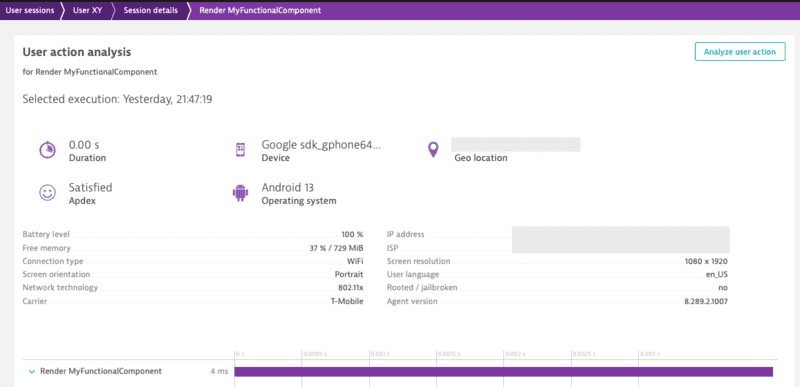
* Example with Functional Component:
|
|
284
286
|
|
|
285
|
-
```
|
|
287
|
+
```ts
|
|
288
|
+
import { Dynatrace } from '@dynatrace/react-native-plugin';
|
|
289
|
+
|
|
286
290
|
export function MyFunctionalComponent(){
|
|
287
291
|
...
|
|
288
292
|
}
|
|
289
293
|
|
|
290
294
|
Dynatrace.withMonitoring(MyFunctionalComponent, "MyFunctionalComponent");
|
|
291
295
|
```
|
|
296
|
+
|
|
292
297
|
|
|
293
298
|
The String "MyFunctionalComponent" is optional as the name of the component can be retrieved through [different properties](#how-does-dynatrace-determine-the-user-action-name).
|
|
294
299
|
|
|
@@ -300,24 +305,31 @@ There are two options to create an action. Either using `enterAutoAction` (the p
|
|
|
300
305
|
|
|
301
306
|
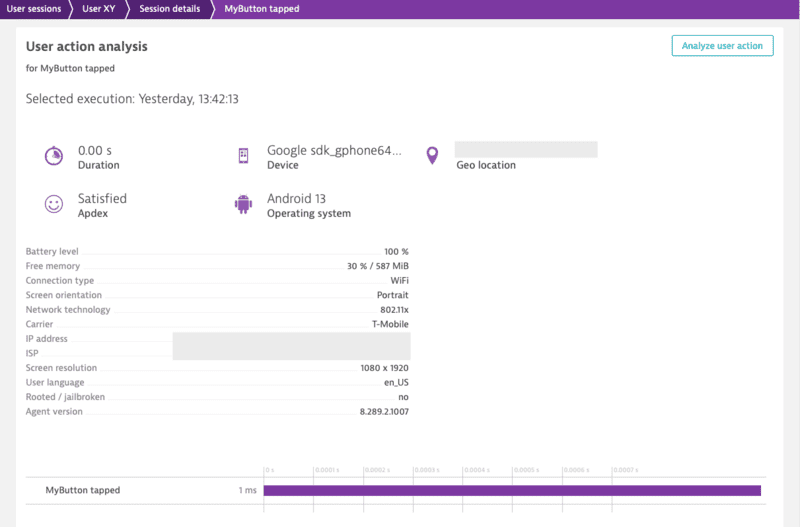
* `enterAutoAction` - Creates an Action which will be automatically handled by the plugin (This is the type of action which is internally used by the plugin when monitoring components and touchables). This means that the plugin decides about the hierachy of this action. If there is no open action, the following action will be a root action. All other actions created by this method, while a root action is open, will be automatically inserted as a child action. Furthermore the plugin will automatically link webrequest (if they are not tagged manually) to the open root action.
|
|
302
307
|
|
|
303
|
-
```
|
|
304
|
-
|
|
308
|
+
```ts
|
|
309
|
+
import { Dynatrace } from '@dynatrace/react-native-plugin';
|
|
310
|
+
|
|
311
|
+
const myAction = Dynatrace.enterAutoAction("MyButton tapped");
|
|
305
312
|
//Perform the action and whatever else is needed.
|
|
306
313
|
myAction.leaveAction();
|
|
307
314
|
```
|
|
315
|
+
|
|
308
316
|
|
|
309
317
|
* `enterManualAction` - Creates an Action which will NOT be handled by the plugin. This means that you have full control about the hierachy of your actions. This function will create a root action for you, which has the ability to create child actions via `enterAction`. Be aware, because of the full manual approach the plugin will not link webrequest automatically. Webrequest have to be manually tagged by using the tag provided by the action via `getRequestTag`.
|
|
310
318
|
|
|
311
|
-
```
|
|
312
|
-
|
|
319
|
+
```ts
|
|
320
|
+
import { Dynatrace } from '@dynatrace/react-native-plugin';
|
|
321
|
+
|
|
322
|
+
const myAction = Dynatrace.enterManualAction("MyButton tapped");
|
|
313
323
|
//Perform the action and whatever else is needed.
|
|
314
324
|
myAction.leaveAction();
|
|
315
325
|
```
|
|
316
326
|
|
|
317
327
|
To create a custom action named `"MyButton tapped"`, use the following code. The *leaveAction* closes the action again. To report values for this action before closing, see [Report Values](#report-values).
|
|
318
328
|
|
|
319
|
-
```
|
|
320
|
-
|
|
329
|
+
```ts
|
|
330
|
+
import { Dynatrace } from '@dynatrace/react-native-plugin';
|
|
331
|
+
|
|
332
|
+
const myAction = Dynatrace.enterAutoAction("MyButton tapped");
|
|
321
333
|
//Perform the action and whatever else is needed.
|
|
322
334
|
myAction.leaveAction();
|
|
323
335
|
```
|
|
@@ -326,20 +338,25 @@ myAction.leaveAction();
|
|
|
326
338
|
|
|
327
339
|
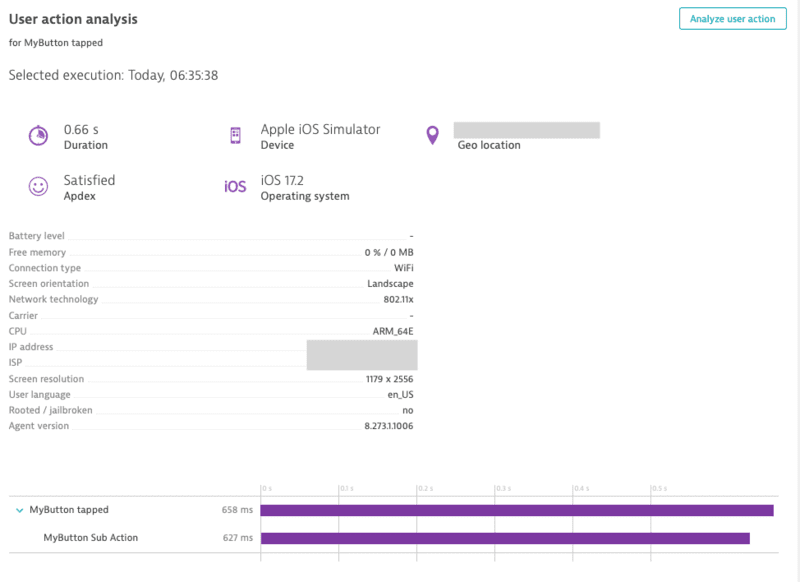
You can create a single custom action as well as sub actions. The `MyButton Sub Action` is automatically put under the `MyButton tapped`. As long as `MyButton tapped` is open, it gathers all the web requests.
|
|
328
340
|
|
|
329
|
-
```
|
|
330
|
-
|
|
331
|
-
|
|
341
|
+
```ts
|
|
342
|
+
import { Dynatrace } from '@dynatrace/react-native-plugin';
|
|
343
|
+
|
|
344
|
+
const myAction = Dynatrace.enterManualAction("MyButton tapped");
|
|
345
|
+
const mySubAction = myAction.enterAction("MyButton Sub Action");
|
|
332
346
|
//Perform the action and whatever else is needed.
|
|
333
347
|
mySubAction.leaveAction();
|
|
334
348
|
myAction.leaveAction();
|
|
335
349
|
```
|
|
350
|
+
|
|
336
351
|
|
|
337
352
|
### Cancel actions
|
|
338
353
|
|
|
339
354
|
Actions can be canceled. That means they will not be sent and discarded fully. This also means that any values and sub actions attached to the action will be removed.
|
|
340
355
|
|
|
341
|
-
```
|
|
342
|
-
|
|
356
|
+
```ts
|
|
357
|
+
import { Dynatrace } from '@dynatrace/react-native-plugin';
|
|
358
|
+
|
|
359
|
+
const myAction = Dynatrace.enterAutoAction("MyButton tapped");
|
|
343
360
|
// Action will be canceled
|
|
344
361
|
myAction.cancel();
|
|
345
362
|
|
|
@@ -354,7 +371,9 @@ You can manually tag and time your web requests. With the API shown below, you a
|
|
|
354
371
|
**Note:**
|
|
355
372
|
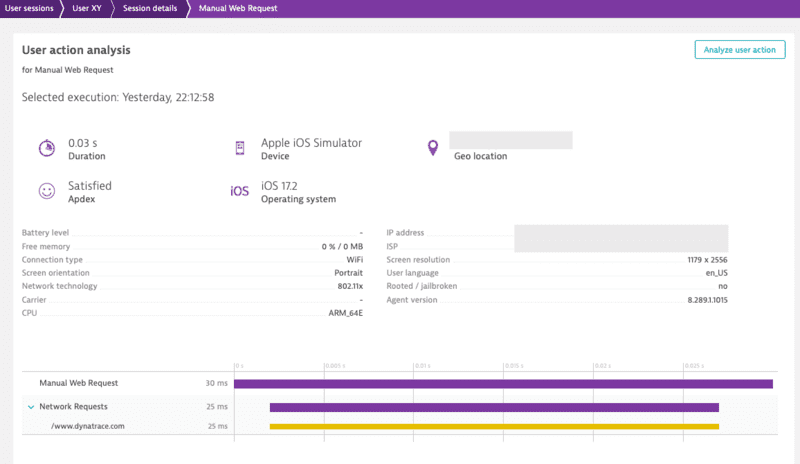
Using this API will force the request to be added to the action that is manually created.
|
|
356
373
|
|
|
357
|
-
```
|
|
374
|
+
```ts
|
|
375
|
+
import { Dynatrace, DynatraceWebRequestTiming } from '@dynatrace/react-native-plugin';
|
|
376
|
+
|
|
358
377
|
let url = 'https://www.dynatrace.com';
|
|
359
378
|
// You can also use enterAutoAction if desired
|
|
360
379
|
let action = Dynatrace.enterManualAction("Manual Web Request");
|
|
@@ -375,10 +394,13 @@ try {
|
|
|
375
394
|
action.leaveAction();
|
|
376
395
|
}
|
|
377
396
|
```
|
|
397
|
+
|
|
378
398
|
|
|
379
399
|
There is also the option to report values for request and response size:
|
|
380
400
|
|
|
381
|
-
```
|
|
401
|
+
```ts
|
|
402
|
+
import { Dynatrace, DynatraceWebRequestTiming } from '@dynatrace/react-native-plugin';
|
|
403
|
+
|
|
382
404
|
let url = 'https://www.dynatrace.com';
|
|
383
405
|
// You can also use enterAutoAction if desired
|
|
384
406
|
let action = Dynatrace.enterManualAction("Manual Web Request");
|
|
@@ -387,7 +409,11 @@ let timing = new DynatraceWebRequestTiming(url, tag);
|
|
|
387
409
|
|
|
388
410
|
try {
|
|
389
411
|
timing.startWebRequestTiming();
|
|
390
|
-
let axiosResponse = await axios.get(url
|
|
412
|
+
let axiosResponse = await axios.get(url, {
|
|
413
|
+
headers: {
|
|
414
|
+
timing.getRequestTagHeader(): tag
|
|
415
|
+
}
|
|
416
|
+
});
|
|
391
417
|
timing.stopWebRequestTimingWithSize(axiosResponse.status, axiosResponse.data, 122, 63);
|
|
392
418
|
} catch (error) {
|
|
393
419
|
timing.stopWebRequestTiming(-1, error);
|
|
@@ -395,6 +421,7 @@ try {
|
|
|
395
421
|
action.leaveAction();
|
|
396
422
|
}
|
|
397
423
|
```
|
|
424
|
+
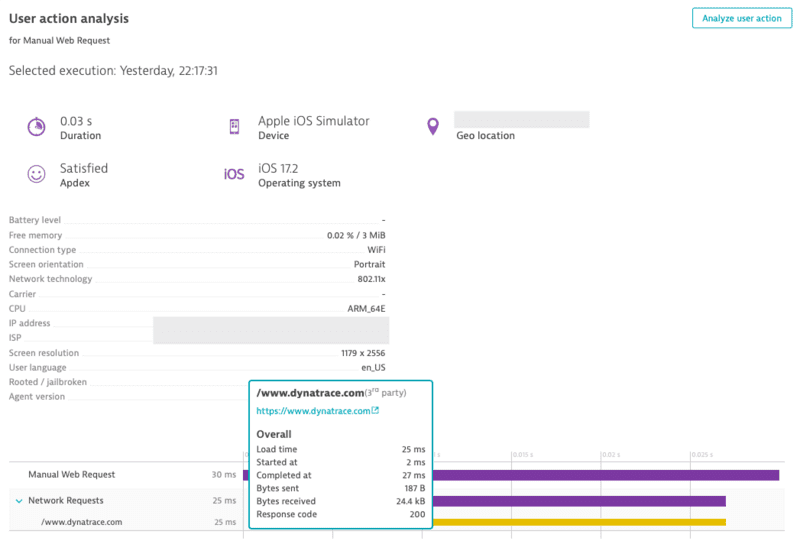
|
|
398
425
|
|
|
399
426
|
### Report values
|
|
400
427
|
|
|
@@ -410,11 +437,14 @@ reportStringValue(valueName: string, value: string, platform?: Platform): void
|
|
|
410
437
|
|
|
411
438
|
To report a string value, use the following:
|
|
412
439
|
|
|
413
|
-
```
|
|
414
|
-
|
|
440
|
+
```ts
|
|
441
|
+
import { Dynatrace } from '@dynatrace/react-native-plugin';
|
|
442
|
+
|
|
443
|
+
const myAction = Dynatrace.enterAutoAction("MyButton tapped");
|
|
415
444
|
myAction.reportStringValue("ValueName", "ImportantValue");
|
|
416
445
|
myAction.leaveAction();
|
|
417
446
|
```
|
|
447
|
+
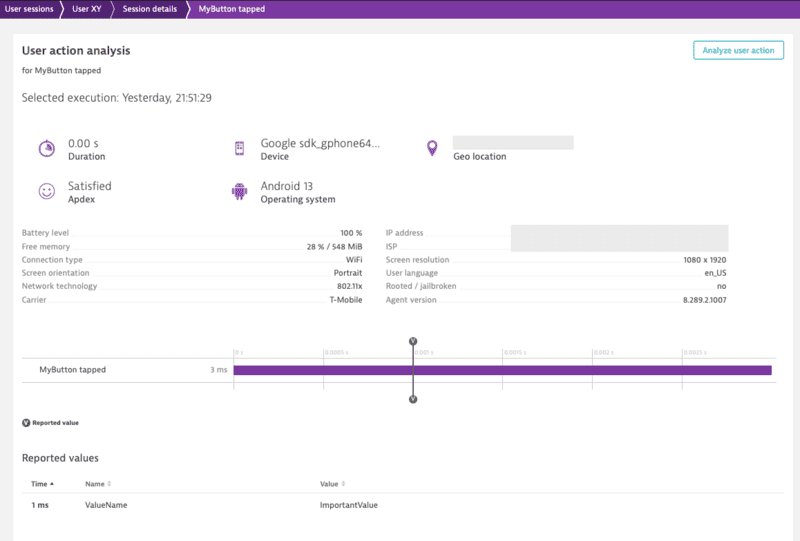
|
|
418
448
|
|
|
419
449
|
If you look at the API calls, you will see the optional parameter `platform?: Platform`. This parameter offers the possibility to report values only for a specific platform. to know more, see [Platform independent reporting](#platform-independent-reporting).
|
|
420
450
|
|
|
@@ -426,6 +456,7 @@ To manually report an error stacktrace, use the following API call:
|
|
|
426
456
|
```ts
|
|
427
457
|
reportErrorStacktrace(errorName: string, errorValue: string, reason: string, stacktrace: string, platform?: Platform): void;
|
|
428
458
|
```
|
|
459
|
+
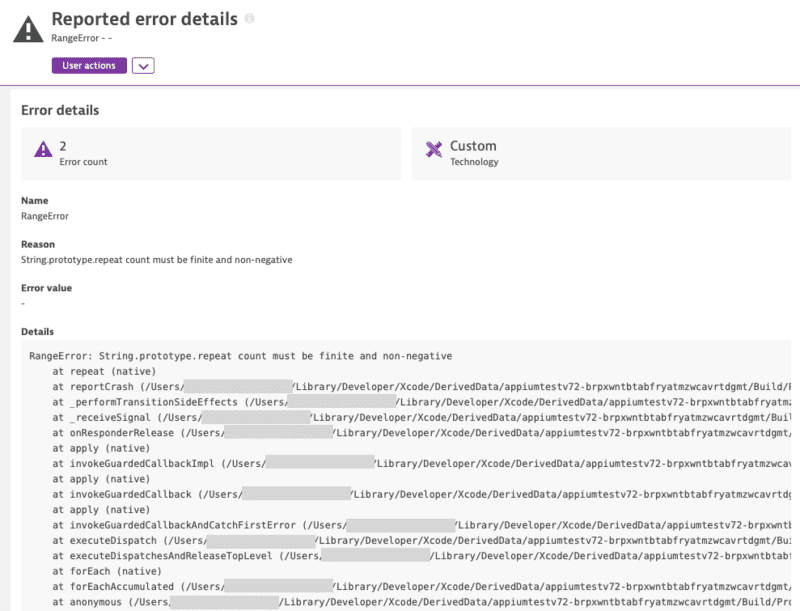
|
|
429
460
|
|
|
430
461
|
**Note:**
|
|
431
462
|
The previous API without *errorValue* is deprecated and will be removed in the future. Please use the new API with errorValue if possible.
|
|
@@ -434,15 +465,20 @@ The previous API without *errorValue* is deprecated and will be removed in the f
|
|
|
434
465
|
|
|
435
466
|
You can identify a user and tag the current session with a name by making the following call:
|
|
436
467
|
|
|
437
|
-
```
|
|
468
|
+
```ts
|
|
469
|
+
import { Dynatrace } from '@dynatrace/react-native-plugin';
|
|
470
|
+
|
|
438
471
|
Dynatrace.identifyUser("User XY");
|
|
439
472
|
```
|
|
473
|
+

|
|
440
474
|
|
|
441
475
|
### End the current user session
|
|
442
476
|
|
|
443
477
|
To end the current user session, use the following API call:
|
|
444
478
|
|
|
445
|
-
```
|
|
479
|
+
```ts
|
|
480
|
+
import { Dynatrace } from '@dynatrace/react-native-plugin';
|
|
481
|
+
|
|
446
482
|
Dynatrace.endSession();
|
|
447
483
|
```
|
|
448
484
|
|
|
@@ -456,6 +492,7 @@ You can manually report a crash via the following API call:
|
|
|
456
492
|
reportCrash(crashName: string, reason: string, stacktrace: string, platform?: Platform): void;
|
|
457
493
|
reportCrashWithException(crashName: string, crash: Error, platform?: Platform): void;
|
|
458
494
|
```
|
|
495
|
+
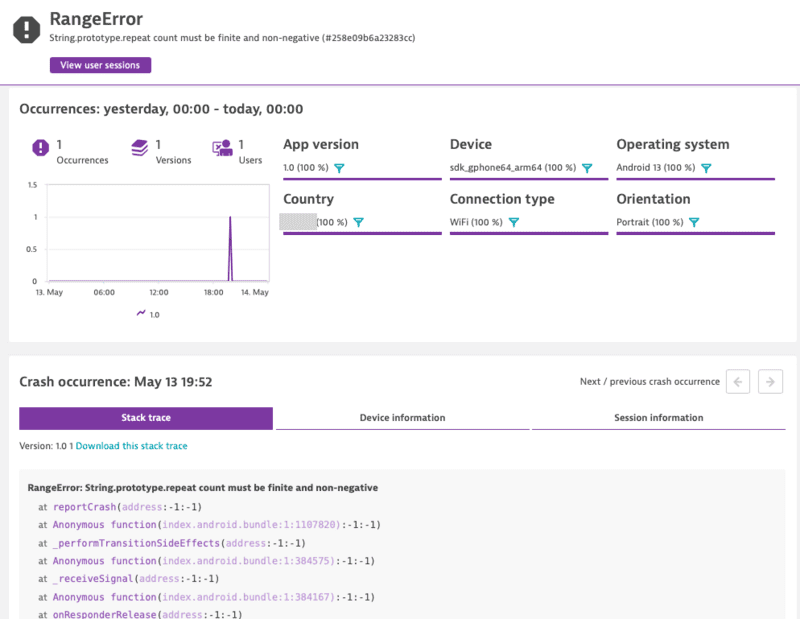
|
|
459
496
|
|
|
460
497
|
> **Note**: If you use this API call to report a crash manually, it will force the session to be completed. Any new actions that are captured afterwards will be added into a new session.
|
|
461
498
|
|
|
@@ -487,12 +524,16 @@ applyUserPrivacyOptions(userPrivacyOptions: UserPrivacyOptions, platform?: Platf
|
|
|
487
524
|
To check the current privacy options that are set:
|
|
488
525
|
|
|
489
526
|
```ts
|
|
490
|
-
|
|
527
|
+
import { Dynatrace } from '@dynatrace/react-native-plugin';
|
|
528
|
+
|
|
529
|
+
const privacyOptions = await Dynatrace.getUserPrivacyOptions();
|
|
491
530
|
```
|
|
492
531
|
|
|
493
532
|
If you want to create a new `UserPrivacyOptions` object:
|
|
494
533
|
|
|
495
534
|
```ts
|
|
535
|
+
import { DataCollectionLevel, UserPrivacyOptions } from '@dynatrace/react-native-plugin';
|
|
536
|
+
|
|
496
537
|
let privacyConfig = new UserPrivacyOptions(DataCollectionLevel.UserBehavior, true);
|
|
497
538
|
```
|
|
498
539
|
|
|
@@ -513,6 +554,8 @@ let crashReporting = privacyConfig.crashReportingOptedIn;
|
|
|
513
554
|
To apply the values that were set on the object:
|
|
514
555
|
|
|
515
556
|
```ts
|
|
557
|
+
import { Dynatrace } from '@dynatrace/react-native-plugin';
|
|
558
|
+
|
|
516
559
|
Dynatrace.applyUserPrivacyOptions(privacyConfig);
|
|
517
560
|
```
|
|
518
561
|
|
|
@@ -528,33 +571,41 @@ setGPSLocation(latitude: number, longitude: number, platform?: Platform): void
|
|
|
528
571
|
|
|
529
572
|
You probably noticed that each method has an additional *optional* parameter named `platform` of type `Platform`. You can use this to only trigger manual instrumentation for a specific OS. The available values are: `Platform.Ios` and `Platform.Android`. Default is that it will work on any platform. Otherwise it is passed *only* to the relevant OS. For example:
|
|
530
573
|
* Passing to **iOS** only:
|
|
531
|
-
```
|
|
532
|
-
|
|
574
|
+
```ts
|
|
575
|
+
import { Dynatrace, Platform } from '@dynatrace/react-native-plugin';
|
|
576
|
+
|
|
577
|
+
const myAction = Dynatrace.enterAutoAction("MyButton tapped", Platform.Ios);
|
|
533
578
|
//Perform the action and whatever else is needed.
|
|
534
579
|
myAction.leaveAction("ios");
|
|
535
580
|
```
|
|
536
581
|
|
|
537
582
|
* Passing to **Android** only:
|
|
538
|
-
```
|
|
539
|
-
|
|
583
|
+
```ts
|
|
584
|
+
import { Dynatrace, Platform } from '@dynatrace/react-native-plugin';
|
|
585
|
+
|
|
586
|
+
const myAction = Dynatrace.enterAutoAction("MyButton tapped", Platform.Android);
|
|
540
587
|
//Perform the action and whatever else is needed.
|
|
541
588
|
myAction.leaveAction("android");
|
|
542
589
|
```
|
|
543
590
|
|
|
544
591
|
* Passing to **both**:
|
|
545
|
-
```
|
|
546
|
-
|
|
592
|
+
```ts
|
|
593
|
+
import { Dynatrace } from '@dynatrace/react-native-plugin';
|
|
594
|
+
|
|
595
|
+
const myAction = Dynatrace.enterAutoAction("MyButton tapped");
|
|
547
596
|
//Perform the action and whatever else is needed.
|
|
548
597
|
myAction.leaveAction();
|
|
549
598
|
```
|
|
550
599
|
|
|
551
|
-
### Business
|
|
600
|
+
### Business event capturing
|
|
552
601
|
|
|
553
602
|
With `sendBizEvent`, you can report business events. These events are standalone events, as OneAgent sends them detached from user actions or user sessions.
|
|
554
603
|
|
|
555
604
|
For more information on business events, see [dynatrace documentation](https://www.dynatrace.com/support/help/how-to-use-dynatrace/business-analytics/ba-events-capturing#expand--example-configuration-files-for-rum--2).
|
|
556
605
|
|
|
557
|
-
```
|
|
606
|
+
```ts
|
|
607
|
+
import { Dynatrace } from '@dynatrace/react-native-plugin';
|
|
608
|
+
|
|
558
609
|
Dynatrace.sendBizEvent("com.easytravel.funnel.booking-finished", {
|
|
559
610
|
"event.name" : "Confirmed Booking",
|
|
560
611
|
"screen": "booking-confirmation",
|
|
@@ -569,6 +620,7 @@ Dynatrace.sendBizEvent("com.easytravel.funnel.booking-finished", {
|
|
|
569
620
|
"childrenTravelers": 0
|
|
570
621
|
});
|
|
571
622
|
```
|
|
623
|
+
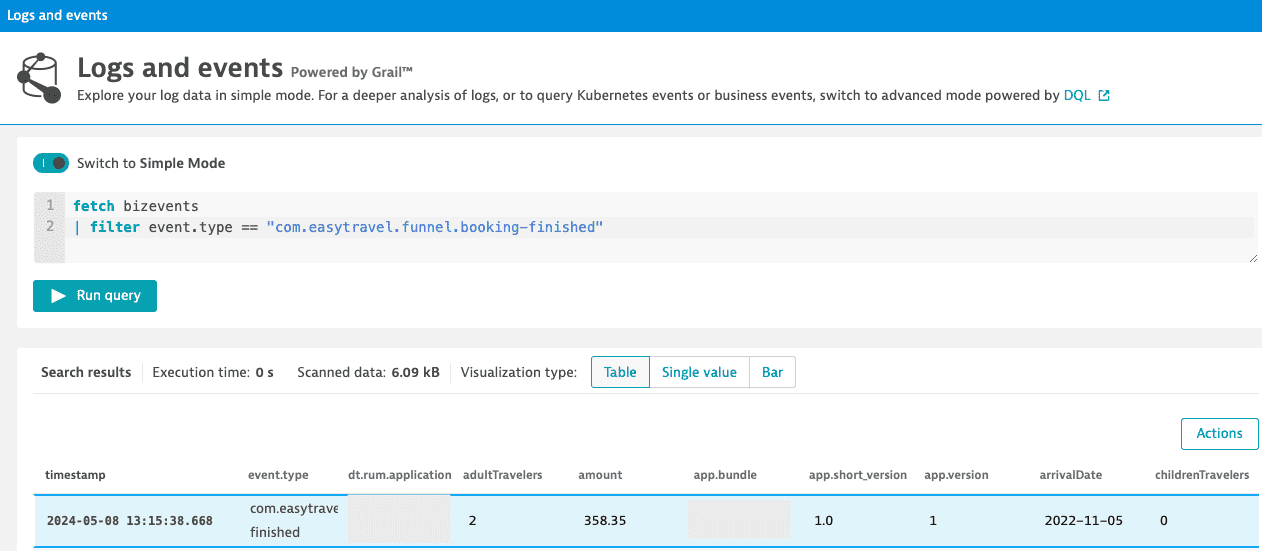
|
|
572
624
|
|
|
573
625
|
### Setting beacon headers
|
|
574
626
|
|
|
@@ -576,7 +628,7 @@ This allows you to put a set of http headers on every agent http request (i.e. A
|
|
|
576
628
|
|
|
577
629
|
**Note:** To clear the previously set headers, call the method without the headers parameter or with a null value for the headers parameter.
|
|
578
630
|
|
|
579
|
-
```
|
|
631
|
+
```ts
|
|
580
632
|
setBeaconHeaders(headers?: Map<string, string> | null, platform?: Platform): void;
|
|
581
633
|
```
|
|
582
634
|
|
|
@@ -584,7 +636,7 @@ setBeaconHeaders(headers?: Map<string, string> | null, platform?: Platform): voi
|
|
|
584
636
|
|
|
585
637
|
If you want to instrument a functional component or class component but want to exclude a certain button or element, you can do this via the `dtActionIgnore` property. Example:
|
|
586
638
|
|
|
587
|
-
```
|
|
639
|
+
```ts
|
|
588
640
|
function TouchableHighlightScreen() {
|
|
589
641
|
return (
|
|
590
642
|
<View>
|
|
@@ -955,7 +1007,7 @@ The variable ${APPLICATION_ID} must then be inserted with a prebuild script. Mak
|
|
|
955
1007
|
|
|
956
1008
|
## User opt-in mode
|
|
957
1009
|
|
|
958
|
-
Specifies if the user has to opt-in for being monitored. When enabled, you must specify the privacy setting. For more information, see the [API section](#
|
|
1010
|
+
Specifies if the user has to opt-in for being monitored. When enabled, you must specify the privacy setting. For more information, see the [API section](#user-privacy-options).
|
|
959
1011
|
|
|
960
1012
|
### Android
|
|
961
1013
|
|
|
@@ -1362,7 +1414,8 @@ If you are struggling with a problem, submit a support ticket to Dynatrace (supp
|
|
|
1362
1414
|
<br/><br/>
|
|
1363
1415
|
## Changelog
|
|
1364
1416
|
|
|
1365
|
-
|
|
1417
|
+
2.291.1
|
|
1418
|
+
* Update Android (8.291.1.1002) & iOS Agent (8.291.1.1004)
|
|
1366
1419
|
* Updated the way we report unhandled errors without a stacktrace
|
|
1367
1420
|
|
|
1368
1421
|
2.289.1
|
|
@@ -1514,7 +1567,7 @@ latest
|
|
|
1514
1567
|
* Fixed transformation problems with TSImportType and JSX
|
|
1515
1568
|
* Updated error handler to report crashes instead of error stacktraces
|
|
1516
1569
|
* Added [setBeaconHeaders API](#setting-beacon-headers)
|
|
1517
|
-
* Added [UserPrivacyOptions API](#
|
|
1570
|
+
* Added [UserPrivacyOptions API](#user-privacy-options)
|
|
1518
1571
|
* Updated DataCollection level enum members to match native agents
|
|
1519
1572
|
|
|
1520
1573
|
1.202.0
|
package/android/build.gradle
CHANGED
|
@@ -70,7 +70,7 @@ repositories {
|
|
|
70
70
|
}
|
|
71
71
|
|
|
72
72
|
dependencies {
|
|
73
|
-
implementation 'com.dynatrace.agent:agent-android:8.
|
|
73
|
+
implementation 'com.dynatrace.agent:agent-android:8.291.1.1002'
|
|
74
74
|
implementation "com.facebook.react:react-native:${safeExtGet('reactNative', '+')}"
|
|
75
75
|
}
|
|
76
76
|
|
package/files/plugin.gradle
CHANGED
|
@@ -27,7 +27,7 @@ exports.Dynatrace = {
|
|
|
27
27
|
start: (configuration) => __awaiter(void 0, void 0, void 0, function* () {
|
|
28
28
|
if (!ConfigurationHandler_1.ConfigurationHandler.isConfigurationAvailable()) {
|
|
29
29
|
if (configuration !== undefined) {
|
|
30
|
-
DynatraceBridge_1.DynatraceNative.start(configuration);
|
|
30
|
+
yield DynatraceBridge_1.DynatraceNative.start(configuration);
|
|
31
31
|
if (configuration.errorHandler) {
|
|
32
32
|
(0, ErrorHandler_1.registerErrorHandler)(configuration.reportFatalErrorAsCrash);
|
|
33
33
|
}
|
package/package.json
CHANGED
|
@@ -1,6 +1,6 @@
|
|
|
1
1
|
{
|
|
2
2
|
"name": "@dynatrace/react-native-plugin",
|
|
3
|
-
"version": "2.
|
|
3
|
+
"version": "2.291.1",
|
|
4
4
|
"description": "This plugin gives you the ability to use the Dynatrace Mobile agent in your react native application.",
|
|
5
5
|
"main": "index.js",
|
|
6
6
|
"types": "typings/react-native-dynatrace.d.ts",
|
|
@@ -71,11 +71,11 @@
|
|
|
71
71
|
"author": "Dynatrace",
|
|
72
72
|
"license": "SEE LICENSE IN LICENSE.md",
|
|
73
73
|
"dependencies": {
|
|
74
|
-
"@babel/runtime": "^7.24.
|
|
74
|
+
"@babel/runtime": "^7.24.5",
|
|
75
75
|
"jscodeshift": "^0.15.2",
|
|
76
76
|
"plist": "^3.1.0",
|
|
77
77
|
"proxy-polyfill": "^0.3.2",
|
|
78
|
-
"semver": "^7.6.
|
|
78
|
+
"semver": "^7.6.2"
|
|
79
79
|
},
|
|
80
80
|
"homepage": "https://www.dynatrace.com/",
|
|
81
81
|
"peerDependencies": {
|
|
@@ -111,7 +111,7 @@ Pod::Spec.new do |s|
|
|
|
111
111
|
#
|
|
112
112
|
|
|
113
113
|
s.dependency "React"
|
|
114
|
-
s.dependency 'Dynatrace', '~> 8.
|
|
114
|
+
s.dependency 'Dynatrace', '~> 8.291.1.1004'
|
|
115
115
|
|
|
116
116
|
# Allows for better compatibility for older and newer versions
|
|
117
117
|
if defined?(install_modules_dependencies)
|