@dynatrace/cordova-plugin 2.331.1 → 2.335.1
This diff represents the content of publicly available package versions that have been released to one of the supported registries. The information contained in this diff is provided for informational purposes only and reflects changes between package versions as they appear in their respective public registries.
- package/README.md +154 -138
- package/files/iOS/Dynatrace.xcframework/Info.plist +11 -11
- package/files/iOS/Dynatrace.xcframework/_CodeSignature/CodeDirectory +0 -0
- package/files/iOS/Dynatrace.xcframework/_CodeSignature/CodeRequirements-1 +0 -0
- package/files/iOS/Dynatrace.xcframework/_CodeSignature/CodeResources +135 -135
- package/files/iOS/Dynatrace.xcframework/_CodeSignature/CodeSignature +0 -0
- package/files/iOS/Dynatrace.xcframework/ios-arm64/Dynatrace.framework/Dynatrace +0 -0
- package/files/iOS/Dynatrace.xcframework/ios-arm64/Dynatrace.framework/Headers/Dynatrace-Swift.h +3 -1
- package/files/iOS/Dynatrace.xcframework/ios-arm64/Dynatrace.framework/Headers/Dynatrace.h +37 -1
- package/files/iOS/Dynatrace.xcframework/ios-arm64/Dynatrace.framework/Info.plist +0 -0
- package/files/iOS/Dynatrace.xcframework/ios-arm64/Dynatrace.framework/Modules/Dynatrace.swiftmodule/Project/arm64-apple-ios.swiftsourceinfo +0 -0
- package/files/iOS/Dynatrace.xcframework/ios-arm64/Dynatrace.framework/Modules/Dynatrace.swiftmodule/arm64-apple-ios.abi.json +10 -2
- package/files/iOS/Dynatrace.xcframework/ios-arm64/Dynatrace.framework/Modules/Dynatrace.swiftmodule/arm64-apple-ios.private.swiftinterface +4 -4
- package/files/iOS/Dynatrace.xcframework/ios-arm64/Dynatrace.framework/Modules/Dynatrace.swiftmodule/arm64-apple-ios.swiftdoc +0 -0
- package/files/iOS/Dynatrace.xcframework/ios-arm64/Dynatrace.framework/Modules/Dynatrace.swiftmodule/arm64-apple-ios.swiftinterface +4 -4
- package/files/iOS/Dynatrace.xcframework/ios-arm64_x86_64-simulator/Dynatrace.framework/Dynatrace +0 -0
- package/files/iOS/Dynatrace.xcframework/ios-arm64_x86_64-simulator/Dynatrace.framework/Headers/Dynatrace-Swift.h +6 -2
- package/files/iOS/Dynatrace.xcframework/ios-arm64_x86_64-simulator/Dynatrace.framework/Headers/Dynatrace.h +37 -1
- package/files/iOS/Dynatrace.xcframework/ios-arm64_x86_64-simulator/Dynatrace.framework/Info.plist +0 -0
- package/files/iOS/Dynatrace.xcframework/ios-arm64_x86_64-simulator/Dynatrace.framework/Modules/Dynatrace.swiftmodule/Project/arm64-apple-ios-simulator.swiftsourceinfo +0 -0
- package/files/iOS/Dynatrace.xcframework/ios-arm64_x86_64-simulator/Dynatrace.framework/Modules/Dynatrace.swiftmodule/Project/x86_64-apple-ios-simulator.swiftsourceinfo +0 -0
- package/files/iOS/Dynatrace.xcframework/ios-arm64_x86_64-simulator/Dynatrace.framework/Modules/Dynatrace.swiftmodule/arm64-apple-ios-simulator.abi.json +10 -2
- package/files/iOS/Dynatrace.xcframework/ios-arm64_x86_64-simulator/Dynatrace.framework/Modules/Dynatrace.swiftmodule/arm64-apple-ios-simulator.private.swiftinterface +4 -4
- package/files/iOS/Dynatrace.xcframework/ios-arm64_x86_64-simulator/Dynatrace.framework/Modules/Dynatrace.swiftmodule/arm64-apple-ios-simulator.swiftdoc +0 -0
- package/files/iOS/Dynatrace.xcframework/ios-arm64_x86_64-simulator/Dynatrace.framework/Modules/Dynatrace.swiftmodule/arm64-apple-ios-simulator.swiftinterface +4 -4
- package/files/iOS/Dynatrace.xcframework/ios-arm64_x86_64-simulator/Dynatrace.framework/Modules/Dynatrace.swiftmodule/x86_64-apple-ios-simulator.abi.json +10 -2
- package/files/iOS/Dynatrace.xcframework/ios-arm64_x86_64-simulator/Dynatrace.framework/Modules/Dynatrace.swiftmodule/x86_64-apple-ios-simulator.private.swiftinterface +4 -4
- package/files/iOS/Dynatrace.xcframework/ios-arm64_x86_64-simulator/Dynatrace.framework/Modules/Dynatrace.swiftmodule/x86_64-apple-ios-simulator.swiftdoc +0 -0
- package/files/iOS/Dynatrace.xcframework/ios-arm64_x86_64-simulator/Dynatrace.framework/Modules/Dynatrace.swiftmodule/x86_64-apple-ios-simulator.swiftinterface +4 -4
- package/files/iOS/Dynatrace.xcframework/ios-arm64_x86_64-simulator/Dynatrace.framework/_CodeSignature/CodeResources +29 -29
- package/files/iOS/Dynatrace.xcframework/tvos-arm64/Dynatrace.framework/Dynatrace +0 -0
- package/files/iOS/Dynatrace.xcframework/tvos-arm64/Dynatrace.framework/Headers/Dynatrace-Swift.h +3 -1
- package/files/iOS/Dynatrace.xcframework/tvos-arm64/Dynatrace.framework/Headers/Dynatrace.h +37 -1
- package/files/iOS/Dynatrace.xcframework/tvos-arm64/Dynatrace.framework/Info.plist +0 -0
- package/files/iOS/Dynatrace.xcframework/tvos-arm64/Dynatrace.framework/Modules/Dynatrace.swiftmodule/Project/arm64-apple-tvos.swiftsourceinfo +0 -0
- package/files/iOS/Dynatrace.xcframework/tvos-arm64/Dynatrace.framework/Modules/Dynatrace.swiftmodule/arm64-apple-tvos.private.swiftinterface +3 -3
- package/files/iOS/Dynatrace.xcframework/tvos-arm64/Dynatrace.framework/Modules/Dynatrace.swiftmodule/arm64-apple-tvos.swiftdoc +0 -0
- package/files/iOS/Dynatrace.xcframework/tvos-arm64/Dynatrace.framework/Modules/Dynatrace.swiftmodule/arm64-apple-tvos.swiftinterface +3 -3
- package/files/iOS/Dynatrace.xcframework/tvos-arm64_x86_64-simulator/Dynatrace.framework/Dynatrace +0 -0
- package/files/iOS/Dynatrace.xcframework/tvos-arm64_x86_64-simulator/Dynatrace.framework/Headers/Dynatrace-Swift.h +6 -2
- package/files/iOS/Dynatrace.xcframework/tvos-arm64_x86_64-simulator/Dynatrace.framework/Headers/Dynatrace.h +37 -1
- package/files/iOS/Dynatrace.xcframework/tvos-arm64_x86_64-simulator/Dynatrace.framework/Info.plist +0 -0
- package/files/iOS/Dynatrace.xcframework/tvos-arm64_x86_64-simulator/Dynatrace.framework/Modules/Dynatrace.swiftmodule/Project/arm64-apple-tvos-simulator.swiftsourceinfo +0 -0
- package/files/iOS/Dynatrace.xcframework/tvos-arm64_x86_64-simulator/Dynatrace.framework/Modules/Dynatrace.swiftmodule/Project/x86_64-apple-tvos-simulator.swiftsourceinfo +0 -0
- package/files/iOS/Dynatrace.xcframework/tvos-arm64_x86_64-simulator/Dynatrace.framework/Modules/Dynatrace.swiftmodule/arm64-apple-tvos-simulator.private.swiftinterface +3 -3
- package/files/iOS/Dynatrace.xcframework/tvos-arm64_x86_64-simulator/Dynatrace.framework/Modules/Dynatrace.swiftmodule/arm64-apple-tvos-simulator.swiftdoc +0 -0
- package/files/iOS/Dynatrace.xcframework/tvos-arm64_x86_64-simulator/Dynatrace.framework/Modules/Dynatrace.swiftmodule/arm64-apple-tvos-simulator.swiftinterface +3 -3
- package/files/iOS/Dynatrace.xcframework/tvos-arm64_x86_64-simulator/Dynatrace.framework/Modules/Dynatrace.swiftmodule/x86_64-apple-tvos-simulator.private.swiftinterface +3 -3
- package/files/iOS/Dynatrace.xcframework/tvos-arm64_x86_64-simulator/Dynatrace.framework/Modules/Dynatrace.swiftmodule/x86_64-apple-tvos-simulator.swiftdoc +0 -0
- package/files/iOS/Dynatrace.xcframework/tvos-arm64_x86_64-simulator/Dynatrace.framework/Modules/Dynatrace.swiftmodule/x86_64-apple-tvos-simulator.swiftinterface +3 -3
- package/files/iOS/Dynatrace.xcframework/tvos-arm64_x86_64-simulator/Dynatrace.framework/_CodeSignature/CodeResources +25 -25
- package/files/plugin.gradle +1 -1
- package/networking/NativeNetworkInterceptorUtils.js +2 -2
- package/package.json +2 -2
- package/plugin.xml +2 -2
- package/scripts/helpers/FileHelper.js +4 -4
- package/scripts/helpers/InstallHelper.js +9 -15
- package/scripts/helpers/PathHelper.js +2 -14
package/README.md
CHANGED
|
@@ -2,7 +2,7 @@
|
|
|
2
2
|
|
|
3
3
|
# Dynatrace Cordova Plugin
|
|
4
4
|
|
|
5
|
-
This plugin gives you the ability to use the Dynatrace instrumentation in your hybrid application (Cordova, Ionic, Capacitor ..). It uses
|
|
5
|
+
This plugin gives you the ability to use the Dynatrace instrumentation in your hybrid application (Cordova, Ionic, Capacitor ..). It uses OneAgent for Mobile and RUM JavaScript. OneAgent for Mobile will give you all device specific values containing lifecycle information and RUM JavaScript will allow you to manually instrument your JavaScript/TypeScript code out of the box (TypeScript definitions included). RUM JavaScript will cover the network calls (depending on your used libraries) and will automatically detect them.
|
|
6
6
|
|
|
7
7
|
## Upgrading major versions
|
|
8
8
|
|
|
@@ -24,16 +24,31 @@ For information as to why this is necessary, read more [here](#migration-from-ma
|
|
|
24
24
|
* Java 11
|
|
25
25
|
* Jetpack Compose 1.4 - 1.10 - see [Compose Compatibility Note](#compose-compatibility-note)
|
|
26
26
|
* For iOS users: Minimum iOS 12
|
|
27
|
-
* For JavaScript
|
|
27
|
+
* For RUM JavaScript: access to API of cluster
|
|
28
28
|
* Node: >= 20.x
|
|
29
29
|
* Cordova: 10+
|
|
30
|
+
* Capacitor: 6+
|
|
30
31
|
|
|
31
|
-
##
|
|
32
|
+
## OneAgent Versions
|
|
32
33
|
|
|
33
|
-
These
|
|
34
|
+
These OneAgent versions are configured in this plugin:
|
|
34
35
|
|
|
35
|
-
* Android
|
|
36
|
-
* iOS
|
|
36
|
+
* Android OneAgent: 8.335.1.1001
|
|
37
|
+
* iOS OneAgent: 8.335.1.1009
|
|
38
|
+
|
|
39
|
+
## OneAgent compatibility
|
|
40
|
+
|
|
41
|
+
OneAgent for Mobile and RUM JavaScript are compatible with each other unless at least one of them reaches End of Support (EoS). To check the support status of their versions, see [Scheduled EoL for unsupported OneAgent versions](https://docs.dynatrace.com/docs/shortlink/end-of-life#scheduled-eol-for-unsupported-oneagent-versions).
|
|
42
|
+
|
|
43
|
+
If versions of both OneAgent for Mobile and RUM JavaScript are within their supported lifecycles, no additional compatibility validation is required. The optimal approach is to keep both of them updated to their latest versions. The only exception is when the Dynatrace documentation explicitly identifies a conflict between specific versions of OneAgent for Mobile and RUM JavaScript. In this case, refer to the documentation for guidance on how to resolve the conflict.
|
|
44
|
+
|
|
45
|
+
### Feature-specific compatibility requirements
|
|
46
|
+
|
|
47
|
+
Some features require a minimum version of OneAgent for Mobile or RUM JavaScript to function properly. If you rely on a feature that has a version dependency, you must ensure both OneAgent for Mobile and RUM JavaScript meet those minimum requirements even if both are within their supported lifecycles.
|
|
48
|
+
|
|
49
|
+
Examples of known feature-specific version requirements:
|
|
50
|
+
|
|
51
|
+
* To use the [iOS-only configuration feature](#ios-only-configuration) with the Dynatrace Cordova plugin, **RUM JavaScript version 1.327 or higher** is required. In addition to the minimum version, you must add the corresponding property to your `dynatrace.config.js` file. See [iOS only configuration](#ios-only-configuration) for required configuration details.
|
|
37
52
|
|
|
38
53
|
## Quick Setup
|
|
39
54
|
|
|
@@ -44,6 +59,8 @@ These agent versions are configured in this plugin:
|
|
|
44
59
|
|
|
45
60
|
## Advanced Topics
|
|
46
61
|
|
|
62
|
+
* [OneAgent compatibility](#oneagent-compatibility)
|
|
63
|
+
* [Feature-specific compatibility requirements](#feature-specific-compatibility)
|
|
47
64
|
* [Capacitor instrumentation](#capacitor-instrumentation)
|
|
48
65
|
* [Opt out](#opt-out)
|
|
49
66
|
* [Cordova configuration](#cordova-configuration)
|
|
@@ -51,14 +68,14 @@ These agent versions are configured in this plugin:
|
|
|
51
68
|
* [Content Security Policy url](#content-security-policy-url)
|
|
52
69
|
* [Cookie Proxy](#cookie-proxy)
|
|
53
70
|
* [Capacitor Cookie Proxy](#capacitor-cookie-proxy)
|
|
54
|
-
* [
|
|
71
|
+
* [RUM JavaScript Path](#rum-javascript-path)
|
|
55
72
|
* [Gradle Path](#gradle-path)
|
|
56
73
|
* [Plist Path](#plist-path)
|
|
57
|
-
* [Mobile
|
|
74
|
+
* [OneAgent for Mobile configuration](#oneagent-for-mobile-configuration)
|
|
58
75
|
* [Hybrid related configuration](#hybrid-related-configuration)
|
|
59
76
|
* [iOS only configuration](#ios-only-configuration)
|
|
60
|
-
* [JavaScript
|
|
61
|
-
* [JavaScript
|
|
77
|
+
* [RUM JavaScript configuration](#rum-javascript-configuration)
|
|
78
|
+
* [RUM JavaScript Snippet Mode](#rum-javascript-snippet-mode)
|
|
62
79
|
* [HTML Instrumentation Requirements](#html-instrumentation-requirements)
|
|
63
80
|
* [Allow any certificate](#allow-any-certificate)
|
|
64
81
|
* [Manual instrumentation](#manual-instrumentation)
|
|
@@ -66,11 +83,11 @@ These agent versions are configured in this plugin:
|
|
|
66
83
|
* [Report error](#report-error)
|
|
67
84
|
* [Identify user](#identify-user)
|
|
68
85
|
* [More examples](#more-examples)
|
|
69
|
-
* [Typings file for JavaScript
|
|
70
|
-
* [Manual instrumentation - Mobile
|
|
86
|
+
* [Typings file for RUM JavaScript API](#typings-file-for-rum-javascript-api)
|
|
87
|
+
* [Manual instrumentation - OneAgent for Mobile](#manual-instrumentation-oneagent-for-mobile)
|
|
71
88
|
* [End session](#end-session)
|
|
72
89
|
* [User Privacy Options](#user-privacy-options)
|
|
73
|
-
* [Typings file for Mobile
|
|
90
|
+
* [Typings file for OneAgent for Mobile API](#typings-file-for-oneagent-for-mobile-api)
|
|
74
91
|
* [Native Webrequests](#native-webrequests)
|
|
75
92
|
* [IBM Mobile First](#ibm-mobile-first)
|
|
76
93
|
* [Ionic WebView for Cordova](#ionic-webview-for-cordova)
|
|
@@ -118,7 +135,7 @@ Be aware for Capacitor after installation some [extra configuration steps](#capa
|
|
|
118
135
|
|
|
119
136
|
## 2. Configuration with Dynatrace
|
|
120
137
|
|
|
121
|
-
If you want to instrument your Cordova application just go to your Dynatrace WebUI and select the menu point "Deploy Dynatrace". Choose to setup mobile monitoring and select Cordova. Afterwards it is possible for you to add the Web part (JavaScript
|
|
138
|
+
If you want to instrument your Cordova application just go to your Dynatrace WebUI and select the menu point "Deploy Dynatrace". Choose to setup mobile monitoring and select Cordova. Afterwards it is possible for you to add the Web part (RUM JavaScript) automatically and download the `dynatrace.config.js` file.
|
|
122
139
|
|
|
123
140
|
This file should be placed in the `root of your project` (same place where the *package.json* is stored). If the file is not available the instrumentation will not work.
|
|
124
141
|
|
|
@@ -156,25 +173,17 @@ hybridWebView {
|
|
|
156
173
|
domains 'http://localhost', '.yourotherdomains.com'
|
|
157
174
|
}
|
|
158
175
|
```
|
|
159
|
-
5. Run the following commands (replace `<platform>` with `ios` or `android`):
|
|
160
|
-
*
|
|
161
|
-
* `ionic capacitor
|
|
176
|
+
5. Run the following commands (replace `<platform>` with `ios` or `android`) for instrumentation:
|
|
177
|
+
* If using **Ionic CLI**:
|
|
178
|
+
* `ionic capacitor run <platform>`
|
|
179
|
+
* `ionic capacitor sync <platform> && ionic capacitor open <platform>`
|
|
162
180
|
* `ionic capacitor build <platform>`
|
|
163
|
-
|
|
164
|
-
*
|
|
165
|
-
*
|
|
166
|
-
* `ionic capacitor run <platform>`
|
|
167
|
-
* `ionic capacitor sync <platform> && ionic capacitor open <platform>`
|
|
168
|
-
* `ionic capacitor build <platform>`
|
|
169
|
-
* If using **Capacitor CLI**:
|
|
170
|
-
* `capacitor run <platform>`
|
|
171
|
-
* `capacitor sync <platform> && capacitor open <platform>`
|
|
181
|
+
* If using **Capacitor CLI**:
|
|
182
|
+
* `capacitor run <platform>`
|
|
183
|
+
* `capacitor sync <platform> && capacitor open <platform>`
|
|
172
184
|
|
|
173
185
|
6. Run your application (if you did not use the **run** command)
|
|
174
186
|
|
|
175
|
-
**Note:**
|
|
176
|
-
Capacitor 3.1 added new hooks inside of their CLI. This allows us to instrument your application when using the `ionic capacitor run` or `capacitor run` commands.
|
|
177
|
-
|
|
178
187
|
## Opt out
|
|
179
188
|
|
|
180
189
|
You can opt-out of having your `package.json` modified by our plugin. By default, we add the hook required to properly instrument your application. To prevent issues with git, using this opt-out feature will no longer have our plugin modify your `package.json`.
|
|
@@ -187,9 +196,9 @@ If using this feature, you will need to manually add the following hook to your
|
|
|
187
196
|
```js
|
|
188
197
|
"scripts": {
|
|
189
198
|
...
|
|
190
|
-
//
|
|
199
|
+
// Option 1 (if using ionic + capacitor)
|
|
191
200
|
"ionic:capacitor:build:before": "node node_modules/@dynatrace/cordova-plugin/scripts/InstrumentCap.js"
|
|
192
|
-
// capacitor
|
|
201
|
+
// Option 2 (if using cordova + capacitor or ionic + capacitor)
|
|
193
202
|
"capacitor:sync:after": "node node_modules/@dynatrace/cordova-plugin/scripts/InstrumentCap.js"
|
|
194
203
|
},
|
|
195
204
|
```
|
|
@@ -223,7 +232,7 @@ There is flag for updating the CSP (Content Security Policy). By default this va
|
|
|
223
232
|
|
|
224
233
|
### Cookie Proxy
|
|
225
234
|
|
|
226
|
-
Issues with cookies are somehow a persistent companion in Ionic or Capacitor applications. Therefore, we provide a proxy script which is wrapping the document.cookie API and are storing the cookies which are important for
|
|
235
|
+
Issues with cookies are somehow a persistent companion in Ionic or Capacitor applications. Therefore, we provide a proxy script which is wrapping the document.cookie API and are storing the cookies which are important for Dynatrace OneAgents in the session storage. Of course this wrapping is still calling the original API. Please see the [Capacitor Cookie Proxy](#capacitor-cookie-proxy) section below if you are using `CapacitorCookies` in your application. If not, please see the configuration below.
|
|
227
236
|
|
|
228
237
|
Per default the cookie proxy is turned off. To make use of this proxy you need to enable it in the cordova configuration in the dynatrace.config.js:
|
|
229
238
|
|
|
@@ -256,20 +265,20 @@ If you are not using `CapacitorCookies` in your application, please be sure to f
|
|
|
256
265
|
**NOTE:**
|
|
257
266
|
If `CapacitorCookies` is set to true, we will not inject our proxy as there have been issues when using both `CapacitorCookies` and our proxy at the same time. Also, if you have both `cookieProxy` and `capacitorCookieProxy` set to true while `CapacitorCookies` is set to false, we will add the capacitor cookie proxy.
|
|
258
267
|
|
|
259
|
-
###
|
|
268
|
+
### RUM JavaScript Path
|
|
260
269
|
|
|
261
|
-
If you want to use a local script/text file that includes the
|
|
270
|
+
If you want to use a local script/text file that includes the RUM JavaScript snippet downloaded from the WebUI or retrieved from using the Dynatrace API. Note that you can name the file whatever you want but the file and directory that you use needs to exist. The file downloaded from the WebUI will be named `jsSnippet.txt` by default.
|
|
262
271
|
|
|
263
272
|
### Gradle Path
|
|
264
273
|
|
|
265
|
-
If your top level build.gradle is not in the standard location or you want to use a specific build.gradle, you can specify a path to the desired file. We will assume that the other gradle file resides in `/app/build.gradle`. This will add all
|
|
274
|
+
If your top level build.gradle is not in the standard location or you want to use a specific build.gradle, you can specify a path to the desired file. We will assume that the other gradle file resides in `/app/build.gradle`. This will add all OneAgent dependencies automatically for you and will update the configuration.
|
|
266
275
|
|
|
267
276
|
### Plist Path
|
|
268
277
|
|
|
269
|
-
Tell the script where your Info.plist file is. The plist file is used for updating the configuration for the iOS
|
|
278
|
+
Tell the script where your Info.plist file is. The plist file is used for updating the configuration for the iOS OneAgent.
|
|
270
279
|
|
|
271
280
|
|
|
272
|
-
## Mobile
|
|
281
|
+
## OneAgent for Mobile configuration
|
|
273
282
|
|
|
274
283
|
```js
|
|
275
284
|
module.exports = {
|
|
@@ -283,7 +292,7 @@ module.exports = {
|
|
|
283
292
|
}
|
|
284
293
|
```
|
|
285
294
|
|
|
286
|
-
The native configuration contains all the settings which are necessary for
|
|
295
|
+
The native configuration contains all the settings which are necessary for OneAgent for Mobile. You can find all the available properties in the [documentation](#official-documentation) of OneAgent for Mobile.
|
|
287
296
|
|
|
288
297
|
The content of the `ios.config` property will be directly copied to the plist file. The content of the `android.config` property will be directly copied to the gradle file.
|
|
289
298
|
|
|
@@ -327,13 +336,13 @@ module.exports = {
|
|
|
327
336
|
|
|
328
337
|
* `DTXHybridApplication` or `hybridWebView.enabled` : Set to `true` if you have a Hybrid application. The default value is `false`.
|
|
329
338
|
|
|
330
|
-
* `DTXSetCookiesForDomain` or `hybridWebView.domains` : For hybrid applications using
|
|
339
|
+
* `DTXSetCookiesForDomain` or `hybridWebView.domains` : For hybrid applications using RUM JavaScript, cookies need to be set for each instrumented domain or server the application communicates with. You can specify domains, host or IP addresses. Domains or sub-domains must start with a dot. Separate the list elements with a comma.
|
|
331
340
|
|
|
332
341
|
### iOS only configuration
|
|
333
342
|
|
|
334
343
|
The `DTXHybridApplicationMode` flag is available for iOS only.
|
|
335
344
|
|
|
336
|
-
Using the default value of `cookies` will set the behavior of the iOS
|
|
345
|
+
Using the default value of `cookies` will set the behavior of the iOS OneAgent to inject Javascript into the webview which allows RUM JavaScript and the iOS OneAgent to correlate the mobile and web session via cookies and or local storage.
|
|
337
346
|
|
|
338
347
|
```js
|
|
339
348
|
module.exports = {
|
|
@@ -346,7 +355,7 @@ module.exports = {
|
|
|
346
355
|
}
|
|
347
356
|
```
|
|
348
357
|
|
|
349
|
-
Using the value of `useragent` will result in modifying the UserAgent header, which appends specific key/values that will allow
|
|
358
|
+
Using the value of `useragent` will result in modifying the UserAgent header, which appends specific key/values that will allow RUM JavaScript to correlate mobile and web sessions properly. This option requires cluster version (or RUM JavaScript version) 327 or higher.
|
|
350
359
|
|
|
351
360
|
**Note:** Using this setting will preserve the original UserAgent header and append the following string: `DTHybrid/x.x dtAdk=... dtAdkSettings=...`
|
|
352
361
|
|
|
@@ -363,18 +372,18 @@ module.exports = {
|
|
|
363
372
|
|
|
364
373
|
* `DTXHybridApplication` or `hybridWebView.enabled` : Set to `true` if you have a Hybrid application. This property is automatically set to true if you are using the dynatrace.config.js file downloaded from the Instrumentation Wizard. Otherwise, the default value is `false`.
|
|
365
374
|
|
|
366
|
-
## JavaScript
|
|
375
|
+
## RUM JavaScript configuration
|
|
367
376
|
|
|
368
|
-
Basically all needed properties for
|
|
369
|
-
* `url` - Dynatrace API url to retrieve the
|
|
370
|
-
* `mode` - Values can be numbers 0-4 depending on what JavaScript
|
|
371
|
-
* `allowanycert` - Allows the plugin to ignore certificate issues when retrieving
|
|
377
|
+
Basically all needed properties for RUM JavaScript are predefined by the downloadable `dynatrace.config.js`. There are four available properties:
|
|
378
|
+
* `url` - Dynatrace API url to retrieve the RUM JavaScript script tag.
|
|
379
|
+
* `mode` - Values can be numbers 0-4 depending on what RUM JavaScript code snippet you want to use.
|
|
380
|
+
* `allowanycert` - Allows the plugin to ignore certificate issues when retrieving RUM JavaScript.
|
|
372
381
|
* `htmlFiles` - A string array which allows you to specify .html files to be instrumented. **Note**: The `htmlFiles` property should only be used if you have html files that are not automatically instrumented by the plugin.
|
|
373
382
|
|
|
374
383
|
|
|
375
|
-
### JavaScript
|
|
384
|
+
### RUM JavaScript Snippet Mode
|
|
376
385
|
|
|
377
|
-
Using a specific mode can allow you during build to insert any of the available JavaScript
|
|
386
|
+
Using a specific mode can allow you during build to insert any of the available RUM JavaScript code snippet options that are offered.
|
|
378
387
|
[Click here](https://www.dynatrace.com/support/help/shortlink/rum-injection#manual-insertion) for more details on the options listed below:
|
|
379
388
|
* 0 - `jsInlineScript`
|
|
380
389
|
* 1 - `jsTagComplete` (Default)
|
|
@@ -392,7 +401,7 @@ module.exports = {
|
|
|
392
401
|
```
|
|
393
402
|
|
|
394
403
|
|
|
395
|
-
The above example will use mode option 2 and retrieve the synchronous code snippet of
|
|
404
|
+
The above example will use mode option 2 and retrieve the synchronous code snippet of RUM JavaScript.
|
|
396
405
|
|
|
397
406
|
**Note:**
|
|
398
407
|
The default url value will be used if mode is not included in the `dynatrace.config.js` file or if mode exists and the value is not valid (i.e. not a number 0 through 4).
|
|
@@ -422,13 +431,13 @@ Be aware that relative paths will always be used based on the assets folder. Cor
|
|
|
422
431
|
|
|
423
432
|
### Allow any certificate
|
|
424
433
|
|
|
425
|
-
If you are having an issue retrieving
|
|
434
|
+
If you are having an issue retrieving RUM JavaScript and see an error message relating to a certificate:
|
|
426
435
|
|
|
427
436
|
```
|
|
428
437
|
Could not retrieve the JavaScript Agent! - Could not retrieve agent optionsError: unable to verify the first certificate
|
|
429
438
|
```
|
|
430
439
|
|
|
431
|
-
You are able to bypass those errors at your **OWN RISK** by using `allowanycert: true` within the `js` property. This will ignore the fact that the SSL connection is not secure (e.g. because of an invalid certificate) and will retrieve
|
|
440
|
+
You are able to bypass those errors at your **OWN RISK** by using `allowanycert: true` within the `js` property. This will ignore the fact that the SSL connection is not secure (e.g. because of an invalid certificate) and will retrieve RUM JavaScript snippet anyways. An example would look like this:
|
|
432
441
|
|
|
433
442
|
```js
|
|
434
443
|
module.exports = {
|
|
@@ -441,7 +450,7 @@ module.exports = {
|
|
|
441
450
|
|
|
442
451
|
## Manual instrumentation
|
|
443
452
|
|
|
444
|
-
The JavaScript
|
|
453
|
+
The RUM JavaScript interface will be provided by RUM JavaScript, it can be used everywhere in your application by simply calling `dtrum`.
|
|
445
454
|
|
|
446
455
|
This gives you the possibility to instrument your code even further by adding manual instrumentation. If you like to know more about the manual instrumentation, have a look into the Dynatrace [documentation](#official-documentation).
|
|
447
456
|
|
|
@@ -485,9 +494,9 @@ The above functionalities are only a small part of how you can use the API. If y
|
|
|
485
494
|
|
|
486
495
|
[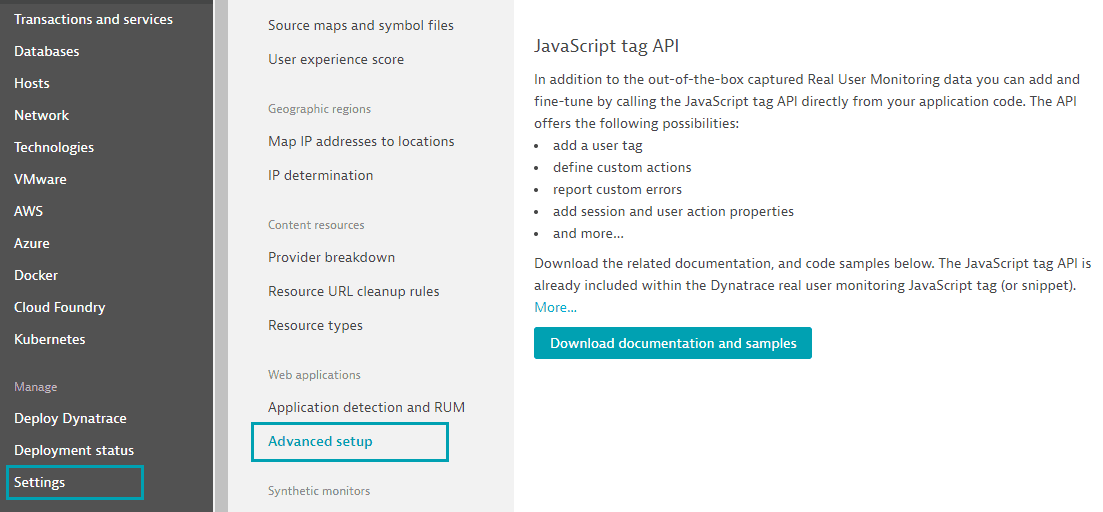]()
|
|
487
496
|
|
|
488
|
-
### Typings file for JavaScript
|
|
497
|
+
### Typings file for RUM JavaScript API
|
|
489
498
|
|
|
490
|
-
If you are using typescript and want to use the manual instrumentation of
|
|
499
|
+
If you are using typescript and want to use the manual instrumentation of RUM JavaScript you should install the typings. The typings are available under the package name `@dynatrace/dtrum-api-types`. External typings have the advantage that you can apply the version that is actually needed.
|
|
491
500
|
|
|
492
501
|
After installing the typings, they can be used by inserting the following line at the top of the file:
|
|
493
502
|
|
|
@@ -515,13 +524,13 @@ let dtrum = window.dtrum;
|
|
|
515
524
|
dtrum.enterAction(...);
|
|
516
525
|
```
|
|
517
526
|
|
|
518
|
-
## Manual instrumentation - Mobile
|
|
527
|
+
## Manual instrumentation - OneAgent for Mobile
|
|
519
528
|
|
|
520
|
-
The Mobile
|
|
529
|
+
The OneAgent for Mobile interface will be provided by OneAgent for Mobile, so it can be used everywhere in your application by simply calling `dynatraceMobile`.
|
|
521
530
|
|
|
522
531
|
### End session
|
|
523
532
|
|
|
524
|
-
In a hybrid scenario it is only possible for
|
|
533
|
+
In a hybrid scenario it is only possible for OneAgent for Mobile to end a session/visit. That's why we expose the endVisit function of OneAgent for Mobile.
|
|
525
534
|
|
|
526
535
|
The interface is available with the name `dynatraceMobile` (TypeScript definitions included). Calling `dynatraceMobile.endVisit(successCallback, errorCallback)` will end the session/visit. Example how this call looks like:
|
|
527
536
|
|
|
@@ -586,9 +595,9 @@ const enum DataCollectionLevel {
|
|
|
586
595
|
}
|
|
587
596
|
```
|
|
588
597
|
|
|
589
|
-
1. Off:
|
|
590
|
-
2. Performance:
|
|
591
|
-
3. UserBehavior:
|
|
598
|
+
1. Off: OneAgent for Mobile doesn't capture any monitoring data.
|
|
599
|
+
2. Performance: OneAgent for Mobile captures only anonymous performance data. Monitoring data that can be used to identify individual users, such as user tags and custom values, aren't captured.
|
|
600
|
+
3. UserBehavior: OneAgent for Mobile captures both performance and user data. In this mode, OneAgent for Mobile recognizes and reports users who re-visit in future sessions.
|
|
592
601
|
|
|
593
602
|
Here are some examples of how to use the API:
|
|
594
603
|
|
|
@@ -617,9 +626,9 @@ dynatraceMobile.applyUserPrivacyOptions(DataCollectionLevel.UserBehavior, true,
|
|
|
617
626
|
});
|
|
618
627
|
```
|
|
619
628
|
|
|
620
|
-
### Typings file for Mobile
|
|
629
|
+
### Typings file for OneAgent for Mobile API
|
|
621
630
|
|
|
622
|
-
To use the interface of
|
|
631
|
+
To use the interface of OneAgent for Mobile directly you must specify the typing definition file in the *tsconfig.json*. Add the following block to the *tsconfig.json*:
|
|
623
632
|
|
|
624
633
|
```
|
|
625
634
|
"files": [
|
|
@@ -706,7 +715,7 @@ if(!dynatraceMobile.getMobileFirstNetworkInterceptor().isInterceptorEnabled()){
|
|
|
706
715
|
|
|
707
716
|
## Ionic WebView for Cordova
|
|
708
717
|
|
|
709
|
-
|
|
718
|
+
OneAgent for Mobile usually sets cookies on the correct domain but the [cordova-plugin-ionic-webview](https://github.com/ionic-team/cordova-plugin-ionic-webview) uses different domains. Those domains need to be added in the configuration. If you defined a custom [hostname](https://github.com/ionic-team/cordova-plugin-ionic-webview#hostname) you need to take this into account as well for choosing the correct domain. A sample configuration which takes care about the default domain for cordova-plugin-ionic-webview looks like the following:
|
|
710
719
|
|
|
711
720
|
```js
|
|
712
721
|
module.exports = {
|
|
@@ -755,10 +764,10 @@ This will download the version `1.191.1` of our plugin. In general we recommend
|
|
|
755
764
|
|
|
756
765
|
Our script assumes that the usual cordova project structure is given. The following arguments can be specified for our instrumentation script if the project structure is different.
|
|
757
766
|
|
|
758
|
-
* `--gradle=C:\MyCordovaAndroidProject\platforms\android\build.gradle` - the location of the root build.gradle file. We will assume that the other gradle file resides in `/app/build.gradle`. This will add all
|
|
759
|
-
* `--plist=C:\MyCordovaIOSProject\platforms\ios\projectName\projectName-Info.plist` - Tell the script where your Info.plist file is. The plist file is used for updating the configuration for
|
|
767
|
+
* `--gradle=C:\MyCordovaAndroidProject\platforms\android\build.gradle` - the location of the root build.gradle file. We will assume that the other gradle file resides in `/app/build.gradle`. This will add all OneAgent dependencies automatically for you and will update the configuration.
|
|
768
|
+
* `--plist=C:\MyCordovaIOSProject\platforms\ios\projectName\projectName-Info.plist` - Tell the script where your Info.plist file is. The plist file is used for updating the configuration for OneAgent.
|
|
760
769
|
* `--config=C:\SpecialFolderForDynatrace\dynatrace.config.js` - Used for if you have not added your config file in the root folder of the Cordova project but somewhere else.
|
|
761
|
-
* `--jsagent=C:\MyCordovaProject\scripts\jsSnippet.txt` - If you want to use a local script/text file that includes the
|
|
770
|
+
* `--jsagent=C:\MyCordovaProject\scripts\jsSnippet.txt` - If you want to use a local script/text file that includes the RUM JavaScript snippet downloaded from the WebUI or retrieved from using the Dynatrace API. Note that you can name the file whatever you want but the file and directory that you use needs to exist. The file downloaded from the WebUI will be named `jsSnippet.txt` by default.
|
|
762
771
|
|
|
763
772
|
Example:
|
|
764
773
|
|
|
@@ -783,7 +792,7 @@ If you use Capacitor make sure to directly modify the sync command in `package.j
|
|
|
783
792
|
When reinstalling our plugin, your custom command will be replaced with our default command unless the [opt out](#opt-out) feature is used. Be sure to [opt out](#opt-out) when using a custom command. If you are using a relative path like in the example above, the path will be appended by process.cwd(), which is the current working directory while executing the capacitor sync.
|
|
784
793
|
|
|
785
794
|
**Additional Note:**
|
|
786
|
-
For the local script file, we copy the specified file 1:1. It is best to download the
|
|
795
|
+
For the local script file, we copy the specified file 1:1. It is best to download the RUM JavaScript snippet from the WebUI after selecting the desired RUM JavaScript format and clicking the **Download** link below the shown code snippet. To get to this page, go to your **Web Application** settings and then select **Setup**. The contents of the file will be copied 1:1 inside of the `<head>` tag of your Cordova applications platform based html files.
|
|
787
796
|
|
|
788
797
|
[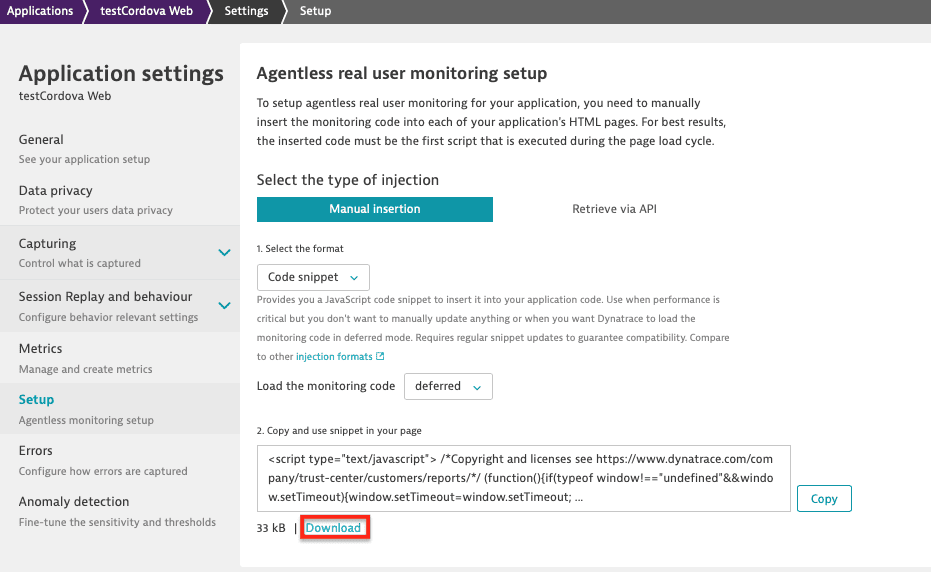]()
|
|
789
798
|
|
|
@@ -831,7 +840,7 @@ process.env['CORDOVA_ANDROID_GRADLE_DISTRIBUTION_URL'] = 'https\\://services.gra
|
|
|
831
840
|
|
|
832
841
|
## MavenCentral in top level gradle file
|
|
833
842
|
|
|
834
|
-
Because the Dynatrace Android
|
|
843
|
+
Because the Dynatrace Android OneAgent now requires the MavenCentral repository, if either `jcenter()` or `mavenCentral()` is not added inside of **ALL** the repositories blocks via the [top-level build.gradle](https://dt-url.net/jm610pso), the build will fail.
|
|
835
844
|
Below is an example of what a basic [top-level build.gradle](https://dt-url.net/jm610pso) file should look like after adding `mavenCentral()` to all repository blocks:
|
|
836
845
|
|
|
837
846
|
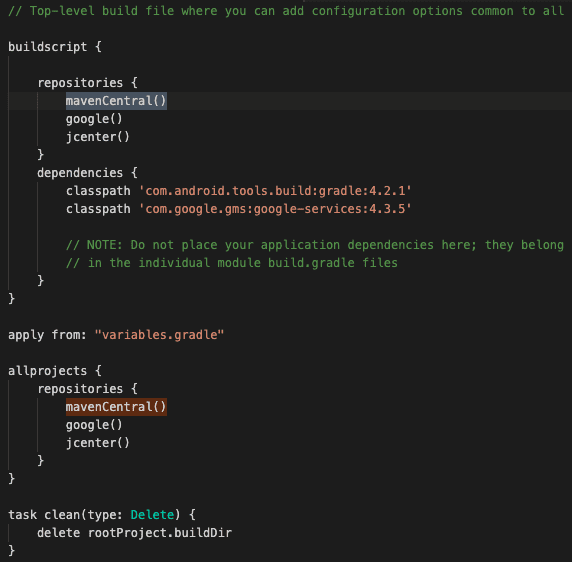
|
|
@@ -847,7 +856,7 @@ JCenter has noted its [sunset](https://jfrog.com/blog/into-the-sunset-bintray-jc
|
|
|
847
856
|
|
|
848
857
|
## Native OneAgent debug logs
|
|
849
858
|
|
|
850
|
-
If your application starts but you see no data (or the session is not merged), you probably need to dig deeper to find out why the OneAgents aren't sending any data. Opening up a support ticket is a great idea, but gathering logs first is even better. Please attach the
|
|
859
|
+
If your application starts but you see no data (or the session is not merged), you probably need to dig deeper to find out why the OneAgents aren't sending any data. Opening up a support ticket is a great idea, but gathering logs first is even better. Please attach the OneAgent for Mobile logs and the [doctor dynatrace](#doctor-dynatrace) logs when opening a support ticket.
|
|
851
860
|
|
|
852
861
|
### Android
|
|
853
862
|
|
|
@@ -885,7 +894,7 @@ ios: {
|
|
|
885
894
|
|
|
886
895
|
## Compose Compatibility Note
|
|
887
896
|
|
|
888
|
-
Our Android
|
|
897
|
+
Our Android OneAgent currently supports **Jetpack Compose 1.4 - 1.10**. If you are using an incompatible version of Jetpack Compose, you may encounter the following error message during build:
|
|
889
898
|
|
|
890
899
|
```
|
|
891
900
|
Could not resolve all dependencies for configuration ':app:debugCompileClasspath'.
|
|
@@ -895,7 +904,7 @@ Please use the latest version of the Dynatrace Android Gradle plugin.
|
|
|
895
904
|
|
|
896
905
|
If you encounter compatibility issues or want to disable Jetpack Compose instrumentation, you can configure this in your `dynatrace.config.js` file. **Note: Disabling Jetpack Compose instrumentation will skip the compatibility check, allowing you to build with any version of Jetpack Compose without triggering version validation errors.**
|
|
897
906
|
|
|
898
|
-
**Important**: The configuration example below shows **only the Compose-specific setting**. You must ensure that your complete `dynatrace.config.js` file includes all other required configuration settings (such as `beaconUrl`, `applicationId`, etc.) as described in the [Android block](#mobile-
|
|
907
|
+
**Important**: The configuration example below shows **only the Compose-specific setting**. You must ensure that your complete `dynatrace.config.js` file includes all other required configuration settings (such as `beaconUrl`, `applicationId`, etc.) as described in the [Android block](#oneagent-for-mobile-configuration) section of this documentation.
|
|
899
908
|
|
|
900
909
|
```js
|
|
901
910
|
module.exports = {
|
|
@@ -920,8 +929,8 @@ For more information about Jetpack Compose instrumentation and monitoring capabi
|
|
|
920
929
|
|
|
921
930
|
## Official documentation
|
|
922
931
|
|
|
923
|
-
* Android
|
|
924
|
-
* iOS
|
|
932
|
+
* Android OneAgent: https://www.dynatrace.com/support/help/technology-support/operating-systems/android/
|
|
933
|
+
* iOS OneAgent: https://www.dynatrace.com/support/help/technology-support/operating-systems/ios/
|
|
925
934
|
|
|
926
935
|
## Doctor Dynatrace
|
|
927
936
|
|
|
@@ -932,7 +941,7 @@ To run this tool, open terminal in the root directory of your project and run th
|
|
|
932
941
|
The results will be generated in the terminal window as well as stored in log folder located in the following directory:
|
|
933
942
|
* `C:\CurrentProject\node_modules\@dynatrace\cordova-plugin\logs\currentDoctorDynatrace.txt`
|
|
934
943
|
|
|
935
|
-
The log file will also include a list of your `package.json` *dependencies* and *devDependencies* which will be helpful when investigating possible issues that arise. Please add this doctor dynatrace log and [
|
|
944
|
+
The log file will also include a list of your `package.json` *dependencies* and *devDependencies* which will be helpful when investigating possible issues that arise. Please add this doctor dynatrace log and [OneAgent for Mobile debug logs](#native-oneagent-debug-logs) when opening a support ticket.
|
|
936
945
|
|
|
937
946
|
## Instrumentation Overhead
|
|
938
947
|
|
|
@@ -953,28 +962,28 @@ The Dynatrace Android Gradle plugin is hosted on [Maven Central](https://search.
|
|
|
953
962
|
|
|
954
963
|
Basically if you have problems with the plugin please have a look into the logs. They will tell you what went wrong. The logs can be found in the plugins folder of your Cordova project. There is a directory called "Logs".
|
|
955
964
|
|
|
956
|
-
* If you see a message like "Error: Could not retrieve the JSAgent! Error: self signed certificate in certificate chain" try to switch the JavaScript
|
|
957
|
-
* If you use live reload (e.g. ionic cordova run android -l) be aware that Ionic/Cordova doesn't use files from the platform folder, so the JavaScript
|
|
958
|
-
* If you have problems retrieving
|
|
965
|
+
* If you see a message like "Error: Could not retrieve the JSAgent! Error: self signed certificate in certificate chain" try to switch the RUM JavaScript configuration from HTTPS to HTTP.
|
|
966
|
+
* If you use live reload (e.g. ionic cordova run android -l) be aware that Ionic/Cordova doesn't use files from the platform folder, so the RUM JavaScript injection will not take place, as we only instrument the temporary platform folder. You are still able to add the copied RUM JavaScript code snippet from the WebUI manually to your index.html (in the source directory). To get to this page, go to your **Web Application** settings and then select **Setup**. Auto-Instrumentation with OneAgent for Mobile still takes place.
|
|
967
|
+
* If you have problems retrieving RUM JavaScript and you get error messages that RUM JavaScript can not be retrieved, you probably don't have access to the API or there is a certificate issue. If this is the certificate use the [allow any certificate](#allow-any-certificate) feature. In any other case a workaround is possible to use the cli and add the `--jsagent=` custom parameter and download the full RUM JavaScript and add the path to the downloaded RUM JavaScript file to the custom parameter value - With this the plugin will not retrieve RUM JavaScript and will use the one that is specified.
|
|
959
968
|
* If you are not seeing data when using Capacitor 3+, please make sure you follow the steps in the [Capacitor Instrumentation](#capacitor-instrumentation) section (more specifically step 4 for the proper commands). Please read the note at the bottom of that section for more information.
|
|
960
969
|
* For Android, if you see an error like "Gradle sync failed: Could not find com.dynatrace.tools.android:gradle-plugin:8.221.1.1005.", please see the [MavenCentral](#mavencentral-in-top-level-gradle-file) section for an example and more information.
|
|
961
|
-
* If you see a message like "Error: Could not retrieve JS Agent optionsForbidden", this means that the internal axios library is too old for processing the request correctly. The solution is to update the Cordova Plugin version, which internally uses a newer axios version to retrieve
|
|
970
|
+
* If you see a message like "Error: Could not retrieve JS Agent optionsForbidden", this means that the internal axios library is too old for processing the request correctly. The solution is to update the Cordova Plugin version, which internally uses a newer axios version to retrieve RUM JavaScript.
|
|
962
971
|
|
|
963
972
|
|
|
964
973
|
### iOS Session Correlation Issues
|
|
965
974
|
|
|
966
975
|
iOS apps using ionic/capacitor have issues with passing cookies from the native layer to WkWebView layer. This issue is due to ionic and capacitor using their own default custom schemes (i.e. *ionic://* or *capacitor://*) and the strict policy of Apple's WebKit not allowing cookies to be set in WkWebView with these custom schemes.
|
|
967
976
|
|
|
968
|
-
To resolve this issue and allow the Mobile and Web sessions to correlate properly, we inject the session information into local storage so that
|
|
977
|
+
To resolve this issue and allow the Mobile and Web sessions to correlate properly, we inject the session information into local storage so that RUM JavaScript can use this info for the Web session it creates.
|
|
969
978
|
|
|
970
979
|
**Requirements**
|
|
971
|
-
* iOS
|
|
972
|
-
* JavaScript
|
|
980
|
+
* iOS OneAgent version 8.219.1.1004+ (already included in our plugin)
|
|
981
|
+
* RUM JavaScript version 1.219+
|
|
973
982
|
* Any version lower will not check local storage and correlation of the mobile and web sessions will not occur.
|
|
974
983
|
|
|
975
984
|
### Using Apple Pay with WebKit/WKWebView
|
|
976
985
|
|
|
977
|
-
When using Apple Pay with WKWebView, there are specific checks that WebKit (Apple) uses when loading the Apple Pay SDK. The Apple Pay SDK does not work when using script injection APIs which is what
|
|
986
|
+
When using Apple Pay with WKWebView, there are specific checks that WebKit (Apple) uses when loading the Apple Pay SDK. The Apple Pay SDK does not work when using script injection APIs which is what the iOS OneAgent uses to properly communicate with RUM JavaScript and to correlate the Mobile and Web User Sessions.
|
|
978
987
|
|
|
979
988
|
**Solution:** Set the `DTXHybridApplicationMode` flag to `useragent` that will allow our plugin to work properly with Apple Pay. For more information, see [iOS only configuration.](#ios-only-configuration)
|
|
980
989
|
|
|
@@ -982,92 +991,99 @@ When using Apple Pay with WKWebView, there are specific checks that WebKit (Appl
|
|
|
982
991
|
|
|
983
992
|
## Changelog
|
|
984
993
|
|
|
994
|
+
2.335.1
|
|
995
|
+
* Updated Android (8.335.1.1001) & iOS OneAgent (8.335.1.1009)
|
|
996
|
+
|
|
997
|
+
2.333.1
|
|
998
|
+
* Updated Android (8.333.1.1006) & iOS OneAgent (8.333.1.1005)
|
|
999
|
+
* Dropped support for Capacitor 5 and lower as they are no longer supported [per Capacitor Support Status](https://capacitorjs.com/docs/main/reference/support-policy#capacitor-maintenance-and-support-status)
|
|
1000
|
+
|
|
985
1001
|
2.331.1
|
|
986
|
-
* Updated Android (8.331.1.1004) & iOS
|
|
1002
|
+
* Updated Android (8.331.1.1004) & iOS OneAgent (8.331.1.1008)
|
|
987
1003
|
* Added Swift Package Manager (SPM) support for Capacitor iOS projects
|
|
988
1004
|
* Added [Compose Compatibility Note](#compose-compatibility-note)
|
|
989
1005
|
|
|
990
1006
|
2.329.1
|
|
991
|
-
* Updated Android (8.329.1.1014) & iOS
|
|
1007
|
+
* Updated Android (8.329.1.1014) & iOS OneAgent (8.329.1.1017)
|
|
992
1008
|
* Updated logic for dynatraceMobile API for iOS to use messageHandler if there is no script injection in WKWebView (see [iOS only configuration](#ios-only-configuration))
|
|
993
1009
|
|
|
994
1010
|
2.327.1
|
|
995
|
-
* Updated Android (8.327.2.1004) & iOS
|
|
1011
|
+
* Updated Android (8.327.2.1004) & iOS OneAgent (8.327.1.1020)
|
|
996
1012
|
|
|
997
1013
|
2.325.1
|
|
998
|
-
* Updated Android (8.325.1.1007) & iOS
|
|
1014
|
+
* Updated Android (8.325.1.1007) & iOS OneAgent (8.325.1.1012)
|
|
999
1015
|
|
|
1000
1016
|
2.323.1
|
|
1001
1017
|
* Deprecation of Node 18
|
|
1002
|
-
* Updated Android (8.323.2.1002) & iOS
|
|
1018
|
+
* Updated Android (8.323.2.1002) & iOS OneAgent (8.323.1.1009)
|
|
1003
1019
|
|
|
1004
1020
|
2.321.1
|
|
1005
|
-
* Updated Android (8.321.2.1009) & iOS
|
|
1021
|
+
* Updated Android (8.321.2.1009) & iOS OneAgent (8.321.1.1007)
|
|
1006
1022
|
|
|
1007
1023
|
2.319.1
|
|
1008
|
-
* Updated Android (8.319.2.1011) & iOS
|
|
1024
|
+
* Updated Android (8.319.2.1011) & iOS OneAgent (8.319.1.1005)
|
|
1009
1025
|
|
|
1010
1026
|
2.317.1
|
|
1011
|
-
* Updated Android (8.317.1.1007) & iOS
|
|
1027
|
+
* Updated Android (8.317.1.1007) & iOS OneAgent (8.317.1.1003)
|
|
1012
1028
|
|
|
1013
1029
|
2.315.1
|
|
1014
|
-
* Updated Android (8.315.1.1005) & iOS
|
|
1030
|
+
* Updated Android (8.315.1.1005) & iOS OneAgent (8.315.1.1002)
|
|
1015
1031
|
|
|
1016
1032
|
2.313.1
|
|
1017
1033
|
* Native web requests utils no longer set and need x-dynatrace header
|
|
1018
|
-
* Updated Android (8.313.1.1004) & iOS
|
|
1034
|
+
* Updated Android (8.313.1.1004) & iOS OneAgent (8.313.1.1016)
|
|
1019
1035
|
|
|
1020
1036
|
2.311.1
|
|
1021
|
-
* Updated Android (8.311.1.1007) & iOS
|
|
1037
|
+
* Updated Android (8.311.1.1007) & iOS OneAgent (8.311.1.1013)
|
|
1022
1038
|
|
|
1023
1039
|
2.309.1
|
|
1024
|
-
* Updated Android (8.309.2.1011) & iOS
|
|
1040
|
+
* Updated Android (8.309.2.1011) & iOS OneAgent (8.309.1.1009)
|
|
1025
1041
|
|
|
1026
1042
|
2.307.1
|
|
1027
|
-
* Updated Android (8.307.1.1005) & iOS
|
|
1043
|
+
* Updated Android (8.307.1.1005) & iOS OneAgent (8.307.1.1014)
|
|
1028
1044
|
* Deprecation of Node 16
|
|
1029
1045
|
|
|
1030
1046
|
2.305.1
|
|
1031
|
-
* Updated Android (8.305.1.1005) & iOS
|
|
1047
|
+
* Updated Android (8.305.1.1005) & iOS OneAgent (8.305.3.1016)
|
|
1032
1048
|
|
|
1033
1049
|
2.303.1
|
|
1034
|
-
* Updated Android (8.303.2.1014) & iOS
|
|
1050
|
+
* Updated Android (8.303.2.1014) & iOS OneAgent (8.303.1.1004)
|
|
1035
1051
|
* Android Gradle Plugin version requirement raised to 7.0+
|
|
1036
1052
|
* Gradle version requirement raised to 7.0+
|
|
1037
1053
|
|
|
1038
1054
|
2.301.1
|
|
1039
|
-
* Updated Android (8.301.1.1004) & iOS
|
|
1055
|
+
* Updated Android (8.301.1.1004) & iOS OneAgent (8.301.1.1008)
|
|
1040
1056
|
|
|
1041
1057
|
2.299.1
|
|
1042
|
-
* Updated Android (8.299.1.1004) & iOS
|
|
1058
|
+
* Updated Android (8.299.1.1004) & iOS OneAgent (8.299.1.1003)
|
|
1043
1059
|
|
|
1044
1060
|
2.297.1
|
|
1045
|
-
* Updated Android (8.297.1.1003) & iOS
|
|
1061
|
+
* Updated Android (8.297.1.1003) & iOS OneAgent (8.297.1.1004)
|
|
1046
1062
|
* Added [Instrumentation Overhead](#instrumentation-overhead) section
|
|
1047
1063
|
* Added [Capacitor Cookie Proxy](#capacitor-cookie-proxy) option for when `CapacitorCookies` is needed
|
|
1048
1064
|
|
|
1049
1065
|
2.295.1
|
|
1050
|
-
* Updated Android (8.295.1.1006) & iOS
|
|
1051
|
-
* Using cookie postfix of JavaScript
|
|
1052
|
-
* Updated [HTML Instrumentation Requirements](#html-instrumentation-requirements) for when injecting
|
|
1066
|
+
* Updated Android (8.295.1.1006) & iOS OneAgent (8.295.1.1020)
|
|
1067
|
+
* Using cookie postfix of RUM JavaScript when enabled
|
|
1068
|
+
* Updated [HTML Instrumentation Requirements](#html-instrumentation-requirements) for when injecting RUM JavaScript into html
|
|
1053
1069
|
|
|
1054
1070
|
2.293.1
|
|
1055
|
-
* Updated Android (8.293.1.1003) & iOS
|
|
1071
|
+
* Updated Android (8.293.1.1003) & iOS OneAgent (8.293.1.1003)
|
|
1056
1072
|
|
|
1057
1073
|
2.291.1
|
|
1058
|
-
* Updated Android (8.291.1.1002) & iOS
|
|
1074
|
+
* Updated Android (8.291.1.1002) & iOS OneAgent (8.291.1.1004)
|
|
1059
1075
|
|
|
1060
1076
|
2.289.1
|
|
1061
|
-
* Updated Android (8.289.2.1007) & iOS
|
|
1077
|
+
* Updated Android (8.289.2.1007) & iOS OneAgent (8.289.1.1015)
|
|
1062
1078
|
|
|
1063
1079
|
2.287.1
|
|
1064
|
-
* Updated Android (8.287.1.1006) & iOS
|
|
1080
|
+
* Updated Android (8.287.1.1006) & iOS OneAgent (8.287.2.1009)
|
|
1065
1081
|
|
|
1066
1082
|
2.285.1
|
|
1067
|
-
* Updated Android (8.285.1.1006) & iOS
|
|
1083
|
+
* Updated Android (8.285.1.1006) & iOS OneAgent (8.285.1.1004)
|
|
1068
1084
|
|
|
1069
1085
|
2.283.1
|
|
1070
|
-
* Updated Android (8.283.1.1004) & iOS
|
|
1086
|
+
* Updated Android (8.283.1.1004) & iOS OneAgent (8.283.1.1004)
|
|
1071
1087
|
* Minimum iOS Version was raised to iOS 12
|
|
1072
1088
|
|
|
1073
1089
|
2.279.2
|
|
@@ -1076,15 +1092,15 @@ When using Apple Pay with WKWebView, there are specific checks that WebKit (Appl
|
|
|
1076
1092
|
* Fixed x-dtc issue for native web requests
|
|
1077
1093
|
* Changed default injection mode from SyncCS to JsTagComplete
|
|
1078
1094
|
* Fixed issue with path for npx and capacitor
|
|
1079
|
-
* Updated Android (8.279.1.1002) & iOS
|
|
1095
|
+
* Updated Android (8.279.1.1002) & iOS OneAgent (8.279.2.1010)
|
|
1080
1096
|
|
|
1081
1097
|
2.277.1
|
|
1082
1098
|
* Updated requirements for Cordova 10+
|
|
1083
1099
|
* Changed plugin id to @dynatrace/cordova-plugin and removed old workarounds used for plugin migration
|
|
1084
|
-
* Updated Android (8.277.1.1003) & iOS
|
|
1100
|
+
* Updated Android (8.277.1.1003) & iOS OneAgent (8.277.1.1004)
|
|
1085
1101
|
|
|
1086
1102
|
1.275.1
|
|
1087
|
-
* Updated iOS
|
|
1103
|
+
* Updated iOS OneAgent (8.275.1.1006)
|
|
1088
1104
|
* Added an [opt-out](#opt-out) feature for modifying package.json
|
|
1089
1105
|
* Fixed PageContext cookie for native web request tracking
|
|
1090
1106
|
* Updated logic to create x-dtc header for native web requests
|
|
@@ -1092,61 +1108,61 @@ When using Apple Pay with WKWebView, there are specific checks that WebKit (Appl
|
|
|
1092
1108
|
|
|
1093
1109
|
1.273.2
|
|
1094
1110
|
* Removed package.json modification for doctorDynatrace
|
|
1095
|
-
* Updated Android (8.273.1.1003) & iOS
|
|
1111
|
+
* Updated Android (8.273.1.1003) & iOS OneAgent (8.273.1.1006)
|
|
1096
1112
|
|
|
1097
1113
|
1.271.1
|
|
1098
|
-
* Updated Android (8.271.1.1003) & iOS
|
|
1114
|
+
* Updated Android (8.271.1.1003) & iOS OneAgent (8.271.2.1007)
|
|
1099
1115
|
|
|
1100
1116
|
1.267.1
|
|
1101
|
-
* Updated Android (8.267.1.1005) & iOS
|
|
1117
|
+
* Updated Android (8.267.1.1005) & iOS OneAgent (8.267.1.1006)
|
|
1102
1118
|
|
|
1103
1119
|
1.265.1
|
|
1104
|
-
* Updated Android (8.265.1.1002) & iOS
|
|
1120
|
+
* Updated Android (8.265.1.1002) & iOS OneAgent (8.265.1.1003)
|
|
1105
1121
|
* Fixed installation issue with old plugin
|
|
1106
1122
|
|
|
1107
1123
|
1.263.1
|
|
1108
|
-
* Updated Android (8.263.1.1002) & iOS
|
|
1124
|
+
* Updated Android (8.263.1.1002) & iOS OneAgent (8.263.2.1005)
|
|
1109
1125
|
|
|
1110
1126
|
1.261.3
|
|
1111
|
-
* Updated Android (8.261.2.1013) & iOS
|
|
1127
|
+
* Updated Android (8.261.2.1013) & iOS OneAgent (8.261.1.1006)
|
|
1112
1128
|
* Fixed file not found during doctor command
|
|
1113
1129
|
* Minimum Java Version was raised to 11
|
|
1114
1130
|
* Added [htmlFiles](#html-instrumentation-requirements) to dynatrace.config.js to customize instrumented html files
|
|
1115
1131
|
|
|
1116
1132
|
1.259.2
|
|
1117
|
-
* Updated Android (8.259.1.1008) & iOS
|
|
1133
|
+
* Updated Android (8.259.1.1008) & iOS OneAgent (8.259.1.1009)
|
|
1118
1134
|
* Hooks using now correct script names (case sensitive)
|
|
1119
1135
|
|
|
1120
1136
|
1.257.1
|
|
1121
|
-
* Updated Android (8.257.1.1007) & iOS
|
|
1137
|
+
* Updated Android (8.257.1.1007) & iOS OneAgent (8.257.1.1007)
|
|
1122
1138
|
* Node Support changed to latest LTS Version (14.x)
|
|
1123
1139
|
* Minimum iOS Version has been raised to 11
|
|
1124
1140
|
|
|
1125
1141
|
1.255.1
|
|
1126
1142
|
* MFP Server URL added to [enableInterceptor API](#ibm-mobile-first)
|
|
1127
|
-
* Updated Android (8.255.1.1005) & iOS
|
|
1143
|
+
* Updated Android (8.255.1.1005) & iOS OneAgent (8.255.1.1006)
|
|
1128
1144
|
|
|
1129
1145
|
1.253.5
|
|
1130
|
-
* Updated Android (8.253.1.1003) & iOS
|
|
1146
|
+
* Updated Android (8.253.1.1003) & iOS OneAgent (8.253.1.1006)
|
|
1131
1147
|
* Fixed wrong declaration for dtrum & MFP API
|
|
1132
1148
|
* Fixed broken export of axios library
|
|
1133
1149
|
|
|
1134
1150
|
1.247.0
|
|
1135
1151
|
* Added support for [Capacitor run command](#capacitor-instrumentation) for Capacitor versions 3.1+
|
|
1136
|
-
* Added option to specify paths for [jsAgent](#
|
|
1152
|
+
* Added option to specify paths for [jsAgent](#rum-javascript-path), [gradlePath](#gradle-path) and [plistPath](#plist-path) in `dynatrace.config.js` file
|
|
1137
1153
|
* Improved capacitor check for specific platforms logic
|
|
1138
|
-
* Updated Android (8.247.1.1003) & iOS
|
|
1154
|
+
* Updated Android (8.247.1.1003) & iOS OneAgent (8.247.1.1007)
|
|
1139
1155
|
* Minimum Android SDK has been raised to SDK 21 and above
|
|
1140
1156
|
|
|
1141
1157
|
1.233.1
|
|
1142
1158
|
* Fixed issue where old static lib was referenced
|
|
1143
1159
|
* Improved capacitor check logic
|
|
1144
1160
|
* Improved injection logic for html
|
|
1145
|
-
* Updated Android (8.231.2.1007) & iOS
|
|
1161
|
+
* Updated Android (8.231.2.1007) & iOS OneAgent (8.233.1.1006)
|
|
1146
1162
|
|
|
1147
1163
|
1.229.0
|
|
1148
1164
|
* Adding SessionStorage values to Native web request instrumentation
|
|
1149
|
-
* Updated Android (8.229.1.1003) & iOS
|
|
1165
|
+
* Updated Android (8.229.1.1003) & iOS OneAgent (8.229.1.1004)
|
|
1150
1166
|
|
|
1151
1167
|
1.227.6
|
|
1152
1168
|
* Added Cookie Proxy for Ionic & Capacitor
|
|
@@ -1154,7 +1170,7 @@ When using Apple Pay with WKWebView, there are specific checks that WebKit (Appl
|
|
|
1154
1170
|
* Fixed wrong check for missing dtrum
|
|
1155
1171
|
* Fixed incorrectly reading cspURL value
|
|
1156
1172
|
* Fixed waiting for async hooks to complete
|
|
1157
|
-
* Updated Android (8.227.1.1002) & iOS
|
|
1173
|
+
* Updated Android (8.227.1.1002) & iOS OneAgent (8.227.1.1019)
|
|
1158
1174
|
|
|
1159
1175
|
1.225.1
|
|
1160
1176
|
* Fixed [doctor dynatrace](#doctor-dynatrace) plugin version check issue
|
|
@@ -1164,9 +1180,9 @@ When using Apple Pay with WKWebView, there are specific checks that WebKit (Appl
|
|
|
1164
1180
|
* Removed check and adding of -ObjC linker for Capacitor apps
|
|
1165
1181
|
* Added support for Capacitor 3
|
|
1166
1182
|
* Enhanced user action creation/correlation for Native WR/MFP requests
|
|
1167
|
-
* Updated Android (8.223.1.1003) & iOS
|
|
1183
|
+
* Updated Android (8.223.1.1003) & iOS OneAgent (8.223.1.1006)
|
|
1168
1184
|
* [IBM MFP Wrapper](#ibm-mobile-first) is now passing all arguments
|
|
1169
|
-
* Removed JSAgent typings which are [available via NPM](#typings-file-for-mobile-
|
|
1185
|
+
* Removed JSAgent typings which are [available via NPM](#typings-file-for-oneagent-for-mobile-api)
|
|
1170
1186
|
|
|
1171
1187
|
1.219.1
|
|
1172
1188
|
* Fixed issue with older Android versions
|
|
@@ -1180,25 +1196,25 @@ When using Apple Pay with WKWebView, there are specific checks that WebKit (Appl
|
|
|
1180
1196
|
* Added [UserPrivacyOptions API](#user-privacy-options)
|
|
1181
1197
|
* End session available via dtrum API
|
|
1182
1198
|
* Added support for [ionic capacitor](#capacitor-instrumentation)
|
|
1183
|
-
* Updated iOS (8.217.1.1003) and Android
|
|
1199
|
+
* Updated iOS (8.217.1.1003) and Android OneAgent (8.211.1.1010)
|
|
1184
1200
|
|
|
1185
1201
|
1.213.0
|
|
1186
|
-
* Added new [custom parameter for cli](#custom-arguments-for-instrumentation-script) to allow use of local
|
|
1187
|
-
* Added [mode option](#javascript-
|
|
1188
|
-
* No longer store
|
|
1189
|
-
* Added dtrum API that will prevent errors if
|
|
1190
|
-
* Updated iOS (8.209.1.1003) and Android
|
|
1202
|
+
* Added new [custom parameter for cli](#custom-arguments-for-instrumentation-script) to allow use of local RUM JavaScript script file
|
|
1203
|
+
* Added [mode option](#rum-javascript-snippet-mode) in the config file for using specific RUM JavaScript code snippet
|
|
1204
|
+
* No longer store RUM JavaScript file and only inject platform html
|
|
1205
|
+
* Added dtrum API that will prevent errors if RUM JavaScript is not loaded
|
|
1206
|
+
* Updated iOS (8.209.1.1003) and Android OneAgent (8.211.1.1010)
|
|
1191
1207
|
* Skipping not readable files instead of throwing an exception
|
|
1192
1208
|
|
|
1193
1209
|
1.205.0
|
|
1194
|
-
* Updated iOS and Android
|
|
1210
|
+
* Updated iOS and Android OneAgent
|
|
1195
1211
|
|
|
1196
1212
|
1.201.0
|
|
1197
|
-
* Updated iOS and Android
|
|
1213
|
+
* Updated iOS and Android OneAgent
|
|
1198
1214
|
|
|
1199
1215
|
1.192.0
|
|
1200
1216
|
* Fix for Installation/Removing issues
|
|
1201
1217
|
|
|
1202
1218
|
1.191.2
|
|
1203
1219
|
* Android Instrumentation changed to Gradle
|
|
1204
|
-
* New Mobile
|
|
1220
|
+
* New Mobile OneAgents (> 8.x)
|