@dubeyvishal/orbital-cli 1.0.7 → 1.0.8
This diff represents the content of publicly available package versions that have been released to one of the supported registries. The information contained in this diff is provided for informational purposes only and reflects changes between package versions as they appear in their respective public registries.
- package/README.md +152 -76
- package/package.json +1 -1
package/README.md
CHANGED
|
@@ -1,108 +1,184 @@
|
|
|
1
1
|
# Orbital CLI
|
|
2
2
|
|
|
3
|
-
**Orbital CLI** is an AI-powered developer
|
|
3
|
+
**Orbital CLI** is an **AI-powered developer assistant** that runs
|
|
4
|
+
directly in your terminal.\
|
|
5
|
+
Chat with AI, perform smart searches, generate mini-projects, and launch
|
|
6
|
+
developer tools --- all without leaving the command line.
|
|
4
7
|
|
|
5
|
-
Built with **
|
|
8
|
+
Built with **Node.js, Express, Commander.js, Next.js**, and **Google
|
|
9
|
+
Gemini AI**.
|
|
6
10
|
|
|
7
|
-
|
|
11
|
+
------------------------------------------------------------------------
|
|
8
12
|
|
|
9
|
-
##
|
|
13
|
+
## ⚡ Installation
|
|
10
14
|
|
|
11
|
-
|
|
12
|
-
|
|
15
|
+
Install globally using npm:
|
|
13
16
|
|
|
14
|
-
|
|
15
|
-
|
|
17
|
+
npm install -g @dubeyvishal/orbital-cli
|
|
16
18
|
|
|
17
|
-
|
|
18
|
-
|
|
19
|
+
Start Orbital:
|
|
19
20
|
|
|
20
|
-
|
|
21
|
+
orbital
|
|
21
22
|
|
|
22
|
-
|
|
23
|
+
------------------------------------------------------------------------
|
|
23
24
|
|
|
24
|
-
|
|
25
|
-
- Chat with AI directly in your terminal
|
|
26
|
-
- Streaming responses (real-time)
|
|
27
|
-
- Supports markdown rendering in terminal output
|
|
25
|
+
## 🔐 Authentication
|
|
28
26
|
|
|
29
|
-
|
|
30
|
-
Orbital intelligently selects tools when needed:
|
|
31
|
-
- 🔍 Web Search
|
|
32
|
-
- 🔗 URL Search / Page Summarization
|
|
33
|
-
- 🧰 Context-based tool routing (AI decides when to use tools)
|
|
27
|
+
Login once to enable AI features:
|
|
34
28
|
|
|
35
|
-
|
|
36
|
-
The most powerful mode:
|
|
37
|
-
- Generates **mini-projects** from a single prompt
|
|
38
|
-
- Creates **folders + files automatically**
|
|
39
|
-
- Writes production-ready code
|
|
40
|
-
- Generates setup commands
|
|
41
|
-
- Output saved neatly into your working directory
|
|
42
|
-
- Designed to build a runnable project in **a few minutes**
|
|
29
|
+
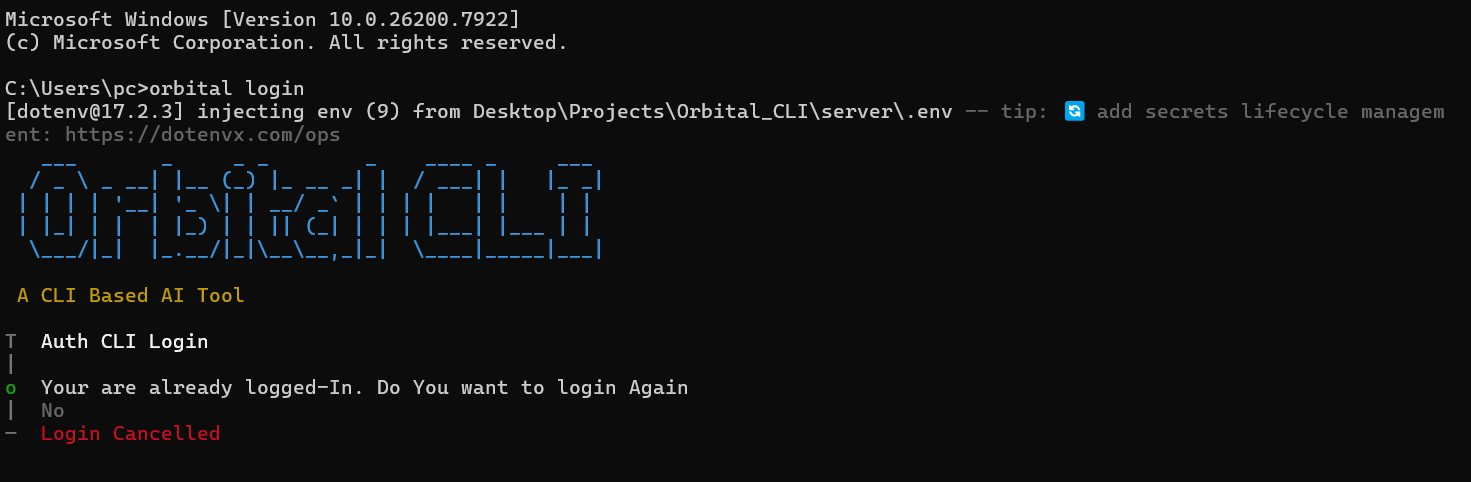
orbital login
|
|
43
30
|
|
|
44
|
-
|
|
45
|
-
- OAuth using **Better Auth**
|
|
46
|
-
- **Device Authorization flow**
|
|
47
|
-
- Session + token handling
|
|
31
|
+
Orbital uses **secure OAuth Device Authorization**.
|
|
48
32
|
|
|
49
|
-
---
|
|
50
33
|
|
|
51
|
-
## 🧱 Tech Stack
|
|
52
|
-
- **Next.js** (Dashboard / Web UI)
|
|
53
|
-
- **Node.js**
|
|
54
|
-
- **Express.js**
|
|
55
|
-
- **Commander.js** (CLI framework)
|
|
56
|
-
- **Better Auth** (OAuth + Device Flow)
|
|
57
|
-
- **Prisma** (Database ORM)
|
|
58
|
-
- **Neon PostgreSQL** (recommended)
|
|
59
|
-
- **AI SDK (Google Gemini)**
|
|
60
34
|
|
|
61
|
-
|
|
35
|
+
------------------------------------------------------------------------
|
|
36
|
+
|
|
37
|
+
## 🔑 Set Your AI API Key
|
|
38
|
+
|
|
39
|
+
To use AI features (chat, tools, agent mode), set your own API key:
|
|
40
|
+
|
|
41
|
+
orbital set-key <your_api_key>
|
|
42
|
+
|
|
43
|
+
The API key is stored securely in your **OS Credential Manager** (Windows Credential Manager / macOS Keychain / Linux Secret Service).
|
|
44
|
+
|
|
45
|
+
Orbital will **never store your key in plain text files**.
|
|
46
|
+
|
|
47
|
+
Once set, you won't need to enter it again.
|
|
48
|
+
|
|
49
|
+
------------------------------------------------------------------------
|
|
50
|
+
|
|
51
|
+
|
|
52
|
+
## 💬 AI Chat Mode
|
|
53
|
+
|
|
54
|
+
Start chatting with AI directly in your terminal:
|
|
55
|
+
|
|
56
|
+
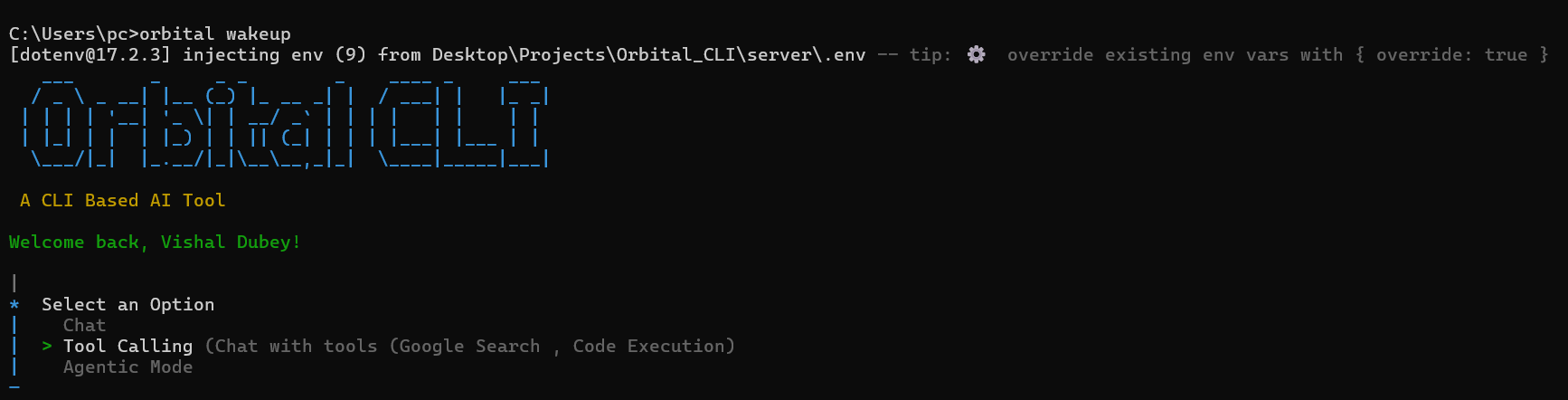
orbital wakeup
|
|
57
|
+
|
|
58
|
+
**Features**
|
|
59
|
+
|
|
60
|
+
- Real-time streaming responses
|
|
61
|
+
- Markdown rendering in terminal
|
|
62
|
+
- Intelligent context handling
|
|
63
|
+
|
|
64
|
+
------------------------------------------------------------------------
|
|
65
|
+
|
|
66
|
+
## 🧠 Tool Calling
|
|
67
|
+
|
|
68
|
+
Orbital automatically selects tools when needed.
|
|
69
|
+
|
|
70
|
+
**Examples** - 🌐 Web search\
|
|
71
|
+
- 🔗 URL summarization\
|
|
72
|
+
- 📄 Content extraction\
|
|
73
|
+
- 🧰 Context-aware tool routing
|
|
74
|
+
|
|
75
|
+
Example prompts:
|
|
76
|
+
|
|
77
|
+
summarize https://react.dev
|
|
78
|
+
latest news about AI agents
|
|
79
|
+
|
|
80
|
+
Orbital decides which tool to use automatically.
|
|
81
|
+
|
|
82
|
+
------------------------------------------------------------------------
|
|
83
|
+
|
|
84
|
+
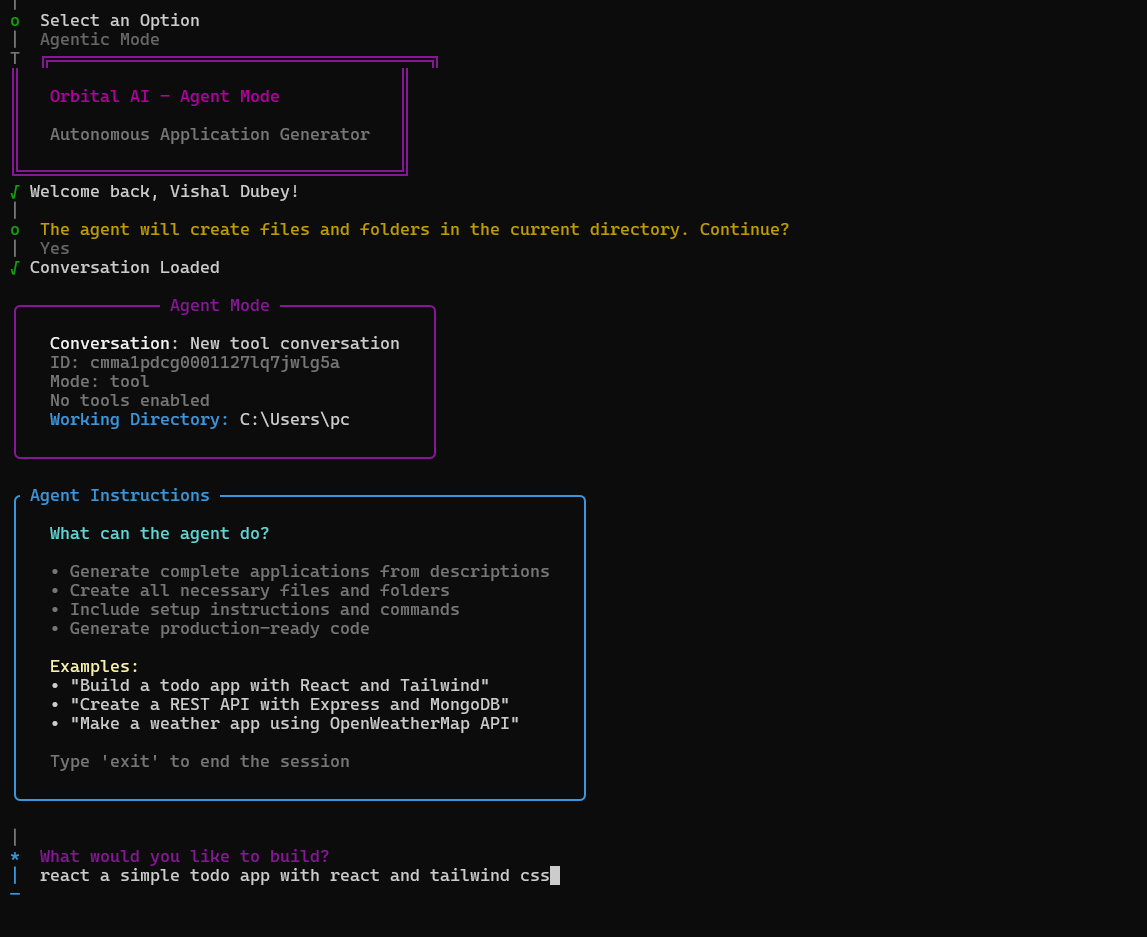
## 🤖 Agentic Mode (Autonomous Project Generator)
|
|
85
|
+
|
|
86
|
+
Orbital can generate **complete mini-projects from a single prompt**.
|
|
87
|
+
|
|
88
|
+
Example:
|
|
89
|
+
|
|
90
|
+
create a node express todo api
|
|
91
|
+
|
|
92
|
+
Orbital will:
|
|
93
|
+
|
|
94
|
+
- Create folders and files
|
|
95
|
+
- Generate working code
|
|
96
|
+
- Provide install and run commands
|
|
97
|
+
- Save everything in your current directory
|
|
98
|
+
|
|
99
|
+
Perfect for:
|
|
100
|
+
|
|
101
|
+
- Rapid prototyping
|
|
102
|
+
- Boilerplate generation
|
|
103
|
+
- Quick development setups
|
|
104
|
+
|
|
105
|
+
------------------------------------------------------------------------
|
|
106
|
+
|
|
107
|
+
## 🚀 Launch Developer Tools
|
|
108
|
+
|
|
109
|
+
Open commonly used developer platforms instantly.
|
|
110
|
+
|
|
111
|
+
orbital launch github
|
|
112
|
+
orbital launch linkedin
|
|
113
|
+
orbital launch leetcode
|
|
114
|
+
orbital launch youtube
|
|
115
|
+
|
|
116
|
+
No need to open the browser manually.
|
|
117
|
+
|
|
118
|
+
------------------------------------------------------------------------
|
|
119
|
+
|
|
120
|
+
## 🔎 Instant YouTube Search
|
|
121
|
+
|
|
122
|
+
Search YouTube directly from the terminal.
|
|
123
|
+
|
|
124
|
+
orbital search "react server components"
|
|
125
|
+
|
|
126
|
+
Orbital will open the results instantly.
|
|
127
|
+
|
|
128
|
+
------------------------------------------------------------------------
|
|
129
|
+
|
|
130
|
+
## 📸 Project Screenshots
|
|
131
|
+
|
|
132
|
+
### 🔐 Orbital Login
|
|
133
|
+
|
|
134
|
+
https://res.cloudinary.com/damw21f39/image/upload/v1773569580/pic1_u0wu0y.png
|
|
135
|
+
|
|
136
|
+
### 🛠 Orbital Wakeup
|
|
137
|
+
|
|
138
|
+
https://res.cloudinary.com/damw21f39/image/upload/v1773569581/pic2_mvnpiu.png
|
|
139
|
+
|
|
140
|
+
### 🤖 Agentic Mode
|
|
141
|
+
|
|
142
|
+
https://res.cloudinary.com/damw21f39/image/upload/v1773569581/pic3_bvidmp.png
|
|
143
|
+
|
|
144
|
+
------------------------------------------------------------------------
|
|
145
|
+
|
|
146
|
+
## 🧱 Tech Stack
|
|
62
147
|
|
|
63
|
-
|
|
148
|
+
- **Node.js**
|
|
149
|
+
- **Express.js**
|
|
150
|
+
- **Commander.js**
|
|
151
|
+
- **Next.js**
|
|
152
|
+
- **Prisma**
|
|
153
|
+
- **Neon PostgreSQL**
|
|
154
|
+
- **Google Gemini AI**
|
|
64
155
|
|
|
65
|
-
|
|
156
|
+
------------------------------------------------------------------------
|
|
66
157
|
|
|
67
|
-
|
|
68
|
-
- Backend (Render): https://smart-cli-based-agent.onrender.com
|
|
158
|
+
## 🌐 Deployed Services
|
|
69
159
|
|
|
70
|
-
|
|
160
|
+
**Frontend**\
|
|
161
|
+
https://smart-cli-based-agent-t7x4.vercel.app
|
|
71
162
|
|
|
72
|
-
|
|
73
|
-
|
|
74
|
-
cd orbital-cli
|
|
163
|
+
**Backend**\
|
|
164
|
+
https://smart-cli-based-agent.onrender.com
|
|
75
165
|
|
|
76
|
-
|
|
166
|
+
------------------------------------------------------------------------
|
|
77
167
|
|
|
78
|
-
|
|
168
|
+
## 📦 npm Package
|
|
79
169
|
|
|
80
|
-
|
|
81
|
-
GOOGLE_GEMINI_API_KEY="your_api_key"
|
|
82
|
-
ORBITAL_MODEL="gemini-2.5-flash"
|
|
170
|
+
https://www.npmjs.com/package/@dubeyvishal/orbital-cli
|
|
83
171
|
|
|
84
|
-
|
|
85
|
-
BETTER_AUTH_BASE_URL="https://smart-cli-based-agent.onrender.com"
|
|
86
|
-
FRONTEND_URL="https://smart-cli-based-agent-t7x4.vercel.app"
|
|
172
|
+
------------------------------------------------------------------------
|
|
87
173
|
|
|
88
|
-
|
|
174
|
+
## 📄 License
|
|
89
175
|
|
|
90
|
-
|
|
91
|
-
npx prisma generate
|
|
92
|
-
npx prisma db push
|
|
176
|
+
**MIT License**
|
|
93
177
|
|
|
94
|
-
|
|
95
|
-
orbital
|
|
178
|
+
------------------------------------------------------------------------
|
|
96
179
|
|
|
97
|
-
|
|
98
|
-
orbital login
|
|
180
|
+
## 👨💻 Developed and Maintained By
|
|
99
181
|
|
|
100
|
-
|
|
101
|
-
orbital wakeup
|
|
102
|
-
Output
|
|
103
|
-
When agent generation succeeds, Orbital shows:
|
|
182
|
+
**Vishal Dubey**
|
|
104
183
|
|
|
105
|
-
|
|
106
|
-
Total files created
|
|
107
|
-
Location on disk
|
|
108
|
-
Setup commands (install, run)
|
|
184
|
+
If you find Orbital CLI useful, consider giving the repository a ⭐ on GitHub.
|
package/package.json
CHANGED
|
@@ -1,6 +1,6 @@
|
|
|
1
1
|
{
|
|
2
2
|
"name": "@dubeyvishal/orbital-cli",
|
|
3
|
-
"version": "1.0.
|
|
3
|
+
"version": "1.0.8",
|
|
4
4
|
"description": "A fullstack CLI-based AI platform with chat mode, multi-tool agents, and agentic AI workflows. Includes GitHub login with device authorization, secure authentication, and modular client–server architecture for building intelligent automation tools.",
|
|
5
5
|
"author": "Vishal Dubey",
|
|
6
6
|
"license": "MIT",
|