@dsh-sparrow/dsh-file-manage 0.1.5-rc.2 → 0.2.0-rc.2
This diff represents the content of publicly available package versions that have been released to one of the supported registries. The information contained in this diff is provided for informational purposes only and reflects changes between package versions as they appear in their respective public registries.
- package/CHANGELOG.md +24 -15
- package/CHANGELOG.zh-CN.md +24 -15
- package/README.md +12 -11
- package/README.zh-CN.md +13 -12
- package/lib/client.js +217 -357
- package/lib/compat.js +5 -20
- package/lib/files.js +55 -6
- package/lib/host.js +31 -16
- package/lib/trust.js +100 -0
- package/lib/types/client/CloudFilesPage.d.ts +41 -0
- package/lib/types/client/CloudFilesPanelIcon.d.ts +6 -0
- package/lib/types/client/index.d.ts +14 -6
- package/lib/types/client/paging.d.ts +4 -7
- package/lib/types/client/panel.d.ts +27 -0
- package/lib/types/client/styles.d.ts +6 -40
- package/lib/types/compat.d.ts +5 -20
- package/lib/types/files.d.ts +37 -7
- package/lib/types/host.d.ts +1 -1
- package/lib/types/trust.d.ts +28 -0
- package/package.json +24 -22
- package/lib/types/client/FileManageDock.d.ts +0 -20
package/CHANGELOG.md
CHANGED
|
@@ -2,41 +2,50 @@
|
|
|
2
2
|
|
|
3
3
|
English | [简体中文](CHANGELOG.zh-CN.md)
|
|
4
4
|
|
|
5
|
+
## 0.2.0-rc.2 (2026-10-08)
|
|
6
|
+
|
|
7
|
+
- Now adapted to official dsh 0.2.0-rc.2 (web and desktop).
|
|
8
|
+
- The Cloud Files entry moved to the top of the sidebar, beside Plugins and Automations, and now opens as a page in the main area instead of a dialog.
|
|
9
|
+
|
|
10
|
+
## 0.1.5-rc.2.1 (2026-09-11)
|
|
11
|
+
|
|
12
|
+
- "Load more" now loads 20 more files per click instead of 100.
|
|
13
|
+
|
|
5
14
|
## 0.1.5-rc.2 (2026-09-10)
|
|
6
15
|
|
|
7
16
|
- Version-line alignment with official dsh 0.1.5-rc.2.
|
|
8
|
-
- The
|
|
9
|
-
- Escape now closes the delete confirmation first
|
|
17
|
+
- The loading indicator now matches the rest of the dsh interface.
|
|
18
|
+
- Escape now closes the delete confirmation first, so it no longer stays on screen after the panel closes.
|
|
10
19
|
|
|
11
20
|
## 0.1.2-rc.1.1 (2026-09-09)
|
|
12
21
|
|
|
13
|
-
-
|
|
22
|
+
- On a dsh version this plugin does not support, it turns itself off and leaves dsh working.
|
|
14
23
|
|
|
15
24
|
## 0.1.2-rc.1 (2026-09-05)
|
|
16
25
|
|
|
17
26
|
- Version-line alignment with official dsh 0.1.2-rc.1 (stability line).
|
|
18
|
-
-
|
|
19
|
-
- Requests
|
|
20
|
-
- The sidebar "Cloud Files" button now
|
|
21
|
-
- "Load more" now
|
|
22
|
-
- A
|
|
27
|
+
- Fixed the file list going wrong after quickly reopening the panel or tapping Retry.
|
|
28
|
+
- Requests stop once the panel is closed, so a cancelled file count no longer keeps using your API credit.
|
|
29
|
+
- The sidebar "Cloud Files" button now matches the width of Settings.
|
|
30
|
+
- "Load more" now sits at the end of the file list, and the list scrolls to the bottom after each page loads.
|
|
31
|
+
- A small 🐦 dsh-sparrow brand line closes the panel.
|
|
23
32
|
|
|
24
33
|
## 0.1.0 (2026-09-02)
|
|
25
34
|
|
|
26
|
-
-
|
|
35
|
+
- First stable release.
|
|
27
36
|
|
|
28
37
|
## 0.1.0-alpha.3 (2026-09-02 · pre-release)
|
|
29
38
|
|
|
30
|
-
-
|
|
39
|
+
- No user-perceivable change from the previous release.
|
|
31
40
|
|
|
32
41
|
## 0.1.0-alpha.2 (2026-09-01 · pre-release)
|
|
33
42
|
|
|
34
|
-
-
|
|
43
|
+
- The list now appears only once files and totals are both loaded, so opening no longer flickers.
|
|
35
44
|
|
|
36
45
|
## 0.1.0-alpha.1 (2026-09-01 · pre-release)
|
|
37
46
|
|
|
38
|
-
- First
|
|
39
|
-
- Sidebar "Cloud Files" entry
|
|
40
|
-
-
|
|
41
|
-
- Reuses the
|
|
47
|
+
- First release.
|
|
48
|
+
- Sidebar "Cloud Files" entry with a page that lists your cloud files 20 at a time, and lets you load more, delete a file, and copy its file ID.
|
|
49
|
+
- Shows how much of your 25 GiB storage is used and how many files are loaded so far.
|
|
50
|
+
- Reuses the DeepSeek connection already configured in dsh; nothing is stored locally.
|
|
42
51
|
|
package/CHANGELOG.zh-CN.md
CHANGED
|
@@ -2,41 +2,50 @@
|
|
|
2
2
|
|
|
3
3
|
简体中文 | [English](CHANGELOG.md)
|
|
4
4
|
|
|
5
|
+
## 0.2.0-rc.2(2026-10-08)
|
|
6
|
+
|
|
7
|
+
- 适配官方 dsh 0.2.0-rc.2(Web 与桌面端)。
|
|
8
|
+
- 「云端文件」入口移到侧边栏顶部(与「插件」「自动化任务」并列),点开后是中央区页面,不再是弹窗。
|
|
9
|
+
|
|
10
|
+
## 0.1.5-rc.2.1(2026-09-11)
|
|
11
|
+
|
|
12
|
+
- 「加载更多」每次加载 20 条,不再是 100 条。
|
|
13
|
+
|
|
5
14
|
## 0.1.5-rc.2(2026-09-10)
|
|
6
15
|
|
|
7
16
|
- 版本线对齐官方 dsh 0.1.5-rc.2。
|
|
8
|
-
-
|
|
9
|
-
- Esc
|
|
17
|
+
- 加载指示器改为与 dsh 界面其余部分一致。
|
|
18
|
+
- Esc 现在先关删除确认框,不再在面板关闭后留在屏上。
|
|
10
19
|
|
|
11
20
|
## 0.1.2-rc.1.1(2026-09-09)
|
|
12
21
|
|
|
13
|
-
- dsh
|
|
22
|
+
- 遇到本插件尚不支持的 dsh 版本时,插件自动停用,dsh 仍可正常使用。
|
|
14
23
|
|
|
15
24
|
## 0.1.2-rc.1(2026-09-05)
|
|
16
25
|
|
|
17
|
-
-
|
|
18
|
-
-
|
|
19
|
-
-
|
|
20
|
-
-
|
|
21
|
-
-
|
|
26
|
+
- 版本线对齐官方 dsh 0.1.2-rc.1(稳定线)。
|
|
27
|
+
- 修复快速关开面板或点重试后文件列表出错的问题。
|
|
28
|
+
- 面板关闭后请求即停止,取消掉的文件计数不再继续消耗你的 API 额度。
|
|
29
|
+
- 侧边栏「云端文件」按钮宽度与 Settings 对齐。
|
|
30
|
+
- 「加载更多」移到文件列表末尾,每页加载后列表滚到底部。
|
|
22
31
|
- 面板底部新增 🐦 dsh-sparrow 品牌行。
|
|
23
32
|
|
|
24
33
|
## 0.1.0 (2026-09-02)
|
|
25
34
|
|
|
26
|
-
-
|
|
35
|
+
- 首个稳定版。
|
|
27
36
|
|
|
28
37
|
## 0.1.0-alpha.3 (2026-09-02 · pre-release)
|
|
29
38
|
|
|
30
|
-
-
|
|
39
|
+
- 与上一版相比无用户可感知的变化。
|
|
31
40
|
|
|
32
41
|
## 0.1.0-alpha.2 (2026-09-01 · pre-release)
|
|
33
42
|
|
|
34
|
-
-
|
|
43
|
+
- 文件与总数都加载完才显示列表,打开时不再闪动。
|
|
35
44
|
|
|
36
45
|
## 0.1.0-alpha.1 (2026-09-01 · pre-release)
|
|
37
46
|
|
|
38
|
-
-
|
|
39
|
-
-
|
|
40
|
-
-
|
|
41
|
-
-
|
|
47
|
+
- 首个版本。
|
|
48
|
+
- 侧边栏「云端文件」入口:每页列出 20 个云端文件,可加载更多、删除文件、复制文件 ID。
|
|
49
|
+
- 显示 25 GiB 空间已用多少,以及当前已加载多少个文件。
|
|
50
|
+
- 复用 dsh 里已配置的 DeepSeek 连接;不在本地保存任何数据。
|
|
42
51
|
|
package/README.md
CHANGED
|
@@ -4,7 +4,7 @@ English | [简体中文](README.zh-CN.md) | [GitHub](https://github.com/peiyucn/
|
|
|
4
4
|
|
|
5
5
|
DeepSeek Files API cloud file management — a DeepSeek Harness (DSH) web plugin (dsh-sparrow collection member).
|
|
6
6
|
|
|
7
|
-
Large images pasted into DSH are auto-uploaded to the DeepSeek Files API, but
|
|
7
|
+
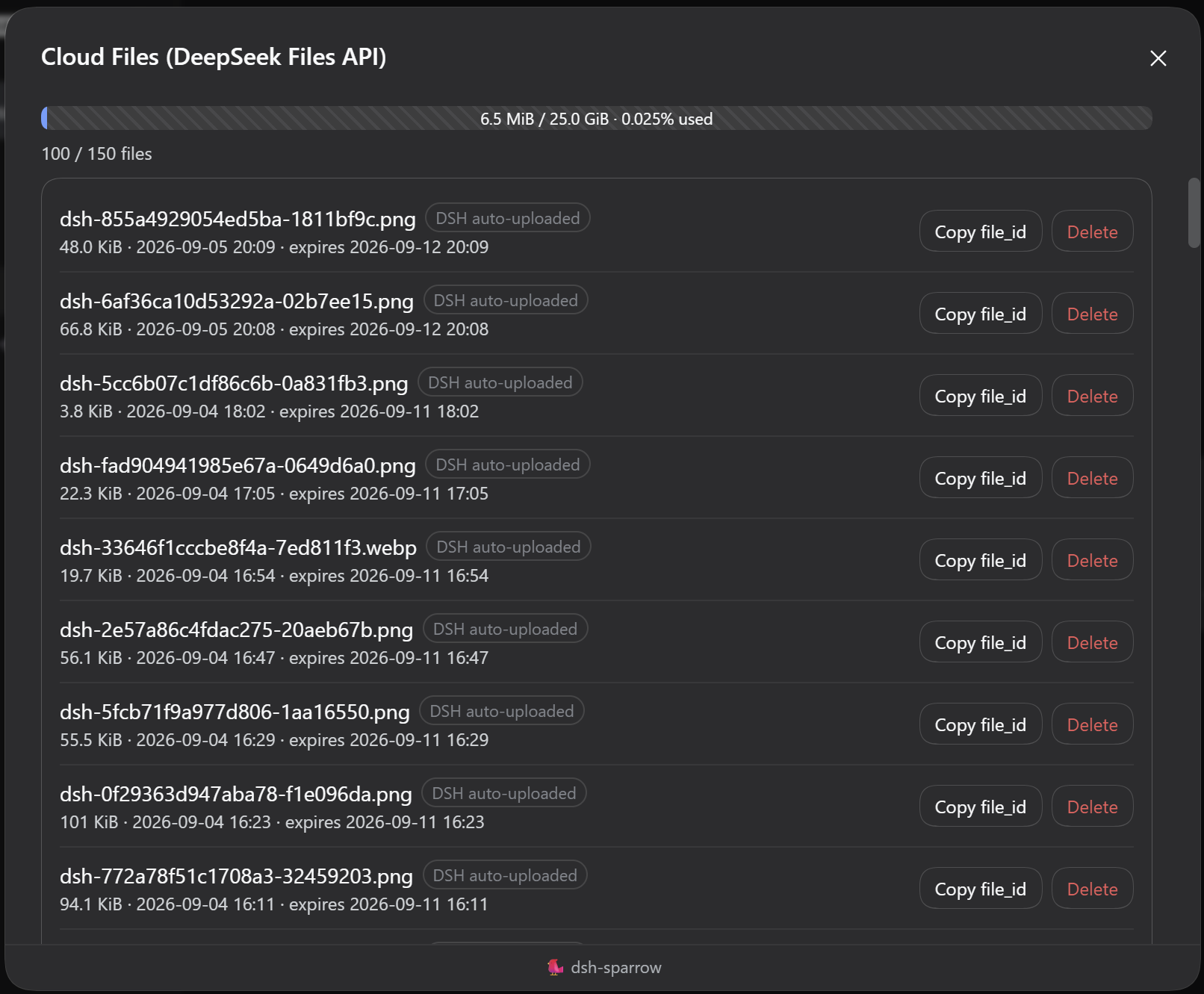
Large images pasted into DSH are auto-uploaded to the DeepSeek Files API, but DSH has no built-in management UI. This plugin adds a "Cloud Files" entry at the top of the sidebar (beside the Plugins and Automations entries): it opens a page in the main area listing every cloud file under your API key — pagination, upload/expiry times, sizes, single-file deletion, and one-click file_id copy. No extra credentials are needed.
|
|
8
8
|
|
|
9
9
|
## Install
|
|
10
10
|
|
|
@@ -12,30 +12,31 @@ Large images pasted into DSH are auto-uploaded to the DeepSeek Files API, but th
|
|
|
12
12
|
dsh plugin --profile web add @dsh-sparrow/dsh-file-manage
|
|
13
13
|
```
|
|
14
14
|
|
|
15
|
-
Requires dsh 0.
|
|
15
|
+
Requires dsh 0.2.0-rc.2 — the exact official version line this release is built and verified against (newer lines, pre-releases in particular, are not covered) — and a working `pnpm` (`dsh plugin` forwards installation to pnpm).
|
|
16
16
|
|
|
17
17
|
> Do **not** run `npm install @dsh-sparrow/dsh-file-manage` directly: that only downloads the package into some `node_modules` and does not register it with the DSH web profile. Use the `dsh plugin` command above, then restart DSH.
|
|
18
18
|
|
|
19
19
|
## Usage
|
|
20
20
|
|
|
21
|
-
* **Entry**: the "Cloud Files"
|
|
22
|
-
* **
|
|
23
|
-
* **
|
|
21
|
+
* **Entry**: the "Cloud Files" icon at the top of the sidebar, opening the page in the main area
|
|
22
|
+
* **Getting back**: The cloud files page is a normal main-area page, not a dialog — it does not dim or block the interface. Return to a conversation the usual way: pick a session in the sidebar, or use New Session
|
|
23
|
+
* **List**: in the order the service returns (this plugin does not re-sort) with "Load more" at the bottom (20 more files per click); each row shows filename / size / upload time / expiry time (when present)
|
|
24
|
+
* **Quota**: the page header shows the total count and a quota bar (used storage / the 25 GiB limit)
|
|
24
25
|
* **Delete**: per-row delete with confirmation; "DSH auto-uploaded" files (`dsh-` prefix) get an extra note — sessions referencing them will transparently re-upload on next use (may be slower)
|
|
25
26
|
* **Copy file_id**: one-click copy per row
|
|
26
27
|
* **Errors**: classified messages for auth failures / rate limits / server errors, with retry
|
|
27
28
|
|
|
28
29
|
## Limitations
|
|
29
30
|
|
|
30
|
-
* The
|
|
31
|
-
* The
|
|
32
|
-
* Quota: at most 10000 files / 25 GiB per key
|
|
33
|
-
* **Where files come from**: DSH auto-uploads to the Files API only on the **DeepSeek model path
|
|
34
|
-
* **Expiry**: DSH auto-uploads files with a default **7-day** expiry (the
|
|
31
|
+
* The Files API has **no batch-delete endpoint** — no "delete all", only per-file deletion
|
|
32
|
+
* The Files API has **no download endpoint** — content cannot be previewed or downloaded
|
|
33
|
+
* Quota: at most 10000 files / 25 GiB per key
|
|
34
|
+
* **Where files come from**: DSH auto-uploads to the Files API only on the **DeepSeek model path**; with other models the list mostly shows files you or external tools uploaded
|
|
35
|
+
* **Expiry**: DSH auto-uploads files with a default **7-day** expiry (the API has no permanent option); expired files are transparently re-uploaded on next use — tune `fileExpiresAfterSeconds` (1h–30d) in the `llm-deepseek` settings section
|
|
35
36
|
|
|
36
37
|
## Screenshot
|
|
37
38
|
|
|
38
|
-
|
|
39
40
|
|
|
40
41
|
## Uninstall & leftovers
|
|
41
42
|
|
package/README.zh-CN.md
CHANGED
|
@@ -4,7 +4,7 @@
|
|
|
4
4
|
|
|
5
5
|
DeepSeek Files API 云端文件管理 —— DeepSeek Harness(DSH)Web 插件(dsh-sparrow 合集成员)。
|
|
6
6
|
|
|
7
|
-
DSH 贴图的大图会自动上传到 DeepSeek Files API
|
|
7
|
+
DSH 贴图的大图会自动上传到 DeepSeek Files API(云端文件库),但 DSH 没有内置的管理界面。本插件在侧边栏上面加「云端文件」入口(与「插件」「自动化任务」并列):点开在中央区以页面形式列出你 API key 下的全部云端文件:翻页、上传 / 到期时间、大小,支持删除单条与一键复制 file_id。不需要额外凭据。
|
|
8
8
|
|
|
9
9
|
## 安装
|
|
10
10
|
|
|
@@ -12,30 +12,31 @@ DSH 贴图的大图会自动上传到 DeepSeek Files API(云端文件库),
|
|
|
12
12
|
dsh plugin --profile web add @dsh-sparrow/dsh-file-manage
|
|
13
13
|
```
|
|
14
14
|
|
|
15
|
-
适配 dsh 0.
|
|
15
|
+
适配 dsh 0.2.0-rc.2(本版构建与验证所对齐的确切官方版本线;更新的版本线、尤其是预发布版本不在承诺范围内),并需要可用的 `pnpm`(`dsh plugin` 会把安装操作转发给 pnpm)。
|
|
16
16
|
|
|
17
17
|
> **不要**直接执行 `npm install @dsh-sparrow/dsh-file-manage`:那只会把包下载到某个 `node_modules`,不会注册进 DSH 的 web profile。请使用上面的 `dsh plugin` 命令安装,并在安装后重启 DSH。
|
|
18
18
|
|
|
19
19
|
## 使用
|
|
20
20
|
|
|
21
|
-
*
|
|
22
|
-
*
|
|
23
|
-
*
|
|
24
|
-
*
|
|
21
|
+
* **入口**:侧边栏上面的「云端文件」图标,点开在中央区以页面形式展示
|
|
22
|
+
* **回对话**:云端文件页是中央区的普通页面、不是弹窗——不压暗、不挡界面。回到对话照常:点侧边栏的会话项,或用 New Session
|
|
23
|
+
* **列表**:按服务端返回的顺序展示(本插件不改排),底部「加载更多」每次多显示 20 条;行内展示文件名 / 大小 / 上传时间 / 到期时间(有则显)
|
|
24
|
+
* **配额**:页面顶部显示总数与配额进度条(已用存储 / 25 GiB 上限)
|
|
25
|
+
* **删除**:行内删除按钮二次确认;「DSH 自动上传」角标(`dsh-` 前缀)的文件有额外提示——删除后旧会话再次引用时 DSH 会自动重新上传(可能稍慢)
|
|
25
26
|
* **复制 file_id**:行内按钮一键复制
|
|
26
27
|
* **错误提示**:鉴权失败 / 限流 / 服务端错误分类展示,可重试
|
|
27
28
|
|
|
28
29
|
## 限制
|
|
29
30
|
|
|
30
|
-
*
|
|
31
|
-
*
|
|
32
|
-
* 配额:单 key 最多 10000 个文件 / 25 GiB
|
|
33
|
-
* **文件来源**:云端文件只在 **DeepSeek 系列模型**路径下由 DSH
|
|
34
|
-
* **有效期**:DSH 自动上传的文件默认 **7
|
|
31
|
+
* Files API **没有批量删除端点**——不做「全部清理」,只能逐条删
|
|
32
|
+
* Files API **没有下载端点**——不能预览 / 下载文件内容
|
|
33
|
+
* 配额:单 key 最多 10000 个文件 / 25 GiB
|
|
34
|
+
* **文件来源**:云端文件只在 **DeepSeek 系列模型**路径下由 DSH 自动上传;使用其它模型时列表主要为你手动 / 外部工具上传的文件
|
|
35
|
+
* **有效期**:DSH 自动上传的文件默认 **7 天**有效期(API 没有「永久」选项);到期后再次引用会自动重新上传,可在 `llm-deepseek` 设置节的 `fileExpiresAfterSeconds`(1 小时–30 天)调整
|
|
35
36
|
|
|
36
37
|
## 截图
|
|
37
38
|
|
|
38
|
-

|
|
39
40
|
|
|
40
41
|
## 卸载与残留
|
|
41
42
|
|