@drincs/pixi-vn 1.2.20 → 1.2.22
This diff represents the content of publicly available package versions that have been released to one of the supported registries. The information contained in this diff is provided for informational purposes only and reflects changes between package versions as they appear in their respective public registries.
- package/README.md +72 -55
- package/dist/canvas/index.cjs +140 -136
- package/dist/canvas/index.d.cts +1 -1
- package/dist/canvas/index.d.ts +1 -1
- package/dist/canvas/index.mjs +140 -136
- package/dist/canvas/tickers/index.cjs +147 -143
- package/dist/canvas/tickers/index.mjs +147 -143
- package/dist/character/index.cjs +51 -49
- package/dist/character/index.mjs +51 -49
- package/dist/{index-DrbCD8Wh.d.cts → index-BhqocQcj.d.cts} +39 -25
- package/dist/{index-Cubs6tJJ.d.ts → index-Bju40pxd.d.ts} +39 -25
- package/dist/index.cjs +160 -156
- package/dist/index.d.cts +3 -3
- package/dist/index.d.ts +3 -3
- package/dist/index.mjs +160 -156
- package/dist/narration/index.cjs +52 -50
- package/dist/narration/index.mjs +52 -50
- package/dist/sound/index.cjs +52 -50
- package/dist/sound/index.mjs +52 -50
- package/package.json +1 -1
package/README.md
CHANGED
|
@@ -2,33 +2,36 @@
|
|
|
2
2
|
|
|
3
3
|

|
|
4
4
|
|
|
5
|
-
Pixi’VN is a very versatile and powerful
|
|
5
|
+
Pixi’VN is a very versatile and powerful 2D game engine. It is based on JavaScript/TypeScript and [PixiJS](https://pixijs.com/).
|
|
6
6
|
|
|
7
|
-
|
|
7
|
+
It provides the following features:
|
|
8
8
|
|
|
9
|
-
|
|
9
|
+
* narrative management
|
|
10
|
+
* provides a 2D canvas
|
|
11
|
+
* providing functionality to play sounds and music
|
|
12
|
+
* storage to set and get game variables.
|
|
13
|
+
* saves the current state of the entire game at each "story step" giving the possibility to go back
|
|
14
|
+
* functionality to save and load the current state of the game.
|
|
10
15
|
|
|
11
|
-
|
|
16
|
+
For a quick start, various [project templates](#project-initialization) are available. Less experienced developers can use these templates without much knowledge of JavaScript/TypeScript.
|
|
17
|
+
|
|
18
|
+
You have the option to use various types of narrative languages (in addition to JavaScript/TypeScript). Currently you can use the following:
|
|
12
19
|
|
|
13
20
|
* [*ink*](https://pixi-vn.web.app/ink/ink)
|
|
14
21
|
* [Ren'Py](https://pixi-vn.web.app/renpy/renpy)
|
|
15
22
|
|
|
16
|
-
Pixi’VN
|
|
17
|
-
|
|
18
|
-
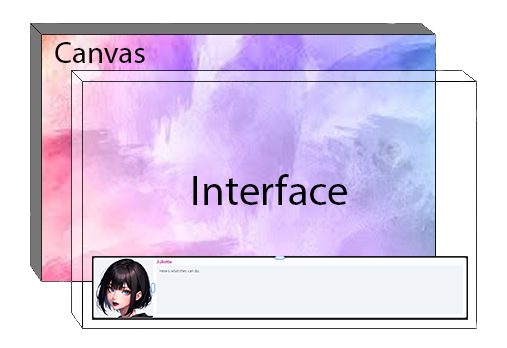
By "UI" is meant the elements that are above the canvas, such as buttons, forms, etc.
|
|
19
|
-
|
|
20
|
-
|
|
21
|
-
|
|
22
|
-
This allows the use of systems such as React, Vue, Angular, etc. to create much more complex **UI screens** with excellent performance.
|
|
23
|
+
Pixi’VN does not provide built-in components to create the game UI. Instead, you should use external JavaScript frameworks to build your UI. This allows you to leverage systems such as React, Vue, etc., to create complex and high-performance **UI screens**.
|
|
23
24
|
|
|
24
|
-
* [
|
|
25
|
-
* [React Interface](https://pixi-vn.web.app/start/interface-react)
|
|
25
|
+
* [React](https://pixi-vn.web.app/start/interface-react)
|
|
26
26
|
* [Vue](https://pixi-vn.web.app/start/interface-vue)
|
|
27
|
+
* [PixiJS](https://pixi-vn.web.app/start/interface-pixijs)
|
|
27
28
|
|
|
28
29
|
## Wiki
|
|
29
30
|
|
|
30
31
|
* [Why Pixi’VN?](https://pixi-vn.web.app/start/why)
|
|
31
|
-
* [
|
|
32
|
+
* [Ren'Py vs Pixi’VN](https://pixi-vn.web.app/start/versus-renpy)
|
|
33
|
+
* [Quick Start](https://pixi-vn.web.app/start/getting-started)
|
|
34
|
+
* [Templates](https://pixi-vn.web.app/start/templates)
|
|
32
35
|
* Make your first:
|
|
33
36
|
* [Visual Novel](https://pixi-vn.web.app/start/make-visual-novel)
|
|
34
37
|
* [Point and Click adventure game](https://pixi-vn.web.app/start/make-point-and-click)
|
|
@@ -59,15 +62,14 @@ This allows the use of systems such as React, Vue, Angular, etc. to create much
|
|
|
59
62
|
* [Game flow with labels](https://pixi-vn.web.app/start/labels-flow)
|
|
60
63
|
* [Label features](https://pixi-vn.web.app/start/labels-advanced)
|
|
61
64
|
* [Choice Menus](https://pixi-vn.web.app/start/choices)
|
|
62
|
-
* [Input](https://pixi-vn.web.app/start/input)
|
|
65
|
+
* [Input prompt](https://pixi-vn.web.app/start/input)
|
|
63
66
|
* [History](https://pixi-vn.web.app/start/history)
|
|
64
67
|
* [Translating](https://pixi-vn.web.app/start/translate)
|
|
65
|
-
* [Markup language (to add text style)](https://pixi-vn.web.app/start/markup)
|
|
66
|
-
* [Markdown](https://pixi-vn.web.app/start/markup-markdown)
|
|
67
|
-
* [Typewriter effect](https://pixi-vn.web.app/start/markup-typewriter)
|
|
68
68
|
* [Other features](https://pixi-vn.web.app/start/other-narrative-features)
|
|
69
|
-
* [
|
|
70
|
-
|
|
69
|
+
* [Markup language (to add text style)](https://pixi-vn.web.app/start/markup)
|
|
70
|
+
* [Markdown](https://pixi-vn.web.app/start/markup-markdown)
|
|
71
|
+
* [Tailwind CSS](https://pixi-vn.web.app/it/start/markup-tailwindcss)
|
|
72
|
+
* [Game canvas](https://pixi-vn.web.app/start/canvas):
|
|
71
73
|
* [Canvas alias](https://pixi-vn.web.app/start/canvas-alias)
|
|
72
74
|
* [Canvas Components](https://pixi-vn.web.app/start/canvas-components)
|
|
73
75
|
* [ImageSprite](https://pixi-vn.web.app/start/canvas-images)
|
|
@@ -76,6 +78,7 @@ This allows the use of systems such as React, Vue, Angular, etc. to create much
|
|
|
76
78
|
* [Filters](https://pixi-vn.web.app/start/canvas-filters)
|
|
77
79
|
* [Lights](https://pixi-vn.web.app/start/canvas-lights)
|
|
78
80
|
* [Spine 2D](https://pixi-vn.web.app/start/canvas-spine2d)
|
|
81
|
+
* [Three.js](https://pixi-vn.web.app/it/start/canvas-threejs)
|
|
79
82
|
* [Canvas functions](https://pixi-vn.web.app/start/canvas-functions)
|
|
80
83
|
* [Position properties](https://pixi-vn.web.app/start/canvas-position)
|
|
81
84
|
* [Transitions](https://pixi-vn.web.app/start/canvas-transition)
|
|
@@ -89,11 +92,12 @@ This allows the use of systems such as React, Vue, Angular, etc. to create much
|
|
|
89
92
|
* [Game storage](https://pixi-vn.web.app/start/storage):
|
|
90
93
|
* [Flags Management](https://pixi-vn.web.app/start/flags)
|
|
91
94
|
* [Stored Classes](https://pixi-vn.web.app/start/stored-classes)
|
|
92
|
-
* [
|
|
95
|
+
* [User Interface (UI)](https://pixi-vn.web.app/start/interface)
|
|
93
96
|
* JavaScript Frameworks
|
|
94
|
-
* [
|
|
95
|
-
* [
|
|
96
|
-
* [
|
|
97
|
+
* [React](https://pixi-vn.web.app/start/interface-react)
|
|
98
|
+
* [Vue](https://pixi-vn.web.app/start/interface-vue)
|
|
99
|
+
* [PixiJS](https://pixi-vn.web.app/start/interface-pixijs)
|
|
100
|
+
* [UI screen examples](https://pixi-vn.web.app/start/interface-examples)
|
|
97
101
|
* [Navigate/switch between UI screens](https://pixi-vn.web.app/start/interface-navigate)
|
|
98
102
|
* [Connect the UI with the storage](https://pixi-vn.web.app/start/interface-connect-storage)
|
|
99
103
|
* [Save and Load](https://pixi-vn.web.app/start/save)
|
|
@@ -101,28 +105,21 @@ This allows the use of systems such as React, Vue, Angular, etc. to create much
|
|
|
101
105
|
* [Website distribution](https://pixi-vn.web.app/start/distribution-website)
|
|
102
106
|
* [Desktop & mobile devices](https://pixi-vn.web.app/start/distribution-desktop-mobile)
|
|
103
107
|
|
|
104
|
-
## Other topics
|
|
105
|
-
|
|
106
|
-
* [FAQ](https://pixi-vn.web.app/other-topics/faq)
|
|
107
|
-
* [Migration](https://pixi-vn.web.app/other-topics/migration)
|
|
108
|
-
* [Intecept Events](https://pixi-vn.web.app/other-topics/intercept-events)
|
|
109
|
-
* [Pixi’VN + Json](https://pixi-vn.web.app/other-topics/pixi-vn-json)
|
|
110
|
-
|
|
111
108
|
## Prerequisites
|
|
112
109
|
|
|
113
110
|
Before starting, you must have the following tools installed:
|
|
114
111
|
|
|
115
112
|
* [Node.js](https://nodejs.org/) version 18 or higher.
|
|
116
|
-
* Text
|
|
113
|
+
* Text editor with TypeScript support, such as:
|
|
117
114
|
* [Visual Studio Code](https://code.visualstudio.com/)
|
|
118
115
|
* [Cursor](https://www.cursor.com/)
|
|
119
116
|
* [VSCodium](https://vscodium.com/)
|
|
120
117
|
* (Recommended) [Git](https://git-scm.com/)
|
|
121
|
-
*
|
|
118
|
+
* A [GitHub account](https://github.com/)
|
|
122
119
|
|
|
123
120
|
## Project Initialization
|
|
124
121
|
|
|
125
|
-
If you want to start a new project, you can use the following command to initialize a new project with the Pixi’VN
|
|
122
|
+
If you want to start from a new project, you can use the following command to initialize a new project with the Pixi’VN templates:
|
|
126
123
|
|
|
127
124
|
```bash
|
|
128
125
|
# npm
|
|
@@ -141,24 +138,15 @@ bun create pixi-vn
|
|
|
141
138
|
deno init --npm pixi-vn
|
|
142
139
|
```
|
|
143
140
|
|
|
144
|
-
|
|
145
|
-
|
|
146
|
-
**Visual Novel - React**:
|
|
147
|
-
|
|
148
|
-
* **[Visual Novel - React - Typescript - Web page](https://github.com/DRincs-Productions/pixi-vn-react-template)**
|
|
149
|
-
* **[Visual Novel - React - Typescript - Web page + Desktop + Mobile](https://github.com/DRincs-Productions/pixi-vn-react-template/tree/tauri)**
|
|
150
|
-
* **[Visual Novel - React - Ink + Typescript - Web page](https://github.com/DRincs-Productions/pixi-vn-react-template/tree/ink)**
|
|
151
|
-
* **[Visual Novel - React - Ink + Typescript - Web page + Desktop + Mobile](https://github.com/DRincs-Productions/pixi-vn-react-template/tree/ink-tauri)**
|
|
141
|
+
You can see the list of available templates and interactive demos [here](https://pixi-vn.web.app/start/templates).
|
|
152
142
|
|
|
153
|
-
|
|
143
|
+
After the project is initialized, open the project directory with your text editor (VSCode is recommended) and start developing your project.
|
|
154
144
|
|
|
155
|
-
|
|
145
|
+
All templates include a `README.md` file with more information about the project.
|
|
156
146
|
|
|
157
|
-
|
|
147
|
+
## Installation
|
|
158
148
|
|
|
159
|
-
|
|
160
|
-
|
|
161
|
-
For installing the Pixi’VN package, you can use the following command:
|
|
149
|
+
To install the Pixi’VN package in an existing JavaScript project, use one of the following commands:
|
|
162
150
|
|
|
163
151
|
```bash
|
|
164
152
|
# npm
|
|
@@ -172,28 +160,38 @@ pnpm add @drincs/pixi-vn
|
|
|
172
160
|
|
|
173
161
|
# bun
|
|
174
162
|
bun add @drincs/pixi-vn
|
|
163
|
+
|
|
164
|
+
# deno
|
|
165
|
+
deno install npm:@drincs/pixi-vn
|
|
175
166
|
```
|
|
176
167
|
|
|
177
|
-
##
|
|
168
|
+
## Initialize
|
|
169
|
+
|
|
170
|
+
Before using the Pixi’VN engine, you must initialize the game. You can do this by calling the `Game.init` method.
|
|
178
171
|
|
|
179
|
-
|
|
172
|
+
This function has the following parameters:
|
|
180
173
|
|
|
181
|
-
|
|
174
|
+
* `element`: The HTML element to append the canvas to.
|
|
175
|
+
* `options`: Equivalent to the options you can use when initializing a [PixiJS Application](https://pixijs.com/8.x/guides/basics/getting-started#creating-an-application). The following options are mandatory:
|
|
176
|
+
* `width`: The width of the canvas.
|
|
177
|
+
* `height`: The height of the canvas.
|
|
178
|
+
* `devtoolsOptions`: Equivalent to the options you can use when initializing the [PixiJS Devtools](https://pixi-vn.web.app/it/start/canvas#use-pixijs-devtools-with-pixivn).
|
|
182
179
|
|
|
183
|
-
```
|
|
180
|
+
```ts title="src/main.tsx"
|
|
184
181
|
import { Game } from "@drincs/pixi-vn";
|
|
185
|
-
import "./index.css";
|
|
186
182
|
|
|
187
183
|
// Canvas setup with PIXI
|
|
188
|
-
const body = document.body
|
|
184
|
+
const body = document.body
|
|
189
185
|
if (!body) {
|
|
190
|
-
throw new Error(
|
|
186
|
+
throw new Error('body element not found')
|
|
191
187
|
}
|
|
192
188
|
|
|
193
189
|
Game.init(body, {
|
|
194
190
|
height: 1080,
|
|
195
191
|
width: 1920,
|
|
196
192
|
backgroundColor: "#303030",
|
|
193
|
+
}).then(() => {
|
|
194
|
+
// ...
|
|
197
195
|
});
|
|
198
196
|
|
|
199
197
|
// read more here: https://pixi-vn.web.app/start/other-narrative-features.html#how-manage-the-end-of-the-game
|
|
@@ -201,4 +199,23 @@ Game.onEnd(async (props) => {
|
|
|
201
199
|
Game.clear();
|
|
202
200
|
props.navigate("/");
|
|
203
201
|
});
|
|
202
|
+
|
|
203
|
+
Game.onError((type, error, { notify }) => {
|
|
204
|
+
notify("allert_error_occurred");
|
|
205
|
+
});
|
|
206
|
+
```
|
|
207
|
+
|
|
208
|
+
```html title="index.html"
|
|
209
|
+
<!doctype html>
|
|
210
|
+
<html lang="en">
|
|
211
|
+
<head>
|
|
212
|
+
<meta charset="UTF-8" />
|
|
213
|
+
<meta name="viewport" content="width=device-width, initial-scale=1.0" />
|
|
214
|
+
<title>Game</title>
|
|
215
|
+
</head>
|
|
216
|
+
<body>
|
|
217
|
+
<div id="root"></div>
|
|
218
|
+
<script type="module" src="/src/main.ts"></script>
|
|
219
|
+
</body>
|
|
220
|
+
</html>
|
|
204
221
|
```
|