@double-coding/dsh-connectors 0.1.0-test.0 → 0.2.0
This diff represents the content of publicly available package versions that have been released to one of the supported registries. The information contained in this diff is provided for informational purposes only and reflects changes between package versions as they appear in their respective public registries.
- package/CONTRIBUTING.en.md +181 -0
- package/CONTRIBUTING.md +9 -1
- package/README.en.md +32 -27
- package/README.md +29 -24
- package/assets/readme/badges/dsh.svg +1 -0
- package/assets/readme/badges/github.svg +1 -0
- package/assets/readme/badges/mit.svg +1 -0
- package/assets/readme/badges/npm.svg +1 -0
- package/assets/readme/panel-en.webp +0 -0
- package/cordis.patch.yml +1 -1
- package/dist/client.js +1324 -578
- package/dist/client.js.map +4 -4
- package/dist/host/connections.d.ts +3 -0
- package/dist/host/connections.js +49 -0
- package/dist/host/connections.js.map +1 -1
- package/dist/host/mcpServers.d.ts +2 -0
- package/dist/host/mcpServers.js +45 -0
- package/dist/host/mcpServers.js.map +1 -1
- package/dist/host/providers.d.ts +7 -0
- package/dist/host/providers.js +8 -0
- package/dist/host/providers.js.map +1 -1
- package/dist/host/routes.js +33 -0
- package/dist/host/routes.js.map +1 -1
- package/dist/host/store.d.ts +10 -0
- package/dist/host/store.js +5 -0
- package/dist/host/store.js.map +1 -1
- package/dist/shared/types.d.ts +16 -0
- package/dist/shared/types.js.map +1 -1
- package/package.json +2 -1
- package/providers/amap/provider.json +19 -1
- package/providers/baidu-netdisk/provider.json +14 -0
- package/providers/circleci/provider.json +17 -1
- package/providers/cloudflare-docs/provider.json +17 -1
- package/providers/context7/provider.json +15 -1
- package/providers/deepwiki/provider.json +16 -1
- package/providers/firecrawl/provider.json +12 -0
- package/providers/gitee/provider.json +18 -1
- package/providers/github/provider.json +17 -1
- package/providers/gitlab/provider.json +19 -2
- package/providers/gitlab-self-hosted/provider.json +20 -2
- package/providers/grafana/provider.json +17 -1
- package/providers/linear/provider.json +12 -0
- package/providers/microsoft-learn/provider.json +17 -1
- package/providers/neon/provider.json +12 -0
- package/providers/notion/provider.json +17 -1
- package/providers/posthog/provider.json +12 -0
- package/providers/postman/provider.json +17 -1
- package/providers/qcc/provider.json +62 -12
- package/providers/sentry/provider.json +24 -2
- package/providers/sourcegraph/provider.json +17 -1
- package/providers/supabase/provider.json +12 -0
- package/providers/tavily/provider.json +12 -0
- package/providers/tencent-docs/provider.json +23 -2
- package/providers/tencent-yuanbao-search/provider.json +19 -1
- package/providers/tianyancha/provider.json +21 -2
- package/providers/yunxiao/provider.json +22 -2
- package/schema/provider.schema.json +34 -0
|
@@ -0,0 +1,181 @@
|
|
|
1
|
+
<p align="center">
|
|
2
|
+
<a href="./CONTRIBUTING.md">简体中文</a> · <strong>English</strong>
|
|
3
|
+
</p>
|
|
4
|
+
|
|
5
|
+
# Contributing providers
|
|
6
|
+
|
|
7
|
+
Built-in providers in `dsh-connectors` are data only: adding one means adding a directory, with no changes to the core code. The contract lives in [`schema/provider.schema.json`](schema/provider.schema.json).
|
|
8
|
+
|
|
9
|
+
## What we accept
|
|
10
|
+
|
|
11
|
+
- Remote MCP services run by the vendor. A regular provider must use an `https://` endpoint.
|
|
12
|
+
- Services that need a user-supplied MCP URL use an `instance` block; the address is provided at runtime (https, http, or a private network). `auth` can be `none`, `bearer`, `header`, or `oauth2`.
|
|
13
|
+
- Static catalog copy, examples, and an optional icon.
|
|
14
|
+
- A real credential test: the provider connects and registers tools.
|
|
15
|
+
|
|
16
|
+
## What we don't accept
|
|
17
|
+
|
|
18
|
+
- Providers that carry executable code, build scripts, or runtime injection.
|
|
19
|
+
- Tokens, client secrets, or fixed private-network addresses in `provider.json`.
|
|
20
|
+
- Plain `http://` endpoints outside `instance`, proxy services, or unofficial relay endpoints. Use the in-app **Custom connector** for those.
|
|
21
|
+
- Telemetry, data reporting, or remote configuration.
|
|
22
|
+
|
|
23
|
+
## Directory layout
|
|
24
|
+
|
|
25
|
+
```text
|
|
26
|
+
providers/
|
|
27
|
+
acme/
|
|
28
|
+
provider.json # required
|
|
29
|
+
icon.svg # optional; icon.png and icon.webp also work
|
|
30
|
+
```
|
|
31
|
+
|
|
32
|
+
- The `id` in `provider.json` must match the directory name.
|
|
33
|
+
- `serverName` defaults to `id` and must be globally unique. It becomes the tool prefix `mcp__<serverName>__`.
|
|
34
|
+
- Icons should be 24×24 SVG. Without one, the client falls back to a colored block with the first letter.
|
|
35
|
+
|
|
36
|
+
## Quick start
|
|
37
|
+
|
|
38
|
+
```bash
|
|
39
|
+
npm run provider:new -- acme --auth bearer --name "Acme"
|
|
40
|
+
# Edit providers/acme/provider.json and replace the TODOs and example URL.
|
|
41
|
+
# Optional: add providers/acme/icon.svg
|
|
42
|
+
npm run check
|
|
43
|
+
```
|
|
44
|
+
|
|
45
|
+
`npm run check` runs the type check, build, provider validation, and endpoint/contract tests (duplicate ids and serverNames, missing fields, URLs, ordering).
|
|
46
|
+
|
|
47
|
+
## Generic endpoint providers (instance)
|
|
48
|
+
|
|
49
|
+
If a service needs the user to enter a complete MCP URL (self-hosted GitLab, Amap), add an `instance` block and leave `server.url` unset:
|
|
50
|
+
|
|
51
|
+
```json
|
|
52
|
+
{
|
|
53
|
+
"instance": {
|
|
54
|
+
"label": "Service URL",
|
|
55
|
+
"placeholder": "https://example.com/mcp",
|
|
56
|
+
"hint": "Enter the complete MCP endpoint. Do not include credentials or a fragment.",
|
|
57
|
+
"help": {
|
|
58
|
+
"url": "https://example.com/docs/mcp",
|
|
59
|
+
"label": "Open setup guide",
|
|
60
|
+
"hint": "Create the service in the console, then copy its URL."
|
|
61
|
+
}
|
|
62
|
+
},
|
|
63
|
+
"server": {
|
|
64
|
+
"serverName": "example",
|
|
65
|
+
"transport": "streamable-http"
|
|
66
|
+
},
|
|
67
|
+
"auth": { "type": "none" }
|
|
68
|
+
}
|
|
69
|
+
```
|
|
70
|
+
|
|
71
|
+
Rules:
|
|
72
|
+
|
|
73
|
+
- `instance.label` is required; `placeholder`, `hint`, and `help` are optional. `help` renders an official link in the address dialog (`{ url, label, hint? }`; the URL must be https).
|
|
74
|
+
- Do not set `server.url` with an `instance`. The user supplies the full address.
|
|
75
|
+
- At runtime the address accepts http/https and private networks, and allows a query string (for endpoints such as `?key=...`). It rejects credentials and fragments. The UI shows a plain-text warning for http.
|
|
76
|
+
- The address is saved exactly as entered; no path is appended. The provider's `placeholder` and `hint` should show a complete endpoint example.
|
|
77
|
+
- All four auth types work: `none` connects after saving; `bearer` and `header` open a separate token dialog; `oauth2` requires DCR on the instance and starts authorization after saving.
|
|
78
|
+
- For an `instance` provider, the plus button first writes an install record without a URL, then opens the address dialog. The detail view only shows a hint and a **Configure** button.
|
|
79
|
+
- Once configured, `instanceReady=true`. **Change address** disconnects the old connection, clears credentials, updates the URL, and requires configuration or authorization again. Closing the dialog before configuring keeps the install, so the user can come back.
|
|
80
|
+
|
|
81
|
+
### Preset endpoints (instance.presets)
|
|
82
|
+
|
|
83
|
+
If the addresses are a fixed set of endpoints (QCC splits ten data domains across MCP services), use `presets` to turn the dialog into a dropdown:
|
|
84
|
+
|
|
85
|
+
```json
|
|
86
|
+
{
|
|
87
|
+
"instance": {
|
|
88
|
+
"label": "Data domain",
|
|
89
|
+
"noun": "data domain",
|
|
90
|
+
"presets": [
|
|
91
|
+
{ "label": "Company records", "url": "https://example.com/mcp/company/stream" },
|
|
92
|
+
{ "label": "Risk records", "url": "https://example.com/mcp/risk/stream" }
|
|
93
|
+
]
|
|
94
|
+
}
|
|
95
|
+
}
|
|
96
|
+
```
|
|
97
|
+
|
|
98
|
+
- Every preset requires `label` and `url`; the URL must be https and the array cannot be empty.
|
|
99
|
+
- With `presets`, the user picks from the list; manual entry and the http warning are removed.
|
|
100
|
+
- `noun` only changes the wording: card and detail actions say "Change data domain" instead of "Change address", and the hint becomes "Select a data domain". Without it, the UI says "address".
|
|
101
|
+
- Each preset is a separate MCP endpoint. Switching disconnects the current connection, clears credentials, and requires a new connection. Make this clear in the UI.
|
|
102
|
+
|
|
103
|
+
## Transport
|
|
104
|
+
|
|
105
|
+
- `server.transport` supports `streamable-http` and legacy `sse`. An `sse` URL must also be https. The plugin's built-in stdio bridge adapts it for `@deepseek-ai/dsh-mcp-client`; providers need no extra code.
|
|
106
|
+
|
|
107
|
+
## Auth types
|
|
108
|
+
|
|
109
|
+
| type | Use case | Key fields |
|
|
110
|
+
| --- | --- | --- |
|
|
111
|
+
| `none` | Public MCP with no credentials | — |
|
|
112
|
+
| `bearer` | `Authorization: Bearer <token>` | `label`, optional `help` |
|
|
113
|
+
| `header` | Custom header such as `X-API-Key` | `header`, optional `prefix`, `label`, `help` |
|
|
114
|
+
| `oauth2` | OAuth 2.0 Authorization Code + PKCE | `flow: "pkce"`, `registration`, optional `scopes` / `clientName` |
|
|
115
|
+
|
|
116
|
+
OAuth `registration`:
|
|
117
|
+
|
|
118
|
+
- `"dcr"`: the server supports dynamic client registration (preferred).
|
|
119
|
+
- `{ "clientId": "..." }`: the vendor provides a public client ID and no client secret is required.
|
|
120
|
+
- `"user"`: the user enters an AppKey / SecretKey in the panel. The provider must declare `endpoints`, and may set `authorizeParams`, `tokenMethod`, and `pkce`. Use this for services without DCR where the user brings their own app.
|
|
121
|
+
|
|
122
|
+
When the server exposes standard OAuth metadata, the host handles discovery and the provider only declares `registration` and `scopes`. In `user` mode the provider's `endpoints` are used directly.
|
|
123
|
+
|
|
124
|
+
1. Send an unauthorized `initialize` to the MCP endpoint and read `resource_metadata` from the 401 `WWW-Authenticate` header (RFC 9728, preferred).
|
|
125
|
+
2. Without that header, try `{origin}/.well-known/oauth-protected-resource{path}` and then `{resource}/.well-known/oauth-protected-resource`.
|
|
126
|
+
3. Take `authorization_servers[0]` as the issuer and read `{issuer}/.well-known/oauth-authorization-server`.
|
|
127
|
+
4. Use the provider's `scopes` first; only fall back to the first scope in the resource metadata.
|
|
128
|
+
5. Authorization, token exchange, and refresh all send the resource metadata's `resource` (RFC 8707). Tianyancha requires it to equal the MCP endpoint; other services can ignore it.
|
|
129
|
+
|
|
130
|
+
Device code and mTLS are not supported. Custom connectors do not have a multi-field credential form. Use `bearer` or `header` for API-key-only services. When a service supports both OAuth and API keys, the built-in card uses OAuth and the key path is left to custom connectors' `headers`.
|
|
131
|
+
|
|
132
|
+
## Credential help links
|
|
133
|
+
|
|
134
|
+
Token-based providers should include `help`:
|
|
135
|
+
|
|
136
|
+
```json
|
|
137
|
+
"help": {
|
|
138
|
+
"url": "https://vendor.example/tokens",
|
|
139
|
+
"label": "Create an API key",
|
|
140
|
+
"hint": "Create it under Settings → API. The token stays on this machine."
|
|
141
|
+
}
|
|
142
|
+
```
|
|
143
|
+
|
|
144
|
+
The authorization form shows this link and hint. Link to the vendor's official credential page.
|
|
145
|
+
|
|
146
|
+
## Copy and examples
|
|
147
|
+
|
|
148
|
+
- `summary`: one line on the card, at most one line of text.
|
|
149
|
+
- `description`: one or two sentences in the detail dialog.
|
|
150
|
+
- `examples`: 1–6 prompts the user can send to the agent. Do not write operational instructions such as "click here".
|
|
151
|
+
- `category`: one of the fixed identifiers `开发工具 / 项目管理 / 数据库 / 知识检索 / 办公协作 / 安全运维 / 数据分析 / 其他` (developer tools, project management, databases, search & knowledge, productivity, security & ops, analytics, other).
|
|
152
|
+
|
|
153
|
+
## Localized copy
|
|
154
|
+
|
|
155
|
+
Top-level `summary`, `description`, and `examples` are the Chinese defaults. Add `translations.en` to override `name`, `vendor`, `summary`, `description`, or `examples`; missing fields fall back to the top-level values. `category` stays a fixed Chinese enum, and the client localizes its label.
|
|
156
|
+
|
|
157
|
+
## Verification checklist
|
|
158
|
+
|
|
159
|
+
- [ ] `npm run check` passes
|
|
160
|
+
- [ ] `provider.json` exists and its `id` matches the directory name
|
|
161
|
+
- [ ] The endpoint is the vendor's official `https://` MCP endpoint, confirmed in the browser or docs
|
|
162
|
+
- [ ] Installed and connected with a real credential; the tool count is recorded
|
|
163
|
+
- [ ] Credentials stay on the host; `provider.json` contains no secrets
|
|
164
|
+
- [ ] Example prompts work and contain no internal project names or personal data
|
|
165
|
+
- [ ] The icon (if any) is official brand material with no external scripts or references
|
|
166
|
+
- [ ] The PR description links the vendor's MCP docs and the tested tool count
|
|
167
|
+
|
|
168
|
+
## Release and compatibility
|
|
169
|
+
|
|
170
|
+
- `schemaVersion` is currently `1`. New capabilities are added as backward-compatible optional fields.
|
|
171
|
+
- Removing or renaming a provider id is a breaking change and needs its own discussion.
|
|
172
|
+
- Validation and catalog loading live in `src/host/providers.ts`; the contract is `schema/provider.schema.json`.
|
|
173
|
+
|
|
174
|
+
## Release
|
|
175
|
+
|
|
176
|
+
1. Bump `version` in `package.json`, refresh `assets/readme/badges/npm.svg` (download the npm badge again), and commit to `main`.
|
|
177
|
+
2. Tag the same version (`vX.Y.Z`) and push the tag to GitHub.
|
|
178
|
+
3. Create a GitHub Release for that tag. `publish-npm.yml` runs `npm run check` and publishes to npm with Trusted Publishing + provenance.
|
|
179
|
+
4. The first release needs a manual `npm login --registry=https://registry.npmjs.org` and `npm publish --access public` to create the package. Then configure Trusted Publishing in the npm package settings: organization `double-coding-lab`, repository `dsh-connectors`, workflow `publish-npm.yml`.
|
|
180
|
+
|
|
181
|
+
Pushing alone does not publish; the Release must be published.
|
package/CONTRIBUTING.md
CHANGED
|
@@ -1,3 +1,7 @@
|
|
|
1
|
+
<p align="center">
|
|
2
|
+
<strong>简体中文</strong> · <a href="./CONTRIBUTING.en.md">English</a>
|
|
3
|
+
</p>
|
|
4
|
+
|
|
1
5
|
# 贡献 Provider
|
|
2
6
|
|
|
3
7
|
`dsh-connectors` 的内置 provider 只包含数据:新增一个 provider 就是加一个目录,不用改核心代码。契约文件是 [`schema/provider.schema.json`](schema/provider.schema.json)。
|
|
@@ -146,6 +150,10 @@ UI 会在授权表单里展示该链接与提示。链接必须是厂商官方
|
|
|
146
150
|
- `examples`:1–6 条可直接发给 Agent 的提示词;不要写「点这里」这类操作说明。
|
|
147
151
|
- `category`:只能是 `开发工具 / 项目管理 / 数据库 / 知识检索 / 办公协作 / 安全运维 / 数据分析 / 其他`。
|
|
148
152
|
|
|
153
|
+
## 本地化文案
|
|
154
|
+
|
|
155
|
+
顶层 `summary` / `description` / `examples` 是中文默认值。需要英文时加 `translations.en`,可覆盖 `name`、`vendor`、`summary`、`description`、`examples`;缺失字段回退到顶层值。`category` 仍是固定中文枚举,界面会按当前语言显示标签。
|
|
156
|
+
|
|
149
157
|
## 验证清单
|
|
150
158
|
|
|
151
159
|
- [ ] `npm run check` 通过
|
|
@@ -165,7 +173,7 @@ UI 会在授权表单里展示该链接与提示。链接必须是厂商官方
|
|
|
165
173
|
|
|
166
174
|
## 发布
|
|
167
175
|
|
|
168
|
-
1. 修改 `package.json` 的 `version
|
|
176
|
+
1. 修改 `package.json` 的 `version`,同步更新 `assets/readme/badges/npm.svg`(重新下载 npm 徽章),提交到 `main`。
|
|
169
177
|
2. 打同名 tag(`vX.Y.Z`)并推送到 GitHub。
|
|
170
178
|
3. 在 GitHub 创建该 tag 的 Release。`publish-npm.yml` 会跑 `npm run check`,然后发布到 npm(Trusted Publishing + provenance)。
|
|
171
179
|
4. 首次发布需要先在本地执行一次 `npm login --registry=https://registry.npmjs.org` 和 `npm publish --access public` 创建包,再到 npm 包设置里配置 Trusted Publishing:organization `double-coding-lab`、repository `dsh-connectors`、workflow `publish-npm.yml`。
|
package/README.en.md
CHANGED
|
@@ -2,16 +2,18 @@
|
|
|
2
2
|
<img src="https://raw.githubusercontent.com/double-coding-lab/dsh-connectors/main/assets/readme/hero-en.svg" width="100%" alt="dsh-connectors: an MCP and CLI connector panel for DeepSeek Harness">
|
|
3
3
|
</p>
|
|
4
4
|
|
|
5
|
-
<
|
|
5
|
+
<div align="center" class="text-center">
|
|
6
6
|
<a href="./README.md">简体中文</a> · <strong>English</strong>
|
|
7
|
-
</
|
|
7
|
+
</div>
|
|
8
8
|
|
|
9
|
-
<
|
|
10
|
-
|
|
11
|
-
|
|
12
|
-
<img alt="
|
|
13
|
-
<img alt="
|
|
14
|
-
|
|
9
|
+
<br>
|
|
10
|
+
|
|
11
|
+
<div align="center" class="text-center">
|
|
12
|
+
<a href="https://www.npmjs.com/package/@double-coding/dsh-connectors"><img alt="npm 0.2.0" src="https://raw.githubusercontent.com/double-coding-lab/dsh-connectors/main/assets/readme/badges/npm.svg"></a>
|
|
13
|
+
<a href="https://github.com/double-coding-lab/dsh-connectors"><img alt="GitHub: double-coding-lab/dsh-connectors" src="https://raw.githubusercontent.com/double-coding-lab/dsh-connectors/main/assets/readme/badges/github.svg"></a>
|
|
14
|
+
<a href="https://github.com/double-coding-lab/dsh-connectors/blob/main/LICENSE"><img alt="MIT" src="https://raw.githubusercontent.com/double-coding-lab/dsh-connectors/main/assets/readme/badges/mit.svg"></a>
|
|
15
|
+
<img alt="DSH 0.2.x" src="https://raw.githubusercontent.com/double-coding-lab/dsh-connectors/main/assets/readme/badges/dsh.svg">
|
|
16
|
+
</div>
|
|
15
17
|
|
|
16
18
|
dsh-connectors is the **Connectors** panel for DeepSeek Harness. It includes 27 MCP connectors and 6 CLI connectors (DingTalk, Feishu, Tencent Meeting, WeCom, Hugging Face, Agent Mail). OAuth runs in your browser, credentials stay on your machine, and connected tools show up in your conversations.
|
|
17
19
|
|
|
@@ -27,7 +29,7 @@ dsh-connectors is the **Connectors** panel for DeepSeek Harness. It includes 27
|
|
|
27
29
|
|
|
28
30
|
## UI and demo
|
|
29
31
|
|
|
30
|
-
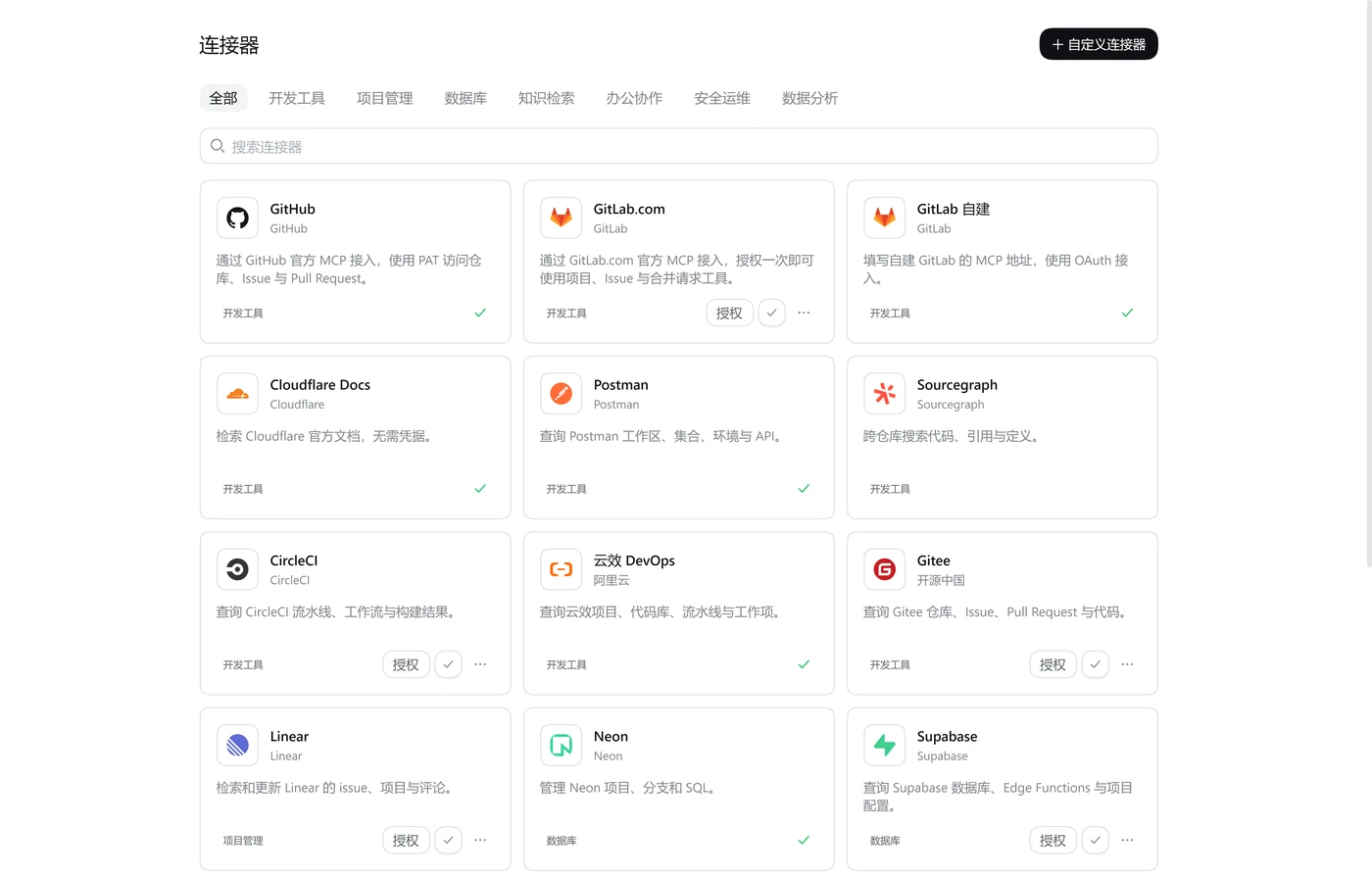
|
|
32
|
+
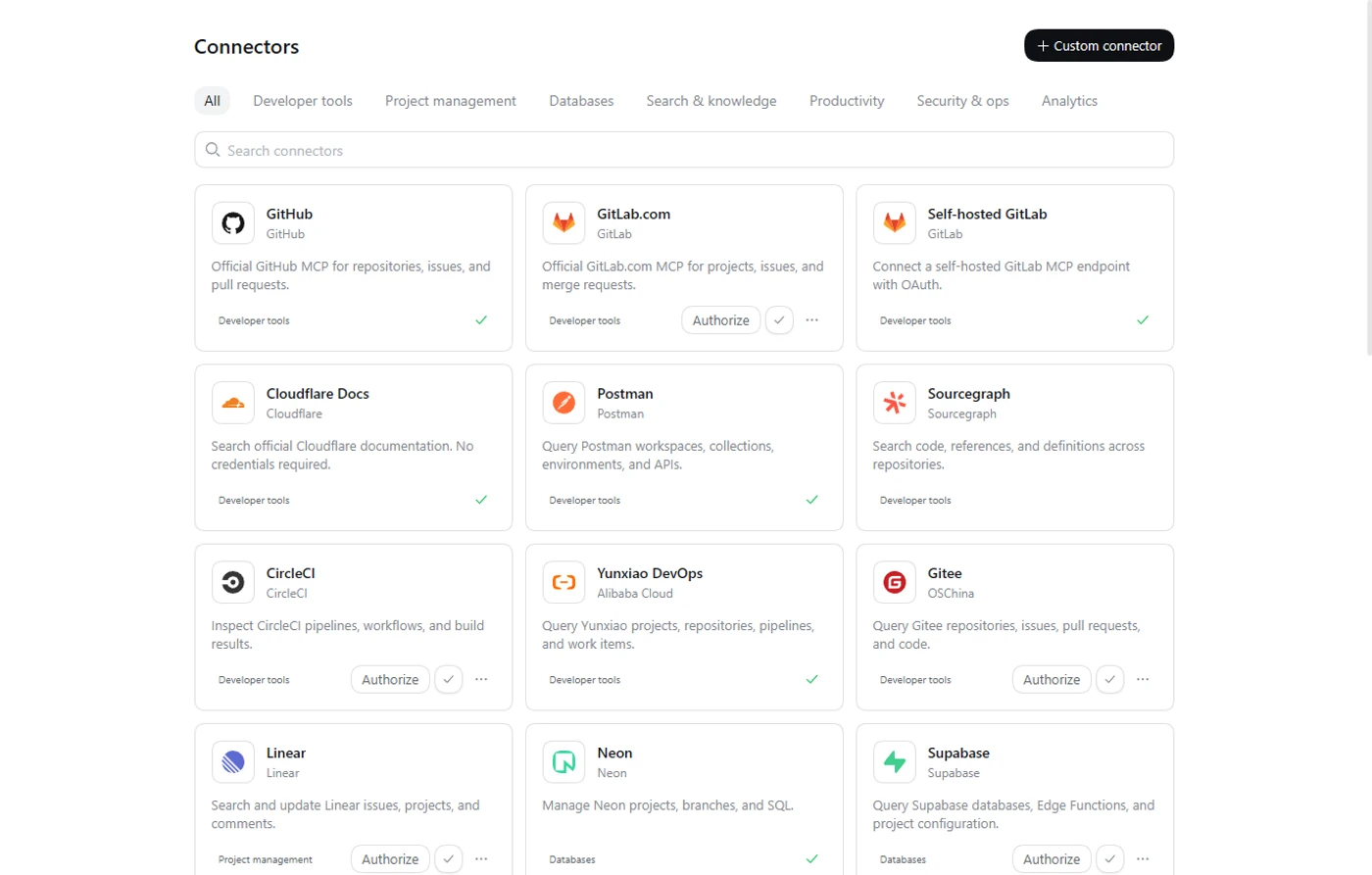
|
|
31
33
|
|
|
32
34
|
Browse by category or search, then click the plus button on a card to install.
|
|
33
35
|
|
|
@@ -37,8 +39,9 @@ Browse by category or search, then click the plus button on a card to install.
|
|
|
37
39
|
- **Tokens and custom endpoints**: API-key services use a token dialog; self-hosted services take a full MCP URL that stays on your machine.
|
|
38
40
|
- **CLI login and updates in the panel**: DingTalk, Feishu, Tencent Meeting, WeCom, Hugging Face, and Agent Mail run through their official CLIs; install, login, update, and uninstall all happen in the panel.
|
|
39
41
|
- **SSE-only servers work too**: a built-in stdio bridge adapts them for `dsh-mcp-client`; Baidu Netdisk uses this path.
|
|
40
|
-
- **Custom `mcpServers`**: paste standard JSON for Streamable HTTP, SSE, or stdio; private or localhost URLs require explicit confirmation.
|
|
42
|
+
- **Custom `mcpServers`**: paste standard JSON for Streamable HTTP, SSE, or stdio; private or localhost URLs require explicit confirmation; descriptions, category labels, and examples can be provided in both Chinese and English.
|
|
41
43
|
- **A provider is a data file**: adding a connector means adding a `provider.json`; no core code changes and no per-vendor branches.
|
|
44
|
+
- **Follows the DSH language**: the panel, catalog copy, and CLI capability descriptions switch between Chinese and English in Settings, live.
|
|
42
45
|
- **Credentials stay on the machine**: connection records, tokens, and OAuth client data live on the host, are never returned by the API, and are redacted from logs.
|
|
43
46
|
|
|
44
47
|
## Built-in catalog
|
|
@@ -47,21 +50,23 @@ The plugin ships 27 MCP providers and 6 CLI connectors. The category table cover
|
|
|
47
50
|
|
|
48
51
|
| Category | Connectors |
|
|
49
52
|
| --- | --- |
|
|
50
|
-
| Developer tools
|
|
51
|
-
| Search & knowledge
|
|
52
|
-
| Productivity
|
|
53
|
-
| Analytics
|
|
54
|
-
| Security & ops
|
|
55
|
-
| Databases
|
|
56
|
-
| Project management
|
|
57
|
-
| CLI
|
|
58
|
-
|
|
59
|
-
|
|
60
|
-
|
|
61
|
-
|
|
|
62
|
-
|
|
|
63
|
-
|
|
|
64
|
-
|
|
|
53
|
+
| Developer tools | GitHub, GitLab, self-hosted GitLab, Gitee, Postman, CircleCI, Yunxiao, Sourcegraph, Cloudflare Docs |
|
|
54
|
+
| Search & knowledge | Context7, Microsoft Learn, DeepWiki, Firecrawl, Tavily, Tencent Yuanbao Search, Amap |
|
|
55
|
+
| Productivity | Notion, Tencent Docs, Baidu Netdisk |
|
|
56
|
+
| Analytics | PostHog, Tianyancha, QCC |
|
|
57
|
+
| Security & ops | Sentry, Grafana |
|
|
58
|
+
| Databases | Neon, Supabase |
|
|
59
|
+
| Project management | Linear |
|
|
60
|
+
| CLI | DingTalk, Feishu, Tencent Meeting, WeCom, Hugging Face, Agent Mail |
|
|
61
|
+
|
|
62
|
+
By auth method: OAuth 2.0 (16), API key or token (6), no credentials (5), CLI + Skills (6).
|
|
63
|
+
|
|
64
|
+
| Auth method | How it works | Examples |
|
|
65
|
+
| --- | --- | --- |
|
|
66
|
+
| OAuth 2.0 (DCR + PKCE) | Browser authorization with automatic token refresh | GitLab, Notion, Firecrawl, Tencent Docs |
|
|
67
|
+
| API key / token | Paste a key in the token dialog; sent as a Bearer header | GitHub, Grafana, Baidu Netdisk |
|
|
68
|
+
| No credentials | The card asks for no credential; connect directly after install | Context7, Microsoft Learn, DeepWiki |
|
|
69
|
+
| CLI + Skills | Runs the vendor CLI; login, update, and uninstall in the panel; no remote MCP server | DingTalk, Feishu, Hugging Face |
|
|
65
70
|
|
|
66
71
|
## Install
|
|
67
72
|
|
|
@@ -138,7 +143,7 @@ Then run:
|
|
|
138
143
|
npm run check
|
|
139
144
|
```
|
|
140
145
|
|
|
141
|
-
See [CONTRIBUTING.md](./CONTRIBUTING.md)
|
|
146
|
+
See [CONTRIBUTING.en.md](./CONTRIBUTING.en.md) and [provider.schema.json](./schema/provider.schema.json) for the contract, auth types, OAuth registration, and the PR checklist. Providers cannot contain executable code; use the in-app **Custom connector** for local stdio or private endpoints.
|
|
142
147
|
|
|
143
148
|
## Security and limits
|
|
144
149
|
|
|
@@ -149,7 +154,7 @@ See [CONTRIBUTING.md](./CONTRIBUTING.md) (Chinese) and [provider.schema.json](./
|
|
|
149
154
|
|
|
150
155
|
## Contributing
|
|
151
156
|
|
|
152
|
-
Open a PR for a new official MCP provider, a fix, or a docs change. Read [CONTRIBUTING.md](./CONTRIBUTING.md) before adding a provider.
|
|
157
|
+
Open a PR for a new official MCP provider, a fix, or a docs change. Read [CONTRIBUTING.en.md](./CONTRIBUTING.en.md) before adding a provider.
|
|
153
158
|
|
|
154
159
|
## License
|
|
155
160
|
|
package/README.md
CHANGED
|
@@ -2,16 +2,18 @@
|
|
|
2
2
|
<img src="https://raw.githubusercontent.com/double-coding-lab/dsh-connectors/main/assets/readme/hero.svg" width="100%" alt="dsh-connectors:DeepSeek Harness 的 MCP 与 CLI 连接器面板">
|
|
3
3
|
</p>
|
|
4
4
|
|
|
5
|
-
<
|
|
5
|
+
<div align="center" class="text-center">
|
|
6
6
|
<strong>简体中文</strong> · <a href="./README.en.md">English</a>
|
|
7
|
-
</
|
|
7
|
+
</div>
|
|
8
8
|
|
|
9
|
-
<
|
|
10
|
-
|
|
11
|
-
|
|
12
|
-
<img alt="
|
|
13
|
-
<img alt="
|
|
14
|
-
|
|
9
|
+
<br>
|
|
10
|
+
|
|
11
|
+
<div align="center" class="text-center">
|
|
12
|
+
<a href="https://www.npmjs.com/package/@double-coding/dsh-connectors"><img alt="npm 0.2.0" src="https://raw.githubusercontent.com/double-coding-lab/dsh-connectors/main/assets/readme/badges/npm.svg"></a>
|
|
13
|
+
<a href="https://github.com/double-coding-lab/dsh-connectors"><img alt="GitHub: double-coding-lab/dsh-connectors" src="https://raw.githubusercontent.com/double-coding-lab/dsh-connectors/main/assets/readme/badges/github.svg"></a>
|
|
14
|
+
<a href="https://github.com/double-coding-lab/dsh-connectors/blob/main/LICENSE"><img alt="MIT" src="https://raw.githubusercontent.com/double-coding-lab/dsh-connectors/main/assets/readme/badges/mit.svg"></a>
|
|
15
|
+
<img alt="DSH 0.2.x" src="https://raw.githubusercontent.com/double-coding-lab/dsh-connectors/main/assets/readme/badges/dsh.svg">
|
|
16
|
+
</div>
|
|
15
17
|
|
|
16
18
|
dsh-connectors 是 DeepSeek Harness 的「连接器」面板。内置 27 个 MCP 连接器和 6 个 CLI 连接器(钉钉、飞书、腾讯会议、企业微信、Hugging Face、Agent Mail)。OAuth 在浏览器里完成,凭据只保存在本机;连上后就能在对话里调用这些工具。
|
|
17
19
|
|
|
@@ -37,8 +39,9 @@ dsh-connectors 是 DeepSeek Harness 的「连接器」面板。内置 27 个 MCP
|
|
|
37
39
|
- **Token 和自定义地址**:需要 API Key 的服务用独立令牌弹窗;自建服务填写完整的 MCP 地址,地址只保存在本机。
|
|
38
40
|
- **CLI 连接的登录和更新也在面板里**:钉钉、飞书、腾讯会议、企业微信、Hugging Face、Agent Mail 通过官方 CLI 工作;安装、登录、更新、卸载都在面板里完成。
|
|
39
41
|
- **SSE 服务也能接入**:插件内置 stdio 桥,把只提供 SSE 的 MCP Server 转接给 `dsh-mcp-client`;百度网盘用的就是这种方式。
|
|
40
|
-
- **自定义 `mcpServers`**:粘贴标准 JSON,支持 Streamable HTTP、SSE 与 stdio;内网 / localhost
|
|
42
|
+
- **自定义 `mcpServers`**:粘贴标准 JSON,支持 Streamable HTTP、SSE 与 stdio;内网 / localhost 地址需要二次确认;描述、分类显示名和示例可以同时填写中英文。
|
|
41
43
|
- **Provider 只包含数据**:新增连接器就是加一个 `provider.json`,不用改核心代码,也没有厂商分支。
|
|
44
|
+
- **跟随 DSH 语言**:面板、目录文案与 CLI 能力说明跟随设置里的中英文切换,切换后即时生效。
|
|
42
45
|
- **凭据留在本机**:连接记录、令牌和 OAuth 客户端信息由宿主保管,接口不回传,日志脱敏。
|
|
43
46
|
|
|
44
47
|
## 内置连接器目录
|
|
@@ -47,21 +50,23 @@ dsh-connectors 是 DeepSeek Harness 的「连接器」面板。内置 27 个 MCP
|
|
|
47
50
|
|
|
48
51
|
| 分类 | 连接器 |
|
|
49
52
|
| --- | --- |
|
|
50
|
-
|
|
|
51
|
-
|
|
|
52
|
-
|
|
|
53
|
-
|
|
|
54
|
-
|
|
|
55
|
-
|
|
|
56
|
-
|
|
|
57
|
-
| CLI
|
|
58
|
-
|
|
59
|
-
|
|
60
|
-
|
|
61
|
-
|
|
|
62
|
-
|
|
|
63
|
-
|
|
|
64
|
-
|
|
|
53
|
+
| 开发工具 | GitHub、GitLab、GitLab 自建、Gitee、Postman、CircleCI、云效、Sourcegraph、Cloudflare Docs |
|
|
54
|
+
| 知识检索 | Context7、Microsoft Learn、DeepWiki、Firecrawl、Tavily、腾讯元宝搜索、高德地图 |
|
|
55
|
+
| 办公协作 | Notion、腾讯文档、百度网盘 |
|
|
56
|
+
| 数据分析 | PostHog、天眼查、企查查 |
|
|
57
|
+
| 安全运维 | Sentry、Grafana |
|
|
58
|
+
| 数据库 | Neon、Supabase |
|
|
59
|
+
| 项目管理 | Linear |
|
|
60
|
+
| CLI | 钉钉、飞书、腾讯会议、企业微信、Hugging Face、Agent Mail |
|
|
61
|
+
|
|
62
|
+
按认证方式统计:OAuth 2.0 16 个,API Key / Token 6 个,无需凭据 5 个,CLI + Skills 6 个。
|
|
63
|
+
|
|
64
|
+
| 认证方式 | 工作方式 | 代表连接器 |
|
|
65
|
+
| --- | --- | --- |
|
|
66
|
+
| OAuth 2.0(DCR + PKCE) | 浏览器授权,令牌过期前自动刷新 | GitLab、Notion、Firecrawl、腾讯文档 |
|
|
67
|
+
| API Key / Token | 在令牌弹窗粘贴 Key,按 Bearer 头发送 | GitHub、Grafana、百度网盘 |
|
|
68
|
+
| 无需凭据 | 卡片不要求凭据,安装后直接连接 | Context7、Microsoft Learn、DeepWiki |
|
|
69
|
+
| CLI + Skills | 调用厂商 CLI;登录、更新、卸载在面板里,不走远程 MCP | 钉钉、飞书、Hugging Face |
|
|
65
70
|
|
|
66
71
|
## 安装
|
|
67
72
|
|
|
@@ -0,0 +1 @@
|
|
|
1
|
+
<svg xmlns="http://www.w3.org/2000/svg" width="74" height="20" role="img" aria-label="DSH: 0.2.x"><title>DSH: 0.2.x</title><filter id="blur"><feGaussianBlur stdDeviation="16"/></filter><linearGradient id="s" x2="0" y2="100%"><stop offset="0" stop-color="#bbb" stop-opacity=".1"/><stop offset="1" stop-opacity=".1"/></linearGradient><clipPath id="r"><rect width="74" height="20" rx="3"/></clipPath><g clip-path="url(#r)"><rect width="35" height="20" fill="#555"/><rect x="35" width="39" height="20" fill="#1f8a5b"/><rect width="74" height="20" fill="url(#s)"/></g><g fill="#fff" text-anchor="middle" font-family="Verdana,Geneva,DejaVu Sans,sans-serif" text-rendering="geometricPrecision" font-size="110"><g transform="scale(.1)"><g aria-hidden="true" fill="#010101"><text x="185" y="150" fill-opacity=".8" filter="url(#blur)" textLength="250">DSH</text><text x="185" y="150" fill-opacity=".3" textLength="250">DSH</text></g><text x="185" y="140" textLength="250">DSH</text></g><g transform="scale(.1)"><g aria-hidden="true" fill="#010101"><text x="535" y="150" fill-opacity=".8" filter="url(#blur)" textLength="290">0.2.x</text><text x="535" y="150" fill-opacity=".3" textLength="290">0.2.x</text></g><text x="535" y="140" textLength="290">0.2.x</text></g></g></svg>
|
|
@@ -0,0 +1 @@
|
|
|
1
|
+
<svg xmlns="http://www.w3.org/2000/svg" width="263" height="20" role="img" aria-label="GitHub: double-coding-lab/dsh-connectors"><title>GitHub: double-coding-lab/dsh-connectors</title><filter id="blur"><feGaussianBlur stdDeviation="16"/></filter><linearGradient id="s" x2="0" y2="100%"><stop offset="0" stop-color="#bbb" stop-opacity=".1"/><stop offset="1" stop-opacity=".1"/></linearGradient><clipPath id="r"><rect width="263" height="20" rx="3"/></clipPath><g clip-path="url(#r)"><rect width="64" height="20" fill="#555"/><rect x="64" width="199" height="20" fill="#24292f"/><rect width="263" height="20" fill="url(#s)"/></g><g fill="#fff" text-anchor="middle" font-family="Verdana,Geneva,DejaVu Sans,sans-serif" text-rendering="geometricPrecision" font-size="110"><image x="5" y="3" width="14" height="14" href="data:image/svg+xml;base64,PHN2ZyBmaWxsPSJ3aGl0ZSIgcm9sZT0iaW1nIiB2aWV3Qm94PSIwIDAgMjQgMjQiIHhtbG5zPSJodHRwOi8vd3d3LnczLm9yZy8yMDAwL3N2ZyI+PHRpdGxlPkdpdEh1YjwvdGl0bGU+PHBhdGggZD0iTTEyIC4yOTdjLTYuNjMgMC0xMiA1LjM3My0xMiAxMiAwIDUuMzAzIDMuNDM4IDkuOCA4LjIwNSAxMS4zODUuNi4xMTMuODItLjI1OC44Mi0uNTc3IDAtLjI4NS0uMDEtMS4wNC0uMDE1LTIuMDQtMy4zMzguNzI0LTQuMDQyLTEuNjEtNC4wNDItMS42MUM0LjQyMiAxOC4wNyAzLjYzMyAxNy43IDMuNjMzIDE3LjdjLTEuMDg3LS43NDQuMDg0LS43MjkuMDg0LS43MjkgMS4yMDUuMDg0IDEuODM4IDEuMjM2IDEuODM4IDEuMjM2IDEuMDcgMS44MzUgMi44MDkgMS4zMDUgMy40OTUuOTk4LjEwOC0uNzc2LjQxNy0xLjMwNS43Ni0xLjYwNS0yLjY2NS0uMy01LjQ2Ni0xLjMzMi01LjQ2Ni01LjkzIDAtMS4zMS40NjUtMi4zOCAxLjIzNS0zLjIyLS4xMzUtLjMwMy0uNTQtMS41MjMuMTA1LTMuMTc2IDAgMCAxLjAwNS0uMzIyIDMuMyAxLjIzLjk2LS4yNjcgMS45OC0uMzk5IDMtLjQwNSAxLjAyLjAwNiAyLjA0LjEzOCAzIC40MDUgMi4yOC0xLjU1MiAzLjI4NS0xLjIzIDMuMjg1LTEuMjMuNjQ1IDEuNjUzLjI0IDIuODczLjEyIDMuMTc2Ljc2NS44NCAxLjIzIDEuOTEgMS4yMyAzLjIyIDAgNC42MS0yLjgwNSA1LjYyNS01LjQ3NSA1LjkyLjQyLjM2LjgxIDEuMDk2LjgxIDIuMjIgMCAxLjYwNi0uMDE1IDIuODk2LS4wMTUgMy4yODYgMCAuMzE1LjIxLjY5LjgyNS41N0MyMC41NjUgMjIuMDkyIDI0IDE3LjU5MiAyNCAxMi4yOTdjMC02LjYyNy01LjM3My0xMi0xMi0xMiIvPjwvc3ZnPg=="/><g transform="scale(.1)"><g aria-hidden="true" fill="#010101"><text x="415" y="150" fill-opacity=".8" filter="url(#blur)" textLength="370">GitHub</text><text x="415" y="150" fill-opacity=".3" textLength="370">GitHub</text></g><text x="415" y="140" textLength="370">GitHub</text></g><g transform="scale(.1)"><g aria-hidden="true" fill="#010101"><text x="1625" y="150" fill-opacity=".8" filter="url(#blur)" textLength="1890">double-coding-lab/dsh-connectors</text><text x="1625" y="150" fill-opacity=".3" textLength="1890">double-coding-lab/dsh-connectors</text></g><text x="1625" y="140" textLength="1890">double-coding-lab/dsh-connectors</text></g></g></svg>
|
|
@@ -0,0 +1 @@
|
|
|
1
|
+
<svg xmlns="http://www.w3.org/2000/svg" width="78" height="20" role="img" aria-label="license: MIT"><title>license: MIT</title><filter id="blur"><feGaussianBlur stdDeviation="16"/></filter><linearGradient id="s" x2="0" y2="100%"><stop offset="0" stop-color="#bbb" stop-opacity=".1"/><stop offset="1" stop-opacity=".1"/></linearGradient><clipPath id="r"><rect width="78" height="20" rx="3"/></clipPath><g clip-path="url(#r)"><rect width="47" height="20" fill="#555"/><rect x="47" width="31" height="20" fill="#1f8a5b"/><rect width="78" height="20" fill="url(#s)"/></g><g fill="#fff" text-anchor="middle" font-family="Verdana,Geneva,DejaVu Sans,sans-serif" text-rendering="geometricPrecision" font-size="110"><g transform="scale(.1)"><g aria-hidden="true" fill="#010101"><text x="245" y="150" fill-opacity=".8" filter="url(#blur)" textLength="370">license</text><text x="245" y="150" fill-opacity=".3" textLength="370">license</text></g><text x="245" y="140" textLength="370">license</text></g><g transform="scale(.1)"><g aria-hidden="true" fill="#010101"><text x="615" y="150" fill-opacity=".8" filter="url(#blur)" textLength="210">MIT</text><text x="615" y="150" fill-opacity=".3" textLength="210">MIT</text></g><text x="615" y="140" textLength="210">MIT</text></g></g></svg>
|
|
@@ -0,0 +1 @@
|
|
|
1
|
+
<svg xmlns="http://www.w3.org/2000/svg" width="80" height="20" role="img" aria-label="npm: v0.2.0"><title>npm: v0.2.0</title><filter id="blur"><feGaussianBlur stdDeviation="16"/></filter><linearGradient id="s" x2="0" y2="100%"><stop offset="0" stop-color="#bbb" stop-opacity=".1"/><stop offset="1" stop-opacity=".1"/></linearGradient><clipPath id="r"><rect width="80" height="20" rx="3"/></clipPath><g clip-path="url(#r)"><rect width="35" height="20" fill="#555"/><rect x="35" width="45" height="20" fill="#cb3837"/><rect width="80" height="20" fill="url(#s)"/></g><g fill="#fff" text-anchor="middle" font-family="Verdana,Geneva,DejaVu Sans,sans-serif" text-rendering="geometricPrecision" font-size="110"><g transform="scale(.1)"><g aria-hidden="true" fill="#010101"><text x="185" y="150" fill-opacity=".8" filter="url(#blur)" textLength="250">npm</text><text x="185" y="150" fill-opacity=".3" textLength="250">npm</text></g><text x="185" y="140" textLength="250">npm</text></g><g transform="scale(.1)"><g aria-hidden="true" fill="#010101"><text x="565" y="150" fill-opacity=".8" filter="url(#blur)" textLength="350">v0.2.0</text><text x="565" y="150" fill-opacity=".3" textLength="350">v0.2.0</text></g><text x="565" y="140" textLength="350">v0.2.0</text></g></g></svg>
|
|
Binary file
|