@dotdrelle/wiki-manager 0.6.19 → 0.6.27
This diff represents the content of publicly available package versions that have been released to one of the supported registries. The information contained in this diff is provided for informational purposes only and reflects changes between package versions as they appear in their respective public registries.
- package/README.md +116 -31
- package/package.json +1 -1
- package/src/core/mcp.js +1 -1
- package/src/shell/repl.js +1 -1
- package/src/shell/useSession.ts +2 -2
package/README.md
CHANGED
|
@@ -24,47 +24,132 @@ everything — either with the mouse in a browser, or by talking to an assistant
|
|
|
24
24
|
A **workspace** = a project. Each project is isolated: its documents, settings,
|
|
25
25
|
and results never get mixed up with the others.
|
|
26
26
|
|
|
27
|
-
##
|
|
27
|
+
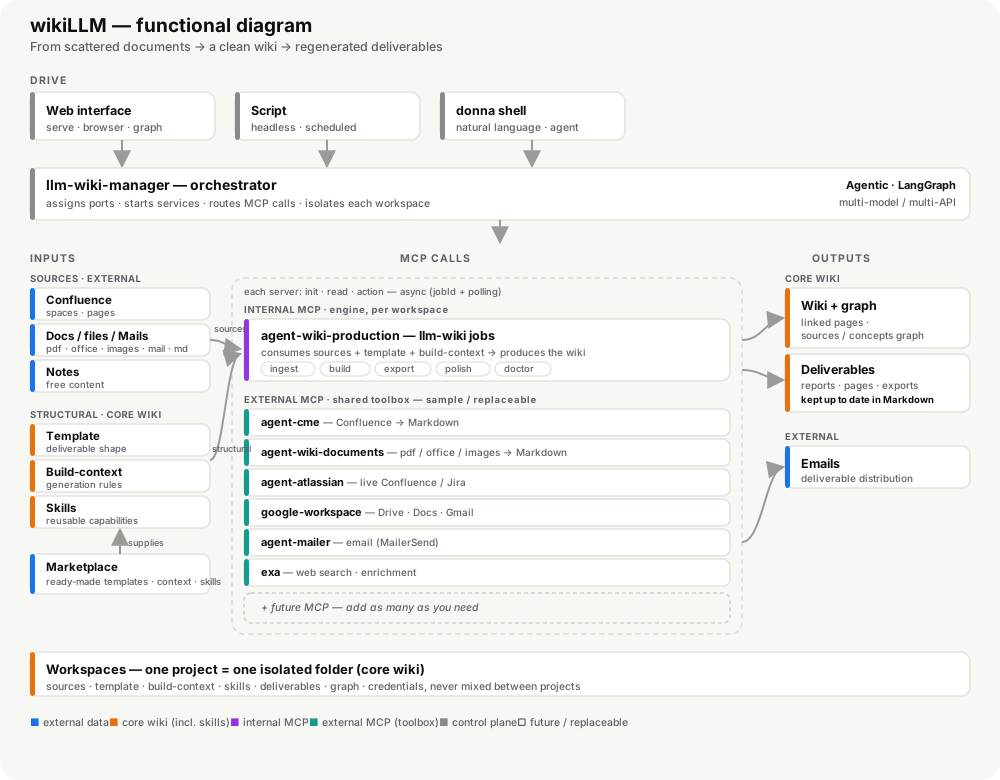
## Functional overview
|
|
28
28
|
|
|
29
|
-
The
|
|
29
|
+
The diagram below shows the whole picture at a glance: how **inputs** (external
|
|
30
|
+
sources plus structural template / build-context / skills from a marketplace)
|
|
31
|
+
flow through the **MCP calls** — split between the *internal* production engine
|
|
32
|
+
and a *replaceable* toolbox of *external* MCP servers — to produce the **core
|
|
33
|
+
wiki** outputs, all driven by an agentic, multi-model orchestrator and grounded
|
|
34
|
+
in isolated workspaces.
|
|
30
35
|
|
|
31
|
-
|
|
36
|
+
|
|
32
37
|
|
|
33
|
-
|
|
34
|
-
mode, with nothing technical to type. It brings together four facets:
|
|
38
|
+
## Quick start — your first wiki in ~5 minutes
|
|
35
39
|
|
|
36
|
-
|
|
37
|
-
|
|
38
|
-
|
|
39
|
-
|
|
40
|
-
- **Chat with an assistant** — an integrated chat that answers about the content,
|
|
41
|
-
but above all an **agent** able to **act**. When a request involves several
|
|
42
|
-
tools (MCP) that depend on each other, it **organizes them into a workflow**:
|
|
43
|
-
it chains the tasks in the right order, waits for one step to finish before
|
|
44
|
-
launching the next, and coordinates everything for you.
|
|
45
|
-
- **Plug in tools** — the interface can call external services (Confluence
|
|
46
|
-
export, sending e-mail…) without you having to deal with them.
|
|
40
|
+
The fastest way in: a **browsable wiki, its dependency graph, and a grounded
|
|
41
|
+
chat** — all on the **shipped example**, with **no external source to
|
|
42
|
+
configure**. External agents (Confluence, mail…) come later, only when you plug
|
|
43
|
+
in real sources.
|
|
47
44
|
|
|
48
|
-
|
|
45
|
+
> **Prerequisites:** Docker running and Node ≥ 22.
|
|
49
46
|
|
|
50
|
-
|
|
51
|
-
|
|
52
|
-
|
|
53
|
-
automated tasks.
|
|
47
|
+
**1 — Install once, pick a home folder.**
|
|
48
|
+
The manager keeps its state (workspaces, `.env`, endpoints) in the directory
|
|
49
|
+
where you launch it, so give it a home:
|
|
54
50
|
|
|
55
|
-
|
|
51
|
+
```bash
|
|
52
|
+
npm i -g @dotdrelle/wiki-manager
|
|
53
|
+
mkdir -p ~/llm-wiki && cd ~/llm-wiki # all manager state lives here
|
|
54
|
+
```
|
|
55
|
+
|
|
56
|
+
**2 — Set the environment.**
|
|
57
|
+
Copy the template and keep the defaults — nothing is mandatory for the local
|
|
58
|
+
demo (tokens/credentials are only needed when you connect real sources, see
|
|
59
|
+
[docs/usage.md](https://raw.githubusercontent.com/dotdrelle/llm-wiki-manager/main/docs/usage.md)). The `mcp.endpoints.json` file is created
|
|
60
|
+
automatically on the first command.
|
|
61
|
+
|
|
62
|
+
```bash
|
|
63
|
+
cp .env.example .env
|
|
64
|
+
```
|
|
65
|
+
|
|
66
|
+
**3 — Start the shared agents.**
|
|
67
|
+
Start the common toolbox once (Confluence export `cme`, `documents`, `mailer`).
|
|
68
|
+
They run in the background and serve every workspace.
|
|
69
|
+
|
|
70
|
+
```bash
|
|
71
|
+
wiki-workspace agents up
|
|
72
|
+
wiki-workspace agents status # ✅ each agent should report healthy
|
|
73
|
+
```
|
|
74
|
+
|
|
75
|
+
**4 — Create the demo workspace.**
|
|
76
|
+
This creates the folder, auto-selects ports, and runs `wiki init` with the
|
|
77
|
+
"basic" scaffold — a working example out of the box.
|
|
78
|
+
|
|
79
|
+
```bash
|
|
80
|
+
wiki-workspace config demo
|
|
81
|
+
```
|
|
82
|
+
|
|
83
|
+
**5 — Start it. Two doors, your choice:**
|
|
84
|
+
|
|
85
|
+
```bash
|
|
86
|
+
# A) just serve — the web interface
|
|
87
|
+
wiki-workspace up demo --open # wiki + graph + built-in chat, in your browser
|
|
88
|
+
|
|
89
|
+
# B) the donna shell — talk in plain language
|
|
90
|
+
wiki-manager # then: /use demo
|
|
91
|
+
```
|
|
92
|
+
|
|
93
|
+
**6 — Check everything is live.**
|
|
94
|
+
Before doing real work, confirm the wiring from the `donna` shell:
|
|
95
|
+
|
|
96
|
+
```text
|
|
97
|
+
/use demo # activate the workspace
|
|
98
|
+
/config status # ✅ LLM configured (apiKey, model, baseUrl)
|
|
99
|
+
/mcp status # ✅ MCP endpoints connected (llm-wiki, production, cme, documents…)
|
|
100
|
+
/mcp tools # the tools each agent exposes
|
|
101
|
+
/services # ✅ serve / mcp-http / production-mcp running
|
|
102
|
+
```
|
|
103
|
+
|
|
104
|
+
Then send a one-line prompt to confirm the **LLM answers**, e.g.
|
|
105
|
+
`say hello in one word`. From the CLI you can re-check anytime with
|
|
106
|
+
`wiki-workspace agents status` and `wiki-workspace list`.
|
|
107
|
+
|
|
108
|
+
> If `/config status` reports missing fields, run `/config edit` to open the
|
|
109
|
+
> workspace **`.wikirc.yaml`**. That's where you set both the **LLM** (`llm.provider`,
|
|
110
|
+
> `llm.model`, `llm.apiKey`, `llm.baseUrl`) — direct chat needs them — and the
|
|
111
|
+
> **vectorization** under `retrieval.vector` (`enabled`, `embeddingModel`, optional
|
|
112
|
+
> separate `baseUrl`/`apiKey`, and reranking) used for retrieval-grounded answers.
|
|
113
|
+
|
|
114
|
+
**7 — Try a few commands & prompts.**
|
|
115
|
+
Plain-language prompts (web chat **or** `donna` shell):
|
|
116
|
+
|
|
117
|
+
```text
|
|
118
|
+
"Summarize wiki/index.md and list the pages it links to."
|
|
119
|
+
"What sources is this page grounded on?"
|
|
120
|
+
"Build the deliverable from the current wiki."
|
|
121
|
+
```
|
|
122
|
+
|
|
123
|
+
Slash primitives (shell):
|
|
124
|
+
|
|
125
|
+
```text
|
|
126
|
+
/wiki # inspect the wiki
|
|
127
|
+
/skills # bundled examples: pipeline, diagnose, status, wiki-sync
|
|
128
|
+
/skills run pipeline # run the shipped end-to-end example
|
|
129
|
+
```
|
|
130
|
+
|
|
131
|
+
**8 — See a concrete result.**
|
|
132
|
+
Open the default page `wiki/index.md` and the **graph view** in the browser,
|
|
133
|
+
then regenerate a deliverable:
|
|
134
|
+
|
|
135
|
+
```bash
|
|
136
|
+
wiki-workspace wiki demo build # or, in the shell: /skills run pipeline
|
|
137
|
+
```
|
|
138
|
+
|
|
139
|
+
That's the whole loop. Next: the four ways to use it and how to configure the
|
|
140
|
+
external agents (CME & co.) live in [docs/usage.md](https://raw.githubusercontent.com/dotdrelle/llm-wiki-manager/main/docs/usage.md); the detailed
|
|
141
|
+
story is in [The journey](#the-journey-from-first-launch-to-first-result); and
|
|
142
|
+
installing from source is in [Initial Setup](#initial-setup).
|
|
56
143
|
|
|
57
|
-
|
|
58
|
-
and the `donna` assistant chains the steps for you. It's the **agentic
|
|
59
|
-
orchestrator**: it understands the request, picks the right tools, and acts. Under
|
|
60
|
-
the hood it relies on its **internal agentic building blocks** (what it can drive
|
|
61
|
-
itself).
|
|
144
|
+
## The 4 ways to use it & agent configuration
|
|
62
145
|
|
|
63
|
-
|
|
146
|
+
The same system has four faces — the **web interface** (explore with the mouse),
|
|
147
|
+
**scripting** (let it run on its own), the **`donna` shell** (talk in plain
|
|
148
|
+
language), and the **shared external agents** (the common toolbox). Each external
|
|
149
|
+
agent (Confluence export with **CME**, document conversion, mail) also needs a
|
|
150
|
+
little setup the first time.
|
|
64
151
|
|
|
65
|
-
|
|
66
|
-
sending e-mails, heavy production jobs. You start them once, and they stay
|
|
67
|
-
available for any workspace.
|
|
152
|
+
Both are covered in **[docs/usage.md](https://raw.githubusercontent.com/dotdrelle/llm-wiki-manager/main/docs/usage.md)**.
|
|
68
153
|
|
|
69
154
|
## The journey: from first launch to first result
|
|
70
155
|
|
package/package.json
CHANGED
package/src/core/mcp.js
CHANGED
|
@@ -205,7 +205,7 @@ async function mcpRequest(endpoint, method, params, signal, options = {}) {
|
|
|
205
205
|
params: {
|
|
206
206
|
protocolVersion: '2025-06-18',
|
|
207
207
|
capabilities: {},
|
|
208
|
-
clientInfo: { name: 'wiki-manager', version: '0.6.
|
|
208
|
+
clientInfo: { name: 'wiki-manager', version: '0.6.27' },
|
|
209
209
|
},
|
|
210
210
|
}),
|
|
211
211
|
});
|
package/src/shell/repl.js
CHANGED
|
@@ -107,7 +107,7 @@ export function createSession() {
|
|
|
107
107
|
language: null,
|
|
108
108
|
mcp: null,
|
|
109
109
|
commands: ['help', 'version', 'exit', 'workspaces', 'new', 'use', 'config', 'status', 'services', 'start', 'stop', 'logs', 'mcp', 'wiki', 'skills', 'upload', 'uploads', 'clear', 'chat', 'agent', 'openui', 'queue'],
|
|
110
|
-
chatMode:
|
|
110
|
+
chatMode: true,
|
|
111
111
|
llm: null,
|
|
112
112
|
activities: {},
|
|
113
113
|
jobQueue: [],
|
package/src/shell/useSession.ts
CHANGED
|
@@ -36,8 +36,8 @@ export function useSession(props: { agent: unknown; packageJson: Record<string,
|
|
|
36
36
|
const [version, setVersion] = createSignal(0);
|
|
37
37
|
const [logs, setLogs] = createSignal<string[]>([]);
|
|
38
38
|
const [input, setInput] = createSignal('');
|
|
39
|
-
const [chatMode, setChatMode] = createSignal(
|
|
40
|
-
(session as any).chatMode =
|
|
39
|
+
const [chatMode, setChatMode] = createSignal(true);
|
|
40
|
+
(session as any).chatMode = true;
|
|
41
41
|
const [dismissedSlashInput, setDismissedSlashInput] = createSignal<string | null>(null);
|
|
42
42
|
const [history, setHistory] = createSignal<string[]>([]);
|
|
43
43
|
const [historyIndex, setHistoryIndex] = createSignal<number | null>(null);
|