@dotdrelle/wiki-manager 0.15.50 → 0.15.52
This diff represents the content of publicly available package versions that have been released to one of the supported registries. The information contained in this diff is provided for informational purposes only and reflects changes between package versions as they appear in their respective public registries.
- package/README.md +20 -992
- package/package.json +10 -2
- package/src/core/buildInfo.json +2 -2
- package/src/core/mcp.js +1 -1
package/README.md
CHANGED
|
@@ -8,9 +8,11 @@ endpoints, and provides the `donna` shell: an agent-first terminal UI that can
|
|
|
8
8
|
inspect workspaces, run safe manager commands, call MCP tools, guide production
|
|
9
9
|
jobs, and run one-shot headless tasks.
|
|
10
10
|
|
|
11
|
-
|
|
12
|
-
the
|
|
13
|
-
|
|
11
|
+
The `llm-wiki`, `llm-wiki-manager` and agent images are released together under
|
|
12
|
+
one coordinated version — the one npm shows above, and the one every image tag
|
|
13
|
+
must match. Rebuild the `llm-wiki` image when deploying a new release through
|
|
14
|
+
Docker: the manager and its runtime run from source and only need a restart, the
|
|
15
|
+
containers do not.
|
|
14
16
|
|
|
15
17
|
The manager does not implement the wiki engine or the external agents. It
|
|
16
18
|
**orchestrates** them — generically. Since 0.12.0 the Donna core is
|
|
@@ -116,7 +118,7 @@ and a *replaceable* toolbox of *external* MCP servers — to produce the **core
|
|
|
116
118
|
wiki** outputs, all driven by an agentic, multi-model orchestrator and grounded
|
|
117
119
|
in isolated workspaces.
|
|
118
120
|
|
|
119
|
-

|
|
120
122
|
|
|
121
123
|
## Quick start — your first wiki in ~5 minutes
|
|
122
124
|
|
|
@@ -142,7 +144,7 @@ mkdir -p ~/llm-wiki && cd ~/llm-wiki # all manager state lives here
|
|
|
142
144
|
**2 — Set the environment.**
|
|
143
145
|
Copy the template and keep the defaults — nothing is mandatory for the local
|
|
144
146
|
demo (tokens/credentials are only needed when you connect real sources, see
|
|
145
|
-
[docs/usage.md](
|
|
147
|
+
[docs/usage.md](docs/usage.md)). The `mcp.endpoints.json` file is created
|
|
146
148
|
automatically on the first command.
|
|
147
149
|
|
|
148
150
|
```bash
|
|
@@ -223,7 +225,7 @@ wiki-workspace wiki demo build # or, in the shell: /skills run pipeli
|
|
|
223
225
|
```
|
|
224
226
|
|
|
225
227
|
That's the whole loop. Next: the four ways to use it and how to configure the
|
|
226
|
-
external agents (CME & co.) live in [docs/usage.md](
|
|
228
|
+
external agents (CME & co.) live in [docs/usage.md](docs/usage.md); the detailed
|
|
227
229
|
story is in [The journey](#the-journey-from-first-launch-to-first-result); and
|
|
228
230
|
installing from source is in [Installing from source](#installing-from-source).
|
|
229
231
|
|
|
@@ -389,992 +391,18 @@ of you in the browser (create → configure → start the agents → open).
|
|
|
389
391
|
|
|
390
392
|
---
|
|
391
393
|
|
|
392
|
-
|
|
394
|
+
## Documentation
|
|
393
395
|
|
|
394
|
-
|
|
396
|
+
The deep reference lives on git, not on this page: an npm landing page should
|
|
397
|
+
answer "what is this and how do I start it", and stop there.
|
|
395
398
|
|
|
396
|
-
|
|
|
399
|
+
| Document | What it answers |
|
|
397
400
|
| --- | --- |
|
|
398
|
-
| [`
|
|
399
|
-
| [`
|
|
400
|
-
| [`
|
|
401
|
-
| [`
|
|
402
|
-
| [`
|
|
403
|
-
|
|
404
|
-
|
|
405
|
-
|
|
406
|
-
Each managed workspace is a normal `llm-wiki` workspace plus manager metadata:
|
|
407
|
-
|
|
408
|
-
```text
|
|
409
|
-
workspaces/<name>/
|
|
410
|
-
.env # ports, tokens, workspace path
|
|
411
|
-
.wikirc.yaml # LLM/vector config for this workspace
|
|
412
|
-
raw/
|
|
413
|
-
wiki/
|
|
414
|
-
templates/
|
|
415
|
-
build-context/
|
|
416
|
-
deliverables/
|
|
417
|
-
.wiki/
|
|
418
|
-
```
|
|
419
|
-
|
|
420
|
-
The `.env` file is manager-owned. The `.wikirc.yaml` file is workspace-owned and
|
|
421
|
-
stores provider/model/baseUrl/apiKey/retrieval settings.
|
|
422
|
-
|
|
423
|
-
Confluence exports land directly in:
|
|
424
|
-
|
|
425
|
-
```text
|
|
426
|
-
raw/untracked/
|
|
427
|
-
```
|
|
428
|
-
|
|
429
|
-
The normal production pipeline starts at ingest:
|
|
430
|
-
|
|
431
|
-
```text
|
|
432
|
-
ingest -> build -> export -> polish
|
|
433
|
-
```
|
|
434
|
-
|
|
435
|
-
The legacy copy step is only for deployments that explicitly configure external
|
|
436
|
-
import mappings.
|
|
437
|
-
|
|
438
|
-
## Configuration overview
|
|
439
|
-
|
|
440
|
-
wikiLLM is configured by **four files** held together by two families of keys:
|
|
441
|
-
**MCP keys** (Bearer tokens that authenticate *who connects to whom*) and **LLM
|
|
442
|
-
keys** (`apiKey` + `baseUrl` that *reach a model*).
|
|
443
|
-
|
|
444
|
-
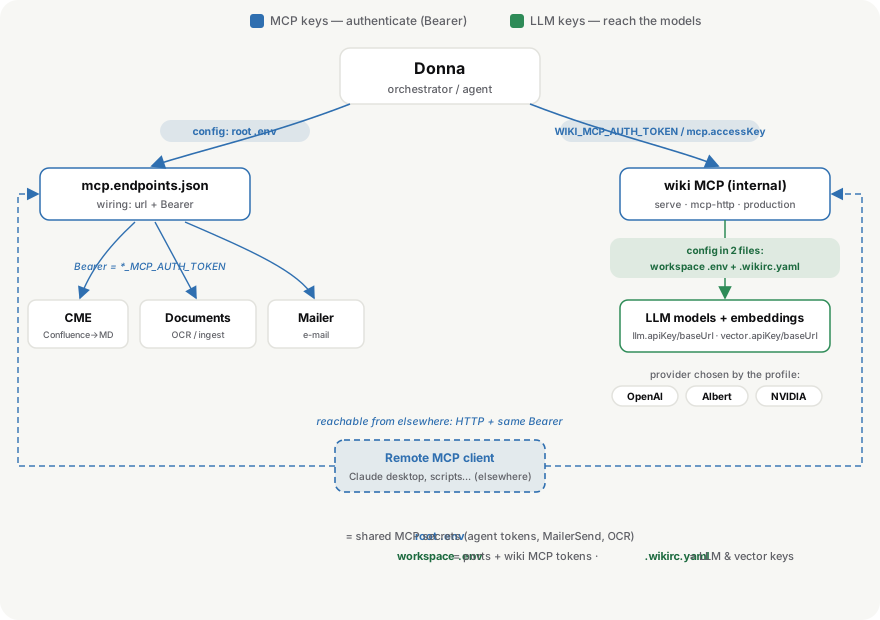
|
|
445
|
-
|
|
446
|
-
| File | Owner | Scope | Holds |
|
|
447
|
-
| --- | --- | --- | --- |
|
|
448
|
-
| `.env` | manager | global | shared secrets: agent MCP tokens, OCR LLM, port overrides, variables for any user-declared external MCP |
|
|
449
|
-
| `mcp.endpoints.json` | manager | global | where each external agent lives + which `Bearer`/header to send |
|
|
450
|
-
| `workspaces/<name>/.env` | manager | per workspace | ports, workspace path, the wiki's own MCP tokens |
|
|
451
|
-
| `workspaces/<name>/.wikirc.yaml` (+ `.wikirc.yaml.<profile>`) | workspace | per workspace | LLM & vector keys (provider/model/apiKey/baseUrl/retrieval) |
|
|
452
|
-
|
|
453
|
-
Donna reaches the external agents and the internal wiki MCP through Bearer
|
|
454
|
-
tokens; the wiki then uses its `.wikirc.yaml` LLM keys to call models and
|
|
455
|
-
embeddings. Because every MCP server is an HTTP endpoint, remote MCP clients can
|
|
456
|
-
connect to the same surfaces with the same tokens. **MCP keys** are set in the
|
|
457
|
-
root `.env`; the wiki's **LLM keys** live in each workspace `.wikirc.yaml`.
|
|
458
|
-
|
|
459
|
-
See the full, field-by-field reference in
|
|
460
|
-
**[docs/configuration.md](https://raw.githubusercontent.com/dotdrelle/llm-wiki-manager/main/docs/configuration.md)**.
|
|
461
|
-
|
|
462
|
-
## Installing from source
|
|
463
|
-
|
|
464
|
-
```bash
|
|
465
|
-
corepack enable
|
|
466
|
-
pnpm install
|
|
467
|
-
```
|
|
468
|
-
|
|
469
|
-
Whether installed locally, globally, or from source, `wiki-manager` keeps its
|
|
470
|
-
state outside the package, in the directory where the command is launched:
|
|
471
|
-
|
|
472
|
-
```text
|
|
473
|
-
./workspaces/ # workspace registry
|
|
474
|
-
./.env # local configuration (gitignored; copy from .env.example)
|
|
475
|
-
./mcp.endpoints.json # external MCP endpoints (gitignored; copy from .env.example)
|
|
476
|
-
```
|
|
477
|
-
|
|
478
|
-
`WIKI_WORKSPACES_DIR` is available as an explicit override for the workspaces
|
|
479
|
-
directory, but not required for normal usage.
|
|
480
|
-
|
|
481
|
-
`WIKI_MANAGER_ENDPOINTS_FILE` can override the default
|
|
482
|
-
`./mcp.endpoints.json`. Compose templates remain in the installed package, while
|
|
483
|
-
relative volumes and runtime state are resolved from the directory where
|
|
484
|
-
`wiki-workspace` is launched.
|
|
485
|
-
|
|
486
|
-
### Local `.env`
|
|
487
|
-
|
|
488
|
-
Copy `.env.example` to `.env` and fill in your values:
|
|
489
|
-
|
|
490
|
-
```bash
|
|
491
|
-
cp .env.example .env
|
|
492
|
-
```
|
|
493
|
-
|
|
494
|
-
The `.env` file is loaded automatically by both `wiki-manager` (Node/Bun process)
|
|
495
|
-
and `wiki-workspace` (Docker Compose). It sets `WORKSPACES_ROOT`, per-agent auth
|
|
496
|
-
tokens, optional port overrides, and credentials for enabled connectors.
|
|
497
|
-
|
|
498
|
-
### External MCP endpoints
|
|
499
|
-
|
|
500
|
-
`mcp.endpoints.json` declares external agents for the shell, TUI, headless, and
|
|
501
|
-
the served chat UI. Values support `${VAR}` interpolation resolved from the
|
|
502
|
-
process environment (including the `.env` loaded at startup):
|
|
503
|
-
|
|
504
|
-
```json
|
|
505
|
-
{
|
|
506
|
-
"mcpServers": {
|
|
507
|
-
"cme": {
|
|
508
|
-
"url": "http://host.docker.internal:${CME_MCP_PORT:-3336}/mcp/",
|
|
509
|
-
"headers": { "Authorization": "Bearer ${CME_MCP_AUTH_TOKEN}" },
|
|
510
|
-
"requireApproval": ["cme_export_run"],
|
|
511
|
-
"retry": { "maxAttempts": 2, "backoffMs": 500 },
|
|
512
|
-
"toolRetries": {
|
|
513
|
-
"cme_export_run": { "maxAttempts": 3, "backoffMs": 1000 }
|
|
514
|
-
}
|
|
515
|
-
},
|
|
516
|
-
"documents": {
|
|
517
|
-
"url": "http://host.docker.internal:${DOCUMENTS_MCP_PORT:-3337}/mcp/",
|
|
518
|
-
"headers": { "Authorization": "Bearer ${DOCUMENTS_MCP_AUTH_TOKEN}" }
|
|
519
|
-
}
|
|
520
|
-
}
|
|
521
|
-
}
|
|
522
|
-
```
|
|
523
|
-
|
|
524
|
-
Copy `mcp.endpoints.example.json` to `mcp.endpoints.json` and set the matching
|
|
525
|
-
token variables in `.env`.
|
|
526
|
-
|
|
527
|
-
### `chatAccess`: which tools chat may use
|
|
528
|
-
|
|
529
|
-
Declaring a server above makes its tools available to **`/agent`** — no further
|
|
530
|
-
declaration, ever. Plug in a new MCP and Donna discovers and uses its tools
|
|
531
|
-
immediately.
|
|
532
|
-
|
|
533
|
-
The optional `chatAccess` block is the authorization layer for **`/chat`**,
|
|
534
|
-
which is closed by default. It decides which tools chat may use, and nothing
|
|
535
|
-
else:
|
|
536
|
-
|
|
537
|
-
```json
|
|
538
|
-
"chatAccess": {
|
|
539
|
-
"maxToolIterations": 8,
|
|
540
|
-
"servers": {
|
|
541
|
-
"cme": { "allow": ["cme_status", "cme_sources_list", "cme_export_status"] },
|
|
542
|
-
"exa": { "allow": ["*"] }
|
|
543
|
-
}
|
|
544
|
-
}
|
|
545
|
-
```
|
|
546
|
-
|
|
547
|
-
| entry | effect in `/chat` |
|
|
548
|
-
| --- | --- |
|
|
549
|
-
| server absent | none of its tools — agent-only |
|
|
550
|
-
| `"allow": ["*"]` | every tool the server exposes |
|
|
551
|
-
| `"allow": [names]` | exactly those tools |
|
|
552
|
-
|
|
553
|
-
Every server uses this one shape. The list is authoritative: naming a tool is
|
|
554
|
-
the decision, whatever the tool is called. No name heuristic filters it — a
|
|
555
|
-
tool name is not a contract, and a third-party MCP is free to name its tools
|
|
556
|
-
however it likes.
|
|
557
|
-
|
|
558
|
-
`/chat` carries no plan: it performs direct unitary actions only. The
|
|
559
|
-
orchestration entry points (`agent_plan`, `agent_execute`,
|
|
560
|
-
`production_start_job`, and plan mutation) are therefore never offered to it,
|
|
561
|
-
including under `"*"`. Multi-step work belongs to `/agent`.
|
|
562
|
-
|
|
563
|
-
An `allowActions` key written by an older manager is folded into `allow` on
|
|
564
|
-
read and removed on the next `agents up`.
|
|
565
|
-
|
|
566
|
-
`chatAccess` is not how workspace context reaches chat. The workspace profile
|
|
567
|
-
(`.wiki/profile.md`) is read from disk and injected into the system prompt of
|
|
568
|
-
both modes, so durable preferences — tone, formatting, notification recipient —
|
|
569
|
-
shape every reply without a tool call and without an allow-list entry. Adding
|
|
570
|
-
`profile_read` here would help no existing install anyway: the scaffold's
|
|
571
|
-
additive merge only fills missing top-level keys and never edits an allow-list
|
|
572
|
-
you already have.
|
|
573
|
-
|
|
574
|
-
### Adding a connector from the served chat UI
|
|
575
|
-
|
|
576
|
-
`mcp.endpoints.json` stays hand-editable, but the Connectors panel of
|
|
577
|
-
`llm-wiki serve` can now write it. Connecting a card there upserts the endpoint
|
|
578
|
-
through the runtime (`POST /mcp/endpoints`), and the runtime immediately
|
|
579
|
-
re-reads the file and rediscovers tools and agents — no restart, and the new
|
|
580
|
-
tools are usable in the same breath by `/chat`, `/agent` and any subsequent
|
|
581
|
-
plan.
|
|
582
|
-
|
|
583
|
-
Because a server absent from `chatAccess` gets **zero** tools in `/chat`, the
|
|
584
|
-
upsert writes `"allow": "*"` for it. That is the deliberate difference between
|
|
585
|
-
a connector declared by hand — where you choose the tool list — and one added
|
|
586
|
-
from the UI, where the person adding it is the person who will use it. Narrow
|
|
587
|
-
it afterwards by editing the file.
|
|
588
|
-
|
|
589
|
-
Three origins are distinguished, and the UI labels each card:
|
|
590
|
-
|
|
591
|
-
| origin | shown as | who owns it |
|
|
592
|
-
| --- | --- | --- |
|
|
593
|
-
| `wiki`, `production`, `llm-wiki`, `wiki-production` | `internal` | the workspace stack. Fields read-only, no delete — the runtime rejects any change to these names |
|
|
594
|
-
| declared in `mcp.endpoints.json` by hand or by `agents up` | `global config` | the operator. CME, Documents, Mailer, Connectors, Exa… |
|
|
595
|
-
| added from the UI | `added here` | carries `"managedBy": "serve-ui"` in the file |
|
|
596
|
-
|
|
597
|
-
Removing a `global config` connector is a workspace-wide act — it leaves every
|
|
598
|
-
chat, agent and future plan — so the UI says so before confirming. The
|
|
599
|
-
container and its data are untouched; only the wiring is removed. The name is
|
|
600
|
-
also pushed into `disabledMcpServers`, which the scaffold honours, so a
|
|
601
|
-
connector you removed on purpose is not silently restored by the next
|
|
602
|
-
`agents up` merging the packaged example back in.
|
|
603
|
-
|
|
604
|
-
Renaming is atomic: the UI sends `previousName`, and the endpoint, its
|
|
605
|
-
`Authorization` header and its `chatAccess` entry move together under the new
|
|
606
|
-
key. A rename onto an existing name, or from a name that is not there, is
|
|
607
|
-
rejected rather than half-applied.
|
|
608
|
-
|
|
609
|
-
`POST /mcp/endpoints` returns **409 while a plan is running** — connector
|
|
610
|
-
wiring must not change under a run that already resolved its agents. The chat
|
|
611
|
-
UI treats that as what it is: the MCP handshake succeeded, so the card stays
|
|
612
|
-
connected and usable in this browser, badged `local only` with
|
|
613
|
-
"runtime synchronization pending", and the write is retried on the next
|
|
614
|
-
reconnect. A busy runtime never presents itself as a broken connector.
|
|
615
|
-
|
|
616
|
-
MCP `tools/call` requests retry transient HTTP/MCP failures before the run fails.
|
|
617
|
-
They also share a per-endpoint outbound control budget (45 RPM by default,
|
|
618
|
-
configurable with `WIKI_MANAGER_MCP_REQUESTS_PER_MINUTE`). This budget is
|
|
619
|
-
independent from `.wikirc` `requestsPerMinute`, which remains reserved for LLM,
|
|
620
|
-
embedding, and reranking provider calls.
|
|
621
|
-
Set global defaults with `WIKI_MANAGER_MCP_RETRY_MAX_ATTEMPTS` and
|
|
622
|
-
`WIKI_MANAGER_MCP_RETRY_BACKOFF_MS`, or override them per endpoint with `retry`
|
|
623
|
-
and per tool with `toolRetries`.
|
|
624
|
-
|
|
625
|
-
After a clean runtime run, the manager runs a lightweight evaluator pass against
|
|
626
|
-
the original task, final plan, recent activities, and recent conversation. The
|
|
627
|
-
verdict is emitted as `run_evaluated` and appears in runtime state as
|
|
628
|
-
`evaluation`. Disable it globally with `WIKI_MANAGER_EVALUATOR=0`, or per run by
|
|
629
|
-
posting `/run` with `"evaluate": false`.
|
|
630
|
-
|
|
631
|
-
When evaluation fails, or when a watched activity ends in error, the runtime can
|
|
632
|
-
ask the LLM for a partial recovery plan and continue only the remaining steps.
|
|
633
|
-
Each recovery is emitted as `run_replanned` and appears in runtime state as
|
|
634
|
-
`replans`. Limit attempts with `WIKI_MANAGER_REPLANNER_MAX_REPLANS` or per run
|
|
635
|
-
with `"replans": 1` in the `/run` body.
|
|
636
|
-
|
|
637
|
-
Runtime approvals are bounded to a run, plan revision and approval class.
|
|
638
|
-
Mutating orchestrated tasks **wait for approval by default**, including tasks
|
|
639
|
-
created by a skill or a directly selected capability such as ingest or
|
|
640
|
-
pipeline. Approve them by running `/approve`, or clicking Approve in either UI:
|
|
641
|
-
the Shell right-pane banner, or the `serve` banner.
|
|
642
|
-
|
|
643
|
-
In `serve` that banner is a **fixed overlay, visible in every centre view**. It
|
|
644
|
-
used to sit inside the composer, which the layout hides in the wiki, connectors
|
|
645
|
-
and execution views — so a restore launched from `/history` waited on an
|
|
646
|
-
approval nobody could see, and the Execution view, the one meant for monitoring,
|
|
647
|
-
could not show it either. The Shell never had that gap because its plan pane is
|
|
648
|
-
always on screen. `POST /approve` also accepts an explicit run scope.
|
|
649
|
-
|
|
650
|
-
An explicitly launched skill is also approval-gated. For an orchestrated skill,
|
|
651
|
-
the scheduler blocks each uncovered mutating task; for a `direct` skill, the
|
|
652
|
-
run-level gate blocks its first direct mutation. Declaring `execution: direct`
|
|
653
|
-
changes routing and available tools—it does not grant automatic approval.
|
|
654
|
-
|
|
655
|
-
External direct MCP tools may additionally declare a per-tool `requireApproval`
|
|
656
|
-
policy. Their pending entries can be approved with
|
|
657
|
-
`POST /approve?itemId=...` or `/approve item <id>`. The timeout defaults to ten
|
|
658
|
-
minutes and can be changed with `WIKI_MANAGER_APPROVAL_TIMEOUT_MS` or
|
|
659
|
-
`approvalTimeoutMs` in the `/run` body. Auto-approval is never inferred from a
|
|
660
|
-
skill or an interactive UI: it requires the caller to pass
|
|
661
|
-
`autoApprove: true`, intended for headless/CI (`--auto-approve`).
|
|
662
|
-
|
|
663
|
-
### Parallelism & throughput
|
|
664
|
-
|
|
665
|
-
The number of tasks that run at once is `MIN(agent recommendedConcurrency, agent
|
|
666
|
-
maxConcurrency, WIKI_MANAGER_CAPABILITY_CONCURRENCY, per-task limits)` — a
|
|
667
|
-
minimum, so the manager ceiling can only lower it. The production agent ships
|
|
668
|
-
intermediate defaults (`PRODUCTION_RECOMMENDED_CONCURRENCY=4` /
|
|
669
|
-
`PRODUCTION_MAX_CONCURRENCY=8`, ≈ 4 parallel); locks then cap real parallelism
|
|
670
|
-
per phase (`ingest_apply` stays serial). The resolved value is shown in both
|
|
671
|
-
UIs' run summary and on the run node of the execution graph, with an amber
|
|
672
|
-
"(ceiling)" marker when the manager ceiling binds. Low/high profiles, the lock
|
|
673
|
-
model and the LLM-backend caveat are in
|
|
674
|
-
[docs/configuration.md § "Parallelism & throughput"](docs/configuration.md).
|
|
675
|
-
|
|
676
|
-
While a run is active, `GET`/`POST /control` still answers without waiting for
|
|
677
|
-
it to finish: `{"action":"status"}` returns the current run/plan/queue state,
|
|
678
|
-
`{"action":"explain"}` adds a one-line plain-language summary, and
|
|
679
|
-
`{"action":"enqueue","input":"..."}` accepts a new request without touching the
|
|
680
|
-
active plan. A queued request starts automatically as soon as the workspace
|
|
681
|
-
goes idle — either because the enqueue call itself found the workspace free,
|
|
682
|
-
or because the run in progress finished and drained the next queued item.
|
|
683
|
-
|
|
684
|
-
`GET /config/profiles` lists the `.wikirc` profiles for a workspace and
|
|
685
|
-
`POST /config/use {"profile":"..."}` switches the active one — the same
|
|
686
|
-
switch as the shell's `/config use`, rejected with 409 while a run is active.
|
|
687
|
-
The manager is the source of truth for which profile is active; `llm-wiki
|
|
688
|
-
serve`'s config-profile picker mirrors whatever the manager reports rather
|
|
689
|
-
than tracking its own state.
|
|
690
|
-
|
|
691
|
-
### Starting external agents
|
|
692
|
-
|
|
693
|
-
Start CME and documents once for all workspaces:
|
|
694
|
-
|
|
695
|
-
```bash
|
|
696
|
-
wiki-workspace agents up
|
|
697
|
-
```
|
|
698
|
-
|
|
699
|
-
This uses the packaged `agents.docker-compose.yml` (it lives inside the npm
|
|
700
|
-
package — never edit it, updates overwrite it). On first run, `agents up`
|
|
701
|
-
generates the missing agent auth tokens into your manager `.env` and seeds
|
|
702
|
-
`mcp.endpoints.json` from the packaged example. `WORKSPACES_ROOT` is resolved
|
|
703
|
-
automatically from the manager workspaces directory. Agent state is stored under
|
|
704
|
-
`./.agents-data/` unless `AGENTS_DATA_DIR` is set.
|
|
705
|
-
|
|
706
|
-
An `npm -g update @dotdrelle/wiki-manager` replaces the packaged Compose files
|
|
707
|
-
but preserves the operator-owned `.env`, `mcp.endpoints.json`, workspaces, agent
|
|
708
|
-
data, and runtime database. Missing standard endpoint definitions are migrated
|
|
709
|
-
additively; existing endpoint definitions are never overwritten.
|
|
710
|
-
|
|
711
|
-
The Gmail connector agent is packaged but opt-in. Enable it in the manager
|
|
712
|
-
`.env`:
|
|
713
|
-
|
|
714
|
-
```dotenv
|
|
715
|
-
CONNECTORS_ENABLED=true
|
|
716
|
-
# Optional locally; generated from CONNECTORS_MCP_PORT when empty:
|
|
717
|
-
GOOGLE_OAUTH_CALLBACK_URL=
|
|
718
|
-
```
|
|
719
|
-
|
|
720
|
-
For a local installation, `wiki-workspace agents up` fills an empty callback
|
|
721
|
-
with:
|
|
722
|
-
|
|
723
|
-
```text
|
|
724
|
-
http://127.0.0.1:<CONNECTORS_MCP_PORT>/oauth/google/callback
|
|
725
|
-
```
|
|
726
|
-
|
|
727
|
-
With the default port, register this exact redirect URI in Google Cloud
|
|
728
|
-
Console:
|
|
729
|
-
|
|
730
|
-
```text
|
|
731
|
-
http://127.0.0.1:3338/oauth/google/callback
|
|
732
|
-
```
|
|
733
|
-
|
|
734
|
-
The browser resolves `127.0.0.1`; Docker forwards the published host port to
|
|
735
|
-
the connectors container. For a remote deployment, set an explicit public
|
|
736
|
-
HTTPS callback instead. In both cases the configured URL must match the Google
|
|
737
|
-
Cloud redirect URI exactly.
|
|
738
|
-
|
|
739
|
-
The local flow uses the public wikiLLM Desktop OAuth Client ID with PKCE and
|
|
740
|
-
does not require a Client Secret. Normal users set neither Google credential.
|
|
741
|
-
`GOOGLE_OAUTH_CLIENT_ID` remains an advanced override for private/internal
|
|
742
|
-
Google projects, and `GOOGLE_OAUTH_CLIENT_SECRET` is an optional compatibility
|
|
743
|
-
override for administrators using a confidential web client.
|
|
744
|
-
|
|
745
|
-
`agents up` also generates the connectors MCP token plus distinct OAuth
|
|
746
|
-
start/state secrets when missing. It adds a regular, standard MCP `connectors`
|
|
747
|
-
entry to `mcp.endpoints.json`. Setting `CONNECTORS_ENABLED=false` and running
|
|
748
|
-
`agents up` removes that entry again, so disabled services are not probed. No
|
|
749
|
-
non-standard `enabled` property is written to MCP configuration files.
|
|
750
|
-
The matching `chatAccess.connectors` policy is managed at the same time, in the
|
|
751
|
-
same shape as every other server — a single `allow` list holding
|
|
752
|
-
`connectors_google_status` and `connectors_google_oauth_start`, so chat can
|
|
753
|
-
report the authorization state and start it. See
|
|
754
|
-
[`chatAccess`](#chataccess-which-tools-chat-may-use).
|
|
755
|
-
|
|
756
|
-
Connector authorization is also available without asking the LLM. These two
|
|
757
|
-
commands work in both the Shell UI and the `llm-wiki serve` chat:
|
|
758
|
-
|
|
759
|
-
```text
|
|
760
|
-
/connector list
|
|
761
|
-
/connector auth google
|
|
762
|
-
```
|
|
763
|
-
|
|
764
|
-
The first reports the Gmail read-only authorization state for the active
|
|
765
|
-
workspace. The second opens Google's OAuth page in the browser. Asking Donna
|
|
766
|
-
to configure or check Google remains supported through the direct connector
|
|
767
|
-
tools above.
|
|
768
|
-
|
|
769
|
-
The Compose profile is an internal implementation detail. Do not set
|
|
770
|
-
`COMPOSE_PROFILES` and do not add provider names such as Gmail or Slack to it:
|
|
771
|
-
one `agent-connectors` service hosts all connector providers.
|
|
772
|
-
|
|
773
|
-
For a public serve deployment, authorization can be started through the
|
|
774
|
-
same-origin proxy:
|
|
775
|
-
|
|
776
|
-
```bash
|
|
777
|
-
curl -X POST https://wiki.example.com/api/connectors/google/oauth/start \
|
|
778
|
-
-H 'Origin: https://wiki.example.com' \
|
|
779
|
-
-H 'X-LLM-WIKI-OAUTH: 1' \
|
|
780
|
-
-H 'Content-Type: application/json' \
|
|
781
|
-
-d '{"instanceId":"google-1"}'
|
|
782
|
-
```
|
|
783
|
-
|
|
784
|
-
Open the returned `authorizationUrl`. The workspace is injected by serve and
|
|
785
|
-
cannot be selected by the browser request.
|
|
786
|
-
|
|
787
|
-
Donna discovers the agent contract automatically from the `connectors` MCP
|
|
788
|
-
endpoint. With only one provider, no routing entry is required. To pin it
|
|
789
|
-
explicitly in a workspace profile:
|
|
790
|
-
|
|
791
|
-
```yaml
|
|
792
|
-
capabilityRouting:
|
|
793
|
-
external-source.collect:
|
|
794
|
-
preferredAgents: [connectors]
|
|
795
|
-
allowedAgents: [connectors]
|
|
796
|
-
```
|
|
797
|
-
|
|
798
|
-
The production agent also advertises `workspace.restore` for Git-backed
|
|
799
|
-
rollback. It is workspace-scoped and remains subject to the normal runtime
|
|
800
|
-
approval and lock checks; it can be pinned in the same way when several agents
|
|
801
|
-
provide that capability.
|
|
802
|
-
|
|
803
|
-
#### Compose overrides — optional agents, proxies, local fixes
|
|
804
|
-
|
|
805
|
-
Two override files sit under **`.wiki/compose/`**, one per stack:
|
|
806
|
-
|
|
807
|
-
| File | Applies to |
|
|
808
|
-
| --- | --- |
|
|
809
|
-
| `.wiki/compose/docker-compose.override.yml` | workspace stack (`serve`, `mcp-http`, `production-mcp`, `wiki`) |
|
|
810
|
-
| `.wiki/compose/agents.docker-compose.override.yml` | agents stack (`cme`, `documents`, `connectors`) |
|
|
811
|
-
|
|
812
|
-
Both are created for you on first use, from packaged templates full of
|
|
813
|
-
ready-to-uncomment examples, and are **never rewritten afterwards** — your edits
|
|
814
|
-
survive package updates. Existing root-level files are migrated automatically.
|
|
815
|
-
Do not confuse them with `.wiki/runtime/*.compose.yml`,
|
|
816
|
-
which the manager regenerates on every Compose command; editing those is always
|
|
817
|
-
lost.
|
|
818
|
-
|
|
819
|
-
Compose merge is standard: new services are added, same-name keys override the
|
|
820
|
-
defaults, `environment` merges per variable name. Only extend services the
|
|
821
|
-
packaged file declares — an invented service name becomes a phantom service
|
|
822
|
-
Compose keeps trying to start.
|
|
823
|
-
|
|
824
|
-
The most common use behind a VPN is proxy passthrough: containers do not inherit
|
|
825
|
-
the host environment, and only `connectors` ships proxy variables by default. See
|
|
826
|
-
[`docs/configuration.md`](docs/configuration.md) § "Compose overrides" for a
|
|
827
|
-
copy-paste block and the `host.docker.internal` / `NO_PROXY` pitfalls.
|
|
828
|
-
|
|
829
|
-
The second use is running an external connector alongside the packaged agents.
|
|
830
|
-
Complete the setup by
|
|
831
|
-
adding the connector's variables to your `.env` and its endpoint block to
|
|
832
|
-
your `mcp.endpoints.json` — every variable an external MCP endpoint needs
|
|
833
|
-
lives in the `.env` and is referenced as `${VAR_NAME}` from
|
|
834
|
-
`mcp.endpoints.json`. A connector running outside the manager Compose stack
|
|
835
|
-
only needs an entry in `mcp.endpoints.json`.
|
|
836
|
-
|
|
837
|
-
Workspace-native MCP servers (`llm-wiki`, `production`) stay configured through
|
|
838
|
-
each workspace `.env`. External agents are workspace-agnostic: the active
|
|
839
|
-
`/use <workspace>` is injected automatically on every CME and documents tool
|
|
840
|
-
call — no need to pass `workspace` explicitly.
|
|
841
|
-
|
|
842
|
-
CME data is isolated per workspace:
|
|
843
|
-
|
|
844
|
-
```text
|
|
845
|
-
.agents-data/cme/<workspace>/cme/app_data.json # Confluence credentials
|
|
846
|
-
.agents-data/cme/<workspace>/sources-manifest.yaml # export sources
|
|
847
|
-
workspaces/<workspace>/raw/untracked/ # exported Markdown
|
|
848
|
-
```
|
|
849
|
-
|
|
850
|
-
Create a workspace:
|
|
851
|
-
|
|
852
|
-
```bash
|
|
853
|
-
wiki-workspace config my-project [path]
|
|
854
|
-
```
|
|
855
|
-
|
|
856
|
-
Start it:
|
|
857
|
-
|
|
858
|
-
```bash
|
|
859
|
-
wiki-workspace up my-project
|
|
860
|
-
```
|
|
861
|
-
|
|
862
|
-
Run wiki commands:
|
|
863
|
-
|
|
864
|
-
```bash
|
|
865
|
-
wiki-workspace wiki my-project doctor
|
|
866
|
-
wiki-workspace wiki my-project ingest
|
|
867
|
-
wiki-workspace wiki my-project build --plan
|
|
868
|
-
wiki-workspace wiki my-project build
|
|
869
|
-
```
|
|
870
|
-
|
|
871
|
-
### Resetting a workspace
|
|
872
|
-
|
|
873
|
-
```bash
|
|
874
|
-
wiki-workspace wiki my-project down # the services must be stopped
|
|
875
|
-
wiki-workspace wiki my-project reset --dry-run # what would go, what stays
|
|
876
|
-
wiki-workspace wiki my-project reset
|
|
877
|
-
```
|
|
878
|
-
|
|
879
|
-
`reset` empties a workspace while keeping the **method**: `.wikirc*` (provider,
|
|
880
|
-
model, retrieval, per-profile variants), `templates/` and `build-context/` —
|
|
881
|
-
plus `.env`, which holds the workspace's ports and MCP tokens and without which
|
|
882
|
-
nothing could be restarted.
|
|
883
|
-
Everything the workspace produced, cached or logged goes — `wiki/`,
|
|
884
|
-
`deliverables/`, `raw/untracked/`, `raw/ingested/`, `.wiki/` (vector index,
|
|
885
|
-
cache, logs, tmp, build state, skills, profile, system prompt), `CLAUDE.md`,
|
|
886
|
-
`.gitignore` — then `wiki init` puts the empty structure back.
|
|
887
|
-
|
|
888
|
-
Three things worth knowing:
|
|
889
|
-
|
|
890
|
-
- `.git/` is kept when present, so the state from before the reset stays
|
|
891
|
-
reachable through `wiki restore`. It is the only undo there is.
|
|
892
|
-
- The command refuses to run while workspace services are up: a container
|
|
893
|
-
writing into the bind mount would recreate part of what was erased and leave
|
|
894
|
-
files owned by another UID behind.
|
|
895
|
-
- It stops there. Nothing is re-synced and nothing is rebuilt — refilling the
|
|
896
|
-
workspace is a decision, not a side effect of emptying it.
|
|
897
|
-
|
|
898
|
-
It is available **only** here: there is no `wiki reset` CLI subcommand, no
|
|
899
|
-
production job type, no MCP tool and no skill for it. Nothing Donna can call
|
|
900
|
-
may erase a workspace. Confirmation is interactive (retype the workspace name)
|
|
901
|
-
unless you pass `--yes`.
|
|
902
|
-
|
|
903
|
-
## Services
|
|
904
|
-
|
|
905
|
-
The shared `docker-compose.yml` starts one workspace stack:
|
|
906
|
-
|
|
907
|
-
| Service | Role | Port variable |
|
|
908
|
-
| --- | --- | --- |
|
|
909
|
-
| `serve` | Wiki web UI and browser chat, container port `3000` | `WIKI_SERVE_PORT` |
|
|
910
|
-
| `mcp-http` | llm-wiki MCP endpoint, container port `3333` | `WIKI_MCP_PORT` |
|
|
911
|
-
| `production-mcp` | Production job MCP endpoint, container port `8080` | `PRODUCTION_MCP_PORT` |
|
|
912
|
-
|
|
913
|
-
Use `wiki-workspace` whenever possible so Compose receives the right project
|
|
914
|
-
name, env file, ports, and volume mounts.
|
|
915
|
-
|
|
916
|
-
`PRODUCTION_ALLOWED_STEPS` gates what `production-mcp` will accept, and an
|
|
917
|
-
omission from it is **silent**: `agent_plan` simply leaves the step's task out of
|
|
918
|
-
the fragment instead of failing. `taxonomy` was missing from the shipped default
|
|
919
|
-
for several releases, so every compose-deployed ingest ran without the taxonomy
|
|
920
|
-
barrier and left the published map stale. Keep the variable in step with the
|
|
921
|
-
in-code default of `production_mcp_server.py`: a test here asserts `taxonomy` is
|
|
922
|
-
present, and one in `agent-wiki-production` compares the whole list against that
|
|
923
|
-
in-code reference. Remember that an explicit value in your `.env` overrides the
|
|
924
|
-
default entirely.
|
|
925
|
-
|
|
926
|
-
Runtime split: the host manager/runtime uses Node.js 22+ for `node:sqlite`; the
|
|
927
|
-
interactive OpenTUI shell uses Bun 1.2+; workspace Docker services run from the
|
|
928
|
-
published images and do not depend on host `node_modules`.
|
|
929
|
-
|
|
930
|
-
Two consequences worth knowing before debugging anything:
|
|
931
|
-
|
|
932
|
-
- **The runtime is not a container.** `runtime/lifecycle.js` spawns it locally,
|
|
933
|
-
detached, from the manager sources — no Compose file declares it. Changing
|
|
934
|
-
runtime or shell code therefore needs a **restart**, never an image rebuild;
|
|
935
|
-
changing `llm-wiki` or an agent needs the image rebuilt.
|
|
936
|
-
- **The runtime starts before the workspace containers.** Its first agent
|
|
937
|
-
discovery legitimately finds them absent. `agentRegistry` keeps a known
|
|
938
|
-
agent's capabilities when a probe fails — it only refreshes `lastSeenAt`, and
|
|
939
|
-
says so in the runtime log — and the periodic re-scan re-probes the MCP
|
|
940
|
-
endpoints instead of reusing a cached status. Without both, a capability the
|
|
941
|
-
agent really has stayed missing from the registry until the next successful
|
|
942
|
-
discovery, and the only symptom was a run failing much later with
|
|
943
|
-
`No agent provides capability …`.
|
|
944
|
-
|
|
945
|
-
As of 0.11.4, the host runtime store carries a minimal format guard:
|
|
946
|
-
`PRAGMA user_version = 1` in SQLite plus `.wiki/meta.json` with
|
|
947
|
-
`schemaVersion: 1`. Unknown future versions stop startup with a clear error.
|
|
948
|
-
On startup, terminal runs older than 30 days are deleted with their events and
|
|
949
|
-
the database is vacuumed. The runtime test suite also includes a fixed-latency
|
|
950
|
-
parallel scheduler guard asserting that two independent build tasks run under
|
|
951
|
-
65% of the sequential duration.
|
|
952
|
-
|
|
953
|
-
```bash
|
|
954
|
-
wiki-workspace list
|
|
955
|
-
wiki-workspace agents up
|
|
956
|
-
wiki-workspace agents status
|
|
957
|
-
wiki-workspace up my-project
|
|
958
|
-
wiki-workspace wiki my-project logs
|
|
959
|
-
```
|
|
960
|
-
|
|
961
|
-
### Document uploads
|
|
962
|
-
|
|
963
|
-
The shell can deposit local documents into the documents agent input volume and
|
|
964
|
-
convert them when the `documents` MCP endpoint is connected:
|
|
965
|
-
|
|
966
|
-
```bash
|
|
967
|
-
/upload /path/to/rapport.pdf
|
|
968
|
-
/uploads
|
|
969
|
-
/upload convert pending
|
|
970
|
-
/uploads clean --older-than 30d
|
|
971
|
-
```
|
|
972
|
-
|
|
973
|
-
Original files are stored under
|
|
974
|
-
`.agents-data/documents/input/<workspace>/`. Converted Markdown is written by
|
|
975
|
-
the documents agent to `<workspace>/raw/untracked/`. If the documents agent is
|
|
976
|
-
down, the upload remains stored and can be converted later.
|
|
977
|
-
Image files, scanned PDFs, and images detected inside PDF or Office documents
|
|
978
|
-
are sent through LLM OCR automatically. The bundled agent stack defaults to
|
|
979
|
-
the Albert-compatible endpoint and
|
|
980
|
-
[`lightonai/LightOnOCR-2-1B`](https://huggingface.co/lightonai/LightOnOCR-2-1B);
|
|
981
|
-
configure it with `DOCUMENT_LLM_BASE_URL`, `DOCUMENT_LLM_MODEL`, and the
|
|
982
|
-
dedicated `DOCUMENT_LLM_API_KEY` (an ambient `OPENAI_API_KEY` is not used).
|
|
983
|
-
|
|
984
|
-
In the served web Chat, a successful conversion also adds the new
|
|
985
|
-
`raw/untracked/*.md` path as a document-context badge. Up to five wiki or
|
|
986
|
-
pending Markdown documents can be selected. Only their paths are sent to
|
|
987
|
-
Donna; she reads the relevant documents through the configured read-only MCP
|
|
988
|
-
tools when the question refers to them. This does not ingest the document:
|
|
989
|
-
`wiki ingest` remains the explicit transition into the durable wiki.
|
|
990
|
-
|
|
991
|
-
## The `donna` Shell
|
|
992
|
-
|
|
993
|
-
Start the agent shell:
|
|
994
|
-
|
|
995
|
-
```bash
|
|
996
|
-
bun start # full OpenTUI shell (requires Bun ≥ 1.2)
|
|
997
|
-
pnpm start # alias for bun start
|
|
998
|
-
pnpm run start:node # fallback: legacy repl.js shell under Node
|
|
999
|
-
```
|
|
1000
|
-
|
|
1001
|
-
The interactive shell is agentic by default:
|
|
1002
|
-
|
|
1003
|
-
- input starting with `/` runs a deterministic shell primitive;
|
|
1004
|
-
- by default, any other input goes to the LangGraph orchestrator with MCP tools;
|
|
1005
|
-
- `/chat` switches free text to direct LLM chat without tools;
|
|
1006
|
-
- `/agent` switches free text back to the LangGraph orchestrator;
|
|
1007
|
-
- the visible agent name is `donna`;
|
|
1008
|
-
- conversation history is separated per workspace;
|
|
1009
|
-
- Ctrl+C interrupts active LLM/MCP calls; Ctrl+C twice exits when idle.
|
|
1010
|
-
|
|
1011
|
-
Direct chat requires an active workspace config with `llm.apiKey`, `llm.model`,
|
|
1012
|
-
and `llm.baseUrl`. If those are missing, the shell reports the missing fields
|
|
1013
|
-
and points to `/use`, `/config list`, `/config use`, or `/config edit`.
|
|
1014
|
-
|
|
1015
|
-
The TUI uses a two-pane layout:
|
|
1016
|
-
|
|
1017
|
-
- **Left** — scrollable conversation thread with a chat input at the bottom.
|
|
1018
|
-
Typing `/` opens a slash-command completion overlay just above the input.
|
|
1019
|
-
Mouse wheel scrolls the conversation, and selecting text copies it through the
|
|
1020
|
-
TUI clipboard bridge. Message headers expose a `[ copy ]` target for copying
|
|
1021
|
-
one message, and user questions also carry `[ redo ]`: it discards every
|
|
1022
|
-
answer, plan step and activity recorded after that question — in the runtime
|
|
1023
|
-
as well as on screen — then re-asks it. Redo is refused while a run is still
|
|
1024
|
-
active; cancel it first. PageUp/PageDown remain available for keyboard
|
|
1025
|
-
scrolling.
|
|
1026
|
-
- **Right** — Plan/Queue tabs, active MCP jobs, plus a live log/trace panel.
|
|
1027
|
-
Click `Plan` or `Queue (N)` to select a tab. `Queue (N)` counts run requests
|
|
1028
|
-
sent while the runtime is already busy, so it reads `(0)` whenever you submit
|
|
1029
|
-
one request at a time. MCP connection details remain available through
|
|
1030
|
-
`/mcp status`.
|
|
1031
|
-
|
|
1032
|
-
In the served browser Activity panel, `Clear` is a per-tab display cleanup and
|
|
1033
|
-
`Clear all` applies it to Plan, Local activity, Runtime activity, and Logs. It
|
|
1034
|
-
does not delete a plan. **Reset plan** is the confirmed destructive operation:
|
|
1035
|
-
it stops active work and purges the workspace runtime plan, activities, logs,
|
|
1036
|
-
queue, and persisted runtime state. Donna can perform the same operation when
|
|
1037
|
-
the user explicitly asks to delete, reset, abandon, or replace the current
|
|
1038
|
-
plan. A request that only says to stop or cancel remains non-purging.
|
|
1039
|
-
|
|
1040
|
-
Useful primitives:
|
|
1041
|
-
|
|
1042
|
-
```text
|
|
1043
|
-
/workspace list
|
|
1044
|
-
/new <name> [path] # interactive TUI wizard
|
|
1045
|
-
/workspace init <name> [path] # low-level non-interactive creation
|
|
1046
|
-
/use <workspace>
|
|
1047
|
-
/config list
|
|
1048
|
-
/config use <name>
|
|
1049
|
-
/config status
|
|
1050
|
-
/services
|
|
1051
|
-
/start [service]
|
|
1052
|
-
/stop [service]
|
|
1053
|
-
/logs <service>
|
|
1054
|
-
/mcp endpoints
|
|
1055
|
-
/mcp status
|
|
1056
|
-
/mcp tools [mcp]
|
|
1057
|
-
/mcp call <mcp> <tool> [json]
|
|
1058
|
-
/queue
|
|
1059
|
-
/queue cancel <id>
|
|
1060
|
-
/queue clear
|
|
1061
|
-
/approve [run|item] <id>
|
|
1062
|
-
/wiki
|
|
1063
|
-
/wiki run <args...>
|
|
1064
|
-
/skills
|
|
1065
|
-
/skills show <name>
|
|
1066
|
-
/skills run <name>
|
|
1067
|
-
/chat
|
|
1068
|
-
/agent
|
|
1069
|
-
/clear
|
|
1070
|
-
```
|
|
1071
|
-
|
|
1072
|
-
Skills are loaded only from the active workspace. The manager itself has no root
|
|
1073
|
-
`SKILL.md` and no root `skills/` directory.
|
|
1074
|
-
|
|
1075
|
-
Executable skills are resolved by the runtime, not expanded into a private LLM
|
|
1076
|
-
prompt by each UI. `/skills run <name>` and `/<name>` therefore use the same
|
|
1077
|
-
path in the Shell and in `llm-wiki serve`; headless `--skill` posts the same
|
|
1078
|
-
invocation to `/run`. Built-in commands keep priority (`/status` remains the
|
|
1079
|
-
Shell status primitive), while `/skills run status` explicitly selects a skill
|
|
1080
|
-
with the same name.
|
|
1081
|
-
|
|
1082
|
-
Donna receives only the sanitized skill catalogue (name, description and
|
|
1083
|
-
parameters) when selecting a skill from natural language. The runtime rereads
|
|
1084
|
-
and compiles the body after selection. Conversation, queue, audit, SSE and run
|
|
1085
|
-
records expose only the public invocation, for example
|
|
1086
|
-
`/wiki-build template="overview"`; the compiled objective remains private
|
|
1087
|
-
execution material. An informational question about a skill therefore remains
|
|
1088
|
-
a question—it does not launch that skill. A natural-language action launches a
|
|
1089
|
-
skill only when Donna finds one strong, unique match and all required parameters
|
|
1090
|
-
are present; an explicit command always wins.
|
|
1091
|
-
|
|
1092
|
-
Every skill may declare its execution policy in front matter:
|
|
1093
|
-
|
|
1094
|
-
```yaml
|
|
1095
|
-
---
|
|
1096
|
-
name: new-template
|
|
1097
|
-
description: Create one reusable deliverable template
|
|
1098
|
-
execution: direct
|
|
1099
|
-
params:
|
|
1100
|
-
- family
|
|
1101
|
-
- intent
|
|
1102
|
-
---
|
|
1103
|
-
```
|
|
1104
|
-
|
|
1105
|
-
`execution: orchestrated` is the default. It gives the compiled run read tools
|
|
1106
|
-
plus capability delegation, but no direct mutating MCP tools. Use it for
|
|
1107
|
-
production workflows whose agents provide a plan, locks, progress and bounded
|
|
1108
|
-
approvals. `execution: direct` gives the compiled run its ordinary direct tools
|
|
1109
|
-
and removes runtime delegation; use it for a focused operation such as writing
|
|
1110
|
-
one template file. The policy is snapshotted when the chain is created, so an
|
|
1111
|
-
edited skill cannot change permissions halfway through an existing chain.
|
|
1112
|
-
|
|
1113
|
-
The runtime compiles a skill into natural-language objectives. Paragraphs alone
|
|
1114
|
-
do not split work: an existing complex capability such as `knowledge.pipeline`
|
|
1115
|
-
stays one objective, one capability resolution and one run. Strong workflow
|
|
1116
|
-
boundaries create a sequential execution chain instead. In the shipped
|
|
1117
|
-
scaffold, `pipeline`, `wiki-ingest`, `wiki-build`, `deliver`, `diagnose`,
|
|
1118
|
-
`status` and `new-template` each compile to one run; `wiki-sync` compiles to an
|
|
1119
|
-
export run followed by an ingest run. Chain items contain `chainId`, sequence,
|
|
1120
|
-
optionality and continuation policy, but never a precomputed `capabilityPlan`.
|
|
1121
|
-
Each item is resolved only when its run starts.
|
|
1122
|
-
|
|
1123
|
-
`/run cancel` cancels the current run and skips only the remaining required
|
|
1124
|
-
items of the same chain. It leaves standalone requests and other chains intact.
|
|
1125
|
-
`/run kill` deliberately keeps its broader workspace scope and purges every
|
|
1126
|
-
queued control request. `/queue cancel <id>` remains item-scoped. The Activity
|
|
1127
|
-
views in both UIs derive their Chain section from the event-sourced control
|
|
1128
|
-
queue, including `skipped` and `skipReason`; no separate chain state exists.
|
|
1129
|
-
|
|
1130
|
-
Workspace switching is isolated. When you run `/use my-project`, the shell
|
|
1131
|
-
switches both the displayed conversation and the LLM history to `my-project`.
|
|
1132
|
-
Returning to another workspace restores that workspace's in-memory conversation
|
|
1133
|
-
for the current shell process.
|
|
1134
|
-
|
|
1135
|
-
## Agent Tooling
|
|
1136
|
-
|
|
1137
|
-
The `donna` agent uses a LangGraph (`@langchain/langgraph`) ReAct loop (max 80
|
|
1138
|
-
tool-use iterations). The LLM client is the `openai` SDK against any
|
|
1139
|
-
OpenAI-compatible endpoint. Each agent turn makes a single streaming LLM call via
|
|
1140
|
-
Server-Sent Events. Text tokens appear in the TUI as they arrive. When the LLM decides to call tools, the stream
|
|
1141
|
-
switches to tool-call accumulation; tool results feed back into the next LLM call
|
|
1142
|
-
until the agent produces a final text response.
|
|
1143
|
-
|
|
1144
|
-
The LLM can call:
|
|
1145
|
-
|
|
1146
|
-
- **connected MCP tools** — discovered at `/use` time and re-discovered on
|
|
1147
|
-
`/mcp status`, `/start`, and `/stop`;
|
|
1148
|
-
- **`shell__run_command`** — restricted internal tool for safe manager primitives
|
|
1149
|
-
only.
|
|
1150
|
-
|
|
1151
|
-
For actionable requests, the orchestrator must not answer with future intent only.
|
|
1152
|
-
If a connected MCP tool or safe primitive can perform the action, it must call the
|
|
1153
|
-
tool in the same turn. If required arguments are missing, ask for the exact
|
|
1154
|
-
missing values. If the tool/server is unavailable, name the concrete blocker.
|
|
1155
|
-
|
|
1156
|
-
`shell__run_command` is limited to safe manager primitives and does not expose
|
|
1157
|
-
arbitrary system commands, `/mcp call`, `/wiki run`, `/start`, `/stop`, `/logs`,
|
|
1158
|
-
or `/exit`.
|
|
1159
|
-
|
|
1160
|
-
### Tool naming
|
|
1161
|
-
|
|
1162
|
-
LLM-facing tool names use `<server>__<tool>`. For the llm-wiki MCP server this
|
|
1163
|
-
means remote tools are intentionally named with both the server namespace and the
|
|
1164
|
-
canonical llm-wiki tool name:
|
|
1165
|
-
|
|
1166
|
-
```text
|
|
1167
|
-
wiki__wiki_list_pages
|
|
1168
|
-
wiki__wiki_read_page
|
|
1169
|
-
wiki__wiki_collect_context
|
|
1170
|
-
```
|
|
1171
|
-
|
|
1172
|
-
The only internal manager tools under the `wiki__*` namespace are `wiki__plan_set`
|
|
1173
|
-
and `wiki__plan_done`. All other `wiki__*` calls are routed to the remote `wiki`
|
|
1174
|
-
MCP endpoint.
|
|
1175
|
-
|
|
1176
|
-
### Production job queue
|
|
1177
|
-
|
|
1178
|
-
`production_start_job` remains protected by the production MCP workspace lock.
|
|
1179
|
-
When a production job is already active, or when the production MCP returns
|
|
1180
|
-
`workspace_busy`, the manager stores the new request in an in-memory local queue
|
|
1181
|
-
instead of dropping it.
|
|
1182
|
-
|
|
1183
|
-
The queue is intentionally narrow in this version: only `production_start_job` is
|
|
1184
|
-
queueable; the production MCP lock remains the source of truth; queue items are
|
|
1185
|
-
scoped to the workspace that created them; switching workspaces freezes queued
|
|
1186
|
-
items from the previous workspace until you switch back.
|
|
1187
|
-
|
|
1188
|
-
Use the Queue tab in the right pane, or `/queue`, `/queue cancel <id>`, and
|
|
1189
|
-
`/queue clear`. `/queue cancel <id>` removes waiting/starting items locally; for a
|
|
1190
|
-
running production queue item, it calls `production_cancel_job(jobId)`.
|
|
1191
|
-
|
|
1192
|
-
## Non-Interactive Mode
|
|
1193
|
-
|
|
1194
|
-
The `--once` mode runs one agent turn:
|
|
1195
|
-
|
|
1196
|
-
```bash
|
|
1197
|
-
node ./bin/wiki-manager.js --once "list configured workspaces"
|
|
1198
|
-
```
|
|
1199
|
-
|
|
1200
|
-
It is intentionally lightweight and does not preload a workspace, LLM config, or
|
|
1201
|
-
MCP endpoints.
|
|
1202
|
-
|
|
1203
|
-
Scheduled unattended execution uses headless mode, not `--once`:
|
|
1204
|
-
|
|
1205
|
-
```bash
|
|
1206
|
-
node ./bin/wiki-manager.js --headless --workspace my-project --skill pipeline
|
|
1207
|
-
node ./bin/wiki-manager.js --headless --workspace my-project --prompt "check production status"
|
|
1208
|
-
```
|
|
1209
|
-
|
|
1210
|
-
Headless mode creates a normal session, runs `/use`, and writes a log under
|
|
1211
|
-
`.wiki/logs/` by default. `--prompt` runs one agent turn unless `--wait` is passed.
|
|
1212
|
-
`--skill "<name> [arguments...]"` submits `/<name> <arguments...>` to the same
|
|
1213
|
-
runtime resolver used by the Shell and Serve. It waits for the complete
|
|
1214
|
-
`chainId`, not only the first run: every control item must become terminal, and
|
|
1215
|
-
any failed item yields exit code 1. A chain waiting for approval returns
|
|
1216
|
-
immediately with guidance unless `--auto-approve` was requested. Combining
|
|
1217
|
-
`--prompt` with runtime `--skill` ignores the prompt and reports that fact in
|
|
1218
|
-
the headless log. `--no-runtime` keeps the legacy local execution path as an
|
|
1219
|
-
explicit compatibility mode, but it still enforces the skill's declared
|
|
1220
|
-
`execution` policy. A direct legacy skill requires the explicit
|
|
1221
|
-
`--auto-approve` opt-in before receiving direct tools.
|
|
1222
|
-
|
|
1223
|
-
Useful headless controls:
|
|
1224
|
-
|
|
1225
|
-
```bash
|
|
1226
|
-
node ./bin/wiki-manager.js --headless --workspace my-project --skill pipeline --timeout 3600 --max-turns 20
|
|
1227
|
-
node ./bin/wiki-manager.js --headless --workspace my-project --skill pipeline --no-wait
|
|
1228
|
-
node ./bin/wiki-manager.js --headless --workspace my-project --prompt "check production status" --wait
|
|
1229
|
-
```
|
|
1230
|
-
|
|
1231
|
-
`--timeout` applies per wave of active jobs, not to the whole run. `--max-turns`
|
|
1232
|
-
limits the number of LLM turns in a skill run. The process exits non-zero on
|
|
1233
|
-
failed/cancelled activities, activity timeout, max-turn exhaustion, or setup
|
|
1234
|
-
failure. Use `--log-file <path>` to choose a specific log path.
|
|
1235
|
-
|
|
1236
|
-
## MCP Activity Contract
|
|
1237
|
-
|
|
1238
|
-
The manager is MCP-agnostic for job tracking. Any MCP response can opt into
|
|
1239
|
-
automatic shell/headless monitoring by including `_activity`:
|
|
1240
|
-
|
|
1241
|
-
```json
|
|
1242
|
-
{
|
|
1243
|
-
"_activity": {
|
|
1244
|
-
"id": "job-123",
|
|
1245
|
-
"source": "production",
|
|
1246
|
-
"kind": "pipeline",
|
|
1247
|
-
"label": "Production pipeline",
|
|
1248
|
-
"status": "running",
|
|
1249
|
-
"progress": { "percent": 42, "step": "build" },
|
|
1250
|
-
"poll": {
|
|
1251
|
-
"server": "production",
|
|
1252
|
-
"tool": "production_job_status",
|
|
1253
|
-
"args": { "jobId": "job-123" },
|
|
1254
|
-
"intervalMs": 2500
|
|
1255
|
-
},
|
|
1256
|
-
"startedAt": "2026-06-05T12:00:00Z",
|
|
1257
|
-
"updatedAt": "2026-06-05T12:03:00Z",
|
|
1258
|
-
"error": null,
|
|
1259
|
-
"terminal": false
|
|
1260
|
-
}
|
|
1261
|
-
}
|
|
1262
|
-
```
|
|
1263
|
-
|
|
1264
|
-
The existing native payload should stay intact. `_activity` is additive metadata
|
|
1265
|
-
for the manager. When `poll` is present, the shell/TUI and headless loop call the
|
|
1266
|
-
declared MCP tool until the activity becomes terminal.
|
|
1267
|
-
|
|
1268
|
-
## Orchestration Contract
|
|
1269
|
-
|
|
1270
|
-
Beyond `_activity`, an MCP server can become a fully **orchestrable agent** by
|
|
1271
|
-
exposing five tools: `agent_describe` (capabilities, limits, health),
|
|
1272
|
-
`agent_plan` (returns a task-graph fragment for an objective — planner agents
|
|
1273
|
-
only), `agent_execute` (starts one bounded, idempotent task), `agent_status`
|
|
1274
|
-
and `agent_cancel`. The manager discovers these at startup and on a periodic
|
|
1275
|
-
re-scan, and routes tasks by capability: workspace config can pin
|
|
1276
|
-
`preferredAgents` / `allowedAgents` / `fallbackAgents` per capability under
|
|
1277
|
-
`capabilityRouting`. Executor-only agents (like `agent-cme`) declare
|
|
1278
|
-
`canPlan: false` and receive single tasks planned elsewhere. Mutating
|
|
1279
|
-
operations must carry an `idempotencyKey` — the agent persists key→job
|
|
1280
|
-
mappings so a retry never duplicates work. Capabilities that mutate external
|
|
1281
|
-
systems should declare `defaultRequiresApproval: true`; the manager then
|
|
1282
|
-
requires a bounded approval (scoped to run, plan revision and approval class)
|
|
1283
|
-
before dispatch. Contracts and schemas live in
|
|
1284
|
-
`plan-directeur-orchestration.md` at the wikiLLM workspace root and in
|
|
1285
|
-
`src/contracts/schemas.js`.
|
|
1286
|
-
|
|
1287
|
-
## Local Compose Overrides
|
|
1288
|
-
|
|
1289
|
-
Do not put machine-specific settings in the shared `docker-compose.yml`.
|
|
1290
|
-
|
|
1291
|
-
For example, if a VPN/proxy requires a custom CA bundle, create a local ignored
|
|
1292
|
-
override such as `docker-compose.ca.local.yml` and run:
|
|
1293
|
-
|
|
1294
|
-
```bash
|
|
1295
|
-
docker compose \
|
|
1296
|
-
-p wiki-my-project \
|
|
1297
|
-
-f docker-compose.yml \
|
|
1298
|
-
-f docker-compose.ca.local.yml \
|
|
1299
|
-
--env-file workspaces/my-project/.env \
|
|
1300
|
-
up -d serve production-mcp
|
|
1301
|
-
```
|
|
1302
|
-
|
|
1303
|
-
Files matching `docker-compose*.local.yml` are ignored by Git.
|
|
1304
|
-
|
|
1305
|
-
## Security Model
|
|
1306
|
-
|
|
1307
|
-
- Workspace names created by `/workspace init` are path-safe identifiers:
|
|
1308
|
-
alphanumeric at both ends, only letters/digits/underscore/dot/dash inside, and
|
|
1309
|
-
no `..` sequence.
|
|
1310
|
-
- Manager MCP tokens are local coordination secrets. They are stored in memory
|
|
1311
|
-
for local calls and are not displayed by status commands.
|
|
1312
|
-
- Provider API keys belong in the workspace `.wikirc.yaml` or in the owning
|
|
1313
|
-
service environment, not in manager-level docs.
|
|
1314
|
-
- Clipboard copy uses `execFileSync`, not shell-string execution.
|
|
1315
|
-
- `.wikirc.yaml` is parsed as YAML `core` schema and must be an object.
|
|
1316
|
-
- `.env` quoted values support basic escapes such as `\"`, `\\`, `\n`, `\r`, and
|
|
1317
|
-
`\t`.
|
|
1318
|
-
|
|
1319
|
-
## Development
|
|
1320
|
-
|
|
1321
|
-
```bash
|
|
1322
|
-
pnpm install
|
|
1323
|
-
pnpm start
|
|
1324
|
-
pnpm run check-versions
|
|
1325
|
-
pnpm run check
|
|
1326
|
-
```
|
|
1327
|
-
|
|
1328
|
-
When bumping a coordinated release, keep `llm-wiki`, `llm-wiki-manager`, Python
|
|
1329
|
-
agent `_AGENT_VERSION` values, MCP `clientInfo.version` / server versions, Git
|
|
1330
|
-
tags, and Docker image tags aligned. Run:
|
|
1331
|
-
|
|
1332
|
-
```bash
|
|
1333
|
-
pnpm run check-versions
|
|
1334
|
-
CHECK_GIT_TAG=1 pnpm run check-versions # pre-release tag check
|
|
1335
|
-
CHECK_DOCKER_IMAGES=1 pnpm run check-versions # after local image build
|
|
1336
|
-
```
|
|
1337
|
-
|
|
1338
|
-
`build-and-push.sh` synchronizes the coordinated version, runs
|
|
1339
|
-
`pnpm run check-versions`, builds images tagged with that version, and can push
|
|
1340
|
-
the matching `latest` tags.
|
|
1341
|
-
|
|
1342
|
-
`pnpm run check` verifies the CLI version, help output, and limited `--once` mode.
|
|
1343
|
-
For headless changes, also test a controlled error path, for example:
|
|
1344
|
-
|
|
1345
|
-
```bash
|
|
1346
|
-
node ./bin/wiki-manager.js --headless --workspace __missing__ --prompt test
|
|
1347
|
-
```
|
|
1348
|
-
|
|
1349
|
-
## Repository Layout
|
|
1350
|
-
|
|
1351
|
-
```text
|
|
1352
|
-
llm-wiki-manager/
|
|
1353
|
-
├── bin/wiki-manager.js
|
|
1354
|
-
├── bunfig.toml # Bun preload for @opentui/solid
|
|
1355
|
-
├── tsconfig.json # TSX compilation (jsxImportSource = @opentui/solid)
|
|
1356
|
-
├── src/
|
|
1357
|
-
│ ├── agent/ # agentic orchestration: @langchain/langgraph (ReAct loop) + openai SDK (OpenAI-compatible LLM client, SSE streaming)
|
|
1358
|
-
│ ├── cli/ # CLI entrypoint
|
|
1359
|
-
│ ├── commands/ # slash commands
|
|
1360
|
-
│ ├── core/ # compose, env, MCP, activity, agentEvents, plan, skills, workspace registry
|
|
1361
|
-
│ └── shell/
|
|
1362
|
-
│ ├── repl.js # legacy TUI and pipe shell (Node fallback)
|
|
1363
|
-
│ ├── tui.tsx # OpenTUI shell root (Bun)
|
|
1364
|
-
│ ├── LeftPane.tsx # conversation view + chat input
|
|
1365
|
-
│ ├── RightPane.tsx # plan, activity, and log panel
|
|
1366
|
-
│ ├── SlashDialog.tsx # completion overlay
|
|
1367
|
-
│ ├── useSession.ts # reactive session state
|
|
1368
|
-
│ ├── useAgent.ts # agent call wrapper (drives the @langchain/langgraph run)
|
|
1369
|
-
│ └── renderer.ts # markdown stripping and line coloring
|
|
1370
|
-
├── docker-compose.yml # workspace-scoped stack (serve, mcp-http, production-mcp)
|
|
1371
|
-
├── agents.docker-compose.yml # packaged global external agents
|
|
1372
|
-
├── wiki-workspace
|
|
1373
|
-
├── .env.example # template for local .env (WORKSPACES_ROOT, agent tokens, …)
|
|
1374
|
-
├── mcp.endpoints.example.json
|
|
1375
|
-
└── workspaces/.env.example
|
|
1376
|
-
```
|
|
1377
|
-
|
|
1378
|
-
## License
|
|
1379
|
-
|
|
1380
|
-
Released under the PolyForm Noncommercial License 1.0.0. See [`LICENSE`](LICENSE).
|
|
401
|
+
| [`docs/usage.md`](docs/usage.md) | The four ways to run wikiLLM, and how to configure the external agents |
|
|
402
|
+
| [`docs/configuration.md`](docs/configuration.md) | Every configuration key: root `.env`, Compose overrides, `mcp.endpoints.json`, workspace `.env`, `.wikirc.yaml`, parallelism |
|
|
403
|
+
| [`docs/technical-reference.md`](docs/technical-reference.md) | Workspace model, services, the `donna` shell, agent tooling, orchestration and activity contracts, security model |
|
|
404
|
+
| [`docs/claude-desktop.md`](docs/claude-desktop.md) | Using a workspace from Claude Desktop |
|
|
405
|
+
| [`CLAUDE.md`](CLAUDE.md) | Repository guidance: invariants to preserve when changing this code |
|
|
406
|
+
|
|
407
|
+
Reading this on npmjs.com? Relative links resolve against the repository, so
|
|
408
|
+
follow them from the git page if one does not open.
|
package/package.json
CHANGED
|
@@ -1,9 +1,17 @@
|
|
|
1
1
|
{
|
|
2
2
|
"name": "@dotdrelle/wiki-manager",
|
|
3
|
-
"version": "0.15.
|
|
3
|
+
"version": "0.15.52",
|
|
4
4
|
"description": "Agentic shell and orchestration cockpit for llm-wiki workspaces.",
|
|
5
|
+
"repository": {
|
|
6
|
+
"type": "git",
|
|
7
|
+
"url": "git+https://github.com/dotdrelle/llm-wiki-manager.git"
|
|
8
|
+
},
|
|
9
|
+
"homepage": "https://github.com/dotdrelle/llm-wiki-manager#readme",
|
|
10
|
+
"bugs": {
|
|
11
|
+
"url": "https://github.com/dotdrelle/llm-wiki-manager/issues"
|
|
12
|
+
},
|
|
5
13
|
"license": "PolyForm-Noncommercial-1.0.0",
|
|
6
|
-
"author": "
|
|
14
|
+
"author": "dotdrelle",
|
|
7
15
|
"type": "module",
|
|
8
16
|
"bin": {
|
|
9
17
|
"wiki-manager": "bin/wiki-manager",
|
package/src/core/buildInfo.json
CHANGED
package/src/core/mcp.js
CHANGED
|
@@ -1,7 +1,7 @@
|
|
|
1
1
|
import { existsSync, readFileSync } from 'node:fs';
|
|
2
2
|
import { managerEnvFile, managerMcpEndpointsFile, readEnvFile } from './env.js';
|
|
3
3
|
|
|
4
|
-
const WIKI_MANAGER_VERSION = '0.15.
|
|
4
|
+
const WIKI_MANAGER_VERSION = '0.15.52';
|
|
5
5
|
|
|
6
6
|
function envValue(key) {
|
|
7
7
|
const filePath = managerEnvFile();
|