@dingtalk-real-ai/dingtalk-connector 0.8.14-beta.7 → 0.8.14
This diff represents the content of publicly available package versions that have been released to one of the supported registries. The information contained in this diff is provided for informational purposes only and reflects changes between package versions as they appear in their respective public registries.
- package/CHANGELOG.md +41 -0
- package/README.en.md +59 -490
- package/README.md +60 -434
- package/bin/dingtalk-connector.js +23 -8
- package/docs/RELEASE_NOTES_V0.8.14.md +86 -0
- package/docs/TROUBLESHOOTING.md +122 -0
- package/openclaw.plugin.json +2 -6
- package/package.json +28 -11
package/CHANGELOG.md
CHANGED
|
@@ -5,6 +5,47 @@ All notable changes to this project will be documented in this file.
|
|
|
5
5
|
The format is based on [Keep a Changelog](https://keepachangelog.com/en/1.0.0/),
|
|
6
6
|
and this project adheres to [Semantic Versioning](https://semver.org/spec/v2.0.0.html).
|
|
7
7
|
|
|
8
|
+
## [0.8.14] - 2026-04-15
|
|
9
|
+
|
|
10
|
+
### 新增 / Added
|
|
11
|
+
- ✨ **一键扫码安装** - 新增 `npx -y @dingtalk-real-ai/dingtalk-connector install` 命令,通过钉钉扫码一键完成机器人创建、凭证获取、插件安装和配置写入,零手动配置
|
|
12
|
+
**One-click QR install** - Added `npx` CLI command for one-click DingTalk bot setup via QR scan: creates bot, obtains credentials, installs plugin, and writes config automatically
|
|
13
|
+
|
|
14
|
+
- ✨ **Device Authorization Flow** - 新增 `device-auth.ts` 和 `device-auth-config.ts` 模块,实现钉钉 Device Flow 授权(init → begin → poll),支持 QR 码终端渲染、指数退避轮询、2 分钟瞬时错误重试窗口
|
|
15
|
+
**Device Authorization Flow** - Added `device-auth.ts` and `device-auth-config.ts` implementing DingTalk Device Flow (init → begin → poll) with terminal QR rendering, exponential backoff polling, and 2-minute transient error retry window
|
|
16
|
+
|
|
17
|
+
- ✨ **Onboarding 扫码授权集成** - `onboarding.ts` 配置向导新增扫码授权路径,首选一键扫码,失败时自动降级为手动输入 Client ID / Client Secret
|
|
18
|
+
**Onboarding QR auth integration** - Setup wizard now prefers one-click QR authorization, with automatic fallback to manual credential input on failure
|
|
19
|
+
|
|
20
|
+
- ✨ **CLI 凭证暂存与恢复** - 当插件安装失败时,凭证保存到独立的 staging 文件(`.dingtalk-staging.json`),避免污染 `openclaw.json`;下次安装成功后自动恢复
|
|
21
|
+
**CLI credential staging & recovery** - Credentials saved to separate staging file on plugin install failure, auto-recovered on next successful install
|
|
22
|
+
|
|
23
|
+
- ✨ **CLI 安装前自动清理** - 安装前自动删除旧版插件目录,清理 `openclaw.json` 中的过期 channel/plugin/allow 配置,避免验证错误
|
|
24
|
+
**CLI pre-install cleanup** - Auto-removes old plugin directory and stale config entries before install to prevent validation errors
|
|
25
|
+
|
|
26
|
+
- ✨ **CLI 429 限流重试** - 插件安装遇到 ClawHub 429 限流时,使用 `Atomics.wait` 同步等待(15s/30s)后重试,最多 3 次
|
|
27
|
+
**CLI 429 rate limit retry** - Plugin install retries up to 3 times with synchronous backoff (15s/30s) on ClawHub 429 rate limiting
|
|
28
|
+
|
|
29
|
+
### 改进 / Improvements
|
|
30
|
+
- ✅ **Prerelease 版本自动识别** - CLI `install` 命令自动检测当前 package 是否为 prerelease 版本(alpha/beta/rc/canary),若是则传递精确版本号给 `openclaw plugins install`,确保安装正确版本
|
|
31
|
+
**Prerelease version auto-detection** - CLI auto-detects prerelease versions and passes exact version spec to `openclaw plugins install`
|
|
32
|
+
|
|
33
|
+
- ✅ **手动配置文档拆分** - 将手动创建机器人和手动配置流程从 README 拆分到独立的 `docs/DINGTALK_MANUAL_SETUP.md`,README 精简为快速入门
|
|
34
|
+
**Manual setup docs separation** - Extracted manual bot creation and config steps to `docs/DINGTALK_MANUAL_SETUP.md`, keeping README focused on quickstart
|
|
35
|
+
|
|
36
|
+
- ✅ **README 全面重写** - 参考飞书 OpenClaw 插件风格重写中英文 README,精简结构,突出核心功能,FAQ 迁移到 `docs/TROUBLESHOOTING.md`
|
|
37
|
+
**README overhaul** - Rewrote Chinese and English README following Lark plugin style, streamlined structure with FAQ moved to `docs/TROUBLESHOOTING.md`
|
|
38
|
+
|
|
39
|
+
- ✅ **GitHub 索引优化** - 新增 `.gitattributes` 排除 `coverage/` 和 `docs/` 的语言统计;优化 `package.json` keywords、description、openclaw channel 元数据;`openclaw.plugin.json` 移除冗余字段
|
|
40
|
+
**GitHub index optimization** - Added `.gitattributes` for language detection; optimized `package.json` keywords, description, openclaw channel metadata; cleaned `openclaw.plugin.json`
|
|
41
|
+
|
|
42
|
+
### 文档 / Documentation
|
|
43
|
+
- 📝 **新增 `docs/DINGTALK_MANUAL_SETUP.md`** - 完整的手动创建机器人和手动配置 OpenClaw 流程文档
|
|
44
|
+
**Added `docs/DINGTALK_MANUAL_SETUP.md`** - Complete manual bot creation and OpenClaw configuration guide
|
|
45
|
+
|
|
46
|
+
- 📝 **新增 `docs/TROUBLESHOOTING.md`** - 常见问题排查文档,涵盖机器人不回复、配置校验、HTTP 401/400、插件安装失败、国内网络等场景
|
|
47
|
+
**Added `docs/TROUBLESHOOTING.md`** - Troubleshooting guide covering common issues like bot not responding, config validation, HTTP errors, install failures, and China network issues
|
|
48
|
+
|
|
8
49
|
## [0.8.13] - 2026-04-08
|
|
9
50
|
|
|
10
51
|
### 修复 / Fixes
|
package/README.en.md
CHANGED
|
@@ -1,550 +1,119 @@
|
|
|
1
1
|
<div align="center">
|
|
2
2
|
<img alt="DingTalk" src="https://raw.githubusercontent.com/DingTalk-Real-AI/dingtalk-openclaw-connector/main/docs/images/dingtalk.svg" width="72" height="72" />
|
|
3
|
-
<h1>
|
|
4
|
-
<p>
|
|
5
|
-
|
|
3
|
+
<h1>OpenClaw DingTalk Plugin</h1>
|
|
4
|
+
<p>Official DingTalk channel plugin for OpenClaw, developed and maintained by the DingTalk team.<br/>It seamlessly connects your OpenClaw Agent to DingTalk, enabling it to directly send/receive messages, manage docs, calendars, tasks, and more.</p>
|
|
5
|
+
|
|
6
|
+
<p>
|
|
7
|
+
<a href="https://www.npmjs.com/package/@dingtalk-real-ai/dingtalk-connector"><img src="https://img.shields.io/npm/v/@dingtalk-real-ai/dingtalk-connector.svg?style=flat&colorA=18181B&colorB=28CF8D" alt="npm version" /></a>
|
|
8
|
+
<a href="https://www.npmjs.com/package/@dingtalk-real-ai/dingtalk-connector"><img src="https://img.shields.io/npm/dm/@dingtalk-real-ai/dingtalk-connector.svg?style=flat&colorA=18181B&colorB=28CF8D" alt="npm downloads" /></a>
|
|
9
|
+
<a href="https://github.com/DingTalk-Real-AI/dingtalk-openclaw-connector/blob/main/LICENSE"><img src="https://img.shields.io/github/license/DingTalk-Real-AI/dingtalk-openclaw-connector.svg?style=flat&colorA=18181B&colorB=28CF8D" alt="license" /></a>
|
|
10
|
+
</p>
|
|
11
|
+
|
|
6
12
|
<p>
|
|
7
13
|
<a href="README.md">简体中文</a> •
|
|
8
|
-
<a href="CHANGELOG.md">Changelog</a>
|
|
14
|
+
<a href="CHANGELOG.md">Changelog</a> •
|
|
15
|
+
<a href="https://openclaw.ai/">OpenClaw Website</a>
|
|
9
16
|
</p>
|
|
10
17
|
</div>
|
|
11
18
|
|
|
12
19
|
---
|
|
13
20
|
|
|
14
|
-
##
|
|
15
|
-
|
|
16
|
-
- [Prerequisites](#prerequisites)
|
|
17
|
-
- [Quick Start](#quick-start)
|
|
18
|
-
- [Features](#features)
|
|
19
|
-
- [Configuration](#configuration)
|
|
20
|
-
- [Troubleshooting](#troubleshooting)
|
|
21
|
-
- [Advanced Topics](#advanced-topics)
|
|
22
|
-
- [DingTalk DEAP Agent Integration](docs/DEAP_AGENT_GUIDE.en.md)
|
|
23
|
-
- [License](#license)
|
|
24
|
-
|
|
25
|
-
---
|
|
26
|
-
|
|
27
|
-
## Prerequisites
|
|
28
|
-
|
|
29
|
-
Before you begin, ensure you have:
|
|
30
|
-
|
|
31
|
-
> This connector is used as an OpenClaw Gateway plugin, and you usually don't need to install or manage Node.js runtime by yourself.
|
|
32
|
-
|
|
33
|
-
### 1. OpenClaw Gateway
|
|
34
|
-
|
|
35
|
-
- **Official Website**: https://openclaw.ai/
|
|
36
|
-
- **Installation**: Follow the official guide to install OpenClaw
|
|
37
|
-
- **Verify installation**:
|
|
38
|
-
```bash
|
|
39
|
-
openclaw gateway status
|
|
40
|
-
```
|
|
41
|
-
Expected output: `✓ Gateway is running on http://127.0.0.1:18789`
|
|
42
|
-
|
|
43
|
-
### ⚠️ Version Compatibility
|
|
44
|
-
|
|
45
|
-
**Important**: dingtalk-connector v0.8.4+ requires **OpenClaw SDK v2026.3.22 or later**.
|
|
46
|
-
|
|
47
|
-
| dingtalk-connector Version | Minimum OpenClaw SDK Version | Notes |
|
|
48
|
-
|---------------------------|------------------------------|-------|
|
|
49
|
-
| v0.8.4+ | v2026.3.22+ | Uses new SDK API with improved routing and session management |
|
|
50
|
-
| v0.8.3 and below | v2026.3.x | Compatible with legacy SDK |
|
|
21
|
+
## Features
|
|
51
22
|
|
|
52
|
-
|
|
53
|
-
```bash
|
|
54
|
-
# Check OpenClaw version
|
|
55
|
-
openclaw --version
|
|
23
|
+
This plugin provides comprehensive DingTalk integration for OpenClaw:
|
|
56
24
|
|
|
57
|
-
|
|
58
|
-
|
|
59
|
-
|
|
60
|
-
|
|
61
|
-
**How to upgrade**:
|
|
62
|
-
```bash
|
|
63
|
-
# Upgrade OpenClaw to the latest version
|
|
64
|
-
npm install -g openclaw@latest
|
|
25
|
+
| Category | Capabilities |
|
|
26
|
+
|----------|-------------|
|
|
27
|
+
| 💬 Messaging | Receive group/DM messages, auto-reply, send text/Markdown, @mentions |
|
|
65
28
|
|
|
66
|
-
|
|
67
|
-
yarn global add openclaw@latest
|
|
68
|
-
```
|
|
29
|
+
Additionally, the plugin supports:
|
|
69
30
|
|
|
70
|
-
**
|
|
71
|
-
-
|
|
72
|
-
-
|
|
73
|
-
-
|
|
31
|
+
- 🌊 **AI Card Streaming**: Typewriter-style live streaming responses within message cards
|
|
32
|
+
- 📱 **Interactive Cards**: Real-time status updates (Thinking/Generating/Complete), confirmation buttons for sensitive operations
|
|
33
|
+
- 🔒 **Permission Policies**: Flexible access control policies for DMs and group chats
|
|
34
|
+
- ⚙️ **Multi-Agent Routing**: Connect multiple bots to different Agents for specialized services
|
|
35
|
+
- 🖼️ **Rich Media**: Receive images/audio/file attachments, auto-upload local images
|
|
36
|
+
- 🔄 **Session Management**: Multi-turn conversation context, isolated sessions for DMs/groups
|
|
74
37
|
|
|
75
|
-
|
|
38
|
+
> 🚧 **Coming Soon** — The following business capabilities are under active development and launching soon! 🎉
|
|
76
39
|
|
|
77
|
-
|
|
78
|
-
|
|
40
|
+
| Category | Capabilities |
|
|
41
|
+
|----------|-------------|
|
|
42
|
+
| 📄 Docs | Create, append, search, and list DingTalk documents |
|
|
43
|
+
| 📅 Calendar | Create/query events, auto-attach DingTalk meeting links, DING reminders, free/busy queries |
|
|
44
|
+
| 📊 AI Sheets | Create sheets, read/write rows, conditional queries |
|
|
45
|
+
| ✅ Tasks | Create personal/group tasks, check status, set deadlines |
|
|
46
|
+
| 📝 Reports | Submit daily/weekly reports, query history |
|
|
47
|
+
| 📁 Drive | Upload/download files to DingTalk Drive |
|
|
48
|
+
| 🔔 DING | Send urgent DING reminders to users/groups |
|
|
79
49
|
|
|
80
50
|
---
|
|
81
51
|
|
|
82
|
-
##
|
|
83
|
-
|
|
84
|
-
> 💡 **Goal**: Get your DingTalk bot working in ~5 minutes
|
|
85
|
-
|
|
86
|
-
### Operating System Support
|
|
87
|
-
|
|
88
|
-
- macOS / Linux: Use the default shell (zsh, bash, etc.).
|
|
89
|
-
- Windows:
|
|
90
|
-
- Recommended: **PowerShell** or **Windows Terminal**.
|
|
91
|
-
- OpenClaw config file path (default): `C:\Users\<YourUserName>\.openclaw\openclaw.json`.
|
|
92
|
-
|
|
93
|
-
Whenever you see `~/.openclaw/openclaw.json` below, it is equivalent to the above path on Windows.
|
|
94
|
-
|
|
95
|
-
### Step 1: Install the Plugin
|
|
96
|
-
|
|
97
|
-
#### Method A: One-Click Install + QR Auth (Recommended)
|
|
98
|
-
|
|
99
|
-
```bash
|
|
100
|
-
npx -y @dingtalk-real-ai/dingtalk-connector install
|
|
101
|
-
```
|
|
102
|
-
|
|
103
|
-
This command will automatically: install the plugin -> display DingTalk authorization QR code -> wait for scan -> save credentials to config file.
|
|
104
|
-
|
|
105
|
-
During installation, the terminal will display:
|
|
106
|
-
|
|
107
|
-
- DingTalk authorization QR code (ASCII)
|
|
108
|
-
- `Authorization URL` (open directly if the QR code cannot be displayed)
|
|
109
|
-
|
|
110
|
-
When you see `Success! Bot configured. (机器人配置成功!)`, the authorization is complete. After authorization, please manually restart the Gateway to apply the configuration:
|
|
111
|
-
|
|
112
|
-
```bash
|
|
113
|
-
openclaw gateway restart
|
|
114
|
-
```
|
|
52
|
+
## Security & Risk Warnings (Read Before Use)
|
|
115
53
|
|
|
116
|
-
|
|
117
|
-
>
|
|
118
|
-
> 💡 **Scan Failure Does Not Affect Installation**: Even if the QR flow fails (auth error / timeout / QR code display failure), plugin dependencies will still be downloaded and installed. After installation, follow the manual setup guide: [`docs/DINGTALK_MANUAL_SETUP.md`](docs/DINGTALK_MANUAL_SETUP.md)
|
|
54
|
+
This plugin integrates with OpenClaw AI automation capabilities and carries inherent risks such as model hallucinations, unpredictable execution, and prompt injection. After you authorize DingTalk permissions, OpenClaw will act under your user identity within the authorized scope, which may lead to high-risk consequences such as leakage of sensitive data or unauthorized operations. Please use with caution.
|
|
119
55
|
|
|
120
|
-
|
|
56
|
+
To reduce these risks, the plugin enables default security protections at multiple layers. However, these risks still exist. **We strongly recommend that you do not proactively modify any default security settings**; once relevant restrictions are relaxed, the risks will increase significantly, and you will bear the consequences.
|
|
121
57
|
|
|
122
|
-
If you
|
|
123
|
-
|
|
124
|
-
```bash
|
|
125
|
-
# 1. Clone the plugin repository
|
|
126
|
-
git clone https://github.com/DingTalk-Real-AI/dingtalk-openclaw-connector.git
|
|
127
|
-
cd dingtalk-openclaw-connector
|
|
58
|
+
We recommend using the DingTalk bot connected to OpenClaw as a **personal conversational assistant**. Avoid deploying it directly in enterprise production environments. If you plan to use it with a company account, please comply with your company's information security policies.
|
|
128
59
|
|
|
129
|
-
|
|
130
|
-
npm install
|
|
131
|
-
|
|
132
|
-
# 3. Install in link mode (changes take effect immediately)
|
|
133
|
-
openclaw plugins install -l .
|
|
134
|
-
|
|
135
|
-
# 4. Trigger QR authorization
|
|
136
|
-
node bin/dingtalk-connector.js install --local
|
|
137
|
-
```
|
|
138
|
-
|
|
139
|
-
#### Method C: Manual Installation
|
|
140
|
-
|
|
141
|
-
1. Download or copy this repository to `~/.openclaw/extensions/dingtalk-connector`.
|
|
142
|
-
2. Make sure it contains `index.ts`, `openclaw.plugin.json`, and `package.json`.
|
|
143
|
-
3. Run `npm install` in that directory to install dependencies.
|
|
144
|
-
|
|
145
|
-
#### Method D: China Mainland Installation (npm Mirror)
|
|
146
|
-
|
|
147
|
-
If `openclaw plugins install` gets stuck at `Installing plugin dependencies...` or fails with `npm install failed` due to network issues in China, you can specify a mirror registry for that install:
|
|
148
|
-
|
|
149
|
-
```bash
|
|
150
|
-
NPM_CONFIG_REGISTRY=https://registry.npmmirror.com openclaw plugins install @dingtalk-real-ai/dingtalk-connector
|
|
151
|
-
```
|
|
152
|
-
|
|
153
|
-
If the plugin is in a partially installed state (e.g., the extension directory exists but dependencies are incomplete), you can manually reinstall dependencies:
|
|
154
|
-
|
|
155
|
-
```bash
|
|
156
|
-
cd ~/.openclaw/extensions/dingtalk-connector
|
|
157
|
-
rm -rf node_modules package-lock.json
|
|
158
|
-
NPM_CONFIG_REGISTRY=https://registry.npmmirror.com npm install
|
|
159
|
-
```
|
|
160
|
-
|
|
161
|
-
To make the mirror permanent, set the default npm registry:
|
|
162
|
-
|
|
163
|
-
```bash
|
|
164
|
-
npm config set registry https://registry.npmmirror.com
|
|
165
|
-
```
|
|
166
|
-
|
|
167
|
-
Or add to `~/.npmrc`:
|
|
168
|
-
|
|
169
|
-
```
|
|
170
|
-
registry=https://registry.npmmirror.com
|
|
171
|
-
```
|
|
172
|
-
|
|
173
|
-
**Verify installation**:
|
|
174
|
-
```bash
|
|
175
|
-
openclaw plugins list
|
|
176
|
-
```
|
|
177
|
-
You should see output similar to `✓ DingTalk Channel (vX.X.X) - loaded`.
|
|
178
|
-
|
|
179
|
-
> ⚠️ **If you don't see `loaded`**, resolve the plugin loading issue before proceeding to Step 3. Otherwise, DingTalk will not appear in `openclaw channels add`.
|
|
60
|
+
> By using this plugin, you are deemed to have fully understood and voluntarily assumed all related risks and responsibilities.
|
|
180
61
|
|
|
181
62
|
---
|
|
182
63
|
|
|
183
|
-
|
|
184
|
-
|
|
185
|
-
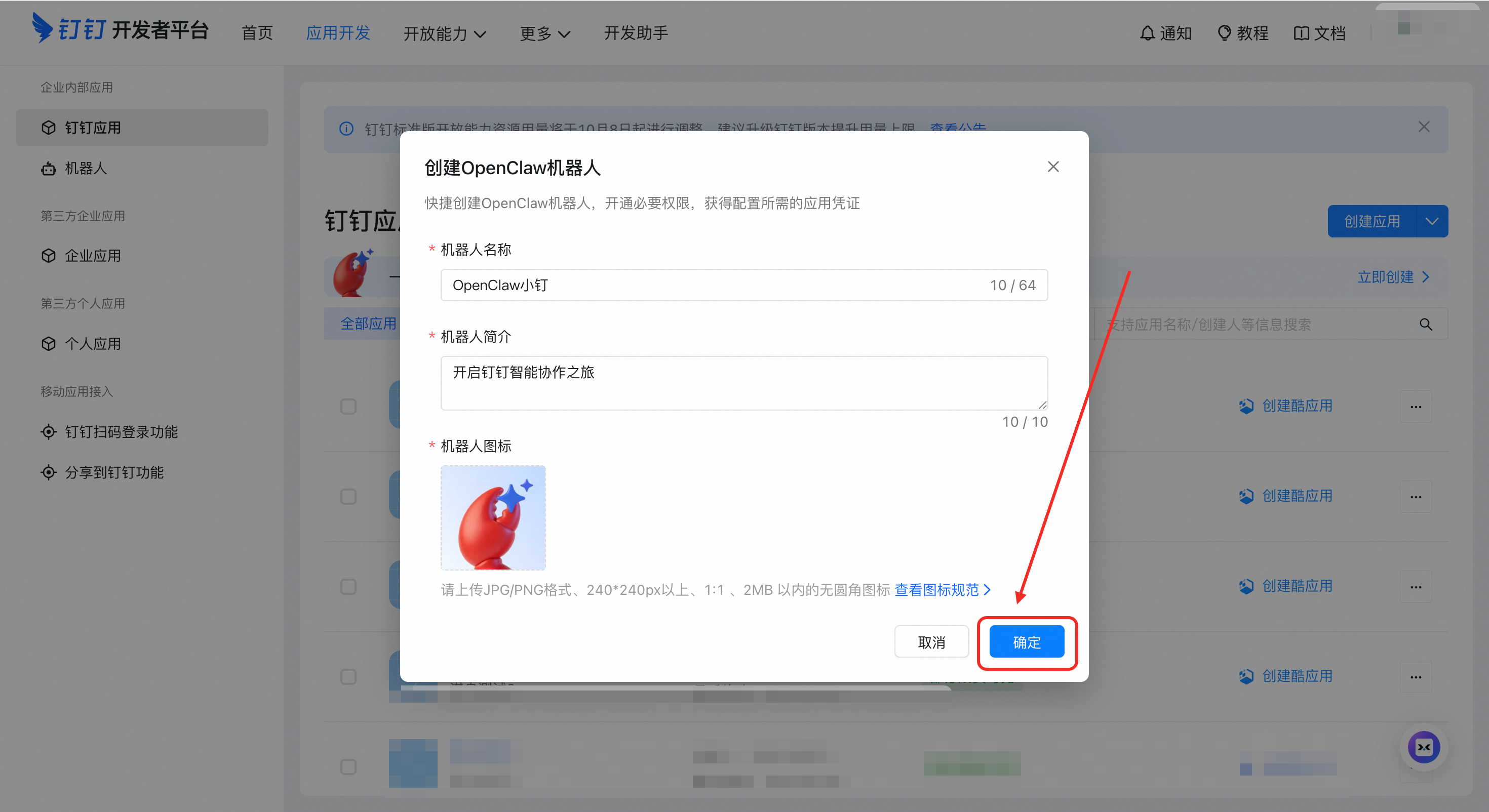
#### 2.1 Create Application
|
|
186
|
-
|
|
187
|
-
1. Go to [DingTalk Open Platform](https://open-dev.dingtalk.com/)
|
|
188
|
-
2. Click **"Application Development"**
|
|
189
|
-
|
|
190
|
-
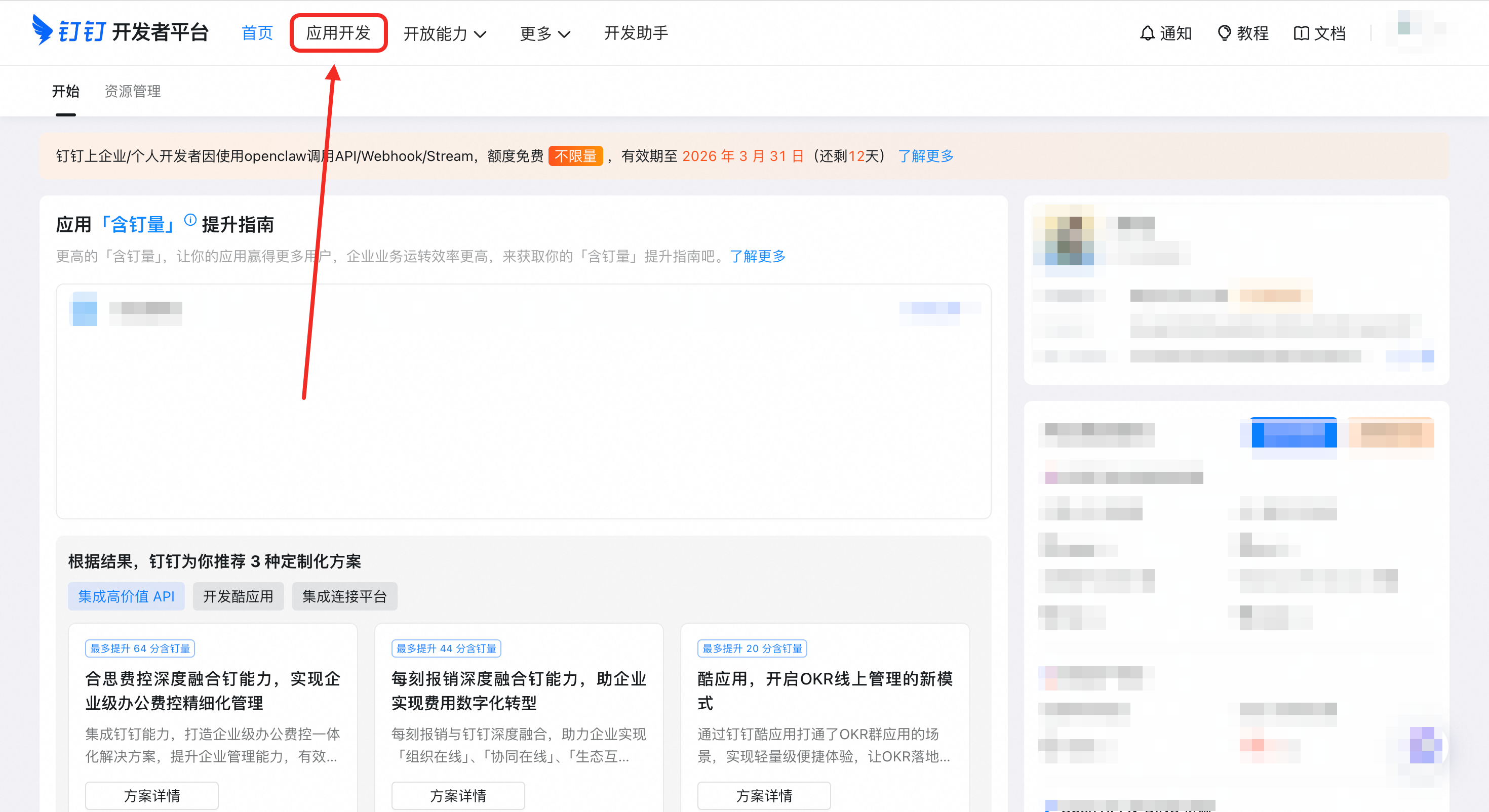
|
|
191
|
-
|
|
192
|
-
#### 2.2 Add Bot Capability
|
|
193
|
-
|
|
194
|
-
1. On the application details page, use the “one-click OpenClaw bot app” flow
|
|
195
|
-
|
|
196
|
-
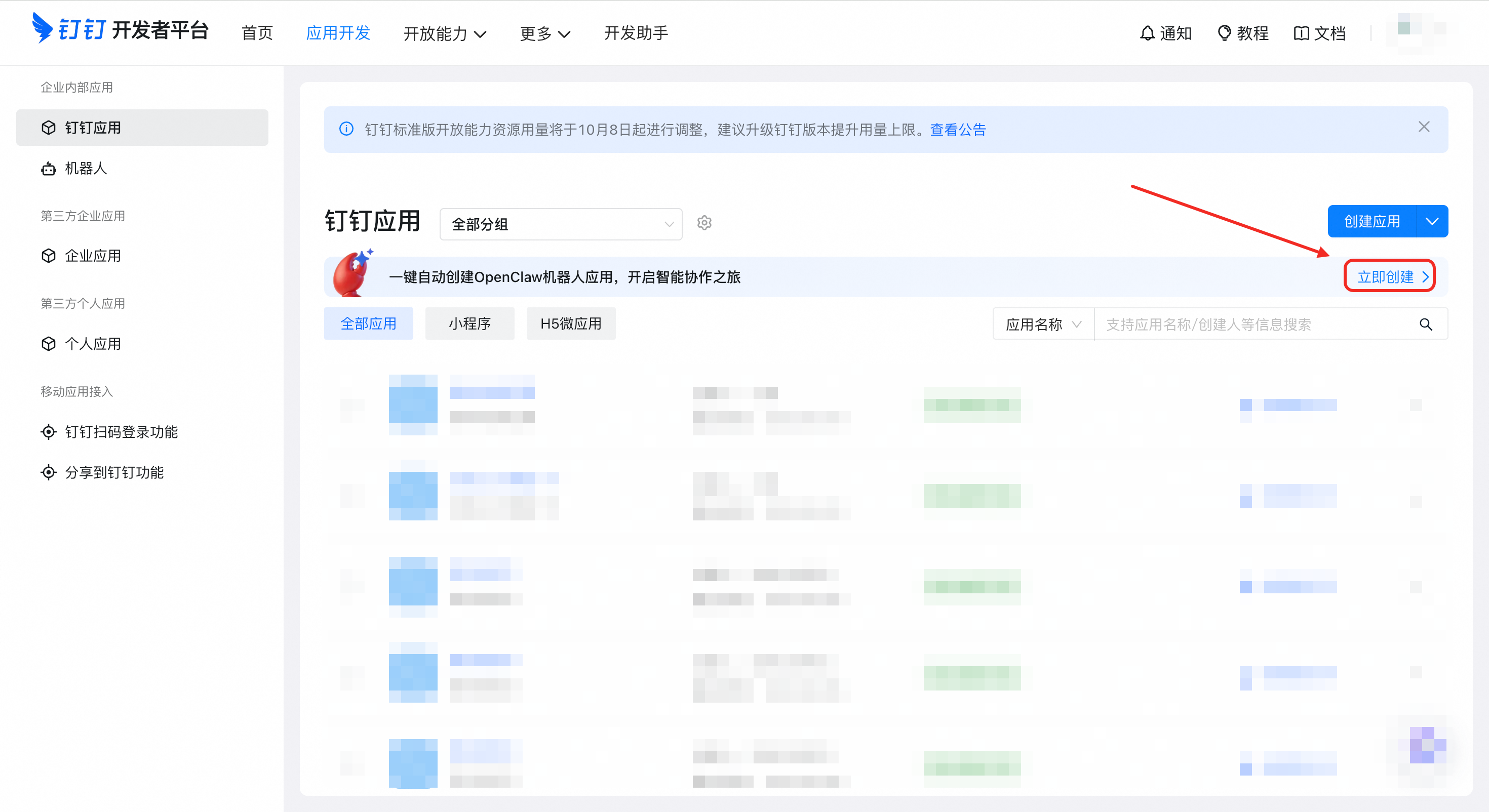
|
|
197
|
-
|
|
198
|
-
#### 2.3 Get Credentials
|
|
199
|
-
|
|
200
|
-
1. Finish creation and open **"Credentials & Basic Info"**
|
|
201
|
-
2. Copy your **AppKey** (Client ID)
|
|
202
|
-
3. Copy your **AppSecret** (Client Secret)
|
|
203
|
-
|
|
204
|
-
|
|
205
|
-
|
|
206
|
-
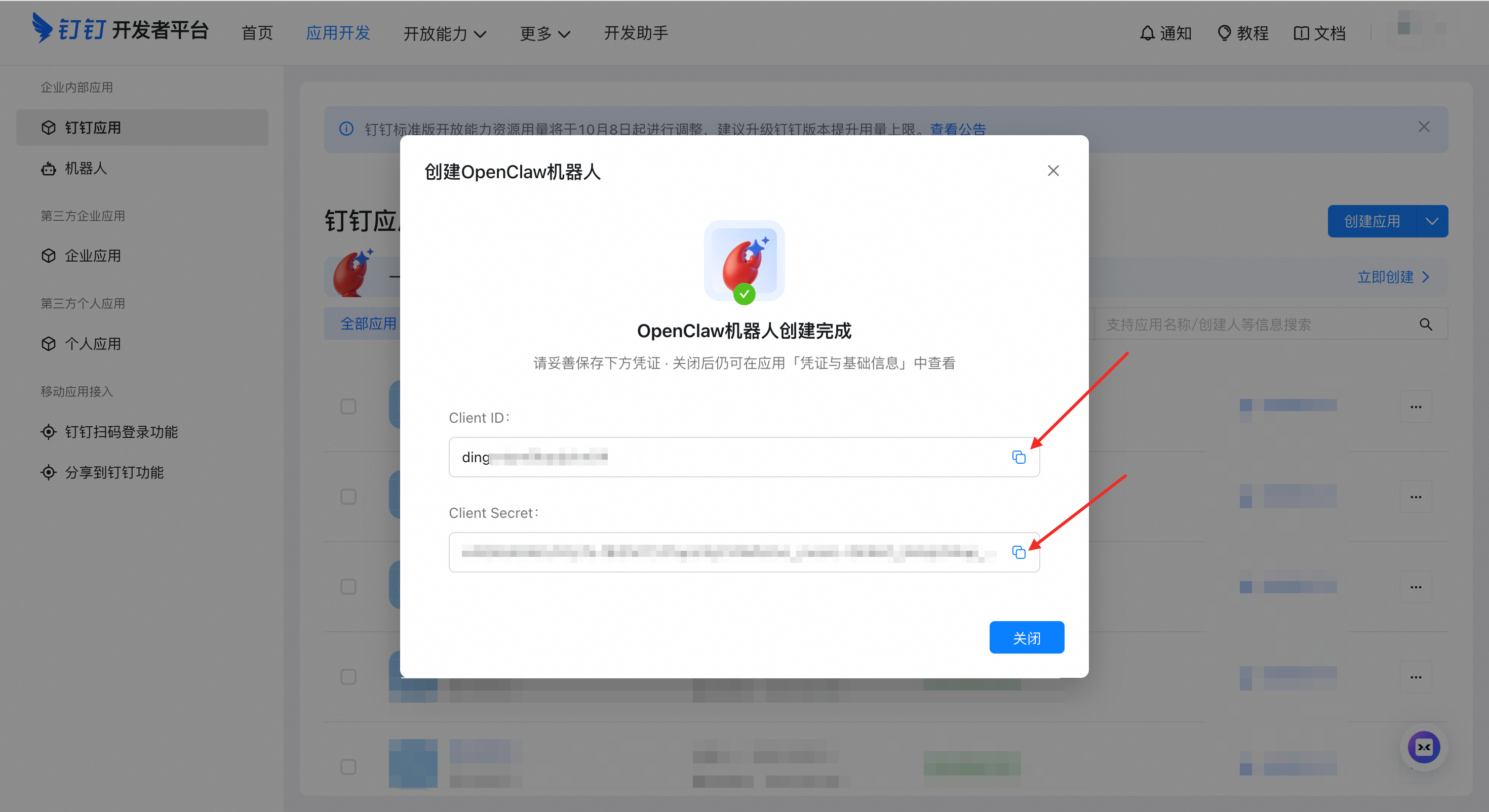
|
|
207
|
-
|
|
208
|
-
> ⚠️ **Important**: Client ID and Client Secret are your bot’s unique credentials. Store them safely.
|
|
209
|
-
|
|
210
|
-
---
|
|
64
|
+
## Requirements & Installation
|
|
211
65
|
|
|
212
|
-
|
|
66
|
+
Before you start, make sure you have:
|
|
213
67
|
|
|
214
|
-
|
|
68
|
+
- **OpenClaw**: Installed and running properly. Visit the [OpenClaw website](https://openclaw.ai/) for details.
|
|
69
|
+
- **Version**: OpenClaw ≥ **2026.4.9**. Check with `openclaw -v`.
|
|
215
70
|
|
|
216
|
-
|
|
71
|
+
> If below this version, upgrade with: `npm install -g openclaw`
|
|
217
72
|
|
|
218
|
-
|
|
73
|
+
### One-Click Install + QR Auth (Recommended)
|
|
219
74
|
|
|
220
75
|
```bash
|
|
221
|
-
npx -y @dingtalk-real-ai/dingtalk-connector install
|
|
76
|
+
npx -y @dingtalk-real-ai/dingtalk-connector@beta install
|
|
222
77
|
```
|
|
223
78
|
|
|
224
|
-
|
|
79
|
+
During installation, the terminal will display a DingTalk authorization QR code. Scan it with the **DingTalk mobile app** and tap "Create Bot" to complete authorization.
|
|
225
80
|
|
|
226
|
-
|
|
227
|
-
|
|
228
|
-
Edit the configuration file:
|
|
229
|
-
|
|
230
|
-
- macOS / Linux: `~/.openclaw/openclaw.json`
|
|
231
|
-
- Windows: `C:\Users\<YourUserName>\.openclaw\openclaw.json`
|
|
232
|
-
|
|
233
|
-
```json
|
|
234
|
-
{
|
|
235
|
-
"channels": {
|
|
236
|
-
"dingtalk-connector": {
|
|
237
|
-
"enabled": true,
|
|
238
|
-
"clientId": "dingxxxxxxxxx",
|
|
239
|
-
"clientSecret": "your_app_secret"
|
|
240
|
-
}
|
|
241
|
-
}
|
|
242
|
-
}
|
|
243
|
-
```
|
|
244
|
-
|
|
245
|
-
> 💡 **Tip**: If the file already has content, add the `dingtalk-connector` section under the `channels` node.
|
|
246
|
-
|
|
247
|
-
---
|
|
248
|
-
|
|
249
|
-
### Step 4: Restart and Test
|
|
81
|
+
When you see `Success! Bot configured.`, the authorization is complete. Then restart the Gateway:
|
|
250
82
|
|
|
251
83
|
```bash
|
|
252
|
-
# Restart OpenClaw Gateway
|
|
253
84
|
openclaw gateway restart
|
|
254
|
-
|
|
255
|
-
# Watch logs in real-time
|
|
256
|
-
openclaw logs --follow
|
|
257
|
-
```
|
|
258
|
-
|
|
259
|
-
**Test your bot**:
|
|
260
|
-
1. Open DingTalk app
|
|
261
|
-
2. Find your bot in the contact list
|
|
262
|
-
3. Send a message: `Hello`
|
|
263
|
-
4. You should receive a response within 10 seconds
|
|
264
|
-
|
|
265
|
-
---
|
|
266
|
-
|
|
267
|
-
## Features
|
|
268
|
-
|
|
269
|
-
### ✅ Core Features
|
|
270
|
-
|
|
271
|
-
- **AI Card Streaming** - Typewriter-like replies with real-time streaming
|
|
272
|
-
- **Session Management** - Multi-turn conversations with context preservation
|
|
273
|
-
- **Session Isolation** - Separate sessions for DMs, groups, and different groups
|
|
274
|
-
- **Auto Session Reset** - Automatic new session after 30 minutes of inactivity
|
|
275
|
-
- **Manual Session Reset** - Send `/new` or `新会话` to clear conversation history
|
|
276
|
-
- **Image Auto-Upload** - Local image paths automatically uploaded to DingTalk
|
|
277
|
-
- **Proactive Messaging** - Send messages to users or groups programmatically
|
|
278
|
-
- **Rich Media Reception** - Receive and process JPEG/PNG images, pass to vision models
|
|
279
|
-
- **File Attachment Extraction** - Parse .docx, .pdf, text files, and binary files
|
|
280
|
-
- **Audio Message Support** - Send audio messages in multiple formats (mp3, wav, amr, ogg)
|
|
281
|
-
- **DingTalk Docs API** - Create, append, search, and list DingTalk documents
|
|
282
|
-
- **Multi-Agent Routing** - Connect multiple bots to different agents for specialized services
|
|
283
|
-
- **Markdown Table Conversion** - Auto-convert Markdown tables to DingTalk-compatible format
|
|
284
|
-
- **Async Mode** - Immediate acknowledgment with background processing (optional)
|
|
285
|
-
|
|
286
|
-
---
|
|
287
|
-
|
|
288
|
-
## Configuration
|
|
289
|
-
|
|
290
|
-
### Basic Configuration
|
|
291
|
-
|
|
292
|
-
| Option | Environment Variable | Description |
|
|
293
|
-
|--------|---------------------|-------------|
|
|
294
|
-
| `clientId` | — | DingTalk AppKey |
|
|
295
|
-
| `clientSecret` | — | DingTalk AppSecret |
|
|
296
|
-
|
|
297
|
-
### Session Management
|
|
298
|
-
|
|
299
|
-
| Option | Default | Description |
|
|
300
|
-
|--------|---------|-------------|
|
|
301
|
-
| `separateSessionByConversation` | `true` | Separate sessions for DMs/groups |
|
|
302
|
-
| `groupSessionScope` | `group` | Group session scope: `group` (shared) or `group_sender` (per-user) |
|
|
303
|
-
| `sharedMemoryAcrossConversations` | `false` | Share memory across different conversations |
|
|
304
|
-
|
|
305
|
-
### Session routing policies (`pmpolicy` / `groupPolicy`)
|
|
306
|
-
|
|
307
|
-
Both session routing/message policy options (including `pmpolicy` and `groupPolicy`) are supported now, so you **do not need to remove** them from existing configurations.
|
|
308
|
-
|
|
309
|
-
> Note: field names may vary across versions/upstream; on the connector side, related policies are supported and applied (for example, `dmPolicy`/`groupPolicy` default to `open`).
|
|
310
|
-
|
|
311
|
-
### Async Mode
|
|
312
|
-
|
|
313
|
-
| Option | Default | Description |
|
|
314
|
-
|--------|---------|-------------|
|
|
315
|
-
| `asyncMode` | `false` | Enable async mode for long-running tasks |
|
|
316
|
-
| `ackText` | `🫡 任务已接收,处理中...` | Acknowledgment message text |
|
|
317
|
-
|
|
318
|
-
---
|
|
319
|
-
|
|
320
|
-
## Troubleshooting
|
|
321
|
-
|
|
322
|
-
### Bot Not Responding
|
|
323
|
-
|
|
324
|
-
**Symptoms**: Bot doesn't reply to messages
|
|
325
|
-
|
|
326
|
-
**Solutions**:
|
|
327
|
-
1. Check plugin status: `openclaw plugins list`
|
|
328
|
-
2. Check gateway status: `openclaw gateway status`
|
|
329
|
-
3. Check logs: `openclaw logs --follow`
|
|
330
|
-
4. Verify the app is published/enabled in DingTalk Open Platform
|
|
331
|
-
|
|
332
|
-
---
|
|
333
|
-
|
|
334
|
-
### Invalid Config: additional properties
|
|
335
|
-
|
|
336
|
-
**Symptoms**:
|
|
337
|
-
|
|
338
85
|
```
|
|
339
|
-
Problem:
|
|
340
|
-
- channels.dingtalk-connector: invalid config: must NOT have additional properties
|
|
341
|
-
```
|
|
342
|
-
|
|
343
|
-
**Cause**: Your config file contains deprecated or renamed fields that are no longer recognized.
|
|
344
|
-
|
|
345
|
-
**Solution**: Open `openclaw.config.yaml` and remove any unsupported fields under `channels.dingtalk-connector`. Known fields to remove:
|
|
346
|
-
|
|
347
|
-
| Old Field | Notes |
|
|
348
|
-
|-----------|-------|
|
|
349
|
-
| `gatewayPassword` | Deprecated legacy field |
|
|
350
|
-
| `gatewayToken` | Deprecated legacy field |
|
|
351
|
-
| `dmHistoryLimit` | Removed in v0.8.9 (never implemented) |
|
|
352
|
-
|
|
353
|
-
The error message will indicate the exact field name. Remove it and restart.
|
|
354
|
-
|
|
355
|
-
---
|
|
356
|
-
|
|
357
|
-
### HTTP 401 Error
|
|
358
|
-
|
|
359
|
-
**Symptoms**: Error message shows "401 Unauthorized"
|
|
360
|
-
|
|
361
|
-
**Solution**: Upgrade to the latest version.
|
|
362
86
|
|
|
363
|
-
|
|
364
|
-
|
|
365
|
-
### Stream Connection 400 Error
|
|
366
|
-
|
|
367
|
-
**Symptoms**: Logs show "Request failed with status code 400"
|
|
368
|
-
|
|
369
|
-
**Common Causes**:
|
|
370
|
-
|
|
371
|
-
| Cause | Solution |
|
|
372
|
-
|-------|----------|
|
|
373
|
-
| App not published | DingTalk Open Platform → Version Management → Publish |
|
|
374
|
-
| Invalid credentials | Check `clientId`/`clientSecret` for typos or extra spaces |
|
|
375
|
-
| Not Stream mode | Verify bot is configured for Stream mode (not Webhook) |
|
|
376
|
-
| IP whitelist | Check if the app has IP whitelist restrictions |
|
|
377
|
-
|
|
378
|
-
**Verification Steps**:
|
|
379
|
-
1. Check app status in [DingTalk Open Platform](https://open-dev.dingtalk.com/)
|
|
380
|
-
2. After any configuration change, click **Save** → **Publish**
|
|
87
|
+
> 💡 **Scan failure does not affect installation**: Even if the QR flow fails, plugin dependencies will still be installed. See [Manual Setup Guide](docs/DINGTALK_MANUAL_SETUP.md) to complete configuration.
|
|
381
88
|
|
|
382
89
|
---
|
|
383
90
|
|
|
384
|
-
##
|
|
385
|
-
|
|
386
|
-
### Multi-Agent Configuration
|
|
387
|
-
|
|
388
|
-
Configure multiple bots connected to different agents:
|
|
389
|
-
|
|
390
|
-
```json5
|
|
391
|
-
{
|
|
392
|
-
"agents": {
|
|
393
|
-
"list": [
|
|
394
|
-
{
|
|
395
|
-
"id": "ding-bot1",
|
|
396
|
-
"name": "Customer Service Bot",
|
|
397
|
-
"model": "your-model-config",
|
|
398
|
-
"workspace": "~/.openclaw/workspace-bot1",
|
|
399
|
-
"identity": {
|
|
400
|
-
"name": "Service Assistant",
|
|
401
|
-
"theme": "customer service",
|
|
402
|
-
"emoji": "🤝"
|
|
403
|
-
}
|
|
404
|
-
// Other agent configurations...
|
|
405
|
-
},
|
|
406
|
-
{
|
|
407
|
-
"id": "ding-bot2",
|
|
408
|
-
"name": "Technical Support Bot",
|
|
409
|
-
"model": "your-model-config",
|
|
410
|
-
"workspace": "~/.openclaw/workspace-bot2",
|
|
411
|
-
"identity": {
|
|
412
|
-
"name": "Tech Expert",
|
|
413
|
-
"theme": "technical support",
|
|
414
|
-
"emoji": "🔧"
|
|
415
|
-
}
|
|
416
|
-
// Other agent configurations...
|
|
417
|
-
}
|
|
418
|
-
]
|
|
419
|
-
},
|
|
420
|
-
"channels": {
|
|
421
|
-
"dingtalk-connector": {
|
|
422
|
-
"enabled": true,
|
|
423
|
-
"accounts": {
|
|
424
|
-
"bot1": {
|
|
425
|
-
"enabled": true,
|
|
426
|
-
"clientId": "ding_bot1_app_key",
|
|
427
|
-
"clientSecret": "bot1_secret"
|
|
428
|
-
},
|
|
429
|
-
"bot2": {
|
|
430
|
-
"enabled": true,
|
|
431
|
-
"clientId": "ding_bot2_app_key",
|
|
432
|
-
"clientSecret": "bot2_secret"
|
|
433
|
-
}
|
|
434
|
-
}
|
|
435
|
-
}
|
|
436
|
-
},
|
|
437
|
-
"bindings": [
|
|
438
|
-
{
|
|
439
|
-
"agentId": "ding-bot1",
|
|
440
|
-
"match": {
|
|
441
|
-
"channel": "dingtalk-connector",
|
|
442
|
-
"accountId": "bot1"
|
|
443
|
-
}
|
|
444
|
-
},
|
|
445
|
-
{
|
|
446
|
-
"agentId": "ding-bot2",
|
|
447
|
-
"match": {
|
|
448
|
-
"channel": "dingtalk-connector",
|
|
449
|
-
"accountId": "bot2"
|
|
450
|
-
}
|
|
451
|
-
}
|
|
452
|
-
]
|
|
453
|
-
}
|
|
454
|
-
```
|
|
91
|
+
## Usage Guide
|
|
455
92
|
|
|
456
|
-
|
|
93
|
+
[OpenClaw DingTalk Plugin User Guide](https://alidocs.dingtalk.com/i/nodes/2Amq4vjg89GEno0zfPqoPGqdV3kdP0wQ?utm_scene=team_space)
|
|
457
94
|
|
|
458
95
|
---
|
|
459
96
|
|
|
460
|
-
|
|
461
|
-
|
|
462
|
-
Users can send the following commands to start a fresh session:
|
|
97
|
+
## Advanced Documentation
|
|
463
98
|
|
|
464
|
-
-
|
|
465
|
-
-
|
|
99
|
+
- [Manual Setup Guide](docs/DINGTALK_MANUAL_SETUP.md) — Configure credentials manually
|
|
100
|
+
- [DingTalk DEAP Agent Integration](docs/DEAP_AGENT_GUIDE.en.md) — Local device operation capabilities
|
|
101
|
+
- [Multi-Agent Routing](https://gist.github.com/smallnest/c5c13482740fd179e40070e620f66a52) — Bind multiple bots to different Agents
|
|
102
|
+
- [Troubleshooting](docs/TROUBLESHOOTING.md) — Installation and usage issue resolution
|
|
466
103
|
|
|
467
104
|
---
|
|
468
105
|
|
|
469
|
-
|
|
470
|
-
|
|
471
|
-
DingTalk Docs capabilities (`docs.*`, including `docs.create` / `docs.append` / `docs.search` / `docs.list` / `docs.read`) require MCP (Model Context Protocol) to provide the underlying tools. To enable `docs.*`, install and enable the corresponding MCP Server/Tool in the OpenClaw Gateway/Agent.
|
|
472
|
-
|
|
473
|
-
- **Where to get MCP Server/Tool**: via the [DingTalk MCP Marketplace](https://mcp.dingtalk.com/) (or your team’s internal MCP marketplace). You can also use a third-party marketplace to source an equivalent “DingTalk Docs Read / DingTalk Docs Reader” capability and connect it to OpenClaw.
|
|
474
|
-
- **Where to configure**: usually at the **Gateway or Agent tool configuration** level (not in this connector).
|
|
475
|
-
- **How it takes effect**: restart the Gateway and ensure the tool is exposed to the target agent.
|
|
476
|
-
|
|
477
|
-
References (OpenClaw configuration docs):
|
|
478
|
-
- `https://docs.openclaw.ai/configuration`
|
|
479
|
-
- `https://docs.openclaw.ai/gateway/configuration-reference`
|
|
480
|
-
|
|
481
|
-
Create and manage DingTalk documents from your agent:
|
|
482
|
-
|
|
483
|
-
```javascript
|
|
484
|
-
// Create document
|
|
485
|
-
dingtalk-connector.docs.create({
|
|
486
|
-
spaceId: "your-space-id",
|
|
487
|
-
title: "Test Document",
|
|
488
|
-
content: "# Test Content"
|
|
489
|
-
})
|
|
490
|
-
|
|
491
|
-
// Append content
|
|
492
|
-
dingtalk-connector.docs.append({
|
|
493
|
-
docId: "your-doc-id",
|
|
494
|
-
markdownContent: "\n## Appended Content"
|
|
495
|
-
})
|
|
496
|
-
|
|
497
|
-
// Search documents
|
|
498
|
-
dingtalk-connector.docs.search({
|
|
499
|
-
keyword: "search keyword"
|
|
500
|
-
})
|
|
501
|
-
|
|
502
|
-
// List documents
|
|
503
|
-
dingtalk-connector.docs.list({
|
|
504
|
-
spaceId: "your-space-id"
|
|
505
|
-
})
|
|
506
|
-
```
|
|
507
|
-
|
|
508
|
-
---
|
|
509
|
-
|
|
510
|
-
## Project Structure
|
|
511
|
-
|
|
512
|
-
```
|
|
513
|
-
dingtalk-openclaw-connector/
|
|
514
|
-
├── src/
|
|
515
|
-
│ ├── core/ # Core connector logic
|
|
516
|
-
│ ├── services/ # DingTalk API services
|
|
517
|
-
│ ├── utils/ # Utility functions
|
|
518
|
-
│ └── types/ # TypeScript type definitions
|
|
519
|
-
├── docs/
|
|
520
|
-
│ └── images/ # Documentation images
|
|
521
|
-
├── openclaw.plugin.json # Plugin manifest
|
|
522
|
-
├── package.json # npm dependencies
|
|
523
|
-
└── LICENSE
|
|
524
|
-
```
|
|
525
|
-
|
|
526
|
-
---
|
|
527
|
-
|
|
528
|
-
## Dependencies
|
|
529
|
-
|
|
530
|
-
| Package | Purpose |
|
|
531
|
-
|---------|---------|
|
|
532
|
-
| `dingtalk-stream` | DingTalk Stream protocol client |
|
|
533
|
-
| `axios` | HTTP client |
|
|
534
|
-
| `mammoth` | Word document (.docx) parsing |
|
|
535
|
-
| `pdf-parse` | PDF document parsing |
|
|
536
|
-
|
|
537
|
-
---
|
|
106
|
+
## Contributing
|
|
538
107
|
|
|
539
|
-
|
|
108
|
+
Community contributions are welcome! If you find a bug or have feature suggestions, please submit an [Issue](https://github.com/DingTalk-Real-AI/dingtalk-openclaw-connector/issues) or Pull Request.
|
|
540
109
|
|
|
541
|
-
|
|
110
|
+
For major changes, we recommend discussing with us first via an Issue.
|
|
542
111
|
|
|
543
112
|
---
|
|
544
113
|
|
|
545
114
|
## License
|
|
546
115
|
|
|
547
|
-
[MIT](LICENSE)
|
|
116
|
+
This project is licensed under the [MIT](LICENSE) License.
|
|
548
117
|
|
|
549
118
|
---
|
|
550
119
|
|