@dingtalk-real-ai/dingtalk-connector 0.8.13 → 0.8.14-beta.0
This diff represents the content of publicly available package versions that have been released to one of the supported registries. The information contained in this diff is provided for informational purposes only and reflects changes between package versions as they appear in their respective public registries.
- package/README.en.md +59 -9
- package/README.md +22 -72
- package/docs/DINGTALK_MANUAL_SETUP.md +50 -0
- package/openclaw.plugin.json +1 -0
- package/package.json +1 -1
- package/src/device-auth-config.ts +14 -0
- package/src/device-auth.ts +197 -0
- package/src/onboarding.ts +168 -38
package/README.en.md
CHANGED
|
@@ -40,6 +40,38 @@ Before you begin, ensure you have:
|
|
|
40
40
|
```
|
|
41
41
|
Expected output: `✓ Gateway is running on http://127.0.0.1:18789`
|
|
42
42
|
|
|
43
|
+
### ⚠️ Version Compatibility
|
|
44
|
+
|
|
45
|
+
**Important**: dingtalk-connector v0.8.4+ requires **OpenClaw SDK v2026.3.22 or later**.
|
|
46
|
+
|
|
47
|
+
| dingtalk-connector Version | Minimum OpenClaw SDK Version | Notes |
|
|
48
|
+
|---------------------------|------------------------------|-------|
|
|
49
|
+
| v0.8.4+ | v2026.3.22+ | Uses new SDK API with improved routing and session management |
|
|
50
|
+
| v0.8.3 and below | v2026.3.x | Compatible with legacy SDK |
|
|
51
|
+
|
|
52
|
+
**How to check versions**:
|
|
53
|
+
```bash
|
|
54
|
+
# Check OpenClaw version
|
|
55
|
+
openclaw --version
|
|
56
|
+
|
|
57
|
+
# Check plugin version
|
|
58
|
+
openclaw plugins list
|
|
59
|
+
```
|
|
60
|
+
|
|
61
|
+
**How to upgrade**:
|
|
62
|
+
```bash
|
|
63
|
+
# Upgrade OpenClaw to the latest version
|
|
64
|
+
npm install -g openclaw@latest
|
|
65
|
+
|
|
66
|
+
# Or use yarn
|
|
67
|
+
yarn global add openclaw@latest
|
|
68
|
+
```
|
|
69
|
+
|
|
70
|
+
**What happens when versions are incompatible**:
|
|
71
|
+
- The plugin displays a detailed error message during loading
|
|
72
|
+
- The message includes upgrade and downgrade instructions
|
|
73
|
+
- The plugin stops loading automatically without affecting other plugins
|
|
74
|
+
|
|
43
75
|
### 2. DingTalk Enterprise Account
|
|
44
76
|
|
|
45
77
|
- You need a DingTalk enterprise account to create internal applications
|
|
@@ -62,13 +94,30 @@ Whenever you see `~/.openclaw/openclaw.json` below, it is equivalent to the abov
|
|
|
62
94
|
|
|
63
95
|
### Step 1: Install the Plugin
|
|
64
96
|
|
|
65
|
-
#### Method A: Install
|
|
97
|
+
#### Method A: One-Click Install + QR Auth (Recommended)
|
|
66
98
|
|
|
67
99
|
```bash
|
|
68
|
-
|
|
100
|
+
npx -y @dingtalk-real-ai/dingtalk-connector install
|
|
69
101
|
```
|
|
70
102
|
|
|
71
|
-
|
|
103
|
+
This command will automatically: install the plugin -> display DingTalk authorization QR code -> wait for scan -> save credentials to config file.
|
|
104
|
+
|
|
105
|
+
During installation, the terminal will display:
|
|
106
|
+
|
|
107
|
+
- DingTalk authorization QR code (ASCII)
|
|
108
|
+
- `Authorization URL` (open directly if the QR code cannot be displayed)
|
|
109
|
+
|
|
110
|
+
When you see `Success! Bot configured. (机器人配置成功!)`, the authorization is complete. After authorization, please manually restart the Gateway to apply the configuration:
|
|
111
|
+
|
|
112
|
+
```bash
|
|
113
|
+
openclaw gateway restart
|
|
114
|
+
```
|
|
115
|
+
|
|
116
|
+
> 💡 **Windows QR Code Tip**: If scanning fails on Windows, the QR code may not render correctly due to terminal resolution. Try switching to [Cmder](https://cmder.app/) and retry.
|
|
117
|
+
>
|
|
118
|
+
> 💡 **Scan Failure Does Not Affect Installation**: Even if the QR flow fails (auth error / timeout / QR code display failure), plugin dependencies will still be downloaded and installed. After installation, follow the manual setup guide: [`docs/DINGTALK_MANUAL_SETUP.md`](docs/DINGTALK_MANUAL_SETUP.md)
|
|
119
|
+
|
|
120
|
+
#### Method B: Install from Local Source (Development)
|
|
72
121
|
|
|
73
122
|
If you want to develop or modify the plugin, clone the repository first:
|
|
74
123
|
|
|
@@ -82,6 +131,9 @@ npm install
|
|
|
82
131
|
|
|
83
132
|
# 3. Install in link mode (changes take effect immediately)
|
|
84
133
|
openclaw plugins install -l .
|
|
134
|
+
|
|
135
|
+
# 4. Trigger QR authorization
|
|
136
|
+
node bin/dingtalk-connector.js install --local
|
|
85
137
|
```
|
|
86
138
|
|
|
87
139
|
#### Method C: Manual Installation
|
|
@@ -161,17 +213,15 @@ You should see output similar to `✓ DingTalk Channel (vX.X.X) - loaded`.
|
|
|
161
213
|
|
|
162
214
|
You have three options to configure the connector:
|
|
163
215
|
|
|
164
|
-
#### Option A:
|
|
216
|
+
#### Option A: Re-run QR Authorization
|
|
165
217
|
|
|
166
|
-
>
|
|
218
|
+
> Credentials are automatically configured during plugin installation (Step 1, Method A). If you need to re-run the QR authorization:
|
|
167
219
|
|
|
168
220
|
```bash
|
|
169
|
-
|
|
221
|
+
npx -y @dingtalk-real-ai/dingtalk-connector install
|
|
170
222
|
```
|
|
171
223
|
|
|
172
|
-
|
|
173
|
-
- `clientId` (AppKey)
|
|
174
|
-
- `clientSecret` (AppSecret)
|
|
224
|
+
> 💡 **Note**: `openclaw channels add` only lists built-in channels. DingTalk is a third-party plugin — use the `npx` command above instead.
|
|
175
225
|
|
|
176
226
|
#### Option B: Edit Configuration File
|
|
177
227
|
|
package/README.md
CHANGED
|
@@ -94,13 +94,28 @@ yarn global add openclaw@latest
|
|
|
94
94
|
|
|
95
95
|
### 步骤 1:安装插件
|
|
96
96
|
|
|
97
|
-
#### 方法 A
|
|
97
|
+
#### 方法 A:一键安装 + 扫码授权(推荐)
|
|
98
98
|
|
|
99
99
|
```bash
|
|
100
|
-
|
|
100
|
+
npx -y @dingtalk-real-ai/dingtalk-connector install
|
|
101
101
|
```
|
|
102
102
|
|
|
103
|
-
|
|
103
|
+
安装过程中,终端会展示:
|
|
104
|
+
|
|
105
|
+
- 钉钉授权二维码(ASCII)
|
|
106
|
+
- `Authorization URL`(二维码无法显示时可直接打开)
|
|
107
|
+
|
|
108
|
+
看到 `Success! Bot configured. (机器人配置成功!)` 即表示授权完成。授权完成后,请手动重启 Gateway 使配置生效:
|
|
109
|
+
|
|
110
|
+
```bash
|
|
111
|
+
openclaw gateway restart
|
|
112
|
+
```
|
|
113
|
+
|
|
114
|
+
> 💡 **Windows 扫码提示**:如果在 Windows 设备中无法扫码成功,可能是终端分辨率导致二维码显示异常。建议更换终端使用 [Cmder](https://cmder.app/) 后重试。
|
|
115
|
+
>
|
|
116
|
+
> 💡 **扫码失败不影响安装**:即使扫码流程出现 `auth 失败 / 超时 / 二维码展示失败`,也不影响插件依赖继续下载与安装。安装完成后,请按手动流程完成配置:[`docs/DINGTALK_MANUAL_SETUP.md`](docs/DINGTALK_MANUAL_SETUP.md)
|
|
117
|
+
|
|
118
|
+
#### 方法 B:通过本地源码安装(二次开发)
|
|
104
119
|
|
|
105
120
|
如果你想对插件进行二次开发,可以先克隆仓库:
|
|
106
121
|
|
|
@@ -114,6 +129,9 @@ npm install
|
|
|
114
129
|
|
|
115
130
|
# 3. 以链接模式安装(方便修改代码后实时生效)
|
|
116
131
|
openclaw plugins install -l .
|
|
132
|
+
|
|
133
|
+
# 4. 触发扫码授权
|
|
134
|
+
node bin/dingtalk-connector.js install --local
|
|
117
135
|
```
|
|
118
136
|
|
|
119
137
|
#### 方法 C:手动安装
|
|
@@ -160,75 +178,7 @@ openclaw plugins list
|
|
|
160
178
|
|
|
161
179
|
---
|
|
162
180
|
|
|
163
|
-
### 步骤 2
|
|
164
|
-
|
|
165
|
-
#### 3.1 创建应用
|
|
166
|
-
|
|
167
|
-
1. 访问 [钉钉开放平台](https://open-dev.dingtalk.com/)
|
|
168
|
-
2. 点击 **"应用开发"**
|
|
169
|
-
|
|
170
|
-
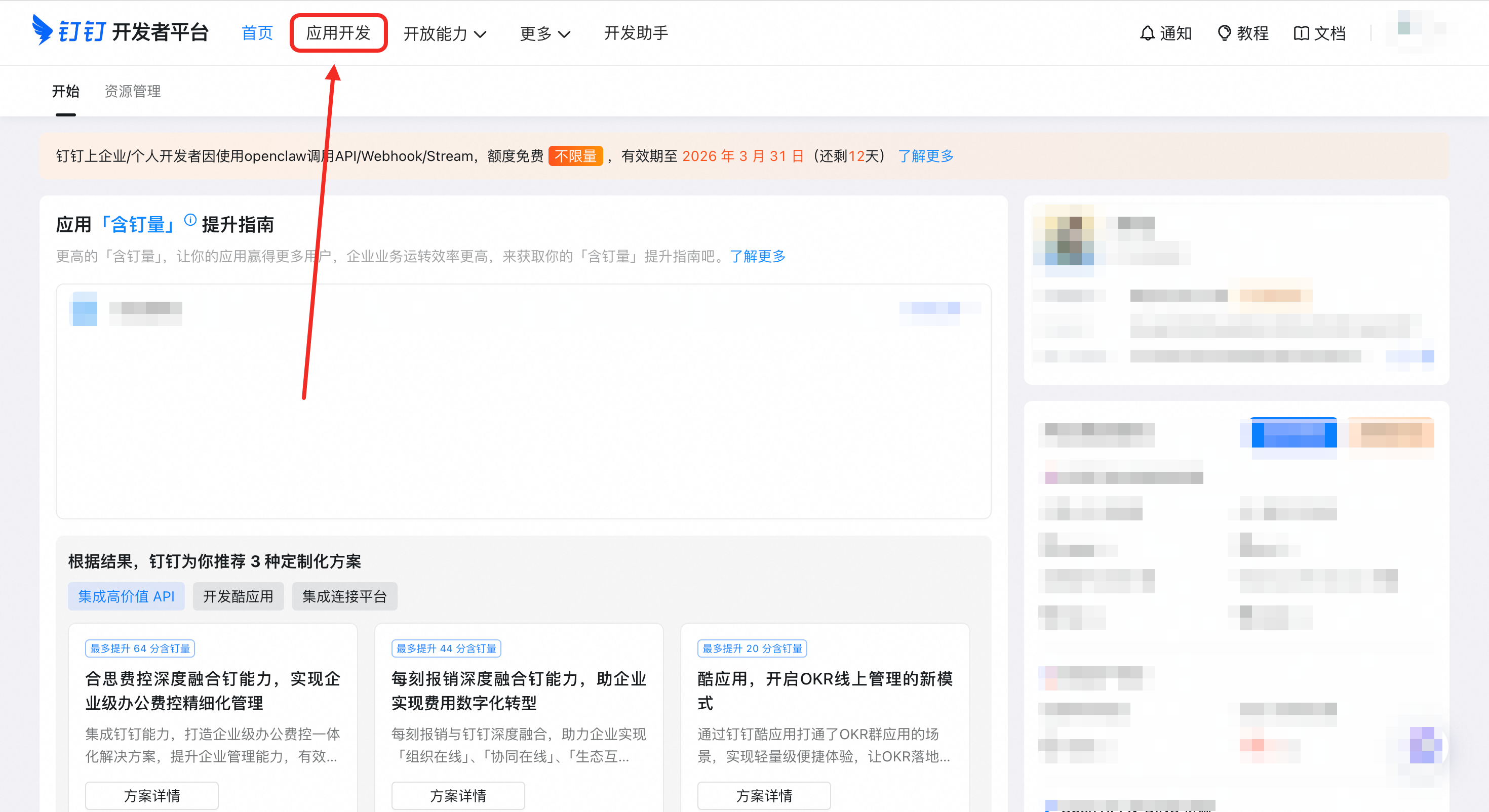
|
|
171
|
-
|
|
172
|
-
#### 3.2 添加机器人能力
|
|
173
|
-
|
|
174
|
-
1. 在应用详情页,点击 一键创建OpenClaw机器人应用
|
|
175
|
-
|
|
176
|
-
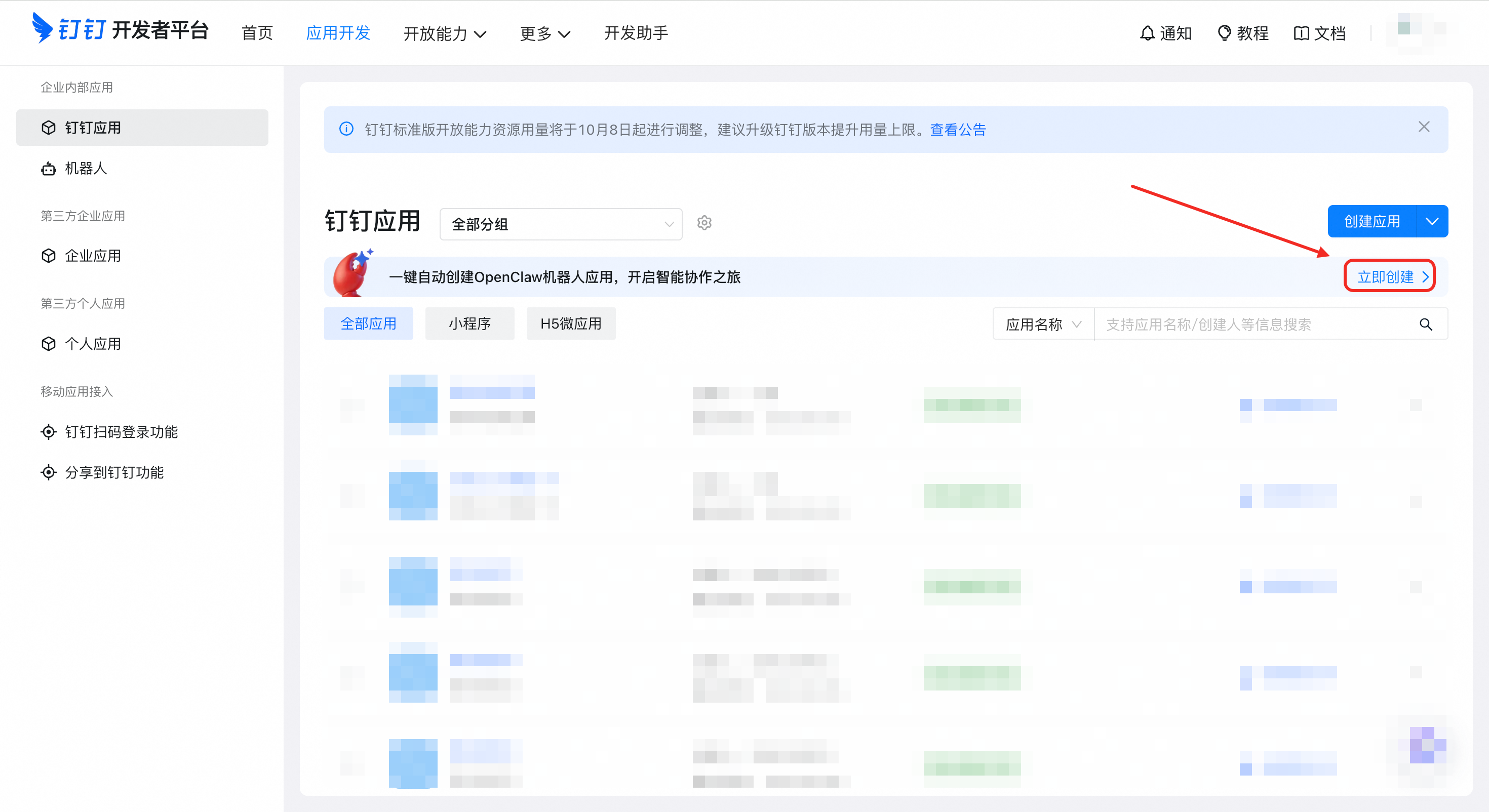
|
|
177
|
-
|
|
178
|
-
#### 3.3 获取凭证
|
|
179
|
-
|
|
180
|
-
1. 完成创建并获取 **"凭证与基础信息"**
|
|
181
|
-
2. 复制你的 **AppKey**(Client ID)
|
|
182
|
-
3. 复制你的 **AppSecret**(Client Secret)
|
|
183
|
-
|
|
184
|
-
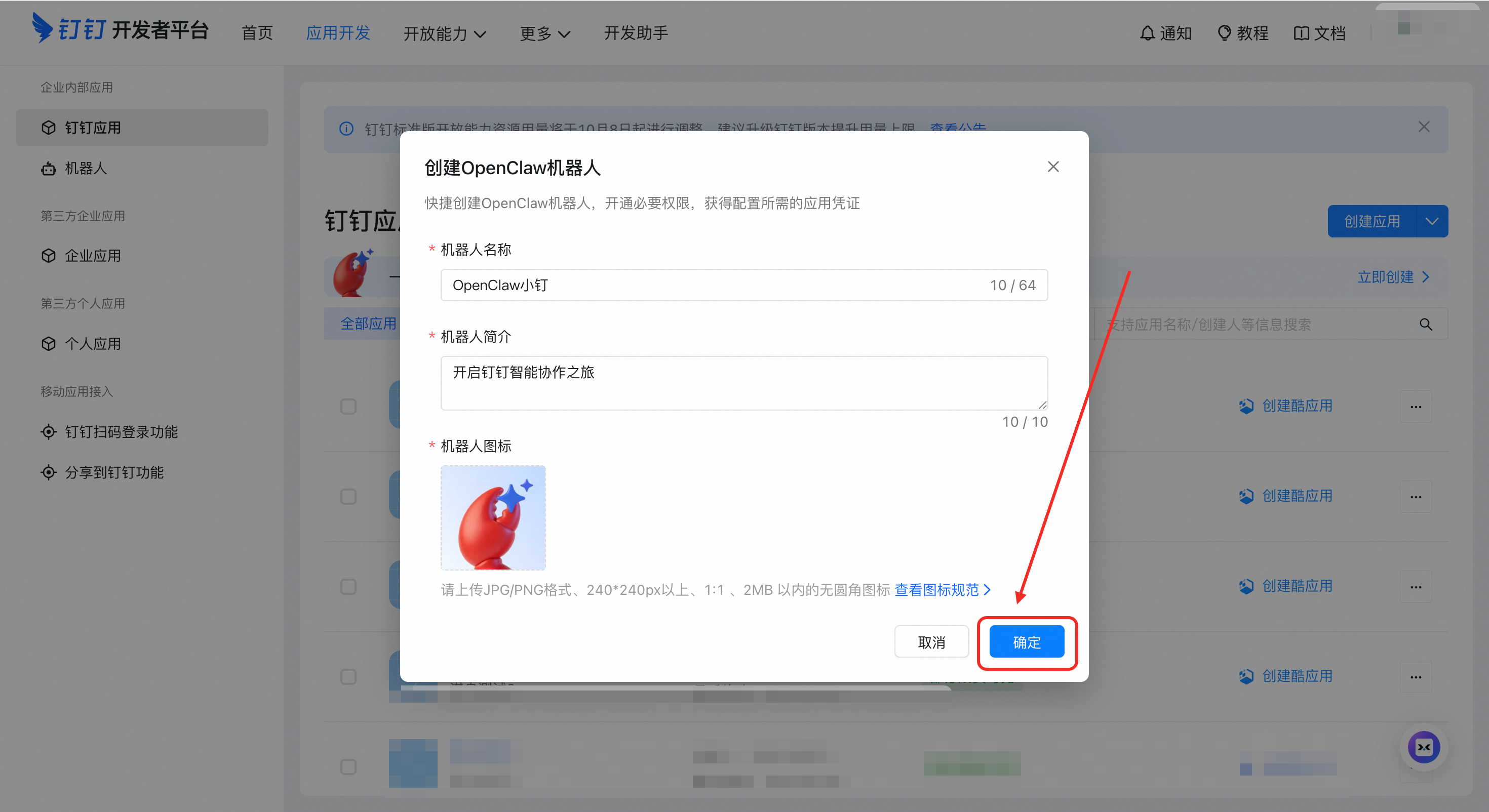
|
|
185
|
-
|
|
186
|
-
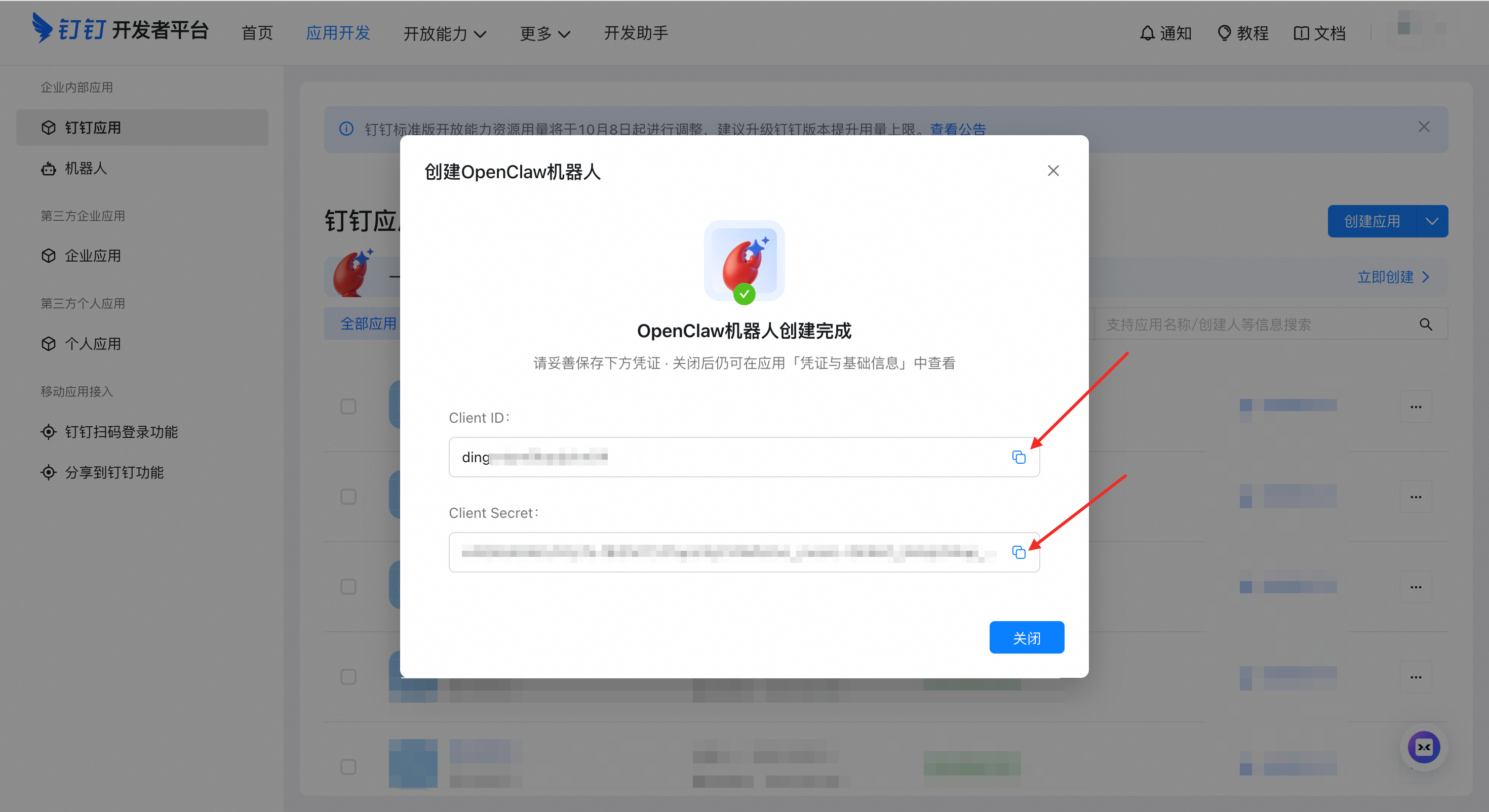
|
|
187
|
-
|
|
188
|
-
> ⚠️ **重要**:Client ID和 Client Secret是机器人的唯一凭证。请合理保存。
|
|
189
|
-
|
|
190
|
-
---
|
|
191
|
-
|
|
192
|
-
### 步骤 3:配置 OpenClaw
|
|
193
|
-
|
|
194
|
-
你有三种方式配置连接器:
|
|
195
|
-
|
|
196
|
-
#### 方式 A:配置向导(推荐新手使用)
|
|
197
|
-
|
|
198
|
-
> 你可以直接复制粘贴下面的命令,在终端中运行配置向导。
|
|
199
|
-
|
|
200
|
-
```bash
|
|
201
|
-
openclaw channels add
|
|
202
|
-
```
|
|
203
|
-
|
|
204
|
-
选择 **"DingTalk (钉钉)"**,然后按提示输入:
|
|
205
|
-
- `clientId`(AppKey)
|
|
206
|
-
- `clientSecret`(AppSecret)
|
|
207
|
-
|
|
208
|
-
#### 方式 B:编辑配置文件
|
|
209
|
-
|
|
210
|
-
编辑配置文件:
|
|
211
|
-
|
|
212
|
-
- macOS / Linux:`~/.openclaw/openclaw.json`
|
|
213
|
-
- Windows:`C:\Users\<你的用户名>\.openclaw\openclaw.json`
|
|
214
|
-
|
|
215
|
-
```json
|
|
216
|
-
{
|
|
217
|
-
"channels": {
|
|
218
|
-
"dingtalk-connector": {
|
|
219
|
-
"enabled": true,
|
|
220
|
-
"clientId": "dingxxxxxxxxx",
|
|
221
|
-
"clientSecret": "your_app_secret"
|
|
222
|
-
}
|
|
223
|
-
}
|
|
224
|
-
}
|
|
225
|
-
```
|
|
226
|
-
|
|
227
|
-
> 💡 **提示**:如果文件已有内容,在 `channels` 节点下添加 `dingtalk-connector` 部分即可。
|
|
228
|
-
|
|
229
|
-
---
|
|
230
|
-
|
|
231
|
-
### 步骤 4:重启并测试
|
|
181
|
+
### 步骤 2:重启并测试
|
|
232
182
|
|
|
233
183
|
```bash
|
|
234
184
|
# 重启 OpenClaw Gateway
|
|
@@ -0,0 +1,50 @@
|
|
|
1
|
+
# 钉钉手动创建与手动配置流程
|
|
2
|
+
|
|
3
|
+
当一键扫码授权不可用、扫码失败,或你希望手动控制配置时,可使用本流程。
|
|
4
|
+
|
|
5
|
+
## 1) 手动创建钉钉机器人
|
|
6
|
+
|
|
7
|
+
### 1.1 创建应用
|
|
8
|
+
|
|
9
|
+
1. 访问 [钉钉开放平台](https://open-dev.dingtalk.com/)
|
|
10
|
+
2. 点击 **"应用开发"**
|
|
11
|
+
|
|
12
|
+

|
|
13
|
+
|
|
14
|
+
### 1.2 添加机器人能力
|
|
15
|
+
|
|
16
|
+
1. 在应用详情页,点击一键创建 OpenClaw 机器人应用
|
|
17
|
+
|
|
18
|
+

|
|
19
|
+
|
|
20
|
+
### 1.3 获取凭证
|
|
21
|
+
|
|
22
|
+
1. 完成创建并获取 **"凭证与基础信息"**
|
|
23
|
+
2. 复制你的 **AppKey**(Client ID)
|
|
24
|
+
3. 复制你的 **AppSecret**(Client Secret)
|
|
25
|
+
|
|
26
|
+

|
|
27
|
+

|
|
28
|
+
|
|
29
|
+
> ⚠️ **重要**:`clientId` 和 `clientSecret` 是机器人的唯一凭证,请合理保存。
|
|
30
|
+
|
|
31
|
+
## 2) 手动配置 OpenClaw
|
|
32
|
+
|
|
33
|
+
编辑配置文件:
|
|
34
|
+
|
|
35
|
+
- macOS / Linux:`~/.openclaw/openclaw.json`
|
|
36
|
+
- Windows:`C:\Users\<你的用户名>\.openclaw\openclaw.json`
|
|
37
|
+
|
|
38
|
+
```json
|
|
39
|
+
{
|
|
40
|
+
"channels": {
|
|
41
|
+
"dingtalk-connector": {
|
|
42
|
+
"enabled": true,
|
|
43
|
+
"clientId": "dingxxxxxxxxx",
|
|
44
|
+
"clientSecret": "your_app_secret"
|
|
45
|
+
}
|
|
46
|
+
}
|
|
47
|
+
}
|
|
48
|
+
```
|
|
49
|
+
|
|
50
|
+
> 💡 **提示**:如果文件已有内容,在 `channels` 节点下添加 `dingtalk-connector` 部分即可。
|
package/openclaw.plugin.json
CHANGED
package/package.json
CHANGED
|
@@ -0,0 +1,14 @@
|
|
|
1
|
+
/**
|
|
2
|
+
* Configuration helpers for DingTalk device registration.
|
|
3
|
+
*
|
|
4
|
+
* Separated from device-auth.ts to isolate environment variable access
|
|
5
|
+
* from network modules, avoiding security scanner "env + network" patterns.
|
|
6
|
+
*/
|
|
7
|
+
|
|
8
|
+
export function getRegistrationBaseUrl(): string {
|
|
9
|
+
return process.env.DINGTALK_REGISTRATION_BASE_URL?.trim() || "https://oapi.dingtalk.com";
|
|
10
|
+
}
|
|
11
|
+
|
|
12
|
+
export function getRegistrationSource(): string {
|
|
13
|
+
return process.env.DINGTALK_REGISTRATION_SOURCE?.trim() || "openClaw";
|
|
14
|
+
}
|
|
@@ -0,0 +1,197 @@
|
|
|
1
|
+
import { dingtalkHttp } from "./utils/http-client.ts";
|
|
2
|
+
import { getRegistrationBaseUrl, getRegistrationSource } from "./device-auth-config.ts";
|
|
3
|
+
|
|
4
|
+
type RegistrationApiResponse<T extends Record<string, unknown>> = T & {
|
|
5
|
+
errcode: number;
|
|
6
|
+
errmsg?: string;
|
|
7
|
+
};
|
|
8
|
+
|
|
9
|
+
type InitResponse = RegistrationApiResponse<{
|
|
10
|
+
nonce?: string;
|
|
11
|
+
expires_in?: number;
|
|
12
|
+
}>;
|
|
13
|
+
|
|
14
|
+
type BeginResponse = RegistrationApiResponse<{
|
|
15
|
+
device_code?: string;
|
|
16
|
+
user_code?: string;
|
|
17
|
+
verification_uri?: string;
|
|
18
|
+
verification_uri_complete?: string;
|
|
19
|
+
expires_in?: number;
|
|
20
|
+
interval?: number;
|
|
21
|
+
}>;
|
|
22
|
+
|
|
23
|
+
type PollResponse = RegistrationApiResponse<{
|
|
24
|
+
status?: string;
|
|
25
|
+
client_id?: string;
|
|
26
|
+
client_secret?: string;
|
|
27
|
+
fail_reason?: string;
|
|
28
|
+
}>;
|
|
29
|
+
|
|
30
|
+
export type DingtalkRegistrationBeginResult = {
|
|
31
|
+
deviceCode: string;
|
|
32
|
+
userCode?: string;
|
|
33
|
+
verificationUri?: string;
|
|
34
|
+
verificationUriComplete: string;
|
|
35
|
+
expiresInSeconds: number;
|
|
36
|
+
intervalSeconds: number;
|
|
37
|
+
};
|
|
38
|
+
|
|
39
|
+
export type DingtalkRegistrationPollStatus =
|
|
40
|
+
| "WAITING"
|
|
41
|
+
| "SUCCESS"
|
|
42
|
+
| "FAIL"
|
|
43
|
+
| "EXPIRED"
|
|
44
|
+
| "UNKNOWN";
|
|
45
|
+
|
|
46
|
+
function assertApiOk<T extends Record<string, unknown>>(
|
|
47
|
+
data: RegistrationApiResponse<T>,
|
|
48
|
+
action: string,
|
|
49
|
+
): RegistrationApiResponse<T> {
|
|
50
|
+
if (!data || data.errcode !== 0) {
|
|
51
|
+
throw new Error(`[${action}] ${data?.errmsg || "unknown error"} (errcode=${data?.errcode ?? "N/A"})`);
|
|
52
|
+
}
|
|
53
|
+
return data;
|
|
54
|
+
}
|
|
55
|
+
|
|
56
|
+
export async function beginDingtalkRegistration(): Promise<DingtalkRegistrationBeginResult> {
|
|
57
|
+
const initResp = await dingtalkHttp.post<InitResponse>(
|
|
58
|
+
`${getRegistrationBaseUrl()}/app/registration/init`,
|
|
59
|
+
{ source: getRegistrationSource() },
|
|
60
|
+
);
|
|
61
|
+
const initData = assertApiOk(initResp.data, "init");
|
|
62
|
+
const nonce = String(initData.nonce ?? "").trim();
|
|
63
|
+
if (!nonce) {
|
|
64
|
+
throw new Error("[init] missing nonce");
|
|
65
|
+
}
|
|
66
|
+
|
|
67
|
+
const beginResp = await dingtalkHttp.post<BeginResponse>(
|
|
68
|
+
`${getRegistrationBaseUrl()}/app/registration/begin`,
|
|
69
|
+
{ nonce },
|
|
70
|
+
);
|
|
71
|
+
const beginData = assertApiOk(beginResp.data, "begin");
|
|
72
|
+
const deviceCode = String(beginData.device_code ?? "").trim();
|
|
73
|
+
const verificationUriComplete = String(beginData.verification_uri_complete ?? "").trim();
|
|
74
|
+
const verificationUri = String(beginData.verification_uri ?? "").trim() || undefined;
|
|
75
|
+
const userCode = String(beginData.user_code ?? "").trim() || undefined;
|
|
76
|
+
const expiresInSeconds = Number(beginData.expires_in ?? 7200);
|
|
77
|
+
const intervalSeconds = Number(beginData.interval ?? 3);
|
|
78
|
+
|
|
79
|
+
if (!deviceCode) {
|
|
80
|
+
throw new Error("[begin] missing device_code");
|
|
81
|
+
}
|
|
82
|
+
if (!verificationUriComplete) {
|
|
83
|
+
throw new Error("[begin] missing verification_uri_complete");
|
|
84
|
+
}
|
|
85
|
+
|
|
86
|
+
return {
|
|
87
|
+
deviceCode,
|
|
88
|
+
userCode,
|
|
89
|
+
verificationUri,
|
|
90
|
+
verificationUriComplete,
|
|
91
|
+
expiresInSeconds: Number.isFinite(expiresInSeconds) && expiresInSeconds > 0 ? expiresInSeconds : 7200,
|
|
92
|
+
intervalSeconds: Number.isFinite(intervalSeconds) && intervalSeconds > 0 ? intervalSeconds : 5,
|
|
93
|
+
};
|
|
94
|
+
}
|
|
95
|
+
|
|
96
|
+
export async function pollDingtalkRegistration(params: {
|
|
97
|
+
deviceCode: string;
|
|
98
|
+
}): Promise<{
|
|
99
|
+
status: DingtalkRegistrationPollStatus;
|
|
100
|
+
clientId?: string;
|
|
101
|
+
clientSecret?: string;
|
|
102
|
+
failReason?: string;
|
|
103
|
+
}> {
|
|
104
|
+
const pollResp = await dingtalkHttp.post<PollResponse>(
|
|
105
|
+
`${getRegistrationBaseUrl()}/app/registration/poll`,
|
|
106
|
+
{ device_code: params.deviceCode },
|
|
107
|
+
);
|
|
108
|
+
const pollData = assertApiOk(pollResp.data, "poll");
|
|
109
|
+
const statusRaw = String(pollData.status ?? "").trim().toUpperCase();
|
|
110
|
+
const status: DingtalkRegistrationPollStatus =
|
|
111
|
+
statusRaw === "WAITING" || statusRaw === "SUCCESS" || statusRaw === "FAIL" || statusRaw === "EXPIRED"
|
|
112
|
+
? statusRaw
|
|
113
|
+
: "UNKNOWN";
|
|
114
|
+
|
|
115
|
+
return {
|
|
116
|
+
status,
|
|
117
|
+
clientId: String(pollData.client_id ?? "").trim() || undefined,
|
|
118
|
+
clientSecret: String(pollData.client_secret ?? "").trim() || undefined,
|
|
119
|
+
failReason: String(pollData.fail_reason ?? "").trim() || undefined,
|
|
120
|
+
};
|
|
121
|
+
}
|
|
122
|
+
|
|
123
|
+
function sleep(ms: number): Promise<void> {
|
|
124
|
+
return new Promise((resolve) => setTimeout(resolve, ms));
|
|
125
|
+
}
|
|
126
|
+
|
|
127
|
+
export async function waitForDingtalkRegistrationSuccess(params: {
|
|
128
|
+
deviceCode: string;
|
|
129
|
+
intervalSeconds: number;
|
|
130
|
+
expiresInSeconds: number;
|
|
131
|
+
}): Promise<{ clientId: string; clientSecret: string }> {
|
|
132
|
+
const RETRY_WINDOW_MS = 2 * 60 * 1000; // 2 minutes retry window for transient errors
|
|
133
|
+
const startedAt = Date.now();
|
|
134
|
+
const timeoutMs = Math.max(1, params.expiresInSeconds) * 1000;
|
|
135
|
+
const intervalMs = Math.max(1, params.intervalSeconds) * 1000;
|
|
136
|
+
let retryStart = 0;
|
|
137
|
+
|
|
138
|
+
while (Date.now() - startedAt < timeoutMs) {
|
|
139
|
+
await sleep(intervalMs);
|
|
140
|
+
let polled;
|
|
141
|
+
try {
|
|
142
|
+
polled = await pollDingtalkRegistration({ deviceCode: params.deviceCode });
|
|
143
|
+
} catch (err) {
|
|
144
|
+
// Network or server error — start retry window
|
|
145
|
+
if (!retryStart) retryStart = Date.now();
|
|
146
|
+
if (Date.now() - retryStart < RETRY_WINDOW_MS) {
|
|
147
|
+
continue;
|
|
148
|
+
}
|
|
149
|
+
throw new Error(`poll failed after ${RETRY_WINDOW_MS / 1000}s retries: ${err instanceof Error ? err.message : String(err)}`);
|
|
150
|
+
}
|
|
151
|
+
|
|
152
|
+
if (polled.status === "WAITING") {
|
|
153
|
+
retryStart = 0;
|
|
154
|
+
continue;
|
|
155
|
+
}
|
|
156
|
+
if (polled.status === "SUCCESS") {
|
|
157
|
+
if (!polled.clientId || !polled.clientSecret) {
|
|
158
|
+
throw new Error("authorization succeeded but credentials are missing");
|
|
159
|
+
}
|
|
160
|
+
return {
|
|
161
|
+
clientId: polled.clientId,
|
|
162
|
+
clientSecret: polled.clientSecret,
|
|
163
|
+
};
|
|
164
|
+
}
|
|
165
|
+
// FAIL / EXPIRED / UNKNOWN — start retry window instead of immediate exit
|
|
166
|
+
if (!retryStart) retryStart = Date.now();
|
|
167
|
+
if (Date.now() - retryStart < RETRY_WINDOW_MS) {
|
|
168
|
+
continue;
|
|
169
|
+
}
|
|
170
|
+
if (polled.status === "FAIL") {
|
|
171
|
+
throw new Error(polled.failReason || "authorization failed");
|
|
172
|
+
}
|
|
173
|
+
if (polled.status === "EXPIRED") {
|
|
174
|
+
throw new Error("authorization expired, please retry");
|
|
175
|
+
}
|
|
176
|
+
throw new Error("authorization returned unknown status");
|
|
177
|
+
}
|
|
178
|
+
|
|
179
|
+
throw new Error("authorization timeout, please retry");
|
|
180
|
+
}
|
|
181
|
+
|
|
182
|
+
export async function renderQrCodeText(content: string): Promise<string | null> {
|
|
183
|
+
try {
|
|
184
|
+
const qrModule = await import("qrcode-terminal");
|
|
185
|
+
const qr = (qrModule as { default?: { generate?: Function }; generate?: Function }).default ?? qrModule;
|
|
186
|
+
const generate = qr.generate;
|
|
187
|
+
if (typeof generate !== "function") {
|
|
188
|
+
return null;
|
|
189
|
+
}
|
|
190
|
+
|
|
191
|
+
return await new Promise<string>((resolve) => {
|
|
192
|
+
generate(content, { small: true }, (output: string) => resolve(output));
|
|
193
|
+
});
|
|
194
|
+
} catch {
|
|
195
|
+
return null;
|
|
196
|
+
}
|
|
197
|
+
}
|
package/src/onboarding.ts
CHANGED
|
@@ -18,8 +18,28 @@ import { promptSingleChannelSecretInput } from "openclaw/plugin-sdk/setup";
|
|
|
18
18
|
import { resolveDingtalkAccount, resolveDingtalkCredentials } from "./config/accounts.ts";
|
|
19
19
|
import { probeDingtalk } from "./probe.ts";
|
|
20
20
|
import type { DingtalkConfig } from "./types/index.ts";
|
|
21
|
+
import {
|
|
22
|
+
beginDingtalkRegistration,
|
|
23
|
+
renderQrCodeText,
|
|
24
|
+
waitForDingtalkRegistrationSuccess,
|
|
25
|
+
} from "./device-auth.ts";
|
|
21
26
|
|
|
22
27
|
const channel = "dingtalk-connector" as const;
|
|
28
|
+
const DINGTALK_MANUAL_SETUP_DOC = "docs/DINGTALK_MANUAL_SETUP.md";
|
|
29
|
+
|
|
30
|
+
async function restartOpenclawGateway(prompter: WizardPrompter): Promise<void> {
|
|
31
|
+
await prompter.note(
|
|
32
|
+
[
|
|
33
|
+
"Configuration saved. Please restart the gateway to apply changes:",
|
|
34
|
+
"",
|
|
35
|
+
" openclaw gateway restart",
|
|
36
|
+
"",
|
|
37
|
+
"If the restart fails, try:",
|
|
38
|
+
" openclaw gateway install --force",
|
|
39
|
+
].join("\n"),
|
|
40
|
+
"OpenClaw gateway",
|
|
41
|
+
);
|
|
42
|
+
}
|
|
23
43
|
|
|
24
44
|
function normalizeString(value: unknown): string | undefined {
|
|
25
45
|
if (typeof value === "number") {
|
|
@@ -138,6 +158,92 @@ async function promptDingtalkClientId(params: {
|
|
|
138
158
|
return clientId;
|
|
139
159
|
}
|
|
140
160
|
|
|
161
|
+
async function tryScanAuthorizeDingtalk(prompter: WizardPrompter): Promise<{
|
|
162
|
+
clientId: string;
|
|
163
|
+
clientSecret: string;
|
|
164
|
+
} | null> {
|
|
165
|
+
const useScanAuth = await prompter.confirm({
|
|
166
|
+
message: "Use DingTalk one-click QR authorization to create app credentials?",
|
|
167
|
+
initialValue: true,
|
|
168
|
+
});
|
|
169
|
+
if (!useScanAuth) {
|
|
170
|
+
return null;
|
|
171
|
+
}
|
|
172
|
+
|
|
173
|
+
const begin = await beginDingtalkRegistration();
|
|
174
|
+
const qr = await renderQrCodeText(begin.verificationUriComplete);
|
|
175
|
+
|
|
176
|
+
if (!qr) {
|
|
177
|
+
await prompter.note(
|
|
178
|
+
[
|
|
179
|
+
"QR rendering failed in current terminal.",
|
|
180
|
+
`Authorization URL: ${begin.verificationUriComplete}`,
|
|
181
|
+
"You can continue with URL authorization, or switch to manual credential input.",
|
|
182
|
+
].join("\n"),
|
|
183
|
+
"DingTalk authorization",
|
|
184
|
+
);
|
|
185
|
+
const continueWithUrl = await prompter.confirm({
|
|
186
|
+
message: "QR display failed. Continue with URL authorization?",
|
|
187
|
+
initialValue: true,
|
|
188
|
+
});
|
|
189
|
+
if (!continueWithUrl) {
|
|
190
|
+
await prompter.note(
|
|
191
|
+
`已切换为手动配置流程。文档:${DINGTALK_MANUAL_SETUP_DOC}`,
|
|
192
|
+
"DingTalk authorization",
|
|
193
|
+
);
|
|
194
|
+
// Explicitly fall back to manual flow
|
|
195
|
+
return null;
|
|
196
|
+
}
|
|
197
|
+
}
|
|
198
|
+
|
|
199
|
+
await prompter.note(
|
|
200
|
+
[
|
|
201
|
+
"Scan with DingTalk to configure your bot (请使用钉钉扫码,配置机器人):",
|
|
202
|
+
qr || "[QR rendering unavailable, please open the link below]",
|
|
203
|
+
`Authorization URL: ${begin.verificationUriComplete}`,
|
|
204
|
+
"In the authorization page, you can create a new bot or bind an existing bot.",
|
|
205
|
+
"Waiting for authorization result...",
|
|
206
|
+
]
|
|
207
|
+
.filter(Boolean)
|
|
208
|
+
.join("\n"),
|
|
209
|
+
);
|
|
210
|
+
|
|
211
|
+
const result = await waitForDingtalkRegistrationSuccess({
|
|
212
|
+
deviceCode: begin.deviceCode,
|
|
213
|
+
intervalSeconds: begin.intervalSeconds,
|
|
214
|
+
expiresInSeconds: begin.expiresInSeconds,
|
|
215
|
+
});
|
|
216
|
+
|
|
217
|
+
await prompter.note("Success! Bot configured. (机器人配置成功!)");
|
|
218
|
+
await restartOpenclawGateway(prompter);
|
|
219
|
+
|
|
220
|
+
return result;
|
|
221
|
+
}
|
|
222
|
+
|
|
223
|
+
function formatDingtalkAuthFailure(err: unknown): string {
|
|
224
|
+
const raw = String(err ?? "");
|
|
225
|
+
if (/timeout/i.test(raw)) {
|
|
226
|
+
return "扫码授权超时。";
|
|
227
|
+
}
|
|
228
|
+
if (/expired/i.test(raw)) {
|
|
229
|
+
return "扫码授权已过期。";
|
|
230
|
+
}
|
|
231
|
+
if (/authorization failed/i.test(raw) || /auth/i.test(raw)) {
|
|
232
|
+
return "扫码授权失败。";
|
|
233
|
+
}
|
|
234
|
+
return "扫码授权未成功完成。";
|
|
235
|
+
}
|
|
236
|
+
|
|
237
|
+
async function noteDingtalkManualFallback(prompter: WizardPrompter, err: unknown): Promise<void> {
|
|
238
|
+
await prompter.note(
|
|
239
|
+
[
|
|
240
|
+
`${formatDingtalkAuthFailure(err)} 你仍可继续安装并改用手动配置。`,
|
|
241
|
+
`手动流程文档:${DINGTALK_MANUAL_SETUP_DOC}`,
|
|
242
|
+
].join("\n"),
|
|
243
|
+
"DingTalk authorization",
|
|
244
|
+
);
|
|
245
|
+
}
|
|
246
|
+
|
|
141
247
|
function setDingtalkGroupPolicy(
|
|
142
248
|
cfg: OpenClawConfig,
|
|
143
249
|
groupPolicy: "open" | "allowlist" | "disabled",
|
|
@@ -262,7 +368,7 @@ export const dingtalkOnboardingAdapter: ChannelSetupWizardAdapter = {
|
|
|
262
368
|
}
|
|
263
369
|
}
|
|
264
370
|
|
|
265
|
-
// If not using env vars, prompt for credentials
|
|
371
|
+
// If not using env vars, authorize or prompt for credentials
|
|
266
372
|
if (!canUseEnv) {
|
|
267
373
|
// Check if we should keep existing configuration
|
|
268
374
|
if (resolved && hasConfigSecret) {
|
|
@@ -272,25 +378,78 @@ export const dingtalkOnboardingAdapter: ChannelSetupWizardAdapter = {
|
|
|
272
378
|
});
|
|
273
379
|
|
|
274
380
|
if (!keepExisting) {
|
|
275
|
-
//
|
|
276
|
-
|
|
381
|
+
// Preferred path: one-click QR authorization
|
|
382
|
+
try {
|
|
383
|
+
const authResult = await tryScanAuthorizeDingtalk(prompter);
|
|
384
|
+
if (authResult) {
|
|
385
|
+
clientId = authResult.clientId;
|
|
386
|
+
clientSecret = authResult.clientSecret;
|
|
387
|
+
clientSecretProbeValue = authResult.clientSecret;
|
|
388
|
+
}
|
|
389
|
+
} catch (err) {
|
|
390
|
+
await noteDingtalkManualFallback(prompter, err);
|
|
391
|
+
}
|
|
392
|
+
|
|
393
|
+
// Fallback: manual input
|
|
394
|
+
if (!clientId || !clientSecret) {
|
|
395
|
+
clientId = await promptDingtalkClientId({
|
|
396
|
+
prompter,
|
|
397
|
+
initialValue:
|
|
398
|
+
normalizeString(dingtalkCfg?.clientId) ?? normalizeString(process.env.DINGTALK_CLIENT_ID),
|
|
399
|
+
});
|
|
400
|
+
|
|
401
|
+
const clientSecretResult = await promptSingleChannelSecretInput({
|
|
402
|
+
cfg: next,
|
|
403
|
+
prompter,
|
|
404
|
+
providerHint: "dingtalk",
|
|
405
|
+
credentialLabel: "Client Secret",
|
|
406
|
+
accountConfigured: false,
|
|
407
|
+
canUseEnv: false,
|
|
408
|
+
hasConfigToken: false,
|
|
409
|
+
envPrompt: "",
|
|
410
|
+
keepPrompt: "",
|
|
411
|
+
inputPrompt: "Enter DingTalk Client Secret",
|
|
412
|
+
preferredEnvVar: "DINGTALK_CLIENT_SECRET",
|
|
413
|
+
});
|
|
414
|
+
|
|
415
|
+
if (clientSecretResult.action === "set") {
|
|
416
|
+
clientSecret = clientSecretResult.value;
|
|
417
|
+
clientSecretProbeValue = clientSecretResult.resolvedValue;
|
|
418
|
+
}
|
|
419
|
+
}
|
|
420
|
+
}
|
|
421
|
+
// If keepExisting is true, we don't modify anything
|
|
422
|
+
} else {
|
|
423
|
+
// No existing config: prefer one-click QR authorization
|
|
424
|
+
try {
|
|
425
|
+
const authResult = await tryScanAuthorizeDingtalk(prompter);
|
|
426
|
+
if (authResult) {
|
|
427
|
+
clientId = authResult.clientId;
|
|
428
|
+
clientSecret = authResult.clientSecret;
|
|
429
|
+
clientSecretProbeValue = authResult.clientSecret;
|
|
430
|
+
}
|
|
431
|
+
} catch (err) {
|
|
432
|
+
await noteDingtalkManualFallback(prompter, err);
|
|
433
|
+
}
|
|
434
|
+
|
|
435
|
+
// Fallback to manual input if QR flow is skipped/failed
|
|
436
|
+
if (!clientId || !clientSecret) {
|
|
277
437
|
clientId = await promptDingtalkClientId({
|
|
278
438
|
prompter,
|
|
279
439
|
initialValue:
|
|
280
440
|
normalizeString(dingtalkCfg?.clientId) ?? normalizeString(process.env.DINGTALK_CLIENT_ID),
|
|
281
441
|
});
|
|
282
442
|
|
|
283
|
-
// Step 2: Then prompt for Client Secret
|
|
284
443
|
const clientSecretResult = await promptSingleChannelSecretInput({
|
|
285
444
|
cfg: next,
|
|
286
445
|
prompter,
|
|
287
446
|
providerHint: "dingtalk",
|
|
288
447
|
credentialLabel: "Client Secret",
|
|
289
|
-
accountConfigured: false,
|
|
290
|
-
canUseEnv: false,
|
|
291
|
-
hasConfigToken: false,
|
|
292
|
-
envPrompt: "",
|
|
293
|
-
keepPrompt: "",
|
|
448
|
+
accountConfigured: false,
|
|
449
|
+
canUseEnv: false,
|
|
450
|
+
hasConfigToken: false,
|
|
451
|
+
envPrompt: "",
|
|
452
|
+
keepPrompt: "",
|
|
294
453
|
inputPrompt: "Enter DingTalk Client Secret",
|
|
295
454
|
preferredEnvVar: "DINGTALK_CLIENT_SECRET",
|
|
296
455
|
});
|
|
@@ -300,35 +459,6 @@ export const dingtalkOnboardingAdapter: ChannelSetupWizardAdapter = {
|
|
|
300
459
|
clientSecretProbeValue = clientSecretResult.resolvedValue;
|
|
301
460
|
}
|
|
302
461
|
}
|
|
303
|
-
// If keepExisting is true, we don't modify anything
|
|
304
|
-
} else {
|
|
305
|
-
// No existing config, prompt for new credentials
|
|
306
|
-
// Step 1: Prompt for Client ID first
|
|
307
|
-
clientId = await promptDingtalkClientId({
|
|
308
|
-
prompter,
|
|
309
|
-
initialValue:
|
|
310
|
-
normalizeString(dingtalkCfg?.clientId) ?? normalizeString(process.env.DINGTALK_CLIENT_ID),
|
|
311
|
-
});
|
|
312
|
-
|
|
313
|
-
// Step 2: Then prompt for Client Secret
|
|
314
|
-
const clientSecretResult = await promptSingleChannelSecretInput({
|
|
315
|
-
cfg: next,
|
|
316
|
-
prompter,
|
|
317
|
-
providerHint: "dingtalk",
|
|
318
|
-
credentialLabel: "Client Secret",
|
|
319
|
-
accountConfigured: false,
|
|
320
|
-
canUseEnv: false,
|
|
321
|
-
hasConfigToken: false,
|
|
322
|
-
envPrompt: "",
|
|
323
|
-
keepPrompt: "",
|
|
324
|
-
inputPrompt: "Enter DingTalk Client Secret",
|
|
325
|
-
preferredEnvVar: "DINGTALK_CLIENT_SECRET",
|
|
326
|
-
});
|
|
327
|
-
|
|
328
|
-
if (clientSecretResult.action === "set") {
|
|
329
|
-
clientSecret = clientSecretResult.value;
|
|
330
|
-
clientSecretProbeValue = clientSecretResult.resolvedValue;
|
|
331
|
-
}
|
|
332
462
|
}
|
|
333
463
|
}
|
|
334
464
|
|