@deventerprisesoftware/scrapi-mcp 0.2.8 → 0.3.0
This diff represents the content of publicly available package versions that have been released to one of the supported registries. The information contained in this diff is provided for informational purposes only and reflects changes between package versions as they appear in their respective public registries.
- package/dist/index.js +106 -115
- package/package.json +66 -52
- package/LICENSE +0 -21
- package/README.md +0 -155
package/dist/index.js
CHANGED
|
@@ -5,38 +5,55 @@ import { McpServer } from "@modelcontextprotocol/sdk/server/mcp.js";
|
|
|
5
5
|
import { StdioServerTransport } from "@modelcontextprotocol/sdk/server/stdio.js";
|
|
6
6
|
import { StreamableHTTPServerTransport } from "@modelcontextprotocol/sdk/server/streamableHttp.js";
|
|
7
7
|
import { z } from "zod";
|
|
8
|
+
import { createRequire } from "module";
|
|
9
|
+
const require = createRequire(import.meta.url);
|
|
10
|
+
const { version: SCRAPI_SERVER_VERSION } = require("./package.json");
|
|
8
11
|
const PORT = process.env.PORT || 5000;
|
|
9
12
|
const SCRAPI_API_KEY = process.env.SCRAPI_API_KEY || "00000000-0000-0000-0000-000000000000";
|
|
10
13
|
const SCRAPI_SERVER_NAME = "ScrAPI MCP Server";
|
|
11
|
-
const SCRAPI_SERVER_VERSION = "0.2.8";
|
|
12
14
|
const app = express();
|
|
13
15
|
app.use(cors({
|
|
14
16
|
origin: "*",
|
|
15
17
|
exposedHeaders: ["mcp-session-id", "mcp-protocol-version"],
|
|
16
|
-
allowedHeaders: [
|
|
17
|
-
"Content-Type",
|
|
18
|
-
"mcp-session-id",
|
|
19
|
-
"mcp-protocol-version",
|
|
20
|
-
"Authorization",
|
|
21
|
-
],
|
|
18
|
+
allowedHeaders: ["Content-Type", "mcp-session-id", "mcp-protocol-version", "Authorization"],
|
|
22
19
|
methods: ["GET", "POST", "OPTIONS"],
|
|
23
|
-
preflightContinue: false
|
|
20
|
+
preflightContinue: false,
|
|
24
21
|
}));
|
|
25
22
|
app.use(express.json());
|
|
26
23
|
// Define session configuration schema
|
|
27
24
|
export const configSchema = z.object({
|
|
28
25
|
scrapiApiKey: z.string().optional().describe("ScrAPI API key for scraping. Leave empty for default limited usage."),
|
|
29
26
|
});
|
|
27
|
+
const BROWSER_COMMANDS_DESCRIPTION = "BROWSER COMMANDS: You can optionally provide browser commands to interact with the page before scraping (e.g., clicking buttons, filling forms, scrolling). " +
|
|
28
|
+
"Provide commands as a JSON array string. Available commands:\n" +
|
|
29
|
+
'- Click: {"click": "#buttonId"} - Click an element using CSS selector\n' +
|
|
30
|
+
'- Input: {"input": {"input[name=\'email\']": "value"}} - Fill an input field\n' +
|
|
31
|
+
'- Select: {"select": {"select[name=\'country\']": "USA"}} - Select from dropdown\n' +
|
|
32
|
+
'- Scroll: {"scroll": 1000} - Scroll down (negative values scroll up)\n' +
|
|
33
|
+
'- Wait: {"wait": 5000} - Wait milliseconds (max 15000)\n' +
|
|
34
|
+
'- WaitFor: {"waitfor": "#elementId"} - Wait for element to appear\n' +
|
|
35
|
+
'- JavaScript: {"javascript": "console.log(\'test\')"} - Execute custom JS\n' +
|
|
36
|
+
'Example: [{"click": "#accept-cookies"}, {"wait": 2000}, {"input": {"input[name=\'search\']": "query"}}]';
|
|
30
37
|
// Parse configuration from query parameters
|
|
31
|
-
function parseConfig(req) {
|
|
32
|
-
const configParam = req.query
|
|
33
|
-
if (configParam) {
|
|
34
|
-
return
|
|
38
|
+
export function parseConfig(req) {
|
|
39
|
+
const configParam = req.query["config"];
|
|
40
|
+
if (typeof configParam !== "string") {
|
|
41
|
+
return {};
|
|
42
|
+
}
|
|
43
|
+
try {
|
|
44
|
+
const decoded = Buffer.from(configParam, "base64").toString("utf-8");
|
|
45
|
+
const parsed = JSON.parse(decoded);
|
|
46
|
+
if (parsed !== null && typeof parsed === "object" && !Array.isArray(parsed)) {
|
|
47
|
+
return parsed;
|
|
48
|
+
}
|
|
49
|
+
return {};
|
|
50
|
+
}
|
|
51
|
+
catch {
|
|
52
|
+
return {};
|
|
35
53
|
}
|
|
36
|
-
return {};
|
|
37
54
|
}
|
|
38
55
|
// Create MCP server with your tools
|
|
39
|
-
export default function createServer({ config
|
|
56
|
+
export default function createServer({ config }) {
|
|
40
57
|
const server = new McpServer({
|
|
41
58
|
name: SCRAPI_SERVER_NAME,
|
|
42
59
|
version: SCRAPI_SERVER_VERSION,
|
|
@@ -46,156 +63,130 @@ export default function createServer({ config, }) {
|
|
|
46
63
|
description: "Use a URL to scrape a website using the ScrAPI service and retrieve the result as HTML. " +
|
|
47
64
|
"Use this for scraping website content that is difficult to access because of bot detection, captchas or even geolocation restrictions. " +
|
|
48
65
|
"The result will be in HTML which is preferable if advanced parsing is required.\n\n" +
|
|
49
|
-
|
|
50
|
-
"Provide commands as a JSON array string. Available commands:\n" +
|
|
51
|
-
"- Click: {\"click\": \"#buttonId\"} - Click an element using CSS selector\n" +
|
|
52
|
-
"- Input: {\"input\": {\"input[name='email']\": \"value\"}} - Fill an input field\n" +
|
|
53
|
-
"- Select: {\"select\": {\"select[name='country']\": \"USA\"}} - Select from dropdown\n" +
|
|
54
|
-
"- Scroll: {\"scroll\": 1000} - Scroll down (negative values scroll up)\n" +
|
|
55
|
-
"- Wait: {\"wait\": 5000} - Wait milliseconds (max 15000)\n" +
|
|
56
|
-
"- WaitFor: {\"waitfor\": \"#elementId\"} - Wait for element to appear\n" +
|
|
57
|
-
"- JavaScript: {\"javascript\": \"console.log('test')\"} - Execute custom JS\n" +
|
|
58
|
-
"Example: [{\"click\": \"#accept-cookies\"}, {\"wait\": 2000}, {\"input\": {\"input[name='search']\": \"query\"}}]",
|
|
66
|
+
BROWSER_COMMANDS_DESCRIPTION,
|
|
59
67
|
inputSchema: {
|
|
60
|
-
url: z
|
|
61
|
-
.string()
|
|
62
|
-
.url({ message: "Invalid URL" })
|
|
63
|
-
.describe("The URL to scrape"),
|
|
68
|
+
url: z.string().url({ message: "Invalid URL" }).describe("The URL to scrape"),
|
|
64
69
|
browserCommands: z
|
|
65
70
|
.string()
|
|
66
71
|
.optional()
|
|
67
72
|
.describe("Optional JSON array of browser commands to execute before scraping. See tool description for available commands and format."),
|
|
68
73
|
},
|
|
69
|
-
}, async ({ url, browserCommands }) => await scrapeUrl(url, "HTML", browserCommands));
|
|
74
|
+
}, async ({ url, browserCommands }) => await scrapeUrl(url, "HTML", config.scrapiApiKey || SCRAPI_API_KEY, browserCommands));
|
|
70
75
|
server.registerTool("scrape_url_markdown", {
|
|
71
76
|
title: "Scrape URL and respond with Markdown",
|
|
72
77
|
description: "Use a URL to scrape a website using the ScrAPI service and retrieve the result as Markdown. " +
|
|
73
78
|
"Use this for scraping website content that is difficult to access because of bot detection, captchas or even geolocation restrictions. " +
|
|
74
79
|
"The result will be in Markdown which is preferable if the text content of the webpage is important and not the structural information of the page.\n\n" +
|
|
75
|
-
|
|
76
|
-
"Provide commands as a JSON array string. Available commands:\n" +
|
|
77
|
-
"- Click: {\"click\": \"#buttonId\"} - Click an element using CSS selector\n" +
|
|
78
|
-
"- Input: {\"input\": {\"input[name='email']\": \"value\"}} - Fill an input field\n" +
|
|
79
|
-
"- Select: {\"select\": {\"select[name='country']\": \"USA\"}} - Select from dropdown\n" +
|
|
80
|
-
"- Scroll: {\"scroll\": 1000} - Scroll down (negative values scroll up)\n" +
|
|
81
|
-
"- Wait: {\"wait\": 5000} - Wait milliseconds (max 15000)\n" +
|
|
82
|
-
"- WaitFor: {\"waitfor\": \"#elementId\"} - Wait for element to appear\n" +
|
|
83
|
-
"- JavaScript: {\"javascript\": \"console.log('test')\"} - Execute custom JS\n" +
|
|
84
|
-
"Example: [{\"click\": \"#accept-cookies\"}, {\"wait\": 2000}, {\"input\": {\"input[name='search']\": \"query\"}}]",
|
|
80
|
+
BROWSER_COMMANDS_DESCRIPTION,
|
|
85
81
|
inputSchema: {
|
|
86
|
-
url: z
|
|
87
|
-
.string()
|
|
88
|
-
.url({ message: "Invalid URL" })
|
|
89
|
-
.describe("The URL to scrape"),
|
|
82
|
+
url: z.string().url({ message: "Invalid URL" }).describe("The URL to scrape"),
|
|
90
83
|
browserCommands: z
|
|
91
84
|
.string()
|
|
92
85
|
.optional()
|
|
93
86
|
.describe("Optional JSON array of browser commands to execute before scraping. See tool description for available commands and format."),
|
|
94
87
|
},
|
|
95
|
-
}, async ({ url, browserCommands }) => await scrapeUrl(url, "Markdown", browserCommands));
|
|
96
|
-
|
|
97
|
-
|
|
98
|
-
|
|
99
|
-
|
|
100
|
-
|
|
101
|
-
|
|
102
|
-
|
|
103
|
-
|
|
104
|
-
|
|
105
|
-
|
|
106
|
-
|
|
107
|
-
|
|
108
|
-
|
|
109
|
-
|
|
110
|
-
|
|
111
|
-
|
|
112
|
-
|
|
113
|
-
return {
|
|
114
|
-
content: [
|
|
115
|
-
{
|
|
116
|
-
type: "text",
|
|
117
|
-
text: "Error: Browser commands must be a JSON array.",
|
|
118
|
-
},
|
|
119
|
-
],
|
|
120
|
-
isError: true,
|
|
121
|
-
};
|
|
122
|
-
}
|
|
88
|
+
}, async ({ url, browserCommands }) => await scrapeUrl(url, "Markdown", config.scrapiApiKey || SCRAPI_API_KEY, browserCommands));
|
|
89
|
+
return server.server;
|
|
90
|
+
}
|
|
91
|
+
export async function scrapeUrl(url, format, apiKey, browserCommands) {
|
|
92
|
+
const body = {
|
|
93
|
+
url,
|
|
94
|
+
useBrowser: true,
|
|
95
|
+
solveCaptchas: true,
|
|
96
|
+
acceptDialogs: true,
|
|
97
|
+
proxyType: "Residential",
|
|
98
|
+
responseFormat: format,
|
|
99
|
+
};
|
|
100
|
+
// Parse and add browser commands if provided
|
|
101
|
+
if (browserCommands && browserCommands.trim() !== "") {
|
|
102
|
+
try {
|
|
103
|
+
const commands = JSON.parse(browserCommands);
|
|
104
|
+
if (Array.isArray(commands)) {
|
|
105
|
+
body.browserCommands = commands;
|
|
123
106
|
}
|
|
124
|
-
|
|
125
|
-
const errorMessage = error instanceof Error ? error.message : "Unknown error";
|
|
107
|
+
else {
|
|
126
108
|
return {
|
|
127
109
|
content: [
|
|
128
110
|
{
|
|
129
111
|
type: "text",
|
|
130
|
-
text:
|
|
112
|
+
text: "Error: Browser commands must be a JSON array.",
|
|
131
113
|
},
|
|
132
114
|
],
|
|
133
115
|
isError: true,
|
|
134
116
|
};
|
|
135
117
|
}
|
|
136
118
|
}
|
|
137
|
-
|
|
138
|
-
const
|
|
139
|
-
console.error(`Using ScrAPI on URL: ${url} with format: ${format}`);
|
|
140
|
-
console.error(`Request body: ${requestBody}`);
|
|
141
|
-
const response = await fetch("https://api.scrapi.tech/v1/scrape", {
|
|
142
|
-
method: "POST",
|
|
143
|
-
headers: {
|
|
144
|
-
"User-Agent": `${SCRAPI_SERVER_NAME} - ${SCRAPI_SERVER_VERSION}`,
|
|
145
|
-
"Content-Type": "application/json",
|
|
146
|
-
"X-API-KEY": config.scrapiApiKey || SCRAPI_API_KEY,
|
|
147
|
-
},
|
|
148
|
-
body: requestBody,
|
|
149
|
-
signal: AbortSignal.timeout(300000),
|
|
150
|
-
});
|
|
151
|
-
const data = await response.text();
|
|
152
|
-
if (response.ok) {
|
|
153
|
-
return {
|
|
154
|
-
content: [
|
|
155
|
-
{
|
|
156
|
-
type: "text",
|
|
157
|
-
text: data,
|
|
158
|
-
_meta: {
|
|
159
|
-
mimeType: `text/${format.toLowerCase()}`,
|
|
160
|
-
},
|
|
161
|
-
},
|
|
162
|
-
],
|
|
163
|
-
};
|
|
164
|
-
}
|
|
119
|
+
catch (error) {
|
|
120
|
+
const errorMessage = error instanceof Error ? error.message : "Unknown error";
|
|
165
121
|
return {
|
|
166
122
|
content: [
|
|
167
123
|
{
|
|
168
124
|
type: "text",
|
|
169
|
-
text:
|
|
125
|
+
text: `Error: Invalid browser commands format. ${errorMessage}`,
|
|
170
126
|
},
|
|
171
127
|
],
|
|
172
128
|
isError: true,
|
|
173
129
|
};
|
|
174
130
|
}
|
|
175
|
-
|
|
176
|
-
|
|
177
|
-
|
|
131
|
+
}
|
|
132
|
+
try {
|
|
133
|
+
console.error(`Using ScrAPI on URL: ${url} with format: ${format}`);
|
|
134
|
+
const response = await fetch("https://api.scrapi.tech/v1/scrape", {
|
|
135
|
+
method: "POST",
|
|
136
|
+
headers: {
|
|
137
|
+
"User-Agent": `${SCRAPI_SERVER_NAME} - ${SCRAPI_SERVER_VERSION}`,
|
|
138
|
+
"Content-Type": "application/json",
|
|
139
|
+
"X-API-KEY": apiKey,
|
|
140
|
+
},
|
|
141
|
+
body: JSON.stringify(body),
|
|
142
|
+
// ScrAPI can take up to 5 minutes to solve captchas and load dynamic pages
|
|
143
|
+
signal: AbortSignal.timeout(300000),
|
|
144
|
+
});
|
|
145
|
+
const data = await response.text();
|
|
146
|
+
if (response.ok) {
|
|
178
147
|
return {
|
|
179
148
|
content: [
|
|
180
149
|
{
|
|
181
150
|
type: "text",
|
|
182
|
-
text:
|
|
151
|
+
text: data,
|
|
152
|
+
_meta: {
|
|
153
|
+
mimeType: `text/${format.toLowerCase()}`,
|
|
154
|
+
},
|
|
183
155
|
},
|
|
184
156
|
],
|
|
185
|
-
isError: true,
|
|
186
157
|
};
|
|
187
158
|
}
|
|
159
|
+
return {
|
|
160
|
+
content: [
|
|
161
|
+
{
|
|
162
|
+
type: "text",
|
|
163
|
+
text: data,
|
|
164
|
+
},
|
|
165
|
+
],
|
|
166
|
+
isError: true,
|
|
167
|
+
};
|
|
168
|
+
}
|
|
169
|
+
catch (error) {
|
|
170
|
+
console.error("Error calling API:", error);
|
|
171
|
+
const errorMessage = error instanceof Error ? error.message : "Unknown error occurred";
|
|
172
|
+
return {
|
|
173
|
+
content: [
|
|
174
|
+
{
|
|
175
|
+
type: "text",
|
|
176
|
+
text: `Error: Failed to scrape URL. ${errorMessage}`,
|
|
177
|
+
},
|
|
178
|
+
],
|
|
179
|
+
isError: true,
|
|
180
|
+
};
|
|
188
181
|
}
|
|
189
|
-
return server.server;
|
|
190
182
|
}
|
|
191
183
|
app.all("/mcp", async (req, res) => {
|
|
192
184
|
try {
|
|
193
|
-
// Parse configuration
|
|
194
|
-
const rawConfig = parseConfig
|
|
195
|
-
|
|
196
|
-
|
|
197
|
-
|
|
198
|
-
: {};
|
|
185
|
+
// Parse and validate configuration
|
|
186
|
+
const rawConfig = parseConfig(req);
|
|
187
|
+
const config = configSchema.parse({
|
|
188
|
+
scrapiApiKey: rawConfig["scrapiApiKey"] ?? SCRAPI_API_KEY,
|
|
189
|
+
});
|
|
199
190
|
const server = createServer({ config });
|
|
200
191
|
const transport = new StreamableHTTPServerTransport({
|
|
201
192
|
sessionIdGenerator: undefined,
|
package/package.json
CHANGED
|
@@ -1,52 +1,66 @@
|
|
|
1
|
-
{
|
|
2
|
-
"name": "@deventerprisesoftware/scrapi-mcp",
|
|
3
|
-
"version": "0.
|
|
4
|
-
"description": "MCP server for using ScrAPI to scrape web pages.",
|
|
5
|
-
"keywords": [
|
|
6
|
-
"mcp",
|
|
7
|
-
"web scraper",
|
|
8
|
-
"web scraping",
|
|
9
|
-
"web data extractor",
|
|
10
|
-
"claude",
|
|
11
|
-
"ai"
|
|
12
|
-
],
|
|
13
|
-
"homepage": "https://scrapi.tech",
|
|
14
|
-
"bugs": {
|
|
15
|
-
"url": "https://github.com/DevEnterpriseSoftware/scrapi-mcp/issues"
|
|
16
|
-
},
|
|
17
|
-
"repository": {
|
|
18
|
-
"type": "git",
|
|
19
|
-
"url": "git+https://github.com/DevEnterpriseSoftware/scrapi-mcp.git"
|
|
20
|
-
},
|
|
21
|
-
"license": "MIT",
|
|
22
|
-
"author": "DevEnterprise Software (https://deventerprise.com)",
|
|
23
|
-
"type": "module",
|
|
24
|
-
"bin": {
|
|
25
|
-
"scrapi-mcp": "dist/index.js"
|
|
26
|
-
},
|
|
27
|
-
"files": [
|
|
28
|
-
"dist"
|
|
29
|
-
],
|
|
30
|
-
"scripts": {
|
|
31
|
-
"build": "tsc && shx chmod +x dist/*.js",
|
|
32
|
-
"
|
|
33
|
-
"watch": "tsc --watch",
|
|
34
|
-
"
|
|
35
|
-
"
|
|
36
|
-
"
|
|
37
|
-
"
|
|
38
|
-
|
|
39
|
-
|
|
40
|
-
"
|
|
41
|
-
"
|
|
42
|
-
"
|
|
43
|
-
|
|
44
|
-
|
|
45
|
-
|
|
46
|
-
"
|
|
47
|
-
"
|
|
48
|
-
"
|
|
49
|
-
|
|
50
|
-
|
|
51
|
-
|
|
52
|
-
}
|
|
1
|
+
{
|
|
2
|
+
"name": "@deventerprisesoftware/scrapi-mcp",
|
|
3
|
+
"version": "0.3.0",
|
|
4
|
+
"description": "MCP server for using ScrAPI to scrape web pages.",
|
|
5
|
+
"keywords": [
|
|
6
|
+
"mcp",
|
|
7
|
+
"web scraper",
|
|
8
|
+
"web scraping",
|
|
9
|
+
"web data extractor",
|
|
10
|
+
"claude",
|
|
11
|
+
"ai"
|
|
12
|
+
],
|
|
13
|
+
"homepage": "https://scrapi.tech",
|
|
14
|
+
"bugs": {
|
|
15
|
+
"url": "https://github.com/DevEnterpriseSoftware/scrapi-mcp/issues"
|
|
16
|
+
},
|
|
17
|
+
"repository": {
|
|
18
|
+
"type": "git",
|
|
19
|
+
"url": "git+https://github.com/DevEnterpriseSoftware/scrapi-mcp.git"
|
|
20
|
+
},
|
|
21
|
+
"license": "MIT",
|
|
22
|
+
"author": "DevEnterprise Software (https://deventerprise.com)",
|
|
23
|
+
"type": "module",
|
|
24
|
+
"bin": {
|
|
25
|
+
"scrapi-mcp": "dist/index.js"
|
|
26
|
+
},
|
|
27
|
+
"files": [
|
|
28
|
+
"dist"
|
|
29
|
+
],
|
|
30
|
+
"scripts": {
|
|
31
|
+
"build": "tsc && shx chmod +x dist/*.js",
|
|
32
|
+
"release": "npm run build && npm publish",
|
|
33
|
+
"watch": "tsc --watch",
|
|
34
|
+
"lint": "eslint index.ts",
|
|
35
|
+
"format": "prettier --write .",
|
|
36
|
+
"format:check": "prettier --check .",
|
|
37
|
+
"test": "vitest run",
|
|
38
|
+
"test:watch": "vitest",
|
|
39
|
+
"ncu": "npx npm-check-updates --interactive",
|
|
40
|
+
"docker:build": "docker build -f Dockerfile -t deventerprisesoftware/scrapi-mcp:v%npm_package_version% -t deventerprisesoftware/scrapi-mcp:latest .",
|
|
41
|
+
"docker:push": "docker push deventerprisesoftware/scrapi-mcp --all-tags",
|
|
42
|
+
"docker:release": "npm run build && npm run docker:build && npm run docker:push"
|
|
43
|
+
},
|
|
44
|
+
"dependencies": {
|
|
45
|
+
"@modelcontextprotocol/sdk": "^1.29.0",
|
|
46
|
+
"cors": "^2.8.6",
|
|
47
|
+
"express": "^5.2.1",
|
|
48
|
+
"zod": "^3.25.76"
|
|
49
|
+
},
|
|
50
|
+
"engines": {
|
|
51
|
+
"node": ">=18"
|
|
52
|
+
},
|
|
53
|
+
"devDependencies": {
|
|
54
|
+
"@eslint/js": "^10.0.1",
|
|
55
|
+
"@types/cors": "^2.8.19",
|
|
56
|
+
"@types/express": "^5.0.6",
|
|
57
|
+
"@types/node": "^25.9.1",
|
|
58
|
+
"eslint": "^10.4.0",
|
|
59
|
+
"eslint-config-prettier": "^10.1.8",
|
|
60
|
+
"prettier": "^3.8.3",
|
|
61
|
+
"shx": "^0.4.0",
|
|
62
|
+
"typescript": "^6.0.3",
|
|
63
|
+
"typescript-eslint": "^8.59.4",
|
|
64
|
+
"vitest": "^4.1.7"
|
|
65
|
+
}
|
|
66
|
+
}
|
package/LICENSE
DELETED
|
@@ -1,21 +0,0 @@
|
|
|
1
|
-
MIT License
|
|
2
|
-
|
|
3
|
-
Copyright (c) 2025 DevEnterprise Software
|
|
4
|
-
|
|
5
|
-
Permission is hereby granted, free of charge, to any person obtaining a copy
|
|
6
|
-
of this software and associated documentation files (the "Software"), to deal
|
|
7
|
-
in the Software without restriction, including without limitation the rights
|
|
8
|
-
to use, copy, modify, merge, publish, distribute, sublicense, and/or sell
|
|
9
|
-
copies of the Software, and to permit persons to whom the Software is
|
|
10
|
-
furnished to do so, subject to the following conditions:
|
|
11
|
-
|
|
12
|
-
The above copyright notice and this permission notice shall be included in all
|
|
13
|
-
copies or substantial portions of the Software.
|
|
14
|
-
|
|
15
|
-
THE SOFTWARE IS PROVIDED "AS IS", WITHOUT WARRANTY OF ANY KIND, EXPRESS OR
|
|
16
|
-
IMPLIED, INCLUDING BUT NOT LIMITED TO THE WARRANTIES OF MERCHANTABILITY,
|
|
17
|
-
FITNESS FOR A PARTICULAR PURPOSE AND NONINFRINGEMENT. IN NO EVENT SHALL THE
|
|
18
|
-
AUTHORS OR COPYRIGHT HOLDERS BE LIABLE FOR ANY CLAIM, DAMAGES OR OTHER
|
|
19
|
-
LIABILITY, WHETHER IN AN ACTION OF CONTRACT, TORT OR OTHERWISE, ARISING FROM,
|
|
20
|
-
OUT OF OR IN CONNECTION WITH THE SOFTWARE OR THE USE OR OTHER DEALINGS IN THE
|
|
21
|
-
SOFTWARE.
|
package/README.md
DELETED
|
@@ -1,155 +0,0 @@
|
|
|
1
|
-

|
|
2
|
-
|
|
3
|
-
# ScrAPI MCP Server
|
|
4
|
-
|
|
5
|
-
[](https://opensource.org/licenses/MIT)
|
|
6
|
-
[](https://www.npmjs.com/package/@deventerprisesoftware/scrapi-mcp)
|
|
7
|
-
[](https://hub.docker.com/r/deventerprisesoftware/scrapi-mcp)
|
|
8
|
-
[](https://smithery.ai/server/@DevEnterpriseSoftware/scrapi-mcp)
|
|
9
|
-
|
|
10
|
-
MCP server for using [ScrAPI](https://scrapi.tech) to scrape web pages.
|
|
11
|
-
|
|
12
|
-
ScrAPI is your ultimate web scraping solution, offering powerful, reliable, and easy-to-use features to extract data from any website effortlessly.
|
|
13
|
-
|
|
14
|
-
<a href="https://glama.ai/mcp/servers/@DevEnterpriseSoftware/scrapi-mcp">
|
|
15
|
-
<img width="380" height="200" src="https://glama.ai/mcp/servers/@DevEnterpriseSoftware/scrapi-mcp/badge" alt="ScrAPI Server MCP server" />
|
|
16
|
-
</a>
|
|
17
|
-
|
|
18
|
-
## Tools
|
|
19
|
-
|
|
20
|
-
1. `scrape_url_html`
|
|
21
|
-
- Use a URL to scrape a website using the ScrAPI service and retrieve the result as HTML.
|
|
22
|
-
Use this for scraping website content that is difficult to access because of bot detection, captchas or even geolocation restrictions.
|
|
23
|
-
The result will be in HTML which is preferable if advanced parsing is required.
|
|
24
|
-
- Inputs:
|
|
25
|
-
- `url` (string, required): The URL to scrape
|
|
26
|
-
- `browserCommands` (string, optional): JSON array of browser commands to execute before scraping
|
|
27
|
-
- Returns: HTML content of the URL
|
|
28
|
-
|
|
29
|
-
2. `scrape_url_markdown`
|
|
30
|
-
- Use a URL to scrape a website using the ScrAPI service and retrieve the result as Markdown.
|
|
31
|
-
Use this for scraping website content that is difficult to access because of bot detection, captchas or even geolocation restrictions.
|
|
32
|
-
The result will be in Markdown which is preferable if the text content of the webpage is important and not the structural information of the page.
|
|
33
|
-
- Inputs:
|
|
34
|
-
- `url` (string, required): The URL to scrape
|
|
35
|
-
- `browserCommands` (string, optional): JSON array of browser commands to execute before scraping
|
|
36
|
-
- Returns: Markdown content of the URL
|
|
37
|
-
|
|
38
|
-
## Browser Commands
|
|
39
|
-
|
|
40
|
-
Both tools support optional browser commands that allow you to interact with the page before scraping. This is useful for:
|
|
41
|
-
- Clicking buttons (e.g., "Accept Cookies", "Load More")
|
|
42
|
-
- Filling out forms
|
|
43
|
-
- Selecting dropdown options
|
|
44
|
-
- Scrolling to load dynamic content
|
|
45
|
-
- Waiting for elements to appear
|
|
46
|
-
- Executing custom JavaScript
|
|
47
|
-
|
|
48
|
-
### Available Commands
|
|
49
|
-
|
|
50
|
-
Commands are provided as a JSON array string. All commands are executed with human-like behavior (random mouse movements, variable typing speed, etc.):
|
|
51
|
-
|
|
52
|
-
| Command | Format | Description |
|
|
53
|
-
|---------|--------|-------------|
|
|
54
|
-
| **Click** | `{"click": "#buttonId"}` | Click an element using CSS selector |
|
|
55
|
-
| **Input** | `{"input": {"input[name='email']": "value"}}` | Fill an input field |
|
|
56
|
-
| **Select** | `{"select": {"select[name='country']": "USA"}}` | Select from dropdown (by value or text) |
|
|
57
|
-
| **Scroll** | `{"scroll": 1000}` | Scroll down by pixels (negative values scroll up) |
|
|
58
|
-
| **Wait** | `{"wait": 5000}` | Wait for milliseconds (max 15000) |
|
|
59
|
-
| **WaitFor** | `{"waitfor": "#elementId"}` | Wait for element to appear in DOM |
|
|
60
|
-
| **JavaScript** | `{"javascript": "console.log('test')"}` | Execute custom JavaScript code |
|
|
61
|
-
|
|
62
|
-
### Example Usage
|
|
63
|
-
|
|
64
|
-
```json
|
|
65
|
-
[
|
|
66
|
-
{"click": "#accept-cookies"},
|
|
67
|
-
{"wait": 2000},
|
|
68
|
-
{"input": {"input[name='search']": "web scraping"}},
|
|
69
|
-
{"click": "button[type='submit']"},
|
|
70
|
-
{"waitfor": "#results"},
|
|
71
|
-
{"scroll": 500}
|
|
72
|
-
]
|
|
73
|
-
```
|
|
74
|
-
|
|
75
|
-
### Finding CSS Selectors
|
|
76
|
-
|
|
77
|
-
Need help finding CSS selectors? Try the [Rayrun browser extension](https://chromewebstore.google.com/detail/rayrun/olljocejdgeipcaompahmnfebhkfmnma) to easily select elements and generate selectors.
|
|
78
|
-
|
|
79
|
-
For more details, see the [Browser Commands documentation](https://scrapi.tech/docs/api_details/v1_scrape/browser_commands).
|
|
80
|
-
|
|
81
|
-
## Setup
|
|
82
|
-
|
|
83
|
-
### API Key (optional)
|
|
84
|
-
|
|
85
|
-
Optionally get an API key from the [ScrAPI website](https://scrapi.tech).
|
|
86
|
-
|
|
87
|
-
Without an API key you will be limited to one concurrent call and twenty free calls per day with minimal queuing capabilities.
|
|
88
|
-
|
|
89
|
-
### Cloud Server
|
|
90
|
-
|
|
91
|
-
The ScrAPI MCP Server is also available in the cloud over SSE at https://api.scrapi.tech/mcp/sse and streamable HTTP at https://api.scrapi.tech/mcp
|
|
92
|
-
|
|
93
|
-
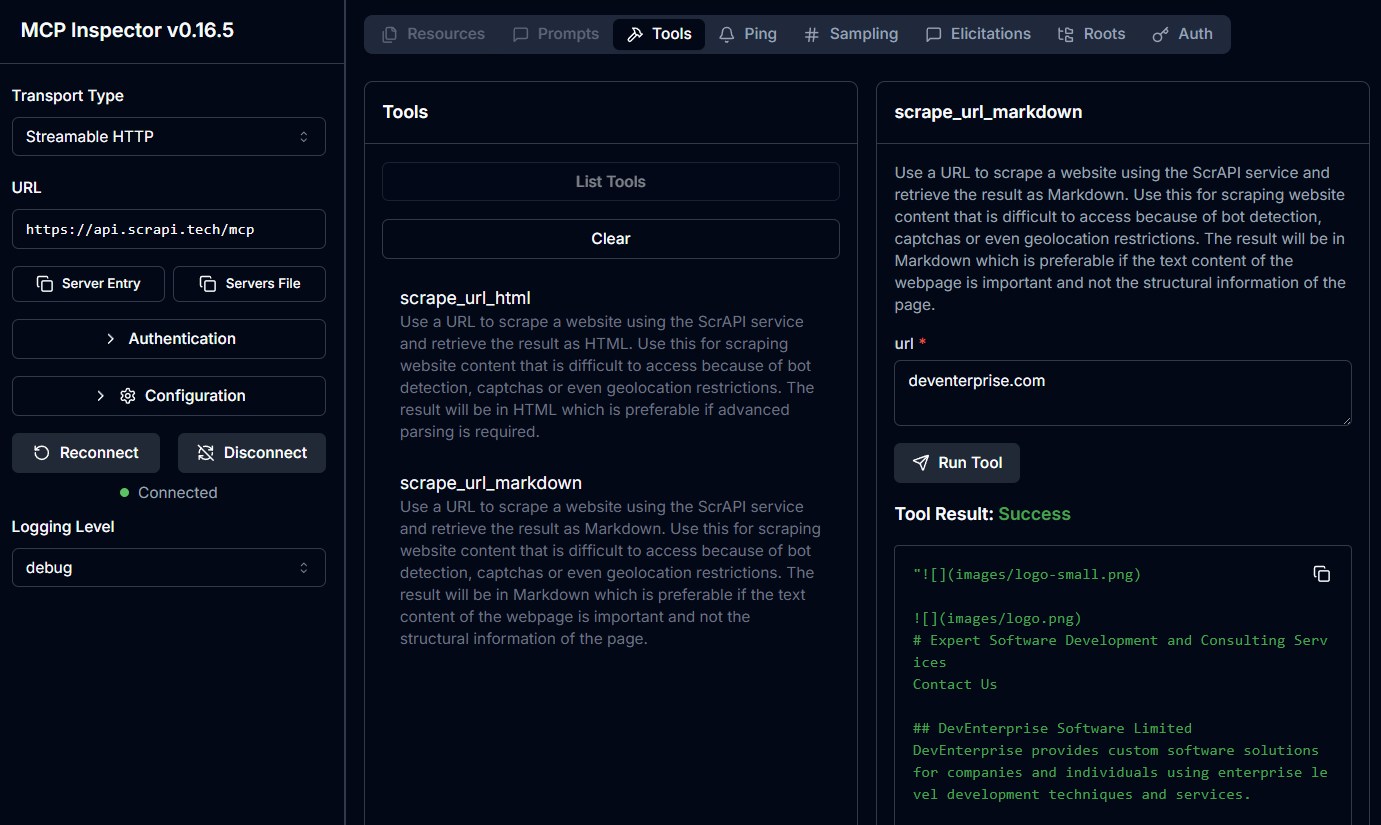
Cloud MCP servers are not widely supported yet but you can access this directly from your own custom clients or use [MCP Inspector](https://github.com/modelcontextprotocol/inspector) to test it. There is currently no facility to pass through your API key when connecting to the cloud MCP server.
|
|
94
|
-
|
|
95
|
-
|
|
96
|
-
|
|
97
|
-
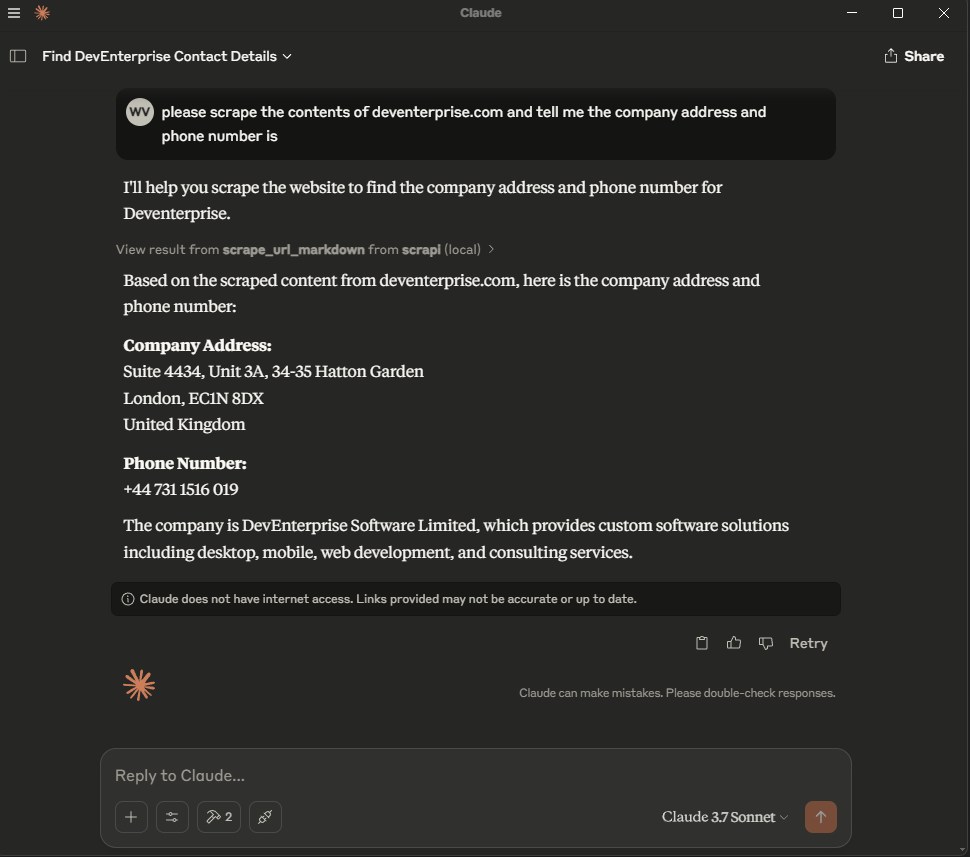
### Usage with Claude Desktop
|
|
98
|
-
|
|
99
|
-
Add the following to your `claude_desktop_config.json`:
|
|
100
|
-
|
|
101
|
-
#### Docker
|
|
102
|
-
|
|
103
|
-
```json
|
|
104
|
-
{
|
|
105
|
-
"mcpServers": {
|
|
106
|
-
"ScrAPI": {
|
|
107
|
-
"command": "docker",
|
|
108
|
-
"args": [
|
|
109
|
-
"run",
|
|
110
|
-
"-i",
|
|
111
|
-
"--rm",
|
|
112
|
-
"-e",
|
|
113
|
-
"SCRAPI_API_KEY",
|
|
114
|
-
"deventerprisesoftware/scrapi-mcp"
|
|
115
|
-
],
|
|
116
|
-
"env": {
|
|
117
|
-
"SCRAPI_API_KEY": "<YOUR_API_KEY>"
|
|
118
|
-
}
|
|
119
|
-
}
|
|
120
|
-
}
|
|
121
|
-
}
|
|
122
|
-
```
|
|
123
|
-
|
|
124
|
-
#### NPX
|
|
125
|
-
|
|
126
|
-
```json
|
|
127
|
-
{
|
|
128
|
-
"mcpServers": {
|
|
129
|
-
"ScrAPI": {
|
|
130
|
-
"command": "npx",
|
|
131
|
-
"args": [
|
|
132
|
-
"-y",
|
|
133
|
-
"@deventerprisesoftware/scrapi-mcp"
|
|
134
|
-
],
|
|
135
|
-
"env": {
|
|
136
|
-
"SCRAPI_API_KEY": "<YOUR_API_KEY>"
|
|
137
|
-
}
|
|
138
|
-
}
|
|
139
|
-
}
|
|
140
|
-
}
|
|
141
|
-
```
|
|
142
|
-
|
|
143
|
-
|
|
144
|
-
|
|
145
|
-
## Build
|
|
146
|
-
|
|
147
|
-
Docker build:
|
|
148
|
-
|
|
149
|
-
```bash
|
|
150
|
-
docker build -t deventerprisesoftware/scrapi-mcp -f Dockerfile .
|
|
151
|
-
```
|
|
152
|
-
|
|
153
|
-
## License
|
|
154
|
-
|
|
155
|
-
This MCP server is licensed under the MIT License. This means you are free to use, modify, and distribute the software, subject to the terms and conditions of the MIT License. For more details, please see the LICENSE file in the project repository.
|