@deventerprisesoftware/scrapi-mcp 0.0.3 → 0.1.1
This diff represents the content of publicly available package versions that have been released to one of the supported registries. The information contained in this diff is provided for informational purposes only and reflects changes between package versions as they appear in their respective public registries.
- package/LICENSE +21 -0
- package/README.md +20 -4
- package/dist/index.js +159 -60
- package/package.json +52 -42
package/LICENSE
ADDED
|
@@ -0,0 +1,21 @@
|
|
|
1
|
+
MIT License
|
|
2
|
+
|
|
3
|
+
Copyright (c) 2025 DevEnterprise Software
|
|
4
|
+
|
|
5
|
+
Permission is hereby granted, free of charge, to any person obtaining a copy
|
|
6
|
+
of this software and associated documentation files (the "Software"), to deal
|
|
7
|
+
in the Software without restriction, including without limitation the rights
|
|
8
|
+
to use, copy, modify, merge, publish, distribute, sublicense, and/or sell
|
|
9
|
+
copies of the Software, and to permit persons to whom the Software is
|
|
10
|
+
furnished to do so, subject to the following conditions:
|
|
11
|
+
|
|
12
|
+
The above copyright notice and this permission notice shall be included in all
|
|
13
|
+
copies or substantial portions of the Software.
|
|
14
|
+
|
|
15
|
+
THE SOFTWARE IS PROVIDED "AS IS", WITHOUT WARRANTY OF ANY KIND, EXPRESS OR
|
|
16
|
+
IMPLIED, INCLUDING BUT NOT LIMITED TO THE WARRANTIES OF MERCHANTABILITY,
|
|
17
|
+
FITNESS FOR A PARTICULAR PURPOSE AND NONINFRINGEMENT. IN NO EVENT SHALL THE
|
|
18
|
+
AUTHORS OR COPYRIGHT HOLDERS BE LIABLE FOR ANY CLAIM, DAMAGES OR OTHER
|
|
19
|
+
LIABILITY, WHETHER IN AN ACTION OF CONTRACT, TORT OR OTHERWISE, ARISING FROM,
|
|
20
|
+
OUT OF OR IN CONNECTION WITH THE SOFTWARE OR THE USE OR OTHER DEALINGS IN THE
|
|
21
|
+
SOFTWARE.
|
package/README.md
CHANGED
|
@@ -1,7 +1,13 @@
|
|
|
1
|
+

|
|
1
2
|
|
|
2
3
|
# ScrAPI MCP Server
|
|
3
4
|
|
|
4
|
-
|
|
5
|
+
[](https://opensource.org/licenses/MIT)
|
|
6
|
+
[](https://www.npmjs.com/package/@deventerprisesoftware/scrapi-mcp)
|
|
7
|
+
[](https://hub.docker.com/r/deventerprisesoftware/scrapi-mcp)
|
|
8
|
+
[](https://smithery.ai/server/@DevEnterpriseSoftware/scrapi-mcp)
|
|
9
|
+
|
|
10
|
+
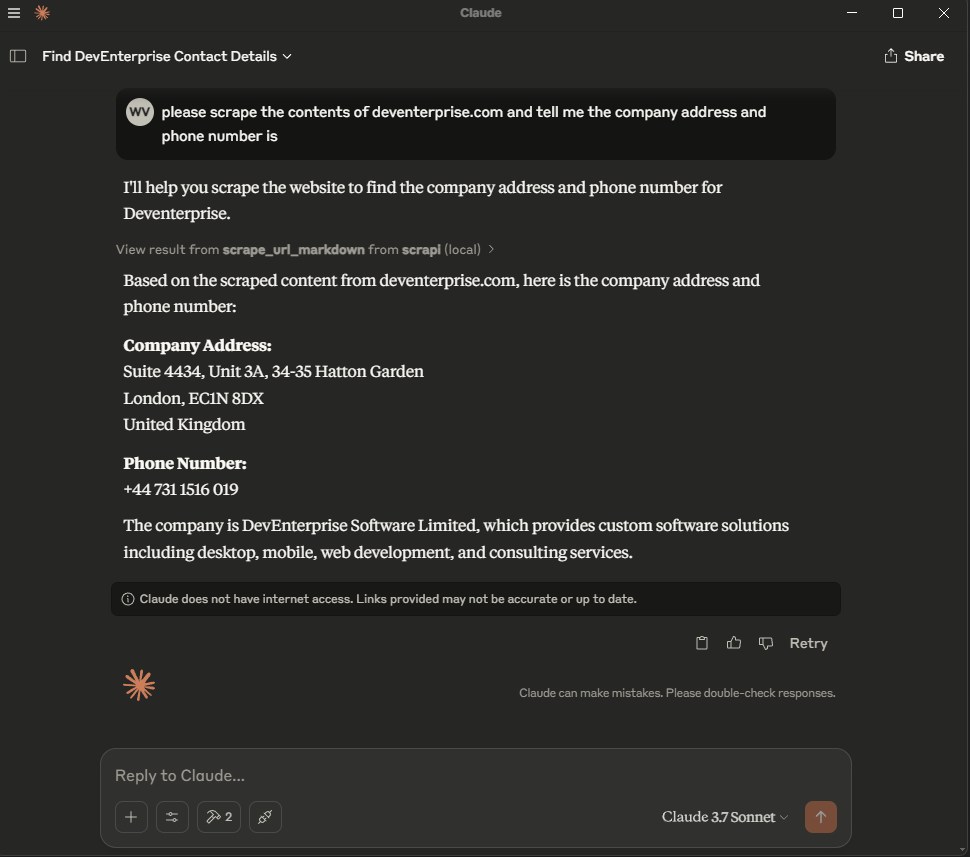
MCP server for using [ScrAPI](https://scrapi.tech) to scrape web pages.
|
|
5
11
|
|
|
6
12
|
ScrAPI is your ultimate web scraping solution, offering powerful, reliable, and easy-to-use features to extract data from any website effortlessly.
|
|
7
13
|
|
|
@@ -29,6 +35,14 @@ Optionally get an API key from the [ScrAPI website](https://scrapi.tech).
|
|
|
29
35
|
|
|
30
36
|
Without an API key you will be limited to one concurrent call and twenty free calls per day with minimal queuing capabilities.
|
|
31
37
|
|
|
38
|
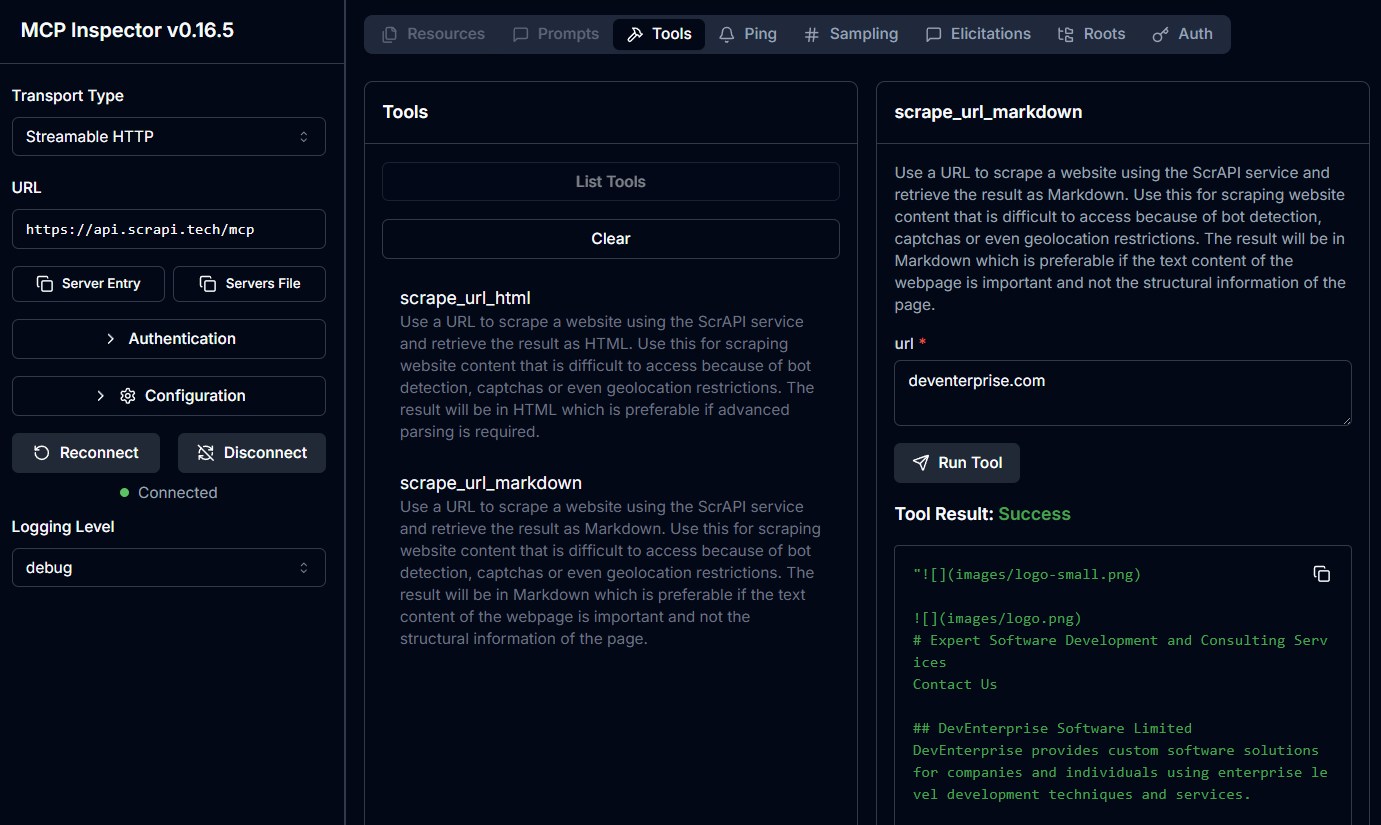
+
### Cloud Server
|
|
39
|
+
|
|
40
|
+
The ScrAPI MCP Server is also available in the cloud over SSE at https://api.scrapi.tech/mcp/sse and streamable HTTP at https://api.scrapi.tech/mcp
|
|
41
|
+
|
|
42
|
+
Cloud MCP servers are not widely supported yet but you can access this directly from your own custom clients or use [MCP Inspector](https://github.com/modelcontextprotocol/inspector) to test it. There is currently no facility to pass through your API key when connecting to the cloud MCP server.
|
|
43
|
+
|
|
44
|
+
|
|
45
|
+
|
|
32
46
|
### Usage with Claude Desktop
|
|
33
47
|
|
|
34
48
|
Add the following to your `claude_desktop_config.json`:
|
|
@@ -38,7 +52,7 @@ Add the following to your `claude_desktop_config.json`:
|
|
|
38
52
|
```json
|
|
39
53
|
{
|
|
40
54
|
"mcpServers": {
|
|
41
|
-
"
|
|
55
|
+
"ScrAPI": {
|
|
42
56
|
"command": "docker",
|
|
43
57
|
"args": [
|
|
44
58
|
"run",
|
|
@@ -56,12 +70,12 @@ Add the following to your `claude_desktop_config.json`:
|
|
|
56
70
|
}
|
|
57
71
|
```
|
|
58
72
|
|
|
59
|
-
|
|
73
|
+
#### NPX
|
|
60
74
|
|
|
61
75
|
```json
|
|
62
76
|
{
|
|
63
77
|
"mcpServers": {
|
|
64
|
-
"
|
|
78
|
+
"ScrAPI": {
|
|
65
79
|
"command": "npx",
|
|
66
80
|
"args": [
|
|
67
81
|
"-y",
|
|
@@ -75,6 +89,8 @@ Add the following to your `claude_desktop_config.json`:
|
|
|
75
89
|
}
|
|
76
90
|
```
|
|
77
91
|
|
|
92
|
+
|
|
93
|
+
|
|
78
94
|
## Build
|
|
79
95
|
|
|
80
96
|
Docker build:
|
package/dist/index.js
CHANGED
|
@@ -1,30 +1,110 @@
|
|
|
1
1
|
#!/usr/bin/env node
|
|
2
|
+
import express from "express";
|
|
3
|
+
import cors from "cors";
|
|
2
4
|
import { McpServer } from "@modelcontextprotocol/sdk/server/mcp.js";
|
|
3
5
|
import { StdioServerTransport } from "@modelcontextprotocol/sdk/server/stdio.js";
|
|
6
|
+
import { StreamableHTTPServerTransport } from "@modelcontextprotocol/sdk/server/streamableHttp.js";
|
|
4
7
|
import { z } from "zod";
|
|
8
|
+
const PORT = process.env.PORT || 5000;
|
|
5
9
|
const SCRAPI_API_KEY = process.env.SCRAPI_API_KEY || "00000000-0000-0000-0000-000000000000";
|
|
6
10
|
const SCRAPI_SERVER_NAME = "ScrAPI MCP Server";
|
|
7
|
-
const SCRAPI_SERVER_VERSION = "0.0
|
|
8
|
-
const
|
|
9
|
-
|
|
10
|
-
|
|
11
|
+
const SCRAPI_SERVER_VERSION = "0.1.0";
|
|
12
|
+
const app = express();
|
|
13
|
+
app.use(cors({
|
|
14
|
+
origin: "*",
|
|
15
|
+
exposedHeaders: ["Mcp-Session-Id", "mcp-protocol-version"],
|
|
16
|
+
allowedHeaders: ["Content-Type", "mcp-session-id"],
|
|
17
|
+
}));
|
|
18
|
+
app.use(express.json());
|
|
19
|
+
// Define session configuration schema
|
|
20
|
+
export const configSchema = z.object({
|
|
21
|
+
scrapiApiKey: z.string().optional().describe("ScrAPI API key for scraping. Leave empty for default limited usage."),
|
|
11
22
|
});
|
|
12
|
-
|
|
13
|
-
|
|
14
|
-
|
|
15
|
-
|
|
16
|
-
|
|
17
|
-
|
|
18
|
-
|
|
19
|
-
|
|
20
|
-
|
|
21
|
-
|
|
22
|
-
|
|
23
|
-
|
|
24
|
-
|
|
25
|
-
|
|
26
|
-
|
|
27
|
-
|
|
23
|
+
// Parse configuration from query parameters
|
|
24
|
+
function parseConfig(req) {
|
|
25
|
+
const configParam = req.query.config;
|
|
26
|
+
if (configParam) {
|
|
27
|
+
return JSON.parse(Buffer.from(configParam, "base64").toString());
|
|
28
|
+
}
|
|
29
|
+
return {};
|
|
30
|
+
}
|
|
31
|
+
// Create MCP server with your tools
|
|
32
|
+
export default function createServer({ config, }) {
|
|
33
|
+
const server = new McpServer({
|
|
34
|
+
name: SCRAPI_SERVER_NAME,
|
|
35
|
+
version: SCRAPI_SERVER_VERSION,
|
|
36
|
+
});
|
|
37
|
+
server.registerTool("scrape_url_html", {
|
|
38
|
+
title: "Scrape URL and respond with HTML",
|
|
39
|
+
description: "Use a URL to scrape a website using the ScrAPI service and retrieve the result as HTML. " +
|
|
40
|
+
"Use this for scraping website content that is difficult to access because of bot detection, captchas or even geolocation restrictions. " +
|
|
41
|
+
"The result will be in HTML which is preferable if advanced parsing is required.",
|
|
42
|
+
inputSchema: {
|
|
43
|
+
url: z
|
|
44
|
+
.string()
|
|
45
|
+
.url({ message: "Invalid URL" })
|
|
46
|
+
.describe("The URL to scrape"),
|
|
47
|
+
},
|
|
48
|
+
}, async ({ url }) => await scrapeUrl(url, "HTML"));
|
|
49
|
+
server.registerTool("scrape_url_markdown", {
|
|
50
|
+
title: "Scrape URL and respond with Markdown",
|
|
51
|
+
description: "Use a URL to scrape a website using the ScrAPI service and retrieve the result as Markdown. " +
|
|
52
|
+
"Use this for scraping website content that is difficult to access because of bot detection, captchas or even geolocation restrictions. " +
|
|
53
|
+
"The result will be in Markdown which is preferable if the text content of the webpage is important and not the structural information of the page.",
|
|
54
|
+
inputSchema: {
|
|
55
|
+
url: z
|
|
56
|
+
.string()
|
|
57
|
+
.url({ message: "Invalid URL" })
|
|
58
|
+
.describe("The URL to scrape"),
|
|
59
|
+
},
|
|
60
|
+
}, async ({ url }) => await scrapeUrl(url, "Markdown"));
|
|
61
|
+
async function scrapeUrl(url, format) {
|
|
62
|
+
var body = {
|
|
63
|
+
url: url,
|
|
64
|
+
useBrowser: true,
|
|
65
|
+
solveCaptchas: true,
|
|
66
|
+
acceptDialogs: true,
|
|
67
|
+
proxyType: "Residential",
|
|
68
|
+
responseFormat: format,
|
|
69
|
+
};
|
|
70
|
+
try {
|
|
71
|
+
const response = await fetch("https://api.scrapi.tech/v1/scrape", {
|
|
72
|
+
method: "POST",
|
|
73
|
+
headers: {
|
|
74
|
+
"User-Agent": `${SCRAPI_SERVER_NAME} - ${SCRAPI_SERVER_VERSION}`,
|
|
75
|
+
"Content-Type": "application/json",
|
|
76
|
+
"X-API-KEY": config.scrapiApiKey || SCRAPI_API_KEY,
|
|
77
|
+
},
|
|
78
|
+
body: JSON.stringify(body),
|
|
79
|
+
signal: AbortSignal.timeout(30000),
|
|
80
|
+
});
|
|
81
|
+
const data = await response.text();
|
|
82
|
+
if (response.ok) {
|
|
83
|
+
return {
|
|
84
|
+
content: [
|
|
85
|
+
{
|
|
86
|
+
type: "text",
|
|
87
|
+
text: data,
|
|
88
|
+
_meta: {
|
|
89
|
+
mimeType: `text/${format.toLowerCase()}`,
|
|
90
|
+
},
|
|
91
|
+
},
|
|
92
|
+
],
|
|
93
|
+
};
|
|
94
|
+
}
|
|
95
|
+
return {
|
|
96
|
+
content: [
|
|
97
|
+
{
|
|
98
|
+
type: "text",
|
|
99
|
+
text: data,
|
|
100
|
+
},
|
|
101
|
+
],
|
|
102
|
+
isError: true,
|
|
103
|
+
};
|
|
104
|
+
}
|
|
105
|
+
catch (error) {
|
|
106
|
+
console.error("Error calling API:", error);
|
|
107
|
+
}
|
|
28
108
|
const response = await fetch("https://api.scrapi.tech/v1/scrape", {
|
|
29
109
|
method: "POST",
|
|
30
110
|
headers: {
|
|
@@ -36,57 +116,76 @@ async function scrapeUrl(url, format) {
|
|
|
36
116
|
signal: AbortSignal.timeout(30000),
|
|
37
117
|
});
|
|
38
118
|
const data = await response.text();
|
|
39
|
-
if (response.ok) {
|
|
40
|
-
return {
|
|
41
|
-
content: [
|
|
42
|
-
{
|
|
43
|
-
type: "text",
|
|
44
|
-
mimeType: `text/${format.toLowerCase()}`,
|
|
45
|
-
text: data,
|
|
46
|
-
},
|
|
47
|
-
],
|
|
48
|
-
};
|
|
49
|
-
}
|
|
50
119
|
return {
|
|
51
120
|
content: [
|
|
52
121
|
{
|
|
53
122
|
type: "text",
|
|
54
123
|
text: data,
|
|
124
|
+
_meta: {
|
|
125
|
+
mimeType: `text/${format.toLowerCase()}`,
|
|
126
|
+
},
|
|
55
127
|
},
|
|
56
128
|
],
|
|
57
|
-
isError: true,
|
|
58
129
|
};
|
|
59
130
|
}
|
|
131
|
+
return server.server;
|
|
132
|
+
}
|
|
133
|
+
app.all("/mcp", async (req, res) => {
|
|
134
|
+
try {
|
|
135
|
+
// Parse configuration
|
|
136
|
+
const rawConfig = parseConfig ? parseConfig(req) : {};
|
|
137
|
+
// Validate and parse configuration
|
|
138
|
+
const config = configSchema
|
|
139
|
+
? configSchema.parse({ scrapiApiKey: rawConfig.scrapiApiKey || SCRAPI_API_KEY })
|
|
140
|
+
: {};
|
|
141
|
+
const server = createServer({ config });
|
|
142
|
+
const transport = new StreamableHTTPServerTransport({
|
|
143
|
+
sessionIdGenerator: undefined,
|
|
144
|
+
});
|
|
145
|
+
// Clean up on request close
|
|
146
|
+
res.on("close", () => {
|
|
147
|
+
transport.close();
|
|
148
|
+
server.close();
|
|
149
|
+
});
|
|
150
|
+
await server.connect(transport);
|
|
151
|
+
await transport.handleRequest(req, res, req.body);
|
|
152
|
+
}
|
|
60
153
|
catch (error) {
|
|
61
|
-
console.error("Error
|
|
154
|
+
console.error("Error handling MCP request:", error);
|
|
155
|
+
if (!res.headersSent) {
|
|
156
|
+
res.status(500).json({
|
|
157
|
+
jsonrpc: "2.0",
|
|
158
|
+
error: { code: -32603, message: "Internal server error" },
|
|
159
|
+
id: null,
|
|
160
|
+
});
|
|
161
|
+
}
|
|
62
162
|
}
|
|
63
|
-
|
|
64
|
-
|
|
65
|
-
|
|
66
|
-
|
|
67
|
-
|
|
68
|
-
|
|
69
|
-
|
|
70
|
-
|
|
71
|
-
|
|
72
|
-
}
|
|
73
|
-
|
|
74
|
-
|
|
75
|
-
|
|
76
|
-
|
|
77
|
-
|
|
78
|
-
|
|
79
|
-
text: data,
|
|
163
|
+
});
|
|
164
|
+
// Main function to start the server in the appropriate mode
|
|
165
|
+
async function main() {
|
|
166
|
+
const transport = process.env.TRANSPORT || "stdio";
|
|
167
|
+
if (transport === "http") {
|
|
168
|
+
// Run in HTTP mode
|
|
169
|
+
app.listen(PORT, () => {
|
|
170
|
+
console.log(`MCP HTTP Server listening on port ${PORT}`);
|
|
171
|
+
});
|
|
172
|
+
}
|
|
173
|
+
else {
|
|
174
|
+
const scrapiApiKey = SCRAPI_API_KEY;
|
|
175
|
+
// Create server with configuration
|
|
176
|
+
const server = createServer({
|
|
177
|
+
config: {
|
|
178
|
+
scrapiApiKey,
|
|
80
179
|
},
|
|
81
|
-
|
|
82
|
-
|
|
83
|
-
|
|
84
|
-
|
|
85
|
-
|
|
86
|
-
|
|
87
|
-
console.error(`${SCRAPI_SERVER_NAME} running on stdio.`);
|
|
180
|
+
});
|
|
181
|
+
// Start receiving messages on stdin and sending messages on stdout
|
|
182
|
+
const stdioTransport = new StdioServerTransport();
|
|
183
|
+
await server.connect(stdioTransport);
|
|
184
|
+
console.error("MCP Server running in stdio mode");
|
|
185
|
+
}
|
|
88
186
|
}
|
|
89
|
-
|
|
90
|
-
|
|
187
|
+
// Start the server
|
|
188
|
+
main().catch((error) => {
|
|
189
|
+
console.error("Server error:", error);
|
|
91
190
|
process.exit(1);
|
|
92
|
-
}
|
|
191
|
+
});
|
package/package.json
CHANGED
|
@@ -1,42 +1,52 @@
|
|
|
1
|
-
{
|
|
2
|
-
"name": "@deventerprisesoftware/scrapi-mcp",
|
|
3
|
-
"version": "0.
|
|
4
|
-
"description": "MCP server for using ScrAPI to scrape web pages.",
|
|
5
|
-
"keywords": [
|
|
6
|
-
"mcp",
|
|
7
|
-
"web scraper",
|
|
8
|
-
"web scraping",
|
|
9
|
-
"web data extractor",
|
|
10
|
-
"claude",
|
|
11
|
-
"ai"
|
|
12
|
-
],
|
|
13
|
-
"homepage": "https://scrapi.tech",
|
|
14
|
-
"bugs": {
|
|
15
|
-
"url": "https://github.com/DevEnterpriseSoftware/scrapi-mcp/issues"
|
|
16
|
-
},
|
|
17
|
-
"repository": {
|
|
18
|
-
"type": "git",
|
|
19
|
-
"url": "git+https://github.com/DevEnterpriseSoftware/scrapi-mcp.git"
|
|
20
|
-
},
|
|
21
|
-
"license": "MIT",
|
|
22
|
-
"author": "DevEnterprise Software (https://deventerprise.com)",
|
|
23
|
-
"type": "module",
|
|
24
|
-
"bin":
|
|
25
|
-
|
|
26
|
-
|
|
27
|
-
|
|
28
|
-
|
|
29
|
-
|
|
30
|
-
|
|
31
|
-
"
|
|
32
|
-
|
|
33
|
-
|
|
34
|
-
"
|
|
35
|
-
"
|
|
36
|
-
|
|
37
|
-
|
|
38
|
-
|
|
39
|
-
|
|
40
|
-
"
|
|
41
|
-
|
|
42
|
-
|
|
1
|
+
{
|
|
2
|
+
"name": "@deventerprisesoftware/scrapi-mcp",
|
|
3
|
+
"version": "0.1.1",
|
|
4
|
+
"description": "MCP server for using ScrAPI to scrape web pages.",
|
|
5
|
+
"keywords": [
|
|
6
|
+
"mcp",
|
|
7
|
+
"web scraper",
|
|
8
|
+
"web scraping",
|
|
9
|
+
"web data extractor",
|
|
10
|
+
"claude",
|
|
11
|
+
"ai"
|
|
12
|
+
],
|
|
13
|
+
"homepage": "https://scrapi.tech",
|
|
14
|
+
"bugs": {
|
|
15
|
+
"url": "https://github.com/DevEnterpriseSoftware/scrapi-mcp/issues"
|
|
16
|
+
},
|
|
17
|
+
"repository": {
|
|
18
|
+
"type": "git",
|
|
19
|
+
"url": "git+https://github.com/DevEnterpriseSoftware/scrapi-mcp.git"
|
|
20
|
+
},
|
|
21
|
+
"license": "MIT",
|
|
22
|
+
"author": "DevEnterprise Software (https://deventerprise.com)",
|
|
23
|
+
"type": "module",
|
|
24
|
+
"bin": {
|
|
25
|
+
"scrapi-mcp": "dist/index.js"
|
|
26
|
+
},
|
|
27
|
+
"files": [
|
|
28
|
+
"dist"
|
|
29
|
+
],
|
|
30
|
+
"scripts": {
|
|
31
|
+
"build": "tsc && shx chmod +x dist/*.js",
|
|
32
|
+
"publish": "npm run build && npm publish",
|
|
33
|
+
"watch": "tsc --watch",
|
|
34
|
+
"ncu": "npx npm-check-updates --interactive",
|
|
35
|
+
"docker:build": "docker build -f Dockerfile -t deventerprisesoftware/scrapi-mcp:v%npm_package_version% -t deventerprisesoftware/scrapi-mcp:latest .",
|
|
36
|
+
"docker:push": "docker push deventerprisesoftware/scrapi-mcp --all-tags",
|
|
37
|
+
"docker:release": "npm run build && npm run docker:build && npm run docker:push"
|
|
38
|
+
},
|
|
39
|
+
"dependencies": {
|
|
40
|
+
"@modelcontextprotocol/sdk": "^1.24.2",
|
|
41
|
+
"cors": "^2.8.5",
|
|
42
|
+
"express": "^5.2.1",
|
|
43
|
+
"zod": "^3.25.76"
|
|
44
|
+
},
|
|
45
|
+
"devDependencies": {
|
|
46
|
+
"@types/cors": "^2.8.19",
|
|
47
|
+
"@types/express": "^5.0.6",
|
|
48
|
+
"@types/node": "^24.10.1",
|
|
49
|
+
"shx": "^0.4.0",
|
|
50
|
+
"typescript": "^5.9.3"
|
|
51
|
+
}
|
|
52
|
+
}
|