@datalayer/agent-runtimes 0.0.4 → 0.0.7
This diff represents the content of publicly available package versions that have been released to one of the supported registries. The information contained in this diff is provided for informational purposes only and reflects changes between package versions as they appear in their respective public registries.
- package/README.md +141 -22
- package/lib/components/chat/components/AgentDetails.d.ts +1 -1
- package/lib/components/chat/components/AgentDetails.js +7 -92
- package/lib/components/chat/components/Chat.d.ts +5 -1
- package/lib/components/chat/components/Chat.js +28 -19
- package/lib/components/chat/components/ContextDistribution.d.ts +47 -0
- package/lib/components/chat/components/ContextDistribution.js +146 -0
- package/lib/components/chat/components/ContextUsage.d.ts +33 -0
- package/lib/components/chat/components/ContextUsage.js +127 -0
- package/lib/components/chat/components/base/ChatBase.d.ts +5 -1
- package/lib/components/chat/components/base/ChatBase.js +40 -15
- package/lib/components/chat/components/index.d.ts +2 -0
- package/lib/components/chat/components/index.js +2 -0
- package/lib/examples/AgentSpaceFormExample.js +41 -6
- package/lib/examples/components/AgentConfiguration.d.ts +22 -0
- package/lib/examples/components/AgentConfiguration.js +37 -10
- package/lib/examples/components/Header.d.ts +0 -2
- package/lib/examples/components/Header.js +2 -16
- package/lib/index.d.ts +1 -0
- package/lib/index.js +1 -0
- package/lib/runtime/index.d.ts +35 -0
- package/lib/runtime/index.js +40 -0
- package/lib/runtime/runtimeStore.d.ts +77 -0
- package/lib/runtime/runtimeStore.js +184 -0
- package/lib/runtime/types.d.ts +84 -0
- package/lib/runtime/types.js +15 -0
- package/lib/runtime/useAgentConnection.d.ts +46 -0
- package/lib/runtime/useAgentConnection.js +112 -0
- package/lib/runtime/useAgentRuntime.d.ts +94 -0
- package/lib/runtime/useAgentRuntime.js +125 -0
- package/package.json +4 -2
- package/patches/.gitkeep +1 -0
- package/scripts/apply-patches.sh +26 -0
- package/scripts/create-patches.sh +40 -0
- package/scripts/download-ai-elements.py +86 -0
- package/scripts/sync-jupyter.sh +123 -0
package/README.md
CHANGED
|
@@ -2,37 +2,34 @@
|
|
|
2
2
|
~ Copyright (c) 2025-2026 Datalayer, Inc.
|
|
3
3
|
~
|
|
4
4
|
~ BSD 3-Clause License
|
|
5
|
+
-->
|
|
5
6
|
|
|
7
|
+
[](https://datalayer.io)
|
|
6
8
|
|
|
7
|
-
|
|
8
|
-
yes, that is my goal to implement https://github.com/datalayer/jupyter-ai-agents/issues/53
|
|
9
|
+
[](https://github.com/sponsors/datalayer)
|
|
9
10
|
|
|
11
|
+
# 🤖 Agent Runtimes
|
|
10
12
|
|
|
11
|
-
|
|
12
|
-
|
|
13
|
-
The vercel ai-element tool approval has been merged 3 weeks ago https://github.com/vercel/ai-elements/pull/163
|
|
14
|
-
That's great! It doesn't look like they have events for that in the Data Stream Protocol yet though, so it's not clear how they expect agent backends to represent tool calls that require approval, or how they'll send approval to the backend...
|
|
15
|
-
I guess having a kind of reference implementation for common use cases/patterns will be good for the community. I would say that kind of case (external mcp server with tool approval like done by eg claude desktop) is quite common, or will become common
|
|
16
|
-
Definitely, which is partly why github.com/pydantic/pydantic-ai/issues/3295 exists, but there's currently a missing link in how approvals should be represented on the event stream going from agent to frontend, and in approval results going from frontend to agent. I'd expect Vercel AI to come up with something sooner rather than later since they have their own (TypeScript) agent SDK as well, which they'd then document in the Data Stream Protocol, which we can then support as well.
|
|
17
|
-
In the meantime, you could do something like this:
|
|
18
|
-
Wrap your MCPServer in ApprovalRequiredToolset (assuming all tools require approval). This means that when any of the tools are called, the agent run will end with a DeferredToolRequests object as result.output
|
|
19
|
-
When you use VercelAIAdapter.dispatch_request, you can add an on_complete handler that is passed the AgentRunResult and can yield additional Vercel AI events. In that handler, you can check result.output , and if it's DeferredToolRequests , you can yield a custom pydantic_ai.ui.vercel_ai.response_types.DataChunk wrapping those deferred tool requests, which will be sent to frontend
|
|
20
|
-
On the frontend you can handle that custom data part by showing the user the tool call that needs approval
|
|
21
|
-
When the user approves, you'll need to perform a new request to the backend containing that approval, by listing the approved tool_call_ids on the SubmitMessage payload (I'm not an expert on how this part of AI Elements works...)
|
|
22
|
-
In the backend endpoint, you then have to parse this value out of the SubmitMessage payload (similar to this: https://github.com/pydantic/ai-chat-ui/blob/b0ac18d2dbbef3cf1636c17a29fb7578a59b32c8/agent/chatbot/server.py#L115-L122), turn it into a DeferredToolResults object and pass it to the dispatch/run method as deferred_tool_results
|
|
13
|
+
[](https://github.com/datalayer/agent-runtimes/actions/workflows/build.yml)
|
|
14
|
+
[](https://pypi.org/project/agent-runtimes)
|
|
23
15
|
|
|
24
|
-
|
|
16
|
+
**Agent Runtimes** is a unified platform for deploying, managing, and interacting with AI agents across multiple protocols and frameworks. It provides both a Python server for hosting agents and React components for seamless integration into web and desktop applications.
|
|
25
17
|
|
|
26
|
-
|
|
18
|
+
## 🎯 What is Agent Runtimes?
|
|
27
19
|
|
|
28
|
-
|
|
20
|
+
Agent Runtimes solves the complexity of deploying AI agents by providing:
|
|
29
21
|
|
|
30
|
-
|
|
22
|
+
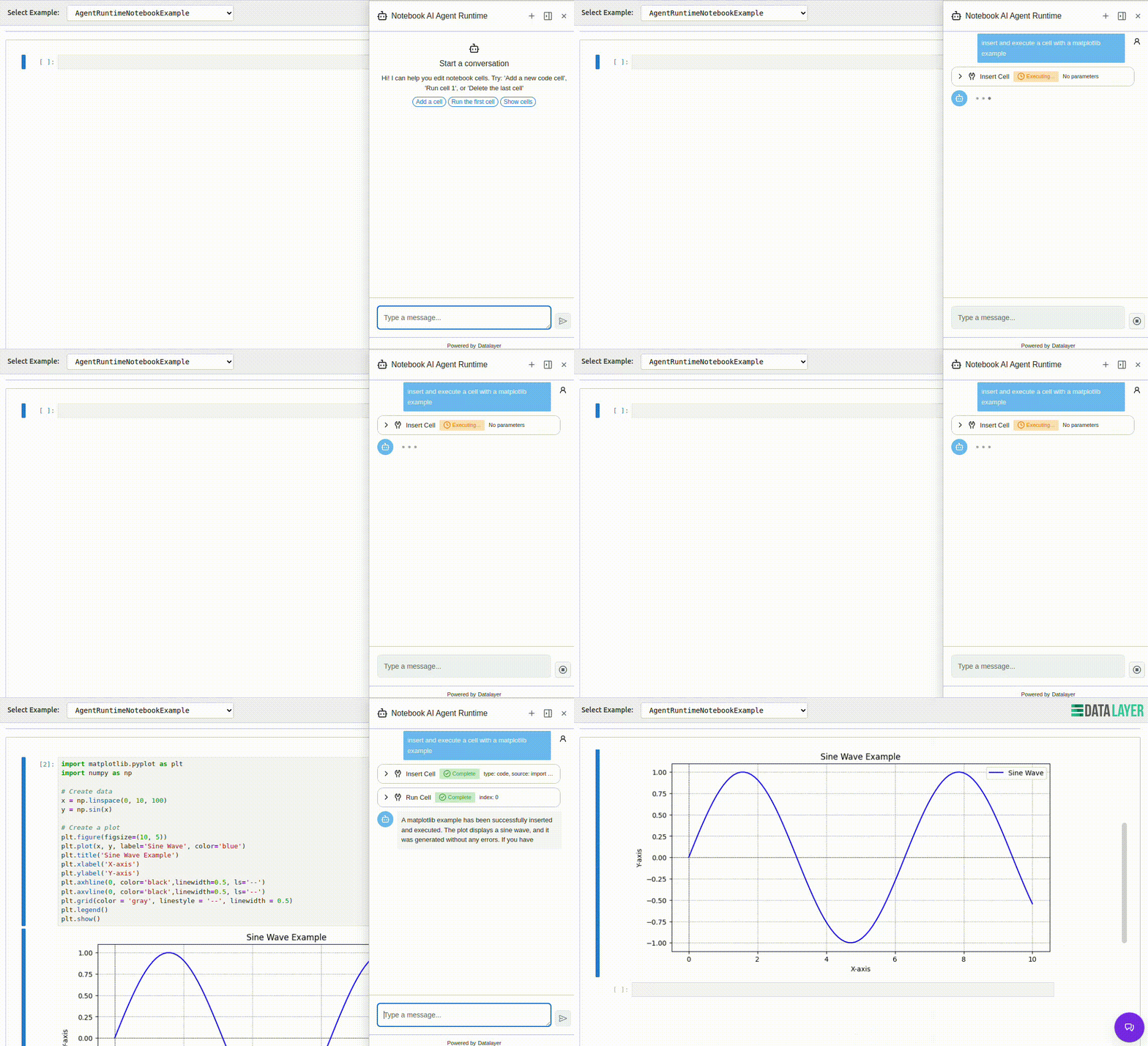
1. **Protocol Abstraction**: One agent, multiple protocols - deploy your agent once and access it through ACP, Vercel AI SDK, AG-UI, MCP-UI, or A2A without changing your code.
|
|
23
|
+
|
|
24
|
+
2. **Framework Flexibility**: Write agents using your preferred framework (Pydantic AI, LangChain, Jupyter AI) while maintaining a consistent API.
|
|
31
25
|
|
|
32
|
-
|
|
33
|
-
[](https://pypi.org/project/code-sandboxes)
|
|
26
|
+
3. **Cloud Runtime Management**: Built-in integration with Datalayer Cloud Runtimes for launching and managing compute resources with Zustand-based state management.
|
|
34
27
|
|
|
35
|
-
|
|
28
|
+
4. **UI Components**: Pre-built React components (ChatBase, ChatSidebar, ChatFloating) that connect to agents and execute tools directly in the browser.
|
|
29
|
+
|
|
30
|
+
5. **Tool Ecosystem**: Seamless integration with MCP (Model Context Protocol) tools, custom tools, and built-in utilities for Jupyter notebooks and Lexical documents.
|
|
31
|
+
|
|
32
|
+
|
|
36
33
|
|
|
37
34
|
## 🌟 Features
|
|
38
35
|
|
|
@@ -49,8 +46,130 @@ In the backend endpoint, you then have to parse this value out of the SubmitMess
|
|
|
49
46
|
- **Jupyter AI**: Notebook integration (adapter ready)
|
|
50
47
|
|
|
51
48
|
### Built-in Features
|
|
52
|
-
- 🔌 **
|
|
49
|
+
- 🔌 **Flexible Architecture**: Easy to add new agents and protocols
|
|
53
50
|
- 🛠️ **Tool Support**: MCP, custom tools, built-in utilities
|
|
54
51
|
- 📊 **Observability**: OpenTelemetry integration
|
|
55
52
|
- 💾 **Persistence**: DBOS support for durable execution
|
|
56
53
|
- 🔒 **Context Optimization**: LLM context management
|
|
54
|
+
|
|
55
|
+
## 🏗️ Architecture
|
|
56
|
+
|
|
57
|
+
Agent Runtimes consists of three main components:
|
|
58
|
+
|
|
59
|
+
### 1. Python Server (`agent_runtimes/`)
|
|
60
|
+
The backend server that hosts AI agents and handles protocol routing:
|
|
61
|
+
- **Agent Adapters**: Unified interface for Pydantic AI, LangChain, and Jupyter AI
|
|
62
|
+
- **Protocol Adapters**: Convert between different agent protocols (ACP, AG-UI, Vercel AI, etc.)
|
|
63
|
+
- **FastAPI Server**: High-performance async server with automatic API documentation
|
|
64
|
+
- **Tool Registry**: Manages and executes tools from various sources (MCP, custom, built-in)
|
|
65
|
+
|
|
66
|
+
### 2. React Components (`src/components/`)
|
|
67
|
+
Pre-built UI components for interacting with agents:
|
|
68
|
+
- **ChatBase**: Core chat interface with customizable styling
|
|
69
|
+
- **ChatSidebar**: Collapsible sidebar for agent interactions
|
|
70
|
+
- **ChatFloating**: Floating chat widget for non-intrusive agent access
|
|
71
|
+
- **All components support**: Frontend tool execution, markdown rendering, code highlighting, and real-time streaming
|
|
72
|
+
|
|
73
|
+
### 3. Runtime Management (`src/runtime/`)
|
|
74
|
+
Cloud runtime lifecycle management with Zustand store:
|
|
75
|
+
- **Launch & Connect**: Create new cloud runtimes or connect to existing ones
|
|
76
|
+
- **Agent Creation**: Automatically create and configure agents on runtimes
|
|
77
|
+
- **State Management**: Track runtime status, agent connections, and errors
|
|
78
|
+
- **Hooks**: React hooks for easy integration (`useAgentRuntime`, `useRuntimeStore`)
|
|
79
|
+
|
|
80
|
+
## 🚀 Use Cases
|
|
81
|
+
|
|
82
|
+
### Notebook AI Assistant
|
|
83
|
+
Add an AI agent to Jupyter notebooks that can:
|
|
84
|
+
- Execute cells, insert code, and modify notebook content
|
|
85
|
+
- Explain code and data analysis
|
|
86
|
+
- Debug errors and suggest improvements
|
|
87
|
+
|
|
88
|
+
```tsx
|
|
89
|
+
import { NotebookAgentsRuntime } from '@datalayer/agent-runtimes';
|
|
90
|
+
|
|
91
|
+
<NotebookAgentsRuntime
|
|
92
|
+
notebookId={notebookId}
|
|
93
|
+
environmentName="python-simple"
|
|
94
|
+
runtimeName={runtimeName}
|
|
95
|
+
serviceManager={serviceManager}
|
|
96
|
+
/>
|
|
97
|
+
```
|
|
98
|
+
|
|
99
|
+
### Document Editor AI
|
|
100
|
+
Integrate AI into Lexical-based document editors:
|
|
101
|
+
- Insert headings, lists, code blocks, and formatted text
|
|
102
|
+
- Summarize content and proofread text
|
|
103
|
+
- Generate ideas and help with writing
|
|
104
|
+
|
|
105
|
+
```tsx
|
|
106
|
+
import { DocumentAgentRuntime } from '@datalayer/agent-runtimes';
|
|
107
|
+
|
|
108
|
+
<DocumentAgentRuntime
|
|
109
|
+
documentId={documentId}
|
|
110
|
+
environmentName="python-simple"
|
|
111
|
+
runtimeName={runtimeName}
|
|
112
|
+
serviceManager={serviceManager}
|
|
113
|
+
/>
|
|
114
|
+
```
|
|
115
|
+
|
|
116
|
+
### Custom Agent Deployment
|
|
117
|
+
Deploy your own Pydantic AI agent with custom tools:
|
|
118
|
+
|
|
119
|
+
```python
|
|
120
|
+
from agent_runtimes import AgentRuntimesApp
|
|
121
|
+
from pydantic_ai import Agent
|
|
122
|
+
|
|
123
|
+
# Create your agent
|
|
124
|
+
agent = Agent(
|
|
125
|
+
model='anthropic:claude-sonnet-4-5',
|
|
126
|
+
system_prompt='You are a helpful assistant.',
|
|
127
|
+
)
|
|
128
|
+
|
|
129
|
+
# Launch the server
|
|
130
|
+
app = AgentRuntimesApp()
|
|
131
|
+
app.add_agent(agent, name='my-agent', transport='ag-ui')
|
|
132
|
+
app.run(port=8000)
|
|
133
|
+
```
|
|
134
|
+
|
|
135
|
+
## 🔧 Key Concepts
|
|
136
|
+
|
|
137
|
+
### Protocols
|
|
138
|
+
Agent Runtimes supports multiple protocols for agent communication:
|
|
139
|
+
|
|
140
|
+
- **AG-UI**: Lightweight protocol for web UIs (POST-based, Pydantic AI native)
|
|
141
|
+
- **ACP**: WebSocket-based Agent Client Protocol for real-time interaction
|
|
142
|
+
- **Vercel AI SDK**: Compatible with Vercel's AI SDK streaming
|
|
143
|
+
- **MCP-UI**: Model Context Protocol with UI resources
|
|
144
|
+
- **A2A**: Agent-to-agent communication protocol
|
|
145
|
+
|
|
146
|
+
### Tools
|
|
147
|
+
Tools extend agent capabilities by allowing them to perform actions:
|
|
148
|
+
|
|
149
|
+
- **Frontend Tools**: Execute in the browser (notebook editing, document manipulation)
|
|
150
|
+
- **MCP Tools**: Tools from Model Context Protocol servers
|
|
151
|
+
- **Custom Tools**: Your own Python functions decorated with tool metadata
|
|
152
|
+
- **Built-in Tools**: File operations, web search, code execution
|
|
153
|
+
- **Code Mode**: Tool discovery includes `output_schema` and `input_examples` for reliable calls; code execution returns `stdout`/`stderr` and a summarized `result`.
|
|
154
|
+
|
|
155
|
+
### Runtime Management
|
|
156
|
+
Cloud runtimes provide compute resources for agents:
|
|
157
|
+
|
|
158
|
+
```typescript
|
|
159
|
+
import { useAgentRuntime } from '@datalayer/agent-runtimes/lib/runtime';
|
|
160
|
+
|
|
161
|
+
const { isReady, endpoint, tools, launchRuntime } = useAgentRuntime({
|
|
162
|
+
autoCreateAgent: true,
|
|
163
|
+
agentConfig: {
|
|
164
|
+
model: 'anthropic:claude-sonnet-4-5',
|
|
165
|
+
systemPrompt: 'You are a helpful AI assistant.',
|
|
166
|
+
},
|
|
167
|
+
});
|
|
168
|
+
|
|
169
|
+
// Launch a new runtime
|
|
170
|
+
await launchRuntime({
|
|
171
|
+
environmentName: 'python-simple',
|
|
172
|
+
creditsLimit: 100,
|
|
173
|
+
type: 'notebook',
|
|
174
|
+
});
|
|
175
|
+
```
|
|
@@ -7,7 +7,7 @@ export interface AgentDetailsProps {
|
|
|
7
7
|
url: string;
|
|
8
8
|
/** Number of messages in conversation */
|
|
9
9
|
messageCount: number;
|
|
10
|
-
/** Agent ID */
|
|
10
|
+
/** Agent ID for context usage tracking */
|
|
11
11
|
agentId?: string;
|
|
12
12
|
/** Callback to go back to chat view */
|
|
13
13
|
onBack: () => void;
|
|
@@ -5,53 +5,12 @@ import { jsx as _jsx, jsxs as _jsxs } from "react/jsx-runtime";
|
|
|
5
5
|
* AgentDetails component - Shows detailed information about the agent
|
|
6
6
|
* including name, protocol, URL, message count, and context details.
|
|
7
7
|
*/
|
|
8
|
-
import { ArrowLeftIcon, GlobeIcon, CommentDiscussionIcon,
|
|
9
|
-
import { Box, Button, Heading, IconButton, Text, Label,
|
|
8
|
+
import { ArrowLeftIcon, GlobeIcon, CommentDiscussionIcon, CheckCircleIcon, XCircleIcon, } from '@primer/octicons-react';
|
|
9
|
+
import { Box, Button, Heading, IconButton, Text, Label, Spinner, } from '@primer/react';
|
|
10
10
|
import { AiAgentIcon } from '@datalayer/icons-react';
|
|
11
11
|
import { useQuery } from '@tanstack/react-query';
|
|
12
|
-
|
|
13
|
-
|
|
14
|
-
name: 'Context',
|
|
15
|
-
totalTokens: 2520000,
|
|
16
|
-
usedTokens: 1523552,
|
|
17
|
-
children: [
|
|
18
|
-
{
|
|
19
|
-
name: 'Files',
|
|
20
|
-
value: 450000,
|
|
21
|
-
children: [
|
|
22
|
-
{ name: 'app.py', value: 125000 },
|
|
23
|
-
{ name: 'models.py', value: 98000 },
|
|
24
|
-
{ name: 'routes.py', value: 112000 },
|
|
25
|
-
{ name: 'utils.py', value: 115000 },
|
|
26
|
-
],
|
|
27
|
-
},
|
|
28
|
-
{
|
|
29
|
-
name: 'Messages',
|
|
30
|
-
value: 380000,
|
|
31
|
-
children: [
|
|
32
|
-
{ name: 'User messages', value: 180000 },
|
|
33
|
-
{ name: 'Assistant responses', value: 200000 },
|
|
34
|
-
],
|
|
35
|
-
},
|
|
36
|
-
{
|
|
37
|
-
name: 'Tools',
|
|
38
|
-
value: 220000,
|
|
39
|
-
children: [
|
|
40
|
-
{ name: 'Code execution', value: 95000 },
|
|
41
|
-
{ name: 'File operations', value: 75000 },
|
|
42
|
-
{ name: 'Search', value: 50000 },
|
|
43
|
-
],
|
|
44
|
-
},
|
|
45
|
-
{
|
|
46
|
-
name: 'Memory',
|
|
47
|
-
value: 473552,
|
|
48
|
-
children: [
|
|
49
|
-
{ name: 'Short term', value: 150000 },
|
|
50
|
-
{ name: 'Long term', value: 323552 },
|
|
51
|
-
],
|
|
52
|
-
},
|
|
53
|
-
],
|
|
54
|
-
};
|
|
12
|
+
import { ContextUsage } from './ContextUsage';
|
|
13
|
+
import { ContextDistribution } from './ContextDistribution';
|
|
55
14
|
function getLocalApiBase() {
|
|
56
15
|
if (typeof window === 'undefined') {
|
|
57
16
|
return '';
|
|
@@ -61,40 +20,10 @@ function getLocalApiBase() {
|
|
|
61
20
|
? 'http://127.0.0.1:8765'
|
|
62
21
|
: '';
|
|
63
22
|
}
|
|
64
|
-
/**
|
|
65
|
-
* Format token count for display
|
|
66
|
-
*/
|
|
67
|
-
function formatTokens(tokens) {
|
|
68
|
-
if (tokens >= 1000000) {
|
|
69
|
-
return `${(tokens / 1000000).toFixed(1)}M`;
|
|
70
|
-
}
|
|
71
|
-
if (tokens >= 1000) {
|
|
72
|
-
return `${(tokens / 1000).toFixed(1)}K`;
|
|
73
|
-
}
|
|
74
|
-
return tokens.toString();
|
|
75
|
-
}
|
|
76
|
-
/**
|
|
77
|
-
* Get icon for context category
|
|
78
|
-
*/
|
|
79
|
-
function getCategoryIcon(name) {
|
|
80
|
-
switch (name.toLowerCase()) {
|
|
81
|
-
case 'files':
|
|
82
|
-
return FileIcon;
|
|
83
|
-
case 'messages':
|
|
84
|
-
return CommentDiscussionIcon;
|
|
85
|
-
case 'tools':
|
|
86
|
-
return ToolsIcon;
|
|
87
|
-
case 'memory':
|
|
88
|
-
return DatabaseIcon;
|
|
89
|
-
default:
|
|
90
|
-
return ClockIcon;
|
|
91
|
-
}
|
|
92
|
-
}
|
|
93
23
|
/**
|
|
94
24
|
* AgentDetails component displays comprehensive information about the agent.
|
|
95
25
|
*/
|
|
96
26
|
export function AgentDetails({ name = 'AI Agent', protocol, url, messageCount, agentId, onBack, }) {
|
|
97
|
-
const contextUsagePercent = (MOCK_CONTEXT_DATA.usedTokens / MOCK_CONTEXT_DATA.totalTokens) * 100;
|
|
98
27
|
// Fetch MCP toolsets status
|
|
99
28
|
const { data: mcpStatus, isLoading: mcpLoading } = useQuery({
|
|
100
29
|
queryKey: ['mcp-toolsets-status'],
|
|
@@ -203,31 +132,17 @@ export function AgentDetails({ name = 'AI Agent', protocol, url, messageCount, a
|
|
|
203
132
|
pl: 4,
|
|
204
133
|
whiteSpace: 'pre-wrap',
|
|
205
134
|
wordBreak: 'break-word',
|
|
206
|
-
}, children: error.split('\n')[0] })] }, server)))] }))] })) : (_jsx(Text, { sx: { fontSize: 1, color: 'fg.muted' }, children: "Failed to load MCP status" })) })] }), _jsxs(Box, { children: [_jsx(Heading, { as: "h4", sx: {
|
|
135
|
+
}, children: error.split('\n')[0] })] }, server)))] }))] })) : (_jsx(Text, { sx: { fontSize: 1, color: 'fg.muted' }, children: "Failed to load MCP status" })) })] }), agentId && _jsx(ContextUsage, { agentId: agentId }), agentId && (_jsxs(Box, { sx: { mt: 3 }, children: [_jsx(Heading, { as: "h4", sx: {
|
|
207
136
|
fontSize: 1,
|
|
208
137
|
fontWeight: 'semibold',
|
|
209
138
|
mb: 2,
|
|
210
139
|
color: 'fg.muted',
|
|
211
|
-
}, children: "Context
|
|
140
|
+
}, children: "Current Context Distribution" }), _jsx(Box, { sx: {
|
|
212
141
|
p: 3,
|
|
213
142
|
bg: 'canvas.subtle',
|
|
214
143
|
borderRadius: 2,
|
|
215
144
|
border: '1px solid',
|
|
216
145
|
borderColor: 'border.default',
|
|
217
|
-
}, children:
|
|
218
|
-
display: 'flex',
|
|
219
|
-
justifyContent: 'space-between',
|
|
220
|
-
mb: 1,
|
|
221
|
-
}, children: [_jsxs(Text, { sx: { fontSize: 1, fontWeight: 'semibold' }, children: [formatTokens(MOCK_CONTEXT_DATA.usedTokens), " /", ' ', formatTokens(MOCK_CONTEXT_DATA.totalTokens), " tokens"] }), _jsxs(Text, { sx: { fontSize: 1, color: 'fg.muted' }, children: [contextUsagePercent.toFixed(0), "%"] })] }), _jsx(ProgressBar, { progress: contextUsagePercent, sx: { height: 8 }, bg: contextUsagePercent > 80
|
|
222
|
-
? 'danger.emphasis'
|
|
223
|
-
: 'accent.emphasis' })] }), _jsx(Box, { sx: { display: 'flex', flexDirection: 'column', gap: 2 }, children: MOCK_CONTEXT_DATA.children.map(category => {
|
|
224
|
-
const CategoryIcon = getCategoryIcon(category.name);
|
|
225
|
-
const categoryPercent = (category.value / MOCK_CONTEXT_DATA.totalTokens) * 100;
|
|
226
|
-
return (_jsxs(Box, { sx: {
|
|
227
|
-
display: 'flex',
|
|
228
|
-
alignItems: 'center',
|
|
229
|
-
gap: 2,
|
|
230
|
-
}, children: [_jsx(Box, { sx: { color: 'fg.muted', width: 20 }, children: _jsx(CategoryIcon, { size: 16 }) }), _jsx(Text, { sx: { fontSize: 1, flex: 1 }, children: category.name }), _jsx(Text, { sx: { fontSize: 0, color: 'fg.muted', minWidth: 60 }, children: formatTokens(category.value) }), _jsx(Box, { sx: { width: 80 }, children: _jsx(ProgressBar, { progress: categoryPercent, sx: { height: 4 } }) })] }, category.name));
|
|
231
|
-
}) })] })] }), _jsx(Box, { sx: { mt: 2 }, children: _jsx(Button, { variant: "primary", onClick: onBack, sx: { width: '100%' }, children: "Back to Chat" }) })] })] }));
|
|
146
|
+
}, children: _jsx(ContextDistribution, { agentId: agentId, height: "250px" }) })] })), _jsx(Box, { sx: { mt: 2 }, children: _jsx(Button, { variant: "primary", onClick: onBack, sx: { width: '100%' }, children: "Back to Chat" }) })] })] }));
|
|
232
147
|
}
|
|
233
148
|
export default AgentDetails;
|
|
@@ -49,6 +49,10 @@ export interface ChatProps {
|
|
|
49
49
|
showModelSelector?: boolean;
|
|
50
50
|
/** Show tools menu (fetched from /configure endpoint) */
|
|
51
51
|
showToolsMenu?: boolean;
|
|
52
|
+
/** Initial model ID to select (e.g., 'openai:gpt-4o-mini') */
|
|
53
|
+
initialModel?: string;
|
|
54
|
+
/** Initial MCP server IDs to enable (others will be disabled) */
|
|
55
|
+
initialMcpServers?: string[];
|
|
52
56
|
/** Clear messages when component mounts or agentId changes */
|
|
53
57
|
clearOnMount?: boolean;
|
|
54
58
|
/** Suggestions to show in empty state */
|
|
@@ -101,5 +105,5 @@ export interface ChatProps {
|
|
|
101
105
|
* />
|
|
102
106
|
* ```
|
|
103
107
|
*/
|
|
104
|
-
export declare function Chat({ transport, extensions: _extensions, baseUrl, wsUrl, agentId, placeholder, title, autoConnect: _autoConnect, streaming: _streaming, onMessageSent: _onMessageSent, onMessageReceived: _onMessageReceived, onDisconnect, onLogout: _onLogout, onCollapsePanel: _onCollapsePanel, className, height, showHeader, showModelSelector, showToolsMenu, clearOnMount: _clearOnMount, suggestions, submitOnSuggestionClick, description, autoFocus, }: ChatProps): import("react/jsx-runtime").JSX.Element;
|
|
108
|
+
export declare function Chat({ transport, extensions: _extensions, baseUrl, wsUrl, agentId, placeholder, title, autoConnect: _autoConnect, streaming: _streaming, onMessageSent: _onMessageSent, onMessageReceived: _onMessageReceived, onDisconnect, onLogout: _onLogout, onCollapsePanel: _onCollapsePanel, className, height, showHeader, showModelSelector, showToolsMenu, initialModel, initialMcpServers, clearOnMount: _clearOnMount, suggestions, submitOnSuggestionClick, description, autoFocus, }: ChatProps): import("react/jsx-runtime").JSX.Element;
|
|
105
109
|
export default Chat;
|
|
@@ -129,11 +129,22 @@ function getProtocolType(transport) {
|
|
|
129
129
|
* />
|
|
130
130
|
* ```
|
|
131
131
|
*/
|
|
132
|
-
export function Chat({ transport, extensions: _extensions, baseUrl = 'http://localhost:8765', wsUrl, agentId, placeholder = 'Type your message...', title, autoConnect: _autoConnect = true, streaming: _streaming = true, onMessageSent: _onMessageSent, onMessageReceived: _onMessageReceived, onDisconnect, onLogout: _onLogout, onCollapsePanel: _onCollapsePanel, className, height = '600px', showHeader = true, showModelSelector = true, showToolsMenu = true, clearOnMount: _clearOnMount = true, suggestions, submitOnSuggestionClick = true, description, autoFocus = false, }) {
|
|
132
|
+
export function Chat({ transport, extensions: _extensions, baseUrl = 'http://localhost:8765', wsUrl, agentId, placeholder = 'Type your message...', title, autoConnect: _autoConnect = true, streaming: _streaming = true, onMessageSent: _onMessageSent, onMessageReceived: _onMessageReceived, onDisconnect, onLogout: _onLogout, onCollapsePanel: _onCollapsePanel, className, height = '600px', showHeader = true, showModelSelector = true, showToolsMenu = true, initialModel, initialMcpServers, clearOnMount: _clearOnMount = true, suggestions, submitOnSuggestionClick = true, description, autoFocus = false, }) {
|
|
133
133
|
const [error, setError] = useState(null);
|
|
134
134
|
const [isInitializing, setIsInitializing] = useState(true);
|
|
135
135
|
const [showDetails, setShowDetails] = useState(false);
|
|
136
136
|
const [messageCount, setMessageCount] = useState(0);
|
|
137
|
+
const [focusTrigger, setFocusTrigger] = useState(0);
|
|
138
|
+
// Focus the input when returning from details view
|
|
139
|
+
useEffect(() => {
|
|
140
|
+
if (!showDetails) {
|
|
141
|
+
// Small delay to ensure the chat view is visible before focusing
|
|
142
|
+
const timer = setTimeout(() => {
|
|
143
|
+
setFocusTrigger(prev => prev + 1);
|
|
144
|
+
}, 100);
|
|
145
|
+
return () => clearTimeout(timer);
|
|
146
|
+
}
|
|
147
|
+
}, [showDetails]);
|
|
137
148
|
// Build protocol config based on transport
|
|
138
149
|
const protocolConfig = useMemo(() => {
|
|
139
150
|
try {
|
|
@@ -248,28 +259,26 @@ export function Chat({ transport, extensions: _extensions, baseUrl = 'http://loc
|
|
|
248
259
|
bg: 'canvas.default',
|
|
249
260
|
}, children: [_jsx(Spinner, { size: "large" }), _jsxs(Text, { sx: { mt: 3, color: 'fg.muted' }, children: ["Connecting to ", transport.toUpperCase().replace('-', ' '), " agent..."] })] }));
|
|
250
261
|
}
|
|
251
|
-
|
|
252
|
-
if (showDetails) {
|
|
253
|
-
return (_jsx(Box, { className: className, sx: {
|
|
254
|
-
position: 'relative',
|
|
255
|
-
height,
|
|
256
|
-
bg: 'canvas.default',
|
|
257
|
-
display: 'flex',
|
|
258
|
-
flexDirection: 'column',
|
|
259
|
-
}, children: _jsx(AgentDetails, { name: title || 'AI Agent', protocol: transport, url: protocolConfig?.endpoint || baseUrl, messageCount: messageCount, agentId: agentId, onBack: () => setShowDetails(false) }) }));
|
|
260
|
-
}
|
|
261
|
-
return (_jsx(Box, { className: className, sx: {
|
|
262
|
+
return (_jsxs(Box, { className: className, sx: {
|
|
262
263
|
position: 'relative',
|
|
263
264
|
height,
|
|
264
265
|
bg: 'canvas.default',
|
|
265
266
|
display: 'flex',
|
|
266
267
|
flexDirection: 'column',
|
|
267
|
-
}, children: _jsx(
|
|
268
|
-
|
|
269
|
-
|
|
270
|
-
|
|
271
|
-
|
|
272
|
-
|
|
273
|
-
|
|
268
|
+
}, children: [_jsx(Box, { sx: {
|
|
269
|
+
display: showDetails ? 'flex' : 'none',
|
|
270
|
+
flexDirection: 'column',
|
|
271
|
+
height: '100%',
|
|
272
|
+
}, children: _jsx(AgentDetails, { name: title || 'AI Agent', protocol: transport, url: protocolConfig?.endpoint || baseUrl, messageCount: messageCount, agentId: agentId, onBack: () => setShowDetails(false) }) }), _jsx(Box, { sx: {
|
|
273
|
+
display: showDetails ? 'none' : 'flex',
|
|
274
|
+
flexDirection: 'column',
|
|
275
|
+
height: '100%',
|
|
276
|
+
}, children: _jsx(ChatBase, { title: title, showHeader: showHeader, protocol: protocolConfig, placeholder: placeholder, description: description, suggestions: suggestions, submitOnSuggestionClick: submitOnSuggestionClick, autoFocus: autoFocus, headerContent: _jsx(IconButton, { icon: InfoIcon, "aria-label": "Agent details", variant: "invisible", size: "small", onClick: () => setShowDetails(true) }), showModelSelector: showModelSelector, showToolsMenu: showToolsMenu, initialModel: initialModel, initialMcpServers: initialMcpServers, onNewChat: handleNewChat, onMessagesChange: messages => setMessageCount(messages.length), headerButtons: {
|
|
277
|
+
showNewChat: true,
|
|
278
|
+
showClear: true,
|
|
279
|
+
onNewChat: handleNewChat,
|
|
280
|
+
}, avatarConfig: {
|
|
281
|
+
showAvatars: true,
|
|
282
|
+
}, backgroundColor: "canvas.default", focusTrigger: focusTrigger }) })] }));
|
|
274
283
|
}
|
|
275
284
|
export default Chat;
|
|
@@ -0,0 +1,47 @@
|
|
|
1
|
+
/**
|
|
2
|
+
* Distribution child item
|
|
3
|
+
*/
|
|
4
|
+
interface DistributionChild {
|
|
5
|
+
name: string;
|
|
6
|
+
value: number;
|
|
7
|
+
children?: DistributionChild[];
|
|
8
|
+
}
|
|
9
|
+
/**
|
|
10
|
+
* Distribution data for treemap
|
|
11
|
+
*/
|
|
12
|
+
interface Distribution {
|
|
13
|
+
name: string;
|
|
14
|
+
value: number;
|
|
15
|
+
children: DistributionChild[];
|
|
16
|
+
}
|
|
17
|
+
/**
|
|
18
|
+
* Context snapshot response from API
|
|
19
|
+
*/
|
|
20
|
+
export interface ContextSnapshotResponse {
|
|
21
|
+
agentId: string;
|
|
22
|
+
systemPrompts: string[];
|
|
23
|
+
systemPromptTokens: number;
|
|
24
|
+
messages: Array<{
|
|
25
|
+
role: string;
|
|
26
|
+
content: string;
|
|
27
|
+
estimatedTokens: number;
|
|
28
|
+
timestamp: string | null;
|
|
29
|
+
}>;
|
|
30
|
+
userMessageTokens: number;
|
|
31
|
+
assistantMessageTokens: number;
|
|
32
|
+
totalTokens: number;
|
|
33
|
+
contextWindow: number;
|
|
34
|
+
distribution: Distribution;
|
|
35
|
+
error?: string;
|
|
36
|
+
}
|
|
37
|
+
export interface ContextDistributionProps {
|
|
38
|
+
/** Agent ID for fetching context snapshot */
|
|
39
|
+
agentId: string;
|
|
40
|
+
/** Height of the chart */
|
|
41
|
+
height?: string;
|
|
42
|
+
}
|
|
43
|
+
/**
|
|
44
|
+
* ContextDistribution component displays context distribution as a treemap.
|
|
45
|
+
*/
|
|
46
|
+
export declare function ContextDistribution({ agentId, height, }: ContextDistributionProps): import("react/jsx-runtime").JSX.Element;
|
|
47
|
+
export default ContextDistribution;
|
|
@@ -0,0 +1,146 @@
|
|
|
1
|
+
import { jsx as _jsx, jsxs as _jsxs } from "react/jsx-runtime";
|
|
2
|
+
// Copyright (c) 2025-2026 Datalayer, Inc.
|
|
3
|
+
// Distributed under the terms of the Modified BSD License.
|
|
4
|
+
/**
|
|
5
|
+
* ContextDistribution component - Shows context distribution as a treemap.
|
|
6
|
+
*/
|
|
7
|
+
import { Box, Text, Spinner, Button } from '@primer/react';
|
|
8
|
+
import { ListUnorderedIcon } from '@primer/octicons-react';
|
|
9
|
+
import { useQuery } from '@tanstack/react-query';
|
|
10
|
+
import ReactECharts from 'echarts-for-react';
|
|
11
|
+
import { useState } from 'react';
|
|
12
|
+
function getLocalApiBase() {
|
|
13
|
+
if (typeof window === 'undefined') {
|
|
14
|
+
return '';
|
|
15
|
+
}
|
|
16
|
+
const host = window.location.hostname;
|
|
17
|
+
return host === 'localhost' || host === '127.0.0.1'
|
|
18
|
+
? 'http://127.0.0.1:8765'
|
|
19
|
+
: '';
|
|
20
|
+
}
|
|
21
|
+
/**
|
|
22
|
+
* Format token count for display
|
|
23
|
+
*/
|
|
24
|
+
function formatTokens(tokens) {
|
|
25
|
+
if (tokens >= 1000000) {
|
|
26
|
+
return `${(tokens / 1000000).toFixed(1)}M`;
|
|
27
|
+
}
|
|
28
|
+
if (tokens >= 1000) {
|
|
29
|
+
return `${(tokens / 1000).toFixed(1)}K`;
|
|
30
|
+
}
|
|
31
|
+
return tokens.toString();
|
|
32
|
+
}
|
|
33
|
+
/**
|
|
34
|
+
* ContextDistribution component displays context distribution as a treemap.
|
|
35
|
+
*/
|
|
36
|
+
export function ContextDistribution({ agentId, height = '250px', }) {
|
|
37
|
+
const [showDetails, setShowDetails] = useState(false);
|
|
38
|
+
const { data: snapshotData, isLoading, error, } = useQuery({
|
|
39
|
+
queryKey: ['context-snapshot', agentId],
|
|
40
|
+
queryFn: async () => {
|
|
41
|
+
const apiBase = getLocalApiBase();
|
|
42
|
+
const response = await fetch(`${apiBase}/api/v1/configure/agents/${encodeURIComponent(agentId)}/context-snapshot`);
|
|
43
|
+
if (!response.ok) {
|
|
44
|
+
throw new Error('Failed to fetch context snapshot');
|
|
45
|
+
}
|
|
46
|
+
return response.json();
|
|
47
|
+
},
|
|
48
|
+
refetchInterval: 10000, // Refresh every 10 seconds
|
|
49
|
+
refetchOnMount: 'always',
|
|
50
|
+
staleTime: 0,
|
|
51
|
+
});
|
|
52
|
+
if (isLoading) {
|
|
53
|
+
return (_jsxs(Box, { sx: {
|
|
54
|
+
p: 3,
|
|
55
|
+
display: 'flex',
|
|
56
|
+
alignItems: 'center',
|
|
57
|
+
justifyContent: 'center',
|
|
58
|
+
height,
|
|
59
|
+
}, children: [_jsx(Spinner, { size: "small" }), _jsx(Text, { sx: { ml: 2, fontSize: 1, color: 'fg.muted' }, children: "Loading context distribution..." })] }));
|
|
60
|
+
}
|
|
61
|
+
if (error || !snapshotData) {
|
|
62
|
+
return (_jsx(Box, { sx: {
|
|
63
|
+
p: 3,
|
|
64
|
+
bg: 'canvas.subtle',
|
|
65
|
+
borderRadius: 2,
|
|
66
|
+
border: '1px solid',
|
|
67
|
+
borderColor: 'border.default',
|
|
68
|
+
}, children: _jsx(Text, { sx: { fontSize: 1, color: 'fg.muted' }, children: "Failed to load context distribution" }) }));
|
|
69
|
+
}
|
|
70
|
+
const { distribution, totalTokens, contextWindow } = snapshotData;
|
|
71
|
+
const hasData = distribution.children && distribution.children.length > 0;
|
|
72
|
+
// ECharts option for treemap
|
|
73
|
+
const chartOption = {
|
|
74
|
+
tooltip: {
|
|
75
|
+
formatter: (info) => {
|
|
76
|
+
return `${info.name}: ${formatTokens(info.value)} tokens`;
|
|
77
|
+
},
|
|
78
|
+
},
|
|
79
|
+
series: [
|
|
80
|
+
{
|
|
81
|
+
type: 'treemap',
|
|
82
|
+
data: hasData ? distribution.children : [{ name: 'No data', value: 1 }],
|
|
83
|
+
roam: false,
|
|
84
|
+
breadcrumb: {
|
|
85
|
+
show: false,
|
|
86
|
+
},
|
|
87
|
+
label: {
|
|
88
|
+
show: true,
|
|
89
|
+
formatter: '{b}',
|
|
90
|
+
fontSize: 12,
|
|
91
|
+
},
|
|
92
|
+
itemStyle: {
|
|
93
|
+
borderColor: '#fff',
|
|
94
|
+
borderWidth: 2,
|
|
95
|
+
},
|
|
96
|
+
levels: [
|
|
97
|
+
{
|
|
98
|
+
itemStyle: {
|
|
99
|
+
borderColor: '#777',
|
|
100
|
+
borderWidth: 0,
|
|
101
|
+
gapWidth: 1,
|
|
102
|
+
},
|
|
103
|
+
},
|
|
104
|
+
{
|
|
105
|
+
itemStyle: {
|
|
106
|
+
borderColor: '#555',
|
|
107
|
+
borderWidth: 5,
|
|
108
|
+
gapWidth: 1,
|
|
109
|
+
},
|
|
110
|
+
colorSaturation: [0.35, 0.5],
|
|
111
|
+
},
|
|
112
|
+
{
|
|
113
|
+
colorSaturation: [0.35, 0.5],
|
|
114
|
+
},
|
|
115
|
+
],
|
|
116
|
+
},
|
|
117
|
+
],
|
|
118
|
+
};
|
|
119
|
+
return (_jsxs(Box, { children: [_jsxs(Box, { sx: {
|
|
120
|
+
display: 'flex',
|
|
121
|
+
justifyContent: 'space-between',
|
|
122
|
+
alignItems: 'center',
|
|
123
|
+
mb: 2,
|
|
124
|
+
}, children: [_jsxs(Text, { sx: { fontSize: 1, fontWeight: 'bold' }, children: ["Current Context (", formatTokens(totalTokens), " /", ' ', formatTokens(contextWindow), " tokens)"] }), _jsx(Button, { size: "small", variant: "invisible", onClick: () => setShowDetails(!showDetails), leadingVisual: ListUnorderedIcon, children: showDetails ? 'Hide Details' : 'Show Details' })] }), hasData ? (_jsx(ReactECharts, { option: chartOption, style: { height }, opts: { renderer: 'svg' } })) : (_jsx(Box, { sx: {
|
|
125
|
+
p: 4,
|
|
126
|
+
bg: 'canvas.subtle',
|
|
127
|
+
borderRadius: 2,
|
|
128
|
+
textAlign: 'center',
|
|
129
|
+
height,
|
|
130
|
+
display: 'flex',
|
|
131
|
+
alignItems: 'center',
|
|
132
|
+
justifyContent: 'center',
|
|
133
|
+
}, children: _jsx(Text, { sx: { color: 'fg.muted', fontSize: 1 }, children: "No context data yet. Start a conversation to see context distribution." }) })), showDetails && hasData && (_jsxs(Box, { sx: {
|
|
134
|
+
mt: 3,
|
|
135
|
+
p: 2,
|
|
136
|
+
border: '1px solid',
|
|
137
|
+
borderColor: 'border.default',
|
|
138
|
+
borderRadius: 2,
|
|
139
|
+
bg: 'canvas.default',
|
|
140
|
+
fontFamily: 'mono',
|
|
141
|
+
fontSize: 0,
|
|
142
|
+
}, children: [_jsx(Text, { sx: { fontWeight: 'bold', display: 'block', mb: 2 }, children: "Context Breakdown:" }), snapshotData.systemPromptTokens > 0 && (_jsxs(Box, { sx: { mb: 2 }, children: [_jsxs(Text, { sx: { fontWeight: 'bold' }, children: ["System Prompts: ", formatTokens(snapshotData.systemPromptTokens), ' ', "tokens"] }), snapshotData.systemPrompts.map((prompt, idx) => (_jsxs(Text, { sx: { display: 'block', ml: 3, mt: 1, color: 'fg.muted' }, children: ["\u2022", ' ', prompt.length > 100 ? prompt.slice(0, 100) + '...' : prompt] }, idx)))] })), (snapshotData.userMessageTokens > 0 ||
|
|
143
|
+
snapshotData.assistantMessageTokens > 0) && (_jsxs(Box, { sx: { mb: 2 }, children: [_jsxs(Text, { sx: { fontWeight: 'bold' }, children: ["Messages:", ' ', formatTokens(snapshotData.userMessageTokens +
|
|
144
|
+
snapshotData.assistantMessageTokens), ' ', "tokens"] }), _jsxs(Box, { sx: { ml: 3, mt: 1 }, children: [_jsxs(Text, { sx: { display: 'block' }, children: ["\u2022 User Messages:", ' ', formatTokens(snapshotData.userMessageTokens), " tokens"] }), _jsxs(Text, { sx: { display: 'block' }, children: ["\u2022 Assistant Responses:", ' ', formatTokens(snapshotData.assistantMessageTokens), " tokens"] })] })] }))] }))] }));
|
|
145
|
+
}
|
|
146
|
+
export default ContextDistribution;
|
|
@@ -0,0 +1,33 @@
|
|
|
1
|
+
/**
|
|
2
|
+
* Context category child item
|
|
3
|
+
*/
|
|
4
|
+
interface ContextCategoryChild {
|
|
5
|
+
name: string;
|
|
6
|
+
value: number;
|
|
7
|
+
}
|
|
8
|
+
/**
|
|
9
|
+
* Context category with children
|
|
10
|
+
*/
|
|
11
|
+
interface ContextCategory {
|
|
12
|
+
name: string;
|
|
13
|
+
value: number;
|
|
14
|
+
children: ContextCategoryChild[];
|
|
15
|
+
}
|
|
16
|
+
/**
|
|
17
|
+
* Context details response from API
|
|
18
|
+
*/
|
|
19
|
+
export interface ContextDetailsResponse {
|
|
20
|
+
name: string;
|
|
21
|
+
totalTokens: number;
|
|
22
|
+
usedTokens: number;
|
|
23
|
+
children: ContextCategory[];
|
|
24
|
+
}
|
|
25
|
+
export interface ContextUsageProps {
|
|
26
|
+
/** Agent ID for fetching context details (required) */
|
|
27
|
+
agentId: string;
|
|
28
|
+
}
|
|
29
|
+
/**
|
|
30
|
+
* ContextUsage component displays token usage breakdown by category.
|
|
31
|
+
*/
|
|
32
|
+
export declare function ContextUsage({ agentId }: ContextUsageProps): import("react/jsx-runtime").JSX.Element;
|
|
33
|
+
export default ContextUsage;
|