@cutos/core 3.4.0 → 4.0.1
This diff represents the content of publicly available package versions that have been released to one of the supported registries. The information contained in this diff is provided for informational purposes only and reflects changes between package versions as they appear in their respective public registries.
- package/README.md +385 -1282
- package/dist/cutos.cjs.js +675 -62
- package/dist/cutos.esm.js +671 -63
- package/package.json +4 -1
- package/types/index.d.ts +356 -0
package/README.md
CHANGED
|
@@ -1,1556 +1,659 @@
|
|
|
1
1
|
# Introduction
|
|
2
2
|
|
|
3
|
-
|
|
3
|
+
`@cutos/core` is the TypeScript-friendly Core SDK for CUTOS 4.0. It provides the system-call API used by LWA applications, Node Providers, tools, and services running in the CUTOS ecosystem.
|
|
4
4
|
|
|
5
|
-
|
|
5
|
+
CUTOS 4.0 uses a Capability/Provider model:
|
|
6
6
|
|
|
7
|
-
|
|
8
|
-
-
|
|
9
|
-
-
|
|
7
|
+
- **Capability**: a named CUTOS system ability consumed by an LWA, service, or AI agent.
|
|
8
|
+
- **Provider**: a Node.js module or process that implements a Capability.
|
|
9
|
+
- **Contract**: a `capability.contract.json` file that describes methods, events, errors, and permissions.
|
|
10
10
|
|
|
11
|
-
|
|
12
|
-
- IPC (Inter-Process Communication) is implemented for communication between processes on the same machine or between processes on different machines within the same network segment.
|
|
13
|
-
- The IPC class allows sending messages to a specific channel and registering listeners for incoming messages.
|
|
11
|
+
Hardware Device/Driver APIs remain available as the compatibility layer, but new CUTOS 4.0 applications should use Capability/Provider and Promise-first APIs.
|
|
14
12
|
|
|
15
|
-
|
|
16
|
-
- The Database class facilitates database operations, including table creation, insertion, updating, querying, and synchronization.
|
|
17
|
-
- Provides a structured interface for managing edge databases.
|
|
13
|
+
## Core API Module Components
|
|
18
14
|
|
|
19
|
-
###
|
|
20
|
-
- The Device and Driver classes represent edge devices and drivers, respectively. The Device can also refer to external devices or modules, such as NFC, fingerprint modules, ID card readers, printers, sensors, GPIO and so on.
|
|
21
|
-
- Devices and drivers communicate for data transmission, command reception, and status updates.
|
|
22
|
-
- Heartbeat monitoring is implemented for drivers to ensure continuous communication.
|
|
15
|
+
### Platform
|
|
23
16
|
|
|
24
|
-
|
|
25
|
-
-
|
|
17
|
+
- `CoreAPI` is the main entry point for connecting to CUTOS runtime.
|
|
18
|
+
- It provides Promise-first methods for reading platform, configuration, box, device, volume, proxy, and shell information.
|
|
26
19
|
|
|
27
|
-
###
|
|
28
|
-
- The Logger class enables logging of information, warnings, errors, and debug messages.
|
|
29
|
-
- Logs are sent and saved to the CUTOS Cloud. In the CUSOS Cloud administration web page, the logs can be queried for a specified device.
|
|
20
|
+
### Capability And Provider
|
|
30
21
|
|
|
31
|
-
|
|
22
|
+
- `cutos.capability(name)` creates a client for calling a CUTOS capability.
|
|
23
|
+
- `cutos.provider(name)` creates a Node-side provider implementation.
|
|
24
|
+
- `Capability.call()` maps to request-response IPC.
|
|
25
|
+
- `Provider.method()` registers a method handler.
|
|
26
|
+
- `Provider.emit()` publishes events to consumers.
|
|
32
27
|
|
|
33
|
-
|
|
28
|
+
### IPC
|
|
34
29
|
|
|
35
|
-
|
|
30
|
+
- IPC is a lower-level channel API for local and cross-device communication.
|
|
31
|
+
- Prefer Capability/Provider for product APIs; use IPC for diagnostics, tools, and experimental services.
|
|
36
32
|
|
|
37
|
-
|
|
33
|
+
### Database
|
|
38
34
|
|
|
39
|
-
|
|
35
|
+
- `CoreClass.Database` provides Promise-first access to the CUTOS local database.
|
|
36
|
+
- `Database.Table` supports table creation, insert, update, delete, query, sync, and mirror-oriented operations.
|
|
40
37
|
|
|
41
|
-
|
|
42
|
-
- Platform Information
|
|
43
|
-
- Configuration
|
|
44
|
-
- Box Information
|
|
45
|
-
- Device Information
|
|
46
|
-
- Http Proxy
|
|
47
|
-
- Volume Control
|
|
48
|
-
- Shell Command Execution
|
|
38
|
+
### Notification
|
|
49
39
|
|
|
50
|
-
|
|
40
|
+
- `Notification` supports registering, unregistering, and emitting system/application notifications.
|
|
51
41
|
|
|
52
|
-
|
|
42
|
+
### Logging
|
|
53
43
|
|
|
54
|
-
|
|
44
|
+
- `Logger` supports info, warning, error, and debug logs.
|
|
55
45
|
|
|
56
|
-
|
|
46
|
+
### Error Model
|
|
57
47
|
|
|
58
|
-
|
|
48
|
+
- CUTOS 4.0 normalizes errors to `CutosError`.
|
|
49
|
+
- `CutosError` includes `code`, `message`, and optional `detail`.
|
|
59
50
|
|
|
51
|
+
# Table Of Contents
|
|
52
|
+
|
|
53
|
+
1. [Quick Start](#quick-start)
|
|
54
|
+
2. [Platform API](#platform-api)
|
|
55
|
+
3. [Capability API](#capability-api)
|
|
56
|
+
4. [Provider API](#provider-api)
|
|
57
|
+
5. [IPC API](#ipc-api)
|
|
58
|
+
6. [Database API](#database-api)
|
|
59
|
+
7. [Notification API](#notification-api)
|
|
60
|
+
8. [Logger API](#logger-api)
|
|
61
|
+
9. [Error Model](#error-model)
|
|
62
|
+
10. [Capability Contract](#capability-contract)
|
|
63
|
+
11. [Mock Dev](#mock-dev)
|
|
64
|
+
12. [Documentation](#documentation)
|
|
60
65
|
|
|
61
66
|
# Quick Start
|
|
62
67
|
|
|
63
|
-
|
|
68
|
+
## Install
|
|
64
69
|
|
|
65
|
-
|
|
70
|
+
```bash
|
|
66
71
|
npm install @cutos/core
|
|
67
|
-
`
|
|
68
|
-
|
|
69
|
-
### Initialize
|
|
70
|
-
|
|
71
|
-
```js
|
|
72
|
-
CoreAPI.init(host, callback);
|
|
73
|
-
```
|
|
74
|
-
|
|
75
|
-
* host: CUTOS address. When host is equal to null, it takes the value 'localhost'. During development, it can be changed
|
|
76
|
-
to the target address (the device address where CUTOS is installed), such as: '192.168.1.11'
|
|
77
|
-
* callback: callback function. The callback function will receive two parameters: result (String) and error (Object).
|
|
78
|
-
Among them, error.name is the error name, and error.message is the specific error message.
|
|
79
|
-
|
|
80
|
-
##### Example:
|
|
81
|
-
|
|
82
|
-
```js
|
|
83
|
-
import { CoreAPI } from '@cutos/core';
|
|
84
|
-
CoreAPI.init('192.168.1.11', (result, error) => {
|
|
85
|
-
if (!error) {
|
|
86
|
-
console.log(result)
|
|
87
|
-
} else {
|
|
88
|
-
console.error('init failed' + error.message)
|
|
89
|
-
}
|
|
90
|
-
})
|
|
91
|
-
```
|
|
92
|
-
|
|
93
|
-
- Return result example:
|
|
94
|
-
|
|
95
|
-
```json
|
|
96
|
-
{
|
|
97
|
-
"result": "CUTOS CORE connected."
|
|
98
|
-
}
|
|
99
|
-
```
|
|
100
|
-
|
|
101
|
-
|
|
102
|
-
# Platform API
|
|
103
|
-
|
|
104
|
-
### CoreAPI.getVersion
|
|
105
|
-
|
|
106
|
-
Get platform version information
|
|
107
|
-
|
|
108
|
-
```js
|
|
109
|
-
CoreAPI.getVersion();
|
|
110
72
|
```
|
|
111
73
|
|
|
112
|
-
|
|
74
|
+
## Import
|
|
113
75
|
|
|
114
|
-
```
|
|
115
|
-
|
|
76
|
+
```ts
|
|
77
|
+
import {
|
|
78
|
+
CoreAPI,
|
|
79
|
+
CoreClass,
|
|
80
|
+
CoreSimulator,
|
|
81
|
+
CutosError,
|
|
82
|
+
cutos
|
|
83
|
+
} from "@cutos/core"
|
|
116
84
|
```
|
|
117
85
|
|
|
118
|
-
|
|
119
|
-
|
|
120
|
-
Get platform information
|
|
121
|
-
|
|
122
|
-
```js
|
|
123
|
-
CoreAPI.getPlatform(callback);
|
|
124
|
-
```
|
|
86
|
+
## Initialize
|
|
125
87
|
|
|
126
|
-
|
|
127
|
-
|
|
128
|
-
##### Example:
|
|
129
|
-
|
|
130
|
-
```js
|
|
131
|
-
CoreAPI.getPlatform(result => {
|
|
132
|
-
console.log(result)
|
|
133
|
-
});
|
|
134
|
-
```
|
|
135
|
-
|
|
136
|
-
- Return result example:
|
|
137
|
-
|
|
138
|
-
```json
|
|
139
|
-
{
|
|
140
|
-
"arch": "x64",
|
|
141
|
-
"platform": "win32",
|
|
142
|
-
"type": "Windows_NT",
|
|
143
|
-
"release": "10.0.19045"
|
|
144
|
-
}
|
|
88
|
+
```ts
|
|
89
|
+
await CoreAPI.init("localhost")
|
|
145
90
|
```
|
|
146
91
|
|
|
147
|
-
|
|
92
|
+
During development, connect to a target CUTOS device:
|
|
148
93
|
|
|
149
|
-
|
|
150
|
-
|
|
151
|
-
```js
|
|
152
|
-
CoreAPI.getConfig(callback);
|
|
94
|
+
```ts
|
|
95
|
+
await CoreAPI.init("192.168.1.100")
|
|
153
96
|
```
|
|
154
97
|
|
|
155
|
-
|
|
98
|
+
## LWA: Consume A Capability
|
|
156
99
|
|
|
157
|
-
|
|
100
|
+
```ts
|
|
101
|
+
await CoreAPI.init("localhost")
|
|
158
102
|
|
|
159
|
-
|
|
160
|
-
CoreAPI.getConfig(result => {
|
|
161
|
-
console.log(result)
|
|
162
|
-
});
|
|
163
|
-
```
|
|
103
|
+
const hello = cutos.capability("hello-device")
|
|
164
104
|
|
|
165
|
-
|
|
105
|
+
const result = await hello.call<
|
|
106
|
+
{ message: string },
|
|
107
|
+
{ message: string }
|
|
108
|
+
>("echo", { message: "hello" })
|
|
166
109
|
|
|
167
|
-
|
|
168
|
-
{
|
|
169
|
-
"srvAddress": "www.cut-os.com",
|
|
170
|
-
"srvRestProtocol": "https",
|
|
171
|
-
"enableTimeSync": true,
|
|
172
|
-
"playReport": false,
|
|
173
|
-
"language": "Chinese",
|
|
174
|
-
"debug": false
|
|
175
|
-
}
|
|
110
|
+
console.log(result.message)
|
|
176
111
|
```
|
|
177
112
|
|
|
178
|
-
|
|
113
|
+
## Node: Implement A Provider
|
|
179
114
|
|
|
180
|
-
|
|
115
|
+
```ts
|
|
116
|
+
await CoreAPI.init("localhost")
|
|
181
117
|
|
|
182
|
-
|
|
183
|
-
CoreAPI.getBoxInfo(callback);
|
|
184
|
-
```
|
|
185
|
-
|
|
186
|
-
- callback: callback function
|
|
187
|
-
|
|
188
|
-
##### Example:
|
|
118
|
+
const provider = cutos.provider("hello-device")
|
|
189
119
|
|
|
190
|
-
|
|
191
|
-
|
|
192
|
-
|
|
120
|
+
provider.method<
|
|
121
|
+
{ message: string },
|
|
122
|
+
{ message: string }
|
|
123
|
+
>("echo", async params => {
|
|
124
|
+
return { message: params.message }
|
|
193
125
|
})
|
|
194
|
-
```
|
|
195
|
-
|
|
196
|
-
- Return result example:
|
|
197
|
-
|
|
198
|
-
```json
|
|
199
|
-
{
|
|
200
|
-
"id": 1016,
|
|
201
|
-
"macAddress": "00-F1-F5-2A-8E-8C",
|
|
202
|
-
"ipAddress": "192.168.1.127",
|
|
203
|
-
"masterIpAddress": "",
|
|
204
|
-
"osVersion": "3.2.0"
|
|
205
|
-
}
|
|
206
|
-
````
|
|
207
|
-
|
|
208
|
-
- `id`: Host ID
|
|
209
|
-
- `macAddress`: Host MAC address
|
|
210
|
-
- `ipAddress`: host IP address
|
|
211
|
-
- `masterIpAddress`: Master IP address, used when multiple hosts form a host group
|
|
212
|
-
- `osVersion`: CUTOS Player Version
|
|
213
|
-
|
|
214
|
-
### CoreAPI.getDeviceInfo
|
|
215
|
-
|
|
216
|
-
Get device information
|
|
217
|
-
|
|
218
|
-
```js
|
|
219
|
-
CoreAPI.getDeviceInfo(callback);
|
|
220
|
-
```
|
|
221
|
-
|
|
222
|
-
- callback: callback function
|
|
223
|
-
|
|
224
|
-
##### Example:
|
|
225
|
-
|
|
226
|
-
```js
|
|
227
|
-
CoreAPI.getDeviceInfo(result => {
|
|
228
|
-
console.log(result)
|
|
229
|
-
})
|
|
230
|
-
```
|
|
231
|
-
|
|
232
|
-
- Return result example:
|
|
233
|
-
|
|
234
|
-
```json
|
|
235
|
-
{
|
|
236
|
-
"id": 1234,
|
|
237
|
-
"name": "sipTimes office",
|
|
238
|
-
"shortName": "",
|
|
239
|
-
"groupId": 0,
|
|
240
|
-
"groupName": null,
|
|
241
|
-
"department": null,
|
|
242
|
-
"description": null,
|
|
243
|
-
"gwi": "9E1E3B67-...101B",
|
|
244
|
-
"gwUrl": "ws://127.0.0.1:61614",
|
|
245
|
-
"ext": null,
|
|
246
|
-
"token": "D+yIxq1d3...BTgjK....."
|
|
247
|
-
}
|
|
248
|
-
```
|
|
249
|
-
|
|
250
|
-
- `id`: device ID
|
|
251
|
-
- `name`: device name
|
|
252
|
-
- `shortName`: device short name
|
|
253
|
-
- `groupId`: device group ID
|
|
254
|
-
- `groupName`: device group name
|
|
255
|
-
- `department`: department
|
|
256
|
-
- `description`: description
|
|
257
|
-
- `gwi`: gateway ID
|
|
258
|
-
- `gwUrl`: gateway address
|
|
259
|
-
- `ext`: extended information
|
|
260
|
-
- `token`: token
|
|
261
|
-
|
|
262
|
-
### CoreAPI.getVolume
|
|
263
|
-
|
|
264
|
-
Get the volume
|
|
265
|
-
|
|
266
|
-
```js
|
|
267
|
-
CoreAPI.getVolume(callback);
|
|
268
|
-
```
|
|
269
|
-
|
|
270
|
-
- callback: callback function
|
|
271
|
-
|
|
272
|
-
##### Example:
|
|
273
|
-
|
|
274
|
-
```js
|
|
275
|
-
CoreAPI.getVolume(result => {
|
|
276
|
-
console.log(result)
|
|
277
|
-
})
|
|
278
|
-
```
|
|
279
|
-
|
|
280
|
-
- Return result example:
|
|
281
|
-
|
|
282
|
-
```js
|
|
283
|
-
"10"
|
|
284
|
-
```
|
|
285
|
-
|
|
286
|
-
### CoreAPI.setVolume
|
|
287
|
-
|
|
288
|
-
Set the volume
|
|
289
|
-
|
|
290
|
-
```js
|
|
291
|
-
CoreAPI.setVolume(value, callback)
|
|
292
|
-
```
|
|
293
|
-
|
|
294
|
-
- value: volume (0-100)
|
|
295
|
-
- callback: callback function
|
|
296
|
-
|
|
297
|
-
##### Example:
|
|
298
|
-
|
|
299
|
-
```js
|
|
300
|
-
CoreAPI.setVolume(70, (result, error) => {
|
|
301
|
-
if (!error) {
|
|
302
|
-
console.log(result)
|
|
303
|
-
}
|
|
304
|
-
})
|
|
305
|
-
```
|
|
306
|
-
|
|
307
|
-
- Return result example:
|
|
308
|
-
|
|
309
|
-
```json
|
|
310
|
-
{
|
|
311
|
-
"result": 70
|
|
312
|
-
}
|
|
313
|
-
```
|
|
314
|
-
|
|
315
|
-
### CoreAPI.setHttpProxy
|
|
316
|
-
|
|
317
|
-
Set proxy to solve LWA cross-domain problem
|
|
318
|
-
|
|
319
|
-
```js
|
|
320
|
-
CoreAPI.setHttpProxy(api, target, callback)
|
|
321
|
-
```
|
|
322
|
-
|
|
323
|
-
- api: interface name
|
|
324
|
-
- target: target address
|
|
325
|
-
- callback: callback function. The callback function returns result if successful and error if failed.
|
|
326
126
|
|
|
327
|
-
|
|
328
|
-
|
|
329
|
-
|
|
330
|
-
CoreAPI.setHttpProxy('api', 'https://www.cut-os.com', (result, error) => {
|
|
331
|
-
if (!error) {
|
|
332
|
-
console.log(result)
|
|
333
|
-
}
|
|
127
|
+
provider.emit("statusChanged", {
|
|
128
|
+
status: "connected",
|
|
129
|
+
message: "hello-device ready"
|
|
334
130
|
})
|
|
335
131
|
```
|
|
336
132
|
|
|
337
|
-
|
|
338
|
-
|
|
339
|
-
```json
|
|
340
|
-
{
|
|
341
|
-
"path": "proxy/api",
|
|
342
|
-
"target": "https://www.cut-os.com"
|
|
343
|
-
}
|
|
344
|
-
```
|
|
345
|
-
|
|
346
|
-
* path: Request address prefix
|
|
347
|
-
* target: target address
|
|
348
|
-
|
|
349
|
-
##### Actual interface call example
|
|
350
|
-
|
|
351
|
-
```js
|
|
352
|
-
fetch(`http://localhost:3000/proxy/api/rest/sv/system/runtime/ping`)
|
|
353
|
-
```
|
|
354
|
-
|
|
355
|
-
##### The actual request address
|
|
356
|
-
|
|
357
|
-
```js
|
|
358
|
-
fetch(`https://www.cut-os.com/rest/sv/system/runtime/ping`)
|
|
359
|
-
```
|
|
360
|
-
|
|
361
|
-
### CoreAPI.shell
|
|
362
|
-
|
|
363
|
-
Shell command execution
|
|
364
|
-
|
|
365
|
-
```js
|
|
366
|
-
CoreAPI.shell(command, callback)
|
|
367
|
-
```
|
|
133
|
+
## Mock Dev
|
|
368
134
|
|
|
369
|
-
|
|
370
|
-
- callback: callback function
|
|
135
|
+
Use Mock Dev when developing an LWA without a local CUTOS Node.
|
|
371
136
|
|
|
372
|
-
|
|
137
|
+
```ts
|
|
138
|
+
import { CoreAPI, cutos, installCutosMock } from "@cutos/core"
|
|
373
139
|
|
|
374
|
-
|
|
375
|
-
|
|
376
|
-
|
|
377
|
-
|
|
140
|
+
installCutosMock({
|
|
141
|
+
capabilities: {
|
|
142
|
+
"hello-device": {
|
|
143
|
+
methods: {
|
|
144
|
+
echo: params => params
|
|
145
|
+
}
|
|
146
|
+
}
|
|
378
147
|
}
|
|
379
148
|
})
|
|
380
|
-
```
|
|
381
|
-
|
|
382
|
-
- Return result example:
|
|
383
|
-
|
|
384
|
-
```
|
|
385
|
-
"/home/linaro"
|
|
386
|
-
```
|
|
387
|
-
|
|
388
|
-
|
|
389
|
-
# IPC API
|
|
390
|
-
|
|
391
|
-
### Installation
|
|
392
|
-
|
|
393
|
-
`
|
|
394
|
-
npm install @cutos/core
|
|
395
|
-
`
|
|
396
|
-
|
|
397
|
-
### Introduce dependencies
|
|
398
|
-
|
|
399
|
-
```js
|
|
400
|
-
import {CoreAPI} from '@cutos/core';
|
|
401
|
-
```
|
|
402
|
-
|
|
403
|
-
### CoreAPI.getIPC
|
|
404
|
-
|
|
405
|
-
Get IPC instance object
|
|
406
|
-
|
|
407
|
-
```js
|
|
408
|
-
let ipc = CoreAPI.getIPC([destAddress]);
|
|
409
|
-
```
|
|
410
|
-
|
|
411
|
-
* destAddress: Optional parameter, target IP address, used for inter-device process communication
|
|
412
|
-
|
|
413
|
-
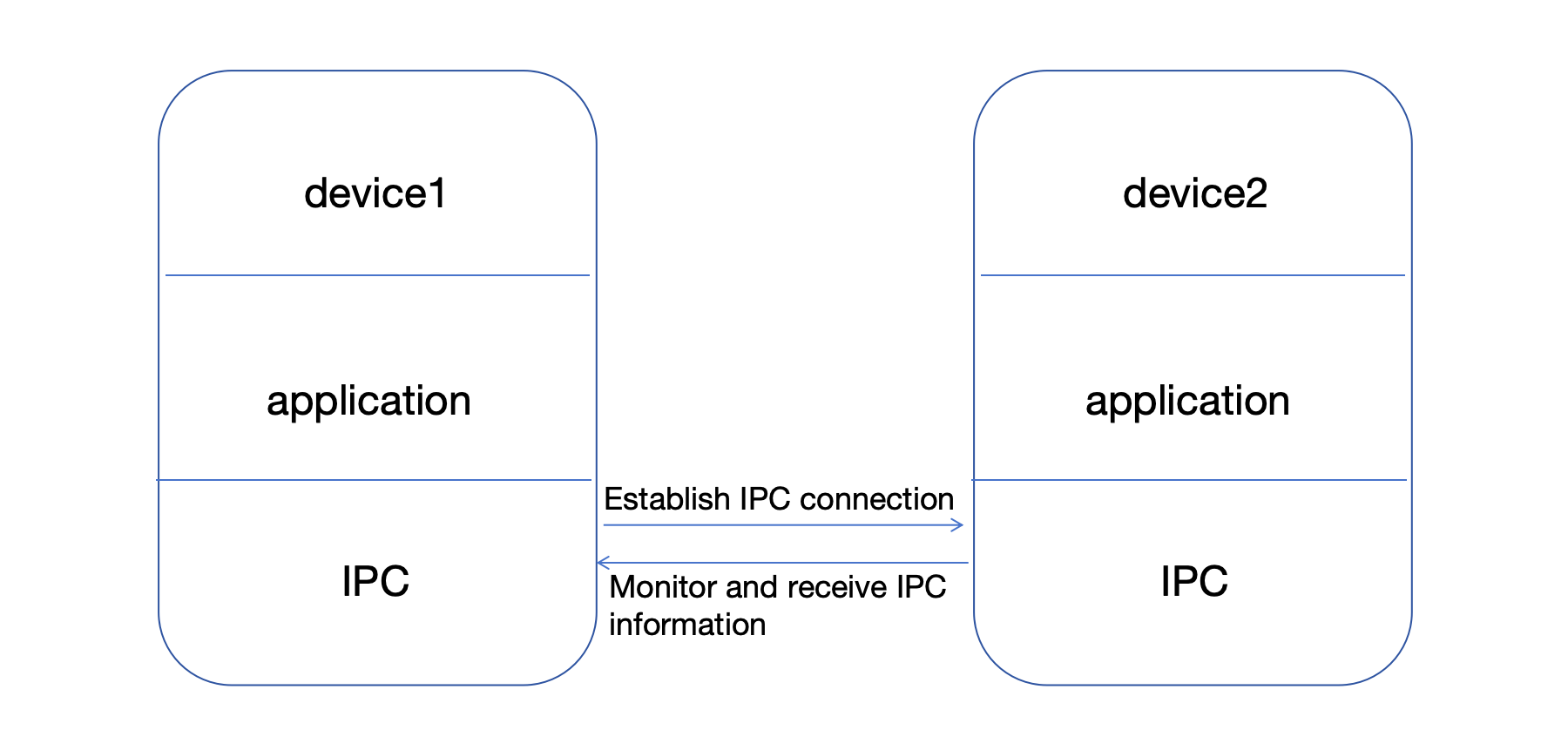
|
|
414
|
-
|
|
415
|
-
### ipc.sendTo
|
|
416
149
|
|
|
417
|
-
|
|
150
|
+
await CoreAPI.init()
|
|
418
151
|
|
|
419
|
-
|
|
420
|
-
|
|
152
|
+
const hello = cutos.capability("hello-device")
|
|
153
|
+
const result = await hello.call("echo", { message: "hello" })
|
|
421
154
|
```
|
|
422
155
|
|
|
423
|
-
|
|
424
|
-
* args: information to be sent
|
|
425
|
-
* callback: callback function
|
|
426
|
-
|
|
427
|
-
### ipc.on
|
|
428
|
-
|
|
429
|
-
Monitor IPC
|
|
430
|
-
|
|
431
|
-
```js
|
|
432
|
-
ipc.on(channel, listener);
|
|
433
|
-
```
|
|
434
|
-
|
|
435
|
-
* channel: channel name
|
|
436
|
-
* listener: listener function (args, respond)
|
|
437
|
-
|
|
438
|
-
##### Local device communication example:
|
|
439
|
-
|
|
440
|
-
##### Example 1 (without return value):
|
|
441
|
-
|
|
442
|
-
```js
|
|
443
|
-
import {CoreAPI} from '@cutos/core';
|
|
444
|
-
|
|
445
|
-
CoreAPI.init();
|
|
156
|
+
Mock Dev is intended for UI and SDK integration development. Real IPC, WebView host behavior, and Node Provider behavior should still be verified with a CUTOS Node before release.
|
|
446
157
|
|
|
447
|
-
|
|
448
|
-
|
|
449
|
-
let ipc = CoreAPI.getIPC();
|
|
450
|
-
//Listen for IPC information
|
|
451
|
-
ipc.on(channel1, (args) => {
|
|
452
|
-
console.log('on', channel1, 'received', args);
|
|
453
|
-
})
|
|
454
|
-
//Send IPC information
|
|
455
|
-
ipc.sendTo(channel1, 'no callback');
|
|
456
|
-
```
|
|
457
|
-
|
|
458
|
-
- Return result example:
|
|
459
|
-
|
|
460
|
-
```
|
|
461
|
-
on channel1 received: "no callback"
|
|
462
|
-
```
|
|
463
|
-
|
|
464
|
-
##### Example 2 (with return value):
|
|
158
|
+
# Platform API
|
|
465
159
|
|
|
466
|
-
|
|
467
|
-
import {CoreAPI} from '@cutos/core';
|
|
160
|
+
## CoreAPI.init
|
|
468
161
|
|
|
469
|
-
|
|
470
|
-
let channel2 = 'channel2';
|
|
471
|
-
let ipc = CoreAPI.getIPC();
|
|
472
|
-
//Monitor IPC information
|
|
473
|
-
ipc.on(channel2, (args, respond) => {
|
|
474
|
-
console.log('on ' + channel2 + ' received: ' + JSON.stringify(args));
|
|
475
|
-
respond({sum: args.opt1 + args.opt2})
|
|
476
|
-
})
|
|
477
|
-
//Sending IPC information
|
|
478
|
-
ipc.sendTo(channel2, {opt1: 2, opt2: 2}, (result) => {
|
|
479
|
-
console.log('on ' + channel2 + ' callback: ' + JSON.stringify(result))
|
|
480
|
-
});
|
|
481
|
-
```
|
|
482
|
-
- Return result example:
|
|
162
|
+
Connect to CUTOS runtime.
|
|
483
163
|
|
|
164
|
+
```ts
|
|
165
|
+
await CoreAPI.init(host?: string | null)
|
|
484
166
|
```
|
|
485
|
-
on channel2 received: {"opt1":2,"opt2":2}
|
|
486
|
-
on channel2 callback: {"sum":4}
|
|
487
|
-
```
|
|
488
|
-
|
|
489
|
-
##### Example of inter-device process communication:
|
|
490
167
|
|
|
491
|
-
|
|
168
|
+
- `host`: CUTOS host address. Defaults to `localhost`.
|
|
169
|
+
- Returns: `Promise<string>`.
|
|
492
170
|
|
|
493
|
-
|
|
494
|
-
import {CoreAPI} from '@cutos/core';
|
|
171
|
+
Example:
|
|
495
172
|
|
|
496
|
-
|
|
497
|
-
|
|
498
|
-
//Destination IP: 192.168.1.149
|
|
499
|
-
let ipc = CoreAPI.getIPC("192.168.1.149");
|
|
500
|
-
//Send IPC information
|
|
501
|
-
ipc.sendTo(channel1, 'no callback');
|
|
173
|
+
```ts
|
|
174
|
+
await CoreAPI.init("localhost")
|
|
502
175
|
```
|
|
503
176
|
|
|
504
|
-
|
|
177
|
+
## CoreAPI.connected
|
|
505
178
|
|
|
506
|
-
|
|
507
|
-
import {CoreAPI} from '@cutos/core';
|
|
508
|
-
|
|
509
|
-
CoreAPI.init();
|
|
510
|
-
let channel1 = 'channel1';
|
|
511
|
-
let ipc = CoreAPI.getIPC();
|
|
512
|
-
//Listen for IPC information
|
|
513
|
-
let ipcListener = function (args) {
|
|
514
|
-
console.log('on', channel1, 'received', args);
|
|
515
|
-
}
|
|
516
|
-
ipc.on(channel1, ipcListener);
|
|
517
|
-
```
|
|
518
|
-
|
|
519
|
-
- Return result example:
|
|
179
|
+
Check whether the SDK is connected.
|
|
520
180
|
|
|
181
|
+
```ts
|
|
182
|
+
const connected = CoreAPI.connected()
|
|
521
183
|
```
|
|
522
|
-
on channel1 received: "no callback"
|
|
523
|
-
```
|
|
524
|
-
|
|
525
|
-
|
|
526
184
|
|
|
527
|
-
|
|
528
|
-
|
|
529
|
-
The basic table structure of CUTOS database is in Key-Value format, and Value can be any json object. The advantage of
|
|
530
|
-
this design is that the database does not need to be upgraded to modify the Value field, but the disadvantage is that it
|
|
531
|
-
cannot be accessed as flexibly as traditional databases. If you need more flexible database access functions, you can
|
|
532
|
-
use the SQL fully compatible interface provided by CUTOS.
|
|
533
|
-
|
|
534
|
-
CUTOS basic table structure (default primary key name is `id`, data type is `INTEGER`):
|
|
535
|
-
|
|
536
|
-
| **Field** | **Data type** | **Description** |
|
|
537
|
-
|:---------:|:-------------:|:------------------------------------------------------:|
|
|
538
|
-
| id | INTEGER | Primary key |
|
|
539
|
-
| value | TEXT | Data |
|
|
540
|
-
| tid | TEXT | Foreign key, transaction id |
|
|
541
|
-
| sync | INTEGER | Synchronization flag: 0-unsynchronized, 1-synchronized |
|
|
542
|
-
| timestamp | INTEGER | Last modified timestamp |
|
|
543
|
-
|
|
544
|
-
### Database
|
|
185
|
+
## CoreAPI.getVersion
|
|
545
186
|
|
|
546
|
-
|
|
187
|
+
Get SDK version.
|
|
547
188
|
|
|
548
|
-
```
|
|
549
|
-
|
|
189
|
+
```ts
|
|
190
|
+
const version = CoreAPI.getVersion()
|
|
550
191
|
```
|
|
551
192
|
|
|
552
|
-
|
|
193
|
+
## CoreAPI.getPlatform
|
|
553
194
|
|
|
554
|
-
|
|
195
|
+
Get platform information.
|
|
555
196
|
|
|
556
|
-
|
|
557
|
-
|
|
558
|
-
|
|
559
|
-
|
|
560
|
-
|
|
561
|
-
|
|
562
|
-
- callback: callback function
|
|
563
|
-
|
|
564
|
-
##### Example:
|
|
565
|
-
|
|
566
|
-
```js
|
|
567
|
-
let database = database.connect((result, error) => {
|
|
568
|
-
if (!error) {
|
|
569
|
-
console.log(result)
|
|
570
|
-
}
|
|
571
|
-
})
|
|
572
|
-
```
|
|
573
|
-
|
|
574
|
-
- Return result example:
|
|
575
|
-
|
|
576
|
-
```json
|
|
577
|
-
{
|
|
578
|
-
"dbPath": "/home/linaro/.config/dios/data/lwa.db"
|
|
197
|
+
```ts
|
|
198
|
+
type PlatformInfo = {
|
|
199
|
+
arch: string
|
|
200
|
+
platform: string
|
|
201
|
+
type: string
|
|
202
|
+
release: string
|
|
579
203
|
}
|
|
580
|
-
```
|
|
581
|
-
|
|
582
|
-
### Database.run
|
|
583
|
-
|
|
584
|
-
Run sql
|
|
585
|
-
|
|
586
|
-
```js
|
|
587
|
-
database.run(sql, callback)
|
|
588
|
-
```
|
|
589
|
-
|
|
590
|
-
- sql: execute sql statement
|
|
591
|
-
- callback: callback function
|
|
592
|
-
|
|
593
|
-
##### Example:
|
|
594
|
-
|
|
595
|
-
```js
|
|
596
|
-
database.run('select * from device', (result, error) => {
|
|
597
|
-
if (!error) {
|
|
598
|
-
console.log(result)
|
|
599
|
-
}
|
|
600
|
-
})
|
|
601
|
-
```
|
|
602
|
-
|
|
603
|
-
- Return result example:
|
|
604
|
-
|
|
605
|
-
```json
|
|
606
|
-
[
|
|
607
|
-
{
|
|
608
|
-
"id": 1,
|
|
609
|
-
"value": "{\"type\":\"printer\",\"name\":\"HP-1\"}",
|
|
610
|
-
"tid": "tra-001",
|
|
611
|
-
"sync": 0,
|
|
612
|
-
"timestamp": 1691401911678
|
|
613
|
-
},
|
|
614
|
-
{
|
|
615
|
-
"id": 2,
|
|
616
|
-
"value": "{\"type\":\"printer\",\"name\":\"HP-2\"}",
|
|
617
|
-
"tid": "tra-002",
|
|
618
|
-
"sync": 0,
|
|
619
|
-
"timestamp": 1691401911681
|
|
620
|
-
}
|
|
621
|
-
]
|
|
622
|
-
```
|
|
623
|
-
|
|
624
|
-
### Database.Table
|
|
625
204
|
|
|
626
|
-
|
|
627
|
-
|
|
628
|
-
```js
|
|
629
|
-
let table = new Database.Table(name, db);
|
|
205
|
+
const platform = await CoreAPI.getPlatform<PlatformInfo>()
|
|
630
206
|
```
|
|
631
207
|
|
|
632
|
-
|
|
633
|
-
- db: database instance
|
|
208
|
+
## CoreAPI.getConfig
|
|
634
209
|
|
|
635
|
-
|
|
210
|
+
Get CUTOS runtime configuration.
|
|
636
211
|
|
|
637
|
-
```
|
|
638
|
-
|
|
212
|
+
```ts
|
|
213
|
+
const config = await CoreAPI.getConfig<Record<string, unknown>>()
|
|
639
214
|
```
|
|
640
215
|
|
|
641
|
-
|
|
642
|
-
|
|
643
|
-
Create a database table
|
|
644
|
-
|
|
645
|
-
```js
|
|
646
|
-
table.create([opts], callback)
|
|
647
|
-
```
|
|
648
|
-
|
|
649
|
-
- opts: optional parameters, including 3 attributes:
|
|
650
|
-
* retentionTime: retention time, in hours; if not passed, it will be retained forever by default
|
|
651
|
-
* keyName: name, if not passed, it will be 'id' by default
|
|
652
|
-
* keyType: type, including 2 types 'TEXT' and 'INTEGER', if not passed, it will be 'INTEGER' by default
|
|
653
|
-
- callback: callback function
|
|
654
|
-
|
|
655
|
-
##### Example:
|
|
656
|
-
|
|
657
|
-
```js
|
|
658
|
-
table.create((result, error) => {
|
|
659
|
-
if (!error) {
|
|
660
|
-
console.log(result)
|
|
661
|
-
}
|
|
662
|
-
});
|
|
663
|
-
```
|
|
216
|
+
## CoreAPI.getBoxInfo
|
|
664
217
|
|
|
665
|
-
|
|
218
|
+
Get host box information.
|
|
666
219
|
|
|
667
|
-
```
|
|
668
|
-
|
|
220
|
+
```ts
|
|
221
|
+
const box = await CoreAPI.getBoxInfo<Record<string, unknown>>()
|
|
669
222
|
```
|
|
670
223
|
|
|
671
|
-
|
|
224
|
+
## CoreAPI.getDeviceInfo
|
|
672
225
|
|
|
673
|
-
|
|
226
|
+
Get registered CUTOS device identity information.
|
|
674
227
|
|
|
675
|
-
```
|
|
676
|
-
|
|
228
|
+
```ts
|
|
229
|
+
const deviceInfo = await CoreAPI.getDeviceInfo<Record<string, unknown>>()
|
|
677
230
|
```
|
|
678
231
|
|
|
679
|
-
|
|
680
|
-
- opts: optional parameters
|
|
681
|
-
* tid: foreign key id, used to establish relationships between multiple records
|
|
682
|
-
- callback: callback function
|
|
232
|
+
## CoreAPI.getSignInfo / CoreAPI.getSignGroupInfo
|
|
683
233
|
|
|
684
|
-
|
|
234
|
+
Get sign and sign group metadata.
|
|
685
235
|
|
|
686
|
-
```
|
|
687
|
-
|
|
688
|
-
|
|
689
|
-
if (!error) {
|
|
690
|
-
console.log(result)
|
|
691
|
-
}
|
|
692
|
-
});
|
|
236
|
+
```ts
|
|
237
|
+
const signInfo = await CoreAPI.getSignInfo<Record<string, unknown>>()
|
|
238
|
+
const groupInfo = await CoreAPI.getSignGroupInfo<Record<string, unknown>>()
|
|
693
239
|
```
|
|
694
240
|
|
|
695
|
-
|
|
241
|
+
## CoreAPI.getVolume / CoreAPI.setVolume
|
|
696
242
|
|
|
697
|
-
```
|
|
698
|
-
|
|
699
|
-
|
|
700
|
-
"row": 1
|
|
701
|
-
}
|
|
243
|
+
```ts
|
|
244
|
+
const volume = await CoreAPI.getVolume<number>()
|
|
245
|
+
await CoreAPI.setVolume(70)
|
|
702
246
|
```
|
|
703
247
|
|
|
704
|
-
|
|
705
|
-
|
|
706
|
-
Insert data by id
|
|
707
|
-
|
|
708
|
-
```js
|
|
709
|
-
table.insertById(id, value, [opts], callback)
|
|
710
|
-
```
|
|
711
|
-
|
|
712
|
-
- id: data id
|
|
713
|
-
- value: insert data
|
|
714
|
-
- opts: optional parameters
|
|
715
|
-
* tid: Foreign key id, used to establish relationships between multiple records
|
|
716
|
-
- callback: callback function
|
|
717
|
-
|
|
718
|
-
##### Example:
|
|
719
|
-
|
|
720
|
-
```js
|
|
721
|
-
let tid = "tra-001";
|
|
722
|
-
table.insertById(1, {type: "printer", name: "NEC"}, {tid: tid}, (result, error) => {
|
|
723
|
-
if (!error) {
|
|
724
|
-
console.log(result)
|
|
725
|
-
}
|
|
726
|
-
});
|
|
727
|
-
```
|
|
248
|
+
## CoreAPI.setHttpProxy
|
|
728
249
|
|
|
729
|
-
-
|
|
250
|
+
Set a runtime HTTP proxy to avoid LWA cross-origin issues during development.
|
|
730
251
|
|
|
731
|
-
```
|
|
732
|
-
{
|
|
733
|
-
|
|
734
|
-
|
|
252
|
+
```ts
|
|
253
|
+
type ProxyResult = {
|
|
254
|
+
path: string
|
|
255
|
+
target: string
|
|
735
256
|
}
|
|
736
|
-
```
|
|
737
|
-
|
|
738
|
-
### Table.update
|
|
739
257
|
|
|
740
|
-
|
|
741
|
-
|
|
742
|
-
|
|
743
|
-
|
|
258
|
+
const proxy = await CoreAPI.setHttpProxy<ProxyResult>(
|
|
259
|
+
"api",
|
|
260
|
+
"https://www.cut-os.com"
|
|
261
|
+
)
|
|
744
262
|
```
|
|
745
263
|
|
|
746
|
-
|
|
747
|
-
- value: update data
|
|
748
|
-
- callback: callback function
|
|
264
|
+
## CoreAPI.shell
|
|
749
265
|
|
|
750
|
-
|
|
266
|
+
Execute a shell command through CUTOS runtime.
|
|
751
267
|
|
|
752
|
-
```
|
|
753
|
-
|
|
754
|
-
if (!error) {
|
|
755
|
-
console.log(result)
|
|
756
|
-
}
|
|
757
|
-
});
|
|
268
|
+
```ts
|
|
269
|
+
const pwd = await CoreAPI.shell<string>("pwd")
|
|
758
270
|
```
|
|
759
271
|
|
|
760
|
-
|
|
272
|
+
Use this API carefully. It should not be exposed to untrusted LWA code without permissions.
|
|
761
273
|
|
|
762
|
-
|
|
763
|
-
{
|
|
764
|
-
"status": true,
|
|
765
|
-
"msg": 0
|
|
766
|
-
}
|
|
767
|
-
```
|
|
274
|
+
# Capability API
|
|
768
275
|
|
|
769
|
-
|
|
276
|
+
## cutos.capability
|
|
770
277
|
|
|
771
|
-
|
|
278
|
+
Create a capability client.
|
|
772
279
|
|
|
773
|
-
```
|
|
774
|
-
|
|
280
|
+
```ts
|
|
281
|
+
const capability = cutos.capability("hello-device")
|
|
775
282
|
```
|
|
776
283
|
|
|
777
|
-
|
|
778
|
-
- callback: callback function
|
|
284
|
+
`CoreAPI.capability()` is equivalent.
|
|
779
285
|
|
|
780
|
-
|
|
781
|
-
|
|
782
|
-
Query data
|
|
783
|
-
|
|
784
|
-
```js
|
|
785
|
-
table.query(id, callback);
|
|
286
|
+
```ts
|
|
287
|
+
const capability = CoreAPI.capability("hello-device")
|
|
786
288
|
```
|
|
787
289
|
|
|
788
|
-
|
|
789
|
-
- callback: callback function
|
|
290
|
+
## capability.call
|
|
790
291
|
|
|
791
|
-
|
|
292
|
+
Call a Provider method.
|
|
792
293
|
|
|
793
|
-
```
|
|
794
|
-
|
|
795
|
-
|
|
796
|
-
|
|
797
|
-
|
|
798
|
-
});
|
|
294
|
+
```ts
|
|
295
|
+
const result = await capability.call<
|
|
296
|
+
{ message: string },
|
|
297
|
+
{ message: string }
|
|
298
|
+
>("echo", { message: "hello" })
|
|
799
299
|
```
|
|
800
300
|
|
|
801
|
-
|
|
301
|
+
Set a per-call timeout:
|
|
802
302
|
|
|
803
|
-
```
|
|
804
|
-
|
|
805
|
-
|
|
806
|
-
|
|
807
|
-
|
|
808
|
-
|
|
809
|
-
"sync": 0,
|
|
810
|
-
"timestamp": 1691401911681
|
|
811
|
-
}
|
|
812
|
-
]
|
|
303
|
+
```ts
|
|
304
|
+
await capability.call(
|
|
305
|
+
"connect",
|
|
306
|
+
{ name: "demo" },
|
|
307
|
+
{ timeout: 3000 }
|
|
308
|
+
)
|
|
813
309
|
```
|
|
814
310
|
|
|
815
|
-
|
|
311
|
+
## capability.on
|
|
816
312
|
|
|
817
|
-
|
|
313
|
+
Subscribe to Provider events.
|
|
818
314
|
|
|
819
|
-
```
|
|
820
|
-
|
|
315
|
+
```ts
|
|
316
|
+
const unsubscribe = capability.on<{
|
|
317
|
+
status: "idle" | "connected" | "error"
|
|
318
|
+
message?: string
|
|
319
|
+
}>("statusChanged", data => {
|
|
320
|
+
console.log(data.status)
|
|
321
|
+
})
|
|
821
322
|
```
|
|
822
323
|
|
|
823
|
-
|
|
824
|
-
- callback: callback function
|
|
324
|
+
## capability.off
|
|
825
325
|
|
|
826
|
-
|
|
326
|
+
Remove one listener or all listeners for an event.
|
|
827
327
|
|
|
828
|
-
```
|
|
829
|
-
|
|
830
|
-
if (!error) {
|
|
831
|
-
console.log(result)
|
|
832
|
-
}
|
|
833
|
-
});
|
|
328
|
+
```ts
|
|
329
|
+
capability.off("statusChanged")
|
|
834
330
|
```
|
|
835
331
|
|
|
836
|
-
|
|
332
|
+
## capability.dispose
|
|
837
333
|
|
|
838
|
-
|
|
839
|
-
{
|
|
840
|
-
"status": true,
|
|
841
|
-
"msg": 0
|
|
842
|
-
}
|
|
843
|
-
```
|
|
844
|
-
|
|
845
|
-
### Table.queryUnsynced
|
|
846
|
-
|
|
847
|
-
Query unsynchronized data
|
|
334
|
+
Clear listeners and release the underlying subscription.
|
|
848
335
|
|
|
849
|
-
```
|
|
850
|
-
|
|
336
|
+
```ts
|
|
337
|
+
capability.dispose()
|
|
851
338
|
```
|
|
852
339
|
|
|
853
|
-
|
|
854
|
-
- callback: callback function
|
|
340
|
+
# Provider API
|
|
855
341
|
|
|
856
|
-
|
|
857
|
-
|
|
858
|
-
```js
|
|
859
|
-
deviceTable.queryUnsynced((result, error) => {
|
|
860
|
-
if (!error) {
|
|
861
|
-
console.log(result)
|
|
862
|
-
}
|
|
863
|
-
});
|
|
864
|
-
```
|
|
342
|
+
## cutos.provider
|
|
865
343
|
|
|
866
|
-
|
|
344
|
+
Create a Provider.
|
|
867
345
|
|
|
868
|
-
```
|
|
869
|
-
|
|
870
|
-
{
|
|
871
|
-
"id": 1,
|
|
872
|
-
"value": "{\"type\":\"printer\",\"name\":\"NEC\"}",
|
|
873
|
-
"tid": "tra-001",
|
|
874
|
-
"sync": 0,
|
|
875
|
-
"timestamp": 1691402230172
|
|
876
|
-
}
|
|
877
|
-
]
|
|
346
|
+
```ts
|
|
347
|
+
const provider = cutos.provider("hello-device")
|
|
878
348
|
```
|
|
879
349
|
|
|
880
|
-
|
|
350
|
+
`CoreAPI.provider()` is equivalent.
|
|
881
351
|
|
|
882
|
-
|
|
883
|
-
|
|
884
|
-
```js
|
|
885
|
-
table.queryByTid(tid, callback);
|
|
352
|
+
```ts
|
|
353
|
+
const provider = CoreAPI.provider("hello-device")
|
|
886
354
|
```
|
|
887
355
|
|
|
888
|
-
|
|
889
|
-
- callback: callback function
|
|
356
|
+
## provider.method
|
|
890
357
|
|
|
891
|
-
|
|
358
|
+
Register a method handler.
|
|
892
359
|
|
|
893
|
-
```
|
|
894
|
-
|
|
895
|
-
|
|
896
|
-
|
|
897
|
-
|
|
898
|
-
}
|
|
360
|
+
```ts
|
|
361
|
+
provider.method<
|
|
362
|
+
{ message: string },
|
|
363
|
+
{ message: string }
|
|
364
|
+
>("echo", async params => {
|
|
365
|
+
return { message: params.message }
|
|
366
|
+
})
|
|
899
367
|
```
|
|
900
368
|
|
|
901
|
-
|
|
369
|
+
Use `context` when raw command information is needed.
|
|
902
370
|
|
|
903
|
-
```
|
|
904
|
-
|
|
905
|
-
|
|
906
|
-
|
|
907
|
-
|
|
908
|
-
|
|
909
|
-
"sync": 0,
|
|
910
|
-
"timestamp": 1691401911681
|
|
371
|
+
```ts
|
|
372
|
+
provider.method<{ name: string }, { connected: boolean }>(
|
|
373
|
+
"connect",
|
|
374
|
+
async (params, context) => {
|
|
375
|
+
console.log(context.command.cmd)
|
|
376
|
+
return { connected: true }
|
|
911
377
|
}
|
|
912
|
-
|
|
378
|
+
)
|
|
913
379
|
```
|
|
914
380
|
|
|
915
|
-
|
|
916
|
-
|
|
917
|
-
Query all data
|
|
381
|
+
Throw `CutosError` for expected business errors.
|
|
918
382
|
|
|
919
|
-
```
|
|
920
|
-
|
|
383
|
+
```ts
|
|
384
|
+
throw new CutosError("HELLO_DEVICE_UNAVAILABLE", "The hello device is unavailable.")
|
|
921
385
|
```
|
|
922
386
|
|
|
923
|
-
|
|
387
|
+
## provider.emit
|
|
924
388
|
|
|
925
|
-
|
|
389
|
+
Emit an event.
|
|
926
390
|
|
|
927
|
-
```
|
|
928
|
-
|
|
929
|
-
|
|
930
|
-
|
|
931
|
-
|
|
932
|
-
});
|
|
933
|
-
```
|
|
934
|
-
|
|
935
|
-
- Return result example:
|
|
936
|
-
|
|
937
|
-
```json
|
|
938
|
-
[
|
|
939
|
-
{
|
|
940
|
-
"id": 1,
|
|
941
|
-
"value": "{\"type\":\"printer\",\"name\":\"HP-1\"}",
|
|
942
|
-
"tid": "tra-001",
|
|
943
|
-
"sync": 0,
|
|
944
|
-
"timestamp": 1691401911678
|
|
945
|
-
},
|
|
946
|
-
{
|
|
947
|
-
"id": 2,
|
|
948
|
-
"value": "{\"type\":\"printer\",\"name\":\"HP-2\"}",
|
|
949
|
-
"tid": "tra-002",
|
|
950
|
-
"sync": 0,
|
|
951
|
-
"timestamp": 1691401911681
|
|
952
|
-
}
|
|
953
|
-
]
|
|
391
|
+
```ts
|
|
392
|
+
provider.emit("statusChanged", {
|
|
393
|
+
status: "connected",
|
|
394
|
+
message: "hello-device ready"
|
|
395
|
+
})
|
|
954
396
|
```
|
|
955
397
|
|
|
398
|
+
## provider.dispose
|
|
956
399
|
|
|
957
|
-
|
|
958
|
-
|
|
959
|
-
## Driver
|
|
960
|
-
|
|
961
|
-
### Driver
|
|
962
|
-
|
|
963
|
-
Constructor
|
|
400
|
+
Clear methods and release the underlying command listener.
|
|
964
401
|
|
|
965
|
-
```
|
|
966
|
-
|
|
402
|
+
```ts
|
|
403
|
+
provider.dispose()
|
|
967
404
|
```
|
|
968
405
|
|
|
969
|
-
|
|
970
|
-
- type: device type, default is cutosAPI.DEVICE.DEFAULT
|
|
971
|
-
- counter: heartbeat interval, default is 10s
|
|
406
|
+
# IPC API
|
|
972
407
|
|
|
973
|
-
|
|
408
|
+
IPC is a lower-level channel API. Prefer Capability/Provider for product APIs.
|
|
974
409
|
|
|
975
|
-
|
|
410
|
+
## CoreAPI.getIPC
|
|
976
411
|
|
|
977
|
-
```
|
|
978
|
-
|
|
412
|
+
```ts
|
|
413
|
+
const ipc = CoreAPI.getIPC()
|
|
414
|
+
const remote = CoreAPI.getIPC("192.168.1.149")
|
|
979
415
|
```
|
|
980
416
|
|
|
981
|
-
|
|
982
|
-
|
|
983
|
-
### Driver.onCommand
|
|
984
|
-
|
|
985
|
-
Receive device commands
|
|
417
|
+
## ipc.call
|
|
986
418
|
|
|
987
|
-
```
|
|
988
|
-
|
|
419
|
+
```ts
|
|
420
|
+
const result = await ipc.call<
|
|
421
|
+
{ left: number; right: number },
|
|
422
|
+
{ sum: number }
|
|
423
|
+
>("math.add", { left: 2, right: 2 })
|
|
989
424
|
```
|
|
990
425
|
|
|
991
|
-
|
|
992
|
-
- command: command, example: {cmd: "connect", args: ""}
|
|
993
|
-
- respond: used to send data back to Device.sendCommand's callback function
|
|
426
|
+
## ipc.callWithOptions
|
|
994
427
|
|
|
995
|
-
|
|
996
|
-
|
|
997
|
-
|
|
998
|
-
|
|
999
|
-
|
|
1000
|
-
|
|
1001
|
-
```js
|
|
1002
|
-
const device = new (name = 'default-device-name', type = cutosAPI.DEVICE.DEFAULT)
|
|
428
|
+
```ts
|
|
429
|
+
await ipc.callWithOptions(
|
|
430
|
+
"math.add",
|
|
431
|
+
{ left: 2, right: 2 },
|
|
432
|
+
{ timeout: 3000 }
|
|
433
|
+
)
|
|
1003
434
|
```
|
|
1004
435
|
|
|
1005
|
-
|
|
1006
|
-
* type: device type, default is cutosAPI.DEVICE.DEFAULT
|
|
436
|
+
## ipc.on
|
|
1007
437
|
|
|
1008
|
-
|
|
1009
|
-
|
|
1010
|
-
|
|
438
|
+
```ts
|
|
439
|
+
const off = ipc.on<{ left: number; right: number }, { sum: number }>(
|
|
440
|
+
"math.add",
|
|
441
|
+
(args, respond) => {
|
|
442
|
+
respond({ sum: args.left + args.right })
|
|
443
|
+
}
|
|
444
|
+
)
|
|
1011
445
|
|
|
1012
|
-
|
|
1013
|
-
device.init([opts], callback)
|
|
446
|
+
off?.()
|
|
1014
447
|
```
|
|
1015
448
|
|
|
1016
|
-
|
|
1017
|
-
to [Driver Template](#download-project-template)
|
|
1018
|
-
* callback: function(result, error)
|
|
449
|
+
## ipc.sendTo
|
|
1019
450
|
|
|
1020
|
-
|
|
451
|
+
Fire-and-forget message.
|
|
1021
452
|
|
|
1022
|
-
```
|
|
1023
|
-
|
|
1024
|
-
if (error) {
|
|
1025
|
-
console.log(error)
|
|
1026
|
-
return;
|
|
1027
|
-
}
|
|
1028
|
-
console.log(result)
|
|
1029
|
-
});
|
|
453
|
+
```ts
|
|
454
|
+
ipc.sendTo("diagnostic.event", { time: Date.now() })
|
|
1030
455
|
```
|
|
1031
456
|
|
|
1032
|
-
|
|
1033
|
-
|
|
1034
|
-
Send a command to the driver
|
|
1035
|
-
|
|
1036
|
-
```js
|
|
1037
|
-
device.sendCommand(command, callback)
|
|
1038
|
-
```
|
|
457
|
+
# Database API
|
|
1039
458
|
|
|
1040
|
-
-
|
|
1041
|
-
- callback: function callback(result), used to receive the response from driver
|
|
459
|
+
CUTOS database uses a key-value table model. Values can be arbitrary JSON objects.
|
|
1042
460
|
|
|
1043
|
-
|
|
461
|
+
## Database
|
|
1044
462
|
|
|
1045
|
-
```
|
|
1046
|
-
|
|
463
|
+
```ts
|
|
464
|
+
const database = new CoreClass.Database()
|
|
465
|
+
await database.connect()
|
|
1047
466
|
```
|
|
1048
467
|
|
|
1049
|
-
|
|
468
|
+
## database.run
|
|
1050
469
|
|
|
1051
|
-
|
|
1052
|
-
|
|
1053
|
-
|
|
1054
|
-
|
|
470
|
+
```ts
|
|
471
|
+
const rows = await database.run<Array<Record<string, unknown>>>(
|
|
472
|
+
"select * from device"
|
|
473
|
+
)
|
|
1055
474
|
```
|
|
1056
475
|
|
|
1057
|
-
|
|
1058
|
-
|
|
1059
|
-
## Device driver relationship
|
|
1060
|
-
|
|
1061
|
-
##### 1. onData and sendData
|
|
1062
|
-
|
|
1063
|
-
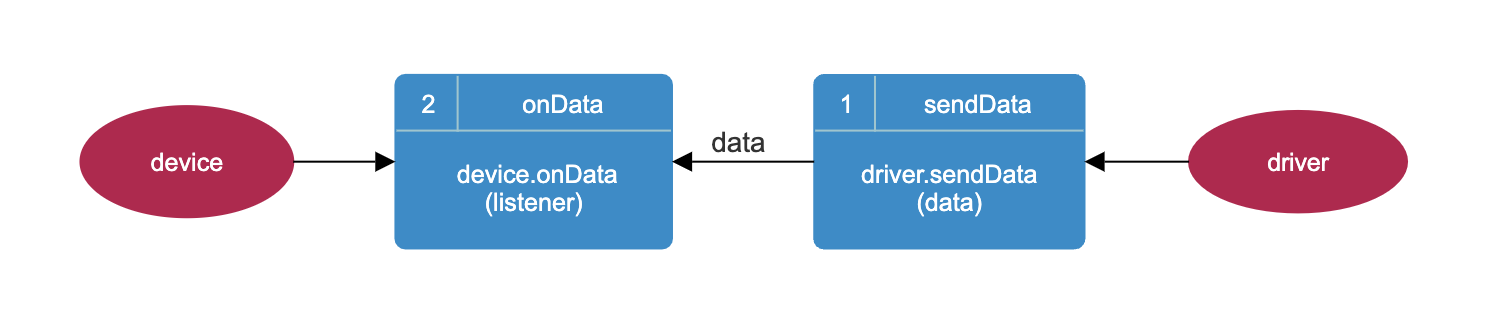
|
|
1064
|
-
|
|
1065
|
-
##### 2. sendCommand (without callback function) and onCommand
|
|
1066
|
-
|
|
1067
|
-
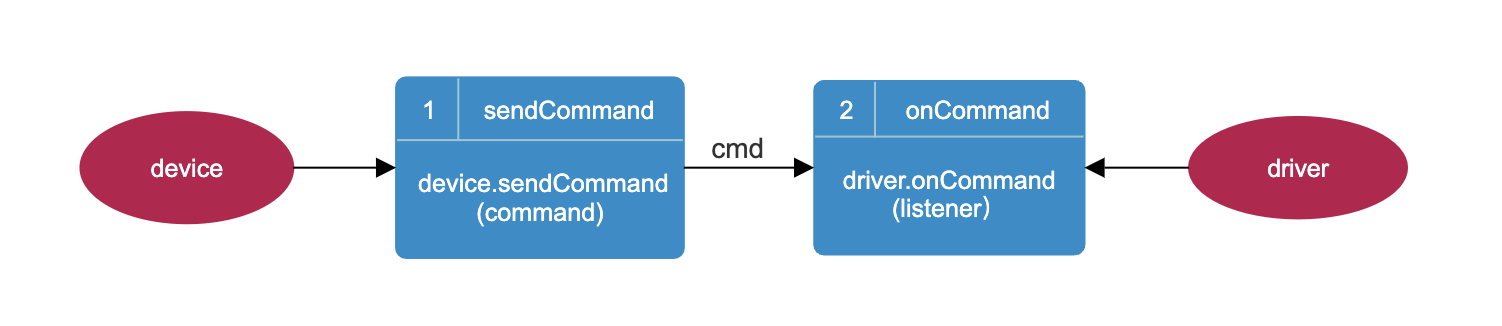
|
|
1068
|
-
|
|
1069
|
-
##### 3. sendCommand (with callback function) and onCommand
|
|
1070
|
-
|
|
1071
|
-

|
|
1072
|
-
|
|
1073
|
-
## Device driver management template
|
|
1074
|
-
|
|
1075
|
-
### Download project template
|
|
1076
|
-
|
|
1077
|
-
| <span style="white-space:nowrap;">Name </span> | Description | Download |
|
|
1078
|
-
|:-----------------------------------------------|:----------------------:|:-----------------------------------------------------------------------------------:|
|
|
1079
|
-
| driver-template | Device driver template | [Download](https://oss.cut-os.com/resources/developer/template/driver-template.zip) |
|
|
1080
|
-
|
|
1081
|
-
##### Project structure
|
|
476
|
+
## Database.Table
|
|
1082
477
|
|
|
478
|
+
```ts
|
|
479
|
+
const table = new CoreClass.Database.Table("device", database)
|
|
1083
480
|
```
|
|
1084
|
-
├── driver/ # Driver
|
|
1085
|
-
│ ├── src/ # Driver source directory
|
|
1086
|
-
│ ├── config.json # Configuration file, configure related parameters
|
|
1087
|
-
│ ├── driver-template.js # Driver template
|
|
1088
|
-
│ ├── driver-template-def.js # Device driver data definition (same as in SDK)
|
|
1089
|
-
│ ├── index.js # Driver loading file
|
|
1090
|
-
│ ├── test/ # Test directory
|
|
1091
|
-
│ ├── main.js # Test entry file, simulate cutos, create a driver service
|
|
1092
|
-
│ ├── package.json # Configuration information for this project
|
|
1093
|
-
│ ├── gulpfile.js # Packaging file
|
|
1094
|
-
│ ├── readme.txt # Instructions
|
|
1095
|
-
├── sdk/ # Interface SDK
|
|
1096
|
-
│ ├── src/ # Source code directory
|
|
1097
|
-
│ ├── driver-template.js # Device template
|
|
1098
|
-
│ ├── driver-template-def.js # Device driver data definition (same as in driver)
|
|
1099
|
-
│ ├── test/ # Test directory
|
|
1100
|
-
│ ├── main.js # Test entry file
|
|
1101
|
-
│ ├── package.json # Configuration information for this project
|
|
1102
|
-
│ ├── gulpfile.mjs # Packaging file
|
|
1103
|
-
│ ├── readme.txt # Instructions
|
|
1104
|
-
```
|
|
1105
|
-
|
|
1106
|
-
### Installation dependencies
|
|
1107
|
-
|
|
1108
|
-
> Note: node version >= 16
|
|
1109
481
|
|
|
1110
|
-
|
|
1111
|
-
cd driver-template/driver
|
|
1112
|
-
npm install
|
|
1113
|
-
```
|
|
482
|
+
## table.create
|
|
1114
483
|
|
|
484
|
+
```ts
|
|
485
|
+
await table.create({
|
|
486
|
+
keyName: "id",
|
|
487
|
+
keyType: "INTEGER"
|
|
488
|
+
})
|
|
1115
489
|
```
|
|
1116
|
-
cd driver-template/sdk
|
|
1117
|
-
npm install
|
|
1118
|
-
```
|
|
1119
|
-
|
|
1120
|
-
[//]: # (### Template-based development)
|
|
1121
|
-
|
|
1122
|
-
### Project startup
|
|
1123
490
|
|
|
1124
|
-
|
|
491
|
+
## table.insert
|
|
1125
492
|
|
|
493
|
+
```ts
|
|
494
|
+
await table.insert(
|
|
495
|
+
{ type: "printer", name: "HP-1" },
|
|
496
|
+
{ tid: "tra-001" }
|
|
497
|
+
)
|
|
1126
498
|
```
|
|
1127
|
-
npm start
|
|
1128
|
-
```
|
|
1129
|
-
|
|
1130
|
-
If the startup is successful, the console will return the following content
|
|
1131
499
|
|
|
1132
|
-
|
|
500
|
+
## table.insertById / table.insertByKey
|
|
1133
501
|
|
|
1134
|
-
```
|
|
1135
|
-
|
|
1136
|
-
|
|
1137
|
-
drvDefault onCommand
|
|
1138
|
-
{
|
|
1139
|
-
"cmd":"init",
|
|
1140
|
-
"args":{"name":"driver-template","type":"driver-template","development":true},
|
|
1141
|
-
"topicResponse":"device-channel-driver-template-response"
|
|
1142
|
-
}
|
|
1143
|
-
connect: received.
|
|
1144
|
-
cmd: custom-cmd received.
|
|
1145
|
-
cmd: unknown is unsupported.
|
|
502
|
+
```ts
|
|
503
|
+
await table.insertById(1, { type: "printer", name: "HP-1" })
|
|
504
|
+
await table.insertByKey("printer-1", { type: "printer", name: "HP-1" })
|
|
1146
505
|
```
|
|
1147
506
|
|
|
1148
|
-
|
|
507
|
+
## table.update / table.updateByKey
|
|
1149
508
|
|
|
509
|
+
```ts
|
|
510
|
+
await table.update(1, { type: "printer", name: "HP-2" })
|
|
511
|
+
await table.updateByKey("printer-1", { type: "printer", name: "HP-2" })
|
|
1150
512
|
```
|
|
1151
|
-
CUTOS CORE connected.
|
|
1152
|
-
driver template init true
|
|
1153
|
-
connect: { msg: 'return success.', status: true }
|
|
1154
|
-
```
|
|
1155
|
-
|
|
1156
|
-
### Packaging and Release
|
|
1157
513
|
|
|
1158
|
-
|
|
514
|
+
## table.delete
|
|
1159
515
|
|
|
516
|
+
```ts
|
|
517
|
+
await table.delete(1)
|
|
1160
518
|
```
|
|
1161
|
-
cd driver-template/driver
|
|
1162
|
-
npm run build
|
|
1163
|
-
```
|
|
1164
|
-
|
|
1165
|
-
```
|
|
1166
|
-
├── driver/
|
|
1167
|
-
│ ├── dist/ # Packaging directory
|
|
1168
|
-
│ ├── driver-template-v1.0.1.drv # Packaging file
|
|
1169
|
-
```
|
|
1170
|
-
|
|
1171
|
-
##### Release the driver
|
|
1172
|
-
|
|
1173
|
-
Upload the package file to https://www.cut-os.com/ and publish
|
|
1174
|
-
Hardware/Driver--Add
|
|
1175
519
|
|
|
1176
|
-
|
|
520
|
+
## table.query APIs
|
|
1177
521
|
|
|
522
|
+
```ts
|
|
523
|
+
const byId = await table.query<Array<Record<string, unknown>>>(1)
|
|
524
|
+
const byKey = await table.queryByKey<Array<Record<string, unknown>>>("printer-1")
|
|
525
|
+
const byTid = await table.queryByTid<Array<Record<string, unknown>>>("tra-001")
|
|
526
|
+
const all = await table.queryAll<Array<Record<string, unknown>>>()
|
|
1178
527
|
```
|
|
1179
|
-
cd driver-template/sdk
|
|
1180
|
-
npm run build
|
|
1181
|
-
```
|
|
1182
|
-
|
|
1183
|
-
```
|
|
1184
|
-
├── sdk/
|
|
1185
|
-
│ ├── dist/ # Packaging directory
|
|
1186
|
-
│ ├── driver-template-sdk-v1.0.2.zip # Packaging files
|
|
1187
|
-
```
|
|
1188
|
-
|
|
1189
|
-
##### Note:
|
|
1190
|
-
|
|
1191
|
-
> 1.The template device-template.js references TYPE, CMD exported in device-template-def.js
|
|
1192
|
-
>
|
|
1193
|
-
> `import {CMD, TYPE} from './device-template-def.js';`
|
|
1194
|
-
> * Device type (TYPE):
|
|
1195
|
-
>
|
|
1196
|
-
- Type constant: key "TEMPLATE", value "Device template".
|
|
1197
|
-
> - Indicates the template type, identifying the category of the device.
|
|
1198
|
-
>* Command type (CMD):
|
|
1199
|
-
>
|
|
1200
|
-
- CMD constant with two pairs:
|
|
1201
|
-
>
|
|
1202
|
-
- CONNECT: 'connect' represents the connection command.
|
|
1203
|
-
> - CUSTOM_CMD: "custom-cmd" represents a custom command for a specific device.
|
|
1204
|
-
|
|
1205
|
-
> 2.Configuration requirements: Keep the TYPE parameter 3 in the template consistent so that the driver matches the
|
|
1206
|
-
> corresponding SDK.
|
|
1207
|
-
>
|
|
1208
|
-
> ```let device = new DeviceTemplate('device-template',callback)``` //device-template.js
|
|
1209
|
-
>
|
|
1210
|
-
> ``` const TYPE = 'device-template';```//device-template-def.js
|
|
1211
|
-
>
|
|
1212
|
-
> ```{"name": "device-template",...}```//config.json
|
|
1213
|
-
|
|
1214
|
-
## Review
|
|
1215
|
-
|
|
1216
|
-
The complete code is as follows:
|
|
1217
|
-
|
|
1218
|
-
### driver
|
|
1219
|
-
|
|
1220
|
-
```js
|
|
1221
|
-
// driver/src/driver-template.js
|
|
1222
|
-
const {CoreDefine, CoreClass} = require('@cutos/core');
|
|
1223
|
-
const {TYPE, CMD} = require('./driver-template-def.js');
|
|
1224
|
-
const config = require('./config.json');
|
|
1225
|
-
|
|
1226
|
-
class DriverTemplate extends CoreClass.Driver {
|
|
1227
|
-
constructor(args) {
|
|
1228
|
-
// check
|
|
1229
|
-
if (TYPE !== config.type) {
|
|
1230
|
-
throw "Error: the 'type' value in config.js and *-def.js MUST be identical.";
|
|
1231
|
-
}
|
|
1232
|
-
super(args.name, TYPE);
|
|
1233
|
-
|
|
1234
|
-
this.startBeat();
|
|
1235
|
-
this.updateStatusInfo(CoreDefine.HEARTBEAT_STATUS.ALIVE, "alive");
|
|
1236
|
-
|
|
1237
|
-
this.onCommand(({cmd, args}, respond) => {
|
|
1238
|
-
// Listen to the messages sent by the device SDK, process the different commands in the message body,
|
|
1239
|
-
// and respond back to the device SDK through the callback function.
|
|
1240
|
-
switch (cmd) {
|
|
1241
|
-
case CMD.CONNECT:
|
|
1242
|
-
this.connect(args, respond);
|
|
1243
|
-
break;
|
|
1244
|
-
case CMD.CUSTOM_CMD:
|
|
1245
|
-
this.customCmd(cmd, args);
|
|
1246
|
-
break;
|
|
1247
|
-
default:
|
|
1248
|
-
this.unsupported(cmd, args, respond);
|
|
1249
|
-
break;
|
|
1250
|
-
}
|
|
1251
|
-
});
|
|
1252
|
-
}
|
|
1253
|
-
|
|
1254
|
-
unsupported(cmd, args, respond) {
|
|
1255
|
-
let result = {};
|
|
1256
|
-
result.msg = "cmd: " + cmd + " is unsupported.";
|
|
1257
|
-
result.status = false;
|
|
1258
|
-
console.log(result.msg);
|
|
1259
|
-
respond(result);
|
|
1260
|
-
}
|
|
1261
|
-
|
|
1262
|
-
connect(args, respond) {
|
|
1263
|
-
console.log("connect: received.");
|
|
1264
|
-
let result = {};
|
|
1265
|
-
result.msg = "return success.";
|
|
1266
|
-
result.status = true;
|
|
1267
|
-
respond(result);
|
|
1268
|
-
}
|
|
1269
|
-
|
|
1270
|
-
// no response
|
|
1271
|
-
customCmd(cmd, args) {
|
|
1272
|
-
console.log("cmd: " + cmd + args, " received.");
|
|
1273
|
-
// process cmd below
|
|
1274
|
-
}
|
|
1275
528
|
|
|
1276
|
-
|
|
1277
|
-
let data = {};
|
|
1278
|
-
data.type = "custom-type"; // custom defined data type
|
|
1279
|
-
data.values = {}; // values from template driver
|
|
1280
|
-
data.values.val = "any value";
|
|
1281
|
-
data.values.timeStamp = Date.now();
|
|
1282
|
-
this.sendData(data);
|
|
1283
|
-
}
|
|
1284
|
-
}
|
|
529
|
+
## table.queryUnsynced
|
|
1285
530
|
|
|
1286
|
-
|
|
531
|
+
```ts
|
|
532
|
+
const rows = await table.queryUnsynced<Array<Record<string, unknown>>>({ limit: 100 })
|
|
1287
533
|
```
|
|
1288
534
|
|
|
1289
|
-
|
|
1290
|
-
|
|
1291
|
-
```js
|
|
1292
|
-
// sdk/src/driver-template.js
|
|
1293
|
-
|
|
1294
|
-
import {CoreClass} from '@cutos/core';
|
|
1295
|
-
import {CMD, TYPE} from './driver-template-def.js';
|
|
1296
|
-
|
|
1297
|
-
class DriverTemplate extends CoreClass.Device {
|
|
1298
|
-
constructor(name, callback, opts = {development: true}) {
|
|
1299
|
-
super(name, TYPE, callback, opts);
|
|
1300
|
-
|
|
1301
|
-
this.onData((data) => {
|
|
1302
|
-
console.log("on data", data)
|
|
1303
|
-
});
|
|
1304
|
-
}
|
|
1305
|
-
|
|
1306
|
-
connect(callback) {
|
|
1307
|
-
let cmdMessage = {cmd: CMD.CONNECT};
|
|
1308
|
-
this.sendCommand(cmdMessage, callback);
|
|
1309
|
-
}
|
|
1310
|
-
|
|
1311
|
-
customCmd() {
|
|
1312
|
-
let cmdMessage = {cmd: CMD.CUSTOM_CMD, args: ""};
|
|
1313
|
-
this.sendCommand(cmdMessage);
|
|
1314
|
-
}
|
|
1315
|
-
}
|
|
1316
|
-
|
|
1317
|
-
export {DriverTemplate};
|
|
1318
|
-
```
|
|
535
|
+
## table.sync
|
|
1319
536
|
|
|
1320
|
-
```
|
|
1321
|
-
|
|
1322
|
-
import {CoreAPI} from '@cutos/core';
|
|
1323
|
-
import {DriverTemplate} from '../src/driver-template.js';
|
|
1324
|
-
|
|
1325
|
-
CoreAPI.init(null, () => {
|
|
1326
|
-
let device = new DriverTemplate('driver-template')
|
|
1327
|
-
console.log("driver template init", result, msg ? " error:" + msg : "");
|
|
1328
|
-
device.init((result, error) => {
|
|
1329
|
-
device.onData((data) => {
|
|
1330
|
-
console.log("on data", data)
|
|
1331
|
-
});
|
|
1332
|
-
|
|
1333
|
-
device.connect((result) => {
|
|
1334
|
-
console.log("connect: ", result)
|
|
1335
|
-
});
|
|
1336
|
-
device.customCmd();
|
|
1337
|
-
device.sendCommand({cmd: "unknown", args: ""});
|
|
1338
|
-
});
|
|
1339
|
-
});
|
|
537
|
+
```ts
|
|
538
|
+
await table.sync(1)
|
|
1340
539
|
```
|
|
1341
540
|
|
|
1342
|
-
|
|
1343
541
|
# Notification API
|
|
1344
542
|
|
|
1345
|
-
|
|
1346
|
-
|
|
1347
|
-
Get notification information instance object
|
|
543
|
+
## CoreAPI.getNotification
|
|
1348
544
|
|
|
1349
|
-
```
|
|
1350
|
-
|
|
545
|
+
```ts
|
|
546
|
+
const notification = CoreAPI.getNotification()
|
|
1351
547
|
```
|
|
1352
548
|
|
|
1353
|
-
|
|
1354
|
-
|
|
1355
|
-
Register notification listener function
|
|
1356
|
-
|
|
1357
|
-
```js
|
|
1358
|
-
notification.register(listener)
|
|
1359
|
-
```
|
|
549
|
+
## notification.register
|
|
1360
550
|
|
|
1361
|
-
|
|
1362
|
-
|
|
1363
|
-
|
|
1364
|
-
|
|
1365
|
-
```js
|
|
1366
|
-
notification.register((data) => {
|
|
1367
|
-
console.log(data);
|
|
551
|
+
```ts
|
|
552
|
+
notification.register(data => {
|
|
553
|
+
console.log(data)
|
|
1368
554
|
})
|
|
1369
555
|
```
|
|
1370
556
|
|
|
1371
|
-
|
|
557
|
+
## notification.unregister
|
|
1372
558
|
|
|
1373
|
-
```
|
|
1374
|
-
{
|
|
1375
|
-
"event": "networkConnection",
|
|
1376
|
-
"msg": true
|
|
1377
|
-
}
|
|
1378
|
-
```
|
|
1379
|
-
|
|
1380
|
-
* event: event name
|
|
1381
|
-
* msg: event content
|
|
1382
|
-
|
|
1383
|
-
### notification.unregister
|
|
1384
|
-
|
|
1385
|
-
Unregister, used to cancel the registration of `notification.register`
|
|
1386
|
-
|
|
1387
|
-
```js
|
|
559
|
+
```ts
|
|
1388
560
|
notification.unregister()
|
|
1389
561
|
```
|
|
1390
562
|
|
|
1391
|
-
|
|
1392
|
-
|
|
1393
|
-
Cancel registration, used to cancel the registration of `notification.register`
|
|
1394
|
-
|
|
1395
|
-
```js
|
|
1396
|
-
notification.emit(event, msg)
|
|
1397
|
-
```
|
|
1398
|
-
|
|
1399
|
-
* event: event name
|
|
1400
|
-
* msg: event content
|
|
1401
|
-
|
|
1402
|
-
##### Example:
|
|
1403
|
-
|
|
1404
|
-
```js
|
|
1405
|
-
import {CoreAPI} from '@cutos/core';
|
|
1406
|
-
|
|
1407
|
-
CoreAPI.init();
|
|
1408
|
-
|
|
1409
|
-
let notification = CoreAPI.getNotification();
|
|
1410
|
-
notification.register((data) => {
|
|
1411
|
-
console.log(data);
|
|
1412
|
-
})
|
|
1413
|
-
notification.emit('notification-1', 'msg-1')
|
|
1414
|
-
```
|
|
1415
|
-
|
|
1416
|
-
- Return result example:
|
|
563
|
+
## notification.emit
|
|
1417
564
|
|
|
1418
|
-
```
|
|
1419
|
-
|
|
1420
|
-
"event": "notification-1",
|
|
1421
|
-
"msg": "msg-1"
|
|
1422
|
-
}
|
|
565
|
+
```ts
|
|
566
|
+
notification.emit("notification-1", "msg-1")
|
|
1423
567
|
```
|
|
1424
568
|
|
|
1425
|
-
|
|
1426
|
-
|
|
1427
|
-
##### Network status notification
|
|
569
|
+
System notification example:
|
|
1428
570
|
|
|
1429
|
-
```
|
|
1430
|
-
{
|
|
1431
|
-
|
|
1432
|
-
|
|
571
|
+
```ts
|
|
572
|
+
type NetworkNotification = {
|
|
573
|
+
event: "networkConnection"
|
|
574
|
+
msg: boolean
|
|
1433
575
|
}
|
|
1434
576
|
```
|
|
1435
|
-
* networkConnection: Network status notification
|
|
1436
|
-
* true: online; false: offline
|
|
1437
|
-
|
|
1438
577
|
|
|
1439
578
|
# Logger API
|
|
1440
579
|
|
|
1441
|
-
|
|
1442
|
-
|
|
1443
|
-
Get the log instance object
|
|
580
|
+
## CoreAPI.getLogger
|
|
1444
581
|
|
|
1445
|
-
```
|
|
1446
|
-
|
|
582
|
+
```ts
|
|
583
|
+
const logger = CoreAPI.getLogger()
|
|
1447
584
|
```
|
|
1448
585
|
|
|
1449
|
-
|
|
586
|
+
## logger.info / warning / error / debug
|
|
1450
587
|
|
|
1451
|
-
|
|
1452
|
-
|
|
1453
|
-
|
|
1454
|
-
logger.
|
|
588
|
+
```ts
|
|
589
|
+
logger.info("hello-device", "provider started")
|
|
590
|
+
logger.warning("hello-device", "slow response")
|
|
591
|
+
logger.error("hello-device", "provider failed")
|
|
592
|
+
logger.debug("hello-device", "debug detail")
|
|
1455
593
|
```
|
|
1456
594
|
|
|
1457
|
-
|
|
1458
|
-
* content: content;
|
|
1459
|
-
* type: type, default is LWA if not passed.
|
|
1460
|
-
|
|
1461
|
-
##### Example:
|
|
595
|
+
The third argument is optional and defaults to `LWA`.
|
|
1462
596
|
|
|
1463
|
-
```
|
|
1464
|
-
logger.info(
|
|
597
|
+
```ts
|
|
598
|
+
logger.info("hello-provider", "started", "Provider")
|
|
1465
599
|
```
|
|
1466
600
|
|
|
1467
|
-
|
|
601
|
+
# Error Model
|
|
1468
602
|
|
|
1469
|
-
|
|
1470
|
-
|
|
1471
|
-
|
|
1472
|
-
|
|
603
|
+
CUTOS 4.0 normalizes SDK errors to `CutosError`.
|
|
604
|
+
|
|
605
|
+
```ts
|
|
606
|
+
try {
|
|
607
|
+
await cutos.capability("hello-device").call("connect", { name: "demo" })
|
|
608
|
+
} catch (error) {
|
|
609
|
+
if (error instanceof CutosError) {
|
|
610
|
+
console.log(error.code)
|
|
611
|
+
console.log(error.message)
|
|
612
|
+
console.log(error.detail)
|
|
613
|
+
}
|
|
1473
614
|
}
|
|
1474
615
|
```
|
|
1475
616
|
|
|
1476
|
-
|
|
1477
|
-
|
|
1478
|
-
Warning
|
|
617
|
+
Common error codes include:
|
|
1479
618
|
|
|
1480
|
-
```
|
|
1481
|
-
|
|
619
|
+
```text
|
|
620
|
+
CUTOS_TIMEOUT
|
|
621
|
+
CUTOS_CORE_ERROR
|
|
622
|
+
DRIVER_INIT_TIMEOUT
|
|
623
|
+
DRIVER_INIT_ERROR
|
|
624
|
+
METHOD_NOT_FOUND
|
|
625
|
+
PROVIDER_ERROR
|
|
1482
626
|
```
|
|
1483
627
|
|
|
1484
|
-
|
|
1485
|
-
* content: content;
|
|
1486
|
-
* type: type, default is LWA if not passed.
|
|
1487
|
-
|
|
1488
|
-
##### Example:
|
|
1489
|
-
|
|
1490
|
-
```js
|
|
1491
|
-
logger.warning('face-api', 'warning-content')
|
|
1492
|
-
```
|
|
628
|
+
# Capability Contract
|
|
1493
629
|
|
|
1494
|
-
|
|
630
|
+
Capabilities should be described by `capability.contract.json`.
|
|
1495
631
|
|
|
1496
632
|
```json
|
|
1497
633
|
{
|
|
1498
|
-
"
|
|
1499
|
-
"
|
|
1500
|
-
"
|
|
1501
|
-
"
|
|
634
|
+
"schemaVersion": "0.1",
|
|
635
|
+
"name": "hello-device",
|
|
636
|
+
"version": "1.0.0",
|
|
637
|
+
"type": "device",
|
|
638
|
+
"methods": {},
|
|
639
|
+
"events": {},
|
|
640
|
+
"errors": {},
|
|
641
|
+
"permissions": []
|
|
1502
642
|
}
|
|
1503
643
|
```
|
|
1504
644
|
|
|
1505
|
-
|
|
645
|
+
Contracts are the source of truth for future SDK generation, Provider stubs, documentation, tests, permissions, and AI tool schemas.
|
|
1506
646
|
|
|
1507
|
-
|
|
647
|
+
# Documentation
|
|
1508
648
|
|
|
1509
|
-
|
|
1510
|
-
logger.error(remark, content, type = "LWA")
|
|
1511
|
-
```
|
|
1512
|
-
|
|
1513
|
-
* remark: remark;
|
|
1514
|
-
* content: content;
|
|
1515
|
-
* type: type, default is LWA if not passed.
|
|
1516
|
-
|
|
1517
|
-
##### Example:
|
|
649
|
+
Full CUTOS 4.0 SDK API guide:
|
|
1518
650
|
|
|
1519
|
-
```
|
|
1520
|
-
|
|
651
|
+
```text
|
|
652
|
+
docs/CUTOS-4.0-SDK-API.md
|
|
1521
653
|
```
|
|
1522
654
|
|
|
1523
|
-
|
|
1524
|
-
|
|
1525
|
-
```
|
|
1526
|
-
AxiosError: Network Error
|
|
1527
|
-
```
|
|
655
|
+
Capability contract spec:
|
|
1528
656
|
|
|
1529
|
-
|
|
1530
|
-
|
|
1531
|
-
Debug
|
|
1532
|
-
|
|
1533
|
-
```js
|
|
1534
|
-
logger.debug(remark, content, type = "LWA")
|
|
1535
|
-
```
|
|
1536
|
-
|
|
1537
|
-
* remark: remark;
|
|
1538
|
-
* content: content;
|
|
1539
|
-
* type: type, default is LWA if not passed.
|
|
1540
|
-
|
|
1541
|
-
##### Example:
|
|
1542
|
-
|
|
1543
|
-
```js
|
|
1544
|
-
logger.debug('face-api', 'debug-content')
|
|
1545
|
-
```
|
|
1546
|
-
|
|
1547
|
-
* Example of returned result log file:
|
|
1548
|
-
|
|
1549
|
-
```json
|
|
1550
|
-
{
|
|
1551
|
-
"type": "LWA",
|
|
1552
|
-
"level": "debug",
|
|
1553
|
-
"remark": "face-api",
|
|
1554
|
-
"content": "debug-content"
|
|
1555
|
-
}
|
|
657
|
+
```text
|
|
658
|
+
docs/CUTOS-Capability-Contract-v0.md
|
|
1556
659
|
```
|