@cutos/core 3.2.4 → 3.2.6
This diff represents the content of publicly available package versions that have been released to one of the supported registries. The information contained in this diff is provided for informational purposes only and reflects changes between package versions as they appear in their respective public registries.
- package/README.md +1000 -302
- package/dist/cutos.cjs.js +8 -3
- package/dist/cutos.esm.js +8 -3
- package/package.json +2 -2
package/README.md
CHANGED
|
@@ -36,9 +36,6 @@ The CUTOS Core API provides a comprehensive set of classes for interacting with
|
|
|
36
36
|
|
|
37
37
|
1.[Quick Start](#quick-start)
|
|
38
38
|
|
|
39
|
-
- Installation
|
|
40
|
-
- Initialization
|
|
41
|
-
|
|
42
39
|
2.[PlatformAPI](#platform-api)
|
|
43
40
|
|
|
44
41
|
- Version
|
|
@@ -46,15 +43,15 @@ The CUTOS Core API provides a comprehensive set of classes for interacting with
|
|
|
46
43
|
- Configuration
|
|
47
44
|
- Box Information
|
|
48
45
|
- Device Information
|
|
49
|
-
- Shell Command Execution
|
|
50
46
|
- Http Proxy
|
|
51
47
|
- Volume Control
|
|
48
|
+
- Shell Command Execution
|
|
52
49
|
|
|
53
|
-
3.IPC
|
|
50
|
+
3.[IPC](#ipc-api)
|
|
54
51
|
|
|
55
|
-
4.Database
|
|
52
|
+
4.[Database](#database-api)
|
|
56
53
|
|
|
57
|
-
5.[Device & Driver](#
|
|
54
|
+
5.[Device & Driver](#devicediver-api)
|
|
58
55
|
|
|
59
56
|
6.[Notification](#notification-api)
|
|
60
57
|
|
|
@@ -63,39 +60,69 @@ The CUTOS Core API provides a comprehensive set of classes for interacting with
|
|
|
63
60
|
|
|
64
61
|
# Quick Start
|
|
65
62
|
|
|
66
|
-
|
|
63
|
+
### Install
|
|
67
64
|
|
|
68
65
|
`
|
|
69
66
|
npm install @cutos/core
|
|
70
67
|
`
|
|
71
68
|
|
|
72
|
-
|
|
69
|
+
### Initialize
|
|
70
|
+
|
|
71
|
+
```js
|
|
72
|
+
CoreAPI.init(host, callback);
|
|
73
|
+
```
|
|
74
|
+
|
|
75
|
+
* host: CUTOS address. When host is equal to null, it takes the value 'localhost'. During development, it can be changed
|
|
76
|
+
to the target address (the device address where CUTOS is installed), such as: '192.168.1.11'
|
|
77
|
+
* callback: callback function. The callback function will receive two parameters: result (String) and error (Object).
|
|
78
|
+
Among them, error.name is the error name, and error.message is the specific error message.
|
|
79
|
+
|
|
80
|
+
##### Example:
|
|
73
81
|
|
|
74
82
|
```js
|
|
75
|
-
// Initialize the CUTOS Core module
|
|
76
83
|
import { CoreAPI } from '@cutos/core';
|
|
77
|
-
CoreAPI.init()
|
|
84
|
+
CoreAPI.init('192.168.1.11', (result, error) => {
|
|
85
|
+
if (!error) {
|
|
86
|
+
console.log(result)
|
|
87
|
+
} else {
|
|
88
|
+
console.error('init failed' + error.message)
|
|
89
|
+
}
|
|
90
|
+
})
|
|
91
|
+
```
|
|
92
|
+
|
|
93
|
+
- Return result example:
|
|
94
|
+
|
|
95
|
+
```json
|
|
96
|
+
{
|
|
97
|
+
"result": "CUTOS CORE connected."
|
|
98
|
+
}
|
|
78
99
|
```
|
|
79
100
|
|
|
80
|
-
|
|
101
|
+
|
|
102
|
+
# Platform API
|
|
81
103
|
|
|
82
104
|
### CoreAPI.getVersion
|
|
83
|
-
|
|
105
|
+
|
|
106
|
+
Get platform version information
|
|
107
|
+
|
|
84
108
|
```js
|
|
85
109
|
CoreAPI.getVersion();
|
|
86
110
|
```
|
|
111
|
+
|
|
87
112
|
- Return result example:
|
|
88
113
|
|
|
89
|
-
```
|
|
90
|
-
"3.2.
|
|
114
|
+
```
|
|
115
|
+
"3.2.6"
|
|
91
116
|
```
|
|
92
117
|
|
|
93
118
|
### CoreAPI.getPlatform
|
|
94
|
-
|
|
119
|
+
|
|
120
|
+
Get platform information
|
|
95
121
|
|
|
96
122
|
```js
|
|
97
123
|
CoreAPI.getPlatform(callback);
|
|
98
124
|
```
|
|
125
|
+
|
|
99
126
|
- callback: callback function
|
|
100
127
|
|
|
101
128
|
##### Example:
|
|
@@ -118,308 +145,893 @@ CoreAPI.getPlatform(result => {
|
|
|
118
145
|
```
|
|
119
146
|
|
|
120
147
|
### CoreAPI.getConfig
|
|
121
|
-
|
|
148
|
+
|
|
149
|
+
Get configuration information
|
|
150
|
+
|
|
122
151
|
```js
|
|
123
152
|
CoreAPI.getConfig(callback);
|
|
124
153
|
```
|
|
154
|
+
|
|
125
155
|
- callback: callback function
|
|
126
156
|
|
|
127
157
|
##### Example:
|
|
128
158
|
|
|
129
159
|
```js
|
|
130
160
|
CoreAPI.getConfig(result => {
|
|
131
|
-
|
|
161
|
+
console.log(result)
|
|
162
|
+
});
|
|
163
|
+
```
|
|
164
|
+
|
|
165
|
+
- Return result example:
|
|
166
|
+
|
|
167
|
+
```json
|
|
168
|
+
{
|
|
169
|
+
"srvAddress": "www.cut-os.com",
|
|
170
|
+
"srvRestProtocol": "https",
|
|
171
|
+
"enableTimeSync": true,
|
|
172
|
+
"playReport": false,
|
|
173
|
+
"language": "Chinese",
|
|
174
|
+
"debug": false
|
|
175
|
+
}
|
|
176
|
+
```
|
|
177
|
+
|
|
178
|
+
### CoreAPI.getBoxInfo
|
|
179
|
+
|
|
180
|
+
Get host information
|
|
181
|
+
|
|
182
|
+
```js
|
|
183
|
+
CoreAPI.getBoxInfo(callback);
|
|
184
|
+
```
|
|
185
|
+
|
|
186
|
+
- callback: callback function
|
|
187
|
+
|
|
188
|
+
##### Example:
|
|
189
|
+
|
|
190
|
+
```js
|
|
191
|
+
CoreAPI.getBoxInfo(result => {
|
|
192
|
+
console.log(result)
|
|
193
|
+
})
|
|
194
|
+
```
|
|
195
|
+
|
|
196
|
+
- Return result example:
|
|
197
|
+
|
|
198
|
+
```json
|
|
199
|
+
{
|
|
200
|
+
"id": 1016,
|
|
201
|
+
"macAddress": "00-F1-F5-2A-8E-8C",
|
|
202
|
+
"ipAddress": "192.168.1.127",
|
|
203
|
+
"masterIpAddress": "",
|
|
204
|
+
"osVersion": "3.2.0"
|
|
205
|
+
}
|
|
206
|
+
````
|
|
207
|
+
|
|
208
|
+
- `id`: Host ID
|
|
209
|
+
- `macAddress`: Host MAC address
|
|
210
|
+
- `ipAddress`: host IP address
|
|
211
|
+
- `masterIpAddress`: Master IP address, used when multiple hosts form a host group
|
|
212
|
+
- `osVersion`: CUTOS Player Version
|
|
213
|
+
|
|
214
|
+
### CoreAPI.getDeviceInfo
|
|
215
|
+
|
|
216
|
+
Get device information
|
|
217
|
+
|
|
218
|
+
```js
|
|
219
|
+
CoreAPI.getDeviceInfo(callback);
|
|
220
|
+
```
|
|
221
|
+
|
|
222
|
+
- callback: callback function
|
|
223
|
+
|
|
224
|
+
##### Example:
|
|
225
|
+
|
|
226
|
+
```js
|
|
227
|
+
CoreAPI.getDeviceInfo(result => {
|
|
228
|
+
console.log(result)
|
|
229
|
+
})
|
|
230
|
+
```
|
|
231
|
+
|
|
232
|
+
- Return result example:
|
|
233
|
+
|
|
234
|
+
```json
|
|
235
|
+
{
|
|
236
|
+
"id": 1234,
|
|
237
|
+
"name": "sipTimes office",
|
|
238
|
+
"shortName": "",
|
|
239
|
+
"groupId": 0,
|
|
240
|
+
"groupName": null,
|
|
241
|
+
"department": null,
|
|
242
|
+
"description": null,
|
|
243
|
+
"gwi": "9E1E3B67-...101B",
|
|
244
|
+
"gwUrl": "ws://127.0.0.1:61614",
|
|
245
|
+
"ext": null,
|
|
246
|
+
"token": "D+yIxq1d3...BTgjK....."
|
|
247
|
+
}
|
|
248
|
+
```
|
|
249
|
+
|
|
250
|
+
- `id`: device ID
|
|
251
|
+
- `name`: device name
|
|
252
|
+
- `shortName`: device short name
|
|
253
|
+
- `groupId`: device group ID
|
|
254
|
+
- `groupName`: device group name
|
|
255
|
+
- `department`: department
|
|
256
|
+
- `description`: description
|
|
257
|
+
- `gwi`: gateway ID
|
|
258
|
+
- `gwUrl`: gateway address
|
|
259
|
+
- `ext`: extended information
|
|
260
|
+
- `token`: token
|
|
261
|
+
|
|
262
|
+
### CoreAPI.getVolume
|
|
263
|
+
|
|
264
|
+
Get the volume
|
|
265
|
+
|
|
266
|
+
```js
|
|
267
|
+
CoreAPI.getVolume(callback);
|
|
268
|
+
```
|
|
269
|
+
|
|
270
|
+
- callback: callback function
|
|
271
|
+
|
|
272
|
+
##### Example:
|
|
273
|
+
|
|
274
|
+
```js
|
|
275
|
+
CoreAPI.getVolume(result => {
|
|
276
|
+
console.log(result)
|
|
277
|
+
})
|
|
278
|
+
```
|
|
279
|
+
|
|
280
|
+
- Return result example:
|
|
281
|
+
|
|
282
|
+
```js
|
|
283
|
+
"10"
|
|
284
|
+
```
|
|
285
|
+
|
|
286
|
+
### CoreAPI.setVolume
|
|
287
|
+
|
|
288
|
+
Set the volume
|
|
289
|
+
|
|
290
|
+
```js
|
|
291
|
+
CoreAPI.setVolume(value, callback)
|
|
292
|
+
```
|
|
293
|
+
|
|
294
|
+
- value: volume (0-100)
|
|
295
|
+
- callback: callback function
|
|
296
|
+
|
|
297
|
+
##### Example:
|
|
298
|
+
|
|
299
|
+
```js
|
|
300
|
+
CoreAPI.setVolume(70, (result, error) => {
|
|
301
|
+
if (!error) {
|
|
302
|
+
console.log(result)
|
|
303
|
+
}
|
|
304
|
+
})
|
|
305
|
+
```
|
|
306
|
+
|
|
307
|
+
- Return result example:
|
|
308
|
+
|
|
309
|
+
```json
|
|
310
|
+
{
|
|
311
|
+
"result": 70
|
|
312
|
+
}
|
|
313
|
+
```
|
|
314
|
+
|
|
315
|
+
### CoreAPI.setHttpProxy
|
|
316
|
+
|
|
317
|
+
Set proxy to solve LWA cross-domain problem
|
|
318
|
+
|
|
319
|
+
```js
|
|
320
|
+
CoreAPI.setHttpProxy(api, target, callback)
|
|
321
|
+
```
|
|
322
|
+
|
|
323
|
+
- api: interface name
|
|
324
|
+
- target: target address
|
|
325
|
+
- callback: callback function. The callback function returns result if successful and error if failed.
|
|
326
|
+
|
|
327
|
+
##### Example:
|
|
328
|
+
|
|
329
|
+
```js
|
|
330
|
+
CoreAPI.setHttpProxy('api', 'https://www.cut-os.com', (result, error) => {
|
|
331
|
+
if (!error) {
|
|
332
|
+
console.log(result)
|
|
333
|
+
}
|
|
334
|
+
})
|
|
335
|
+
```
|
|
336
|
+
|
|
337
|
+
- Return result example:
|
|
338
|
+
|
|
339
|
+
```json
|
|
340
|
+
{
|
|
341
|
+
"path": "proxy/api",
|
|
342
|
+
"target": "https://www.cut-os.com"
|
|
343
|
+
}
|
|
344
|
+
```
|
|
345
|
+
|
|
346
|
+
* path: Request address prefix
|
|
347
|
+
* target: target address
|
|
348
|
+
|
|
349
|
+
##### Actual interface call example
|
|
350
|
+
|
|
351
|
+
```js
|
|
352
|
+
fetch(`http://localhost:3000/proxy/api/rest/sv/system/runtime/ping`)
|
|
353
|
+
```
|
|
354
|
+
|
|
355
|
+
##### The actual request address
|
|
356
|
+
|
|
357
|
+
```js
|
|
358
|
+
fetch(`https://www.cut-os.com/rest/sv/system/runtime/ping`)
|
|
359
|
+
```
|
|
360
|
+
|
|
361
|
+
### CoreAPI.shell
|
|
362
|
+
|
|
363
|
+
Shell command execution
|
|
364
|
+
|
|
365
|
+
```js
|
|
366
|
+
CoreAPI.shell(command, callback)
|
|
367
|
+
```
|
|
368
|
+
|
|
369
|
+
- command: command
|
|
370
|
+
- callback: callback function
|
|
371
|
+
|
|
372
|
+
##### Example:
|
|
373
|
+
|
|
374
|
+
```js
|
|
375
|
+
CoreAPI.shell('pwd', (result, error) => {
|
|
376
|
+
if (!error) {
|
|
377
|
+
console.log(result)
|
|
378
|
+
}
|
|
379
|
+
})
|
|
380
|
+
```
|
|
381
|
+
|
|
382
|
+
- Return result example:
|
|
383
|
+
|
|
384
|
+
```
|
|
385
|
+
"/home/linaro"
|
|
386
|
+
```
|
|
387
|
+
|
|
388
|
+
|
|
389
|
+
# IPC API
|
|
390
|
+
|
|
391
|
+
### CoreAPI.getIPC
|
|
392
|
+
|
|
393
|
+
Get IPC instance object
|
|
394
|
+
|
|
395
|
+
```js
|
|
396
|
+
let ipc = CoreAPI.getIPC([destAddress]);
|
|
397
|
+
```
|
|
398
|
+
|
|
399
|
+
* destAddress: optional parameter, target IP address, used for inter-device process communication
|
|
400
|
+
|
|
401
|
+
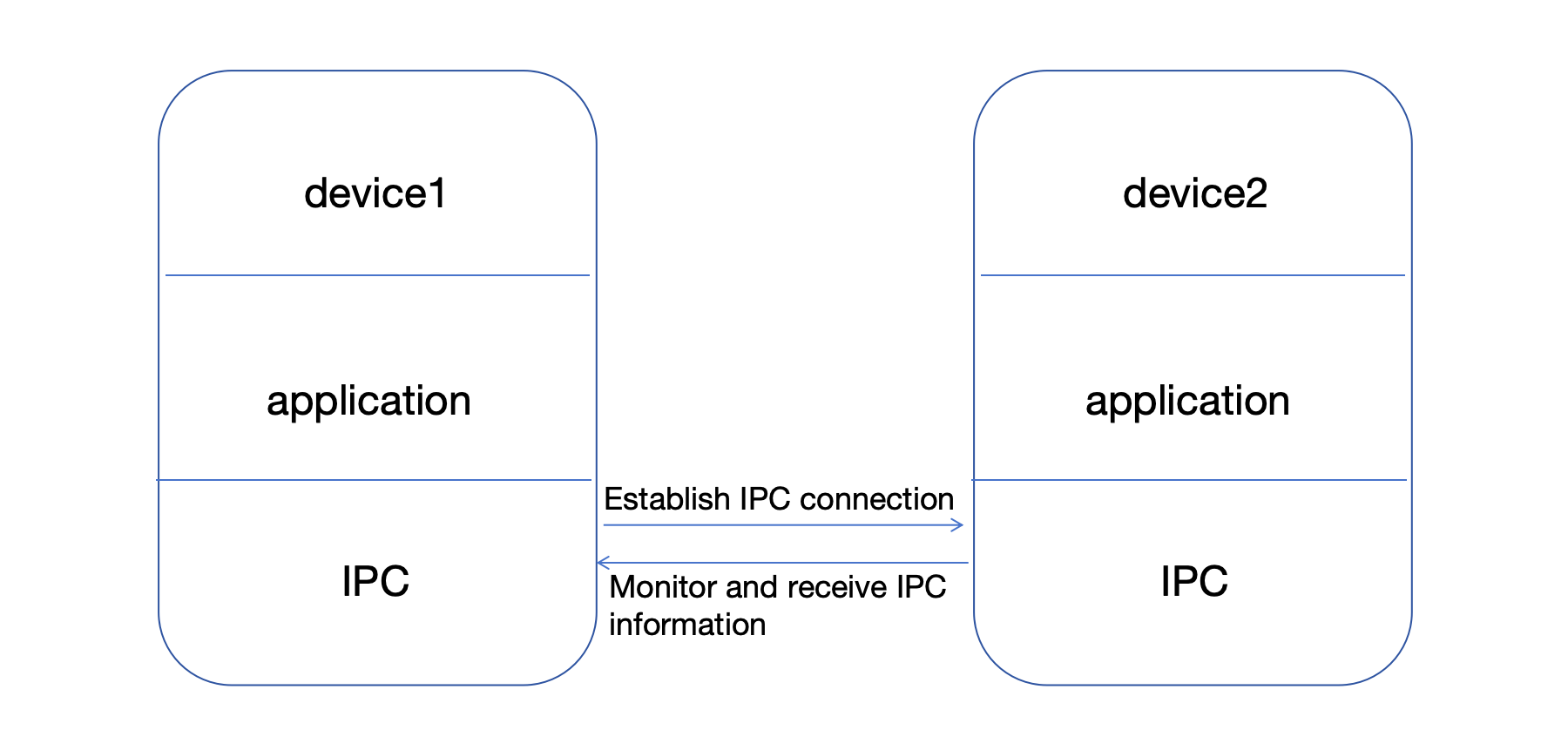
|
|
402
|
+
|
|
403
|
+
### ipc.on
|
|
404
|
+
|
|
405
|
+
Listen IPC
|
|
406
|
+
|
|
407
|
+
```js
|
|
408
|
+
ipc.on(channel, listener);
|
|
409
|
+
```
|
|
410
|
+
|
|
411
|
+
* channel: channel name
|
|
412
|
+
* listener: listener function (data)
|
|
413
|
+
|
|
414
|
+
### ipc.sendTo
|
|
415
|
+
|
|
416
|
+
Send IPC information
|
|
417
|
+
|
|
418
|
+
```js
|
|
419
|
+
ipc.sendTo(channel, data);
|
|
420
|
+
```
|
|
421
|
+
|
|
422
|
+
* channel: channel name
|
|
423
|
+
* data: sent information
|
|
424
|
+
|
|
425
|
+
##### Local device communication example:
|
|
426
|
+
|
|
427
|
+
```js
|
|
428
|
+
import {CoreAPI} from '@cutos/core';
|
|
429
|
+
|
|
430
|
+
CoreAPI.init();
|
|
431
|
+
|
|
432
|
+
let ipc = CoreAPI.getIPC();
|
|
433
|
+
//Listen for IPC information
|
|
434
|
+
let ipcListener = function (data) {
|
|
435
|
+
console.log(data);
|
|
436
|
+
};
|
|
437
|
+
ipc.on("channel-1", ipcListener);
|
|
438
|
+
//Send IPC information
|
|
439
|
+
ipc.sendTo("channel-1", {event: "event-1", msg: "msg-1"});
|
|
440
|
+
```
|
|
441
|
+
|
|
442
|
+
- Return result example:
|
|
443
|
+
|
|
444
|
+
```json
|
|
445
|
+
{
|
|
446
|
+
"event": "event-1",
|
|
447
|
+
"msg": "msg-1"
|
|
448
|
+
}
|
|
449
|
+
```
|
|
450
|
+
|
|
451
|
+
##### Example of inter-device process communication:
|
|
452
|
+
|
|
453
|
+
```js
|
|
454
|
+
import {CoreAPI} from '@cutos/core';
|
|
455
|
+
|
|
456
|
+
CoreAPI.init();
|
|
457
|
+
|
|
458
|
+
let ipc = CoreAPI.getIPC("192.168.1.149");
|
|
459
|
+
//Listen for IPC information
|
|
460
|
+
let ipcListener = function (data) {
|
|
461
|
+
console.log(data);
|
|
462
|
+
}
|
|
463
|
+
ipc.on("channel-2", ipcListener);
|
|
464
|
+
//Send IPC information
|
|
465
|
+
ipc.sendTo("channel-2", {event: "event-2", msg: "msg-2"});
|
|
466
|
+
```
|
|
467
|
+
|
|
468
|
+
- Return result example:
|
|
469
|
+
|
|
470
|
+
```json
|
|
471
|
+
{
|
|
472
|
+
"event": "event-2",
|
|
473
|
+
"msg": "msg-2"
|
|
474
|
+
}
|
|
475
|
+
```
|
|
476
|
+
|
|
477
|
+
|
|
478
|
+
# Database API
|
|
479
|
+
|
|
480
|
+
The basic table structure of CUTOS database is in Key-Value format, and Value can be any json object. The advantage of
|
|
481
|
+
this design is that the database does not need to be upgraded to modify the Value field, but the disadvantage is that it
|
|
482
|
+
cannot be accessed as flexibly as traditional databases. If you need more flexible database access functions, you can
|
|
483
|
+
use the SQL fully compatible interface provided by CUTOS.
|
|
484
|
+
|
|
485
|
+
CUTOS basic table structure (default primary key name is `id`, data type is `INTEGER`):
|
|
486
|
+
|
|
487
|
+
| **Field** | **Data type** | **Description** |
|
|
488
|
+
|:---------:|:-------------:|:------------------------------------------------------:|
|
|
489
|
+
| id | INTEGER | Primary key |
|
|
490
|
+
| value | TEXT | Data |
|
|
491
|
+
| tid | TEXT | Foreign key, transaction id |
|
|
492
|
+
| sync | INTEGER | Synchronization flag: 0-unsynchronized, 1-synchronized |
|
|
493
|
+
| timestamp | INTEGER | Last modified timestamp |
|
|
494
|
+
|
|
495
|
+
### Database
|
|
496
|
+
|
|
497
|
+
Constructor
|
|
498
|
+
|
|
499
|
+
```js
|
|
500
|
+
let database = new Database(db);
|
|
501
|
+
```
|
|
502
|
+
|
|
503
|
+
- db: database name, default is lwa.db if name is not passed
|
|
504
|
+
|
|
505
|
+
### Database.connect
|
|
506
|
+
|
|
507
|
+
Connect to database
|
|
508
|
+
|
|
509
|
+
```js
|
|
510
|
+
database.connect(callback)
|
|
511
|
+
```
|
|
512
|
+
|
|
513
|
+
- callback: callback function
|
|
514
|
+
|
|
515
|
+
##### Example:
|
|
516
|
+
|
|
517
|
+
```js
|
|
518
|
+
let database = database.connect((result, error) => {
|
|
519
|
+
if (!error) {
|
|
520
|
+
console.log(result)
|
|
521
|
+
}
|
|
522
|
+
})
|
|
523
|
+
```
|
|
524
|
+
|
|
525
|
+
- Return result example:
|
|
526
|
+
|
|
527
|
+
```json
|
|
528
|
+
{
|
|
529
|
+
"dbPath": "/home/linaro/.config/dios/data/lwa.db"
|
|
530
|
+
}
|
|
531
|
+
```
|
|
532
|
+
|
|
533
|
+
### Database.run
|
|
534
|
+
|
|
535
|
+
Run sql
|
|
536
|
+
|
|
537
|
+
```js
|
|
538
|
+
database.run(sql, callback)
|
|
539
|
+
```
|
|
540
|
+
|
|
541
|
+
- sql: execute sql statement
|
|
542
|
+
- callback: callback function
|
|
543
|
+
|
|
544
|
+
##### Example:
|
|
545
|
+
|
|
546
|
+
```js
|
|
547
|
+
database.run('select * from device', (result, error) => {
|
|
548
|
+
if (!error) {
|
|
549
|
+
console.log(result)
|
|
550
|
+
}
|
|
551
|
+
})
|
|
552
|
+
```
|
|
553
|
+
|
|
554
|
+
- Return result example:
|
|
555
|
+
|
|
556
|
+
```json
|
|
557
|
+
[
|
|
558
|
+
{
|
|
559
|
+
"id": 1,
|
|
560
|
+
"value": "{\"type\":\"printer\",\"name\":\"HP-1\"}",
|
|
561
|
+
"tid": "tra-001",
|
|
562
|
+
"sync": 0,
|
|
563
|
+
"timestamp": 1691401911678
|
|
564
|
+
},
|
|
565
|
+
{
|
|
566
|
+
"id": 2,
|
|
567
|
+
"value": "{\"type\":\"printer\",\"name\":\"HP-2\"}",
|
|
568
|
+
"tid": "tra-002",
|
|
569
|
+
"sync": 0,
|
|
570
|
+
"timestamp": 1691401911681
|
|
571
|
+
}
|
|
572
|
+
]
|
|
573
|
+
```
|
|
574
|
+
|
|
575
|
+
### Database.Table
|
|
576
|
+
|
|
577
|
+
Constructor
|
|
578
|
+
|
|
579
|
+
```js
|
|
580
|
+
let table = new Database.Table(name, db);
|
|
581
|
+
```
|
|
582
|
+
|
|
583
|
+
- name: table name
|
|
584
|
+
- db: database instance
|
|
585
|
+
|
|
586
|
+
##### Example:
|
|
587
|
+
|
|
588
|
+
```js
|
|
589
|
+
let table = new Database.Table('device', database);
|
|
590
|
+
```
|
|
591
|
+
|
|
592
|
+
### Table.create
|
|
593
|
+
|
|
594
|
+
Create a database table
|
|
595
|
+
|
|
596
|
+
```js
|
|
597
|
+
table.create([opts], callback)
|
|
598
|
+
```
|
|
599
|
+
|
|
600
|
+
- opts: optional parameters, including 3 attributes:
|
|
601
|
+
* retentionTime: retention time, in hours; if not passed, it will be retained forever by default
|
|
602
|
+
* keyName: name, if not passed, it will be 'id' by default
|
|
603
|
+
* keyType: type, including 2 types 'TEXT' and 'INTEGER', if not passed, it will be 'INTEGER' by default
|
|
604
|
+
- callback: callback function
|
|
605
|
+
|
|
606
|
+
##### Example:
|
|
607
|
+
|
|
608
|
+
```js
|
|
609
|
+
table.create((result, error) => {
|
|
610
|
+
if (!error) {
|
|
611
|
+
console.log(result)
|
|
612
|
+
}
|
|
613
|
+
});
|
|
614
|
+
```
|
|
615
|
+
|
|
616
|
+
- Return result example:
|
|
617
|
+
|
|
618
|
+
```json
|
|
619
|
+
[]
|
|
620
|
+
```
|
|
621
|
+
|
|
622
|
+
### Table.insert
|
|
623
|
+
|
|
624
|
+
Insert data
|
|
625
|
+
|
|
626
|
+
```js
|
|
627
|
+
table.insert(value, [opts], callback);
|
|
628
|
+
```
|
|
629
|
+
|
|
630
|
+
- value: Insert data
|
|
631
|
+
- opts: optional parameters
|
|
632
|
+
* tid: foreign key id, used to establish relationships between multiple records
|
|
633
|
+
- callback: callback function
|
|
634
|
+
|
|
635
|
+
##### Example:
|
|
636
|
+
|
|
637
|
+
```js
|
|
638
|
+
let tid = "tra-001";
|
|
639
|
+
table.insert({type: "printer", name: "NEC"}, {tid: tid}, (result, error) => {
|
|
640
|
+
if (!error) {
|
|
641
|
+
console.log(result)
|
|
642
|
+
}
|
|
643
|
+
});
|
|
644
|
+
```
|
|
645
|
+
|
|
646
|
+
- Return result example:
|
|
647
|
+
|
|
648
|
+
```json
|
|
649
|
+
{
|
|
650
|
+
"status": true,
|
|
651
|
+
"row": 1
|
|
652
|
+
}
|
|
653
|
+
```
|
|
654
|
+
|
|
655
|
+
### table.insertById
|
|
656
|
+
|
|
657
|
+
Insert data by id
|
|
658
|
+
|
|
659
|
+
```js
|
|
660
|
+
table.insertById(id, value, [opts], callback)
|
|
661
|
+
```
|
|
662
|
+
|
|
663
|
+
- id: data id
|
|
664
|
+
- value: insert data
|
|
665
|
+
- opts: optional parameters
|
|
666
|
+
* tid: Foreign key id, used to establish relationships between multiple records
|
|
667
|
+
- callback: callback function
|
|
668
|
+
|
|
669
|
+
##### Example:
|
|
670
|
+
|
|
671
|
+
```js
|
|
672
|
+
let tid = "tra-001";
|
|
673
|
+
table.insertById(1, {type: "printer", name: "NEC"}, {tid: tid}, (result, error) => {
|
|
674
|
+
if (!error) {
|
|
675
|
+
console.log(result)
|
|
676
|
+
}
|
|
677
|
+
});
|
|
678
|
+
```
|
|
679
|
+
|
|
680
|
+
- Return result example:
|
|
681
|
+
|
|
682
|
+
```json
|
|
683
|
+
{
|
|
684
|
+
"status": true,
|
|
685
|
+
"row": 1
|
|
686
|
+
}
|
|
687
|
+
```
|
|
688
|
+
|
|
689
|
+
### Table.update
|
|
690
|
+
|
|
691
|
+
Update data
|
|
692
|
+
|
|
693
|
+
```js
|
|
694
|
+
table.update(id, value, callback);
|
|
695
|
+
```
|
|
696
|
+
|
|
697
|
+
- id: data id
|
|
698
|
+
- value: update data
|
|
699
|
+
- callback: callback function
|
|
700
|
+
|
|
701
|
+
##### Example:
|
|
702
|
+
|
|
703
|
+
```js
|
|
704
|
+
table.update(row, {type: "printer", name: "HP-2"}, (result, error) => {
|
|
705
|
+
if (!error) {
|
|
706
|
+
console.log(result)
|
|
707
|
+
}
|
|
132
708
|
});
|
|
133
709
|
```
|
|
134
710
|
|
|
135
|
-
- Return result example:
|
|
711
|
+
- Return result example:
|
|
712
|
+
|
|
713
|
+
```json
|
|
714
|
+
{
|
|
715
|
+
"status": true,
|
|
716
|
+
"msg": 0
|
|
717
|
+
}
|
|
718
|
+
```
|
|
719
|
+
|
|
720
|
+
### table.delete
|
|
721
|
+
|
|
722
|
+
Delete data
|
|
723
|
+
|
|
724
|
+
```js
|
|
725
|
+
table.delete(id, callback)
|
|
726
|
+
```
|
|
727
|
+
|
|
728
|
+
- id: data id
|
|
729
|
+
- callback: callback function
|
|
136
730
|
|
|
137
|
-
|
|
138
|
-
{
|
|
139
|
-
"srvAddress": "www.cut-os.com",
|
|
140
|
-
"srvRestProtocol": "https",
|
|
141
|
-
"enableTimeSync": true,
|
|
142
|
-
"playReport": false,
|
|
143
|
-
"language": "Chinese",
|
|
144
|
-
"debug": false
|
|
145
|
-
}
|
|
146
|
-
```
|
|
731
|
+
### Table.query
|
|
147
732
|
|
|
148
|
-
|
|
149
|
-
##### Get host information
|
|
733
|
+
Query data
|
|
150
734
|
|
|
151
735
|
```js
|
|
152
|
-
|
|
736
|
+
table.query(id, callback);
|
|
153
737
|
```
|
|
738
|
+
|
|
739
|
+
- id: data id
|
|
154
740
|
- callback: callback function
|
|
155
741
|
|
|
156
742
|
##### Example:
|
|
157
743
|
|
|
158
744
|
```js
|
|
159
|
-
|
|
160
|
-
|
|
161
|
-
|
|
745
|
+
deviceTable.query(row, (result, error) => {
|
|
746
|
+
if (!error) {
|
|
747
|
+
console.log(result)
|
|
748
|
+
}
|
|
749
|
+
});
|
|
162
750
|
```
|
|
751
|
+
|
|
163
752
|
- Return result example:
|
|
164
753
|
|
|
165
754
|
```json
|
|
166
|
-
|
|
167
|
-
|
|
168
|
-
|
|
169
|
-
|
|
170
|
-
|
|
171
|
-
|
|
172
|
-
|
|
173
|
-
|
|
174
|
-
|
|
175
|
-
|
|
176
|
-
- `ipAddress`: host IP address
|
|
177
|
-
- `masterIpAddress`: Master IP address, used when multiple hosts form a host group
|
|
178
|
-
- `osVersion`: CUTOS Player Version
|
|
755
|
+
[
|
|
756
|
+
{
|
|
757
|
+
"id": 2,
|
|
758
|
+
"value": "{\"type\":\"printer\",\"name\":\"HP-2\"}",
|
|
759
|
+
"tid": "tra-001",
|
|
760
|
+
"sync": 0,
|
|
761
|
+
"timestamp": 1691401911681
|
|
762
|
+
}
|
|
763
|
+
]
|
|
764
|
+
```
|
|
179
765
|
|
|
180
|
-
###
|
|
181
|
-
|
|
766
|
+
### Table.sync
|
|
767
|
+
|
|
768
|
+
Synchronize data
|
|
182
769
|
|
|
183
770
|
```js
|
|
184
|
-
|
|
771
|
+
table.sync(id, callback);
|
|
185
772
|
```
|
|
773
|
+
|
|
774
|
+
- id: data id
|
|
186
775
|
- callback: callback function
|
|
187
776
|
|
|
188
777
|
##### Example:
|
|
189
778
|
|
|
190
779
|
```js
|
|
191
|
-
|
|
192
|
-
|
|
193
|
-
|
|
780
|
+
deviceTable.sync(row, (result, error) => {
|
|
781
|
+
if (!error) {
|
|
782
|
+
console.log(result)
|
|
783
|
+
}
|
|
784
|
+
});
|
|
194
785
|
```
|
|
195
786
|
|
|
196
787
|
- Return result example:
|
|
197
788
|
|
|
198
789
|
```json
|
|
199
790
|
{
|
|
200
|
-
"
|
|
201
|
-
"
|
|
202
|
-
"shortName": "",
|
|
203
|
-
"groupId": 0,
|
|
204
|
-
"groupName": null,
|
|
205
|
-
"department": null,
|
|
206
|
-
"description": null,
|
|
207
|
-
"gwi": "9E1E3B67-...101B",
|
|
208
|
-
"gwUrl": "ws://127.0.0.1:61614",
|
|
209
|
-
"ext": null,
|
|
210
|
-
"token": "D+yIxq1d3...BTgjK....."
|
|
791
|
+
"status": true,
|
|
792
|
+
"msg": 0
|
|
211
793
|
}
|
|
212
|
-
|
|
213
794
|
```
|
|
214
|
-
- Return result:
|
|
215
|
-
- `id`: device ID
|
|
216
|
-
- `name`: device name
|
|
217
|
-
- `shortName`: device short name
|
|
218
|
-
- `groupId`: device group ID
|
|
219
|
-
- `groupName`: device group name
|
|
220
|
-
- `department`: department
|
|
221
|
-
- `description`: description
|
|
222
|
-
- `gwi`: gateway ID
|
|
223
|
-
- `gwUrl`: gateway address
|
|
224
|
-
- `ext`: extended information
|
|
225
|
-
- `token`: token
|
|
226
795
|
|
|
227
|
-
###
|
|
228
|
-
|
|
796
|
+
### Table.queryUnsynced
|
|
797
|
+
|
|
798
|
+
Query unsynchronized data
|
|
229
799
|
|
|
230
800
|
```js
|
|
231
|
-
|
|
801
|
+
table.queryUnsynced([opts], callback);
|
|
232
802
|
```
|
|
803
|
+
|
|
804
|
+
- opts: optional parameters
|
|
233
805
|
- callback: callback function
|
|
234
806
|
|
|
235
807
|
##### Example:
|
|
236
808
|
|
|
237
809
|
```js
|
|
238
|
-
|
|
239
|
-
|
|
240
|
-
|
|
810
|
+
deviceTable.queryUnsynced((result, error) => {
|
|
811
|
+
if (!error) {
|
|
812
|
+
console.log(result)
|
|
813
|
+
}
|
|
814
|
+
});
|
|
241
815
|
```
|
|
816
|
+
|
|
242
817
|
- Return result example:
|
|
243
818
|
|
|
244
|
-
```
|
|
245
|
-
|
|
819
|
+
```json
|
|
820
|
+
[
|
|
821
|
+
{
|
|
822
|
+
"id": 1,
|
|
823
|
+
"value": "{\"type\":\"printer\",\"name\":\"NEC\"}",
|
|
824
|
+
"tid": "tra-001",
|
|
825
|
+
"sync": 0,
|
|
826
|
+
"timestamp": 1691402230172
|
|
827
|
+
}
|
|
828
|
+
]
|
|
246
829
|
```
|
|
247
830
|
|
|
248
|
-
###
|
|
249
|
-
|
|
831
|
+
### Table.queryByTid
|
|
832
|
+
|
|
833
|
+
Query data by foreign key
|
|
250
834
|
|
|
251
835
|
```js
|
|
252
|
-
|
|
836
|
+
table.queryByTid(tid, callback);
|
|
253
837
|
```
|
|
254
|
-
|
|
838
|
+
|
|
839
|
+
- tid: foreign key id
|
|
255
840
|
- callback: callback function
|
|
256
841
|
|
|
257
842
|
##### Example:
|
|
258
843
|
|
|
259
844
|
```js
|
|
260
|
-
|
|
261
|
-
|
|
262
|
-
|
|
845
|
+
deviceTable.queryByTid("tra-001", (result, error) => {
|
|
846
|
+
if (!error) {
|
|
847
|
+
console.log(result)
|
|
848
|
+
}
|
|
849
|
+
});
|
|
263
850
|
```
|
|
264
851
|
|
|
265
852
|
- Return result example:
|
|
266
853
|
|
|
267
854
|
```json
|
|
268
|
-
|
|
269
|
-
|
|
270
|
-
|
|
855
|
+
[
|
|
856
|
+
{
|
|
857
|
+
"id": 2,
|
|
858
|
+
"value": "{\"type\":\"printer\",\"name\":\"HP-2\"}",
|
|
859
|
+
"tid": "tra-001",
|
|
860
|
+
"sync": 0,
|
|
861
|
+
"timestamp": 1691401911681
|
|
862
|
+
}
|
|
863
|
+
]
|
|
271
864
|
```
|
|
272
|
-
|
|
273
|
-
|
|
865
|
+
|
|
866
|
+
### Table.queryAll
|
|
867
|
+
|
|
868
|
+
Query all data
|
|
274
869
|
|
|
275
870
|
```js
|
|
276
|
-
|
|
871
|
+
table.queryAll(callback);
|
|
277
872
|
```
|
|
278
873
|
|
|
279
|
-
-
|
|
280
|
-
- target: target address
|
|
281
|
-
- callback: callback function. The callback function returns result if successful and error if failed.
|
|
874
|
+
- callback: callback function
|
|
282
875
|
|
|
283
876
|
##### Example:
|
|
284
877
|
|
|
285
878
|
```js
|
|
286
|
-
|
|
879
|
+
deviceTable.queryAll((result, error) => {
|
|
287
880
|
if (!error) {
|
|
288
881
|
console.log(result)
|
|
289
882
|
}
|
|
290
|
-
})
|
|
883
|
+
});
|
|
291
884
|
```
|
|
292
885
|
|
|
293
886
|
- Return result example:
|
|
294
887
|
|
|
295
888
|
```json
|
|
296
|
-
|
|
297
|
-
|
|
298
|
-
"
|
|
299
|
-
"
|
|
889
|
+
[
|
|
890
|
+
{
|
|
891
|
+
"id": 1,
|
|
892
|
+
"value": "{\"type\":\"printer\",\"name\":\"HP-1\"}",
|
|
893
|
+
"tid": "tra-001",
|
|
894
|
+
"sync": 0,
|
|
895
|
+
"timestamp": 1691401911678
|
|
896
|
+
},
|
|
897
|
+
{
|
|
898
|
+
"id": 2,
|
|
899
|
+
"value": "{\"type\":\"printer\",\"name\":\"HP-2\"}",
|
|
900
|
+
"tid": "tra-002",
|
|
901
|
+
"sync": 0,
|
|
902
|
+
"timestamp": 1691401911681
|
|
300
903
|
}
|
|
301
|
-
|
|
302
|
-
```
|
|
303
|
-
##### Actual interface call example
|
|
304
|
-
```js
|
|
305
|
-
fetch(`http://localhost:3000/proxy/api/rest/sv/system/runtime/ping`)
|
|
306
|
-
```
|
|
307
|
-
##### The actual request address
|
|
308
|
-
```js
|
|
309
|
-
fetch(`https://www.cut-os.com/rest/sv/system/runtime/ping`)
|
|
904
|
+
]
|
|
310
905
|
```
|
|
311
906
|
|
|
312
|
-
### CoreAPI.shell
|
|
313
|
-
##### Shell command execution
|
|
314
907
|
|
|
315
|
-
|
|
316
|
-
CoreAPI.shell(command, callback)
|
|
317
|
-
```
|
|
318
|
-
- command: command
|
|
319
|
-
- callback: callback function
|
|
908
|
+
# Device&Diver API
|
|
320
909
|
|
|
321
|
-
|
|
910
|
+
## Driver
|
|
911
|
+
|
|
912
|
+
### Driver
|
|
913
|
+
|
|
914
|
+
Constructor
|
|
322
915
|
|
|
323
916
|
```js
|
|
324
|
-
|
|
917
|
+
const driver = new Driver(name = 'default-driver-name', type = cutosAPI.DEVICE.DEFAULT, counter = 10)
|
|
325
918
|
```
|
|
326
919
|
|
|
327
|
-
|
|
920
|
+
- name: driver name, default is 'default-driver-name'
|
|
921
|
+
- type: device type, default is cutosAPI.DEVICE.DEFAULT
|
|
922
|
+
- counter: heartbeat interval, default is 10s
|
|
328
923
|
|
|
329
|
-
|
|
924
|
+
### Driver.sendData
|
|
330
925
|
|
|
331
|
-
|
|
926
|
+
Send data to the device
|
|
332
927
|
|
|
333
928
|
```js
|
|
334
|
-
|
|
929
|
+
driver.sendData(data)
|
|
335
930
|
```
|
|
336
|
-
* name: driver name, default is 'default-driver-name'
|
|
337
|
-
* type: device type, default is cutosAPI.DEVICE.DEFAULT
|
|
338
|
-
* counter: heartbeat interval, default is 10s
|
|
339
931
|
|
|
340
|
-
|
|
341
|
-
##### Driver sends data to the device
|
|
932
|
+
- data: data
|
|
342
933
|
|
|
343
|
-
|
|
344
|
-
driver.sendData(data)
|
|
345
|
-
```
|
|
346
|
-
- data: transmission data
|
|
934
|
+
### Driver.onCommand
|
|
347
935
|
|
|
348
|
-
|
|
349
|
-
##### Driver receives device commands
|
|
936
|
+
Receive device commands
|
|
350
937
|
|
|
351
938
|
```js
|
|
352
939
|
driver.onCommand(listener)
|
|
353
940
|
```
|
|
354
|
-
- listener: listener callback function
|
|
355
|
-
```js
|
|
356
|
-
listener(messageBody, callback);
|
|
357
|
-
```
|
|
358
|
-
- messageBody: message body
|
|
359
|
-
- callback: callback function
|
|
360
941
|
|
|
942
|
+
- listener: listen callback function (command, [callback]), call callback after processing command
|
|
943
|
+
- command: command, example: {cmd: "connect", args: ""}
|
|
944
|
+
- callback: callback function (result)
|
|
945
|
+
|
|
946
|
+
## SDK
|
|
361
947
|
|
|
362
|
-
|
|
948
|
+
### Device
|
|
363
949
|
|
|
364
|
-
|
|
950
|
+
Constructor
|
|
365
951
|
|
|
366
952
|
```js
|
|
367
|
-
const device = new
|
|
953
|
+
const device = new (name = 'default-device-name', type = cutosAPI.DEVICE.DEFAULT)
|
|
368
954
|
```
|
|
955
|
+
|
|
369
956
|
* name: device name, default is 'default-device-name'
|
|
370
957
|
* type: device type, default is cutosAPI.DEVICE.DEFAULT
|
|
371
958
|
|
|
372
|
-
###
|
|
373
|
-
|
|
959
|
+
### Device.init
|
|
960
|
+
|
|
961
|
+
Device initialization
|
|
374
962
|
|
|
375
963
|
```js
|
|
376
964
|
device.init([opts], callback)
|
|
377
965
|
```
|
|
378
|
-
|
|
966
|
+
|
|
967
|
+
* opts: optional parameters, passed to the driver loading process, refer
|
|
968
|
+
to [Driver Template](#download-project-template)
|
|
379
969
|
* callback: callback function
|
|
380
970
|
|
|
381
|
-
|
|
382
|
-
|
|
971
|
+
##### Example:
|
|
972
|
+
|
|
973
|
+
```js
|
|
974
|
+
device.init((result, error) => {
|
|
975
|
+
if (error) {
|
|
976
|
+
console.log(error)
|
|
977
|
+
return;
|
|
978
|
+
}
|
|
979
|
+
console.log(result)
|
|
980
|
+
});
|
|
981
|
+
```
|
|
982
|
+
|
|
983
|
+
### Device.sendCommand
|
|
984
|
+
|
|
985
|
+
Send a command to the driver
|
|
383
986
|
|
|
384
987
|
```js
|
|
385
988
|
device.sendCommand(command, callback)
|
|
386
989
|
```
|
|
990
|
+
|
|
387
991
|
- command: command, example: command = {cmd: "connect", args: ""}
|
|
388
|
-
- callback: callback function, you can pass a
|
|
992
|
+
- callback: callback function, you can pass a listening callback function to listen to the device status
|
|
389
993
|
|
|
390
994
|
##### Example:
|
|
995
|
+
|
|
391
996
|
```js
|
|
392
|
-
device.sendCommand(
|
|
997
|
+
device.sendCommand({cmd: "connect", args: ""}, Listener(msg))
|
|
393
998
|
```
|
|
394
999
|
|
|
395
|
-
###
|
|
396
|
-
|
|
1000
|
+
### Device.onData
|
|
1001
|
+
|
|
1002
|
+
Receive data sent by the driver
|
|
397
1003
|
|
|
398
1004
|
```js
|
|
399
1005
|
device.onData(listener)
|
|
400
1006
|
```
|
|
401
|
-
|
|
402
|
-
|
|
403
|
-
|
|
404
|
-
```
|
|
405
|
-
- data: return data
|
|
1007
|
+
|
|
1008
|
+
- listener: listener callback function (data)
|
|
1009
|
+
- data: data
|
|
406
1010
|
|
|
407
1011
|
## Device driver relationship
|
|
1012
|
+
|
|
408
1013
|
##### 1. onData and sendData
|
|
1014
|
+
|
|
409
1015
|
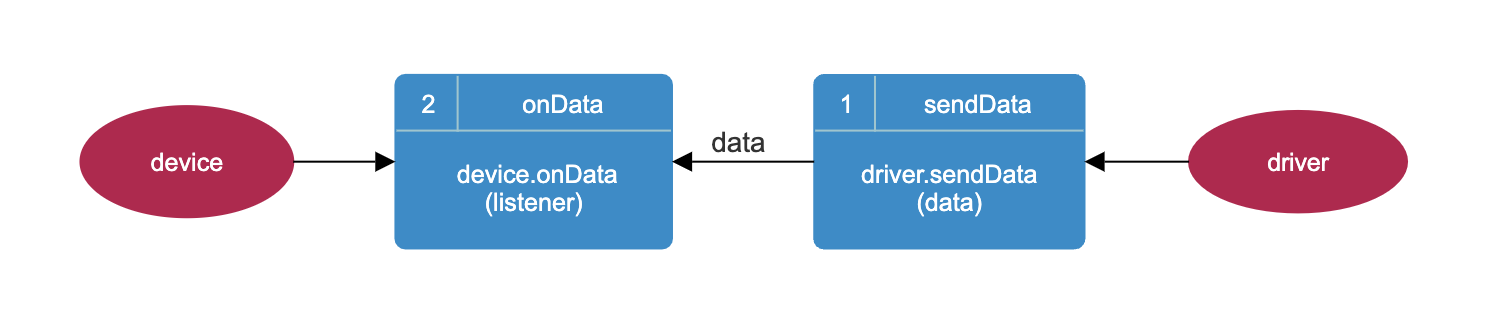
|
|
1016
|
+
|
|
410
1017
|
##### 2. sendCommand (without callback function) and onCommand
|
|
1018
|
+
|
|
411
1019
|
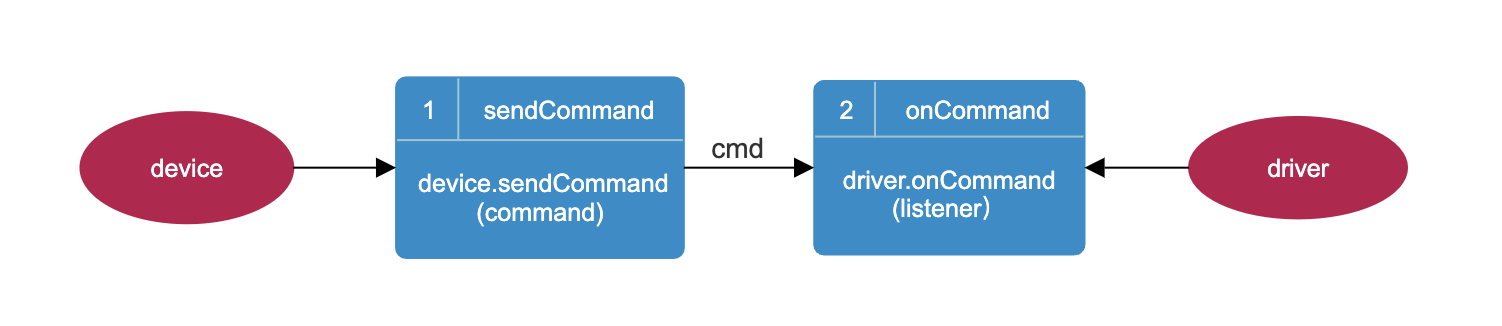
|
|
1020
|
+
|
|
412
1021
|
##### 3. sendCommand (with callback function) and onCommand
|
|
1022
|
+
|
|
413
1023
|

|
|
1024
|
+
|
|
414
1025
|
## Device driver management template
|
|
415
1026
|
|
|
416
1027
|
### Download project template
|
|
417
1028
|
|
|
418
|
-
| <span style="white-space:nowrap;">Name </span> |
|
|
419
|
-
|
|
420
|
-
| driver-template
|
|
1029
|
+
| <span style="white-space:nowrap;">Name </span> | Description | Download |
|
|
1030
|
+
|:-----------------------------------------------|:----------------------:|:-----------------------------------------------------------------------------------:|
|
|
1031
|
+
| driver-template | Device driver template | [Download](https://oss.cut-os.com/resources/developer/template/driver-template.zip) |
|
|
421
1032
|
|
|
422
1033
|
##### Project structure
|
|
1034
|
+
|
|
423
1035
|
```
|
|
424
1036
|
├── driver/ # Driver
|
|
425
1037
|
│ ├── src/ # Driver source directory
|
|
@@ -434,8 +1046,8 @@ listener(data);
|
|
|
434
1046
|
│ ├── readme.txt # Instructions
|
|
435
1047
|
├── sdk/ # Interface SDK
|
|
436
1048
|
│ ├── src/ # Source code directory
|
|
437
|
-
│ ├──
|
|
438
|
-
│ ├──
|
|
1049
|
+
│ ├── driver-template.js # Device template
|
|
1050
|
+
│ ├── driver-template-def.js # Device driver data definition (same as in driver)
|
|
439
1051
|
│ ├── test/ # Test directory
|
|
440
1052
|
│ ├── main.js # Test entry file
|
|
441
1053
|
│ ├── package.json # Configuration information for this project
|
|
@@ -451,6 +1063,7 @@ listener(data);
|
|
|
451
1063
|
cd driver-template/driver
|
|
452
1064
|
npm install
|
|
453
1065
|
```
|
|
1066
|
+
|
|
454
1067
|
```
|
|
455
1068
|
cd driver-template/sdk
|
|
456
1069
|
npm install
|
|
@@ -461,9 +1074,11 @@ npm install
|
|
|
461
1074
|
### Project startup
|
|
462
1075
|
|
|
463
1076
|
You need to start the driver first, then start the SDK.
|
|
1077
|
+
|
|
464
1078
|
```
|
|
465
1079
|
npm start
|
|
466
1080
|
```
|
|
1081
|
+
|
|
467
1082
|
If the startup is successful, the console will return the following content
|
|
468
1083
|
|
|
469
1084
|
* driver
|
|
@@ -474,64 +1089,75 @@ CUTOS Simulator started and listening on port 1883
|
|
|
474
1089
|
drvDefault onCommand
|
|
475
1090
|
{
|
|
476
1091
|
"cmd":"init",
|
|
477
|
-
"args":{"name":"
|
|
478
|
-
"topicResponse":"device-channel-
|
|
1092
|
+
"args":{"name":"driver-template","type":"driver-template","development":true},
|
|
1093
|
+
"topicResponse":"device-channel-driver-template-response"
|
|
479
1094
|
}
|
|
480
1095
|
connect: received.
|
|
481
1096
|
cmd: custom-cmd received.
|
|
482
1097
|
cmd: unknown is unsupported.
|
|
483
1098
|
```
|
|
1099
|
+
|
|
484
1100
|
* SDK
|
|
485
1101
|
|
|
486
1102
|
```
|
|
487
1103
|
CUTOS CORE connected.
|
|
488
|
-
|
|
1104
|
+
driver template init true
|
|
489
1105
|
connect: { msg: 'return success.', status: true }
|
|
490
1106
|
```
|
|
1107
|
+
|
|
491
1108
|
### Packaging and Release
|
|
492
1109
|
|
|
1110
|
+
##### Packaging Driver
|
|
1111
|
+
|
|
493
1112
|
```
|
|
494
1113
|
cd driver-template/driver
|
|
495
1114
|
npm run build
|
|
496
1115
|
```
|
|
497
|
-
|
|
498
|
-
cd driver-template/sdk
|
|
499
|
-
npm run build
|
|
500
|
-
```
|
|
501
|
-
##### Packaging Driver
|
|
1116
|
+
|
|
502
1117
|
```
|
|
503
1118
|
├── driver/
|
|
504
1119
|
│ ├── dist/ # Packaging directory
|
|
505
1120
|
│ ├── driver-template-v1.0.1.drv # Packaging file
|
|
506
1121
|
```
|
|
1122
|
+
|
|
507
1123
|
##### Release the driver
|
|
1124
|
+
|
|
508
1125
|
Upload the package file to https://www.cut-os.com/ and publish
|
|
509
1126
|
Hardware/Driver--Add
|
|
510
1127
|
|
|
511
1128
|
##### Packaged Device SDK
|
|
1129
|
+
|
|
1130
|
+
```
|
|
1131
|
+
cd driver-template/sdk
|
|
1132
|
+
npm run build
|
|
1133
|
+
```
|
|
1134
|
+
|
|
512
1135
|
```
|
|
513
1136
|
├── sdk/
|
|
514
1137
|
│ ├── dist/ # Packaging directory
|
|
515
|
-
│ ├──
|
|
1138
|
+
│ ├── driver-template-sdk-v1.0.2.zip # Packaging files
|
|
516
1139
|
```
|
|
517
1140
|
|
|
518
|
-
#####
|
|
519
|
-
|
|
520
|
-
>
|
|
1141
|
+
##### Note:
|
|
1142
|
+
|
|
521
1143
|
> 1.The template device-template.js references TYPE, CMD exported in device-template-def.js
|
|
522
1144
|
>
|
|
523
1145
|
> `import {CMD, TYPE} from './device-template-def.js';`
|
|
524
1146
|
> * Device type (TYPE):
|
|
525
|
-
>
|
|
526
|
-
|
|
1147
|
+
>
|
|
1148
|
+
- Type constant: key "TEMPLATE", value "Device template".
|
|
1149
|
+
> - Indicates the template type, identifying the category of the device.
|
|
527
1150
|
>* Command type (CMD):
|
|
528
|
-
|
|
529
|
-
|
|
530
|
-
|
|
1151
|
+
>
|
|
1152
|
+
- CMD constant with two pairs:
|
|
1153
|
+
>
|
|
1154
|
+
- CONNECT: 'connect' represents the connection command.
|
|
1155
|
+
> - CUSTOM_CMD: "custom-cmd" represents a custom command for a specific device.
|
|
531
1156
|
|
|
532
|
-
> 2.Configuration requirements: Keep the TYPE parameter 3 in the template consistent so that the driver matches the
|
|
1157
|
+
> 2.Configuration requirements: Keep the TYPE parameter 3 in the template consistent so that the driver matches the
|
|
1158
|
+
> corresponding SDK.
|
|
533
1159
|
>
|
|
534
|
-
> ```let device = new DeviceTemplate('device-template')``` //device-template.js
|
|
1160
|
+
> ```let device = new DeviceTemplate('device-template',callback)``` //device-template.js
|
|
535
1161
|
>
|
|
536
1162
|
> ``` const TYPE = 'device-template';```//device-template-def.js
|
|
537
1163
|
>
|
|
@@ -541,96 +1167,94 @@ Hardware/Driver--Add
|
|
|
541
1167
|
|
|
542
1168
|
The complete code is as follows:
|
|
543
1169
|
|
|
544
|
-
|
|
1170
|
+
### driver
|
|
1171
|
+
|
|
545
1172
|
```js
|
|
546
1173
|
// driver/src/driver-template.js
|
|
547
1174
|
const {CoreDefine, CoreClass} = require('@cutos/core');
|
|
548
|
-
const {TYPE, CMD} = require('./
|
|
1175
|
+
const {TYPE, CMD} = require('./driver-template-def.js');
|
|
549
1176
|
const config = require('./config.json');
|
|
550
1177
|
|
|
551
1178
|
class DriverTemplate extends CoreClass.Driver {
|
|
552
|
-
constructor(args) {
|
|
1179
|
+
constructor(args) {
|
|
553
1180
|
// check
|
|
554
|
-
if (TYPE !== config.type) {
|
|
555
|
-
throw "Error: the 'type' value in config.js and *-def.js MUST be identical.";
|
|
556
|
-
}
|
|
557
|
-
super(args.name, TYPE);
|
|
558
|
-
|
|
559
|
-
this.startBeat();
|
|
560
|
-
this.updateStatusInfo(CoreDefine.HEARTBEAT_STATUS.ALIVE, "alive");
|
|
561
|
-
|
|
562
|
-
this.onCommand(({cmd, args}, callback) => {
|
|
563
|
-
//Listen to the messages sent by the device SDK, process the different commands in the message body,
|
|
564
|
-
// and respond back to the device SDK through the callback function.
|
|
565
|
-
switch (cmd) {
|
|
566
|
-
case CMD.CONNECT:
|
|
567
|
-
this.connect(args, callback);
|
|
568
|
-
break;
|
|
569
|
-
case CMD.CUSTOM_CMD:
|
|
570
|
-
this.customCmd(cmd, args);
|
|
571
|
-
break;
|
|
572
|
-
default:
|
|
573
|
-
this.unsupported(cmd, args, callback);
|
|
574
|
-
break;
|
|
575
|
-
}
|
|
576
|
-
});
|
|
1181
|
+
if (TYPE !== config.type) {
|
|
1182
|
+
throw "Error: the 'type' value in config.js and *-def.js MUST be identical.";
|
|
577
1183
|
}
|
|
1184
|
+
super(args.name, TYPE);
|
|
1185
|
+
|
|
1186
|
+
this.startBeat();
|
|
1187
|
+
this.updateStatusInfo(CoreDefine.HEARTBEAT_STATUS.ALIVE, "alive");
|
|
1188
|
+
|
|
1189
|
+
this.onCommand(({cmd, args}, callback) => {
|
|
1190
|
+
// Listen to the messages sent by the device SDK, process the different commands in the message body,
|
|
1191
|
+
// and respond back to the device SDK through the callback function.
|
|
1192
|
+
switch (cmd) {
|
|
1193
|
+
case CMD.CONNECT:
|
|
1194
|
+
this.connect(args, callback);
|
|
1195
|
+
break;
|
|
1196
|
+
case CMD.CUSTOM_CMD:
|
|
1197
|
+
this.customCmd(cmd, args);
|
|
1198
|
+
break;
|
|
1199
|
+
default:
|
|
1200
|
+
this.unsupported(cmd, args, callback);
|
|
1201
|
+
break;
|
|
1202
|
+
}
|
|
1203
|
+
});
|
|
1204
|
+
}
|
|
578
1205
|
|
|
579
|
-
|
|
580
|
-
|
|
581
|
-
|
|
582
|
-
|
|
583
|
-
|
|
584
|
-
|
|
585
|
-
|
|
1206
|
+
unsupported(cmd, args, callback) {
|
|
1207
|
+
let result = {};
|
|
1208
|
+
result.msg = "cmd: " + cmd + " is unsupported.";
|
|
1209
|
+
result.status = false;
|
|
1210
|
+
console.log(result.msg);
|
|
1211
|
+
callback(result);
|
|
1212
|
+
}
|
|
586
1213
|
|
|
587
|
-
|
|
588
|
-
|
|
589
|
-
|
|
590
|
-
|
|
591
|
-
|
|
592
|
-
|
|
593
|
-
|
|
1214
|
+
connect(args, callback) {
|
|
1215
|
+
console.log("connect: received.");
|
|
1216
|
+
let result = {};
|
|
1217
|
+
result.msg = "return success.";
|
|
1218
|
+
result.status = true;
|
|
1219
|
+
callback(result);
|
|
1220
|
+
}
|
|
594
1221
|
|
|
595
|
-
|
|
596
|
-
|
|
597
|
-
|
|
598
|
-
|
|
599
|
-
|
|
1222
|
+
// no response
|
|
1223
|
+
customCmd(cmd, args) {
|
|
1224
|
+
console.log("cmd: " + cmd + args, " received.");
|
|
1225
|
+
// process cmd below
|
|
1226
|
+
}
|
|
600
1227
|
|
|
601
|
-
|
|
602
|
-
|
|
603
|
-
|
|
604
|
-
|
|
605
|
-
|
|
606
|
-
|
|
607
|
-
|
|
608
|
-
|
|
1228
|
+
sendCustomData() {
|
|
1229
|
+
let data = {};
|
|
1230
|
+
data.type = "custom-type"; // custom defined data type
|
|
1231
|
+
data.values = {}; // values from template driver
|
|
1232
|
+
data.values.val = "any value";
|
|
1233
|
+
data.values.timeStamp = Date.now();
|
|
1234
|
+
this.sendData(data);
|
|
1235
|
+
}
|
|
609
1236
|
}
|
|
610
1237
|
|
|
611
1238
|
module.exports = DriverTemplate;
|
|
612
1239
|
```
|
|
613
1240
|
|
|
614
|
-
|
|
1241
|
+
### SDK
|
|
615
1242
|
|
|
616
1243
|
```js
|
|
617
|
-
// sdk/src/
|
|
1244
|
+
// sdk/src/driver-template.js
|
|
1245
|
+
|
|
618
1246
|
import {CoreClass} from '@cutos/core';
|
|
619
|
-
import {CMD, TYPE} from './
|
|
1247
|
+
import {CMD, TYPE} from './driver-template-def.js';
|
|
620
1248
|
|
|
621
|
-
class
|
|
622
|
-
constructor(name) {
|
|
623
|
-
super(name, TYPE);
|
|
1249
|
+
class DriverTemplate extends CoreClass.Device {
|
|
1250
|
+
constructor(name, callback, opts = {development: true}) {
|
|
1251
|
+
super(name, TYPE, callback, opts);
|
|
624
1252
|
|
|
625
1253
|
this.onData((data) => {
|
|
626
1254
|
console.log("on data", data)
|
|
627
1255
|
});
|
|
628
1256
|
}
|
|
629
1257
|
|
|
630
|
-
/**
|
|
631
|
-
*
|
|
632
|
-
* @param callback(result)
|
|
633
|
-
*/
|
|
634
1258
|
connect(callback) {
|
|
635
1259
|
let cmdMessage = {cmd: CMD.CONNECT};
|
|
636
1260
|
this.sendCommand(cmdMessage, callback);
|
|
@@ -642,140 +1266,211 @@ class DeviceTemplate extends CoreClass.Device {
|
|
|
642
1266
|
}
|
|
643
1267
|
}
|
|
644
1268
|
|
|
645
|
-
export {
|
|
1269
|
+
export {DriverTemplate};
|
|
646
1270
|
```
|
|
1271
|
+
|
|
647
1272
|
```js
|
|
648
1273
|
// sdk/test/main.js
|
|
649
1274
|
import {CoreAPI} from '@cutos/core';
|
|
650
|
-
import {
|
|
651
|
-
|
|
1275
|
+
import {DriverTemplate} from '../src/driver-template.js';
|
|
652
1276
|
|
|
653
|
-
CoreAPI.init(null, (
|
|
654
|
-
|
|
655
|
-
|
|
656
|
-
|
|
657
|
-
}
|
|
658
|
-
console.log(result)
|
|
1277
|
+
CoreAPI.init(null, () => {
|
|
1278
|
+
//
|
|
1279
|
+
let device = new DriverTemplate('driver-template', ({result, msg}) => {
|
|
1280
|
+
console.log("driver template init", result, msg ? " error:" + msg : "");
|
|
659
1281
|
|
|
660
|
-
|
|
661
|
-
|
|
662
|
-
|
|
663
|
-
console.log(error)
|
|
664
|
-
return;
|
|
665
|
-
}
|
|
666
|
-
console.log(result)
|
|
1282
|
+
device.onData((data) => {
|
|
1283
|
+
console.log("on data", data)
|
|
1284
|
+
});
|
|
667
1285
|
|
|
668
1286
|
device.connect((result) => {
|
|
669
|
-
console.log("connect:", result)
|
|
1287
|
+
console.log("connect: ", result)
|
|
670
1288
|
});
|
|
671
1289
|
device.customCmd();
|
|
672
|
-
device.sendCommand({cmd: "unknown", args: ""}
|
|
673
|
-
console.log('unknown:', result)
|
|
674
|
-
});
|
|
1290
|
+
device.sendCommand({cmd: "unknown", args: ""});
|
|
675
1291
|
});
|
|
676
1292
|
});
|
|
677
1293
|
```
|
|
678
1294
|
|
|
679
|
-
|
|
1295
|
+
|
|
1296
|
+
# Notification API
|
|
680
1297
|
|
|
681
1298
|
### CoreAPI.getNotification
|
|
682
|
-
|
|
1299
|
+
|
|
1300
|
+
Get notification information instance object
|
|
1301
|
+
|
|
683
1302
|
```js
|
|
684
1303
|
let notification = CoreAPI.getNotification();
|
|
685
1304
|
```
|
|
686
1305
|
|
|
687
1306
|
### notification.register
|
|
1307
|
+
|
|
1308
|
+
Register notification listener function
|
|
1309
|
+
|
|
1310
|
+
```js
|
|
1311
|
+
notification.register(listener)
|
|
1312
|
+
```
|
|
1313
|
+
|
|
1314
|
+
* listener: listener function
|
|
1315
|
+
|
|
688
1316
|
##### Example:
|
|
689
1317
|
|
|
690
1318
|
```js
|
|
691
|
-
notification.register((
|
|
692
|
-
console.log(
|
|
1319
|
+
notification.register((data) => {
|
|
1320
|
+
console.log(data);
|
|
693
1321
|
})
|
|
694
|
-
```
|
|
1322
|
+
```
|
|
1323
|
+
|
|
1324
|
+
- Return result example:
|
|
1325
|
+
|
|
1326
|
+
```json
|
|
1327
|
+
{
|
|
1328
|
+
"event": "networkConnection",
|
|
1329
|
+
"msg": true
|
|
1330
|
+
}
|
|
1331
|
+
```
|
|
1332
|
+
|
|
1333
|
+
* event: event name
|
|
1334
|
+
* msg: event content
|
|
1335
|
+
|
|
1336
|
+
### notification.unregister
|
|
1337
|
+
|
|
1338
|
+
Unregister, used to cancel the registration of `notification.register`
|
|
1339
|
+
|
|
1340
|
+
```js
|
|
1341
|
+
notification.unregister()
|
|
1342
|
+
```
|
|
1343
|
+
|
|
1344
|
+
### notification.emit
|
|
1345
|
+
|
|
1346
|
+
Cancel registration, used to cancel the registration of `notification.register`
|
|
1347
|
+
|
|
1348
|
+
```js
|
|
1349
|
+
notification.emit(event, msg)
|
|
1350
|
+
```
|
|
1351
|
+
|
|
1352
|
+
* event: event name
|
|
1353
|
+
* msg: event content
|
|
1354
|
+
|
|
1355
|
+
##### Example:
|
|
1356
|
+
|
|
1357
|
+
```js
|
|
1358
|
+
import {CoreAPI} from '@cutos/core';
|
|
1359
|
+
|
|
1360
|
+
CoreAPI.init();
|
|
1361
|
+
|
|
1362
|
+
let notification = CoreAPI.getNotification();
|
|
1363
|
+
notification.register((data) => {
|
|
1364
|
+
console.log(data);
|
|
1365
|
+
})
|
|
1366
|
+
notification.emit('notification-1', 'msg-1')
|
|
1367
|
+
```
|
|
1368
|
+
|
|
695
1369
|
- Return result example:
|
|
696
1370
|
|
|
1371
|
+
```json
|
|
1372
|
+
{
|
|
1373
|
+
"event": "notification-1",
|
|
1374
|
+
"msg": "msg-1"
|
|
1375
|
+
}
|
|
1376
|
+
```
|
|
1377
|
+
|
|
1378
|
+
### System notification
|
|
1379
|
+
|
|
1380
|
+
##### Network status notification
|
|
1381
|
+
|
|
697
1382
|
```json
|
|
698
1383
|
{
|
|
699
1384
|
"event": "networkConnection",
|
|
700
1385
|
"msg": true
|
|
701
1386
|
}
|
|
702
1387
|
```
|
|
703
|
-
|
|
704
|
-
*
|
|
705
|
-
|
|
1388
|
+
* networkConnection: Network status notification
|
|
1389
|
+
* true: online; false: offline
|
|
1390
|
+
|
|
706
1391
|
|
|
707
|
-
#
|
|
1392
|
+
# Logger API
|
|
708
1393
|
|
|
709
1394
|
### CoreAPI.getLogger
|
|
710
|
-
|
|
1395
|
+
|
|
1396
|
+
Get the log instance object
|
|
711
1397
|
|
|
712
1398
|
```js
|
|
713
1399
|
let logger = CoreAPI.getLogger();
|
|
714
1400
|
```
|
|
715
1401
|
|
|
716
1402
|
### logger.info
|
|
717
|
-
|
|
1403
|
+
|
|
1404
|
+
Information
|
|
718
1405
|
|
|
719
1406
|
```js
|
|
720
1407
|
logger.info(remark, content, type = "LWA")
|
|
721
1408
|
```
|
|
722
|
-
|
|
1409
|
+
|
|
1410
|
+
* remark: remark;
|
|
723
1411
|
* content: content;
|
|
724
1412
|
* type: type, default is LWA if not passed.
|
|
725
1413
|
|
|
726
1414
|
##### Example:
|
|
727
1415
|
|
|
728
1416
|
```js
|
|
729
|
-
logger.info('
|
|
1417
|
+
logger.info('face-api', 'success')
|
|
730
1418
|
```
|
|
731
1419
|
|
|
732
1420
|
* Return result log file example:
|
|
733
1421
|
|
|
734
1422
|
```json
|
|
735
|
-
{
|
|
1423
|
+
{
|
|
1424
|
+
"dateTime": 1709891709950,
|
|
1425
|
+
"status": "The server is alive!"
|
|
1426
|
+
}
|
|
736
1427
|
```
|
|
737
1428
|
|
|
738
1429
|
### logger.warning
|
|
739
|
-
|
|
1430
|
+
|
|
1431
|
+
Warning
|
|
740
1432
|
|
|
741
1433
|
```js
|
|
742
1434
|
logger.warning(remark, content, type = "LWA")
|
|
743
1435
|
```
|
|
744
|
-
|
|
1436
|
+
|
|
1437
|
+
* remark: remark;
|
|
745
1438
|
* content: content;
|
|
746
1439
|
* type: type, default is LWA if not passed.
|
|
747
1440
|
|
|
748
1441
|
##### Example:
|
|
749
1442
|
|
|
750
1443
|
```js
|
|
751
|
-
logger.warning('
|
|
1444
|
+
logger.warning('face-api', 'warning-content')
|
|
752
1445
|
```
|
|
753
1446
|
|
|
754
1447
|
* Return result log file example:
|
|
755
1448
|
|
|
756
1449
|
```json
|
|
757
1450
|
{
|
|
758
|
-
"type": "LWA",
|
|
759
|
-
"level": "warning",
|
|
760
|
-
"remark": "
|
|
761
|
-
"content": "warning-content"
|
|
1451
|
+
"type": "LWA",
|
|
1452
|
+
"level": "warning",
|
|
1453
|
+
"remark": "face-api",
|
|
1454
|
+
"content": "warning-content"
|
|
762
1455
|
}
|
|
763
1456
|
```
|
|
764
1457
|
|
|
765
1458
|
### logger.error
|
|
766
|
-
|
|
1459
|
+
|
|
1460
|
+
Error
|
|
767
1461
|
|
|
768
1462
|
```js
|
|
769
1463
|
logger.error(remark, content, type = "LWA")
|
|
770
1464
|
```
|
|
771
|
-
|
|
1465
|
+
|
|
1466
|
+
* remark: remark;
|
|
772
1467
|
* content: content;
|
|
773
1468
|
* type: type, default is LWA if not passed.
|
|
774
1469
|
|
|
775
1470
|
##### Example:
|
|
776
1471
|
|
|
777
1472
|
```js
|
|
778
|
-
logger.error('
|
|
1473
|
+
logger.error('face-api', 'fatal-content')
|
|
779
1474
|
```
|
|
780
1475
|
|
|
781
1476
|
* Example of returned result log file:
|
|
@@ -785,27 +1480,30 @@ AxiosError: Network Error
|
|
|
785
1480
|
```
|
|
786
1481
|
|
|
787
1482
|
### logger.debug
|
|
788
|
-
|
|
1483
|
+
|
|
1484
|
+
Debug
|
|
789
1485
|
|
|
790
1486
|
```js
|
|
791
1487
|
logger.debug(remark, content, type = "LWA")
|
|
792
1488
|
```
|
|
793
|
-
|
|
1489
|
+
|
|
1490
|
+
* remark: remark;
|
|
794
1491
|
* content: content;
|
|
795
1492
|
* type: type, default is LWA if not passed.
|
|
796
1493
|
|
|
797
1494
|
##### Example:
|
|
798
1495
|
|
|
799
1496
|
```js
|
|
800
|
-
logger.debug('
|
|
1497
|
+
logger.debug('face-api', 'debug-content')
|
|
801
1498
|
```
|
|
1499
|
+
|
|
802
1500
|
* Example of returned result log file:
|
|
803
1501
|
|
|
804
1502
|
```json
|
|
805
1503
|
{
|
|
806
|
-
"type": "LWA",
|
|
807
|
-
"level": "debug",
|
|
808
|
-
"remark": "
|
|
809
|
-
"content": "debug-content"
|
|
1504
|
+
"type": "LWA",
|
|
1505
|
+
"level": "debug",
|
|
1506
|
+
"remark": "face-api",
|
|
1507
|
+
"content": "debug-content"
|
|
810
1508
|
}
|
|
811
1509
|
```
|