@coloopx/colocad 0.1.0-alpha.5 → 0.1.0-alpha.7
This diff represents the content of publicly available package versions that have been released to one of the supported registries. The information contained in this diff is provided for informational purposes only and reflects changes between package versions as they appear in their respective public registries.
- package/CHANGELOG.md +44 -0
- package/README.md +115 -172
- package/README.zh-CN.md +118 -125
- package/bin/colocad.mjs +17 -9
- package/docs/README.md +10 -3
- package/docs/README.zh-CN.md +11 -2
- package/docs/agent-modeling-handbook.md +1 -1
- package/docs/agent-modeling-handbook.zh-CN.md +2 -2
- package/docs/api.md +9 -6
- package/docs/engineering-queries.md +122 -0
- package/docs/engineering-queries.zh-CN.md +74 -0
- package/docs/getting-started.md +1 -1
- package/docs/integrations/claude-code.md +1 -1
- package/docs/integrations/codex.md +1 -1
- package/docs/integrations/pi.md +17 -4
- package/docs/integrations/verification.md +7 -1
- package/docs/native-solidworks.md +12 -0
- package/docs/performance.md +62 -0
- package/examples/integrations/README.md +11 -2
- package/examples/integrations/compact-tools.mjs +1 -1
- package/kernel/dist/client.d.ts +5 -2
- package/kernel/dist/client.js +35 -7
- package/kernel/dist/generated.d.ts +297 -4
- package/kernel/dist/process.d.ts +1 -1
- package/kernel/dist/process.js +3 -3
- package/kernel/dist/query-generated.d.ts +181 -0
- package/kernel/dist/query-generated.js +1 -0
- package/kernel/dist/tools.d.ts +35 -0
- package/kernel/dist/tools.js +11 -2
- package/kernel/dist/types.d.ts +9 -0
- package/kernel/native/darwin-arm64/agent-cad +2 -2
- package/kernel/native/darwin-arm64/manifest.json +2 -2
- package/kernel/native/linux-arm64/agent-cad +2 -2
- package/kernel/native/linux-arm64/manifest.json +2 -2
- package/kernel/native/linux-x64/agent-cad +2 -2
- package/kernel/native/linux-x64/manifest.json +2 -2
- package/kernel/release.json +4 -4
- package/kernel/schemas/model.schema.json +1752 -135
- package/kernel/schemas/query.schema.json +1150 -0
- package/package.json +5 -2
- package/skills/colocad/references/tool-contracts.md +14 -2
- package/src/build.mjs +3 -2
- package/src/index.d.mts +2 -1
- package/src/session.d.mts +5 -3
- package/src/session.mjs +26 -10
- package/viewer/dist/index.js +179 -179
- package/viewer/dist/standalone.js +179 -179
- package/viewer/index.d.ts +2 -1
package/README.zh-CN.md
CHANGED
|
@@ -1,207 +1,200 @@
|
|
|
1
|
-
#
|
|
1
|
+
# Colocad
|
|
2
2
|
|
|
3
3
|

|
|
4
4
|
|
|
5
|
-
|
|
5
|
+
**面向 agent 的参数化 CAD:本地 Rust 几何内核、TypeScript SDK、CLI,以及可追溯的建模过程。**
|
|
6
6
|
|
|
7
|
-
[English](README.md) · [
|
|
7
|
+
[English](README.md) · [文档](docs/README.zh-CN.md) · [npm](https://www.npmjs.com/package/@coloopx/colocad) · [更新日志](CHANGELOG.md) · [Releases](https://github.com/Coloopx/colocad/releases) · [封面模型](examples/hiwin-kk60/README.md)
|
|
8
8
|
|
|
9
|
-
|
|
9
|
+
Colocad 把明确的建模指令转成可编辑源、精确 STEP 和可视化产物。Agent、harness 与 CAD 程序都在**同一个沙箱内部**。npm 包自带编译好的 Rust 内核,安装后建模无需 Python、Rust 工具链、网络或独立 CAD 服务。
|
|
10
10
|
|
|
11
|
-
|
|
11
|
+
**项目处于 alpha 阶段。** 已有机械零件、装配体、性能记录和可复现示例;尚不能完整替代 build123d,也不等于经过制造验收的 CAD 系统。[支持范围与限制](#支持范围与限制)。
|
|
12
12
|
|
|
13
|
-
|
|
13
|
+
## 可以用来做什么
|
|
14
14
|
|
|
15
|
-
|
|
15
|
+
- **零件和装配体:** 参数化特征、重复零件实例、精确 STEP,以及 PNG/GLB/STL 预览。
|
|
16
|
+
- **Agent 建模:** SDK 工具与随包 skill,支持尺寸解释、特征规划、改参和结果检查。
|
|
17
|
+
- **人类审阅:** 保存成功与失败的构建,检查源和回执,输出单文件离线 HTML、四视图 MP4/GIF。
|
|
18
|
+
|
|
19
|
+
SDK 是基础,CLI 和工具适配器负责接入 harness,skill 指导建模决策。图纸与图片由 agent 作为证据解释;colocad 执行明确的几何指令。
|
|
16
20
|
|
|
17
21
|
```mermaid
|
|
18
22
|
flowchart LR
|
|
19
|
-
A[Agent +
|
|
20
|
-
H --> C[
|
|
21
|
-
|
|
22
|
-
|
|
23
|
-
|
|
24
|
-
K --> F[STEP + 模型 + 回执 + 网格]
|
|
25
|
-
F --> V[CLI 查看器 / HTML / MP4 / GIF]
|
|
23
|
+
A[Agent + skill] --> H[现有 harness]
|
|
24
|
+
H --> C[CLI / SDK 工具]
|
|
25
|
+
C --> K[本地 Rust 内核]
|
|
26
|
+
K --> F[STEP + 源 + 回执 + 网格]
|
|
27
|
+
F --> V[CLI 查看器 / HTML / 动画]
|
|
26
28
|
```
|
|
27
29
|
|
|
28
|
-
|
|
30
|
+
## 安装
|
|
31
|
+
|
|
32
|
+
需要 **Node.js 22+**,支持 **Linux x64、Linux arm64、macOS arm64**。
|
|
29
33
|
|
|
30
34
|
```sh
|
|
31
|
-
npm install @coloopx/colocad@0.1.0-alpha.
|
|
35
|
+
npm install @coloopx/colocad@0.1.0-alpha.7
|
|
36
|
+
```
|
|
37
|
+
|
|
38
|
+
安装包包含 JS/TS API、CLI、原生可执行文件、查看器和完整 skill。Rust 源码位于 [crates/agent-cad](crates/agent-cad),npm 包携带编译产物。[模型与产物格式](docs/concepts.md)。
|
|
39
|
+
|
|
40
|
+
## 快速开始
|
|
32
41
|
|
|
33
|
-
|
|
42
|
+
在你的 Node 项目中运行:
|
|
43
|
+
|
|
44
|
+
```sh
|
|
45
|
+
# 构建随包歧管示例,保存源、回执和几何。
|
|
34
46
|
npx colocad record node_modules/@coloopx/colocad/examples/manifold.json ./history \
|
|
35
47
|
--label "Build the manifold"
|
|
36
48
|
|
|
37
|
-
#
|
|
49
|
+
# 启动交互式查看器。
|
|
38
50
|
npx colocad view ./history
|
|
39
51
|
|
|
40
|
-
# 导出单文件 HTML
|
|
52
|
+
# 导出单文件 HTML,其中包含最终 STEP 下载。
|
|
41
53
|
npx colocad replay ./history ./review.html
|
|
42
54
|
```
|
|
43
55
|
|
|
44
|
-
|
|
56
|
+
示例包含拉伸、盲孔切除、圆角、线性阵列和口袋。修改 JSON 后再次 `record` 到同一个 history 目录,即可追加版本;失败尝试也会保留。`view` 展示启动时的快照,新增版本后需重新打开。[首个零件与改参教程](docs/getting-started.md)。
|
|
45
57
|
|
|
46
|
-
|
|
47
|
-
| --- | --- | --- |
|
|
48
|
-
| `colocad plan TREE.json` | `colocad/1` 特征树 | 编译原生建模任务,不生成几何 |
|
|
49
|
-
| `colocad build TREE.json NEW_DIR --preview` | `colocad/1` 特征树 | STEP、可编辑特征树、报告与预览 |
|
|
50
|
-
| `colocad record MODEL.json SESSION --label TEXT` | 特征树或内核模型 JSON | 构建并追加持久化建模阶段 |
|
|
51
|
-
| `colocad view SESSION` | 已保存会话 | 启动查看器,可加 `--export review.html` |
|
|
52
|
-
| `colocad replay SESSION review.html` | 已保存会话 | 导出离线单文件 HTML |
|
|
53
|
-
| `colocad render SESSION modeling.mp4` | 已保存会话 | 导出四视图动画、时间/哈希清单和封面,也支持 `.gif` |
|
|
58
|
+
也可以通过 SDK 使用相同的本地内核:
|
|
54
59
|
|
|
55
|
-
|
|
60
|
+
```js
|
|
61
|
+
import { ModelingSession } from '@coloopx/colocad/session';
|
|
62
|
+
|
|
63
|
+
const session = await ModelingSession.create('./sdk-history');
|
|
64
|
+
const result = await session.build({
|
|
65
|
+
version: 1, units: 'mm', parameters: { length: 60 },
|
|
66
|
+
features: [{ id: 'stock', op: 'box', origin: [0, 0, 0],
|
|
67
|
+
size: [{ param: 'length' }, 30, 8] }],
|
|
68
|
+
output: 'stock',
|
|
69
|
+
});
|
|
70
|
+
if (!result.ok) throw new Error(JSON.stringify(result.error));
|
|
71
|
+
await session.edit({ length: 80 });
|
|
72
|
+
```
|
|
73
|
+
|
|
74
|
+
无需记录会话时,直接使用 `CadClient`。[SDK、CLI 与工具 API](docs/api.md)。
|
|
75
|
+
|
|
76
|
+
## 从 CLI 启动可视化与导出
|
|
56
77
|
|
|
57
|
-
|
|
58
79
|
|
|
59
|
-
|
|
80
|
+
查看时间线、源、特征、回执与选中的零件;切换镜头、显示剖切/爆炸视图、下载产物。离线 HTML 内嵌渲染代码和几何。需要集成到现有界面时,可使用 `@coloopx/colocad/viewer`。
|
|
81
|
+
|
|
82
|
+
| 命令 | 输入 | 结果 |
|
|
83
|
+
| --- | --- | --- |
|
|
84
|
+
| `colocad plan TREE.json` | `colocad/1` 特征树 | 编译并检查原生建模任务 |
|
|
85
|
+
| `colocad build TREE.json NEW_DIR --preview` | 特征树 | STEP、可编辑源和预览 |
|
|
86
|
+
| `colocad record MODEL.json SESSION` | 特征树或 kernel JSON | 构建并保存建模里程碑 |
|
|
87
|
+
| `colocad view SESSION` | 已保存会话 | 本地交互查看器 |
|
|
88
|
+
| `colocad replay SESSION review.html` | 已保存会话 | 单文件离线 HTML |
|
|
89
|
+
| `colocad render SESSION modeling.mp4` | 已保存会话 | 四视图动画,也支持 `.gif` |
|
|
90
|
+
|
|
91
|
+
无桌面的沙箱使用 `colocad view ./history --no-open --port 8787`,配合 harness 现有端口转发;监听地址为 `127.0.0.1`。
|
|
60
92
|
|
|
61
93
|
```sh
|
|
62
|
-
#
|
|
94
|
+
# 可选的视频依赖;还需在宿主安装 FFmpeg。
|
|
63
95
|
npm install -D playwright
|
|
64
96
|
npx playwright install chromium
|
|
65
|
-
# 在宿主安装 FFmpeg 后,直接从会话导出:
|
|
66
97
|
npx colocad render ./history ./modeling.mp4 --width 1280 --height 800 --fps 15
|
|
67
|
-
npx colocad render ./history ./modeling.gif --width 960 --height 600 --fps 10
|
|
68
98
|
```
|
|
69
99
|
|
|
70
|
-
|
|
100
|
+
动画读取**实际保存的 CAD 版本**,真实调用耗时与剪辑后的播放时长分别显示。构建几何、导出 HTML 无需 Chromium 或 FFmpeg。[完整历史与渲染指南](docs/modeling-history.md)。
|
|
71
101
|
|
|
72
|
-
|
|
102
|
+
## 接入你的 agent
|
|
73
103
|
|
|
74
|
-
|
|
104
|
+
复制完整 skill,包含 references、scripts 和可编辑形状资产:
|
|
75
105
|
|
|
76
106
|
```sh
|
|
77
|
-
# Codex
|
|
107
|
+
# Codex 项目技能;Claude Code 改用 .claude/skills。
|
|
78
108
|
mkdir -p .agents/skills
|
|
79
109
|
cp -R node_modules/@coloopx/colocad/skills/colocad .agents/skills/colocad
|
|
80
|
-
|
|
81
|
-
# Claude Code 使用 .claude/skills/colocad 路径。
|
|
82
110
|
```
|
|
83
111
|
|
|
84
|
-
|
|
112
|
+
已有同名 skill 时,更新前保留本地定制。然后给 agent 一个具体任务:
|
|
113
|
+
|
|
114
|
+
> 使用 colocad skill,构建 100 × 50 × 6 mm 安装板,中心对称布置 3 × 2 个 Ø6 通孔,两向孔距 32、30 mm。保存可编辑源与建模会话,检查尺寸,通过 CLI 导出 STEP 和离线 HTML。
|
|
85
115
|
|
|
86
|
-
|
|
116
|
+
| Harness | 接入方式 |
|
|
117
|
+
| --- | --- |
|
|
118
|
+
| Codex | [项目 skill 与 CLI](docs/integrations/codex.md) |
|
|
119
|
+
| Claude Code | [项目 skill 与本地工具](docs/integrations/claude-code.md) |
|
|
120
|
+
| Pi core / coding agent | [类型化工具适配与扩展](docs/integrations/pi.md) |
|
|
121
|
+
| 自建 harness | [SDK schema、状态和产物生命周期](docs/integrations/overview.md) |
|
|
87
122
|
|
|
88
|
-
[
|
|
123
|
+
[完整建模指南](docs/agent-modeling-handbook.zh-CN.md)涵盖材料预备、尺寸不确定性、工具抽象、提示词、建模闭环、验证和调优。[可运行工具示例](examples/integrations/README.md)执行真实建模、数值核对和失败恢复;决策序列是脚本化的,不是 LLM 自主建模成功率测试。
|
|
89
124
|
|
|
125
|
+
## 实例:完整线性执行器
|
|
90
126
|
|
|
91
|
-
|
|
127
|
+
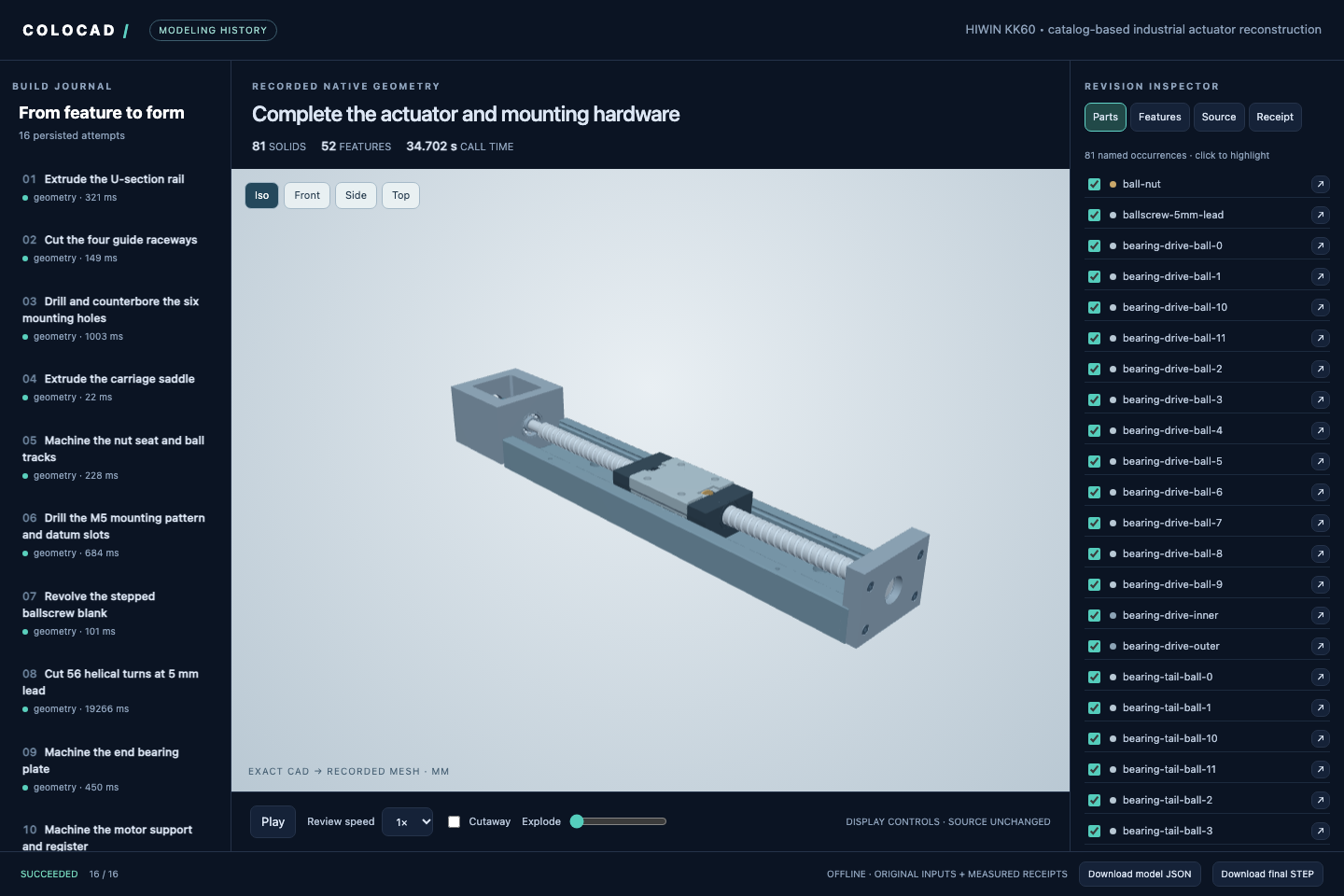
封面依据厂家图纸重建 **HIWIN KK60,导轨 300 mm、导程 5 mm、行程 210 mm**,包含 **52 个最终特征、81 个命名实体实例、16 个建模里程碑**。丝杠螺旋槽是实际切出的几何,另有导轨沟槽、安装孔、滑台、轴承和联轴器。
|
|
92
128
|
|
|
93
129
|
```sh
|
|
94
130
|
node node_modules/@coloopx/colocad/examples/hiwin-kk60/run.mjs ./actuator
|
|
95
131
|
npx colocad view ./actuator/session
|
|
96
|
-
npx colocad replay ./actuator/session ./actuator.html
|
|
97
|
-
# 视频导出另需 Playwright/Chromium 和 FFmpeg。
|
|
98
132
|
npx colocad render ./actuator/session ./modeling.mp4
|
|
99
133
|
```
|
|
100
134
|
|
|
101
|
-
|
|
102
|
-
|
|
103
|
-
## 100 秒能交付多少版绳驱灵巧手?
|
|
135
|
+
独立 OCCT 检查覆盖 16 份 STEP、64 个材料探针和指定位置的导轨/滑台间隙。未公开内部结构明确标为近似或省略;这是产品目录重建,不是可直接生产的完整图纸。动画也不是速度基准。
|
|
104
136
|
|
|
105
|
-
|
|
137
|
+
[MP4](showcase/hiwin-kk60/modeling.mp4) · [可编辑模型](showcase/hiwin-kk60/model.json) · [验证结果](showcase/hiwin-kk60/verification.json) · [尺寸与假设](examples/hiwin-kk60/sources.json) · [完整离线交付包](https://github.com/Coloopx/colocad/releases/download/v0.1.0-alpha.4/hiwin-kk60-delivery.zip)
|
|
106
138
|
|
|
107
|
-
|
|
139
|
+
## 性能
|
|
108
140
|
|
|
109
|
-
|
|
141
|
+
性能取决于几何和执行方式。在同一个 **43 实体绳驱灵巧手**的 100 秒版本队列实测中,Colocad 完成交付 **44 份 STEP,build123d 为 33 份**,最高采样沙箱内存低 **57.1%**。
|
|
110
142
|
|
|
111
|
-
|
|
112
|
-
|---|---:|---:|
|
|
113
|
-
| 100 秒内交付的完整整手 | **44 份** | 33 份 |
|
|
114
|
-
| 首份 STEP | **2.223 s** | 3.010 s |
|
|
115
|
-
| 共同前 33 份交付耗时中位数 | **2.234 s** | 2.855 s |
|
|
116
|
-
| 连续 100 秒内的最高采样内存 | **130.9 MiB** | 304.9 MiB |
|
|
143
|
+

|
|
117
144
|
|
|
118
|
-
|
|
145
|
+
| 相同版本队列,1 vCPU / 512 MiB | Colocad | build123d |
|
|
146
|
+
| --- | ---: | ---: |
|
|
147
|
+
| 100 秒完整 STEP 交付 | **44** | 33 |
|
|
148
|
+
| 第一份 STEP | **2.223 s** | 3.010 s |
|
|
149
|
+
| 相同前 33 个输入的任务耗时中位数 | **2.234 s** | 2.855 s |
|
|
150
|
+
| 最高采样 cgroup 内存 | **130.9 MiB** | 304.9 MiB |
|
|
119
151
|
|
|
120
|
-
|
|
152
|
+
每个后端运行一个窗口,每次改版新起 CAD 进程。内存约每 25 ms 采样,包含子进程、临时文件和计入容器的文件缓存;所有计数 STEP 均已回读。原始运行使用 alpha.2 SDK 和首次随 alpha.3 发布的优化内核,并非 alpha.6 的新实测。GIF 展示截至当前的最高采样值,而非瞬时内存。[方法与原始数据](showcase/tendon-hand/window/README.md)。
|
|
121
153
|
|
|
122
154
|
<details>
|
|
123
|
-
<summary
|
|
124
|
-
|
|
125
|
-

|
|
126
|
-
|
|
127
|
-
</details>
|
|
155
|
+
<summary>冷启动零件与缓存预览结果</summary>
|
|
128
156
|
|
|
129
|
-
|
|
130
|
-
|---|---:|---:|---:|---:|
|
|
131
|
-
| 三槽导轨 | 113 / 2,485 ms | **22.0×** | 20.0 / 259.3 MiB | **7.7%** |
|
|
132
|
-
| 四盲孔歧管 | 230 / 2,963 ms | **12.9×** | 20.7 / 258.7 MiB | **8.0%** |
|
|
133
|
-
| 绳驱手近节指骨 | 259 / 2,244 ms | **8.6×** | 21.4 / 260.1 MiB | **8.2%** |
|
|
134
|
-
| 43 实体整手 | 3,952 / 3,293 ms | **0.83×** | 52.7 / 271.3 MiB | **19.4%** |
|
|
157
|
+

|
|
135
158
|
|
|
136
|
-
|
|
159
|
+
已发布 alpha.2 内核在传感器导轨、歧管上的 time-to-STEP 分别快 **22.0×、12.9×**,峰值内存分别为 build123d 的 **7.7%、8.0%**。两边在 Linux arm64、1 vCPU / 512 MiB 下预热后各测 5 个独立进程/cgroup;计入启动、导入、建模、校验和导出,不含安装、预览、推理或常驻 agent。这不是所有操作的优势:歧管几何计算为 53.7 ms,而 build123d 为 43.8 ms,旧版完整手模型也曾更慢。
|
|
137
160
|
|
|
138
|
-
|
|
139
|
-
|
|
140
|
-
**旧版整手基线。** 另一项 100 秒、按顺序改参的实测中,colocad 交付 24 份整手 STEP,build123d 交付 30 份;每份都是完整的 43 个实体,已逐件回读。[两端交付时间戳与几何核对](showcase/tendon-hand/evidence/window.json)
|
|
141
|
-
|
|
142
|
-
## SDK、CLI、skill 怎么选?
|
|
143
|
-
|
|
144
|
-
SDK 是基础,CLI / 工具负责执行,skill 提供建模步骤与常用结构。完整文档从[中文开发指南](docs/README.zh-CN.md)开始,包含模型格式、改参、预览复用、失败处理和产物保存。
|
|
145
|
-
|
|
146
|
-
| 使用环境 | 接入文档 |
|
|
147
|
-
| --- | --- |
|
|
148
|
-
| Pi agent core / Pi coding agent | [工具适配器、extension 与 skill](docs/integrations/pi.md) |
|
|
149
|
-
| Claude Code | [项目 skill + 本地 CLI](docs/integrations/claude-code.md) |
|
|
150
|
-
| Codex | [skill 安装、调用与产物检查](docs/integrations/codex.md) |
|
|
151
|
-
| 自建 harness | [同沙箱架构、会话状态与产物生命周期](docs/integrations/overview.md) |
|
|
161
|
+
对未改变的几何,复用网格观察在两个零件上比 Colocad 自身重建后渲染快 5.6×–16.8×。这是内部缓存路径对比,不是 build123d 对比。
|
|
152
162
|
|
|
153
|
-
|
|
154
|
-
|
|
155
|
-
运行 `npm install @coloopx/colocad@0.1.0-alpha.5` 即可安装优化后的装配内核和完整 skill。沙箱内的 harness 可加载 `node_modules/@coloopx/colocad/skills/colocad/SKILL.md`,也可以把整个 `colocad` skill 目录复制到 agent 的技能目录。
|
|
156
|
-
|
|
157
|
-
常见机械件可以让 agent 直接按尺寸搭建。例如「做一块 100 × 50 × 6 mm 的安装板,钻 3 × 2 个 Ø6 通孔,两向孔距 32 和 30 mm」。skill 自带可改参的孔阵列、轴套、角码、开口壳和四种基础实体。参见[基础形状与结构的命令示例](skills/colocad/references/quick-build.md)。
|
|
158
|
-
|
|
159
|
-
- **应用或 harness 集成:** 进程里直接调用 SDK 的 `build(tree, newDir, { preview: true })`;多实体装配用 `CadClient.build(model)`。
|
|
160
|
-
- **终端或沙箱 agent:** 安装 `npm install @coloopx/colocad@0.1.0-alpha.5`;用 `./node_modules/.bin/colocad plan tree.json` 检查特征,再用 `./node_modules/.bin/colocad build tree.json ./new-part --preview`。成品在 `new-part/part/model.step`。全程在同一沙箱内。
|
|
161
|
-
- **从多视图交给 agent:** 从 [skills/colocad](skills/colocad/SKILL.md) 安装 skill;下个回合输入「用 `$colocad` 读这四张图,生成可编辑模型和 STEP,并标出推断的内部结构」。[完整安装命令、SDK 装配示例和重放步骤](showcase/tendon-hand/README.md#try-it-with-your-agent)。
|
|
162
|
-
|
|
163
|
-
以 Linux arm64 为例,安装后可执行文件就在 `node_modules/@coloopx/colocad/kernel/native/linux-arm64/agent-cad`。npm 分发编译产物;要读或修改 `.rs` 源文件,请用上面的 GitHub 源码链接。
|
|
163
|
+
</details>
|
|
164
164
|
|
|
165
|
-
|
|
165
|
+
[完整性能证据与边界](docs/performance.md) · [含 STEP 下载的离线对比](https://github.com/Coloopx/colocad/raw/refs/heads/main/docs/benchmarks/comparison.html)。
|
|
166
166
|
|
|
167
|
-
|
|
167
|
+
## 支持范围与限制
|
|
168
168
|
|
|
169
|
-
|
|
169
|
+
- 原生包支持 Linux x64/arm64、macOS arm64,要求 Node.js 22+。[发布验证](docs/evidence/release-alpha.7.json)。
|
|
170
|
+
- 支持可编辑 JSON/程序和精确 STEP;STEP 不保存商业 CAD 软件的原生特征树。
|
|
171
|
+
- Linux 通用可编辑 SOLIDWORKS 输出尚未完成。实验性 Windows author 需要授权 SOLIDWORKS,软件内重建验收仍未通过验证。[原生导出状态](docs/native-solidworks.md)。
|
|
172
|
+
- 几何有效、读图正确、可编辑、能配合和可制造需要各自的证据。[验证范围](docs/validation.md)。
|
|
173
|
+
- CAD 的 512 MiB 测试不代表常驻 agent、浏览器和视频编码器的整体内存预算。
|
|
170
174
|
|
|
171
|
-
|
|
175
|
+
## 文档与帮助
|
|
172
176
|
|
|
173
|
-
|
|
177
|
+
alpha.7 已提供:[精确查询与几何驱动装配](docs/engineering-queries.zh-CN.md),以及[可运行的外部 STEP 例子](examples/engineering-queries/README.md)。[四阶段目标](specs/0005-capability-reliability-and-optimization.zh-CN.md)依次为功能覆盖、几何可靠性、工程可用性、benchmark 驱动优化。SDK、CLI、工具 schema 和三平台原生内核同步交付;这是 Colocad 自己的查询 API,不提供 CadQuery Python/API 兼容层。
|
|
174
178
|
|
|
175
|
-
|
|
179
|
+
G1–G3 已按[明确的验收范围](specs/experiments/0005/README.md)通过:24/24 几何案例独立验证、127 项 Rust / 41 项 Node 测试,以及 Linux arm64 **1 vCPU / 512 MiB** 内的两条真实 Pi 任务。语料执行加最小调度器的 cgroup 峰值约 **256 MiB**;驻留 Pi/harness 加 82 实体执行器改参和预览约 **371 MiB**,无 OOM。这是正确性与资源验收,不是新一轮 build123d 性能比较,也不代表全部工业场景对等;G4 尚未启动。
|
|
176
180
|
|
|
177
|
-
| 切到俯视图 | 完整重建并出图 | 复用网格出图 | 加速比 |
|
|
178
|
-
| :--- | ---: | ---: | ---: |
|
|
179
|
-
| 导轨 | 108.8 ms | 19.4 ms | **5.6×** |
|
|
180
|
-
| 歧管 | 223.8 ms | 13.3 ms | **16.8×** |
|
|
181
181
|
|
|
182
|
-
|
|
182
|
+
[入门](docs/getting-started.md) · [API](docs/api.md) · [完整建模指南](docs/agent-modeling-handbook.zh-CN.md) · [Skill](skills/colocad/SKILL.md) · [故障排查](docs/troubleshooting.md) · [全部文档](docs/README.zh-CN.md)
|
|
183
183
|
|
|
184
|
-
|
|
184
|
+
问题和功能建议请[提交 issue](https://github.com/Coloopx/colocad/issues),附上版本、平台、最小模型和相关回执,并移除凭证及私密资料。
|
|
185
185
|
|
|
186
|
-
|
|
186
|
+
## 开发与贡献
|
|
187
187
|
|
|
188
188
|
```sh
|
|
189
|
-
|
|
190
|
-
|
|
189
|
+
git clone https://github.com/Coloopx/colocad.git
|
|
190
|
+
cd colocad
|
|
191
|
+
npm ci
|
|
192
|
+
npm run build:kernel
|
|
193
|
+
npm test
|
|
191
194
|
```
|
|
192
195
|
|
|
193
|
-
|
|
194
|
-
|
|
195
|
-
```js
|
|
196
|
-
import { readFile } from 'node:fs/promises';
|
|
197
|
-
import { build } from '@coloopx/colocad';
|
|
198
|
-
|
|
199
|
-
const tree = JSON.parse(await readFile('./node_modules/@coloopx/colocad/examples/manifold.json', 'utf8'));
|
|
200
|
-
tree.parameters.instances = 3;
|
|
201
|
-
const result = await build(tree, './three-port-manifold', { preview: true });
|
|
202
|
-
console.log(result.step);
|
|
203
|
-
```
|
|
196
|
+
源码构建需要 Rust 工具链,并拉取固定版本的 SolidCore。查看器、视频和 Pi 接入测试另有依赖;安装、测试和发布方法见 [CONTRIBUTING.md](CONTRIBUTING.md)。欢迎提交 issue 和 pull request。
|
|
204
197
|
|
|
205
|
-
|
|
198
|
+
## 许可证与致谢
|
|
206
199
|
|
|
207
|
-
|
|
200
|
+
Colocad 应用代码使用 [MIT 许可证](LICENSE)。内核基于 [SolidCore](https://github.com/tangency-labs/solidcore),其中包含源自 NVIDIA USD BRep / SMLib 的工作;查看器使用 Three.js。依赖许可证与归属见 [NOTICE.md](NOTICE.md) 和 [kernel/licenses](kernel/licenses)。工业实例与 HIWIN 无隶属或背书关系。
|
package/bin/colocad.mjs
CHANGED
|
@@ -1,15 +1,22 @@
|
|
|
1
1
|
#!/usr/bin/env node
|
|
2
|
-
import { readFile } from "node:fs/promises";
|
|
3
|
-
import { compileTree, build, kernelModel } from "../src/index.mjs";
|
|
2
|
+
import { readFile, writeFile } from "node:fs/promises";
|
|
3
|
+
import { compileTree, build, kernelModel, CadClient } from "../src/index.mjs";
|
|
4
4
|
import { ModelingSession, exportSessionHtml } from "../src/session.mjs";
|
|
5
5
|
import { startViewer, parseViewOptions } from "../src/view-server.mjs";
|
|
6
6
|
import { renderSession, parseRenderOptions } from "../src/render.mjs";
|
|
7
7
|
import { writeSolidWorks } from "../src/solidworks.mjs";
|
|
8
8
|
const [cmd, input, output, ...flags] = process.argv.slice(2);
|
|
9
|
-
const help =
|
|
10
|
-
"colocad build TREE.json NEW_DIRECTORY [--preview]\ncolocad plan TREE.json\ncolocad record MODEL.json SESSION_DIRECTORY [--label TEXT]\ncolocad replay SESSION_DIRECTORY OUTPUT.html\ncolocad view SESSION_DIRECTORY [--no-open] [--port PORT] [--export OUTPUT.html] [--cutaway] [--view iso|front|side|top]\ncolocad render SESSION_DIRECTORY OUTPUT.mp4|OUTPUT.gif [--width N] [--height N] [--fps N] [--seconds-per-step N]\ncolocad solidworks NATIVE-JOB.json NEW_FILE.SLDPRT";
|
|
9
|
+
const help = "colocad query REVISION_DIR REQUEST.json [--out NEW_RECEIPT.json]\n"+
|
|
10
|
+
"colocad build TREE.json NEW_DIRECTORY [--preview] [--queryable]\ncolocad plan TREE.json\ncolocad record MODEL.json SESSION_DIRECTORY [--label TEXT] [--queryable]\ncolocad replay SESSION_DIRECTORY OUTPUT.html\ncolocad view SESSION_DIRECTORY [--no-open] [--port PORT] [--export OUTPUT.html] [--cutaway] [--view iso|front|side|top]\ncolocad render SESSION_DIRECTORY OUTPUT.mp4|OUTPUT.gif [--width N] [--height N] [--fps N] [--seconds-per-step N]\ncolocad solidworks NATIVE-JOB.json NEW_FILE.SLDPRT";
|
|
11
11
|
try {
|
|
12
12
|
if (cmd === "--help" || cmd === "-h" || !cmd) console.log(help);
|
|
13
|
+
else if(cmd==='query'&&input&&output&&(flags.length===0||(flags.length===2&&flags[0]==='--out'))){
|
|
14
|
+
const bytes=await readFile(output);if(bytes.length>2*1024*1024)throw Error('Query input exceeds 2 MiB');
|
|
15
|
+
const client=new CadClient({outputRoot:input,queryRoots:[input],wallMs:120000});
|
|
16
|
+
const receipt=await client.query(input,JSON.parse(bytes));
|
|
17
|
+
if(flags.length)await writeFile(flags[1],JSON.stringify(receipt,null,2)+'\n',{flag:'wx'});
|
|
18
|
+
if(receipt.ok)console.log(JSON.stringify(receipt));else{console.error(JSON.stringify(receipt));process.exitCode=1;}
|
|
19
|
+
}
|
|
13
20
|
else if (cmd === "render" && input && output) {
|
|
14
21
|
console.log(JSON.stringify(await renderSession(input,output,parseRenderOptions(flags))));
|
|
15
22
|
}
|
|
@@ -31,26 +38,27 @@ try {
|
|
|
31
38
|
if (raw.length > 2 * 1024 * 1024) throw Error("Input exceeds 2 MiB");
|
|
32
39
|
const spec = JSON.parse(raw.toString("utf8"));
|
|
33
40
|
let res;
|
|
34
|
-
if (cmd === "record" && output
|
|
41
|
+
if (cmd === "record" && output) {
|
|
42
|
+
let label=input,queryable;for(let i=0;i<flags.length;i++){if(flags[i]==='--queryable'&&queryable===undefined)queryable=true;else if(flags[i]==='--label'&&flags[i+1]!==undefined)label=flags[++i];else throw Error(help);}
|
|
35
43
|
let session;
|
|
36
44
|
try { session=await ModelingSession.create(output,{wallMs:120000}); }
|
|
37
45
|
catch(error) { if(error.code!=="EEXIST") throw error; session=await ModelingSession.open(output,{wallMs:120000}); }
|
|
38
|
-
res=await session.build(spec.format==="colocad/1"?kernelModel(spec):spec,{label
|
|
46
|
+
res=await session.build(spec.format==="colocad/1"?kernelModel(spec):spec,{label,queryable});
|
|
39
47
|
if(!res.ok) process.exitCode=1;
|
|
40
48
|
}
|
|
41
49
|
else if (cmd === "plan" && !output) res = compileTree(spec);
|
|
42
50
|
else if (
|
|
43
51
|
cmd === "build" &&
|
|
44
52
|
output &&
|
|
45
|
-
|
|
53
|
+
flags.every(flag=>['--preview','--queryable'].includes(flag))&&new Set(flags).size===flags.length
|
|
46
54
|
)
|
|
47
|
-
res = await build(spec, output, { preview: flags.
|
|
55
|
+
res = await build(spec, output, { preview: flags.includes('--preview'),queryable:flags.includes('--queryable') });
|
|
48
56
|
else if (cmd === "solidworks" && output && !flags.length)
|
|
49
57
|
res = await writeSolidWorks(spec, output);
|
|
50
58
|
else throw Error(help);
|
|
51
59
|
console.log(JSON.stringify(res));
|
|
52
60
|
}
|
|
53
61
|
} catch (e) {
|
|
54
|
-
console.error(JSON.stringify({ error: e.message }));
|
|
62
|
+
console.error(JSON.stringify(cmd==='query'?{ok:false,error:{code:'CLI_QUERY_ERROR',message:e.message}}:{ error: e.message }));
|
|
55
63
|
process.exitCode = 1;
|
|
56
64
|
}
|
package/docs/README.md
CHANGED
|
@@ -4,7 +4,7 @@
|
|
|
4
4
|
|
|
5
5
|
Build locally with **SDK → CLI/tools → skill**. The skill guides modeling decisions; the SDK and Rust kernel execute them. Agent, harness and CAD process share the same sandbox and filesystem.
|
|
6
6
|
|
|
7
|
-
These guides target **@coloopx/colocad 0.1.0-alpha.
|
|
7
|
+
These guides target **@coloopx/colocad 0.1.0-alpha.7**, Node.js 22+, Linux x64/arm64 or macOS arm64. The project is still alpha; documentation does not imply complete CAD coverage.
|
|
8
8
|
|
|
9
9
|
[中文开发指南](README.zh-CN.md)
|
|
10
10
|
|
|
@@ -21,8 +21,15 @@ These guides target **@coloopx/colocad 0.1.0-alpha.5**, Node.js 22+, Linux x64/a
|
|
|
21
21
|
| Model efficiently from dimensions or views | [Best practices](best-practices.md) |
|
|
22
22
|
| Diagnose a failed call or installation | [Troubleshooting](troubleshooting.md) |
|
|
23
23
|
| Run examples and contribute a change | [Contributing](../CONTRIBUTING.md) |
|
|
24
|
+
| Compare execution performance and limits | [Performance evidence](performance.md) |
|
|
25
|
+
| Check native SOLIDWORKS export status | [Native author](native-solidworks.md) |
|
|
24
26
|
| Understand what has actually been tested | [Integration verification](integrations/verification.md), [geometry validation](validation.md) |
|
|
27
|
+
| Check G1–G3 acceptance, Linux limits and live-agent traces | [Frozen corpus, lifecycle and sandbox evidence](../specs/experiments/0005/README.md) |
|
|
28
|
+
| Contribute geometry queries and assembly interfaces | [SDD 0004 revision 2 — contract and 28 acceptance cases](../specs/0004-engineering-query-and-assembly-interfaces.md), [implementation evidence](../specs/experiments/0004/README.md) |
|
|
25
29
|
|
|
26
|
-
Runnable adapters and their regression tests live in [examples/integrations](../examples/integrations/README.md).
|
|
30
|
+
Runnable adapters and their regression tests live in [examples/integrations](../examples/integrations/README.md). The standalone SDK example pins the published alpha.3 compatibility baseline; current Pi/session adapters use this checkout and the matching native. The complete Pi example project is in GitHub. Alpha.5 also packages the compact adapter and guided workflow example. The skill, assets and its helper scripts **are** included.
|
|
27
31
|
|
|
28
|
-
Performance depends on workload and execution mode. See the [README measurements](../README.md#
|
|
32
|
+
Performance depends on workload and execution mode. See the [README measurements](../README.md#performance), with their startup, geometry and memory accounting, before choosing a budget. A 512 MiB CAD benchmark is not a 512 MiB guarantee for a resident LLM harness plus CAD.
|
|
33
|
+
|
|
34
|
+
- [Exact geometry queries and datum-driven assembly (alpha.7)](engineering-queries.md)
|
|
35
|
+
- [Four ordered goals and benchmark/retrospective optimization](../specs/0005-capability-reliability-and-optimization.md)
|
package/docs/README.zh-CN.md
CHANGED
|
@@ -4,7 +4,7 @@
|
|
|
4
4
|
|
|
5
5
|
colocad 的分层是 **SDK 为基础,CLI / 工具负责调用,skill 指导建模流程**。Agent、harness 和 Rust CAD 进程都在同一个沙箱内,共享项目目录。现有 harness 负责模型推理、权限、会话和产物保存,不需要额外部署 CAD 服务。
|
|
6
6
|
|
|
7
|
-
本文对应 `@coloopx/colocad@0.1.0-alpha.
|
|
7
|
+
本文对应 `@coloopx/colocad@0.1.0-alpha.7`,要求 Node.js 22+;预编译内核支持 Linux x64/arm64、macOS arm64。工程仍处于 alpha 阶段。
|
|
8
8
|
|
|
9
9
|
## 从材料到交付的完整指南
|
|
10
10
|
|
|
@@ -15,7 +15,7 @@ colocad 的分层是 **SDK 为基础,CLI / 工具负责调用,skill 指导
|
|
|
15
15
|
在已有 Node 项目根目录执行;没有 `package.json` 时先运行 `npm init -y`:
|
|
16
16
|
|
|
17
17
|
```sh
|
|
18
|
-
npm install --save-exact @coloopx/colocad@0.1.0-alpha.
|
|
18
|
+
npm install --save-exact @coloopx/colocad@0.1.0-alpha.7
|
|
19
19
|
./node_modules/.bin/colocad build \
|
|
20
20
|
node_modules/@coloopx/colocad/examples/manifold.json ./manifold-v1 --preview
|
|
21
21
|
```
|
|
@@ -83,3 +83,12 @@ test ! -e .agents/skills/colocad && \
|
|
|
83
83
|
接入示例用已发布 npm 包执行实际 Rust 建模,并经过 Pi core 工具循环、错误恢复、扩展加载和 skill 发现测试。模型回复采用确定性脚本,因此这是接入回归,不是未知图纸上的自主建模成功率测试。Claude Code 尚未做实机推理验收。
|
|
84
84
|
|
|
85
85
|
参数 JSON 可重建,STEP 是精确几何;二者不等于 SOLIDWORKS 原生特征树。Linux 通用可编辑 `.SLDPRT` 尚未完成,Windows author 尚缺授权软件内的完整回读重建验收。[接入验证范围](integrations/verification.md) · [几何与原生输出验证](validation.md)
|
|
86
|
+
|
|
87
|
+
[性能证据与测量边界](performance.md) · [SOLIDWORKS 原生导出状态](native-solidworks.md)
|
|
88
|
+
|
|
89
|
+
## 工程查询与装配接口(alpha.7)
|
|
90
|
+
|
|
91
|
+
[SDD 0004 中文实施说明](../specs/0004-engineering-query-and-assembly-interfaces.zh-CN.md)与[英文规范](../specs/0004-engineering-query-and-assembly-interfaces.md)第 2 版已纳入 CadQuery 对照评审,定义可组合选择、几何基准、面/孔/轴查询、稳定引用、安装接口与 28 项验收。支持域内的 G1–G3 已通过验收,alpha.7 包含 SDK、CLI 与三平台原生实现。[实验台账](../specs/experiments/0004/README.md)保留迭代过程;[安装包验证](evidence/release-alpha.7.json)检查实际交付。
|
|
92
|
+
|
|
93
|
+
- [精确查询与几何基准装配(alpha.7)](engineering-queries.zh-CN.md)
|
|
94
|
+
- [四阶段目标与 benchmark / 回溯优化](../specs/0005-capability-reliability-and-optimization.zh-CN.md)
|
|
@@ -1,6 +1,6 @@
|
|
|
1
1
|
# Agent CAD handbook
|
|
2
2
|
|
|
3
|
-
A complete workflow for source preparation, modeling tools, agent guidance, validation and tuning. This describes the implemented Colocad alpha.
|
|
3
|
+
A complete workflow for source preparation, modeling tools, agent guidance, validation and tuning. This describes the implemented Colocad alpha.7 interfaces and recommendations informed by actual use and primary sources. It is not a claim of universal optimal prompting or autonomous industrial reconstruction.
|
|
4
4
|
|
|
5
5
|
[完整中文指南](agent-modeling-handbook.zh-CN.md) · [Research and evidence](agent-modeling-research.md) · [Packaged skill](../skills/colocad/SKILL.md)
|
|
6
6
|
|
|
@@ -1,6 +1,6 @@
|
|
|
1
1
|
# Agent CAD 完整工作指南:资料、工具、建模闭环与调优
|
|
2
2
|
|
|
3
|
-
本指南对应 colocad alpha.
|
|
3
|
+
本指南对应 colocad alpha.7 的 skill 和可运行示例。目标是把指定产品及其工程依据变成可编辑源、精确几何、可追溯检查和可供人类查看的过程。以下是基于仓库实作和公开资料整理的默认方法,不是已证明适用于所有模型/产品的最优提示词。
|
|
4
4
|
|
|
5
5
|
[English overview](agent-modeling-handbook.md) · [研究依据与适用边界](agent-modeling-research.md) · [随包 skill](../skills/colocad/SKILL.md) · [提示词模板](../skills/colocad/references/prompt-patterns.md) · [真实 KK60 产品](../examples/hiwin-kk60/README.md)
|
|
6
6
|
|
|
@@ -209,7 +209,7 @@ KK60 的真实螺旋槽让总装触发内部 STEP 实体数限制,最终修复
|
|
|
209
209
|
## 8. 运行、审阅与交付
|
|
210
210
|
|
|
211
211
|
```sh
|
|
212
|
-
npm install @coloopx/colocad@0.1.0-alpha.
|
|
212
|
+
npm install @coloopx/colocad@0.1.0-alpha.7
|
|
213
213
|
node node_modules/@coloopx/colocad/examples/hiwin-kk60/run.mjs ./actuator
|
|
214
214
|
npx colocad view ./actuator/session
|
|
215
215
|
npx colocad replay ./actuator/session ./actuator.html
|
package/docs/api.md
CHANGED
|
@@ -1,6 +1,6 @@
|
|
|
1
1
|
# SDK, CLI and tool reference
|
|
2
2
|
|
|
3
|
-
Targets `@coloopx/colocad@0.1.0-alpha.
|
|
3
|
+
Targets `@coloopx/colocad@0.1.0-alpha.7`. The [public declarations](../src/index.d.mts) and [kernel declarations](../kernel/src/types.ts) are the complete type contracts.
|
|
4
4
|
|
|
5
5
|
## Feature-tree SDK and CLI
|
|
6
6
|
|
|
@@ -20,7 +20,7 @@ colocad build TREE.json NEW_DIRECTORY [--preview]
|
|
|
20
20
|
colocad solidworks NATIVE-JOB.json NEW_FILE.SLDPRT
|
|
21
21
|
```
|
|
22
22
|
|
|
23
|
-
CLI success prints JSON to stdout. Failure prints an error to stderr and exits nonzero. Feature-tree CLI input is limited to 2 MiB. The third command is the [experimental Windows author](
|
|
23
|
+
CLI success prints JSON to stdout. Failure prints an error to stderr and exits nonzero. Feature-tree CLI input is limited to 2 MiB. The third command is the [experimental Windows author](native-solidworks.md).
|
|
24
24
|
|
|
25
25
|
## Kernel SDK
|
|
26
26
|
|
|
@@ -39,7 +39,9 @@ The host chooses `outputRoot`, a local directory for generated revisions, and op
|
|
|
39
39
|
| `capabilities()` | Native version, supported operations, budgets and declared limitations |
|
|
40
40
|
| `schema()` | Complete kernel model JSON Schema |
|
|
41
41
|
| `validate(model)` | Cheap input/dependency/budget preflight; no geometric validity guarantee |
|
|
42
|
-
| `build(model,
|
|
42
|
+
| `build(model, optionsOrRevision?)` | Build/check exact geometry; options include `queryable` and `previousRevision`; a legacy revision string remains supported |
|
|
43
|
+
| `querySchema()` | Exact-query JSON Schema from the installed native |
|
|
44
|
+
| `query(artifactDirectory, request)` | Read an exact snapshot using its `query_revision_id`, within host-configured `queryRoots` |
|
|
43
45
|
| `edit(model, parameters)` | Change existing numeric parameters, then build; input remains unchanged |
|
|
44
46
|
| `preview(model, options?)` | Build or reuse a matching display mesh and render it |
|
|
45
47
|
| `observeArtifact(directory, options?)` | Render from a trusted saved mesh with integrity checks |
|
|
@@ -59,7 +61,7 @@ Build receipts include `artifact_directory`, `geometry`, `validation`, feature r
|
|
|
59
61
|
|
|
60
62
|
Preview options include `view: "iso" | "top" | "bottom" | "front" | "back" | "left" | "right"`, image size, `chord_mm` and section settings. Use the schema for exact fields and limits. A different camera can reuse geometry; changing mesh precision or geometry can require new work.
|
|
61
63
|
|
|
62
|
-
The kernel SDK limits serialized input to 32 MiB. Query capabilities for native feature, assembly and mesh budgets. The SDK has no in-flight `AbortSignal` contract in alpha.
|
|
64
|
+
The kernel SDK limits serialized input to 32 MiB. Query capabilities for native feature, assembly and mesh budgets. The SDK has no in-flight `AbortSignal` contract in alpha.7: the Pi example checks cancellation before dispatch, while an already-running native call is bounded by `wallMs`.
|
|
63
65
|
|
|
64
66
|
## Agent tools
|
|
65
67
|
|
|
@@ -69,15 +71,16 @@ The kernel SDK limits serialized input to 32 MiB. Query capabilities for native
|
|
|
69
71
|
| --- | --- |
|
|
70
72
|
| `cad_capabilities` | `{}` |
|
|
71
73
|
| `cad_validate` | `{ model }` |
|
|
72
|
-
| `cad_build` | `{ model }` |
|
|
74
|
+
| `cad_build` | `{ model, options?: { queryable?: boolean } }` |
|
|
73
75
|
| `cad_preview` | `{ model, options? }` |
|
|
74
76
|
| `cad_edit` | `{ model, parameters }` |
|
|
75
77
|
| `cad_solve_sketch` | `{ sketch, parameters? }` |
|
|
76
78
|
| `cad_inspect_step` | `{ model, asset }` |
|
|
79
|
+
| `cad_query` | `{ artifact_directory, request }`; session-bound form takes `{ request }` against the accepted artifact |
|
|
77
80
|
|
|
78
81
|
Preserve the complete `inputSchema`, including root `$defs`. Do not wrap it without rewriting `$ref` locations. These definitions are transport-neutral; the package does not launch an MCP server. If a provider rejects the union-heavy schema, use the skill with shell tools or build a provider-specific schema adapter and test its validation behavior.
|
|
79
82
|
|
|
80
|
-
The Pi example exposes the first five tools
|
|
83
|
+
The Pi example exposes the first five tools plus capability-gated `cad_query`. It converts failed receipts into failed tool results and includes PNG bytes in image content when a preview is at most 4 MiB. Build/edit feedback retains the query revision. See the [query guide](engineering-queries.md) for selection, datums, holes/groups, interfaces and supported geometric relationships.
|
|
81
84
|
|
|
82
85
|
For STEP imports, use `attachStep(model, assetId, stepText)` from `@coloopx/colocad/kernel`. The host registers text under an opaque ID; the model need not choose arbitrary filesystem paths. The returned model is a copy. [Integration policy and lifecycle](integrations/overview.md).
|
|
83
86
|
|