@coloopx/colocad 0.1.0-alpha.5 → 0.1.0-alpha.6
This diff represents the content of publicly available package versions that have been released to one of the supported registries. The information contained in this diff is provided for informational purposes only and reflects changes between package versions as they appear in their respective public registries.
- package/README.md +112 -175
- package/README.zh-CN.md +116 -128
- package/docs/README.md +4 -2
- package/docs/README.zh-CN.md +4 -2
- package/docs/agent-modeling-handbook.md +1 -1
- package/docs/agent-modeling-handbook.zh-CN.md +2 -2
- package/docs/api.md +1 -1
- package/docs/getting-started.md +1 -1
- package/docs/integrations/claude-code.md +1 -1
- package/docs/integrations/codex.md +1 -1
- package/docs/native-solidworks.md +12 -0
- package/docs/performance.md +62 -0
- package/kernel/release.json +1 -1
- package/package.json +1 -1
package/README.md
CHANGED
|
@@ -2,257 +2,194 @@
|
|
|
2
2
|
|
|
3
3
|

|
|
4
4
|
|
|
5
|
-
**
|
|
5
|
+
**Parametric CAD for agents. Local Rust geometry, a TypeScript SDK, a CLI, and an inspectable modeling history.**
|
|
6
6
|
|
|
7
|
-
[
|
|
7
|
+
[中文](README.zh-CN.md) · [Documentation](docs/README.md) · [npm](https://www.npmjs.com/package/@coloopx/colocad) · [Releases](https://github.com/Coloopx/colocad/releases) · [Model behind the cover](examples/hiwin-kk60/README.md)
|
|
8
8
|
|
|
9
|
-
|
|
9
|
+
Colocad turns explicit modeling instructions into editable source, exact STEP geometry and visual review artifacts. It runs alongside the agent and its harness **inside the same sandbox**. The npm package includes the compiled Rust kernel; installed modeling needs no Python, Rust toolchain, network or separate CAD service.
|
|
10
10
|
|
|
11
|
-
|
|
11
|
+
**Alpha software:** useful for supported mechanical parts and assemblies, with measured performance and reproducible examples. It is not a complete replacement for build123d or a manufacturing-certified CAD system. See [support and limits](#support-and-limits).
|
|
12
12
|
|
|
13
|
-
|
|
13
|
+
## What you can build
|
|
14
14
|
|
|
15
|
-
|
|
15
|
+
- **Parts and assemblies:** parametric features, repeated part definitions, exact STEP and PNG/GLB/STL previews.
|
|
16
|
+
- **Agent workflows:** SDK tools and a bundled skill for interpreting dimensions, planning features, editing and checking results.
|
|
17
|
+
- **Human review:** persistent build attempts, source/receipt inspection, offline single-file HTML and four-view MP4/GIF replay.
|
|
18
|
+
|
|
19
|
+
The SDK is the foundation; the CLI and tool adapters expose it to your harness; the skill guides modeling decisions. Images and drawings are evidence the agent interprets. Colocad executes explicit geometry instructions.
|
|
16
20
|
|
|
17
21
|
```mermaid
|
|
18
22
|
flowchart LR
|
|
19
|
-
A[Agent +
|
|
20
|
-
H --> C[
|
|
21
|
-
|
|
22
|
-
|
|
23
|
-
|
|
24
|
-
K --> F[STEP + model + receipts + meshes]
|
|
25
|
-
F --> V[CLI viewer / HTML / MP4 / GIF]
|
|
23
|
+
A[Agent + skill] --> H[Existing harness]
|
|
24
|
+
H --> C[CLI / SDK tools]
|
|
25
|
+
C --> K[Local Rust kernel]
|
|
26
|
+
K --> F[STEP + source + receipts + meshes]
|
|
27
|
+
F --> V[CLI viewer / HTML / animation]
|
|
26
28
|
```
|
|
27
29
|
|
|
28
|
-
|
|
29
|
-
|
|
30
|
-
```sh
|
|
31
|
-
npm install @coloopx/colocad@0.1.0-alpha.5
|
|
30
|
+
## Install
|
|
32
31
|
|
|
33
|
-
|
|
34
|
-
npx colocad record node_modules/@coloopx/colocad/examples/manifold.json ./history \
|
|
35
|
-
--label "Build the manifold"
|
|
32
|
+
Requires **Node.js 22+** on **Linux x64, Linux arm64 or macOS arm64**.
|
|
36
33
|
|
|
37
|
-
|
|
38
|
-
|
|
39
|
-
|
|
40
|
-
# Export one self-contained HTML file, including the final STEP download.
|
|
41
|
-
npx colocad replay ./history ./review.html
|
|
34
|
+
```sh
|
|
35
|
+
npm install @coloopx/colocad@0.1.0-alpha.6
|
|
42
36
|
```
|
|
43
37
|
|
|
44
|
-
|
|
38
|
+
The package ships JS/TS APIs, the CLI, native executables, viewer and complete skill. Rust source is in [crates/agent-cad](crates/agent-cad); the npm tarball contains compiled binaries. [Package and model formats](docs/concepts.md).
|
|
45
39
|
|
|
46
|
-
|
|
47
|
-
| --- | --- | --- |
|
|
48
|
-
| `colocad plan TREE.json` | `colocad/1` feature tree | Compile a native modeling job without building geometry |
|
|
49
|
-
| `colocad build TREE.json NEW_DIR --preview` | `colocad/1` feature tree | STEP, editable tree, report and previews |
|
|
50
|
-
| `colocad record MODEL.json SESSION --label TEXT` | Feature tree **or** kernel model JSON | Build and append a persistent modeling milestone |
|
|
51
|
-
| `colocad view SESSION` | Recorded session | Local interactive viewer; optional `--export review.html` |
|
|
52
|
-
| `colocad replay SESSION review.html` | Recorded session | Single offline HTML, no listening process |
|
|
53
|
-
| `colocad render SESSION modeling.mp4` | Recorded session | Four-view animation, timing/hash manifest and poster; `.gif` also supported |
|
|
40
|
+
## Quick start
|
|
54
41
|
|
|
55
|
-
|
|
42
|
+
Run these commands from your Node project:
|
|
56
43
|
|
|
57
|
-
|
|
44
|
+
```sh
|
|
45
|
+
# Build the packaged manifold and save its source, receipt and geometry.
|
|
46
|
+
npx colocad record node_modules/@coloopx/colocad/examples/manifold.json ./history \
|
|
47
|
+
--label "Build the manifold"
|
|
58
48
|
|
|
59
|
-
|
|
49
|
+
# Launch the interactive viewer.
|
|
50
|
+
npx colocad view ./history
|
|
60
51
|
|
|
61
|
-
|
|
62
|
-
|
|
63
|
-
npm install -D playwright
|
|
64
|
-
npx playwright install chromium
|
|
65
|
-
# Install FFmpeg on your host, then export from the same persisted session:
|
|
66
|
-
npx colocad render ./history ./modeling.mp4 --width 1280 --height 800 --fps 15
|
|
67
|
-
npx colocad render ./history ./modeling.gif --width 960 --height 600 --fps 10
|
|
52
|
+
# Export one offline HTML file, including a final STEP download.
|
|
53
|
+
npx colocad replay ./history ./review.html
|
|
68
54
|
```
|
|
69
55
|
|
|
70
|
-
|
|
56
|
+
The manifold includes an extrusion, blind cut, fillet, linear pattern and pocket. Record an edited JSON into the same history directory to append a revision; failed attempts remain visible. `view` serves a snapshot, so reopen it after adding revisions. [First part and parameter edit](docs/getting-started.md).
|
|
71
57
|
|
|
72
|
-
|
|
58
|
+
Prefer an API? Use the same kernel through a persistent session:
|
|
73
59
|
|
|
74
60
|
```js
|
|
75
61
|
import { ModelingSession } from '@coloopx/colocad/session';
|
|
76
62
|
|
|
77
|
-
const session = await ModelingSession.create('./history'
|
|
78
|
-
const
|
|
63
|
+
const session = await ModelingSession.create('./sdk-history');
|
|
64
|
+
const result = await session.build({
|
|
79
65
|
version: 1, units: 'mm', parameters: { length: 60 },
|
|
80
66
|
features: [{ id: 'stock', op: 'box', origin: [0, 0, 0],
|
|
81
67
|
size: [{ param: 'length' }, 30, 8] }],
|
|
82
68
|
output: 'stock',
|
|
83
|
-
};
|
|
84
|
-
const result = await session.build(model, { label: 'Extrude the stock' });
|
|
69
|
+
});
|
|
85
70
|
if (!result.ok) throw new Error(JSON.stringify(result.error));
|
|
86
|
-
await session.edit({ length: 80 }
|
|
71
|
+
await session.edit({ length: 80 });
|
|
87
72
|
```
|
|
88
73
|
|
|
89
|
-
Use `CadClient` for direct builds
|
|
90
|
-
|
|
91
|
-
### Skill: give the agent the complete modeling guide
|
|
92
|
-
|
|
93
|
-
Copy the **whole** bundled skill directory, including scripts, references and editable shape assets:
|
|
94
|
-
|
|
95
|
-
```sh
|
|
96
|
-
# Codex project skill
|
|
97
|
-
mkdir -p .agents/skills
|
|
98
|
-
cp -R node_modules/@coloopx/colocad/skills/colocad .agents/skills/colocad
|
|
99
|
-
|
|
100
|
-
# For Claude Code, use .claude/skills/colocad instead.
|
|
101
|
-
```
|
|
74
|
+
Use `CadClient` for direct builds without session recording. [SDK, CLI and tool API](docs/api.md).
|
|
102
75
|
|
|
103
|
-
|
|
76
|
+
## Visualize and export from the CLI
|
|
104
77
|
|
|
105
|
-
|
|
78
|
+
|
|
106
79
|
|
|
107
|
-
|
|
80
|
+
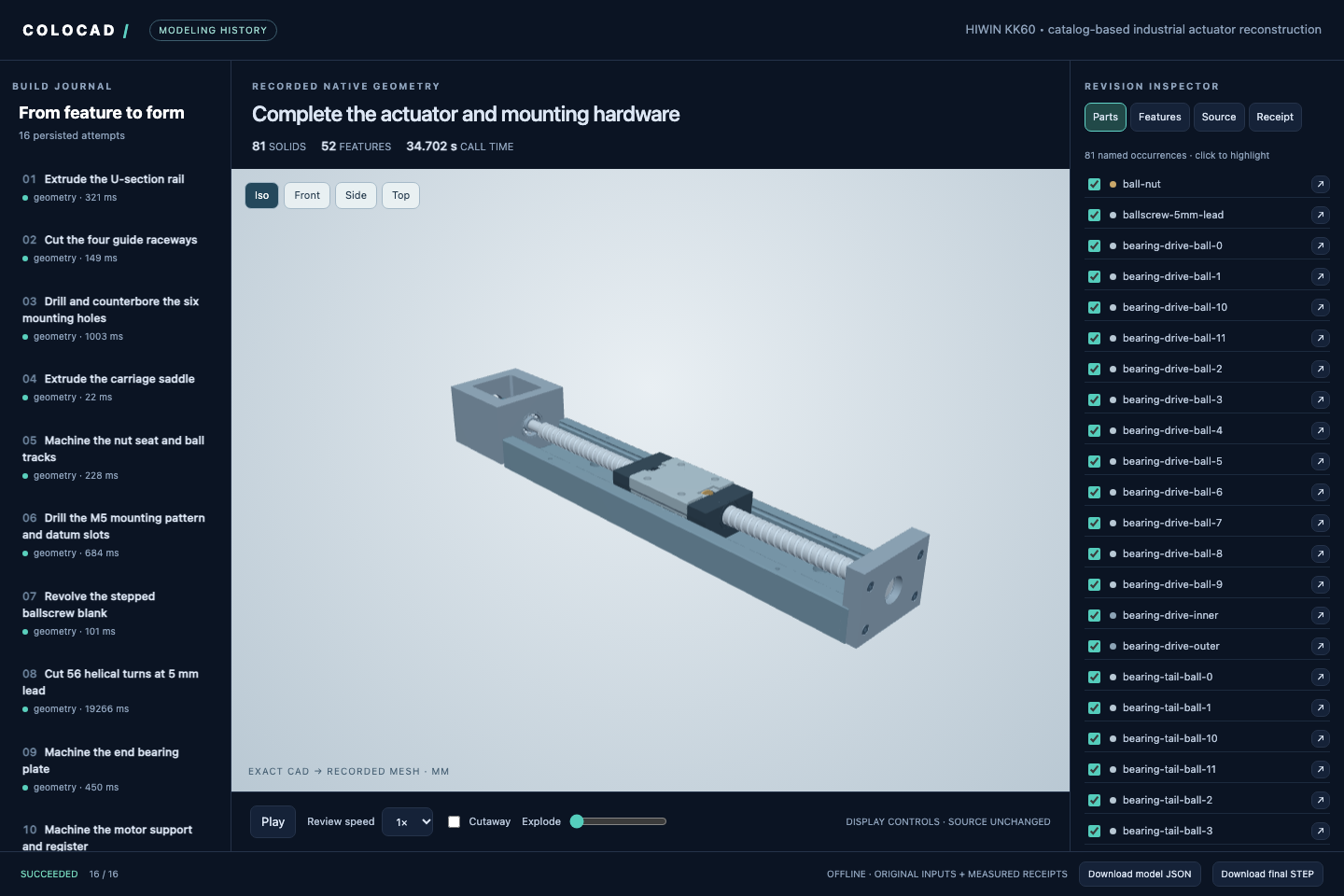
Inspect the timeline, source, features, receipts and selected parts. Switch cameras, show display sections or explosion, and download artifacts. The offline HTML embeds its rendering code and geometry. Hosts can also embed `@coloopx/colocad/viewer`.
|
|
108
81
|
|
|
82
|
+
| Command | Input | Result |
|
|
83
|
+
| --- | --- | --- |
|
|
84
|
+
| `colocad plan TREE.json` | `colocad/1` feature tree | Compile and inspect a native job |
|
|
85
|
+
| `colocad build TREE.json NEW_DIR --preview` | Feature tree | STEP, editable source and previews |
|
|
86
|
+
| `colocad record MODEL.json SESSION` | Feature tree or kernel JSON | Build and persist a milestone |
|
|
87
|
+
| `colocad view SESSION` | Saved session | Interactive local viewer |
|
|
88
|
+
| `colocad replay SESSION review.html` | Saved session | Self-contained offline HTML |
|
|
89
|
+
| `colocad render SESSION modeling.mp4` | Saved session | Four-view animation; `.gif` also supported |
|
|
109
90
|
|
|
110
|
-
|
|
91
|
+
In a headless sandbox, use `colocad view ./history --no-open --port 8787` with the harness's port forwarding; the listener binds to `127.0.0.1`.
|
|
111
92
|
|
|
112
93
|
```sh
|
|
113
|
-
|
|
114
|
-
|
|
115
|
-
npx
|
|
116
|
-
|
|
117
|
-
npx colocad render ./actuator/session ./modeling.mp4
|
|
94
|
+
# Optional movie dependencies; install FFmpeg on the host as well.
|
|
95
|
+
npm install -D playwright
|
|
96
|
+
npx playwright install chromium
|
|
97
|
+
npx colocad render ./history ./modeling.mp4 --width 1280 --height 800 --fps 15
|
|
118
98
|
```
|
|
119
99
|
|
|
120
|
-
|
|
121
|
-
|
|
122
|
-
## How many tendon hands can an agent deliver in 100 seconds?
|
|
123
|
-
|
|
124
|
-
**colocad delivered 44 complete revisions to build123d’s 33 (+33.3%), with 57.1% lower peak sampled sandbox memory.** Both tools rebuilt and assembled the same 43-solid hand at each revision. Each tick marks a complete STEP handed off to storage.
|
|
100
|
+
Movies replay **actual saved revisions**. Recorded call times and edited playback duration are separate. Building geometry and exporting HTML do not need Chromium or FFmpeg. [History, viewer and rendering guide](docs/modeling-history.md).
|
|
125
101
|
|
|
126
|
-
|
|
102
|
+
## Use with your agent
|
|
127
103
|
|
|
128
|
-
|
|
104
|
+
Copy the whole skill, including its references, scripts and editable shape assets:
|
|
129
105
|
|
|
130
|
-
|
|
131
|
-
|
|
132
|
-
|
|
133
|
-
|
|
134
|
-
|
|
135
|
-
| Highest sampled cgroup memory over the 100 s window | **130.9 MiB** | 304.9 MiB |
|
|
136
|
-
|
|
137
|
-
One measured window per backend, with a new CAD process for each revision. The original run used the alpha.2 SDK and the optimized Linux arm64 kernel now bundled in alpha.3. Memory samples taken about every 25 ms include subprocesses, tmpfs and charged file cache. Every counted STEP reopened successfully. [Measurement method](showcase/tendon-hand/window/README.md) · [Detailed build and single-call replay](showcase/tendon-hand/assembly-performance.md)
|
|
138
|
-
|
|
139
|
-
The static scorecard below uses the **published alpha.2 binary**. With fresh tool processes the sensor rail and manifold reached STEP 22.0× and 12.9× faster than build123d, using 7.7% and 8.0% of its peak memory.
|
|
140
|
-
|
|
141
|
-
<details>
|
|
142
|
-
<summary>See the static comparison across four workloads</summary>
|
|
143
|
-
|
|
144
|
-

|
|
145
|
-
|
|
146
|
-
</details>
|
|
147
|
-
|
|
148
|
-
| Deliverable | Time to STEP: colocad / build123d | Speedup¹ | Peak memory: colocad / build123d | Share of build123d peak |
|
|
149
|
-
| :--- | ---: | ---: | ---: | ---: |
|
|
150
|
-
| Sensor rail | 113 / 2,485 ms | **22.0×** | 20.0 / 259.3 MiB | **7.7%** |
|
|
151
|
-
| Port manifold | 230 / 2,963 ms | **12.9×** | 20.7 / 258.7 MiB | **8.0%** |
|
|
152
|
-
| Tendon-hand proximal link | 259 / 2,244 ms | **8.6×** | 21.4 / 260.1 MiB | **8.2%** |
|
|
153
|
-
| Complete 43-solid hand | 3,952 / 3,293 ms | **0.83×** | 52.7 / 271.3 MiB | **19.4%** |
|
|
154
|
-
|
|
155
|
-
¹ build123d time divided by colocad time from unrounded observations. Same Linux arm64 image, 1 vCPU, 512 MiB. Five fresh processes and cgroups per part and backend after warm-up. Time is the median wall clock including startup, imports, modeling, backend checks and STEP export. Memory is the maximum measured cgroup peak; charged pages, temporary outputs and tool descendants count. Installation, container startup, previews, inference and a resident agent are excluded.
|
|
156
|
-
|
|
157
|
-
[Rail/manifold samples](docs/benchmarks/runs.json) · [Finger/hand samples](showcase/tendon-hand/evidence/scope.json) · [Four-view hand study and CAD downloads](showcase/tendon-hand/README.md) · [Offline scorecard](https://github.com/Coloopx/colocad/raw/refs/heads/main/docs/benchmarks/time-to-step.html)
|
|
158
|
-
|
|
159
|
-
**Historical alpha.2 result.** in a separate 100-second sweep of complete hand revisions, colocad delivered 24 STEPs to build123d’s 30. Every counted file reopened as a valid 43-solid assembly. [Timestamped outputs and paired geometry checks](showcase/tendon-hand/evidence/window.json)
|
|
106
|
+
```sh
|
|
107
|
+
# Codex project skill; use .claude/skills for Claude Code.
|
|
108
|
+
mkdir -p .agents/skills
|
|
109
|
+
cp -R node_modules/@coloopx/colocad/skills/colocad .agents/skills/colocad
|
|
110
|
+
```
|
|
160
111
|
|
|
161
|
-
|
|
112
|
+
If that skill already exists, preserve local customizations before updating it. Then ask:
|
|
162
113
|
|
|
163
|
-
|
|
114
|
+
> Use the colocad skill to build a 100 × 50 × 6 mm plate with a centered 3 × 2 grid of Ø6 through-holes on 32 × 30 mm pitches. Keep editable source and modeling history, verify the dimensions, and export STEP and an offline HTML review through the CLI.
|
|
164
115
|
|
|
165
|
-
|
|
|
116
|
+
| Harness | Integration |
|
|
166
117
|
| --- | --- |
|
|
167
|
-
|
|
|
168
|
-
| Claude Code | [Project skill and local
|
|
169
|
-
|
|
|
170
|
-
|
|
|
171
|
-
|
|
172
|
-
The [runnable examples](examples/integrations/README.md) exercise the published package, real native builds and Pi tool-loop error recovery. See [what was verified](docs/integrations/verification.md) and [how to contribute](CONTRIBUTING.md).
|
|
173
|
-
|
|
174
|
-
Install with `npm install @coloopx/colocad@0.1.0-alpha.5`. This version bundles the optimized assembly kernel and the complete agent skill. The skill lives at `node_modules/@coloopx/colocad/skills/colocad/`. Point your harness at its `SKILL.md` or copy the whole directory into your agent’s skill collection.
|
|
118
|
+
| Codex | [Project skill and CLI](docs/integrations/codex.md) |
|
|
119
|
+
| Claude Code | [Project skill and local tools](docs/integrations/claude-code.md) |
|
|
120
|
+
| Pi core / coding agent | [Typed tool adapter and extension](docs/integrations/pi.md) |
|
|
121
|
+
| Your own harness | [SDK schemas, state and artifact lifecycle](docs/integrations/overview.md) |
|
|
175
122
|
|
|
176
|
-
|
|
123
|
+
The [end-to-end handbook](docs/agent-modeling-handbook.md) covers source preparation, dimension uncertainty, tool abstraction, prompts, modeling loops, validation and tuning. A [runnable guided workflow](examples/integrations/README.md) demonstrates real builds, quantitative edits and recovery; its decisions are scripted, not a live-LLM benchmark.
|
|
177
124
|
|
|
178
|
-
|
|
179
|
-
- **In a shell or agent tool call:** install `npm install @coloopx/colocad@0.1.0-alpha.5`. Run `./node_modules/.bin/colocad plan tree.json`, then `./node_modules/.bin/colocad build tree.json ./new-part --preview`. Open `new-part/part/model.step`.
|
|
180
|
-
- **From drawings with an agent:** install the [colocad skill](skills/colocad/SKILL.md). Start the next turn with “Use `$colocad` to reconstruct these four views, export STEP, and flag any internal details you inferred.” [Installation and assembly replay](showcase/tendon-hand/README.md#try-it-with-your-agent).
|
|
125
|
+
## Example: a complete linear actuator
|
|
181
126
|
|
|
182
|
-
|
|
127
|
+
The cover reconstructs a **HIWIN KK60, 300 mm rail, 5 mm lead, 210 mm travel** from manufacturer drawings: **52 final features, 81 named solid occurrences and 16 modeling milestones**. It includes a physically cut helical screw groove, rail tracks, mounting holes, carriage, bearings and coupling.
|
|
183
128
|
|
|
184
|
-
|
|
185
|
-
|
|
186
|
-
|
|
187
|
-
|
|
188
|
-
|
|
189
|
-
|
|
190
|
-
### When the agent only changes the camera
|
|
129
|
+
```sh
|
|
130
|
+
node node_modules/@coloopx/colocad/examples/hiwin-kk60/run.mjs ./actuator
|
|
131
|
+
npx colocad view ./actuator/session
|
|
132
|
+
npx colocad render ./actuator/session ./modeling.mp4
|
|
133
|
+
```
|
|
191
134
|
|
|
192
|
-
|
|
135
|
+
Independent OCCT checks cover all 16 STEP revisions, 64 material probes and selected rail/carriage clearances. Proprietary internals are explicitly approximated or omitted; this is a catalog reconstruction, not a production drawing package. The animation is not a speed benchmark.
|
|
193
136
|
|
|
194
|
-
|
|
195
|
-
| :--- | ---: | ---: | ---: |
|
|
196
|
-
| Sensor rail | 108.8 ms | 19.4 ms | **5.6×** |
|
|
197
|
-
| Port manifold | 223.8 ms | 13.3 ms | **16.8×** |
|
|
137
|
+
[MP4](showcase/hiwin-kk60/modeling.mp4) · [Editable model](showcase/hiwin-kk60/model.json) · [Checks](showcase/hiwin-kk60/verification.json) · [Dimensions and assumptions](examples/hiwin-kk60/sources.json) · [Full offline delivery](https://github.com/Coloopx/colocad/releases/download/v0.1.0-alpha.4/hiwin-kk60-delivery.zip)
|
|
198
138
|
|
|
199
|
-
|
|
139
|
+
## Performance
|
|
200
140
|
|
|
201
|
-
|
|
141
|
+
Performance depends on geometry and execution mode. In a measured 100-second queue of the same **43-solid tendon hand**, Colocad delivered **44 complete STEP revisions versus build123d's 33**, with **57.1% lower highest sampled sandbox memory**.
|
|
202
142
|
|
|
203
|
-
|
|
204
|
-
| :--- | :--- |
|
|
205
|
-
| Agent skill, CLI, JavaScript API, TypeScript declarations and precompiled Rust executables for **Linux x64, Linux arm64 and macOS arm64**. Node.js 22+. | [Rust CAD source](crates/agent-cad/src), [TypeScript kernel SDK](kernel/src), [feature compiler](src/tree.mjs), tests and [pinned SolidCore dependency](third_party/solidcore.lock.json). |
|
|
143
|
+

|
|
206
144
|
|
|
207
|
-
|
|
145
|
+
| Same revision queue, 1 vCPU / 512 MiB | Colocad | build123d |
|
|
146
|
+
| --- | ---: | ---: |
|
|
147
|
+
| Complete STEP deliveries in 100 s | **44** | 33 |
|
|
148
|
+
| First STEP | **2.223 s** | 3.010 s |
|
|
149
|
+
| Median job, same first 33 inputs | **2.234 s** | 2.855 s |
|
|
150
|
+
| Highest sampled cgroup memory | **130.9 MiB** | 304.9 MiB |
|
|
208
151
|
|
|
209
|
-
|
|
152
|
+
One window per backend; a fresh CAD process per revision; approximately 25 ms memory sampling includes subprocesses, temporary files and charged file cache. Every counted STEP reopened successfully. This run used the alpha.2 SDK and the optimized kernel first bundled in alpha.3; it is not a new alpha.6 measurement. The GIF plots the highest sample so far, not instantaneous usage. [Method and samples](showcase/tendon-hand/window/README.md).
|
|
210
153
|
|
|
211
|
-
|
|
154
|
+
<details>
|
|
155
|
+
<summary>Cold-start parts and cached previews</summary>
|
|
212
156
|
|
|
213
|
-
|
|
214
|
-
npm install @coloopx/colocad@alpha
|
|
215
|
-
npx colocad build node_modules/@coloopx/colocad/examples/manifold.json ./manifold --preview
|
|
216
|
-
npx colocad build node_modules/@coloopx/colocad/examples/sensor-rail.json ./rail
|
|
217
|
-
```
|
|
157
|
+

|
|
218
158
|
|
|
219
|
-
The
|
|
159
|
+
The published alpha.2 kernel reached STEP **22.0× faster** for a sensor rail and **12.9× faster** for a manifold, using **7.7% and 8.0%** of build123d's peak memory. Five fresh processes/cgroups per part and backend after warm-up; Linux arm64, 1 vCPU / 512 MiB. Startup/imports, modeling, checks and export count; installation, previews, inference and a resident agent do not. These gains do not apply to every operation: manifold geometry alone took 53.7 ms versus build123d's 43.8 ms, and the old complete-hand result was slower.
|
|
220
160
|
|
|
221
|
-
|
|
161
|
+
For unchanged geometry, saved-mesh observation was 5.6×–16.8× faster than Colocad's own rebuild-and-render path on two parts. This is an internal cache comparison, not a build123d result.
|
|
222
162
|
|
|
223
|
-
|
|
224
|
-
import { readFile } from 'node:fs/promises';
|
|
225
|
-
import { build } from '@coloopx/colocad';
|
|
226
|
-
|
|
227
|
-
const tree = JSON.parse(await readFile('./node_modules/@coloopx/colocad/examples/manifold.json', 'utf8'));
|
|
228
|
-
await build(tree, './original');
|
|
229
|
-
tree.parameters.instances = 3;
|
|
230
|
-
const edited = await build(tree, './edited');
|
|
231
|
-
console.log(edited.geometry.volume_mm3);
|
|
232
|
-
```
|
|
163
|
+
</details>
|
|
233
164
|
|
|
234
|
-
|
|
165
|
+
[Full performance evidence and limitations](docs/performance.md) · [Offline comparison with STEP downloads](https://github.com/Coloopx/colocad/raw/refs/heads/main/docs/benchmarks/comparison.html).
|
|
235
166
|
|
|
236
|
-
|
|
167
|
+
## Support and limits
|
|
237
168
|
|
|
238
|
-
|
|
169
|
+
- Native packages: Linux x64/arm64 and macOS arm64, Node.js 22+. [Release verification](docs/evidence/release-alpha.6.json).
|
|
170
|
+
- Editable JSON/programs and exact STEP are supported; STEP does not preserve a commercial CAD application's native feature tree.
|
|
171
|
+
- General editable SOLIDWORKS output on Linux remains incomplete. The experimental Windows author requires licensed SOLIDWORKS, and a native rebuild pass is still unverified. [Native author status](docs/native-solidworks.md).
|
|
172
|
+
- CAD checks, drawing interpretation, edit preservation, fit and manufacturing readiness are separate claims. [Validation scope](docs/validation.md).
|
|
173
|
+
- A 512 MiB CAD test is not a memory guarantee for an entire resident agent, browser or video encoder.
|
|
239
174
|
|
|
240
|
-
|
|
175
|
+
## Documentation and help
|
|
241
176
|
|
|
242
|
-
|
|
243
|
-
colocad solidworks .\manifold\part\native-job.json .\manifold.SLDPRT
|
|
244
|
-
```
|
|
177
|
+
[Getting started](docs/getting-started.md) · [API](docs/api.md) · [Agent handbook](docs/agent-modeling-handbook.md) · [Skill](skills/colocad/SKILL.md) · [Troubleshooting](docs/troubleshooting.md) · [All documentation](docs/README.md)
|
|
245
178
|
|
|
246
|
-
|
|
179
|
+
For a bug or feature request, [open an issue](https://github.com/Coloopx/colocad/issues) with the package version, platform, minimal model and relevant receipt. Remove credentials and private source material.
|
|
247
180
|
|
|
248
|
-
##
|
|
181
|
+
## Develop and contribute
|
|
249
182
|
|
|
250
183
|
```sh
|
|
184
|
+
git clone https://github.com/Coloopx/colocad.git
|
|
185
|
+
cd colocad
|
|
186
|
+
npm ci
|
|
251
187
|
npm run build:kernel
|
|
252
188
|
npm test
|
|
253
|
-
node bin/colocad.mjs build examples/manifold.json ./out/manifold --preview
|
|
254
189
|
```
|
|
255
190
|
|
|
256
|
-
|
|
191
|
+
Building from source requires the Rust toolchain and fetches the pinned SolidCore dependency. Viewer/render and Pi integration checks have additional dependencies; see [CONTRIBUTING.md](CONTRIBUTING.md) for setup, tests and release instructions. Contributions are welcome as issues and pull requests.
|
|
192
|
+
|
|
193
|
+
## License and acknowledgments
|
|
257
194
|
|
|
258
|
-
|
|
195
|
+
Colocad application code is [MIT licensed](LICENSE). The kernel builds on [SolidCore](https://github.com/tangency-labs/solidcore), including work derived from NVIDIA USD BRep / SMLib; the viewer uses Three.js. Dependency licenses and attribution are in [NOTICE.md](NOTICE.md) and [kernel/licenses](kernel/licenses). The industrial example is not affiliated with or endorsed by HIWIN.
|
package/README.zh-CN.md
CHANGED
|
@@ -1,207 +1,195 @@
|
|
|
1
|
-
#
|
|
1
|
+
# Colocad
|
|
2
2
|
|
|
3
3
|

|
|
4
4
|
|
|
5
|
-
|
|
5
|
+
**面向 agent 的参数化 CAD:本地 Rust 几何内核、TypeScript SDK、CLI,以及可追溯的建模过程。**
|
|
6
6
|
|
|
7
|
-
[English](README.md) · [
|
|
7
|
+
[English](README.md) · [文档](docs/README.zh-CN.md) · [npm](https://www.npmjs.com/package/@coloopx/colocad) · [Releases](https://github.com/Coloopx/colocad/releases) · [封面模型](examples/hiwin-kk60/README.md)
|
|
8
8
|
|
|
9
|
-
|
|
9
|
+
Colocad 把明确的建模指令转成可编辑源、精确 STEP 和可视化产物。Agent、harness 与 CAD 程序都在**同一个沙箱内部**。npm 包自带编译好的 Rust 内核,安装后建模无需 Python、Rust 工具链、网络或独立 CAD 服务。
|
|
10
10
|
|
|
11
|
-
|
|
11
|
+
**项目处于 alpha 阶段。** 已有机械零件、装配体、性能记录和可复现示例;尚不能完整替代 build123d,也不等于经过制造验收的 CAD 系统。[支持范围与限制](#支持范围与限制)。
|
|
12
12
|
|
|
13
|
-
|
|
13
|
+
## 可以用来做什么
|
|
14
14
|
|
|
15
|
-
|
|
15
|
+
- **零件和装配体:** 参数化特征、重复零件实例、精确 STEP,以及 PNG/GLB/STL 预览。
|
|
16
|
+
- **Agent 建模:** SDK 工具与随包 skill,支持尺寸解释、特征规划、改参和结果检查。
|
|
17
|
+
- **人类审阅:** 保存成功与失败的构建,检查源和回执,输出单文件离线 HTML、四视图 MP4/GIF。
|
|
18
|
+
|
|
19
|
+
SDK 是基础,CLI 和工具适配器负责接入 harness,skill 指导建模决策。图纸与图片由 agent 作为证据解释;colocad 执行明确的几何指令。
|
|
16
20
|
|
|
17
21
|
```mermaid
|
|
18
22
|
flowchart LR
|
|
19
|
-
A[Agent +
|
|
20
|
-
H --> C[
|
|
21
|
-
|
|
22
|
-
|
|
23
|
-
|
|
24
|
-
K --> F[STEP + 模型 + 回执 + 网格]
|
|
25
|
-
F --> V[CLI 查看器 / HTML / MP4 / GIF]
|
|
23
|
+
A[Agent + skill] --> H[现有 harness]
|
|
24
|
+
H --> C[CLI / SDK 工具]
|
|
25
|
+
C --> K[本地 Rust 内核]
|
|
26
|
+
K --> F[STEP + 源 + 回执 + 网格]
|
|
27
|
+
F --> V[CLI 查看器 / HTML / 动画]
|
|
26
28
|
```
|
|
27
29
|
|
|
28
|
-
|
|
30
|
+
## 安装
|
|
31
|
+
|
|
32
|
+
需要 **Node.js 22+**,支持 **Linux x64、Linux arm64、macOS arm64**。
|
|
29
33
|
|
|
30
34
|
```sh
|
|
31
|
-
npm install @coloopx/colocad@0.1.0-alpha.
|
|
35
|
+
npm install @coloopx/colocad@0.1.0-alpha.6
|
|
36
|
+
```
|
|
37
|
+
|
|
38
|
+
安装包包含 JS/TS API、CLI、原生可执行文件、查看器和完整 skill。Rust 源码位于 [crates/agent-cad](crates/agent-cad),npm 包携带编译产物。[模型与产物格式](docs/concepts.md)。
|
|
39
|
+
|
|
40
|
+
## 快速开始
|
|
41
|
+
|
|
42
|
+
在你的 Node 项目中运行:
|
|
32
43
|
|
|
33
|
-
|
|
44
|
+
```sh
|
|
45
|
+
# 构建随包歧管示例,保存源、回执和几何。
|
|
34
46
|
npx colocad record node_modules/@coloopx/colocad/examples/manifold.json ./history \
|
|
35
47
|
--label "Build the manifold"
|
|
36
48
|
|
|
37
|
-
#
|
|
49
|
+
# 启动交互式查看器。
|
|
38
50
|
npx colocad view ./history
|
|
39
51
|
|
|
40
|
-
# 导出单文件 HTML
|
|
52
|
+
# 导出单文件 HTML,其中包含最终 STEP 下载。
|
|
41
53
|
npx colocad replay ./history ./review.html
|
|
42
54
|
```
|
|
43
55
|
|
|
44
|
-
|
|
56
|
+
示例包含拉伸、盲孔切除、圆角、线性阵列和口袋。修改 JSON 后再次 `record` 到同一个 history 目录,即可追加版本;失败尝试也会保留。`view` 展示启动时的快照,新增版本后需重新打开。[首个零件与改参教程](docs/getting-started.md)。
|
|
45
57
|
|
|
46
|
-
|
|
47
|
-
| --- | --- | --- |
|
|
48
|
-
| `colocad plan TREE.json` | `colocad/1` 特征树 | 编译原生建模任务,不生成几何 |
|
|
49
|
-
| `colocad build TREE.json NEW_DIR --preview` | `colocad/1` 特征树 | STEP、可编辑特征树、报告与预览 |
|
|
50
|
-
| `colocad record MODEL.json SESSION --label TEXT` | 特征树或内核模型 JSON | 构建并追加持久化建模阶段 |
|
|
51
|
-
| `colocad view SESSION` | 已保存会话 | 启动查看器,可加 `--export review.html` |
|
|
52
|
-
| `colocad replay SESSION review.html` | 已保存会话 | 导出离线单文件 HTML |
|
|
53
|
-
| `colocad render SESSION modeling.mp4` | 已保存会话 | 导出四视图动画、时间/哈希清单和封面,也支持 `.gif` |
|
|
58
|
+
也可以通过 SDK 使用相同的本地内核:
|
|
54
59
|
|
|
55
|
-
|
|
60
|
+
```js
|
|
61
|
+
import { ModelingSession } from '@coloopx/colocad/session';
|
|
62
|
+
|
|
63
|
+
const session = await ModelingSession.create('./sdk-history');
|
|
64
|
+
const result = await session.build({
|
|
65
|
+
version: 1, units: 'mm', parameters: { length: 60 },
|
|
66
|
+
features: [{ id: 'stock', op: 'box', origin: [0, 0, 0],
|
|
67
|
+
size: [{ param: 'length' }, 30, 8] }],
|
|
68
|
+
output: 'stock',
|
|
69
|
+
});
|
|
70
|
+
if (!result.ok) throw new Error(JSON.stringify(result.error));
|
|
71
|
+
await session.edit({ length: 80 });
|
|
72
|
+
```
|
|
56
73
|
|
|
57
|
-
|
|
74
|
+
无需记录会话时,直接使用 `CadClient`。[SDK、CLI 与工具 API](docs/api.md)。
|
|
58
75
|
|
|
59
|
-
|
|
76
|
+
## 从 CLI 启动可视化与导出
|
|
77
|
+
|
|
78
|
+

|
|
79
|
+
|
|
80
|
+
查看时间线、源、特征、回执与选中的零件;切换镜头、显示剖切/爆炸视图、下载产物。离线 HTML 内嵌渲染代码和几何。需要集成到现有界面时,可使用 `@coloopx/colocad/viewer`。
|
|
81
|
+
|
|
82
|
+
| 命令 | 输入 | 结果 |
|
|
83
|
+
| --- | --- | --- |
|
|
84
|
+
| `colocad plan TREE.json` | `colocad/1` 特征树 | 编译并检查原生建模任务 |
|
|
85
|
+
| `colocad build TREE.json NEW_DIR --preview` | 特征树 | STEP、可编辑源和预览 |
|
|
86
|
+
| `colocad record MODEL.json SESSION` | 特征树或 kernel JSON | 构建并保存建模里程碑 |
|
|
87
|
+
| `colocad view SESSION` | 已保存会话 | 本地交互查看器 |
|
|
88
|
+
| `colocad replay SESSION review.html` | 已保存会话 | 单文件离线 HTML |
|
|
89
|
+
| `colocad render SESSION modeling.mp4` | 已保存会话 | 四视图动画,也支持 `.gif` |
|
|
90
|
+
|
|
91
|
+
无桌面的沙箱使用 `colocad view ./history --no-open --port 8787`,配合 harness 现有端口转发;监听地址为 `127.0.0.1`。
|
|
60
92
|
|
|
61
93
|
```sh
|
|
62
|
-
#
|
|
94
|
+
# 可选的视频依赖;还需在宿主安装 FFmpeg。
|
|
63
95
|
npm install -D playwright
|
|
64
96
|
npx playwright install chromium
|
|
65
|
-
# 在宿主安装 FFmpeg 后,直接从会话导出:
|
|
66
97
|
npx colocad render ./history ./modeling.mp4 --width 1280 --height 800 --fps 15
|
|
67
|
-
npx colocad render ./history ./modeling.gif --width 960 --height 600 --fps 10
|
|
68
98
|
```
|
|
69
99
|
|
|
70
|
-
|
|
100
|
+
动画读取**实际保存的 CAD 版本**,真实调用耗时与剪辑后的播放时长分别显示。构建几何、导出 HTML 无需 Chromium 或 FFmpeg。[完整历史与渲染指南](docs/modeling-history.md)。
|
|
71
101
|
|
|
72
|
-
|
|
102
|
+
## 接入你的 agent
|
|
73
103
|
|
|
74
|
-
|
|
104
|
+
复制完整 skill,包含 references、scripts 和可编辑形状资产:
|
|
75
105
|
|
|
76
106
|
```sh
|
|
77
|
-
# Codex
|
|
107
|
+
# Codex 项目技能;Claude Code 改用 .claude/skills。
|
|
78
108
|
mkdir -p .agents/skills
|
|
79
109
|
cp -R node_modules/@coloopx/colocad/skills/colocad .agents/skills/colocad
|
|
80
|
-
|
|
81
|
-
# Claude Code 使用 .claude/skills/colocad 路径。
|
|
82
110
|
```
|
|
83
111
|
|
|
84
|
-
|
|
112
|
+
已有同名 skill 时,更新前保留本地定制。然后给 agent 一个具体任务:
|
|
85
113
|
|
|
86
|
-
|
|
114
|
+
> 使用 colocad skill,构建 100 × 50 × 6 mm 安装板,中心对称布置 3 × 2 个 Ø6 通孔,两向孔距 32、30 mm。保存可编辑源与建模会话,检查尺寸,通过 CLI 导出 STEP 和离线 HTML。
|
|
87
115
|
|
|
88
|
-
|
|
116
|
+
| Harness | 接入方式 |
|
|
117
|
+
| --- | --- |
|
|
118
|
+
| Codex | [项目 skill 与 CLI](docs/integrations/codex.md) |
|
|
119
|
+
| Claude Code | [项目 skill 与本地工具](docs/integrations/claude-code.md) |
|
|
120
|
+
| Pi core / coding agent | [类型化工具适配与扩展](docs/integrations/pi.md) |
|
|
121
|
+
| 自建 harness | [SDK schema、状态和产物生命周期](docs/integrations/overview.md) |
|
|
89
122
|
|
|
123
|
+
[完整建模指南](docs/agent-modeling-handbook.zh-CN.md)涵盖材料预备、尺寸不确定性、工具抽象、提示词、建模闭环、验证和调优。[可运行工具示例](examples/integrations/README.md)执行真实建模、数值核对和失败恢复;决策序列是脚本化的,不是 LLM 自主建模成功率测试。
|
|
90
124
|
|
|
91
|
-
|
|
125
|
+
## 实例:完整线性执行器
|
|
126
|
+
|
|
127
|
+
封面依据厂家图纸重建 **HIWIN KK60,导轨 300 mm、导程 5 mm、行程 210 mm**,包含 **52 个最终特征、81 个命名实体实例、16 个建模里程碑**。丝杠螺旋槽是实际切出的几何,另有导轨沟槽、安装孔、滑台、轴承和联轴器。
|
|
92
128
|
|
|
93
129
|
```sh
|
|
94
130
|
node node_modules/@coloopx/colocad/examples/hiwin-kk60/run.mjs ./actuator
|
|
95
131
|
npx colocad view ./actuator/session
|
|
96
|
-
npx colocad replay ./actuator/session ./actuator.html
|
|
97
|
-
# 视频导出另需 Playwright/Chromium 和 FFmpeg。
|
|
98
132
|
npx colocad render ./actuator/session ./modeling.mp4
|
|
99
133
|
```
|
|
100
134
|
|
|
101
|
-
|
|
102
|
-
|
|
103
|
-
## 100 秒能交付多少版绳驱灵巧手?
|
|
135
|
+
独立 OCCT 检查覆盖 16 份 STEP、64 个材料探针和指定位置的导轨/滑台间隙。未公开内部结构明确标为近似或省略;这是产品目录重建,不是可直接生产的完整图纸。动画也不是速度基准。
|
|
104
136
|
|
|
105
|
-
|
|
137
|
+
[MP4](showcase/hiwin-kk60/modeling.mp4) · [可编辑模型](showcase/hiwin-kk60/model.json) · [验证结果](showcase/hiwin-kk60/verification.json) · [尺寸与假设](examples/hiwin-kk60/sources.json) · [完整离线交付包](https://github.com/Coloopx/colocad/releases/download/v0.1.0-alpha.4/hiwin-kk60-delivery.zip)
|
|
106
138
|
|
|
107
|
-
|
|
139
|
+
## 性能
|
|
108
140
|
|
|
109
|
-
|
|
141
|
+
性能取决于几何和执行方式。在同一个 **43 实体绳驱灵巧手**的 100 秒版本队列实测中,Colocad 完成交付 **44 份 STEP,build123d 为 33 份**,最高采样沙箱内存低 **57.1%**。
|
|
110
142
|
|
|
111
|
-
|
|
112
|
-
|---|---:|---:|
|
|
113
|
-
| 100 秒内交付的完整整手 | **44 份** | 33 份 |
|
|
114
|
-
| 首份 STEP | **2.223 s** | 3.010 s |
|
|
115
|
-
| 共同前 33 份交付耗时中位数 | **2.234 s** | 2.855 s |
|
|
116
|
-
| 连续 100 秒内的最高采样内存 | **130.9 MiB** | 304.9 MiB |
|
|
143
|
+

|
|
117
144
|
|
|
118
|
-
|
|
145
|
+
| 相同版本队列,1 vCPU / 512 MiB | Colocad | build123d |
|
|
146
|
+
| --- | ---: | ---: |
|
|
147
|
+
| 100 秒完整 STEP 交付 | **44** | 33 |
|
|
148
|
+
| 第一份 STEP | **2.223 s** | 3.010 s |
|
|
149
|
+
| 相同前 33 个输入的任务耗时中位数 | **2.234 s** | 2.855 s |
|
|
150
|
+
| 最高采样 cgroup 内存 | **130.9 MiB** | 304.9 MiB |
|
|
119
151
|
|
|
120
|
-
|
|
152
|
+
每个后端运行一个窗口,每次改版新起 CAD 进程。内存约每 25 ms 采样,包含子进程、临时文件和计入容器的文件缓存;所有计数 STEP 均已回读。原始运行使用 alpha.2 SDK 和首次随 alpha.3 发布的优化内核,并非 alpha.6 的新实测。GIF 展示截至当前的最高采样值,而非瞬时内存。[方法与原始数据](showcase/tendon-hand/window/README.md)。
|
|
121
153
|
|
|
122
154
|
<details>
|
|
123
|
-
<summary
|
|
155
|
+
<summary>冷启动零件与缓存预览结果</summary>
|
|
124
156
|
|
|
125
|
-

|
|
126
158
|
|
|
127
|
-
|
|
128
|
-
|
|
129
|
-
| 独立交付物 | 首份 STEP:colocad / build123d | 交付速度比¹ | 沙箱峰值:colocad / build123d | 内存占对方 |
|
|
130
|
-
|---|---:|---:|---:|---:|
|
|
131
|
-
| 三槽导轨 | 113 / 2,485 ms | **22.0×** | 20.0 / 259.3 MiB | **7.7%** |
|
|
132
|
-
| 四盲孔歧管 | 230 / 2,963 ms | **12.9×** | 20.7 / 258.7 MiB | **8.0%** |
|
|
133
|
-
| 绳驱手近节指骨 | 259 / 2,244 ms | **8.6×** | 21.4 / 260.1 MiB | **8.2%** |
|
|
134
|
-
| 43 实体整手 | 3,952 / 3,293 ms | **0.83×** | 52.7 / 271.3 MiB | **19.4%** |
|
|
135
|
-
|
|
136
|
-
¹ 速度比为 build123d 用时 ÷ colocad 用时,按未取整的读数计算。Linux arm64、1 vCPU、512 MiB。每组预热后交替运行五轮,**耗时取中位数,内存取五轮容器 cgroup 峰值最大值**。计入启动、导入、建模、后端自身的检查及 STEP 导出;不含安装、容器启动、预览、模型推理或常驻 agent。单件和整手使用各自对应的公开接口。
|
|
137
|
-
|
|
138
|
-
[原始读数:导轨与歧管](docs/benchmarks/runs.json) · [原始读数:指骨与整手](showcase/tendon-hand/evidence/scope.json) · [四视图、可编辑整手和 STEP](showcase/tendon-hand/README.md) · [离线数据卡](https://github.com/Coloopx/colocad/raw/refs/heads/main/docs/benchmarks/time-to-step.html)
|
|
139
|
-
|
|
140
|
-
**旧版整手基线。** 另一项 100 秒、按顺序改参的实测中,colocad 交付 24 份整手 STEP,build123d 交付 30 份;每份都是完整的 43 个实体,已逐件回读。[两端交付时间戳与几何核对](showcase/tendon-hand/evidence/window.json)
|
|
141
|
-
|
|
142
|
-
## SDK、CLI、skill 怎么选?
|
|
143
|
-
|
|
144
|
-
SDK 是基础,CLI / 工具负责执行,skill 提供建模步骤与常用结构。完整文档从[中文开发指南](docs/README.zh-CN.md)开始,包含模型格式、改参、预览复用、失败处理和产物保存。
|
|
145
|
-
|
|
146
|
-
| 使用环境 | 接入文档 |
|
|
147
|
-
| --- | --- |
|
|
148
|
-
| Pi agent core / Pi coding agent | [工具适配器、extension 与 skill](docs/integrations/pi.md) |
|
|
149
|
-
| Claude Code | [项目 skill + 本地 CLI](docs/integrations/claude-code.md) |
|
|
150
|
-
| Codex | [skill 安装、调用与产物检查](docs/integrations/codex.md) |
|
|
151
|
-
| 自建 harness | [同沙箱架构、会话状态与产物生命周期](docs/integrations/overview.md) |
|
|
152
|
-
|
|
153
|
-
[可运行示例与接入回归](examples/integrations/README.md) · [建模最佳实践](docs/best-practices.md) · [常见故障](docs/troubleshooting.md) · [贡献指南](CONTRIBUTING.md)
|
|
159
|
+
已发布 alpha.2 内核在传感器导轨、歧管上的 time-to-STEP 分别快 **22.0×、12.9×**,峰值内存分别为 build123d 的 **7.7%、8.0%**。两边在 Linux arm64、1 vCPU / 512 MiB 下预热后各测 5 个独立进程/cgroup;计入启动、导入、建模、校验和导出,不含安装、预览、推理或常驻 agent。这不是所有操作的优势:歧管几何计算为 53.7 ms,而 build123d 为 43.8 ms,旧版完整手模型也曾更慢。
|
|
154
160
|
|
|
155
|
-
|
|
161
|
+
对未改变的几何,复用网格观察在两个零件上比 Colocad 自身重建后渲染快 5.6×–16.8×。这是内部缓存路径对比,不是 build123d 对比。
|
|
156
162
|
|
|
157
|
-
|
|
158
|
-
|
|
159
|
-
- **应用或 harness 集成:** 进程里直接调用 SDK 的 `build(tree, newDir, { preview: true })`;多实体装配用 `CadClient.build(model)`。
|
|
160
|
-
- **终端或沙箱 agent:** 安装 `npm install @coloopx/colocad@0.1.0-alpha.5`;用 `./node_modules/.bin/colocad plan tree.json` 检查特征,再用 `./node_modules/.bin/colocad build tree.json ./new-part --preview`。成品在 `new-part/part/model.step`。全程在同一沙箱内。
|
|
161
|
-
- **从多视图交给 agent:** 从 [skills/colocad](skills/colocad/SKILL.md) 安装 skill;下个回合输入「用 `$colocad` 读这四张图,生成可编辑模型和 STEP,并标出推断的内部结构」。[完整安装命令、SDK 装配示例和重放步骤](showcase/tendon-hand/README.md#try-it-with-your-agent)。
|
|
162
|
-
|
|
163
|
-
以 Linux arm64 为例,安装后可执行文件就在 `node_modules/@coloopx/colocad/kernel/native/linux-arm64/agent-cad`。npm 分发编译产物;要读或修改 `.rs` 源文件,请用上面的 GitHub 源码链接。
|
|
164
|
-
|
|
165
|
-
## 两个建模后端做出来的东西一样吗?
|
|
166
|
-
|
|
167
|
-

|
|
168
|
-
|
|
169
|
-
左右两列分别从相同参数独立建模、导出 STEP,再用同一套 OCCT 三角化参数、相机和光照出图。四份 STEP 回读都是有效的单实体。导轨各有 22 个面、56 条边;歧管各有 27 个面、54 条边。两个零件分别做 A−B、B−A,测得差集体积均为 **0 mm³**(布尔容差 0.000001 mm)。[逐件几何核对](docs/benchmarks/step-checks.json)
|
|
163
|
+
</details>
|
|
170
164
|
|
|
171
|
-
|
|
165
|
+
[完整性能证据与边界](docs/performance.md) · [含 STEP 下载的离线对比](https://github.com/Coloopx/colocad/raw/refs/heads/main/docs/benchmarks/comparison.html)。
|
|
172
166
|
|
|
173
|
-
##
|
|
167
|
+
## 支持范围与限制
|
|
174
168
|
|
|
175
|
-
|
|
169
|
+
- 原生包支持 Linux x64/arm64、macOS arm64,要求 Node.js 22+。[发布验证](docs/evidence/release-alpha.6.json)。
|
|
170
|
+
- 支持可编辑 JSON/程序和精确 STEP;STEP 不保存商业 CAD 软件的原生特征树。
|
|
171
|
+
- Linux 通用可编辑 SOLIDWORKS 输出尚未完成。实验性 Windows author 需要授权 SOLIDWORKS,软件内重建验收仍未通过验证。[原生导出状态](docs/native-solidworks.md)。
|
|
172
|
+
- 几何有效、读图正确、可编辑、能配合和可制造需要各自的证据。[验证范围](docs/validation.md)。
|
|
173
|
+
- CAD 的 512 MiB 测试不代表常驻 agent、浏览器和视频编码器的整体内存预算。
|
|
176
174
|
|
|
177
|
-
|
|
178
|
-
| :--- | ---: | ---: | ---: |
|
|
179
|
-
| 导轨 | 108.8 ms | 19.4 ms | **5.6×** |
|
|
180
|
-
| 歧管 | 223.8 ms | 13.3 ms | **16.8×** |
|
|
175
|
+
## 文档与帮助
|
|
181
176
|
|
|
182
|
-
|
|
177
|
+
[入门](docs/getting-started.md) · [API](docs/api.md) · [完整建模指南](docs/agent-modeling-handbook.zh-CN.md) · [Skill](skills/colocad/SKILL.md) · [故障排查](docs/troubleshooting.md) · [全部文档](docs/README.zh-CN.md)
|
|
183
178
|
|
|
184
|
-
|
|
179
|
+
问题和功能建议请[提交 issue](https://github.com/Coloopx/colocad/issues),附上版本、平台、最小模型和相关回执,并移除凭证及私密资料。
|
|
185
180
|
|
|
186
|
-
|
|
181
|
+
## 开发与贡献
|
|
187
182
|
|
|
188
183
|
```sh
|
|
189
|
-
|
|
190
|
-
|
|
184
|
+
git clone https://github.com/Coloopx/colocad.git
|
|
185
|
+
cd colocad
|
|
186
|
+
npm ci
|
|
187
|
+
npm run build:kernel
|
|
188
|
+
npm test
|
|
191
189
|
```
|
|
192
190
|
|
|
193
|
-
|
|
194
|
-
|
|
195
|
-
```js
|
|
196
|
-
import { readFile } from 'node:fs/promises';
|
|
197
|
-
import { build } from '@coloopx/colocad';
|
|
198
|
-
|
|
199
|
-
const tree = JSON.parse(await readFile('./node_modules/@coloopx/colocad/examples/manifold.json', 'utf8'));
|
|
200
|
-
tree.parameters.instances = 3;
|
|
201
|
-
const result = await build(tree, './three-port-manifold', { preview: true });
|
|
202
|
-
console.log(result.step);
|
|
203
|
-
```
|
|
191
|
+
源码构建需要 Rust 工具链,并拉取固定版本的 SolidCore。查看器、视频和 Pi 接入测试另有依赖;安装、测试和发布方法见 [CONTRIBUTING.md](CONTRIBUTING.md)。欢迎提交 issue 和 pull request。
|
|
204
192
|
|
|
205
|
-
|
|
193
|
+
## 许可证与致谢
|
|
206
194
|
|
|
207
|
-
|
|
195
|
+
Colocad 应用代码使用 [MIT 许可证](LICENSE)。内核基于 [SolidCore](https://github.com/tangency-labs/solidcore),其中包含源自 NVIDIA USD BRep / SMLib 的工作;查看器使用 Three.js。依赖许可证与归属见 [NOTICE.md](NOTICE.md) 和 [kernel/licenses](kernel/licenses)。工业实例与 HIWIN 无隶属或背书关系。
|
package/docs/README.md
CHANGED
|
@@ -4,7 +4,7 @@
|
|
|
4
4
|
|
|
5
5
|
Build locally with **SDK → CLI/tools → skill**. The skill guides modeling decisions; the SDK and Rust kernel execute them. Agent, harness and CAD process share the same sandbox and filesystem.
|
|
6
6
|
|
|
7
|
-
These guides target **@coloopx/colocad 0.1.0-alpha.
|
|
7
|
+
These guides target **@coloopx/colocad 0.1.0-alpha.6**, Node.js 22+, Linux x64/arm64 or macOS arm64. The project is still alpha; documentation does not imply complete CAD coverage.
|
|
8
8
|
|
|
9
9
|
[中文开发指南](README.zh-CN.md)
|
|
10
10
|
|
|
@@ -21,8 +21,10 @@ These guides target **@coloopx/colocad 0.1.0-alpha.5**, Node.js 22+, Linux x64/a
|
|
|
21
21
|
| Model efficiently from dimensions or views | [Best practices](best-practices.md) |
|
|
22
22
|
| Diagnose a failed call or installation | [Troubleshooting](troubleshooting.md) |
|
|
23
23
|
| Run examples and contribute a change | [Contributing](../CONTRIBUTING.md) |
|
|
24
|
+
| Compare execution performance and limits | [Performance evidence](performance.md) |
|
|
25
|
+
| Check native SOLIDWORKS export status | [Native author](native-solidworks.md) |
|
|
24
26
|
| Understand what has actually been tested | [Integration verification](integrations/verification.md), [geometry validation](validation.md) |
|
|
25
27
|
|
|
26
28
|
Runnable adapters and their regression tests live in [examples/integrations](../examples/integrations/README.md). They install the published npm release. The complete Pi example project is in GitHub. Alpha.5 also packages the compact adapter and guided workflow example. The skill, assets and its helper scripts **are** included.
|
|
27
29
|
|
|
28
|
-
Performance depends on workload and execution mode. See the [README measurements](../README.md#
|
|
30
|
+
Performance depends on workload and execution mode. See the [README measurements](../README.md#performance), with their startup, geometry and memory accounting, before choosing a budget. A 512 MiB CAD benchmark is not a 512 MiB guarantee for a resident LLM harness plus CAD.
|
package/docs/README.zh-CN.md
CHANGED
|
@@ -4,7 +4,7 @@
|
|
|
4
4
|
|
|
5
5
|
colocad 的分层是 **SDK 为基础,CLI / 工具负责调用,skill 指导建模流程**。Agent、harness 和 Rust CAD 进程都在同一个沙箱内,共享项目目录。现有 harness 负责模型推理、权限、会话和产物保存,不需要额外部署 CAD 服务。
|
|
6
6
|
|
|
7
|
-
本文对应 `@coloopx/colocad@0.1.0-alpha.
|
|
7
|
+
本文对应 `@coloopx/colocad@0.1.0-alpha.6`,要求 Node.js 22+;预编译内核支持 Linux x64/arm64、macOS arm64。工程仍处于 alpha 阶段。
|
|
8
8
|
|
|
9
9
|
## 从材料到交付的完整指南
|
|
10
10
|
|
|
@@ -15,7 +15,7 @@ colocad 的分层是 **SDK 为基础,CLI / 工具负责调用,skill 指导
|
|
|
15
15
|
在已有 Node 项目根目录执行;没有 `package.json` 时先运行 `npm init -y`:
|
|
16
16
|
|
|
17
17
|
```sh
|
|
18
|
-
npm install --save-exact @coloopx/colocad@0.1.0-alpha.
|
|
18
|
+
npm install --save-exact @coloopx/colocad@0.1.0-alpha.6
|
|
19
19
|
./node_modules/.bin/colocad build \
|
|
20
20
|
node_modules/@coloopx/colocad/examples/manifold.json ./manifold-v1 --preview
|
|
21
21
|
```
|
|
@@ -83,3 +83,5 @@ test ! -e .agents/skills/colocad && \
|
|
|
83
83
|
接入示例用已发布 npm 包执行实际 Rust 建模,并经过 Pi core 工具循环、错误恢复、扩展加载和 skill 发现测试。模型回复采用确定性脚本,因此这是接入回归,不是未知图纸上的自主建模成功率测试。Claude Code 尚未做实机推理验收。
|
|
84
84
|
|
|
85
85
|
参数 JSON 可重建,STEP 是精确几何;二者不等于 SOLIDWORKS 原生特征树。Linux 通用可编辑 `.SLDPRT` 尚未完成,Windows author 尚缺授权软件内的完整回读重建验收。[接入验证范围](integrations/verification.md) · [几何与原生输出验证](validation.md)
|
|
86
|
+
|
|
87
|
+
[性能证据与测量边界](performance.md) · [SOLIDWORKS 原生导出状态](native-solidworks.md)
|
|
@@ -1,6 +1,6 @@
|
|
|
1
1
|
# Agent CAD handbook
|
|
2
2
|
|
|
3
|
-
A complete workflow for source preparation, modeling tools, agent guidance, validation and tuning. This describes the implemented Colocad alpha.
|
|
3
|
+
A complete workflow for source preparation, modeling tools, agent guidance, validation and tuning. This describes the implemented Colocad alpha.6 interfaces and recommendations informed by actual use and primary sources. It is not a claim of universal optimal prompting or autonomous industrial reconstruction.
|
|
4
4
|
|
|
5
5
|
[完整中文指南](agent-modeling-handbook.zh-CN.md) · [Research and evidence](agent-modeling-research.md) · [Packaged skill](../skills/colocad/SKILL.md)
|
|
6
6
|
|
|
@@ -1,6 +1,6 @@
|
|
|
1
1
|
# Agent CAD 完整工作指南:资料、工具、建模闭环与调优
|
|
2
2
|
|
|
3
|
-
本指南对应 colocad alpha.
|
|
3
|
+
本指南对应 colocad alpha.6 的 skill 和可运行示例。目标是把指定产品及其工程依据变成可编辑源、精确几何、可追溯检查和可供人类查看的过程。以下是基于仓库实作和公开资料整理的默认方法,不是已证明适用于所有模型/产品的最优提示词。
|
|
4
4
|
|
|
5
5
|
[English overview](agent-modeling-handbook.md) · [研究依据与适用边界](agent-modeling-research.md) · [随包 skill](../skills/colocad/SKILL.md) · [提示词模板](../skills/colocad/references/prompt-patterns.md) · [真实 KK60 产品](../examples/hiwin-kk60/README.md)
|
|
6
6
|
|
|
@@ -209,7 +209,7 @@ KK60 的真实螺旋槽让总装触发内部 STEP 实体数限制,最终修复
|
|
|
209
209
|
## 8. 运行、审阅与交付
|
|
210
210
|
|
|
211
211
|
```sh
|
|
212
|
-
npm install @coloopx/colocad@0.1.0-alpha.
|
|
212
|
+
npm install @coloopx/colocad@0.1.0-alpha.6
|
|
213
213
|
node node_modules/@coloopx/colocad/examples/hiwin-kk60/run.mjs ./actuator
|
|
214
214
|
npx colocad view ./actuator/session
|
|
215
215
|
npx colocad replay ./actuator/session ./actuator.html
|
package/docs/api.md
CHANGED
|
@@ -1,6 +1,6 @@
|
|
|
1
1
|
# SDK, CLI and tool reference
|
|
2
2
|
|
|
3
|
-
Targets `@coloopx/colocad@0.1.0-alpha.
|
|
3
|
+
Targets `@coloopx/colocad@0.1.0-alpha.6`. The [public declarations](../src/index.d.mts) and [kernel declarations](../kernel/src/types.ts) are the complete type contracts.
|
|
4
4
|
|
|
5
5
|
## Feature-tree SDK and CLI
|
|
6
6
|
|
package/docs/getting-started.md
CHANGED
|
@@ -10,7 +10,7 @@ Run in a new project directory:
|
|
|
10
10
|
mkdir my-cad-project
|
|
11
11
|
cd my-cad-project
|
|
12
12
|
npm init -y
|
|
13
|
-
npm install --save-exact @coloopx/colocad@0.1.0-alpha.
|
|
13
|
+
npm install --save-exact @coloopx/colocad@0.1.0-alpha.6
|
|
14
14
|
cp node_modules/@coloopx/colocad/examples/manifold.json manifold.json
|
|
15
15
|
./node_modules/.bin/colocad plan manifold.json
|
|
16
16
|
./node_modules/.bin/colocad build manifold.json ./manifold-v1 --preview
|
|
@@ -7,7 +7,7 @@ Use a project skill with Claude Code's existing Bash and file/image tools. Insta
|
|
|
7
7
|
From your project's root (with a `package.json`; create one with `npm init -y` if needed):
|
|
8
8
|
|
|
9
9
|
```sh
|
|
10
|
-
npm install --save-exact @coloopx/colocad@0.1.0-alpha.
|
|
10
|
+
npm install --save-exact @coloopx/colocad@0.1.0-alpha.6
|
|
11
11
|
mkdir -p .claude/skills
|
|
12
12
|
test ! -e .claude/skills/colocad && \
|
|
13
13
|
cp -R node_modules/@coloopx/colocad/skills/colocad .claude/skills/colocad
|
|
@@ -7,7 +7,7 @@ Install a project skill and let Codex use its existing terminal and image tools.
|
|
|
7
7
|
From the root of a Node project:
|
|
8
8
|
|
|
9
9
|
```sh
|
|
10
|
-
npm install --save-exact @coloopx/colocad@0.1.0-alpha.
|
|
10
|
+
npm install --save-exact @coloopx/colocad@0.1.0-alpha.6
|
|
11
11
|
mkdir -p .agents/skills
|
|
12
12
|
test ! -e .agents/skills/colocad && \
|
|
13
13
|
cp -R node_modules/@coloopx/colocad/skills/colocad .agents/skills/colocad
|
|
@@ -0,0 +1,12 @@
|
|
|
1
|
+
# Native SOLIDWORKS author (experimental)
|
|
2
|
+
|
|
3
|
+
The Windows entry point consumes the same job. It starts a blank part using the application's configured default, builds sketches with native lines and circles, calls extrusion/cut/fillet/pattern APIs and names the resulting features. The fillet uses body edges and the native pattern selects the original seed feature. There are no part-specific model files. Running it requires local Windows, .NET 8 and a licensed SOLIDWORKS installation with a valid default blank part configuration.
|
|
4
|
+
|
|
5
|
+
```powershell
|
|
6
|
+
colocad solidworks .\manifold\part\native-job.json .\manifold.SLDPRT
|
|
7
|
+
```
|
|
8
|
+
|
|
9
|
+
Use `COLOCAD_SW_INTEROP` for an alternate directory containing the local SOLIDWORKS interop DLLs. The completion check is designed to save a temporary part, reopen it, verify native types, radius, pattern seed, count, pitch and reference volume, then edit a driving extrusion dimension, rebuild, restore and check it. Only a successful check publishes the output. The current release has **no native runtime pass** for either complex part. The package includes no four-hole template and does not route jobs to another machine.
|
|
10
|
+
|
|
11
|
+
|
|
12
|
+
[Validation notes](validation.md) · [API](api.md)
|
|
@@ -0,0 +1,62 @@
|
|
|
1
|
+
# Performance evidence and reproduction
|
|
2
|
+
|
|
3
|
+
These measurements apply to the stated workloads and historical binaries. They are not a claim of universal superiority or a fresh benchmark of every release.
|
|
4
|
+
|
|
5
|
+
## How many tendon hands can an agent deliver in 100 seconds?
|
|
6
|
+
|
|
7
|
+
**colocad delivered 44 complete revisions to build123d’s 33 (+33.3%), with 57.1% lower peak sampled sandbox memory.** Both tools rebuilt and assembled the same 43-solid hand at each revision. Each tick marks a complete STEP handed off to storage.
|
|
8
|
+
|
|
9
|
+

|
|
10
|
+
|
|
11
|
+
The GIF shows the **highest memory sampled so far** for each tool on the same 0–512 MiB scale. For actual usage between builds, see the [instantaneous-memory replay (MP4)](https://github.com/Coloopx/colocad/raw/refs/heads/main/showcase/tendon-hand/window/hand-window-en.mp4) or the [timestamped samples](../showcase/tendon-hand/evidence/window-optimized.json).
|
|
12
|
+
|
|
13
|
+
| Same revision queue, 1 vCPU / 512 MiB | Optimized colocad | build123d |
|
|
14
|
+
|---|---:|---:|
|
|
15
|
+
| Complete hands delivered in 100 s | **44** | 33 |
|
|
16
|
+
| First STEP | **2.223 s** | 3.010 s |
|
|
17
|
+
| Median job time on the same first 33 inputs | **2.234 s** | 2.855 s |
|
|
18
|
+
| Highest sampled cgroup memory over the 100 s window | **130.9 MiB** | 304.9 MiB |
|
|
19
|
+
|
|
20
|
+
One measured window per backend, with a new CAD process for each revision. The original run used the alpha.2 SDK and the optimized Linux arm64 kernel now bundled in alpha.3. Memory samples taken about every 25 ms include subprocesses, tmpfs and charged file cache. Every counted STEP reopened successfully. [Measurement method](../showcase/tendon-hand/window/README.md) · [Detailed build and single-call replay](../showcase/tendon-hand/assembly-performance.md)
|
|
21
|
+
|
|
22
|
+
The static scorecard below uses the **published alpha.2 binary**. With fresh tool processes the sensor rail and manifold reached STEP 22.0× and 12.9× faster than build123d, using 7.7% and 8.0% of its peak memory.
|
|
23
|
+
|
|
24
|
+
<details>
|
|
25
|
+
<summary>See the static comparison across four workloads</summary>
|
|
26
|
+
|
|
27
|
+

|
|
28
|
+
|
|
29
|
+
</details>
|
|
30
|
+
|
|
31
|
+
| Deliverable | Time to STEP: colocad / build123d | Speedup¹ | Peak memory: colocad / build123d | Share of build123d peak |
|
|
32
|
+
| :--- | ---: | ---: | ---: | ---: |
|
|
33
|
+
| Sensor rail | 113 / 2,485 ms | **22.0×** | 20.0 / 259.3 MiB | **7.7%** |
|
|
34
|
+
| Port manifold | 230 / 2,963 ms | **12.9×** | 20.7 / 258.7 MiB | **8.0%** |
|
|
35
|
+
| Tendon-hand proximal link | 259 / 2,244 ms | **8.6×** | 21.4 / 260.1 MiB | **8.2%** |
|
|
36
|
+
| Complete 43-solid hand | 3,952 / 3,293 ms | **0.83×** | 52.7 / 271.3 MiB | **19.4%** |
|
|
37
|
+
|
|
38
|
+
¹ build123d time divided by colocad time from unrounded observations. Same Linux arm64 image, 1 vCPU, 512 MiB. Five fresh processes and cgroups per part and backend after warm-up. Time is the median wall clock including startup, imports, modeling, backend checks and STEP export. Memory is the maximum measured cgroup peak; charged pages, temporary outputs and tool descendants count. Installation, container startup, previews, inference and a resident agent are excluded.
|
|
39
|
+
|
|
40
|
+
[Rail/manifold samples](../docs/benchmarks/runs.json) · [Finger/hand samples](../showcase/tendon-hand/evidence/scope.json) · [Four-view hand study and CAD downloads](../showcase/tendon-hand/README.md) · [Offline scorecard](https://github.com/Coloopx/colocad/raw/refs/heads/main/docs/benchmarks/time-to-step.html)
|
|
41
|
+
|
|
42
|
+
**Historical alpha.2 result.** in a separate 100-second sweep of complete hand revisions, colocad delivered 24 STEPs to build123d’s 30. Every counted file reopened as a valid 43-solid assembly. [Timestamped outputs and paired geometry checks](../showcase/tendon-hand/evidence/window.json)
|
|
43
|
+
|
|
44
|
+
## What the two STEP writers produced
|
|
45
|
+
|
|
46
|
+

|
|
47
|
+
|
|
48
|
+
Each backend modeled the part from the same parameters. The images use the exported STEPs, the same mesher and camera. OCCT reopened each file as **one valid solid**. Both rail exports had 22 faces and 56 edges; both manifold exports had 27 faces and 54 edges. The two directional boolean differences measured **0 mm³** in both cases (boolean tolerance: 0.000001 mm). [Geometry checks](../docs/benchmarks/step-checks.json)
|
|
49
|
+
|
|
50
|
+
On the manifold, build123d’s modeling phase alone was **43.8 ms** to colocad’s **53.7 ms**, while build123d import alone took **2.45 s**. The table measures a fresh tool call, not the speed of an isolated boolean operation. [Stage timings and reproduction](../benchmarks/readme/README.md)
|
|
51
|
+
|
|
52
|
+
### When the agent only changes the camera
|
|
53
|
+
|
|
54
|
+
The first preview saves a display mesh. For a second view of unchanged geometry, the kernel SDK can load that mesh instead of rebuilding the solid or triangulating it again. Here are five-run medians for the same **top view**, comparing two paths inside colocad:
|
|
55
|
+
|
|
56
|
+
| Part | Rebuild part + render | Render from saved mesh | Speedup |
|
|
57
|
+
| :--- | ---: | ---: | ---: |
|
|
58
|
+
| Sensor rail | 108.8 ms | 19.4 ms | **5.6×** |
|
|
59
|
+
| Port manifold | 223.8 ms | 13.3 ms | **16.8×** |
|
|
60
|
+
|
|
61
|
+
The PNG, GLB and STL from both paths matched byte for byte on every pair. This test starts with the SDK already loaded and includes native process startup and display output. A geometry edit needs a new revision. [Preview measurements and hashes](../docs/benchmarks/preview-runs.json)
|
|
62
|
+
|
package/kernel/release.json
CHANGED
package/package.json
CHANGED